

A video upload can contain the answer you need and still be misread. Gemini 4 Argon can take text, images, video, audio, and PDFs as input, then return text that analyzes or connects details across them. The gemini 4 Argon multimodal capabilities are most useful when your task is to inspect existing material, not create new media. Its unified context limit is 1,048,576 tokens, but that is a capacity limit, not an accuracy guarantee. Below is a task-by-task guide to what it can analyze, how to verify the answer, and where the current API and Atlas Cloud fit.
Key takeaways
- Argon accepts text, images, video, audio, and PDF input; its documented output is text.
- The 1,048,576-token context is shared by input and output. Default synchronous output is capped at 65,536 tokens.
- Image generation, audio generation, and Live API are not supported by the Argon model.
- Verify claims against page numbers, timestamps, or visible evidence before using them in a workflow.
What “multimodal” means for Gemini 4 Argon
For the Gemini API, multimodal means Argon can receive different kinds of source material in a request and reason over that material alongside text instructions. The current Gemini API model page lists text, image, video, audio, and PDF inputs, with text as the output. It also lists structured output, function calling, code execution, file search, and search grounding among supported capabilities. Those tools can shape a workflow, but they do not change the output modality into an image, audio track, or live conversation stream. (Google AI for Developers, October 2026)
The token figures need careful reading. Google lists a unified context window of 1,048,576 tokens for input and output combined. A normal synchronous request has a maximum output of 65,536 tokens; long decode can reach up to 1,048,576 under its documented background continuation flow. If your prompt and attached content consume most of the shared window, less room remains for reasoning and answer text. The headline “1M context” does not mean every million-token request fits into one ordinary response.
| Material you provide | Documented input? | Argon output | A useful first task | Evidence to check |
|---|---|---|---|---|
| Text and PDF | Yes | Text | Summarize a report or compare claims across sections | Page, heading, table row, or quoted passage |
| Image | Yes | Text | Read a chart, identify objects, or compare two images | Labels, values, locations, and image crop |
| Video | Yes | Text | Describe event order or find a moment in a clip | Timestamp and the actual frame |
| Audio | Yes | Text | Answer questions about an uploaded recording | Audio segment, transcript, speaker, or sound |
| Generated media | No image/audio generation listed | Text | Return a written analysis or structured result | Schema and source support |
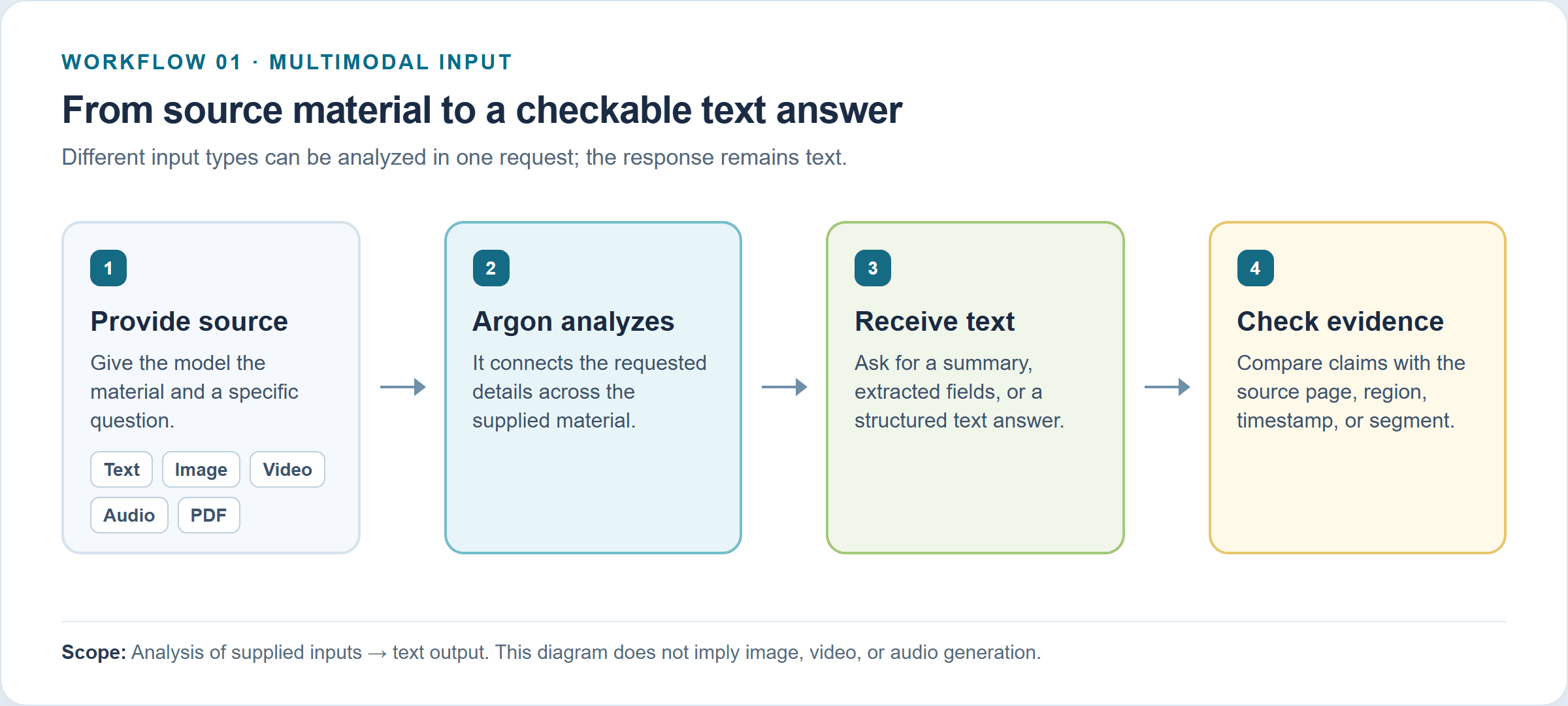 Workflow illustration: supplied text, image, video, audio, or PDF is analyzed into a text answer, then checked against source evidence.
The Gemini app may offer features that compose or create media through other models and tools. Do not assume those app-level features are capabilities of the gemini-4-argon API model itself. For an implementation decision, use the API capability table and exact model ID rather than a product-family label.
What Gemini 4 Argon can analyze in images, video, audio, and PDFs
The best way to decide whether Argon fits is to name the evidence your task needs. “Understand a video” is too broad. “Find each time the operator places a part in the tray, then cite the timestamp” is testable.
Images: inspect, compare, and extract visual information
An image request can ask Argon to describe a scene, compare two supplied pictures, extract visible text, interpret a chart, or return visual findings in a structured format. These are analysis tasks: the output is text or structured text. They can help a support team triage product photos, a researcher scan figures, or an operator extract labels from an image set.
Independent testing offers a useful reality check, provided you treat it as one benchmark setup rather than a forecast for your own images. Roboflow’s October 2026 Vision Evals reports Argon among the top models in its tested object detection, OCR, and visual reasoning tasks. Its OCR evaluation separates exact transcription and related subtasks, and its article reports weak spots such as small or blurred text and harder visual readings. Its setup, selected images, prompts, and scoring define those results; they do not establish a general success rate for every scan or chart. (Roboflow, October 2026)
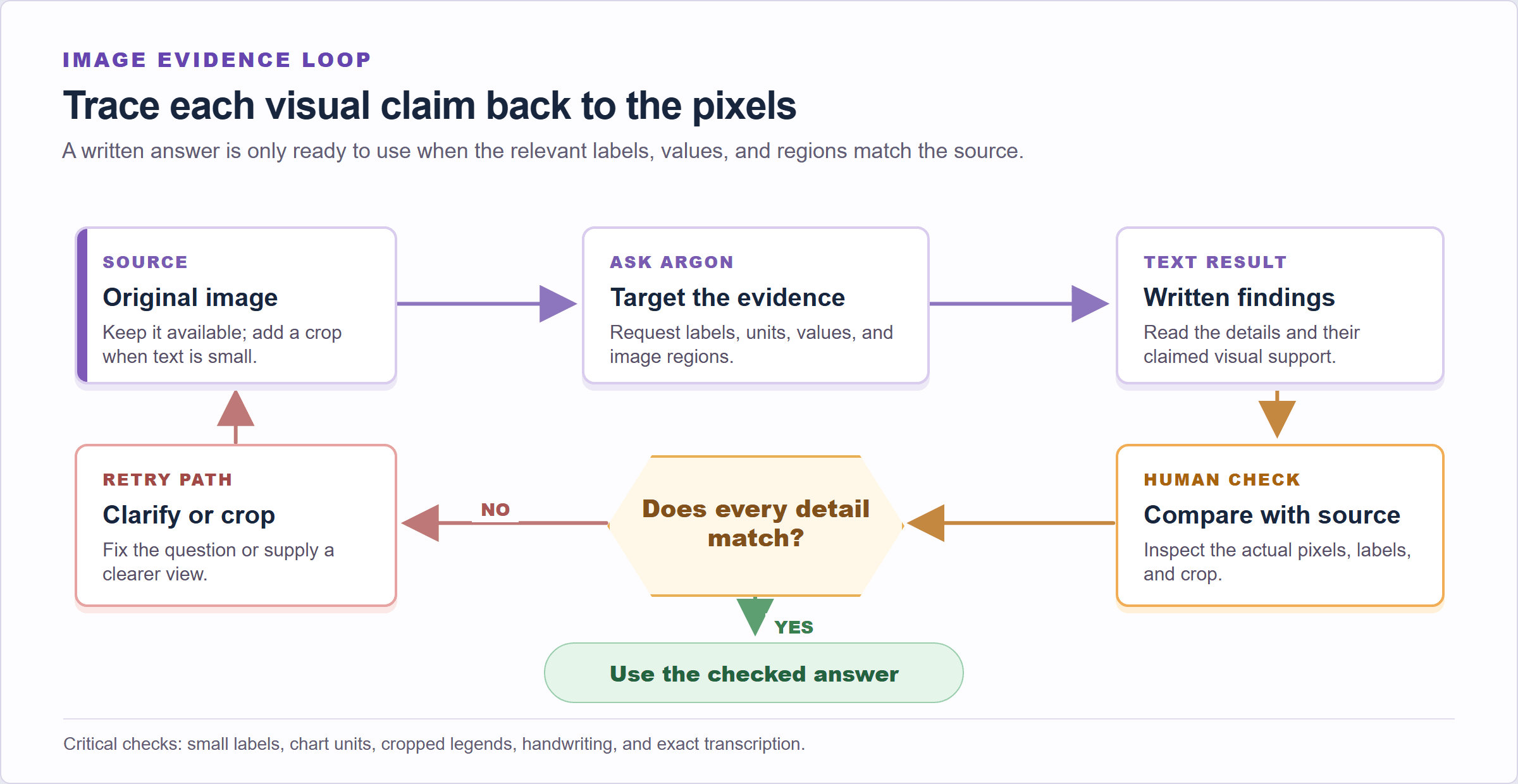 Workflow illustration: ask for image details and their supporting regions, then verify each claim against the original image.
For a chart, ask for the title, axes, units, relevant values, and the image region supporting each value. Then compare those details with the source. Small labels, low-resolution screenshots, handwriting, overlapping marks, or a cropped legend deserve manual review. If exact transcription matters, include a clear crop and preserve the original so a reviewer can check every character.
Video: reason about events over time
Video adds ordering and time. Argon can answer questions about actions, changes, and events across frames. The API supports agentic video understanding, an option that can dynamically inspect the timeline; its documented default mode is static. Check the video guide and request settings for the mode your integration actually uses.
A useful production question might be: “At what time does the technician remove the filter, and what happens immediately before and after?” Require timestamps, then inspect those moments. A fluent description without time-aligned evidence is not enough for incident review, quality checks, or training data.
Google’s robotics team describes an Argon workflow that analyzes a 136-second overhead recording of a two-arm robot folding paper into an origami fox. The system produces a hierarchy of time-aligned annotations, from the overall task to subtasks and contact-level actions, with quality-control labels around retries. This is a concrete example of video analysis output being labels and structure tied to footage. The article is a research example, not a guarantee that a general API call will reproduce a robotics pipeline. (Google Developers Blog, October 2026)
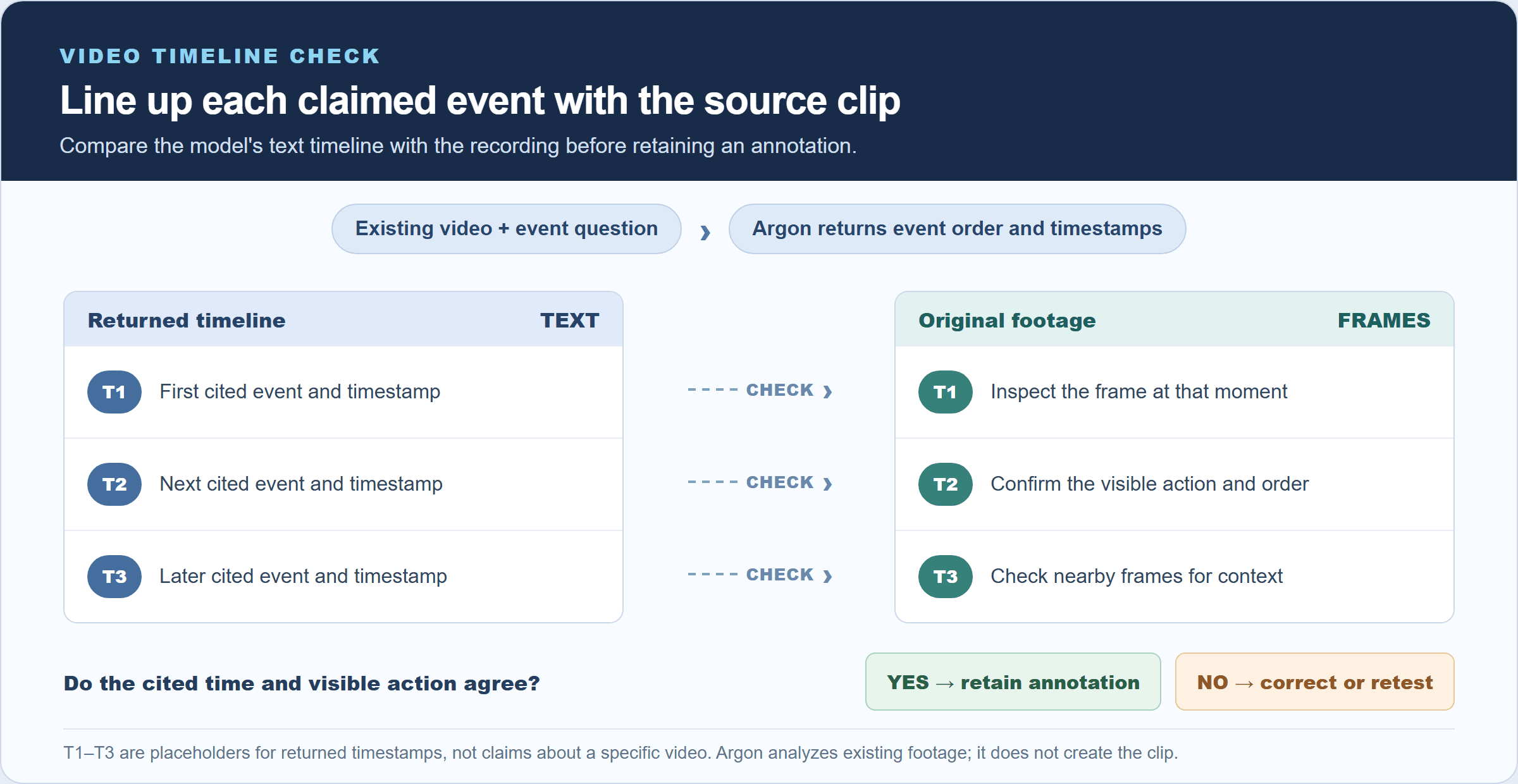 Workflow illustration: ask for event order and timestamps, then verify each cited moment against the original recording.
Motion can be easy to misread when the camera moves, hands obscure an object, or two actions happen close together. Sample the returned timestamps against the original footage. If an answer affects safety or a pass/fail decision, make a person or a purpose-built vision system verify the critical frames.
Audio: analyze supplied recordings
Audio input lets you ask questions grounded in a recording, such as what was said, which sound occurred first, or whether a particular phrase appears. Before designing an integration, check the current audio-input documentation for supported formats, duration and sampling constraints, and the exact request shape. “Audio input supported” alone does not specify every transcription behavior or guarantee that an attachment was actually passed through your client.
Build a small known-answer test set from recordings you have permission to process. Include clean speech, overlapping speakers, background noise, silence, and non-speech sounds if those occur in production. Ask for timestamps or a short evidence quote where the interface supports it. Verify the attachment reached the model, then compare the result to the recording. This catches both model errors and integration errors such as omitted file parts or unsupported encoding.
PDFs and mixed documents: connect details across sources
PDF support is valuable when a question crosses prose, tables, and figures. A reviewer could ask whether a report’s executive summary agrees with a table later in the document, or extract a claim and its supporting figure. Multiple documents can be supplied for comparison, subject to the request’s token and file limits.
Ask for a source location with each claim. Page references are useful, but validate them because PDF page numbering can differ from the printed page label. For a table, request its row label and column heading as well as the value. For a diagram, ask the model to name the visual element it used. If a PDF is scanned, rotated, faint, or densely typeset, test representative pages rather than assuming all pages were parsed equally well.
A compact output schema can make review easier: claim, source location, supporting excerpt or visual detail, and confidence or “not found.” Structured outputs can enforce a shape, but a valid JSON object can still contain a mistaken reading. Format validation and factual validation are separate checks.
How to test Gemini 4 Argon’s multimodal understanding
Use a short evaluation before connecting the model to a large batch. Choose a source where a human can establish the right answer, and define what counts as a correct result. The point is to test the entire path from file selection through model response, not simply to see whether the answer sounds plausible.
- Select one public report with a chart or a short video with clearly identifiable events. Keep a human-checked answer key.
- Ask the model to use only the attached material and attach a location to each claim.
- Compare every claim with the source. Record omissions, wrong readings, unsupported inferences, and locations that do not resolve to evidence.
- Repeat with several examples that resemble your actual files, including difficult cases.
- Set a pass threshold based on the cost of an error. Route uncertain or high-impact results to human review.
You can adapt this prompt:
Analyze only the attached material. Answer the questions below in a table. For every claim, cite the page number, timestamp, or visible evidence that supports it. If the material does not contain the answer, say “not found.” Do not infer missing facts.
For an image, replace “page number, timestamp” with “image region and visible label.” For a PDF, ask for the page and table or section name. For audio, request a timestamp and the words or sound that support the answer. These small changes make the output easier to audit.
Track errors by type rather than using one overall accuracy figure. A wrong digit in a chart, a missed event, and a citation to the wrong page have different consequences. This evaluation frame converts an impressive capability list into a repeatable decision about whether the model is dependable for your files.
Gemini 4 Argon limits: what multimodal support does not mean
Input support does not imply matching output support. The API currently lists image generation, audio generation, and Live API as unsupported for Argon. If the task is to create a new image, soundtrack, or real-time voice interaction, choose a model or tool that explicitly lists that output. You can still use Argon to analyze the prompt, source material, or generated result.
A million-token window also does not guarantee complete recall. It is shared across the request and response, and long inputs may increase latency and cost. The model may overlook a detail, infer information that is absent, or return an incorrect timestamp while sounding certain. Long decode is an API execution path with additional requirements, not the default behavior for every client.
Benchmarks are directional evidence. Roboflow reports results from specific task datasets and evaluation settings, while Google’s model card summarizes a broader set of internal and public evaluations. Neither substitutes for a test using your camera quality, document layouts, vocabulary, languages, and error tolerance. A high score on one category cannot prove reliable performance on a different task.
Use a reviewer when the answer influences a financial, legal, safety, medical, or employment decision. Keep the original input and returned evidence together so a person can audit the conclusion. For recurring workflows, log the model version, prompt, relevant settings, source identifier, and review outcome. That record helps distinguish a model change from a file or integration problem.
| Task | Good first test | Review closely |
|---|---|---|
| Chart reading | Ask for labeled values with axis units | Small fonts, dense legends, approximate visual readings |
| OCR | Use a clean crop with a known transcription | Blur, handwriting, rotation, mixed scripts |
| Video events | Ask for timestamped actions in sequence | Occlusion, rapid cuts, inferred causes |
| Audio Q&A | Ask a known question about a short recording | Noise, multiple speakers, attachment handling |
| PDF comparison | Ask for claim, page, and supporting passage | Scanned pages, mismatched page numbering, cross-page inference |
Access, pricing, and where Atlas Cloud fits
The public API model ID is gemini-4-argon; Google currently lists Gemini API and AI Studio as access routes. Google’s current notice lists an introductory rate of $2 per million input tokens and $10 per million output tokens through November 30, 2026, then $4 and $20 respectively. Cached input has separate terms, so do not estimate it as ordinary input. (Google, October 2026)
Atlas Cloud’s current All Models listing did not show Gemini 4 Argon when checked for this article. That means there is no verified Atlas Argon model page or Atlas price to quote here. Do not treat a general platform listing as proof of availability. If your team is comparing providers or building a broader model workflow, Atlas Cloud can be a place to browse other listed models, but confirm the exact model page and supported operations before planning around any provider.
The source check also affects the recommendation: use Google’s official route to test Argon today, and treat Atlas Cloud as a separate discovery option for models that are actually listed. There is no claim here that Argon is hosted on Atlas Cloud.
Is Gemini 4 Argon right for your task?
Put Argon on a shortlist when the job requires reasoning across mixed material, extracting visual details, following events through a video, or reviewing a long report. Its large shared context and text output can help consolidate evidence into a table or structured result. The next step is a small, human-checkable evaluation using your own representative inputs.
Choose a different model or tool when the required deliverable is generated imagery, generated audio, or a live audio/video conversation. For OCR or operational decisions, compare its output with a purpose-built alternative if exactness, speed, or predictable cost matters more than broad reasoning.
If the evaluation passes your task-specific threshold, pilot it with logging and human review before raising volume. If it fails, classify the errors and decide whether clearer inputs, a changed prompt, a different model, or a separate OCR/transcription system is the right fix. The useful question is whether Gemini 4 Argon multimodal capabilities meet your error budget.
Frequently Asked Questions
Can Gemini 4 Argon analyze videos and audio?
Yes. Its API lists both video and audio as supported inputs. Video understanding can return descriptions or timestamped analysis; audio can be supplied for audio-grounded questions. Check the current file format and request documentation, then verify the response against the original media.
Does Gemini 4 Argon generate images or audio?
No. The current API capability table marks image generation and audio generation as unsupported for this model. Its documented output modality is text, even when its input contains images, audio, or video.
What does Gemini 4 Argon’s 1M-token context window mean?
The 1,048,576-token limit is shared by input and output. Default synchronous output is capped at 65,536 tokens. Google documents a separate long-decode flow for larger outputs, up to the shared limit, with background execution and continuation steps.
How much does Gemini 4 Argon API access cost?
As of October 16, 2026, Google lists $2 per million input tokens and $10 per million output tokens through November 30, 2026. The listed subsequent rates are $4 and $20. Check the live pricing and cached-token terms before estimating a project.





