

Latest update: Gemini Omni Flash 1.1 is now live as of September 1, 2026.
The price is not the hard part. Knowing which second is worth paying for is.
For gemini omni flash 1.1 pricing, the published API list price is per output second: $0.03 at 360p, $0.10 at 720p, $0.15 at 1080p, and $0.30 at 4K. A 5-second 720p output therefore comes to $0.50. Test the shot in 360p, pick the direction, then pay for final resolution.
Google lists stable gemini-omni-1.1-flash outputs at 3 to 10 seconds and 24 FPS. Extension reaches 40 seconds cumulatively in 10-second increments, so budget a chain, not one 40-second render (Google AI for Developers, August 2026).
Key takeaways
- 5 seconds at 720p: about $0.50 in published API list price.
- 360p drafts make composition tests cheap.
- Successful generations, not duration alone, set the budget.
- A 40-second story is four linked 10-second extensions.

Case 1: a browser-rendered decision card for a 5-second café launch brief, separating 3 low-cost 360p tests from one 4K final.
Why Gemini Omni Flash 1.1 Pricing Gets Misread
Omni 1.1 combines 360p previews, first-and-last-frame interpolation, upscaling to 4K, video reference input, and scene extension. Google says 360p previews can be up to 60% faster and cost one-third as much as standard 720p output (Google launch announcement, August 2026).
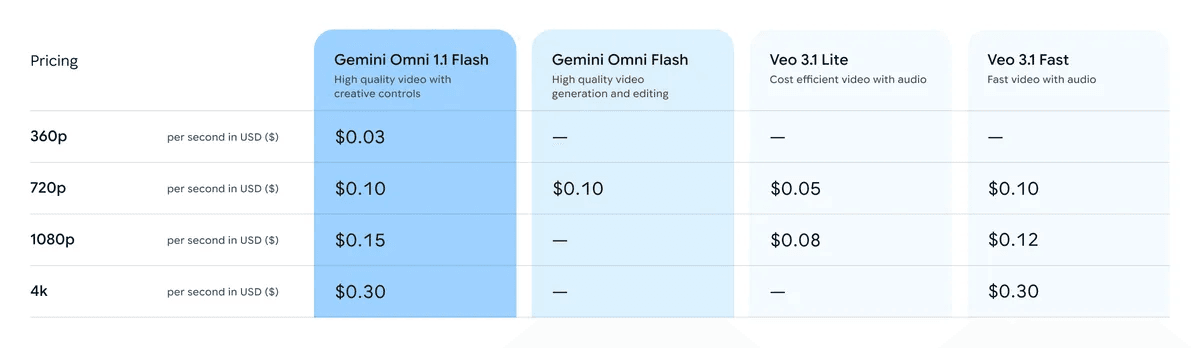
Google launch pricing table crop for Gemini Omni Flash 1.1 pricing
Google launch pricing table, checked on September 1, 2026. It is the source for the published API list-price calculations below.
Common misses are simple: reading a per-second rate as a per-video rate, treating 40 seconds as one output, and omitting reruns. Review complex action, cross-extension identity, and exact text before committing a clip to a campaign.
Gemini Omni Flash 1.1 Pricing Workflow: One Brief, Clear Evidence
Keep the brief, draft, and selected final in a reproducible workspace. The three cards in this guide use the same format: concrete brief on the left, published calculation on the right. The numbers remain selectable and auditable rather than being baked into synthetic imagery.
| Production-support model | Article job | Current listed price | Current discount |
| Seedream v5.0 Pro Text-to-Image | Reference still | $0.045 / image | No discount shown |
| MiniMax H3 Image-to-Video | Short motion sample | $0.08 / second | No discount shown |
| Seedance 2.5 Reference-to-Video | Fallback reference-driven motion | $0.134 / second at 1080p | -36% shown |
For teams validating several creative briefs, Atlas Cloud can be a separate workspace for retaining reference stills and motion tests behind a budget decision. It is not a Gemini billing channel.
Step 1: Create a Costed Café Shot Brief
Define one five-second shot before generating. The café draft calculation is 5 seconds × 3 runs × $0.03 = $0.45.
plaintext1Cinematic commercial still, a young female barista in a sunlit independent coffee shop, pouring a precise spiral of water over a ceramic dripper, warm amber morning light, natural steam, customers softly visible in the background, 35mm lens, shallow depth of field, realistic skin texture, editorial product-film composition, no text, no logo, 16:9.
Choose Seedream v5.0 Pro Text-to-Image, 16:9, 2K, one image, and the highest available quality. Save the selected still with the brief so the final does not drift from the draft decision.
Step 2: Produce the Café Motion Sample
Upload the selected still. Test three usable shot changes before committing to a higher-resolution final.
plaintext1Five-second premium coffee commercial. Start on the barista’s focused face, cut to a macro view of hot water blooming the grounds, then use a side tracking shot as a customer receives the cup. Keep the same barista, café, morning light, ceramic dripper, and steam. No text, no logo, no zoom-only motion.
Choose MiniMax H3 Image-to-Video, 5 seconds, 2K, and 16:9. In Gemini, use the selected brief for 360p drafts, then generate the final at the resolution the deliverable requires.
Step 3: Price a Gemini Omni Flash 1.1 Keyframe Transition
Use a 10-second product transition when both end frames serve the campaign. This brief moves from a design desk to a designer wearing matte-black headphones at a night window.
plaintext1Create a five-second elegant product transition from the design desk to the evening city window. Begin with a top-down close view of matte-black wireless headphones, orbit gently as the designer picks them up, then reveal the designer wearing them by the window. Preserve the headphone design and identity. Use a top-down shot, product macro, and medium portrait. No text, no logo, no zoom-only movement.
Choose MiniMax H3 Image-to-Video, 5 seconds, 2K, and 16:9 for a motion sample. For Gemini, the 10-second published figures are $0.30 at 360p, $1.00 at 720p, $1.50 at 1080p, and $3.00 at 4K. Check Google’s current keyframe controls before launch.

Case 2: a browser-rendered 10-second keyframe-reveal card with the endpoint decision and 360p-to-4K range.
Step 4: Budget a Gemini Omni Flash 1.1 Extension
Make every extension beat independently useful. The floating-library brief allows a team to stop after a segment that no longer supports the story.
plaintext1Five-second cinematic magical-realism sequence. Start with a female librarian in a dark green coat at an oak table, move past a floating book in the foreground, then make a smooth half-orbit revealing a vast dusty library and drifting shelves. Preserve the librarian, green coat, oak table, warm dusty light, and realistic depth. No text, no logo, no zoom-only movement.
Choose MiniMax H3 Image-to-Video, 5 seconds, 2K, and 16:9 for an article motion sample. In Gemini, four linked 10-second extensions are $1.20 at 360p, $4.00 at 720p, $6.00 at 1080p, or $12.00 at 4K.
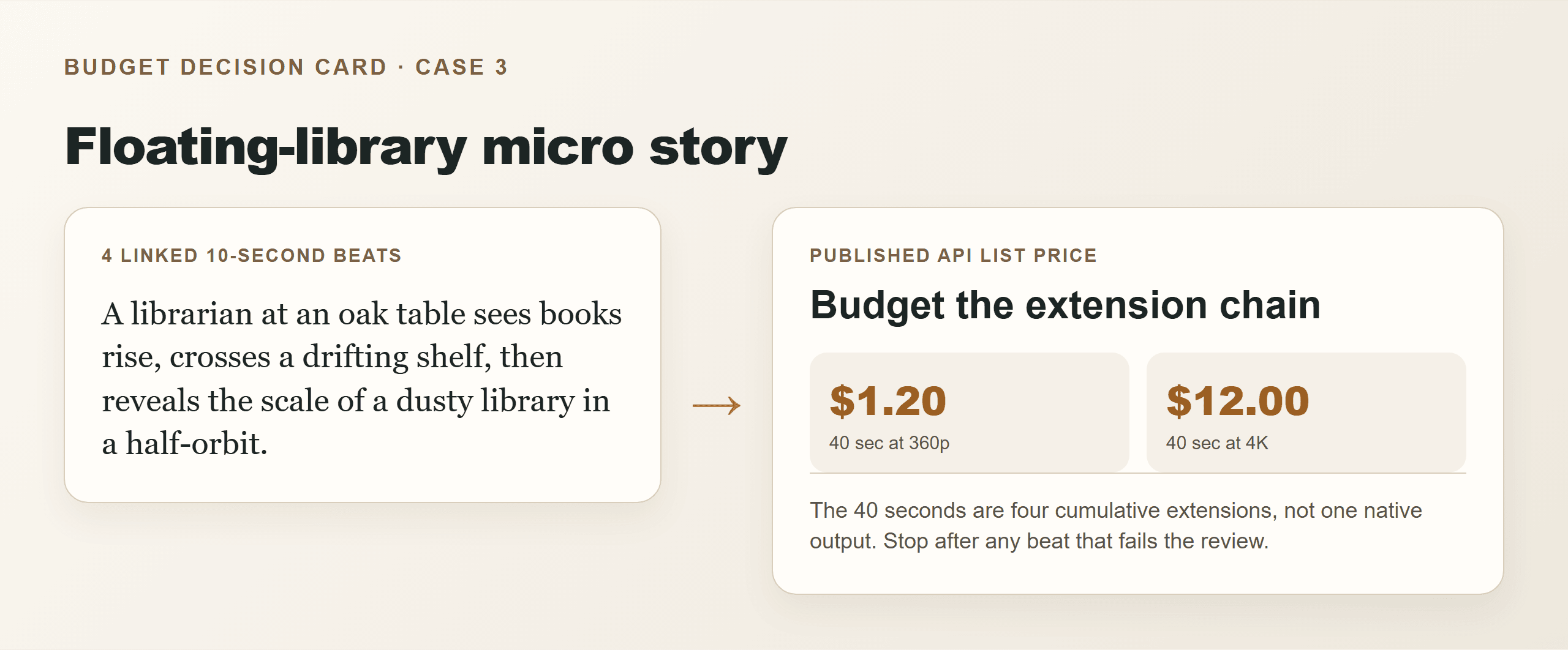
Gemini Omni Flash 1.1 pricing floating library extension card
Case 3: a browser-rendered 40-second extension card that makes the four-beat structure and published range explicit.
Gemini Omni Flash 1.1 Pricing Variations
plaintext1Total estimated output cost = seconds × published price per second × successful generations
- Fast test: 3 five-second 360p compositions and 1 4K final equals
$0.45 + $1.50 = $1.95, assuming each output succeeds. - Keyframe transition: Use the 10-second $3.00 4K example only when both endpoint frames have campaign value.
- Micro story: Split a 40-second story into 4 viable beats. The 4K output calculation is $12.00 before reruns.
Do not use this formula for subscription credits, regional tax, storage, editing software, human review, or post-production. Flow credits and Gemini API pricing are different units.
Gemini Omni Flash 1.1 Pricing: Cost, Rights and Limits
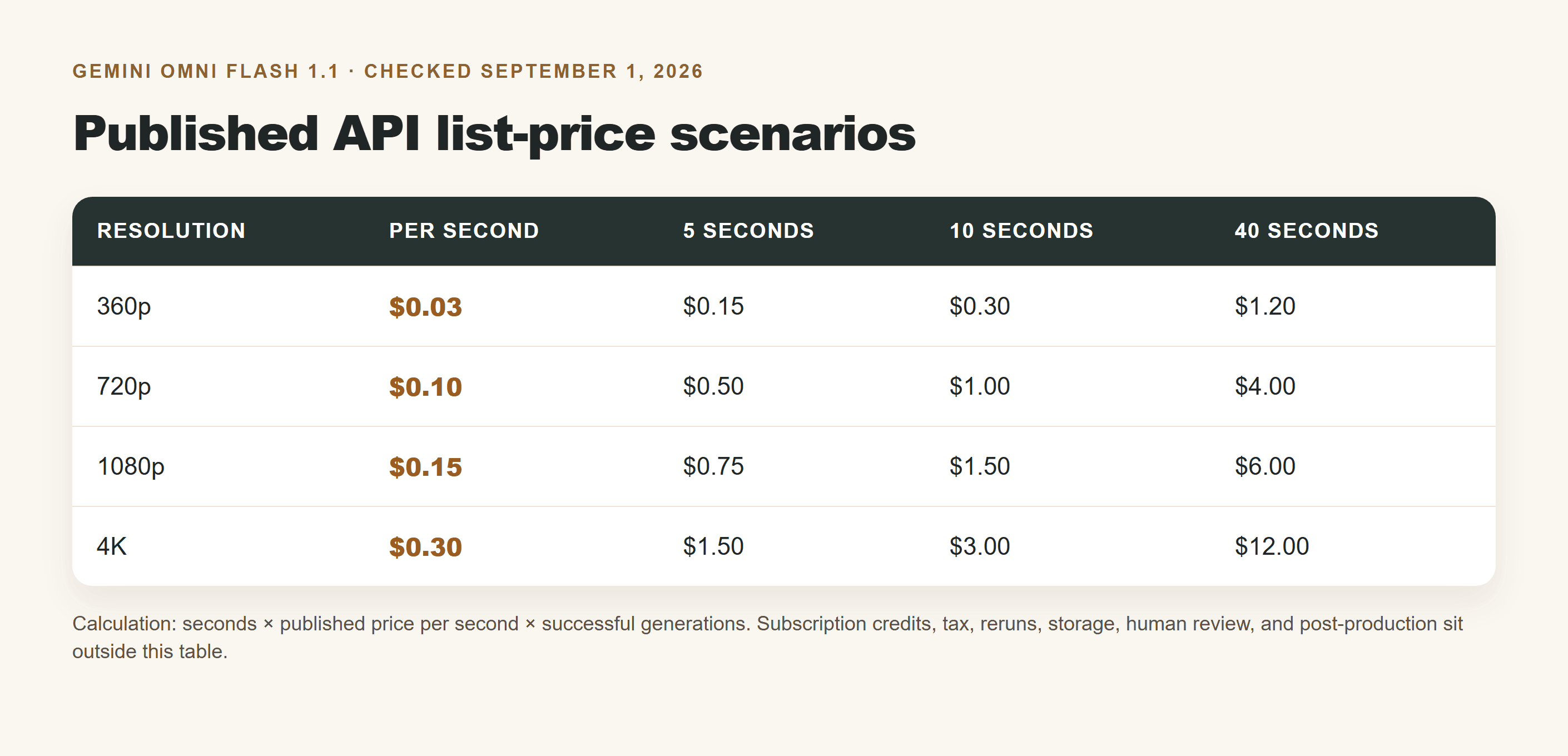
Gemini Omni Flash 1.1 pricing scenarios table for 5, 10 and 40 seconds
Browser-rendered scenario table using Google’s published API list-price figures, checked on September 1, 2026.
| Scenario | Lowest useful test | Recommended final | Largest hidden variable |
| Café launch, 5 sec | $0.15 at 360p | $1.50 at 4K | Composition retries |
| Headphone reveal, 10 sec | $0.30 at 360p | $3.00 at 4K | Endpoint consistency |
| Floating library, 40 sec | $1.20 at 360p | $12.00 at 4K | Continuity across 4 extensions |
These are published API list-price examples, not a promise of final invoice cost. Use only permitted reference material, check current terms and regional availability before commercial release, and retain an AI-generation record.
Explore the current image and video model catalog on Atlas Cloud when you need a separate workspace behind a Gemini Omni Flash 1.1 pricing decision.
Frequently Asked Questions
How much does Gemini Omni Flash 1.1 cost per second?
Published API list price is $0.03 at 360p, $0.10 at 720p, $0.15 at 1080p, and $0.30 at 4K.
What does a 5-second Gemini Omni Flash 1.1 video cost?
$0.15 at 360p, $0.50 at 720p, $0.75 at 1080p, or $1.50 at 4K before reruns.
Is 360p worth using before a 4K final?
Yes when composition, action, or camera movement is still unsettled. A five-second 360p test is $0.15; the same 4K output is $1.50 in published list price.
Does scene extension mean Gemini Omni Flash 1.1 generates 40 seconds at once?
No. Google describes 10-second increments, up to 40 seconds cumulatively.
Are Google Flow credits and Gemini API pricing the same thing?
No. API pricing is a per-output-second calculation; Flow uses subscription credits that vary by plan and region.
Can Gemini Omni Flash 1.1 keep a character consistent across extensions?
It can use prior video context for extension, but review identity, props, action continuity, and text on every accepted segment.





