

You have a 10-second product shot you finally like. The cup is right, the actor is right, rain is doing its rain thing. Then comes the risky click. A longer prompt does not protect that shot. A controlled next beat does.
Gemini Omni Flash 1.1 video extension can append 3 to 10 seconds at a time, up to a 40-second cumulative result in the supported Gemini API workflow. Treat it as a chain: approve a 10-second anchor, then direct one observable event per continuation.
That gives editors, social teams, and developers a review point after every segment, before a drifting hand, prop, face, light direction, or sound bed turns into an expensive surprise.
Gemini Omni Flash 1.1 Video Extension: Key Takeaways
- A single output is 3 to 10 seconds.
- Extension appends at the tail, up to 40 seconds total.
- Preserve an approved anchor, then add one beat.
- Review the join before extending again.
- UI access can lag API capability.
Gemini Omni Flash 1.1 Video Extension: A Continuity Case to Test
The desired result is a connected sequence, not a longer isolated clip. For a rainy coffee commercial, audit the cup, charcoal apron, doorway position, overcast light, and camera height at each join.

Gemini Omni 1.1 Flash continuity case: a barista and the same matte-black coffee cup move from a rain-window establishing shot, through an interior tracking shot, to a low doorway view
Real 10-second test-environment output generated with Google Gemini Omni 1.1 Flash Text-to-Video at 720p. The sequence keeps the barista, charcoal apron, coffee cup, rain, and café setting while changing from a rain-window establishing view to an interior lateral follow and a low doorway/outdoor view. The GIF is silent here because the visual continuity and camera changes, rather than audio, are the point of this case.
Why Gemini Omni Flash 1.1 Video Extension Is Hot, and Why Attempts Fail
The stable gemini-omni-1.1-flash release supports text, image, and short-video input, plus 3-to-10-second outputs in 360p, 720p, 1080p, and 4K. Google describes 1080p and 4K in this release as upscaled outputs. (Gemini Omni Flash model page, August 2026)
The headline is attractive: a 10-second clip can become a 40-second sequence. The production problem is the join.
Three choices cause most continuation failures:
- A closed anchor. If the first clip ends on a finished pose, the next action has no believable exit. End with motion still available: a hand reaching for a door, a runner tightening a lace, or a dog just outside frame.
- A rewrite prompt. Repeating every detail of person, set, lens, and weather invites a redraw. Preserve the few identity anchors that matter, then describe the new movement.
- A surface mismatch. Model capability, API availability, the Gemini app, and a Flow control are separate surfaces. Verify the exact surface before promising a client an Extend button.
Gemini Omni Flash 1.1 Workflow, Models, and Cost Before You Generate
Google documents extension as an end-of-clip operation. It can use a previous interaction for a model-generated video, or an uploaded clip of 10 seconds or less. Uploaded talking footage cannot be extended with new dialogue, and uploaded-video extension has regional restrictions in the EEA, Switzerland, and the UK. (Gemini Omni Flash guide, August 2026)
Keep the model picker, prompt, upload, and result review in one browser tab. Atlas Cloud can be a quiet operating layer because its model directory lets a team inspect live video surfaces before committing a run.
The Atlas test environment now exposes a runnable Gemini Omni Flash workflow. The coffee, runner, and picnic cases in this article use real test-environment outputs to show the prompt, continuity anchors, and visible next beat. No production price is claimed.
td {white-space:nowrap;border:0.5pt solid #dee0e3;font-size:10pt;font-style:normal;font-weight:normal;vertical-align:middle;word-break:normal;word-wrap:normal;}
| Stage | Goal | Lock or add | If it fails |
| Draft | Find a usable action exit | Leave seed open | Rewrite the story beat |
| Approve | Select one anchor | Record seed and final frame | Keep the approved clip |
| Extend | Add one visible event | Preserve anchors, add one variable | Retry only this join |
| QC | Inspect 1 second either side | Check identity, prop, space, hands, motion | Reduce the new variable |
| Upscale | Deliver after approval | Keep the approved chain | Do not use upscale to hide a bad join |
How to Use Gemini Omni Flash 1.1 Video Extension Step by Step
Step 1: Generate a 10-Second Anchor Shot
In a Gemini API-capable surface, select 10 seconds, 16:9, and 720p where those controls are available. Leave the seed at -1 until you have a usable take, then record the seed and keep the approved result.
plaintext1A realistic cinematic commercial in one continuous handheld 35mm shot. Inside a small independent coffee shop on a rainy morning, a young female barista in a charcoal apron places one matte black takeaway coffee cup on a warm walnut counter, turns toward the glass door, and walks to it. Rain streaks move naturally on the window, soft overcast daylight, shallow depth of field, subtle reflections on the floor. Keep the same woman, apron, cup, shop layout, lighting, and camera height throughout. Natural audio: quiet espresso machine, rain against glass, soft footsteps. No text, no logos, no jump cuts.

Coffee-shop anchor case: the barista, matte-black cup, doorway, rain, and lighting are the elements to preserve
Continuity-planning case visual generated with GPT Image. It shows the concrete anchors in the Step 1 brief, not a Gemini Omni Flash result.
Step 2: Extend the Same Shot With One New Beat
Use this only where the selected surface exposes a real extension or continuation path. Upload the approved Step 1 clip. The completed output should retain the source and append a new tail.
plaintext1Continue this exact scene from its final moment. The same barista opens the glass door and steps onto the rain-wet sidewalk while still carrying the same matte black coffee cup. The camera follows behind her at the same height in one smooth movement. Preserve her face, charcoal apron, cup shape, coffee shop interior, rainy overcast lighting, realistic motion, and ambient rain sound. Add no new people, no text, no logo, and no cut.
Check the second either side of the join: cup, hands, door position, apron, light direction, and ambient sound. A drift here means revise Step 2, not Step 1.

Step 2 continuation case: the barista carries the same matte-black cup through the open café door onto the rain-wet sidewalk
High-resolution case visual for the Step 2 continuation prompt. It makes the tail event auditable: the barista, matte-black cup, café doorway, rain, and exterior light remain clear as she crosses the threshold.
Step 3: Extend Again With One Controlled Story Event
This pass adds one person at the frame edge. Do not combine a new person, place, time of day, camera angle, and dialogue in one request.
plaintext1Continue this exact scene from its final moment. The same barista walks two steps under the café awning and hands the same matte black coffee cup to one waiting customer wearing a navy raincoat. Keep the barista, cup, rain, lighting, camera height, and natural ambient sound consistent. The customer enters only at the right edge of frame. No dialogue, no text, no logo, no sudden camera cut.

Step 3 controlled-variable case: the barista hands the same coffee cup to one customer in a navy raincoat under the café awning
High-resolution case visual for the Step 3 continuation prompt. It shows the one permitted new variable: a single customer receiving the cup under the awning, while the barista, rain, café doorway, and handoff remain clear.
Step 4: Run a Product-Consistency Variation
Test a runner moving from an apartment door to a riverside path. The anchors are face, dark green jacket, white shoes, wet pavement, cool dawn light, and camera direction.
plaintext1Continue the same runner and product story in one realistic 35mm commercial shot. The runner finishes tying the same white running shoes beside an apartment door, opens it, and starts jogging onto a quiet riverside path at blue hour. Preserve the runner’s face, dark green jacket, white shoes, wet pavement, cool dawn light, and camera direction. Natural audio: shoelace pull, door latch, distant birds, soft footsteps. No text, no logos, no cut.
Approve only if the shoe silhouette, lace color, jacket, and direction of travel remain stable through the join.
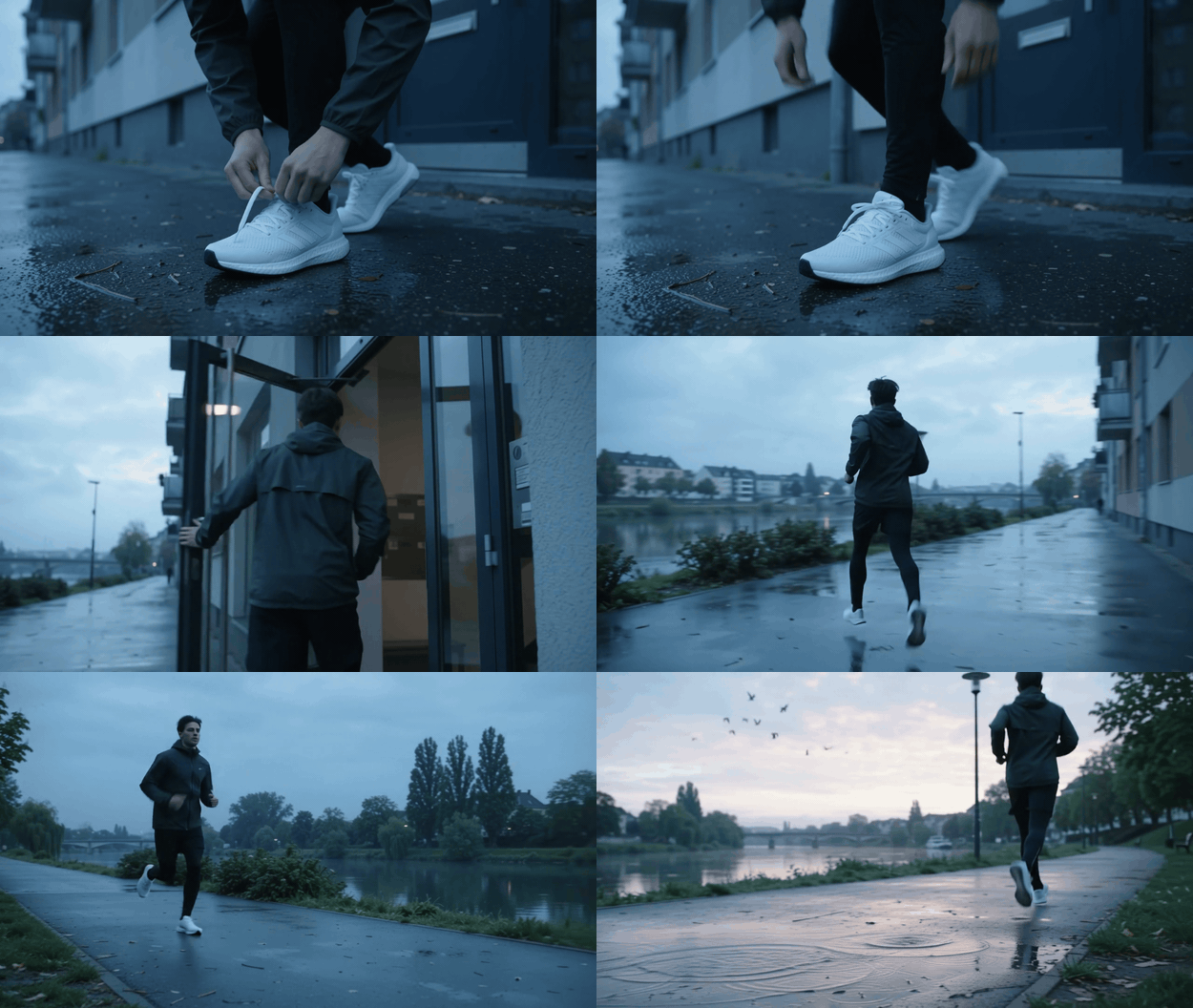
Runner product-consistency GIF: the same dark-green jacket and white shoes move from a lace tie at the apartment door to a riverside run
Real 10-second Google Gemini Omni 1.1 Flash Text-to-Video test-environment output. It tests the Step 4 anchors across a low shoe-level opening, a lateral follow from the apartment door, and a low riverside pass, rather than relying on a single push-in shot.
Step 5: Run a Reference-Character Variation
Use one non-human reference. Keep the people and picnic stable; the dog is the only new variable.
plaintext1In the same realistic park picnic scene, continue from the final moment. Two friends keep arranging a cream picnic blanket under leafy trees in soft late-afternoon light. The small golden dog shown in IMAGE_REF_0 runs gently into frame from the left, circles the blanket once, and sits beside them. Preserve the people, picnic objects, sunlight direction, camera distance, and natural park ambience. No text, no logos, no abrupt cut.

Reference-character GIF: a small golden dog enters from the left, circles the cream picnic blanket, and sits beside two friends
Real 10-second Google Gemini Omni 1.1 Flash Text-to-Video test-environment output. The dog is the only new character: it enters from the left, circles the blanket, and sits while the two friends, cream picnic setup, and late-afternoon park remain stable across wide, dog-height, and high three-quarter views.
Step 6: Approve, Upscale, and Export Without Breaking the Join
Review identity, hero product, spatial continuity, hands, motion, audio, then the cut point. After 2 continuity failures, change the preceding story exit or remove a new variable. Do not overwrite a good anchor because a later segment stumbled.
Where the selected surface supports it, request 1080p or 4K after the chain is approved. Google describes those as upscaled outputs, not native 4K. (Gemini API release notes, August 2026)
Gemini Omni Flash 1.1 Video Extension Variations That Need Different Prompts
Camera continuation. Describe only the next camera action, such as “the camera pans across the mountains.”
Reference-led extension. Introduce one character, product, or action reference. The dog in Step 5 has one job: enter, circle once, sit.
First-and-last-frame interpolation. Use it when you know the two boundary images and want the bridge between them. It is not a substitute for continuing the last moment of an existing clip.
Uploaded footage. Keep a source at 10 seconds or less. If someone is already speaking, do not request fresh dialogue.
Gemini Omni Flash 1.1 Video Extension Cost and Production Reality
Use the quote on the surface that is actually running. This article's test could not verify an Atlas Gemini Omni Flash route or price, so a fixed Atlas 40-second estimate would be invented.
td {white-space:nowrap;border:0.5pt solid #dee0e3;font-size:10pt;font-style:normal;font-weight:normal;vertical-align:middle;word-break:normal;word-wrap:normal;}
| Item | Reliable budgeting rule | What can change it |
| 10-second anchor | Save the completed-run quote | Selected model and options |
| Video-edit pass | Save the completed-run quote | Source duration and surface |
| 40-second chain | Budget each approved turn | Input length and reruns |
| Upscaled delivery | Check the selected run | Resolution support and quote |
A 360p draft option in Gemini does not mean every other surface exposes 360p. Verify the form you execute. For a Gemini Omni Flash 1.1 video extension production run, stop after 2 failed joins and change the story node, rather than stacking adjectives onto the same prompt.
Frequently Asked Questions
Can Gemini Omni Flash 1.1 really extend a video to 40 seconds?
Yes. The documented Gemini API workflow adds up to 10 seconds per continuation to a cumulative 40-second video. One output remains 3 to 10 seconds.
Is Gemini Omni Flash 1.1 video extension available in Flow?
Availability can differ across API, app, and UI surfaces. Confirm the exact account and surface before scheduling an Extend workflow.
How do I keep the same character when extending an AI video?
Approve a strong anchor, preserve a small set of identity anchors, and direct only the next visible action. Add a reference only for a defined subject or product.
Can I extend an uploaded video with dialogue?
Do not add dialogue to an uploaded clip where someone is talking. Keep the continuation silent or use the documented multi-turn path for model-generated video where speech is supported.
Does Gemini Omni Flash 1.1 generate native 4K video?
Google describes 1080p and 4K in this release as upscaled outputs.
What is the difference between video extension, video editing, and first-and-last-frame interpolation?
Extension appends a new tail. Video editing transforms a short source with a prompt. First-and-last-frame interpolation creates the bridge between two supplied images.





