Your request returns successfully. The application still has no usable image. Perhaps the response contains a task ID, or the finished picture includes an extra object that makes it unsuitable for the page.
A generative AI API for developers lets your application send inputs to a model and receive generated content. Choose one around your required inputs, output format, waiting time, and acceptance criteria. Then build the job handling and checks that turn a response into something a user can use.
This guide follows an image workflow from selection through delivery. You will get a task-selection table, matching JavaScript and Python examples, 3 concrete image briefs, and a cost worksheet. The same decision process applies to text and video, with different protocols and output checks.
Key takeaways
- Choose the task and acceptance criteria before the model.
- Save asynchronous task IDs so interrupted work can resume.
- Measure cost per accepted output, including rejected generations.
- Test files and business constraints before showing a finished result.
Generative AI API for Developers: What It Does
A model performs the generation. An API defines how your software requests that work. An SDK wraps the interface in language-specific helpers. A hosted platform operates access to models, while your application supplies the user experience, permissions, and rules for accepting the result.
These distinctions matter when reading a product page. A chat application that creates pictures does not establish that its developer endpoint accepts the same inputs. An SDK with a convenient method does not remove the need to understand its underlying response and failure states.
Start with the following task map. The interaction column describes an application design to evaluate, rather than a promise that every provider supports that mode.
| Task | Input | Required capability | Output | Interaction to evaluate | Acceptance criteria |
|---|---|---|---|---|---|
| Support reply draft | Ticket and approved help content | Grounded text generation | Draft text | Synchronous or streaming | Answers the ticket; no invented policy |
| Document field extraction | Document text or supported file | Structured extraction | JSON fields | Request or queued job | Valid schema and source evidence |
| Editorial illustration | Written visual brief | Text-to-image | Image file | Asynchronous job | Correct objects, layout, dimensions |
| Image editing | Source image and instruction | Image-conditioned editing | Edited image | Asynchronous job | Requested change; preserved details |
| Video generation | Prompt or supported reference | Video generation | Video file | Queued job | Correct duration, motion, audio if required |
| Retrieval-assisted answer | Question and retrieved passages | Retrieval plus generation | Answer and references | Synchronous or streaming | Claims supported by retrieved passages |
Generating an image, analyzing an uploaded image, and editing an existing image are separate capabilities. Verify each explicitly. Similarly, a video endpoint may support a starting frame without supporting arbitrary multi-image references.
Embeddings convert inputs into vectors useful for retrieval and similarity. They can help find relevant documents before an answer is generated. They do not themselves produce the answer or establish that retrieved content supports its claims.
The practical boundary is input → request → output → application acceptance. You own the final stage. A generated invoice field still needs validation; a picture still needs inspection; a support response still needs permission to make the promise it contains.
Protocol choices also vary. Google's reference distinguishes standard generation, streaming, and live interaction. Treat that as evidence that interaction modes differ, rather than assuming identical support elsewhere. (Google Gemini API reference, accessed September 2026.)
Generative AI API for Developers: How to Choose
Write a small acceptance brief before comparing catalogs. For an editorial image feature, that might specify landscape output, a bounded object count, no visible branding, and a human review step. For ticket classification, it might specify a fixed label set and an explicit uncertain outcome.
Evaluate candidates in this order:
- Inputs and outputs. Check the exact model endpoint for supported files, input limits, output formats, and reference-image behavior. A model family name is too broad to serve as a contract.
- Task compliance. Try representative briefs, including awkward ones. Count constraint failures separately from file or network failures so you know what needs fixing.
- Integration fit. Confirm authentication, response envelopes, task status values, and client-library support. Include the work needed to adapt these to your existing backend.
- Waiting time and concurrency. Decide whether users can leave and return. Test your expected workload before committing to an interactive experience with a short deadline.
- Billing clarity. Identify the billable unit and which settings change it. Check failure and refund handling instead of assuming every submitted request receives the same charge.
- Data requirements. Review input handling, retention, deletion, and applicable terms against the actual data you intend to send. Document unresolved questions before using sensitive material.
- Change management. Keep a regression set and record model identifiers, prompts, and parameters. Plan how you will reassess behavior after an update or replacement.
Institutional guidance illustrates why access and data rules belong in this decision: Harvard describes approved access routes and restrictions around its AI developer tools. Those are Harvard's arrangements, not universal permissions for your application. (Harvard University Information Technology, accessed September 2026.)
| Access route | Suitable team | Integration work | Operational responsibility | Main limitation | Verify before choosing |
|---|---|---|---|---|---|
| Direct model provider | Team centered on one provider's capabilities | Provider-specific API, accounts, adapters | Your app and jobs; provider inference | Additional providers add separate contracts | Endpoint features, regions, quotas, terms |
| Multi-model hosted platform | Team evaluating several supported models | Shared access plus model-specific validation | Your app and jobs; platform-hosted inference | Shared access does not standardize every parameter | Exact models, schemas, billing, data path |
| Self-hosted open model | Team with infrastructure and model-serving skills | Deploy, expose, secure, and maintain inference | Hardware, serving, scaling, monitoring, updates | Capacity and engineering overhead | License, hardware fit, throughput, maintenance |
Atlas Cloud is one hosted option to evaluate when several model capabilities belong in the same application. This article uses its image-task interface as a concrete example. You still need to validate each model's inputs and outputs; changing a model ID alone is insufficient.
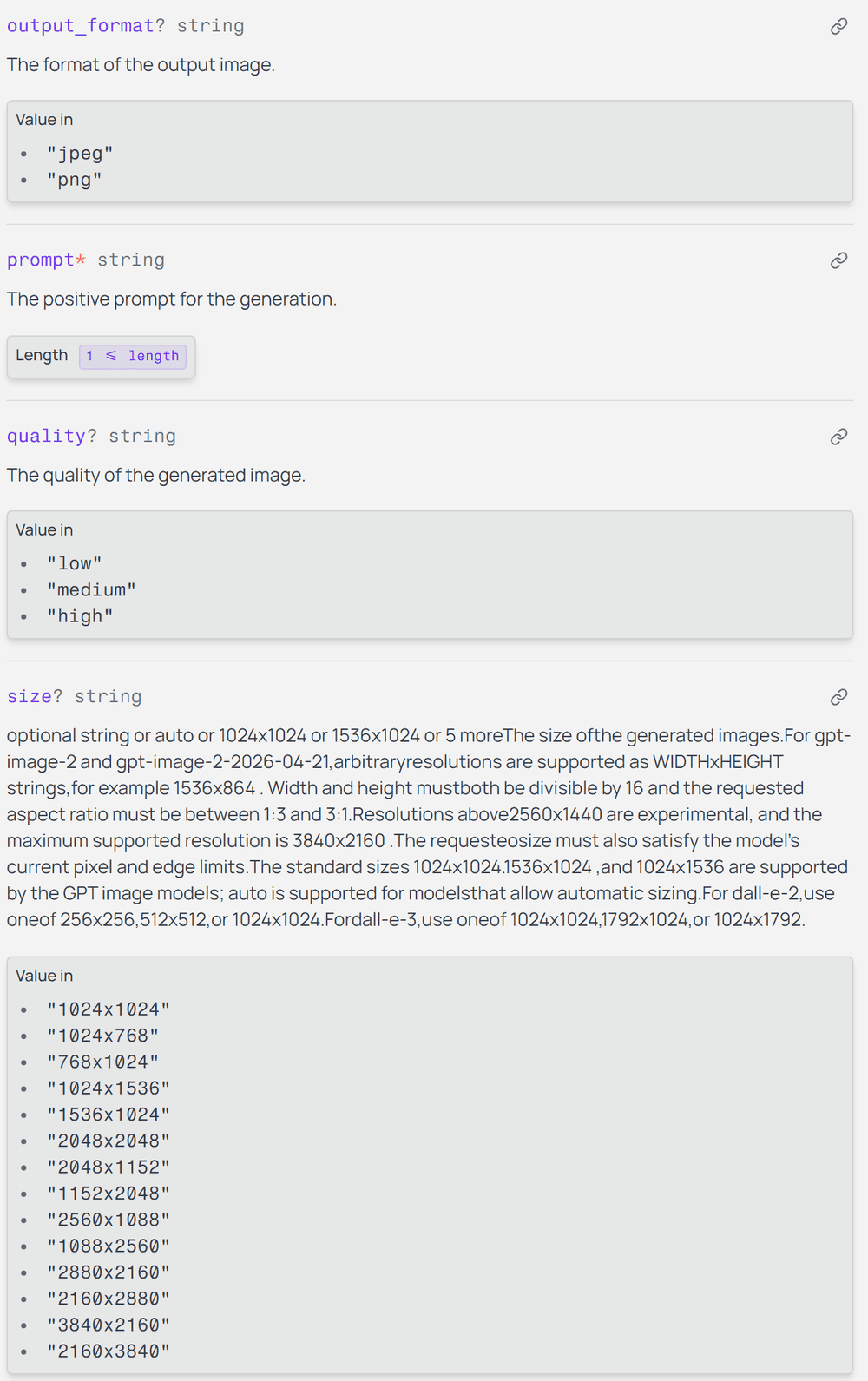
Official image endpoint documentation showing output format, quality, and size constraints
Model-specific parameters are part of the integration contract. Read their permitted values before reusing a request body.
For a small SaaS team, the useful comparison is the total effort to ship one accepted result. Include adapter code, support investigation, review time, and migration tests alongside the inference charge. That keeps a convenient prototype from hiding an expensive production workflow.
Generative AI API for Developers: First Request
The example uses GPT Image 2 Text-to-Image, with model ID openai/gpt-image-2/text-to-image. Its endpoint documentation lists quality: high, size: 2048x1152, and output_format: png. These are the requested settings for the examples below.
1. Establish the prompt in the playground. Use the breakfast brief below without adding a reference image. Check the model name and committed settings before pressing Run. A selection that reverts when you leave a field is not the setting you requested.
plaintext1Create a realistic editorial food photograph for an article about a simple breakfast. 2 3On a light oak table, show exactly one white ceramic plate holding exactly two slices of toasted sourdough bread, one small clear glass bowl of strawberry jam, and one stainless steel butter knife resting to the right of the plate. 4 5Use soft morning window light from the left, natural colors, a three-quarter overhead camera angle, and realistic bread texture. Keep every requested object fully inside the frame. 6 7No people, no hands, no drinks, no extra dishes, no packaging, no logos, no text, and no watermark. Landscape composition, 16:9.
2. Keep authentication on the server. Your frontend should ask your own backend to start a job. Store ATLAS_API_KEY in the server environment. Never include it in browser JavaScript, image URLs, or client-visible logs. Set ATLAS_API_HOST to api.atlascloud.ai; this is a hostname, without a scheme or path.
3. Submit once and persist the ID. The documented generation route is POST /api/v1/model/generateImage. Read data.id, then store it against your application's job. If the submission response is lost, investigate before creating another potentially billable task.
4. Poll the saved job. Query GET /api/v1/model/prediction/{prediction_id}. The prediction documentation describes processing, completed, and failed, with output URLs in data.outputs. A completed status should still be checked for a nonempty output array.
5. Download and validate. Save the file under your control, verify that it decodes, and inspect it against the brief. Only then return an accepted result to the application. A download or validation error should remain attached to the existing job.
The following code is assembled from the official interface documentation. It is not presented as a live API benchmark. The article's media workflow uses the browser test playground, not an API key.
Save the exact breakfast prompt as prompt.txt. For Node.js, use an environment with built-in fetch, install sharp, and save this as generate.mjs. Run it in a dedicated working directory. Run only one of the two language examples unless you intentionally want two jobs.
javascript1import { readFile, writeFile, mkdir } from 'node:fs/promises'; 2import sharp from 'sharp'; 3 4const key = process.env.ATLAS_API_KEY; 5const host = process.env.ATLAS_API_HOST; 6if (!key || host !== 'api.atlascloud.ai') { 7 throw new Error('Set ATLAS_API_KEY and ATLAS_API_HOST'); 8} 9const base = 'https:' + '//' + host; 10const headers = { Authorization: `Bearer ${key}` }; 11const sleep = ms => new Promise(resolve => setTimeout(resolve, ms)); 12const payload = { 13 model: 'openai/gpt-image-2/text-to-image', 14 prompt: await readFile('prompt.txt', 'utf8'), 15 quality: 'high', size: '2048x1152', output_format: 'png' 16}; 17await mkdir('output', { recursive: true }); 18await writeFile('output/request.json', JSON.stringify(payload, null, 2)); 19 20async function api(path, method = 'GET', body) { 21 const response = await fetch(base + path, { 22 method, 23 headers: { ...headers, 'Content-Type': 'application/json' }, 24 body: body ? JSON.stringify(body) : undefined, 25 signal: AbortSignal.timeout(30000) 26 }); 27 const requestId = response.headers.get('x-request-id'); 28 console.error(JSON.stringify({ method, status: response.status, requestId })); 29 if (!response.ok) { 30 const error = new Error(`HTTP ${response.status}; request ${requestId}`); 31 error.retryable = [429, 500, 503, 504].includes(response.status); 32 throw error; 33 } 34 const json = await response.json(); 35 if (!json.data) throw new Error('Missing response data'); 36 return json.data; 37} 38 39let id = process.env.PREDICTION_ID; 40try { 41 if (!id) { 42 // Deliberately no automatic retry for submission. 43 const submitted = await api('/api/v1/model/generateImage', 'POST', payload); 44 id = submitted.id; 45 if (typeof id !== 'string' || !id) throw new Error('Missing prediction ID'); 46 await writeFile('output/prediction-id.txt', id); 47 } 48 const deadline = Date.now() + 600000; 49 let errors = 0; 50 let outputUrl; 51 while (Date.now() < deadline) { 52 let job; 53 try { 54 job = await api('/api/v1/model/prediction/' + encodeURIComponent(id)); 55 errors = 0; 56 } catch (error) { 57 const transient = error.retryable || 58 ['TimeoutError', 'AbortError'].includes(error.name) || 59 error instanceof TypeError; 60 if (!transient || ++errors > 3) throw error; 61 await sleep(Math.min(30000, 1000 * 2 ** errors) + Math.random() * 500); 62 continue; 63 } 64 if (job.status === 'failed') { 65 throw new Error(`Task failed; code ${job.error_code ?? 'unknown'}`); 66 } 67 if (job.status === 'completed') { 68 outputUrl = job.outputs?.[0]; 69 if (typeof outputUrl !== 'string' || !outputUrl) { 70 throw new Error('Completed task has no output'); 71 } 72 break; 73 } 74 if (job.status !== 'processing') throw new Error('Unexpected task status'); 75 await sleep(2000); 76 } 77 if (!outputUrl) throw new Error('Polling deadline reached; resume this ID'); 78 const url = new URL(outputUrl); 79 if (url.protocol !== 'https:') throw new Error('Unexpected output protocol'); 80 // Do not forward the API credential to the media host. 81 const file = await fetch(url, { signal: AbortSignal.timeout(60000) }); 82 if (!file.ok) throw new Error(`Download HTTP ${file.status}`); 83 const bytes = Buffer.from(await file.arrayBuffer()); 84 await sharp(bytes, { limitInputPixels: 20000000 }).raw().toBuffer(); 85 const meta = await sharp(bytes).metadata(); 86 if (meta.format !== 'png' || meta.width !== 2048 || meta.height !== 1152) { 87 throw new Error('File format or dimensions differ from the request'); 88 } 89 await writeFile('output/breakfast.png', bytes); 90 console.log(JSON.stringify({ id, state: 'ready_for_review', 91 file: 'output/breakfast.png' })); 92} catch (error) { 93 console.error(JSON.stringify({ id: id ?? null, state: 'needs_attention', 94 error: error.message })); 95 process.exitCode = 1; 96}
The shorter Python equivalent uses requests and Pillow, the same prompt.txt, and identical settings. It also accepts PREDICTION_ID for resuming. These scripts demonstrate one local job; a deployed service needs persistent job records and bounded downloads.
python1import io, json, os, random, time 2from pathlib import Path 3from urllib.parse import quote, urlparse 4import requests 5from PIL import Image 6 7key = os.environ['ATLAS_API_KEY'] 8assert os.environ['ATLAS_API_HOST'] == 'api.atlascloud.ai' 9base = 'https:' + '//' + os.environ['ATLAS_API_HOST'] 10headers = {'Authorization': 'Bearer ' + key} 11out = Path('output') 12out.mkdir(exist_ok=True) 13payload = dict(model='openai/gpt-image-2/text-to-image', 14 prompt=Path('prompt.txt').read_text(encoding='utf-8'), 15 quality='high', size='2048x1152', output_format='png') 16job_id = os.getenv('PREDICTION_ID') 17try: 18 if not job_id: 19 # A submission timeout needs investigation, not a blind retry. 20 r = requests.post(base + '/api/v1/model/generateImage', 21 headers=headers, json=payload, timeout=30) 22 r.raise_for_status() 23 job_id = r.json()['data']['id'] 24 if not isinstance(job_id, str) or not job_id: 25 raise ValueError('Missing prediction ID') 26 (out / 'prediction-id.txt').write_text(job_id) 27 deadline, errors, url = time.monotonic() + 600, 0, None 28 while time.monotonic() < deadline: 29 try: 30 r = requests.get(base + '/api/v1/model/prediction/' + 31 quote(job_id, safe=''), headers=headers, timeout=30) 32 r.raise_for_status() 33 except requests.RequestException as exc: 34 status = exc.response.status_code if exc.response is not None else None 35 if status not in (None, 429, 500, 503, 504) or errors >= 3: 36 raise 37 errors += 1 38 time.sleep(min(30, 2 ** errors) + random.random() / 2) 39 continue 40 errors = 0 41 job = r.json()['data'] 42 if job['status'] == 'failed': 43 raise RuntimeError('Task failed: ' + str(job.get('error_code'))) 44 if job['status'] == 'completed': 45 outputs = job.get('outputs') or [] 46 if not outputs or not isinstance(outputs[0], str) or not outputs[0]: 47 raise ValueError('Completed task has no output') 48 url = outputs[0] 49 break 50 if job['status'] != 'processing': 51 raise ValueError('Unexpected task status') 52 time.sleep(2) 53 if not url: 54 raise TimeoutError('Polling deadline reached; resume this ID') 55 if urlparse(url).scheme != 'https': 56 raise ValueError('Unexpected output protocol') 57 r = requests.get(url, timeout=60) # No Authorization header here. 58 r.raise_for_status() 59 with Image.open(io.BytesIO(r.content)) as image: 60 image.load() 61 if image.format != 'PNG' or image.size != (2048, 1152): 62 raise ValueError('Unexpected file format or dimensions') 63 (out / 'breakfast.png').write_bytes(r.content) 64 print(json.dumps(dict(id=job_id, state='ready_for_review'))) 65except Exception as exc: 66 print(json.dumps(dict(id=job_id, state='needs_attention', error=str(exc)))) 67 raise SystemExit(1)
 Completed GPT Image 2 playground showing the submitted breakfast prompt and finished output
A completed playground run records the submitted prompt, output size, quality setting, and the generated result together.
A polling deadline stops this client from waiting; it does not cancel server-side work. A request already in flight can finish after the polling window, so this is not a strict end-to-end latency guarantee. Preserve the ID and allow a worker to check it later.
Generative AI API for Developers: Practical Uses
The 3 briefs below test different requirements. They are independent requests, not a chain in which one result becomes the next input. Keep the same model and requested settings so differences in the briefs remain easy to understand.
A. Food editorial image: count and placement. The breakfast prompt tests whether the output contains 2 toast slices, 1 plate, 1 jam bowl, and 1 knife. The knife must sit to the right of the plate, and all required objects must remain inside the frame.

Breakfast image generation example paired with object count and knife placement checksThe generated result contains the requested plate, toast, jam bowl, and right-side knife, ready for the placement review below.
Inspect overlapping slices individually. A visually convincing breakfast can still fail if a cup appears in the background or the knife moves onto the plate. If a result fails, revise the ambiguous spatial instruction, change one variable, and retain the rejection reason. Avoid repeatedly asking for a generally better picture.
B. Article cover: usable headline space. This request treats composition as a layout dependency. The page editor needs empty space on the left, while the right side carries the tools and pot. Add the actual title later using HTML/CSS so it remains editable and readable.
plaintext1Create a realistic editorial photograph for an article about repairing everyday objects. 2 3On the right half of a light wooden workbench, show one pair of worn gardening gloves, one small metal hand trowel, and one unbranded terracotta plant pot. The left 45 percent of the image must remain an empty, softly lit section of the same workbench, suitable for adding a headline later. 4 5Use natural side light from a nearby window, believable material textures, neutral colors, and a slightly elevated camera angle. 6 7No people, no hands, no extra tools, no plants, no logos, no letters, no text, and no watermark. Landscape composition, 16:9.
 Workbench cover example showing requested left-side headline space and right-side objects
The result preserves usable empty space on the left while keeping the gloves, pot, and trowel on the right.
Check the result at the intended publishing crop. A landscape master may lose its useful empty region when a mobile card crops centrally. If the composition fails, specify tighter object boundaries or change the application crop. Do not hide the failure by placing text over the requested subjects.
C. Fabric illustration: detail and order. The next request asks for 3 folded swatches with distinguishable visible textures. It tests count, position, and whether the result supports an explanatory illustration at the size readers will see.
plaintext1Create a realistic close-up editorial photograph for an article explaining common fabric textures. 2 3Show exactly three folded fabric swatches arranged side by side on a neutral matte gray surface: natural beige linen on the left, blue cotton denim in the center, and dark green wool on the right. 4 5Use the same soft daylight across all three fabrics, an overhead camera angle, and sufficient depth of field to keep the visible weave of each fabric in focus. Preserve natural wrinkles and believable fiber detail. 6 7No labels, no rulers, no sewing tools, no hands, no additional objects, no text, no logos, and no watermark. Landscape composition, 16:9.
 AI-generated fabric illustration with beige, blue, and dark green swatch placement checks
The three requested swatches are visually distinct. This generated texture is an illustration, not evidence of a real product's fiber composition.
If the center swatch lacks readable weave, record that problem and adjust framing or the detail instruction. Never describe generated texture as a measured property of a real product.
Text features need similarly narrow checks. For ticket classification, reject labels outside the allowed set and keep an uncertain route. For document extraction, require fields and source spans alongside parseable JSON. A syntactically valid response can still place the wrong amount in the wrong field.
Generative AI API for Developers: Handle Failures
Track transport success, task completion, and business acceptance separately. A successful HTTP response can contain a processing task. A completed task can produce a broken download. A readable image can violate the brief. Each needs a different recovery action.
Set 3 clocks deliberately: an individual HTTP timeout, a polling interval, and an overall waiting window. The examples use a 30-second API request timeout, 2-second polling, and a 10-minute polling window. These are application choices, not advertised service performance.
| Symptom | Possible cause | Check next | Retry approach |
|---|---|---|---|
| Parameter error | Unsupported field or value | Exact endpoint schema and submitted payload | Correct the request first |
| HTTP 401 | Authentication issue or wrong route | Key configuration and endpoint path | No unchanged retry |
| Insufficient balance | Available balance or allowance | Account billing state | Resolve funding or allowance first |
| HTTP 429 | Rate limit reached | Account/model concurrency and request rate | Bounded backoff with jitter |
| Task reports failed | Model, input, or policy failure | Prediction ID, error code, error detail | Investigate before new generation |
| Polling timeout | Client deadline or slow task | Existing task status | Resume querying the same ID |
| Completed with empty output | Missing or unexpected result | Full structured job response | Flag for investigation; no blind resubmit |
The current platform error documentation says LLM and media endpoints do not provide Retry-After or remaining-rate-limit headers. Use a client-side delay policy; do not make recovery depend on a header that these routes do not return. Other API families can behave differently.
Keep automatic read retries bounded. Exponential delays plus a little random jitter help prevent many workers from retrying together. Reduce concurrency if throttling persists. Repeated failures should become an observable incident rather than an endless loop hidden behind a spinner.
Submission retries deserve stricter treatment. When a connection closes after you sent the body, you may not know whether the server created a task. Record a local intent before submission and investigate request history or support traces when no prediction ID arrives. Do not invent an idempotency header unless the endpoint documents it.
After you have an ID, use it to resume. A download failure should trigger another download attempt or status check, not another image-generation request. The examples deliberately keep automatic retry behavior on polling reads and stop on a failed submission.
For every job, retain your application job ID, prediction ID, request IDs, model, settings, timestamps, and final disposition. Store prompts only under an appropriate data policy. Never put authorization headers or sensitive user content into general error logs.
Give the frontend states it can explain: preparing, processing, checking output, ready, or needs attention. Show a recoverable job when someone reloads the page. Disable repeated submission while the same local job is pending, while still allowing an intentional new request when appropriate.
Generative AI API for Developers: Real Costs
A low request price does not tell you the cost of a usable feature. Your budget needs the amount charged, the number of accepted outputs, and the supporting work required to deliver them.
Text APIs commonly distinguish input and output tokens. Long context, retrieved passages, conversation history, and repeated responses can all contribute to usage. Record the categories that the chosen endpoint actually bills instead of applying a single token estimate to every workload.
For images, inspect the exact model's billing unit and configuration. Size and quality can affect billing differently across models. For video, duration, resolution, and model choice can change the charge. Do not turn a catalog's starting price into a quote for a specific configuration.
The selected image model's exact high-quality, 2048 × 1152 price was not verified across both the catalog and detail page during this article's research. No current unit price or discount is asserted here. Confirm it before running a paid production evaluation.
Use 2 related calculations:
plaintext1API cost per accepted output = actual API charges / accepted outputs 2 3Full feature cost per accepted output = 4(API charges + attributable review + storage + transfer + processing costs) 5/ accepted outputs
Keep the observation period consistent. For ongoing storage, state whether the calculation covers the first month, a defined retention period, or an allocated recurring cost. Avoid comparing one model's inference-only figure with another workflow's fully loaded cost.
Hypothetical example: you submit 100 requests and accept 80 outputs. Divide the actual total charge for that batch by 80. If all 100 requests were charged an identical amount c, the API cost per accepted output would be 1.25c. That condition matters: it does not assume that every failed request is billed.
| Model | Settings | Submissions | Actual charge | Accepted outputs | API cost per accepted output | Measurement date |
|---|---|---|---|---|---|---|
| GPT Image 2 Text-to-Image | high; 2048x1152; PNG | To record | To record | To record | To calculate | To record |
| Same model, next evaluation batch | Record exact settings | To record | To record | To record | To calculate | To record |
Use this as a worksheet, not a results table. The image demonstrations do not establish a representative acceptance rate or production cost. Keep playground quotes separate from settled billing records, especially when evaluating in a test environment.
When accepted outputs equal zero, report the batch as unsuccessful and show the total spend. A cost-per-accepted-output ratio is undefined in that case. Hiding failed batches would make your budget look better than the application behaves.
Reduce waste first: validate inputs before submission, save job IDs, prevent accidental duplicates, and reuse accepted assets when the product permits it. Then compare cheaper settings on the same briefs and checks. A setting that reduces the quote but doubles rejection work may increase the feature cost.
Test the Output, Not Just the Response
Write acceptance criteria while drafting the prompt. This prevents a convincing image from changing your definition of success after the fact. Keep hard requirements separate from optional preferences, and record why a reviewer rejected a result.
Automate the checks that have clear mechanical answers: download success, file decoding, format, dimensions, and file-size limits. For JSON, validate the schema, required fields, allowed labels, and types. A missing required field should not quietly become an invented default.
Use human review for requirements that need interpretation. In the breakfast example, a reviewer must distinguish overlapping slices, identify the knife, assess its position, and look for extra objects. An automated vision checker may assist, but evaluate its mistakes before letting it approve results alone.
The breakfast review should include the following independent checks:
- Exactly 2 toast slices, 1 white plate, 1 clear jam bowl, and 1 knife.
- Knife to the right of the plate; required objects fully in frame.
- No extra cups, dishes, hands, packaging, or visible branding.
- Readable PNG at the requested dimensions.
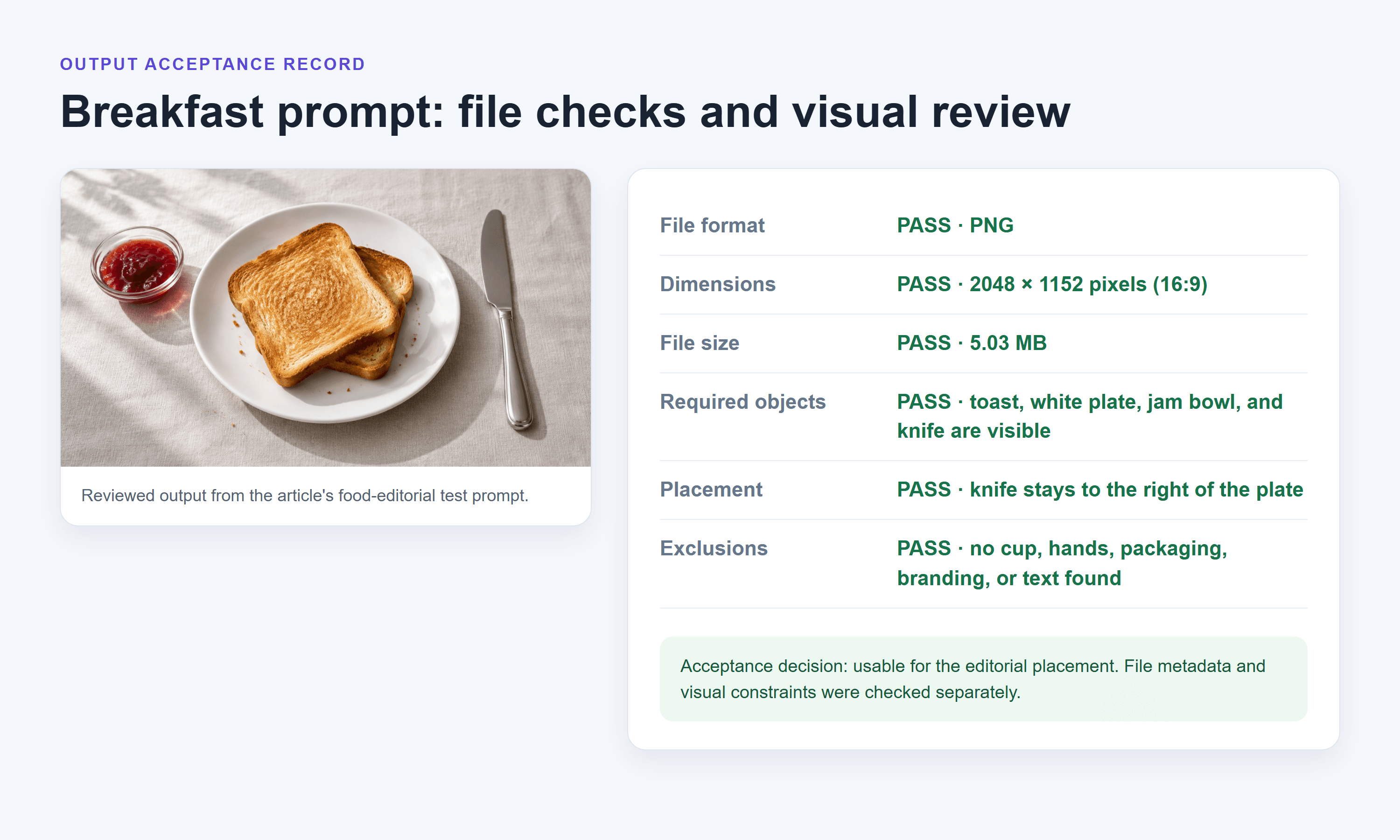 Validation record separating file metadata checks from visual acceptance checks
The record reports the generated file's real dimensions and size separately from its visual acceptance checks.
Build a fixed regression set from the actual feature: ordinary reuests, crowded compositions, conflicting instructions, difficult crops, and relevant input limits. Version the briefs and reviewer rules. Repeat them when changing the model, prompt template, or output settings.
Report technical success and accepted-output rate separately. A readable file that contains an extra object counts as a successful delivery and a content rejection. Combining those outcomes into one success number conceals the fix your team needs.
The 2025 developer survey found 46% distrusted AI-tool accuracy and 33% trusted it; 3% reported high trust. These responses concern AI tools in development workflows, not a measured failure rate for generation APIs. (Stack Overflow Developer Survey, 2025.)
Likewise, 3 illustrative runs cannot establish overall accuracy or a useful p95 latency. Collect a larger, relevant sample across the conditions you expect in production, and retain outliers. Use the demonstrations to develop the checks, then use systematic evaluation to make a release decision.
A Production Checklist Before You Ship
The first working request settles only a small part of the release decision. Your application also has to contain spend, recover unfinished work, and explain what happened when no result is available.
Protect access. Keep credentials on the backend, separate environments, restrict access to job records, and plan credential rotation. Authorize every status and download request against the user who owns that job. An unguessable task ID is not a replacement for permission checks.
Bound inputs and resource use. Validate prompt length, upload type and size, requested output settings, and supported combinations. For downloaded media, enforce allowed destinations, redirects, byte limits, and decoding limits. The compact scripts above illustrate the lifecycle; they are not a hardened public download service.
Set budgets before submission. Define per-user and per-task limits, maximum concurrent jobs, and who can request more expensive settings. Reserve budget while work is pending so simultaneous requests cannot all pass the same remaining-balance check.
Persist state. Write the local job before calling the provider. Save the returned prediction ID immediately and make polling resumable after a process restart. If submission status is unknown, use an investigation state instead of telling users that the job definitely failed.
Own the delivered asset. Decide where accepted files live, who can access them, and when they expire. Verify provider-link lifetime and retention terms rather than depending on a temporary output URL indefinitely. Include deletion of derived files in the application's data workflow.
Make failure understandable. Distinguish a delayed task, a rejected result, and a service error. Offer a clear route to retry intentionally or request review. Preserve the user's brief so recovery does not require reconstructing the work.
Monitor changes. Track completion, acceptance, cost, and waiting time separately. Re-run the regression set after model or parameter changes, and keep the previous configuration available where feasible. Redact sensitive logs and assign retention periods to both content and operational records.
To evaluate the example platform for your own application, start with the Atlas Cloud model catalog, then read the selected endpoint and prediction documentation. Choose one task, define acceptance, and record what the evaluation actually delivers before expanding access.
Frequently Asked Questions
Which generative AI API should I choose for my application?
Choose around the feature's inputs, outputs, acceptable waiting time, and review requirements. Run the same representative briefs against the candidates you can legally and operationally use. Compare accepted-output cost and integration work alongside capabilities. There is no universal choice established by these 3 image examples.
Are there free generative AI APIs for developers?
Some services offer trials or limited free usage, but availability, eligibility, quotas, and permitted uses change. Verify current terms for the exact endpoint. A free consumer-tool allowance does not necessarily include API access. Self-hosting also uses hardware, electricity, and engineering time, even when model weights are downloadable.
Do I need machine learning experience to use a generative AI API?
You can begin with HTTP, JSON, authentication, and ordinary backend development skills. Shipping a dependable feature additionally requires evaluation and operational work. You need to understand the model's limitations well enough to define acceptable output, without necessarily training a model yourself.
Can one API handle text, images, and video?
A platform may provide all 3, but each capability can use different endpoints, parameters, output types, and waiting patterns. Verify each interface separately. A shared account or credential does not make a text request body compatible with an image or video model.
Why does my image request return a task ID instead of an image?
The endpoint submits work asynchronously. Save the ID and query the documented status route. Retrieve the file when the task completes, then validate it. If your client stops waiting, the server-side job may still be running; resume that job before submitting another.
How can I reduce API costs without breaking the workflow?
Prevent duplicate submissions, validate inputs early, reuse accepted assets where appropriate, and test cheaper configurations against unchanged acceptance criteria. Measure actual charges per accepted result. A generative AI API for developers earns its place when the surrounding application can deliver usable work at a cost you can sustain.





