At an evening station entrance, commuters stream toward ticket gates while a few people stop to read a map and another flow crosses from the side. A convincing image of that scene is easy to mistake for convincing crowd behavior. Genie 4 crowd movement in busy public spaces is a more demanding test: can the scene keep responding as you move through it and change what happens?
Genie 4 is an interactive world model, not simply a text-to-video generator. Google DeepMind has shown a crowded 1980s Japanese station, and describes keyboard navigation, camera control, and real-time natural-language scene changes. The announcement also says Genie 4 remains an early research preview, with object permanence, spatial accuracy, complex interactions, and long-term consistency still under development. That makes it promising for concept exploration, but not evidence of a validated crowd simulator. ( Google DeepMind, October 2026 )
Key takeaways
- Genie 4 lets an eligible tester explore and steer an evolving scene; a standard video generator returns a fixed clip.
- Specify paths, crossing flows, stopping behavior, camera movement, and scene landmarks instead of relying on “busy” or “realistic.”
- Judge movement over time, including crossings, repeated people, and whether the station stays in place after an edit.
- As of November 2, 2026, Genie 4 is a research preview with limited access. A fixed video is a different kind of fallback.
What Genie 4 Changes About Crowd Movement
A video generator usually turns an input into a clip you watch from the camera path it chose. Genie 4 is presented as a world model: you can move the view through a generated environment and steer the evolving scene with text. DeepMind says its demonstrations use standard keyboard controls for navigation and camera control, alongside natural-language prompts for changes such as altering weather or introducing an object. It also says Gemini helps interpret those changes in context and keep the world progressing.
That distinction matters when a designer wants to inspect a station beyond one composed shot. You might begin at a wide concourse entrance, walk toward the ticket gates, then ask for a small group to pause near a wall map. In principle, that sequence lets you explore whether the environment continues around the new event. It is a more useful question than whether one frame looks crowded.
The official crowded-station example is a prompt for a rural Japanese railway station in the 1980s. It describes passengers waiting, walking, boarding, and carrying luggage, a railway inspector near the camera, a long red train on the nearest track, and a mountain setting. That is evidence of the scene DeepMind chose to demonstrate. It is not an independent test of crowd realism, and the published prompt does not establish that every requested action behaved correctly during extended exploration.
| Need | Interactive world model | Fixed video generator |
|---|---|---|
| Input and output | A prompt-led world that can be navigated and steered during a session | A prompt-led clip with a rendered camera path |
| Continue exploring | Move through the scene and try supported live changes | Review the output; a new generation is a separate result |
| Useful for | Early scene, camera, and interaction exploration | A short concept clip or visual reference |
| Access | Genie 4 access is currently limited to a research preview | Depends on the chosen model and service |
Choose Genie 4 when the question involves what happens as you move or intervene. Choose fixed video when the deliverable is a clip to review or share. Neither format by itself proves that pedestrian paths, clearances, or timing match a real venue.
How to Prompt Genie 4 for a Busy Public Space
“Make a busy station” gives a model a theme, not a movement plan. A useful crowd prompt describes observable behavior and spatial relationships. Start with seven pieces: place, time, layout, flow, individual actions, camera route, and sound. For a useful evaluation, also name what should stay fixed, such as the position of the entrance, gates, and signs.
The official station prompt supplies a setting and visible activity. For a controlled experiment, make one variable explicit at a time. If the first run has unclear walking directions, revise the flow instruction while keeping the location and camera plan stable. If you change the setting, density, camera, and behavior together, you cannot tell which instruction changed the result.
The following is a starting experiment for an authorized Genie 4 preview user. It is not an Atlas Cloud prompt, and availability of any control depends on the preview experience provided to that account.
plaintext1Create an explorable, realistic public train-station concourse during the evening commute. Show a steady, dense pedestrian flow moving in both directions through clearly visible lanes. Some people walk briskly toward the platform entrances, a few pause beside a wall map without blocking the main flow, and small groups walk together at a natural pace. Pedestrians adjust their paths and leave personal space when crossing; avoid synchronized marching or repeated identical people. Keep the station layout stable, with the main entrance, ticket gates, and platform signs in consistent positions. Begin from a wide eye-level view, then let me move toward the ticket gates while the crowd continues to flow naturally. Use realistic indoor station ambience and indistinct background conversation. Do not show emergencies, panic, collisions, or readable brand logos.
Treat the prompt as an experiment specification, not a guarantee. “Leave personal space” expresses a desired behavior, but it does not define a measured clearance threshold. “Keep the station layout stable” is a request, not proof that geometry remains stable. If the preview interface supports live text steering, test one narrow event such as asking a few people to pause near the map, then observe the paths around them. Do not assume a particular control, duration, or setting unless it is documented in your account’s interface.
For a fair check, keep a small run log: the prompt version, starting viewpoint, instruction changed, and what you observed afterward. You do not need a complicated scoring system. The purpose is to separate a visible result from an impression and to make repeated attempts comparable.
Case: The Fallen Program at a Station Crossing
Set the test in a fictional station concourse at blue hour. Amber light falls through an arched glass roof onto teal and terracotta mosaics. One stream of passengers heads for the ticket gates while another crosses toward the exit. An adult woman in an emerald tailored coat, coral pleated dress, saffron silk scarf, and burgundy boots notices a folded, unprinted program slipping from her tote. She pivots to catch it, smiles in relief when another passenger helps, gestures thanks, and rejoins her companion. This small interruption gives the crowd a reason to adjust its paths without an emergency or an implausible dance routine.
The supplied stills and 28-second clip are fixed generated media, not Genie 4 footage. The question is whether the same mosaic crossing, map wall, skylight, and gate line remain in place as the camera changes direction. Watch whether nearby passengers sidestep naturally and resume their routes. The woman's turn, reach, changing expression, and gesture make individual motion visible within the larger flow.
The case uses three still images and one continuous 28-second video. To recreate it, make the wide view with Seedream 5.0 Pro Text-to-Image. Make the side and return views with Seedream 5.0 Pro Edit, using the first image to preserve identity, wardrobe, lighting, and architecture. Pass all three approved images to Wan 3.0 Reference-to-Video for the long clip. These fixed outputs help inspect the idea; only a real Genie 4 session can test live navigation or text steering.
Image 1 prompt, wide entrance view: Photorealistic 16:9 cinematic still of a busy fictional modern station at blue hour. An arched glass roof washes a teal and terracotta star mosaic with amber light. A brass-edged map wall stands to the left of a stable row of ticket gates. Two dense but readable pedestrian streams cross at the mosaic, walking in opposite directions. In the middle distance, an adult woman with chestnut hair in a low braided bun wears an emerald tailored coat over a coral pleated dress, a saffron silk scarf, burgundy ankle boots, and a small leather tote. She turns her head with an alert, surprised expression as a folded blank program begins to slip from the tote. Wide eye-level view from the entrance, 35mm lens, rich but believable color, natural faces and hands, distinct clothing on other passengers. No readable signs, logos, collisions, duplicated people, or empty platform.
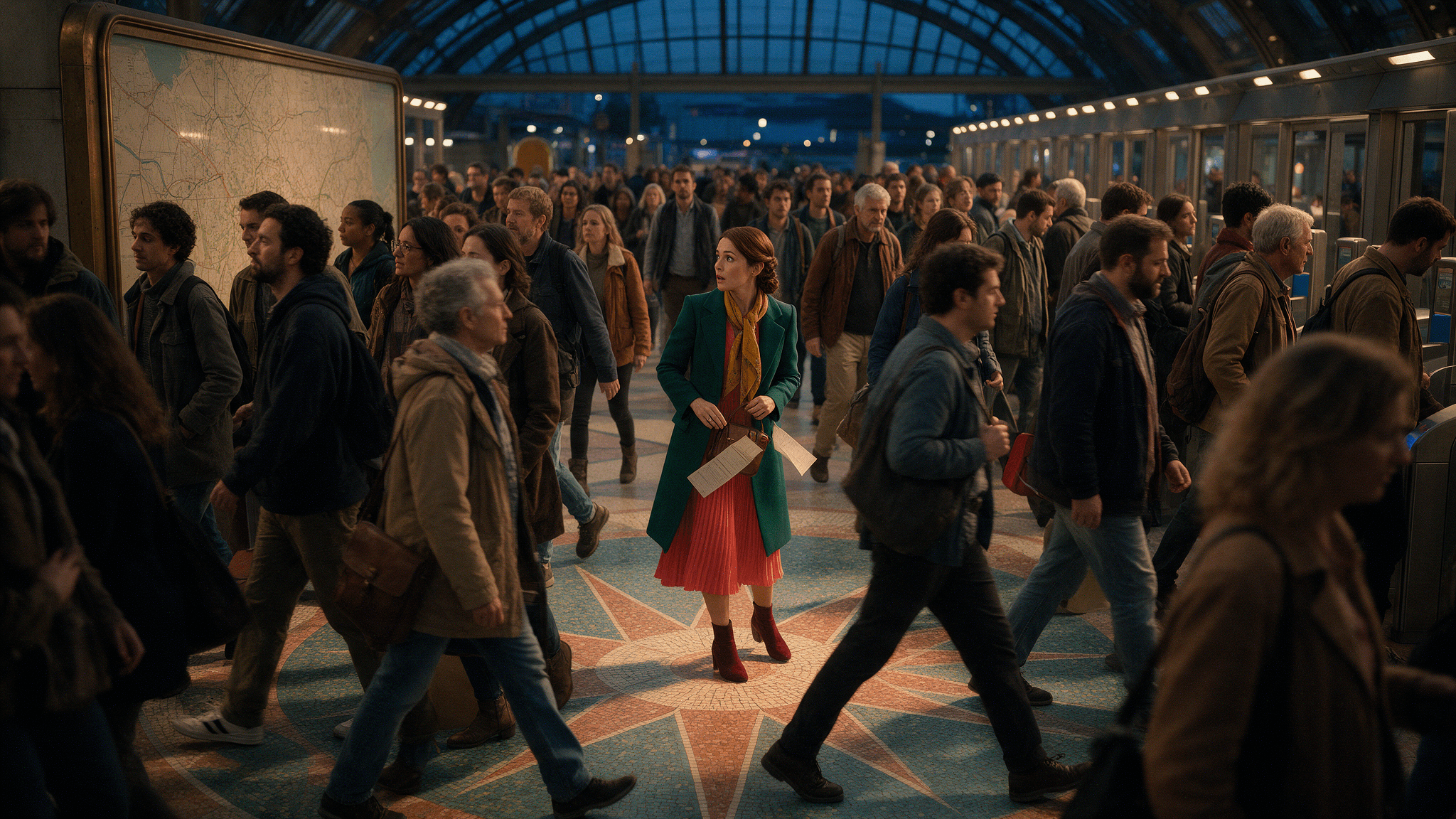
The wide frame establishes the star mosaic, map wall, gates, and opposing pedestrian flows.
Image 2 prompt, side crossing view: Edit Image 1 into a 16:9 side angle about 90 degrees from the entrance view. Preserve the woman's exact face, low braid, emerald coat, coral dress, saffron scarf, burgundy boots, and tote. Keep the same arched roof, map wall, gate line, star mosaic, and blue-hour amber light in spatially plausible positions. Show her mid-pivot with one arm reaching for the falling blank program; the scarf and skirt follow the turn naturally. A passenger in a plum jacket bends slightly and catches a corner. People moving in both directions curve around them with varied strides and visible personal space. Natural expression and elegant body mechanics, no posed dance, extra limbs, scene redesign, or legible text.
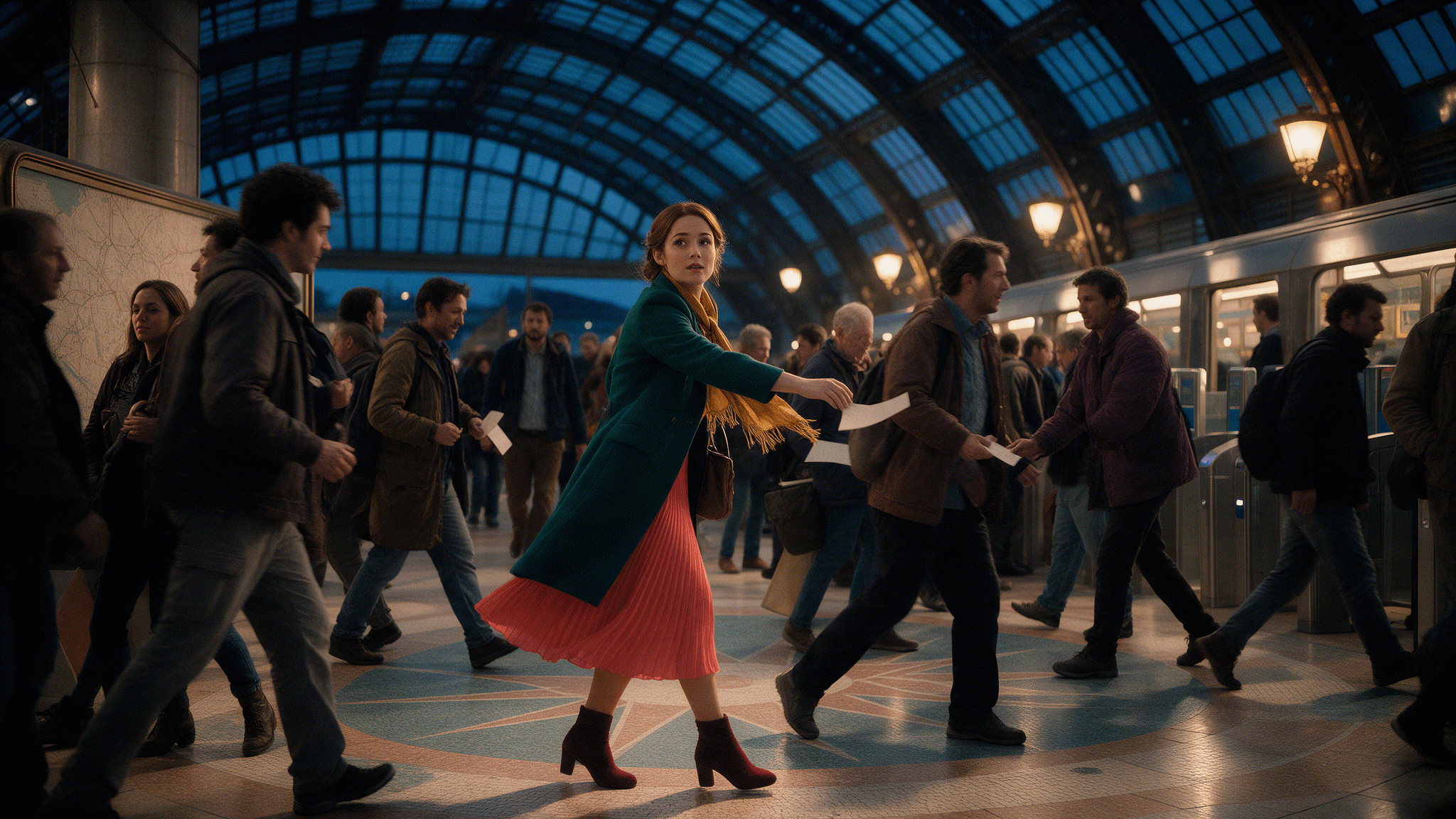
The side view makes her reach and the local crossing visible; the program and nearby people are the continuity checks.
Image 3 prompt, reverse view from the gates: Edit Images 1 and 2 into a third 16:9 view looking back toward the entrance from just beyond the gates. Preserve the same faces, clothing, plum-jacket passenger, roof arches, map wall, gate line, star mosaic, and color palette. The woman now holds the recovered blank program, smiles with relief, opens one hand in thanks, and turns her shoulders to rejoin the flow. The two crossing streams continue behind and beside her. Shoulder-height framing with the mosaic and roof recognizable from the reverse direction. Photorealistic fabric and skin, polished but credible station design, no frozen crowd, repeated faces, logos, or readable signs.
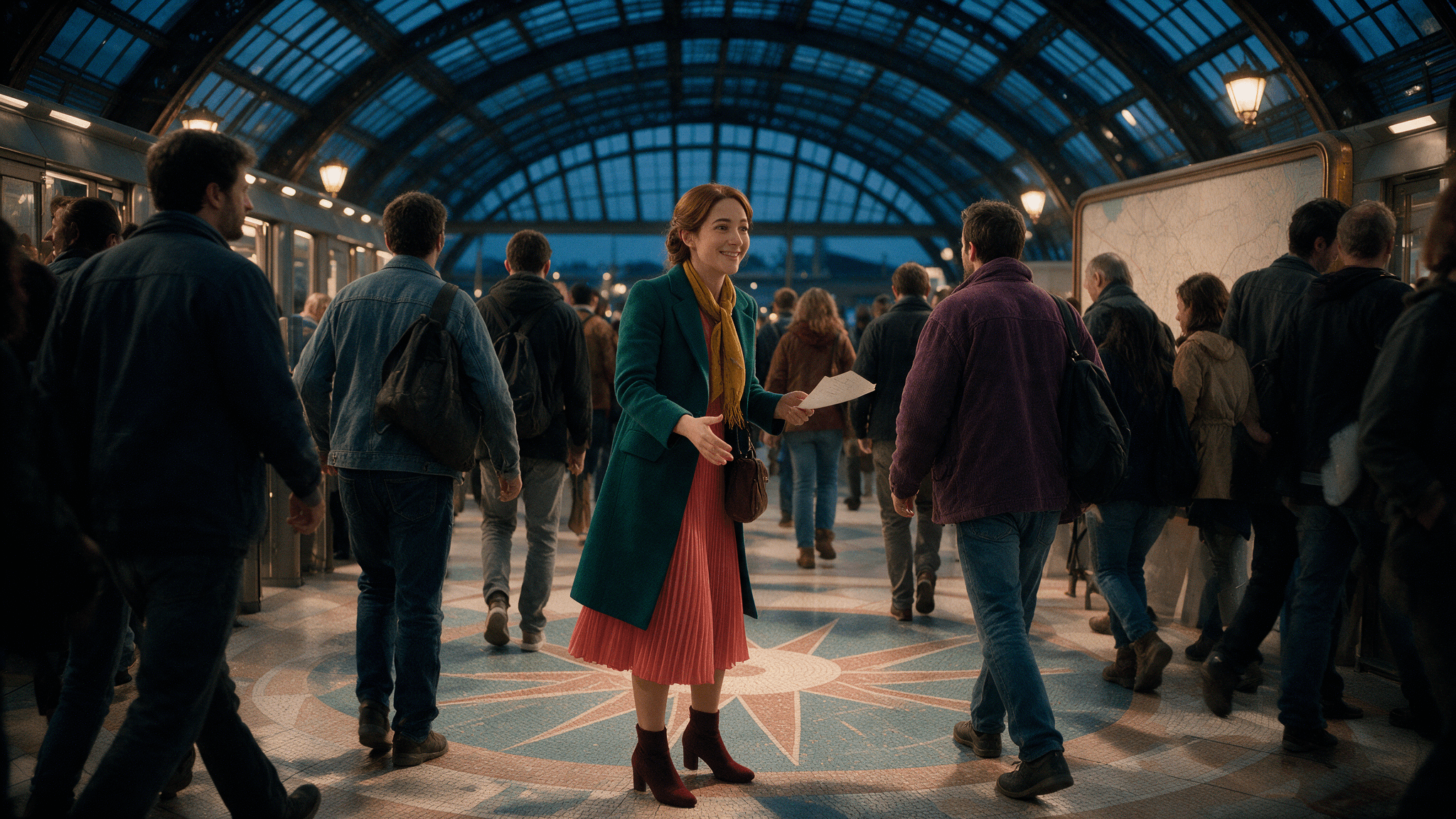
The final still retains her outfit and the station landmarks, but it does not achieve the requested true reverse angle.
28-second video prompt: Use the three approved stills as visual references for one continuous, photorealistic 16:9 shot of the same concourse and people. At 0-7 seconds, glide diagonally inward from the entrance as two busy streams cross near the star mosaic with varied walking rhythms. At 7-14 seconds, track beside the woman as the blank program slips from her tote; her eyebrows lift, she pivots with a controlled full-body turn, her scarf and skirt move with inertia, and she reaches for it. At 14-21 seconds, arc around the crossing as the plum-jacket passenger catches a corner, nearby walkers slow or sidestep without losing their routes, and the woman smiles, accepts the program, and gives a small open-handed thank-you gesture. At 21-28 seconds, pass to a reverse view from the gates as she turns toward her companion and rejoins the stream; look back to reveal the same map wall, roof arches, gate line, and star mosaic in consistent positions. Keep faces, clothing, architecture, and lighting stable; camera height believable; action fluid and expressions readable. No emergency, dance routine, collisions, duplicated people, teleporting, warped hands, abrupt cuts, or slow zoom-only movement. No logos or legible signage.
The 28-second fixed clip moves from a wide crowd view to the paper handoff and back through the concourse. It is a rendered example, not a recording of Genie 4 interaction.
The stills preserve the woman's emerald coat, saffron scarf, and coral dress across the event. The third image remains on a similar side of the scene instead of showing the requested reverse view. In the clip, the camera moves between wide and closer side views while the program changes hands, but it does not complete a clear reverse-view continuity test. That gap matters more than the attractiveness of any one frame. The fixed clip also cannot show how Genie 4 would respond to a live steering request.
How to Evaluate Crowd Behavior Instead of One Frame
A still frame can show density and composition. It cannot tell you whether pedestrians keep moving coherently, whether crossing streams make space for one another, or whether a scene edit changes the building behind them. Watch a continuous sequence and check the same five things each time:
- Flow direction: Can you identify the main routes through the concourse? Do people continue toward the entrances, or do paths randomly reverse?
- Local crossings: When two streams meet, do people appear to adjust their direction and speed, or do bodies overlap, snap sideways, or pass through one another?
- Individual variation: Do people walk, wait, and form groups with varied timing, or do many figures repeat the same movement and appearance?
- Spatial continuity: After moving the camera or changing the scene, do fixed landmarks such as gates and walls stay in consistent positions?
- Event and sound fit: If a few people stop or a sound cue occurs, do nearby people and the ambience respond in a way that fits what is visible?
Use the list to decide whether a result supports a visual discussion. A scene might work for a mood board even if several pedestrians repeat. That same output would be inadequate for studying collision avoidance. Record specific failures, such as a person disappearing after the camera turns or a walkway changing shape, rather than scoring “realism” as one broad impression.
The checklist does not turn a generated scene into a validated simulation. DeepMind itself identifies visual drift, object permanence, complex physical interactions, spatial accuracy, and longer-term consistency as active research limitations. A polished image or responsive moment can coexist with errors in those areas. ( Google DeepMind, Genie 4 limitations )
Genie 4 Access, Availability, and a Practical Plan B
The announcement says Genie 4 has started rolling out as a research preview to trusted testers. Google says it plans to expand access through Project Genie for Google AI Ultra subscribers and through early-access partners for the Gemini API and Google AI Studio. “Plans to expand” does not mean every subscriber or developer can use it today. The public announcement does not state a generally available price, and a waitlist is not a confirmation of access.
Check the official Genie page and waitlist for current eligibility before planning a project around a live session. If you do gain access, start with a short exploration and treat the output as an early visual prototype. Avoid basing a schedule, safety claim, or production requirement on access that has not been granted.
If your immediate need is a fixed concept clip, a video model can answer a narrower question: what might this station look and feel like in one composed shot? Atlas Cloud lists Wan 3.0 Reference-to-Video as one option when you already have reference images. Check the live model settings before running.
The station-crossing case above is one fixed-video example. Its 28-second camera route can reveal repeated figures, unstable architecture, or paths that cut through one another. The clip is a visual concept preview, not an interactive Genie 4 session: a viewer cannot walk around it or steer a new event as it happens.
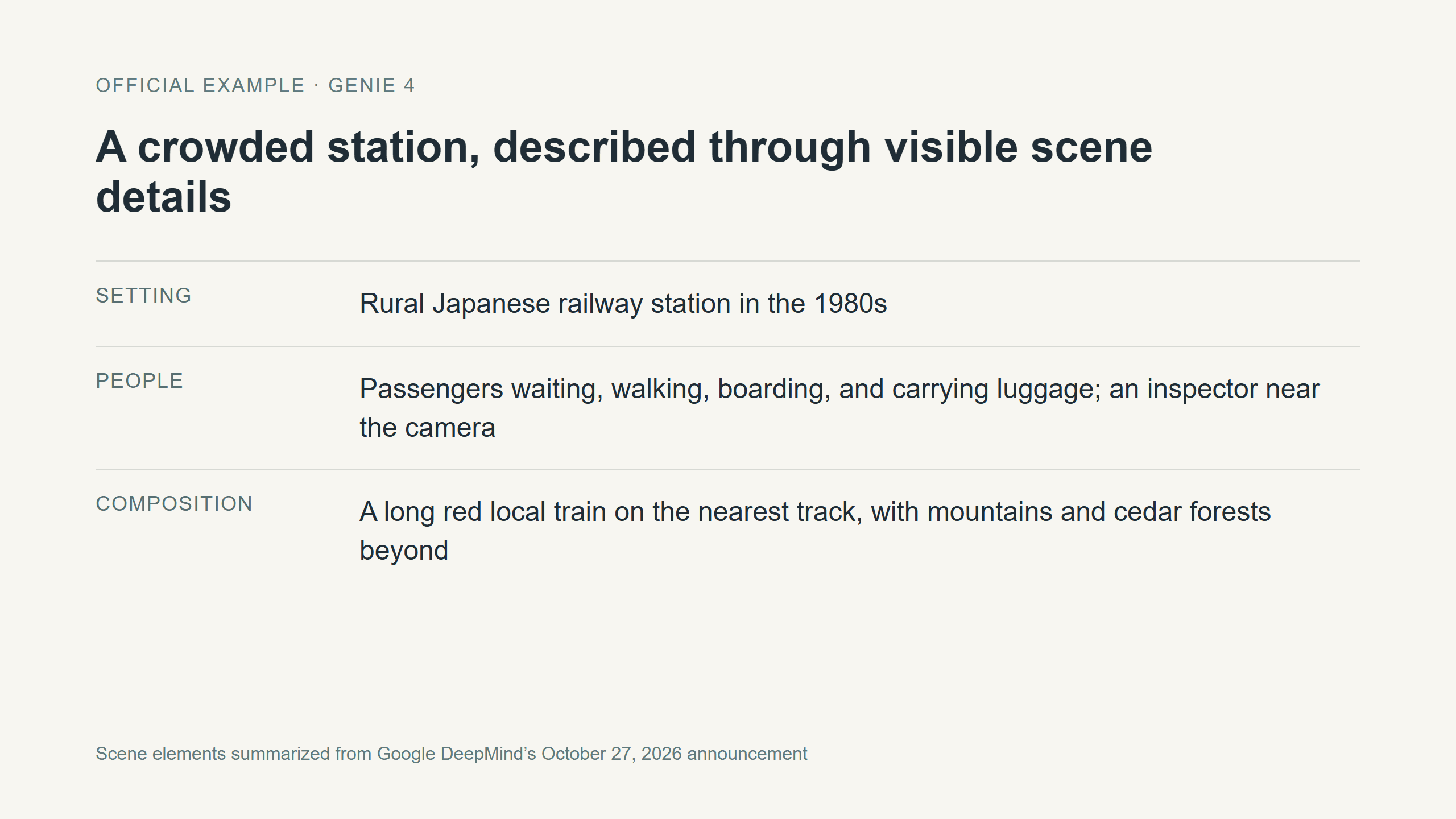 A concise reading of the scene elements named in DeepMind’s official station prompt.
When Genie 4 Crowd Scenes Are Useful, and Where to Be Careful
An interactive crowd scene may help a game team discuss the feel of a concourse, help a filmmaker explore camera height and movement, or let a creative team compare a few scene directions before building a detailed environment. The value is in rapid exploration: people can ask “what if the camera starts here?” or “what changes if a small group pauses?” and inspect the response.
Those questions differ from production validation. A generated crowd scene does not establish a venue’s capacity, evacuation time, accessibility, safe pedestrian density, or compliance with building requirements. Those decisions need appropriate real-world data and methods, plus review by qualified professionals. Genie 4’s own stated limitations around spatial accuracy and complex interactions make it especially important not to treat a plausible-looking sequence as an engineering result.
The same boundary applies to game logic. A generated character seeming to yield is not proof of a repeatable navigation rule, deterministic collision handling, or stable behavior across sessions. Use the scene to make an idea discussable; move to purpose-built tools and controlled testing when the decision depends on measured outcomes.
For Genie 4 crowd movement in busy public spaces, the practical next step is to define one interaction you want to inspect, write down the landmarks and paths that should remain consistent, and verify current preview eligibility. If you cannot access Genie 4 and only need a shareable visual reference, use a fixed video workflow and label the result accurately.
Frequently Asked Questions
Is Genie 4 a video generator or an interactive world model?
Google describes Genie 4 as an interactive world model. Its demonstrations show keyboard navigation, camera control, and real-time text steering. It can also produce recorded audiovisual output, but that does not make it equivalent to a workflow that only returns a fixed video clip.
Can Genie 4 simulate realistic crowd movement?
It can generate crowded scenes, and DeepMind’s announcement includes a crowded station example. That demonstrates the intended capability, not a validated measurement of pedestrian behavior. Check movement across time and keep the model’s published limitations in view.
Is Genie 4 publicly available, and does it have a public price?
As of November 2, 2026, DeepMind describes a research preview for trusted testers and a planned wider rollout. The public announcement does not give a generally available price. Confirm eligibility through the official announcement and waitlist.
Can Atlas Cloud run Genie 4?
The Atlas Cloud model directory does not list Genie 4. Atlas Cloud offers fixed video generation options such as Wan 3.0, but those do not provide Genie 4’s interactive world simulation.


