The impact may look convincing. Does the scene still make sense a moment later? The useful way to assess Genie 4 is to watch a clear collision, then check what happens after contact. This guide to Genie 4 physics simulation for collisions and object movement gives you a repeatable observation protocol for object identity, direction changes, and scene continuity. It also explains what a generated view can show, and what it cannot prove about mass, speed, or physical laws.
Key takeaways
- Genie 4 is an interactive generative world model, not a conventional physics engine with exposed state variables.
- A fixed scene and one collision make it easier to judge contact, post-impact movement, and object continuity.
- A convincing clip does not establish numerical accuracy or suitability for engineering and safety tests.
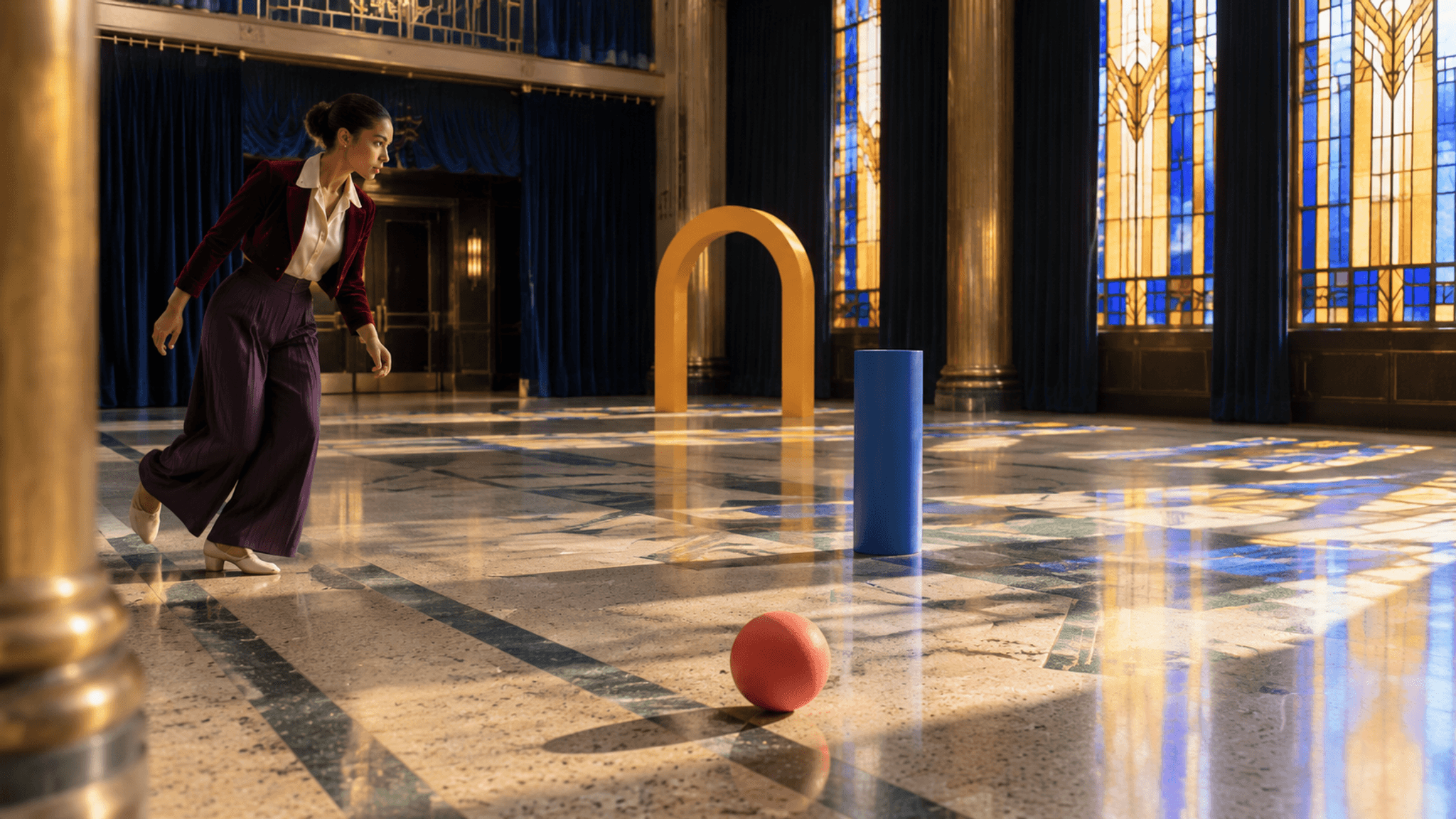
Reference frame for the Art Deco foyer case: the dancer, ball, cylinder, and arch before the motion begins.
What “physics simulation” means in Genie 4
A conventional physics engine updates explicit quantities such as position, velocity, collision geometry, and material properties according to configured rules. A world model instead generates an interactive scene and responds to user actions or instructions. Its output may depict cause and effect, but the visible result does not automatically expose the numbers or rules behind that depiction.
Google describes Genie 4 as a world model that can generate environments where objects collide, water flows, and trees sway. It also describes live changes through natural language, such as changing the camera or adding objects. That makes the model interesting for exploring a scene and asking what happens next. It does not, by itself, make each depicted collision a measured physics result (Google DeepMind, Genie 4).
For a developer, the distinction is practical. You can use an interactive generated world to explore a mechanic, find a visual direction, or prompt a follow-up event. A traditional engine remains the right place to tune restitution, friction, mass, and collision shapes, because those are explicit and inspectable inputs there. Unless a system exposes those values and a validation method, treat “realistic physics” as a visual description rather than a benchmark claim.
How to design a Genie 4 collision test
Start with an event simple enough that a viewer can tell whether it happened. A ball striking a stationary block is easier to assess than a pile of moving objects in a busy scene. Keep the camera steady, both objects visible, and the floor plain. Give each object a distinctive color and shape so that a change in identity is easy to spot.
That is the core of a Genie 4 physics simulation for collisions and object movement test: one simple event with an aftermath you can compare across runs.
Google’s Project Genie prompt guidance recommends describing an environment and character or object actions in direct language. That guidance is for Project Genie, not a published Genie 4 prompt syntax. It is still a sensible starting point for a clear test brief: specify the setting, the objects, their initial states, the event, and the point you want to inspect (Google, Project Genie prompt tips, March 2026).
A proposed test prompt could read:
plaintext1In a plain studio with a flat floor, show one red ball rolling from left to right toward one stationary blue block. Keep both objects fully visible from a fixed side view. The ball contacts the center of the block. Continue the same view after contact so the ball and block remain visible. Keep their colors and shapes consistent. No extra objects or scene changes.
This is a test specification, not a claim that Genie 4 accepts these exact controls or will produce a particular outcome. When testing in an available session, save the wording, the visible controls, and a screen recording. If the system offers live steering, record each instruction and when you entered it. Those details help distinguish model behavior from a prompt change or camera movement.
Use a collision observation card for each run:
| Observation | Record |
|---|---|
| Starting state | Surface, object positions, initial movement, and camera angle |
| Contact | Whether contact is visible and whether either object is obscured at impact |
| Immediate response | Visible direction change, bounce, roll, tip, slide, or stop |
| Continuity | Whether color, shape, count, and relative positions stay recognizable |
| Repeat run | What stayed similar and what changed under the same prompt |
Change one condition at a time. For example, first keep the block stationary, then run a separate test with the block already moving. Do not compare those outcomes as if they isolate one variable if you also changed the camera, surface, or wording. A small test set is more informative when each variation has a clear reason.
How to read object movement after impact
Review the moment before contact, the contact itself, and the few moments after it as separate observations. A ball that visibly touches a wall and changes direction gives evidence that the scene depicts a collision response. A ball that passes through the wall, changes color, disappears, or reappears elsewhere raises a continuity issue. Record what is on screen before explaining why it happened.
The observation card is deliberately qualitative. “The ball moved left after contact” is a visible description. “The ball conserved momentum” is a claim about quantities that a rendered clip alone may not provide. To support that claim, you would need reliable measurements of relevant states, defined units and conditions, and a method to repeat and analyze the event. Apparent compression, bounce height, or travel distance in perspective can be misleading.
Repeat the same test several times if access permits. Consistency across runs can tell you whether the prompt tends to produce a similar scene. It still cannot establish that a single run follows a physical law: repeated outputs may share visual patterns without exposing the underlying calculation. Keep separate notes for event legibility, object continuity, and repeatability. These are useful prototype observations, not one combined “physics score.”
For a fair comparison with an engine, hold the scenario description constant and write down what each system actually exposes. An engine may provide coordinates and velocities; a generative world may provide live visual interaction. Compare the outputs against the question you need answered, rather than treating a video and a numerical simulation as interchangeable evidence.
What Genie 4 can and cannot prove
Genie 4 can be explored as a way to create and steer interactive scenes. The official materials show generated environments and describe direct complex events, while also listing research limitations around consistency and interaction. Those demonstrations establish the product’s intended capabilities, not a measured collision-accuracy benchmark. The official page describes the current state and limitations; check it again when access or capabilities matter to your work.
The official page also states that complex events and object persistence remain research challenges. This matters directly to a collision test: a clean impact frame can still be followed by an object changing shape, disappearing, or losing its earlier position. Check the aftermath and repeat the run before treating continuity as a reliable behavior. Product demonstrations illustrate possible outcomes, while independent measurements would be needed to support accuracy claims.
That boundary suggests a useful division of labor:
- Early game or film ideation: explore how a collision might look or how an interactive scene could unfold.
- Mechanic implementation: use your game engine’s collision system and inspect its parameters and state.
- Scientific or engineering analysis: use a validated simulator or measurement setup suited to the question.
- Robot safety or deployment: do not rely on a generated visual scene as the sole verification method.
A world model may help a team discover a promising scenario or communicate an idea. It does not replace the system that must calculate or verify the behavior. Label generated material as a visual prototype when sharing it with teammates, so nobody mistakes an illustrative outcome for a validated simulation result.
One visual case: the Art Deco foyer collision
The visual reference takes place in an empty Art Deco theater foyer rather than a garden. Late-afternoon light passes through geometric stained glass onto jade-and-cream terrazzo; indigo velvet curtains and brass columns frame a clear floor path. A dancer in a cropped burgundy velvet jacket, ivory silk blouse, deep-plum wide-leg trousers, and cream leather dance shoes sweeps a coral rubber ball toward a cobalt wooden cylinder. The cylinder nudges a saffron wooden arch. Her expression changes from focused anticipation to surprise, then playful relief as she moves around the shifting objects. The six supplied ten-second clips show different parts of that chain. They are generated video storyboards, not Genie 4 output or a completed physics test. Watch for both successful motion and continuity failures.
Create the shared opening frame with Seedream v5.0 Pro Text-to-Image (bytedance/seedream-v5.0-pro/text-to-image). For a repeat run, generate ten-second clips with Seedance 2.5 Image-to-Video (bytedance/seedance-2.5/image-to-video, 16:9 first frame). For a repeat run, use a clear final frame from the preceding clip as the next first frame. Keep the original character-and-location reference beside it. The six downloaded MP4s supplied for this article have been converted to GIFs and placed below. Their embedded metadata does not identify the generating model or original prompt, so the model names and written prompts here are a reproducible recommendation, not verified provenance for these files. These clips are not interactive Genie 4 recordings or measured simulations.
Shared first-frame prompt for Seedream v5.0 Pro:
plaintext1Wide 16:9 cinematic photograph inside an empty 1930s Art Deco theater foyer, designed as a clear stage for a kinetic collision scene. Cream-and-jade terrazzo floor with long geometric inlay lines, two brass-clad columns, deep indigo velvet curtains, and tall amber-and-cobalt stained-glass windows. Late-afternoon sun enters from camera right, casting sharply defined colored window shapes across the floor. At frame left stands one young adult dancer with warm brown skin, expressive dark eyes, and hair in a secure sculpted bun. She wears a cropped burgundy velvet jacket over an ivory silk blouse, deep-plum pleated wide-leg trousers, and cream leather dance shoes. Her posture is coiled for movement, one heel lifted, gaze fixed on one matte coral-red rubber ball in the foreground. A single cobalt-painted wooden cylinder stands three meters ahead on the ball's path; a single lightweight saffron-painted wooden arch stands behind it. All three movable objects are fully visible and clearly separated. Low 35 mm camera, strong floor leading lines, one softly blurred brass column at the edge, tactile velvet, silk, wood, and terrazzo, controlled coral-cobalt-saffron accents against rich indigo and warm ivory. Elegant photographic realism, natural shadows and slight film grain. No garden, plants, crowd, stage performance, text, signage, logos, extra balls, extra dancers, floating objects, or UI.
For another generation pass, maintain the same dancer, clothing, object count, floor geometry, architecture, sunlight direction, and color grade in all six clips. Each ten-second segment needs visible action and changing camera direction. The supplied clips are shown as they are; when a contact or transition is unclear, the caption says so.
Shot 1: the first touch
What to inspect: starting positions, foot-to-ball contact, and the ball's initial direction.
plaintext1Use the supplied Art Deco foyer still as the exact first frame. Ten seconds of continuous, expressive movement. From 0-3 seconds, track laterally at knee height as the dancer glides diagonally along the jade-and-cream terrazzo toward the single coral ball. Her gaze stays on the ball; her expression shifts from focused anticipation to a quick playful smile, while her burgundy velvet jacket and deep-plum pleated trousers move with natural inertia. From 3-6 seconds, she makes a precise side step, rotates her shoulders and hips, and sweeps one cream dance shoe into clear contact with the ball exactly once. The ball begins rolling toward the stationary cobalt cylinder. Pan smoothly from her foot to the rolling ball without hiding the touch. From 6-10 seconds, follow the ball in a low three-quarter view while the dancer completes a controlled turn, catches her balance, and raises her eyebrows as she watches its path. Keep the ball, cylinder, and saffron arch distinct and spatially stable. Amber-and-cobalt stained-glass light, indigo curtains, brass columns, crisp shadows, natural 35 mm motion, rich but controlled color. No dialogue, text, crowd, plants, extra props, duplicated limbs, teleportation, or zoom-only motion. Wide 16:9.
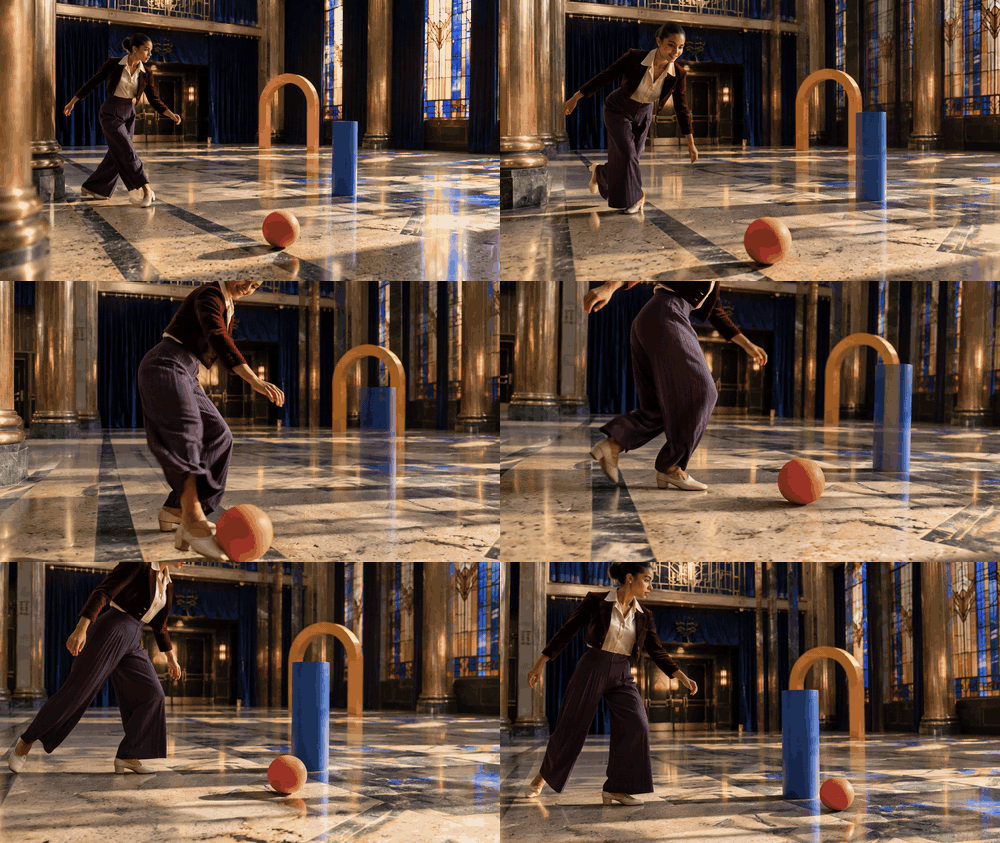
The dancer approaches and appears to set the ball in motion. The foot-to-ball touch is brief, so the clip is a visual reference rather than proof of a controlled impulse.
Shot 2: the primary collision
What to inspect: ball-to-cylinder contact, the ball's changed direction, and the cylinder's first response.
plaintext1Begin from the chosen final frame of shot one in the identical empty Art Deco theater foyer. Preserve the dancer's warm brown skin, sculpted bun, burgundy velvet jacket, ivory blouse, deep-plum trousers, cream dance shoes, and the exact coral ball, cobalt cylinder, and saffron arch. Ten seconds. From 0-3 seconds, a low front three-quarter tracking view follows the ball across the terrazzo inlay lines toward the still cylinder; show a clean gap until contact. From 3-5 seconds, the camera arcs to a clear side angle while staying wide enough to show both complete objects. The coral ball strikes the cylinder once at its lower half. The ball deflects diagonally left; the cylinder tips and begins rotating right. Make the contact point visible and do not let either object pass through the other. From 5-10 seconds, track laterally to hold both resulting motions in one frame. In the background, the dancer reacts with widened eyes and an open-mouthed smile, then pivots sharply around the cylinder's path. Stained-glass sunlight moves across real terrazzo texture, brass surfaces remain fixed, indigo curtains stay in place. Smooth cinematic 35 mm motion, believable gravity, no hidden impact, dialogue, text, crowd, plants, duplicate objects, or slow push-in. Wide 16:9.
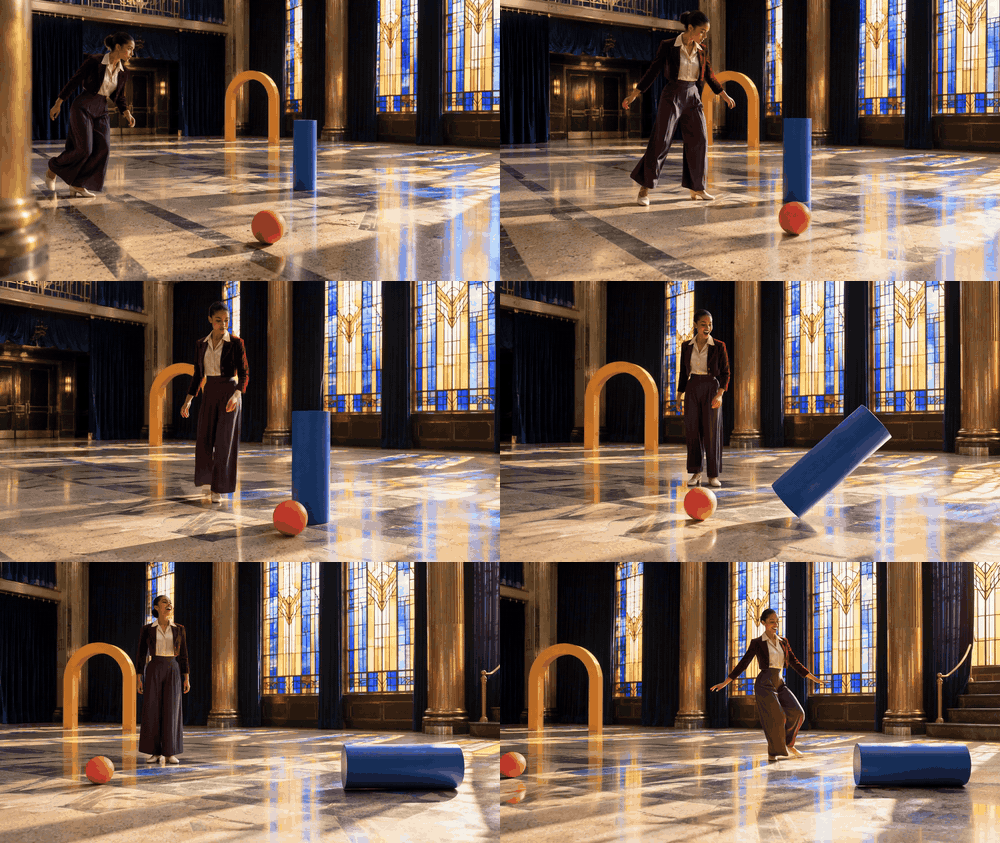
The cylinder tips as the ball reaches it. Inspect the contact frame before claiming a measured collision response.
Shot 3: cylinder follow-through
What to inspect: whether the blue cylinder keeps the same shape and moves coherently after the first impact. This extra supplied clip was not part of the original five-shot prompt plan. The exact original generation prompt is unavailable; the following is a suggested prompt for a repeat run.
plaintext1Continue from the final frame of the ball-to-cylinder impact in the same empty Art Deco theater foyer. Ten seconds. Keep one coral rubber ball, one cobalt-painted wooden cylinder, one saffron wooden arch, and the same dancer in a burgundy velvet jacket, ivory blouse, deep-plum wide-leg trousers, and cream dance shoes. From 0-3 seconds, track low beside the ball as it rolls away from the cylinder on the cream-and-jade terrazzo. From 3-7 seconds, shift to a clear three-quarter side angle as the cylinder tips, rocks on its edge, and gradually falls to the floor, keeping its blue color, size, and solid shape. From 7-10 seconds, widen the view to show the ball, fallen cylinder, arch, and dancer together; she crosses the background in two quick dance steps, then turns her head toward the moving cylinder with a surprised expression. Preserve the stained-glass light pattern, brass columns, indigo curtains, gravity, and object count. Smooth camera movement, no hidden collision, extra objects, text, plants, teleportation, or zoom-only motion. Wide 16:9.
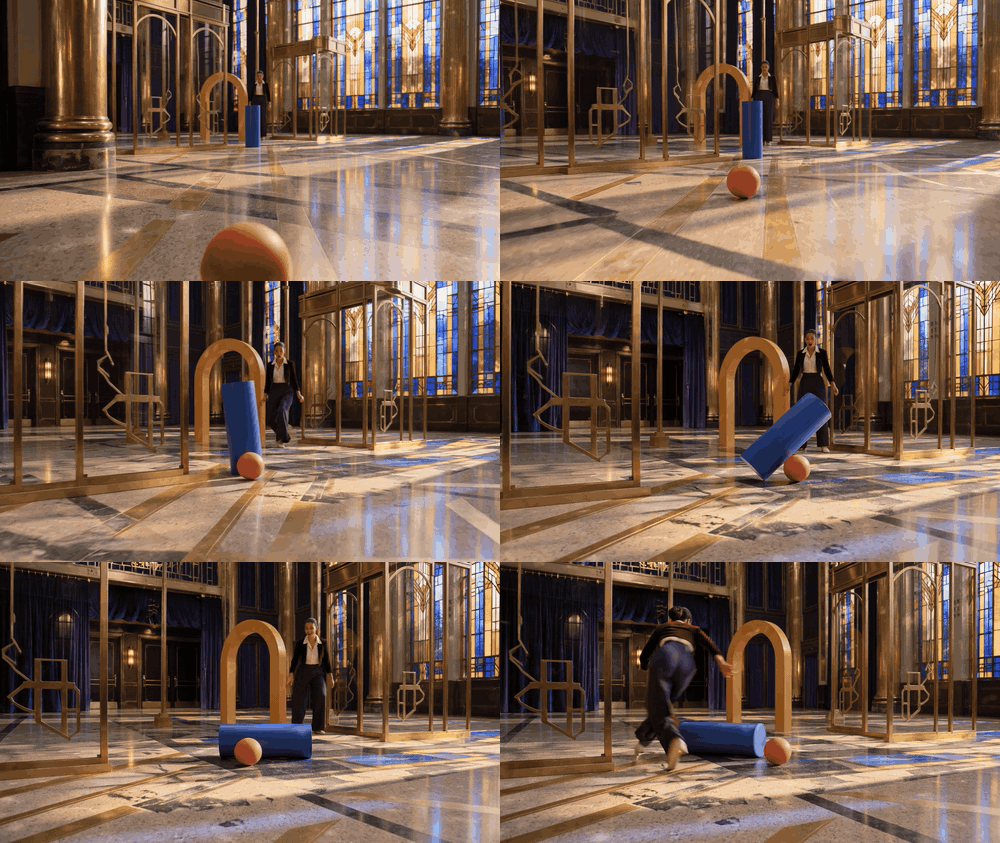
The cylinder tilts and settles while the ball stays in view. Compare its starting position with clip 02 before treating the two segments as continuous footage.
Shot 4: the secondary collision
What to inspect: transfer of motion from the cylinder to the arch, with all objects retaining their identities.
plaintext1Use the selected final frame of shot two as the first frame in the same Art Deco foyer. Maintain the exact burgundy-and-plum outfit, dancer's face and bun, coral ball, cobalt cylinder, saffron arch, terrazzo pattern, brass columns, indigo curtains, and light direction. Ten seconds. The cylinder is already rotating toward the stationary arch. From 0-3 seconds, track at waist height beside the cylinder while the dancer crosses behind it in a quick, elegant chasse step; her expression tightens from delight to alert concentration. From 3-6 seconds, drop to a low three-quarter angle and show the cobalt cylinder making one clear contact with the arch's lower left side. The light wooden arch rocks back, while the cylinder rolls a short additional distance; neither changes shape or color. From 6-10 seconds, orbit gently to keep both objects and their slowing motion visible as the dancer makes a small airborne turn, lands softly beyond them, and steadies herself with one extended hand. The pleated trousers and velvet jacket settle naturally. Colored stained-glass light cuts across cream-and-jade terrazzo, warm brass glints remain restrained, realistic 35 mm film texture. No shattering, magical sparks, speech, captions, crowd, plants, teleports, duplicate objects, or zoom-only motion. Wide 16:9.
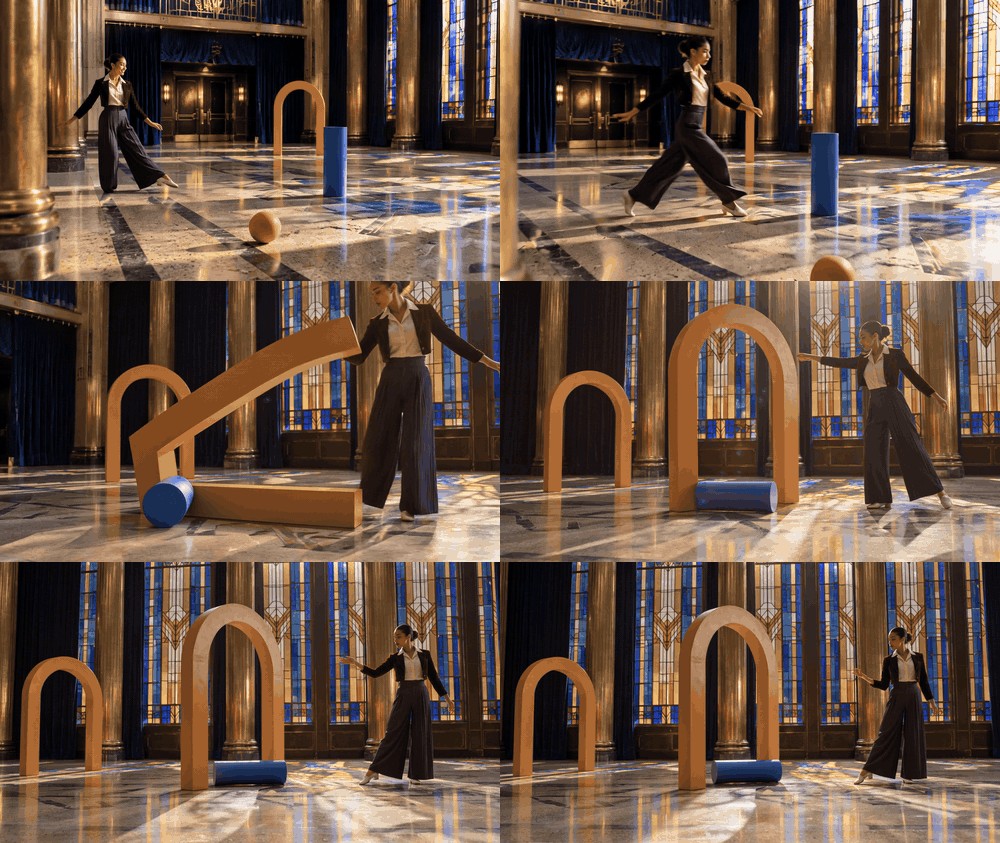
The arch tips near the cylinder, but the exact contact point is unclear. This is a storyboard of the intended secondary collision, not proof that the depicted transfer is physically correct.
Shot 5: occlusion and recovery
What to inspect: whether the same ball reappears after passing behind a fixed column.
plaintext1Continue from the preceding shot's final frame in the same empty Art Deco foyer. The single coral ball is still rolling slowly; the cobalt cylinder has shifted, and the saffron arch is rocking toward rest. Ten seconds. From 0-3 seconds, follow the dancer from slightly behind as she takes two fast, fluid dance steps across the geometric terrazzo and spots the ball. Her brows draw together in concentration, then one corner of her mouth lifts. From 3-6 seconds, slide the camera behind a fixed brass-clad column so the ball becomes briefly hidden by the column itself. Keep the column, floor pattern, and dancer spatially consistent while the ball continues its established direction. From 6-10 seconds, emerge at a low three-quarter angle as the same single coral ball rolls out from the far side with unchanged size, color, and direction. The dancer turns her shoulders, reaches toward it, stops short, and lets it pass, breaking into a delighted grin. Keep the cylinder and arch in plausible background positions. Amber-and-cobalt stained-glass light, indigo velvet curtains, tactile silk and terrazzo, smooth 35 mm camera movement. No speech, titles, crowd, plants, duplicate ball, object morphing, location jump, or empty slow zoom. Wide 16:9.
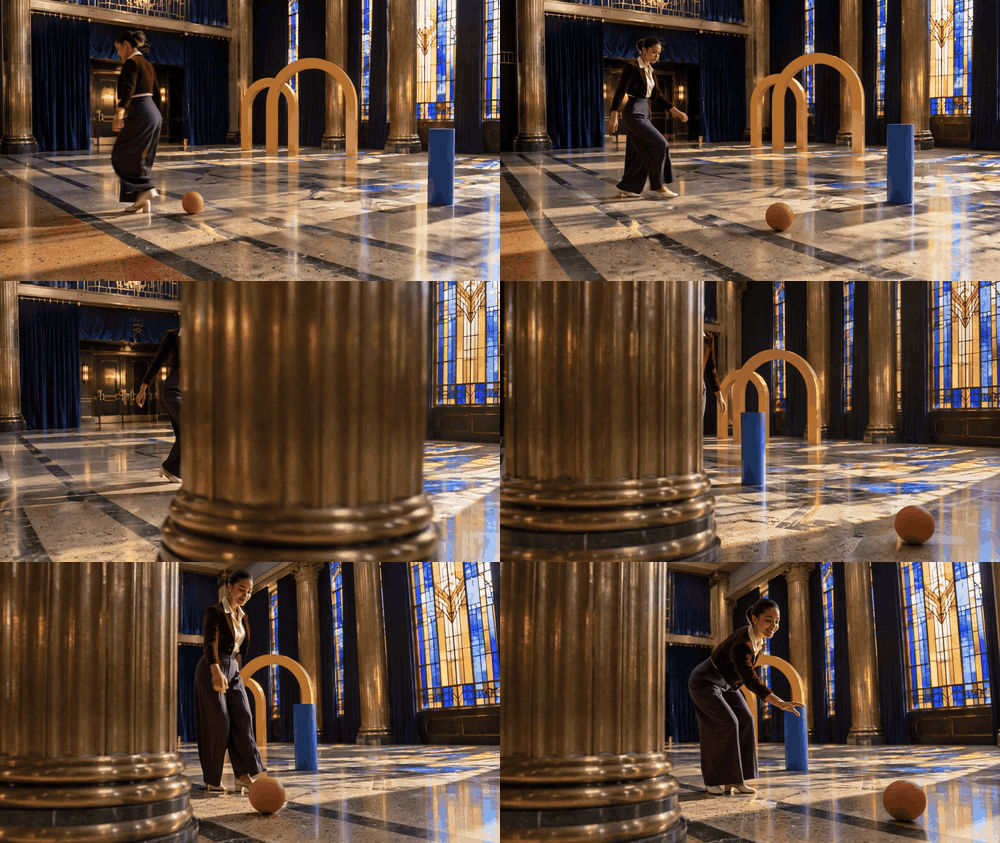
The ball is briefly hidden by a fixed column. Compare its color, size, and direction on either side of the occlusion.
Shot 6: the aftermath
What to inspect: final relative positions, settling motion, and continuity of the full scene.
plaintext1Use the final frame of shot four as the first frame, preserving the dancer's burgundy cropped velvet jacket, ivory silk blouse, deep-plum wide-leg trousers, cream dance shoes, the same coral ball, cobalt cylinder, saffron arch, brass columns, indigo curtains, stained-glass windows, and terrazzo floor. Ten seconds. From 0-3 seconds, begin low beside the coral ball as it decelerates along the floor inlay lines; the saffron arch completes a small believable rocking motion farther back. From 3-6 seconds, crane smoothly into a wide three-quarter view that reveals all three objects at once in their changed positions. Do not reset them to their starting places. The dancer travels around the settled cylinder with two flowing steps and a full controlled spin, her pleated trousers describing a clear arc. From 6-10 seconds, arc the camera to face her as she catches her balance, checks the ball and arch, exhales, then smiles with visible relief and playful pride. Hold the final composition long enough to read every object's position. Warm directional window light and colored glass shapes, cream-and-jade terrazzo, rich indigo and burgundy, restrained film grain, physically plausible settling. No speech, captions, crowd, plants, duplicate props, sudden camera teleport, or push-in-only movement. Wide 16:9.
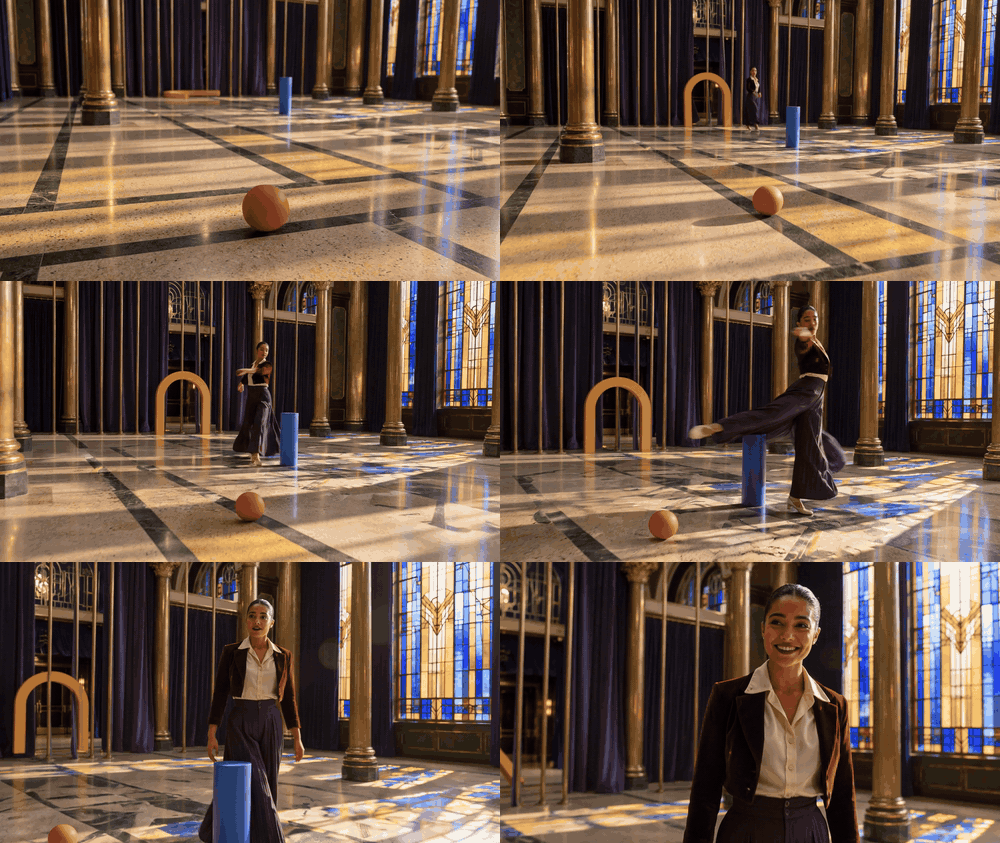
The wide ending shows the dancer's spin and the final scene. Compare the arch's position with clip 04; an apparent reset would be a continuity failure.
Review the six supplied results as one case. If the foot contact is invisible, the deflection changes between shots, an object duplicates, or final positions jump, record the failure plainly. The storyboard can communicate an idea, but it cannot validate numerical physics. For a real Genie 4 session, use the simpler fixed-camera protocol above, save the actual interaction, and compare its visible aftermath with the same observation card.
Access and next steps
Google’s announcement describes Genie 4 as a research preview starting with trusted testers, with broader availability plans tied to Project Genie and selected partners. That is a changing rollout, so consult the current official Genie page for access rather than assuming every reader can try it today. Project Genie’s earlier public prompt advice is useful context, but it is not a guarantee of Genie 4 access or identical controls.
If you can access Genie 4, begin with one fixed-camera collision and save the prompt and recording. Fill in the observation card before drawing conclusions. If you cannot access it, you can still prepare the protocol now, or make a clearly labeled video reference with a text-to-video model. For Genie 4 physics simulation for collisions and object movement, the central question is not whether one impact looks convincing. It is whether the scene remains interpretable after contact, and whether the evidence is strong enough for the decision you need to make.
Frequently Asked Questions
Is Genie 4 a physics engine?
Google describes Genie 4 as a world model for generating and interacting with simulated environments. A conventional physics engine exposes configured properties and calculated state for a scene. Do not assume a generated world exposes the same data or provides a validated numerical simulation.
Can Genie 4 show a ball bouncing or two objects colliding?
The official Genie materials describe environments with object collisions. A particular prompt or session may vary, so assess the actual run and record whether contact and post-impact movement remain visible. A product demonstration is not a guarantee for every requested collision.
Is Genie 4 accurate enough for game or engineering physics?
A generated scene can support visual exploration, but a rendered outcome alone does not prove numerical accuracy. Use the game engine or an appropriate validated simulator for implementation, engineering analysis, and safety decisions.
Can an AI video generator test object movement?
It can help create a visual reference for a proposed movement. A generated clip does not offer the same interaction or measurable state as a physics engine, and it should not be presented as Genie 4 output unless it actually came from Genie 4.





