Water exposes a world model's weak spots quickly. A stream can look convincing in one frame and still fail when a leaf lands, a board crosses a wave, or the camera turns. Genie 4 water flow and surface ripple realism is therefore best judged as a sequence of cause and effect, not as a polished still. Public material shows that DeepMind presents flowing water and interactive water scenes as capabilities, but it does not publish an independent water-physics score. That makes a careful five-point inspection more useful than a blanket verdict.
Key takeaways
- Genie 4 is an interactive world model that generates and updates an explorable scene, not simply a prompt-to-video renderer.
- Official pages show water-flow and water-interaction examples, but do not provide a measured fluid-accuracy benchmark.
- Check continuity, ripple propagation, interaction, reflections, and persistence before calling generated water physically reliable.
What Genie 4 Is, and What Its Water Demos Can Prove
A conventional text-to-video model aims to deliver a finished clip from a prompt. Genie 4 is presented as a world model: a user can move through a generated environment, steer the scene with natural-language instructions, and observe how it responds. That difference matters for water. A clip can hide discontinuities with editing. An explorable scene gives the viewer more chances to test what happens after movement or a change in direction.
DeepMind lists flowing water, object collisions, swaying trees, and naturally moving characters among the behaviors it aims to generate. Its page describes Genie 4 as an evolving preview, and says the recordings show real-time interactions that have been shortened for presentation. The official material establishes that water is part of the intended capability set. It does not establish that the model solves fluid dynamics or that every ripple follows measured physical laws. (Google DeepMind’s Genie 4 overview, October 2026)
The useful distinction is between three levels of evidence:
- Appearance: Does the surface read as water through color, highlights, transparency, and texture?
- Motion coherence: Does the visible flow remain plausible across adjacent moments and camera movement?
- Physical validity: Do speed, forces, wave propagation, splashes, and object responses match a defined reference or measurement?
A public demo can support observations about appearance and visible coherence. Physical validity needs a test setup, a reference, and repeatable measurements. The public Genie 4 page does not provide those for water.
A Five-Point Test for Water Flow and Surface Ripples
Use this checklist on any water sequence. Replay the same short interval at normal speed, then inspect it frame by frame. A single striking frame is not enough: most errors show up at transitions.
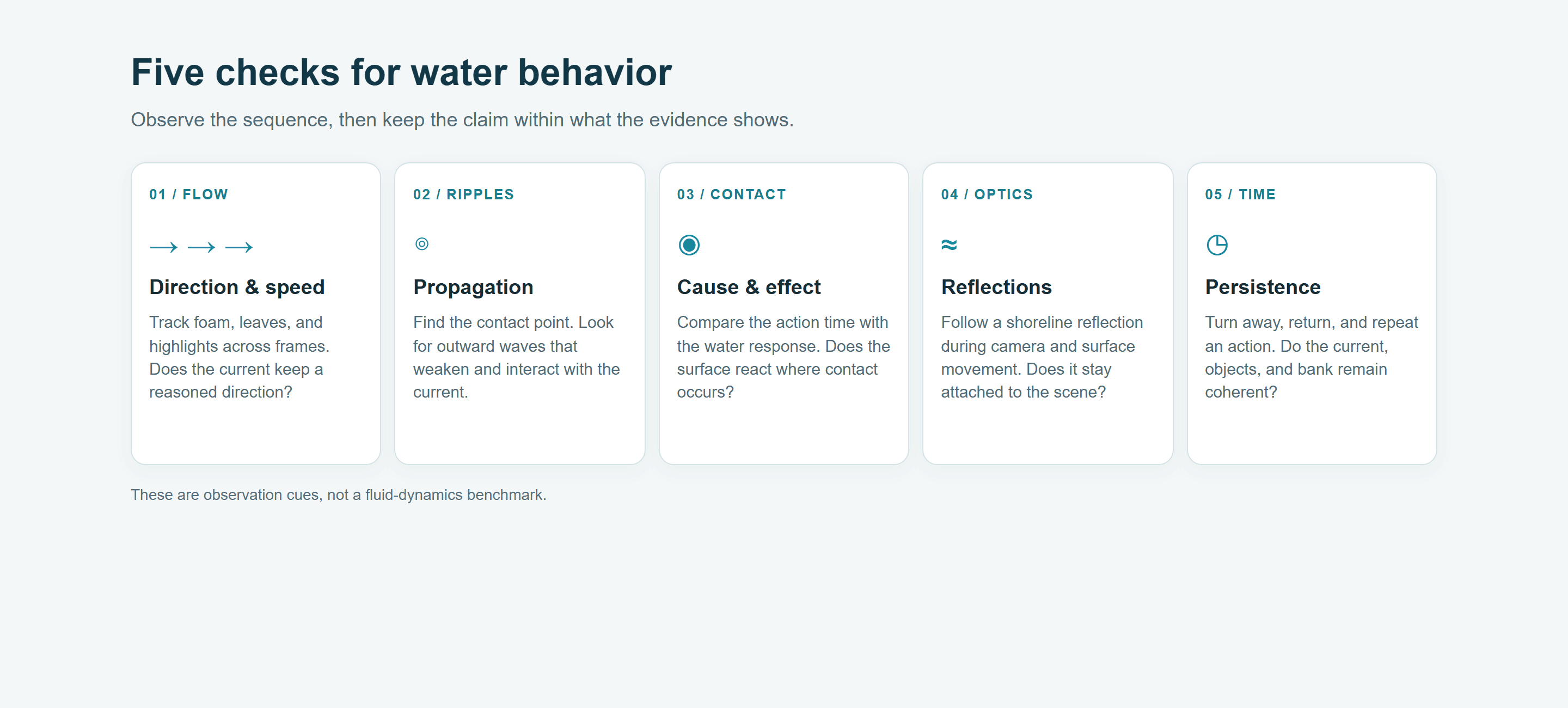
The checklist separates visible cues from conclusions that require a controlled benchmark.
| Check | What to watch | What a pass can support | What it cannot prove alone |
|---|---|---|---|
| Flow continuity | Track foam, leaves, or highlights across adjacent frames. Check whether the current keeps its direction and whether speed changes have a visible cause. | The sequence has locally coherent motion. | Correct flow rate, viscosity, or fluid equations. |
| Ripple propagation | Find the disturbance point. Look for wave fronts expanding away from it, weakening with distance, and interacting with the current. | The model represents a recognizable ripple response. | Measured wave speed or correct energy loss. |
| Cause and effect | Note where a foot, board, or dropped object contacts the surface and when the water reacts. Check whether the reaction follows that contact. | The visible response is temporally linked to the action. | Correct forces, mass, or collision mechanics. |
| Reflection stability | Follow a shoreline, tree, or bright reflection as the camera and surface move. Look for reflections that slide independently of both. | Reflections remain visually attached to the scene. | Correct optics or a physically calibrated surface normal. |
| Temporal consistency | Continue moving, revisit the same bank, and repeat one interaction after a prompt edit. Watch for water direction, shore shape, or objects changing unexpectedly. | The scene remains usable over the tested interval. | Long-session stability or repeatability across new runs. |
Flow cues and ripple cues can disagree. For continuity, follow something distinct, such as a leaf edge or foam patch, for several seconds. The water texture may change naturally, but rocks and the bank give you fixed reference points. If highlights and flecks keep reforming in place, the surface may look active without showing a stable current.
A ripple does not need to look like a perfect circle in moving water. Current can stretch or bend its visible rings. Look for a response that begins near the contact point, expands outward, and changes as it meets the flow. A calm pond makes a simpler first test because fewer forces compete. A stream adds a useful second test of whether the disturbance and current can coexist.
Treat reflections and highlights as separate clues. A bright streak can move because of surface motion, lighting, or camera movement. Follow a reflected tree or shoreline as well as the highlight. If the camera turns, the reflected scene should change with the viewing angle; if the surface ripples, its image may distort locally. A single flickering highlight cannot establish that the model handles water optics correctly. For a useful pass, write down the timestamp, action, expected response, and observed response. For example: “At 00:04, the leaf contacts the surface near the left stone; a ring begins at the contact point, expands, and is then carried downstream.” This notes an observable event. “The water physics are accurate” is a much broader claim and needs more evidence.
For comparisons, hold the viewing conditions steady. Use the same playback speed, crop, and camera interval, and compare the same event in each run. If one clip uses a wide shot and another cuts to a close-up, the second may hide a missed ripple or make a small splash look more dramatic. Keep a copy of the prompt and note any edits before running again.
Separate prompt-following from physical behavior, too. A model can omit the leaf because the instruction was ambiguous, even if it could render a ripple. Conversely, it can follow every clause while producing a ripple that moves in the wrong direction. Record both outcomes: whether the requested event appeared, and whether its visible response stayed coherent. This keeps the review useful without turning a subjective impression into a benchmark.
A practical three-run check can expose instability without pretending to establish scientific accuracy. First, run the base prompt. Second, repeat it unchanged and note whether the event sequence changes. Third, change one stated condition, such as moving the leaf closer to the bank, and see whether the result changes in a corresponding way. Save all three outputs. Variation is not automatically a failure in a generative system, but unexplained variation matters if the scene must support repeatable interaction.
Keep the standard proportional to the task. A short concept video may only need a believable current and a clear splash. A game prototype needs controls and water behavior to respond consistently. A robotics simulation would need a validated physical model and known error bounds before its water interactions could support engineering decisions.
What the Public Genie 4 Evidence Shows
DeepMind’s model page provides a broad claim: Genie 4 can generate environments where water flows and objects collide. Its examples include a flowing river in a stylized world prompt and scenes involving water-like movement. Project Genie’s gallery supplies a more directly interactive water example called Tide Rider, where users steer a surfboard and try to catch or ride a wave. It also describes Rollerball as a scene for testing memory, reflections, and water physics. Those are useful demonstrations of interactive scenarios and suggested user tests. They are not a published measurement of ripple shape, wave speed, or fluid accuracy. (Project Genie’s official gallery, accessed November 2, 2026)
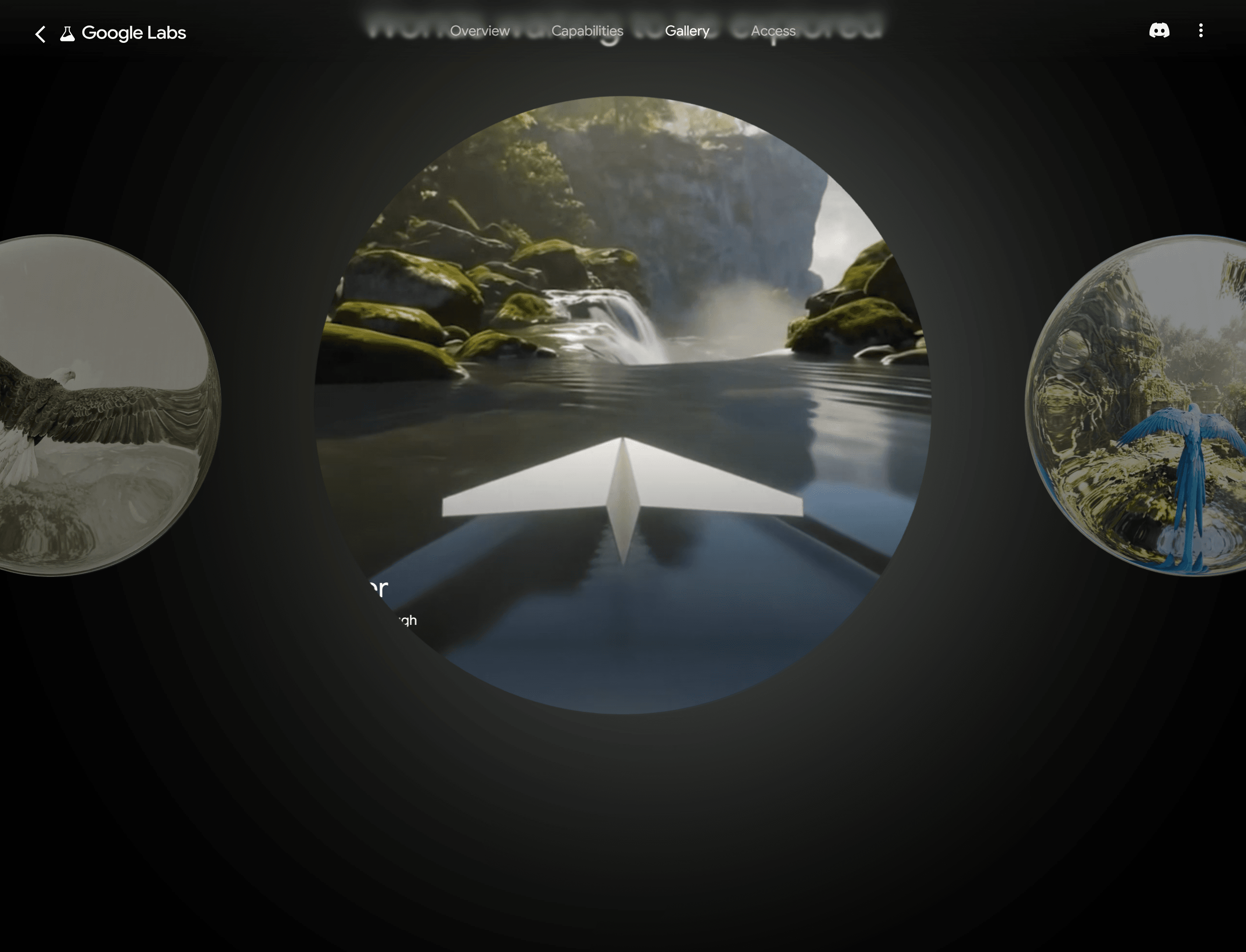
The Folded Flyer gallery preview shows a navigable waterway; the separate Tide Rider example invites users to test wave riding.
The strongest conclusion is narrow: the public materials demonstrate that water is part of Genie 4’s interactive world-generation showcase. They invite people to explore how a surface responds. They do not show a controlled comparison against a real stream, a fluid solver, or a public benchmark with repeated trials.
DeepMind also names limits that affect this kind of inspection. Visual details and object permanence can shift over time, with drift more noticeable during longer runs, complex prompt edits, or navigation. Interactions among users, agents, and shared environments remain an active research challenge. Continuous interactions last a few minutes rather than extended sessions. These caveats make persistence part of the water test: a ripple that looks good once tells you less if the shoreline or current changes after you turn around.
A public demo is most useful as a source of test ideas. It can show a user steering an environment and reveal the kinds of water interactions DeepMind wants viewers to notice. It leaves several evaluation details unanswered: whether the same action was repeated from the same starting state, how many attempts were made, and how a result was selected. Those details matter when a creator wants to compare behavior rather than watch a showcase.
When you review a recording, separate the instruction from the observed result. A prompt may explicitly ask for flowing water or a wave, so the clip can show that the model rendered the requested concept. A later steering action can show how the scene changes in that take. Neither establishes that an unprompted interaction would behave the same way. Keep a short observation log with the source clip, visible user action, response, and time interval. This makes the next test easier to reproduce and prevents a visually strong moment from standing in for a repeatability claim. Avoid reading more into the official videos than they show. DeepMind says recordings are real-time interactions, but sequences are shortened and intended for illustration. A selected recording can show that an event happened in that take. It cannot establish how often it happens, how robustly it repeats, or whether the behavior is physically calibrated.
A Reproducible Water-Scene Test You Can Run Today
Genie 4 access and a conventional video-generation workflow answer different needs. If you have access to Genie 4, use its controls to explore the scene and repeat an interaction. If you need a rendered water clip today, run the same observational idea through an available text-to-video model, then label the result with the actual model and settings. That run tests your prompt and video workflow, not Genie 4.
Start with a deliberately constrained scene:
plaintext1A continuous natural-history shot at water level beside a shallow rocky stream. Clear water flows steadily from left to right around three fixed stones. A small leaf drops into the stream near the center, touches the surface, and creates circular ripples that spread outward and fade while the current carries the leaf downstream. Keep the stones fixed, the water direction consistent, and reflections of the trees stable relative to the camera. Show the full sequence without cuts: calm flow, leaf impact, expanding ripples, then the leaf drifting away. Realistic daylight, restrained documentary camera movement, physically coherent motion. No text, no graphics, no extra objects, no sudden camera changes.
Use text-to-video at 16:9 for 6–8 seconds if the selected endpoint supports those settings. Keep audio off unless sound is part of your evaluation. Save the model name, endpoint, resolution, duration, prompt, and generation date with the file. On a second run, change only one variable, such as the leaf impact location. If several prompt details change at once, you cannot tell which instruction affected the output.
Review the result in this order:
- Confirm that the stream stays left-to-right before and after impact.
- Check that the ripple starts at the leaf’s contact point rather than appearing across the whole surface.
- Follow the leaf after impact and see whether the current carries it downstream.
- Track a reflection and one fixed stone while the camera moves.
- Replay the same prompt with one controlled change and compare the same moments.
Atlas Cloud currently lists a Veo 3.1 text-to-video endpoint for ordinary video creation. Its model page describes text-to-video, image-to-video, and reference-to-video options; the selected endpoint determines supported settings and pricing. The directory is a place to inspect current video-generation options, not evidence that Genie 4 is hosted there. Creators can start from Atlas Cloud homepage, then browse Atlas Cloud’s model directory or the specific Veo 3.1 text-to-video offering when a finished clip, rather than an interactive world, is the deliverable. Verify endpoint parameters and current price on the model page before running it.
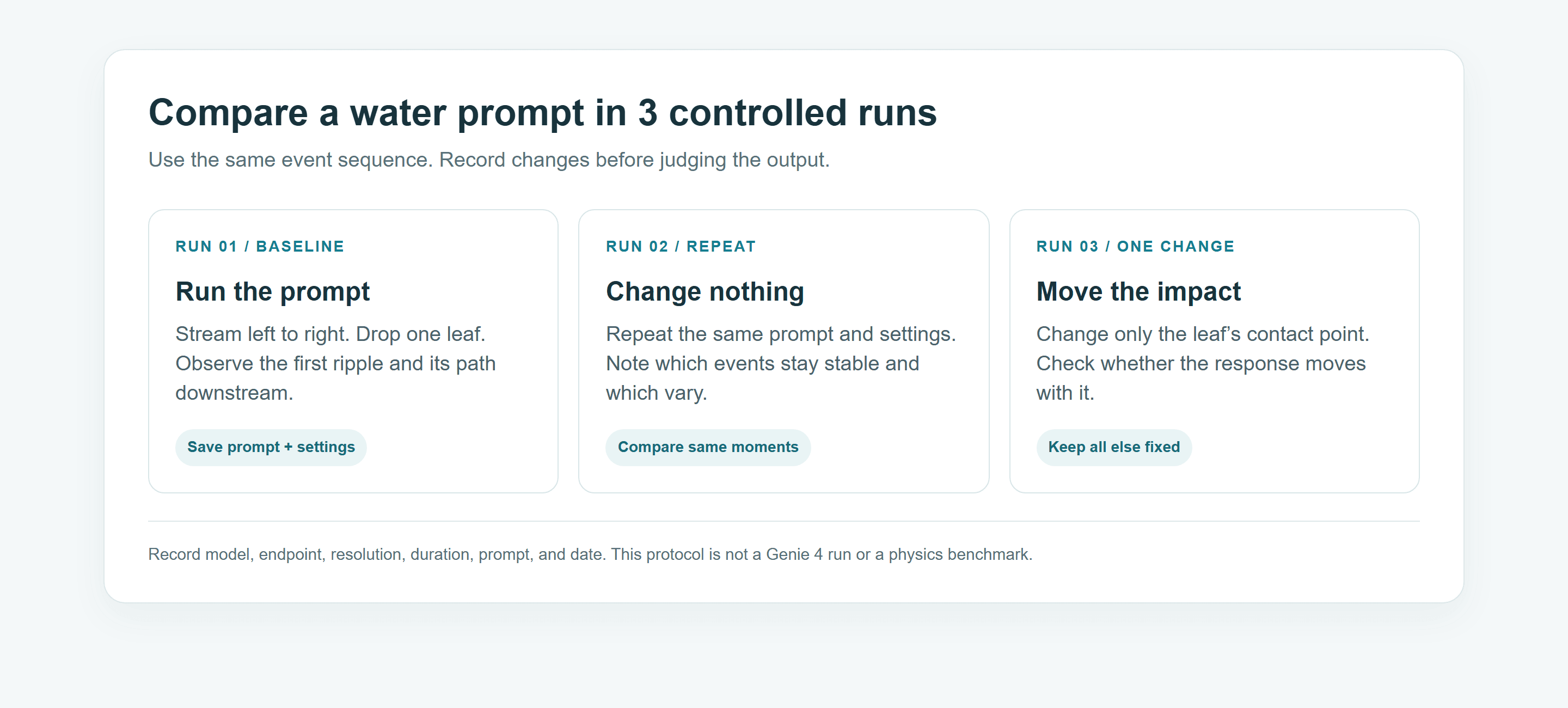
The protocol keeps model identity and test conditions attached to the result so another run can be compared fairly.
A Human-in-the-Stream Case: Three Views and Three GIFs
A close look at water needs a visible cause, not just a beautiful surface. This case uses three supplied stills and three independently generated 10-second clips converted to GIFs. The woman steps across a shallow stream, turns as the camera moves, and finally reaches toward the surface. Her movements give the viewer contact points, fixed stones, a drifting leaf, and reflections to inspect. These are illustrative generated outputs, not Genie 4 footage or a controlled fluid-physics benchmark.
The stills establish the woman, wardrobe, bank, stones, and camera positions. The GIFs let us inspect motion that stills cannot show. Across the supplied media she wears a cobalt embroidered jacket, a pomegranate-red skirt with a copper floral hem, a saffron scarf, and dark boots in a terraced garden with fuchsia bougainvillea and a turquoise stream. Each GIF is a separate take, so do not infer continuous motion or repeatability across the three files. The source files do not contain verifiable model identity; confirm the generation job record before attributing these outputs to a specific model.
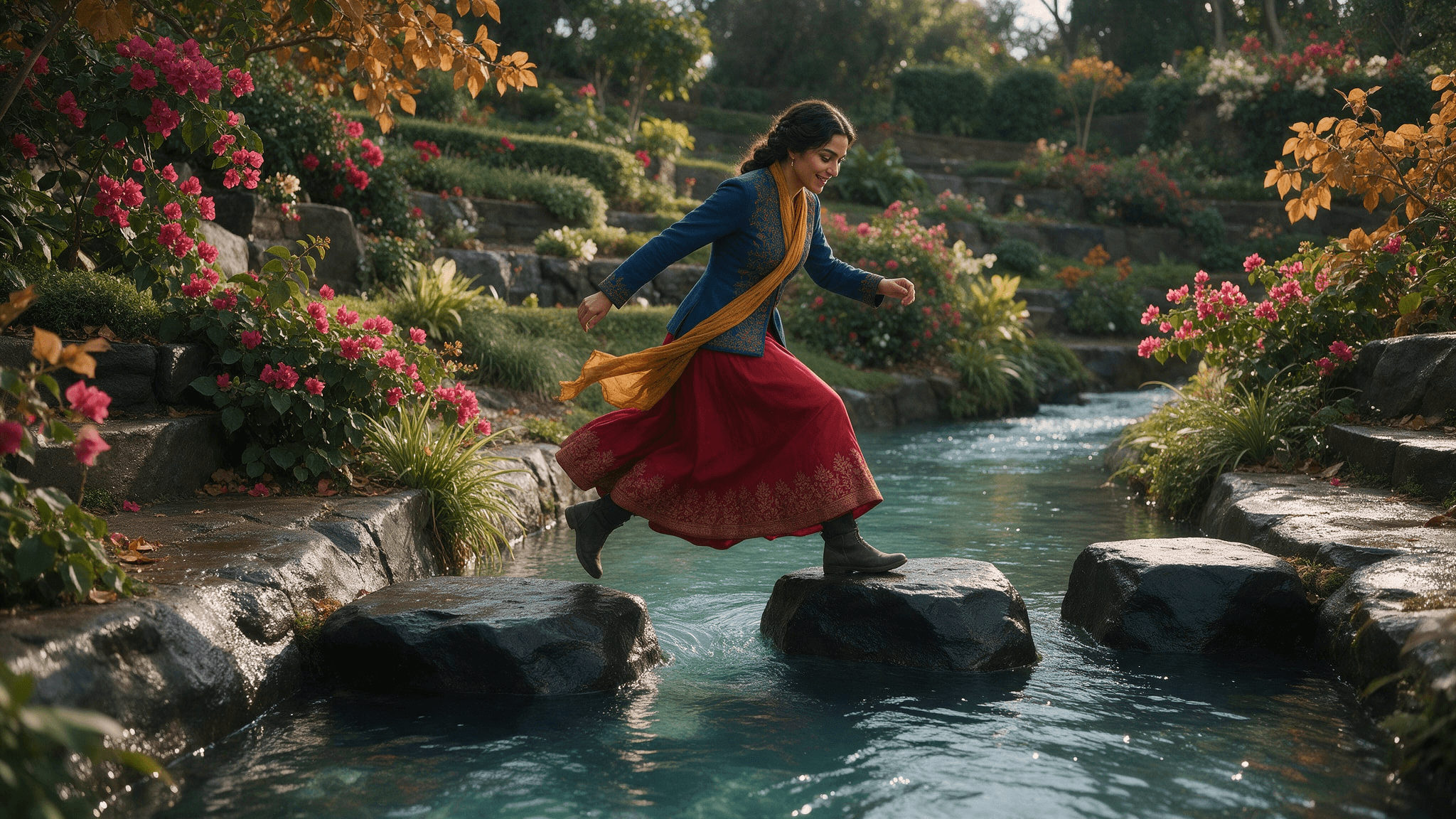
Still 1 establishes the full crossing, fixed stones, colorful garden, and the woman's costume before a visible water contact.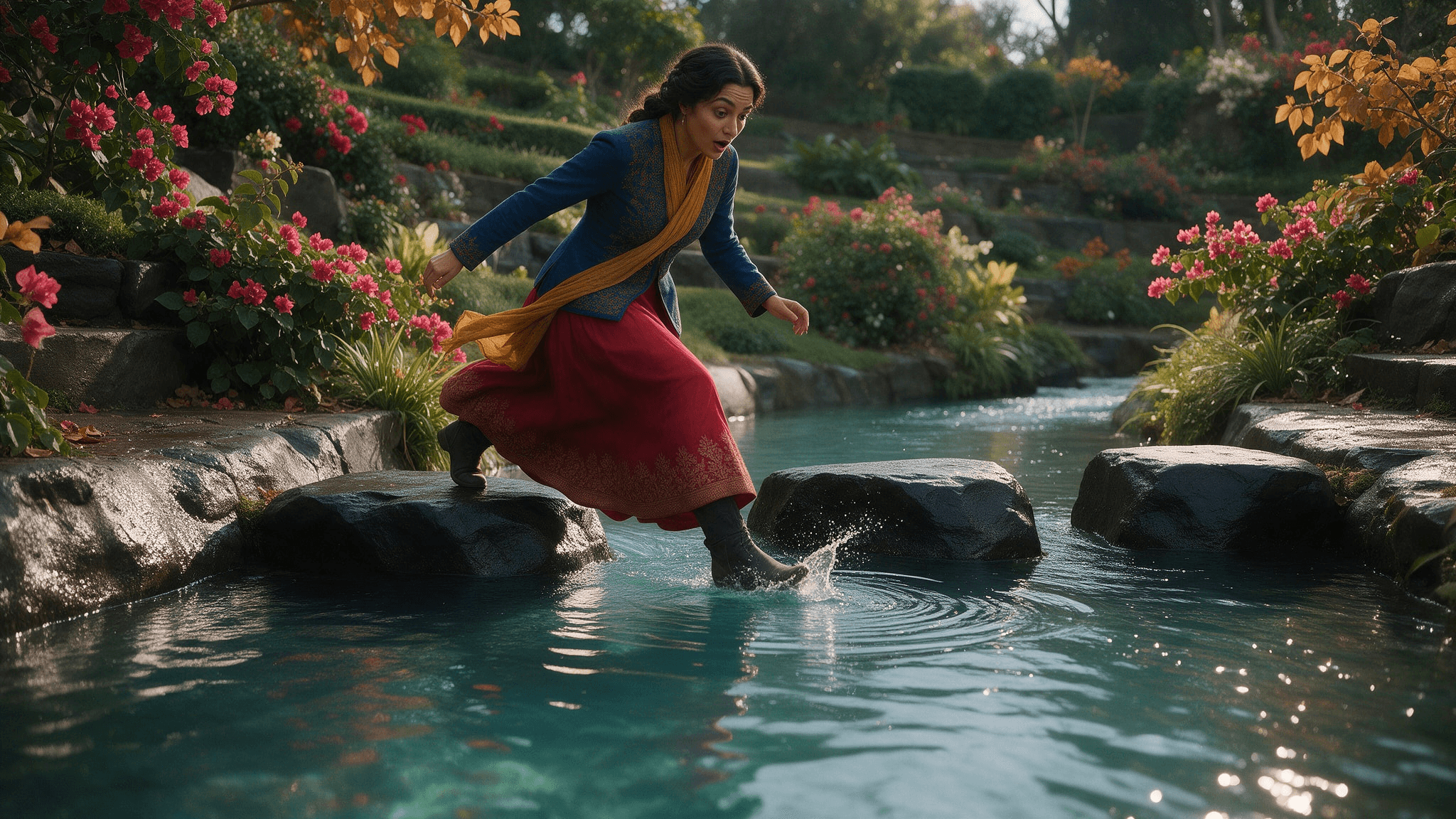
Still 2 places the boot and ripple origin in one view. It describes a moment, not the timing of the water response.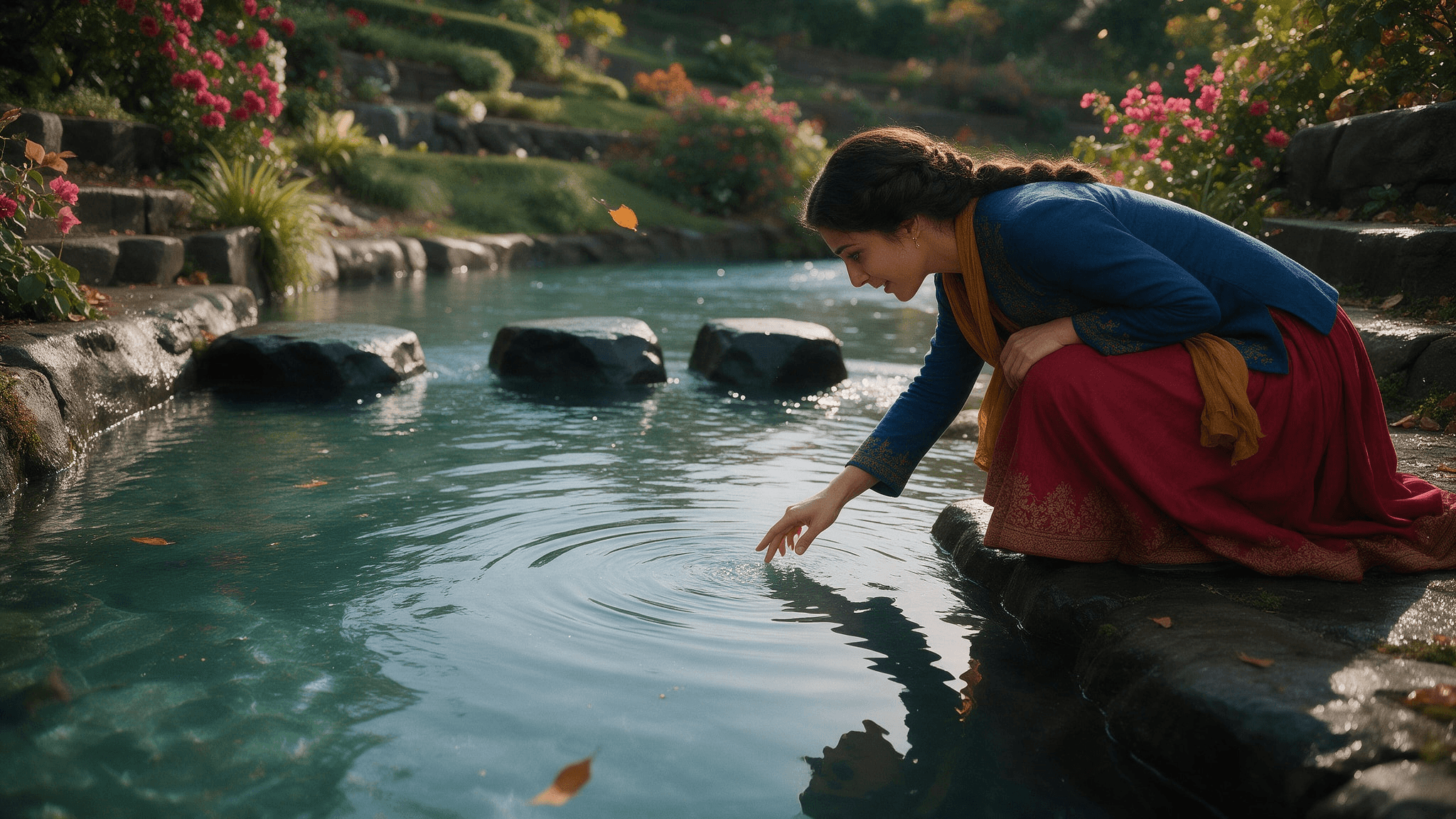
Still 3 changes the viewing direction and shows the hand, reflected profile, and water surface together.
Still-image model: Nano Banana 2. Generate image 1 with Text-to-Image (google/nano-banana-2/text-to-image). Then use Reference-to-Image (google/nano-banana-2/reference-to-image) for images 2 and 3, uploading the accepted first image as a character, costume, and location reference. Generate one separate 16:9 image per run. For each run, copy the COMMON SCENE block below and only the matching IMAGE block. When generating image 3, upload image 2 as an additional reference if the playground offers that option.
plaintext1COMMON SCENE FOR EACH IMAGE: Create one photorealistic 16:9 editorial still of the same adult woman and the same shallow stream in one terraced garden. She has expressive dark eyes and dark wavy hair secured in a low braided bun. Her costume is a tailored deep-cobalt jacket with fine copper embroidery, a full pomegranate-red skirt with a copper floral hem, a narrow saffron silk scarf, and practical dark ankle boots. Preserve her face, hair, clothes, three large black stepping stones, flowering fuchsia bougainvillea, amber leaves, and stone banks across the series. Clear turquoise water passes the first stone, then the second, then the third toward the downstream bank. Its apparent screen direction can change when the camera crosses to the opposite bank, but its physical direction never changes. Warm late-afternoon light, rich but believable colors, detailed fabric, natural skin, clear water, no fantasy glow. 2 3IMAGE 1, WIDE UPSTREAM VIEW: A low three-quarter view from the upstream bank shows the full garden and the entire crossing. She is mid-stride between the first and second stone, smiling with concentration, scarf and skirt describing the direction of her movement. Leave the near edge of the water and the three stones unobstructed so the current is easy to read. This is the before-contact reference. 4 5IMAGE 2, WATER-LEVEL SIDE VIEW: A low side angle beside the second stone shows her boot toe making one clear, gentle contact with the stream. Her face is visible above the water, eyebrows lifted in a brief surprised expression. Small concentric ripple fronts begin at the boot contact point; the current continues left to right around the stone. A bright reflected strip of the cobalt jacket and red skirt breaks only where the ripple reaches it. Keep the contact point, foot, and full ripple origin visible. 6 7IMAGE 3, REVERSE OVER-THE-SHOULDER VIEW: From the downstream bank, look back past her shoulder as she crouches and extends her fingertips toward the water. Her expression has changed to delighted curiosity. The three stones and the same garden remain recognizable. A saffron leaf drifts toward the downstream bank; the earlier boot ripple has weakened, while a new small fingertip ripple begins exactly below her hand. Her reflected silhouette changes with this reversed viewing direction. Do not move the stream, stones, or costume between images. 8 9Each output must be one complete image, not a triptych, collage, contact sheet, storyboard page, or fake screenshot. No text, labels, logos, extra people, extra limbs, floating feet, duplicated stones, or unexplained waves. Include only the requested angle in each run.
Motion model: Wan 3.0 Reference-to-Video, model ID alibaba/wan-3.0/reference-to-video. The reproducible brief below calls for three separate 10-second generations, one prompt per run, at 16:9 and native 1080p if offered. Upload the three approved stills in image 1, image 2, image 3 order as scene and character references for each run. The model produces source clips; convert each complete 10-second clip to its own GIF. Do not cut one longer clip into three excerpts. The actual model used for the supplied files must be confirmed from the generation history; do not label the GIFs as Genie 4 output. The documented duration range for this endpoint includes 10 seconds.
GIF 1: The boot touches the current. This clip tests contact timing and the origin of the first ripple while showing a full-body movement and an expressive reaction.
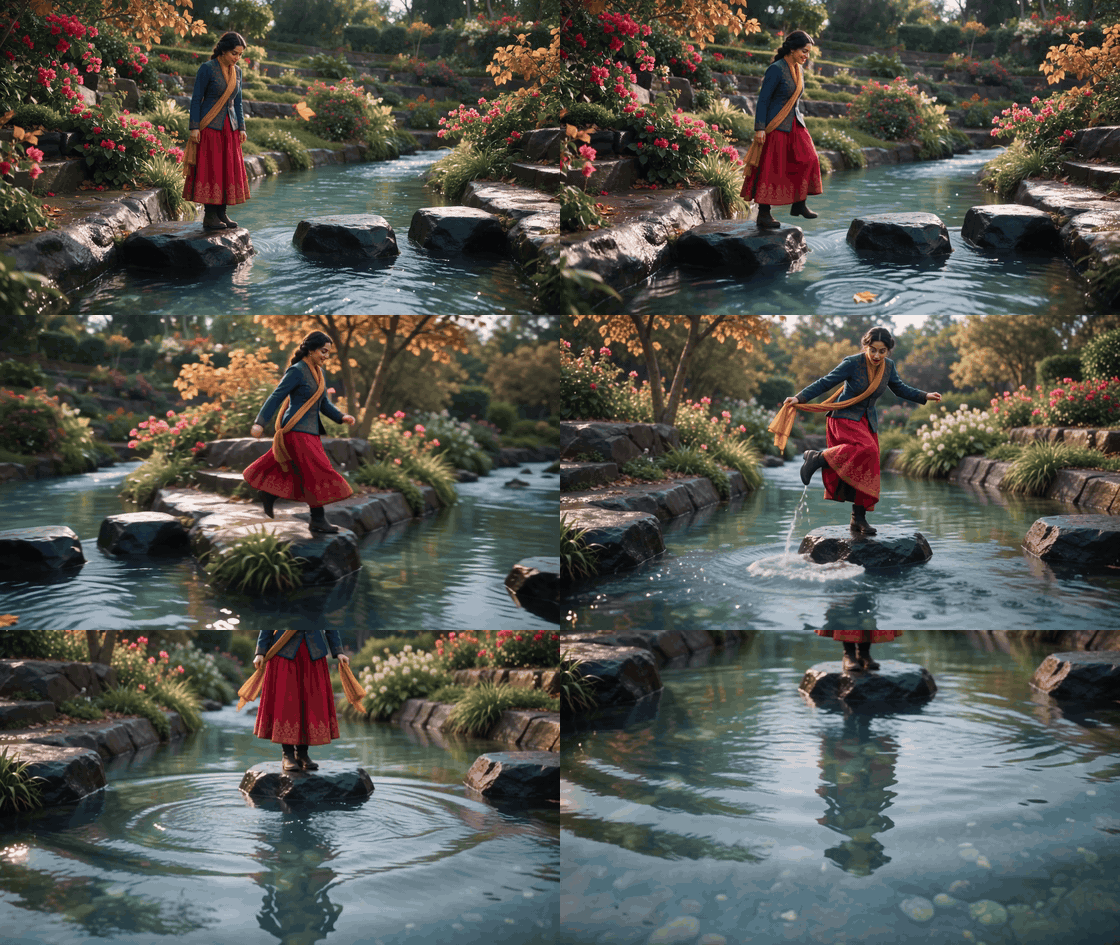
In this take, she crosses the stones, her boot disturbs the surface, and ripple rings appear nearby. Watch the contact and response in sequence; the GIF does not measure wave speed or physical accuracy.
plaintext1Generate ONE continuous 10-second photorealistic 16:9 source clip to be converted into an animated GIF. Use reference image 1 for the same adult woman's face, dark braided bun, deep-cobalt embroidered jacket, pomegranate-red skirt with copper floral hem, saffron scarf, dark ankle boots, three fixed black stepping stones, bougainvillea, amber leaves, and shallow turquoise stream. Use reference image 2 for the precise low side view and boot-contact location. Water flows past stone 1, then stone 2, then stone 3 toward the fixed downstream bank. Warm late-afternoon light, rich natural colors, clear reflections, detailed fabric, and smooth anatomy. 2 30–2 seconds: Start wide and low from the upstream bank. She studies the stepping stones with a focused expression, then smiles. Water and one saffron leaf move steadily downstream. Camera tracks sideways, revealing the crossing rather than zooming. 4 52–5 seconds: She takes an elegant full-body step onto the second stone. Her shoulders turn, skirt swings, and scarf follows her motion. The camera arcs smoothly toward a water-level side view. At about second 4, the toe of her front boot briefly touches the stream beside the stone. Her eyebrows rise in genuine surprise; she lifts the foot back to safety. 6 75–10 seconds: Keep the boot, exact touch point, and water together in frame. A small splash begins at contact, followed by ripple fronts that expand and weaken while the current stretches them slightly downstream. She catches the scarf with one hand and gives a delighted smile. The camera continues a short lateral move so her reflected cobalt jacket and red skirt change with the viewing angle and ripple. The three stones stay fixed. 8 9One take, one location, no cut or slow push-in. No dialogue, text, logos, costume changes, extra people, floating feet, duplicated stones, large waves, ripple before contact, reversed flow, or sudden camera jumps. Keep the contact point and at least two visible ripple fronts unobstructed.
GIF 2: The camera turns while the stream keeps flowing. This clip offers a view of the dancer's turn, the banks and stones, and changing reflections. The actual take also begins with another foot-water splash, despite the prompt asking for no new impact.
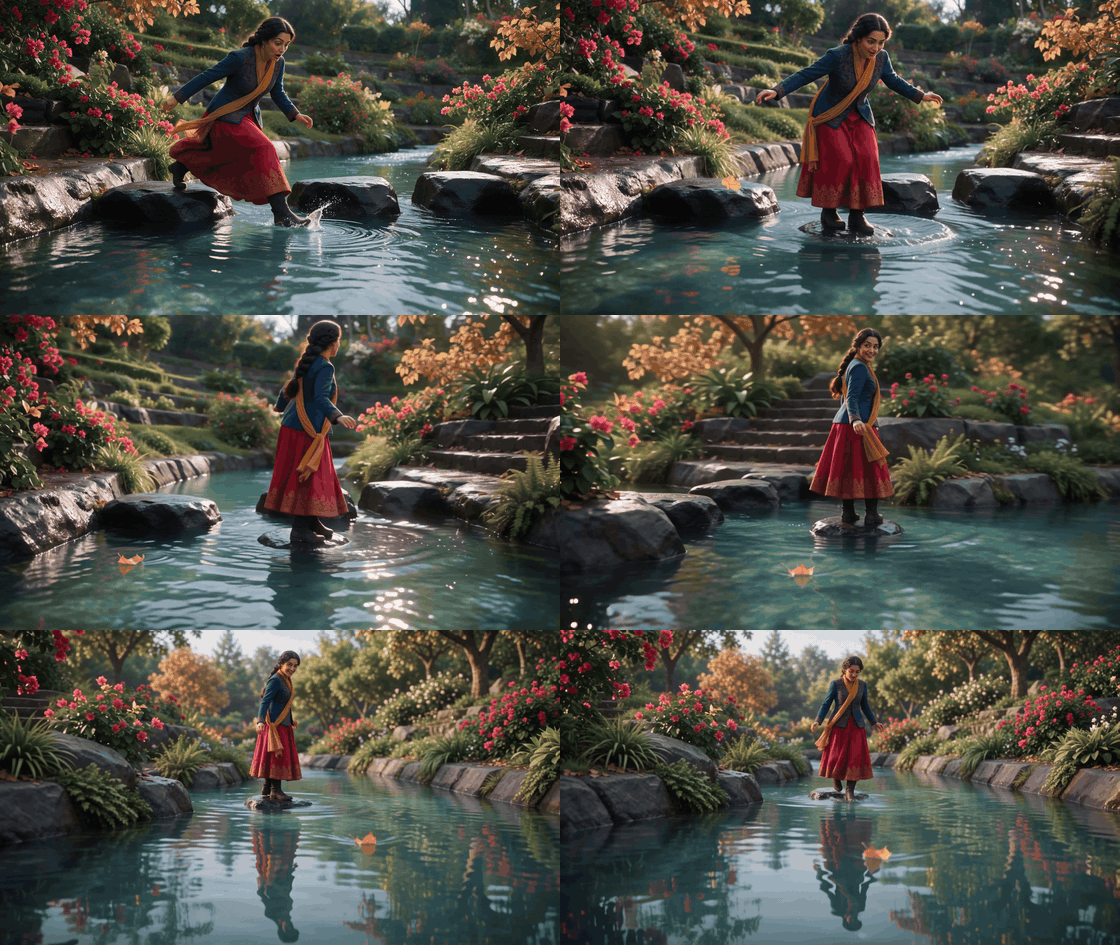
Use the later camera move to inspect landmarks and reflections. Because the take adds an early splash, it is a qualitative viewing example rather than a controlled test that changes only the camera angle.
plaintext1Generate ONE continuous 10-second photorealistic 16:9 source clip to be converted into an animated GIF. Use reference images 1, 2, and 3 for the same adult woman, dark braided bun, cobalt embroidered jacket, pomegranate-red skirt, copper hem, saffron scarf, dark ankle boots, three fixed black stones, bougainvillea, amber leaves, stone banks, and shallow turquoise stream. Water always travels from the first stone past the second and third toward the same downstream bank, even when the camera crosses to the opposite side. Warm late-afternoon light and rich believable color. 2 30–3 seconds: Begin beside the second stone at a waist-high side angle. The woman steps lightly onto the third stone, opens her arms for balance, and turns her shoulders and hips in one fluid movement. Her face changes from careful concentration to a playful smile. A single saffron leaf passes the second stone and moves steadily downstream. 4 53–7 seconds: The camera makes a smooth, visible quarter-circle arc from the side toward the downstream bank, changing its viewing direction without a cut. Her scarf sweeps across the air and the skirt settles naturally as she pivots to look back over one shoulder. Keep all three stones and the drifting leaf recognizable as landmarks. The current does not freeze, reverse, or regenerate in place. 6 77–10 seconds: Finish in a low reverse three-quarter view. She glances down at her reflection, smiles with curiosity, and takes a small balancing step. Her reflected silhouette and the reflected trees shift with the new camera angle; small existing surface undulations distort them locally. The leaf continues past the third stone toward the downstream bank. 8 9One take, no cut, no static zoom, no new water impact in this clip. No dialogue, text, logos, extra people, costume changes, duplicated leaves or stones, sliding shoreline, inconsistent reflections, or reversed current. Prioritize graceful body motion, a clear facial transition, a visible camera arc, and trackable water flow.
GIF 3: Fingertips make a second ripple. This clip follows a change from standing to crouching as the camera drops toward the surface.
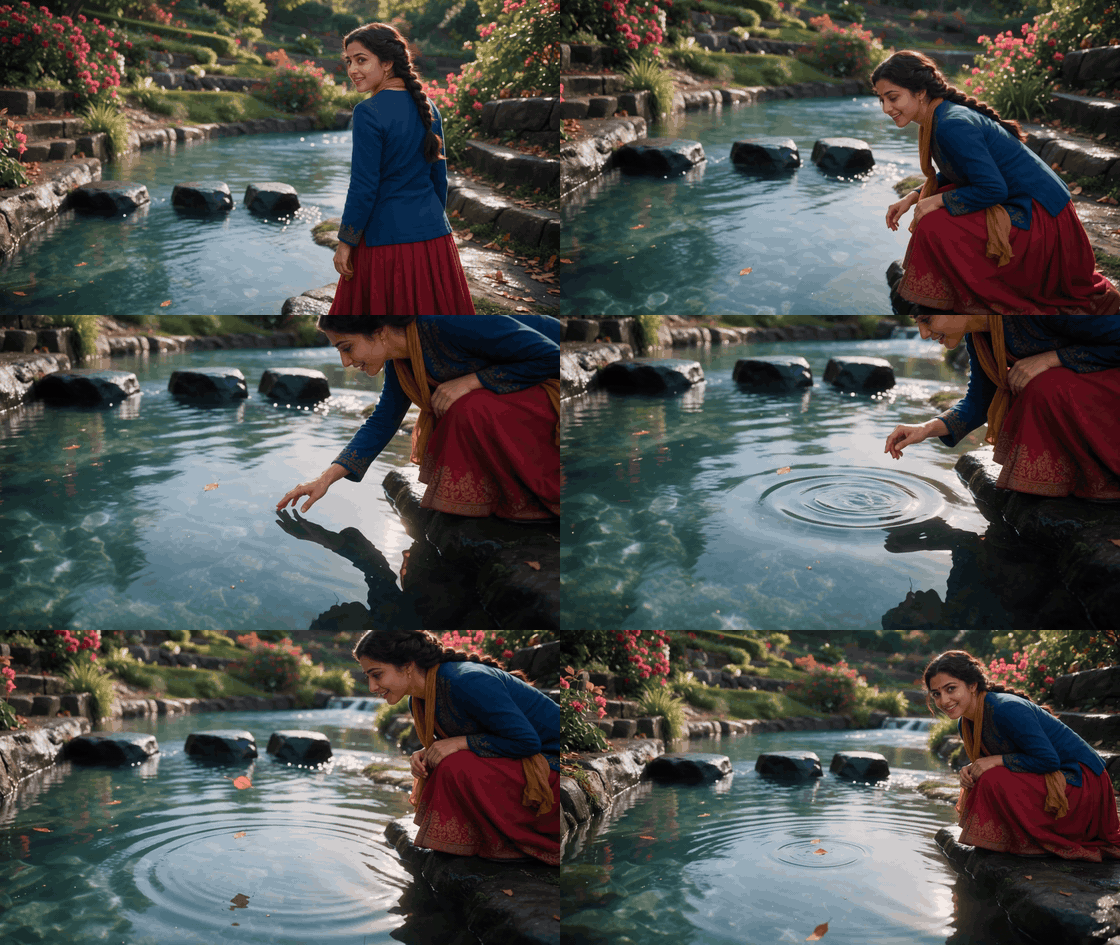
Ripples appear near her lowered hand while her reflection remains in view. Inspect the original frames if exact fingertip contact and ripple timing matter; this GIF alone does not establish a measured water response.
plaintext1Generate ONE continuous 10-second photorealistic 16:9 source clip to be converted into an animated GIF. Use reference image 3 for the same adult woman's face, dark braided bun, cobalt embroidered jacket, pomegranate-red skirt with copper floral hem, saffron scarf, dark ankle boots, and the downstream reverse camera direction. Use reference images 1 and 2 to keep the same terraced garden, bougainvillea, amber leaves, stone banks, three fixed black stepping stones, and shallow turquoise stream. Keep the same upstream-to-downstream water path. Warm late-afternoon light, rich believable colors, detailed fabric, natural skin, and physically legible water contact. 2 30–3 seconds: Start in a medium reverse three-quarter view as she looks back across the stones. Her playful smile softens into curiosity. She turns toward the bank and lowers into a graceful, controlled crouch; the skirt folds and scarf settles naturally. The camera tracks around her shoulder and drops toward water level without a cut. 4 53–5 seconds: In a low over-the-shoulder view, show her face in partial profile, her hand, and the undisturbed surface together. At about second 4, two fingertips lightly touch the water exactly once near the bank. Her eyes widen slightly and she leans forward with interest. The water must remain calm at this spot until contact. 6 75–10 seconds: A small ripple begins exactly beneath the fingertips, expands across her reflected profile and the reflected amber leaves, then weakens as the current carries the visible disturbance downstream. She lifts her hand, watches the rings, and ends with a quiet delighted smile. A single saffron leaf continues downstream past the fixed third stone. The camera makes a gentle lateral move to reveal the changing reflection, not a push-in. 8 9One take, one location, no cut, no dialogue, text, logos, extra people, extra limbs, floating hand, costume changes, duplicated stones or leaves, oversized splash, ripple before contact, frozen water, or reversed flow. Keep fingertips, ripple origin, face, and reflected surface readable at GIF size.
How to evaluate these outputs: The stills can confirm design and viewpoint consistency, but they cannot establish motion realism. In GIF 1 and GIF 3, check that each ripple begins only at the visible contact point and expands while the current remains downstream. In GIF 2, track the same leaf, stones, shore, and reflection throughout the camera arc. Reject a clip that consists mainly of a zoom or that loses the character, costume, action, or water event. Describe only what the actual outputs show. Before naming a generating model in a published caption, verify it in the generation job history. Never label these files “Genie 4 footage.”
Do not publish a substitute-model output under a Genie 4 caption. The model label is part of the evidence. If you later gain Genie 4 access, run the same underlying event in an explorable scene, record the control sequence, and describe what you observed rather than claiming a score you did not measure.
Interactive World Model or Video Generator?
Choose by the artifact you need. An interactive world model lets you navigate and probe a changing environment. A video generator produces a clip that can be edited, shared, or placed in a campaign. Those outputs overlap visually, but they support different decisions.
| Need | Interactive world model such as Genie 4 | Text-to-video such as Veo 3.1 |
|---|---|---|
| Main activity | Explore, steer, and change a generated world while it runs. | Describe a shot and receive a rendered video. |
| Useful water question | Does the world react when I move, turn, or interact with a wave? | Can the prompt produce a coherent stream-and-ripple shot? |
| Output | An interactive session or recorded demonstration. | A video clip for editing or publishing. |
| Evidence limit | Preview examples do not equal a fluid benchmark. | A convincing clip does not establish interactive behavior. |
| Access check | Genie 4 remains a research preview for trusted testers; Project Genie’s page lists Google AI Ultra subscribers as eligible. | Check the chosen endpoint and account access on the current model page. |
If you are a game designer, the first question is whether movement and repeated actions feel coherent enough to support exploration. If you are a marketer or editor, the practical question is whether the generated clip communicates the scene in the time you have. Use the water-flow checklist for both, but keep the claims tied to the output: “the clip shows expanding ripples” is precise; “the model simulates water accurately” is not supported without a measurement.
For creators comparing options, record the same five observations beside each output. You do not need a made-up score. A short note such as “clear flow direction, ripple starts late, reflection slips during pan” is more actionable than an overall realism rating because it tells you what to revise next.
Frequently Asked Questions
Can Genie 4 generate realistic flowing water?
DeepMind lists flowing water as an example of the environments Genie 4 can generate. The public material supports saying that water appears in its interactive-world showcase. It does not publish an independent accuracy measurement, so “realistic” should describe a specific visible result rather than a general verified capability.
Does Genie 4 create ripples when an object touches water?
Project Genie invites users to test water physics in interactive examples, including Tide Rider and Rollerball. The public pages do not provide a controlled object-drop ripple benchmark. If ripple timing and propagation matter to your project, inspect a real run and record the contact point, response, and repeatability.
Is Genie 4 publicly available?
The DeepMind Genie 4 page currently describes a research preview for trusted testers, with broader access planned through Project Genie and early-access API and AI Studio partners. Project Genie’s public page currently lists Google AI Ultra subscribers aged 18 or older. Access terms can change, so check the official pages before planning around availability.
Can I access Genie 4 on Atlas Cloud?
The current Atlas Cloud directory and Veo 3.1 model page document video-generation workflows, not Genie 4 access. Treat Veo 3.1 as an option for generating a water clip, not as a Genie 4 endpoint.
Does Genie 4 publish a water-physics benchmark or price?
The official pages reviewed for this article do not provide a water-specific benchmark score or a public Genie 4 price. The current evidence supports qualitative inspection of the published examples and any accessible session you can reproduce.
For now, the clearest way to discuss Genie 4 water flow and surface ripple realism is to separate what you can see from what has been measured. Start with flow direction, ripple origin, interaction timing, reflection behavior, and persistence. Then state the result at that level of evidence.


