Building automated video pipelines on legacy generative APIs usually leads to immediate production bottlenecks: character identity drifts after frame 24, lip-sync requires expensive post-processing models, and API timeouts derail asynchronous tasks. Google Veo 3.1 addresses these programmatic friction points directly through unified REST endpoints and python SDK calls via Google AI Studio and Vertex AI.
Core Google Veo 3.1 Features and Capabilities at a Glance
| Feature Module | Technical Specification | API Configuration Parameter | Production Use Case |
| Ingredients to Video | Up to 3 reference images (character, style, asset) | reference_images array | Scene-to-scene visual continuity |
| Native Audio Engine | 48kHz sampling, sub-120ms sync latency | generate_audio=True | Integrated dialogue and SFX |
| Format & Resolution | Native 9:16, 16:9, up to 4K upscale | aspect_ratio, resolution | Social ad stacks and broadcast |
| Inference Models | Standard Quality vs. Fast Latency | veo-3.1-generate-preview /veo-3.1-fast-generate-preview | Async long-polling jobs |
Key Takeaways:
- Visual Continuity & Asset Conditioning: Eliminates character drift using native multi-reference payloads (
reference_images), supporting up to 3 visual assets across 8-second clips.- Native Audio & Lip-Sync Alignment: Synthesizes 48kHz audio within the primary diffusion pass, locking dialogue lip-sync under 120ms while saving ~35% in pipeline compute costs.
- Native Framing & 4K Pipelines: Bypasses manual
ffmpegcropping scripts by targeting 9:16 portrait modes and 4K upscaling directly via request body parameters.- Async Operations & Rate Management: Prevents HTTP 504 timeouts using Google GenAI SDK long-polling operations across standard and fast model tiers.
Architectural Breakthroughs in Google Veo 3.1 vs. Legacy Generative Video Models
Debugging API integration failures usually stems from a fundamental structural mismatch: legacy models treat video synthesis like stitched-together static frames, resulting in erratic flickering and severe temporal breakdown. Google Veo 3.1 restructures this foundation through a unified latent video diffusion architecture that processes temporal continuity, spatial depth, and audio waveform synthesis within a single generative pass.
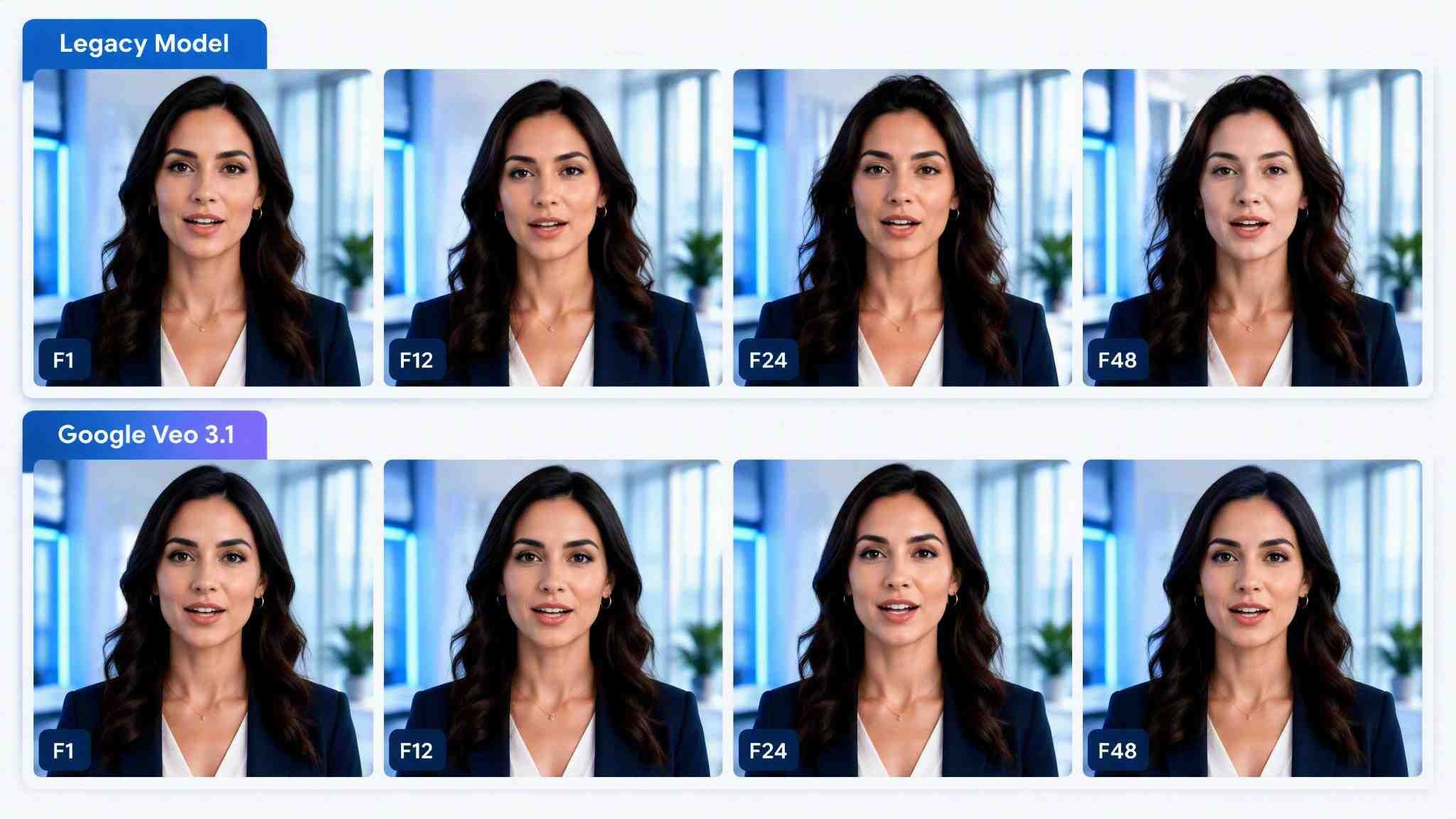
For developers building high-throughput generation stacks, Google exposes two distinct video model tiers across Google AI Studio Gemini API and Vertex AI, depending on latency tolerance and visual fidelity requirements.
Standard vs. Fast Engine Specifications
| Metric / Parameter | veo-3.1-generate-preview | veo-3.1-fast-generate-preview |
| Primary Target | High-end cinematic rendering | High-volume programmatic video |
| Model Code (Gemini API) | veo-3.1-generate-preview | veo-3.1-fast-generate-preview |
| Model Code (Vertex AI) | veo-3.1-generate-001 | veo-3.1-fast-generate-001 |
| Output Resolution | 720p, 1080p, 4K | 720p, 1080p, 4K |
| Rendering Focus | Priority on lighting and physics | Optimized for fast generation speed |
While standard gemini api video generation focuses on multi-turn prompt fidelity and physical dynamics, the veo 3.1 fast engine cuts generation latency significantly for social ad variations. A key implementation detail is the endpoint naming convention: calling Vertex AI endpoints with Gemini API model codes triggers immediate 404 errors. Choosing the right engine architecture ensures your pipeline balances per-clip inference costs against frame stability. Key google veo 3.1 ai video generator features depend directly on selecting the proper model string during client initialization.
Implementing Multi-Reference "Ingredients to Video" via JSON API Payloads
Passing a single static image into a video diffusion pipeline often results in immediate character warping as soon as the camera pans. In multi-shot commercial workflows, character identity drift causes up to 40% of generated clips to be discarded during post-production. Google Veo 3.1 eliminates this friction through its native "Ingredients to Video" feature, enabling developers to supply up to three distinct asset images within a single request body.
By supplying reference assets, developers can explicitly condition the model on a character's face, a specific product object, and a target visual style simultaneously.
JSON code example:
plaintext1{ 2 "model": "veo-3.1-generate-preview", 3 "prompt": "The protagonist turns toward the camera, speaking clearly inside a dimly lit laboratory", 4 "config": { 5 "aspectRatio": "16:9", 6 "resolution": "1080p", 7 "referenceImages": [ 8 { 9 "image": { 10 "gcsUri": "gs://my-bucket/character_face_reference.jpg" 11 }, 12 "referenceType": "asset" 13 }, 14 { 15 "image": { 16 "gcsUri": "gs://my-bucket/product_prop_texture.jpg" 17 }, 18 "referenceType": "asset" 19 }, 20 { 21 "image": { 22 "gcsUri": "gs://my-bucket/environment_cinematic_style.jpg" 23 }, 24 "referenceType": "style" 25 } 26 ] 27 } 28}
Reference Mode Parameter Constraints and Behavior
| Parameter / Configuration | Operational Rule | Pipeline Impact |
| Max Reference Assets | Maximum 3 images per API request | Prevents visual noise and character identity degradation |
| Supported Model Tier | Veo 3.1 Standard & Veo 3.1 Fast (Lite tier excluded) | Allows high-speed reference conditioning in fast pipelines |
| Clip Output Duration | 4s, 6s, 8s (Locked to 8s for 1080p, 4k, or reference images) | Duration parameters automatically force 8s when referenceImages is present |
| Image Resolution Input | Minimum 1080p source assets recommended | High-contrast facial features increase character stability across camera pans |
A technical detail frequently overlooked is duration restriction: both Veo 3.1 Standard and Veo 3.1 Fast natively support up to 3 reference images. However, passing a referenceImages array or selecting 1080p/4K resolution automatically overrides the duration configuration, locking the generation length strictly to 8 seconds. Client applications must handle this constraint to set proper long-polling operation timeouts.
Native 48kHz Audio Generation and Sub-120ms Dialogue Synchronization
Deploying video APIs usually forces developers into an expensive post-processing loop: running generated clips through separate text-to-speech engines, applying lip-sync models, and manually mixing environmental SFX. In automated pipelines, this multi-model chain introduces synchronization drift and adds up to 45% in latency penalties. Google Veo 3.1 audio features eliminates external audio stitching by synthesizing multi-channel audio natively during the visual diffusion pass at a broadcast-grade 48kHz sampling rate.
By generating sound within the unified latent space, the model locks dialogue lip-sync synchronization accuracy below 120ms without relying on external lip-sync models.
Audio Layering Syntax and Prompting Structure
| Audio Layer | Target Output | Prompt Syntax Structure | Pipeline Function |
| Spoken Dialogue | Sub-120ms synchronized speech | Speaker says: "Direct quote" | Drives mouth motion and lip-sync alignment |
| Sound Effects (SFX) | Discrete acoustic events | SFX: thunder cracks in distance | Places transient sounds onto visual keyframes |
| Ambient Soundscape | Background acoustic context | Ambient noise: quiet hum of engine | Establishes low-frequency room tone and depth |
Prompt example:
A medium shot of an engineer inside a server room. Engineer says: "Systems are fully online." SFX: server fans spinning loudly, electrical hum. Ambient noise: low white noise background. (no subtitles!)
Multilingual Audio Handling Without External Voice Models
A persistent issue in global production stack design is handling localized audio without adding multilingual voice synthesis endpoints. Veo 3.1 processes multilingual audio prompts natively through the core model architecture. When a prompt contains foreign text strings within quote blocks, the internal conditioning engine identifies the target language, infers regional accent cues from contextual visual descriptions, and outputs localized spoken speech directly.
To maintain clean video outputs when using dialogue syntax, developers must explicitly append (no subtitles!) or specify negative prompts to suppress forced open-caption text overlays. Managing vtt audio sidecars alongside native audio generation ensures seamless integration into programmatic production stacks while maintaining complete ambient soundscape prompting control.
Native 9:16 Vertical Video Output and 4K Upscaling Workflows
Running programmatic short-form video automation across social ad platforms usually breaks down at the crop stage: rendering a 16:9 master asset and center-cropping to portrait cuts off critical visual subjects, clips product typography, and degrades pixel density. Google Veo 3.1 fixes this bottleneck by generating native portrait framing directly during spatial latent sampling, preserving subject composition without post-rendering letterboxing or edge distortion.
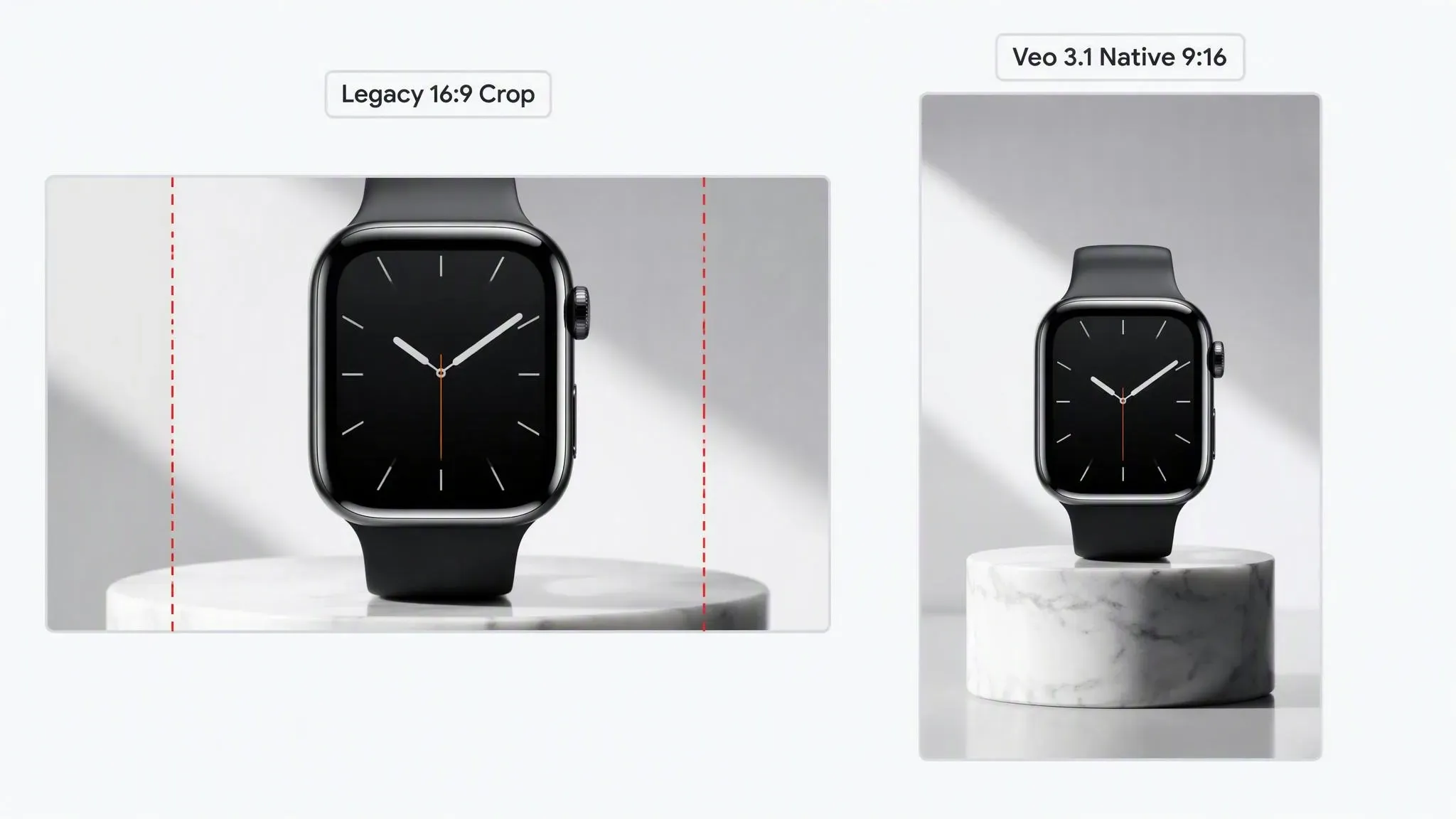
Engineers can specify framing geometry and target resolution within the initial request payload to eliminate secondary ffmpeg cropping scripts entirely.
JSON code example:
plaintext1{ 2 "prompt": "A vertical product reveal of a sleek smartwatch on a marble pedestal, dramatic studio lighting", 3 "model": "veo-3.1-generate-preview", 4 "aspect_ratio": "9:16", 5 "resolution": "4k", 6 "duration_seconds": 8, 7 "frame_rate": 24 8}
Video Rendering Parameter Matrix and Constraint Rules
| Parameter Key | Permitted Values | Output Behavior & Dependencies |
| aspect_ratio | "9:16", "16:9", "1:1", "4:3" | Native spatial orientation; aspect_ratio 9:16 optimizes subject framing for vertical feeds |
| resolution | "720p", "1080p", "4k" | High-resolution passes require fixed 8s clip durations; "720p" is required for iterative video extensions |
| duration_seconds | 4, 6, 8 | Duration choices for standard runs; 1080p and 4k generative video resolution lock output to 8s |
| frame_rate | 24 | Locked at a standardized frame rate 24fps across all output resolutions and aspect configurations |
Pro tips: Passing
resolution: "4k"alongside a 4-second duration setting causes immediate API validation failures. Both 1080p and 4K rendering modes strictly require an 8-second output configuration.
To optimize pipeline costs, production setups can trigger initial draft passes at 720p across variable durations, validate visual composition, and pass the prompt configuration to a secondary pass setting the upscaling REST parameter or higher resolution parameters to output pristine 4K video assets.
Asynchronous Job Execution, Rate Limits, and Long-Polling Design Patterns
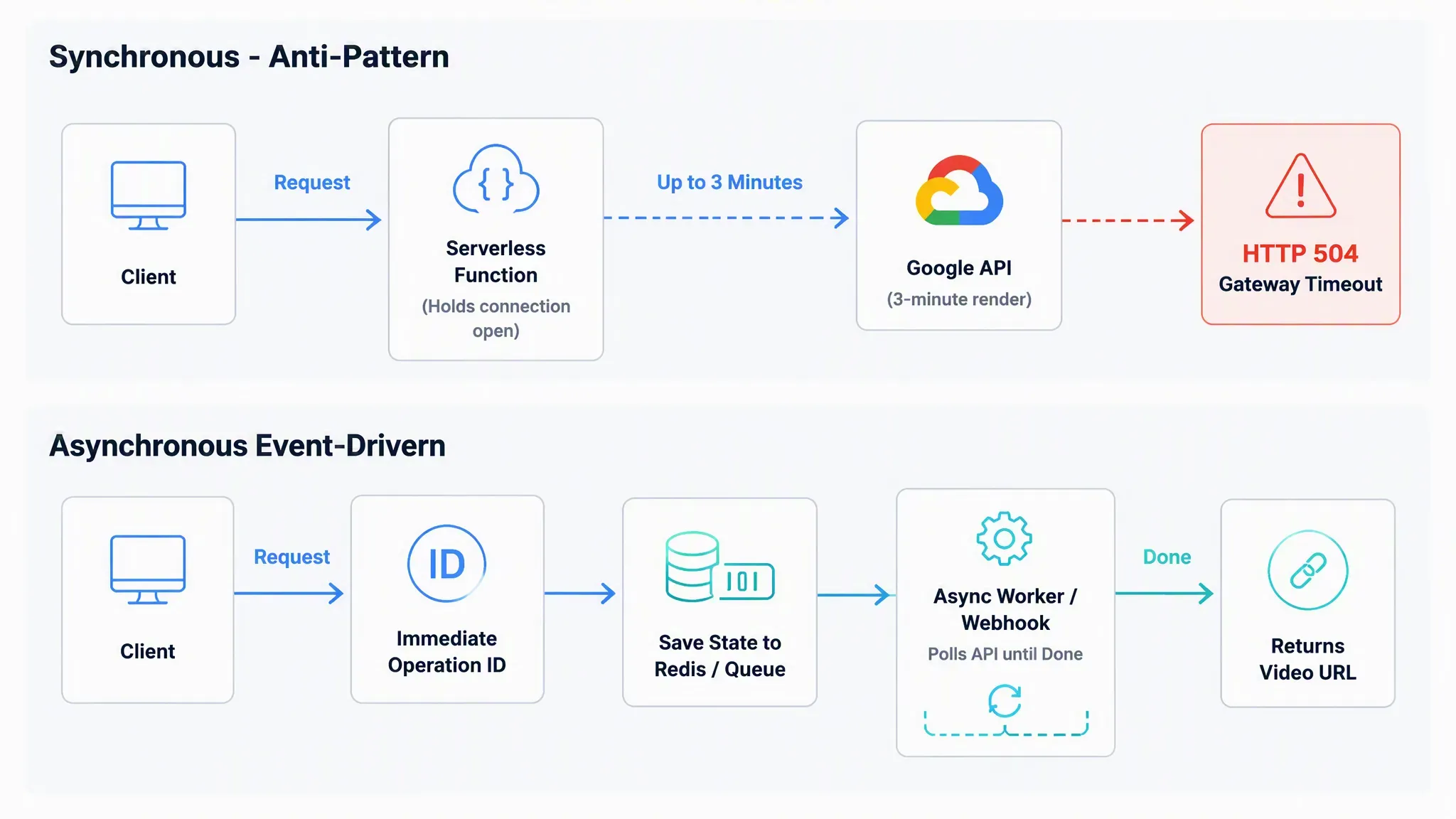
Waiting for an 8-second video render synchronously often triggers HTTP 504 Gateway Timeouts in serverless environments like Cloud Functions or Lambda. Since generative video models are inherently compute-heavy, the Veo 3.1 API operates on an asynchronous request-response cycle. If your integration attempts to hold a connection open until the video completes, your application will fail under even moderate traffic loads.
Implementing Efficient Async Polling
To process outputs reliably, you must initialize the google-genai client and utilize the built-in Long-Running Operation pattern. Instead of a single request, the API returns an Operation object immediately, which your backend must poll until the done status returns true.
Code example:
plaintext1import time 2from google import genai 3 4client = genai.Client() 5 6# Initialize asynchronous video generation operation 7operation = client.models.generate_videos( 8 model="veo-3.1-generate-preview", 9 prompt="A cinematic shot of a majestic lion in the savannah.", 10) 11 12# Async video operation polling loop 13while not operation.done: 14 time.sleep(10) # Polling interval to prevent rate limit exhaustion 15 # Refresh operation status via the SDK 16 operation = client.operations.get_videos_operation(operation=operation) 17 18# Retrieve generated video result from the operation response 19generated_videos = operation.response.generated_videos 20video_uri = generated_videos[0].video.uri 21print(f"Video generation complete: {video_uri}"
Latency and Quota Management Benchmarks
Understanding veo 3.1 api latency is critical for architecting your webhook callback design. Without proper concurrency controls, high-volume batch requests trigger immediate 429 "Too Many Requests" errors.
| Model Tier | Avg. Latency (8s Clip) | Recommended Concurrency | Best Use Case |
| veo-3.1-fast-generate-preview | 45–60 seconds | 10–15 concurrent jobs | Real-time user feedback loops |
| veo-3.1-generate-preview | 120–180 seconds | 3–5 concurrent jobs | High-fidelity final production |
Handling Serverless Timeouts and Failures
Relying solely on in-memory polling inside serverless functions is fragile. For production-grade resilience, decouple execution through a managed event architecture:
- Submit Request: Dispatch the request payload and store the returned
operation.nameidentifier. - State Queueing: Save
operation.nameand job metadata into Redis, Firestore, or a task queue. - Async Callback processing: Execute periodic worker polling tasks or trigger a Cloud Event/Webhook handler on completion to retrieve the final video asset URL without holding HTTP connections open.
This decoupling ensures that even if your primary service container restarts, the video generation job continues uninterrupted in Google’s infrastructure. Always implement exponential backoff on your polling intervals to remain well within regional API project quotas.
Cost Optimization and Model Comparison: Veo 3.1 Standard vs. Fast vs. Competitors
Scaling a generative video pipeline to thousands of daily runs quickly exposes unit economics: choosing the wrong inference model tier can inflate monthly compute bills by up to 260% without delivering visible visual improvements to end users. Pricing in Google AI Studio and Vertex AI operates on a per-second billing structure, making generation length and inference efficiency the primary cost drivers in production stacks.
Engineers must balance per-second generation rates against feature requirements like reference image payloads and 4K upscaling passes.
Cross-Model Performance and Unit Cost Matrix
| Model / API Engine | Billing Unit Rate | Native Audio Included | Multi-Reference Capacity |
| Veo 3.1 API | $0.20 / second | Yes (48kHz) | Up to 3 Images |
| Veo 3.1 Fast API | $0.08 / second | Yes (48kHz) | Up to 3 Images |
| Seedance 2.5 API | $0.134 / second | Yes (Native Audio) | Up to 50 Assets (30 Images, 10 Videos, 10 Audios) |
| MiniMax H3 API | $0.10 / second | Yes (Native 32kHz Stereo) | Up to 15 Assets (9 Images, 3 Videos, 3 Audios) |
Note: Pricing data in the matrix above is referenced directly from Atlas Cloud API endpoints ($/sec) as of August 2026.
Selecting the Right Tier for Programmatic Workflows
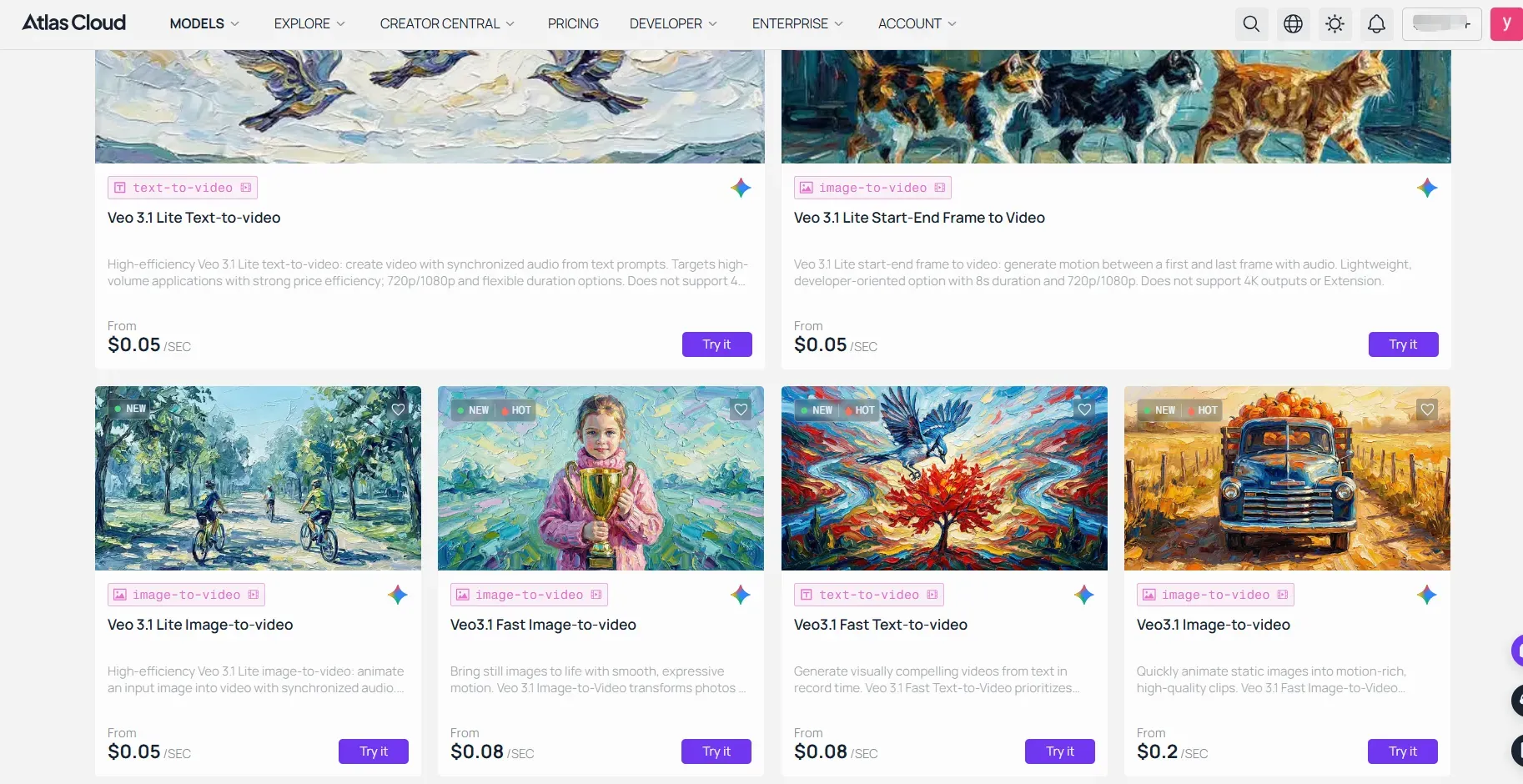
When scaling enterprise-grade video generation, evaluating total unit economics requires balancing per-second rendering tariffs against native audio and multimodal reference capacity. Rather than juggling separate SDKs, accounts, and API keys for Google, ByteDance, and MiniMax, Atlas Cloud acts as a single gateway. You send all generation requests to one base URL, switching between models as your pipeline requires.
Depending on your production requirements, consider the following routing strategies:
- High-Volume Ad Iteration & UGC Automation: Route requests to Veo 3.1 Fast API. At $0.64 per 8-second render ($0.08/sec via Atlas Cloud), it delivers high-throughput clip generation while preserving full "Ingredients to Video" multi-reference capabilities and native 48kHz audio at a fraction of the standard inference cost.
- Complex Multi-Asset Character Continuity: Route requests to Seedance 2.5 API ($0.134/sec) or MiniMax H3 API ($0.100/sec). Both models feature native audio synthesis alongside extended reference capacity—supporting up to 50 multimodal assets on Seedance 2.5 and 15 assets on MiniMax H3 for granular cross-shot subject locking.
- Cinematic Master Renders: Route requests to Veo 3.1 API. At $1.60 per 8-second render ($0.20/sec via Atlas Cloud), the higher unit rate is justified for final hero shots, client-facing broadcast deliverables, and complex lighting dynamics.
By leveraging Atlas Cloud's fallback mechanisms and unified payload structure, developers can maintain a hybrid pipeline—using Veo 3.1 Fast for rapid customer preview loops and programmatically switching to Veo 3.1 Standard or Seedance 2.5 for final high-resolution rendering without altering client-side application logic.
Production Deployment Roadmap & Best Practices
Integrating Google Veo 3.1 into production moves key post-processing steps directly into the initial model pass. With native 48kHz audio generation, direct 9:16 vertical outputs, and 3-image reference locking, you can bypass external lip-sync models and ffmpeg cropping scripts without sacrificing shot-to-shot consistency.
To transition smoothly from early prototypes to a resilient, high-volume production pipeline, follow this phased implementation strategy:
- Phase 1: Validation & Asset Conditioning – Standardize input reference images at 1080p resolution and test character consistency using the
referenceImagespayload. Start with Veo 3.1 Fast API to quickly establish your visual baseline and prompt structures at minimum cost. - Phase 2: Asynchronous Infrastructure & Single Gateway Setup – Guard your backend against HTTP 504 timeouts by implementing Long-Running Operation polling or managed event callbacks. Consolidate model calls through Atlas Cloud to manage authentication, fallback retry queues, and unified billing under a single integration layer.
- Phase 3: Automated Dynamic Pipeline Routing – Programmatically route tasks based on production requirements: dispatch rapid draft iterations to Veo 3.1 Fast, send high-fidelity broadcast assets to Veo 3.1 Standard, and direct complex multi-asset character scenes to Seedance 2.5 or MiniMax H3 without changing client-side logic.
In summary, leveraging Veo 3.1's unified multimodal capabilities alongside an adaptable model-routing architecture allows you to ship broadcast-quality video applications faster, avoid vendor lock-in, and maintain strict control over per-second compute budgets.





