You opened a code review, asked for a quick look, and watched your five-hour window vanish before you had a deliverable. That experience is miserable, especially when the task seemed small.
The short answer to the gpt-6 astra usage limit is that there is no reliable universal message count to optimize around. Your Work and Codex allowance responds to the work you ask Astra to perform: task scope, input and output length, reasoning level, tool activity, and Fast mode all matter. The practical fix is to route work before the run, then give Astra a small, testable brief.
That distinction matters because four things often get mixed together. Ordinary ChatGPT conversation has its own experience and controls. ChatGPT Work and Codex draw from their usage structure. The official API has rate limits such as requests and tokens per minute. Credits are an official way eligible accounts can pay for more Work and Codex use after included usage runs out. OpenAI’s current guidance says Plus and Business Standard have limited Astra use, while Pro, Business Premium, and Enterprise have their existing full allowance, subject to rollout and account access (OpenAI Help Center, September 2026).
Key takeaways
- Astra usage is task-dependent, not a fixed message counter.
- Open-ended agents expand the execution surface fast.
- Save Astra for ambiguous, high-judgment work.
- Use checkpoints so the next window resumes cleanly.
- API pricing and subscription allowance are separate.
A Bounded Planning Demo Before You Spend an Astra Run
A bounded business-planning task follows the same pattern. Give GPT-6 Astra six known inputs, such as weather, expected footfall, ingredient stock, and a margin target. Require one defined deliverable: a promotion choice, expected sales, stock movement, prep quantities, and a short explanation of why the choice fits. Do not authorize browsing, sending messages, or changing a live system.
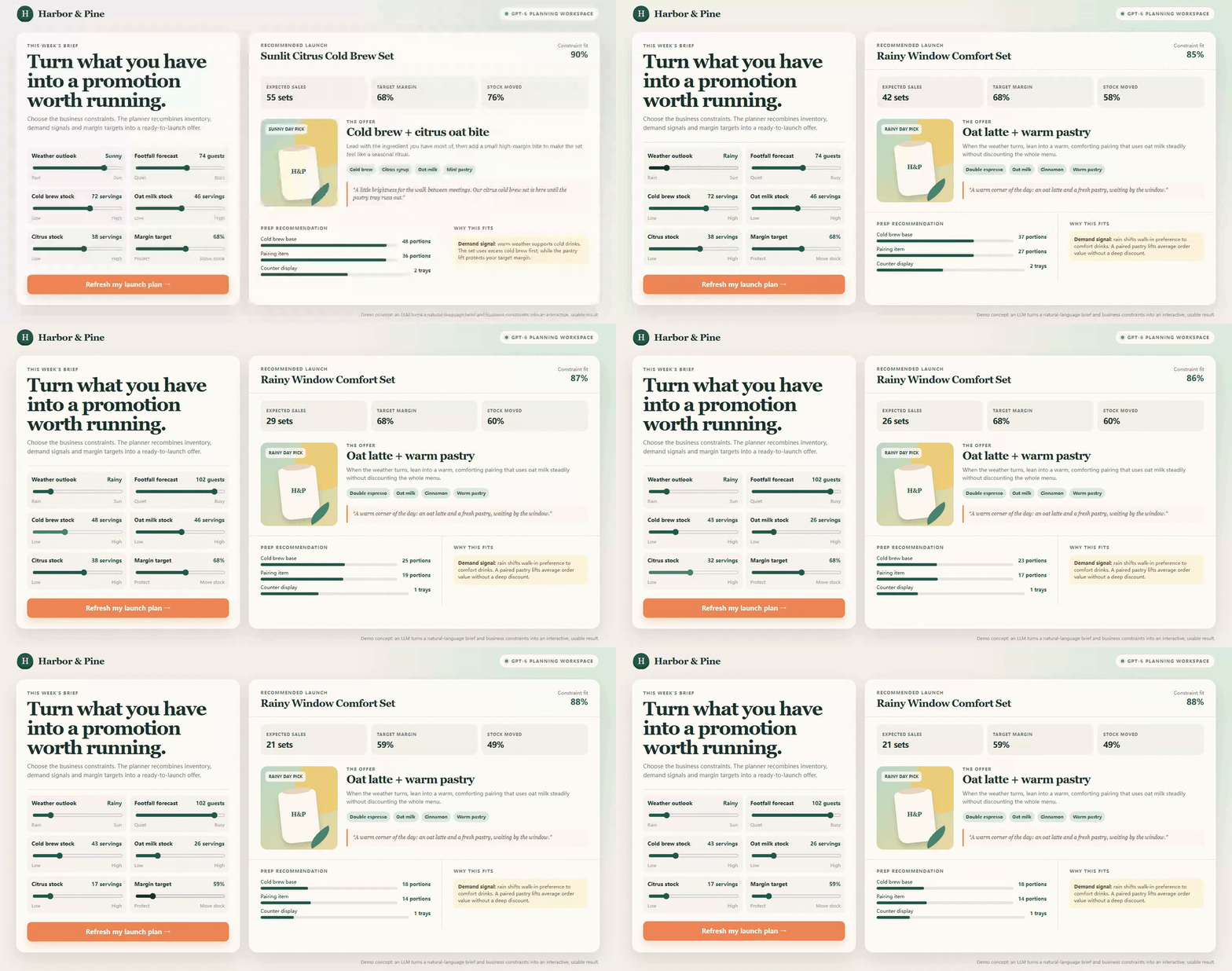
Animated six-control coffee promotion planner showing real slider changes and a live switch from a sunny cold-brew set to a rainy warm-pastry set
This browser-rendered demo makes the bounded contract visible. Each of the six controls changes a declared constraint; the recommendation, forecast, margin, stock movement, and prep plan update in the same output surface. It is an illustrative planning workflow, not a GPT-6 Astra usage measurement.
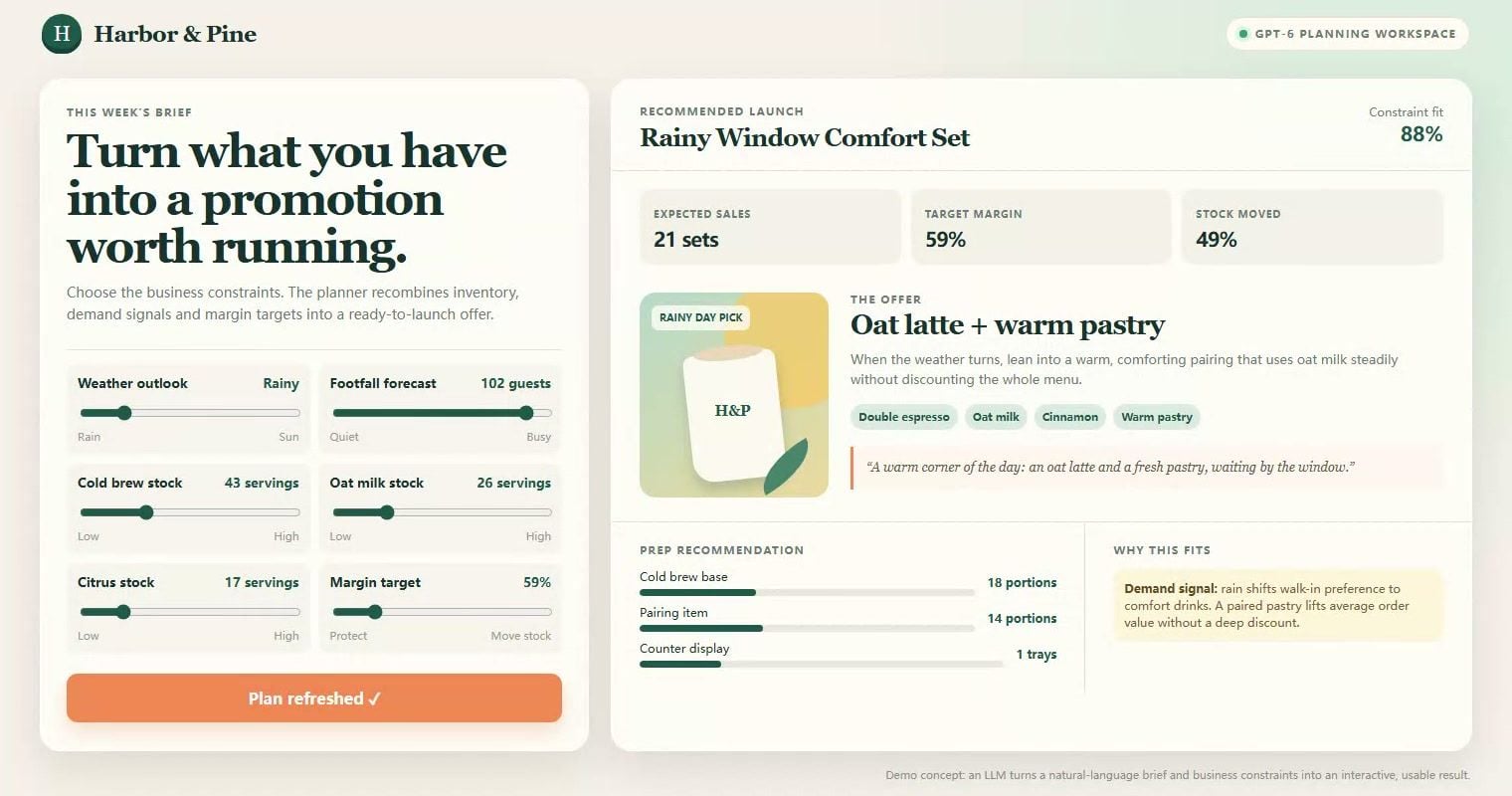
Final state of the six-control coffee promotion planner showing the rainy-day recommendation, 21 expected sets, 59 percent margin target, and 49 percent stock moved
The final still is the reviewable handoff: a person can see the final constraints and the resulting promotion before choosing whether to act on it.
Why GPT-6 Astra Usage Limits Feel So Hot Right Now
Astra arrived for hard, multi-step work: coding, research, computer use, browser tasks, and document creation. Those are exactly the jobs where a vague sentence can become a long chain of inspection, tool calls, and follow-up reasoning. A reader sees one final answer. The allowance reflects the work behind it.
The most expensive brief often looks harmless. “Review this plugin and find anything wrong” has no file boundary, no acceptance criteria, no stopping point, and no rule against browsing or delegation. It quietly authorizes an agent to keep finding new things worth checking.
An anecdotal report in r/codex describes a 12-file plugin review, multiple subagents, and a quickly shrinking five-hour window (r/codex discussion, September 2026). Treat that as a user report about task shape, not a platform-wide consumption ratio. The useful lesson is that a code review can contain many hidden decisions: which files to open, which hypotheses to test, whether to search beyond scope, and whether a suspicious detail deserves another branch of inquiry.
A one-page site audit works the same way. “Review my site and give corrections” sounds like a light request. Without a URL list, severity threshold, finding limit, reproduction format, and stop condition, it becomes an unlimited audit brief. The agent can inspect copy, performance, mobile behavior, analytics, accessibility, checkout paths, competitors, and every linked page. No one deliberately asked for all of that, yet the instruction allows it.
Five common usage amplifiers recur:
- A goal without a stopping condition.
- Browsing, computer use, tools, or subagents that expand verification.
- Large old threads pasted back into a new request.
- Higher reasoning effort or Fast mode used before the task proves it needs them.
- Confusion between subscription allowance and API tokens, RPM, TPM, or credits.
The fix starts before a prompt reaches Astra. Write down the evidence the final answer must contain, the evidence it must not seek, and the moment it should stop. That makes an answer easier for a human to audit too.
GPT-6 Astra Usage Limit Workflow: Route Work Before You Run It
Reserve official GPT-6 Astra for uncertainty that is genuinely expensive to resolve: an ambiguous regression crossing modules, conflicting evidence, or safety-sensitive browser work. Routine preparation can happen in a separate, metered model workflow where the input, output, and budget are explicit.
Atlas Cloud is useful here as a workflow lane, not an Astra shortcut. Its current catalog does not list GPT-6 Astra. That is intentional in this SOP: a narrow preparation pass on Atlas Cloud should leave the final high-judgment decision for your official Astra access.
| Task type | Recommended route | Why | Budget control |
| Unknown regression across modules, ambiguous root cause, safety-sensitive browser work | Official GPT-6 Astra | Complex judgment and tool orchestration belong here | Small scope, explicit stop condition, Fast mode off |
| Requirement decomposition, fixed review checklist, test-plan drafting | GPT-5.6 Sol on Atlas Cloud | Known inputs can become a reusable work package | Token cap, low temperature, no tools |
| Logs, issue triage, release-note summaries | DeepSeek V4 Flash 0731 | Formatting and classification are easy to verify | Token cap and strict output format |
This is workload routing, not a way around a subscription rule. Atlas Cloud does not host Astra, and moving low-risk preparation elsewhere does not change your included Astra allowance. It gives you a smaller contract when you return to Astra, plus an independent record of what the next run must cover. Before routing, ask three questions. Is the outcome easy to evaluate from a known input? Can a reviewer tell whether the result is complete without searching for new information? Would a short retry cost less than a broad agent investigation? If the answer is yes, the task belongs in the preparation lane. You are buying a clean constraint, not a second opinion about every line of code.
A useful checkpoint names the artifact, the owner, and the next permitted action. For example: triage brief v1 saved; reviewer may inspect only 12 files; stop after six checks. That sentence prevents a later turn from silently reopening discovery. It also gives a teammate enough context to challenge scope before a costly run begins. A lightweight brief also makes it obvious when a task needs fresh product context, a human decision, or a true escalation rather than another autonomous pass in future reviews.
How to Avoid the GPT-6 Astra Usage Limit: A 3-Step SOP
Use this continuous workflow for the 12-file checkout-total review. The example keeps the same business rule throughout: expected total equals subtotal minus a valid coupon, plus tax and shipping. The preparation models do not browse, edit files, or run agents. They turn a broad request into a compact work package.
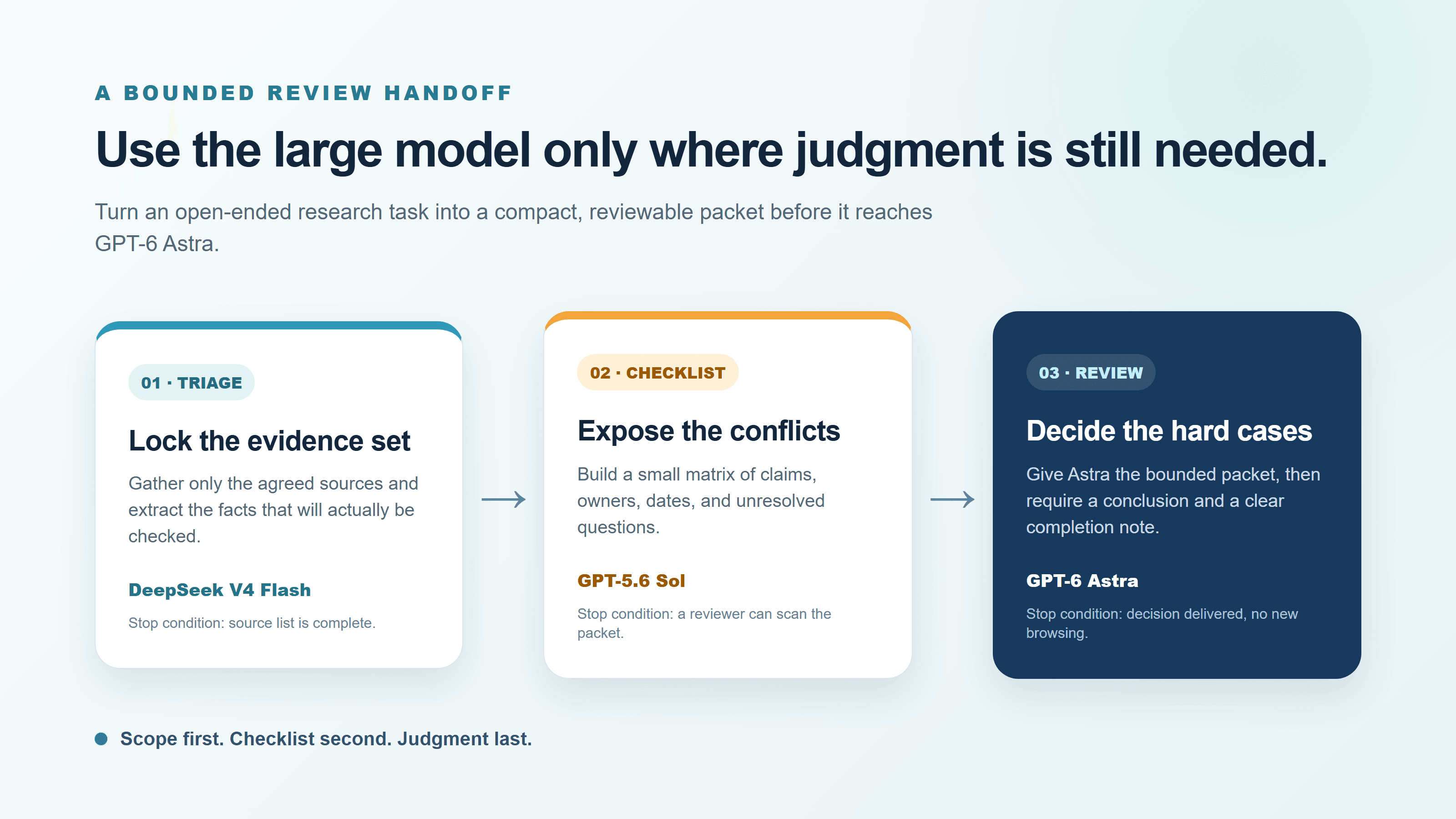
Three-stage workload-routing flow showing DeepSeek V4 Flash for bounded triage, GPT-5.6 Sol for a checklist, and GPT-6 Astra for the final review
A three-step routing flow built from this article's scope and stop conditions: lock the evidence set, expose the conflicts, then reserve Astra for the decision that still needs judgment.
Step 1: Create a Bounded Triage Brief Before Using GPT-6 Astra
Start in DeepSeek V4 Flash 0731. Give it only the task, suspected files, and acceptance rule. Do not paste a repository, an entire old chat, or a pile of unrelated logs. Ask for one assumption when data is missing, rather than letting the model invent a second investigation.
plaintext1You are a bounded engineering triage assistant. 2 3Turn the request below into a review brief that another model can execute without expanding scope. 4 5Return exactly these sections: 61. Goal, one sentence 72. In-scope files, maximum 12 83. Out-of-scope work 94. Acceptance checks, maximum 6 105. Stop condition 116. Evidence required in the final answer 12 13Do not browse. Do not suggest subagents. Do not write code. 14If information is missing, write one assumption instead of inventing more work. 15 16REQUEST: 17Review the checkout-total regression in this TypeScript web app. The suspected files are: 18src/cart/total.ts 19src/cart/coupons.ts 20src/cart/tax.ts 21src/cart/shipping.ts 22src/checkout/summary.tsx 23src/checkout/submit.ts 24tests/cart-total.test.ts 25tests/coupon.test.ts 26tests/shipping.test.ts 27tests/checkout-summary.test.tsx 28package.json 29README.md 30 31The expected total is subtotal - valid coupon + tax + shipping.
Set temperature to 0.1, max output tokens to 450, and leave agent, browser, and tool modes off. The result should be short enough to paste into the next step without bringing back the noisy original thread.

Google Veo 3.1 Lite motion case showing a reviewer sorting a bounded set of source pages into a compact handoff packet
A four-second Google Veo 3.1 Lite motion case generated in the Atlas development environment. It makes the handoff tangible: sort the agreed evidence, compare the conflict, and close one compact review packet. It is an illustrative workflow visual, not a model UI or a usage measurement.
Step 2: Turn the Brief Into a Review Checklist, Not an Open-Ended Investigation
Paste the complete Step 1 brief into GPT-5.6 Sol as the only context. This separates planning from diagnosis. Astra will not have to rediscover the file order, invent acceptance checks, or decide whether an unrelated refactor belongs in the answer.
plaintext1You are preparing a constrained code-review checklist. 2 3Use only the triage brief below. Produce: 4- a file-by-file review order; 5- one failure hypothesis per file; 6- the exact test or inspection evidence needed; 7- a final pass/fail matrix. 8 9Rules: 10- Do not add files outside the stated scope. 11- Do not browse. 12- Do not edit code. 13- Do not propose extra features or refactors. 14- Stop after the listed acceptance checks are covered. 15- Keep the answer under 700 words. 16 17TRIAGE BRIEF: 18[PASTE THE COMPLETE OUTPUT FROM STEP 1]
Set temperature to 0.1, max output tokens to 900, and keep browser, subagents, and file writing off. Read the matrix before moving forward. If it calls for a file outside the agreed list, repair the brief now. That is a cheap correction; doing it after Astra has begun a broad investigation is not.
Step 3: Use GPT-6 Astra Only for the Narrow, High-Judgment Review
Run this step in your official ChatGPT Work, Codex, or OpenAI API environment. Astra’s model documentation lists reasoning settings from low through max, a 1.05M-token context window, API rate limits by tier, and standard API pricing that is separate from a subscription allowance (OpenAI GPT-6 Astra model documentation, September 2026). Start at medium. Escalate only the conflict package if the evidence truly disagrees.
Use repository read access only. Work in a disposable branch, worktree, or synthetic reproduction first. Do not grant writing, production credentials, publishing rights, broad web browsing, or automatic subagents for this review.
plaintext1Act as a read-only reviewer for the checkout-total regression. 2 3Your scope is limited to the files and acceptance checks below. 4Do not edit files. 5Do not create subagents. 6Do not browse the web. 7Do not inspect files outside the list. 8Do not perform security scans, dependency upgrades, refactors, or UI redesigns. 9 10For each finding, return: 111. severity; 122. file and line range; 133. the exact violated acceptance check; 144. the smallest proposed fix; 155. one test command or manual verification step. 16 17If no finding is supported by the listed evidence, say: 18"No supported regression found in the approved scope." 19 20Stop immediately after reviewing the listed files and checks. 21 22REVIEW CHECKLIST: 23[PASTE THE COMPLETE OUTPUT FROM STEP 2]
Set reasoning effort to medium, leave Fast mode off, and allow read-only repository access. Save the triage brief, checklist, completed review, and one next-step checkpoint. If the current allowance ends afterward, the next window resumes from evidence rather than making Astra reconstruct the task.
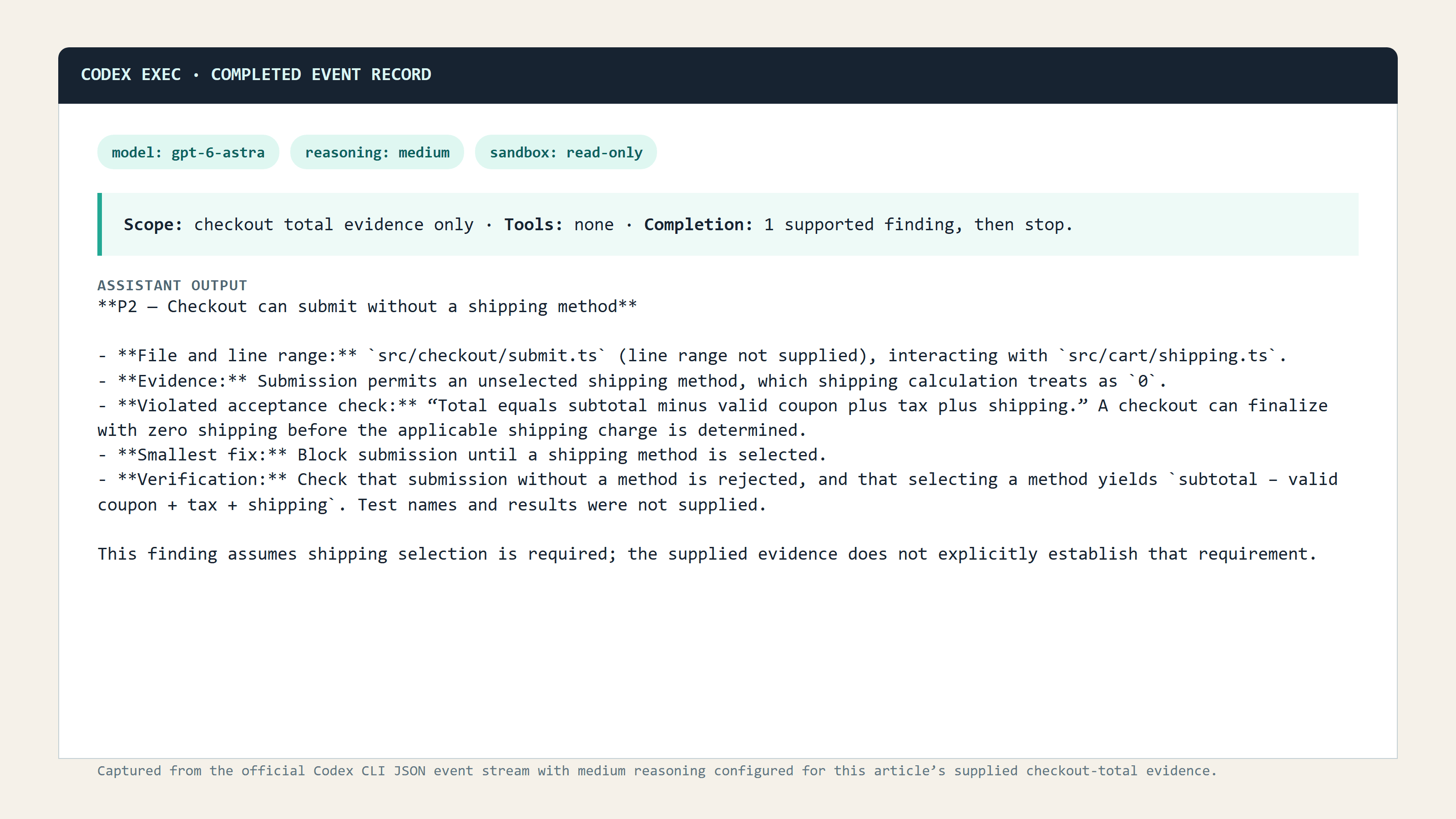
Official GPT-6 Astra completed read-only review log for the checkout-total scope, showing medium reasoning, limited files, evidence-led findings, and a clear completion state
Official Codex run log for the same read-only review contract. It records a completed, deliberately scoped review rather than a usage-meter claim.
This SOP cannot promise a fixed consumption number. It removes unnecessary exploration, duplicate reasoning, and avoidable tool expansion. More importantly, it leaves a clean handoff packet when the window does end.
GPT-6 Astra Usage Limit Variations, Costs, and Compliant Options
The same contract pattern fits other agent-shaped tasks. Case 2 narrows a site audit to three pages and five P0 or P1 findings. Its deliverable has URLs, issue descriptions, impact, reproduction steps, and an owner. A lightweight model can prepare the audit contract; Astra then rechecks only the two disputed, high-impact findings.

Google Veo 3.1 Lite motion case showing an auditor reducing a table of page cards to a small priority checklist
A four-second Google Veo 3.1 Lite motion case generated in the Atlas development environment. Three page cards become a deliberately small priority set, illustrating the five-finding cap before any high-judgment review begins.
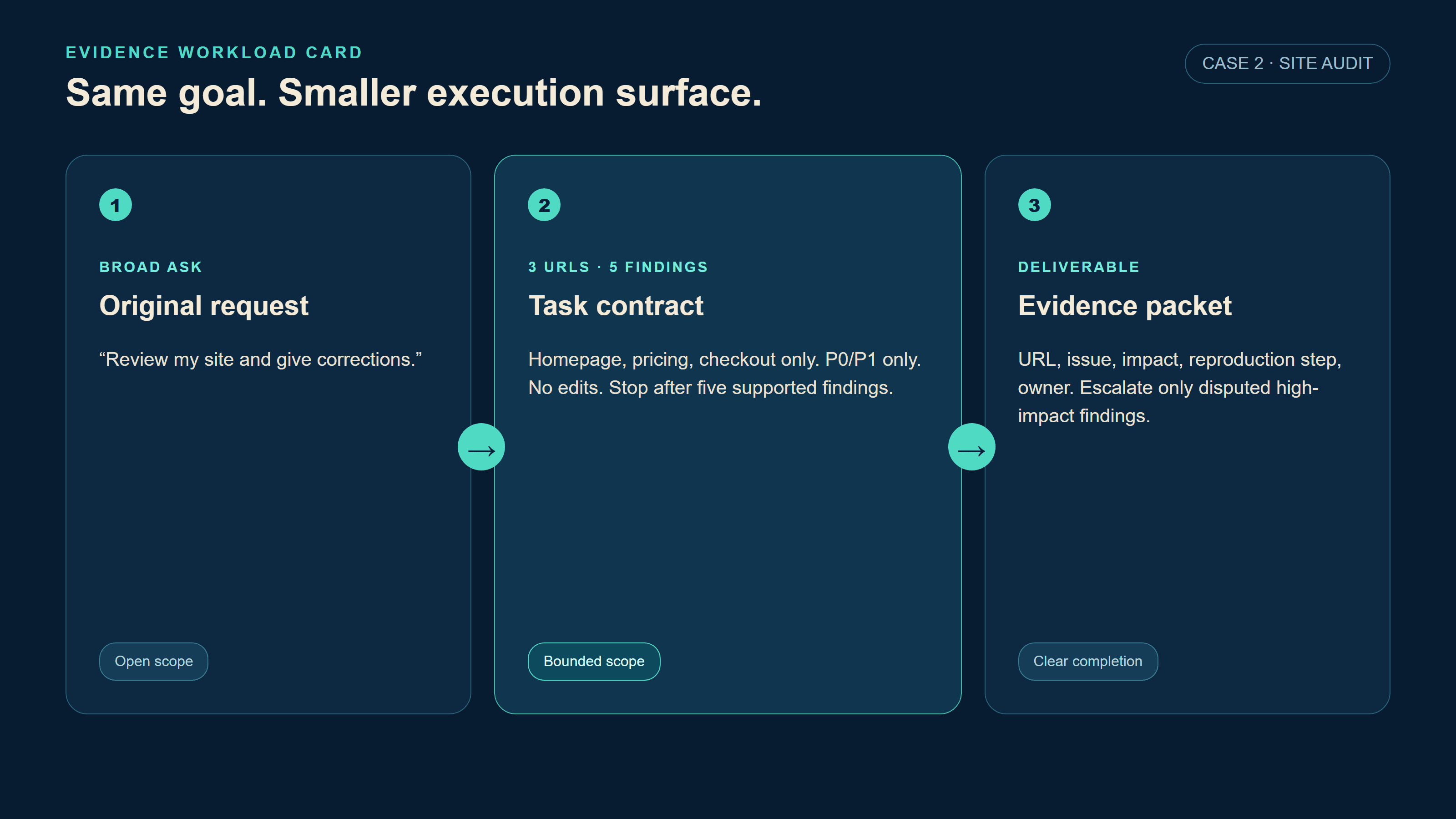
GPT-6 Astra usage limit Evidence Workload Card showing a one-page site audit narrowed to homepage, pricing, and checkout with five P0-P1 findings
Case 2 uses the same Evidence Workload Card format: a broad site-audit request becomes a page list, a finding cap, and a defined evidence packet.
Case 3 breaks a travel-research-to-publish request into four checkpoints: source list, itinerary constraints, HTML draft, and human publish approval. Research, generation, and publishing should never sit inside one limitless turn. Continue only when the previous checkpoint exists and a person approves the publishing stage.
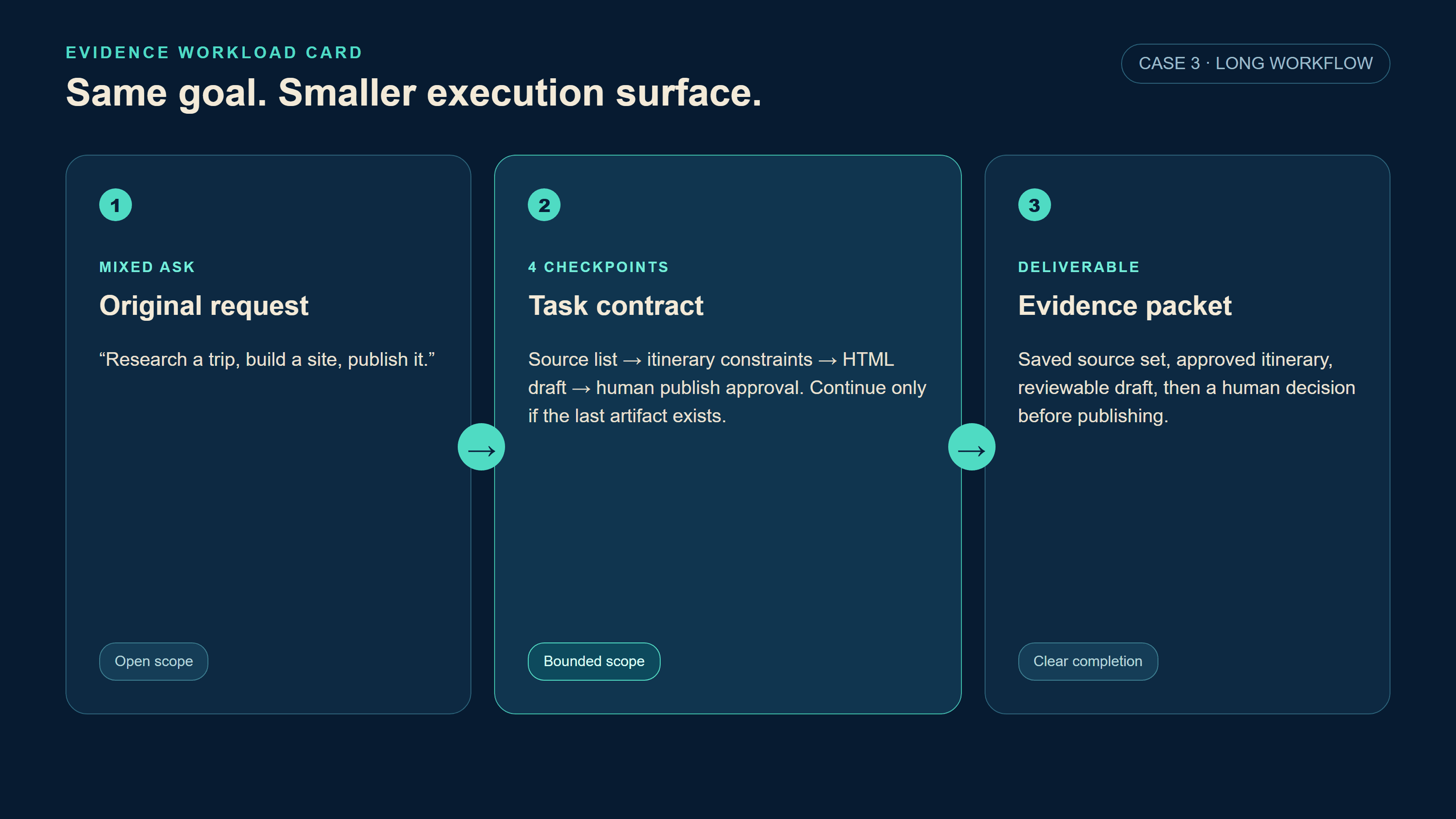
GPT-6 Astra usage limit Evidence Workload Card showing a travel research to publish chain divided into source, itinerary, HTML, and human-approval checkpoints
Case 3 keeps the same three-column visual system while changing the task: every phase has a saved artifact and a “continue only if” rule.
Use this quick escalation rule:
| Signal | Action |
| Clear file list and known acceptance test | Keep Astra at medium, or prepare the work package in a scoped API model first |
| Conflicting evidence across modules | Send only the conflict package to Astra |
| Browsing or computer use is required | Specify the sites, allowed actions, and stop condition |
| Repetitive formatting or summarization | Keep it out of Astra’s allowance |
Current cost and limit types.
The prices below are public list rates checked on September 7, 2026. They can change, so confirm the live model page before publishing or budgeting. API prices are not a conversion rate for a ChatGPT subscription allowance.
| Route | Current public price or limit type | What it means |
| GPT-6 Astra official API | $10 / 1M input tokens; $50 / 1M output tokens | Token billing, separate from subscription allowance |
| GPT-6 Astra Fast mode | 2x the standard API rate | Use when time value clearly beats the extra spend |
| GPT-6 Astra Batch or Flex | 50% of standard API rate | For work that can wait |
| GPT-5.6 Sol on Atlas Cloud | $5 / 1M input; $30 / 1M output | Bounded checklist and review-plan work |
| DeepSeek V4 Pro 0813 on Atlas Cloud | $1.32 / 1M input; $3.96 / 1M output | Stronger analysis with defined inputs and outputs |
| DeepSeek V4 Flash 0731 on Atlas Cloud | $0.44 / 1M input; $1.32 / 1M output | Triage, summaries, and classification |
Use the live Atlas model catalog to recheck the Atlas entries and any discounts. On the catalog checked for this article, DeepSeek V4 Pro 0813 and DeepSeek V4 Flash 0731 were listed at the rates above. The GPT-5.6 Sol detail page should be checked again before publication because a live catalog can change.
Can you bypass a GPT-6 Astra usage limit? No. Do not use multiple accounts, automated retries, unapproved scripts, or other tactics intended to evade a product limit. The compliant choices are to wait for the reset, buy official credits where your account and region allow it, use the official API, or move clearly bounded low-risk preparation into an independent metered workflow. Save the current evidence and checkpoint first. Replaying the same broad old conversation in a new window simply spends the next allowance on reconstruction.
GPT-6 Astra Usage Limit FAQ
What is the GPT-6 Astra usage limit on ChatGPT Plus?
OpenAI does not publish one fixed message count that applies to every task. Plus has limited Astra usage in Work and Codex as access rolls out. Task size, input and output size, reasoning settings, Fast mode, and work performed can change consumption.
Does GPT-6 Astra share a limit with Codex and ChatGPT Work?
When you sign into Codex with ChatGPT, it uses your ChatGPT plan’s usage and billing. Work follows the same usage structure as Codex. Regular Chat can have separate model controls, so read the current product notice for your account rather than inferring from one interface.
Why did GPT-6 Astra hit the usage limit after one task?
One agent-shaped task can contain browsing, computer use, long context, high reasoning, tools, follow-up verification, and multiple stages. Community anecdotes explain the frustration, but they do not establish a universal percentage. Use a written scope, acceptance checks, and stop condition to control the job you send.
Can I keep using GPT-6 Astra after I hit the limit?
That depends on your plan, account, region, rollout status, and whether credits are available. You may wait for a reset, use eligible official credits, or use the official API. Credits do not grant early rollout access.
What is the difference between an Astra usage limit and API rate limits?
A subscription allowance governs the Work and Codex experience. API rate limits govern requests, tokens, and queues by API tier, while API usage is billed by tokens and applicable tool charges. They are related products, but they are not the same meter.
What should I use when Astra is not worth spending on a task?
Start with a bounded brief and a verifiable checklist. Use a metered preparation model for summaries, triage, and fixed-format planning, then reserve Astra for the conflict that still needs high judgment. That is the durable answer to the gpt-6 astra usage limit: a smaller execution surface and a checkpoint you can carry forward.





