Your child wears round glasses and blue overalls on page 1. By page 3, the glasses have corners and the overalls have gained a pocket. Imagine reading those pages aloud: the story continues, but the child seems to change.
The practical answer to GPT Image 2.5 Children’s Book Character Consistency is to approve a visual master, attach it to every page request, separate identity from scene instructions, and check each result before accepting it. Higher resolution alone will not keep a character recognizable.
This guide gives you a character bible, copyable prompts, a 4-page nature-observation sequence, and a review method you can use with an existing manuscript. The child and scenes are original tutorial exercises, not a published book or a customer success story.
Key Takeaways
- Approve the character before producing story pages.
- Supply reference images explicitly for each request.
- Let poses and expressions change while identity stays recognizable.
- Check continuity before paying for more pages or arranging print layouts.
Evidence status: Documentation and public model pages checked September 18, 2026. This delivery now includes a completed master-generation capture, character sheet, reference-based editing capture, four story pages, a reference-versus-text-only comparison, and a controlled-edit comparison. No formal pass rate or paid cost was measured, so the sequence should be treated as a documented exercise rather than a model-wide benchmark.
GPT Image 2.5 Children’s Book Character Consistency: What Holds?
A useful definition of character consistency has several parts: facial identity, apparent age, proportions, clothing construction, recognizable accessories, illustration style, and continuity with the story. A page can satisfy 6 of these and still fail the scene. A child who looks correct while picking up a snail does not illustrate a sentence about watching it without touching it.
Identity also permits variation. A profile hides an eye. A crouch shortens the visible torso. Warm window light changes the appearance of skin and fabric. Check whether those changes make sense for the viewpoint and lighting before treating every color difference as drift.
The goal is recognizable identity through movement. Repeating one standing pose across an entire book would avoid some difficult views, but it would limit what the illustrator can tell through gesture. The 4 scenes in this guide deliberately test standing, crouching, turning away, and looking closely at a leaf indoors.
OpenAI describes Sunburst as a generation and editing model with an emphasis on editing precision. That makes it a reasonable choice for this exercise, which repeatedly passes approved images into edits. It does not establish a measured success rate for picture books. (OpenAI Sunburst model documentation, accessed September 2026.)
Keep the interface distinction clear. Text-to-image starts from words. An edit request supplies images and instructions. A ChatGPT conversation may present these activities through a different interface with conversational context. This tutorial uses explicit image uploads in a model playground; it does not depend on a chat remembering an earlier page.
You will create one master and one reference sheet before making 4 individual illustrations. The master establishes the approved design. The sheet supplies views that the master does not show. When those inputs disagree, the master takes priority, and you should repair the conflicting sheet before continuing.
Set a small acceptance boundary before expanding production. These 4 pages can reveal whether your design survives the angles your story needs. They cannot prove that another 20 pages, a winter outfit, or a second character will work equally well. Add those challenges only when the manuscript calls for them.
GPT Image 2.5 Children’s Book Character Consistency: The Character Bible
Start with your finished story. Mark the actions that must be visible on each page, then list the character details a child reader should recognize. Separate those lists. A jacket needed only for a rainy chapter belongs in the scene requirements; a permanent pair of glasses belongs in the identity description.
For this exercise, the child is about 6, with a round face, medium-brown skin, short black curls, and thin dark-red round glasses. The outfit has a small number of countable features. That makes it easier to identify a construction error than a description such as “comfortable blue clothes.”
| Feature | Fixed identity or design | Allowed change | Example that needs revision |
|---|---|---|---|
| Face and age | Round face; visibly young child | Expression and viewing angle | An elongated face that reads as an older child |
| Hair | Black curly bob ending at the jaw | Natural movement and occlusion | A straight fringe or much longer hair |
| Glasses | Thin, round, dark-red frames | Perspective and reflections | Square frames or a different frame color |
| Overalls | Teal-blue; 2 straps; 2 brass fasteners; 1 square chest pocket | Folds and hidden details | A chest pocket appearing on the back |
| Shirt and shoes | Ivory short sleeves; mustard sneakers with white soles | Shadows, bending, partial occlusion | Long sleeves or boots replacing sneakers |
| Proportions | Slightly enlarged head; short childlike limbs | Foreshortening and crouching | Adult-length legs in a full-body view |
| Story action | The action assigned to that page | Staging that preserves its meaning | Touching the snail when the story says observe |
“Warm and cute” can describe a mood, but it gives a reviewer little to check. A round frame, a jaw-length silhouette, and one square pocket are observable. Keep these details simple enough that you can recognize them at the size readers will see in the book.
Record the illustration style separately: watercolor washes, restrained colored-pencil outlines, visible paper texture, and a limited palette. That separation helps you diagnose a page with the correct child but a different rendering style. It also lets the lighting become warmer indoors without rewriting the child's identity.
Create a small reference folder with character-master-v1.png, character-sheet-v1.png, the identity text, and a short approval note. Save the exact model ID and settings alongside those files. A filename such as final-new-really-final.png tells a collaborator nothing about which design controls the next request.
Once approved, treat that reference version as fixed. Save changes under a new version and explain why they were needed. If you change the glasses halfway through production, mark which pages require rechecking. Do not silently update the master and assume already accepted illustrations still match it.
The bible should also identify missing information. A 3-quarter portrait cannot establish the back of the overalls. Resolve that view in the sheet, inspect it, and add the approved construction to your notes. Unseen details need a design decision before they become a continuity standard.
GPT Image 2.5 Children’s Book Character Consistency: Reference Sheets
Use Atlas Cloud to select the exact model and keep the source files for each request. Begin in Sunburst Text-to-Image. Remove the example prompt before pasting your own.
Shared settings. Request quality: max, size: 2048x1152, background: opaque, output_format: png, and n: 1. These are landscape demonstration settings, not a print specification. Check the selected values before Run and inspect the downloaded file's dimensions afterward. Do not assume a size field retained what you typed.
The official prompting guide recommends reusable character references for multi-illustration stories and distinguishes controlled edits from new compositions. It also documents the experimental range above 2560×1440 total pixels. We use a smaller landscape canvas here. The prompts below are written for this tutorial, not copied from official samples. (OpenAI Image Prompting, accessed September 2026.)
Step 1: establish one full-body master. Generate without reference images using this prompt:
plaintext1Create a single full-body character reference for an original children's picture book about observing everyday nature. 2 3The character is a six-year-old child with medium-brown skin, a round face, dark-brown eyes, a short black curly bob ending at the jaw, and thin round dark-red glasses. The child wears an ivory short-sleeved T-shirt under teal-blue overalls with exactly two shoulder straps, two round brass fasteners, and one square chest pocket. The shoes are mustard-yellow sneakers with white soles. 4 5Use a hand-painted watercolor illustration style with restrained colored-pencil outlines, visible paper texture, and soft neutral daylight. Keep the child visibly young, with a slightly enlarged head and short childlike limbs. 6 7Show one standing figure in a relaxed three-quarter view. Keep the entire head, hands, and shoes visible. Use a plain warm-white background with generous empty space around the figure. 8 9No additional characters, props, lettering, labels, logos, or watermark.
Wait for the new output to finish, then download it. Inspect the head, glasses, straps, fasteners, chest pocket, hands, and shoes. Approve the actual image before naming it character-master-v1.png. If a defining detail is wrong, revise it now; every later reference would otherwise repeat the ambiguity.
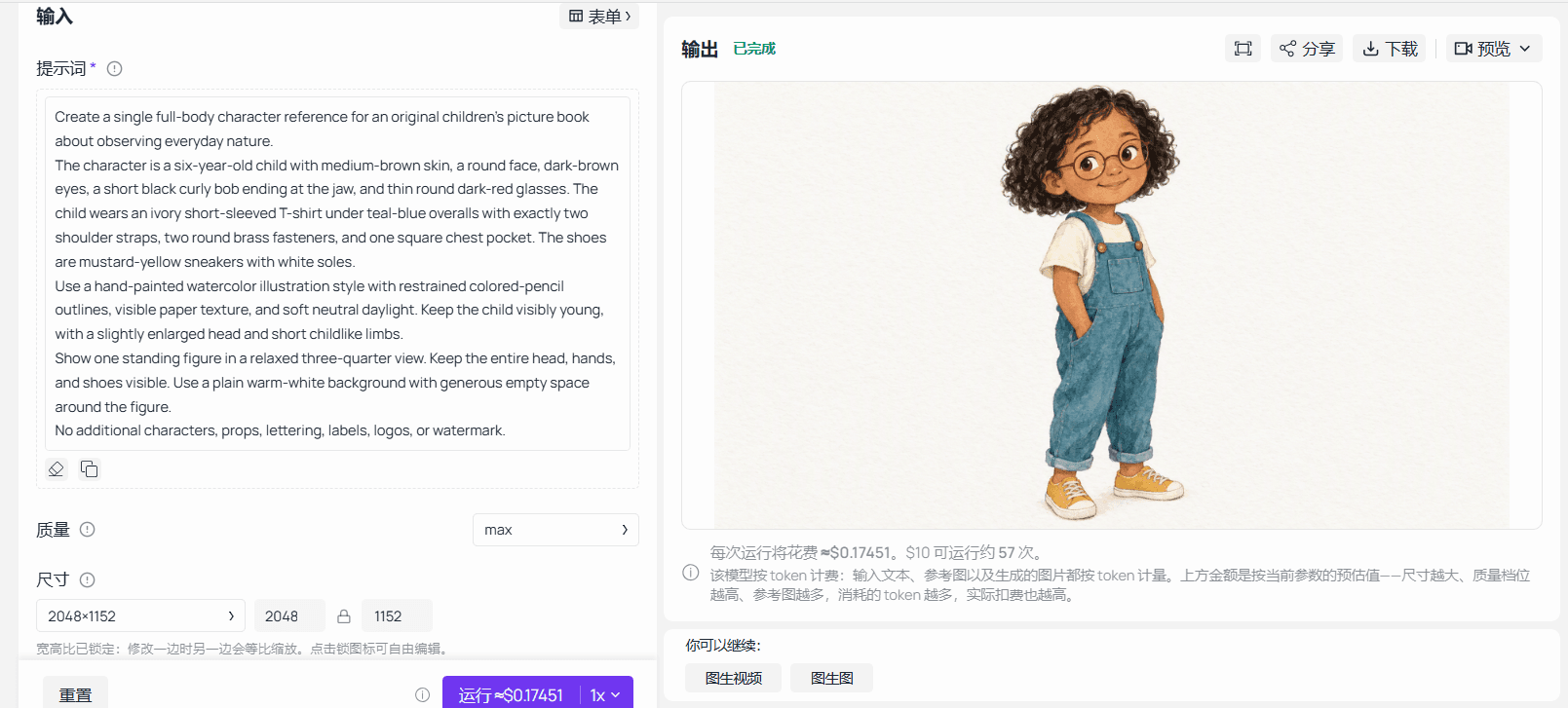 Sunburst generation playground evidence for the full-body character master
Completed Sunburst Text-to-Image capture for the full-body master. The prompt, max-quality landscape settings, and resulting character reference are visible.
Step 2: make the multiview sheet. Open Sunburst Edit, clear any preset reference, and upload the downloaded master. Use the same output settings and this prompt:
plaintext1Use the attached image as the approved identity and illustration-style reference. 2 3Create a six-panel character reference sheet on a plain warm-white background. Show the exact same child in every panel: 4top row: full-body front view, full-body left profile, full-body back view; 5bottom row: three-quarter face with a neutral expression, the same face smiling, the same face looking thoughtfully downward. 6 7Preserve the approved face shape, apparent age, skin tone, dark-brown eyes, short curly black bob, thin round dark-red glasses, body proportions, and clothing construction. 8 9The outfit remains an ivory T-shirt, teal-blue overalls with two straps, two brass fasteners and one square chest pocket, and mustard-yellow sneakers with white soles. In views where a detail is hidden, do not move it to make it visible. 10 11Keep the watercolor washes, colored-pencil outlines, and paper texture consistent across all panels. These are six views of one character, not six character designs. 12 13No written labels, panel numbers, props, extra accessories, or watermark.
Inspect each panel against the master. The front view establishes garment construction. The profile checks the forehead, nose, chin, and glasses arm. The rear view establishes hair length and the back of the straps. Expression views show how the same face changes without becoming older.
Reject a sheet that quietly contains several designs. Do not average conflicting faces into a new identity. Repair or regenerate the sheet, then save the accepted version as character-sheet-v1.png. Keep any labels or review marks in a separate presentation copy so you can upload the clean original to later requests.
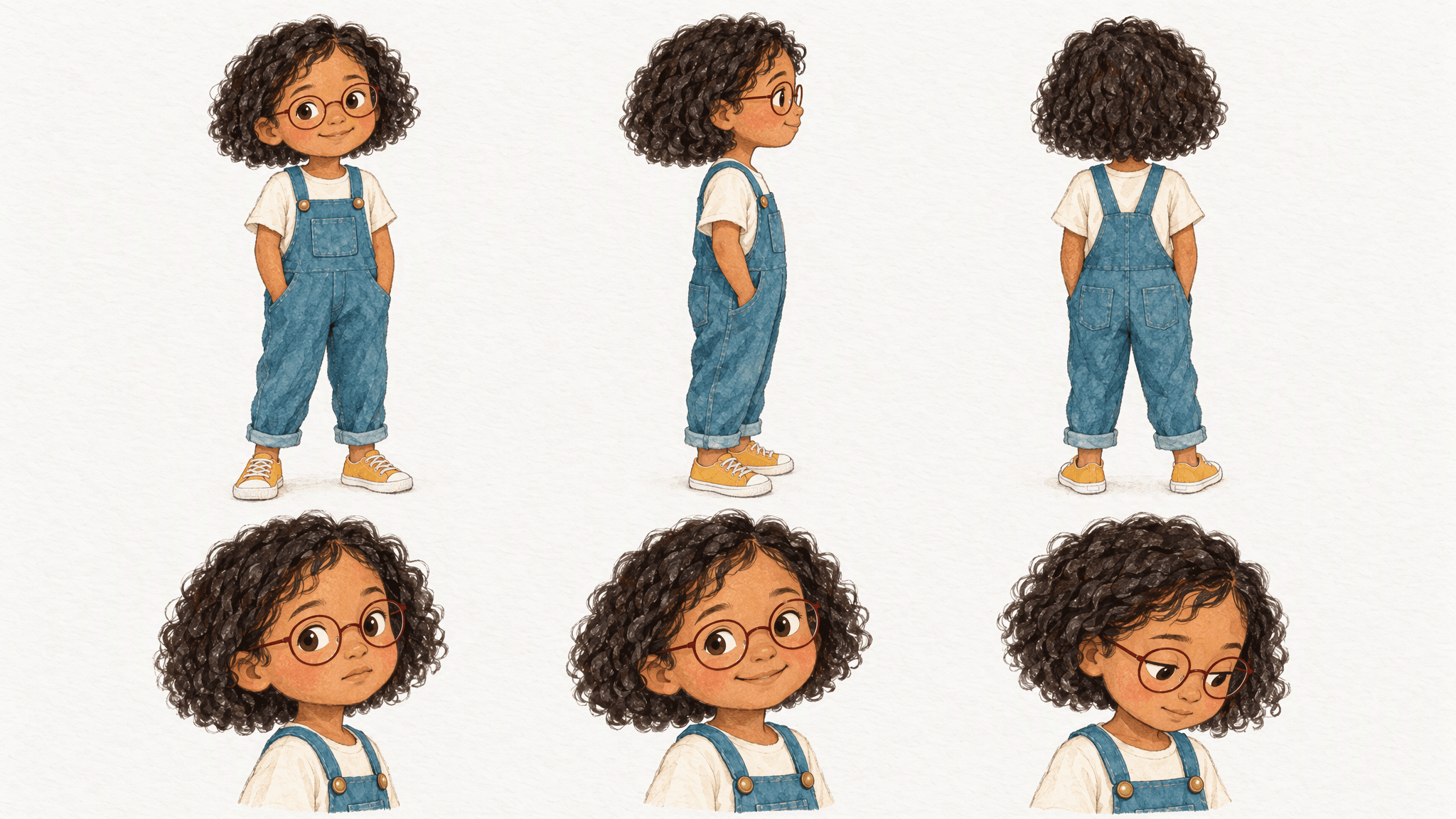 Character reference sheet evidence covering front, profile, back, and expressions
Completed six-view character sheet based on the approved master, covering front, profile, rear, neutral, smiling, and downward-looking views.
GPT Image 2.5 Children’s Book Character Consistency: Four Pages
The exercise follows one child through a neighborhood park and back home. Each scene tests a different production difficulty while serving the same quiet observation story. There are no invented sales figures, customer claims, or promises that the images are publication-ready.
Step 3: generate each page separately. In Sunburst Edit, start every request with the approved master as Image 1 and the approved sheet as Image 2. Check the upload order. Remove leftover inputs from the previous request, including the model page's example image. Paste the full fixed block below, followed by exactly one scene block.
plaintext1Create one landscape illustration for the same children's picture book. 2 3Reference roles: 4Image 1 is the approved authority for the child's identity, age, proportions, outfit, and illustration style. 5Image 2 provides additional views of that same character. If the references disagree, follow Image 1. 6 7Preserve the child's round face, medium-brown skin, dark-brown eyes, short black curly bob, and thin round dark-red glasses. Preserve the ivory T-shirt, teal-blue overalls with two shoulder straps, two brass fasteners and one square chest pocket, and mustard-yellow sneakers with white soles. 8 9Keep the hand-painted watercolor washes, restrained colored-pencil outlines, and paper texture. Change only the pose, expression, viewpoint, environment, and lighting required by the scene below. 10 11Render one scene, not a collage or reference sheet. Keep hands and body proportions plausible. Leave the upper-left quarter visually quiet for text to be added later. Do not render any text, labels, logos, or watermark.
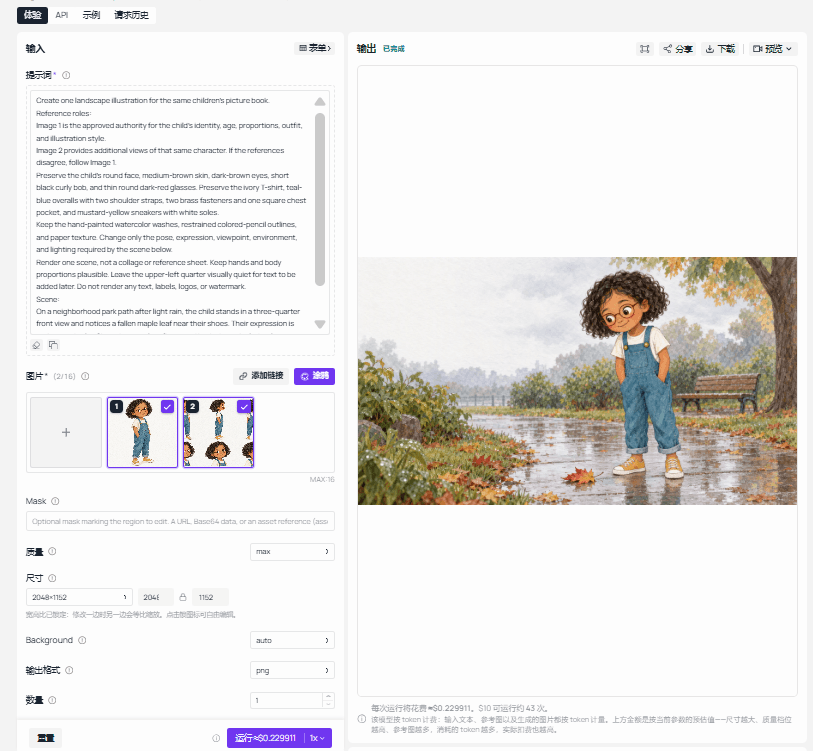 Sunburst edit playground evidence showing character references and a story-page output
Completed Sunburst Edit capture with the master and character sheet attached as references and a finished Page A output visible.
Page A: standing and clothing. This is the easiest view in the set and a useful first check of whether a reference-based scene preserves the whole outfit. The leaf supplies the story action. The distant bench provides context without introducing another recurring character.
plaintext1Scene: 2On a neighborhood park path after light rain, the child stands in a three-quarter front view and notices a fallen maple leaf near their shoes. Their expression is curious and calm. Show the complete figure and both shoes. Include a low wooden bench in the distant background and soft overcast daylight. There are no other people.
Save the first completed result as page-a-v1.png, even if it needs work. Compare the visible pocket and fasteners with the master before spending time on background detail. Record whether the upper-left area actually leaves usable room for text.
Page B: profile and crouching. The face now has fewer visible identity cues, while bent limbs make proportions harder to judge. Check that the glasses sit on the face naturally. A circular lens can appear narrower in profile; do not demand a front-facing circle drawn onto a sideways head.
plaintext1Scene: 2Beside a small puddle on a park path, the child crouches in a left-facing profile to observe a snail on a fallen leaf without touching it. Show a gentle, concentrated expression. Keep the glasses correctly fitted in profile and the child's limbs anatomically plausible. Use soft overcast daylight. There are no other people.
Save page-b-v1.png. Trace the child's arms and legs rather than judging the silhouette alone. Then inspect the action: the snail should remain separate from the hands. A missing snail fails the story even when the character matches.
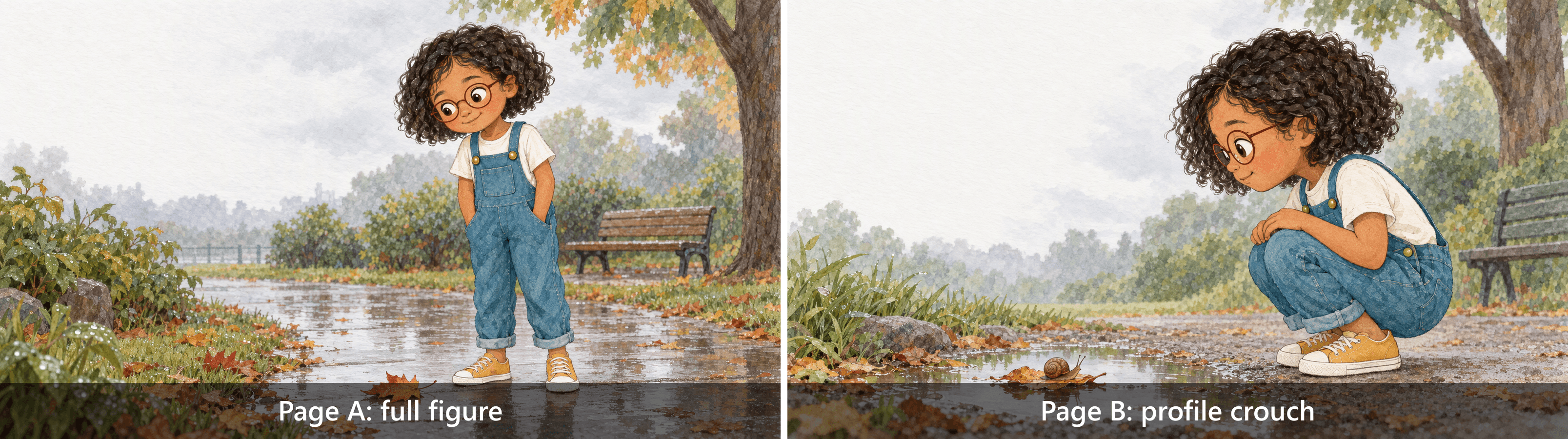 Front and crouching-profile story-page comparison for clothing and body proportions
Generated Page A and Page B comparison. It shows the same child in a full standing view and a crouching profile, allowing the outfit, glasses, body proportions, and story action to be inspected together.
Page C: rear view and a turn. This page tests information that the master only partially supplies. The approved rear panel becomes useful here. Check the back construction of the overalls rather than expecting the front chest pocket to remain visible.
plaintext1Scene: 2The child walks along a neighborhood park path, seen mostly from behind, and turns their head slightly to look at a small bird perched on a low branch. Show the back of the curly bob and the back construction of the overalls clearly. Keep the bird small and separate from the child. Do not move the chest pocket onto the back. There are no other people.
Save page-c-v1.png. Judge the hair outline, straps, and visible side of the face. Mark hidden features as not visible. The bird is a small story element; its position should make the head turn understandable.
Page D: a close view under warmer light. The child returns indoors to study a leaf. The face occupies more of the frame, so a change in apparent age or facial structure becomes easier to notice. Warmer illumination is expected; a redesigned child is not.
plaintext1Scene: 2Back indoors, the child sits at a wooden table beside a window and studies a fallen maple leaf placed on a blank sheet of paper. Use a waist-up three-quarter view with a thoughtful, slightly pleased expression. Late-afternoon window light is warmer than the outdoor scenes, but preserve the child's identity, apparent age, outfit, and watercolor style. Keep the paper blank and include no other people.
Save page-d-v1.png. If your manuscript says this is the exact leaf collected earlier, separately define its shape and markings or supply an approved prop reference. The character reference alone does not establish object continuity.
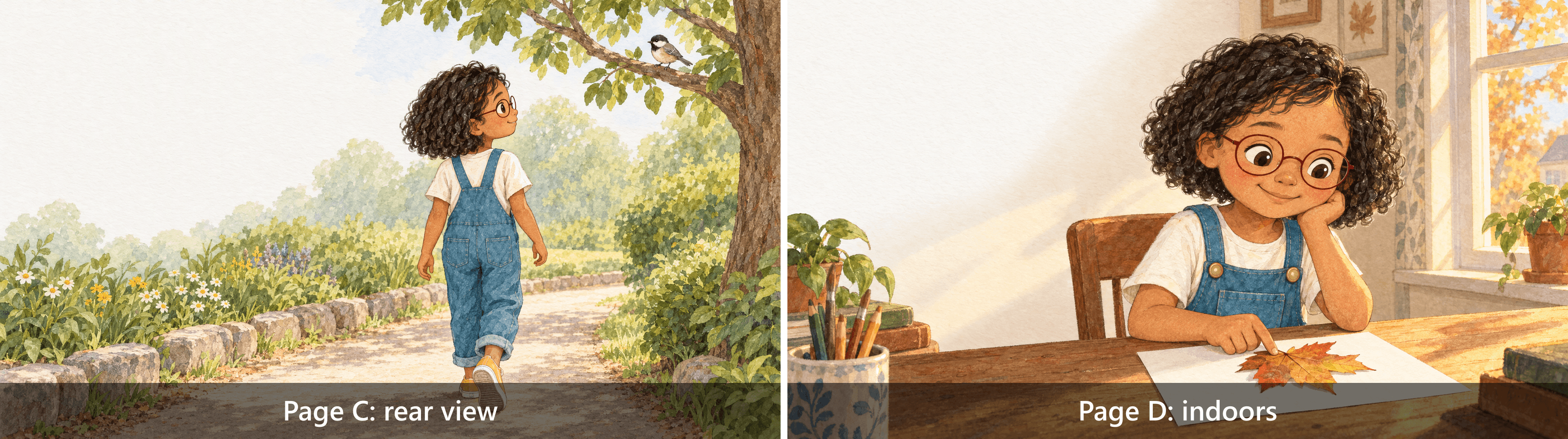 Rear-view and indoor story-page comparison for hair, straps, and facial identity
Generated Page C and Page D comparison. The rear park view makes the overall straps and hair silhouette visible; the indoor view checks facial identity under warmer window light.
Use a previous page as an additional reference only when it controls something specific, such as the park layout. State that role in the prompt. Keep the master as the identity authority, and avoid passing an unapproved page forward merely because it was generated most recently.
GPT Image 2.5 Children’s Book Character Consistency: Fixing Drift
Diagnose the failure before writing an edit instruction. “Make it consistent” leaves the model to decide what consistency means. “Match the thin round dark-red frames in Image 2 while keeping the existing expression” defines a visible target and a set of things to preserve.
Use a local edit when most of a page is acceptable. If the child has a different face, different proportions, and a different outfit, restart from the approved reference package. Repeated repairs to a fundamentally wrong identity can leave you with a page that is difficult to compare with any stable baseline.
| Visible problem | First operation to consider | Reference to retain | Inspect after the change |
|---|---|---|---|
| Glasses shape differs | Targeted glasses edit | Current page plus master | Face, eyes, expression, and viewing angle |
| Extra pocket or missing strap | Targeted garment edit | Current page plus master or approved rear view | Hands, torso, other garment details |
| Face and age both drift | Regenerate the scene | Master plus approved sheet | Entire identity and scene action |
| Correct child, wrong story action | Rewrite the action and regenerate or edit | Master plus sheet; current page if useful | Object contact, gaze, and pose |
| Different illustration style throughout | Regenerate with the approved style reference | Master plus sheet | Linework, washes, texture, and palette |
Step 4: compare with a text-only request. Return to Text-to-Image, remove all references, and use the same requested settings as Page B. Paste this complete prompt:
plaintext1Create one landscape children's picture-book illustration. 2 3A six-year-old child has medium-brown skin, a round face, dark-brown eyes, a short black curly bob ending at the jaw, and thin round dark-red glasses. The child wears an ivory short-sleeved T-shirt under teal-blue overalls with exactly two shoulder straps, two round brass fasteners, and one square chest pocket. The shoes are mustard-yellow sneakers with white soles. 4 5Beside a small puddle on a park path, the child crouches in a left-facing profile to observe a snail on a fallen leaf without touching it. Show a gentle, concentrated expression. Keep the glasses correctly fitted in profile and the child's limbs anatomically plausible. Use soft overcast daylight. There are no other people. 6 7Use hand-painted watercolor washes, restrained colored-pencil outlines, and visible paper texture. Leave the upper-left quarter visually quiet for later typesetting. Render one scene. No text, labels, logos, or watermark.
Compare the resulting child with Page B and the master. Check facial structure, hair, glasses, and garment construction at a comparable display scale. Record similarities as well as differences. One text-only result might resemble the reference closely, and one reference-based result might still need repair.
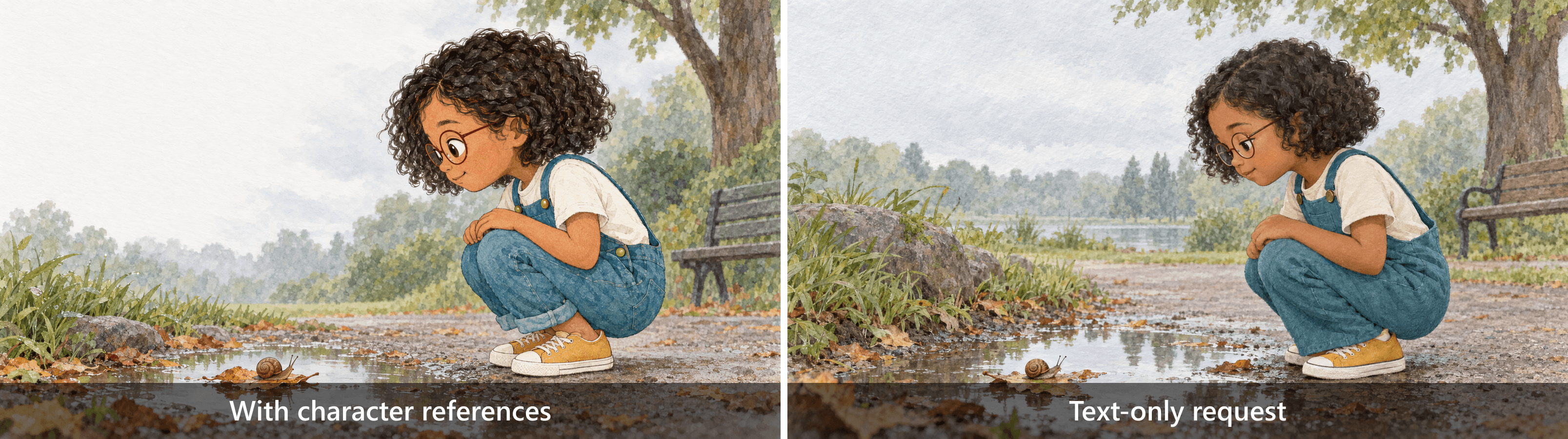 Reference-based and text-only crouching scenes compared for visible character details
Generated comparison of the reference-based crouching page and a text-only request. This single pair illustrates different prompt structures and reference use; it does not establish a model-wide success rate.
Step 5: repair one observed defect. Use the current page as Image 1 and the master as Image 2. Only use the following prompt if the actual result has the specified glasses error:
plaintext1Edit Image 1. Use Image 2 only as the approved character-identity reference. 2 3Correct the child's glasses in Image 1 to match Image 2: thin, round, dark-red frames, fitted naturally to the existing face and viewing angle. 4 5Keep the child's face shape, eyes, nose, apparent age, hair, expression, pose, outfit, hands, background, framing, lighting, watercolor texture, and all other objects unchanged. 6 7Do not copy Image 2's pose or background. Do not redesign the character. Add no text or new objects.
If that defect does not occur, preserve the honest result. Use this controlled expression change on the indoor page instead, and label it as a deliberate revision rather than an error repair:
plaintext1Edit Image 1. Use Image 2 as the approved character-identity reference. 2 3Change only the child's expression from thoughtful to gently pleased, with a subtle closed-mouth smile. 4 5Preserve identity, apparent age, glasses, hair, head angle, pose, clothing, hands, background, framing, lighting, and illustration texture. Do not add or remove objects. Add no text.
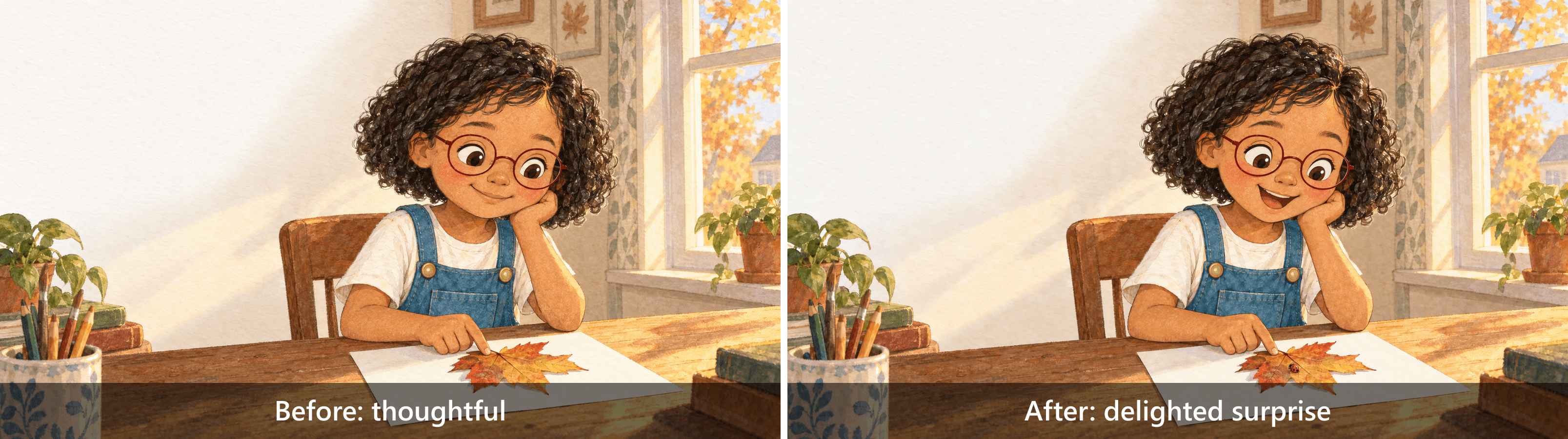 Before-and-after evidence for a targeted correction or controlled expression edit
Before-and-after Page D comparison. The child shifts from thoughtful to delighted surprise, but the edited result also adds a ladybug on the leaf. Because that insect was outside the intended expression-only scope, treat it as an observed collateral change to inspect, not a fully successful preservation edit.
Inspect the whole page after the edit, including the leaf, fingers, pocket, and window. A successful smile adjustment does not excuse a changed hand. Keep both versions and write a short decision: accept, revise again, or return to the earlier version. That note prevents the newest file from becoming the approved file by accident.
GPT Image 2.5 Children’s Book Character Consistency: Seven Checks
Review each page twice: once beside the master at a comfortable inspection size, and once in the intended reading sequence. The first pass catches details. The second reveals changes in apparent age, scale, and visual rhythm that may be less obvious when viewing isolated images.
Use Pass, Revise, or Not visible for each of these 7 checks. A hidden shoe does not fail a waist-up scene, but it also supplies no evidence that the shoe design was preserved. Keep the distinction in your records so a later review can understand what was actually inspected.
- Face and age: compare cheek shape, jaw, eye placement, and whether the child still reads as about 6.
- Hair: compare the silhouette, curl pattern, length, and color where visible.
- Identity markers: inspect glasses shape, color, fit, and any other defining accessory.
- Clothing and shoes: count visible straps, fasteners, and pockets; check shoe construction.
- Proportions and pose: trace limbs, joints, hands, and head-to-body relationships with perspective in mind.
- Illustration style: compare outlines, watercolor washes, paper texture, and the overall palette.
- Story action: check gaze, object placement, contact, and the exact action assigned to the page.
A page is accepted only when every visible requirement passes and the composition communicates the story. Record why a feature is not visible. If the manuscript specifically needs that feature, such as a child showing a marked shoe to a friend, hiding it is a scene failure rather than an acceptable exemption.
For a second character, give each uploaded reference an explicit owner. Describe one person's glasses and clothing in their own identity block, then describe the other person's design separately. Check both figures after overlap, movement, or partial occlusion. Shared attributes can become difficult to assign when the prompt simply asks for “the same children.”
Keep review comments concrete enough for another person to act on. “The left frame is square” is useful. “Something feels off” needs another look before an edit request. This record also becomes a handoff document if an illustrator or designer finishes the pages manually.
Flare or Sunburst for Your Picture Book?
OpenAI positions Flare around fast everyday image generation. That is a model description, not evidence that it will complete your particular reference-heavy book faster overall. A short generation that needs several repairs can take more production time than a longer request that you accept. (OpenAI Flare model documentation, accessed September 2026.)
This exercise selects Sunburst for both the initial image and the editing chain. Keeping one model through the sequence makes it easier to track the effects of changed scene instructions and reference inputs. There is no Flare image set here and no measured ranking between the two.
| Model | Official emphasis | Stage you might consider | What your own trial still needs to establish |
|---|---|---|---|
| Flare | Fast everyday image generation | Early concept exploration and composition options | Identity retention with your references, actual wait time, and repair effort |
| Sunburst | Image generation and editing precision | Approved-reference scenes and targeted revisions | Cross-page continuity, collateral edit changes, and cost per accepted page |
Choose a trial that matches the difficult part of your manuscript. A straight-on smiling portrait offers limited evidence for a book full of running, turning, and overlapping characters. Use a page that shows the views, clothing details, and interactions you will repeatedly need.
Reference quantity should follow purpose. The Atlas edit page lists a limit of 16 images, but this workflow uses 2 because each has a distinct job. Adding every previous page can introduce conflicting poses, environments, or versions. More inputs also require more effort to organize and review.
Keep quality and size fixed while comparing production approaches, then record the differences you actually observe. Avoid changing the model, the prompt, the references, and the resolution simultaneously if you want to understand which choice helped. For deadline decisions, record total operator time as well as waiting time; upload preparation and revision review belong in the schedule.
Budget for Approved Pages, Not Just Generations
The baseline exercise contains 8 outputs: 1 master, 1 sheet, 4 story pages, 1 text-only comparison, and 1 targeted or controlled edit. That is a planned count, not a guarantee of 8 successful requests. A rejected master or conflicting sheet can add work before page production starts.
Use this formula after the project has accepted pages:
Cost per approved page = actual project generation and editing charges ÷ final approved page count.
Include the master, sheet, retries, and repairs in the numerator. If you include the comparison experiment, say so; it is evaluation overhead rather than a required output for every future book. If no page is approved, report that the cost per approved page is not yet calculable.
Check the current Atlas model catalogue before planning a paid production run. On September 18, 2026, the catalogue displayed rounded starting prices and a 20% discount for these Sunburst routes. Those listings do not quote the full cost of this exercise at maximum quality.
The public model notes describe token-based billing and a submission hold that is reconciled against reported usage. Record the estimate displayed before Run separately from the settled charge. Reference images and output settings matter; multiplying a catalogue minimum by the number of book pages can substantially misstate the budget.
Keep human work in a separate time column: selecting references, inspecting output, writing repair instructions, arranging type, and preparing files. Test-environment credits are not evidence of a production payment. Where settlement is unavailable, mark it unverified and leave the formula unevaluated. That is more useful than presenting a precise book budget built from an unrelated starting price.
Prepare the Illustrations for Book Layout
Approve the image sequence before arranging the final typography. Keep the story text in the layout document so you can change a sentence, font size, or line break without regenerating the child. The prompts deliberately ask for blank paper and quiet space rather than rendered page text.
Choose the final page shape before producing an entire book. The requested 2048×1152 canvas serves a landscape demonstration. A square printed page or a portrait trim size may require a different composition. Cropping after generation can remove the shoes you needed to check or consume the area reserved for words.
Treat the upper-left quiet area as a starting instruction. Place the real text over the illustration during a layout proof and check whether branches, window frames, or strong color changes interfere with reading. A visually empty corner can still be too narrow for the actual sentence at an appropriate type size.
For a spread, inspect the center fold and the trim boundary. Keep essential facial features, hands, and small story objects away from areas likely to be obscured or cut. Follow the actual printer's template for bleed and safe placement; the blog demonstration does not supply those production measurements.
The basic size calculation is pixels ÷ target PPI = inches. At 300 PPI, a 2048-pixel edge measures about 6.83 inches, and a 1152-pixel edge measures 3.84 inches. This arithmetic is an example, not a universal publishing requirement. The intended trim size, bleed, and printer specifications determine whether the image has enough pixels.
Inspect a proof at its intended reading size. Glasses that are clear in a large monitor view can become difficult to distinguish on paper. Check fine outlines, small objects, text contrast, and page-to-page color variation. A screen-only review cannot establish how a specific printer and paper stock will reproduce the illustration.
Deliver a complete working package: approved page images, clean master and sheet, exact prompts, model IDs, settings, version history, and the review table. Keep the original outputs alongside layout exports so another collaborator can distinguish image generation from later cropping or color work.
Before commercial release, check the current service terms and your publishing platform's requirements for the intended use and any required disclosures. This workflow does not establish legal clearance or publication acceptance.
For GPT Image 2.5 Children’s Book Character Consistency, the useful milestone is a reviewed sequence with traceable references. Try one challenging page with your approved character reference in Atlas Cloud, then check it against the 7-point checklist before building the rest of the book.
Frequently Asked Questions
Can GPT Image 2.5 keep the same child consistent across an entire book?
Reference images and repeated identity instructions give you a practical way to control and review continuity. They do not guarantee every page will pass. A 4-page sample only tests those scenes and views. Before expanding, include the hardest poses, lighting changes, and interactions from your manuscript, then budget for revisions and review the full sequence together.
Is one reference image enough, or do I need a character sheet?
One clear reference may cover a page that resembles its viewpoint. A sheet becomes useful when the story needs a profile, a rear view, or varied expressions. Inspect the sheet before using it: a conflicting rear panel can introduce its own errors. Keep one master as the identity authority and use only supplementary views you have approved.
Why do the face or clothes change even when I reuse the same prompt?
Words leave visual details open to interpretation. “Round face” does not specify one exact facial structure, and clothing descriptions leave seam placement and proportions partly unresolved. A reference supplies visible information, but the resulting page still needs inspection. Reattach the approved images each time, name their roles, and avoid using an unreviewed result as the next identity baseline.
How do I keep 2 characters from sharing the same clothes or features?
Assign every reference to a named character and write separate identity blocks. Describe the scene's positions and interactions so ownership remains clear. After generation, inspect each person independently, including features that disappear behind another figure and reappear. Correct a transferred accessory against its owner's reference, then check that the edit did not change the other character.
Should I use Flare or Sunburst for children’s book illustrations?
Consider Flare for everyday generation and Sunburst when precise editing is central to the task, following their official positioning. This guide uses Sunburst throughout and does not provide a measured comparison. Test your own difficult page with fixed inputs and record accepted results, revision effort, waiting time, and visible charges before choosing a model for the complete project.
How much should I budget for a complete illustrated book?
Start with a small production sample. Add the actual charges for references, pages, rejected attempts, and repairs, then divide by accepted pages. Track human review and layout separately. More complex later scenes can change the rate, so keep a contingency based on your observed revisions. A test credit balance or catalogue starting price does not establish your final paid budget.





