You have the joke. Your cat has claimed the keyboard, three deadlines have landed on the same afternoon, or one more feature has somehow become essential before launch. Then the image generator misspells the caption or gives your visibly overwhelmed character a relaxed smile.
GPT Image 2.5 Custom Meme Creation works through two routes: generate an original scene from text, or upload an existing image and edit it. This guide uses Sunburst for both, with five everyday ideas and a caption-only revision that puts preservation under scrutiny.
Start with the contradiction, write the exact words readers should see, and identify which parts of the picture carry the joke. For a familiar template that only needs labels, an ordinary caption editor may already do the job.
The examples below are designed demonstrations, not stories about real customers or successful campaigns. Their value is a repeatable way to decide what to ask for and what to reject before posting.
Key takeaways
- Choose a joke structure before choosing a template.
- Separate exact visible text from instructions.
- Preserve the expression, gesture, and relationships that make the meme recognizable.
GPT Image 2.5 Custom Meme Creation: What It Can Do
GPT Image 2.5 is a model family. The specific model in this guide is Sunburst, and the two operations are text-to-image generation and reference-image editing. A ChatGPT model-picker label, a GPT Image 2 tutorial, and a Sunburst playground are different things; record the actual model identifier when reproducing an example.
OpenAI describes Sunburst as supporting image generation and editing from text and image inputs, with an emphasis on editing precision. It offers five explicit quality levels, low, medium, high, xhigh, and max, plus automatic selection. (OpenAI Sunburst documentation, accessed September 2026).
| Choice | Documented positioning | How to use that distinction here |
|---|---|---|
| Sunburst | Generation and editing, with emphasis on precise edits | Keep one model across new scenes and template revisions |
| Flare | Fast, everyday image generation | Consider for a separate generation experiment; no speed comparison is claimed here |
| Ordinary caption editor | Places text on an existing canvas | Use when the source picture already communicates the whole joke |
The first two rows summarize OpenAI's Sunburst and Flare model descriptions, rather than a measured ranking. Neither description establishes which model will understand your team's private joke. Keeping Sunburst throughout this tutorial removes one variable while you work on wording, layout, and preservation.
For an original meme, the model must invent the physical situation. The cat needs to occupy the keyboard; the grocery bags need to obstruct the person's attempt to unlock the door. Those relationships deserve more prompt space than generic requests for a funny image.
For a template edit, the source already supplies the visual setup. Your job is to assign the new meaning while retaining the recognizable arrangement. A request to add labels should not quietly turn into a new photograph or a cleaned-up cartoon.
A caption editor gives you direct control over text placement without regenerating the scene. That distinction matters because a model's instruction to preserve an image is an objective, not a promise that every untouched pixel will survive. Choose generation when you need new visual content, and judge edits against the original.
GPT Image 2.5 Custom Meme Creation Starts With the Joke
A useful starting sentence names something a person wants and the small obstacle that makes their behavior ridiculous. “I want to work, but my cat owns the keyboard” contains a visible conflict. “Work is stressful” gives the model almost nothing to stage.
Before writing a prompt, reduce your idea to one contradiction. Then pick a format whose existing visual relationships express it. The template should make the situation easier to understand before the reader finishes the caption.
| Everyday frustration | Joke structure | Example | What must remain clear |
|---|---|---|---|
| Your plan conflicts with reality | Original single-image contradiction | Cat occupying the work keyboard | The supposed productivity manager prevents work |
| Avoiding a tiny inconvenience creates a larger one | Original everyday exaggeration | Carrying every grocery bag at once | The overloaded person could simply make another trip |
| Two desirable goals compete | Two Buttons | Shipping on time versus adding a feature | Both choices feel tempting and difficult to reconcile |
| A new temptation interrupts responsibility | Distracted Boyfriend | Current project versus new idea | Each label maps unambiguously to one person |
| Someone denies obvious trouble | This Is Fine | Three deadlines in one afternoon | Calm expression contrasts with the surrounding fire |
These are five different mechanisms. Two Buttons describes indecision; Distracted Boyfriend describes diverted attention. Swapping the same labels between them can weaken both because the relationships change. A decision between two options needs two options, while temptation needs a person, a responsibility, and a distraction.
For the button example, “SHIP ON TIME” and “ADD ONE MORE FEATURE” suggest a familiar release-day tradeoff. The conflict depends on limited time. If both labels can happen comfortably together, the sweating character becomes harder to explain.
The original Two Buttons format pairs opposing choices with a visibly strained reaction. Its recognizable structure is why preserving the panels and sweating gesture matters more than upgrading the artwork. (Know Your Meme, accessed September 2026).
“Make a funny meme” leaves the subject, contradiction, wording, and reading order undecided. Instead, specify the person or animal, the decisive action, the exact caption, and the placement. You can then inspect those four elements separately rather than deciding vaguely whether the result feels right.
Try reading the caption without the image, then covering the caption and looking at the image. Each should contribute something. If the words explain every object and action, shorten them. If the picture communicates nothing beyond a neutral portrait, strengthen the physical situation before adding more text.
GPT Image 2.5 Custom Meme Creation: 2 Everyday Prompts
The two original ideas use ordinary photographic scenes because their humor depends on recognizing a small daily annoyance. Keep the setting specific enough to read quickly: a blocked laptop and a crowded apartment doorway. Elaborate styling can make those moments feel like a campaign shoot.
You can reproduce the setup on Atlas Cloud, using a named model page rather than guessing which image model a general chat interface selected.
Original-image procedure
- Open the Sunburst Text-to-Image playground. Confirm
openai/gpt-image-2.5-sunburst/text-to-image. - Select
quality=max,size=2048x1152, PNG output, an opaque background, and one image. Verify the displayed values after changing them. - Paste one complete prompt below. Remove any preset prompt or sample reference before running.
- Wait for your task to complete and download its output. A sample picture already on the page is not your result.
- Read the caption character by character, then inspect the action at phone width. Save an accepted original separately before attempting edits.
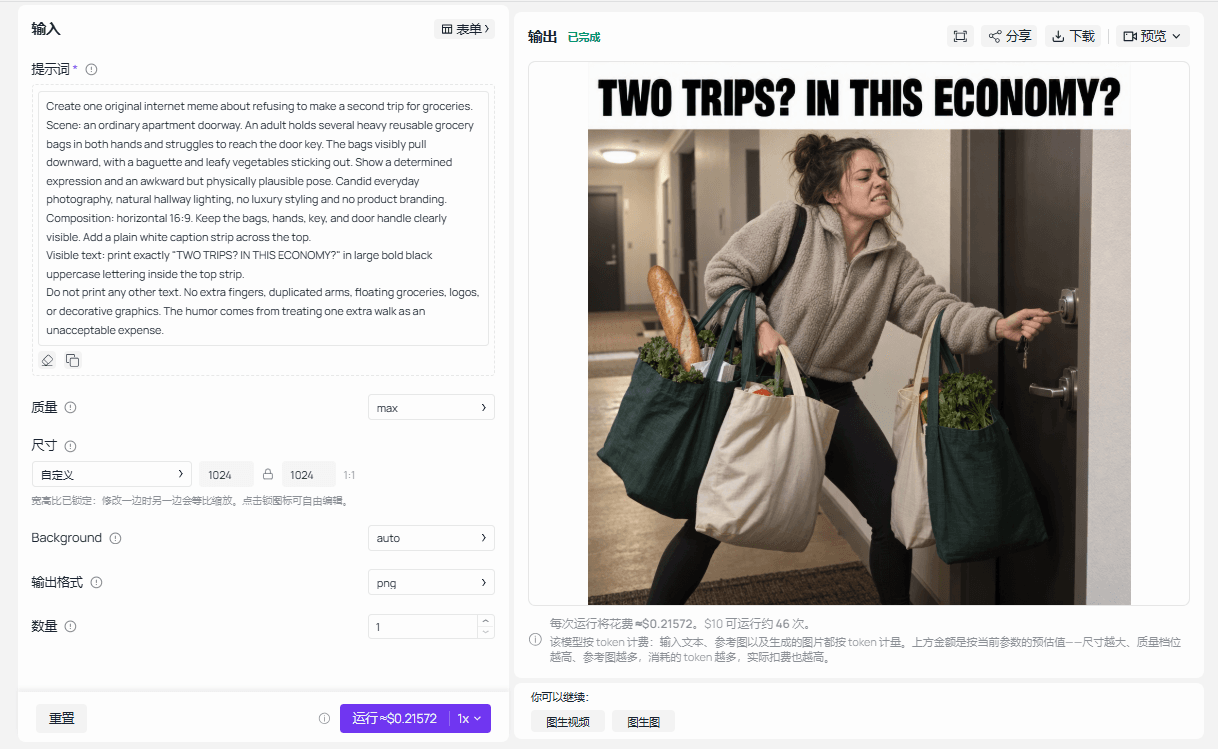 Sunburst text-to-image playground with the grocery-bag prompt, max quality, PNG output, and a completed result
Sunburst Text-to-Image playground capture for the grocery-bag prompt. The displayed result was generated with max quality and PNG output.
Idea 1: the productivity manager is asleep
The cat's apparent authority makes the joke. Calling it a manager turns a familiar interruption into a workplace relationship, while its sleeping body explains why the human cannot get anything done. A cat beside the laptop would be cute but would weaken that relationship.
plaintext1Create one original, relatable internet meme about trying to work from home while a cat occupies the keyboard. 2 3Scene: a candid, ordinary home-office photograph. A tabby cat lies directly across a laptop keyboard, completely blocking it. At the edge of the frame, the worker's hands hover helplessly above the cat. The laptop screen is turned away and shows no readable interface. Soft window light, everyday clutter, natural fur texture, no advertising aesthetic. 4 5Composition: horizontal 16:9. Keep the cat and the blocked keyboard immediately recognizable. Reserve a plain white caption strip across the top, separate from the photograph. 6 7Visible text: print exactly "MY PRODUCTIVITY MANAGER IS ASLEEP" in large bold black uppercase lettering inside the top strip. 8 9Do not print any other text. Do not add logos, extra panels, speech bubbles, or decorative graphics. The joke is that the cat controls whether any work gets done.
Check that the keyboard is genuinely blocked and the hovering hands belong to a plausible human position. The screen should not become a competing source of text. Keep this downloaded image for the caption-edit demonstration later, where the original and revision belong together.
Idea 2: every grocery bag in one trip
The second joke treats another walk as an intolerable expense. Heavy bags, an awkward key reach, and stubborn determination explain the disproportionate effort. The short caption adds the excuse; it does not need to narrate the entire trip from the car.
plaintext1Create one original internet meme about refusing to make a second trip for groceries. 2 3Scene: an ordinary apartment doorway. An adult holds several heavy reusable grocery bags in both hands and struggles to reach the door key. The bags visibly pull downward, with a baguette and leafy vegetables sticking out. Show a determined expression and an awkward but physically plausible pose. Candid everyday photography, natural hallway lighting, no luxury styling and no product branding. 4 5Composition: horizontal 16:9. Keep the bags, hands, key, and door handle clearly visible. Add a plain white caption strip across the top. 6 7Visible text: print exactly "TWO TRIPS? IN THIS ECONOMY?" in large bold black uppercase lettering inside the top strip. 8 9Do not print any other text. No extra fingers, duplicated arms, floating groceries, logos, or decorative graphics. The humor comes from treating one extra walk as an unacceptable expense.
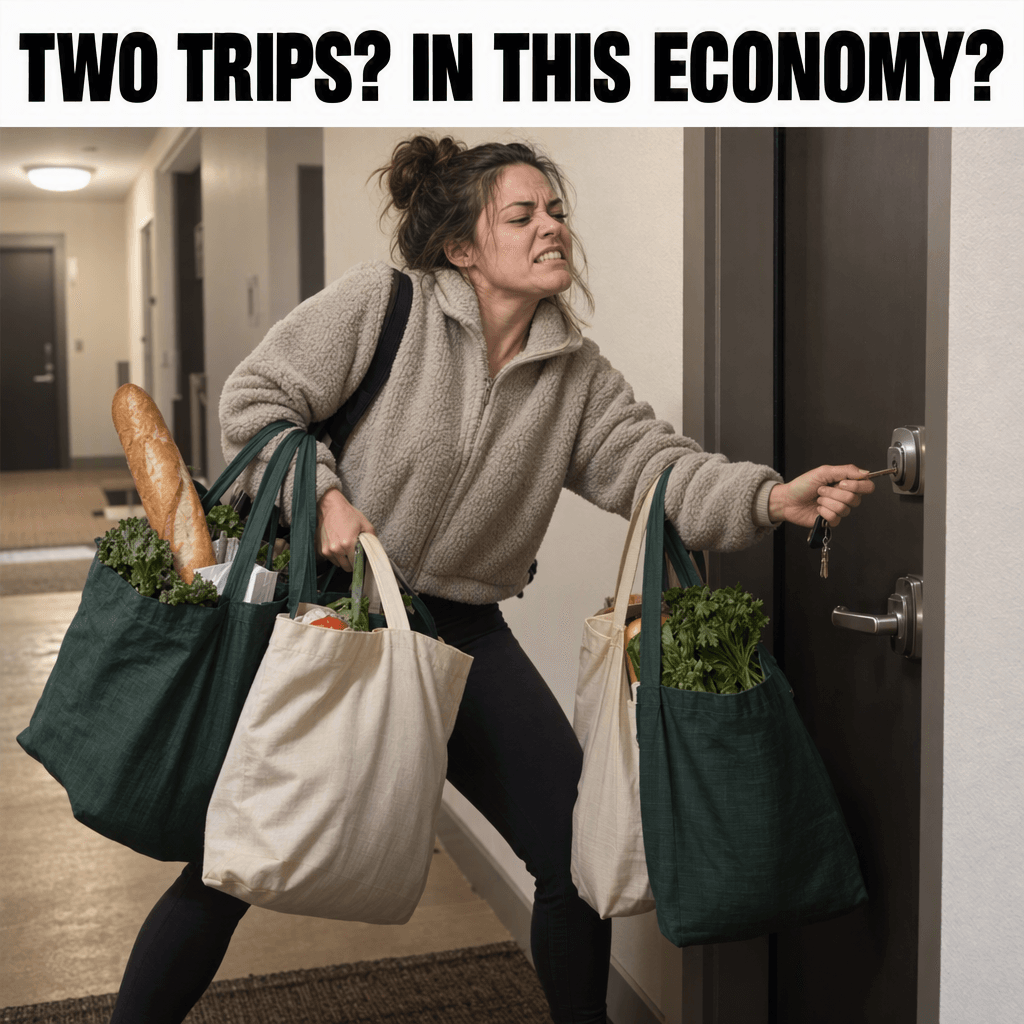 Generated grocery meme showing a person carrying every bag in one trip and the caption “TWO TRIPS? IN THIS ECONOMY?”
Generated Sunburst result for the grocery-bag prompt. The caption, loaded bags, reaching hand, key, and door handle are visible in the completed image.
Inspect the relationship between handles, fingers, and bag weight. A determined expression alone cannot rescue groceries that float or hands that never hold anything. The doorway should also be close enough to make the key problem intelligible without an explanatory caption underneath.
For both ideas, keep the white strip separate from the photograph. That gives readers a predictable reading order and creates a defined region for later text replacement. Reject a result if the model prints labels such as “Visible text” or copies the instructions into the scene.
GPT Image 2.5 Custom Meme Creation With Classic Templates
Existing templates bring an established visual joke. Download the actual image before editing; asking the model to create something “like Two Buttons” introduces unnecessary changes to the artwork. Keep the untouched download so you can compare every subsequent result with a stable source.
The three source links in the captions below open circulating blank-template files. Open the image and save it locally, retaining the corresponding template name. These are reference copies from Imgflip, not a claim that you have obtained a rights holder's original master or permission for commercial use.
Template-edit procedure
- Save the required template, then open the Sunburst Edit playground.
- Confirm
openai/gpt-image-2.5-sunburst/edit. Remove preset images and upload the single original template for that case. - Choose
quality=max,size=auto, PNG, and one output. Check that the source preview shows the full image. - Paste the matching prompt, run once, and download the completed result. Record the actual dimensions; automatic sizing does not establish that the source dimensions were retained.
- Compare the source and output before accepting the result. Return to the source if the model changes an expression, panel, or important gesture.
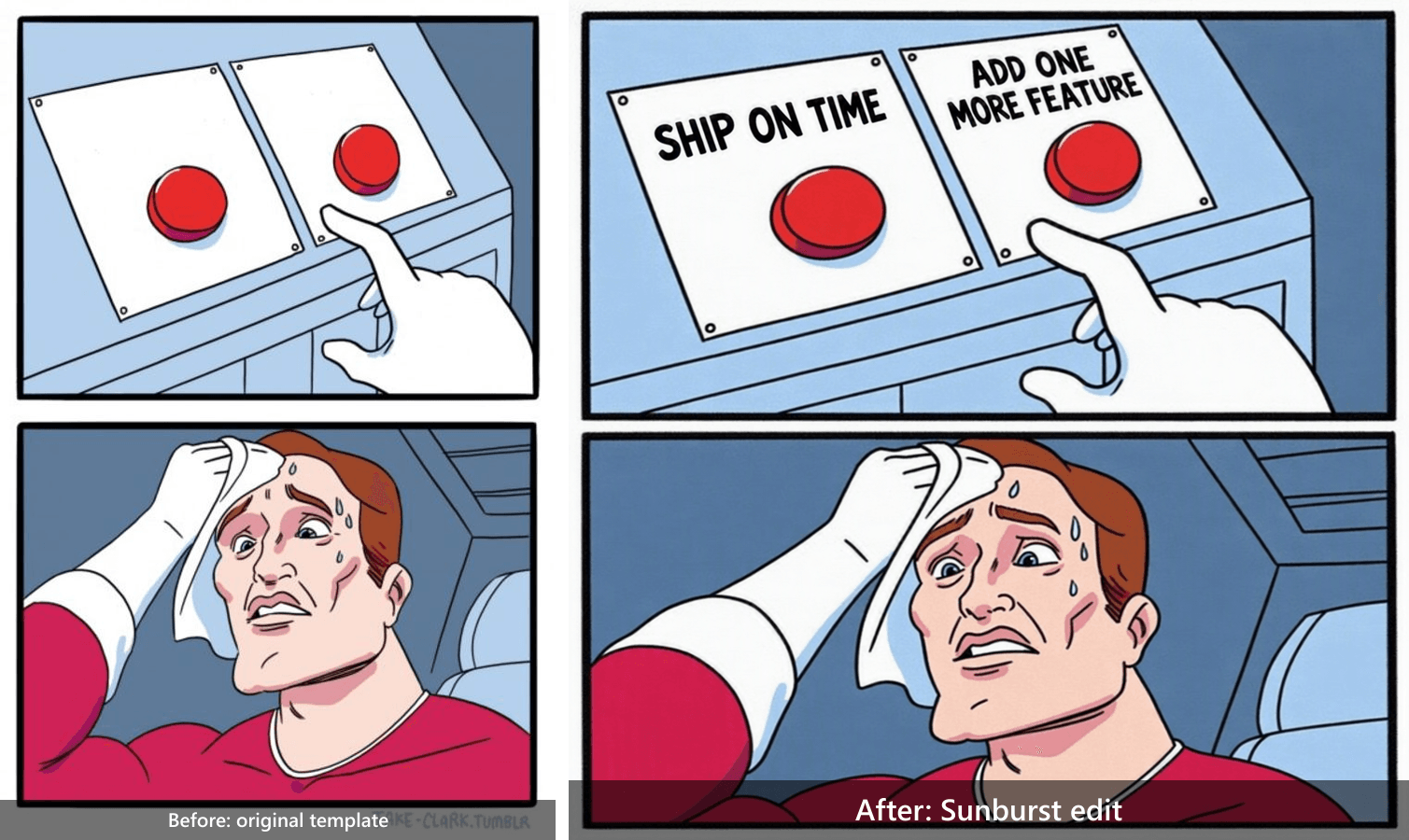 Two Buttons before-and-after comparison: original blank template on the left and the Sunburst edit with “SHIP ON TIME” and “ADD ONE MORE FEATURE” on the right
Before/after comparison of the original Two Buttons template and the completed Sunburst edit. The requested labels are associated with their respective buttons while the two-panel layout, sweating reaction, hand position, and comic texture remain intact.
Idea 3: ship on time or add one more feature
The two labels should describe a decision the audience has actually faced. “SHIP ON TIME” promises relief; “ADD ONE MORE FEATURE” captures the temptation to expand scope. The sweating reaction makes sense when readers recognize the pressure of wanting both.
Keep the comic's rough texture. Cleaning its lines, changing the face, or rearranging the panels can make a technically readable caption feel detached from the familiar reaction. The preservation instruction is intentionally more detailed than the request to add words.
plaintext1Edit the uploaded Two Buttons meme template. 2 3Preserve the original two-panel layout, character, sweating expression, hand positions, red buttons, outlines, colors, and existing low-resolution comic texture. Do not redraw or modernize the artwork. 4 5Add exactly these labels to the existing label areas beside the two buttons: 6Left button: "SHIP ON TIME" 7Right button: "ADD ONE MORE FEATURE" 8 9Use clear black lettering that fits the available space. Keep both labels associated with the correct buttons. Do not cover the character's face or change the sweat. 10 11Do not add any other text, objects, panels, logos, or faces. Keep the full original composition and aspect ratio.
A successful edit associates each phrase with the intended button without covering the hand or reaction. Read the options in isolation: neither should require a paragraph about your product roadmap. If the longer phrase becomes tiny, break it into lines before shrinking the whole template.
Idea 4: my current project versus a new idea
Distracted Boyfriend supplies three roles rather than two choices. The man represents the distracted person, his girlfriend represents the existing commitment, and the woman in red represents the new temptation. If the labels move to the wrong torsos, the joke can imply something entirely different.
Use both visual identifiers and roles in the prompt. “The person on the right” alone becomes unreliable when a model changes framing. A description combining position, clothing, and relationship gives the label a more explicit target.
plaintext1Edit the uploaded Distracted Boyfriend meme photograph. 2 3Preserve all three original people, their identities, facial expressions, clothing, gaze directions, body positions, the street background, lighting, and photographic texture. 4 5Add exactly three readable labels in white bold lettering with a black outline: 6On the man in the center: "ME" 7On his girlfriend at the right: "FINISHING MY CURRENT PROJECT" 8On the woman in red at the left: "A NEW IDEA" 9 10Place labels near the corresponding torsos without covering faces. Break long text into short lines if needed. 11 12Do not change anyone's face, beautify the photo, replace the background, or add additional text. Preserve the full original framing and aspect ratio.
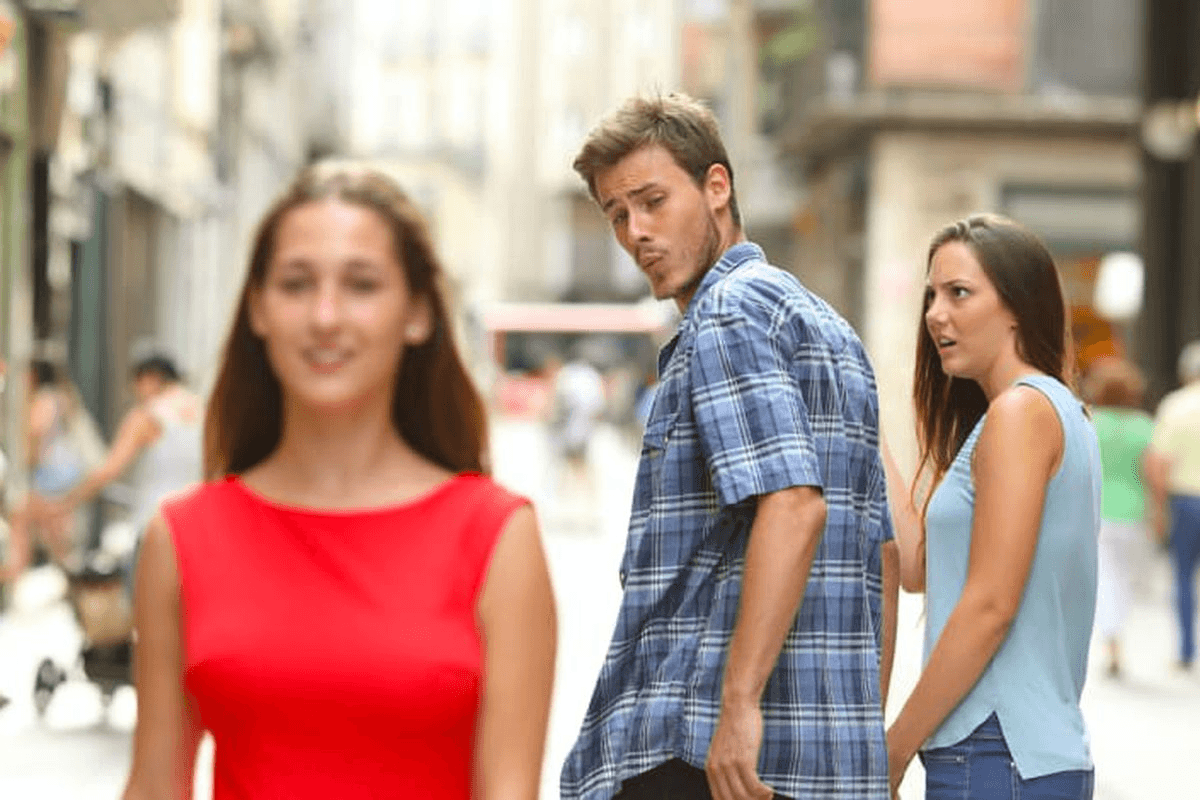 Original Distracted Boyfriend photograph showing the three people and their gaze directions
Original Distracted Boyfriend template, downloaded September 17, 2026. Source image only; no model edit or local caption overlay.
Check all three faces before examining typography. Their gaze and reactions establish the betrayal of attention. Then inspect the label boundaries: a long project label that overlaps the man can leave the audience unsure who represents the commitment. Preserve the complete photograph when adjusting the text.
Idea 5: three deadlines, one afternoon
This Is Fine works through denial. The room communicates the emergency while the dog's calm behavior refuses to acknowledge it. Your new caption supplies a relatable reason for the emergency without needing to repaint the fire or alter the character.
The instruction below adds canvas above the image. That changes the outer proportions intentionally while asking the original panels to keep their internal proportions. Distinguish those two requirements when checking the result: a taller finished canvas is expected, a stretched dog is not.
plaintext1Use the uploaded This Is Fine meme as the unchanged base artwork. 2 3Keep the original dog, calm expression, hat, mug, table, flames, panel arrangement, colors, outlines, and existing speech-bubble text. Do not repaint, upscale into a new art style, or replace the character. 4 5Add a clean white caption strip above the complete original image. In that strip, print exactly: 6"THREE DEADLINES. ONE AFTERNOON." 7 8Use large bold black uppercase lettering. Preserve the original artwork's proportions inside the expanded canvas. Do not crop either panel or cover existing text. 9 10Add no other text, logos, characters, or objects.
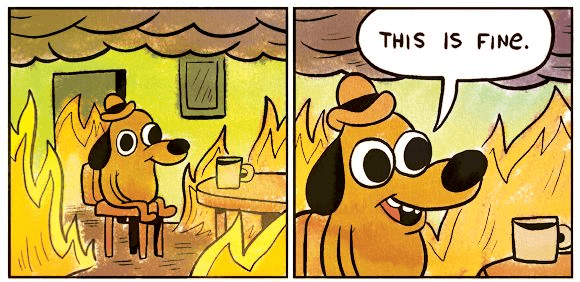
Original This Is Fine comic with calm dog, flames, mug and speech bubble
Original This Is Fine template, downloaded September 17, 2026. Source image only; both panels and the existing speech bubble are retained. No model edit or local caption overlay.
The acceptance test is simple: both panels, the original bubble text, the mug, and the calm expression must remain readable. If the edit extinguishes the flames or makes the dog panic, it removes the contradiction. Adding more deadline-related objects would also distract from the existing setup.
GPT Image 2.5 Custom Meme Creation: Fix Text and Drift
A caption-only revision is a useful preservation test because the intended change is small and explicit. Use the cat image downloaded from the original-generation step. Upload that file as a new input in Sunburst Edit; do not assume the playground remembers an earlier page or inherits a conversation.
Keep quality=max, PNG, automatic sizing, and one output. Confirm the preview contains the accepted cat photograph and its current caption, then paste this complete instruction:
plaintext1Edit only the text inside the existing white caption strip at the top of this image. 2 3Replace the current caption with exactly: 4"THE KEYBOARD HAS A NEW OWNER" 5 6Keep the same caption strip, font style, font weight, alignment, and text color. Adjust only the font size if needed to fit the new sentence. 7 8Preserve the photograph below the strip: the same cat, fur markings, position, keyboard, hands, background, lighting, shadows, and crop. Do not add or remove any objects. 9 10Do not print instructions or quotation marks. Return one edited image.
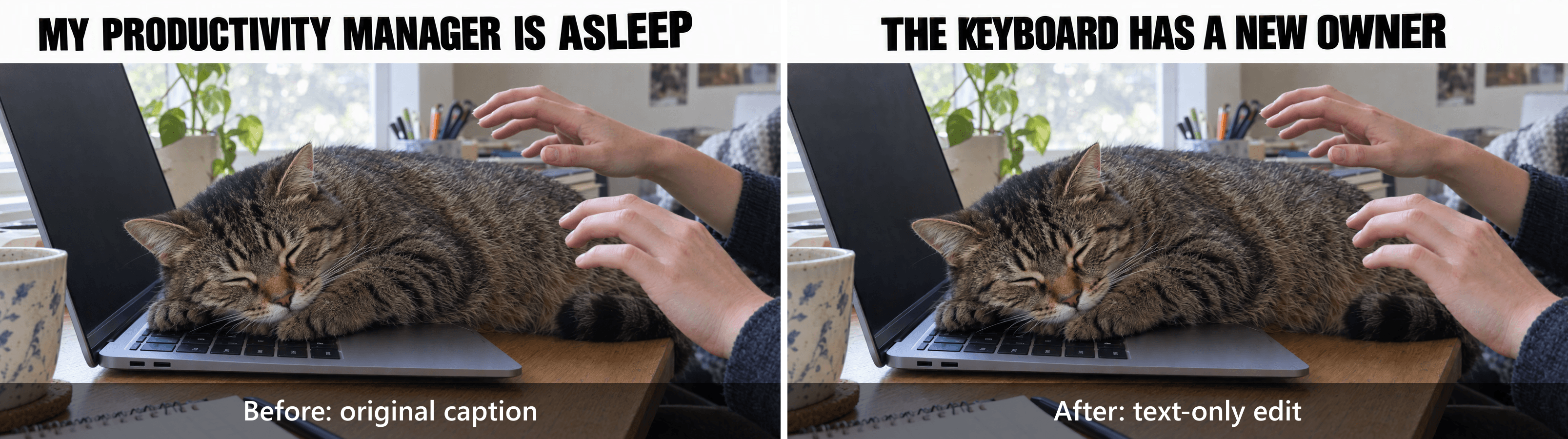 Cat keyboard meme before and after a caption-only edit, showing the same cat, keyboard, hands, lighting, and crop
Caption-only edit comparison. The left result reads “MY PRODUCTIVITY MANAGER IS ASLEEP”; the right result reads “THE KEYBOARD HAS A NEW OWNER.” The cat, keyboard, hands, lighting, and crop remain visually consistent across the two images.
Download the revision as a separate file. Check the new sentence first, including spacing and missing words. Then compare the photographs: cat markings, paw position, keyboard edges, fingers, shadows, and crop. Matching subject matter is weaker evidence than matching those specific details.
For a closer inspection, align equally sized copies in an image editor and toggle between them. A difference blend can reveal changes outside the caption strip, although resizing or compression also creates differences. Reserve “pixel-identical” for an actual pixel comparison of appropriately aligned images, not a quick glance.
The September discussion around GPT Images 2.5 includes a user's report that instructions intended as guidance appeared as printed content. That is a useful failure example, not a measured error rate. (Reddit r/ChatGPT, September 2026).
| Failure | Check first | Next action |
|---|---|---|
| Instructions appear in the image | Caption and instructions are mixed | Put printable words in a separate Visible text field |
| Meme resembles an advertisement | Promotional adjectives and brand elements | Remove them; describe the specific action |
| Label lands on the wrong person | Vague subject references | Specify position, clothing, and role together |
| Original expression changes | Edit scope includes the whole subject | Restart from the source and target the text region |
| Caption is too small | Too many words for the space | Shorten the caption or enlarge its dedicated area |
| Each edit drifts further | A damaged result becomes the next input | Return to the last accepted version |
If repeated generation disturbs an otherwise useful image, replace the caption locally. Cover only the existing plain white strip with the same background color, add the new text as a layer, and export a lossless copy. Check that the photograph beneath the strip remains untouched.
Label that result as a local text overlay if you publish it in a comparison. It demonstrates a reliable finishing method, but it cannot support a claim about Sunburst's preservation performance. Keep the model revision separately if it helps explain why you chose the fallback.
Make GPT Image 2.5 Custom Meme Creation Fit Your Audience
Specific situations travel further across a small community than broad statements whose meaning readers must supply themselves. “Everyone is stressed” names an emotion. “Three deadlines. One afternoon.” supplies a time constraint that people can immediately picture. The latter gives the This Is Fine image a defined context.
Translate the underlying frustration into the audience's language before replacing nouns. A developer may recognize a late feature request; a student may recognize another reading added before an exam. Both involve limited time, but their vocabulary and social stakes differ.
For a brand account, begin with situations the people behind the account also experience. Admitting that your own team keeps opening new projects is more grounded than mocking customers for getting distracted. Keep identifiable clients and private workplace incidents out of casual jokes unless everyone involved has agreed to their use.
You do not need a logo inside every image. The account name, accompanying post, and surrounding conversation already provide context. A discount strip or product claim can compete directly with the caption and turn an observation into a sales message before anyone has enjoyed the joke.
A practical pre-post check
- View the image at the width it will occupy on a phone. Read it without zooming.
- Break captions at natural phrase boundaries, keeping labels near their subjects.
- Show it to a few people who understand the topic without explaining the joke first.
- Ask what they think each person or option represents. Conflicting answers suggest a mapping problem.
- Remove details that demand insider knowledge your intended audience does not have.
Treat that informal check as feedback, not a prediction of engagement. A colleague understanding the joke does not establish that a public post will generate shares, clicks, or conversions. If you later compare posts, record the audience, placement, and timing before attributing differences to the image model.
Before a brand publishes a template, check its source and the relevant permissions. Being able to download a picture does not establish commercial clearance. Keep source records with your working files, and prefer an original scene or properly licensed material when your planned use requires rights you cannot confirm.
GPT Image 2.5 Custom Meme Creation: Settings and Cost
The reproduction settings below distinguish original scenes from template edits. They are target settings, not a substitute for checking what the form actually submits. Record the output's dimensions after downloading it, especially when automatic sizing is involved.
| Setting | Original cat and grocery scenes | Template and caption edits |
|---|---|---|
| Model operation | Sunburst text-to-image | Sunburst edit |
| Quality | max | max |
| Requested size | 2048x1152, 16:9 | auto |
| Output | PNG, opaque background | PNG; preserve source appearance |
| Images per request | 1 | 1 |
| Reference | None | One downloaded original or accepted prior output |
OpenAI's image parameter documentation supports custom dimensions subject to divisibility, aspect-ratio, and pixel limits. It lists a maximum of 3840×2160 and describes resolutions above 2560×1440 as experimental. This guide's original-image target stays below that threshold. (OpenAI image parameters, accessed September 2026).
Do not force every template into 16:9. A tall Two Buttons image needs both panels, and This Is Fine needs room for its added caption strip. Preserving the joke's layout takes priority over making a uniform grid of exports.
For pricing, distinguish the catalog's starting display, the quote for selected settings, and the cost of an accepted result. The public listings and model descriptions checked on September 17, 2026 did not establish a fixed total for this guide's max requests. Higher quality can cost more, so consult the current model directory and the quote shown after setting your parameters.
Cost per accepted image = actual charges for all generations and edits ÷ accepted final images.
Include unsuccessful attempts when calculating that figure. Test-environment credits do not establish a production bill, and one generation producing a usable result does not guarantee the same outcome next time.
| What you need | Start with | Reason |
|---|---|---|
| New everyday scene | Image generation | The visual situation does not exist yet |
| Labels on a complete template | Caption editor | Direct text placement preserves the underlying picture |
| Changes to visual content | Reference-image editing | The image itself needs modification |
| One sentence changed in a white strip | Local text layer | A defined region can be replaced deterministically |
For GPT Image 2.5 Custom Meme Creation, choose one situation your audience actually recognizes, adapt its caption, and try the corresponding Atlas Cloud playground above. Keep the version whose picture and words still tell the same joke.
Frequently Asked Questions
Can GPT Image 2.5 create memes with exact text?
Yes, you can request specific text, but you still need to inspect the output. Put the printable caption in its own field, preserve exact spelling, and prohibit additional words. Read the downloaded image at full size and phone width. A correct caption that becomes unreadable when reduced still needs revision.
Can I upload and edit an existing meme template?
Yes. Upload the actual template to the edit operation, then describe the text to add and the visual elements to preserve. Keep the original download for comparison. A model-generated imitation of a known template introduces a different source and makes preservation harder to evaluate. Check permission for your intended use separately.
Should I use Sunburst or Flare for custom memes?
Sunburst is the consistent choice for this guide because the examples emphasize edits alongside original generation. OpenAI positions Flare around everyday generation and speed. Those descriptions do not establish a measured winner for your meme. Compare with identical inputs if the distinction matters to your own publishing workload.
How do I change a caption without changing the picture?
Use a text layer over a dedicated caption area when exact preservation is essential. If you try generative editing first, upload the last accepted image and constrain the change to its text strip. Save the revision separately and compare the non-text regions before treating it as a successful local edit.
Is GPT Image 2.5 custom meme creation free?
Do not assume free access. The cost depends on the service, account terms, selected settings, and any applicable credits. A test-environment run or promotional allowance does not prove ongoing free production use. Check the current quote and account conditions before submitting, and include retries when assessing what a usable result costs.
Why does my AI-generated meme look like an advertisement?
The prompt may emphasize polish, branding, products, or decorative layout more than the situation. Remove that material and specify the awkward action that carries the joke. Use a short caption and ordinary surroundings. Inspect whether someone can understand the frustration without reading a product claim or a paragraph of explanation.





