

The hardest part of an AI Halloween photo is often the person in it. You ask for a candlelit portrait and get a stranger's face, an extra hand, or a costume that hides every feature you wanted to keep. These Halloween AI photo prompts give you 12 copy-ready ideas for portraits, pets, party scenes, and photo repairs, with clear instructions for using a reference photo when the subject needs to remain recognizable. Copy the prompt that fits your photo, replace the details in brackets, and make one change at a time after the first result.
Key takeaways
- Use a clear reference photo when the picture must show a particular person or pet; use text alone when you want an invented scene.
- Name the subject, setting, costume or prop, light source, camera framing, and the details that must stay the same.
- Start with one of the ChatGPT, Gemini, or Atlas Cloud prompts below, then revise a single problem instead of rewriting the whole scene.
- Check faces, hands, pet anatomy, and any visible writing before sharing a generated photo.
Choose the right starting photo
If you want a Halloween version of yourself, begin with a well-lit photo where your face is visible. A source image gives the generator something concrete to preserve. Ask for a change in clothing, setting, or lighting while specifying that facial structure, skin tone, hairstyle, and other distinguishing features should remain recognizable. That is a request to the model, not a guarantee. Look at the output before posting it as your portrait.
For a group picture, upload a photo containing everyone who should appear. State the exact number of people and identify where each person stands. If the tool changes or adds a face, revise that one detail. A prompt cannot reliably restore someone whose face is hidden in the source.
If you want a fictional haunted street or a Halloween still life, skip the upload. Text-to-image gives you freedom to specify the whole frame. Use a photo reference only when you need a particular person, pet, object, or composition. This split also prevents a common mistake: asking a text-only prompt to preserve a face the model has never seen.
| Your goal | Best input | What to specify first |
|---|---|---|
| Make a Halloween portrait of yourself | One clear portrait | Which facial features and pose must remain recognizable |
| Change a group photo into a party scene | A photo of the whole group | Exact headcount and each person's position |
| Give your pet a costume | A clear pet photo | Species, coat markings, and safe, plausible costume details |
| Invent a scene from scratch | Text prompt | Subject, setting, light, framing, and mood |
ChatGPT Halloween photo prompts for personal photos
ChatGPT Images can edit an uploaded photo by following a written instruction. You can then describe a further change to the result. The official OpenAI image guide documents both the upload-and-edit flow and follow-up edits. The prompts here focus on one visible change per image so the request is easy to inspect.
1. Candlelit archivist portrait
Upload a clear portrait of one adult. This is a Halloween portrait for someone who wants an atmospheric costume without covering their face.
plaintext1Edit the uploaded photo into a believable Halloween portrait. Keep this person's recognizable facial structure, skin tone, hairstyle, age appearance, and expression. Dress them as a midnight archivist in a dark velvet jacket with a small antique key on a chain. Place them among tall library shelves, with one warm desk lamp and cool blue light from a distant window. Frame the photo from the waist up at eye level, like a 35 mm editorial photograph. Keep both hands natural and visible. No mask, face paint, writing, logo, or extra people.
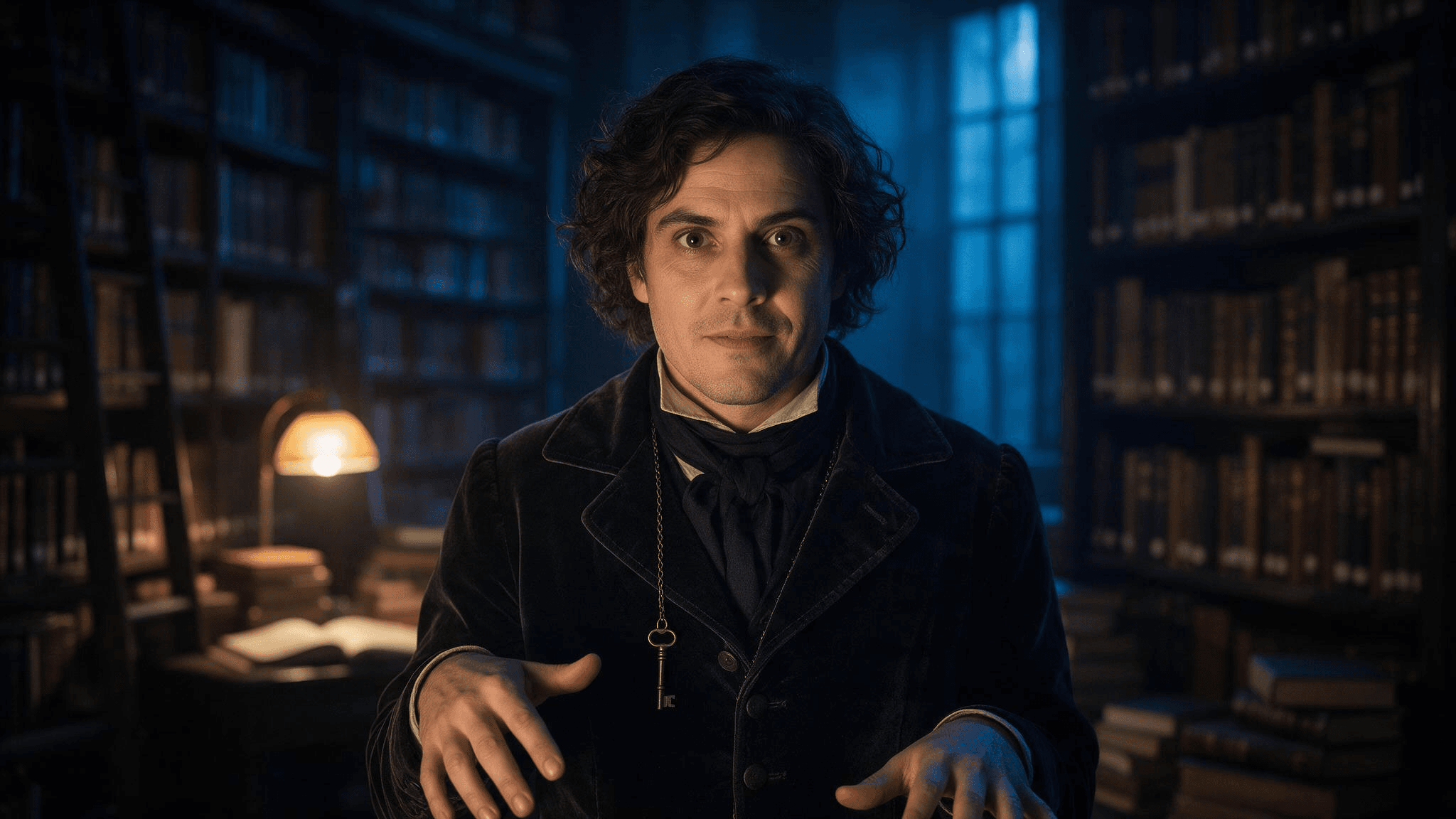 Example result for the archivist brief. Compare the face with your uploaded portrait before sharing an edit as your own photo.
If the first image changes the face, send a short follow-up: Keep the lighting and jacket. Restore the eyes, nose, mouth, and hair from my uploaded photo; do not alter my face. Narrow edits are easier to judge than another complete scene request.
2. Friends arriving at the party
Use one photo with the full group rather than separate cropped headshots. The interesting part is the shared moment, not a set of unrelated costume portraits.
plaintext1Turn the uploaded group photo into a candid Halloween party arrival. Preserve the exact [number] people, their relative positions, recognizable faces, skin tones, hairstyles, and body proportions. Give each person a distinct, simple costume accessory: [person at left: detail], [person in center: detail], [person at right: detail]. Put them on a townhouse stoop with carved pumpkins and warm porch light at blue hour. Keep the camera height, natural expressions, and friendly group spacing from the source. Do not add or remove anyone. No masks over faces, duplicate limbs, text, or logos.
Fill every bracket before pasting. If there are four friends, name four positions. Otherwise the model must guess which instruction belongs to whom.
3. Your pet as a tiny night watchman
Give a pet a light accessory rather than asking the model to turn its body into a human character. The face and coat are what make the photo feel like your pet.
plaintext1Edit this photo of my [dog/cat] into a playful Halloween pet portrait. Preserve the pet's face, breed or body type, coat colors, distinctive markings, and natural four-legged anatomy. Add a lightweight navy cape and a small felt moon on the collar; leave the ears, eyes, and paws unobstructed. Place the pet beside a pumpkin on a familiar-looking porch. Use gentle evening light and an eye-level camera angle. Keep the result photographic, with no human hands, extra paws, lettering, or brand marks.
4. Fix one detail without losing the photo
After any of the first three prompts, use this repair instruction when the scene works but one element does not. Replace the bracket with the actual problem.
plaintext1Keep the current image's composition, subject, costume, color, and lighting. Change only [the specific incorrect detail]. Match the corrected area to the surrounding photo. Preserve the person's or pet's identity from the uploaded reference. Do not introduce new objects, people, or text.
Describe the error precisely: remove the extra finger on the hand holding the lantern gives the editor a smaller job than make it better. Inspect the revised image for changes outside the requested area.
Gemini AI Halloween photo prompts with clear references
Gemini can create an image from a written prompt and use uploaded images as references or editing inputs, as described in Gemini Apps Help. A useful Gemini AI Halloween photo prompt says which parts come from the upload and which parts are invented. These four prompts cover a different scene from the ChatGPT set, so choose by the photo you already have rather than by a claim that one tool always performs better.
5. Pumpkin-patch portrait after sunset
plaintext1Using my uploaded portrait as the identity reference, create a waist-up photograph of the same adult at a pumpkin patch just after sunset. Keep the face shape, skin tone, hair, and visible freckles or other distinctive features recognizable. Replace the background with rows of pumpkins, a distant wooden fence, and a few warm lanterns. Dress the subject in a practical dark coat and a subtle crescent-moon brooch. Natural blue-hour sky, warm lantern light on the face, moderate depth of field, eye-level camera. Do not change the person's age appearance or add face paint, text, or other people.
6. A costume test with the same person
This prompt is for judging an outfit idea before you build it. Use a photo that shows enough of the body and clothing for the tool to understand the intended framing.
plaintext1Use my uploaded full-length photo as the reference for the same person. Show a realistic Halloween costume concept: a vintage stargazer wearing a midnight-blue coat, brass star map accessories, and a narrow belt of small paper constellations. Keep the same face, skin tone, hairstyle, body proportions, and standing pose. Show the full outfit against a simple neutral wall in soft studio light so the clothing is easy to inspect. The costume must look wearable, with practical seams and no floating objects. No mask, face paint, text, logo, or extra people.
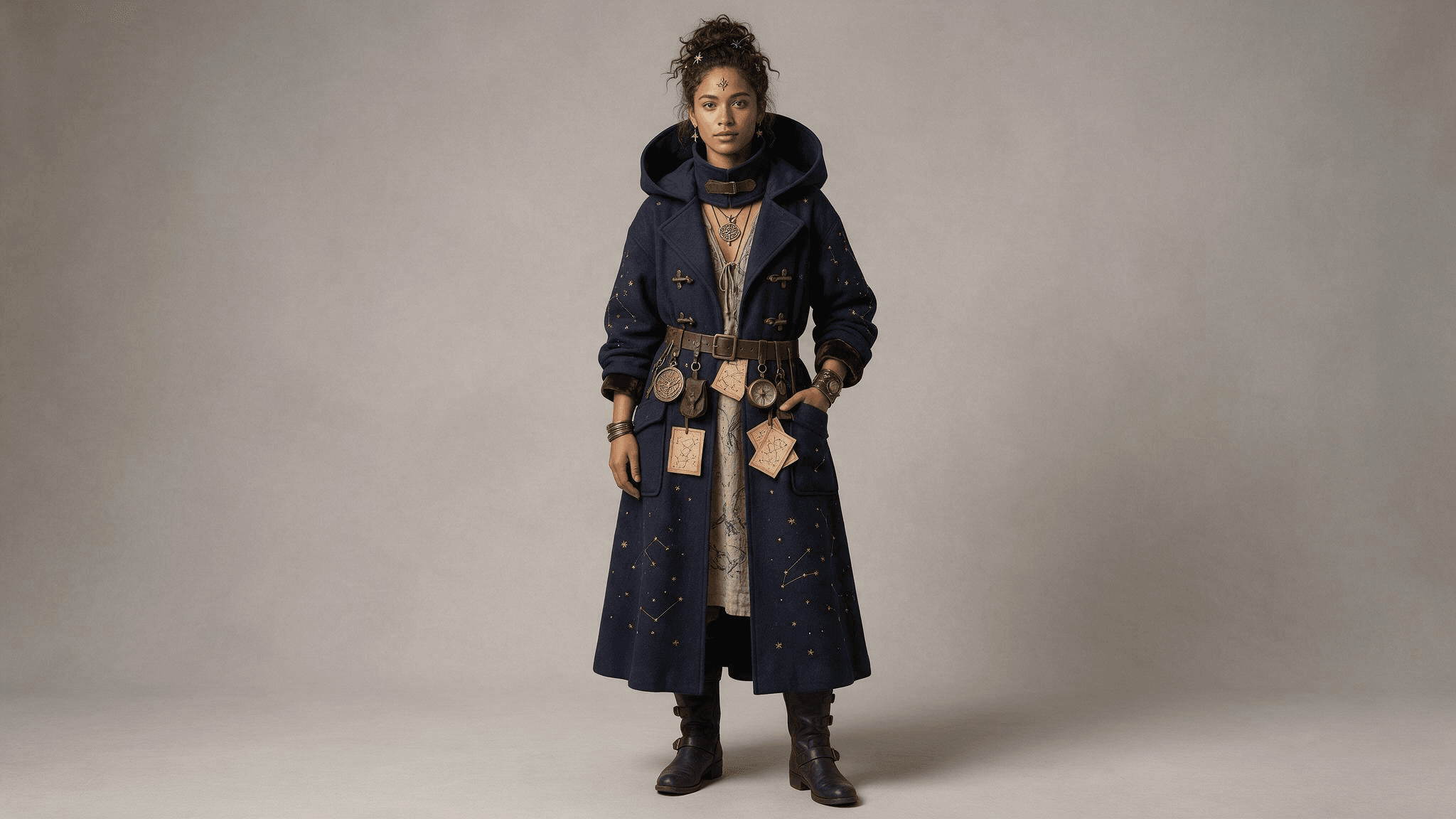 The full-length result makes the coat, belt, and accessories easy to inspect. Compare the face and proportions with your uploaded photo.
7. A family photo with a changed setting
plaintext1Use the uploaded family photo as the reference. Preserve the exact [number] people and their positions, recognizable faces, approximate ages, skin tones, and natural proportions. Change only the setting and small accessories: put the family on an autumn front porch with pumpkins, paper bats, and warm window light. Add one simple costume accessory to each person as follows: [list each person by position and accessory]. Keep the original camera perspective and friendly expressions. No new faces, missing people, masks, unreadable signs, or extra hands.
Review every face separately. The more people in one image, the more important it becomes to compare the output with the source instead of judging only the overall atmosphere.
8. A pet portrait with a second visual reference
If you have a photo of the accessory you want, upload it alongside the pet photo and say what each image is for. Google notes that Gemini can work from multiple uploaded images; availability and results can vary by account and model.
plaintext1Use image 1 only for my pet's identity and image 2 only for the shape and color of the small costume accessory. Create a realistic Halloween photo of the same pet sitting beside a pumpkin indoors. Preserve the pet's face, coat pattern, size, and natural anatomy from image 1. Adapt the accessory from image 2 so it fits comfortably and does not cover the eyes, ears, nose, or mouth. Warm lamp light, eye-level camera, uncluttered background. Do not copy any people or background from image 2. No text, extra limbs, or human-like paws.
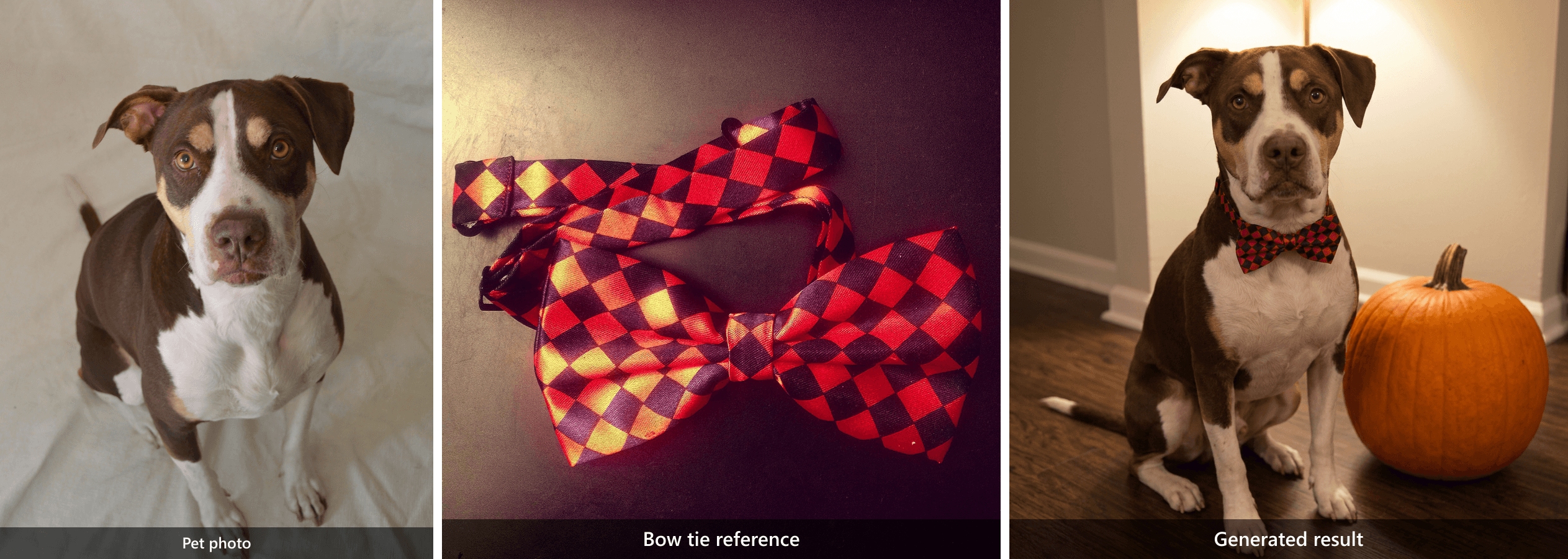 Two distinct inputs lead to one result: the dog comes from the pet photo, while the red-and-black pattern comes from the bow tie reference.
New Halloween photos from a blank canvas
These prompts need no personal upload. They work when you want an invented Halloween scene, a fictional portrait, or a seasonal image for a post. They also show how to write AI prompts for Halloween without relying on a movie character or a vague instruction like make it spooky.
9. The midnight library keeper
plaintext1Create a photorealistic editorial portrait of a fictional adult midnight library keeper caught opening an old book between tall wooden shelves. A dark velvet jacket and one antique key on a chain; both hands turn a single page naturally. Shelf edges lead the eye toward the subject, with a blurred book spine in the near foreground. One warm desk lamp lights the face while cool blue dusk enters through a high window. Waist-up composition at eye level, 35 mm lens feel, natural skin texture, worn wood grain, restrained film grain, warm amber and blue-gray color palette. No mask, face paint, extra fingers, floating objects, writing, logo, or watermark.
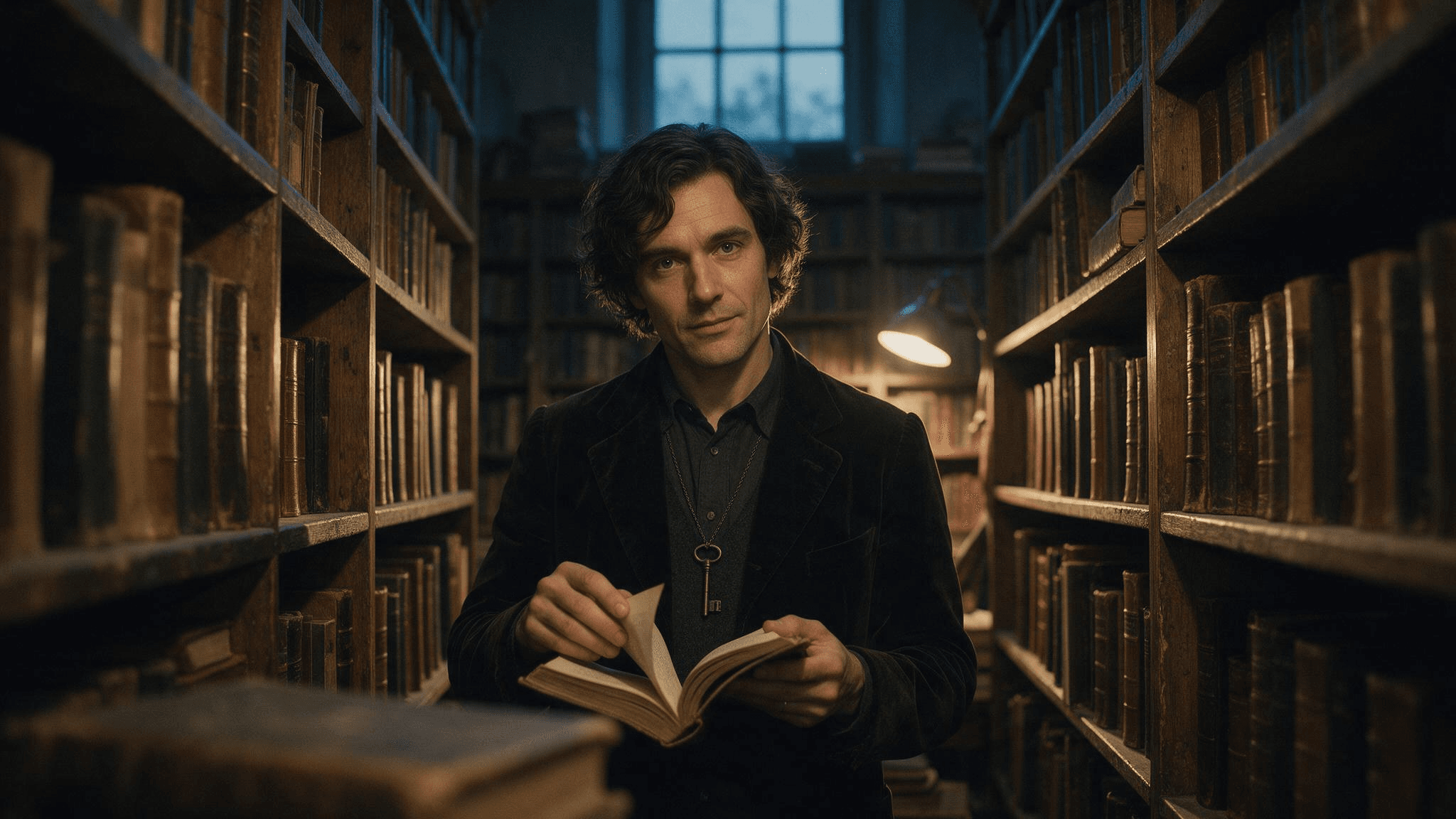 Text-only result: the fictional keeper, open book, antique key, shelves, and warm-and-cool lighting are visible in one frame.
10. The bakery after closing
plaintext1Create a photorealistic editorial still life inside a small neighborhood bakery after closing on Halloween. Three decorated pumpkin pastries sit on a worn wooden counter, one just broken open with a thin curl of steam rising, beside a folded linen cloth and a brass bell. The counter edge leads toward the pastries; a blurred flour-dusted tray sits in the near foreground. Through the window, cool blue dusk and a few softly blurred porch lanterns are visible. A warm pendant lamp lights the pastries from above. Frame at counter height with a 35 mm lens feel, natural food texture, restrained film grain, warm amber and blue-gray color palette. No people, floating decorations, readable signs, logos, labels, or watermark.
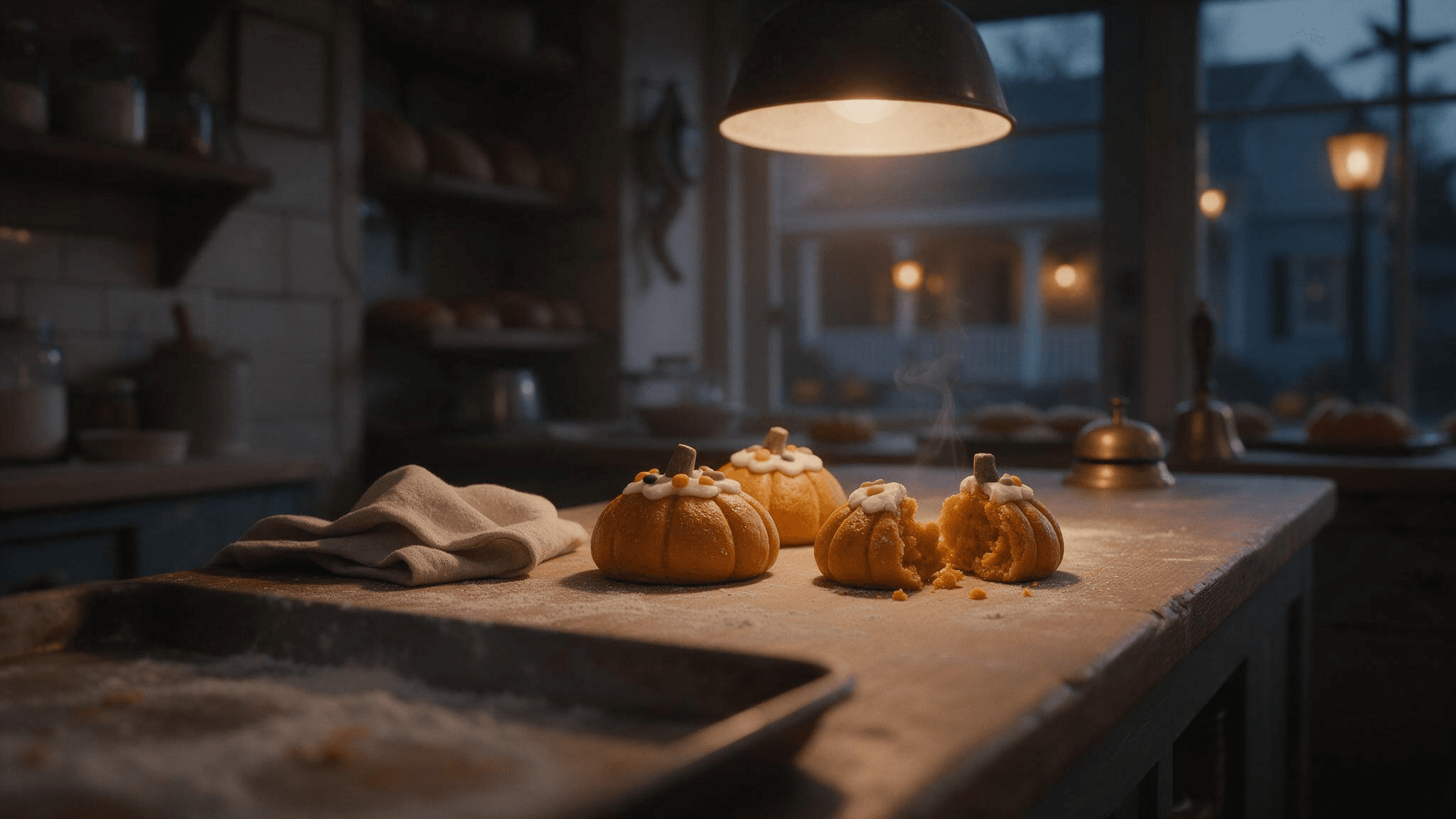 Still-image result: the counter, three pastries, opened pastry, warm pendant light, and blue dusk show how the setting details shape the frame.
The same bakery idea also works as a short motion example. Here, hands arrange the pastries before the view opens toward the window, giving the viewer more information than a slow zoom of the still image.
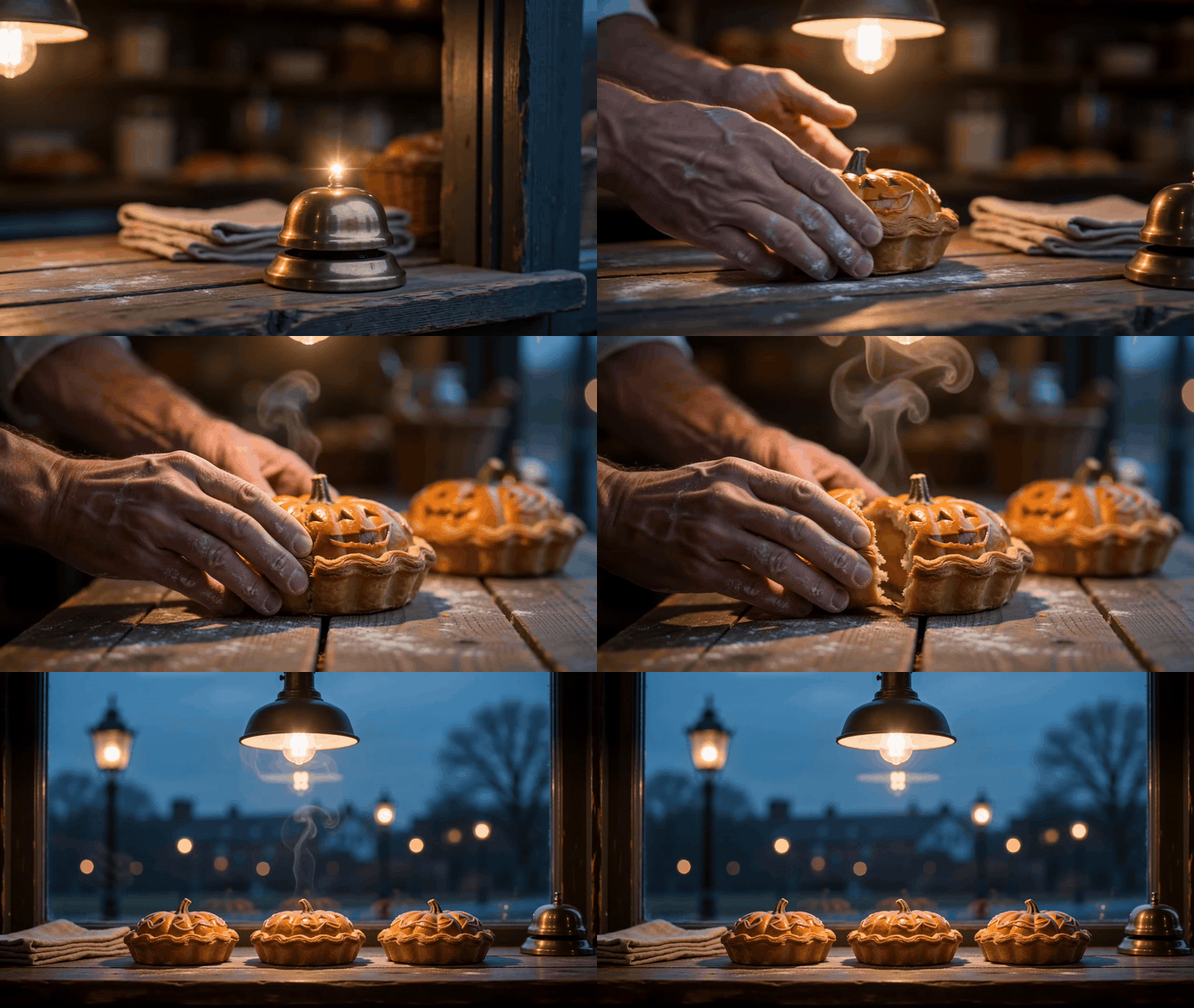
Motion variation of the bakery prompt, showing pastry placement and a wider counter view.
11. The last house on the block
plaintext1Create a photorealistic Halloween exterior of one old but welcoming townhouse at blue hour. A short stone path leads from the lower foreground to a front porch with exactly three carved pumpkins, a glowing window, and a few handmade paper bats. One damp leaf skitters across the path as a gust catches it, with other leaves settled along the edge. Photograph from across the street at eye level with a 35 mm lens feel, using the path as a leading line and a softly blurred fence post in the near foreground. Cool blue dusk balances warm light from the porch and window; restrained film grain and realistic architectural proportions. No people, cars, lettering, billboards, floating objects, or watermark.
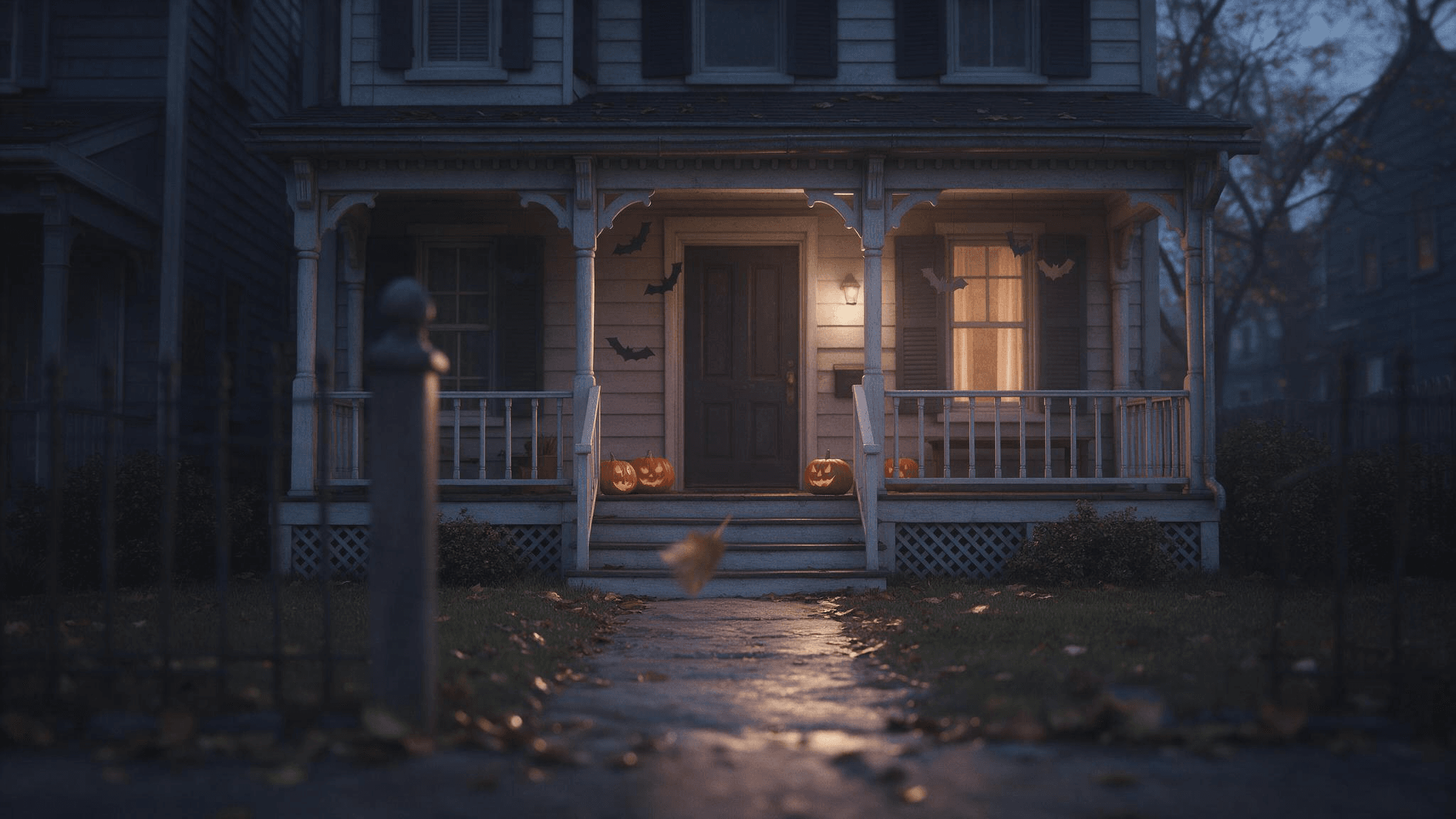 The result captures porch lighting and the path toward the door. It appears to include more than the requested three pumpkins, so check object counts before using a generated image.
12. A rain-soaked party invitation background
plaintext1Create a photorealistic editorial photo of a rain-darkened cobblestone lane leading to a small Halloween gathering. Warm light spills from an open doorway at the far end; a few pumpkins and autumn leaves sit along the walls. Keep the upper third dark and visually quiet so I can add invitation text later in a separate editor. Eye-level 35 mm lens feel, realistic wet reflections, cool blue-gray shadows and warm amber practical lights, restrained film grain. No people close to camera, generated letters, logos, or watermark.
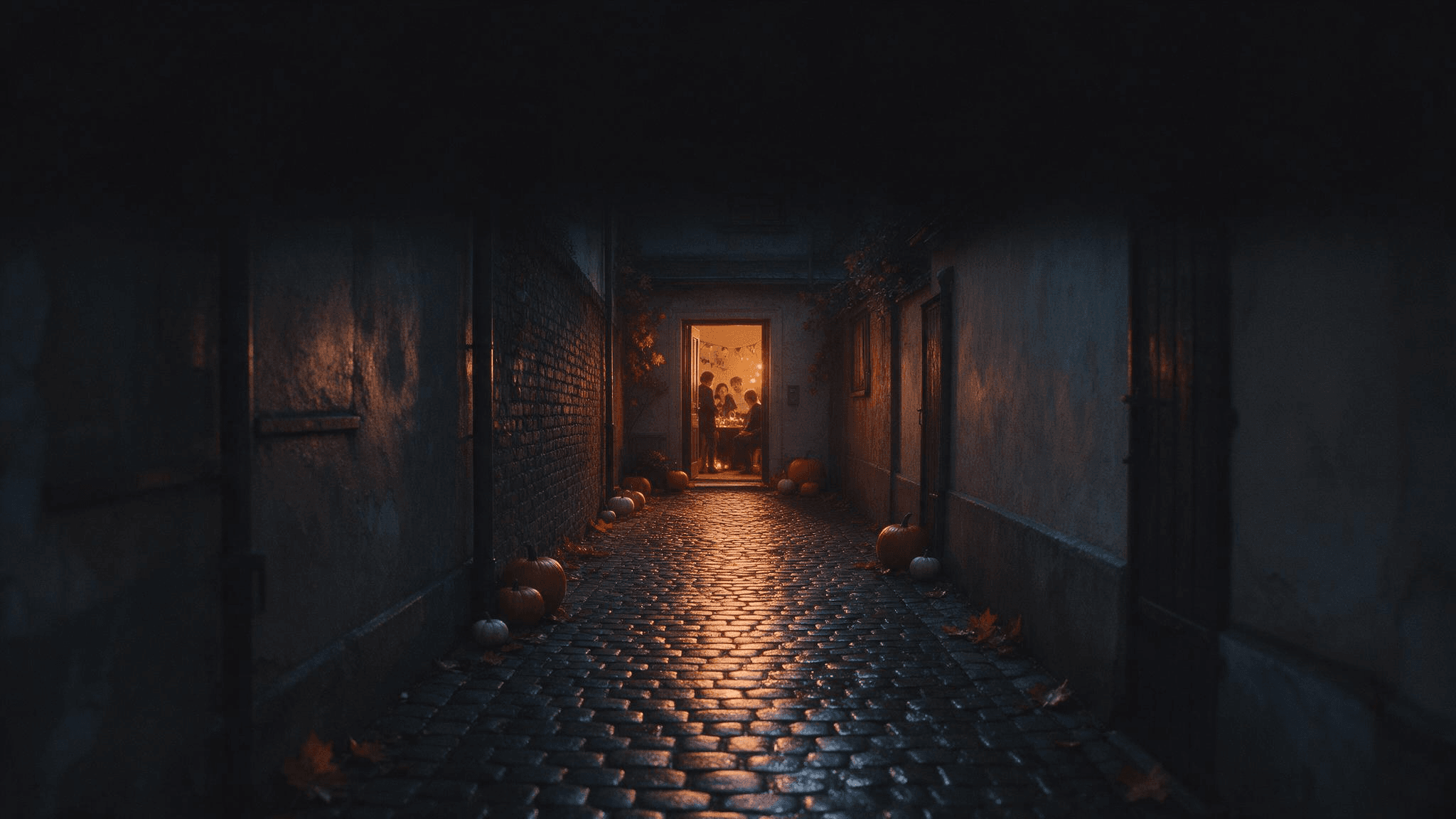 The dark upper space stays free for invitation text added later in a separate editor.
Add your event details later in a text editor. The image prompt asks for empty space, not AI-rendered lettering that could be misspelled or difficult to revise.
Make each prompt work harder
The most reusable Halloween photo prompt is a compact creative brief. Write one sentence for the subject and action, one for the setting, one for lighting and camera, and one for the details you refuse to lose. For an upload, the last sentence should name identity and headcount. For text-to-image, it should name composition and unwanted additions.
Replace general adjectives with visible instructions. Spooky could mean fog, horror makeup, a dark room, or a ghost. Cool blue dusk outside the window and a warm lamp on the face tells the model exactly where the mood comes from. Vintage becomes clearer when you specify a velvet jacket, brass key, and wooden shelves.
Use exclusions sparingly. A long list of no clauses can crowd out the main idea. Prioritize errors that would spoil this specific photo: an obscured face in a portrait, extra people in a group, changed markings on a pet, or letters on an invitation background. Check the image afterward; a negative instruction is not a validation step.
When the first result is close, change one variable. Try keep everything else; move the lantern to the left of the subject or retain the same face; make the background less crowded. If the subject itself is wrong, return to the source photo and make the preservation request explicit. If the source photo is blurry, use a clearer input before stacking more prompt clauses on top of it.
Google's Halloween image examples show how a photo can anchor a ghostly portrait or seasonal scene. The creative principle is portable: specify what remains from the input and what the model may reinvent. That is more useful than copying a long trend prompt whose lighting, pose, and source image do not match yours.
Try the prompts in Atlas Cloud's Image Generator
If you want to explore different hosted image models for the same brief, start at Atlas Cloud and open the AI Image Generator. The page supports text-to-image, reference-guided generation, and prompt-based editing. Its model selector lets you try a brief with the image model that fits the result you need. The four fictional scene prompts above are ready for text-to-image; the personal-photo prompts require a workflow that accepts an uploaded image.
Paste one prompt, choose a model and aspect ratio, and inspect the result at full size. For a portrait, look at the eyes, hands, and costume edges. For a scene, check the requested object count and whether the light actually comes from the described sources. If a prompt produces a strong subject but weak framing, keep the subject description and revise only the camera sentence. This keeps the next result comparable to the first.
Do not present an invented face as a real person's transformed photo. If you need a recognizable person, supply a photo you are entitled to use and compare the output with it. Avoid uploading someone else's portrait without permission, especially when you intend to publish the result.
Frequently asked questions
Do these Halloween AI photo prompts require a selfie?
Only the prompts that preserve a particular person need a photo of that person. A clear portrait often works better than a heavily filtered selfie because the face is easier to see. Prompts 9 through 12 create fictional scenes from text alone.
Why does an AI Halloween portrait change my face?
The prompt may ask for an elaborate costume, new angle, dramatic light, and a preserved identity at the same time. Begin with a clear source photo, keep the face visible, and change fewer things in the first edit. Check the result rather than assuming the identity instruction succeeded.
Can I use the same prompt in ChatGPT, Gemini, and Atlas Cloud?
The scene description is portable, but the input workflow matters. An instruction that says use my uploaded photo needs an image-capable edit or reference mode. A blank-canvas scene can go into text-to-image. Tool controls and model behavior vary, so use the first output to make a small, specific revision.
What is the fastest way to improve a weak result?
Identify the single most important error. If the subject is wrong, improve the reference or subject sentence. If the mood is wrong, name the actual light source and time of day. If the composition is wrong, state camera height, framing, and where the subject sits in the frame. Keep the parts that already work.
Pick one of these Halloween AI photo prompts that matches the image you can supply today. A clear source photo or a sharply described scene will do more work than a longer list of spooky adjectives.





