

A Halloween selfie works when your friends recognize you before they notice the ghost, pumpkin, or costume. These Halloween AI prompts for selfies start with that rule. Upload a clear photo of yourself, decide whether you need a new selfie angle or a full image edit, and copy the prompt that matches the change. Each example specifies the camera position, light, and details to preserve, so the result has a better chance of looking like a photo you might actually have taken.
Key takeaways
- A selfie needs arm's-length perspective and believable phone framing, not just a close-up portrait.
- Use a short scene or mood phrase when a tool only changes the selfie angle and setting; use a full edit prompt for costumes, props, or a second figure.
- Tell the editor which facial and clothing details must stay, then inspect the output instead of assuming identity was preserved.
- Keep a ghost, mirror effect, or costume detail behind or beside the face if recognition is the point.
First, decide what kind of selfie you are making
The word selfie describes a camera relationship. A portrait taken by another person is usually framed from farther away and with less perspective distortion. A believable phone selfie tends to put the face nearer the lens, show a slight tilt or raised arm, and leave part of the background inside that closer framing. Asking for a “Halloween portrait” without those cues may produce a polished studio picture rather than a casual self-shot.
There are two practical routes. Atlas Cloud's Free AI Selfie Generator takes one portrait and reframes it as a natural selfie. Its optional mood field accepts a short scene description. The tool's page says it keeps the outfit from the input photo, so use a photo of yourself already wearing the clothes or accessories you want to see. Leave the mood blank if you only want the camera angle changed. It describes one free generation for eligible accounts, so check the current offer on the page before planning multiple versions.
If you need a witch hat added, a ghost placed in a doorway, or a different outfit, use an image editor instead. Atlas Cloud's Image Generator and Editor supports prompts with reference images and targeted edits. That is the place for the longer prompts below. Keep the distinction clear: a mood phrase chooses a scene; an edit prompt tells the model which pixels and subjects should change.
| Your goal | Start with | Give the tool |
|---|---|---|
| Turn a portrait into a Halloween-flavored selfie without changing clothes | A clear solo portrait in the outfit you like | A brief mood such as “pumpkin-lit porch, blue hour, relaxed” |
| Add a costume item or change the room | A clear photo of you | A full edit prompt naming the new item and the details to preserve |
| Make a ghost photobomb your selfie | A selfie or portrait with space behind you | A full edit prompt that places the ghost behind, not over, your face |
| Put two friends in one selfie | A photo containing both people | An edit prompt with the exact headcount and positions |
This split matters more than the brand of the model. A short field cannot carry a long list of identity and prop constraints. A flexible editor can accept those constraints, but it may still drift. The source photo and the output review do much of the work.
Choose an input photo that leaves room for the idea
Use a sharp photo where both eyes and the shape of your face are visible. Even light makes it easier to compare the output with the original. Heavy beauty filters, sunglasses, masks, or a hand crossing the face remove information an editor would need to preserve. If the result must look like you, avoid treating a low-resolution screenshot as a strong identity reference.
Look at the space around your head before writing the prompt. A ghost needs a doorway or a clear patch of background. A pumpkin on the porch needs a lower corner that is not already full of your hair or shoulder. A group selfie needs enough room for each face. If your source is a tight crop, ask for an expanded frame before introducing a second subject, or choose a wider photo.
The prompt examples below use a clear portrait as the identity reference. Use the same source photo across the three ideas if you want to compare how each scene changes the result. Your actual edited images still need a face, hand, and background check before you share them as pictures of yourself.
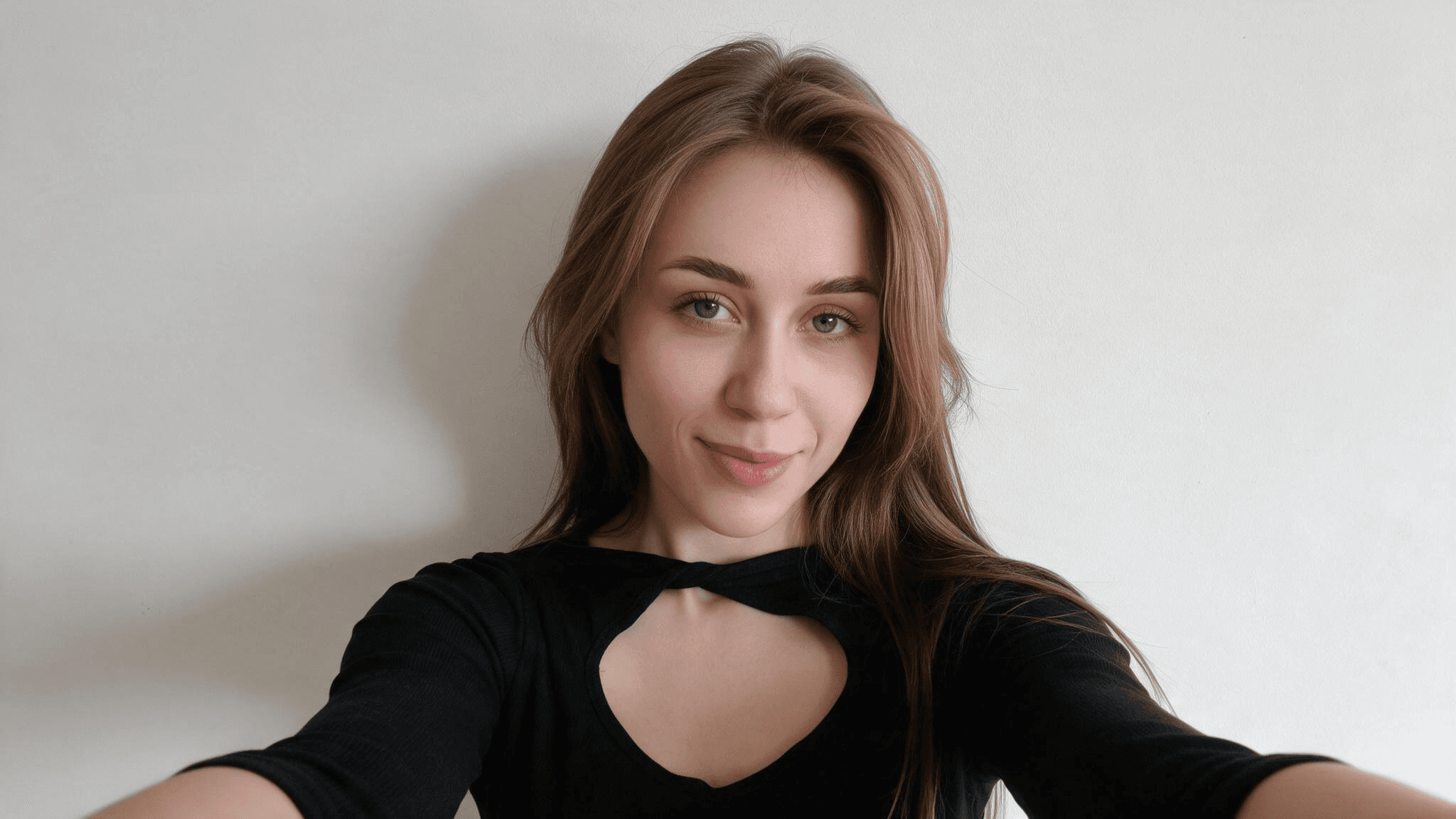
This is the shared input photo, before any Halloween edit. Both eyes, the hairline, and the original black top are visible, so they give you concrete details to compare with each generated result. Portrait source: Pexels.
3 Halloween selfie prompts you can copy and adapt
Replace only the bracketed details. Keep the selfie perspective and preservation clauses in place for the first attempt. After the first result, make one targeted correction rather than sending a completely new description. The three prompts keep the same phone-photo goal but ask for different Halloween changes. The example outputs below came back in landscape framing despite the 4:5 request, so set the aspect ratio in the tool when that control is available or leave room for a later crop.
1. Pumpkin-lit porch selfie: change the scene, keep the person
This is the easiest brief to test because it asks for an atmosphere rather than a new identity or elaborate costume. If you are using Atlas Cloud's dedicated selfie tool, upload a portrait and put only this in the mood field: pumpkin-lit front porch, blue hour, warm window light, relaxed. Use a photo where you already like your outfit; that tool is designed to carry it through.
For a full image editor, copy this version. It asks for a realistic arm's-length camera angle and makes the background change explicit:
plaintext1Edit the uploaded portrait into a believable 4:5 handheld front-camera Halloween selfie of the same adult. Preserve their recognizable facial structure, skin tone, hairstyle, expression, and existing outfit. The camera is held at arm's length a little above eye level, with subtle 24 mm phone-lens perspective; show only a natural forearm edge and keep the phone outside the frame. The person is stepping onto a neighborhood porch at blue hour and glancing back with a spontaneous smile. Two carved pumpkins sit low behind the shoulder, separated from the face. Warm window light brushes the face while the cool evening sky stays visible. Add a slight foreground blur from one autumn leaf, tactile clothing texture, natural skin, modest phone-camera grain, and a restrained amber-and-slate-blue palette. No mask, duplicate face, extra fingers, studio lighting, text, or watermark.
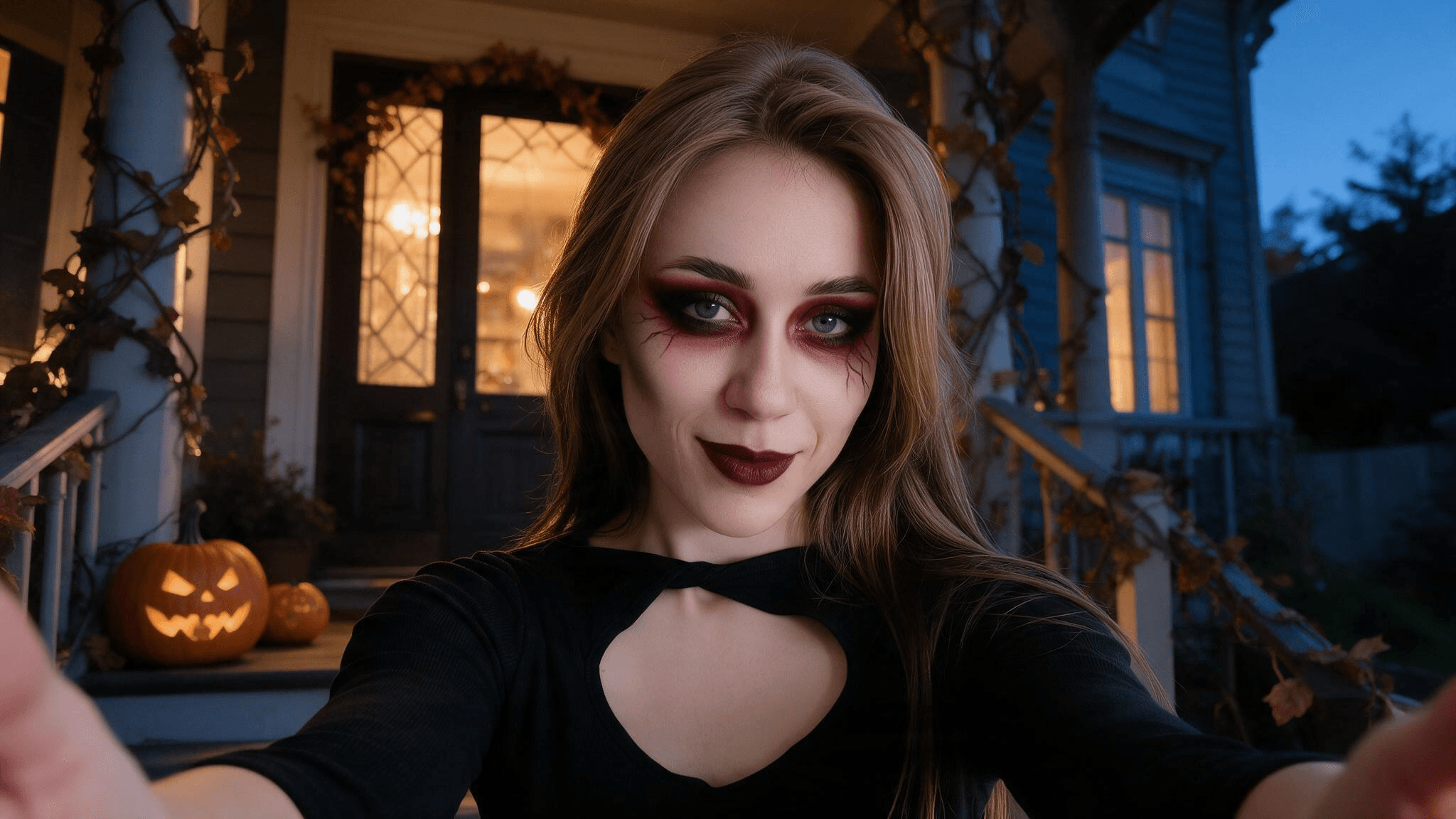
The generated porch selfie keeps the face clear and the raised arm visible. The pumpkins and warm window stay beside and behind the subject rather than covering the face.
Judge the result on three points: is the face recognizable, does the arm and camera geometry read as a selfie, and are the pumpkins clearly behind the subject? A model can make a beautiful autumn portrait while missing the selfie part. If that happens, ask it to keep the face and setting but reframe from a phone held at arm's length.
2. Doorway ghost selfie: keep the scare behind you
The ghost-in-the-doorway idea is a recognizable Halloween image pattern; Google's Halloween prompt guide shows a nostalgic phone-and-bedroom variation. For a true selfie, the person should still be taking the photo. Keep the ghost small and in the background, where it changes the story without hiding the face. This version avoids a named film character and relies on an ordinary sheet-ghost silhouette.
plaintext1Edit the uploaded portrait into a candid 4:5 Halloween front-camera selfie of the same adult. Preserve their recognizable facial structure, skin tone, hairstyle, age appearance, and natural expression. Use an arm's-length, slightly high 24 mm phone viewpoint; show only a natural forearm edge and keep the phone outside the frame. The person has just turned toward the lens in a lived-in hallway. Gentle direct phone flash lights the face, one warm table lamp lights the midground, and cool blue dusk reaches the far doorway. In that doorway, behind and beside the person's shoulder, place exactly one adult in a plain white bedsheet ghost costume, visible from head to knee, small in frame and softly out of focus. The ghost must never overlap the face. Natural skin, realistic shadows, modest phone-camera grain, restrained amber-and-slate-blue palette. No gore, recognizable movie character, second ghost, duplicate hands, text, or watermark.
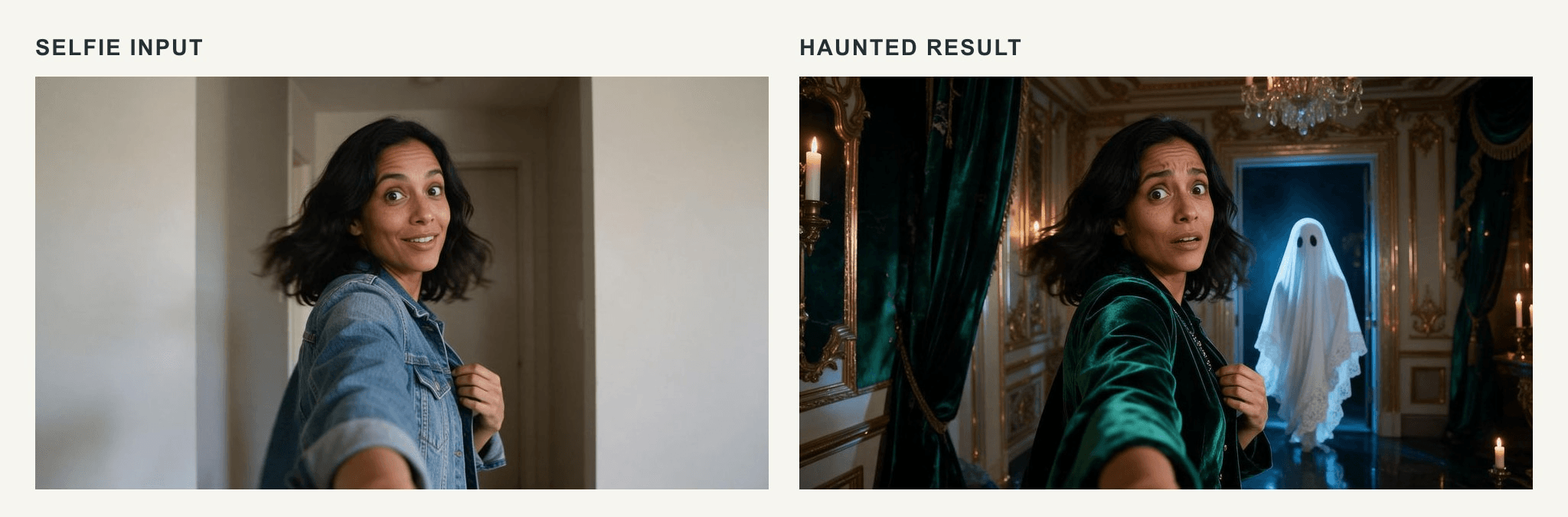
The ghost is visible and the face stays clear, but the generated figure stands close behind the subject instead of far back in the doorway specified by the prompt. This is a placement error to correct, not an example of the requested distance.
This Halloween AI trend prompt is easy to weaken by piling on effects. Purple fog, several monsters, and a dark face may look more “Halloween” in the abstract, but they remove the joke of noticing the ghost after seeing the selfie. In this result, the targeted follow-up is: Move the sheet ghost farther back into the doorway; keep my face, arm, and hallway unchanged.
3. Low-effort witch selfie: add one wearable clue
A costume selfie should show enough of the outfit for the idea to register, but a huge hat brim can erase the face. This prompt adds a small, wearable accent to an existing portrait instead of reinventing the person. If the source photo already has your chosen costume, the dedicated selfie generator can handle the angle and mood; use an editor when the accessory must be added.
plaintext1Edit the uploaded portrait into a believable 4:5 handheld front-camera Halloween selfie of the same adult. Preserve their recognizable face shape, skin tone, hairstyle, expression, body proportions, and original clothing. Add a small black felt witch hat tilted back so its brim leaves both eyebrows and eyes clear; attach one silver crescent pin to the existing top. The person is caught laughing while the free hand lightly adjusts the hat outside a neighborhood party at blue hour. Use an arm's-length, slightly high 24 mm phone viewpoint; the phone stays outside the frame and the holding forearm appears only at the edge. Warm porch bulbs and a few distant pumpkins sit behind the person, while gentle direct phone flash keeps the face readable. Natural skin and fabric texture, modest phone-camera grain, restrained amber-and-slate-blue palette. The hat must touch the hair and the pin must touch the fabric. No mask, heavy makeup, floating accessories, extra arms, text, or watermark.
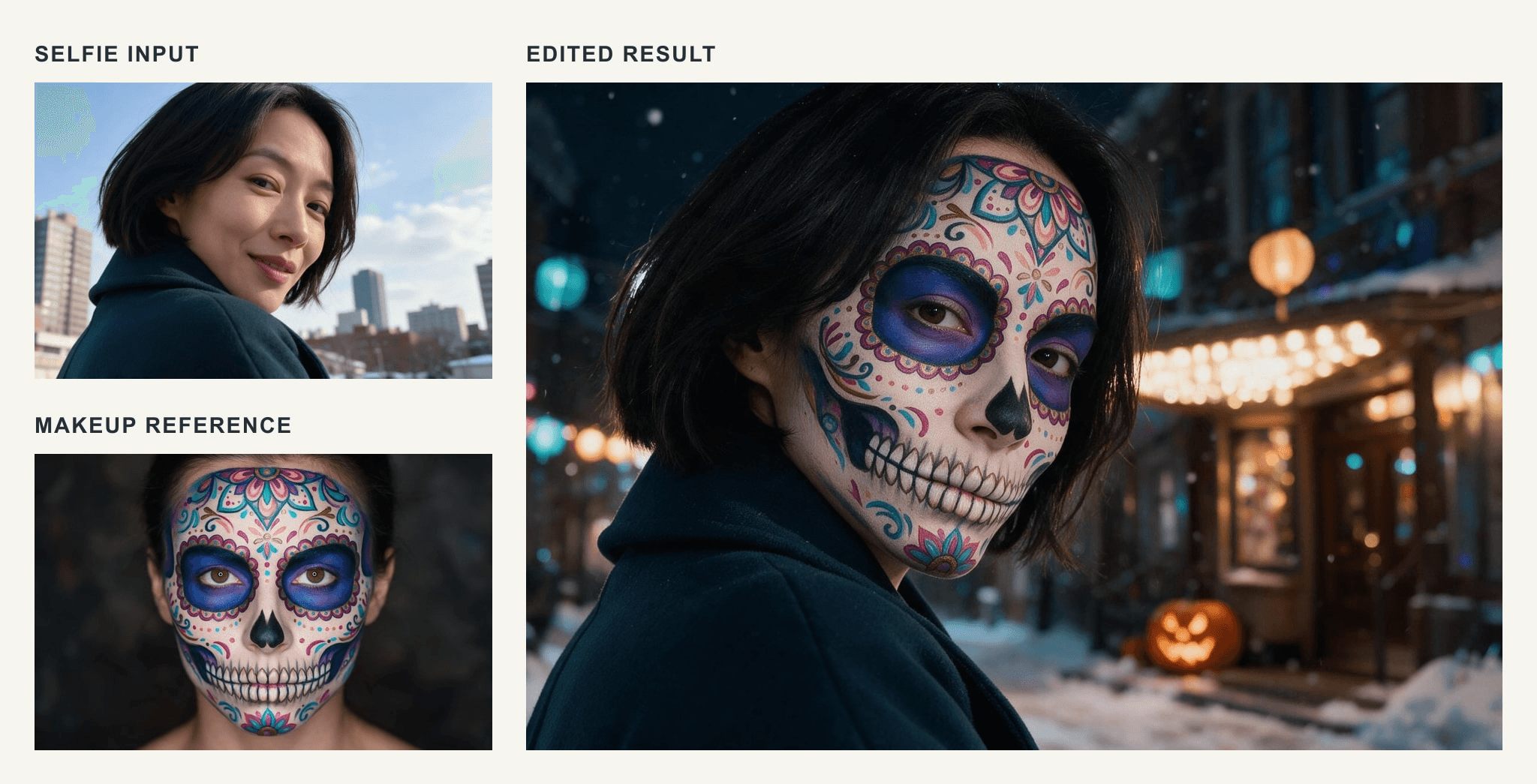 The hat leaves the face visible, but the crescent lands on the hat rather than on the top requested in the prompt. If that location matters, correct the pin alone while keeping the face and framing.
Check the pin and hat separately from the likeness. If the hat is too large, ask for a smaller brim while holding the face and camera framing fixed. Do not respond to a hat problem by changing the entire scene; that makes the next output harder to compare.
More prompt variations for the photo you already have
The first three prompts cover a solo selfie with one clear change. The next ideas answer different source-photo problems. They are useful to copy, but they need inputs that match the instructions. A model cannot preserve a second friend who is absent from the reference, and a mirror shot is not the same camera geometry as a direct front-camera selfie.
Mirror selfie in a decorated room
Use a source image that shows the outfit you want to keep. A mirror selfie should visibly include the phone and reflection; do not also ask for an invisible phone and a front-camera angle. That contradiction often produces confused hands.
plaintext1Turn the uploaded photo into a believable Halloween mirror selfie of the same adult. Preserve the person's recognizable face, hairstyle, skin tone, and clothing. Show the phone in one natural hand within the mirror reflection, with the other hand relaxed and anatomically correct. Add a few paper bats and one carved pumpkin in the room behind the person. Keep the mirror frame straight, the reflection consistent, and the face unobstructed. Soft indoor lamp light, candid phone-photo texture, no extra person, duplicate phone, floating hand, text, or watermark.
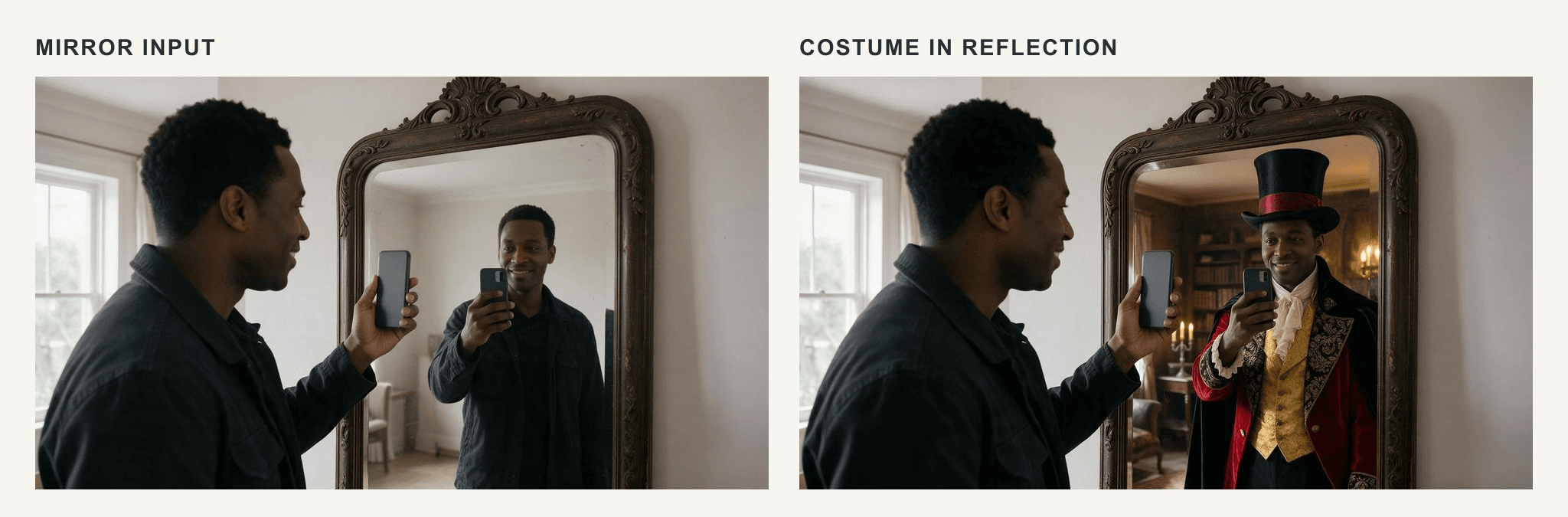
This standalone generated example shows the mirror composition: one visible phone, an unobstructed face, and decorations behind the subject. It uses a different person and does not demonstrate identity preservation from an uploaded photo.
The mirror is the point here, so inspect the reflection before judging the decorations. If the reflection reverses text on clothing or shows a second phone, remove the error with a targeted follow-up.
Two friends after the party
Use a real photo with both friends visible. The prompt below is a group-selfie edit, not a way to invent a missing person's identity. Fill in the bracketed descriptions by position so the tool knows which face belongs to whom.
plaintext1Edit the uploaded photo of exactly two adults into a candid Halloween selfie after a party. Preserve both recognizable faces, skin tones, hairstyles, and relative positions: [person on the left] stays left and [person on the right] stays right. Keep their existing costumes or clothing. One person holds the phone at arm's length from slightly above; both lean naturally into the frame. Behind them, show a quiet porch with two pumpkins and warm window light at night. Keep both faces clearly visible, natural hands, ordinary phone-photo detail, and a friendly tired expression. Do not add a third person, swap the faces, cover a face, invent text, or add a watermark.
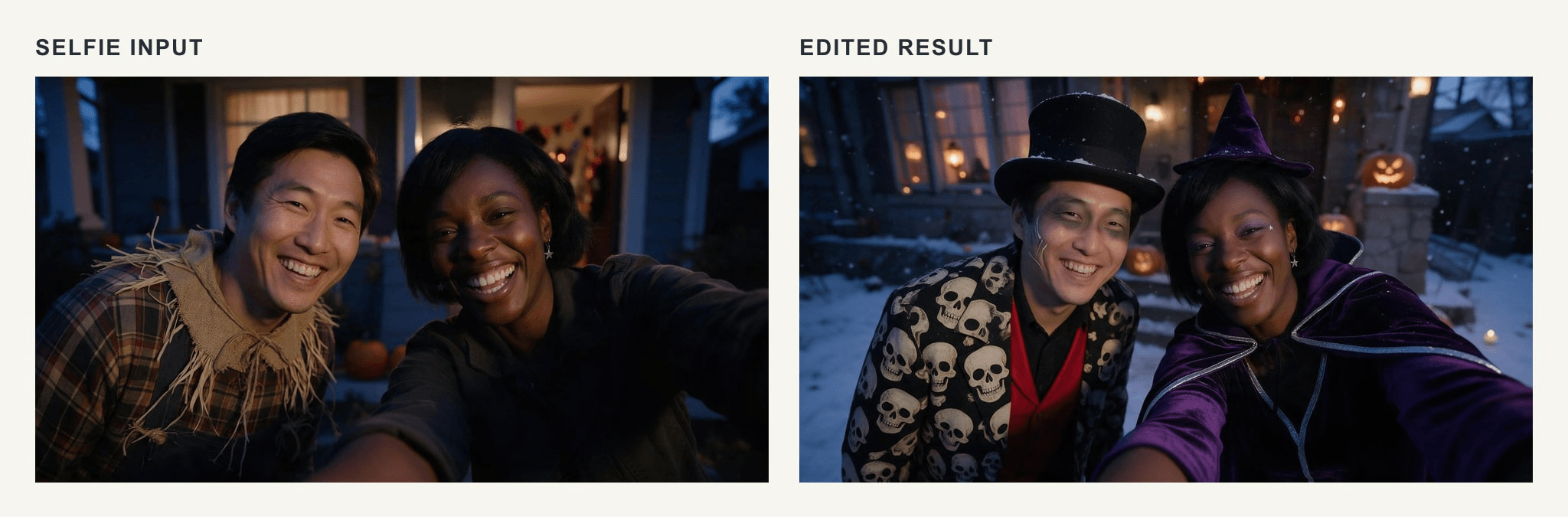
This standalone generated example demonstrates the two-person framing and clear left-right separation. The pair were created for this example, so the picture does not establish that an edit preserved either friend's identity.
Review the two faces one at a time. An image can look plausible at thumbnail size while quietly swapping a hairstyle or merging an arm. If the model changes one person, identify that person by position in your repair instruction.
A funny photobomb instead of a horror scene
If the audience is a family group chat, a small comic surprise may work better than a dark doorway. Keep the photobomber easy to recognize and physically behind the subject. This prompt does not require a specific movie reference or elaborate monster makeup.
plaintext1Use my uploaded photo as the identity reference for a casual front-camera Halloween selfie. Keep my face, hair, skin tone, expression, and existing outfit recognizable. I am holding the phone at arm's length outside a house at dusk. In the background, a friend in an oversized homemade pumpkin costume is accidentally caught mid-step, trying to squeeze through a narrow gate. Keep the friend small enough that I remain the clear subject. Warm porch light, slight natural motion blur on the background friend, realistic phone-camera perspective. No extra people, distorted hands, text, logo, or watermark.
If you need the friend to be a particular real person, upload a photo that includes them and describe their position. Without that reference, treat the background character as fictional.
Repair a result without losing what worked
The strongest follow-up names one defect and freezes the rest. “Make it better” gives the editor permission to redesign your face, costume, and lighting at once. A specific correction gives you a useful second comparison.
| If the output has... | Try this follow-up |
|---|---|
| A face that no longer resembles the upload | “Keep the scene and camera framing. Restore the eyes, nose, mouth, hairline, and skin tone from my uploaded reference photo.” |
| A portrait rather than a selfie | “Keep my face and setting. Move the virtual camera to a phone held at arm's length, slightly above eye level, with one natural raised arm.” |
| A ghost blocking the face | “Keep the ghost, but move it behind my shoulder into the distant doorway. Do not change my face or pose.” |
| A distorted hand or phone | “Correct only the hand holding the phone. Show one natural hand with five fingers and consistent phone geometry.” |
| A costume that overpowers the selfie | “Reduce the hat or prop to a small wearable accent. Keep my face, outfit, lighting, and camera angle unchanged.” |
Look at the full-resolution result after each edit. Cropping to a square avatar can hide an arm error, but it can also crop away the ghost or the costume clue that made the idea work. Decide where you will use the picture before you make the final crop.
Share a Halloween selfie with its context intact
An AI-made selfie can be fun, but it may also look like a record of a party or place that never existed. If the setting or photobomber is invented, a simple caption such as “AI Halloween edit” keeps the joke clear. Get permission before uploading someone else's face or posting a group edit. These are especially sensible checks when the picture will leave a private chat and reach a wider feed.
For your first attempt, choose the porch mood if you want a natural image quickly. Choose the doorway ghost if you want a story in the background. Choose the small costume edit if the accessory matters. Start with the photo that supports the idea, copy one prompt, and inspect the face and camera angle before adding anything else. That is how Halloween AI prompts for selfies become pictures that still feel personal.
FAQ
How do I do the Halloween AI selfie trend?
Upload a clear picture of yourself to an image editor, choose one Halloween scene, and use a prompt that preserves your face while specifying an arm's-length phone angle. The ghost-in-a-doorway version above adds a recognizable background story. Review the face, hands, and placement before sharing.
Can a free selfie generator add a costume to my photo?
Do not assume so. Atlas Cloud's dedicated free selfie tool describes turning a portrait into a selfie and carrying the source outfit through. Wear the costume in the input photo, or use a separate image-editing tool with an explicit clothing instruction.
What is the difference between a Halloween portrait and a Halloween selfie prompt?
A portrait prompt may ask for eye-level framing by another photographer. A selfie prompt specifies phone distance, angle, a plausible raised arm or mirror, and enough foreground perspective to read as a self-shot. Both can be Halloween themed, but they do not create the same camera viewpoint.
Why does the AI change my face?
The source may be too dark, small, covered, or filtered, and a complicated edit gives the model more opportunities to redraw the person. Use a clearer reference, request fewer simultaneous changes, and compare the result with the source. Preservation instructions help guide the edit but cannot guarantee an exact likeness.





