

The how i become a millionaire in 30 days clip is a joke about asking a chatbot for a miraculous shortcut and getting the least magical answer possible: "Get a job." The character's wounded stare, frantic typing, and second attempt are the real story. Below are two online examples that show how the same setup works with a human and a pet. Then we build a new, longer version with an original character, a new setting, legible dialogue, and a reaction that lasts long enough to land.
Key takeaways
- The recognizable sequence is the hopeful question, blunt reply, offended pause, and another try.
- Online human and pet versions change the performer while keeping the timing of the joke.
- Our original 26-second playground version uses a child performer and adds readable dialogue in editing rather than asking a video model to draw a phone interface.
- Treat "Get a job" as a scripted punchline, not proof of what a chatbot would answer or a real wealth plan.
What happens in the online versions?
The first online example keeps the joke close to an everyday phone conversation. A person raises a phone with total confidence, looks down for the answer, and abruptly loses that confidence. Watch the change in posture. The setup is spoken toward the phone, but the payoff is performed outward toward the viewer. The reaction makes the short line memorable.
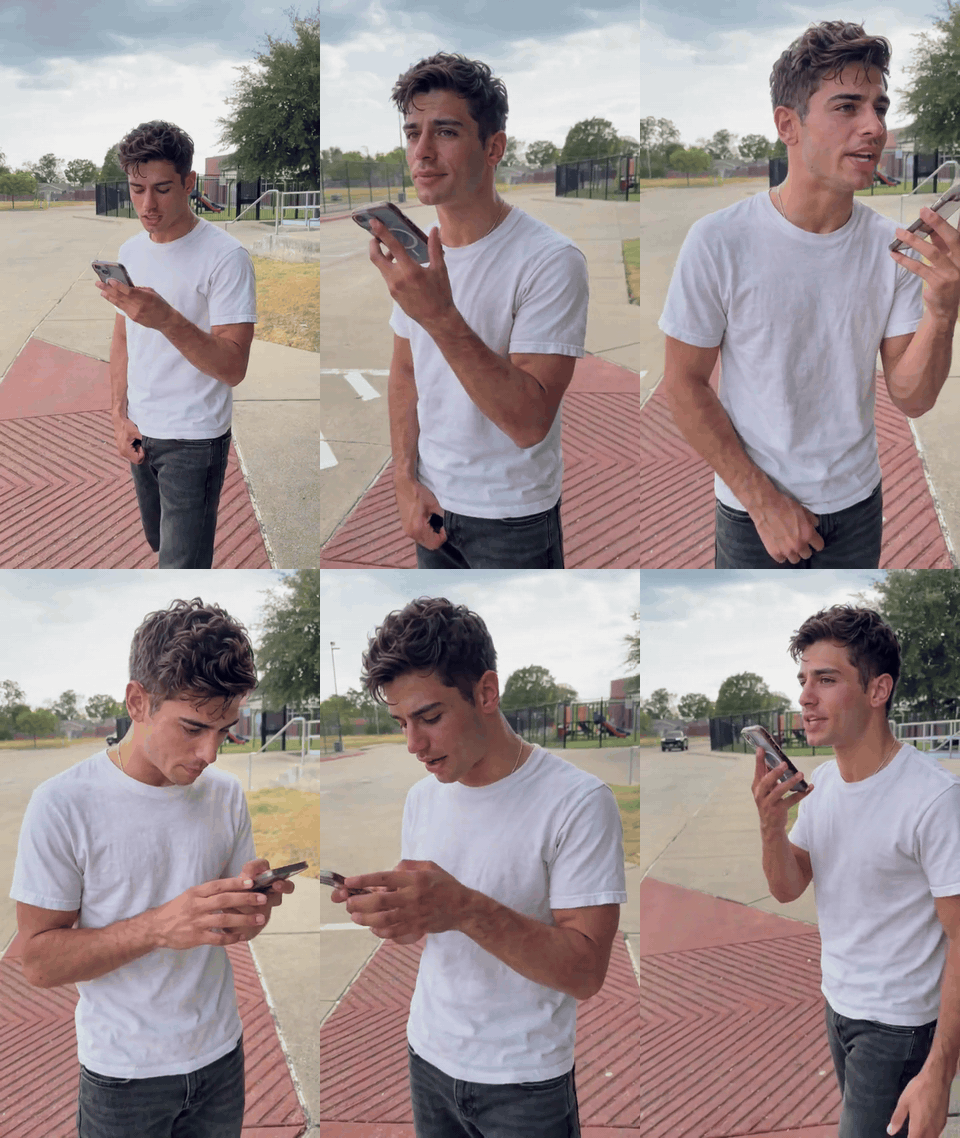
Online example, human version. The key visual beat is the shift from hopeful delivery to visible disbelief.
The second online example puts a pet in the same role. Its upright pose and phone prop make the ambition absurd before the answer arrives. A head turn and a long look at the camera do the work that a human actor would do with eyebrows and a muttered protest. This is more than a costume swap: the animal's body language changes the feel of the punchline while the question and reply remain recognizable.
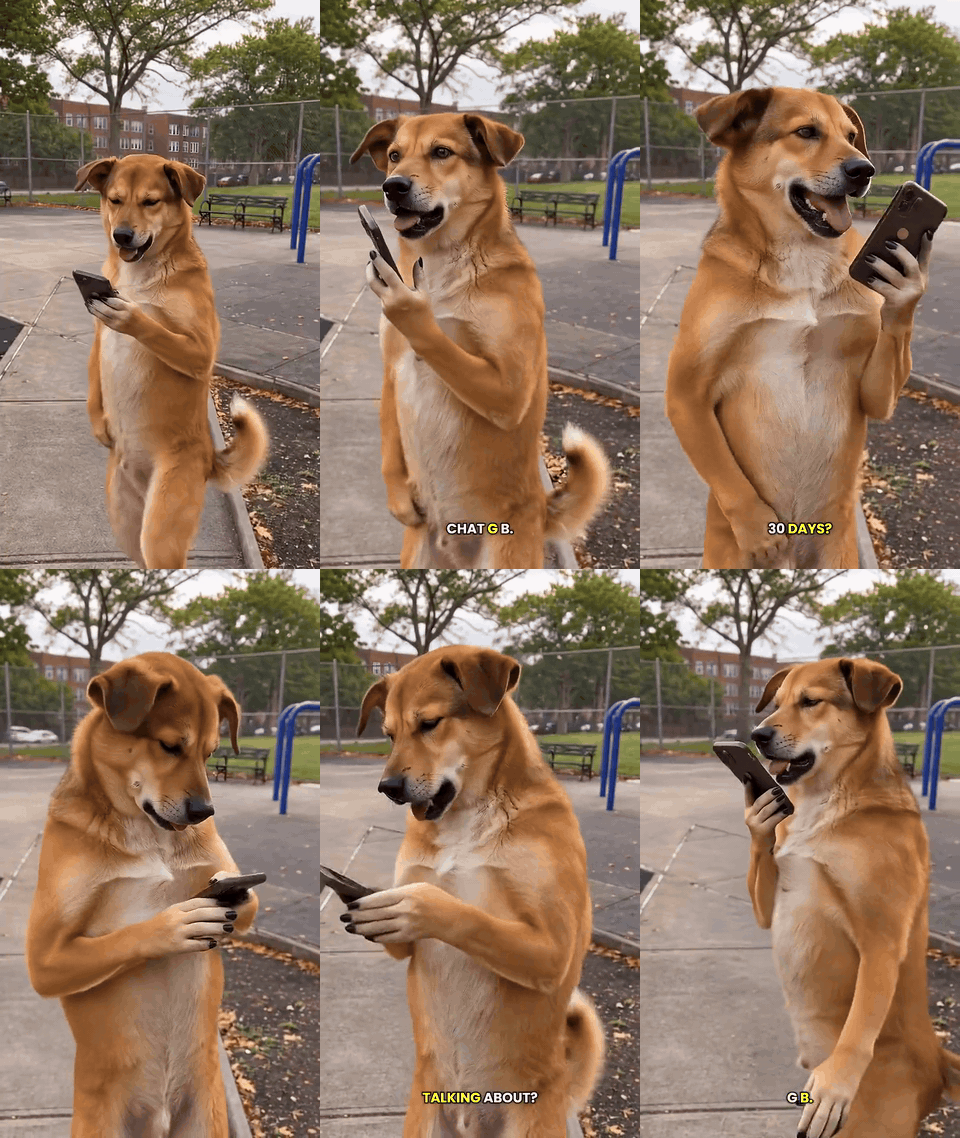
Online example, pet version. The performance relies on an upright pose, a readable phone gesture, and the delayed offended look.
These are examples of the circulating video format, not recordings that establish a particular chatbot response. A comedy sketch can stage the exchange; an AI remake can generate the performer. The phrase "how I become" is kept here because it is part of the searched meme line, though "how do I become" is ordinary English. Neither phrase makes the video financial advice.
The four beats that make it recognizable
| Beat | What viewers see | Why it matters |
|---|---|---|
| Ask | A phone is raised as if it can reveal a secret | The character's confidence sets up an oversized expectation. |
| Reply | "Get a job." appears or is read aloud | The answer is deliberately plain and short. |
| React | The character freezes, looks up, or stares at the camera | The pause lets the audience discover the insult alongside the character. |
| Ask again | Fast typing or another voice message | The character refuses the ordinary answer and extends the joke. |
The order matters more than an exact shot length. If the reply comes before the viewer understands the question, there is no contrast. If the reaction is cut immediately, the punchline has no room to breathe. If the character simply walks away, the clip loses the stubborn second attempt that makes this format specific.
How do you make a version that is your own?
Start with the joke's structure, then change the performance, setting, and ending. Replaying someone else's footage shot for shot makes the result harder to distinguish and gives you less control over the dialogue. For our demonstration, we place one fictional child in a sunlit playground. The child asks for a millionaire shortcut with bright optimism, then meets the blunt "Get a job." reply. That advice is deliberately absurd for a child; the change from delight to disbelief carries the joke. The phone screen faces the child, so the model never needs to invent app buttons or readable messages.
The useful design constraint is to separate performance from text. A video model can animate a person raising a phone, reading, recoiling, and typing. It is less reliable at rendering exact chat text on a moving phone. We therefore generate the acting first and add clean, editorial captions afterward. The captions report the joke's scripted lines; they are not presented as a screenshot of a real ChatGPT session.
1. Build a consistent first frame
Use a landscape 16:9 image with the child’s face, both hands, and the phone visible. A waist-up composition leaves room for the expression to change without losing the colorful slide and swings behind the child. Leave some uncluttered space for captions. The first frame should look hopeful rather than already shocked.
For this article, the first frame is generated with Seedream v5.0 Pro on Atlas Cloud. The prompt is deliberately concrete:
plaintext1Photorealistic 16:9 opening frame for a light comedy video. One fictional child around 10 years old stands in a colorful neighborhood playground on a sunny late afternoon. The child has curly dark hair, a yellow windbreaker over a blue T-shirt, and holds one smartphone near their mouth. Show the child from the waist up, with both hands visible. Their face is large and clear: bright eyes, raised eyebrows, and a wide, hopeful grin, as if they are about to ask for a secret way to become a millionaire. Place a red slide, teal climbing frame, swings, trees, and colorful playground flooring at different depths. Eye-level camera, natural warm light, realistic anatomy. Leave some open space on the right for captions. The phone screen faces the child. No other people, readable text, app interface, logos, or watermark.
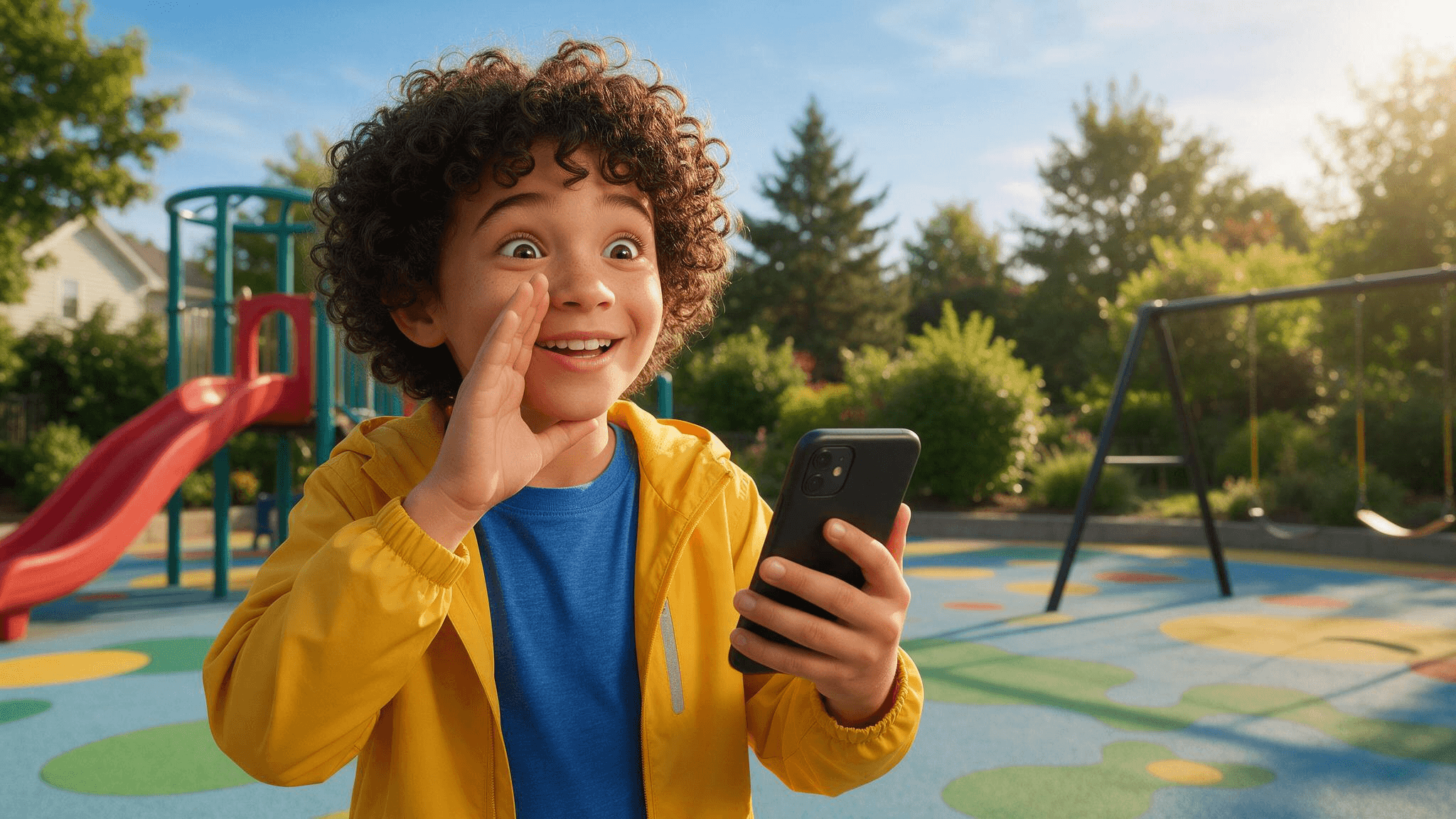
Our generated starting frame. The child’s broad smile and raised brows establish the hopeful opening; the slide and swings make the new setting unmistakable.
2. Animate a complete reaction, not a moving portrait
Use the first frame as the image input for Seedance 2.5 Image-to-Video on Atlas Cloud. We set the target to 26 seconds, landscape 16:9, with sound. The prompt calls for a sequence of distinct facial reactions. It does not ask the model to display chat bubbles or spell the punchline, because those exact words are added in the edit.
plaintext1Use the uploaded image as the first frame and visual reference. Create one continuous 26-second, 16:9 video in the same sunny playground. Keep exactly the same child throughout: approximately ten years old, curly dark hair, yellow windbreaker over a blue T-shirt, holding the same black smartphone. Preserve the child's face, hairstyle, clothing, body proportions, and the playground layout: red slide, teal climbing frame, swings, trees, and colorful rubber ground. Do not add other people or change locations. The story is a playful reaction to asking a phone how to become a millionaire in 30 days. Show the story through the child's changing expressions and actions; do not render readable text on the phone. Begin with the child smiling hopefully, shifting their weight, raising the phone, and tapping in a question. As they read the first reply, let the smile gradually disappear: their eyes track the screen, eyebrows lift, the phone lowers slightly, and they lean back in surprise. The surprised expression lasts only a moment. Without pausing, they blink, turn their head slightly, glance toward the camera, then look back at the phone with an annoyed frown. They take a small sideways step, adjust their grip, and actively type a second question with both thumbs. Their expression softens into an exaggerated, hopeful plea. They tilt the phone closer, gesture once with their free hand, and keep shifting naturally on their feet. After reading the second reply, their eyebrows rise, then fall. They lower the phone, give one brief exasperated shrug with an open palm, shake their head slightly, and end with a disbelieving look toward the camera while still blinking and moving naturally. Keep each reaction connected to the next through visible head, hand, shoulder, eye, and body movement. There must be meaningful motion throughout the entire clip, especially from seconds 9 to 18. No held pose, frozen reaction, repeated frames, motion loop, or long motionless stare. Use a gentle handheld camera that subtly moves sideways with the child while keeping them clearly framed. No scene cuts, sudden camera jumps, pure zoom-in, character changes, extra fingers or limbs, changing clothes, or changing playground objects. Natural late-afternoon light and realistic playground ambience.
The delivered clip makes the emotional change easy to follow: the child starts with a grin, opens their mouth in surprise at the first reply, frowns, types another question, and finally gives an exasperated shrug. The extra still below isolates the instant when the ordinary answer overturns the child’s millionaire plan.
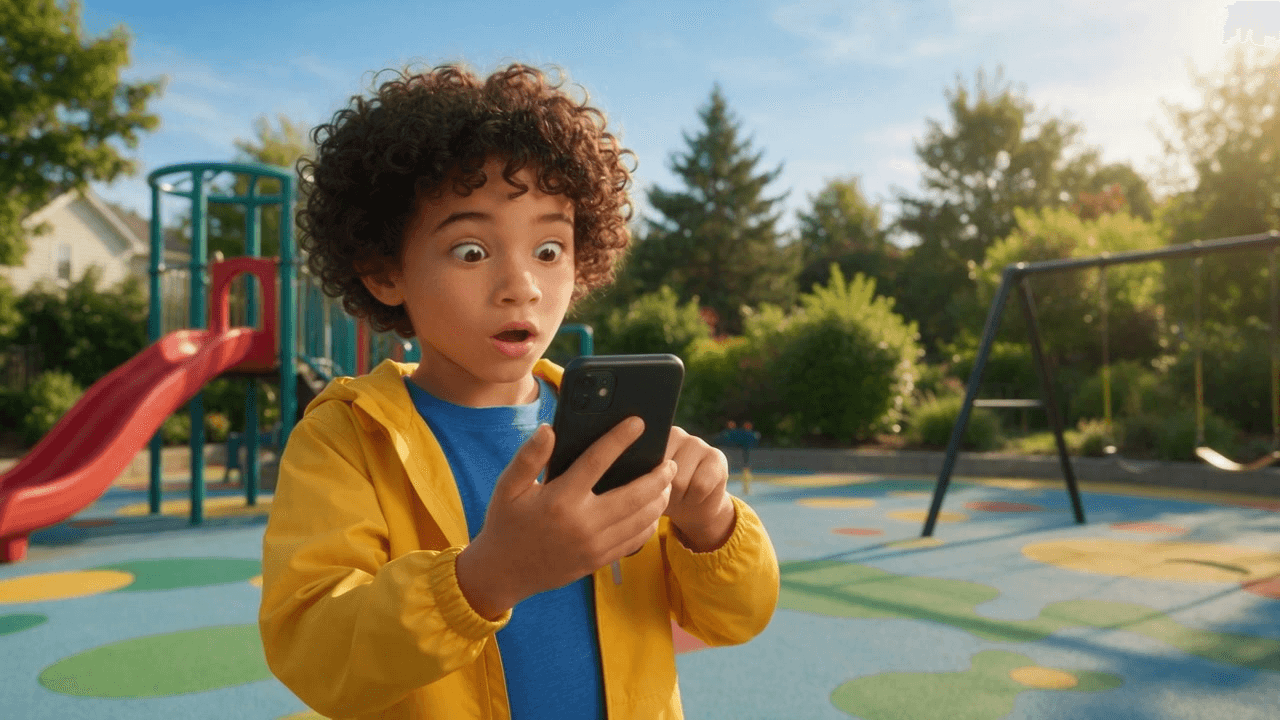
Frame from about 6 seconds into the generated video. Compared with the hopeful first image, the widened eyes and open mouth make the punchline’s effect immediately visible.
3. Add exact dialogue and keep the joke readable without sound
The short script is enough. Put the question on screen while the child addresses the phone, bring in "Get a job." only when the child reads the reply, and leave a beat before the protest. For the follow-up, use a new question rather than repeating the opening word for word. Subtitles should sit in a consistent safe area, with strong contrast, and should never cover the face or hands.
| Moment in our 26-second cut | Editorial caption | Performance cue |
|---|---|---|
| Opening | “How I become a millionaire in 30 days?” | Bright, certain delivery to the phone. |
| Reply | “Get a job.” | Eyes drop to the screen; smile disappears. |
| Reaction | “Seriously?” | Surprise gives way to a frown before typing. |
| Second attempt | “Okay, but what if I skip that part?” | Phone comes back up; tone turns pleading. |
Keep the writing short enough to read at a glance. Do not fabricate a realistic chat screenshot to prove the line was generated by an app. A clearly designed caption communicates the scripted exchange honestly and keeps the 16:9 clip understandable with sound off. The original audio stays with the video; the four displayed lines are editorial captions.
4. Export, inspect, and label
Export one continuous MP4 rather than cutting a source clip into several article embeds. Check its actual duration after export. The requested 26 seconds matters only if the file is genuinely longer than 20 seconds and the extra time contains meaningful action. In this article, the final original example is embedded below with a poster frame so readers can see the completed sequence in place.
Our original example: a child in a playground asks, receives the blunt reply, stares in disbelief, types, and tries again in one 26-second landscape video. The subtitles are editorial additions to the generated performance.
Before posting an AI-generated realistic scene, use the platform's AI-content label where applicable. TikTok's AI-generated-content guidance explains its labeling tools and requirements for realistic AI media. YouTube's altered-or-synthetic-content guidance describes disclosure during upload. Use your own likeness, a fictional character, or a participant who agreed to appear. The two online GIFs above are examples for analysis; publishing a remake calls for your own footage, sound, and permissions.
What makes the punchline land in a longer cut?
A 26-second version needs more than two copies of a 13-second meme. We give the child a visible change of strategy. At first, the phone is treated like a shortcut machine. After the reply, the child does not merely repeat the demand: they frown, type, reformulate it, and try to negotiate with the answer. That shift turns the last beat into a new joke instead of padding.
Sound-off readability also changes the edit. In a feed, viewers may meet the clip muted. The captions need to reveal the question and reply at the correct moments, while the actor's movement supplies emotion. The delayed "Seriously?" caption should not appear during the first stunned frame; the silent look comes first. That tiny pause is where the viewer reads the face.
Finally, keep the setup truthful. The video is a staged comedy scene and the line is a scripted gag. It does not show a real chatbot session or promise that anyone can become rich in 30 days. The next useful action is to choose an original performer and setting, storyboard the four beats, and test whether someone can understand your draft with its sound turned off. If they can identify both the question and the offended second attempt, the format is working.
FAQ
Did a chatbot really answer “Get a job”?
The phrase is the punchline in a comedy format. A video showing it is not evidence of a real chatbot exchange or a response you will always receive.
Can I make the meme with a pet or a friend?
Yes, if you have a suitable photo and permission from any person shown. A pet version needs clear eyes, muzzle, and coat markings. A friend version needs a clear face and their agreement to be depicted saying the lines.
Why use a video model and then add captions separately?
The model handles motion and acting; an editor handles exact text. Separating those jobs avoids garbled phone screens and gives you control over the timing of the punchline.
Does the original example here exceed 20 seconds?
Yes. The delivered MP4 is verified after export, rather than relying only on the duration selected in the generator. The extra time is used for a second attempt and a final reaction.





