The forest path is working, the character is halfway through the scene, and the sun is too bright for the mood. How to change weather in a Genie 4 world in real time has a straightforward answer: once you have access, ask Genie 4 to change one weather condition while naming the scene details you want preserved. Google has demonstrated natural-language weather edits in a running simulation, but Genie 4 is still a research preview for trusted testers as of October 28, 2026.
The prompts below are careful test templates, not verified commands from a public hands-on session.
Key takeaways
- Google confirms that Genie 4 can change weather with natural-language prompts while a simulation evolves.
- Test one weather change at a time and name the landmarks, character, layout, and camera direction to preserve.
- Treat the prompts here as starting points. Public access and repeatable edit behavior are not yet established.
- Check for scene drift after every edit; Google lists object permanence and long-term consistency as active research areas.

The turquoise bridge, flower cart, canal, and red paper boat establish the visual anchors for the weather sequence below.
Can You Change Weather in a Genie 4 World in Real Time?
Yes, according to Google DeepMind’s announcement. Genie 4 lets a user steer an evolving simulation with text, including changing its weather, moving the camera, or adding a person or object. Google says Gemini adapts the instruction to the surrounding scene, while the world continues to progress between inputs.
That is different from generating a separate weather video or applying a filter after recording: the demonstrated interaction edits a running simulated world.
The boundary matters. The announcement describes recordings of real-time interactions, but this article is not a report of an independent Genie 4 test. At publication, Google says it has started a research preview with trusted testers. It plans to extend access to consumers through Project Genie and to early-access partners through the Gemini API and Google AI Studio.
A waitlist is available, but the company has not announced broad availability in the cited update. (Google DeepMind, October 27, 2026, Genie 4 announcement.)
Confirmed by Google: in-world, natural-language edits can include weather, camera movement, and new people or objects. The simulation continues between inputs.
Still to verify in public use: the exact prompt interface, whether every weather type is supported in every world, how often landmarks persist after an edit, and whether a weather instruction changes ambient sound as requested.
How to Change the Weather Without Rebuilding the Scene
Think of a weather edit as a small continuity test. Your aim is to see whether one environmental property changes while recognizable scene anchors remain. This test design helps you spot what moved; it does not guarantee Genie 4 will lock those details in place.
Start with a scene you can audit
Choose a compact environment with a few visible anchors: a path, a distinctive tree, a building, and one character are easier to compare than a crowded street full of similar objects. Keep the camera pointed at a recognizable landmark. If the camera is already moving, pause or settle on a view before you issue the edit, if the actual interface allows it.
This is a measurement choice, not a Google requirement. A simple scene gives you a clearer baseline. If the tree disappears or the path bends after the instruction, you can identify a continuity change more easily than you could in an indistinct landscape.
Change one weather variable at a time
For a first pass, ask for light rain. Do not also switch from day to night, move to a new camera angle, add a person, and change the season. Those requests make it difficult to tell which instruction caused a change in the scene.
Use a prompt with four parts:
- Action: say what weather should change, such as “change the current weather to light rain.”
- Strength or character: keep it concrete, such as light rain, gentle snowfall, or a thin layer of fog.
- Preservation: name existing landmarks, characters, object positions, and layout.
- Continuation: ask the scene to keep progressing naturally.
A request such as “make the forest cinematic and stormy” bundles mood, lighting, and weather. A more controlled version says “change the current weather to light rain” and lists what should remain. The second form makes the test easier to read even if the model does not honor every preservation instruction.
Check before you add another edit
Compare the scene before and after the prompt. Record the changes first, then decide whether to refine the weather. If the character or camera moved, note that before asking for heavier rain. Otherwise, a second instruction can make it unclear whether the first edit held.
The suggested cycle is: one scene → one weather change → check preserved elements → record drift → decide whether to retry. It is a proposed test SOP for readers who gain access, not a confirmed sequence of Genie 4 interface steps.
Copyable Prompts for Rain, Snow, Fog, and Wind
These templates are designed to isolate one change and make preservation criteria explicit. They have not been tested in a public Genie 4 session, so treat the wording as a starting point and follow the controls shown in the access environment you receive.
Google’s existing Project Genie prompt guide recommends describing the environment and using concise, direct language. That guide applies to Project Genie’s world-creation flow; it is useful context for writing prompts, but it does not document a Genie 4 weather-editing interface. (Google, Project Genie prompt-writing tips.)
| Weather change | Prompt template | Preserve | Check after the edit |
|---|---|---|---|
| Light rain | Change the current weather to light rain. Keep the same forest path, trees, character, object positions, and camera direction. Let the scene continue naturally. | Path, trees, character, objects, camera direction | Does rain appear while the same path and landmarks remain recognizable? |
| Heavier rain | Make the rain heavier and add visible wet reflections on the path. Preserve the existing environment, character, object positions, and camera direction. | Environment, character, object positions, camera | Did rain intensity change, and did the path or framing also change? |
| Gentle snow | Change the current weather to gentle snowfall. Keep the same buildings, trees, character, and spatial layout. Do not add new objects. | Buildings, trees, character, layout | Did snow begin without new structures or a different scene? |
| Light fog | Add a light layer of morning fog between the existing trees. Keep nearby objects visible and preserve the current camera direction and scene layout. | Nearby visibility, trees, camera, layout | Is the fog limited enough to compare the original landmarks? |
| Steady wind | Add a steady breeze that moves the existing grass and tree branches. Keep the current weather, scene layout, and camera direction unchanged. | Existing weather, layout, camera | Do the existing plants move, and do other scene elements stay put? |
Avoid adding “make it beautiful,” a time-of-day change, a new camera move, and a character action to the same test. Those may be useful creative directions later. During a continuity check, they add variables without making the weather result easier to judge.
Case Study: One Flower Market, Five Weather States
Imagine a riverside flower market at blue hour: a turquoise stone bridge arcs over a narrow canal; saffron lanterns glow beneath copper awnings; magenta bougainvillea spills over the right wall; a cobalt flower cart stands in the foreground; and one red paper boat floats beside the left quay. A flower seller in a saffron coat and indigo scarf is closing her stall. These five anchors give a weather edit something visible to preserve.
The sequence below is an illustrative weather storyboard, not a captured Genie 4 session. A tester with Genie 4 access can try the short weather instructions and record whether the same world persists. The clips show five intended visual states; they do not establish how Genie 4 actually behaves.
Each clip runs for 10 seconds and returns to the same riverside market. Compare the bridge, awnings, bougainvillea, flower cart, red paper boat, and seller's clothing as the weather changes. The dry, light-rain, and heavy-rain shots establish the progression. In the strong-wind shot, the scarf and cover show the gust more clearly than the rain angle. The final rainbow reveal combines several changes for storytelling, so it is not a single-variable continuity test.
Opening scene brief:
plaintext1Photoreal cinematic establishing frame of a compact riverside flower market at blue hour, horizontal 16:9. A turquoise stone footbridge arches over a narrow canal in the middle distance. Warm saffron lanterns hang beneath weathered copper awnings on the left; saturated magenta bougainvillea cascades down a plaster wall on the right. A cobalt-blue flower cart filled with coral dahlias, violet irises, and cream peonies occupies the near foreground. One red paper boat floats beside the left quay. A young adult flower seller with expressive dark eyes wears a saffron raincoat and indigo scarf and folds a sheet of wrapping paper at her cart. Dry cobblestones, calm teal water, no rain, no fog, no wind. Rich but natural color separation, textured stone, believable flowers and skin, 35 mm lens, waist-height three-quarter view looking toward the bridge, soft lantern light against the cool evening sky. Keep every landmark clearly visible. No lettering, logos, duplicated people, or floating objects.
-
Visual 1, vivid dry baseline. It establishes exactly what later shots must preserve. Genie 4 test instruction:
Keep this market scene progressing under the current dry weather; do not change the weather yet.Scene direction:plaintext1Ten-second continuous shot from the supplied first frame, warm and lively before any storm. The flower seller folds a cream paper sleeve around coral dahlias, notices the red paper boat drifting beside the left quay, and breaks into a curious smile. She turns her shoulders, leans over the cobalt cart, and gently catches a loose violet iris before it falls; her hands and the bouquet move with believable weight. Begin at waist height in a wide three-quarter view of the turquoise bridge, copper awnings, magenta bougainvillea, cart, and boat. Glide sideways along the stall to reveal the dry amber-lit cobblestones and glassy teal canal, then return to the original bridge-facing axis. Saffron lanterns flicker against a clear cobalt-blue evening sky; the flowers and wall retain saturated but natural color. Absolutely no rain, wet pavement, fog, or wind. No cuts, extra people, duplicated objects, dialogue, text, or zoom-only motion.

Dry market baseline: the bridge, flower cart, and paper boat remain visible before the weather changes.
-
Visual 2, the first visible rain. The light shower, splash rings, and patchy wet stones must be unmistakable, while the market remains far clearer than in Visual 3's downpour. Genie 4 test instruction:
Change only the weather to light rain. Keep this flower market, seller, landmarks, object positions, and bridge-facing camera direction recognizable.Scene direction:plaintext1Ten-second continuous continuation from the same first-frame market, visibly changing from dry weather to a clear but gentle shower. At second two, distinct silver raindrops cross every amber lantern beam; by second five, numerous small splash rings cover the teal canal and patchy dark wet areas spread over roughly half of the cobblestones. A few soft amber reflection halos appear in those patches, but there are no streams, broad puddles, or opaque rain curtains. Keep the air clear enough to read the distant turquoise bridge and the magenta bougainvillea. The seller's curious smile turns to delighted surprise: she looks up, feels a drop on her palm, raises an eyebrow, then swiftly lifts the wrapped bouquet beneath the copper awning and pulls the narrow canvas cover halfway over the cart. Follow her hand from a low cart-level angle, tilt up to show the light shower against the lanterns, and return to the bridge-facing view. Her saffron coat gains visible but scattered damp specks. No heavy rain, strong wind, lightning, new stalls, extra people, cuts, dialogue, text, or zoom-only motion.

Light rain begins over the same market; small splashes appear while the bridge remains clear.
-
Visual 3, vertical downpour. The main contrast with Visual 2 is a dense curtain of rain, full wet-stone reflections, and urgent sheltering action, with little wind. Genie 4 test instruction:
Increase the existing rain to a steady downpour. Keep the market layout, seller, bridge, flower cart, paper boat, and camera axis recognizable.Scene direction:plaintext1Ten-second continuous continuation in the identical flower market, now a decisive jump from drizzle to a dense, nearly vertical downpour. Heavy rain forms visible silver curtains in front of the saffron lanterns; water streams from both copper awnings; broad puddles join along the same cobblestone seams and stretch amber, cobalt, and magenta reflections across the ground. The teal canal breaks into dense overlapping ripples, while the turquoise bridge remains recognizable through the rain. The seller's delighted expression turns to focused concern. She pulls the canvas cover fully over the coral dahlias and violet irises, presses its edge down with both palms, then ducks beneath the awning and looks back toward the red paper boat. Begin with a wide bridge-facing shot so the weather change is obvious, arc smoothly to a lower three-quarter angle past the glowing puddles, and settle with the bridge, cart, wall, and boat still in frame. Rain falls mostly straight down: no strong wind yet, no lightning, no new scenery, no extra people, no cuts, dialogue, captions, or zoom-only motion.
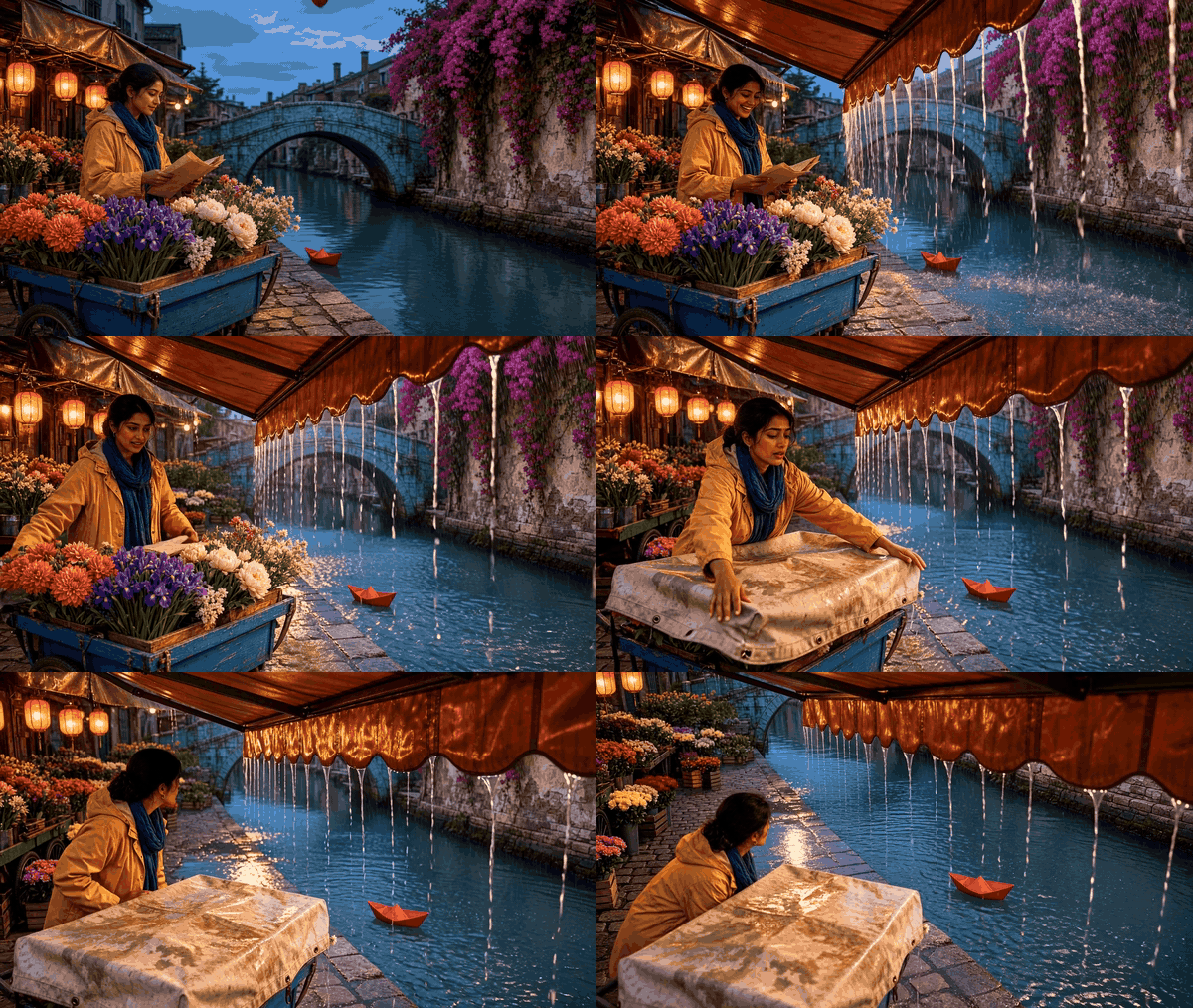
The rain intensifies and the seller covers the flowers as water collects on the cobblestones.
-
Visual 4, wind arrives during the rain. The scarf and canvas cover react strongly to the gust while rainfall continues. The rain slants slightly, although the wind's effect on the fabric is the clearest difference from Visual 3. Genie 4 creative instruction:
Bring in a strong crosswind as the heavy rain eases to a moderate shower. Blow the falling rain diagonally across the whole market while preserving its landmarks.Scene direction:plaintext1Ten-second continuous continuation from Visual 3's heavy-rain final frame. During seconds zero to two, the rain still falls almost vertically over the entire flower market, with the turquoise bridge visible beyond it. During seconds three to six, a strong crosswind rises from the left canal toward the right-hand bougainvillea wall. The downpour eases into a moderate shower as the gust turns the falling rain into clearly separated diagonal streaks, slanting about 40 degrees across the sky, in front of the bridge, around the flower cart, and over the canal. The rain must visibly travel through the whole open scene; do not portray it mainly as water pouring off the copper awnings. Keep enough space between streaks to see their direction and the saturated teal, magenta, cobalt, and amber background. The awnings flex, bougainvillea and flower heads bend rightward, and the seller's indigo scarf whips in the same direction. She widens her eyes at the sudden gust, plants one foot, grips the cobalt cart with one hand, and catches the lifting canvas cover with the other. The red paper boat spins but remains near the left quay. Start wide on the bridge axis, move to a low side angle as she braces the cart, then return to a wide view with every landmark visible. Smooth physical motion; no opaque wall of rain, no waterfall from the awning, no lightning, destroyed stalls, extra people, cuts, dialogue, text, or zoom-only movement.

A gust lifts the cover and blows the seller's scarf sideways as rain continues over the canal.
-
Visual 5, rainbow after the storm. This is the creative payoff: the rain stops, light returns, and a rainbow appears over the same wet market. Genie 4 creative instruction:
Let the rain stop, calm the wind, part the clouds, and reveal a natural rainbow above the existing bridge. Keep the market and seller recognizable.Scene direction:plaintext1Ten-second continuous continuation from the wind-driven moderate rain, ending in an unmistakable post-storm reveal. During seconds one to four, the diagonal rain weakens to a few falling drops and the canvas cover settles as the strong wind calms. During seconds five to seven, a break opens in the blue-hour clouds and a low shaft of warm late-evening sunlight touches the turquoise bridge and the still-wet cobblestones. By the final seconds, one believable, complete rainbow arcs above the bridge against darker retreating clouds; its colors are visible yet natural, not a neon painted stripe. Keep the copper awnings dripping, the canal rippling, puddles reflecting saffron lanterns, and the cobalt cart and magenta bougainvillea in their original places. The seller cautiously lifts her head, her tense face opens into a genuine relieved smile, and she raises one rescued coral-dahlia bouquet toward the light while the red paper boat remains beside the left quay. Begin close enough to read her expression, then move laterally outward into a wide bridge-facing composition that reveals the rainbow and all scene anchors. No instant dry pavement, no new buildings or people, no double rainbow, no season jump, no cuts, dialogue, text, or zoom-only motion.

After the rain, wet stones catch the warm light and a rainbow appears above the bridge.
The five intended states are dry and luminous; a first light shower; dense vertical downpour; rain with a strong wind cue in the scarf and cover; then rain-free wet stones and a rainbow. The bridge, cart, wall, seller, and boat should remain recognizable across all five. If illustrative clips change those anchors, note the mismatch rather than treating it as a successful continuity test. Clips 4 and 5 combine changes for storytelling and must be labeled as such in any actual Genie 4 test.
How to Tell Whether a Genie 4 Weather Edit Worked
A visually convincing result can still be a poor continuity edit if it silently replaces the path, character, or camera view. Use a short audit rather than a vague “looks right” judgment.
The official announcement says the model can keep a simulation progressing cohesively, but it also warns that details and object permanence can drift. Your own record should separate the intended change from everything you asked to preserve.
After each prompt, check these items:
- Target weather: can you identify the requested rain, snow, fog, or wind in the scene?
- Landmarks: do the same buildings, trees, path, and other anchors still appear?
- Character and objects: are they recognizable and in roughly the same positions?
- Camera: does the viewpoint still face the same direction, or has it shifted?
- Other changes: did time of day, season, lighting, or scene layout change even though you did not request it?
- Sound: if the scene has audio, did it change? Log what you hear, but do not assume a text weather edit guarantees a particular sound.
Genie 4 is described as generating native audio, including ambient sound. The announcement does not promise that every rain prompt will add raindrops, thunder, or any particular mix. Treat audio as a separate observation rather than proof that a visual weather instruction worked.
Keep a minimal run log:
| Field | What to record |
|---|---|
| Access route | The product entry point and date you tested |
| Baseline | Scene anchors and camera direction before the edit |
| Prompt | Exact text submitted |
| Intended change | The single weather variable |
| Preserved | Which anchors, objects, and viewpoint remained recognizable |
| Drift | Any unrequested change to identity, position, layout, lighting, or sound |
| Retry | Whether you repeated the same prompt or changed one phrase |
A record like this makes later comparisons more useful than a collection of “successful” examples with no baseline. Do not calculate a success rate from a handful of personal runs or compare results across different starting scenes as if they were controlled tests.
What Can Still Drift After a Weather Change?
Google says Genie 4 can maintain coherent environments over short sessions, while visual details and object permanence may shift over time. The announcement highlights longer sessions, multiple complex edits, and movement through a scene as situations where drift can appear.
It also lists spatial accuracy, complex physical interactions, legible text, real-time audio accuracy, and long-term consistency as active research areas. (Google DeepMind, October 27, 2026.)
That warning changes how you should use the prompts. Treat them as a way to explore art direction, prototype a mood, or test whether a scene responds to an instruction. Do not assume a wet road will remain in the same place across a long sequence, or that a character will retain exact position and appearance after repeated edits. If a scene matters for a production, save or capture useful states when the actual product offers a supported way to do so, and validate critical details in the tools used for final production.
A simulated rainstorm is also not a weather forecast or a validated physical model of rainfall. Genie 4 creates an interactive world. Its visual or audio response can help you imagine a scene, but it does not establish real-world precipitation, drainage, visibility, or safety conditions.
Can You Try Genie 4 Yet?
As of October 28, 2026, Google describes Genie 4 as a research preview for trusted testers. The announcement says consumer access through Project Genie and early access for Gemini API and Google AI Studio partners are planned next steps.
It does not say that every Google AI Ultra subscriber can already use Genie 4, so check the current official announcement and Project Genie waitlist for the latest status instead of relying on an assumed rollout date.
If you want to prepare an art-direction reference while waiting, Atlas Cloud offers creative tools for planning visual states. The flower-market sequence above can help a team compare dry, rainy, and post-storm looks before a world-model test. It does not edit a running Genie 4 scene, and this article does not claim that Genie 4 accepts these images or clips as inputs.
When access arrives, begin with one short weather edit in a simple scene. Save the exact prompt and compare the same landmarks before adding another instruction. That makes how to change weather in a Genie 4 world in real time a testable question rather than an assumption about a launch demo.
Frequently Asked Questions
Can you change weather without restarting a Genie 4 world?
Google’s demonstration describes weather changes as real-time steering while a simulation evolves. Whether a particular session needs to restart depends on the actual access interface and how the world responds; the public announcement does not document every control or edge case.
What is the best prompt for rain in Genie 4?
Start with one change and explicit preservation criteria: “Change the current weather to light rain. Keep the same path, trees, character, object positions, and camera direction.” This is a test template, not a verified best-performing prompt.
Can Genie 4 preserve the same character and camera after a weather change?
You can ask it to preserve both, but a prompt is not a guarantee. Google says object permanence and long-term consistency remain active research areas, so compare the character and viewpoint after each edit.
Is Genie 4 available to everyone now?
No. In its October 27, 2026 update, Google described a research preview for trusted testers and said broader consumer and developer access would follow. Check the official waitlist for changes.
Can I use Genie 4 to simulate real-world weather?
Use it to explore an interactive scene, not as a forecasting or validated weather-physics system. A generated storm does not establish real precipitation or predict conditions at a real location.


