


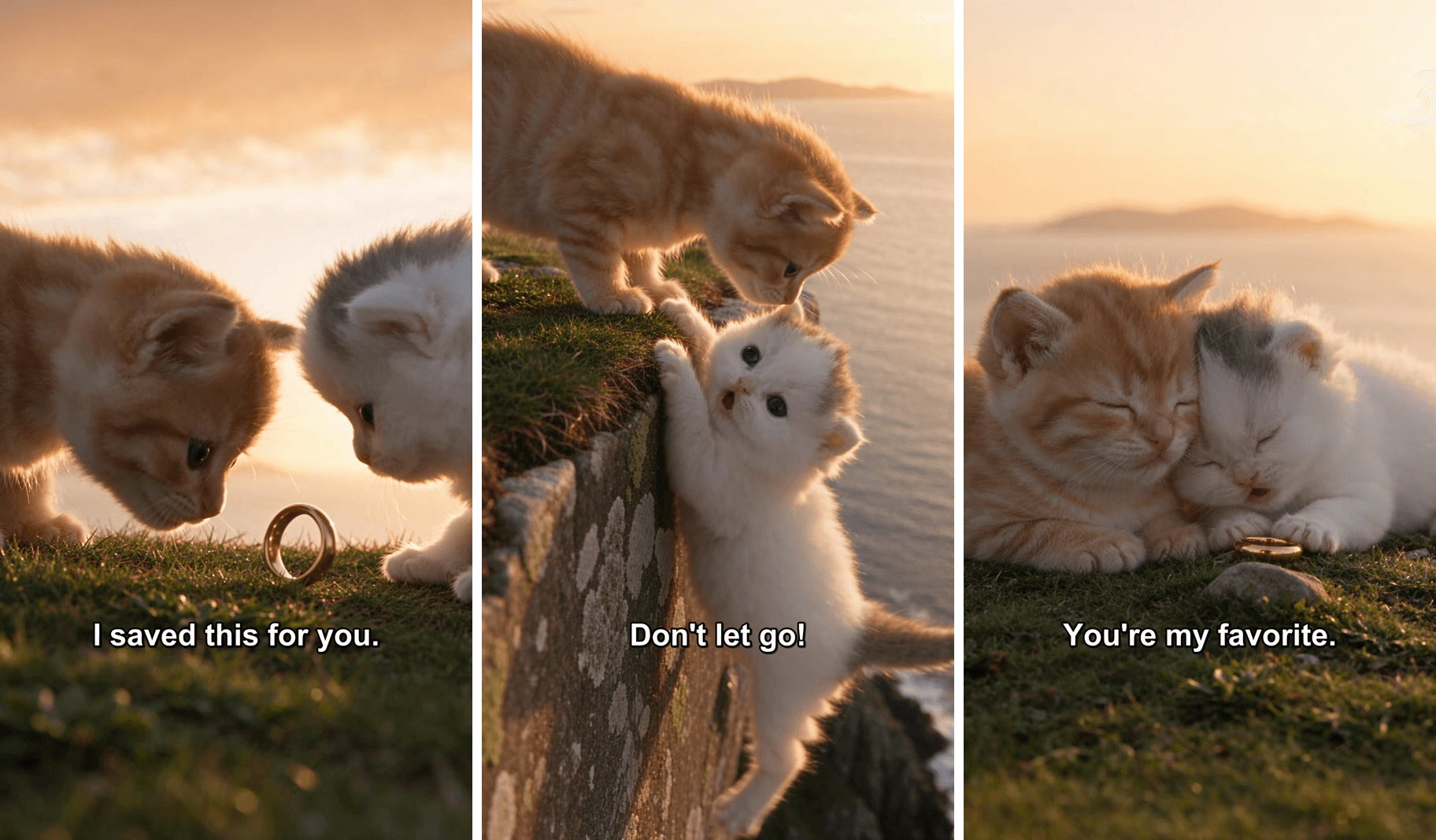
A ginger kitten pushes a tiny gold ring across the grass. A few seconds later, the white kitten he gave it to is hanging off a cliff by her front paws, the sea far below. "Don't let go!"
That is the pull of the talking kitten story: cats that look real, one small drama, and a line of white text at the bottom of the screen. This guide shows how to make AI cat videos like it from two cat photos, one scene image and a single prompt. The clip in this guide is our own 15-second run, captions included.
Key Takeaways
- Four AI cat video formats keep coming up on TikTok: talking kitten dramas, cats with jobs, fake CCTV clips and dances.
- A good AI cat story needs two cats you can tell apart, one place and one emotional turn, which fits into five shots and 15 seconds.
- In the Atlas Cloud AI video generator, two cat photos and a scene image go in as references, and Seedance 2.5 returns the clip with voices and sound.
- Keep text out of the generated footage, then add captions that start on each spoken line and end before the next cut.
- Write down how props behave: a ring that should lie flat needs a line in the prompt saying so.
What Are AI Cat Videos, and Why Is the AI Cat Story Format Everywhere?
AI cat videos are short clips where the cat is generated instead of filmed. Some look like phone footage of real kittens. Others look like an animated film. Across the AI generated cat videos we browsed on TikTok, four formats come up again and again:
| Format | What happens | What you start with |
|---|---|---|
| Talking kitten drama | Two realistic kittens act out a small love or family story, with spoken lines and captions | Two cat photos and a scene |
| Cats with jobs | A cat works as a barber, a tattoo artist or a boxer, one episode at a time | A recurring cat character |
| Fake CCTV cat | A "security camera" catches a cat doing something it shouldn't | One cat photo and a camera-style prompt |
| Dancing cat | A real pet photo moves to a trending song | One photo of your cat |
The jobs format shows how far a recurring character can go. The TikTok account FinKitty4U runs a "champion" series and has 2.2 million followers; its barber episode had 8.6 million views when we checked on November 16, 2026.
Dancing cats have their own walkthrough in our AI cat dance guide. This one sticks to the story.
Why do stories travel? A dance loops. A story gives people a reason to stay to the last second: a gift, a slip, a rescue. The captions carry the lines for anyone scrolling with the sound off.
How to Make AI Cat Videos With an AI Cat Video Generator
We made the cliff rescue on Atlas Cloud in one run. Here it is with our captions added:
The model is Seedance 2.5. It took the two kitten photos as references and kept their markings through all five shots: the grey patch on top of the white kitten's head, the pale ginger coat and white muzzle on the other. The five spoken lines and the background sound came out of the same run.
Everything below happens in the video generator, on the Video Generation tab.
Step 1: Pick Two Cat Photos and One Scene
Three reference images do the casting:
| Reference | In the prompt | What makes a good one |
|---|---|---|
| Cat 1 photo | @Image1, Milo | A sharp face with the eyes visible and a coat color that is easy to read |
| Cat 2 photo | @Image2, Luna | A coat or marking that tells her apart from cat 1 at a glance |
| Scene image | @Image3, the cliff top | Empty ground in the lower half of the frame, where the cats will stand |
Pick two cats that look different. A ginger kitten and a white one are hard to confuse; two grey tabbies can be harder to tell apart. Give each cat a name in the prompt and repeat its markings every time it acts.
For the scene, any image model works. This is the prompt behind our cliff image, made at 9:16:
plaintext1A photorealistic photo of a grassy cliff edge at golden hour, shot on a phone from low to the ground. The lower half of the frame is a flat patch of short grass and pale rock that ends in a clear, sharp cliff edge running across the frame. Beyond the edge, far below and softly out of focus: a calm sea and distant hazy hills under a warm orange sky. Shallow depth of field, natural colors, soft wind in the grass. Vertical composition. No people, no animals, no text.
Method 1: Generate the AI Cat Story in the Video Generator
Follow the numbers on the screenshot:
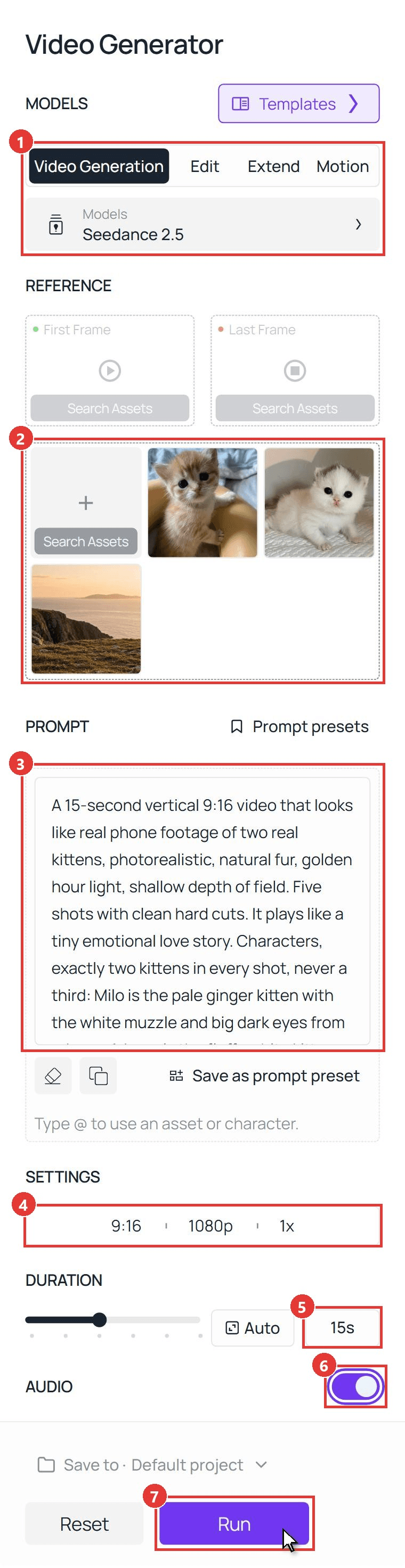
- Model: open Video Generation and keep Seedance 2.5.
- References: under Upload other references, add cat 1, then cat 2, then the scene. That order sets @Image1, @Image2 and @Image3. Leave First Frame and Last Frame empty.
- Prompt: paste the prompt below, then swap in your cats' names and markings.
- Settings: pick 9:16 and 1080p, with one output.
- Duration: type 15.
- Audio: leave it on. The kittens' voices come from here.
- Run. The clip appears in the panel on the right.
plaintext1A 15-second vertical 9:16 video that looks like real phone footage of two real kittens, photorealistic, natural fur, golden hour light, shallow depth of field. Five shots with clean hard cuts. It plays like a tiny emotional love story. 2 3Characters, exactly two kittens in every shot, never a third: Milo is the pale ginger kitten with the white muzzle and big dark eyes from @Image1. Luna is the fluffy white kitten with a grey patch on top of her head and big dark eyes from @Image2. They stay real kittens the whole time: four legs, real kitten bodies and proportions, no clothes, no human hands, they blink, their ears and whiskers move. Their fur colors and markings stay exactly as in the reference images. The place is the grassy cliff top from @Image3, and every shot stays on this same cliff top with the sea and the distant island behind. When a kitten speaks, its small mouth opens and closes softly with the words, in a small, high, gentle voice. All spoken lines are in American English only, no other language. 4 5Shot 1, 0-3s, close two-shot low on the grass, both kittens' faces visible: the tiny plain gold ring lies flat on the grass. The ginger kitten Milo pushes it with his nose so it slides flat across the grass toward the white kitten Luna, who sits facing him. Milo says: "I saved this for you." 6Hard cut. 7Shot 2, 3-6.5s, side view of the cliff lip, the grass edge on the left and the sheer drop with the sea far below clearly visible on the right: the tiny gold ring rolls on its edge across the grass, wobbles, tips over and falls flat, coming to rest lying flat half over the very lip of the cliff. The white kitten Luna creeps to the lip and says: "My ring!" She hooks the ring with one front paw and flicks it back onto the grass behind her. At that moment the soft grass edge crumbles under her front paws and she slides forward over the lip. 8Hard cut. 9Shot 3, 6.5-9.5s, same side view of the cliff lip: the white kitten Luna hangs from the grassy lip by her two front paws, back legs kicking gently, eyes wide, the sea far below her. Luna says: "Don't let go!" The ginger kitten Milo rushes to the lip, leans down and gently takes the scruff of her neck in his mouth. 10Hard cut. 11Shot 4, 9.5-12s, close shot from the grass side: the ginger kitten Milo pulls backward, and the white kitten Luna scrambles up over the lip onto the grass. Both flop down side by side, breathing fast, the tiny gold ring lying flat on the grass next to them. Milo says: "Never." 12Hard cut. 13Shot 5, 12-15s, close two-shot on the same cliff-top grass, the sea and the distant island softly out of focus behind them, same golden light as the other shots, not a plain colored backdrop: the white kitten Luna lies with the tiny gold ring lying flat between her front paws and leans her head against the ginger kitten Milo's cheek. Milo closes his eyes. Luna says: "You're my favorite." Hold to the final frame. 14 15Props: the ring is always the same tiny plain gold ring. It obeys gravity: whenever it is not moving it lies flat on its side on the ground, and it never stands upright on its edge by itself. It never floats, never changes size, and never falls off the cliff. No one falls off the cliff, no injury. 16 17Audio: soft wind, a slow gentle piano melody, the five spoken lines only, no narration, no other voices. 18 19No humans, no hands, no other animals. No text, no subtitles, no captions, no logos, no watermark anywhere.
Method 2: Create AI Cat Videos Through the Seedance 2.5 API
Making a story for every cat your followers send in? The API takes the same three images and the same prompt.
Step 1: Create an API key. In the console, open Settings and create a key under API Keys.

Step 2: Check the request format. The Atlas Cloud API docs cover authentication, and the API tab on the Seedance 2.5 reference-to-video model page lists every field.
Step 3: Send the request and poll. The three images go in the reference_images array as public URLs, in the same order as in the prompt:
plaintext1curl -X POST https://api.atlascloud.ai/api/v1/model/generateVideo \ 2 -H "Authorization: Bearer $ATLASCLOUD_API_KEY" \ 3 -H "Content-Type: application/json" \ 4 -d '{ 5 "model": "bytedance/seedance-2.5/reference-to-video", 6 "prompt": "<paste the cat story prompt here>", 7 "reference_images": [ 8 "https://your-cdn.com/cat-1.jpg", 9 "https://your-cdn.com/cat-2.jpg", 10 "https://your-cdn.com/scene.png" 11 ], 12 "ratio": "9:16", 13 "resolution": "1080p", 14 "duration": 15, 15 "generate_audio": true 16 }'
Poll the returned prediction ID until the status reads completed, then download the clip from the outputs array:
plaintext1curl https://api.atlascloud.ai/api/v1/model/prediction/<prediction_id> \ 2 -H "Authorization: Bearer $ATLASCLOUD_API_KEY"
The endpoint and the key stay the same across every video model on Atlas Cloud. To try another one, change the model string.
An AI Cat Story Script You Can Copy: The Cliff Rescue
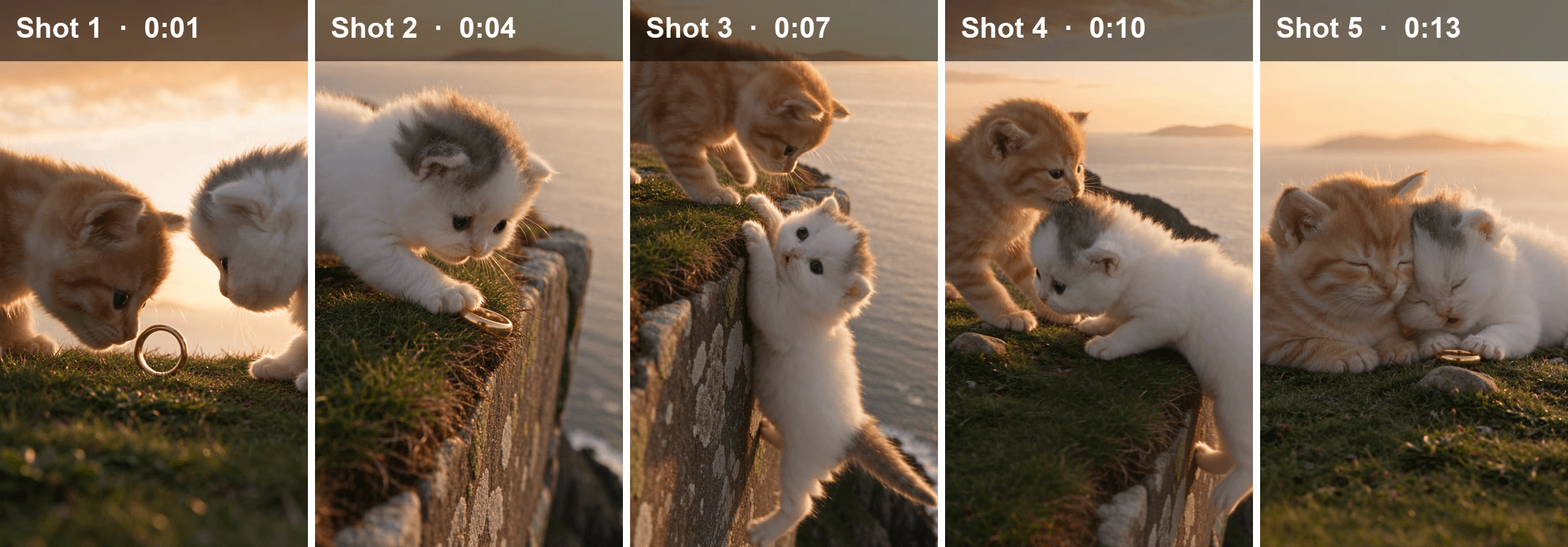
Five shots, one turn. This is how the finished clip breaks down, with the line that gets captioned in each:
| Shot | Time | What happens | Line |
|---|---|---|---|
| 1 | 0 to 2.5 s | Milo pushes the gold ring over to Luna | "I saved this for you." |
| 2 | 2.5 to 6.3 s | The ring stops at the cliff edge, Luna reaches for it and slips | "My ring!" |
| 3 | 6.3 to 8.7 s | Luna hangs by her front paws and Milo leans down to her | "Don't let go!" |
| 4 | 8.7 to 12.2 s | Milo pulls her back up and they flop onto the grass | "Never." |
| 5 | 12.2 to 15 s | Cheek to cheek, eyes closed, the ring in front of them | "You're my favorite." |
Four lines in the prompt do most of the work.
Show the danger in the same frame. Shot 2 is written as a side view with the grass edge and the drop to the sea in one picture. Shot at ground level, the edge of a cliff looks like any patch of grass.
Tell props how to rest. "Whenever it is not moving it lies flat on its side" makes the ring settle flat in the grass each time it stops, like a real one.
Pin every shot to one place. "Every shot stays on this same cliff top" keeps the final cuddle in front of the same sea and island as the rescue.
Keep the kittens kittens. "Four legs, no clothes, no human hands" holds the real-footage look from the first frame to the last.
For more on how Seedance 2.5 reads timed shots and @Image bindings, see our Seedance 2.5 prompt guide. Planning a second episode with the same pair? The AI cartoon couple guide covers keeping characters the same across clips.
Add Beat-Synced Captions to Your AI Cat Video
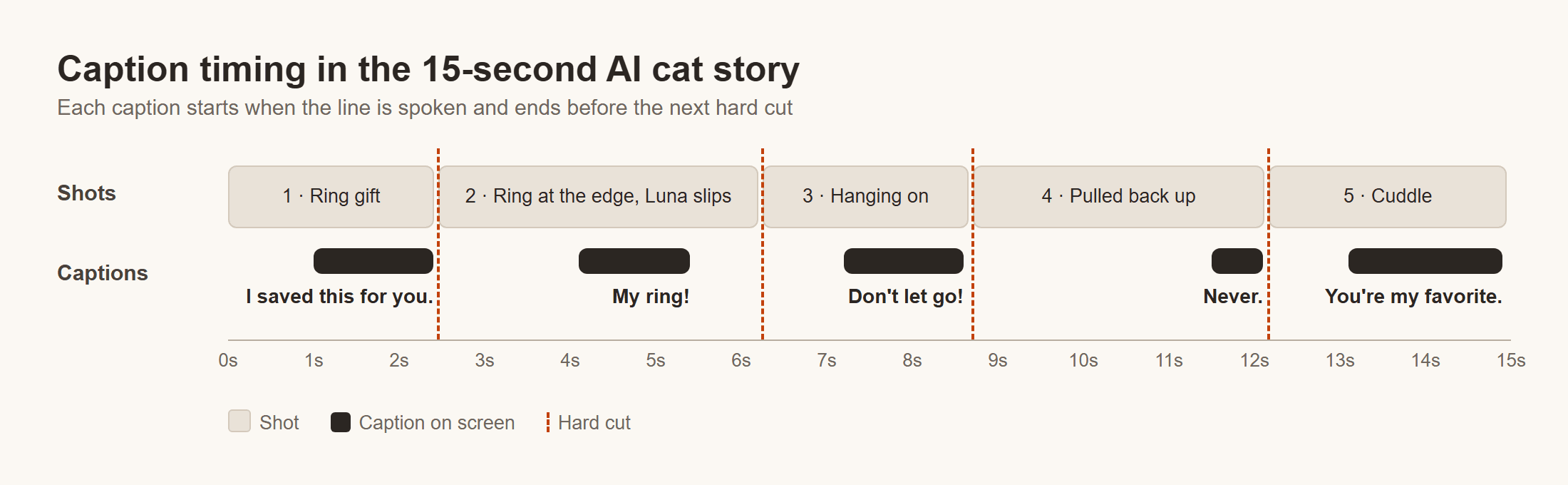
Captions go on after generation, in an editor where you can fix a typo or retime a line. That is why the prompt ends with "no text, no subtitles". In this AI cat video, "beat-synced" means each caption lands on a beat of the story: it appears with the spoken line and is gone before the cut.
Here is how we timed ours:
- Find each line on the waveform. Any editor with an audio waveform shows the voices as spikes. Ours sit at about 1.1, 4.2, 7.3, 11.6 and 13.2 seconds.
- Start the caption with the voice. A caption that shows up before the kitten opens its mouth spoils the line.
- End it before the next hard cut. Three of our lines ran up against a cut, so we ended them at 2.4, 8.6 and 12.1 seconds. A caption that hangs over a new shot reads as late.
- Keep the style plain. White bold text with a thin dark outline, placed above the bottom fifth of the frame so the app's own caption and buttons don't cover it.
AI Cat Video Prompts for Three More Formats
Same workflow, different story. We wrote these three for this guide and have not run them yet, so treat them as starting points:
| Format | References | Shape |
|---|---|---|
| Cat chef | Your cat plus a kitchen counter | Four short shots that end on a proud reveal |
| CCTV cat | One cat photo | One fixed camera, one take, a look into the lens at the end |
| Cat with a job | Two cats | A customer and a barber, three shots |
The cat chef:
plaintext1A 15-second vertical 9:16 video that looks like real phone footage. The cat from @Image1, a real cat on four legs with no clothes, stands on the wooden kitchen counter from @Image2 in warm morning light. Shot 1: it sniffs a bowl of flour. Hard cut. Shot 2: it pats a lump of dough with both front paws. Hard cut. Shot 3: close-up, flour on its whiskers, it sneezes once. Hard cut. Shot 4: it sits proudly next to a lopsided bread roll. Soft kitchen sounds and a playful plucked melody. Exactly one cat. No people, no hands, no text.
The CCTV cat:
plaintext1Real security camera recording. One grainy black-and-white CCTV feed from a fixed camera high in the corner of a living room at night, looking down, wide-angle lens, dark corners, video noise. Small white text in the top left corner: "CAM 02". The cat from @Image1 creeps along the back of the sofa, stops at the side table and slowly pushes a glass of water off the edge. Then it looks straight up into the camera and holds eye contact until the last frame. One continuous 10-second take, no cuts. Exactly one cat, no people. Faint room hum and the soft thud of the glass on the rug.
The cat with a job:
plaintext1A 15-second vertical 9:16 video that looks like real footage. The cat from @Image1 sits upright on a tall stool in a small barbershop, a tiny striped cape around its neck. The cat from @Image2 stands on the counter behind it, holding a comb in its mouth. Shot 1: the barber cat combs the fur on the customer's head. Hard cut. Shot 2: close-up, a small tuft of fur drifts to the floor. Hard cut. Shot 3: the customer cat turns to the camera, ears up, pleased. Exactly two cats with real cat bodies, no human hands. Barbershop chatter, a soft snip sound, upbeat jazz. No text.
Frequently Asked Questions
How can I create a free AI cat video?
On Atlas Cloud, adding a payment method unlocks $1 of free credit. That covers a short test run: a 5-second 480p clip with audio and three reference images costs about $0.67, 20% off the $0.84 list price, as of November 16, 2026. Use it to check that your cats look right before you run the full 15 seconds.
What is the meow meow song in AI cat stories?
It is a meowed version of Billie Eilish's "What Was I Made For?", with the lyrics replaced by sad meows.
The Daily Dot reported on August 28, 2024 that a TikTok account called mpminds first used it on April 13, 2024, and that the sound had been used in 931,400 videos. The same report says the most popular AI cat stories of that wave used it.
Can I put my own cat in an AI cat story?
Yes. Upload a clear photo of your cat as @Image1 and describe its coat and markings in the prompt. If your cat is an adult, drop the word "kitten" from the prompt and describe it as a grown cat.
How long can an AI cat video be?
Seedance 2.5 makes 4 to 30 seconds per generation. Five shots fit in 15 seconds. A longer story can run to 30 seconds in one pass, or be built from several clips joined in an editor.
How much does a 15-second AI cat story cost on Atlas Cloud?
With audio and three reference images, a 15-second clip costs about $8.90 at 1080p, the setting we used, against an $11.12 list price. At 720p it is about $4.52 (list $5.65). Both prices are 20% off as of November 16, 2026, and the Run button shows the exact price before you generate.
Conclusion
A cat story works when it has two cats you can tell apart, one place and one moment where things go wrong. The cuts, the voices and the music can all be written into a single prompt, and the captions are one short pass in an editor.
Start small: two photos, five shots, five lines. That is how to make AI cat videos people watch to the end, and once the first one works, the same pair can come back for episode two.




