One person sits on the edge of a wooden pier looking out over calm water. A second person stands in the surf in a mint-green dress, points straight into the camera lens while singing, and then sits beside the first person on wet sand at sunset. Twenty-eight seconds later the clip loops, and the two faces on screen belong to a couple who have never set foot on that beach. That is the raindance ai trend, and since late September 2026 it has turned pairs of camera-roll portraits into the waterfront duet from Dave and Tems' hit single across TikTok and Instagram Reels.
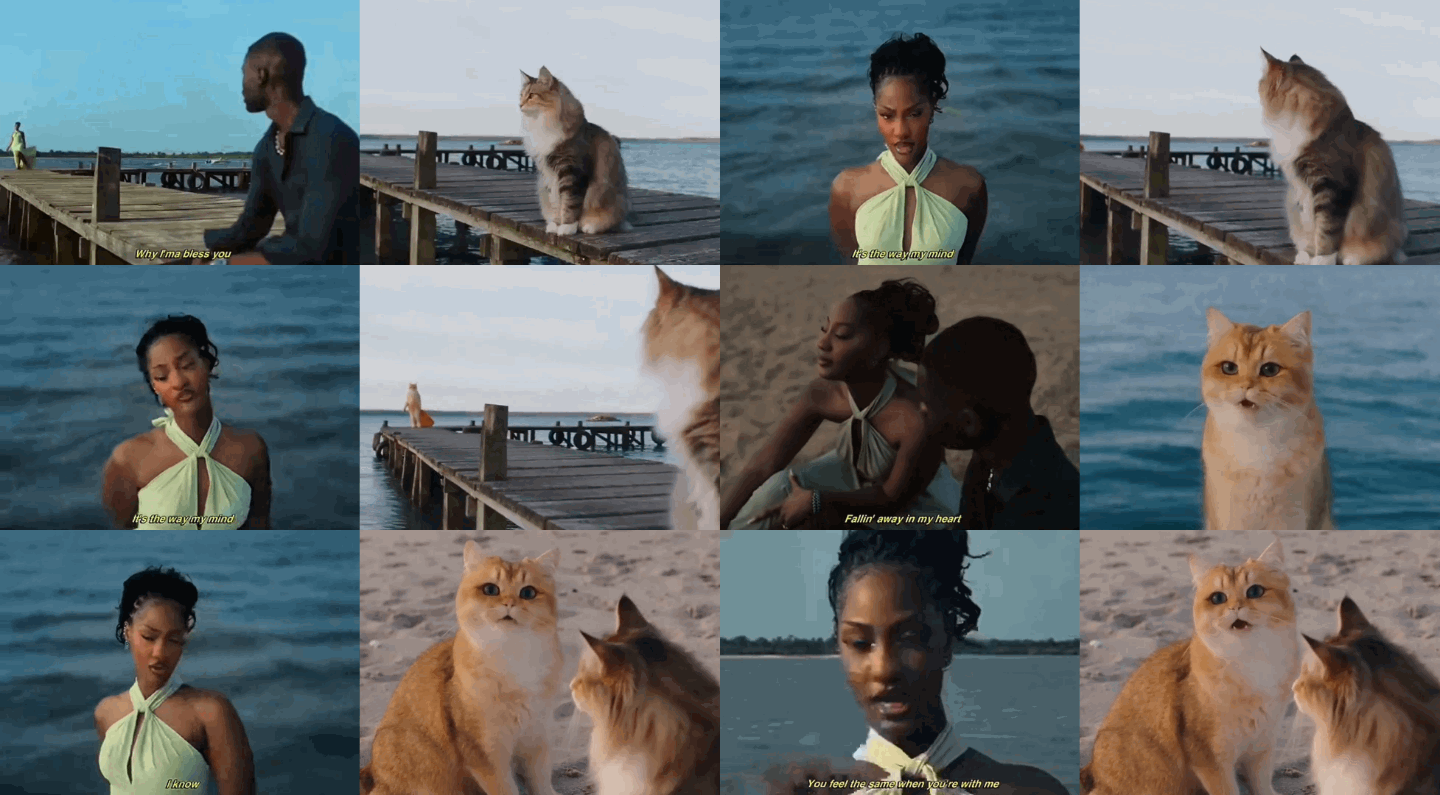
Two separate photos (include pets) recasted into the pier wait, the sea close-up, and the sunset beach scene.
You do not need camera gear or timeline editors to run this trend. Kling 4.0 takes two waist-up portraits and a reference clip, then locks both identities across every original pier-to-beach cut. For a purely prompt-driven route, MiniMax H3 generates an original sunset or rainy reunion from two photos alone.
What Is the Raindance AI Trend?
Two photos, golden hour, and a Dave & Tems soundtrack. That is the entire formula behind the viral Raindance trend. The generator cuts between two solo shots—one person waiting on a dock, the other singing directly into the camera—before dropping them side by side on the sand. No filming required. Anyone with two still portraits can instantly reunite long-distance partners or stitch two friends into the same scene.
| Item | Detail |
| Original track | "Raindance" by Dave featuring Tems, released October 23, 2025 (The Boy Who Played the Harp) |
| Source visual | Official music video directed by Nathan James Tettey, filmed in Lagos and published January 9, 2026 |
| AI trend emergence | First public face-recast prompts shared September 30, 2026; template clips spread on TikTok and Reels in early October 2026 |
| Role 1 (The Pier Partner) | Starts seated on the wooden pier in a dark green shirt; appears in the opening dock cuts and the final beach two-shot |
| Role 2 (The Sea Singer) | Appears at the far end of the pier in a mint-green dress, sings in the ocean close-ups, points at the lens, and joins Role 1 on the sand |
| Other search names | Raindance couple trend, Dave Tems AI video, Raindance two-photo filter |
The Pier-to-Beach Shots, Step by Step
Whether you trim a 15-second reference clip or generate the full 28-second sequence, the visual follows three recurring beats from the original waterfront edit.
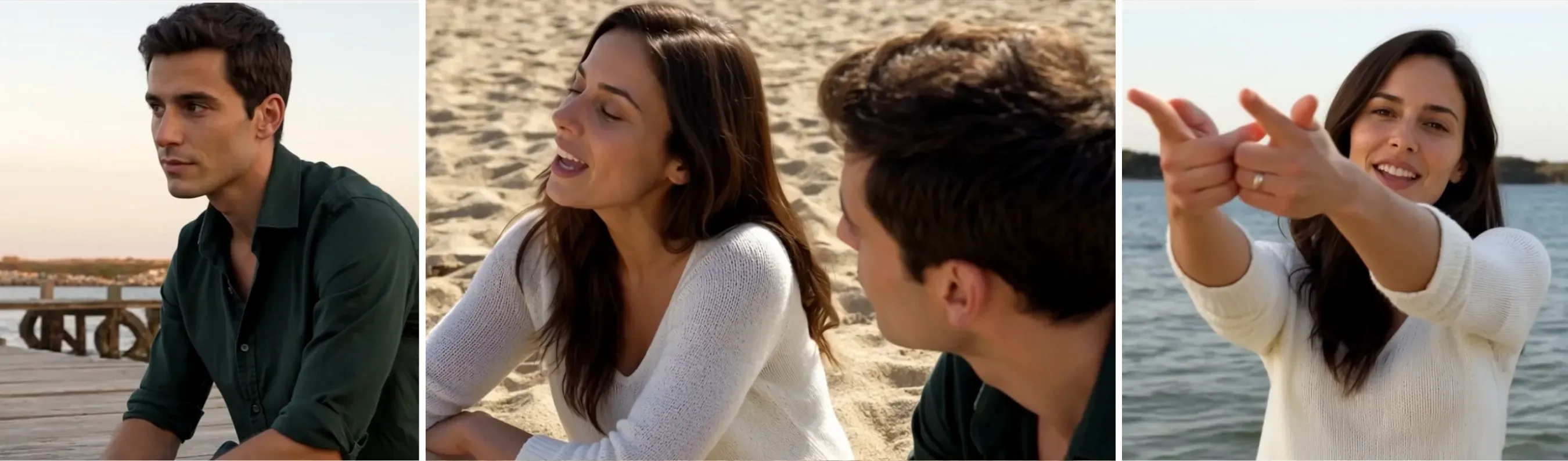
The signature sequence: waiting on the pier, sitting together, and pointing at the lens by the sea.
- The pier wait. Person 1 sits near the edge of a weathered wooden dock over calm water, looking back down the planks as a second figure appears in the distance.
- The ocean close-up. The edit cuts to the surf at golden hour. Person 2 stands in front of the waves with arms crossed or relaxed, singing softly into the camera.
- The lens point. Person 2 reaches one hand straight toward the camera lens on the vocal beat, holding eye contact in a tight waist-up frame. This is the frame most creators use as their TikTok cover image.
Which AI Generators Actually Make the Raindance Video?
Four web tools currently put the trend's name on a dedicated landing page. Four of them use generative video models to build the clip from still photos, and two of them name the exact foundation model they run on. The specifications below come from each product's public page on October 29, 2026.
| Tool | Photos Needed | Output Length, Frame, and Resolution | Pricing and Audio Notes |
| Starrd Raindance Template | 1 or 2 photos (people or pets) | 28 seconds (12 shots), 16:9 widescreen, 480p | 250 credits (about $12.50); includes the synced song |
| Buble Raindance AI Video Generator | 2 photos | 15 or 30 seconds; fixed 4:3 | 750 credits (15s) or 151 credits (30s) |
| Airaindance RainDance AI | 2 photos (person or pet) | free 2s shot of you both on the beach preview in 480p; 28s, fixed 4:3 | 50 credits at 480p Standard; 100 credits or at 720p HD; exports a silent MP4 |
| MakeMemev Raindance AI | 2 photos | 10-second dock, sea, and sunset beach clip, no watermark, 4:3 | Listed from $4.99 per video with trend audio included |
The key takeaway is in column three. Starrd's multi-shot music video remake runs on Kling 4.0, and Buble's original pier reunion runs on MiniMax H3. Because both foundation models are hosted directly on Atlas Cloud, you do not have to pay $9.99 to $12.99 for a 480p or 720p clip locked to a fixed 4:3 frame. You can open the underlying model yourself, set the aspect ratio to vertical 9:16 for TikTok and Reels, render up to 1080p, and control what both people wear in the prompt.
How to Prepare Your Two Photos So Faces Do Not Blend
Multi-character video models read reference slots by index. Before you open the generator, prepare your two portraits using four rules so the model keeps both faces distinct across every cut.
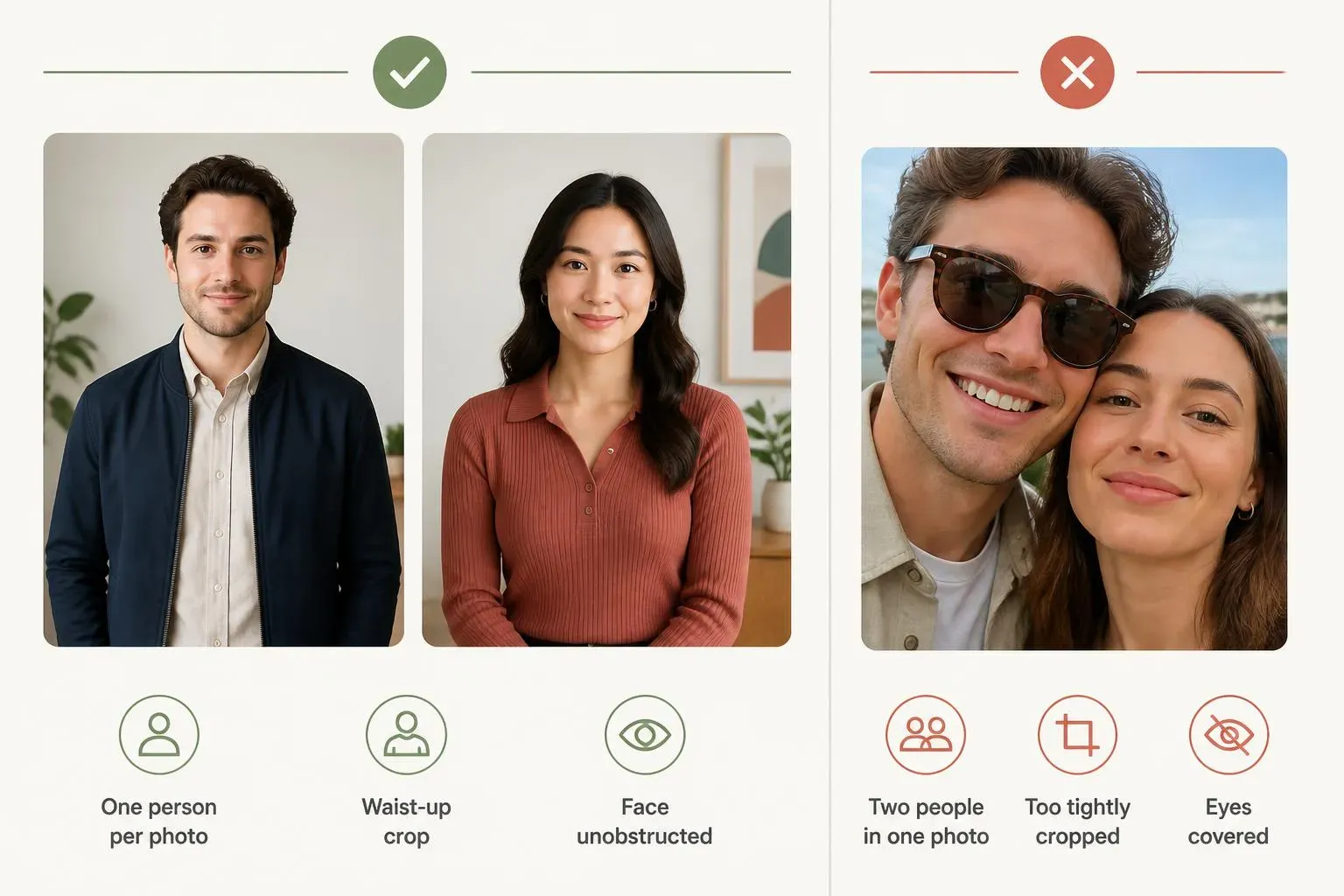
Separate waist-up portraits keep roles and outfits distinct across all three cuts.
- Put one person in each image file. Uploading a couple selfie into a single reference slot forces the vision encoder to guess which face belongs to which character, which leads to blended features in the final beach shot. Crop each person into a separate JPG or PNG under 10 MB.
- Use a waist-up or three-quarter crop. A tight passport-style crop from the chin to the forehead gives the model no clothing data, forcing it to invent shirts or borrow the outfits worn by Dave and Tems in the reference video. A waist-up photo locks your subject's top and jacket across the cut.
- Match the face scale between the two files. The two photos can come from completely different locations, such as an indoor office and an outdoor street. What matters is proportion: pick two photos where both heads fill a similar share of the frame so the model renders both people at natural relative heights when they sit side by side.
- Keep eyes and mouths unobstructed. Role 2 sings into the lens and points at the camera. Sunglasses, hands resting on the chin, or heavy beauty filters break lip movement and cause the face to shimmer during close-ups.
How to Make a Raindance AI Video on Atlas Cloud
Atlas Cloud hosts both foundation models that power the paid third-party templates, including Kling 4.0 and MiniMax H3. Pick Method 1 if you have a reference clip of the original waterfront video and want to copy its camera cuts. Pick Method 2 if you only have two photos and want to generate a continuous pier reunion from scratch.
Method 1 Recast the Pier-to-Beach Cuts with Kling 4.0
Kling 4.0 accepts up to 10 reference images, 5 reference videos, 7 subjects and 3 voices in a single request, and renders up to 30 seconds of native 1080p video. You bind each uploaded file in your prompt using @-syntax in the exact order you uploaded them (@Image1, @Image2, and @Video1).
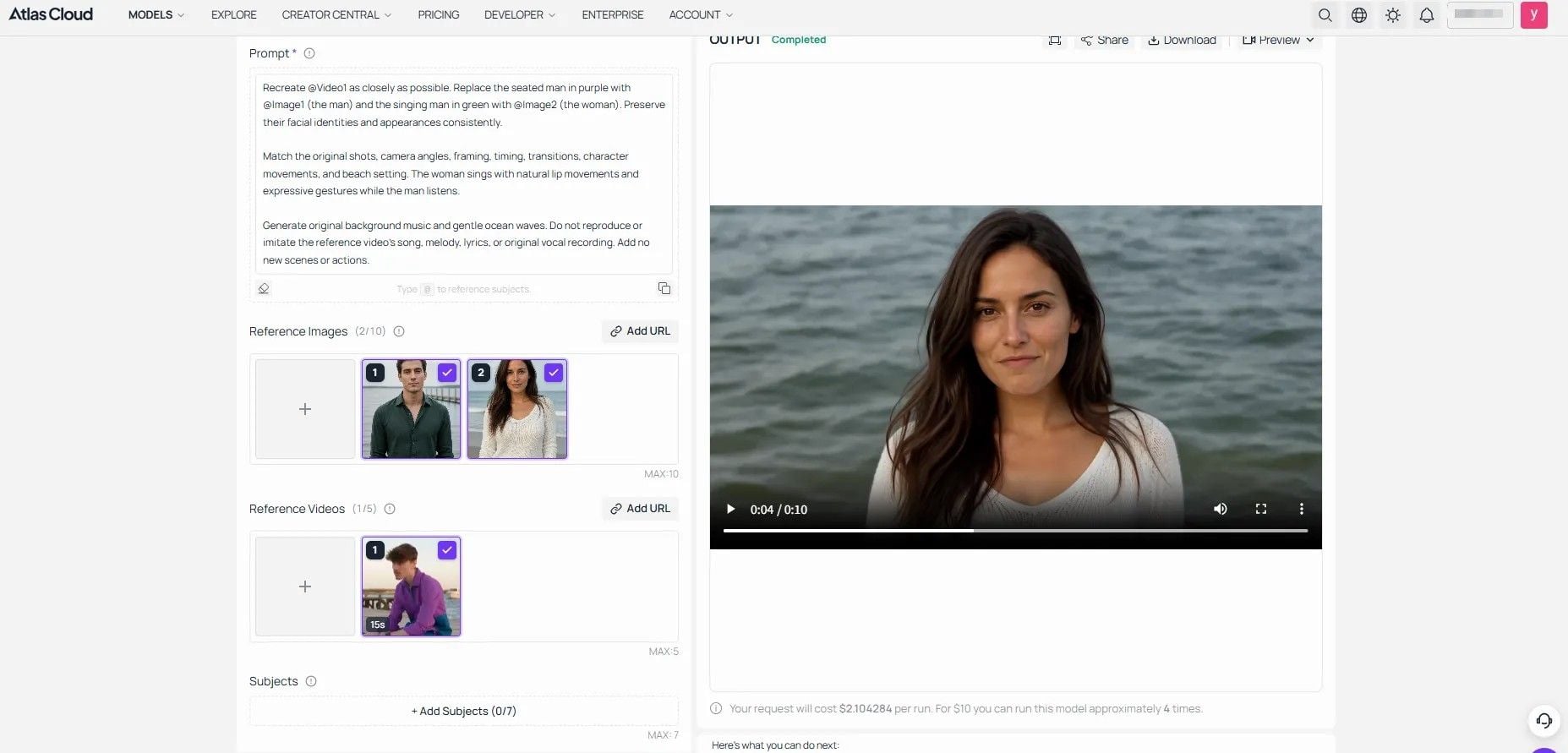
Upload the pier partner as @Image1, the singer as @Image2, and the reference clip as @Video1 in Kling video 4.0.
- Open the Kling video 4.0 playground on Atlas Cloud.
- Under Reference Images, upload the Pier Partner photo first (
@Image1) and the Sea Singer photo second (@Image2). - Under Reference Videos, upload a 10-to-15-second clip (
@Video1) covering the pier wait, the ocean close-up, and the sunset beach sit. - Paste the prompt below into the Prompt field, replacing the clothing descriptions with what your two subjects wear in their photos:
plaintext1Recreate @Video1 as closely as possible. Replace the seated man in purple with @Image1 (the man) and the singing man in green with @Image2 (the woman). Preserve their facial identities and appearances consistently. 2Match the original shots, camera angles, framing, timing, transitions, character movements, and beach setting. The woman sings with natural lip movements and expressive gestures while the man listens. 3Generate original background music and gentle ocean waves. Do not reproduce or imitate the reference video's song, melody, lyrics, or original vocal recording. Add no new scenes or actions.
- Set Duration to match your reference clip length (such as 10 seconds).
- Set Aspect Ratio to
9:16for a full-screen TikTok or Reels post, or choose 16:9 for a widescreen video. Select Auto to let Kling determine the aspect ratio based on your reference video. - Use 720p for initial tests to check character consistency, outfits, and shot transitions, then click Run.
Method 2 Generate an Original Pier Duet with MiniMax H3
If you do not want to trim or upload a reference video, switch to MiniMax H3 Reference-to-Video. The model accepts up to 9 images in its refers array, renders 5-to-15-second clips up to 2K resolution, and generates a matching ambient soundtrack alongside the video.
- Open MiniMax H3 Reference-to-Video in the Atlas Cloud Video Generator.
- Add your two portraits to the reference list: the seated partner first and the approaching singer second.
- Paste the scene prompt below. Feel free to customize the setting and atmosphere to match your desired mood, not limited to a rainy pier or a singing duet.
- Set Aspect Ratio explicitly to
9:16or4:3. The default setting isadaptive, which picks an output frame based on your uploaded portrait dimensions unless you override it. - Select
10or15seconds for Duration and768Por2Kfor Resolution, then click Run.
Without a video reference, achieving a 1:1 recreation is quite difficult; however, you can use the original video as a reference while incorporating your own creative ideas:
Method 3 Run the Two-Photo Workflow Through the API
If you are building a social video app or running batch generations, both models sit behind the same /api/v1/model/generateVideo endpoint on Atlas Cloud.
Step 1: Create an API key. Open Settings in your Atlas Cloud console, click Create API Key, and store the token securely.
Step 2: Submit the generation request. The curl example below runs the Kling 4.0 two-photo workflow from Method 1:
plaintext1# Step 1: Start video generation 2generate_url = "https://api.atlascloud.ai/api/v1/model/generateVideo" 3headers = { 4 "Content-Type": "application/json", 5 "Authorization": "Bearer $ATLASCLOUD_API_KEY" 6} 7 8 data = { 9 "model": "kwaivgi/kling-v4.0/reference-to-video", 10 "reference_images": [ 11 "image1 url", 12 "image2 url" 13 ], 14 "reference_videos": [ 15 "your reference video" 16 ], 17 "duration": 3-30, 18 "resolution": "720p/1080p", 19 "ratio": "9:16"/"16:9"/"1:1"/"21:9", 20 "prompt": "your prompt" 21 }'
Step 3: Poll for the finished MP4. The POST response returns a prediction_id. Query the prediction endpoint until the status reads completed and the video URL appears in the output array:
plaintext1poll_url = f"https://api.atlascloud.ai/api/v1/model/prediction/{prediction_id}"
To switch the same API call to MiniMax H3, change the model string to "minimax/h3/reference-to-video" and pass the images URLs inside the refers array.
Why Your Raindance AI Video Looks Off
Most visual defects trace back to how the two photos were cropped or ordered. Use the table below to isolate the cause and fix the clip in one rerun.
| What You See | What Usually Caused It | What to Change |
| The wrong person sings in the ocean close-up | @Image1 and @Image2 were uploaded in the reverse order of the roles named in the prompt | Swap the two image upload slots so the pier partner is first and the sea singer is second |
| Both people share a blended face on the beach | Both subjects were uploaded inside a single couple photo, or one photo had much lower resolution | Split the subjects into two separate image files where both faces have similar sharpness and frame size |
| The singer wears Tems' mint dress or Dave's shirt | The prompt left clothing unspecified, so the model copied the wardrobe from @Video1 | Describe each person's shirt or jacket color in the prompt and end with Do not copy the outfits of the performers in @Video1 |
| Faces warp during the cut from the pier to the sea | The prompt described continuous movement across a hard camera cut in the reference video | Add explicit stage markers (In shot 1... In shot 2... In shot 3...) so the model treats each cut as a clean scene reset |
| Subjects appear with bare feet or mismatched trousers | The input photos were cropped tightly at the chest | Upload three-quarter portraits, or name lower-body clothes (navy trousers and white sneakers) in the prompt |
| The hand pointing at the lens looks blurred or has extra fingers | Fast foreshortening toward the camera in a low-resolution draft | Specify points one clear five-finger hand steadily toward the camera lens and run the final pass at 1080p |
The Raindance workflow requires two clean waist-up portraits and the right model pipeline. Kling 4.0 transfers the pier, ocean, and sunset cuts directly from a reference clip to your photos. MiniMax H3 generates the entire coastal reunion using only the two portraits. Keep each subject in a separate image file, pin their outfits in the prompt, and sync the official track on upload.
FAQ
Does the AI video include the official Dave and Tems Raindance song?
Kling 4.0 and MiniMax H3 generate their own synchronized audio or carry over the audio from your uploaded reference clip. Even if your reference clip has the music on it, the best workflow for TikTok and Instagram Reels is to mute the exported MP4 at upload and select the official "Raindance" track by Dave featuring Tems inside the app. Picking the native platform sound indexes your video under the trend page and prevents copyright muting.
Can the two photos come from different places or include pets?
Yes. Both models build the coastal scene from the prompt or reference video, so your two portraits do not need matching backgrounds. You can also upload a clear front-facing photo of a dog, cat, or animated character into either slot.
How much does a Raindance AI video cost on Atlas Cloud?
Check the Run button for the exact price before you hit generate. MiniMax H3 starts at $0.038/sec, ~ $0.8 to $1.3 for a 10s clip 768p/2k. Kling 4.0 gets $0.11/sec, ~ $1.4 to $2.1 for a 10s clip 720p/1080p.
Do I need to label a Raindance AI video as AI on TikTok?
Yes, when the video uses real people's photos. TikTok's AI-generated content policy requires creators to apply the AIGC disclosure toggle or caption label whenever a post shows realistic video of real people performing actions they never filmed. Always get permission before uploading another person's photo into a generator.





