I was trying to save money on eight seconds of a record shop. A needle drop, dust in a sunbeam, a bassline sliding in underneath. So I did the sensible thing everyone recommends and shot it at the cheap resolution tier first.
The sound was perfect. The stylus hit the groove one frame before the bass came in, which is exactly the kind of accident you cannot write into a prompt. I approved it and pressed re-render at the higher resolution.
The clip came back with the same framing, the same dust, the same camera. And a completely different soundtrack. Not better, not worse. A different performance. I had paid full price a second time for something I had never approved.
That is the part of "cheapest way to access MiniMax H3" that no rate card tells you. This article is not a per-second price comparison. It is an audit of the seconds you pay for twice.
Key Takeaways: The Cheapest Way to Access MiniMax H3, Summarized
- The lowest sticker price lives on MiniMax's own pay-as-you-go API: $0.13/s at 2K, $0.08/s at 768P, plus a $0.05/s regeneration tier that exists nowhere else.
- Your MiniMax subscription and your prepaid video packages both exclude H3 in writing. Neither one buys a single H3 second, and package balances reset to zero at expiry.
- The cheaper resolution tier is not a low-quality copy of the same clip. It is a separate generation, and on a locked first frame it still handed back an unrelated audio track.
- The cheapest finished clip therefore comes from approving at the cheap tier and then upscaling, which priced out roughly 37% below the same shoot finished with a 2K re-render.
- Open weights are not free access: local output tops out at 768p, 2K needs a separate regeneration pass, and the licence names the EU, UK, Republic of Korea and USA as Excluded Territories.
The delivered clip: eight seconds, 2560x1440, native stereo audio. Headphones on for this one. It was approved at the cheap tier and lifted to 2K afterwards, so the click of the stylus you hear is the take I signed off on, not a re-roll of it.
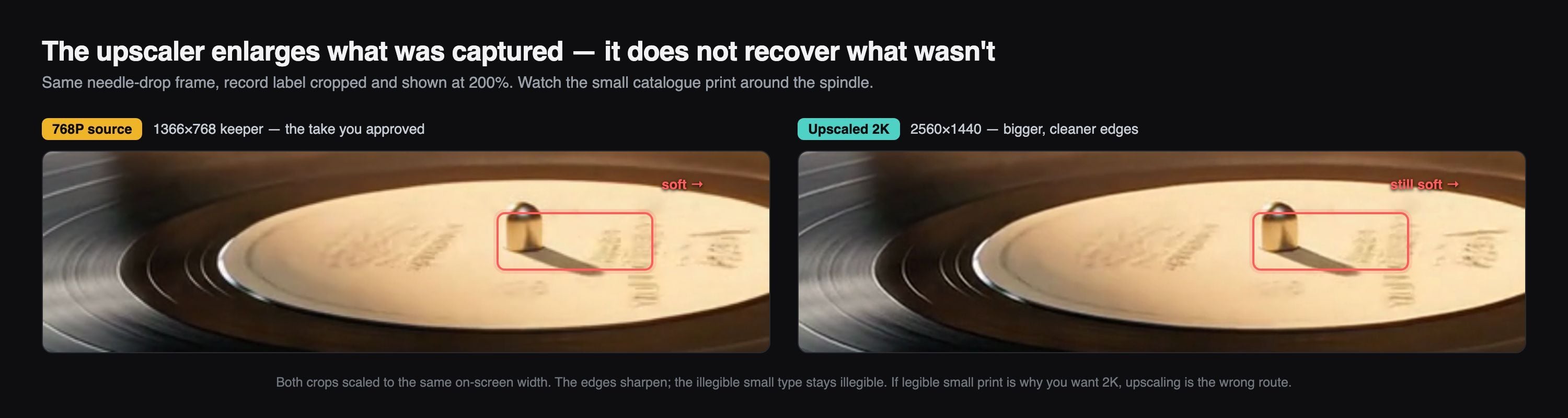
Record label crop at 200 percent, the 768P approved take on the left and the upscaled 2K delivery on the right, with an arrow pointing at the small catalogue number
Same crop, same frame, 200%. The upscaler cleans the paper grain and the groove highlight . What it cannot do is invent the catalogue number, because that detail was never in the cheaper file. That is the trade you are buying.
Why the Cheapest Way to Access MiniMax H3 Trips Up Almost Everyone
H3 is one of very few models that hands you 2K and native stereo audio out of the same request, so "how much per second" became the most searched thing about it. Four different traps sit inside that question.
The numbers floating around are not all from the same page. Rates circulated in the launch coverage sit noticeably below what the official pay-as-you-go page charges today. If you budgeted off a screenshot from launch week, your budget is wrong.
Some aggregators price tiers H3 does not have. The resolution enum on all three H3 endpoints is exactly two values, 768P and 2K. When you see a very low per-second rate attached to a 512p or 1080p H3 tier, that rate is not describing H3 output. Check that the tier exists before you compare the price.
The cheapest official tier is not portable. MiniMax lists Regeneration, 768P to 2K, at $0.05 per second with the source video billed at $0.05 per second too (MiniMax pay-as-you-go pricing, August 2026). That is the genuinely cheap upgrade path, and it only exists as a first-party endpoint. Any plan that assumes you can do the same trick through a third party is arithmetic on a tier you cannot call.
Everyone budgets per second and pays per re-render. A wasted 2K take at eight seconds costs more than a whole afternoon of cheap-tier drafting. Which is why the rest of this piece prices a finished clip instead of a second.
Five Doors In: Every Way to Access MiniMax H3, Priced
There are five ways in, and one of them cannot deliver anything at all.
| Door | Sticker price | What you pay before you render | What it can actually deliver | Does the balance expire | Who may legally use it |
|---|---|---|---|---|---|
| Hailuo web and app credits | Prepaid credit bundles; H3's per-second credit draw is not published as a flat number, so read the in-app quote | A credit bundle | A file you download from the app. No API, no automation | Depends on the bundle you bought | Anyone the app serves |
| MiniMax first-party PAYG API | $0.13/s at 2K, $0.08/s at 768P, $0.05/s regeneration | Nothing, wallet balance only | 2K, native audio, all three endpoints, plus the regeneration tier | No | Anyone MiniMax onboards |
| Routed API platform (one key, many vendors) | $0.14/s at 2K, $0.10/s at 768P on Atlas Cloud | Nothing | 2K, native audio, three H3 endpoints, plus other vendors' models on the same key | No | Anyone the platform serves |
| Self-hosted open weights | GPU time only | Weights, VRAM, your own serving stack | 768p by default. 2K needs a separate regeneration pass you also have to run | Not applicable | Not licensed in the EU, UK, Republic of Korea or USA |
| Subscription and prepaid video packages | $20 to $120 a month, or $1,000 to $6,000 per package | The full plan or package up front | Zero H3 seconds | Yes, and the remainder resets to zero | Anyone, for the models that are covered |
That last row is not a joke, and it is the single most expensive misunderstanding in this topic. The Token Plan page is explicit: "A small number of special models (MiniMax H3, voice design, rapid voice cloning, etc.) are not currently supported" (MiniMax Token Plan, August 2026). The video resource packs, which run from $1,000 to $6,000 and are valid for one month, are just as blunt: "Video packages support Hailuo video models. MiniMax H3 is not supported yet." The same page adds the part that hurts: "Resource pack remaining quantity is not inherited; it will automatically reset to zero when expired" (MiniMax Video Packages, August 2026).
So prepaying is not a cheaper way to access MiniMax H3. It is a way to hold a balance you cannot spend on H3 while a clock runs on it.
The self-hosting door deserves its own honest paragraph, because "33B open weights" reads like "free". H3-Omni-Transformer is a 33B dense single-stream Transformer with roughly 13B of those parameters sitting in AdaLN-related branches, and the released setup puts the shorter side at 768 pixels by default, with 2K handled by a separate H3-Regenerate-2K pass rather than a super-resolution module (Hugging Face model card, August 2026). Community reports on consumer cards vary wildly, so treat any single VRAM or minutes-per-clip figure as one person's box, not a spec. The hard blocker is legal, not technical: the community licence defines Excluded Territories as "the European Union, the United Kingdom, the Republic of Korea and the United States of America." If you are reading this from any of those, the weights are not your access route, whatever your GPU can do.
The One-Key Chain Behind the Cheapest Way to Access MiniMax H3
Here is the thing that decided my routing, and it is not the per-second rate.
Finishing a clip cheaply takes three different models: something to lock the first frame, H3 itself, and an upscaler. A first-party video API gives you exactly one of those three. So the cheap route either turns into two more signups and two more invoices, or it happens behind one key. I ran this shoot on Atlas Cloud for that reason, and I want to be straight about the trade before the table:
Atlas is not the lowest per-second price for H3. It is $0.14/s at 2K against MiniMax's $0.13/s, and $0.10/s at 768P against $0.08/s. About one cent and two cents per second more.
What it buys back is the rest of the chain, plus two billing behaviours that matter more than a cent: requests rejected at submission bill $0.00, and reference material is not a separate line item. Compare that with the first-party sheet, where input images are "First 5 images free; $0.04 per additional image". On the routed side a ten-reference-image job billed the same as a one-image job at the same length and resolution. For character consistency work, that inverts the price comparison entirely.
| Job in this chain | Model | Price as of 19 August 2026 | Does a first-party video API cover it |
|---|---|---|---|
| Lock the first frame | google/nano-banana-2/text-to-image | $0.08 at 1K, $0.12 at 2K, $0.16 at 4K | No |
| Draft and keeper, first frame locked | minimax/h3/image-to-video | $0.10/s at 768P, $0.14/s at 2K, no discount badge today | Yes |
| Raise resolution, keep the take | atlascloud/video-upscaler | $0.018/s base, $0.024/s at the 2k target, 5 second minimum | No |
Two parameter notes before you copy anything. On image-to-video the ratio enum is only adaptive, because your first frame decides the shape. And the upscaler bills the input duration rounded up to whole seconds, with 2k capped at 23 seconds, 690 frames and 30 input fps. H3 delivers 24 fps, so an eight second clip is comfortably inside every limit.
Tutorial: The Cheapest Way to Access MiniMax H3, Step by Step
One shot, five runs, one receipt. Every price in this article comes from this shoot.
Step 1: Lock the First Frame Before You Touch H3
This is the step that makes cheap drafting mean anything. Text-to-video at two different resolutions gives you two different films, so a draft you cannot reproduce is not a draft. Generate the composition as a still first and it becomes the immovable part of every run after it.
Plain1Extreme close-up of a vintage turntable in a dim independent record shop, the tonearm hovering a few millimetres above a spinning black vinyl record, warm amber sunbeam cutting diagonally through the frame with visible dust motes suspended in it, the record's cream paper label catching the light with small printed text and a faded catalogue number, shallow depth of field, grooves reflecting a thin arc of highlight, background racks of record sleeves melting into soft bokeh, 35mm anamorphic look, deep shadows, film grain, cinematic colour grade, photorealistic.
Settings: resolution 2K, aspect ratio 16:9. Go 2K here even though the first video run is at the cheap tier. The still is the cheapest thing in the whole chain and it is the reference every later step inherits.
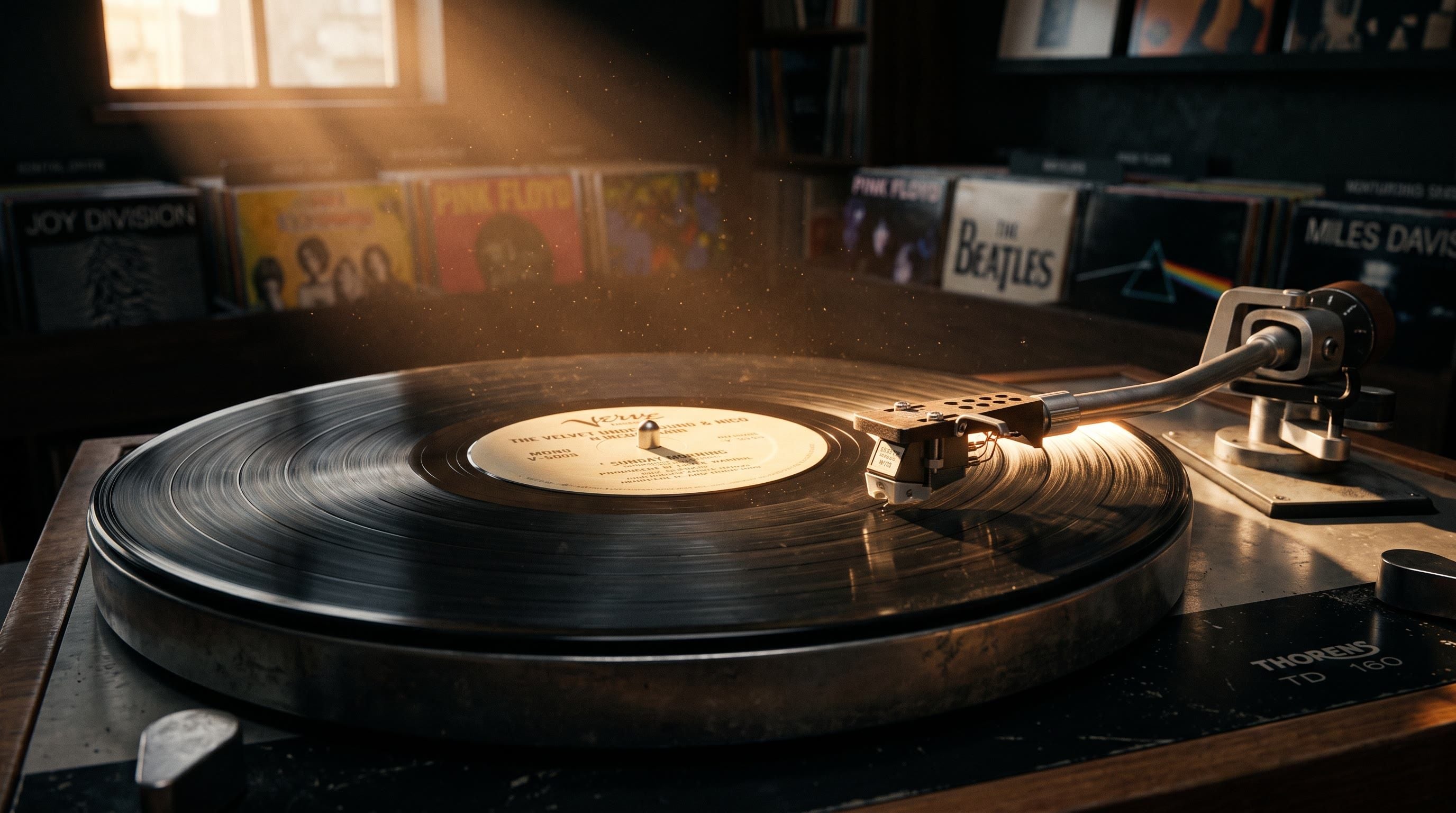
The generated first frame: a tonearm hovering over a spinning vinyl record in a dim record shop with a dusty sunbeam
The locked first frame. Generated with google/nano-banana-2/text-to-image at 2K, 16:9.
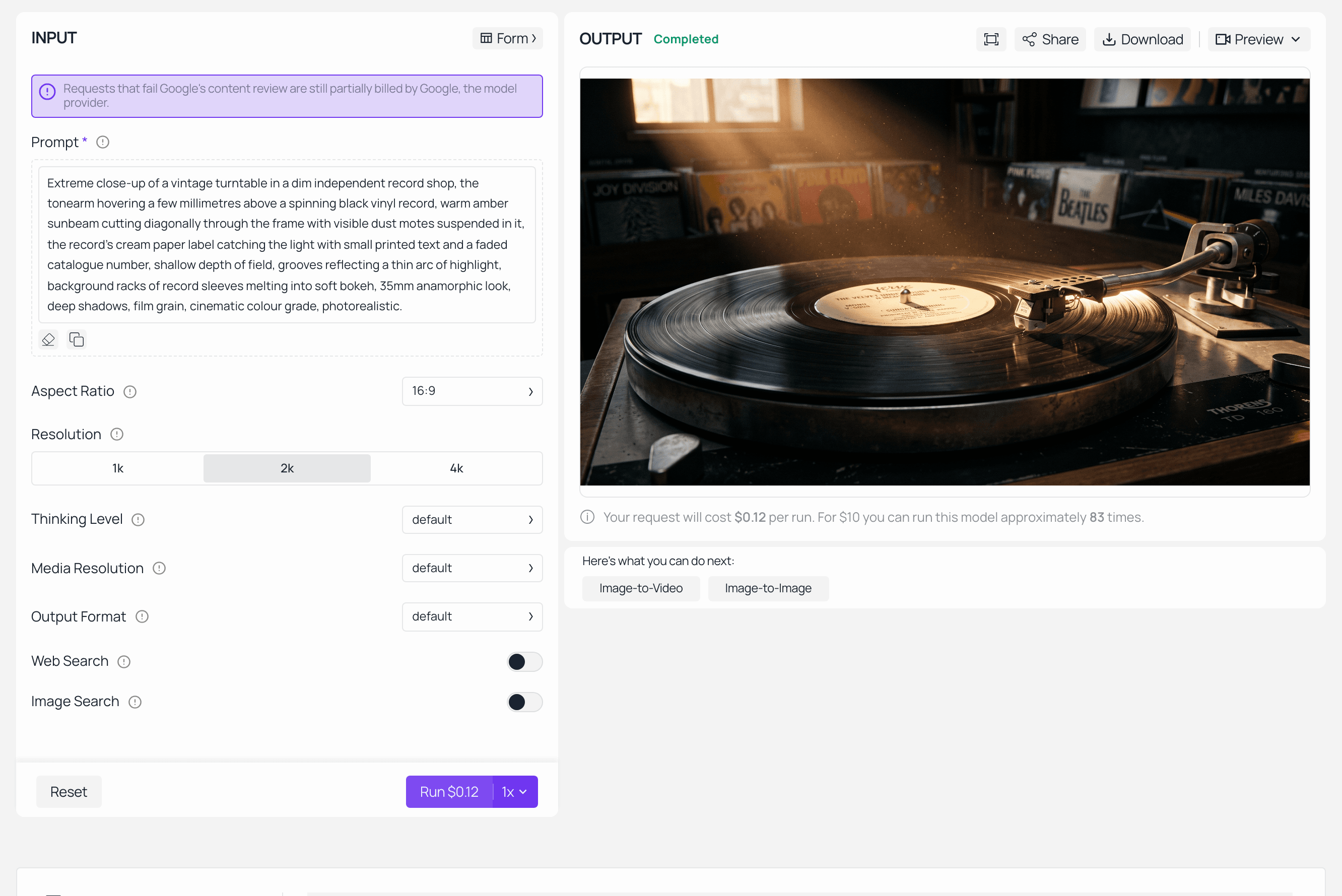
Nano Banana 2 playground on Atlas Cloud with the turntable prompt filled in and the finished first frame rendered in the output panel
Nano Banana 2 on Atlas Cloud, run completed. The Run button quotes the job before you spend anything, and that quote is the number to trust over any pricing page.
Step 2: Buy Four Seconds, Not Eight
Four is the floor of the duration enum, and four seconds is enough to answer the only question a test needs to answer: does the motion read. Testing at eight seconds doubles the cost of being wrong.
Plain1The tonearm lowers smoothly and the stylus settles into the outer groove; a faint puff of dust lifts off the record and drifts through the sunbeam; the record keeps turning at a steady speed. Audio: the dry click of the tonearm touching down, three seconds of warm vinyl surface crackle, room tone of a quiet shop. No music yet, no voices.
Settings: image is your Step 1 file, resolution 768P, duration 4, ratio stays adaptive.
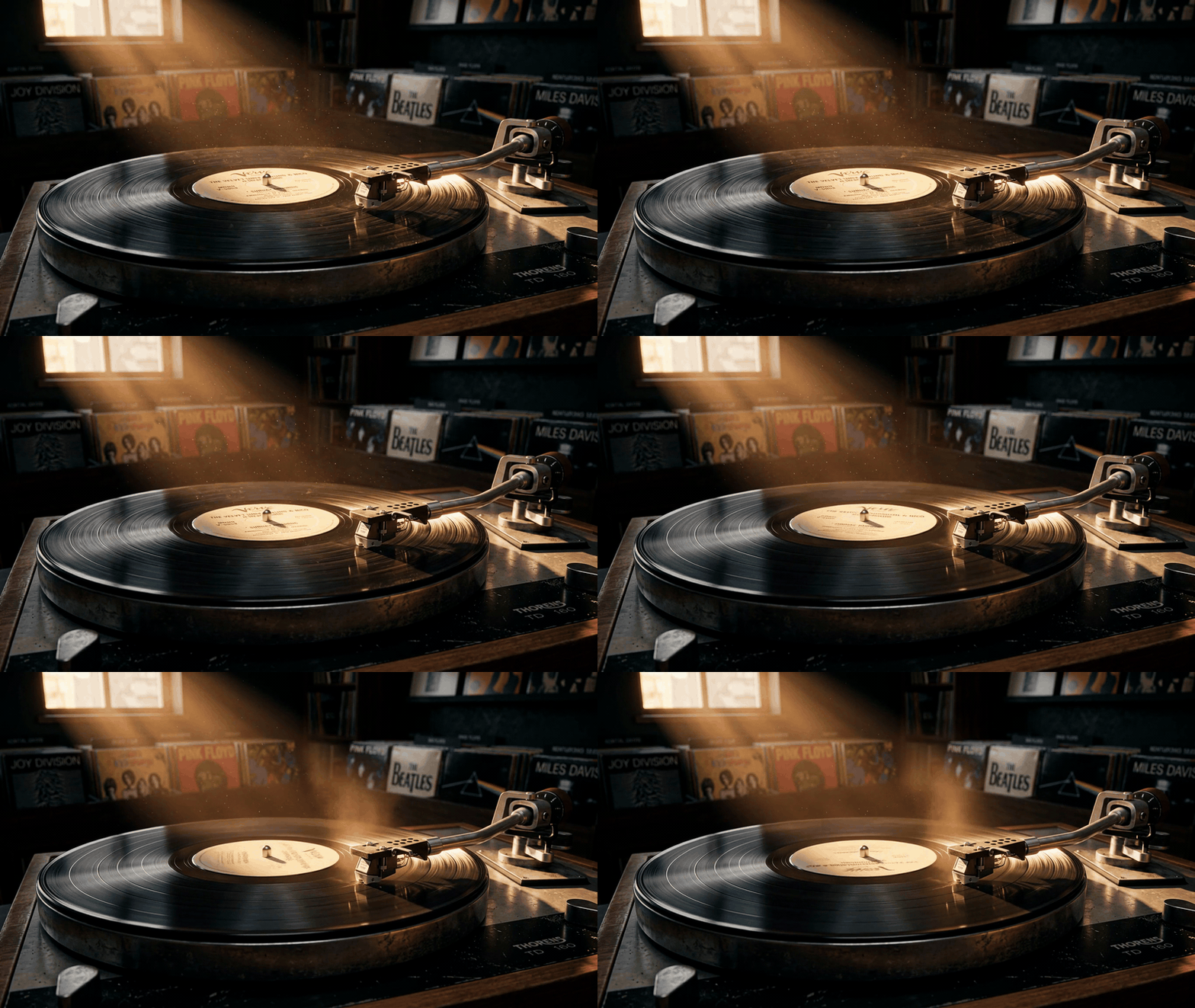
Four second 768P test render of the needle drop, shown as a silent GIF
The four second test at 768P, shown here as a silent GIF. The delivered file carries 32 kHz stereo. Judge the movement and the dust here. Do not judge the sound yet, and Step 5 explains why.
Step 3: Shoot the Keeper at the Cheaper Tier
Same first frame, same shot, full length, still at 768P. This run is not a rehearsal. It is the take you are going to deliver, so this is where you actually listen and either approve or re-roll.
Plain1The tonearm lowers and the stylus settles into the outer groove; dust lifts through the sunbeam; after a few seconds a warm bassline fades in and the camera drifts a few centimetres closer to the label. Audio: tonearm click, vinyl surface crackle, then a slow warm bass groove entering underneath the crackle, quiet shop room tone throughout. No voices.
Settings: resolution 768P, duration 8, everything else unchanged.
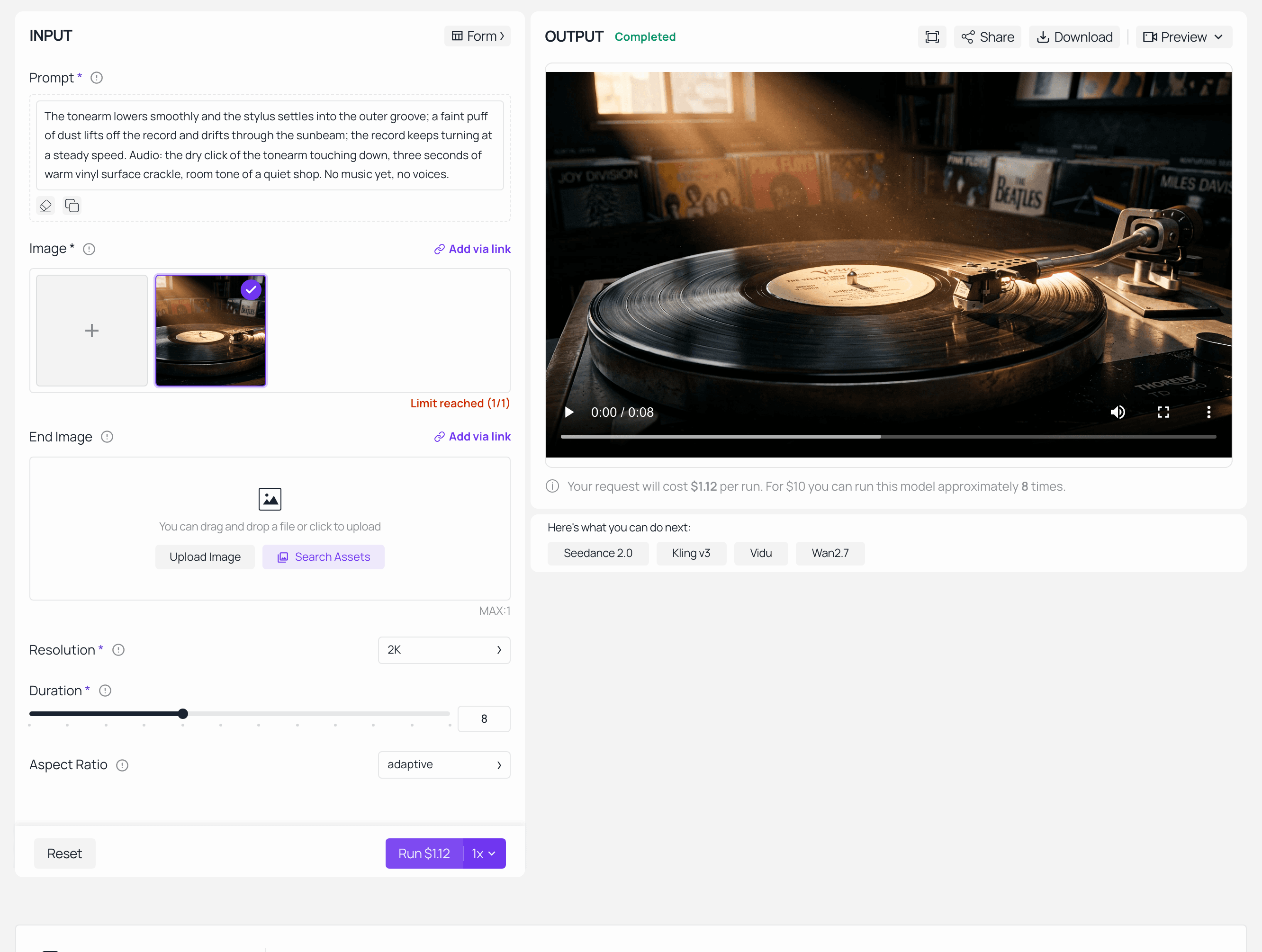
MiniMax H3 image-to-video playground on Atlas Cloud with the first frame loaded and the finished clip in the output panel
H3 image-to-video on Atlas Cloud, run completed with the locked first frame in the image slot. Note the honest caveat: the Resolution and Duration dropdowns in this capture sit at the page defaults, so the quote on the Run button reads the 2K tier. The parameters this step actually used are the ones written above.
The keeper, eight seconds at 768P, 1344x768. This is the audio to memorise: the click, the crackle, then the bass arriving late. Everything after this step is about not losing it.
Step 4: The Cheapest Way to Access MiniMax H3 at 2K Is Not a Second Render
Feed the approved file to the upscaler and set target to 2k. It enlarges the take you already approved, frame by frame, and it does not touch the audio stream. That is the whole point.
The honest limitation: it cannot recover what was never captured. The small catalogue number on the paper label is soft in the 768P source, and it is still soft after the upscale, just bigger and cleaner around the edges. The crop near the top of this article is that exact frame, the 768P keeper beside its 2K enlargement, and the small type stays illegible in both. If legible small print is the reason you want 2K, this route will not give it to you and the first-party regeneration tier is what you actually want.
One pricing note before you run it: billable seconds are the input duration rounded up, with a five second minimum, so a short clip prices at five seconds whether it is five or two.
Step 5: The Control Run That Explains Everything Above
Now the run that cost me the article's central lesson. Identical first frame, identical prompt, identical duration. One change: resolution set to 2K.
Composition held. That is the good news, and it is entirely down to the locked first frame: same set, same framing, same dust, same label position, and the small type went from soft to readable exactly as advertised.
The audio did not hold. The two delivered tracks are unrelated, not similar-but-cleaner. Peak normalised cross-correlation between the two waveforms came out at 0.0053 at zero lag, and their loudness envelopes correlated at -0.118. Those are the numbers you get from two independent performances of the same brief, and they line up with how 2K is produced: a second generation, not a filter over the first one.
Same first frame, same prompt, resolution=2K . Headphones again, then compare it to Step 3. The picture is the same shot. The needle drop is a different needle drop.
So the advice everyone repeats, draft cheap then finish expensive, is not an upgrade path for anything carried by sound. It is a second roll of the dice at full price.
Three More Ways to Access MiniMax H3 for Less
Stop testing at delivery length. The duration enum starts at 4. Composition, camera drift and whether the motion reads at all are all legible in four seconds, and a wrong answer costs half as much. Only the keeper needs the full runtime.
Never test with text-to-video if you plan to finish with a locked frame. Bare text prompts drift between resolution tiers because the model has nothing to anchor to. Spend the price of one still, and every later run inherits the same set. A draft is only worth what it predicts.
Pile on the reference material where it is free. First-party pricing gives you five input images free and then charges $0.04 for each additional one. On the routed side, a ten-image reference job billed identically to a single-image job at the same length and resolution. Character consistency and multi-angle product work are exactly the jobs that need eight or ten references, and that is where the cheaper sticker price stops being the cheaper bill.
The Receipt: What the Cheapest Way to Access MiniMax H3 Actually Costs
Priced at the rates verified on the model pages above, per finished eight second clip at 2K.
| Route to a finished 2K clip | Priced cost | Is the audio the take you approved | Does small type sharpen | When to pick it |
|---|---|---|---|---|
| Approve at 768P, then upscale to 2k | $1.54 | Yes, untouched | No | Anything carried by sound, motion or timing |
| Approve at 768P, then re-render at 2K | $2.44 | No, new performance | Yes | Text on screen, faces, fine surface detail |
| Straight to 2K, one take rejected, one accepted | $2.36 | Whatever the second roll gave you | Yes | Never on purpose |
Line by line for the recommended route: first frame at 2K, $0.12. Four second test at 768P, $0.40. Eight second keeper at 768P, $0.80. Upscale to 2k, $0.22, because H3 delivers a little over the requested duration and the upscaler rounds the input up to nine billable seconds. Total $1.54, against $2.44 for the same shoot finished by re-rendering. That is about 37% off the finished clip, and roughly 80% off the finishing step alone.
Two caveats so you can rebuild this honestly. The table is rate arithmetic, not a screenshot of an invoice, so read your own quote on the Run button before every job and treat the pricing page as a hint. And the price field on a prediction fills in late: when status flips to completed it is often still empty, so you have to poll the prediction id a second time to get the real number. Without that second poll you cannot build a receipt at all.
The licence line to read before you pick a route. These two doors have opposite legal shapes, and it is worth thirty seconds of your attention. The first-party API terms carry an obligation to defend you on patent and copyright claims, though not on trademark or likeness. The community licence on the open weights runs the other way: section VI.3 puts the indemnity on you, "You shall defend, indemnify, and hold us harmless against any Third-Party claim arising out of or related to the use or distribution of the MiniMax H3 Works", and section IV.2 requires you to "prominently display 'MiniMax H3' on the user interface of commercial product or service". Add the Excluded Territories clause and the picture is clear: the hosted API is open to the US, the weights are not. Whichever provider you route through, the terms you are actually bound by are theirs, so read the ones you signed.
MiniMax H3 Cheapest Way to Access: Frequently Asked Questions
What is the cheapest way to access MiniMax H3 right now?
The lowest sticker price is MiniMax's own pay-as-you-go API at $0.08/s for 768P and $0.13/s for 2K. The lowest total cost for a finished clip is a different thing: lock a first frame, approve the take at 768P, then raise the resolution with an upscaler instead of re-rendering. In this shoot that route priced 37% below the same shoot finished with a 2K re-render, because it never pays full price twice for the same shot.
Is a Hailuo or MiniMax subscription cheaper than paying per second for H3?
It is not more expensive, it is unusable. The Token Plan page states that "A small number of special models (MiniMax H3, voice design, rapid voice cloning, etc.) are not currently supported", and the video package page states that "Video packages support Hailuo video models. MiniMax H3 is not supported yet." Packages also expire after a month and the remainder resets to zero, so prepaying for H3 access buys a countdown, not seconds.
Does the cheaper resolution tier halve my MiniMax H3 bill?
No, and it is not even close to half. At the routed rates I used, 768P runs $0.10/s against $0.14/s at 2K, so about 29% cheaper per second. More importantly the cheap tier is a separate generation rather than a lower-quality copy, so treat it as a real take you might deliver, not a preview of the expensive one.
Can I access MiniMax H3 for free by running the open weights?
Only partly, and probably not legally where you live. The released weights default to a 768 pixel short side and 2K arrives through a separate regeneration pass you also have to run, so local output is not the same deliverable as the API's. On top of the GPU cost, the community licence names the European Union, the United Kingdom, the Republic of Korea and the United States of America as Excluded Territories. That covers most of the audience searching for this.
Do failed or rejected MiniMax H3 jobs still cost money?
A request rejected at submission bills $0.00, which is the good case. The expensive case is an input that is structurally valid but broken in content, for example a reference URL that resolves to nothing useful, because the job can render and bill anyway. The only way to know which happened is to poll the finished prediction a second time and read its price field.
Why do some providers advertise a cheaper way to access MiniMax H3 than the official page?
Usually because the tier being priced is not an H3 tier. The resolution enum on every H3 endpoint holds exactly two values, 768P and 2K, so a very low rate attached to a 512p or 1080p H3 option is describing something else. Before comparing any two prices, confirm the resolution and duration you need actually exist in that provider's schema, then read the quote on the run button rather than the marketing page.





