Your AI video already looks expensive. Then the camera floats away, the product drifts, the audio feels glued on, and the final frame lands nowhere.
That is why people search for minimax h3 director. They want to know whether MiniMax H3 can be directed like a short commercial, not whether it can make another pretty clip. The answer: yes, if you treat Director as a shot brief workflow. One shot. One camera move. One visible action. One end frame.
MiniMax describes H3 as a general-purpose multimodal generation model that understands text, images, video, and audio in one context, with native stereo sound, up to 15 seconds, and up to 2K output (MiniMax, July 2026). The Hugging Face model card lists 4 to 15 second output, broad aspect ratios, 24 FPS, 32 kHz stereo audio, and Ref2VA inputs up to 9 images, 3 videos, and 3 audio clips under a 12 file cap (Hugging Face, August 2026).
This guide uses Atlas Cloud as the working surface because the H3 Text-to-Video, Image-to-Video, and Reference-to-Video pages sit in one browser flow. You can write the prompt, check the quote, run the clip, screenshot the completed job, and download the output without deploying the model locally.
Key takeaways
- MiniMax H3 Director works best as a shot brief, not a keyword pile.
- Use one camera move and one visible action per short clip.
- Native audio is part of the generation, so prompt sound separately.
- Use references for one job each: identity, layout, motion, or sound.
- Verify the live Atlas Cloud quote before a 2K keeper run.
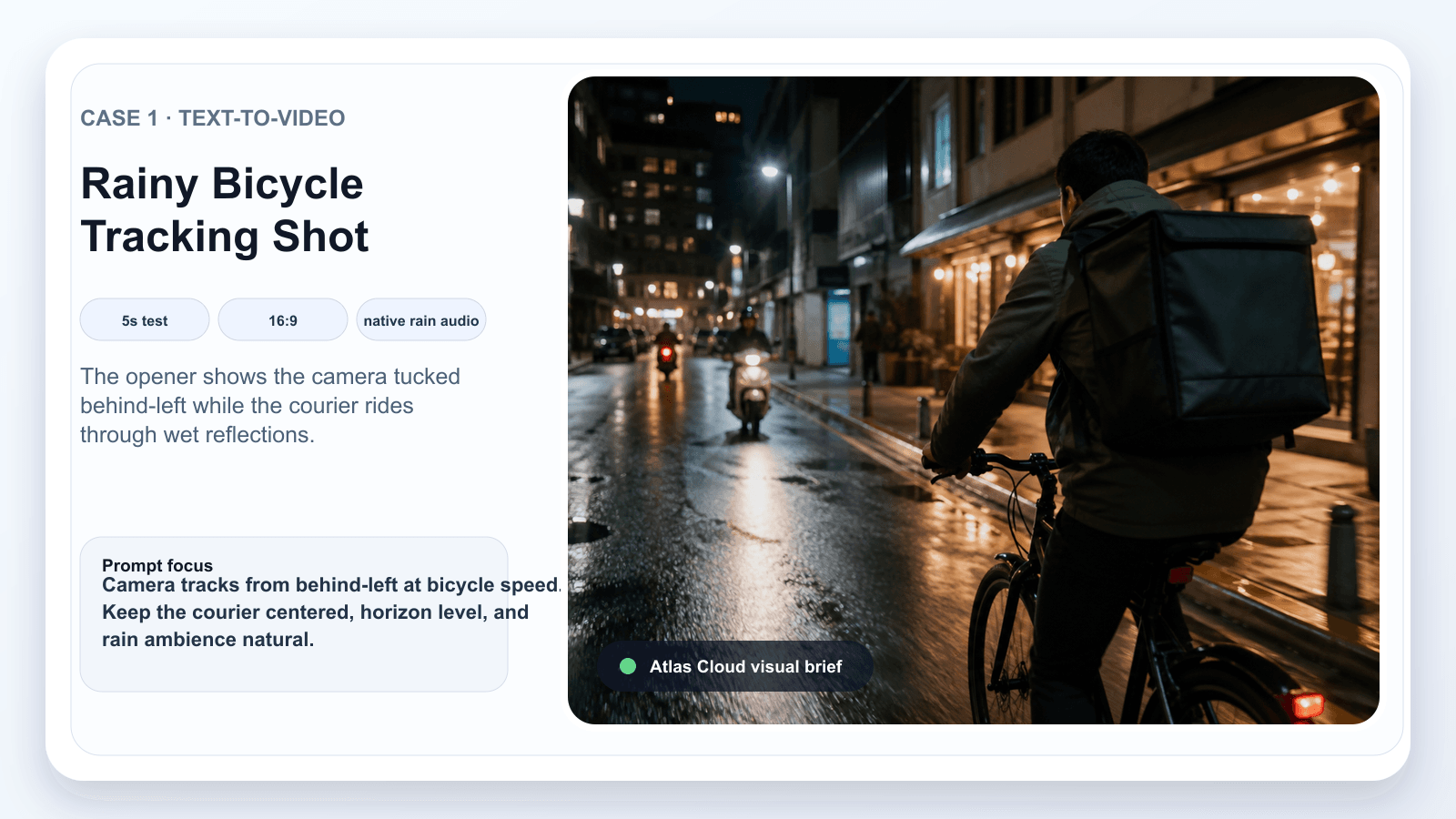
MiniMax H3 Director rainy bicycle tracking shot visual brief
Case 1 opening frame: a rear-left tracking view establishes the courier, bicycle, wet road reflections, and rain ambience before the camera starts moving.
Why MiniMax H3 Director Is Hot, and Why Attempts Fail
MiniMax H3 arrived with 3 promises creators care about: multimodal context, native stereo audio, and high-resolution regeneration. The official launch post also frames H3 around commercial content creation, advertising, e-commerce, product design, UI/UX, and gaming use cases (MiniMax).
That explains the hype. It does not make the camera deterministic.
Most weak MiniMax H3 Director prompts fail in predictable ways:
- The creator asks for 3 camera moves inside a 5 second clip.
- The subject, camera, scene, and sound arrive as one tangled sentence.
- The prompt asks the model to invent readable UI text, prices, or legal copy.
- A reference image is expected to control identity, lighting, layout, and camera motion at once.
- The prompt never names the final frame, so the shot keeps wandering.
The useful mental model is a production brief. A camera operator needs a path, a distance, a subject lock, and a landing frame. H3 needs the same thing in words.
Community guides around MiniMax H3 camera movement are converging on the same practical advice: name one camera move, its direction, its speed, what must stay stable, and the final composition (MiniMax H3 Camera Movement Prompts, August 2026). Treat those camera words as instructions to test, not guaranteed buttons.
MiniMax H3 Director Workflow on Atlas Cloud
For this article, the Atlas Cloud flow is deliberately plain. Use Atlas Cloud when you want the model pages, quotes, generation history, screenshots, and downloads in one place.
The H3 family page currently lists 3 relevant endpoints: MiniMax H3 Text-to-Video, MiniMax H3 Image-to-Video, and MiniMax H3 Reference-to-Video. The public model directory on August 28, 2026 showed the H3 family cards from $0.1/SEC on the H3 family page, while the wider models directory can surface different catalog floors. Treat the playground quote as the price of record for the exact settings you run.
| Need | Atlas model | Input | Best for | Planned setting | Price note |
|---|---|---|---|---|---|
| Invent a shot from scratch | MiniMax H3 Text-to-Video | Prompt only | Openers, mood tests, one-take scenes | 5s, 16:9 first | Check live quote before run |
| Animate a locked first frame | MiniMax H3 Image-to-Video | First frame, optional last frame | Products, people, packaging | 5s, 16:9, 2K keeper if quote fits | Check live quote before run |
| Use identity or motion references | MiniMax H3 Reference-to-Video | Reference files plus prompt | Camera reuse, series continuity, UI-layout tests | 5s test | Check visible UI controls on publish day |
MiniMax H3 Director Tutorial: One Camera Brief, 3 Finished Shots
Step 1: Write the MiniMax H3 Director Shot Brief
Start with the camera job. Then add the subject, action, sound, and ending. This keeps a 5 second test from behaving like a whole storyboard jammed into one clip.
text1integrated_multimodal_description: 2[Shot 1] [Subject] is in [specific environment]. The visible action is [one clear action]. Camera: [one camera move], [direction], [speed], keeping [subject/product/horizon] stable. The shot ends on [final frame]. Dialogue or diegetic sound inside the scene: [if needed]. 3 4overall_soundscape: 5[ambient sound, physical sound, room tone, weather, movement sounds]. 6 7non_diegetic_music: 8[score direction] or N/A. 9
Settings to pick:
- Mode: choose Text-to-Video, Image-to-Video, or Reference-to-Video based on the input you actually have.
- Duration: 5s for the first test.
- Ratio: 16:9 for a blog showcase, 9:16 for a short-form ad variation.
- Resolution: use the lowest useful test setting if available, then raise quality for the keeper.
- Audio: keep native audio enabled when ambience, dialogue, or sound design matters.
Step 2: Run Case 1 in MiniMax H3 Text-to-Video
With that structure in place, Case 1 is a clean MiniMax H3 Text-to-Video test: no reference image or product packshot, just a camera-led scene that has to hold a rider, rain, reflections, and a landing frame.
text1integrated_multimodal_description: 2[Shot 1] A young bicycle courier in a dark green rain jacket rides slowly through a narrow city street at night after light rain. Wet pavement reflects small shop lights and passing scooter headlights. Camera: handheld tracking shot from slightly behind and to the left of the bicycle, moving at the same speed, with a gentle natural sway but no sudden zoom. The courier looks over one shoulder once, then keeps riding forward. The shot ends with the bicycle passing under a warm sign and the camera settling into a steady medium-wide frame. Keep the rider's jacket color, bicycle shape, street direction, and horizon stable. 3 4overall_soundscape: 5Soft tire noise on wet pavement, light rain dripping from awnings, distant scooters, faint city room tone. 6 7non_diegetic_music: 8Low restrained electronic pulse, quiet enough that the rain and tire sound remain clear. 9
Settings to pick:
- Model: MiniMax H3 Text-to-Video.
- Duration: 5s first, then longer only if the tracking works.
- Ratio: 16:9.
- Resolution: use the visible test tier if available, or the page default if it is the only committed option.
- Output: save MP4, then convert clips at 10s or under into GIF for Feishu.
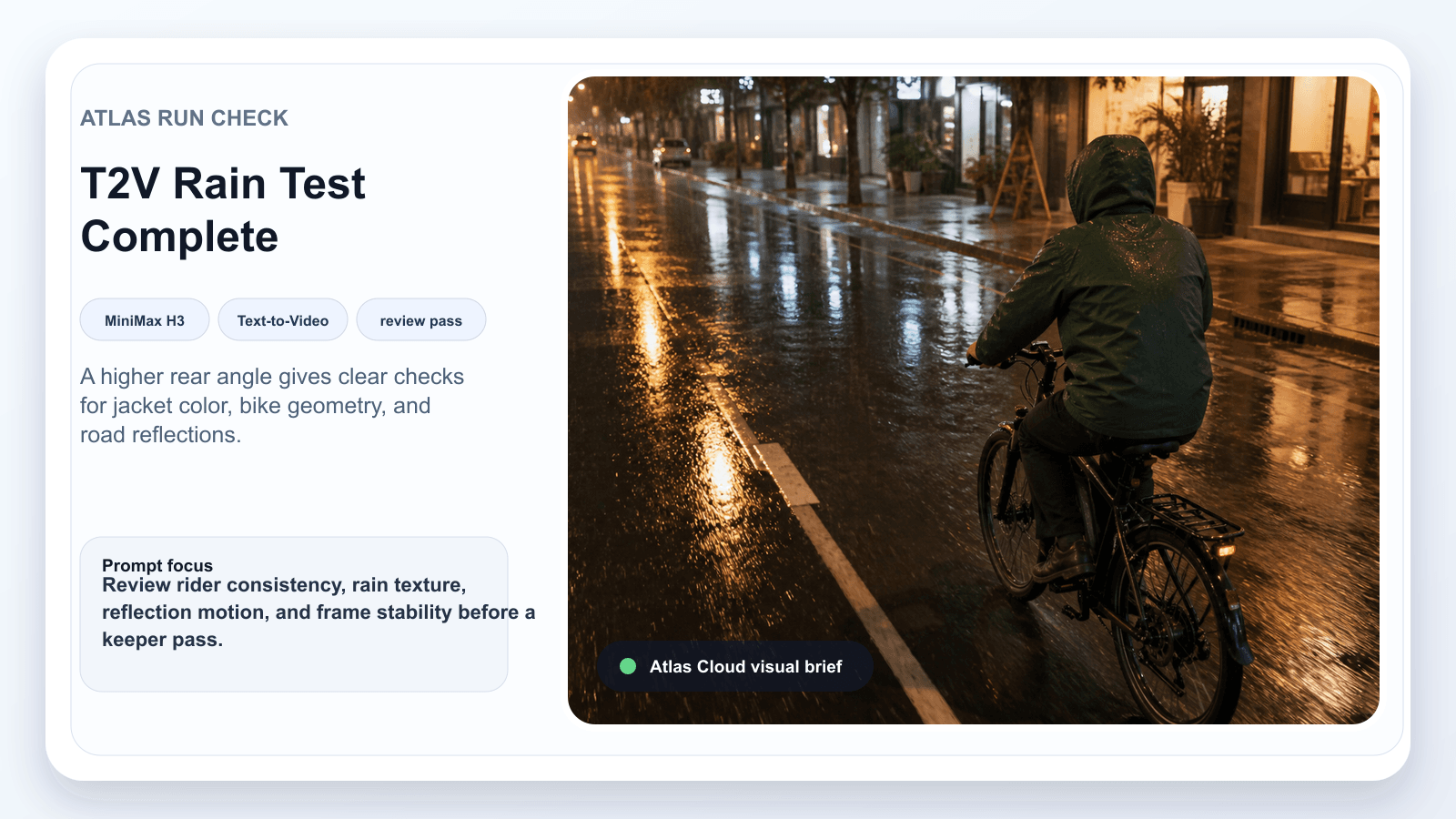
MiniMax H3 Text-to-Video rainy bicycle run review card
Run review card: higher rear angle for checking rider consistency, jacket color, bike geometry, horizon, and wet-road motion.
Step 3: Run Case 1 Again as a Tightened MiniMax H3 Director Retry
After the first run, look for one specific problem. If it over-zooms or drifts, change only the camera constraint. Removing the music can also make the soundscape less busy and reduce the number of things the model is trying to satisfy.
text1integrated_multimodal_description: 2[Shot 1] The same bicycle courier rides through the same rain-wet city street at night. Camera: locked tracking distance from behind-left, waist-height, matching the bicycle speed. Do not orbit, do not zoom, do not cut. The courier makes one small shoulder glance at the midpoint, then continues forward. End on the bicycle moving beneath a warm storefront sign, with the rider still centered and the street horizon level. 3 4overall_soundscape: 5Wet tires, soft rain, distant scooters, light chain movement. 6 7non_diegetic_music: 8N/A. 9
Settings to pick:
- Model: MiniMax H3 Text-to-Video.
- Same duration, ratio, and resolution as Step 2.
- Choose the better of the first run and retry as the showcase.
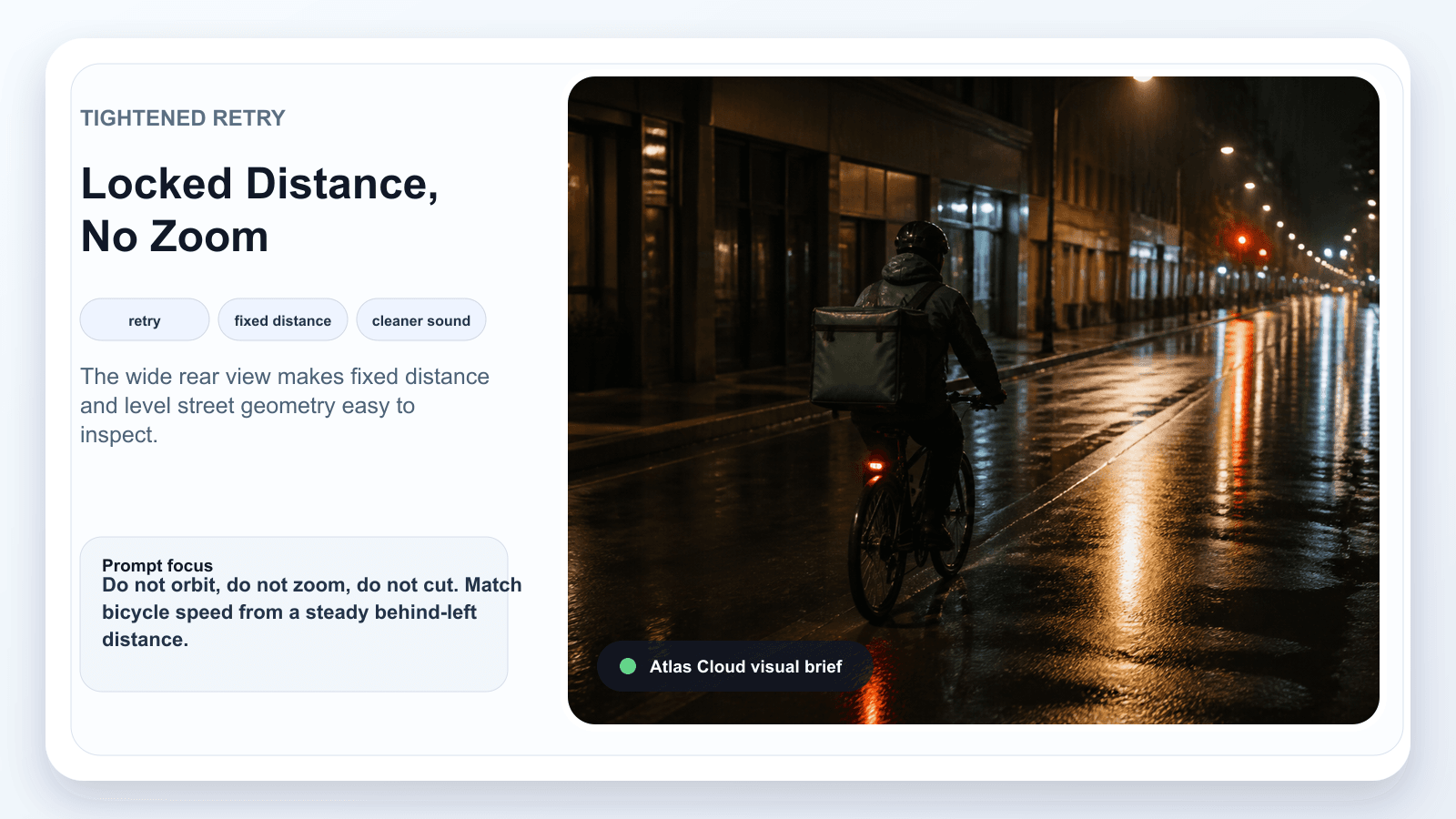
MiniMax H3 Director tightened retry card with locked tracking distance
Tightened retry card: wider behind-left distance with strong road lines, built to show no zoom, no orbit, and stable tracking.
The two checks above keep the evaluation focused on the rider, bicycle, and street geometry. The finished sequence below then turns that controlled tracking setup into a short courier story, moving from the rain-soaked approach to the warm storefront delivery beat.
Case 1 motion preview: a 30-second video follows the rain-soaked courier from the tracking opener to the warm storefront delivery beat, showing how a directed sequence can connect rider motion, detail shots, and a small narrative turn.
Step 4: Run Case 2 in MiniMax H3 Reference-to-Video
Case 2 is for game and app marketers who need the car, garage, and interface zones to stay readable while the camera moves. Use one selector frame to lock the layout, then put the headlight pulse, floor mist, and lateral move in the motion brief.
text1@Image 1 provides the game car selector layout, car shape, color palette, and readable UI zones. Preserve the layout, but do not invent new text. 2 3integrated_multimodal_description: 4[Shot 1] A glossy electric rally car sits in a futuristic mountain racing garage, viewed through a clean game car-selection interface. Camera: slow lateral truck from left to right across the front of the car, then settles on a three-quarter view. The car's headlights pulse once, thin mist moves near the floor, and small reflections slide across the bodywork. Keep the car shape, menu panel positions, and horizon stable. Do not add extra letters, prices, fake badges, or unreadable UI labels. 5 6overall_soundscape: 7Soft garage ventilation, one subtle electric motor hum, small UI confirmation ticks. 8 9non_diegetic_music: 10Low energetic synth bed, no vocals. 11
Settings to pick:
- Model: MiniMax H3 Reference-to-Video.
- Duration: 10s for the motion preview below.
- Ratio: 16:9 or adaptive if the reference controls the frame.
- Resolution: use the committed test setting shown by the playground.
- Reference: the locally rendered game selector screenshot.
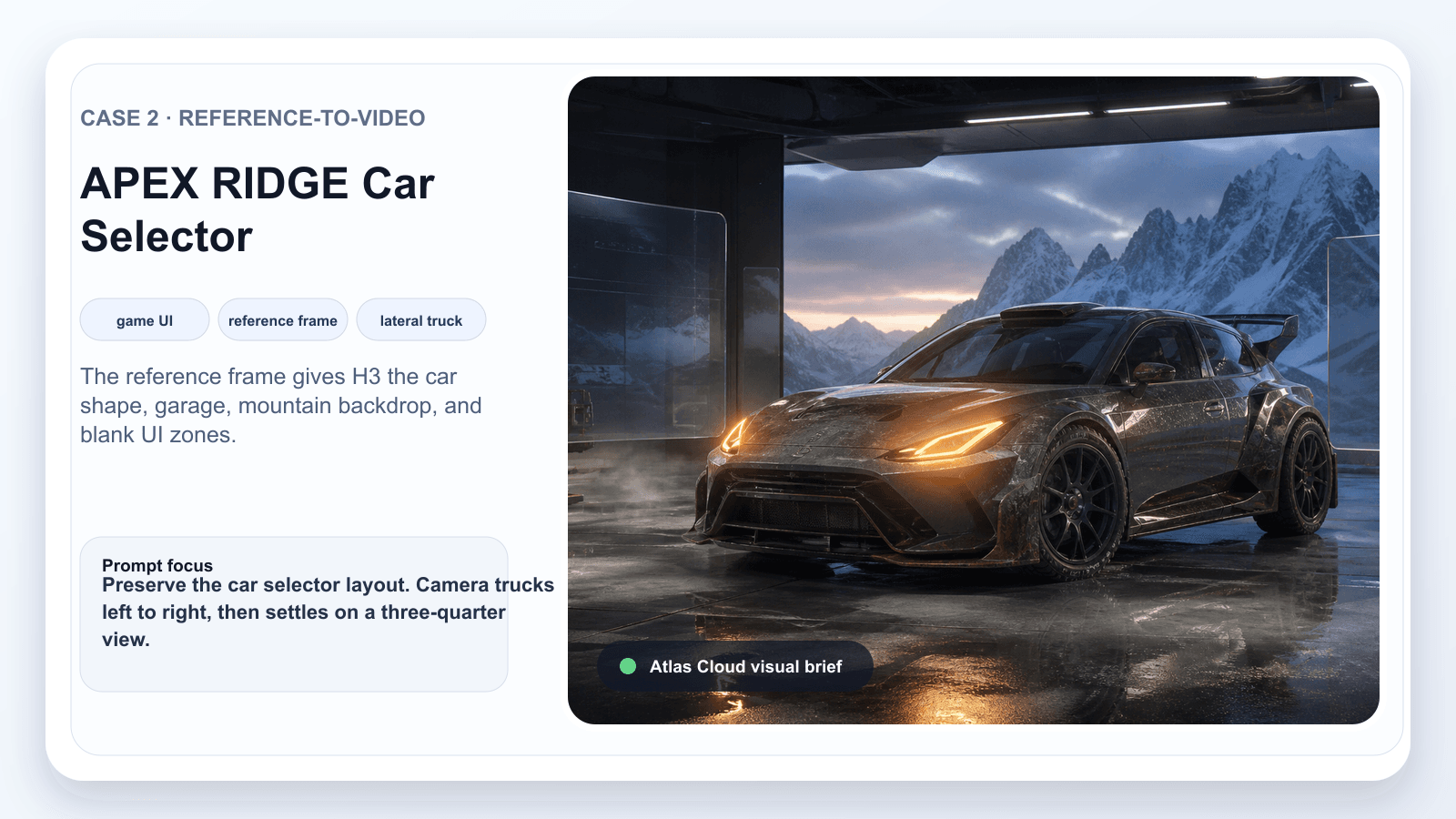
MiniMax H3 Reference-to-Video APEX RIDGE car selector visual brief
Case 2 reference frame: the car silhouette, mountain garage, and quiet interface zones provide the layout anchor before motion begins.
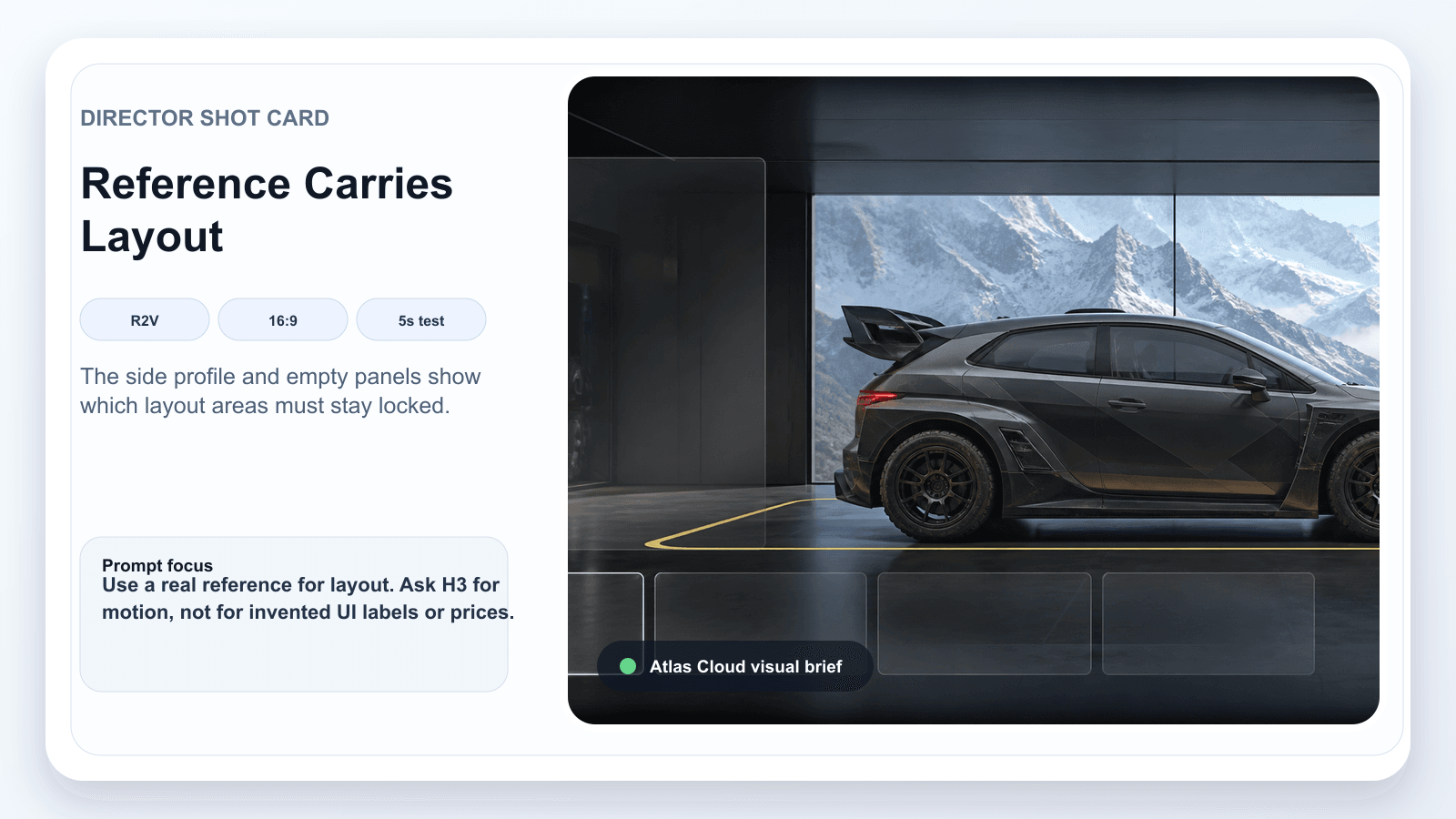
MiniMax H3 Director shot card for APEX RIDGE reference workflow
Case 2 shot card: the side-profile framing keeps the car and horizon stable while the later motion focuses on lights, mist, and lateral movement.
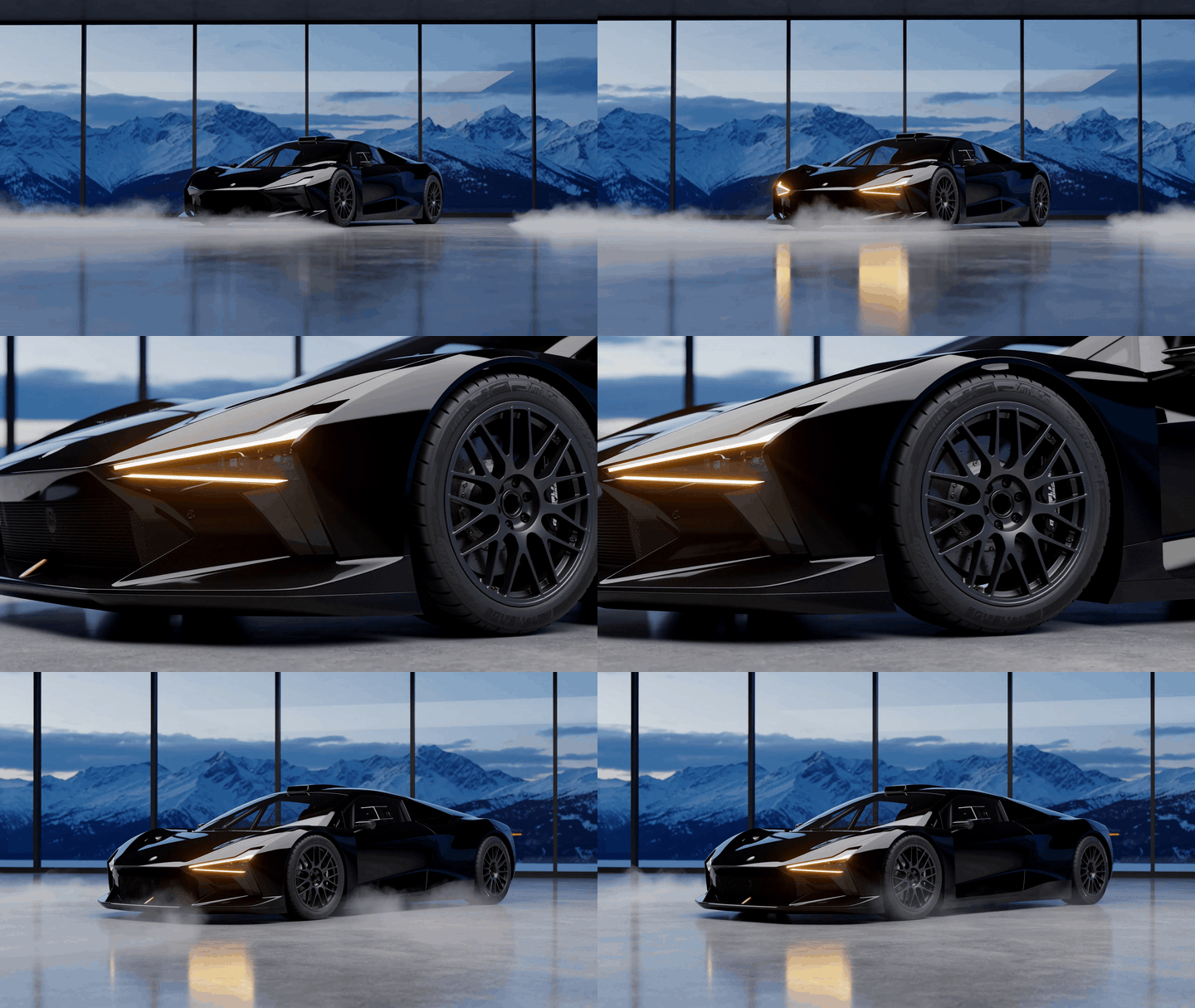
MiniMax H3 Director APEX RIDGE car showcase GIF
Case 2 motion preview: a 10-second GIF moves from the selector view through a headlight-and-mist detail to a side three-quarter hero angle, so the lateral camera brief reads as motion rather than a still.
Step 5: Run Case 3 in MiniMax H3 Image-to-Video
Case 3 keeps the commercial workflow compact: lock the outfit, street context, and warm light in one anchor, then direct a walk, one cuff adjustment, and a final pose.
First-frame image prompt:
text1A realistic streetwear campaign still in Chicago, 16:9. A young adult model wearing an oversized charcoal jacket, white tee, loose black cargo pants, and clean sneakers stands near an elevated train platform entrance at golden hour. Real city texture, warm side light, natural skin, documentary fashion photography, 35mm lens look, shallow but usable depth of field, no visible brand logos, no text, no watermark. 2
MiniMax H3 Image-to-Video prompt:
text1integrated_multimodal_description: 2[Shot 1] The first frame defines the model's outfit, pose, Chicago street corner, and golden-hour light. Animate it as a short streetwear ad. Camera: start in a medium-wide walking frame, cut to a three-quarter cuff-adjustment beat, then side-track into a confident final pose. A train passes softly in the far background, creating moving reflections in nearby windows. Keep the outfit, face, body proportions, street layout, and lighting consistent. 3 4overall_soundscape: 5Distant train rumble, light city traffic, fabric movement from the cuff adjustment, soft footsteps nearby. 6 7non_diegetic_music: 8Minimal warm hip-hop beat, no vocals. 9
Settings to pick:
- First frame: GPT Image 2 or an owned brand photo, quality high, 16:9.
- H3 model: MiniMax H3 Image-to-Video.
- Duration: 10s for the motion preview below.
- Ratio: 16:9 if exposed, or inherited from the first frame.
- Resolution: 2K keeper only after you check the live quote.
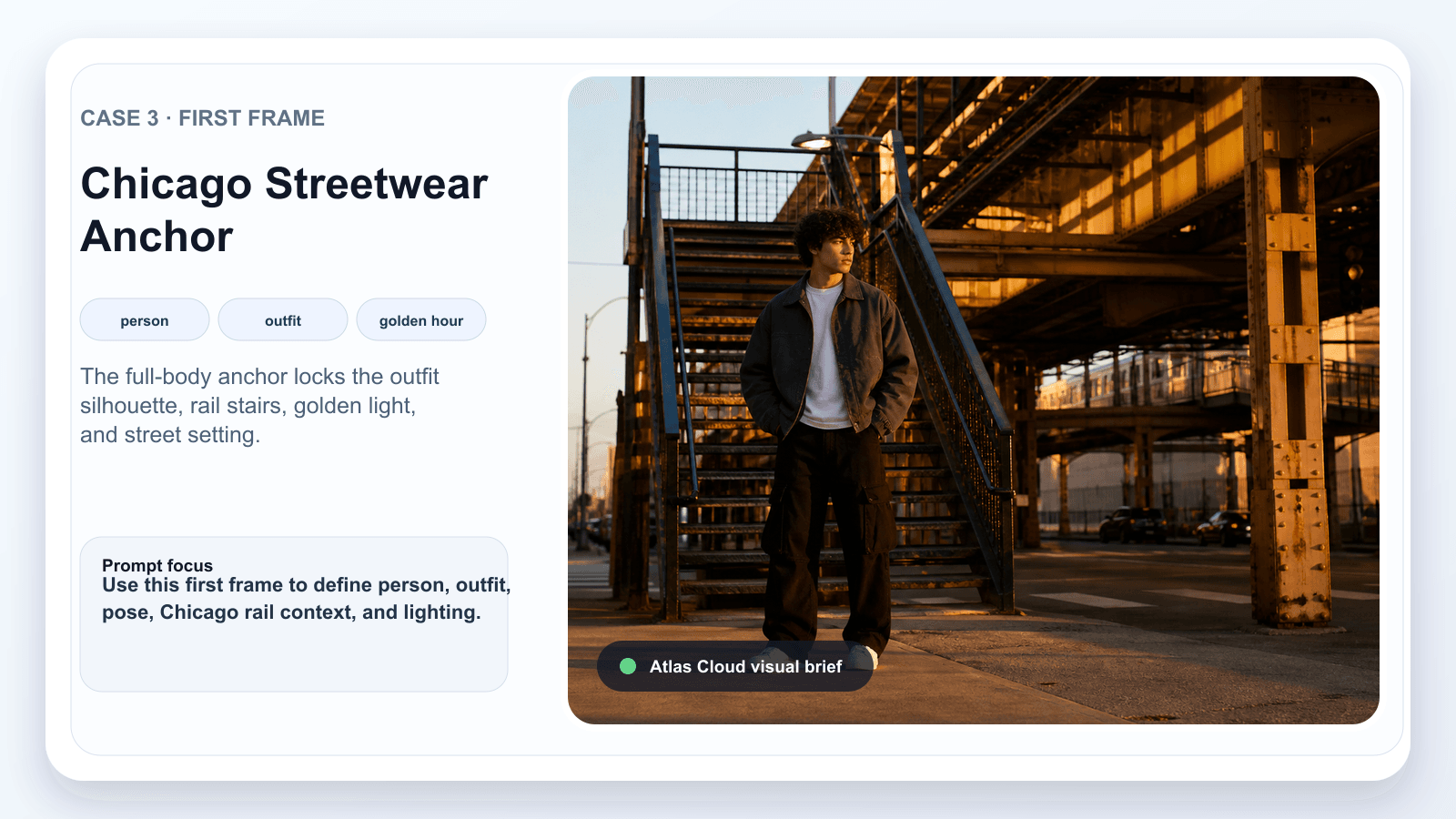
Chicago streetwear first frame visual anchor for MiniMax H3 Director workflow
Case 3 anchor: the full-body frame fixes the jacket silhouette, cargo pants, rail structure, and warm late-day light.
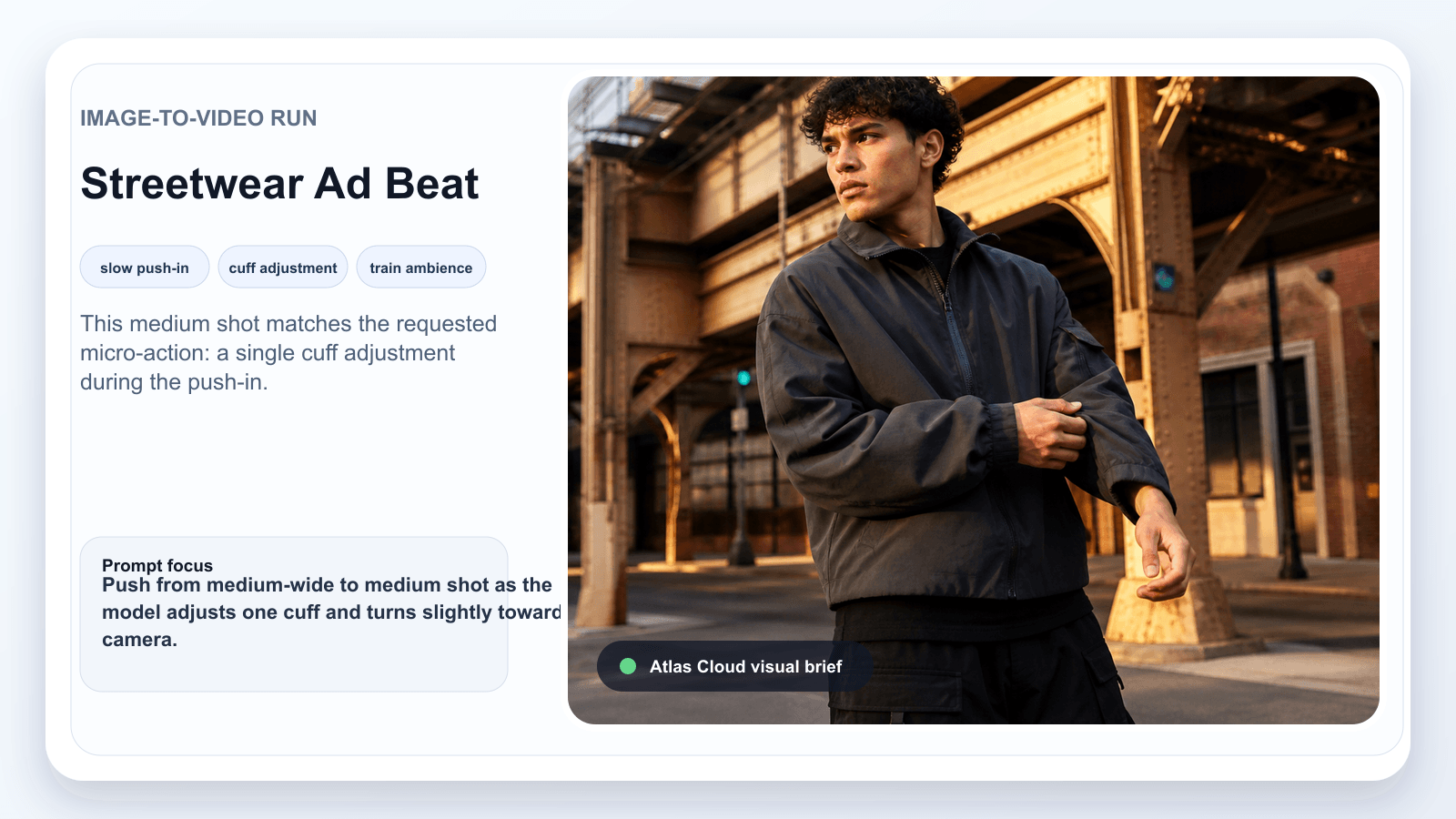
MiniMax H3 Image-to-Video Chicago streetwear ad visual brief
Case 3 review: a closer cuff-adjustment check verifies that the same outfit and street context hold through the commercial beat.
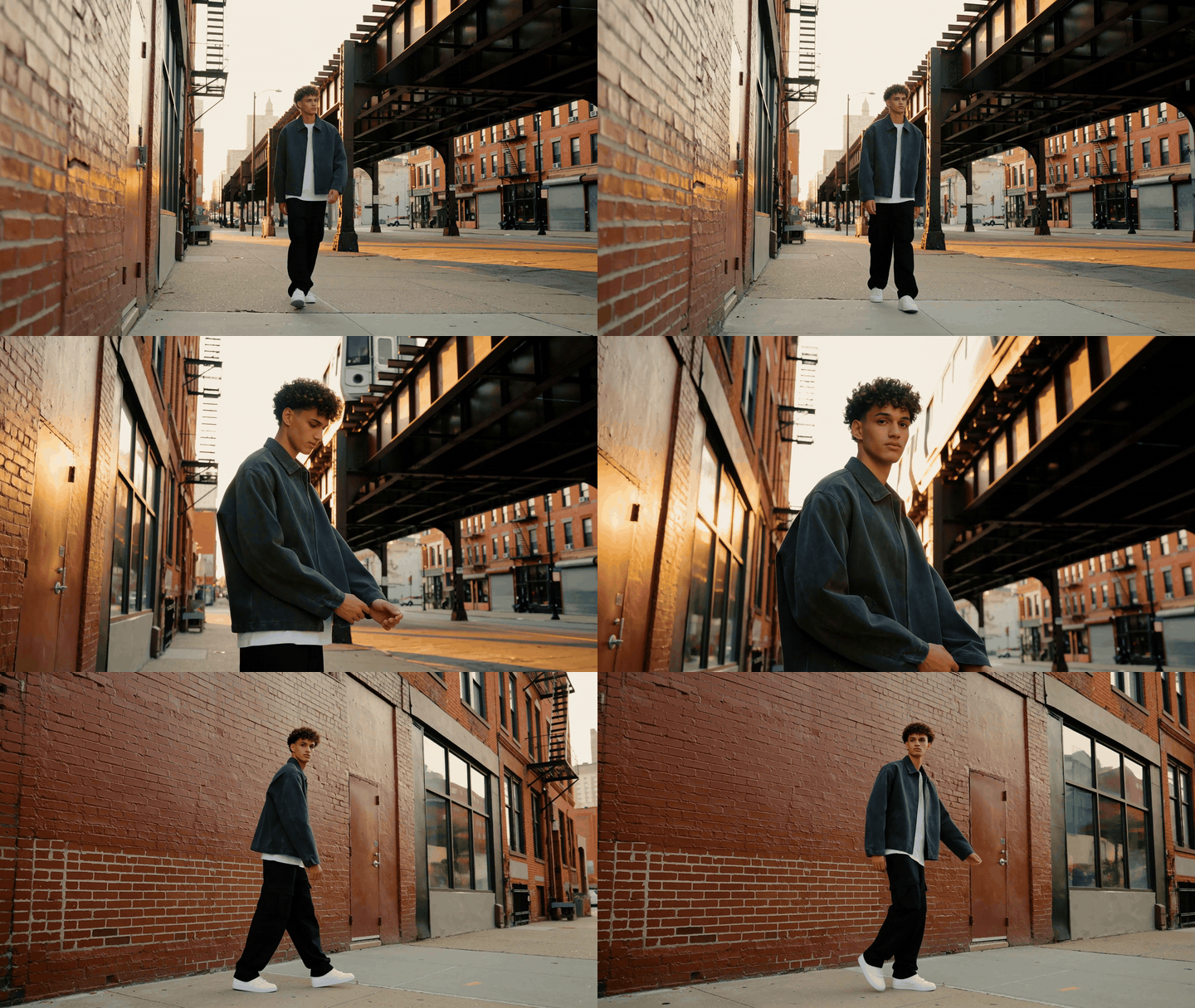
MiniMax H3 Director Chicago streetwear ad GIF
Case 3 motion preview: a 10-second GIF follows the streetwear walk, cuff-adjustment beat, and final fashion pose, matching the commercial camera direction described above.
MiniMax H3 Director Variations for Ads and Games
Once the 3 base cases work, change format with restraint. A new ratio or reference should solve one delivery problem, not rewrite the whole shot.
| Camera move | Good for | Risk | Safer prompt constraint |
|---|---|---|---|
| Static | UI, products, readable objects | The clip feels inactive | Add one subject or object micro-action |
| Slow push-in | Product, fashion, reveal shots | Face or product geometry can warp | Keep the shape stable, no zoom jump |
| Lateral tracking | Bikes, cars, walking subjects | Subject drift | Fixed distance, level horizon |
| Small orbit | Single product or person | Unseen sides can hallucinate | 90 degrees max, slow speed |
| Multi-shot cut | Ad montage | Continuity breaks | 2 to 3 shots max in 10 to 15s |
Good variations from this set:
- Turn Case 3 into 9:16 for TikTok, Reels, or Shorts.
- Use Image-to-Video for perfume, headphones, cups, or packaging because the product geometry starts locked.
- Use Reference-to-Video when a game team needs the same car, camera path, or HUD zones across several concepts.
- Add exact dialogue only when the line is short enough for the clip length.
MiniMax H3 Director Cost on Atlas Cloud
The honest MiniMax H3 price answer is setting-specific. The Atlas Cloud H3 family page showed Text-to-Video, Image-to-Video, and Reference-to-Video from $0.1/SEC when checked for this draft. Other Atlas directory surfaces and playground quotes may show different floors or per-generation estimates, so publish against the live quote visible on the exact model page you run.
For planning, budget by seconds, retries, and keeper passes:
| Plan | Runs | Why | Estimated floor |
|---|---|---|---|
| Quick test | 1 x 5s | Check camera move | From the live H3 quote |
| Article workflow | 3 x 5s | Compare 3 use cases | 3 short tests |
| Keeper pass | 1 x 8s to 10s | Final ad asset | Verify 2K quote first |
| Full creative round | 3 tests + 1 keeper | Practical ad workflow | Test floor plus keeper quote |
The low-friction path is simple: run short clips first, pick the strongest one, then raise duration or resolution only for the version you would actually publish.
MiniMax H3 Director Brand Safety Notes
Use owned or licensed faces, voices, logos, and product files. For commercial ads, add price text, logos, legal disclaimers, subtitles, and CTAs in an editor after generation. H3 can produce visuals and native audio in one pass, but brand copy still needs exact human control.
Keep the source prompt, references, model page, quote, and downloaded output with the client file. That record makes MiniMax H3 Director reviews faster when a stakeholder asks what changed between versions.
MiniMax H3 Director FAQ
Is MiniMax H3 Director a separate model or a prompting workflow?
In most creator usage, MiniMax H3 Director means a camera-led way to use MiniMax H3. You write a directed shot brief and add references when you need tighter identity, motion, layout, or audio control.
What is the best prompt format for MiniMax H3 Director?
Use 3 fields: integrated_multimodal_description, overall_soundscape, and non_diegetic_music. Inside the first field, write one shot, one subject action, one camera move, stability constraints, and the final frame.
Does MiniMax H3 Director support native audio?
Yes. MiniMax says H3 generates native stereo sound, and the Hugging Face model card lists 32 kHz stereo output. Prompt ambience, physical sounds, dialogue, and music separately so the model knows what belongs inside the scene.
Can I use images, videos, and audio as references in MiniMax H3?
The public model card describes Ref2VA support for up to 9 images, 3 video clips, and 3 audio clips with a 12 file mixed cap. On Atlas Cloud, check the current playground UI before publishing because visible controls can expose a subset of the underlying reference workflow.
How much does MiniMax H3 Director cost on Atlas Cloud?
Use the live quote. The H3 family page showed from $0.1/SEC during this draft, but exact cost changes with endpoint, duration, resolution, and any current catalog updates.
What settings should I use first: 768P or 2K, 5 seconds or 15 seconds?
Start with 5 seconds at the lowest useful test resolution the page exposes. Move to 2K or a longer duration only after the camera path, subject lock, and final frame work.
MiniMax H3 Director rewards boring discipline: short tests, one camera idea, specific sound, and a clear ending. That is also what keeps the bill, the client review, and the edit timeline under control.





