

A food clip fails the moment the burger melts into a new burger.
That is the fast answer for minimax h3 food video work: use a clean reference frame, write one short motion arc, lock the food geometry, and check the result before you scale it. MiniMax H3 can make short food ads, restaurant reels, product loops, UGC taste tests, and clips with native sound, but food punishes loose prompts harder than most categories.
This guide gives you 3 food video cases you can copy: ramen rack focus, burger bite review, and sparkling citrus product ad. The workflow is practical for restaurant marketers, CPG growth teams, creators, and agencies testing short videos for TikTok, Reels, Shorts, menus, or landing pages.
Key takeaways
- Use image-to-video when the dish or package must stay stable.
- Keep each prompt to 1 scene and 1 visible food moment.
- Write food, camera, light, motion, sound, and preservation rules.
- Draft at 5s or low resolution, then rerun the winner higher.
- Use final design tools for logos, prices, and claims.
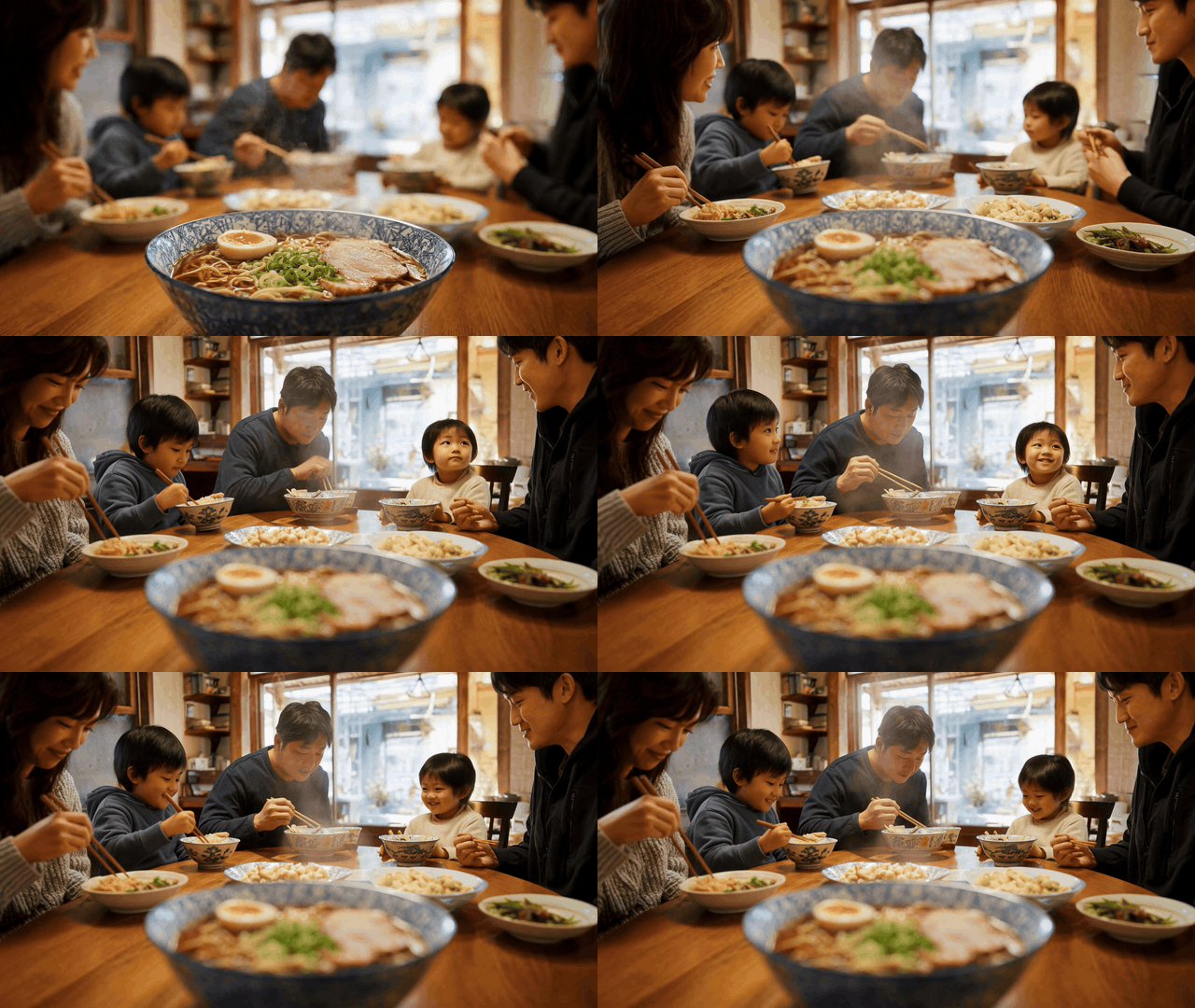
MiniMax H3 food video ramen rack focus GIF with steam rising from a ramen bowl and a family dinner in the background
Case 1 showcase: a ramen restaurant reel shown as a silent GIF. The generated source clip is designed around steam, rack focus, and a warm family dinner mood.
Why MiniMax H3 Food Video Is Hot, and Why Food AI Videos Fail
MiniMax launched H3 on July 31, 2026 as a general-purpose multimodal generation model that can read text, images, video, and audio context, then generate video up to 15 seconds at 2K with native stereo sound (MiniMax, July 2026). That matters for food because the camera does not just need a pretty plate. It needs synchronized steam, texture, hands, liquid, bite timing, room tone, and sometimes spoken lines.
Short food video also fits how people discover restaurants and products. Wistia analyzed 13M+ videos and 79M hours of viewing data for its 2026 report, then found that food and beverage plus retail and ecommerce perform best with short, visual, easy-to-rewatch videos under 3 minutes (Wistia, April 2026). Sprout Social reported that 38% of users in its Q2 2026 Pulse Survey prefer social platforms over traditional search when looking for restaurants (Sprout Social, July 2026).
Most AI food clips fail in familiar ways:
- The burger changes height or ingredients between frames.
- Fingers merge into buns, cups, or chopsticks.
- Steam looks like smoke from a different scene.
- Liquid splashes ignore gravity.
- Packaging text mutates.
- The prompt packs 8 ad shots into 10 seconds.
The fix is boring in the useful way. Give H3 one food object, one motion beat, one camera path, and a short list of things that must not change.
MiniMax H3 Food Video Workflow on Atlas Cloud
MiniMax develops H3. Atlas Cloud gives you browser access to the H3 family in one place, so a marketer can move between text-to-video, image-to-video, and reference-to-video without stitching together separate tools.
For food, start from a real product photo whenever possible. If you do not have one, create a base frame first, then animate it. In the tutorial below, the first frame comes from GPT Image 2 for base food frames, then the motion uses MiniMax H3 Image-to-Video.
| Workflow | Best for | Inputs | Atlas Cloud page | Risk to check | Example case |
|---|---|---|---|---|---|
| MiniMax H3 Text-to-Video | Fictional recipe, mood concept, fast ideation | Prompt only | Text-to-video | Invented food may drift | New menu concept |
| MiniMax H3 Image-to-Video | Real dish, menu hero, CPG product ad | Food or product image plus prompt | Image-to-video | Shape, toppings, label stability | Ramen, burger, citrus can |
| MiniMax H3 Reference-to-Video | Person plus product plus motion or audio reference | Image, video, or audio references plus prompt | Reference-to-video | Competing references | Creator ad with voice |
| GPT Image 2 Text-to-Image | Controlled first frame when no photo exists | Prompt only | Text-to-image | Base frame realism | Ramen base frame |
As of August 26, 2026, Atlas Cloud models/all lists MiniMax H3 Text-to-Video, Image-to-Video, and Reference-to-Video from $0.1/SEC, with 2K and 5 to 15 second support shown for the H3 video endpoints. Check the model page and playground quote before publishing paid tests because resolution, duration, and promotions can change.
Step 1: Create the MiniMax H3 Food Video Reference Frame
Use a real dish photo if you have one. If you need a controlled demo frame, generate a first frame with GPT Image 2. This gives MiniMax H3 a stable bowl, toppings, table position, and background relationship before motion begins.
text1A realistic 16:9 food photography hero frame of a steaming bowl of shoyu ramen in a blue and white ceramic bowl on a wooden family dining table. The ramen is in sharp foreground focus with visible noodles, egg, scallions, pork slices, and heavy steam. In the soft background, a warm Japanese home dining room with a family seated around the table, intentionally out of focus. Natural warm indoor light, shallow depth of field, real camera photography, no text, no logo, no watermark. 2
Settings to pick: GPT Image 2, quality high, 16:9. Use this step in the Atlas Cloud model explorer if you are comparing several base-frame models, or go straight to the model page when you already know what you want.
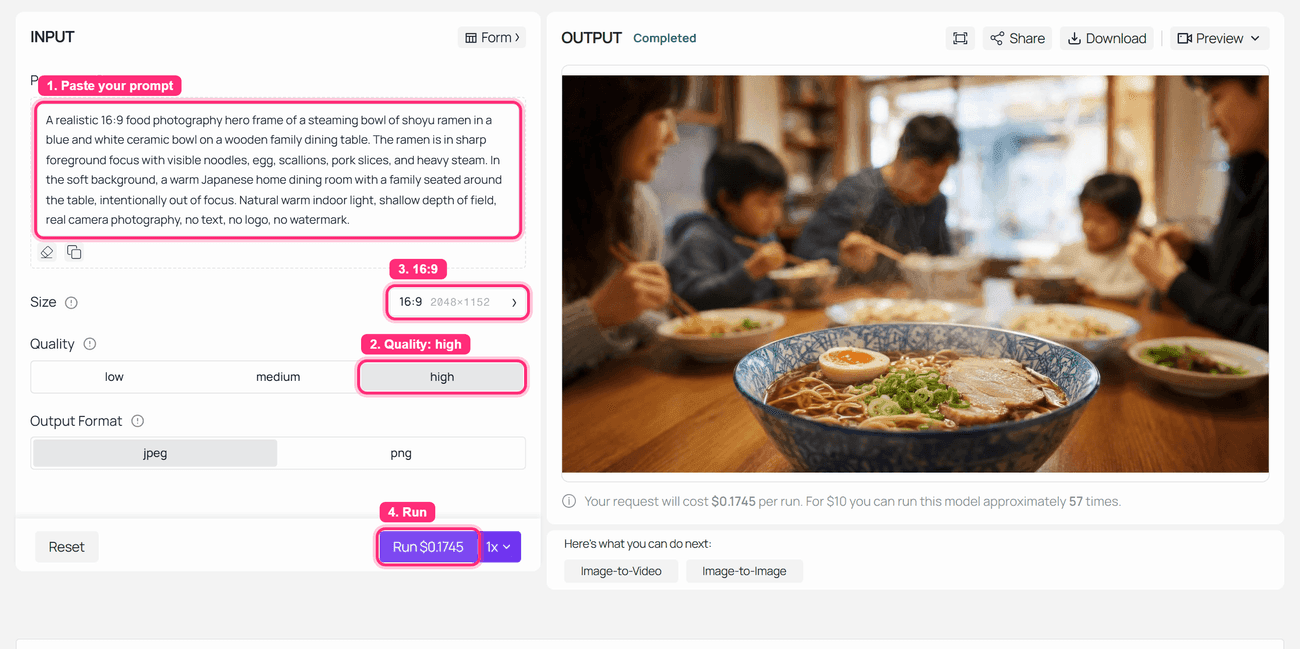
GPT Image 2 run-completed screenshot for a MiniMax H3 food video ramen base frame
Step 1 screenshot: GPT Image 2 on Atlas Cloud with the ramen base-frame prompt and a completed food reference image in the output panel.
Step 2: Animate the MiniMax H3 Food Video Ramen Reel
Upload the ramen frame from Step 1 to MiniMax H3 Image-to-Video. The prompt treats the image as the exact opening frame and spends most of its words protecting the food, table, room layout, and family placement.
text1Eight-second cinematic MiniMax H3 food video using the uploaded ramen image as the exact opening frame. Preserve the bowl shape, ceramic pattern, ramen toppings, table position, warm room layout, and family placement. From 0 to 2 seconds, hold the ramen in crisp foreground focus as thick steam rises naturally. From 2 to 5 seconds, perform a slow rack focus from the ramen bowl to the family in the background while the steam becomes a soft translucent veil. From 5 to 8 seconds, the family smiles and talks quietly around the table while the ramen remains blurred in the foreground. Camera stays locked on a tripod, no cuts, no new dishes, no text. Sound: soft room tone, chopsticks touching ceramic once, gentle family conversation murmur, subtle steam and kitchen ambience. 2
Settings to pick: MiniMax H3 Image-to-Video, 8s, 16:9, the lowest available resolution for a quick draft or the highest available resolution for a production candidate. Keep native audio on in the source file, even though the article GIF is silent.
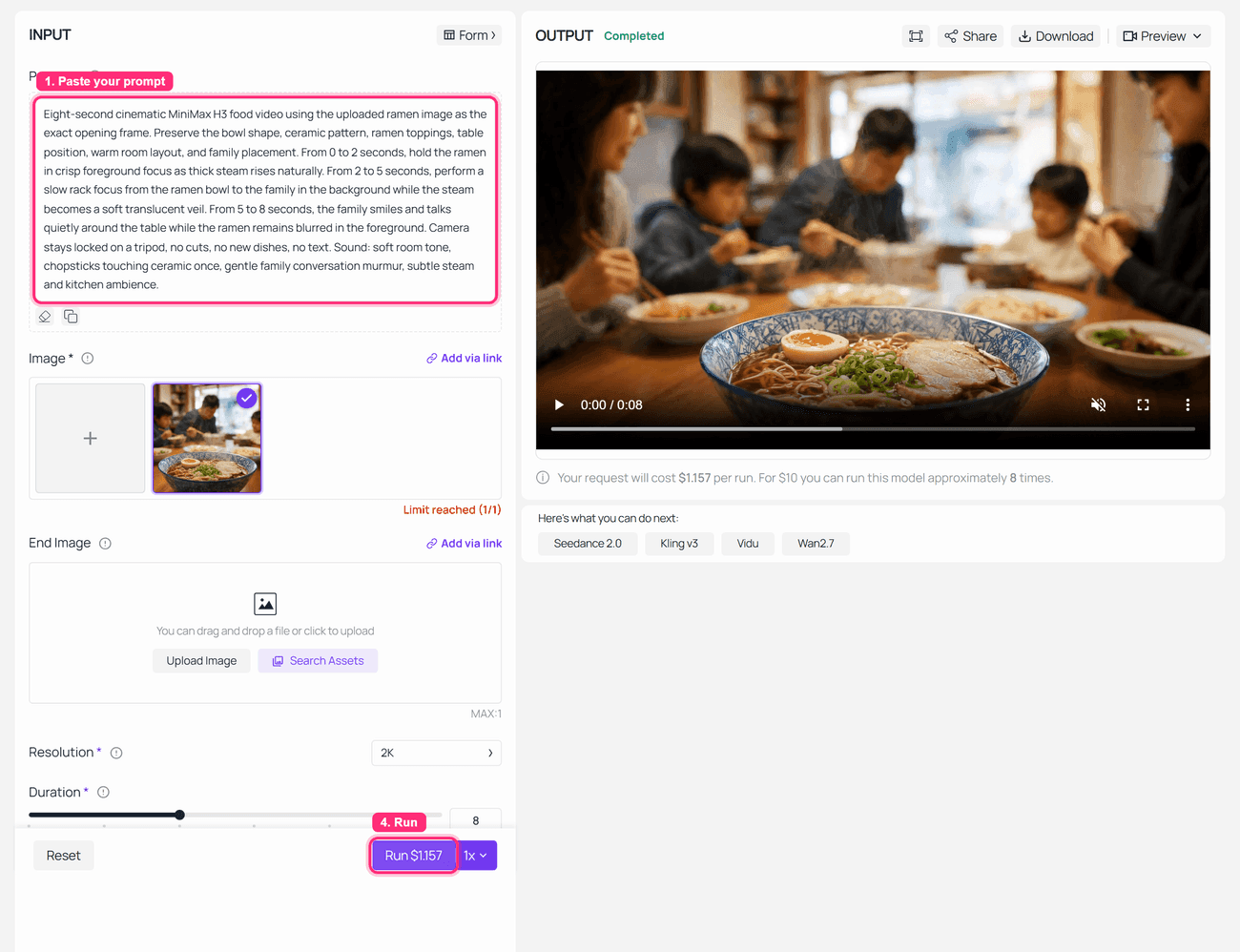
MiniMax H3 Image-to-Video run-completed screenshot for the ramen food video prompt
Step 2 screenshot: MiniMax H3 Image-to-Video with the ramen reference uploaded, preservation rules in the prompt, and the completed output visible.
Step 3: Make a MiniMax H3 Food Video UGC Burger Variation
This variation is closer to a TikTok food review. The risk moves from steam and focus to hands, box paper, cheese stretch, bite geometry, and short spoken lines. The prompt below asks for 10 seconds, while the captured playground run delivered an 8-second source clip, so the GIF reflects the delivered file.
text1A realistic vertical 9:16 smartphone photo frame of a gourmet cheeseburger in an open kraft paper takeout box on a small apartment dining table. The burger has a glossy sesame bun, thick beef patty, melted cheddar, lettuce, tomato, pickles, and visible sauce. A young lifestyle creator's hands are near the box but not touching the burger yet. Warm apartment light, casual TikTok food review mood, natural phone camera grain, no brand logo, no text, no watermark. 2
Use that as the base-frame prompt if no real burger photo is available. Then animate it with this MiniMax H3 prompt:
text1Ten-second vertical MiniMax H3 food video using the uploaded burger image as the exact product reference. Preserve the burger bun shape, patty thickness, cheese melt, lettuce, tomato, sauce, box shape, and table layout. Authentic UGC smartphone food review, handheld but stable. From 0 to 2 seconds, the creator opens the box wider and says, "Burger night." From 2 to 5 seconds, the camera moves closer as the burger is lifted and the cheese stretches naturally. From 5 to 8 seconds, the creator takes one bite and reacts with a real smile, saying, "Okay, that is actually good." From 8 to 10 seconds, hold a close-up of the bitten burger with fries entering the edge of frame. Sound: paper box rustle, small cheese stretch, bite crunch, casual room tone. No logo, no text overlay, no warped hands, no changing burger ingredients. 2
Settings to pick: 9:16, 10s when the control is available, or the delivered 8s default if the playground returns that length. Use the lowest available resolution for a draft or higher for the keeper. Use H3 image-to-video first; use MiniMax H3 Reference-to-Video only when a product image, person reference, and motion or voice reference all need to share control.
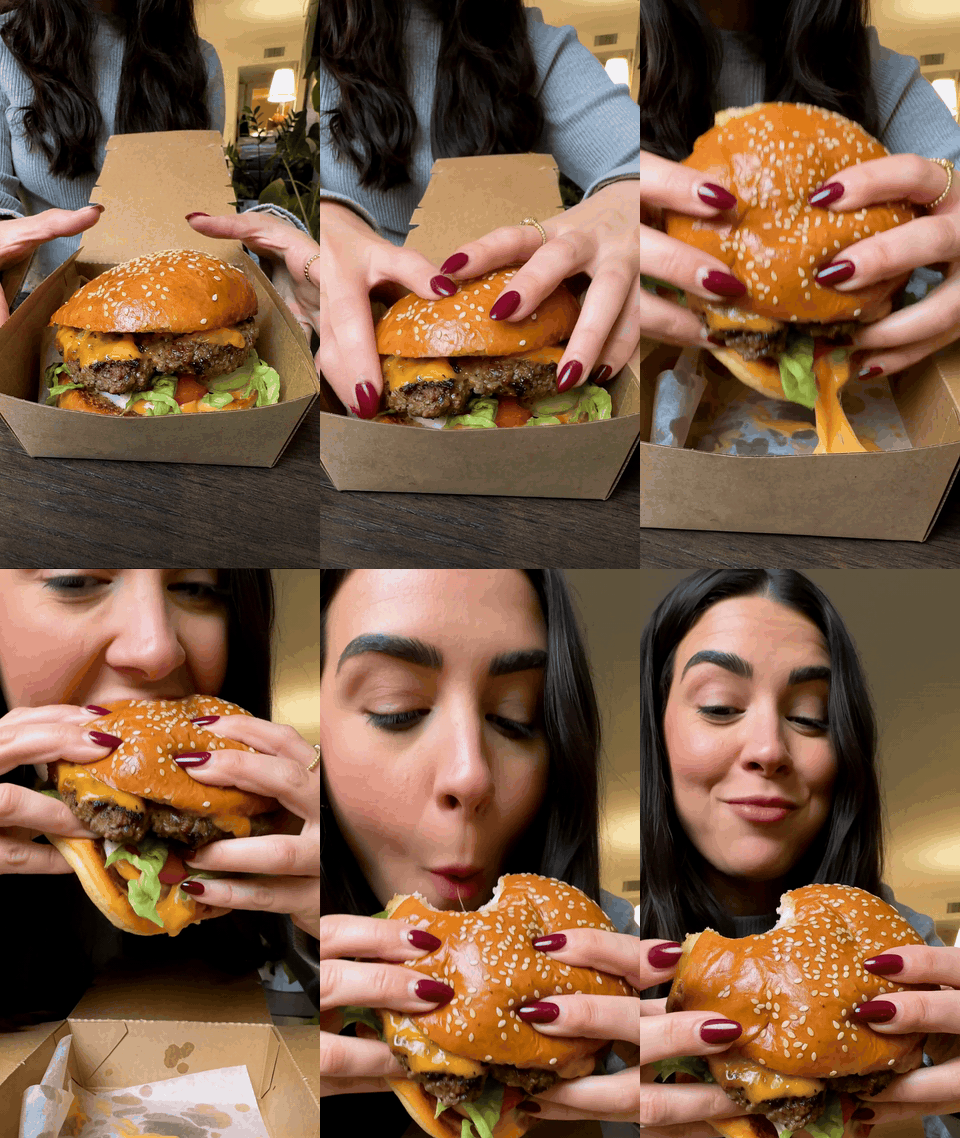
MiniMax H3 food video burger UGC review GIF with a creator opening a burger box and taking a bite
Case 2 result: an 8-second UGC-style burger review shown as a silent GIF. The source prompt includes paper rustle, bite crunch, and spoken lines for the generated video file.
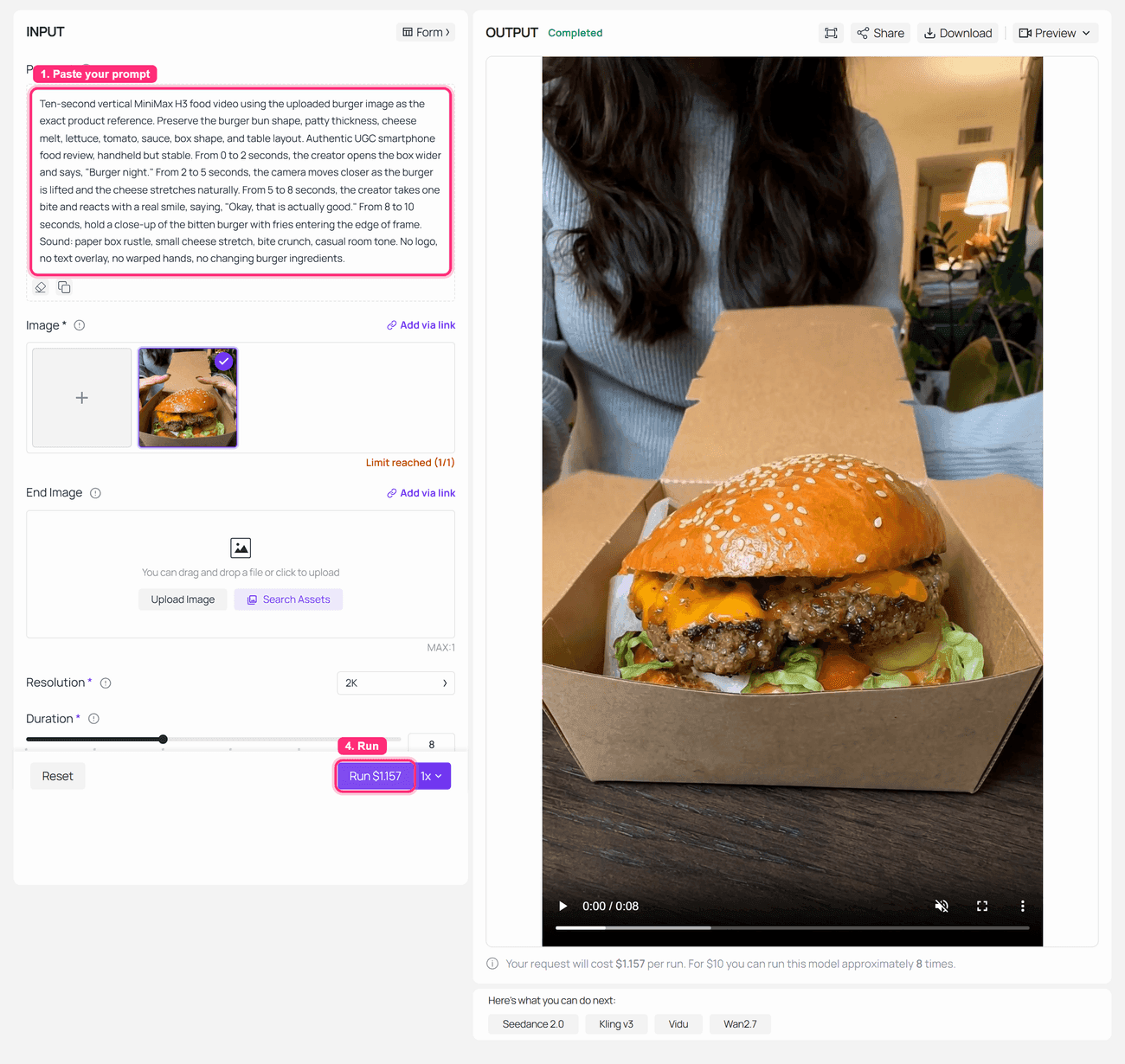
MiniMax H3 Image-to-Video run-completed screenshot for the UGC burger food video variation
Step 3 screenshot: MiniMax H3 Image-to-Video completed with a vertical burger reference and UGC motion prompt.
Step 4: Build a MiniMax H3 Food Video Citrus Product Ad
The citrus can test is for CPG and ecommerce teams. It asks H3 to preserve a simple can geometry while moving condensation, bubbles, an orange slice, and a tab-opening beat. The prompt asks for 6 seconds, while this run delivered an 8-second file.
text1A realistic 16:9 studio product photography frame of a clear unbranded sparkling citrus drink can on a pale stone kitchen counter. The can has one simple coral stripe with no readable brand text, visible silver rim, pull tab, condensation droplets, and a fresh orange slice beside it. Bright daylight through a kitchen window, clean commercial food and beverage photography, realistic reflections, no logo, no text, no watermark. 2
Animate the base frame with:
text1Six-second MiniMax H3 food and beverage product video using the uploaded can image as the exact opening frame. Preserve the can height, rim, tab, coral stripe width, condensation pattern, orange slice position, and counter surface. From 0 to 2 seconds, cold condensation grows subtly on the can while tiny bubbles move inside the drink. From 2 to 4 seconds, an orange slice drops beside the can and makes a small realistic splash. From 4 to 6 seconds, the tab opens once as the camera pushes in slightly and stops on a crisp product close-up. Bright daylight, clean kitchen counter, realistic liquid physics. Sound: one tab click, fizz, small splash, quiet kitchen ambience. No hands, no extra cans, no text, no label mutation, no impossible liquid motion. 2
Settings to pick: 16:9 or 1:1, 6s when the control is available, or the delivered 8s default if the playground returns that length. Use the lowest available resolution for a draft or higher for the keeper. Use a fictional, unbranded can unless you have rights to the real package art.
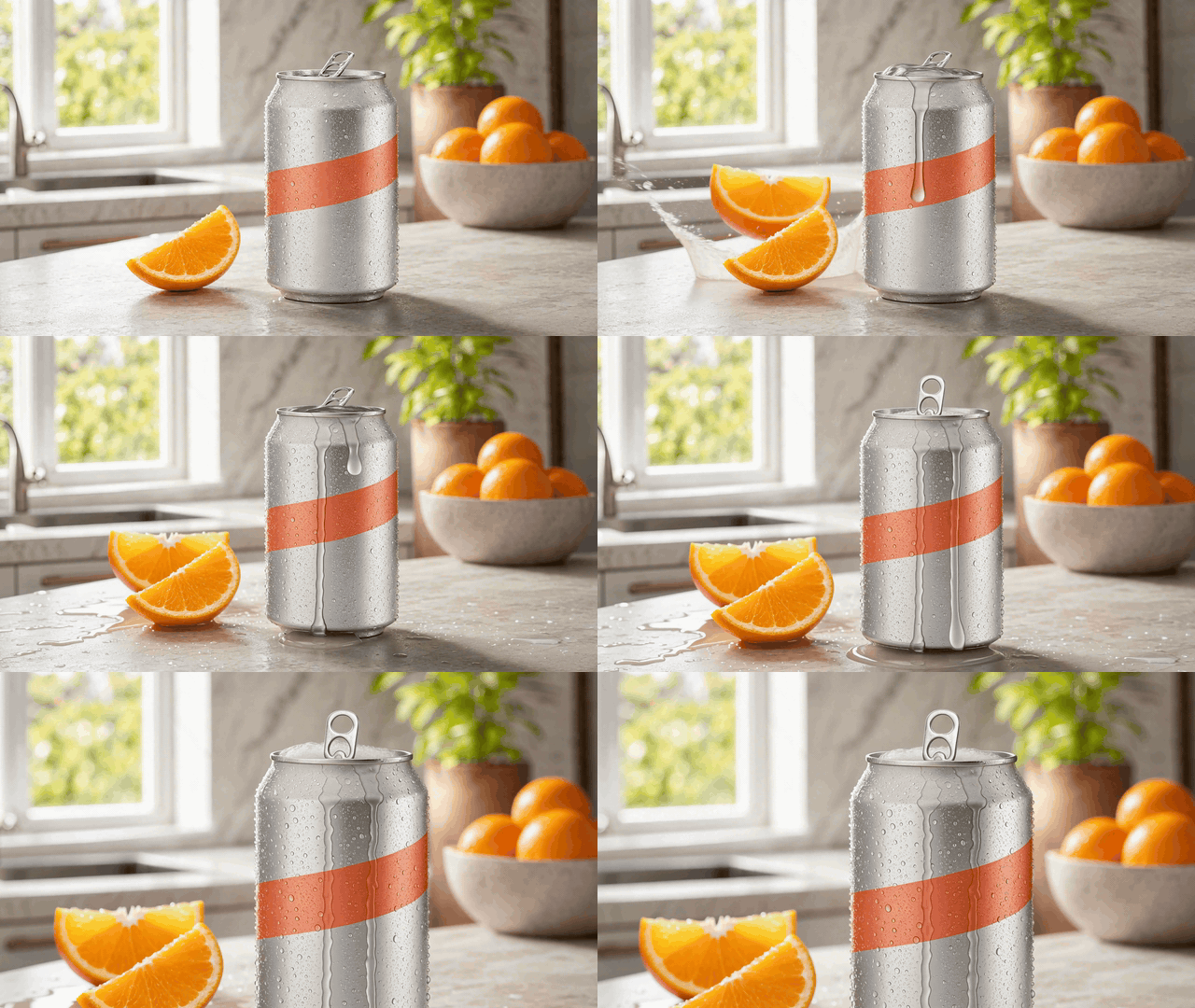
MiniMax H3 food video sparkling citrus product ad GIF with a citrus drink can, condensation, orange slice, and fizz
Case 3 result: an 8-second sparkling citrus product ad shown as a silent GIF, built to test can stability, fizz, condensation, and splash timing.
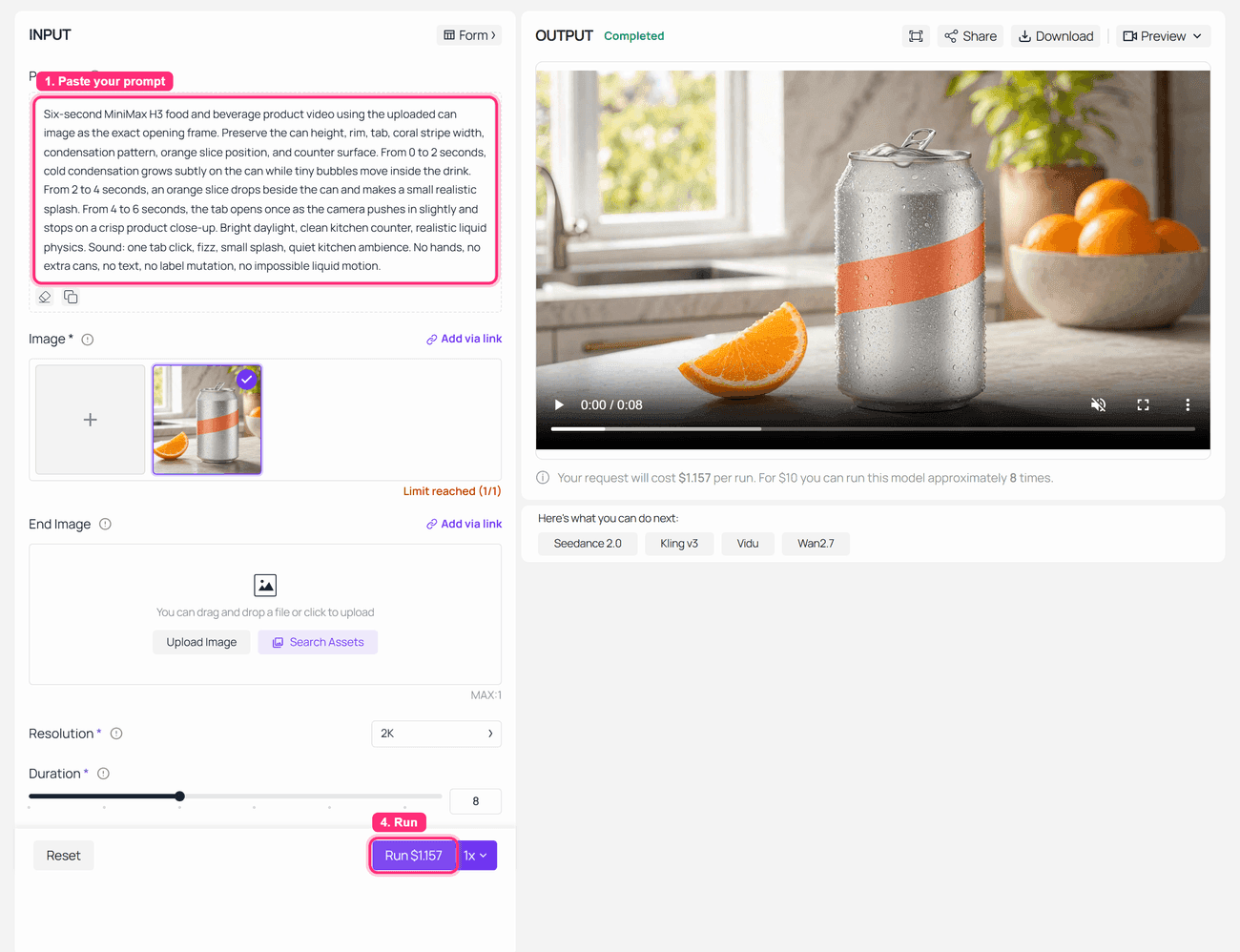
MiniMax H3 Image-to-Video run-completed screenshot for the sparkling citrus drink product ad
Step 4 screenshot: MiniMax H3 Image-to-Video completed for the citrus can reference and product-motion prompt.
Step 5: Inspect the MiniMax H3 Food Video Before You Rerun
Do not approve a food ad because the first frame looks good. Watch the clip frame by frame and inspect the moments where food usually breaks.
Use this QA order:
- Food shape stable?
- Hands acceptable?
- Packaging or label unchanged?
- Sound events aligned with visible action in the source video?
- Motion richer than a slow push-in?
- No generated text, fake logo, or price claim?
For clips at 10 seconds or shorter, convert the article version to GIF for Feishu compatibility. Keep the original MP4 internally when you need to review audio.
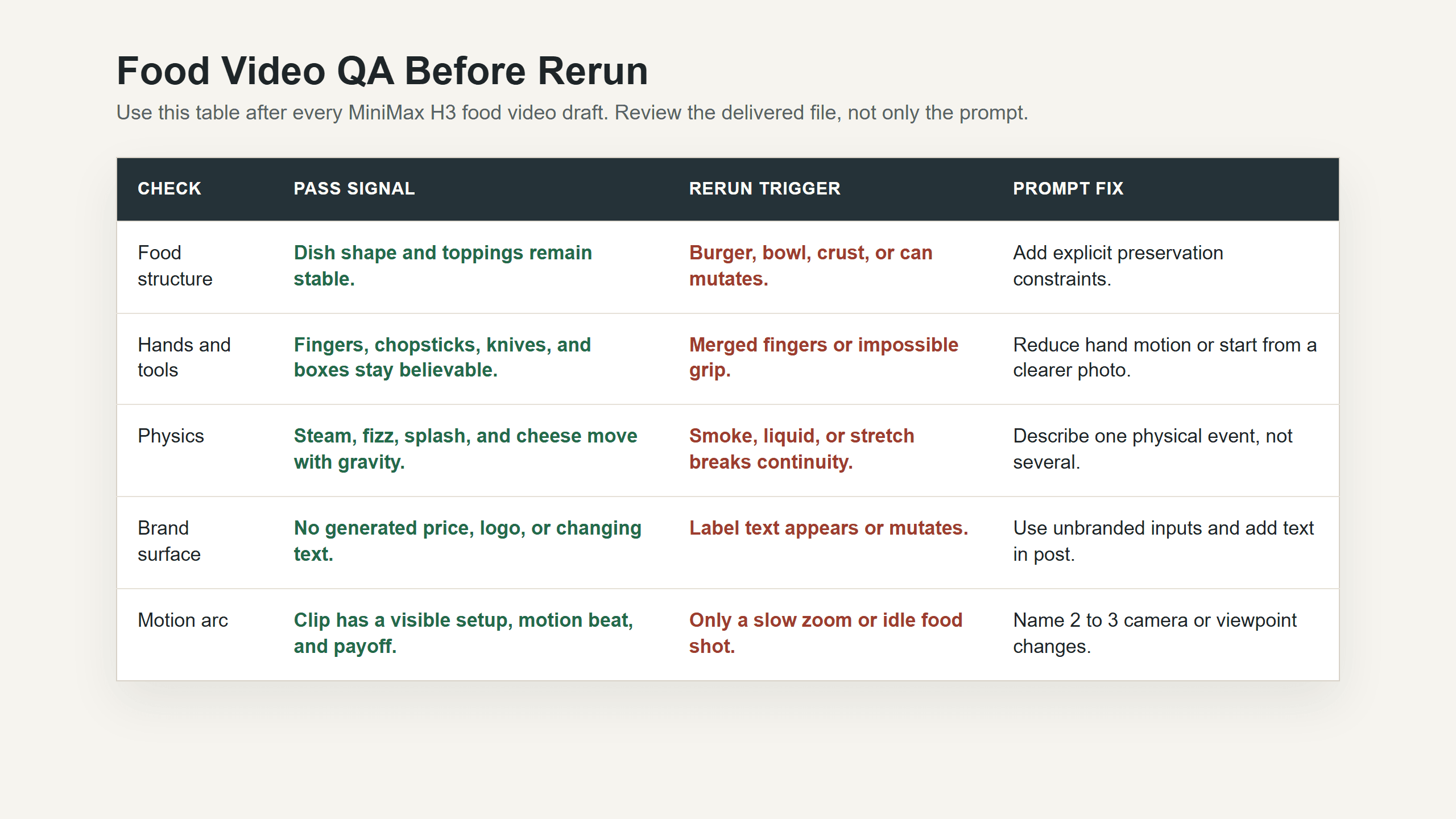
Browser-rendered MiniMax H3 food video quality check table for reviewing food shape, hands, labels, sound timing, and rerun triggers
Step 5 screenshot: a browser-rendered QA checklist, not an AI-generated fake chart.
MiniMax H3 food video variations for restaurants, delivery, and CPG
Once the first 3 cases pass, adapt the same structure to repeatable growth assets:
- Restaurant menu hero, 16:9 website banner: "Five-second MiniMax H3 food video of a grilled salmon plate on a white ceramic dish, lemon oil brushed across the surface, steam rising, camera starts macro on flaky texture then pulls back to the full plate under warm restaurant window light, no text. Sound: soft pan sizzle and quiet dining room."
- TikTok creator taste test, 9:16: "Seven-second MiniMax H3 food video using the uploaded taco image as the exact food reference. The creator lifts one taco, salsa drips once, then takes a bite and smiles. Handheld phone footage, warm kitchen light, no text, no logo, no changing fillings."
- CPG beverage loop, 1:1 or 9:16: "Six-second MiniMax H3 product video using the uploaded bottle image. Preserve bottle shape, cap, label position, and condensation. Ice cubes slide in the foreground, bubbles rise, camera settles on a clean pack shot, no text."
- Bakery ASMR cut, 16:9 or 9:16: "Five-second MiniMax H3 food video for a bakery ASMR reel. A sourdough loaf is sliced on a wooden board, crust cracks clearly, steam rises from the soft interior, warm morning bakery light, close macro lens, no text. Sound: crisp bread crackle, knife on board, quiet bakery ambience."
MiniMax H3 food video cost on Atlas Cloud
Atlas Cloud models/all currently lists MiniMax H3 Text-to-Video, Image-to-Video, and Reference-to-Video from $0.1/SEC. That makes a short draft cheap enough for structured testing, but reruns add up when hands or packaging fail.
| Asset | Model | Duration | Catalog floor | Why it is worth running | Rerun trigger |
|---|---|---|---|---|---|
| Citrus ad | MiniMax H3 Image-to-Video | 6s | From $0.60 | Product geometry, fizz, and splash test | Can shape mutates |
| Ramen reel | MiniMax H3 Image-to-Video | 8s | From $0.80 | Steam, rack focus, dining mood | Bowl or family drifts |
| Burger UGC | MiniMax H3 Image-to-Video | 10s | From $1.00 | Hands, bite, cheese, creator pacing | Fingers or burger break |
| 3-case package | MiniMax H3 Image-to-Video | 24s total | From $2.40 | Covers restaurant, UGC, and CPG | Any keeper fails QA |
These are floor estimates from the public catalog, not a final invoice. Actual cost can change with resolution, mode, promotions, queue behavior, and failed reruns. For a live test, confirm the quote in the playground before pressing Run.
MiniMax H3 food video legal and brand safety notes
Use authorized product photos before generating ads for a real restaurant, delivery brand, or CPG package. Add logos, price offers, nutrition claims, legal disclaimers, and promo text in editing software after generation so the final creative stays accurate.
Do not fake customer reviews, celebrity endorsements, health benefits, or ingredient claims. If the clip becomes paid media, keep the prompt, input image, output file, and human review notes together.
The strongest minimax h3 food video workflow is simple: stabilize the food with a reference image, ask for one appetizing motion beat, then rerun only the variable that failed.
Frequently Asked Questions
What is MiniMax H3 food video best for?
MiniMax H3 food video is best for 5 to 15 second food ads, restaurant reels, product loops, UGC-style taste tests, menu previews, and social clips where visuals and source audio can be generated together.
Should I use text-to-video or image-to-video for food?
Use image-to-video for real dishes, menu photos, product packaging, and food ads where shape matters. Use text-to-video for fictional menu concepts. Use reference-to-video when a person, product, motion reference, or audio reference must guide the same clip.
Can MiniMax H3 keep a burger or drink can consistent?
It can improve consistency when you upload a clear reference image and write strict preservation rules, but no video model guarantees perfect food or packaging stability. Keep the clip short, limit the camera moves, and inspect frames before approving.
Does MiniMax H3 generate sound for food videos?
Yes. H3 supports native stereo audio. Write the sound source clearly, such as fizz, bite crunch, paper rustle, chopsticks on ceramic, room tone, or kitchen ambience. If sound is the deliverable, publish an MP4 instead of a silent GIF.
How much does a MiniMax H3 food video cost on Atlas Cloud?
As of August 26, 2026, Atlas Cloud models/all lists the 3 MiniMax H3 video endpoints from $0.1/SEC. A 6s citrus ad starts around $0.60, an 8s ramen reel around $0.80, and a 10s burger UGC clip around $1.00 before optional base-image cost and reruns.
Can I use MiniMax H3 food videos for ads?
Yes, as test ad assets, but review brand rights, price claims, nutrition claims, testimonials, and platform rules before spending media budget. Add critical text in post-production, not inside the generated clip.





