


The English headline can look right while the Spanish date loses a digit. A guest will act on the finished invitation, regardless of what your prompt originally said. A MiniMax H3 Image bilingual event invitation needs a reliable copy sheet and a final reading check as much as it needs a clear design brief.
Start with verified wording in both languages. Choose a layout that lets each audience read a complete message, generate the design, then compare every field in the downloaded original with your approved copy. Review the whole image at its actual sharing size before sending it. Use reference editing to change the composition and ordinary typesetting for text that must be exact.
This guide supplies English-Spanish and English-Chinese briefs, a two-column adaptation prompt, and a field-by-field review method. The examples use public event information for independent educational designs, not official invitations or admission passes.
Key takeaways
- Prepare complete, matching event details in both languages first.
- Specify separate language zones and a clear text hierarchy.
- Check every character in the original, then review the mobile display.
- Image generation still needs precise typesetting and final approval.
What MiniMax H3 Image Can Do for Bilingual Invitations
This workflow uses MiniMax H3 Image Text-to-Image for the two original invitations and MiniMax H3 Image Edit for the reference-based layout adaptation. For an invitation, the relevant operations are creating a design from approved text and recomposing a downloaded design with a reference image. Keep the prompt, original download and selected controls together so the result can be reviewed and reproduced.
The official guide documents text-to-image generation, editing with 1-16 references, and 1-10 outputs per request. It supports PNG, JPEG and WebP, with an output area up to 20,000,000 pixels. Masked editing and transparent backgrounds are unsupported. These are service specifications, not a promise that every supplied character will appear correctly. (MiniMax Image Generation Guide, accessed November 2026).
This workflow targets the Standard MiniMax H3 Image entries on Atlas Cloud. MiniMax H3 Image Text-to-Image and MiniMax H3 Image Edit have separate task pages, so the correct entry matters when you upload a reference. Keep the original result locally before attempting a variation.
Think of MiniMax H3 Image text rendering as part of the generated picture. A date can resemble the requested date while containing a substituted digit. An attractive headline can also conceal a missing accent. The model's ability to accept a bilingual brief establishes a useful starting point; your review establishes whether that particular output is usable.
A larger canvas gives letters more pixels, but guests usually see a reduced image. Native dimensions, readable lettering and complete information therefore need separate checks. Provider speed announcements also do not measure your playground wait, which can include queuing, generation, transfer and rendering. Record those observations only after a real run.
Lock the Event Details Before You Write the Prompt
Build a Two-Language Copy Sheet
Give the team one approved copy sheet. Keep the event facts, translations and verification source together so a later reviewer can resolve a discrepancy without guessing. A designer should never have to choose between two dates found in separate chat messages.
The English-Spanish example below deliberately contains only information needed for the layout study. The venue retains its proper name in both blocks. The action label is instructional copy, while the actual visit link belongs in the accompanying message.
| Field | English | Spanish | Verification source or status |
|---|---|---|---|
| Heading | EVENT INVITATION | INVITACIÓN AL EVENTO | Editorial wording for this study |
| Event name | Art Basel Miami Beach | Art Basel Miami Beach | Art Basel official event information |
| Public dates | December 4-6, 2026 | Del 4 al 6 de diciembre de 2026 | Art Basel official event information |
| Venue | Miami Beach Convention Center | Miami Beach Convention Center | Art Basel official event information |
| Meeting time and time zone | Not supplied | Not supplied | Confirm separately before an actual meeting invitation |
| Action label | Plan your visit | Planifica tu visita | Editorial wording for this study |
| Action destination | Official visitor information | Same destination | Open and verify before distribution |
For your own event, add the host, contact, registration deadline and accessibility information when they affect attendance. Mark an unresolved item as awaiting confirmation in the working sheet. Keep that unresolved wording out of the image until the organizer supplies the answer.
Separate Translation from Image Proofreading
Ask a reader of each language to approve meaning before generation. They should check whether a phrase sounds like an invitation, whether the formality fits the audience and whether names match the organizer's usage. Keep a proper name unchanged when translation would make it harder to find.
Spell out months to avoid numeric date ambiguity. If guests must arrive at a particular hour, include the time zone and distinguish a meeting appointment from the broader event schedule. A show that runs for several days does not establish your reception time.
After language approval, freeze the wording for that run. Compare the generated image against this same version, including accents, digits and punctuation. A translation reviewer checks intended meaning; an image proofreader checks the marks guests actually see. Assign both responsibilities even when one person performs them.
Give each approved version a short identifier. If the organizer changes the date after generation, update the sheet first and mark every affected export for replacement. A correct image attached to an outdated email can still mislead guests. Keep a named owner for the final send decision so a fluent reviewer and a designer do not each assume the other checked the facts.
Choose a Bilingual Layout That Fits the Message
Stacked Language Blocks
Stacked blocks suit a portrait invitation shared in a message thread. A reader can finish the English information and then the Spanish or Chinese information without moving between alternating lines. Leave a visible gap or quiet divider between blocks so the reading order remains obvious.
Give both languages comparable prominence. Equal treatment does not require identical point sizes: different scripts have different shapes and spacing needs. Judge whether each reader can locate the event, date, location and next action with similar effort. Avoid reducing the second language to a tiny translation underneath a dominant headline.
Side-by-Side Columns
Columns can work on a wider card with short text. Align equivalent fields so a bilingual reviewer can compare them quickly, while letting each column remain a complete invitation. Do not share the date between columns if that would leave one audience searching across the card.
A narrow phone preview can make both columns difficult to read. Shrinking the entire design preserves the layout but reduces every letter. Test the expected preview width before committing to columns, especially when a long Spanish phrase wraps onto several lines beside a compact English phrase.
Front-and-Back or Separate Versions
Use two sides or separate language versions when the brief contains substantial directions, a schedule or different font requirements. Each version should retain the same facts and a clear response route. Printed reverse sides need proofing even when the front already passed.
| Layout | Copy density | Mobile reading | Print use | Maintenance |
|---|---|---|---|---|
| Stacked blocks | Short to moderate | One continuous vertical reading path | Suits a portrait card | Review both blocks in one file |
| Side-by-side | Short | Narrow previews can compress both columns | Suits a wider format | Recheck wrapping after each edit |
| Front-and-back | Moderate to long | Requires a clear two-image sequence | Fits two-sided production | Track both sides together |
| Separate versions | Longer or audience-specific | One language per image | Separate print files possible | Synchronize every factual change |
Choose the structure before writing style instructions. Removing secondary detail from the image often helps more than reducing type. Put travel notes and extended schedules in accessible message text, where guests can copy, translate or search them.
Before selecting a layout, count the lines each language will require at a comfortable reading size. A short English venue name may occupy one line while the accompanying translation takes two. Reserve space for the longer block early. Adding breathing room only after generation may force you to discard a composition that otherwise follows the brief.
Two Published Bilingual Invitations Worth Studying
Before writing a MiniMax H3 Image prompt, examine how published invitations make room for two complete messages. These wedding stationery examples address the same practical problem as an event invitation: guests must find the names, date, location and next step in a language they can read. Use their information structure as a reference for your own brief.
English-Spanish: Give Each Language a Complete Side
Bella Figura's published New Calligraphy invitation uses English on one side and Spanish on the reverse. Its photograph shows both language versions together. A consistent calligraphic treatment and ink color connect the two sides, while each language receives its own reading area.
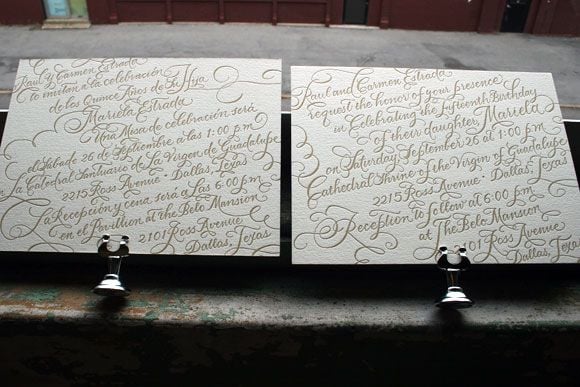
Published design reference: Bella Figura, Bilingual Letterpress Wedding Invitations, New Calligraphy. Photograph credited to Bella Figura; the Spanish version is shown on the left and English on the right.
The useful lesson is space allocation. Giving each language a full side avoids shrinking a second translation into the margin. For a digital event invitation, apply that idea as two coordinated images or two generous language blocks. Preserve the same event facts in both versions, then judge each language's legibility at the final display size. This photograph illustrates language separation; it does not establish how the lettering would read on a phone.
English-Chinese: Keep the Identity, Adapt the Reading Direction
RiyaStudioDigital's published Chinese-English wedding invitation template shows two coordinated versions. The English text runs horizontally in a centered hierarchy, while the Chinese version uses vertical columns. Both share a red double-happiness motif, lanterns and blossom borders.
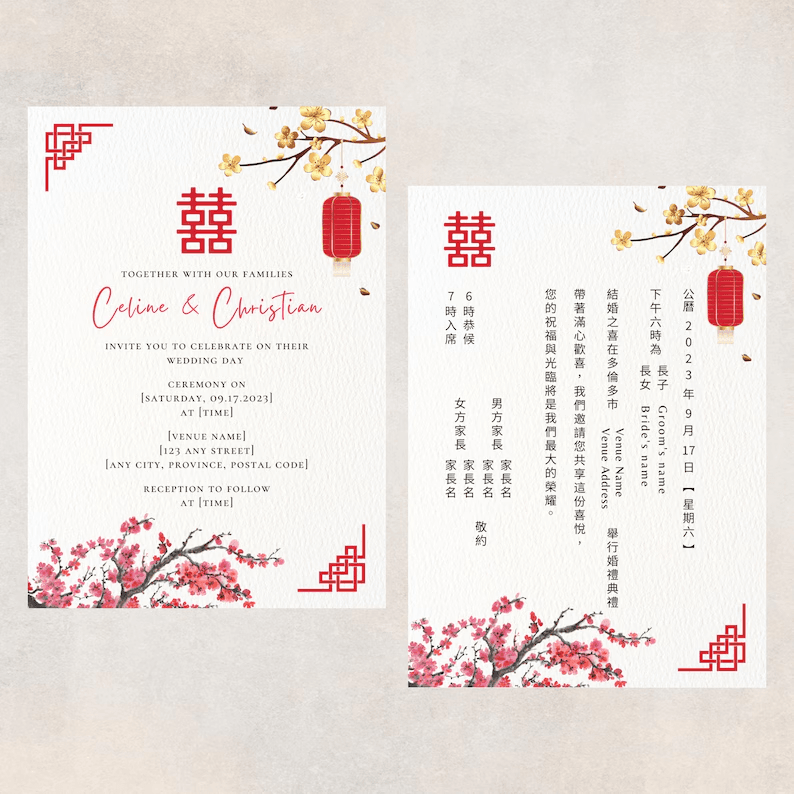
Published template reference: RiyaStudioDigital, Bilingual Chinese Wedding Invitation, listing 1351566042. Seller preview credited to RiyaStudioDigital; the displayed names and venue fields include sample or placeholder wording.
The layout lesson is that matching visual identity does not require identical text geometry. Chinese and English can use different reading directions while retaining recognizable borders, colors and hierarchy. For your MiniMax H3 Image brief, specify where each language starts and how its fields should flow. The preview's placeholder venue and time fields also show why a design template needs approved event copy before distribution. Keep decorative motifs outside the text area and proofread each version independently.
The three examples below apply those decisions to generated invitations: complete stacked English-Spanish and English-Chinese blocks, followed by an English-Spanish column layout. Their copy and results can then be checked field by field.
Generate an English-Spanish Event Invitation
Use Verified Event Information
The first study uses Art Basel Miami Beach, December 4-6, 2026, at Miami Beach Convention Center. The organizer confirms those dates and venue in its public event information. This is an independent educational layout study and grants no admission, VIP access or registration entitlement. (Art Basel, accessed November 2026).
The brief excludes logos, passes, invented prices and contact details. That keeps the exercise focused on bilingual invitation design without making the image resemble an official credential. Use your own authorized event identity when producing a real campaign.
Paste the Prompt and Set the Canvas
Open the MiniMax H3 Image Text-to-Image playground. Choose MiniMax H3 Image Text-to-Image (Standard), one PNG and a 1152 × 2048 canvas for a 9:16 portrait invitation. Use an explicit size and disable prompt expansion for this copy-controlled brief.
Read the dimensions back after entering them, then check the downloaded file separately. P1 and P2 in this article are both 1152 × 2048 PNGs. Keep the same portrait format and visual direction across these two independent language examples.
P1 combines the use case, language order, literal copy and visual constraints. Quotation marks identify strings to render; the prompt separately tells the model to omit the marks. Both blocks repeat the venue because each language must communicate the complete brief.
plaintext1Create a flat, front-facing bilingual event invitation design for an independent educational layout study using verified public information about Art Basel Miami Beach 2026. This is not an official invitation or an admission pass. 2 3Use a portrait 9:16 composition. Warm ivory background, deep navy typography, one restrained coral geometric accent, clear margins and generous negative space. Keep decorative elements away from every text block. Do not imitate an existing event poster or reproduce an official logo. 4 5Use two clearly separated language blocks, English above Spanish. Give both languages comparable visual prominence. Each block must contain its complete information. Use clear, highly legible lettering rather than script. 6 7Render only the following text, in this order: 8 9English block: 10"EVENT INVITATION" 11"Art Basel Miami Beach" 12"December 4-6, 2026" 13"Miami Beach Convention Center" 14"Plan your visit" 15 16Spanish block: 17"INVITACIÓN AL EVENTO" 18"Art Basel Miami Beach" 19"Del 4 al 6 de diciembre de 2026" 20"Miami Beach Convention Center" 21"Planifica tu visita" 22 23Reproduce the supplied wording and numbers exactly. Do not print quotation marks or the labels English block and Spanish block. Preserve the accent in INVITACIÓN. Add no other text, logos, prices, QR codes, barcodes, signatures or watermarks.
Inspect the First Output
P1 uses two stacked language blocks on a 9:16 portrait canvas. The English section sits above the Spanish section, separated by a navy rule. Both sections repeat the event, date, venue and action, so either audience can read a complete invitation.
Download the original before resizing it or opening the edit page. Preserve that file as P1 so every later crop and adaptation has a traceable source. Record the actual pixel dimensions, format, attempt count and displayed charge alongside the prompt.
Read the Spanish heading character by character, including the Ó in INVITACIÓN. Compare both date lines with the copy sheet. Then check the complete venue name and both action labels. Read all remaining marks too: an extra subtitle or a repeated line is a deviation even when the supplied fields look correct.
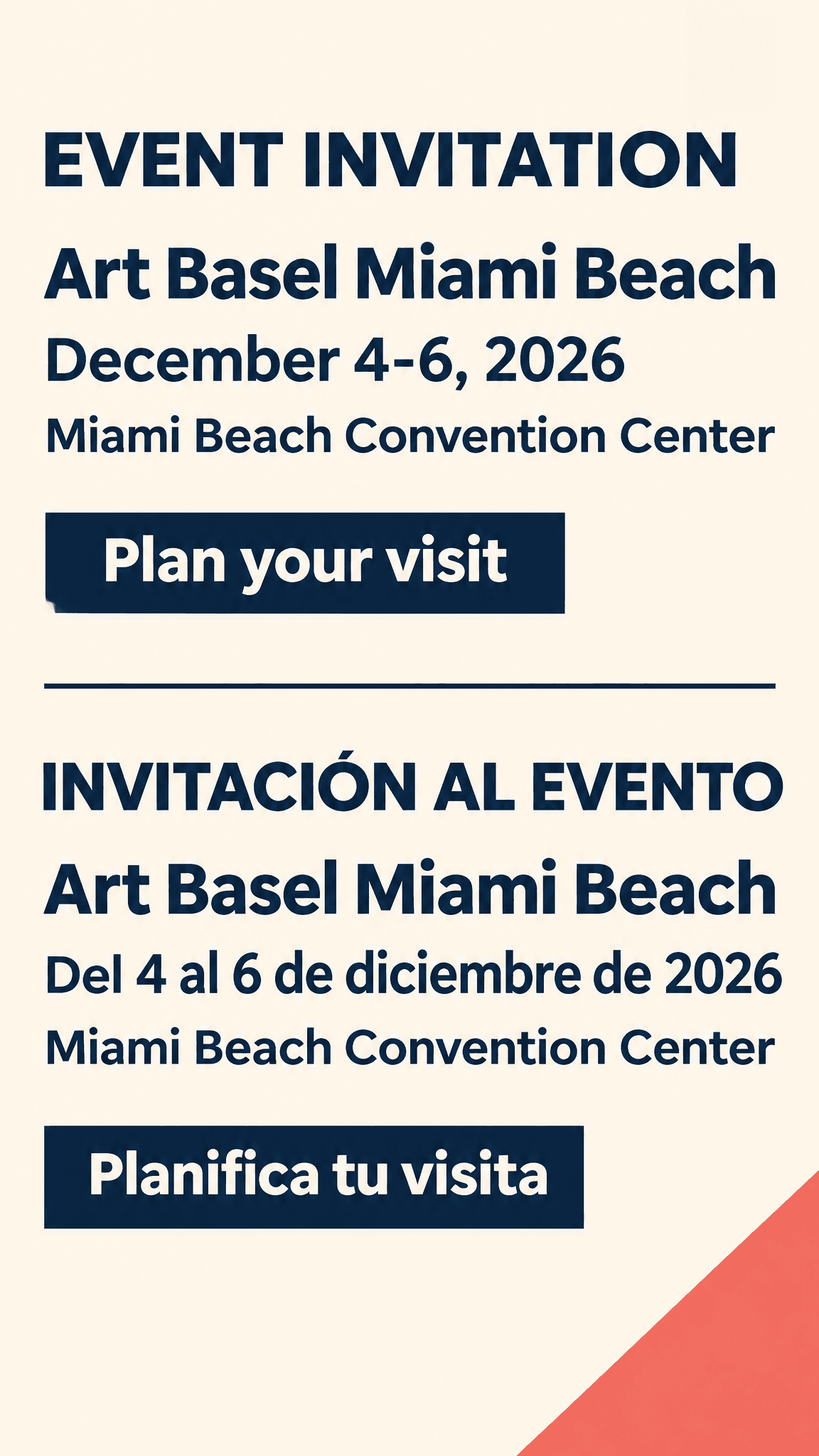
P1: English-Spanish invitation, 1152 × 2048 PNG, 9:16 portrait. Both blocks contain the event name, dates, complete venue and action labels. The Spanish heading retains the accent in INVITACIÓN.
Save the full prompt with the result rather than relying on the playground history alone. If a colleague needs to reproduce the exercise, they need the exact text, the selected task and the actual controls. Record whether the download is the original output or a compressed sharing copy; only the original can support a full-resolution text inspection.
The first image is a candidate, not the approval event. If a line differs, write down the requested and observed wording before deciding what to change. This makes the next operation deliberate and prevents an attractive composition from receiving an unsupported pass.
Adapt the Brief for Chinese Text and a Second Layout
English-Chinese Copy Needs Its Own Layout Check
The second study uses CES 2027, January 6-9, 2027, in Las Vegas, Nevada. CES confirms those dates and city. This brief provides no booth, meeting room or appointment, so none should appear in the design. (CES, accessed November 2026).
This English-Chinese invitation is a separate text-to-image task. Chinese characters and line lengths change the spacing problem enough to deserve an independent layout check. Keep the ivory, navy and coral direction so the series remains comparable, while judging each result on its own.
Use the same one-image PNG target and 1152 × 2048 canvas as P1. Replace the prompt with P2, without uploading the Spanish output as a reference. This keeps both language examples in a 9:16 portrait format.
plaintext1Create a flat, front-facing English and Simplified Chinese event invitation design for an independent educational layout study using verified public information about CES 2027. This is not an official invitation or an admission pass. 2 3Use a portrait 9:16 composition. Warm ivory background, deep navy typography and one restrained coral geometric accent. Keep the same clear editorial approach throughout: generous margins, separate language blocks, high legibility and no decorative objects behind the text. 4 5Place the complete English block above the complete Simplified Chinese block. Give both languages comparable prominence. Use clear sans-serif-style lettering with carefully formed Chinese characters. 6 7Render only the following text, in this order: 8 9English block: 10"EVENT INVITATION" 11"CES 2027" 12"January 6-9, 2027" 13"Las Vegas, Nevada" 14"Plan your visit" 15 16Simplified Chinese block: 17"活动邀请" 18"CES 2027" 19"2027年1月6日至9日" 20"美国内华达州拉斯维加斯" 21"查看参观信息" 22 23Reproduce every supplied word, Chinese character and number exactly. Do not print quotation marks or the language-block labels. Do not translate CES into a different event name. Add no other text, logos, prices, QR codes, barcodes, signatures or watermarks.

P2: English-Chinese invitation, 1152 × 2048 PNG, 9:16 portrait. Both language blocks show CES 2027, the January 6-9 dates and Las Vegas. The Chinese city line reads 美国内华达州拉斯维加斯; the brief supplies no specific meeting location.
Inspect 邀请, 内华达州 and 拉斯维加斯 at full resolution, then read the Chinese date as a separate statement. Recognizing the intended phrase is insufficient if a character has lost a stroke. Ask a fluent reader to compare each line against the copy sheet.
For a real invitation, add your confirmed meeting time, specific location and registration route in the accompanying text or formal typeset file. Do not let a recognizable event name make an incomplete meeting brief seem ready to send.
Recompose the Invitation as Two Columns
Open MiniMax H3 Image Edit and upload the original P1 download as Image 1. Choose a 2048 × 1152 canvas, request one PNG and use the same event copy for the two-column edition. Prompt expansion always applies to edits according to the model-page schema.
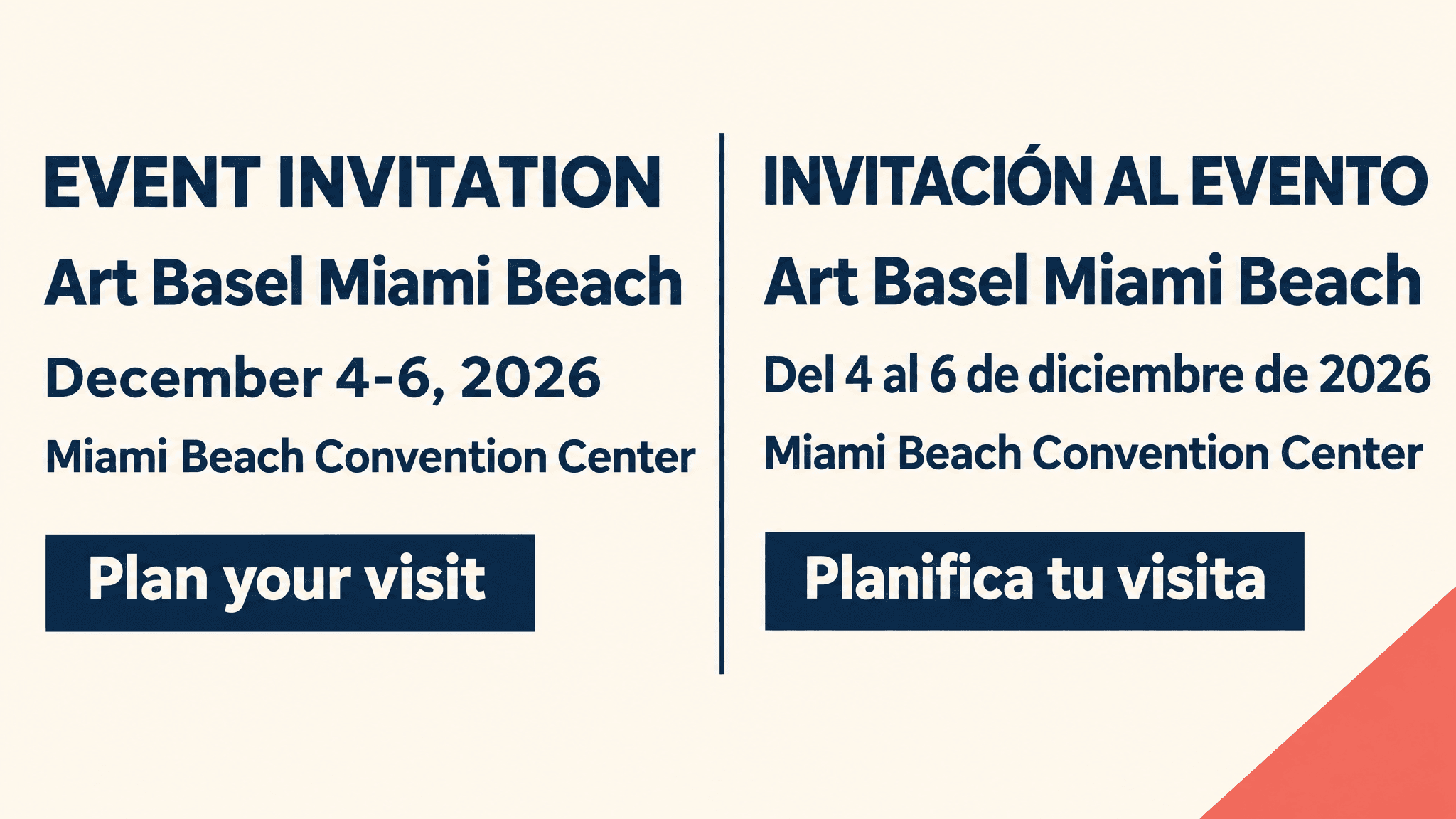
P3 changes the reading structure: English occupies the left column and Spanish occupies the right, separated by a vertical navy rule. The warm ivory background, navy lettering and coral corner accent connect it to P1. Each column remains a complete invitation. Reference editing can redraw text, so check every field again.
plaintext1Use Image 1 as the design reference. Create a 2048 × 1152 landscape edition with the same bilingual event invitation content. Recompose the layout into two clearly separate, equal-width columns: the complete English invitation on the left and the complete Spanish invitation on the right. This must be an obvious layout change from Image 1's stacked language blocks, not a crop, a stretch, or the original image placed inside a frame. 2 3Preserve the warm ivory background, deep navy lettering, restrained coral geometric accent, flat front-facing design and clear typography. Add a slim navy divider between the columns with generous space on both sides. Give both languages comparable prominence. Within each column, place the heading, event name, date, venue and action label in that order. Allow the longer Spanish lines to wrap naturally inside the right column while keeping all text large, legible and away from the edges. 4 5The left English column must contain exactly: 6 7"EVENT INVITATION" 8"Art Basel Miami Beach" 9"December 4-6, 2026" 10"Miami Beach Convention Center" 11"Plan your visit" 12 13The right Spanish column must contain exactly: 14 15"INVITACIÓN AL EVENTO" 16"Art Basel Miami Beach" 17"Del 4 al 6 de diciembre de 2026" 18"Miami Beach Convention Center" 19"Planifica tu visita" 20 21Do not add, remove, translate or rewrite any supplied wording. Preserve the accent in INVITACIÓN. Do not print quotation marks or the column labels. Add no other text, logos, QR codes, barcodes, signatures or watermarks.
P3: two-column English-Spanish invitation, 2048 × 1152 PNG. English appears on the left and Spanish on the right, with a vertical divider. Both blocks retain the event name, dates, complete venue and action labels, including the accent in INVITACIÓN.
Compare P3 with P1: the horizontal divider between stacked blocks has become a vertical divider between columns. The date and venue remain readable in each language, while the shared palette keeps the two editions visually related. Recheck every supplied line after the layout edit, including the longer Spanish date.
Return to the original P1 for a new adaptation instead of repeatedly editing a descendant. Each extra generation creates another opportunity for a digit or letter to change, and a clear source makes those changes easier to identify.
Proofread Every Field Before You Send
Check Characters, Numbers and Language Completeness
Open the original and the approved copy sheet side by side. Transcribe what the image actually contains before checking what you expect it to contain. Reading from the prompt first can encourage your eye to fill in a missing accent or digit.
Use separate passes for names, dates, location and actions. Then read each language alone. A bilingual design fails its purpose if the Spanish reader needs the English block to discover the venue, or the Chinese reader needs English to interpret the date.
OCR can flag omissions and help compare strings, but recognition software can normalize a malformed character into the expected word. Check the image itself, especially Chinese strokes, accent marks and small numerals. Keep ambiguous fields marked for revision rather than treating an OCR match as final approval.
| Prompt | Actual downloaded size | Attempts | Field deviations | Use decision |
|---|---|---|---|---|
| P1: English-Spanish | 1152 × 2048 PNG, 9:16 | Not recorded | All supplied text fields visible | Reviewed portrait example |
| P2: English-Chinese | 1152 × 2048 PNG, 9:16 | Not recorded | Both language blocks, dates and city line visible | Reviewed portrait example |
| P3: two-column reference edit | 2048 × 1152 PNG, 16:9 | Not recorded | Complete English and Spanish columns visible | Reviewed two-column example |
Review the Whole Invitation at Its Actual Display Size
After inspecting details, view the entire image at the width guests will encounter. A 390-pixel-wide browser preview can expose tiny venue lines and cramped columns. It is a browser simulation, so describe it that way unless you also tested an actual device. These supplied files were inspected at their native dimensions; a physical phone check has not been recorded.
Review the message around the image too. Guests need selectable dates, a working destination and a way to ask questions. Repeating the essential details as ordinary message text also helps readers who cannot reliably access information inside an image.
Decide Whether to Edit, Regenerate or Typeset
| Observed problem | Next action |
|---|---|
| Overall layout does not fit the copy | Rewrite the layout constraint and generate again |
| Need a different canvas while retaining design direction | Edit from the preserved original reference |
| A date, name or address must match exactly | Set that text precisely in an ordinary layout editor |
| Small text disappears in the sharing preview | Shorten the image copy and move detail into accompanying text |
| An edit unexpectedly changes another field | Return to the original and specify preservation requirements |
Use a correction prompt only after observing the stated error. If INVITACIÓN is wrong in a future run, P4 provides a focused request. It appears correctly in P1 and P3, so this correction was not needed for those examples.
plaintext1Edit Image 1. Correct the Spanish heading so that it reads exactly: 2 3"INVITACIÓN AL EVENTO" 4 5Preserve the accent on Ó. Do not print quotation marks. 6 7Keep all other English and Spanish wording, dates, venue information, language-block order, background colors and decorative elements unchanged. Do not add any text or graphic elements.
After any correction, repeat the entire field check. A local request does not guarantee pixel-level preservation elsewhere. For operational details, precise typesetting often gives the organizer a more controllable finish than another generative attempt.
When typesetting is needed, remove or cover the generated text cleanly in an authorized layout workflow, then add verified live text using fonts that contain every required character. Inspect the complete export again for overlapping text, missing glyphs and clipping. Label that deliverable as a typeset revision. Preserve the untouched model output separately so your test record remains honest.
Export for Screens, Print and a Working Response Link
Keep three deliverables distinct: the original download for review, a sharing copy sized for the channel, and a print file prepared to the printer's requirements. Archive the approved copy sheet with them so a later date change can be applied consistently across every version.
PNG is a raster image. Its lettering consists of pixels, and downloading it does not create editable font objects or vector text. Preserve an editable layout file when your workflow includes ordinary typesetting. Recheck that file's export instead of assuming its correct text will remain readable after resizing.
For print, ask the printer for finished dimensions, bleed, safe margins and color requirements. Pixel count alone cannot certify print readiness. As an illustration, a 2048-pixel edge corresponds to about 6.83 inches at 300 pixels per inch; that calculation says nothing about bleed or the printer's accepted file format.
Place the response link in the email, message or webpage surrounding the image. A generated button shape cannot receive a click inside a standalone PNG. Open the real destination, confirm it belongs to the intended event and verify what guests see before they register. Generate any QR code with an actual encoding tool and scan the final exported version.
Budget for discarded generations and reference edits as well as accepted images. The model directory provides current starting rates. Those labels do not establish the charge for a selected size. Record the quote shown for your selected canvas before submitting each run. The downloaded PNGs establish their pixel dimensions, but no generation charge or attempt count was supplied for these examples.
Include the review effort in your production plan too. One accepted image can require translation approval, a rejected candidate and a separate mobile export. Tracking those stages helps the next event team estimate its work without turning this small example into a general claim about generation speed or bilingual accuracy.
Keep publication approval separate from the generation status. Save the reviewer's name, the approved copy-sheet version and the exact exported filename together. If you change the sharing size after approval, revisit the small text at that new size. This simple handoff helps a colleague avoid sending a development image that merely resembles the approved one.
Your MiniMax H3 Image bilingual event invitation is ready for distribution when both language reviewers approve the exported text, the actual sharing preview remains readable and the response route works. Bring your own checked copy to the Atlas Cloud playground, preserve the first download and make that final approval against the file your guests will receive.
FAQ
Can MiniMax H3 Image Create an Invitation in Two Languages?
MiniMax H3 Image can generate a design from a prompt containing both language blocks. The English-Spanish and English-Chinese examples in this article each include an event name, date, location and action in both languages. Supply the approved wording yourself and review each language independently in the downloaded image. These examples show specific results, rather than a guarantee for every language or brief.
What Should I Include in a MiniMax H3 Image Bilingual Invitation Prompt?
Include the event name, dates, location and action label in each language, then specify their reading order. Put the exact text in quotation marks and tell the model to omit those marks from the image. State the canvas, palette, margins and language-block layout separately. P1 and P2 use complete stacked blocks on a 1152 × 2048 portrait canvas; P3 uses separate English and Spanish columns.
How Do I Check Chinese Characters and Spanish Accents?
Compare the original image with the approved copy one field at a time. Check Chinese strokes, every date digit and the accent in INVITACIÓN before reviewing the whole design at its intended sharing size. OCR can help flag differences, but inspect the actual lettering too. If an operational detail must match exactly, finish that text in an ordinary layout editor and preserve the untouched generated image as your source record.
Can MiniMax H3 Image Edit Change the Layout While Keeping the Same Wording?
Use MiniMax H3 Image Edit with the original invitation as Image 1. Specify the new layout and repeat the complete text that must be retained. P3 demonstrates English on the left and Spanish on the right, with a vertical divider and the same event details as P1. Check all fields after editing because a layout request can also redraw letters, accents and numbers.
Can I Print or Send the Generated PNG Directly?
For digital sharing, review the exported image at the width guests will see and repeat essential details as selectable message text. Put the working response link in that message or webpage, since a button drawn inside a PNG cannot receive clicks. For print, confirm finished dimensions, bleed, margins and color requirements with the printer. A PNG provides raster artwork, so retain an editable layout file when precise text changes or print preparation are required.vvv




