


Your comic has 4 panels, but the worker changes clothes halfway through. The punchline arrives too early. A speech bubble points at the wrong person.
For MiniMax H3 Image comic strip creation, start with 4 story beats, then specify the reading order, fixed character features, and exact dialogue. Generate one complete page, check it as a story, and reuse an approved character reference for the next strip.
This guide provides 3 original everyday comic prompts: a muted meeting, a forgotten coffee cup, and a bookmark lesson. It also includes the reference-sheet, sequel, and dialogue-edit instructions needed to turn a single page into a repeatable series.
Key takeaways
- Give each panel one action and one purpose in the story.
- Start with a square page containing 2 rows and 2 columns.
- Assign character identity and drawing style to explicit reference images.
- Check every line, bubble tail, and recurring prop before publishing.
What MiniMax H3 Image Can Do for Comic Strips
MiniMax H3 Image generates still images from text and edits images using references. MiniMax's November 11 announcement describes 4096 × 4096 output and support for up to 16 reference images. Those capabilities make a short comic page a reasonable creative task; they do not establish that every page will contain correct lettering, panel order, or continuity. (MiniMax announcement, November 2026)
Use it for a small, self-contained situation that a reader can understand in a few seconds. A remote worker discovering a muted microphone needs one character, one room, and a visible change in expression. A longer adventure introduces more locations, costume states, speakers, and facts to preserve.
The model can help draw those scenes, but you still need to decide what readers learn in each panel. If panel 2 reveals the mistake and panel 4 repeats it, a visually consistent page can still feel flat. Resolve that timing in the script before spending another generation.
Keep the scope narrow for your first attempt: one event, a regular grid, and short dialogue. A successful page should let a new reader identify the speaker and follow the actions without your explanation.
For a continuing series, keep an approved page, a character reference, and a short list of recurring objects. These give the next request concrete source material. They also give you something specific to compare when a face, sweater, or desk arrangement changes.
For social posts, choose a situation the audience can recognize without a caption explaining the setting. The meeting example uses a familiar mismatch between what someone thinks happened and what everyone else heard. An educational strip needs a similarly visible change, such as a bookmark replacing a folded corner.
Decide your acceptance criteria before generation. For this guide, a usable draft needs 4 distinct moments, recognizable recurring characters, and a readable causal sequence. A publishable file also needs accurate text and a check at its intended display size. Keeping those decisions separate prevents an attractive first impression from ending the review too early.
Plan 4 Panels Before You Write the Image Prompt
Give Each Panel One Story Beat
Write the comic as setup, development, turn, and payoff. Each panel should change what the reader knows. For the muted-meeting example, the worker begins confidently, becomes enthusiastic, hears the correction, and reacts.
Keep the first 2 panels free of mute icons or knowing reactions from colleagues. Those clues would reveal the joke before the worker discovers it. The laptop is a story prop, so showing its back or side also avoids unnecessary software-interface details.
| Position | Main action | Exact dialogue | Fixed character features | Ambiguity to avoid |
|---|---|---|---|---|
| Top left | Worker starts the update | "I have a quick update." | Dark curls, round black glasses, mustard sweater | Revealing the muted microphone |
| Top right | Worker gestures enthusiastically | "And that solves it!" | Same face, glasses, and clothes | Adding a second event |
| Bottom left | Worker stops and listens | "You're on mute." | Same worker, now puzzled | Giving the laptop's line to the worker |
| Bottom right | Worker lowers both hands | "That explains the silence." | Same worker, embarrassed | Adding a new joke or speaker |
Notice that the worker's line in panel 2 sounds conclusive, while the reader still lacks the explanation for the silence. Panel 3 supplies that missing information. Panel 4 then gives the worker a reaction rather than another fact. You can reuse this rhythm with a forgotten attachment or an unplugged charger, provided the discovery remains visible.
Choose a Reading Order and a Dialogue Budget
Use 2 rows and 2 columns, read left to right across the top and then the bottom. A regular grid lets you spend your attention on the story. Irregular panels can wait until the basic page reads clearly.
Aim for one short line per panel in these exercises. That is an editorial choice for mobile reading, not a model limit. Longer dialogue needs more bubble space and leaves less room for the gesture that carries the scene.
Generate the full page first when you want to judge timing, spacing, and continuity together. Generate panels separately when one frame needs unusually precise revision or you intend to letter everything yourself. Separate generation creates an extra job: assembling panels with consistent borders, scale, and spacing.
Before opening the generator, read only the action column aloud. Then read only the dialogue. Both sequences should make sense. If the joke depends on a missing action, add that action to the script before asking the model to draw it.
Generate Your First Comic Strip in MiniMax H3 Image
Specify the Layout, Character, and Exact Dialogue
Execution status, November 16, 2026: The illustrations below show the scripted stories and edit sequence. They use a wide 2-by-2 layout, while the square settings below are a starting point for a MiniMax H3 Image run. MiniMax H3 Image completion time and success rate have not been measured for this guide.
For browser-based generation, Atlas Cloud provides separate text-to-image and edit entries for this model. Open the MiniMax H3 Image text-to-image playground for the first page.
Choose the Standard entry, request one image, and set a square 4096 × 4096 canvas. Select PNG explicitly if the form offers it; the current Atlas schema defaults to JPEG. Leave text-to-image prompt expansion enabled for this exercise. Verify the displayed values before running, since selecting a ratio alone may leave the output size on Auto.
The prompt separates layout, identity, environment, panel actions, and lettering. That makes revision manageable: if the speaker is wrong, change the speaker instruction without rewriting the worker's appearance.
The official guidance recommends placing the task before style, spelling out grids as rows and columns, quoting visible text, and assigning each reference a role. These are useful ways to reduce ambiguity in a comic brief. (MiniMax H3 Image README, checked November 2026)
Prompt A: the muted-meeting comic
plaintext1Create one complete four-panel comic page about a familiar remote-work mistake: finishing an enthusiastic explanation before discovering that the microphone was muted. 2 3LAYOUT 4Square canvas. Exactly 2 rows and 2 columns, with four equal rectangular panels and clear white gutters. Read left to right across the top row, then left to right across the bottom row. Each panel shows one distinct moment. 5 6CHARACTER 7The same adult office worker appears in all four panels: short dark curly hair, round black glasses, mustard-yellow sweater, navy trousers. Keep the face, hairstyle, glasses, clothing colors, and body proportions consistent. 8 9SETTING AND STYLE 10A recognizable home office with a plain laptop, a blue ceramic mug, and a small desk plant. Clean black ink outlines, flat muted colors, soft daylight, expressive body language, uncluttered backgrounds. Keep this visual style consistent throughout the page. 11 12PANEL 1, TOP LEFT 13The worker sits upright at the desk and begins speaking confidently toward the laptop. 14One speech bubble from the worker reads exactly: "I have a quick update." 15 16PANEL 2, TOP RIGHT 17The worker gestures enthusiastically with both hands while continuing the explanation. 18One speech bubble from the worker reads exactly: "And that solves it!" 19 20PANEL 3, BOTTOM LEFT 21The worker stops and listens, looking puzzled. 22One speech bubble from the laptop speaker reads exactly: "You're on mute." 23 24PANEL 4, BOTTOM RIGHT 25The worker quietly lowers both hands, looking embarrassed. 26One speech bubble from the worker reads exactly: "That explains the silence." 27 28LETTERING 29Use large, readable English lettering. Each bubble tail must point toward its specified speaker or source. Include only the four quoted lines. No title, captions, panel numbers, logos, interface text, or watermark. Show the laptop mainly from the back or side, without a readable software interface.
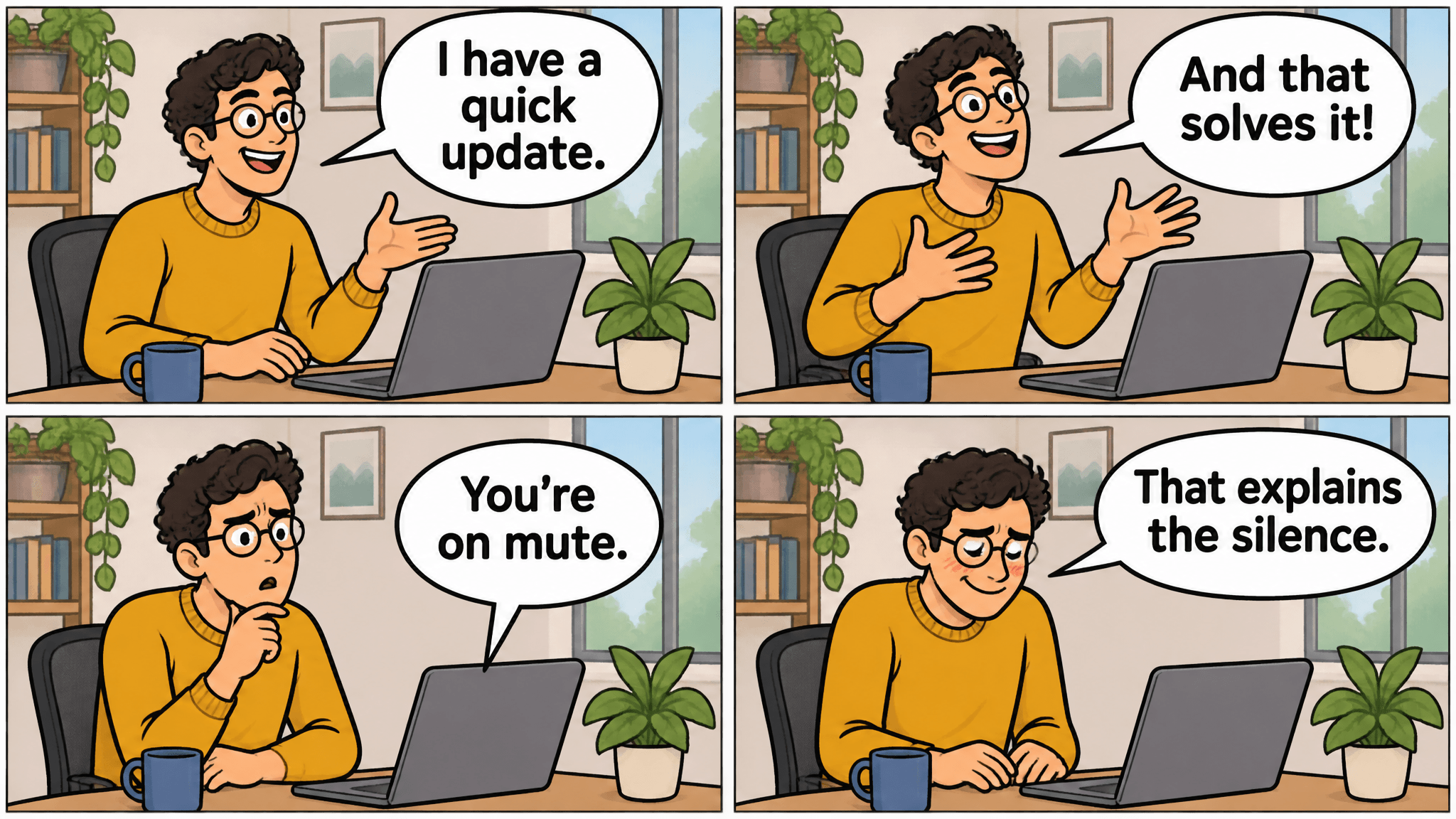
The correction appears in panel 3 with a bubble tail toward the laptop. The worker's glasses, curls, sweater, mug, and desk plant remain recognizable through the final reaction.
The completed-page captures below pair visible prompt text with an illustration for closer reading. Their controls and prices do not describe MiniMax H3 Image; the captures do not verify its generation time or performance.
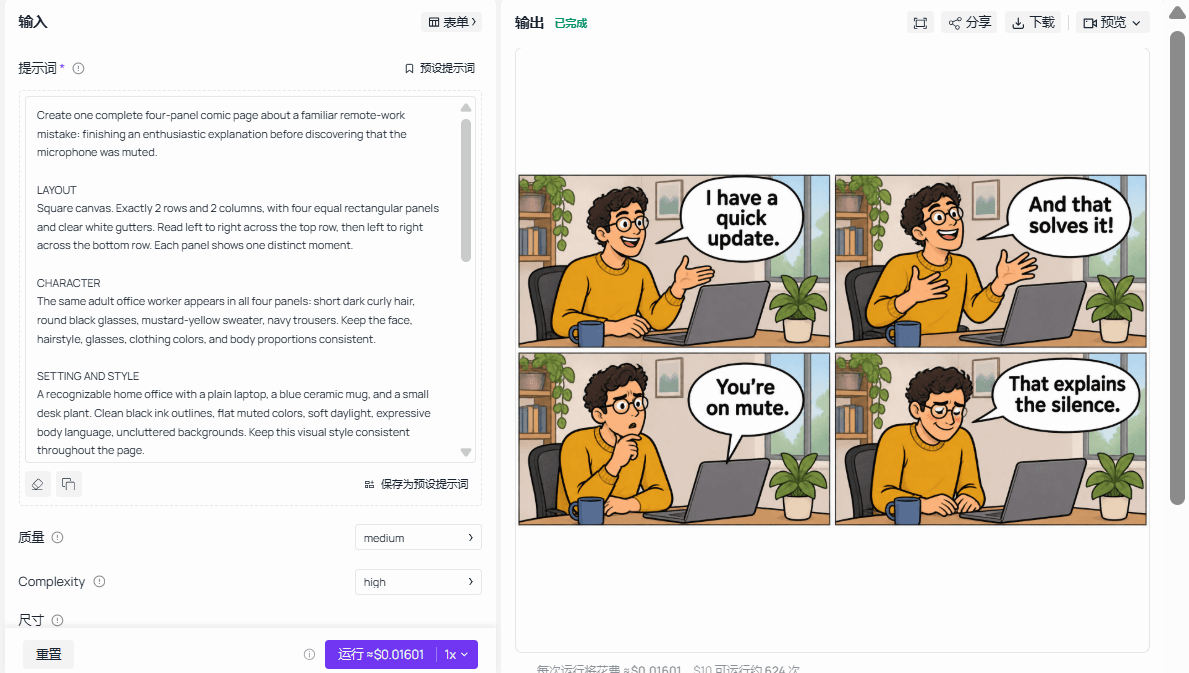
Prompt and result together: compare the four requested beats, dialogue, and bubble sources with the visible page.
The negative instructions each protect something specific. Excluding titles and captions reserves space for dialogue. Naming the bubble source keeps the laptop's correction separate from the worker's speech. Excluding a readable interface lets the picture communicate a meeting without relying on fabricated software labels.
Keep the prompt beside the downloaded result during review. Mark a mismatch as layout, identity, action, or lettering. If several categories fail together, simplify the brief before retrying. If only one line needs revision, preserve the approved source and move to the edit entry.
Review the Completed Page Before You Rerun
Save the original result before making changes. Count the panels, read every bubble verbatim, and trace each tail to its source. Then compare the worker's hair, glasses, sweater, and proportions across the page.
Finally, cover the last panel. The earlier panels should set up the reaction without already delivering it. Ask someone unfamiliar with the prompt to explain the joke; a reader who needs your script has identified a story problem.
Measure elapsed time from submission until the result is available to download. That includes service waiting and delivery. MiniMax's under-10-second 4K claim describes vendor-reported performance; it is not a promise about the Standard playground's end-to-end completion time.
Keep the Same Character Across Panels and New Strips
Create a Reference Sheet From the Approved Character
Approve the first worker before extracting a reference. If you dislike the face or clothing, fix the source page first. A reference sheet can carry an unwanted feature into every later strip.
Open the MiniMax H3 Image edit playground. Upload the approved office comic as image 1, keep the square canvas and one-image output, and use Prompt B. Prompt expansion applies to edits, so do not depend on disabling it.
The 3 views belong to one reference-sheet file. Uploading that sheet later counts as one input image. Inspect the face shape, curl pattern, glasses, sweater, trousers, and full-body proportions before approving it.
Prompt B: extract the character reference
plaintext1Use image 1 as the source of the character's identity and drawing style. 2 3Create a character reference sheet on a square white canvas. Show the same adult office worker in three clearly separated full-body views: front view, three-quarter view, and side view. 4 5Preserve the character's face shape, short dark curly hair, round black glasses, mustard-yellow sweater, navy trousers, body proportions, black ink outlines, and muted flat colors from image 1. 6 7Use a neutral standing pose and a calm expression in every view. Show the complete body without cropping. Do not redesign or beautify the character. Do not include the laptop, desk, speech bubbles, backgrounds, text, letters, numbers, logos, or watermark.
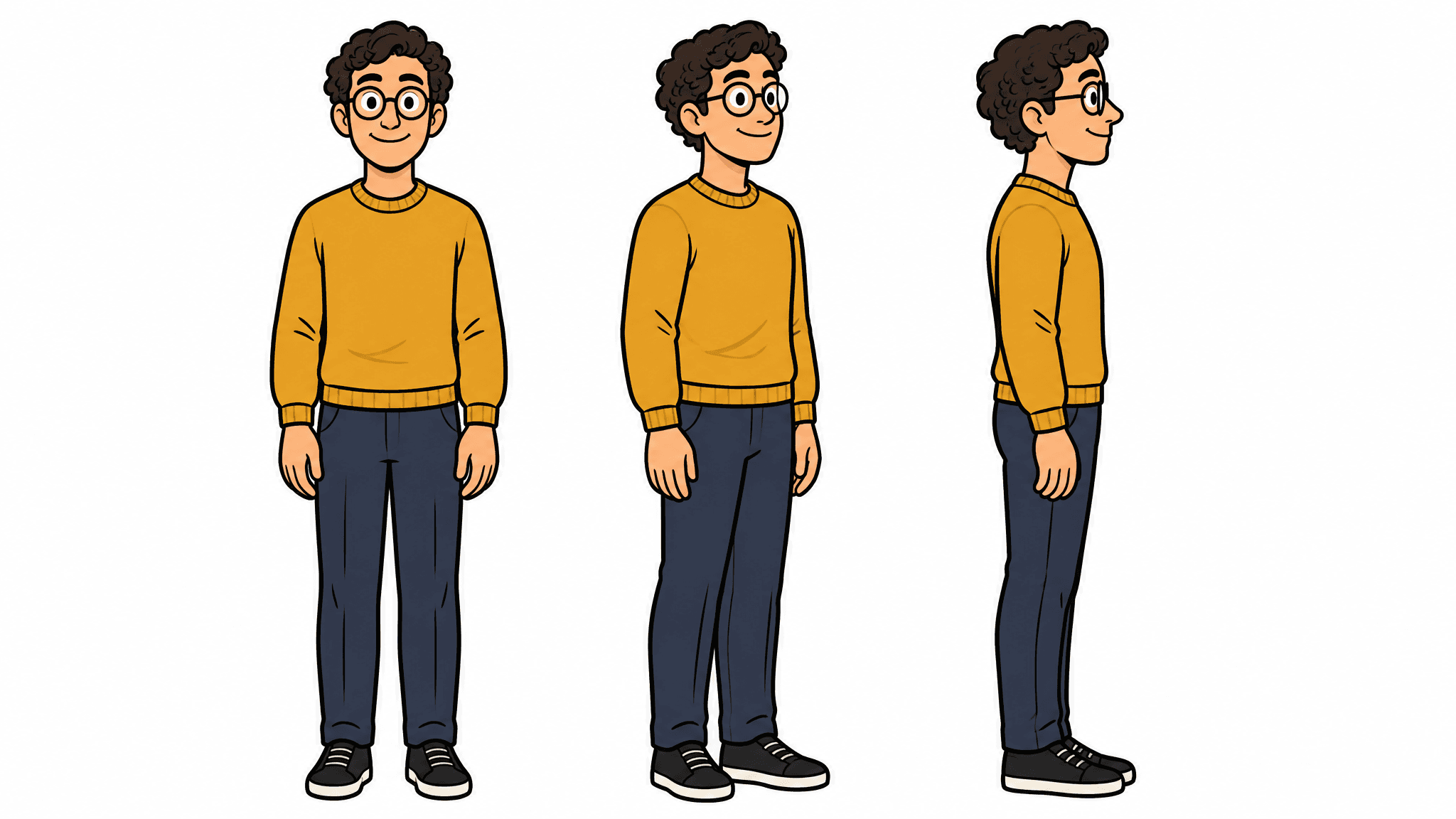
The sheet separates three full-body views while retaining the curls, round glasses, mustard sweater, and navy trousers used in the office story.
Choose a reference with a face large enough to inspect. A tiny character hidden behind a desk gives you less evidence for deciding whether the sheet preserved the design. Compare the side view's glasses and hair silhouette as well as the front view; consistency means the views describe one person.
Keep a small continuity note beside the reference files: mustard sweater, navy trousers, round black glasses, blue mug, small plant. Use that same list when reviewing the sequel. It turns a vague judgment about resemblance into a repeatable check of the features you actually care about.
Give Each Reference Image One Job
For the sequel, upload the character sheet first and the original comic second. Image 1 supplies identity and clothing. Image 2 supplies linework, colors, gutters, and the home-office atmosphere. Verify the thumbnail order before submitting.
This division helps explain your intent when references contain competing information. The original page contains useful drawing style and an old story. Prompt C explicitly keeps the style while replacing the actions and dialogue.
References guide the result; they do not lock pixels or guarantee identical features. Review identity, props, and style separately. A recognizable worker can still sit beside a mug that changes color, while matching colors can hide a changed face.
Prompt C: the screen-sharing sequel
plaintext1Create a new four-panel comic page. 2 3REFERENCE ROLES 4Use image 1 only for the office worker's identity, hairstyle, glasses, clothing, and body proportions. 5Use image 2 for the black ink linework, muted flat colors, panel borders, gutters, and home-office atmosphere. 6Tell the new story below. Do not copy the previous story or its dialogue. 7 8LAYOUT 9Square canvas. Exactly 2 rows and 2 columns with four equal rectangular panels. Read left to right, top row before bottom row. 10 11STORY 12The same office worker realizes that screen sharing is still active after a meeting. 13 14PANEL 1, TOP LEFT 15The worker leans back after finishing a presentation. 16The worker says exactly: "That's everything." 17 18PANEL 2, TOP RIGHT 19The worker reaches toward a lunch bag beside the desk. 20The worker says exactly: "Time for lunch." 21 22PANEL 3, BOTTOM LEFT 23The worker freezes while listening to the laptop. 24A speech bubble from the laptop speaker reads exactly: "You're still sharing." 25 26PANEL 4, BOTTOM RIGHT 27The worker quickly reaches back toward the laptop with an embarrassed smile. 28The worker says exactly: "Bonus content." 29 30Keep the same character design in every panel. Keep the blue mug and small plant visually consistent when visible. Use large readable lettering and clear bubble tails. Include only the four quoted lines. No title, panel numbers, logos, readable software interface, or watermark.
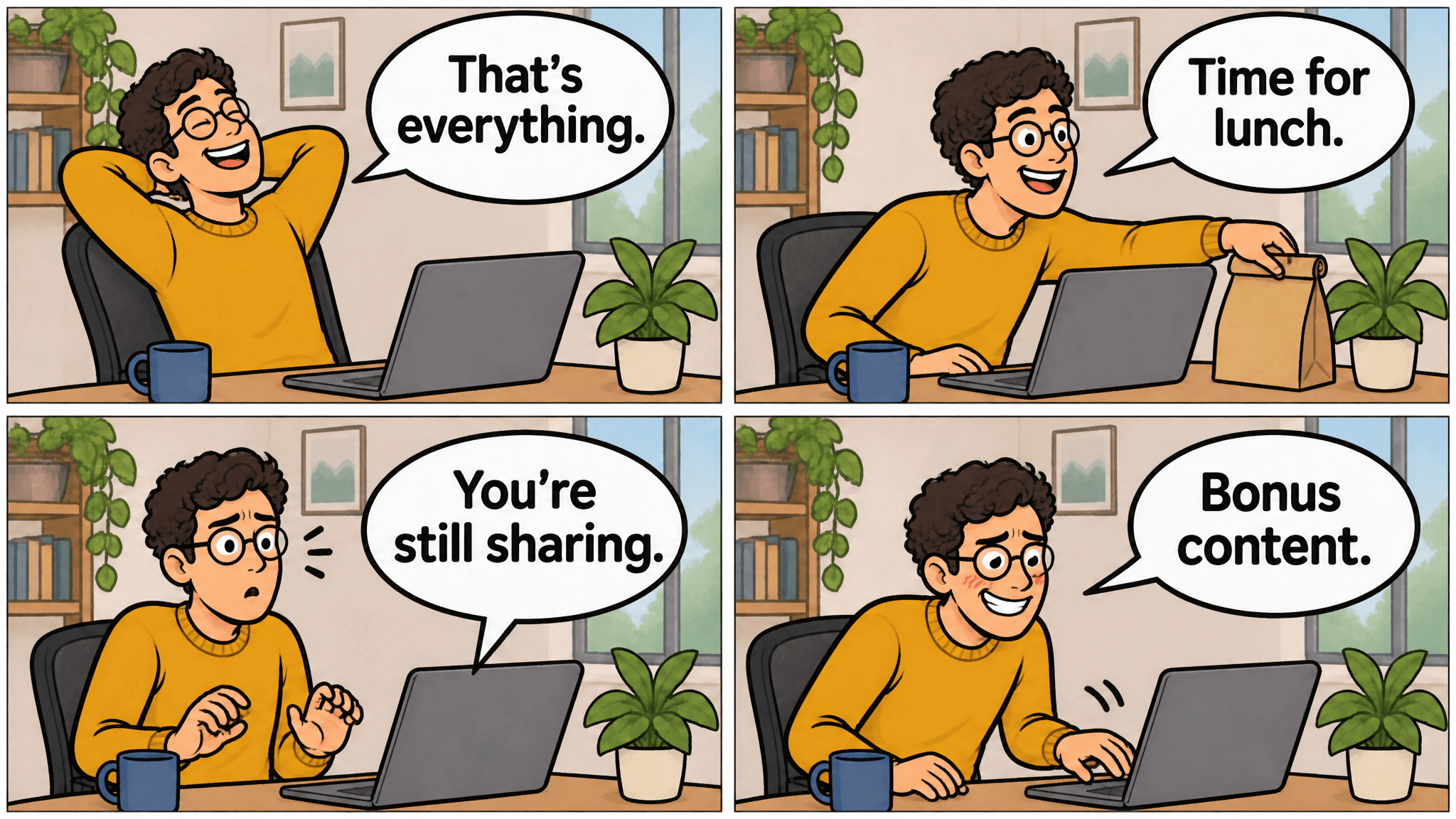
The sequel keeps the worker, blue mug, plant, and home-office layout recognizable while replacing the first story's actions and dialogue. The laptop delivers the correction in panel 3.
Keep the approved sheet unchanged between episodes. If you intentionally redesign the character, save a new version and label which episodes use it. Otherwise an accidental change can become the next strip's reference and gradually replace the original design.
Fix Lettering, Layout, and Continuity Problems
Make One Targeted Edit and Recheck the Whole Page
Choose the smallest instruction that addresses the actual problem. A wrong bubble tail needs a source correction. A missing story beat needs an action correction. Asking for a generally "better comic" gives you little control over which parts change.
| Symptom | First response | Recheck afterward |
|---|---|---|
| Missing or extra panel | Restate 2 rows and 2 columns; regenerate if the structure remains confused | Panel count and reading order |
| Changed glasses, clothes, or face | Supply the approved character reference and name the changed feature | All panels and recurring props |
| Misspelled line or wrong speaker | Quote the replacement and identify its panel and source | Every line and bubble tail |
| Punchline appears early | Rewrite the earlier action or dialogue before generating again | What each panel reveals |
| Frames look correct but lack cause and effect | Repair the 4-beat script | Whether a new reader can explain the sequence |
Prompt D demonstrates a deliberate copy edit, rather than assuming the original result contains an error. Upload the sequel as image 1 and replace "Bonus content." with "Still here."
Prompt D: shorten the final line
plaintext1Edit image 1. 2 3In the bottom-right panel only, replace the office worker's speech-bubble text with exactly: 4"Still here." 5 6Keep the same speaker and bubble-tail direction. Preserve the four-panel layout, story actions, character identity, hairstyle, glasses, clothing, desk objects, linework, colors, and all dialogue in the other three panels. 7 8Do not add another bubble, title, caption, panel, logo, or watermark.
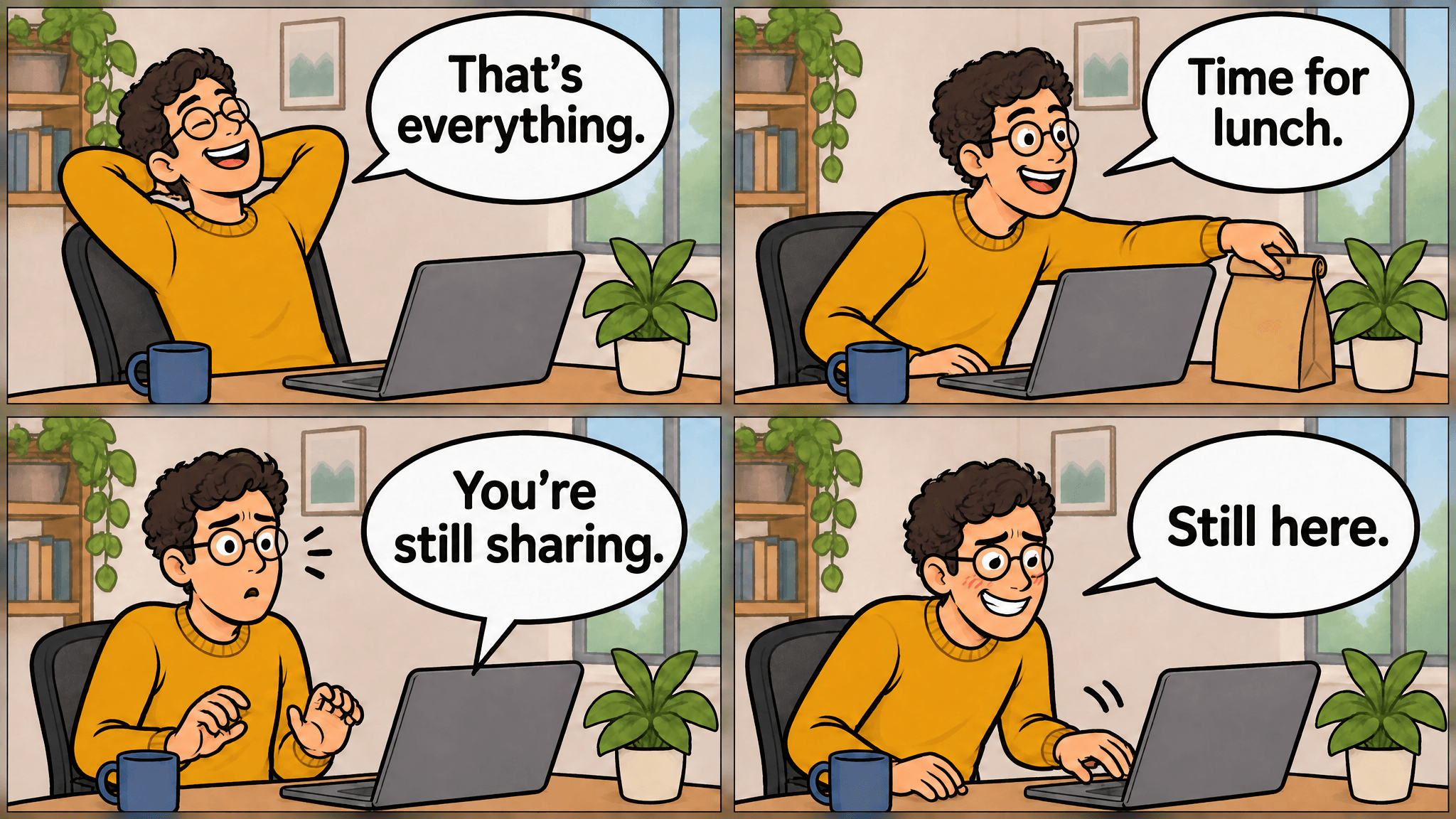
The final bubble now reads "Still here." Compare it with the preceding sequel image to check whether the other three lines, objects, and panel borders stayed consistent.
Compare the whole edited page against the source. Check the first 3 lines again, then the character, objects, and panel borders. A correct replacement does not establish that everything else stayed unchanged. The MiniMax H3 Image README lists mask-based inpainting as unsupported, so this tutorial makes no promise of a protected local region.
A useful edit request names the panel, the replacement, and the elements you want preserved. It should also leave a clear comparison to perform afterward. Save the source under a different filename so an unsuccessful edit cannot overwrite your only approved episode.
Move Lettering Outside the Model When It Keeps Failing
If repeated edits keep breaking readable text, request artwork without bubbles, captions, letters, or numbers. Add the approved dialogue in a conventional layout tool, using a consistent font and manually positioned tails.
That gives you deterministic control over spelling and placement. Reserve bubble space in the artwork prompt, keep the script beside the layout, and check that a bubble does not cover the hand movement that explains the joke.
Use separate panels if that makes assembly easier. Keep the panel order from the script and export one finished page. Preserve both the unlettered artwork and editable lettering file so a later wording change does not require another model run.
Try 2 More Comic Prompts for Everyday Stories
A Silent Coffee-Shop Comic
The coffee example removes dialogue and makes an object carry the story. The blue cup stays home, the commuter searches an empty bag, and the final return closes the loop.
The important relationship is spatial: the reader sees where the cup belongs and where it is missing. Give the first panel enough counter space to establish the cup. In panel 3, keys and a scarf make the bag's contents visible without introducing another explanation.
Prompt E: the forgotten cup
plaintext1Create a silent four-panel comic about remembering a reusable coffee cup only after leaving home. 2 3LAYOUT 4Square canvas. Exactly 2 rows and 2 columns, four equal panels with clear white gutters. Read left to right, top row before bottom row. 5 6CHARACTER 7The same adult commuter in every panel: chin-length dark hair, green jacket, beige trousers, and a tan shoulder bag. 8 9STYLE 10Clean black ink outlines, muted flat colors, soft morning daylight, expressive but believable gestures, recognizable everyday settings. 11 12PANEL 1, TOP LEFT 13Inside a small kitchen, the commuter confidently picks up the shoulder bag. A distinctive blue reusable cup remains clearly visible on the counter behind them. 14 15PANEL 2, TOP RIGHT 16At a neighborhood coffee counter, the commuter opens the shoulder bag to look for the cup. 17 18PANEL 3, BOTTOM LEFT 19Close view of the open bag containing keys and a folded scarf, with no cup. The commuter's hand pauses in realization. 20 21PANEL 4, BOTTOM RIGHT 22Back in the kitchen, the blue cup sits exactly where it was left. In the background, the commuter returns through the doorway with a sheepish expression. 23 24Tell the complete story through actions, objects, expressions, and composition. Keep the commuter, bag, and cup consistent. No speech bubbles, captions, signs, labels, letters, numbers, logos, or watermark.
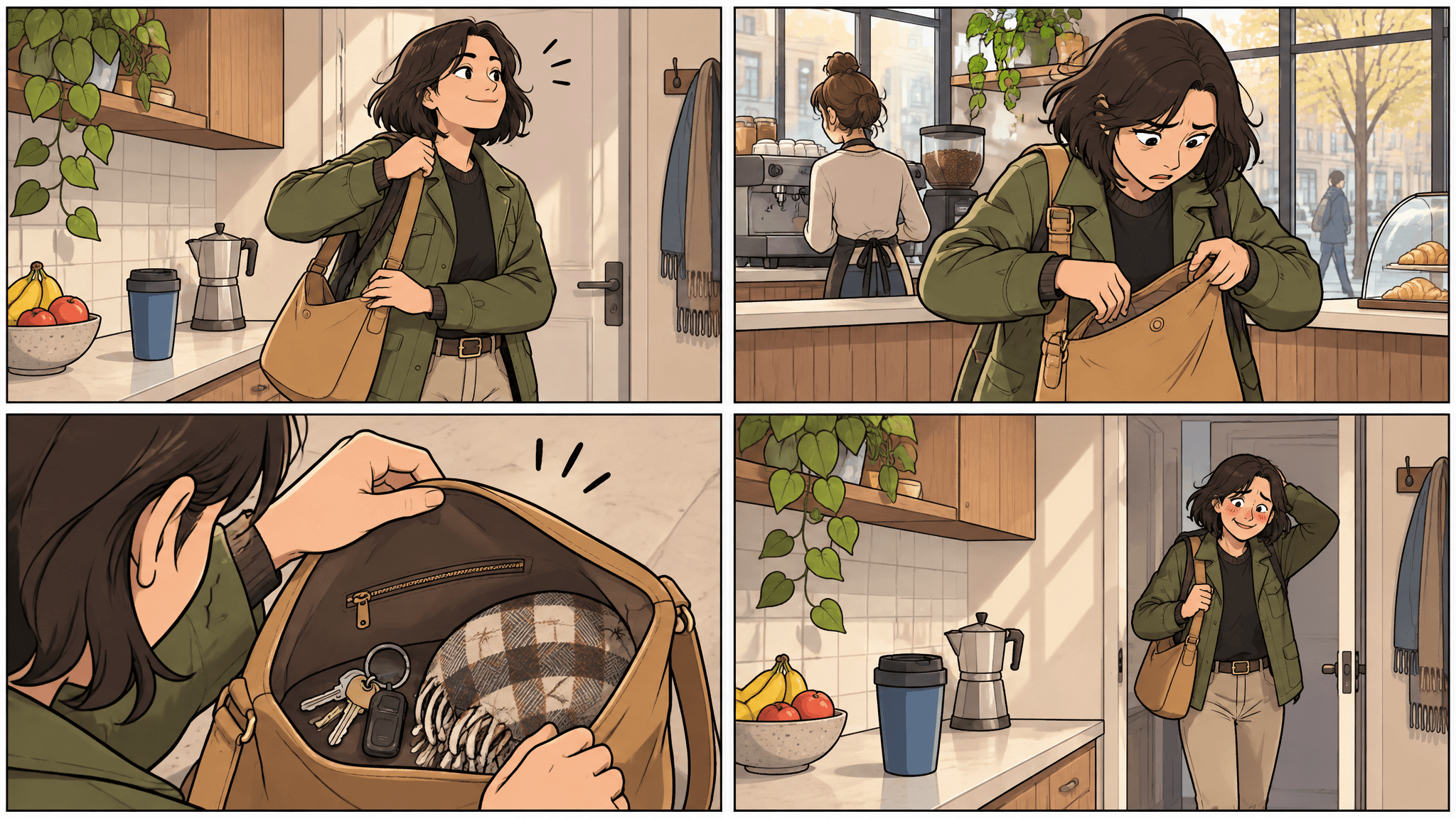
The blue cup remains on the kitchen counter while the commuter searches a bag at the coffee shop and then returns home. No dialogue is needed to explain the missing object.Prompt and result together: check the cup on the counter, the empty bag, and the return home.
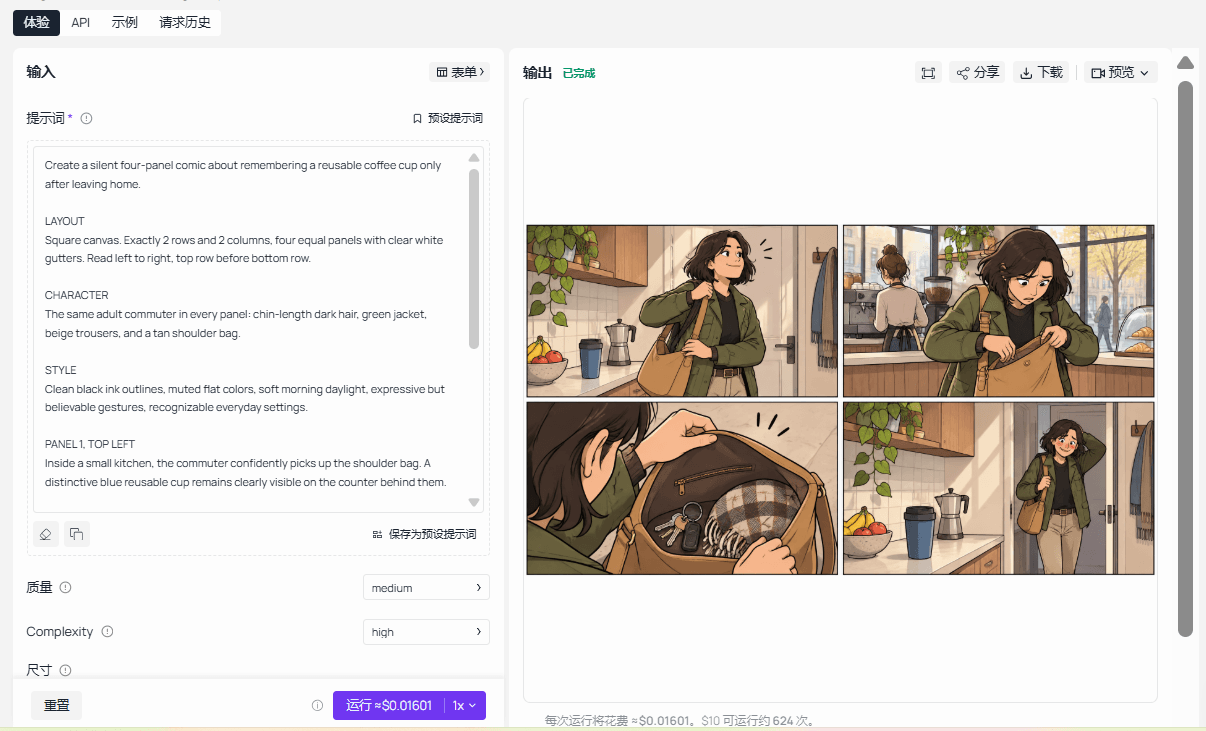
Review this page without reading its prompt. The commuter should look for the cup at the coffee counter and return home afterward. Reject an output where the cup appears inside the bag, since that removes the reason to return.
You can replace the cup with a lunchbox or library card. Keep the same logic: establish the object, leave it behind, discover its absence, and respond. Avoid adding a second forgotten item until the first sequence reads clearly.
A Short Study-Habit Comic
The bookmark example uses 2 adult students and one practical suggestion. It tests whether the model can keep speakers distinct while showing a small hand action in the correct order.
Student A begins folding a page corner. Student B offers an alternative. Student A uses it and delivers the final line. The lesson emerges from an observable action, so the page does not need a paragraph explaining book care.
Prompt F: the bookmark lesson
plaintext1Create a four-panel comic about using a bookmark instead of folding a book's page corner. 2 3LAYOUT 4Square canvas. Exactly 2 rows and 2 columns with four equal panels and clear white gutters. Read left to right, top row before bottom row. 5 6CHARACTERS 7The same two adult students throughout. 8Student A has short brown hair and wears a blue cardigan. 9Student B has dark braided hair and wears a rust-red shirt. 10 11SETTING AND STYLE 12A quiet library table. One plain green paperback and one yellow rectangular bookmark. Clean black ink outlines, muted flat colors, soft daylight, uncluttered backgrounds. 13 14PANEL 1, TOP LEFT 15Student A starts to bend the top corner of a page in the green book. 16Student A says exactly: "I'll mark my place." 17 18PANEL 2, TOP RIGHT 19Student B notices and holds up the yellow bookmark. 20Student B says exactly: "Try this." 21 22PANEL 3, BOTTOM LEFT 23Student A places the bookmark between the pages and closes the book without folding the corner. 24Student A says exactly: "Page saved." 25 26PANEL 4, BOTTOM RIGHT 27Both students smile. Student A holds the closed green book with the yellow bookmark visible at the top. 28Student A says exactly: "Corner saved too." 29 30Keep both students' identities, clothes, and proportions consistent. Keep the book green and the bookmark yellow. Use large readable English lettering and clear bubble tails. Include only the four quoted lines. No title, readable book-cover text, signs, panel numbers, logos, or watermark.
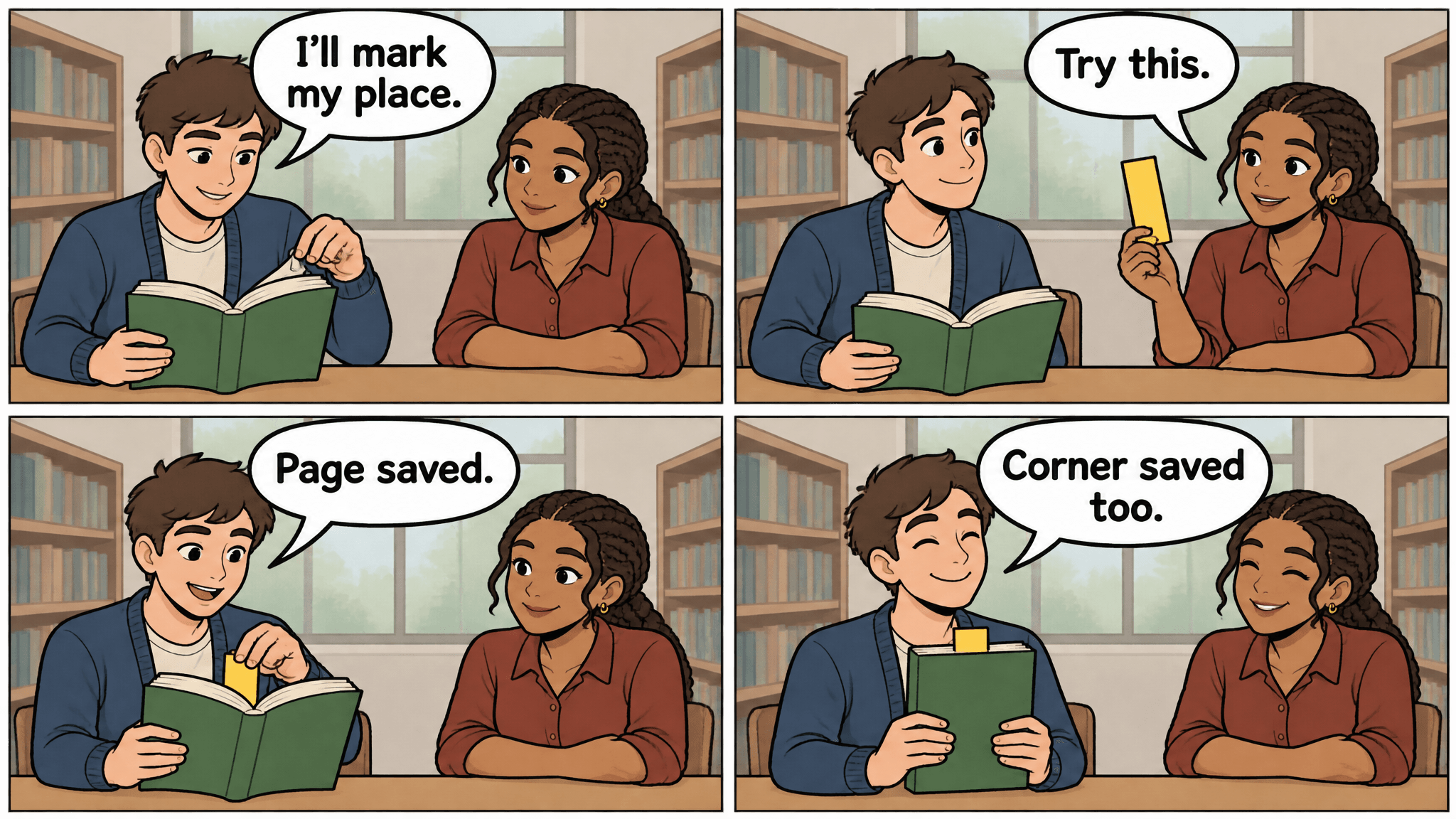
Student B offers the yellow bookmark before Student A places it in the green book. The four short lines remain readable and assigned to their intended speakers.Prompt and result together: inspect when the bookmark appears, which student speaks, and how the final action reads.
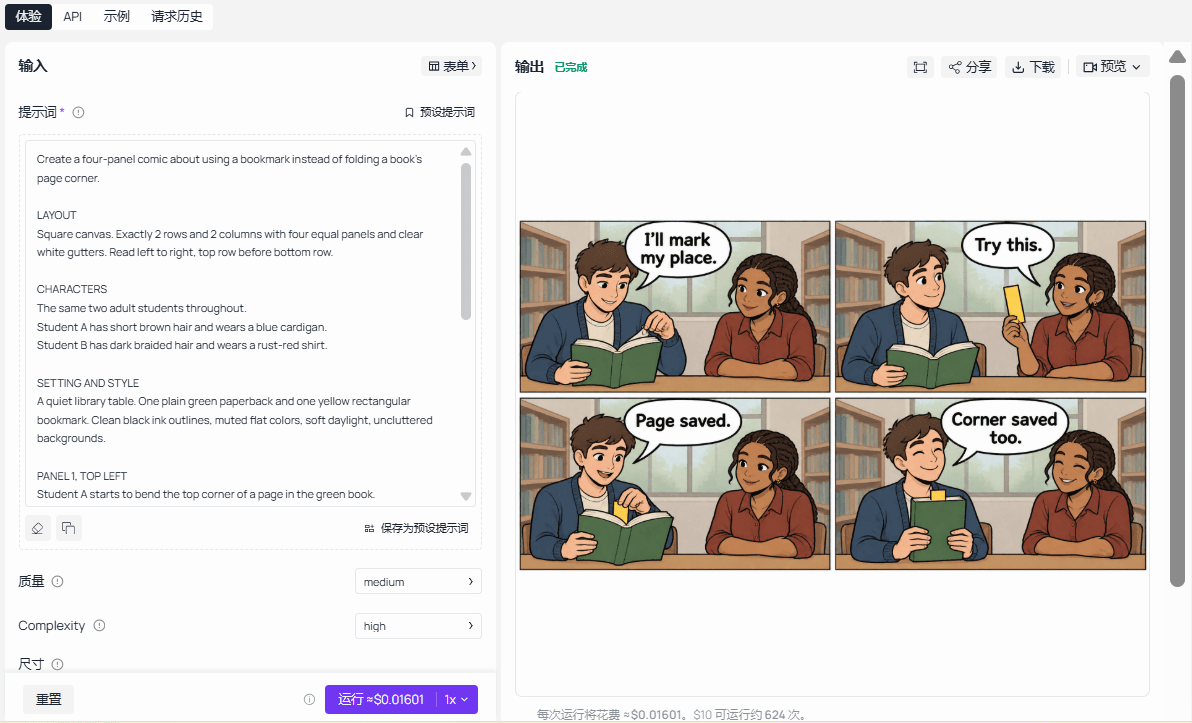
Look closely at the hands and book corner. Correct lettering cannot compensate for a picture that shows the bookmark already in place before Student B offers it. Track the green cover and yellow bookmark through all 4 frames.
For another teaching strip, change one habit and one object together. A cable organizer or labeled storage box can follow a similar action sequence. Keep the explanation limited to what the pictures actually demonstrate, without inventing educational outcomes.
Check Readability, Generation Cost, and Export Settings
Record a failed request separately from a paid completed result. A timeout in your capture tool does not by itself tell you whether the service finished the task or billed it. Check the task history before resubmitting so the next attempt does not duplicate a result that already exists.
Open the finished page at the width readers will see on a phone. Read without zooming. If the dialogue needs magnification, enlarge the lettering, reduce its word count, or publish panels as a carousel. Extra pixels alone will not fix a crowded composition.
Keep the original high-resolution file and export a separate web version. Inspect the smaller version after compression, especially apostrophes, bubble tails, and narrow gutters. Keep explanatory captions outside the comic so they remain readable as article text.
For MiniMax H3 Image comic strip creation, record attempts by task. A character sheet is reusable preparation; a sequel and its revisions are new episode work. The illustrations let you inspect story order, lettering, and visible continuity. They do not provide a measured MiniMax H3 Image success rate or elapsed generation time.
| Case or task | Visible check in the illustration | MiniMax H3 Image run status |
|---|---|---|
| Muted meeting | Four distinct beats; the laptop speaks in panel 3 | Not verified |
| Character reference | Three views retain the sweater, glasses, and hairstyle | Not verified |
| Screen-sharing sequel | The same worker appears in a new four-beat story | Not verified |
| Dialogue revision | The final line reads "Still here." | Not verified |
| Silent coffee story | The cup stays home during the bag search | Not verified |
| Bookmark lesson | The bookmark is offered before it is placed in the book | Not verified |
For your own MiniMax H3 Image run, calculate generation cost as text-to-image runs × that day's applicable rate, plus edit runs × that day's applicable rate. Check the exact Standard entries in the live model directory, then confirm the task quote for your chosen size. Discounts and final charges can differ from a rounded catalog price.
Hosted access lets you work in a browser without installing model weights. Local execution requires a compatible inference setup and its own compute budget. Open weights do not make hosted generation free.
Start your next strip in Atlas Cloud's text-to-image entry with a 4-beat script you can explain before you generate it.
Frequently Asked Questions
Can I Use an Existing Character Drawing as a Reference?
Yes, choose a clear drawing you have the right to use and explain which features it supplies. Add another reference only when it has a distinct purpose, such as linework or palette. Inspect the result for identity drift; reference input does not guarantee every detail will survive.
Can I Publish or Sell Comics Made With MiniMax H3 Image?
Check the current MiniMax H3 Image Community License and your service's terms before publishing. The November 2026 text says MiniMax claims no rights over outputs, while also restricting use and display outside its applicable territory, which excludes the US, UK, EU, and South Korea. It requires clear disclosure of machine-generated public content.
Separate authorization provisions also apply to certain commercial and hosted uses. Open weights alone do not establish permission for your location or project.
Can I Turn the Finished Strip Into a Vertical Carousel?
Yes. Crop the approved page into its 4 panels and arrange them in reading order in a local layout tool. Preserve complete bubbles and tails, then check each slide at phone size. Keep the original page as the source so the carousel and article use the same artwork.




