You subscribed so you could run H3. The Subscription Key arrived, the usage bar showed up, the dashboard looked healthy. Then the first call came back with an error.
The answer was sitting under the tier table the whole time, in 11-pixel grey type you have to select with your cursor to read comfortably. It is not a conspiracy. It is just typography. It is also enough to burn a month of subscription fee on a model the plan never covered.
So before you spend another hour comparing tiers: MiniMax has four separate wallets, and only one of them can pay for an H3 clip.
Key takeaways
- The MiniMax Token Plan does not cover H3. The grey line under the tier table names it directly, and the quota list only includes text, image, speech and music.
- Prepaid Video Packages do not cover H3 either. Their own page carries an alert saying so.
- H3 runs on pay-as-you-go, full stop. There is no subscription break-even point to calculate, because there is no H3 subscription.
- The money you can actually save is in wasted seconds, not in the per-second rate. Lock your first frame and iterate short before you commit to 2K.
Last updated: 2026-08-12. MiniMax plan tiers have changed before, and one of them was pulled outright. Re-check the official pricing pages before you commit budget.

Night shoot for an ad spot, with a director's field monitor showing a neon noodle-stall frame and a spike of paper receipts in the foreground
The shoot is the cheap part. Working out which wallet the render comes out of is where teams lose a week. Generated with openai/gpt-image-2/text-to-image.
Here is the payoff before any theory. One 8-second product shot for a night-market noodle stall, rendered at 2K from a single locked first frame. Every number in this article is the real bill for this exact clip.

Eight-second 2K noodle-stall clip generated by MiniMax H3 from a locked first frame
The finished take, billed $1.12. The delivered mp4 is 2560x1440, 24fps, exactly 8.00s, with a 32kHz AAC stereo track; this is a downsampled silent GIF of it.
Why "MiniMax H3 Token Plan vs Pay As You Go" Is the Wrong Question
The keyword exists because H3 made 2K video cheap enough to budget monthly. At a listed $0.13 per second for 2K and $0.08 per second for 768P (MiniMax pay-as-you-go docs, August 2026), a performance team can suddenly put native-audio 2K clips into a weekly ad rotation. The moment something becomes a monthly line item, people start shopping for a subscription.
Three ways that shopping trip goes wrong, in the order we see them:
- Treating the Subscription Key as an H3 key. Token Plan issues its own key. Your pay-as-you-go API key is a different credential against a different balance. Swapping them is the single most common source of auth errors here.
- Buying a Video Package first and reading the alert second. The packages are real prepaid discounts on Hailuo video models. H3 is explicitly outside them.
- Copying a tier table out of a third-party roundup. Plenty of pages still quote a $10 starter tier that no longer exists, and 768P at $0.09 or $0.10 per second, which is not what MiniMax's own page says.
That last one is worth a rule: trust the official page and your own invoice, and nothing in between.
The Four Wallets Behind MiniMax H3 Pay As You Go
MiniMax bills through four pools that look interchangeable in a dashboard and are not. This is the table to screenshot.
| Wallet | What it costs | Expiry | Key type | Pays for H3? |
|---|---|---|---|---|
| Pay-as-you-go balance | Metered per second of output | Balance does not expire | Standard API key | Yes, the only one |
| Token Plan | Plus $20, Max $50, Ultra $120 per month | Monthly, 5-hour rolling and weekly windows, no carryover | Separate Subscription Key | No, excluded in writing |
| Video Packages | $1,000 to $6,000 prepaid, 3,760 to 26,780 video points, 5% to 20% off | Valid 1 month, resets to zero | Account balance | No, "not supported yet" |
| Prepaid Credits | $5, $25 or $100 for 5,000 / 25,000 / 100,000 credits | 365 days from purchase | Subscription Key | Unclear, see note |
The Token Plan page is unambiguous once you find the line. Its coverage note reads: "Available model coverage includes the full MiniMax lineup (M3 / M2.7 / image / speech / music). A small number of special models (MiniMax H3, voice design, rapid voice cloning, etc.) are not currently supported." The quota description above it lists text, image, speech and music resources sharing one pool (MiniMax Token Plan docs, August 2026). Video is simply not in the pool.
The Video Packages page carries its own alert: "Video packages support Hailuo video models. MiniMax H3 is not supported yet", followed by a pointer to pay-as-you-go or sales (MiniMax video pricing docs, August 2026). Those packages also expire in a month and reset to zero, which makes them a commitment, not a savings account.
One honest gap: the Prepaid Credits block on the Token Plan page says "Credits usage is unrestricted" and gives credits a 365-day validity, but it never names H3 either way. We have not verified an H3 job billing against credits, so treat that row as untested rather than as a yes.
Which rate actually hits your card. Two routes, two rate cards. Both are real, and the cheaper per-second number is not automatically the cheaper month.
| Line item | MiniMax direct (list) | Atlas Cloud (routed) |
|---|---|---|
| H3 video output, 2K | $0.13 / second | $0.14 / second |
| H3 video output, 768P | $0.08 / second | $0.10 / second |
| 768P to 2K regeneration | $0.05 / second | Not offered as an H3 endpoint |
| H3-Context-IR tokens | $0.90 in / $3.60 out per M tokens | Not billed separately |
| Reference audio | Free | Free |
| Reference images | First 5 free, then $0.04 each | Included in the per-second rate |
| Reference video | Billed by input duration at the output resolution rate | Included in the per-second rate |
| Minimum to start | Account top-up | No minimum, balance does not expire |
Read that honestly: Atlas Cloud is not the cheaper per-second option, and there is no discount running on H3 as of this month. What the routed price buys is a flatter setup. No deposit tier, no expiring points, no second key system, and one key reaches all three H3 endpoints inside a catalogue of 474 models, 203 of them video. When you are still deciding whether H3 belongs in the pipeline at all, that matters more than one cent per second.
It also has a real gap worth naming: MiniMax's $0.05 per second Regeneration path, which re-renders a finished 768P take into 2K, has no equivalent H3 endpoint on the routed side. The closest substitute is the generic video upscaler at $0.0240 per second to 2K with a 5-second minimum, and an upscaler cannot invent detail the source never had.
Last updated: 2026-08-12. Prices and plan tiers verified on the official MiniMax pricing pages and the Atlas Cloud model pages on that date. Re-check both before you commit budget.
MiniMax H3 Token Plan vs Pay As You Go: A Monthly Volume Decision Table
There is no subscription break-even to find, so the useful question becomes: at my volume, what does one finished clip actually cost, and what do I change to lower it?
Costs below are measured Atlas Cloud bills for 8-second clips at 2K, including one first frame per shot and a realistic number of takes.
| Finished clips per month | Recommended path | Real cost per finished 8s clip |
|---|---|---|
| Under 10 | Pay-as-you-go, shoot 2K straight, absorb the retries | About $2.41 (two 2K takes plus one first frame) |
| 10 to 100 | Pay-as-you-go with a locked first frame. Iterate at 4s / 768P, commit once at 8s / 2K | About $1.69 (two 4s tests at $0.40, one $1.12 final, $0.17 frame) |
| 100 to 1,000 | Same recipe, submitted in batches. Your ceiling is concurrency, not unit price | About $1.69 plus one first frame per shot |
| Over 1,000 | Custom terms with a provider. Video packages still will not pay for H3 | Negotiated |
Notice what is missing: a discount column. On H3 there is no volume tier to buy into, because the two prepaid pools that offer volume discounts both exclude it. So the thing to shop for at scale is not price, it is throughput. On the direct API, MiniMax documents a task-concurrency ceiling that a serious batch will hit. On a routed provider we have measured wider headroom: 20 H3 image-to-video jobs submitted with no waits all returned HTTP 200 inside 8.1 seconds and all 20 completed, median 175.6 seconds submit to done. Do not assume that is constant, but do measure it before you plan a batch night.
Tutorial: Pricing One Real Shot on MiniMax H3 Pay As You Go, Step by Step
Four steps, one clip, one honest invoice at the end. Everything here runs in a browser tab.
Step 1. Lock the first frame.
This is the step that makes the rest of the article's arithmetic work. If you go straight to text-to-video, the same prompt at 768P and at 2K returns two different films, because H3's 2K path is in-context regeneration rather than an upscale. Set dressing, camera height and prop placement all move. Lock a first frame and the two tiers hold the same composition, so the difference collapses to detail instead of being a different shot.
Open GPT Image 2, set quality to high and size to 2048x1152 (16:9), and paste this:
text1A photorealistic cinematic still of a night-market noodle stall at 11pm: a wok bursting with orange flame behind the counter, steam curling through magenta and cyan neon signage, a vendor's hands lifting a tangle of glossy hand-pulled noodles out of a steel basket with long chopsticks, condensation on the stainless counter, hand-painted menu board slightly out of focus in the background, rain-slick pavement reflecting the neon, shot on a 35mm anamorphic lens at f/2.0, shallow depth of field, warm practical lighting against cool blue night, rich film grain, 16:9 2
Billed: $0.1745. Worth knowing that the $0.009 figure in the model listing is a token-tier floor, not what a high-quality 2048x1152 image costs.
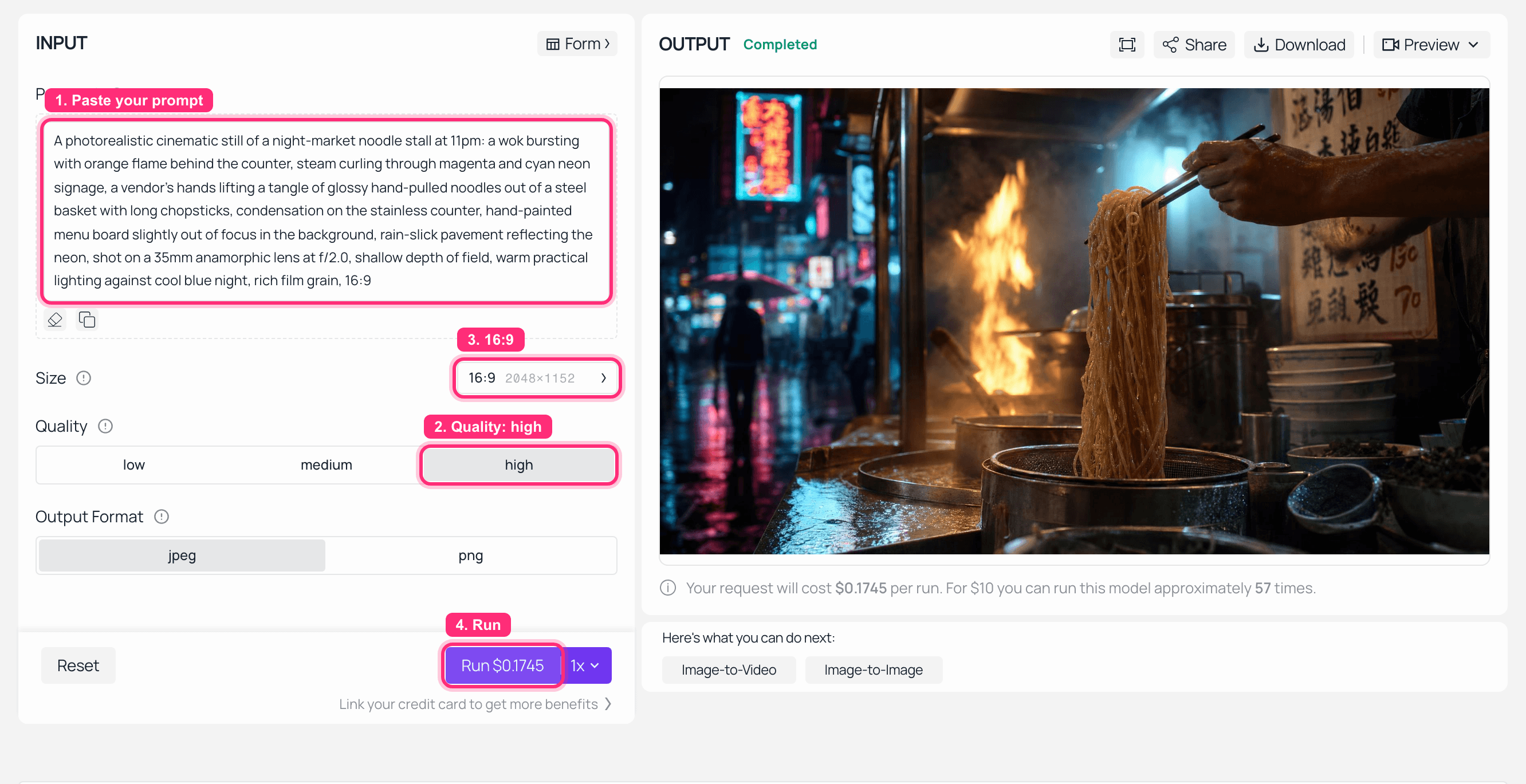
GPT Image 2 playground on Atlas Cloud with the noodle-stall prompt and the generated first frame in the output panel
Step 1 completed in the playground. The Run button quotes the charge before you submit it.

The generated first frame: a night-market noodle stall with wok flame and neon signage
The locked first frame. Both video takes below start from this exact file.
Step 2. Render the draft at 768P.
Open H3 image-to-video, upload the Step 1 frame, set resolution 768P, duration 8, and leave ratio on adaptive (the uploaded frame decides the shape on this endpoint). Prompt:
text1The vendor lifts the noodles higher and steam rises across the frame; the wok flame flares once behind him and settles; neon reflections shimmer on the wet pavement; slow handheld push-in toward the noodles. Ambient audio: sizzling oil, the clatter of a metal ladle, distant street chatter, light rain. No music, no voiceover, no on-screen text. 2
Delivered: 1344x768, 24fps, 32kHz AAC stereo. Billed $0.80, about 190 to 215 seconds of wall time. Resolution and duration are both required fields on this endpoint, so send them explicitly rather than trusting a default.
Step 3. Render the final at 2K.
Same endpoint, same frame, same prompt. Change one field: resolution 2K. Delivered 2560x1440 at 24fps with its own 32kHz stereo mix. Billed $1.12, roughly 310 to 400 seconds.
Worth knowing before you plan around drafts: we compared the two audio tracks sample by sample and they are unrelated, with a waveform correlation of 0.005 at zero lag. The 768P pass tells you whether the composition and the action work. It does not preview the mix you will ship.
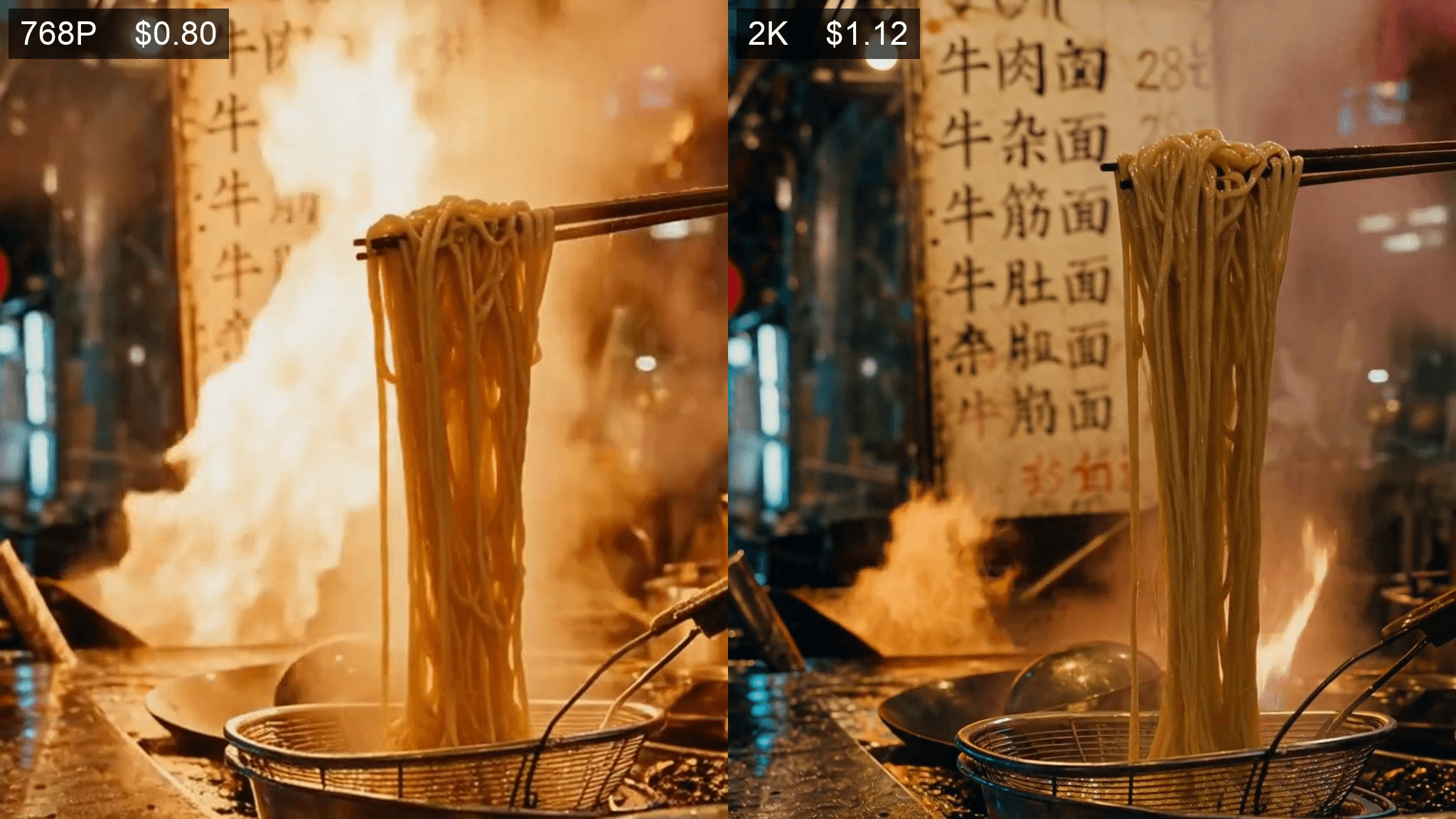
Matched crops from the 768P draft and the 2K final, labelled with their real bills, showing the menu board legible only at 2K
The same moment from both takes, cropped identically. Framing, props and the vendor's action hold; the hand-painted menu board is mush at 768P and resolves into readable dish names and prices at 2K. The flame differs slightly because each tier is still a separate render, not an upscale of the other.
In the playground the Run button quotes $1.12 before you submit, at the page defaults of 2K and 8 seconds, and the invoice came back at exactly that. The two clips above are the API responses from these runs rather than screen captures of them.
Step 4. Get the real invoice.
Do not price your month off a rate card. Re-request the prediction by ID after the job finishes and read its price field. On H3 that field often comes back empty at the moment status flips to completed, so poll it again a few seconds later. That second poll is the only way to get an honest per-clip number.
| Step | Model | Settings | Billed |
|---|---|---|---|
| 1 | openai/gpt-image-2/text-to-image | quality high, 2048x1152 | $0.1745 |
| 2 | minimax/h3/image-to-video | 768P, 8s, adaptive | $0.80 |
| 3 | minimax/h3/image-to-video | 2K, 8s, adaptive | $1.12 |
| One finished shot, drafted and delivered | $2.0945 |
Three Cheaper Ways to Run MiniMax H3 Pay As You Go
Iterate short, commit long. Duration is a straight multiplier and 4 seconds is the floor. A 4s 768P test take bills $0.40 against $1.12 for an 8s 2K take, so two prompt revisions still cost less than one committed render. This is the biggest lever in the list, and it costs nothing to adopt.
Reuse the frame across aspect ratios. Crop the same locked first frame to 9:16 and re-run image-to-video for a vertical cut. You pay for seconds, not for the extra format, and the composition survives because the frame did.
Upscale instead of re-rolling. For a 768P keeper without fine text, the generic upscaler takes an 8-second clip to 2K for about $0.19, so the whole shot lands near $0.99 against $1.12 for a native 2K take. The catch is real: it preserves your take exactly and cannot recover small print the source never resolved. If the shot has a wordmark or a menu board in it, pay for the native 2K.
If you are locking a character or a product rather than a composition, reference-to-video is the endpoint for that, at the same per-second rates.
What a Month of MiniMax H3 Pay As You Go Really Costs
Take 40 finished 8-second 2K clips in a month, a normal load for one ad account in rotation.
Naive path. Shoot everything at 2K, expect two takes per keeper: 40 x 2 x $1.12, plus 40 first frames at $0.1745, is $96.58.
Locked-frame path. Two 4s / 768P test takes per shot, then one 8s / 2K commit: 40 x ($0.80 + $1.12), plus the same frames, is $83.78. That is 13% off, from workflow discipline alone.
Now the part most articles get wrong. The classic "draft at low res, finish at high res" ladder barely pays on H3, because the gap between tiers is small. At $0.14 and $0.10 per second, drafting a full 8s take before the 2K commit only beats shooting 2K straight once you need roughly four takes per keeper. On MiniMax's direct rates it flips sooner, at about three takes, and if you use their $0.05 per second Regeneration path it flips at two, because a 768P draft plus a regeneration to 2K costs the same as a single native 2K render.
So the honest conclusion for anyone comparing MiniMax H3 token plan vs pay as you go: there is no plan to compare, and the per-second rate is nearly fixed. The variable you control is how many 2K seconds you throw away.
Fine Print: Plan Tiers Move, and Self-Hosting Isn't a Fourth Wallet
Tiers change, and MiniMax has changed them badly enough to apologise for it. In June 2026 the company publicly apologised for how it communicated a billing change from its Coding Plan to the Token Plan, opened a self-service refund channel on June 3, and extended the validity of compensation points from one month to a year (AIbase, June 2026). Since then a low starter tier has disappeared from the Token Plan table entirely. That is the whole reason this article carries a verification date instead of a promise.
One more path people raise as a way out of per-second billing: H3's weights are open. Running them locally is a real option, but it is not a fourth wallet, and it comes with terms the API does not. The H3 licence effective 2026-08-02 defines Excluded Territories covering the EU, the UK, the Republic of Korea and the United States, bans use of the weights and their outputs outside the applicable territory, requires written authorisation above $20M annual revenue, and requires a visible "MiniMax H3" attribution in your interface. Those clauses govern self-hosting the weights. Calling the hosted API is a different relationship, so do not let the licence scare you off the API, and do not let the API make you assume the weights are unencumbered.
Frequently Asked Questions
Does the MiniMax Token Plan include H3 video generation?
No. The coverage note under the tier table names it: "A small number of special models (MiniMax H3, voice design, rapid voice cloning, etc.) are not currently supported." The plan's shared quota covers text, image, speech and music resources only. Video is not in that list at all.
Can I spend MiniMax video package points on H3?
No. The Video Packages page carries an alert reading "Video packages support Hailuo video models. MiniMax H3 is not supported yet", and points you at pay-as-you-go instead. Those points also expire one month after purchase and reset to zero, so buying them speculatively for H3 is a double loss.
Is pay as you go more expensive than a subscription for MiniMax H3?
The question has no answer, because H3 has no subscription path. There is no break-even volume to calculate. The comparison worth running instead is how many 2K seconds you discard per finished clip, since that is the only number in the bill you actually control.
Why is my MiniMax H3 pay as you go bill higher than the listed per-second price?
Three usual causes on the direct API: reference images past the first five bill $0.04 each, reference video bills by its own duration at your output resolution rate, and takes you throw away bill exactly like keepers. Requests refused at submit time cost nothing, but a well-formed request pointing at a dead URL renders and bills anyway.
Do the MiniMax H3 token plan and pay as you go pools use different API keys?
Yes, and this is the top source of confusing auth errors. Token Plan issues a separate Subscription Key scoped to plan coverage, while pay-as-you-go uses your standard Open Platform API key against your account balance. They are not interchangeable, and topping up the plan will never make an H3 call on a Subscription Key work.
Will unused MiniMax token plan quota or video points roll over?
No. Token Plan quota settles inside 5-hour rolling and weekly windows with no carryover. Video package points are valid one month and reset to zero when they expire. Only Prepaid Credits get a long life, at 365 days from each purchase date, and a routed pay-as-you-go balance that does not expire at all.





