Your first POST came back in ten seconds with a task_id. Looked like a win.
Then nothing happened for six minutes. You had copied while status != "Success" out of some tutorial, and the loop just spun, because this endpoint does not return the word Success anymore. So you switched to a webhook. Not a single push arrived, and nothing anywhere told you why. The next morning you went back for yesterday's render and the link 404'd.
Those four things look unrelated. None of them is the model's fault. All four are the async contract, which almost nobody writes down. Here is the whole contract, plus one real two-shot short film that came out the other end.
Key takeaways
- Three endpoints, one loop: create returns a
task_idand hangs up, you poll, you download. Everything hard lives after the create call. - The five real statuses are
queued,running,succeeded,failed,cancelled. There is noexpiredstatus, no matter what a blog post told you. - Two things do expire, and neither is a status: the download URL is time-limited, and the task record itself is only queryable for 7 days.
- If you use a callback, MiniMax first sends a verification request with a
challengefield and you must echo it back unchanged within 3 seconds. Fail that and you get no error, just silence forever. - For text-only generation,
ratiois required and cannot beadaptive. For image-to-video the first frame decides the frame, and anyratioyou pass is ignored.
The finished thing first
The whole payoff of this tutorial: two MiniMax H3 shots at 2K, concatenated, 14.6 seconds. Shot A is image-to-video from a generated first frame, shot B is text-to-video. Turn the sound on. The audio is not a soundtrack laid over the top, H3 rendered the gears, the rain and the whispered line as part of the same generation.
Three API calls made that. One image model for the first frame, two H3 endpoints for the shots, one ffmpeg line to join them. The code below is the code that made it.
Why Most MiniMax H3 Tutorials Break on the Second Request
Almost every guide for this model stops at the create call. That is the easy half. The create call validates your payload, hands you a task_id and disconnects, and then you are alone with a job that takes minutes and a set of rules nobody printed.
The failures are boringly repeatable. I hit five of these six in one afternoon.
| Symptom | What you see | Actual cause | Fix |
|---|---|---|---|
| Poll loop never exits | Terminal prints forever, job finished ages ago | Your exit condition compares against v1 words like Success / Fail. The v2 query endpoint returns lowercase succeeded / failed | Match on the v2 enum, and raise on any status you do not recognize |
| Instant 400 on text-to-video | Request rejected before any render starts | ratio missing, or set to adaptive, which text-only mode refuses | Pass an explicit ratio such as 16:9 |
| Your ratio is silently ignored | Output frame is not what you asked for | Image-to-video derives the frame from the first frame image, so ratio is a no-op there | Crop or generate the first frame at the frame you want |
| Webhook never fires, no error | Zero pushes, clean logs, no complaint from the API | The verification handshake failed. MiniMax sent a challenge and your endpoint did not echo it back unchanged inside 3 seconds | Answer the challenge synchronously, before any auth or queue middleware |
| Yesterday's URL 404s | Download link dead, render seems gone | The download URL is time-limited. The render is fine | Query the same task_id again for a fresh URL, within the 7-day window |
| Random 429s under load | Some submits rejected, no queue | Concurrency is capped, and it is a hard cap, not a waiting line | Bound your own in-flight count and retry the submit, not the render |
The first row is the one that eats whole evenings, and it is worth being precise about. MiniMax's older video API reported progress with capitalized words in the Preparing / Queueing / Processing / Success / Fail family. The v2 query endpoint used by H3 returns queued, running, succeeded, failed, cancelled (MiniMax API Reference, August 2026). A lot of third-party reseller docs still print the old set, or mix both in one page. If you inherited a loop from one of those, it cannot terminate, because the string it is waiting for is never sent.
MiniMax H3 Tutorial Workflow: Three Endpoints, Five Statuses, One Loop
H3 shipped on 2026-07-31 as an omni-modal video model: text, image, video and audio all live in the same context window, output up to 15 seconds at 2K with native stereo audio (MarkTechPost, August 2026). For the API that means one create endpoint with a content array, and what you put in the array decides which mode you are in.
| Mode | What goes in content | role on the image item | What ratio does | Use it for |
|---|---|---|---|---|
| Text-to-video | one text item | none | Required, and adaptive is rejected | Shots with no source image, full control of the frame |
| Image-to-video | text item plus image item | first_frame (optionally also last_frame) | Ignored, the first frame decides | Animating a still you already art-directed |
| Reference-to-video | text item plus reference item | reference_image (also reference_video, reference_audio) | Required, same as text-only | Keeping one character or one voice across shots |
And the part your code actually has to handle. Five statuses, five different branches.
| Status | What it means | What your code does |
|---|---|---|
| queued | Accepted, waiting for a slot | Keep polling, back off |
| running | Rendering | Keep polling, back off |
| succeeded | Done, content.url is populated | Download immediately, in this iteration |
| failed | Render failed | Read the error body, log it, do not blind-retry the same payload |
| cancelled | Job was cancelled | Exit the loop, treat as terminal |
| anything else | Not in the enum | Raise. A new status you silently treat as "keep waiting" is the bug from the table above |
There is no expired status. That word gets attached to this API a lot and it belongs to two other things: the download URL, which is time-limited and refreshable, and the task record, which is only queryable for the last 7 days. Both are covered in Step 4.
One more number before the code. Concurrency for video generation on H3 is capped by connection count, not requests per minute: 2 concurrent tasks on the free tier, 15 once you are paid (MiniMax Rate Limits, August 2026). Past the cap you get a 429 immediately. Nothing queues on your behalf. I have also pushed 20 concurrent H3 jobs through a routing gateway and had all 20 land, and I have had a 429 on the same setup on a different day, so treat any number above the documented cap as weather, not a constant.
Direct or through a gateway
The three steps are the same either way, but the strings differ, and that matters when you are debugging at 1am.
| MiniMax direct | Unified gateway (Atlas Cloud) | |
|---|---|---|
| Submit | POST /v2/video_generation | POST /api/v1/model/generateVideo |
| Poll | GET /v2/query/video_generation/{task_id} | GET /api/v1/model/prediction/{id} |
| Status words | queued / running / succeeded / failed / cancelled | completed on success, failed on failure |
| Push notifications | Callback URL with the 3-second challenge handshake | Poll the prediction id |
| Concurrency | 2 free, 15 paid, hard 429 | Not published as a per-model cap, measured wider in practice |
| First-frame image model on the same key | No, separate account | Yes, GPT Image 2 and H3 sit behind one key |
| H3 price | Published per resolution tier | Per second of output, tiered by resolution, quoted on the Run button before you submit |
The reason I ran this tutorial's chain on a gateway is purely the second-to-last row: the first frame comes from an OpenAI image model and the two shots come from MiniMax, and I did not want two vendors, two keys and two billing pages for one 14-second film. If you are already inside MiniMax's platform, stay there, the loop below works unchanged apart from the paths and the status words.
Hailuo AI Video Generator: How to Use It Before You Write Any Code
If you got here searching how to use the Hailuo AI video generator, you are in the right place and you do not need any of the code yet. Hailuo is MiniMax's consumer-facing app and H3 is the model name the API uses. Same engine, different door.
Three minutes, no terminal:
- Open a model page, for example MiniMax H3 image-to-video. The playground is the right-hand panel of the page.
- Drop in a first-frame image, or switch to the text-to-video page and just write a prompt. Set resolution and duration. Say out loud what you want to hear, not only what you want to see: H3 generates the audio in the same pass, so "rain ticking on glass, tiny servo clicks" is a real instruction, not decoration.
- Hit Run. The button shows the exact charge for the settings you picked before you commit to it. Wait, download.
That is the whole no-code path, and for one-off clips it is genuinely the faster option. The moment you want ten variants, or a first frame generated by another model and fed straight in, come back to the code. That is what the rest of this is.
The MiniMax H3 Tutorial: Create, Poll, Download, Repeat
One example runs through all seven steps: a clockmaker repairs a small brass mechanical bird, whispers one line to it, and the bird flies out of the workshop. Two shots. Shot A is image-to-video so the interior is art-directed. Shot B is text-to-video because there is no source frame for the sky.
Step 1: Generate the first frame with GPT Image 2
Image-to-video ignores ratio, so the first frame is where you decide the frame of shot A. Generate it at 16:9 and at the highest quality tier, because H3 will inherit every flaw in it and then add motion blur on top.
Model: openai/gpt-image-2/text-to-image. Settings: quality high, 2048x1152, 16:9, PNG.
text1A cluttered clockmaker's workshop at dusk, warm tungsten lamp over a scarred oak 2bench. An old repairman in a leather apron leans close to a small brass mechanical 3bird resting in his cupped hands, its wing plates half-open, tiny gears visible. 4Rain streaks the mullioned window behind him; a coal stove glows amber at frame 5left. Shallow depth of field, 35mm, volumetric dust in the lamp beam, deep amber 6and teal palette, photoreal, no text. 7
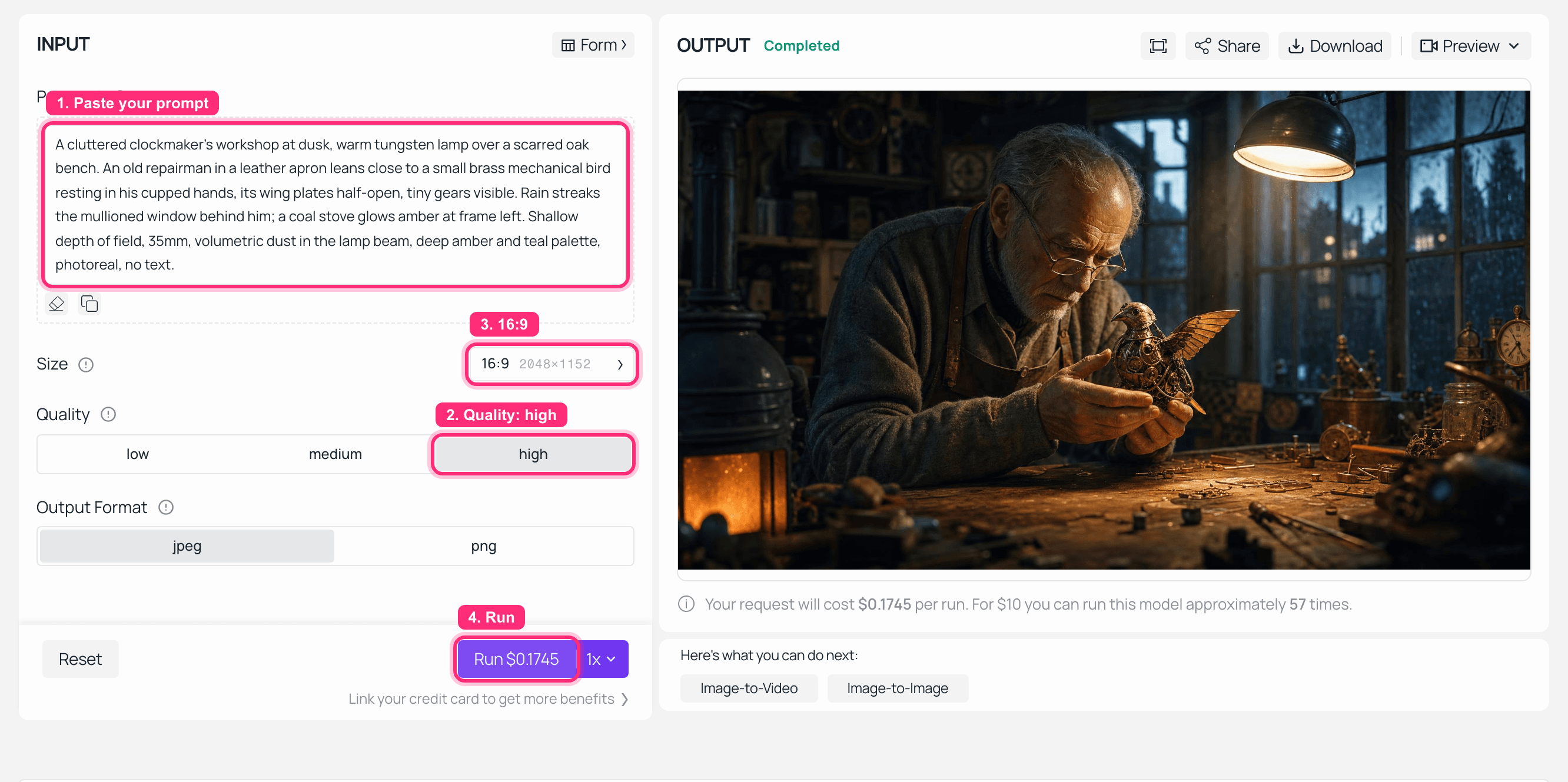
GPT Image 2 playground on Atlas Cloud with this tutorial's first-frame prompt and the rendered clockmaker workshop in the output panel
GPT Image 2 on Atlas Cloud, quality high at 2048x1152. The Run button quotes the exact charge for the settings you picked, $0.1745 for this one, before you commit to it.
Keep the returned URL. Step 2 feeds it straight to H3, no download round trip needed.
Step 2: Create the MiniMax H3 task and hold on to the task_id
The create call does two things and then stops caring about you: it validates the payload and it returns a task_id. A 400 here is your payload, not a transient failure, so do not put it behind a retry loop. Every other class of problem shows up later, during polling.
The one habit that saves real money: persist the task_id before you do anything else. Tasks are only queryable for 7 days, and if your process dies with the id in memory, you have paid for a render you can no longer reach.
python1import os, json, time, requests 2 3BASE = "https://api.minimax.io" 4HEADERS = { 5 "Authorization": f"Bearer {os.environ['MINIMAX_API_KEY']}", 6 "Content-Type": "application/json", 7} 8 9def create_task(payload: dict) -> str: 10 r = requests.post(f"{BASE}/v2/video_generation", 11 headers=HEADERS, json=payload, timeout=60) 12 if r.status_code == 400: 13 # your payload is wrong. retrying it will just be wrong again. 14 raise ValueError(f"rejected: {r.text}") 15 r.raise_for_status() 16 task_id = r.json()["task_id"] 17 with open("tasks.jsonl", "a") as f: # persist BEFORE anything else 18 f.write(json.dumps({"task_id": task_id, "at": int(time.time()), 19 "payload": payload}) + "\n") 20 return task_id 21 22SHOT_A_PROMPT = ( 23 "The old repairman's hands steady the brass bird. Its glass eyes flicker alight, " 24 "wing plates click open one by one. He leans in and whispers, close to the mic, " 25 ""Let's see if you still remember the sky." Slow 50mm push-in, lamp light raking " 26 "across the brass, rain ticking on the window, coal stove crackling, tiny servo " 27 "clicks under his voice. Warm amber key, teal window fill. No on-screen text." 28) 29 30shot_a = create_task({ 31 "model": "MiniMax-H3", 32 "resolution": "2K", 33 "duration": 8, 34 # no "ratio" here on purpose: image-to-video takes the frame from the first frame 35 "content": [ 36 {"type": "text", "text": SHOT_A_PROMPT}, 37 {"type": "image_url", "role": "first_frame", 38 "image_url": {"url": FIRST_FRAME_URL}}, 39 ], 40}) 41print("shot A task:", shot_a) 42
Here is that exact prompt and first frame running as a job, so you can see what a healthy submit looks like from the other side:
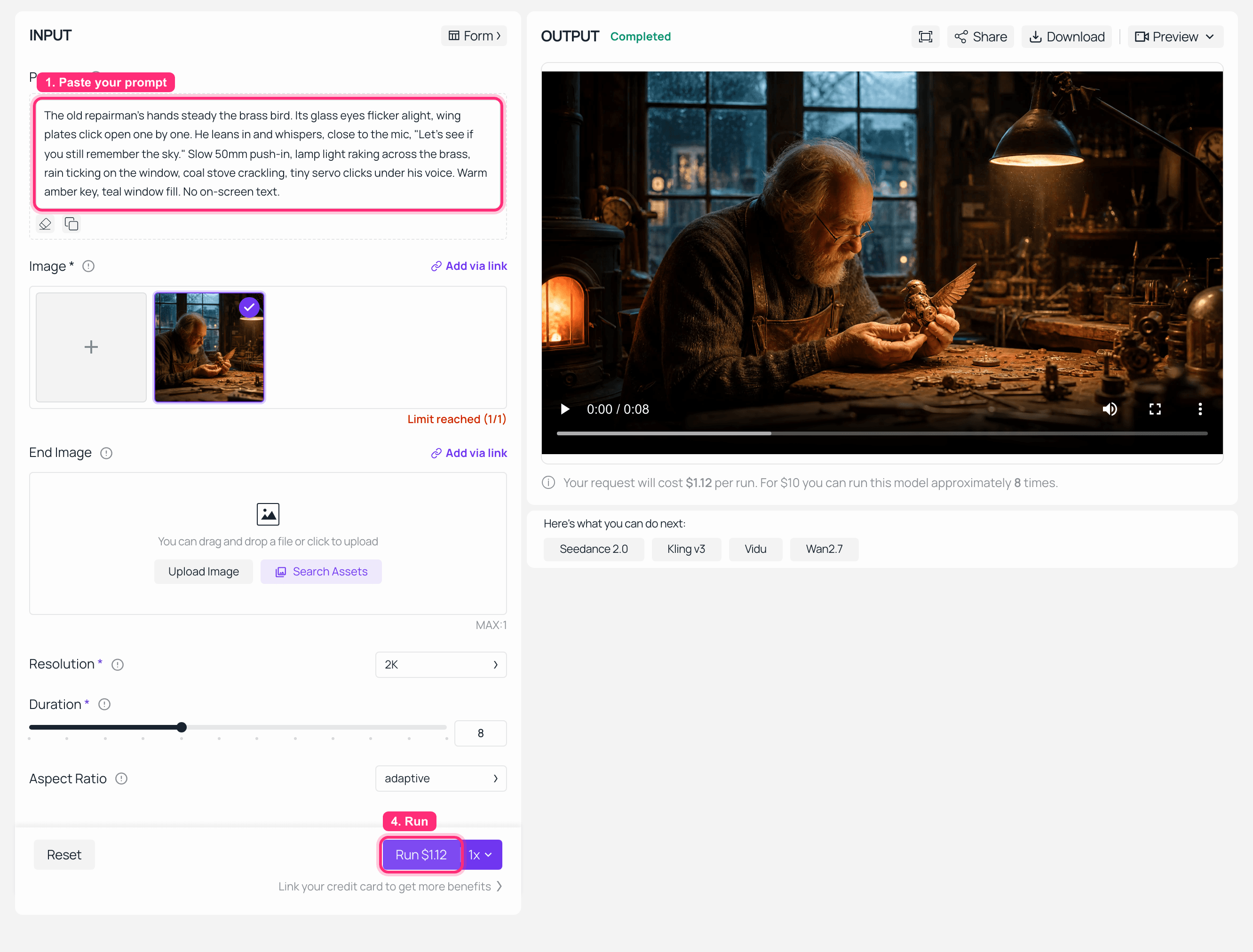
MiniMax H3 image-to-video playground on Atlas Cloud with the workshop first frame loaded and the rendered clip in the output panel
MiniMax H3 image-to-video: first frame loaded on the left, finished 2K clip in OUTPUT on the right. Note the Aspect Ratio field pinned to adaptive, and the $1.12 quote for 2K at 8 seconds.
Step 3: Poll it, and handle all five MiniMax H3 statuses
This is the loop everyone gets wrong, so it is worth writing out in full. Four rules: back off instead of hammering, cap the total wait, treat succeeded as "download now", and raise on any status not in the enum.
python1TERMINAL_OK = {"succeeded"} 2TERMINAL_BAD = {"failed", "cancelled"} 3IN_FLIGHT = {"queued", "running"} 4 5def poll(task_id: str, timeout_s: int = 900) -> dict: 6 delay, deadline = 3.0, time.time() + timeout_s 7 while time.time() < deadline: 8 r = requests.get(f"{BASE}/v2/query/video_generation/{task_id}", 9 headers=HEADERS, timeout=30) 10 r.raise_for_status() 11 task = r.json()["task"] 12 status = task["status"] 13 14 if status in TERMINAL_OK: 15 return task # content.url is live NOW 16 if status in TERMINAL_BAD: 17 raise RuntimeError(f"{status}: {json.dumps(r.json())[:400]}") 18 if status not in IN_FLIGHT: 19 # a status the enum does not have. do NOT fall through to "keep waiting". 20 raise RuntimeError(f"unknown status {status!r} -- read the changelog") 21 22 print(f" {status} ... next check in {delay:.0f}s") 23 time.sleep(delay) 24 delay = min(delay * 1.5, 15.0) # 3s -> 15s ceiling 25 raise TimeoutError(f"{task_id} still not terminal after {timeout_s}s") 26
Three things in there are deliberate:
status not in IN_FLIGHT raises instead of continuing. If MiniMax adds a sixth status next quarter, you want a loud crash, not a loop that waits for a word that never comes. This single line is the difference between the broken tutorial and this one.
failed does not retry. A failed render usually means the prompt tripped a filter or the payload had a bad combination, and firing the identical payload again buys you the identical failure at full price. Log the body, look at it, then decide.
The backoff starts at 3 seconds and lands at 15. H3 at 2K takes minutes, not seconds. Polling once a second just burns your rate limit on the query endpoint.
Step 4: Download before the URL expires
The moment succeeded lands, stream the file to disk. The URL in content.url is explicitly a time-limited link: "Download or store it promptly; query again to obtain a new URL after it expires" (MiniMax API Reference, August 2026). It is not a CDN path you can put in your database and forget about.
That second half is the good news, and it is the answer to the 404 you got the next morning. The render is not gone. Query the same task_id again and you get a fresh URL, for up to 7 days after creation.
python1def download(url: str, path: str) -> str: 2 with requests.get(url, stream=True, timeout=300) as r: 3 r.raise_for_status() 4 with open(path, "wb") as f: 5 for chunk in r.iter_content(1 << 20): 6 f.write(chunk) 7 return path 8 9def refresh_url(task_id: str) -> str: 10 """Dead link? The render is fine. Ask again, inside the 7-day window.""" 11 r = requests.get(f"{BASE}/v2/query/video_generation/{task_id}", 12 headers=HEADERS, timeout=30) 13 r.raise_for_status() 14 return r.json()["task"]["content"]["url"] 15 16task = poll(shot_a) 17download(task["content"]["url"], "shot-a.mp4") 18
What comes back for shot A, next to the still it started from:

Side by side: the generated first frame on the left, a frame from the finished MiniMax H3 clip on the right, showing the bird's wing plates opened and the eyes lit
Left: the GPT Image 2 still from Step 1, exactly as submitted. Right: a frame pulled from the 2K clip H3 returned. Same set, same light, the wing plates and the eyes are what moved.
Step 5: Shot B with MiniMax H3 text-to-video, where ratio is mandatory
No source frame for the sky, so shot B is text-only. That flips the ratio rule from "ignored" to "required": for a text-only prompt, ratio is required and cannot be adaptive (MiniMax API Reference, August 2026). Leave it out or send adaptive and you get an immediate 400, before any render begins.
Model: minimax/h3/text-to-video. Settings: 2K, duration 6, ratio 16:9.
text1The brass bird bursts through a half-open workshop skylight into a rain-washed 2evening sky, wings beating in a whir of gears, droplets spraying off the metal 3feathers as it climbs past wet slate rooftops toward a break of gold cloud. 4Camera cranes up behind it, 24mm, backlit rim from the low sun. Sound: wing 5servos whirring, wind rising, distant church bell, rain fading out. No text. 6
python1shot_b = create_task({ 2 "model": "MiniMax-H3", 3 "resolution": "2K", 4 "duration": 6, 5 "ratio": "16:9", # required here. omit it or pass "adaptive" -> 400 6 "content": [{"type": "text", "text": SHOT_B_PROMPT}], 7}) 8download(poll(shot_b)["content"]["url"], "shot-b.mp4") 9
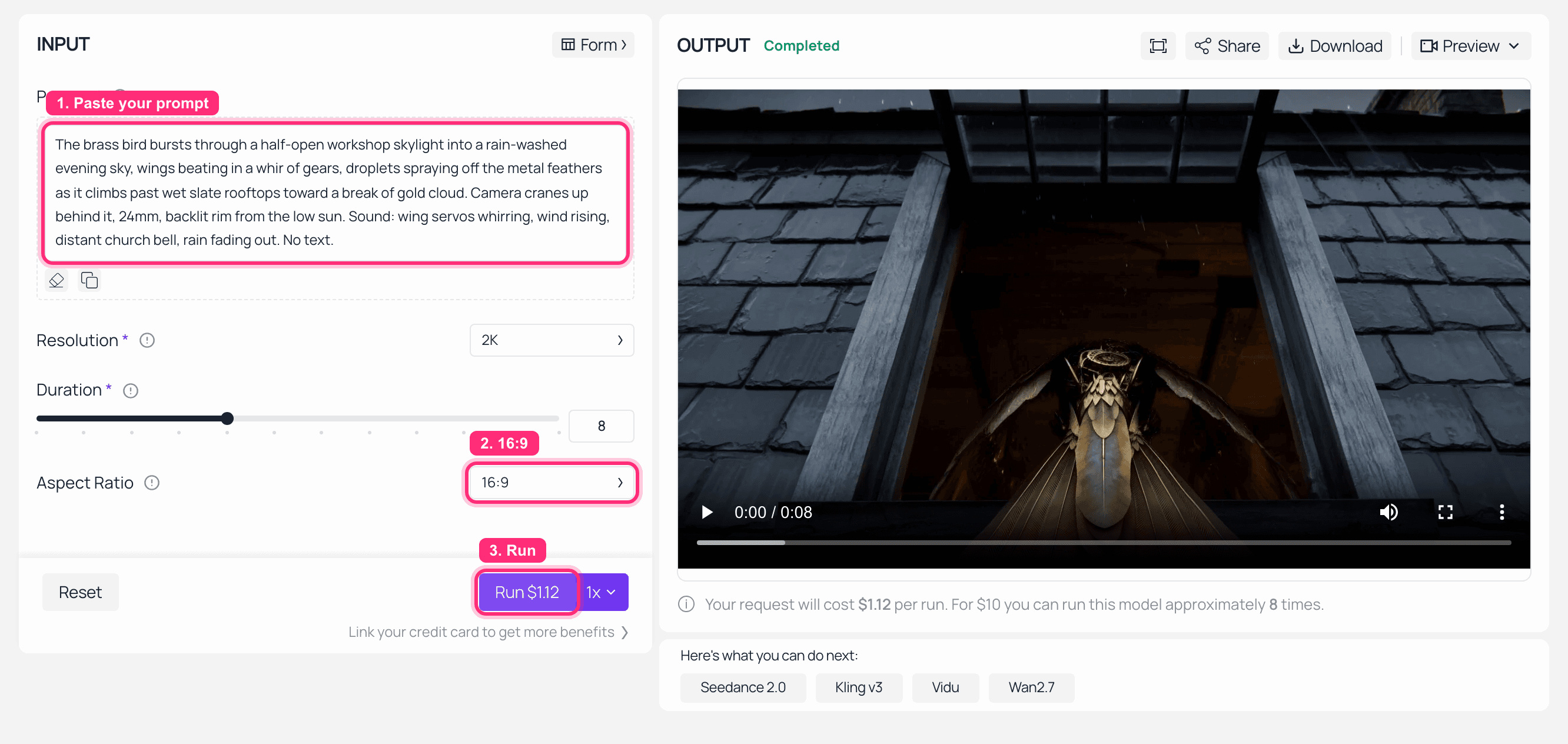
MiniMax H3 text-to-video playground on Atlas Cloud with the bird-takes-flight prompt and the finished clip in the output panel
MiniMax H3 text-to-video with shot B's prompt and Aspect Ratio set explicitly to 16:9. This run used the page's default 8 seconds rather than the 6 in the payload above.
Step 6: Skip polling with a callback, and echo the challenge in 3 seconds
If you would rather be told than ask, pass callback_url on the create call. There is exactly one catch, it is documented in a single parenthesis in the API reference, and it is the single most common way self-hosted callbacks fail.
Before MiniMax pushes you anything, it sends a verification request containing a challenge field, and "you must return the challenge unchanged within 3 seconds to complete verification" (MiniMax API Reference, August 2026). Miss it and there is no error anywhere. Your create calls keep succeeding, your renders keep finishing, and you simply never get a push. Nothing in any log says why.
Twelve lines of FastAPI, and the ordering inside them is the whole point:
python1from fastapi import FastAPI, Request 2 3app = FastAPI() 4 5@app.post("/minimax/callback") 6async def callback(req: Request): 7 body = await req.json() 8 if "challenge" in body: # verification handshake, answer it FIRST 9 return {"challenge": body["challenge"]} # unchanged, synchronous, no auth gate 10 task_id = body.get("task_id") 11 status = body.get("status") 12 enqueue(task_id, status) # real notification: hand off, return fast 13 return {"ok": True} 14
The mistakes that kill it, in order of how often I have seen them:
- The challenge request goes through your auth middleware and gets a 401 or a redirect. Verification is unauthenticated by definition. Whitelist the path.
- The handler pushes the challenge onto a queue and answers asynchronously. Too late. That reply has to be in the response body of that request.
- The value gets re-serialized, trimmed, or wrapped. Echo it byte for byte.
- You are testing through a tunnel against a serverless dev server, and the cold start alone is over 3 seconds. Warm it up first, or verify against a process that is already running.
Polling is completely fine, by the way. If you have a handful of jobs an hour, the loop in Step 3 is less code and less to break. The callback pays off when you have many jobs and do not want a poller per job.
Step 7: Concatenate the two shots into one film
Both shots came back as 2560x1440 h264 at 24fps with AAC stereo audio at 32kHz. Same container, same everything, so this is a stream copy rather than a re-encode. No quality loss, no waiting.
One small surprise worth expecting: asking for 6 seconds got me a 6.58 second file. Durations come back close to what you asked for, not exact to the frame, so the two shots add up to 14.62 seconds rather than a clean 14.
bash1printf "file 'shot-a.mp4'\nfile 'shot-b.mp4'\n" > list.txt 2ffmpeg -f concat -safe 0 -i list.txt -c copy brass-bird-two-shot.mp4 3
That output is the video at the top of this article. If -c copy complains, your two shots have different resolutions or frame rates, which on H3 means you changed resolution between calls. Match them, or drop the -c copy and accept one re-encode.
MiniMax H3 Tutorial Variations Worth Stealing
Five things worth trying once the loop above works, in rough order of how much money they save you.
Draft at 768P, finish at 2K. Both tiers are the same model, and 768P costs about 29% less per second. Render your candidates short and cheap, watch them, then re-run only the winner at 2K with the same prompt. This is where most of the savings in a shot list live. Which tier you actually need for delivery is its own argument, and I made it in 768P vs 2K.
Duration is every integer from 4 to 15. Not a set of presets. If the action lands at 7 seconds, ask for 7 and stop paying for 8.
First frame plus last frame. Send a second image item with role: "last_frame" and H3 will build the transition between them. Useful for handoffs between shots you have already art-directed.
Reference-to-video for continuity. role: "reference_image" keeps a character across shots instead of re-rolling their face every generation. There is a matching reference_audio role with a 2 to 15 second window for the reference clip, which is how you keep a voice consistent. See reference-to-video.
Vertical talking head. ratio: "9:16" with a dialogue line in the prompt is the highest-volume use of this model right now, because the audio comes out of the same pass and the lips match without a separate lip-sync step.
Prompt craft is a separate skill from the async plumbing, and if your shots are technically clean but visually flat, the problem is upstream of this article. Start with the H3 prompt guide.
What This MiniMax H3 Tutorial Cost to Run
Real line items from the run that produced the film at the top, quoted by the Run button and verified on 2026-08-12. H3 bills per second of output and the rate is tiered by resolution: the 2K jobs quoted $1.12 for 8 seconds, which is $0.14 per second, and the catalogue's $0.10 starting rate is the 768P tier. All three H3 endpoints are at full price right now, no discount applied.
| Step | Model | Settings | Charge |
|---|---|---|---|
| First frame | GPT Image 2 text-to-image | quality high, 2048x1152 | $0.1745 |
| Shot A | H3 image-to-video | 2K, 8s | $1.12 |
| Shot B | H3 text-to-video | 2K, 16:9, 6s | $0.84 |
| Delivered film | 14.6s, two shots, 2560x1440, stereo audio | $2.13 | |
| Screenshot runs for this article | H3 i2v + t2v | 2K, 8s each | $2.24 |
Worth noting that the same two shots drafted at 768P would have been $0.80 and $0.60 instead of $1.12 and $0.84, about 29% off, for footage you can absolutely judge a take on.
Two billing details that are easy to learn the expensive way. A request rejected at submit costs nothing, so a 400 on a missing ratio is free. A request that renders something useless is not free: if the job reaches succeeded, you are charged, even if the output is not what you wanted. That is the real argument for drafting at 768P.
Per-second rates, the 768P and 2K comparison, and how the charge behaves across durations are broken down properly in the MiniMax H3 API pricing companion to this article. This one is the code, that one is the bill.
Attribution and Territory Before You Ship
Two things to check before this goes anywhere public. MiniMax's API terms include a conditional defense obligation covering patent and copyright claims against API output, and that obligation does not extend to trademark or likeness, so a recognizable logo or a real person in your prompt is still your problem. Separately, the open-weights license for H3 carries an Excluded Territories clause, and that clause governs the downloaded weights and their outputs, not the hosted API, whose terms name a US service region you can select. Read whichever contract you actually signed. And label H3 output as H3 output in your UI.
MiniMax H3 Tutorial FAQ
What are the MiniMax H3 task statuses, and is there an expired one?
Five: queued, running, succeeded, failed, cancelled. There is no expired status. Two other things do expire and get confused for one: the download URL in content.url is time-limited, and the task record itself is only queryable for the last 7 days.
Do I have to use a callback, or is polling fine for MiniMax H3?
Polling is fine and is less code. Use a callback when you have enough concurrent jobs that a poller per job is silly. If you do, the endpoint must echo the challenge field back unchanged within 3 seconds, synchronously, ahead of any auth middleware. A failed handshake produces no error message at all, just permanent silence.
Why does my MiniMax H3 text-to-video request 400 with "ratio is required and cannot be adaptive"?
Because you are in text-only mode, where there is no first frame to infer the frame from. Pass an explicit value: 21:9, 16:9, 4:3, 1:1, 3:4 or 9:16. The same rule is why ratio looks like it does nothing in image-to-video, where the first frame decides and any ratio you send is ignored.
How many MiniMax H3 jobs can I run in parallel?
The documented cap is connection-based: 2 concurrent tasks free, 15 paid. Over the cap you get an immediate 429 rather than a queue slot, so bound your own in-flight count. Routing gateways sometimes absorb more, and I have had 20 concurrent jobs all complete, but I have also been 429'd on the same setup another day. Do not build a scheduler that assumes the higher number.
My MiniMax H3 video URL 404s a day later. Is the render gone?
No. The URL expired, the render did not. Query the same task_id again and the response carries a fresh URL, any time inside the 7-day query window. After 7 days the task record itself is no longer queryable, which is why Step 2 persists the task_id before doing anything else.
I searched "hailuo ai video generator how to use" and landed on a MiniMax H3 tutorial. Am I in the right place?
Yes. Hailuo is the consumer app and H3 is the model name used by the API. Same engine. If you want one clip, use the playground path in the workflow section above, no code required. If you want ten variants or a first frame piped in from another model, the seven steps are for you.





