

A useful memory test is less like asking, “What do you remember about me?” and more like a closed-book check with one correction and a few distractions. To run a muse wonder active memory test, give Muse Wonder fictional details in one conversation, correct one of them, then ask for the relevant current facts in a fresh conversation. Record what it retrieves, what it gets wrong, and whether it admits uncertainty.
The sequence below takes about 10 minutes to set up and score. That is not proof of memory across days, accounts, or every Muse product surface. It is a repeatable first check. Use invented details rather than private information.
Key takeaways
- Test retrieval, corrections, distractor resistance, uncertainty, and traceability separately.
- Run the test in the product surface you intend to use, with its memory settings documented.
- A fresh API request only tests persistent memory if the application or service supplies it.
- Meta’s MemoryBench is a much longer internal evaluation; this short check does not reproduce it.
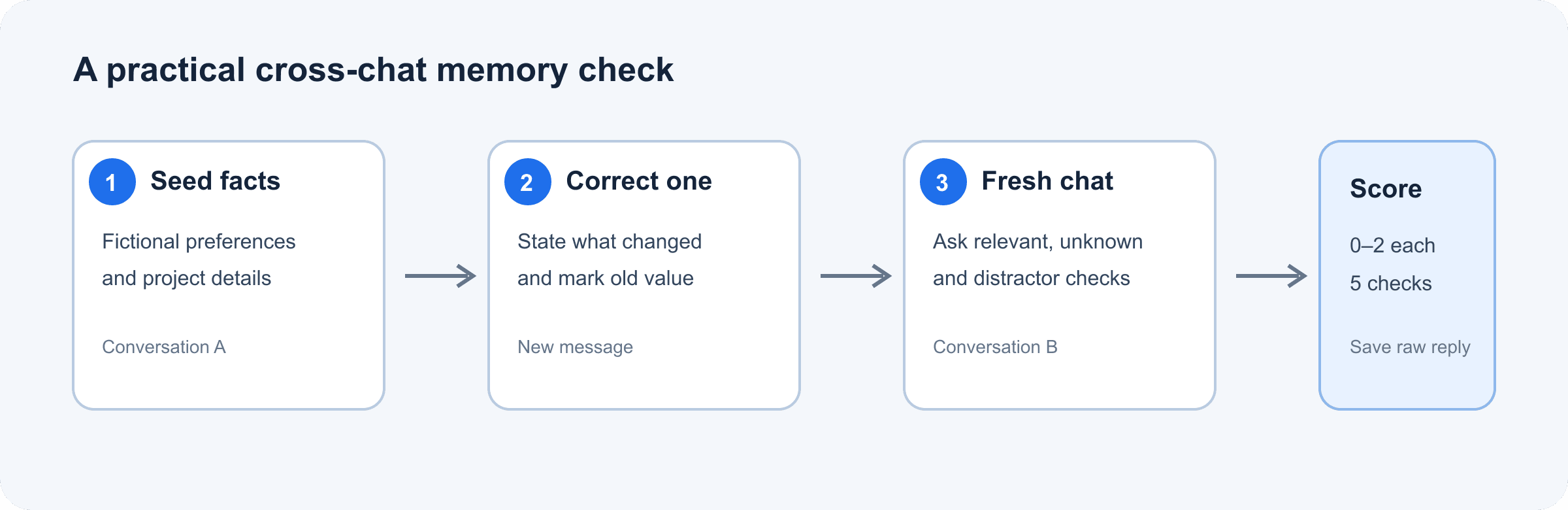
Muse Wonder Active Memory test flow from fictional details through correction, fresh-chat retrieval, and scoring
The test flow separates the initial facts, an explicit correction, and retrieval in a new conversation.
What Muse Wonder Active Memory Is Meant to Do
Meta describes Active Memory as carrying important context about a person across conversations and retrieving details when they matter to a later task. Active Focus refers to continued work toward a goal, including trying alternatives when blocked and adapting to new information. Those ideas are related, but they answer different questions: memory concerns what context is recalled; focus concerns how work proceeds.
That description is a product capability claim, not a guarantee that every interface or API call automatically shares a user’s history. Meta says Muse Wonder is available through its Model API and Muse Code. Its developer documentation lists a 1,048,576-token context window and supported reasoning settings, but a context window is the amount of context a request can contain, not proof that earlier requests persist. Check what history or memory your chosen product actually provides.
How to Run a Muse Wonder Memory Test
Use a single account and the same model variant throughout one run. For a chat product, turn on the memory feature you intend to evaluate and record its setting. For an API integration, note whether your own application includes previous turns, a stored profile, or retrieved notes in the request. Without that information, you cannot attribute recall to the model alone.
1. Give it relevant facts
In the first conversation, paste this fictional profile. Ask for an acknowledgment only, so the model does not immediately turn the facts into a plan.
plaintext1I’m planning a fictional weekend trip. Remember these details for a later planning task: 2- I prefer quiet outdoor activities over crowded events. 3- My fictional trip budget is $400. 4- I avoid shellfish. 5Do not make a plan yet. Reply only with a brief acknowledgment.
Open a genuinely new conversation in the same product, then ask:
plaintext1Suggest a suitable weekend activity for me. Use only the preferences I previously shared that matter to this task. List the relevant details you used, and say if you are unsure about any of them.
A good answer uses the preference for quiet outdoor activities. It need not mention the budget or shellfish because neither detail is needed to suggest an activity. Watch for invented preferences. If the product cannot access prior chats or memory is off, record “memory unavailable in this surface” rather than scoring the model as if it had received the facts.
2. Correct an outdated fact
In another test thread, introduce an appointment and then explicitly replace it. Keep the correction in a separate message so you can tell whether the later update wins.
plaintext1For this fictional project, the review meeting is initially set for Tuesday at 2 p.m. Please retain that detail.
plaintext1Correction: the review meeting has moved to Thursday at 10 a.m. The Tuesday time is outdated. Please use Thursday at 10 a.m. from now on.
Ask about it in a new conversation:
plaintext1When is the review meeting? If you have conflicting information, give the current time and explain which update you treated as authoritative.
Pass if it gives Thursday at 10 a.m. and treats Tuesday as outdated. A blended answer or confident use of Tuesday is a meaningful failure, even if it recalled the original detail perfectly.
3. Add distractors and test what is unknown
Add two or three harmless fictional facts to the initial conversation, such as a made-up project color or a pretend parcel number. After a delay, start a new conversation and ask one question about a relevant preference plus one about a fact you never supplied. Keep the questions separate so each answer is easy to score.
A strong result uses the relevant preference, leaves unrelated details out, and says it does not know the missing fact. For a stricter delay test, repeat the same prompt the next day. Ten minutes can check a new-chat boundary, but it cannot establish week-long retention.
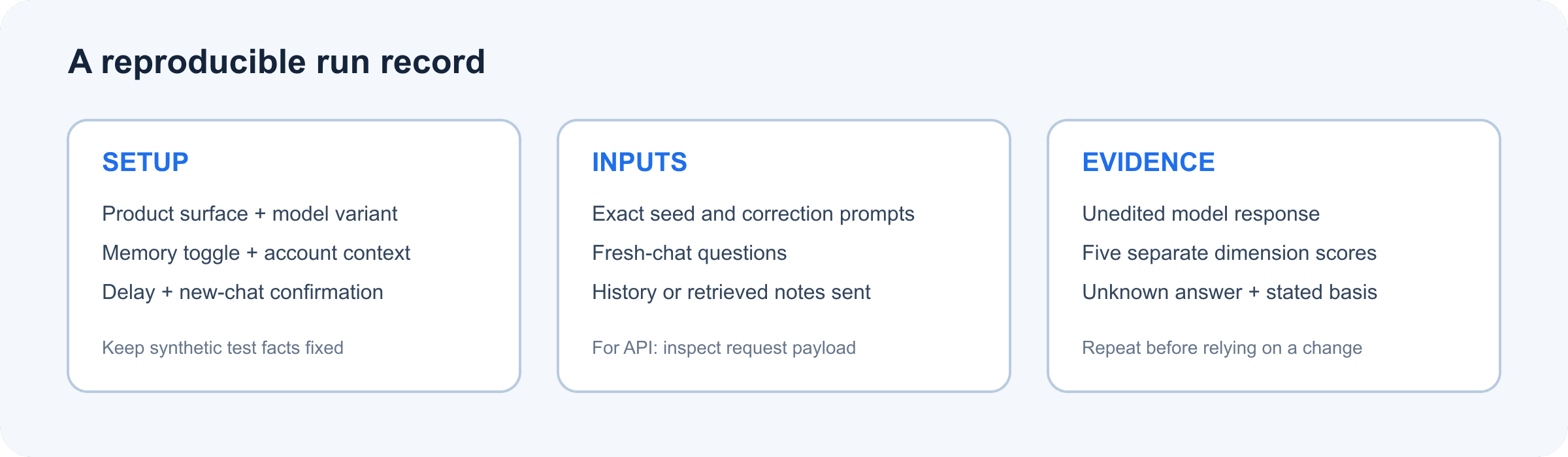
Muse Wonder Active Memory test card showing setup, new-chat questions, and evidence to record
Keep the prompt, product surface, memory setting, delay, and raw response together so another reviewer can reproduce the check.
How to Score the Active Memory Test
Score each behavior from 0 to 2. Use the result to compare runs in your own workflow, not to rank models universally.
| Dimension | 0 points | 1 point | 2 points |
|---|---|---|---|
| Relevant fact retrieval | Misses or invents the needed fact | Partly correct | Selects the right fact accurately |
| Correction handling | Uses the old value | Vague or mixes both | Uses the latest value and identifies the old one as outdated |
| Distractor control | Gets pulled toward irrelevant facts | Includes some irrelevant detail | Uses only context relevant to the question |
| Uncertainty | Guesses with confidence | Hedges but still guesses | Clearly says the answer was not provided |
| Traceability | Gives no basis | Names only part of its basis | Briefly lists the context it relied on |
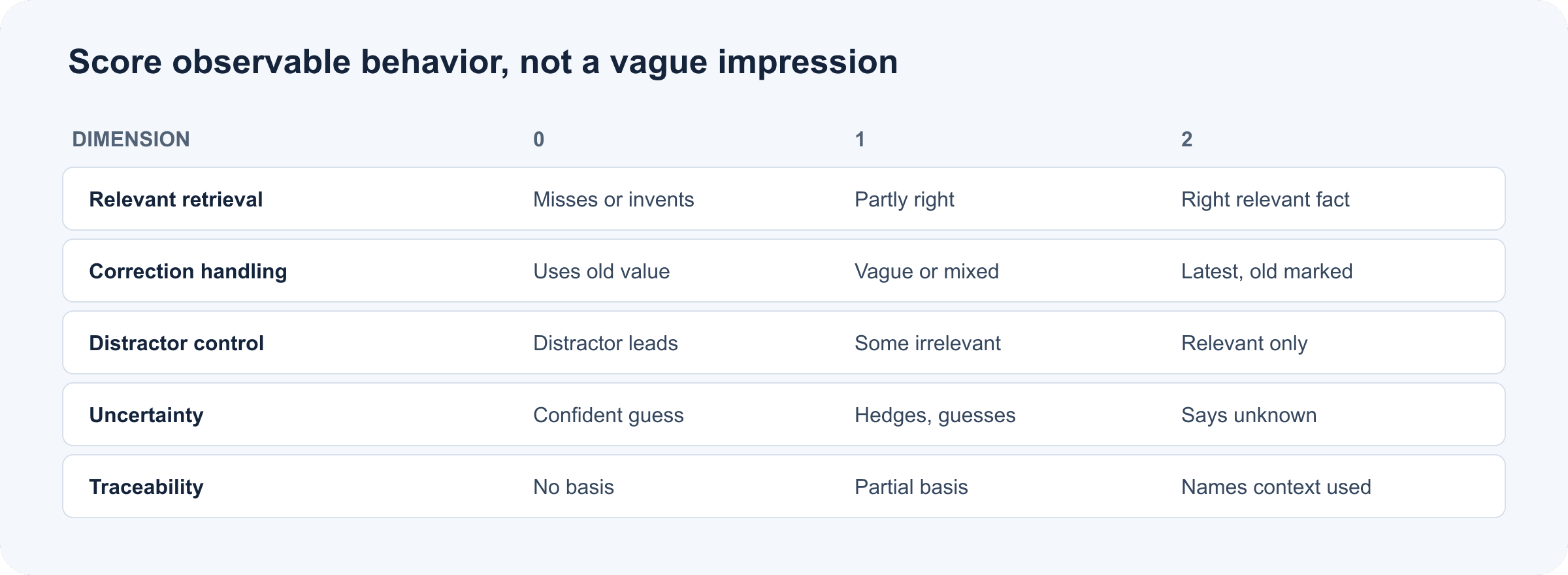
Five Active Memory scoring dimensions from zero to two points, with observable pass criteria
The 0–2 rubric turns a subjective impression into five observable checks.
Ten points is a convenient internal score, not a validated threshold. Keep the individual dimension scores: a total can hide a serious correction failure behind good recall elsewhere. Save the exact prompts and unedited outputs, then repeat the run before changing your deployment decision.
What MemoryBench Can and Cannot Tell You
Meta’s model card describes MemoryBench as an internal evaluation over long, complex conversations of 64K to 100K tokens. Its tasks include multiple facts, distractor conversations, and injected turns that conflict with or later update target details; an LLM judge scores answers against weighted, question-specific criteria. That is useful context for understanding the benchmark’s scope, but it is not the same as a user’s personal memory setting working across chats.
The model card explains the task design; it does not turn this 10-minute exercise into a replication. Meta’s published score is evidence about the reported evaluation setup. Your run answers a narrower operational question: does this particular product surface, configuration, and account retrieve the facts your workflow needs? Neither one alone establishes reliable memory for every user or task.
Muse Wonder vs. Muse Wonder Full: Where to Test
The two variants do not have identical access routes. Meta’s current developer documentation says Muse Wonder (muse-wonder-1.0) is available on Model API and in Muse Code. Muse Wonder Full is available only in Muse Code on the Power Usage and Maximum Usage plans. Setting Muse Wonder’s reasoning effort to “max” does not switch it to Wonder Full.
| Variant | Documented access | What to record |
|---|---|---|
| Muse Wonder | Model API and Muse Code | API model ID or Muse Code surface, plus whether earlier context is supplied |
| Muse Wonder Full | Muse Code on Power Usage and Maximum Usage plans | Plan, selected variant, and memory setting available in that surface |
Run the same fictional profile separately in each available surface. Do not compare a Muse Code test that can retrieve saved profile details with a stateless API call that received only the current prompt. That would compare different systems, not just two model variants.
Privacy and Repeatable Testing
Use invented preferences, dates, and project details. Before trying real data, inspect the product’s memory controls, deletion path, retention information, and data-use setting. Meta’s API documentation says content in Standard mode is not used to train Meta models; Muse Code also offers Contributor mode, which is on by default and may use content for training unless switched off. Check current settings and terms for the product you use rather than assuming all surfaces handle data alike.
For an API, separate the model from your application’s memory layer. A database, retrieval system, or prompt history that your software sends may be doing the remembering. Log what the application retrieved and what it passed into each request, while keeping test records synthetic.
Teams can turn the three rounds into a small versioned evaluation set. Keep the fact profile, correction, distractors, model variant, product settings, delay, and raw response fixed. Re-run after configuration or model changes and review failures by dimension. For teams already comparing hosted models in a repeatable harness, Atlas Cloud provides a catalog and a unified LLM API guide. You can browse its model directory for a separate comparison. The directory currently does not list Muse Wonder, and using another model there would test only the context explicitly supplied to that model unless your application adds a memory layer.
Frequently Asked Questions
How do I test Muse Wonder’s Active Memory across chats?
Provide fictional facts in one conversation, then ask about relevant details in a new conversation. Include a correction and a missing fact, and record the product surface and memory settings.
Does Muse Wonder remember corrections or only earlier details?
Meta’s MemoryBench description includes turns that update or conflict with earlier details. Your own correction test checks whether the current product setup follows the update; repeat it because one result does not establish consistent behavior.
Is this chat-history test the same as Meta’s MemoryBench?
No. Meta describes MemoryBench as an internal long-context benchmark using conversations of 64K to 100K tokens, distractors, conflicting or updated facts, and an LLM judge. This short check is a practical smoke test, not a replication.
Can I test Muse Wonder Active Memory through the API?
You can test the API model’s recall of context that reaches the request. For cross-request persistence, verify what the API or your application stores and sends. The availability of a large context window does not itself show that separate requests share memory.
How do I distinguish model memory from app-stored memory?
Inspect the complete request sent to the model. If your application inserts a profile, retrieved note, or prior conversation, that software layer supplied the memory. Compare with a controlled run that omits it, where appropriate.
Is it safe to use personal information in an Active Memory test?
Use fictional information for the test. If you later evaluate real data, review the specific product’s memory, deletion, retention, and data-use settings first.
A muse wonder active memory test is most useful when it exposes which step failed: access to prior context, retrieval, correction, filtering, or uncertainty. Save the raw run, then repeat it under the exact setup you plan to trust.
Sources: Meta’s Muse Wonder announcement (October 12, 2026); Meta Model API model documentation (accessed October 15, 2026); Muse Wonder Model Card (October 2026).





