

The line is about missing someone. The voice was generated with a sad emotion setting, yet the reference portrait has a broad smile. That is the kind of conflict a still storyboard cannot answer. To make OmniHuman 2.0 emotional voice and facial expression matching concrete, we first kept one portrait and one 9.68-second voice track fixed, then generated two videos with opposing facial directions. Two further videos use matched angry and grieving portraits, voice deliveries, and directions. The silent GIFs let you inspect the visible expressions.
There is an important version boundary. Atlas Cloud now lists Avatar Omni Human 2.0. Our October 20, 2026 run in the Atlas test environment returned an upstream unsupported-model error before rendering. All four completed avatar videos in this article were generated there with Avatar Omni Human 1.5. They demonstrate a related audio-driven workflow and a useful diagnostic method, not measured OmniHuman 2.0 performance.
Key takeaways
- Listen to the supplied audio first. In the test below, the same sad recording produced visibly different gaze, mouth, and gesture choices when the direction changed.
- A smiling source portrait can carry its expression into the opening frames, even when the prompt asks for restraint.
- A second pair makes anger and grief visibly distinct by matching the starting portrait, voice delivery, and direction to each mood. It does not isolate one input as the cause.
- Compare the same timestamps with sound on and off; describe what actually changes instead of assuming a prompt worked exactly as written.
- Check the model version and a completed output before using one version's result to illustrate another.
What audio, the portrait, and the prompt each contribute
Atlas describes Omni Human 2.0 as an audio-driven avatar model that accepts a reference image, a WAV or MP3 track, and an optional text prompt. Its public model page lists 720p output and input audio from 4 to 300 seconds. The page says the prompt may direct gestures, actions, scene details, and camera movement. These are product-page specifications, not a claim that every requested facial beat will appear in a generated clip (Atlas Omni Human 2.0 model page).
The earlier OmniHuman-1 paper frames the research family as human animation conditioned on image, audio, text, and other signals. It does not establish the exact controls or results of a later product version (OmniHuman-1 paper, ICCV 2025). For a creator preparing one test, a simpler division of labor is more useful:
| Input | Job in the test | What to check |
|---|---|---|
| Portrait | Anchors the person's identity and initial expression | Is the face visible, and does the starting smile fight the intended mood? |
| Audio | Supplies the actual words, timing, pauses, and delivery | Does the recording sound like the emotion the script implies? |
| Prompt | Requests visible behavior around the recording | Did the face, gaze, and gestures actually follow those directions? |
Mouth movement and emotional expression are separate checks. A face can appear to speak while its eyes and smile communicate the wrong meaning. A still frame can reveal the expression, but only a video with its original audio lets you judge the voice-to-face relationship.
The real test inputs: a sad line and a smiling source image
We deliberately used Atlas's smiling sample portrait rather than an already sorrowful face. The face is clear and front-facing, which makes the generated expression easy to inspect, but the starting grin creates a demanding case for a sad line.
 Fixed input image for both videos. The smile is part of the source image, so inspect the opening seconds separately from the later performance.
For the audio, we used the Atlas test environment's MiniMax Speech 2.6 HD playground with the English “Upset Girl” voice and the sad emotion setting. The exact script was: “I thought you would be here today. I kept looking at the door, even after everyone had gone. I miss you more than I can say.” The resulting MP3 lasts 9.68 seconds. Both avatar runs used that same audio file and the same portrait; only the optional direction prompt changed. Both returned 9.8-second MP4s with an audio track. This is a small practical comparison, not a formal model benchmark.
This input choice matters. The script gives the speaker a reason to look down or hold back a smile, while the reference photo suggests the opposite. If the face keeps smiling, first ask whether the source image or the direction is carrying more weight in that take. Do not assume that adding more emotional adjectives will settle the conflict.
Two real video results: the same voice, different facial direction
Run A: ask for a restrained face
Here is the direction used for the first completed Omni Human 1.5 run:
The woman speaks quietly and sadly to camera. Her initial broad smile fades before the first word. Keep the brows gently drawn together, the eyes moist and downcast, and the mouth restrained. At the final sentence, she looks back at camera but does not smile. Minimal head and hand movement; steady medium close-up.

Run A, Atlas test environment, Avatar Omni Human 1.5. This GIF is silent. The opening frame still carries the source smile; around 2 to 4 seconds the gaze drops and the mouth relaxes, and near 6 to 8 seconds the eyes lower or close. The prompt did not remove the smile before the first word exactly as requested.
Run B: ask for a smile that conflicts with the line
The portrait and the sad MP3 stayed the same. We changed only the direction:
The woman speaks brightly to camera with a broad, cheerful smile throughout the entire audio. Keep the eyes lively and the brows relaxed; add a small upbeat nod while speaking. Never let the smile fade, even during the final sentence. Minimal hand movement; steady medium close-up.

Run B, Atlas test environment, Avatar Omni Human 1.5. At 2 to 6 seconds she more often looks toward the camera and keeps a slight smile. The smile softens near the end, so “throughout” was not followed literally. The visual cue is still less consistent with the supplied sad line than Run A.
The two results answer the title's practical question more clearly than a generic “be emotional” prompt. The audio alone did not force the same visible mood in both takes. Text direction affected the generated gaze and expression, while the strongly smiling input remained visible at the start. These observations apply to these two 1.5 runs. They do not quantify Omni Human 2.0's expression accuracy.
Check the same moments, then make one change
The frame pair below comes from the two real videos at about six seconds. The left result looks down and brings the hands together; the right result faces the viewer with a slight smile. It is a visual comparison of outputs, not a replacement for playing the clips with their sound.
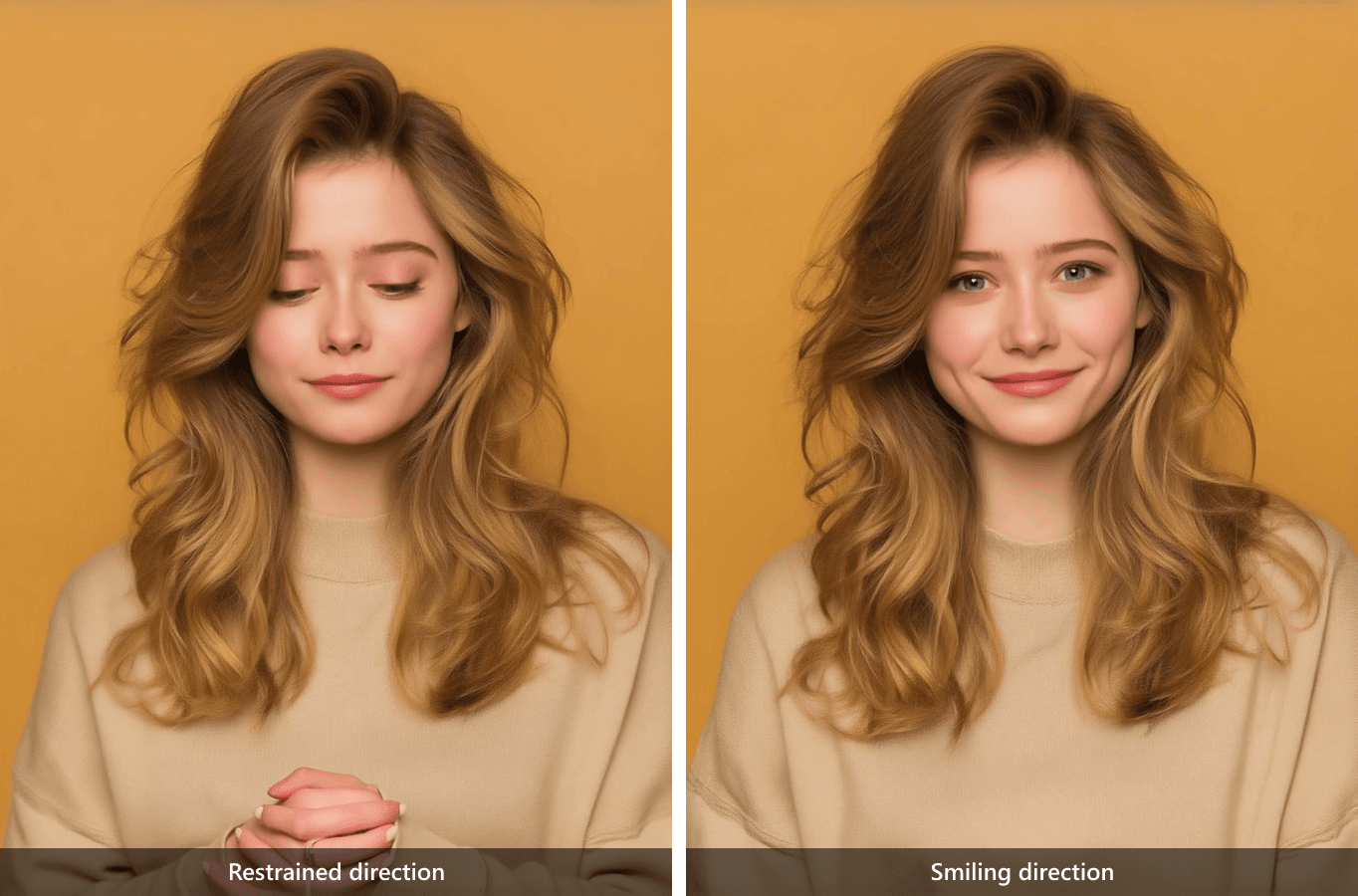 Same portrait and sad audio, approximately 00:06. Left: restrained direction. Right: smiling direction. Both frames are from actual Omni Human 1.5 outputs.
Use three passes for your own clip:
- Listen without watching. Mark the words and pauses that carry the emotion. In this test, the line about looking at the door and missing someone is the meaning to protect.
- Watch muted at those moments. Check the eyes, mouth corners, head angle, and gestures. A speaker can move her lips yet still appear cheerful or detached.
- Play sound and picture together. Decide whether the face supports the line, weakens it, or changes its meaning. If it fails, change one input or instruction and review the same timestamps again.
| Moment in these two clips | Run A, restrained direction | Run B, smiling direction | What the comparison supports |
|---|---|---|---|
| Opening | Both inherit the source portrait's broad smile | Both inherit the source portrait's broad smile | The source expression is visible before a requested change can take hold |
| About 00:04 | Gaze drops and the mouth is comparatively neutral | Gaze stays closer to the camera with a lighter expression | The direction changes more than lip movement alone |
| About 00:06 | Eyes remain downcast; hands are clasped | Eyes face the camera; a small smile remains | The same audio can accompany distinct visible emotional cues |
| About 00:08 | Eyes close and the expression stays restrained | The direct gaze returns, although the smile has softened | Neither prompt was followed word for word throughout |
This is a useful review table, not a numerical quality score. We did not run enough samples to separate prompt effects from the model's random variation. The videos let a creator judge whether this particular take serves the intended sentence.
A wider contrast: anger and grief from the same line
Runs A and B held the portrait and recording fixed to examine one direction change. For a more visible emotional contrast, we made two new short clips from the same speaker and the same script. This time the source expression, voice delivery, and video direction were each matched to the intended mood. The purpose is to show two practical end results, not to claim that one parameter alone caused the difference.
The shared script was: You promised you would be here. I waited all night, staring at the door. I don't know how to trust you after this. In the Atlas test environment, MiniMax Speech 2.6 HD read it twice with the same English_captivating_female1 voice, English language, speed 1, volume 1, and pitch 0. We set the emotion to angry for the first recording (6.73 seconds) and sad for the second (7.34 seconds). Neither audio file is embedded in this article; the GIFs are silent.
Starting from the same smiling photo used above, we made two reference portraits with Seedream v4.7 Edit. These are the actual image inputs to the avatar model:
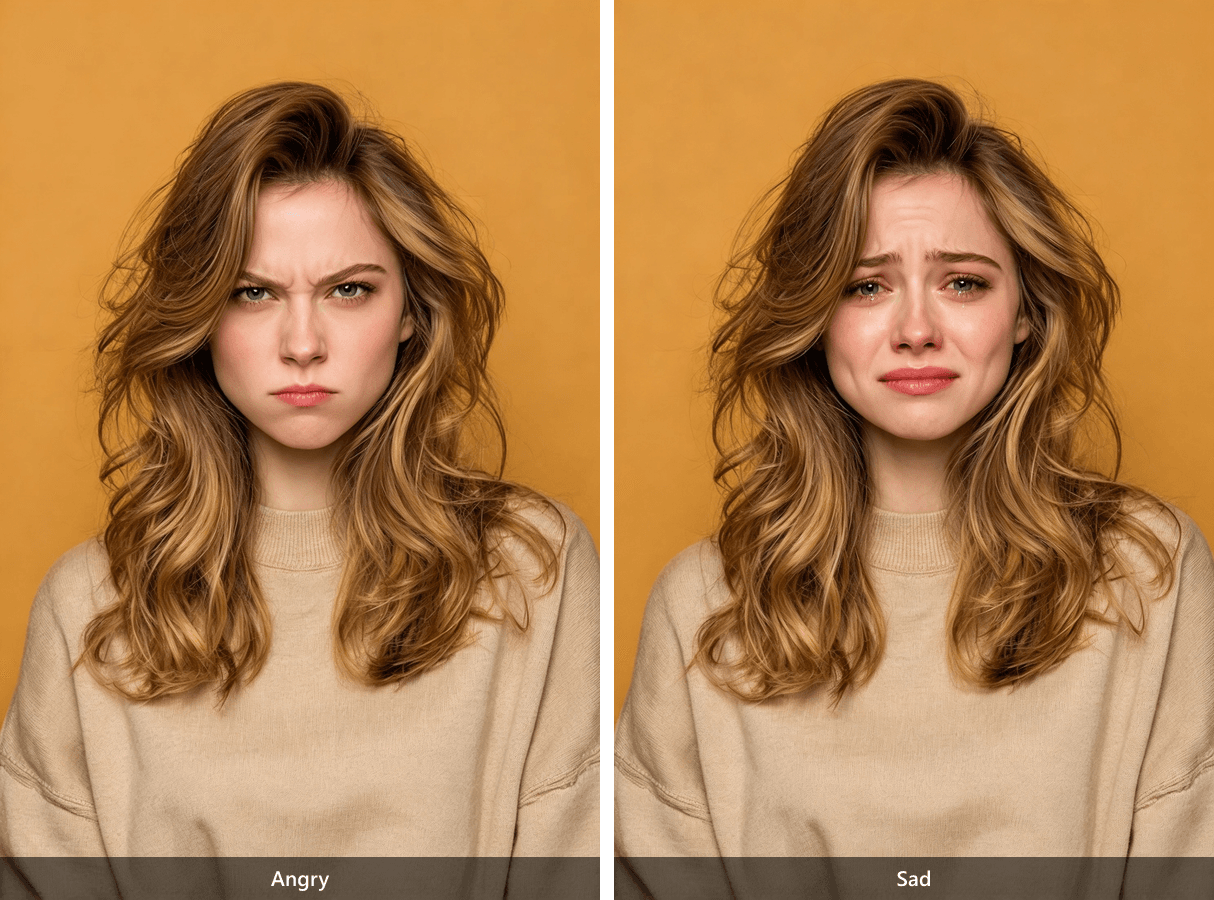
Left: lowered, drawn brows and a firm mouth. Right: raised inner brows, wet eyes, and a downturned mouth. Both were edited from the original smiling portrait; the edit also changes fine facial details, so the two sources are not pixel-identical apart from expression.
The full Seedream edit instruction for the angry portrait was:
Edit the woman's face into a clearly angry, controlled expression: eyebrows lowered and drawn together, eyes narrowed in a hard direct glare, jaw tense, lips pressed firmly together. Keep the same woman's identity, hairstyle, beige sweater, orange background, lighting, photographic style, camera angle and medium portrait framing. No smile, no tears, no extra people or objects.
For the grieving portrait, we used:
Edit the woman's face into visible grief: inner eyebrows raised and drawn together, eyes wet and downcast, mouth corners turned downward, lips gently closed, shoulders slightly lowered. Keep the same woman's identity, hairstyle, beige sweater, orange background, lighting, photographic style, camera angle and medium portrait framing. No smile, no angry glare, no extra people or objects.
Both finished avatar clips used Avatar Omni Human 1.5, 1080p output, and seed 20261021. They run for 6.76 and 7.40 seconds, close to their corresponding recordings.
Run C: anger after a broken promise
The angry portrait and angry recording were paired with this complete video direction:
She speaks directly to camera with controlled anger. Her brows stay lowered and drawn together, eyes narrow, jaw tightens, and her lips press firmly between phrases. On "promised", she leans slightly forward and raises one hand in a brief pointed gesture; at the last sentence, she holds a hard direct gaze. No smile, no tears. Keep the camera steady, medium close-up, orange background unchanged.
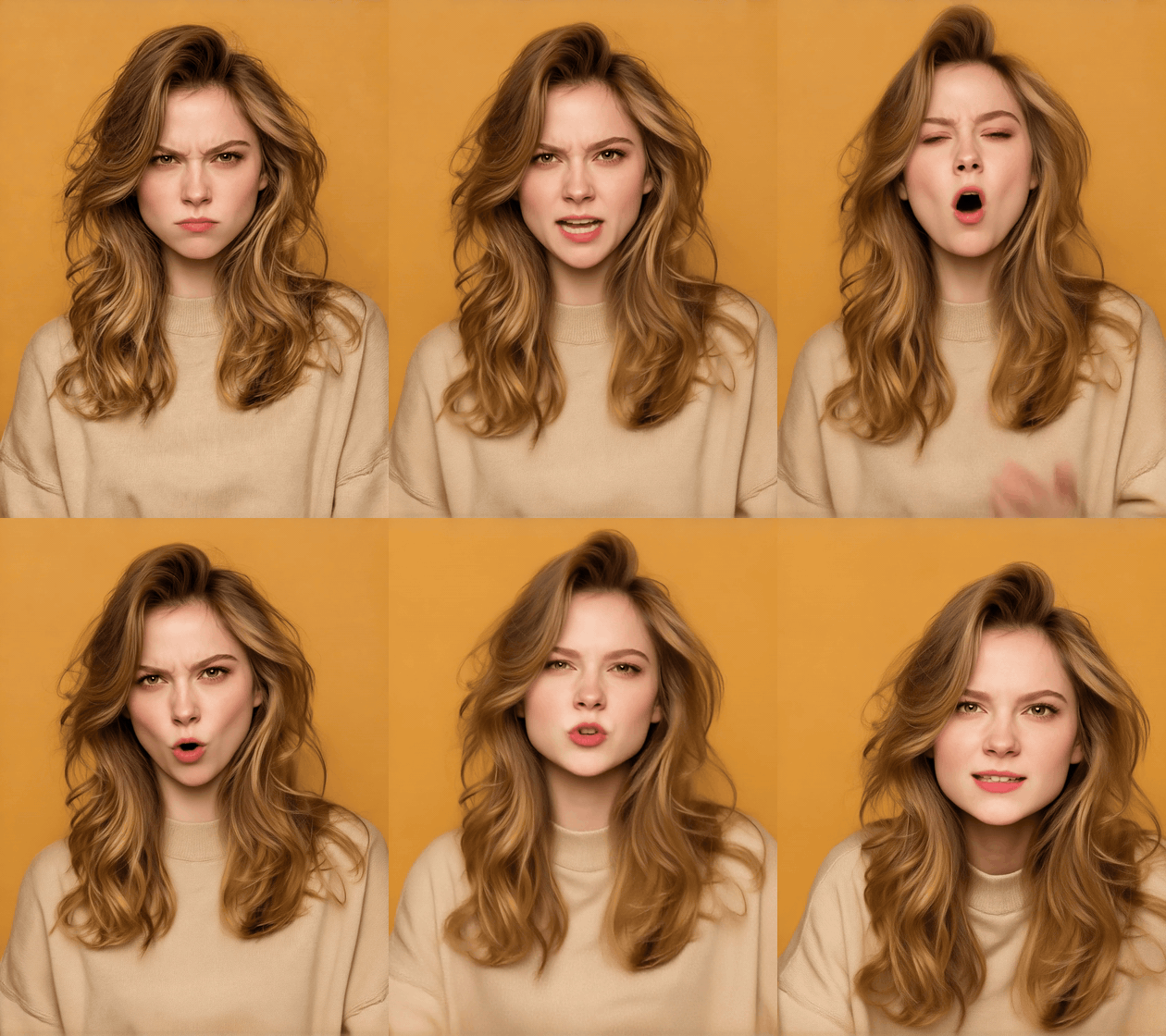
Run C, Atlas test environment, Avatar Omni Human 1.5. Around the opening and middle, she speaks with narrowed eyes and knitted brows. The expression softens near the end; the requested pointed hand gesture is not clearly visible. This GIF has no sound.
Run D: grief after the same broken promise
The grieving portrait and sad recording were paired with a different direction:
She speaks to camera with grief. Her inner brows lift and draw together, eyes grow glossy and downcast, shoulders lower, and her mouth relaxes into a slight downturn. On "waited all night", she looks down and pauses; near the last sentence, she looks back up without smiling. No angry glare or pointed gestures. Keep the camera steady, medium close-up, orange background unchanged.
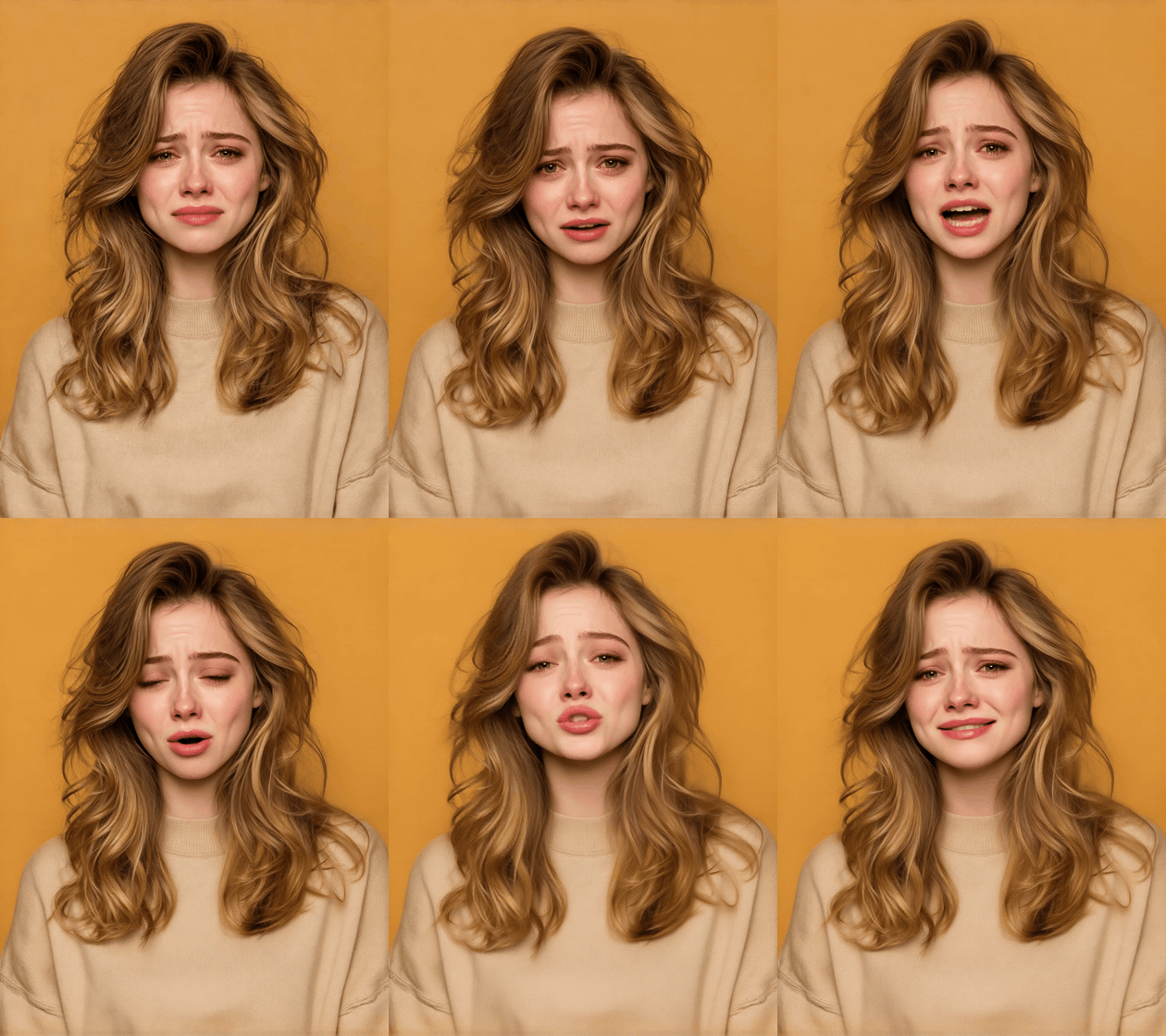
Run D, Atlas test environment, Avatar Omni Human 1.5. Wet eyes, tears, and raised inner brows remain visible through the clip. She mostly faces the camera rather than clearly looking down at the requested phrase. This GIF has no sound.
At the same moments, C looks tense and confrontational while D looks distressed. The difference is visible in the completed videos, not just in the edited starting frames. Because portrait, recording, and direction all changed together, these examples show a matched-input workflow rather than a controlled test of voice emotion alone. To judge whether either face follows the delivery precisely, review its original video with sound; a silent GIF cannot establish voice-to-expression timing.
Prompt for speech or singing without fighting the track
Start with the audio event you want viewers to notice, then name the smallest visible action. For a quiet line, request lowered gaze or a restrained mouth rather than “maximum sadness.” For a genuine change in delivery, place a smile or nod after the audible pause. If the recording stays sad from beginning to end, a cheerful expression throughout is a deliberate mismatch like Run B.
Singing uses the same review principle, though we did not generate a singing clip for this article. A testable direction would be: Medium close-up. The singer looks focused, briefly closes her eyes during the held note, then lowers her chin when the phrase ends. Keep the camera steady. The supplied song still determines the lyrics, note lengths, and timing. Judge a real singing output with the music on; a still storyboard cannot establish that the face follows a held note.
Keep temporal words such as “then” or “at the end” only when the recording has a clear beat. Avoid stacking conflicting directions such as “fixed camera” and “orbiting camera.” If a prompt misses a beat, simplify or move one cue instead of rewriting the portrait, audio, and direction at once.
Troubleshoot a flat or mismatched expression
| What you notice | Likely place to inspect | Smallest next test |
|---|---|---|
| A sad line begins with a grin | The portrait itself is smiling | Try a source portrait whose opening expression suits the scene while keeping the audio and prompt fixed |
| The face stays cheerful through a serious sentence | The prompt requests a smile or upbeat delivery | Remove that instruction and ask for one concrete restrained action |
| The face changes but mouth timing feels wrong | The source recording, edits, or generated take | Use a cleaner, shorter audio edit and compare the same words |
| A prompt asks for a beat that never appears | The recording has no audible pause or shift | Move the direction to an actual pause, or remove it |
| The two outputs differ less than expected | The model may not follow every expression cue | Try one additional take, then judge whether the limitation matters for the use case |
Run A and Run B also show why “more prompt detail” is not a universal fix. Neither obeyed every word in its direction. The useful result is a more specific diagnosis: the source smile persists at the opening, while the later gaze and expression can differ. That tells you which part to change next.
Is OmniHuman 2.0 available on Atlas Cloud?
Yes, the current English Atlas model page lists Avatar Omni Human 2.0. This corrects the earlier version of this article, which said the model was absent from the catalog. A listing is not the same as a successful generation in every environment. On October 20, 2026, our 2.0 request through the Atlas development playground stopped with the upstream message req_key <realman_avatar_picture_omni20_cv> not supported; its page said the failed request was not charged. No 2.0 video was produced in that attempt. The successful clips above are labeled 1.5 for that reason.
For a live project, open the exact model page and confirm a completed run with your own inputs. The 2.0 page lists an image, a 4 to 300-second MP3 or WAV, optional prompt direction, and 720p output. The 1.5 documentation has different limits and resolution options, so do not treat this article's 1.5 clips as a 2.0 benchmark. Check the current Atlas model catalog for live availability and pricing.
Check rights and context before publishing
Before sharing an animated person, confirm permission to use the portrait and voice for the intended purpose. Review music, likeness, voice, and distribution rights for the context as well. Label synthetic or edited footage when viewers could mistake it for documentary material or a real person's current statement. Keep the source image, audio, prompt, and output together so a collaborator can understand what was actually generated.
The next useful step for OmniHuman 2.0 emotional voice and facial expression matching is a controlled test with a completed 2.0 output: choose an image whose starting expression suits the recording, mark one emotional beat, write one visible direction, then compare the same timestamps with sound on and off. The four 1.5 videos above show how to conduct that check and what a conflicting smile can look like.
Frequently Asked Questions
Does OmniHuman 2.0 generate the voice in this workflow?
The Atlas model page describes an uploaded audio track as a required input. In this article, a separate MiniMax speech model made the voice recording first; the avatar model animated the portrait from that MP3. Do not treat the avatar output as evidence that it invented the spoken line.
Why does a sad voice still have a smiling face?
The starting image and an optional upbeat prompt can favor a smile even when the words are sad. Runs A and B began from the same smiling photo, but later gaze and expression differed when the direction changed. Review your own clip with sound before deciding which cue dominates.
Can OmniHuman 2.0 animate singing?
Atlas lists singing as a use case for 2.0, with audio supplying the performance. We did not complete a 2.0 singing run here. Use a short vocal-forward section and inspect the held notes and phrase endings in a real video with sound.
Should a prompt repeat dialogue or lyrics?
Usually no. The audio already supplies the words and timing. Direct the visible expression, gesture, framing, or scene in terms that agree with the recording.
Did this article generate an OmniHuman 2.0 video?
No. The 2.0 request in the Atlas test environment failed before rendering. The two results shown here as GIFs were generated there with Avatar Omni Human 1.5 and are labeled accordingly.





