The shot into the empty net is the easy part. In an Ozil Goal AI Video Generator clip, viewers notice whether the ball actually clears the goalkeeper, returns to the scorer's feet, survives two defensive challenges, and crosses the line after a visible final touch. A familiar face in the scorer's place will not rescue a ball that teleports between cuts. This guide shows how to prepare a lawful reference, write the action in order, and judge the finished motion before you post it.
Key takeaways
- Build the sequence around four connected beats: chip, recovery, defender evasions, finish.
- Use a full-body image for the scorer and a permitted clip for motion when your chosen mode accepts both.
- Tell the model to replace only the scorer, keep one ball, and preserve each defender's role.
- Check the actual exported video frame by frame. A plausible still can hide a broken touch.
What makes this goal recognizable?
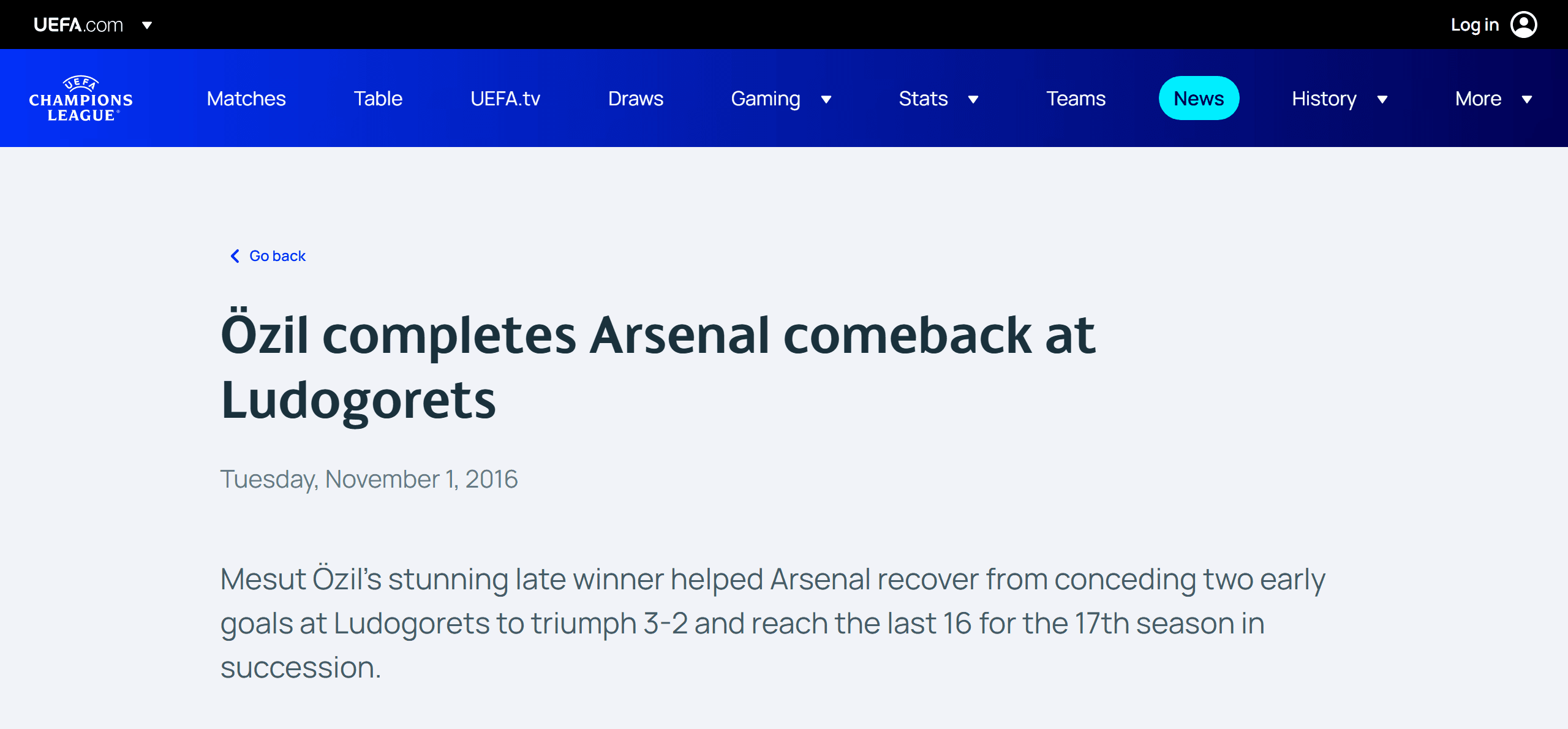
The trend refers to Mesut Özil's late winner in Arsenal's 3–2 Champions League comeback at Ludogorets on November 1, 2016. UEFA's match report records the score and two defenders closing in, while UEFA's German-language account specifically describes the chip over goalkeeper Milan Borjan. The October home fixture against the same club was a different match; it ended 6–0.
 {width="85%"}
The official report identifies the match behind the trend; the screenshot is source evidence, not reusable match footage.
The video trend asks a generator to place a different scorer into that kind of moment. The useful target is the logic of the play, not just a football stadium and a dramatic celebration. First, the keeper commits. Then the ball rises over him. The scorer reaches it again. Two defenders try to close the lane, and the scorer finishes. If the model skips the recovery or invents a second ball, the punchline loses its cause and effect.
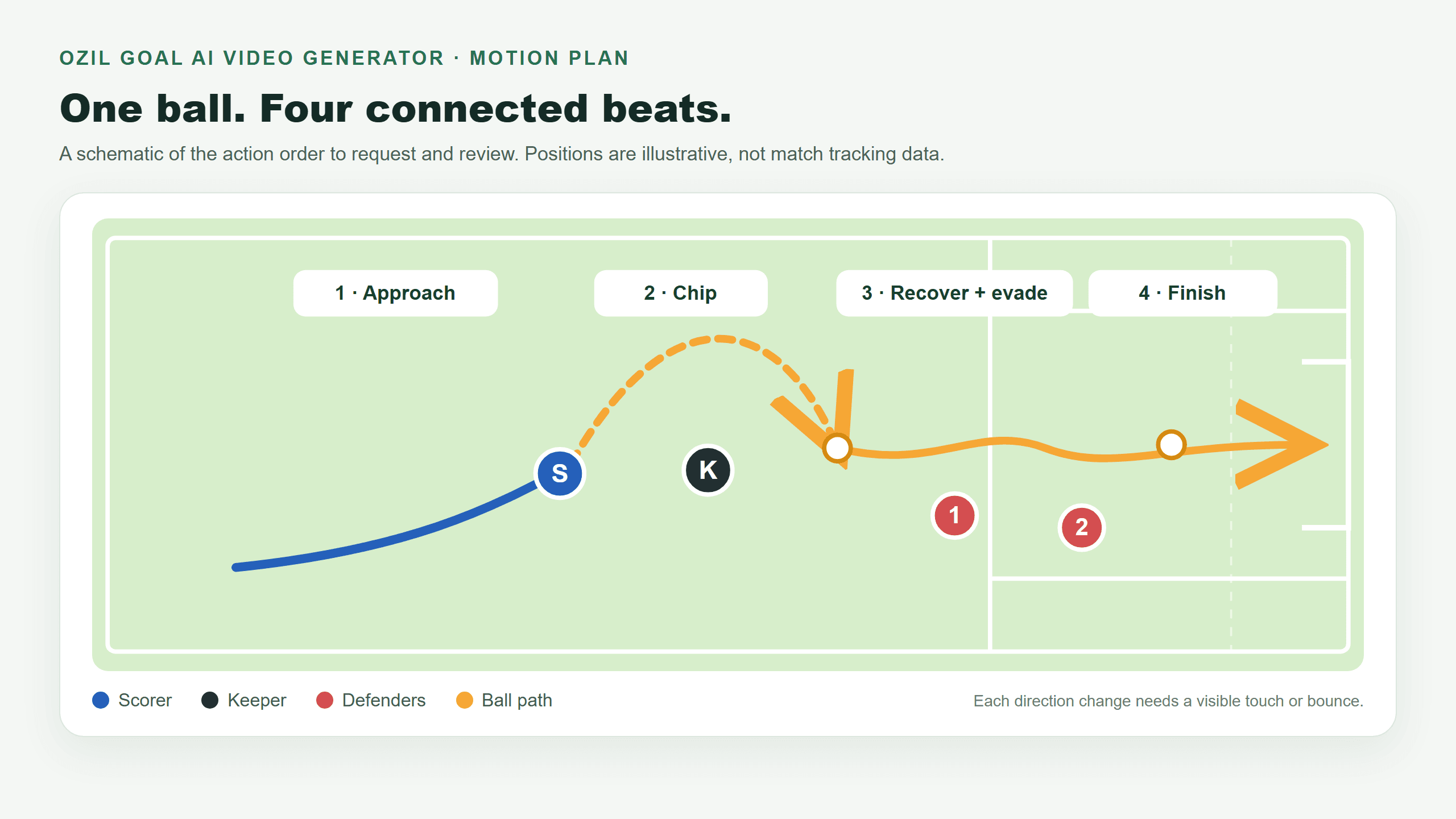
The four-beat motion plan is illustrative. The scorer's position and ball path are not tracking data from the 2016 match.
There are two ways to attempt it. A reference-to-video mode can use a permitted clip to guide action order and camera timing while a character image guides appearance. A text-to-video mode can produce an original football scene from the beat list, but a prompt alone cannot guarantee the precise timing of a specific match broadcast. Treat those as different creative goals. A generic sports clip can still be fun; it should not be labeled a faithful recreation if its movement diverges.
Prepare inputs that give the model a fair chance
Start with one clear image of the person or original character who will score. A full-body view makes the outfit, shoes, silhouette, and leg motion easier to specify than a cropped face selfie. Choose a pose with visible feet and little occlusion. For a real person, use your own likeness or get that person's permission. Avoid asking the model to infer a full kit from a face-only image and then complaining when the shoes change between shots.
If you want the original beat timing, pick a video mode that explicitly accepts both an image reference and a video reference. Atlas Cloud's Seedance 2.5 reference-to-video model is one route to inspect. Its model documentation lists image and video references and uses @Image1 and @Video1 to identify them in the prompt. The available duration, aspect ratio, audio behavior, and processing mode depend on the selected settings. Check the current form before committing a render.
The reference clip must be one you have permission to use for this purpose. A sports broadcast being easy to find does not make it free to copy, edit, or publish. The U.S. Copyright Office's fair-use FAQ explains why there is no simple safe number of seconds to borrow. When you lack rights to the match footage, film a small original football sequence, use a licensed clip whose terms allow adaptation, or make an original text-led variation instead. The goal can be inspired by the play without claiming to be the official broadcast.
Choose a reference that includes the whole action, not merely the last two seconds of the shot. If the model only sees the finish, it has to invent the chip and the defender responses. Conversely, a five-second output setting can compress the play so hard that the final touch disappears. Match output length to the material and verify the setting actually took effect. For vertical delivery, frame the scorer, ball, goalkeeper, and mouth of the goal together. A 9:16 crop that loses the ball at the top of the chip breaks the story even when the face looks right.
Write the prompt as a chain of visible causes
Give the image and motion clip separate jobs. @Image1 describes the scorer. @Video1 describes the action and camera path. Then set boundaries: replace the ball-controlling scorer only; leave the keeper and two defenders in their roles; keep one ball and the goal in a fixed place. Ask for the feet to make contact before the ball changes direction. These details are more actionable than piling on adjectives such as “epic” or “viral.”
Here is a copy-ready prompt for a compatible image-plus-video-reference workflow. Edit the clothing and framing details to match your inputs:
plaintext1Use @Image1 only as the identity and full-body appearance of the scorer. Use @Video1 as the action-order and camera-timing reference. Replace only the attacker who controls the ball and scores. Keep the scorer's face, build, hairstyle, outfit, and shoes consistent through turns and partial occlusions. Keep the goalkeeper, two defenders, pitch, goal, and their roles distinct. 2 3Follow the visible play in order: the scorer approaches the advancing goalkeeper; one foot lifts the single football over him; the ball drops and the same scorer regains control; the first and then second defender challenge; the scorer makes a visible final touch and the ball travels into the net. Make each ball movement follow a foot touch or natural bounce. Keep foot contact with the turf and preserve the direction of play and goal position across camera changes. Use the supported duration that includes the entire finish. Frame vertically only if the ball, scorer, and goal remain visible. 4 5Do not duplicate the scorer, swap player roles, invent another ball, add a new trick, teleport the ball, slide feet across the grass, merge bodies, or change clothes between shots.
This is a control prompt, not a guarantee. Reference-capable models can still misread which player is the scorer, especially when several bodies overlap. If the output swaps the goalkeeper's face or gives a defender the scorer's shirt, simplify the source clip or use a reference frame with clearer separation. Changing ten adjectives rarely solves an ambiguous visual target.
If you have no permitted motion clip, use a text-only prompt that describes an original play rather than asking for an exact replay:
plaintext1A fictional adult footballer in a plain blue shirt attacks a goal at dusk on an unbranded pitch. Wide touchline view: the goalkeeper advances as the footballer lifts one ball over him. Lateral tracking view: the ball lands, the same footballer regains it, and two defenders challenge in sequence. Low goal-side view: a visible final foot touch sends the ball across the line into the net. The football has one continuous trajectory, the scorer's clothing stays consistent, and feet meet the grass naturally. No logos, broadcast graphics, duplicate players, new balls, or celebratory cut before the finish. Vertical 9:16 composition with the ball and goal visible throughout.
The text-only version is useful for testing whether a model can stage the four beats. It cannot establish that a real person was replaced into the historical shot. If your actual render simplifies the action, describe the result honestly: perhaps it demonstrates the chip and finish, while the defender sequence still needs another attempt.
Recreate and edit these videos in the Atlas Cloud playground
First open Seedance 2.5 Text-to-Video to make an original motion source. Use a permitted clip of your own for any reference workflow. Then open Seedance 2.5 Reference-to-Video to change only the number 13 scorer. In its Playground form, upload the original MP4 under Reference Videos so the prompt can call it @Video1. Paste one character prompt at a time into Prompt, check the duration, resolution, aspect ratio, and MP4 output controls, and run each edit separately. The four complete 15-second results are shown below as animated GIFs for in-page playback.
1. Generate the original football sequence
For a widescreen version of this example, set 15 seconds, 720p, 16:9, and MP4 in Text-to-Video. This prompt spells out the intended ball path and gives the finish time to complete. Review the actual output rather than assuming every requested beat succeeded.
plaintext1Create a single complete, original 15-second football play in a horizontal 16:9 frame. This is a fictional scene on an unbranded grass pitch at dusk, not historical match footage. Use one continuous medium-wide sideline tracking shot, moving smoothly with the attacker; never cut away, zoom in, or hide a touch. Keep the attacker, the ONE ball, the goalkeeper, both defenders, and the goal spatially consistent. The ball must stay visible or be immediately traceable in every second. 2 30-3 seconds: A blue-shirted adult attacker dribbles the one ball toward a visible goal. A black-clad goalkeeper advances off his line toward the attacker. Two different red-shirted defenders wait between the attacker and the open goal, separated from each other and visible in the background. 4 53-5 seconds: Show the attacker's boot scoop under the ball. The ball rises in a clear, continuous arc OVER the advancing goalkeeper's outstretched hands. The goalkeeper reaches and misses. Do not cut during the foot contact, flight, or clearance. 6 75-7 seconds: The ball lands on the grass behind the goalkeeper. The SAME attacker runs around him, reaches the landing ball, and makes a visible controlling touch with a boot. Keep the goalkeeper behind the attacker, not magically back in front. 8 97-10 seconds: Defender one, in red, approaches from the attacker's left and lunges. The attacker makes a visible touch to the right and passes him. Defender two, a separate red-shirted player, then approaches from the right. The attacker makes another visible touch to the left and passes him. Show both attempts and both evasions in order; neither defender disappears mid-action. 10 1110-13 seconds: Now facing the open goal, the attacker takes a final, clearly visible shot with his right foot. Track the same ball as it rolls across the goal line and strikes the inside of the net. The ball must enter the goal only after that final boot contact. 12 1313-15 seconds: Hold the view long enough to see the ball settled inside the net and the attacker slowing down outside the goal. End only after the complete scoring action. 14 15Visual continuity rules: Exactly one ball, one blue attacker, one black goalkeeper, and two distinct red defenders. Their kits, faces, body sizes, and positions remain stable. Realistic foot-to-ball contact, grounded running, natural ball flight and bounce, fixed goal location, readable full-body framing. No extra players, no duplicated ball, no teleporting, no reverse action, no premature celebration, no close-up portraits, no graphics, text, badges, or logos. Prioritize the full sequence of physical actions over stylized camera effects.
The first animation is the motion source used for the three character edits.
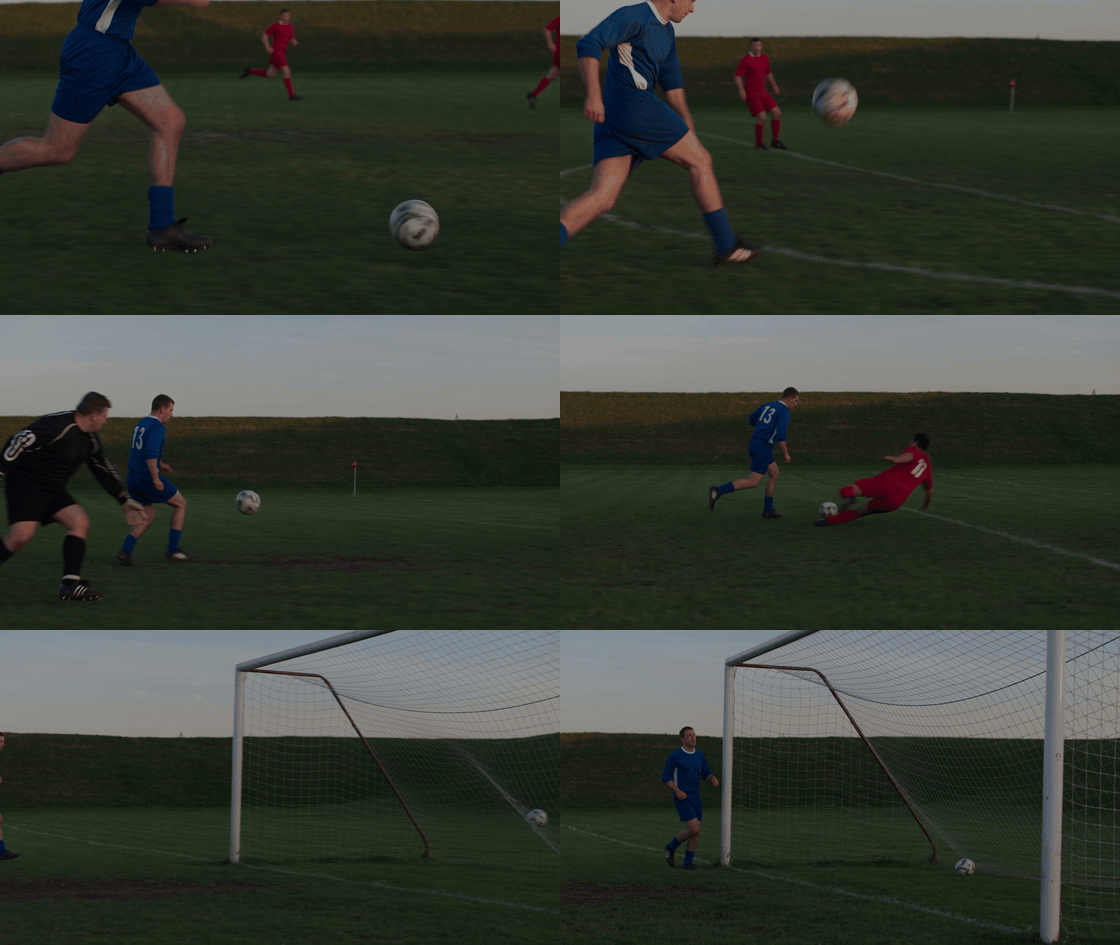
This 15-second Seedance 2.5 text-to-video result provides the baseline for the three character variations below. The blue number 13 attacker lifts the ball past the advancing goalkeeper, continues through a defender challenge, and reaches the goal-side finish.
2. Replace the scorer with a cat
In Reference-to-Video, keep the original MP4 selected as @Video1. Paste this prompt and run the cat edit. The animation directly below shows the resulting full play.
plaintext1Use @Video1 as the exact source video for a localized character replacement. Change ONLY the blue-shirted number 13 footballer into a bipedal anthropomorphic tabby cat. Give this one player a feline face, ears, whiskers, and subtle fur on exposed skin, while preserving the same blue number 13 jersey, shorts, socks, and football boots. 2 3Match the source player's position, body size, joint poses, running path, dribbles, chip, turns, final kick, timing, and shadows frame by frame. Keep the original 15-second duration, 16:9 framing, camera movement, pitch, lighting, goal, single ball and its trajectory, black-clad goalkeeper, red-shirted defenders, their appearances and actions, and the final net movement unchanged. Do not add a new action, player, limb, ball, camera cut, crop, or speed change. Edit only the blue player's appearance.
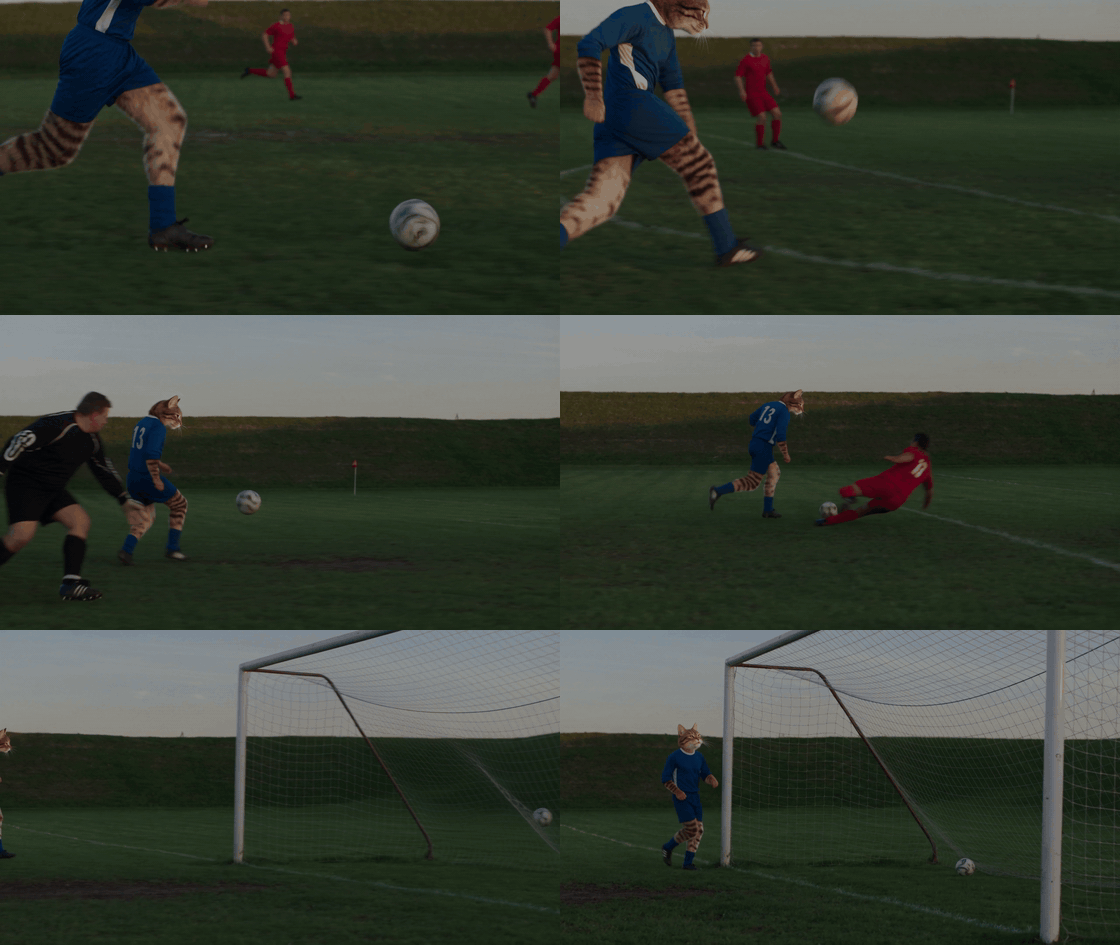
In the cat version, the number 13 scorer keeps the blue kit while gaining a feline head and striped exposed limbs. The approach, goalkeeper encounter, defender challenge, and finish follow the same broad sequence, making the character change easy to compare with the baseline.
3. Replace the scorer with an older man
Use the same original MP4 as @Video1, then run a separate edit with the prompt below. The cream shirt and navy shorts make the target change visible during wide shots.
plaintext1Use @Video1 as the exact motion and camera reference for this 15-second, 16:9 video. Edit only the original blue-shirted number 13 attacker who controls the ball and scores. Replace that player’s entire visible appearance with the same clearly elderly man throughout every shot. He is about 75 years old, with short silver-white hair, a receding hairline, visible facial wrinkles, and an older adult face and build. Replace his original all-blue kit with a cream long-sleeved retro football jersey with a navy collar and cuffs, a clearly visible navy number 13, dark navy knee-length football shorts, long white socks, and brown leather football boots. Keep these clothes and his facial features consistent through every angle and occlusion. 2 3Preserve the source player’s exact running, touches, kick, direction, position, and timing, even though his appearance changes. Preserve the single ball’s path, the goalkeeper, red-shirted defenders, goal, pitch, lighting, shot order, camera movement, and total duration exactly as shown in @Video1. Do not change any other person or their actions. Do not add shots, players, balls, or a new celebration.
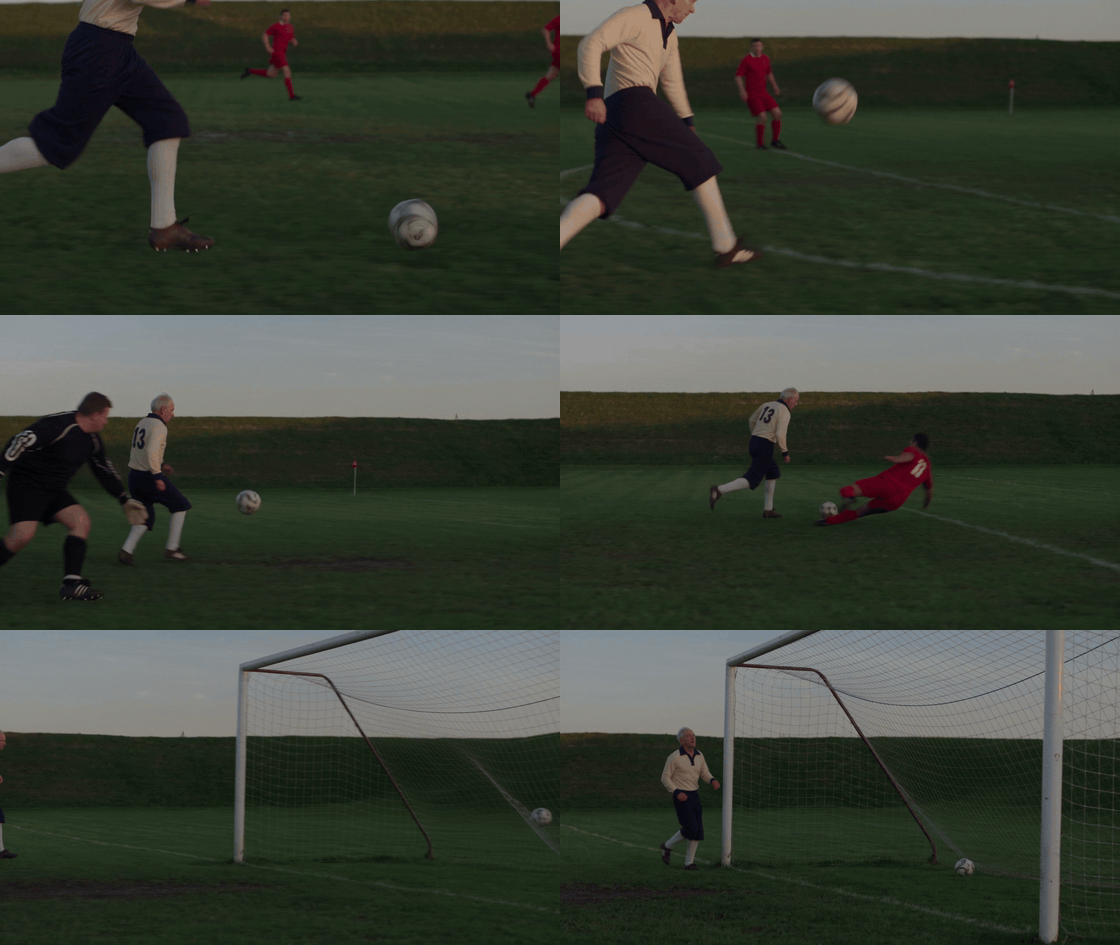
The older scorer is identifiable by silver hair, a cream long-sleeved shirt, navy shorts, and white socks, rather than by his face alone. Number 13 remains on his back as he moves past the goalkeeper and red-shirted defender toward the final shot.
4. Replace the scorer with a woman
Start another edit from the same original MP4. This prompt asks for a long ponytail and a pleated blue athletic skirt while keeping the other players and the ball path tied to @Video1.
plaintext1Use @Video1 as the exact motion and camera reference for this 15-second, 16:9 video. Edit only the blue-shirted number 13 attacker who controls the ball and scores. Replace that player’s entire visible appearance with the same adult woman throughout every shot. She has clearly visible long dark hair in a ponytail that reaches her mid-back. Keep her blue number 13 football jersey, but replace the original shorts with a visibly pleated, above-the-knee blue athletic skirt with fitted shorts underneath. Make her face, body shape, hair, skirt, arms, and legs consistent across turns and partial occlusions. The skirt and ponytail should move naturally without hiding her feet or the ball. 2 3Preserve the source player’s exact running, touches, kick, direction, position, and timing. Preserve the single ball’s path, the goalkeeper, red-shirted defenders, goal, pitch, lighting, shot order, camera movement, and total duration exactly as shown in @Video1. Do not change any other person or their actions. Do not add shots, players, balls, or a new celebration.
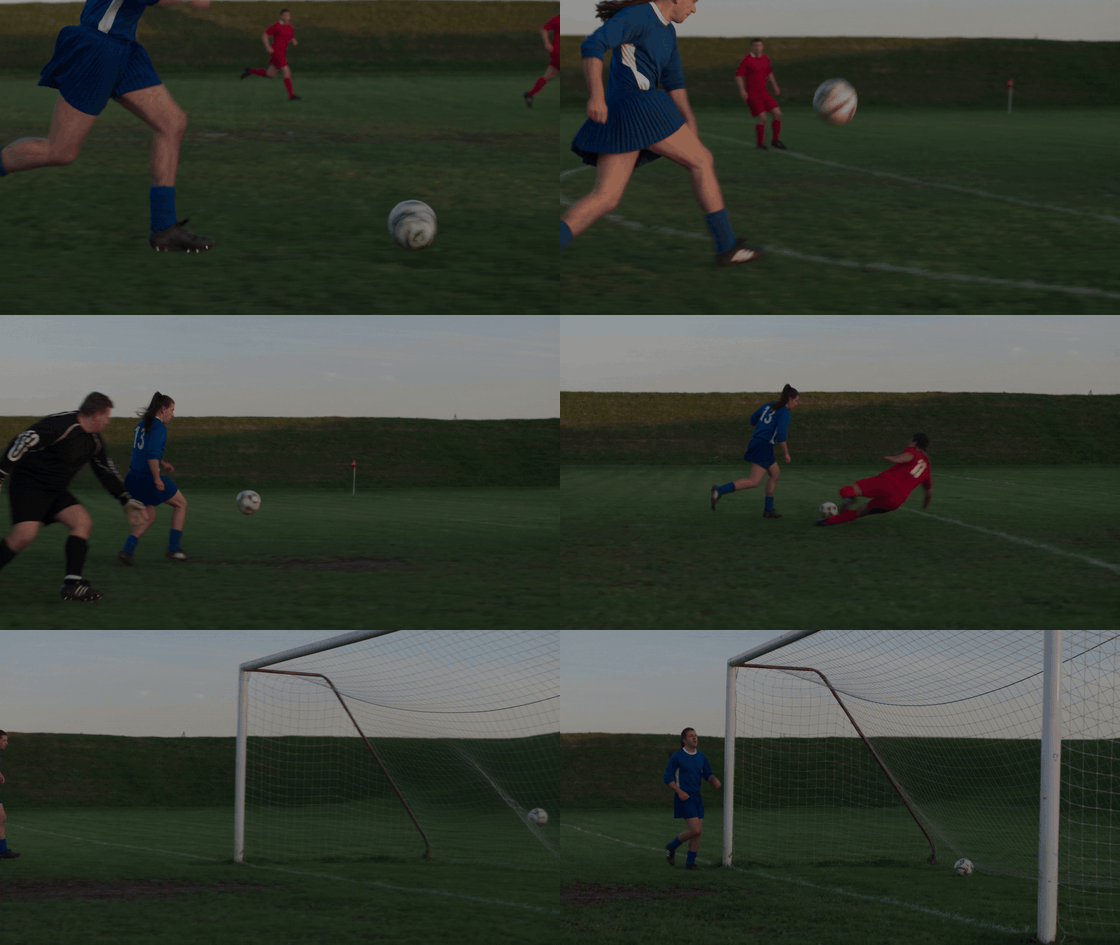
The woman version adds a long ponytail and a blue athletic skirt, so her identity remains visible in both close and wide shots. She continues the chip, run, defender challenge, and finish while the goalkeeper and red-shirted players retain their roles.
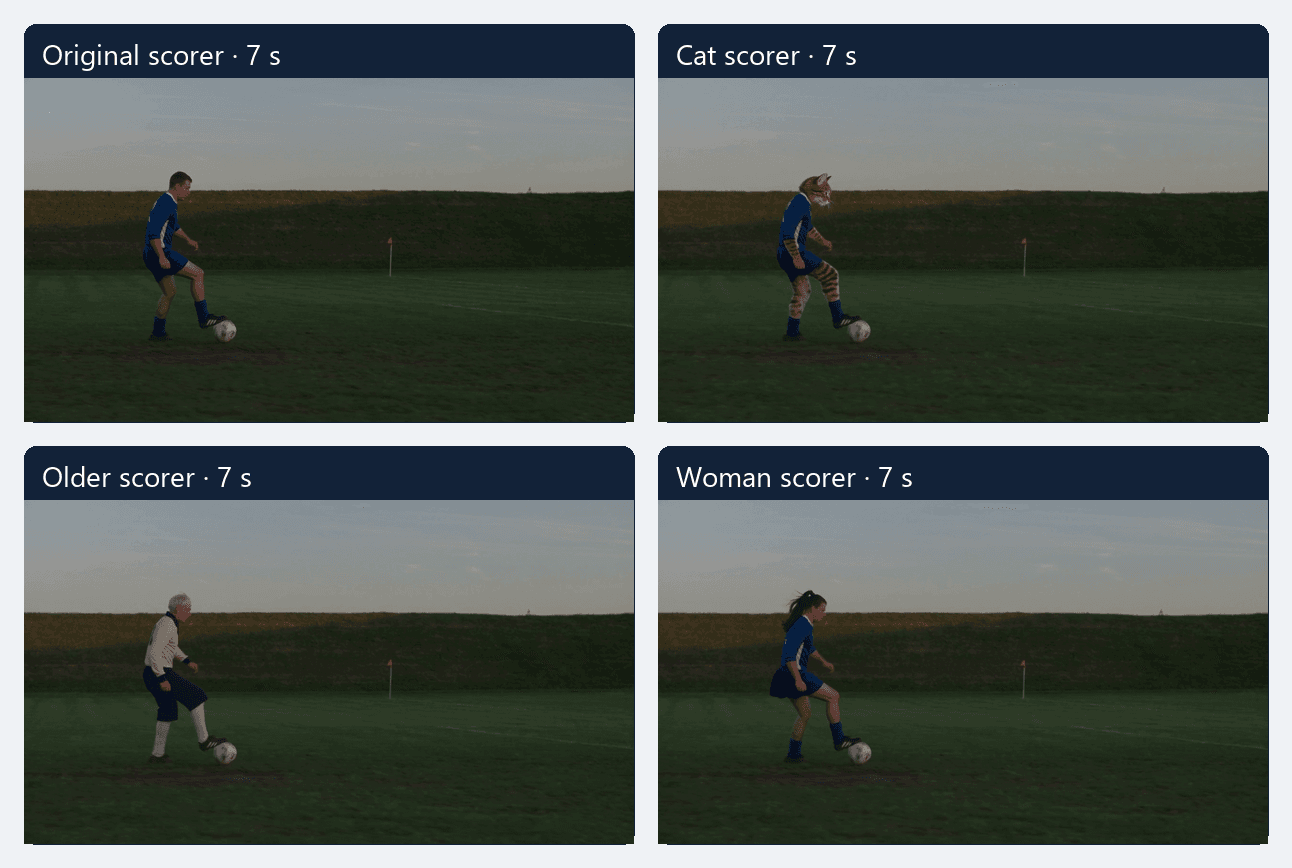
Matching seven-second frames from the four actual MP4 files. Comparing the same ball-control moment makes the scorer's changed appearance visible without relying on four unrelated poses.
Generate once, then inspect the difficult frames
Render a draft at the shortest duration that still allows the whole sequence. Watch it at normal speed before judging individual frames. Does the play read without a caption? The camera should follow the ball's path, not jump to a new angle exactly when a missed touch would be visible. Motion should carry the action forward; a slow push-in on a static player is not a goal sequence.
Then pause at four points: the highest point of the chip, the ball's landing, the moment both defenders enter the action, and the last touch before the goal. Scrub one frame at a time around each. Look for the number of balls, whether a boot meets the ball, where the keeper and defenders stand, and whether the same scorer survives the cut. A convincing image at the goal line can coexist with an impossible ball path three seconds earlier.
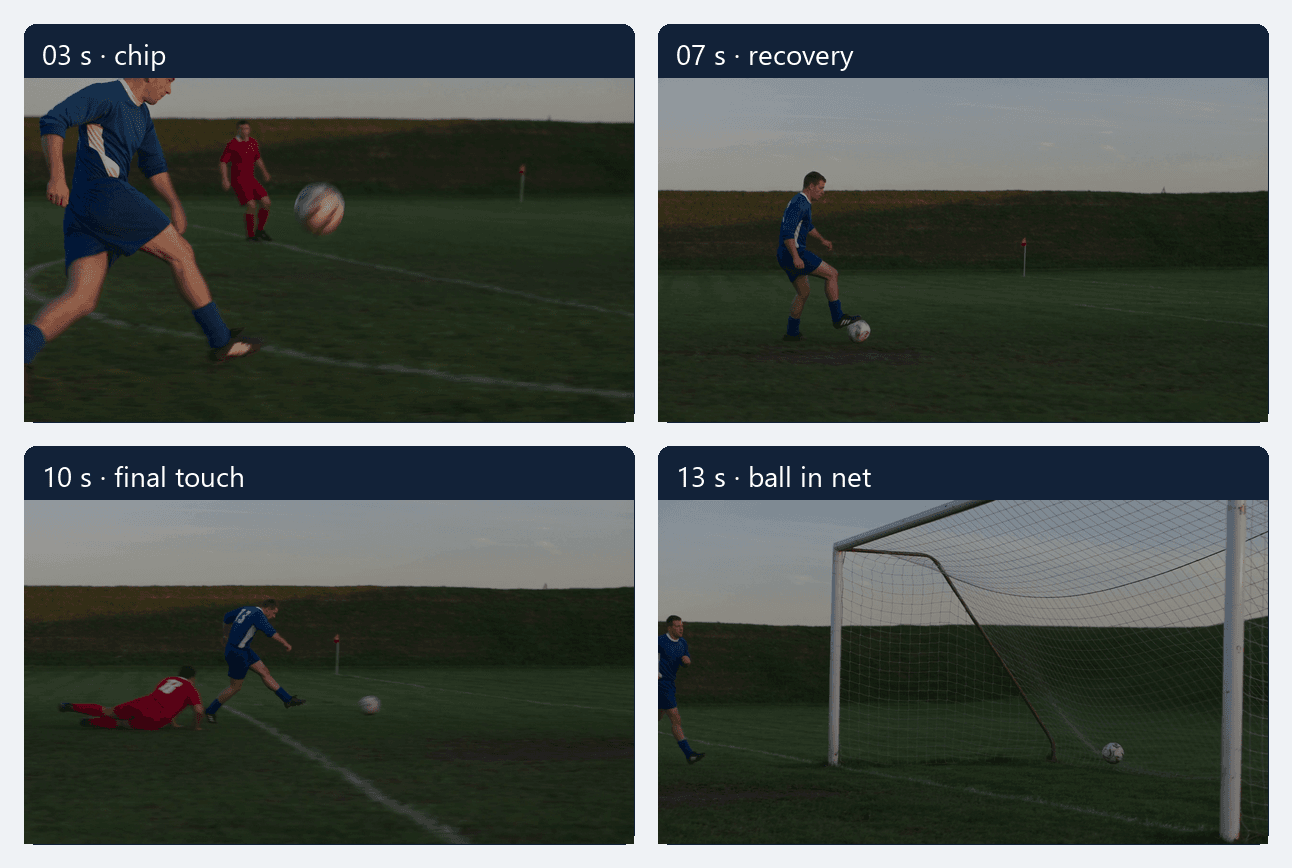
Four checkpoints from the original 15-second MP4: the lifted ball, the later controlling touch, the final shot, and the ball inside the net. The moving clip above remains the source for judging continuity between these stills.
| Check | Passing sign | Typical failure | Next adjustment |
|---|---|---|---|
| Scorer identity | Same face, build, outfit, and shoes before and after the turns | Face or shirt transfers to a defender | Clarify “replace only the scorer”; choose a less crowded input |
| Chip | One ball rises after a visible foot touch and clears the keeper | Ball appears above the keeper without contact | Show the approach and touch in the reference or prompt |
| Recovery | The same ball lands and stays in reach of the scorer | Ball jumps between cuts or becomes two balls | Reduce camera cuts and simplify the action |
| Defenders | Two distinct challenges occur in order | Defenders merge, freeze, or switch roles | Use a wider reference with visible spacing |
| Finish | Final touch sends the ball across the line | Goal is implied by a celebration | Reserve enough duration for the finish and hold the goal in frame |
Do not repair every defect with one enormous negative prompt. Fix the biggest broken link first. If the model loses the ball after the chip, shorten the motion request to a clearly filmed approach and recovery, or provide a cleaner reference. If identity drifts but movement reads, improve the scorer image and specify stable clothes. If the goal vanishes in a vertical crop, change the framing before rerendering the same prompt.
Export for the platform without hiding the action
Keep the complete play in the master export. A vertical social cut can work if the frame follows the ball and leaves the net visible. Test the crop at the chip apex and at the final touch, the two moments most likely to leave a narrow frame. If either moment is clipped, use a wider composition or reframe from a permitted source. Do not claim the result has native sound unless the selected model and exported file actually contain it. Add music only when you have permission for the track.
When you share the result, describe it as an AI recreation or an original variation. Avoid implying that a newly generated player appeared in the 2016 broadcast. That distinction helps the audience understand what the video shows and keeps the historical match footage separate from your creative edit.
The next useful action is small: prepare one full-body scorer image, one permitted motion reference if you have it, and the four-beat checklist above. Run one draft through a compatible Atlas Cloud reference-to-video option, then keep only the version whose ball path still makes sense when you watch it frame by frame.
FAQ
Can I make the Ozil goal AI trend from one photo?
You can make an Ozil-inspired football scene from a photo and a text prompt if your chosen model supports image-to-video. For the specific sequence and camera timing, use a permitted reference clip with a mode that accepts both kinds of input. One still image alone does not define the exact path of the ball or defenders.
Why does the scorer change halfway through?
Overlapping players and fast cuts can make the replacement target ambiguous. Use a clear full-body image, identify the scorer as the only player to replace, and keep the original roles of the keeper and defenders explicit. Review the turn and occlusion frames, where identity drift is easiest to miss at full speed.
How long should the clip be?
Long enough to show a visible chip, recovery, defender challenges, and final touch without rushing any one beat. The exact options depend on the model and mode. Check the rendered file's duration rather than assuming the form saved the number you selected.
Can I use the real match footage as the reference?
Only if you have the necessary rights or a valid basis for that use. Finding a clip online does not grant permission to adapt or republish it. For a shareable demonstration, an original or properly licensed football reference is the cleaner input.
What is the fastest way to spot a bad result?
Watch the ball, not the face. Count the balls through the chip, landing, defender moves, and finish. If it changes position without a touch or bounce, the movement needs revision even when individual frames look polished.





