You bookmarked the Pikaswaps page a few months ago. Today you click it and land on a login screen. Search for it inside Pika and the name doesn't come up either.
Here's what happened. Pika rebuilt its whole platform in September 2026, and Pikaswaps didn't make it into the new app list under that name. The closest match is a new app called Swap Anything: upload a clip, pick what to replace, and the performance stays as filmed. Pikadditions survived with its name intact. This guide covers what each tool does now, what a run costs in credits, whether a free account gets you anywhere, and how Atlas Cloud handles the same kind of edit from a single written instruction.
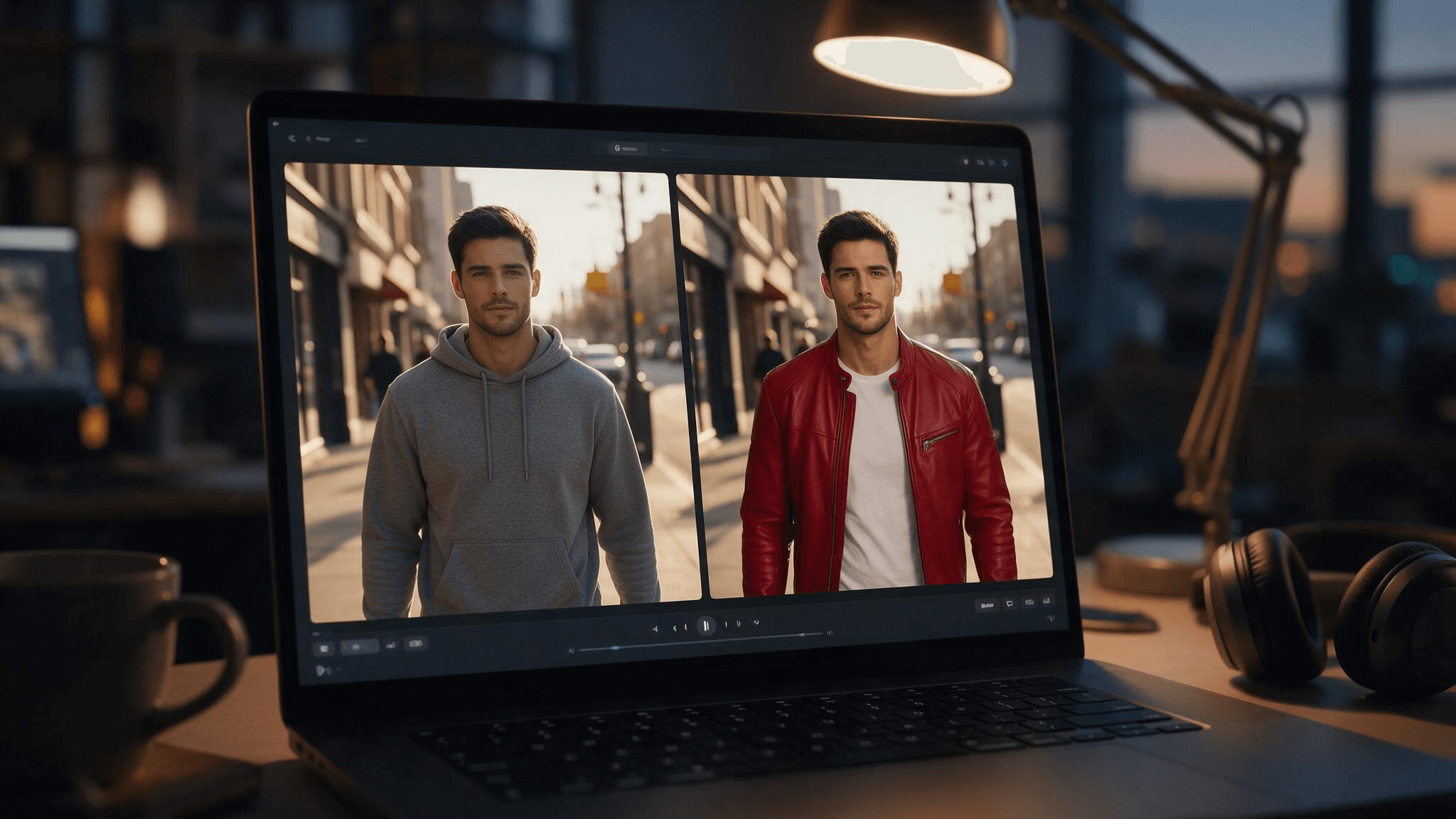
Key Takeaways
- Pikaswaps no longer appears in Pika's app list after the relaunch Pika announced on September 17, 2026, and the old URL now sends logged-out visitors to a login page.
- Swap Anything is the closest match in the new lineup. It replaces characters, outfits, locations, or products while keeping the original timing and motion.
- Pikadditions kept its name, and Pika's own FAQ says it can only add things to a clip, never remove or replace them.
- Pika's Free plan comes with 0 monthly credits, so running Swap Anything means a paid plan or a credit pack.
- Atlas Cloud's video editor handles swap-style edits from one written instruction, with seven models to pick from in its Video Edit tab.
What Happened to Pikaswaps?
Pika published "Welcome to the New Pika" on September 17, 2026. The post describes a rebuilt platform that puts video, image, and sound creation in one place, with a set of focused apps on top and a mix of Pika's own and outside models underneath. The previous version moved to old.pika.art, and a banner in the new app catalog says Pika is keeping it up "for a few weeks, so you have time to say goodbye."
For Pikaswaps specifically, three things changed:
- The name is gone from the catalog. The "Pika Models" row lists Pika 2.5, Pikadditions, Pikaframes, and Pika's audio models. Pikaswaps isn't there.
- The old links don't open the tool. Both pika.art/pikaswaps and old.pika.art/pikaswaps redirect logged-out visitors to the new login page.
- A new app took the slot. Swap Anything sits in Featured Apps, its own page carries a NEW label, and its catalog card pitches it as a way to recast anything in a clip.
We couldn't find a rename notice from Pika. In practice, though, Swap Anything is where pika swaps users end up, and its internal page path (/apps/reskin-video) describes the job well: reskin an existing video.
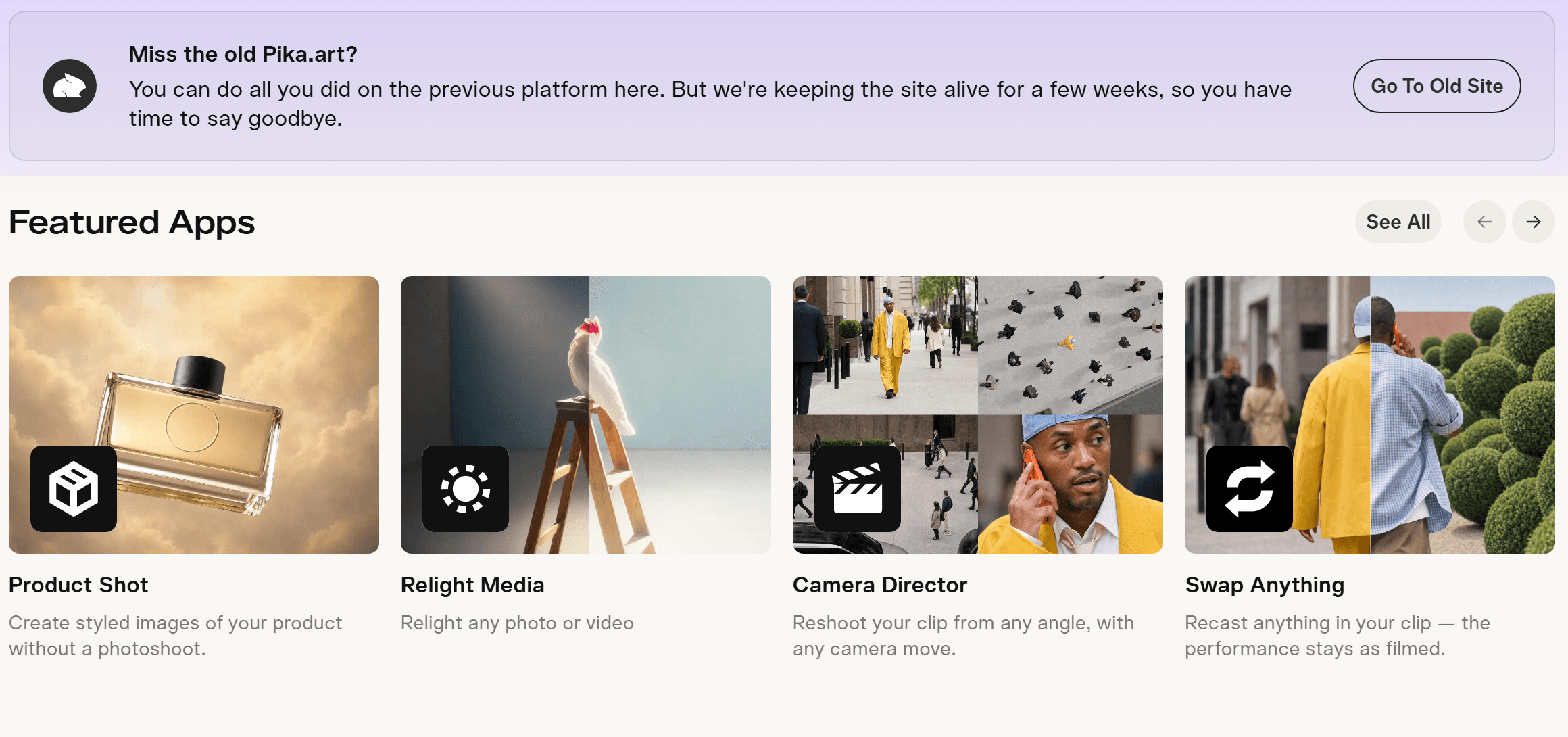
Source: Pika app catalog, captured September 2026
How Swap Anything Works (vs. the Old Pikaswaps AI)
Pika's help center still carries the pre-relaunch description of Pikaswaps: a video-to-video feature that lets you swap objects in your real-world video with "wild modifications and alterations." That was the whole brief, one free-form request per run.
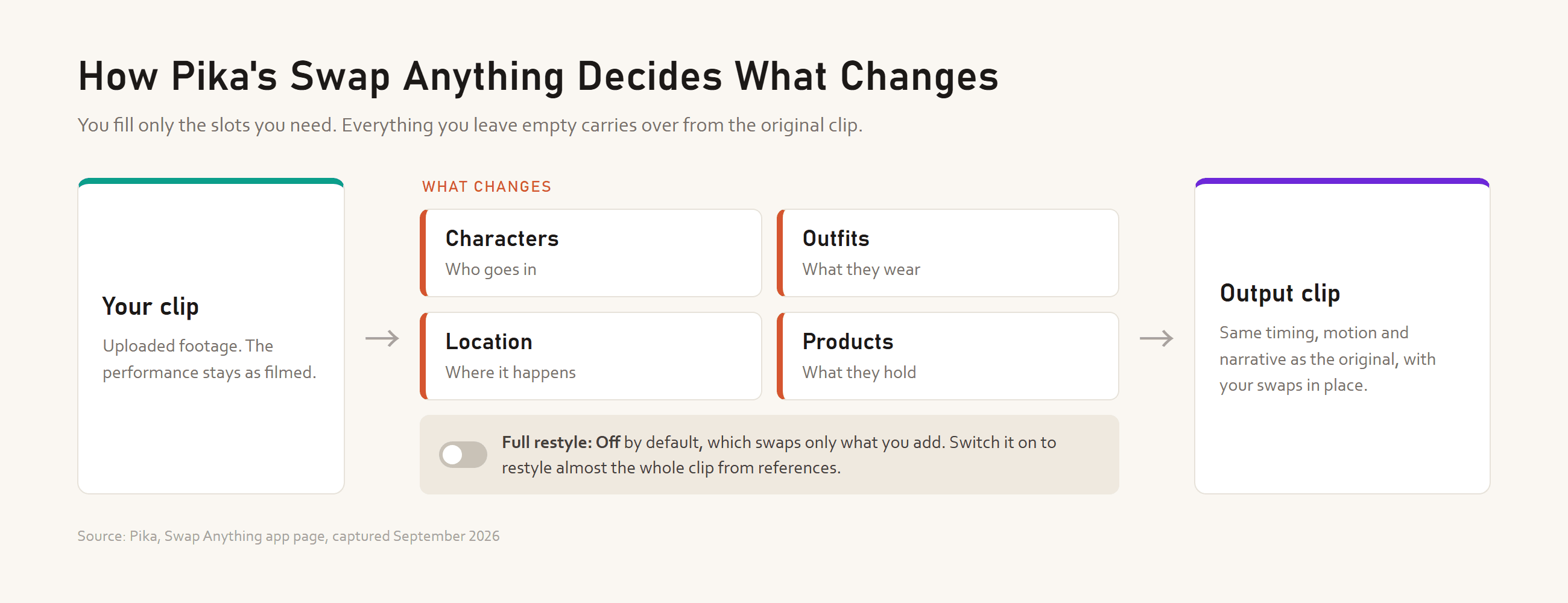
Swap Anything breaks that request into parts. After you upload a clip, the panel asks what should change, split into four slots:
| Slot | What Pika's panel says it covers |
|---|---|
| Characters | Who goes in |
| Outfits | What they wear |
| Location | Where it happens |
| Products | What they hold |
Below the slots sits a Full restyle toggle, off by default and labeled "swap only what you add." Switch it on and, per the app page, you can upload references and change almost everything about how the clip looks. Either way, Pika says the app keeps the original's timing, motion, and narrative.
So the pikaswaps AI idea survives. What's new is the structure around it: four named categories and a restyle switch instead of one free-form object swap. The Swap Anything page doesn't say which model runs the edit, and Pika's launch post explains why: its apps pick a suitable model automatically, with manual model choice there for anyone who wants more control.
Atlas Cloud: Recast a Clip With One Sentence and 7 Models
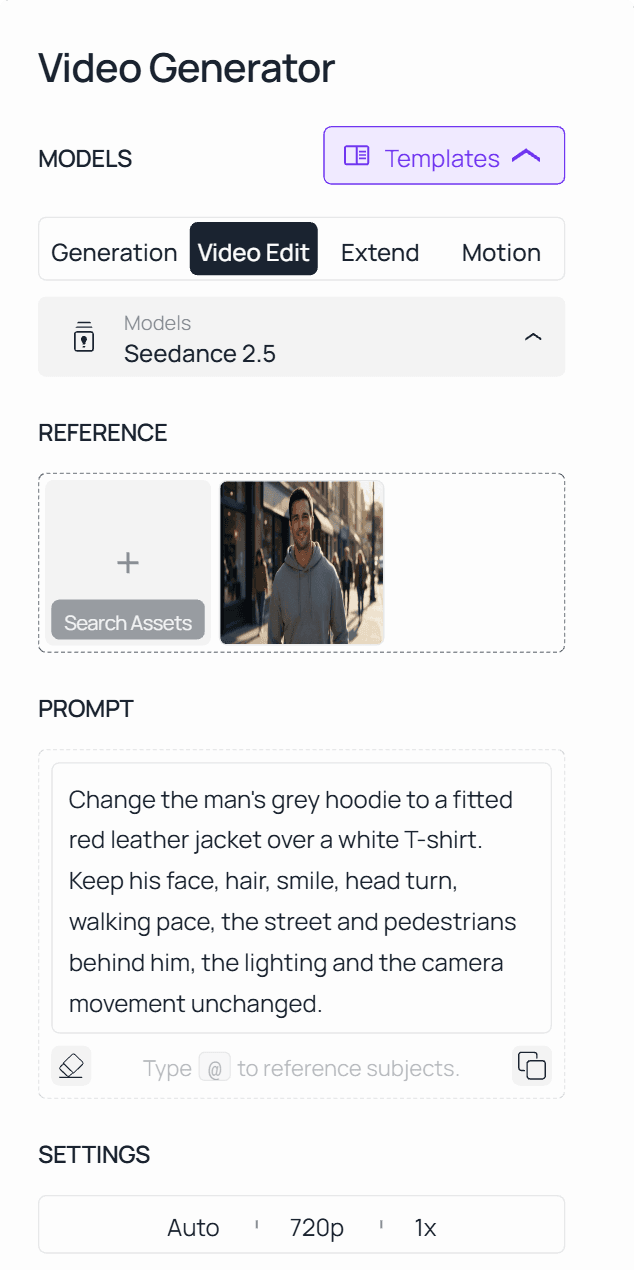
Atlas Cloud does the same kind of edit without the slot panel. In the Video Edit tab, you upload a clip and write what should change and what should stay. Seven models are available there. Seedance 2.5 from the ByteDance model family is the default, alongside Seedance 2.0, Gemini Omni Flash, HappyHorse-1.0, Wan 2.7, Kling Video O3 Pro, and Grok Imagine from xAI.
Here's the Outfits job from Swap Anything, done with one sentence on Atlas Cloud: a 5-second street clip, Seedance 2.5, and an instruction to swap the hoodie for a jacket and nothing else.
If wardrobe is the only thing you ever swap, our video clothes changer guide goes deeper on that one job. For replacing a face rather than a whole character, AI Face Swap Video 3.0 covers what those tools actually do.
Method 1: Swap Elements From the Video Edit Tab
- Open the video generator and switch to the Video Edit tab. The page URL stays the same, so look for the tab label.
- Upload the source clip.
- Keep Seedance 2.5 or pick another model from the list. The Seedance 2.5 reference-to-video page runs the same model and lets you edit the request as JSON before you submit.
- Write the instruction in three parts: what changes, what it becomes, and what stays put.
- If the clip has no sound, switch Audio off so the result stays silent too.
- Run it and play the result next to the original before you export.
Method 2: API Access in 3 Steps
Step 1: Get your API key. Create one in the Atlas Cloud console and copy it.
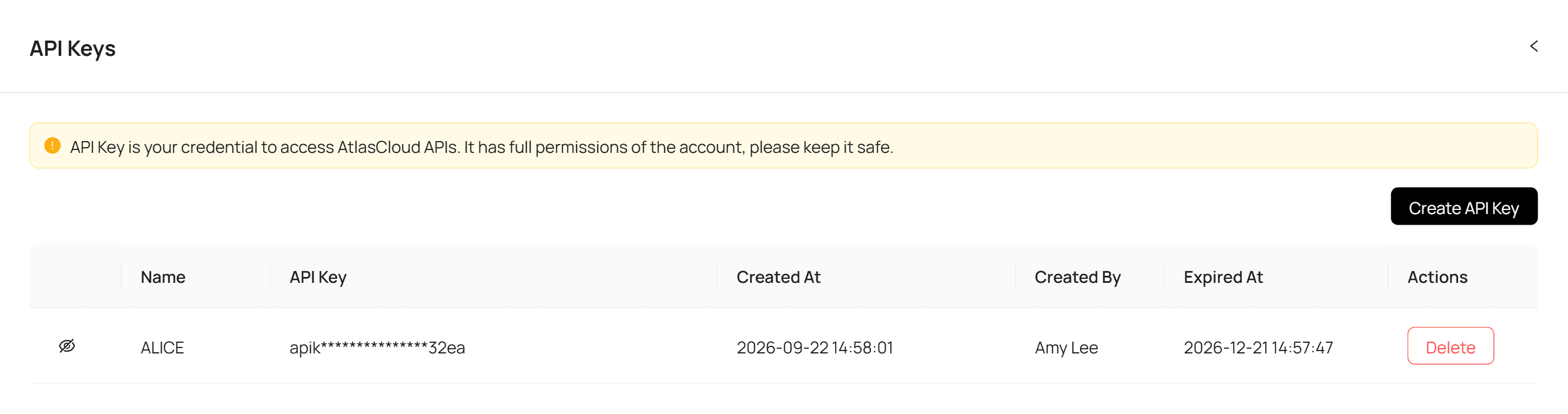
Step 2: Check the API docs. Accepted formats, clip length limits, and each model's input fields are in the API documentation.
Step 3: Make your first request. Send the clip and the instruction:
plaintext1curl -X POST https://api.atlascloud.ai/api/v1/model/generateVideo \ 2 -H "Content-Type: application/json" \ 3 -H "Authorization: Bearer $ATLASCLOUD_API_KEY" \ 4 -d '{ 5 "model": "bytedance/seedance-2.5/reference-to-video", 6 "prompt": "Change the man'''s grey hoodie to a fitted red leather jacket over a white T-shirt. Keep his face, hair, smile, head turn, walking pace, the street and pedestrians behind him, the lighting and the camera movement unchanged.", 7 "reference_videos": ["<your_clip_url>"], 8 "duration": -1, 9 "ratio": "adaptive", 10 "resolution": "720p" 11 }'
Then poll until the job finishes:
plaintext1curl https://api.atlascloud.ai/api/v1/model/prediction/<prediction_id> \ 2 -H "Authorization: Bearer $ATLASCLOUD_API_KEY"
duration: -1 and ratio: adaptive are what turn this into an edit. The output keeps the source clip's length and aspect ratio instead of generating new ones. The endpoint, the auth header, and the polling call stay the same for every video model Atlas Cloud hosts. Moving the same job to Kling Video O3 Pro or Wan 2.7 means changing the model string and checking that model's input fields in the docs.
Pikadditions: The Pika Additions Tool That Kept Its Name
Pikadditions made it through the relaunch untouched. It still lives at /apps/pikadditions, sits in the "Pika Models" row, and carries a "Powered by Pika" label, which Swap Anything's page doesn't.
Three inputs cover a run: a clip, what to add, and where it goes. A reference image is optional, and Pika's FAQ says it only matters when the addition has to match something specific. Placement lives in the prompt, and Pika's own examples read like stage directions: resting on top of his head, on the table to the left.
A few details from the app's FAQ worth knowing before you run it:
- The result comes back at 5 or 10 seconds, picked in the settings row.
- You can render at 720p or 1080p.
- Asked whether it can remove or replace something, the FAQ answers no. Pikadditions only adds.
That last point is why pika additions can't stand in for the old Pikaswaps. If something in the frame has to go or change, Swap Anything is the Pika app for it.
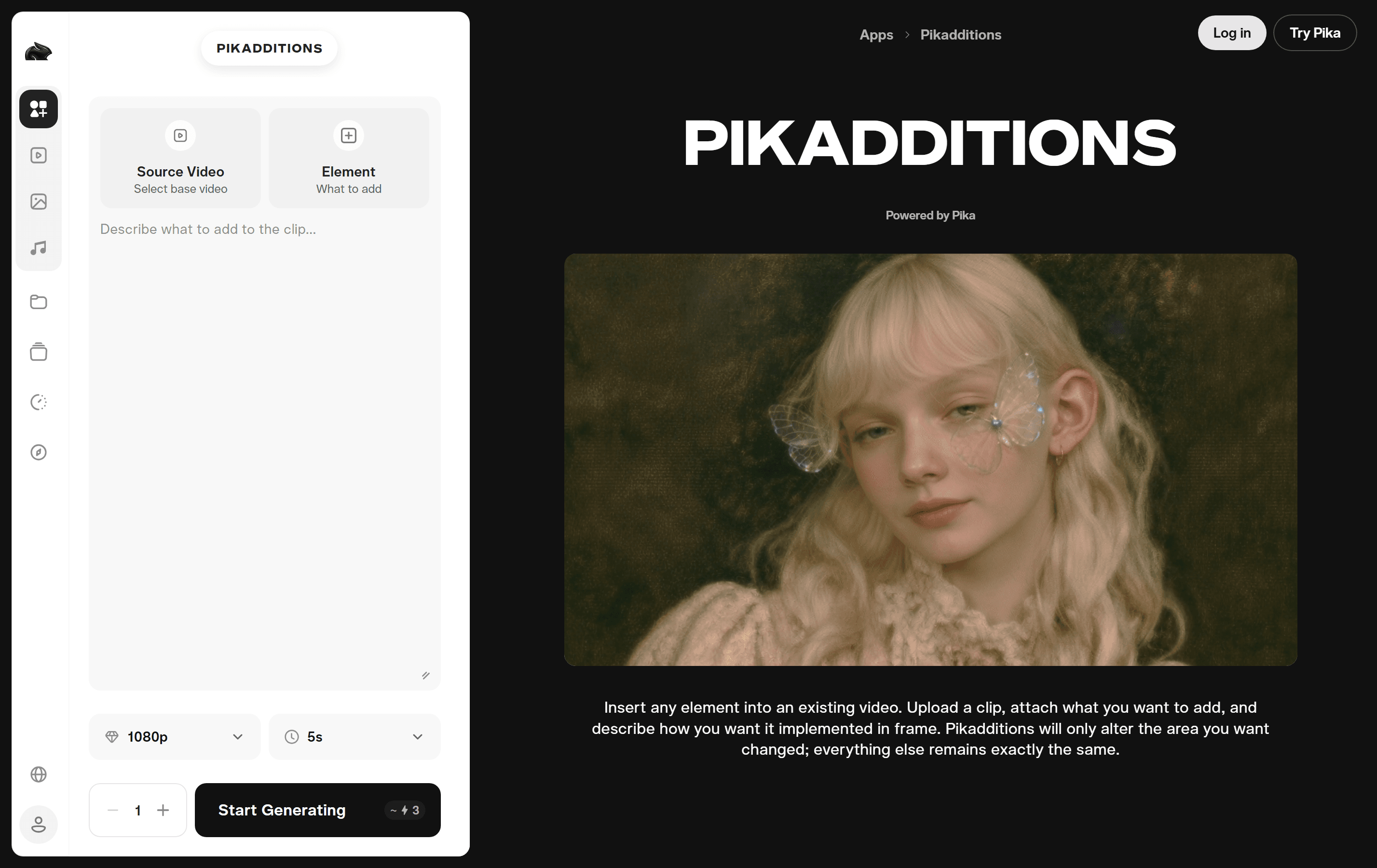
Source: Pika, Pikadditions app page, captured September 2026
Pika Swaps Pricing: What Swap Anything and Pikadditions Cost
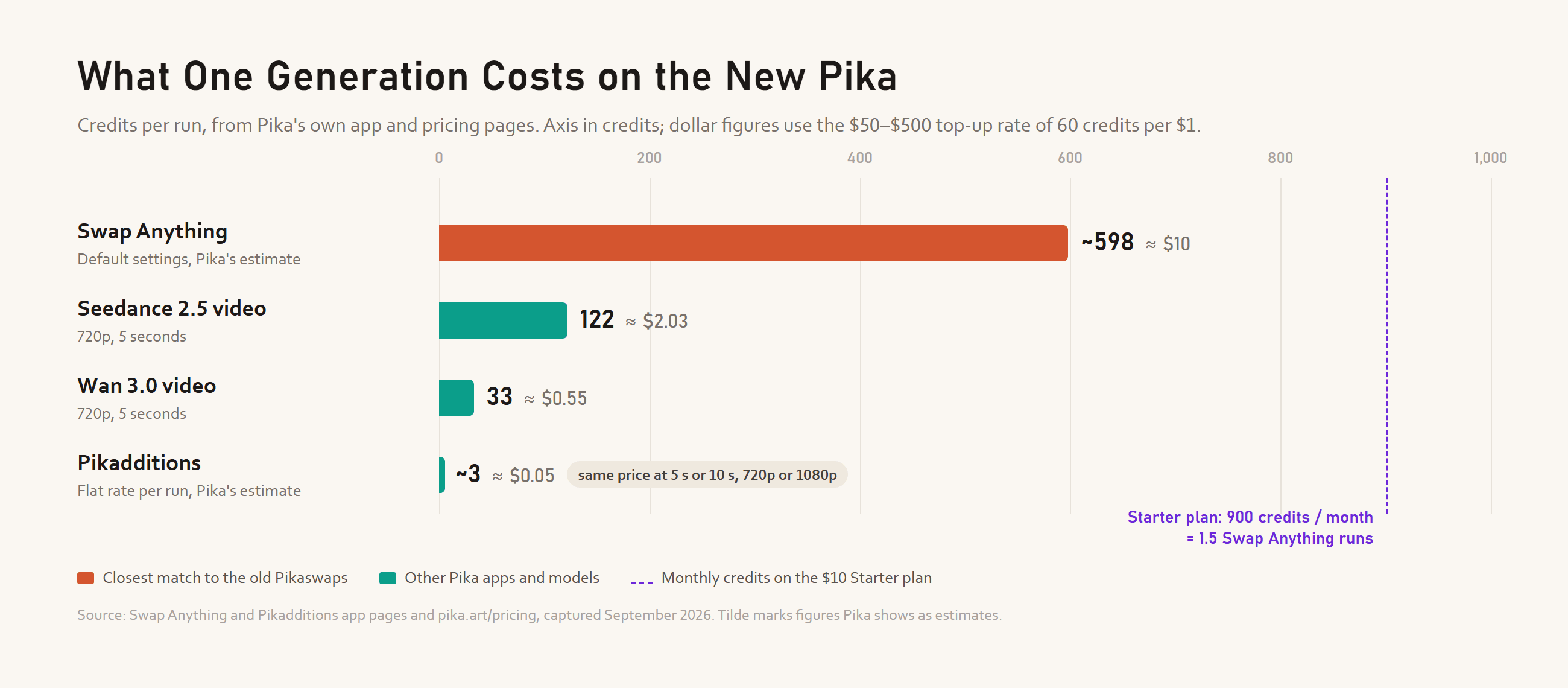
Everything on the new Pika runs on credits, and the two editing apps sit at opposite ends of the scale. With default settings and no clip uploaded yet, the Generate button on Swap Anything shows about 598 credits. Pikadditions shows about 3 at its default 5 seconds and 1080p, and its page says length and resolution don't change that number.
Pika marks both with a tilde, so read them as estimates. The help center still quotes the pre-relaunch rates, 10 credits for Pikaswaps on Turbo and 20 on Pro, and those figures don't match what the new apps display. For scale, Pika's pricing page lists a 5-second 720p Seedance 2.5 clip at 122 credits and the same clip on Wan 3.0 at 33.
Converting to dollars: the one-time credit packs from $50 to $500 work out to 60 credits per $1, and only the $1,000 pack adds a 10% bonus on top. At that rate, one Swap Anything run lands near $10, and a Pikadditions run costs about a nickel.
Is There a Free Way to Use Pikaswaps?
Not really. Pika's Free plan costs $0 and comes with 0 monthly credits, marked "packs only." It includes access to all models and no watermark, but no commercial license. You can open Swap Anything on a free account. Running it takes credits you have to buy.
| Plan | Price per month | Credits per month | Commercial license |
|---|---|---|---|
| Free | $0 | 0 (packs only) | No |
| Starter | $10 ($8 billed yearly) | 900 | No |
| Creator | $35 ($28 billed yearly) | 3,150 | Yes |
| Fancy | $95 and up ($76 billed yearly) | 8,550 and up | Yes |
The cheapest route to a single Swap Anything run is Starter: 900 credits covers one pass at the default estimate, with about 300 left over. The smallest credit pack on the pricing page is 3,000 credits for $50.
One catch if you still have the old site open. Pika says top-up credits bought now only work on the new pika.art and can't be spent on old.pika.art, the API, MCP, or the iOS app.
Looking for a Pika Swap AI Alternative? Atlas Cloud Compared
Both tools start from footage you already have and change part of it. The difference is in how you ask. Swap Anything gives you four slots to fill and a restyle switch. Atlas Cloud's Video Edit tab takes a sentence and lets you choose which of seven models reads it.
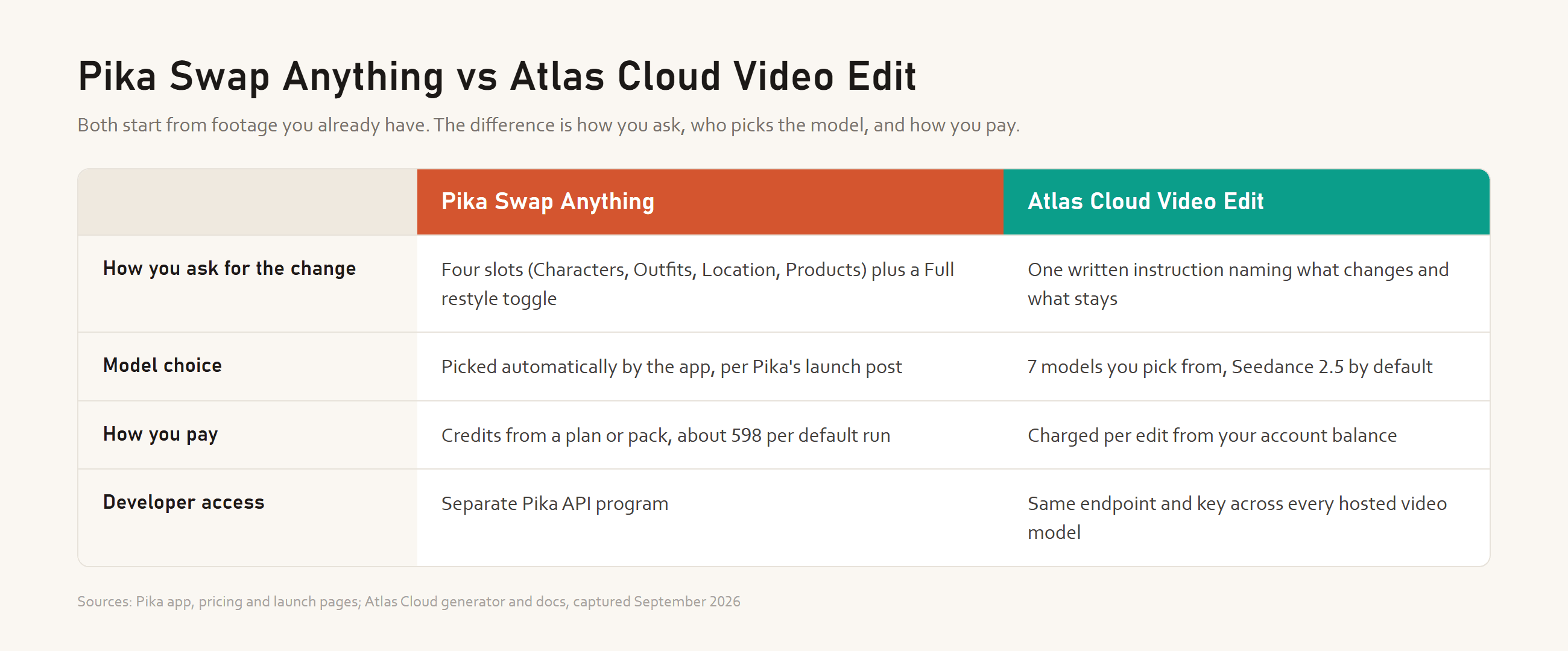
If you'd rather click through categories than write a prompt, and you already have a Pika plan, Swap Anything's panel keeps things simple. If you want to name the exact change yourself, try a second model when a shot is tricky, or wire the same edit into your own app through one API, Atlas Cloud is the more flexible setup.
FAQ
Is Pikaswaps still available?
Not under that name. Pika's relaunched app catalog doesn't list Pikaswaps, and the closest tool now is Swap Anything, which swaps characters, outfits, locations, or products in an existing clip. Pika says paid subscribers' past generations move into an "OG Pika" project on the new site, and the old interface stays at old.pika.art for a few more weeks.
Can I use Pika swaps free or without login?
No on both counts. Opening Swap Anything needs a Pika account, and a free account has nothing to spend, so the first run means paying. Before you buy, upload your clip and read the Generate button again: Pika marks the credit figure with a tilde and treats it as an estimate.
What's the difference between Pikaswaps and Pikadditions?
Pikaswaps, now Swap Anything in practice, replaces things that are already in the shot. Pikadditions inserts something new and leaves everything else alone. Pick Pikadditions for a prop dropped onto a table, Swap Anything for changing what someone is wearing.
How does Atlas Cloud charge for video edits?
Per edit, from your account balance, and the Run button shows the estimated cost before you submit. That makes it easy to test one clip on two different models and compare the results before you commit to a longer batch.
Conclusion
Pika rebuilt its platform in September 2026, handed the swap job to a new app with four categories and a restyle switch, and let the old name fall away. Pikadditions stayed put under its old name. The biggest change for anyone coming back is cost, since a free account can't run Swap Anything without buying credits first.
If you just need to change one thing in a clip and would rather describe it in your own words, Atlas Cloud's Video Edit tab does that across seven models, with the same API behind all of them. If you're already paying for Pika, Swap Anything is the closest thing to pikaswaps and the obvious place to start.





