Finish an edit, press save, and one question decides the rest of your evening: was that the last save you get today? We read Pixlr's pricing page, its homepage FAQ and its tool pages looking for the answer, and came away without it. That is usually where the search for a Pixlr alternative begins, at a ceiling you meet before you can read it.
So this comparison follows the billing instead of the feature list. Every Pixlr line quoted below was read on Pixlr's own pages or in its own public replies during September 2026, and the number we went looking for turned up somewhere no product page would ever send you.
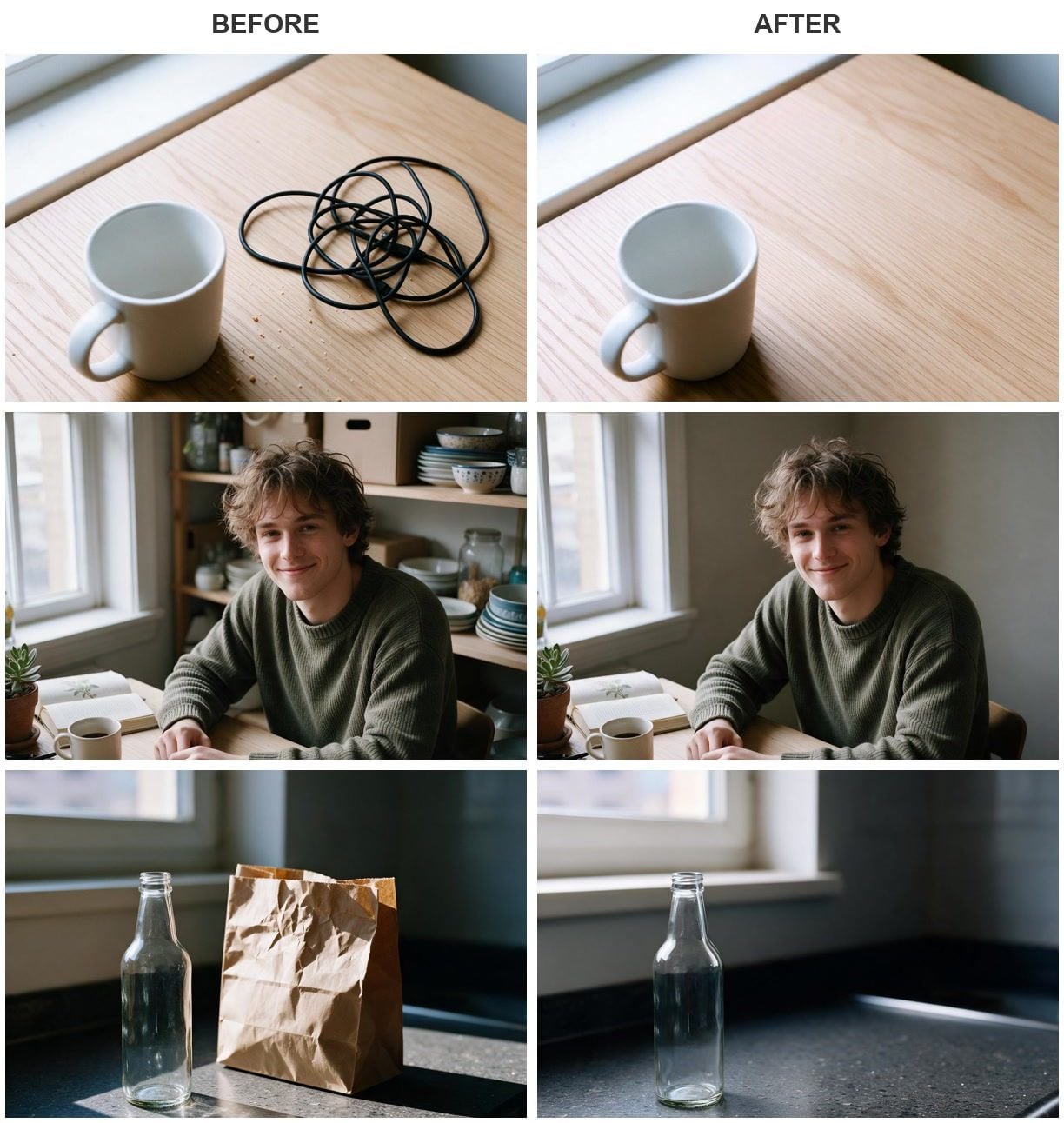
Each pair is one Image Edit run on Seedream v5.0 Pro, September 2026. The source frames were generated in the same workspace.
Key Takeaways
- Pixlr's pricing page sells four paid tiers into one credit pool and carries no free column at all.
- The one place we found a figure for the free tier is Pixlr's own reply to a review, which put it at three saved images a day.
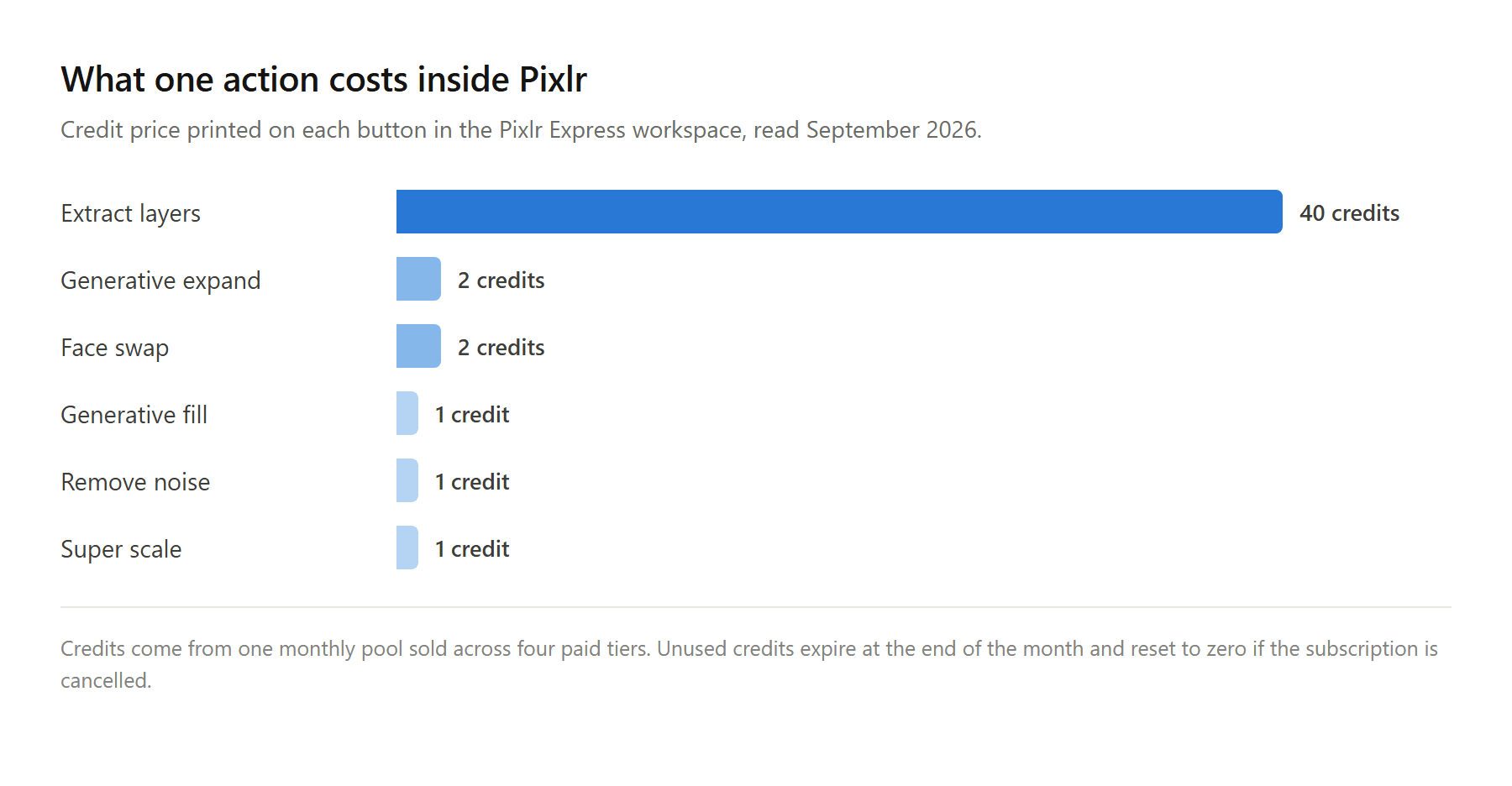
- Pixlr's AI actions price themselves on the button: 1 credit to generate, 2 to expand or swap a face, 40 to extract layers.
- Plan credits expire at the end of each month, do not roll over, and reset to zero when you cancel.
- Atlas runs Image Edit in a browser tab, bills per image, and prints the cost of the run on the button before you press it.
What Pixlr Gets Right as a Free Online Editor
Pixlr is a serious editor with a long memory behind it. Two of them, in fact. The classic workspace now lives at the editor URL and introduces itself as "the free advanced photo editor by Pixlr," while the newer one at the express URL calls itself "the free modern AI powered photo editor by Pixlr." The old X and E addresses redirect into those two.
The reach is real. Its Android listing shows more than 100 million downloads against 1.21 million reviews, and few browser editors have been opened that many times.
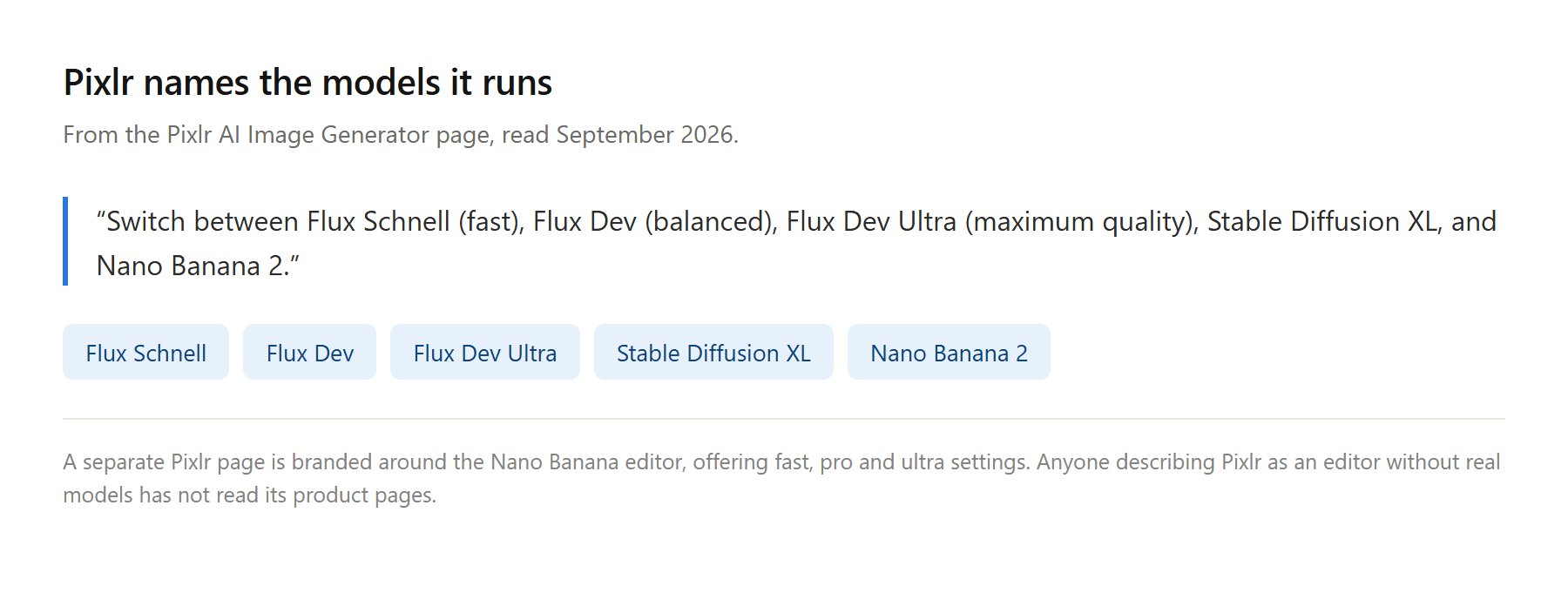
It has also stopped hiding what runs underneath. The homepage names Flux, Stable Diffusion, Seedream and Kling among the models behind its tools, and the image generator page tells you which ones sit in the dropdown: "Switch between Flux Schnell (fast), Flux Dev (balanced), Flux Dev Ultra (maximum quality), Stable Diffusion XL, and Nano Banana 2." There is even a whole page branded around one of them, the Nano Banana editor, with fast, pro and ultra settings to pick between.
So nothing below is an argument that Pixlr picked bad models or built a weak editor. The argument is about what a free account can finish, and what the meter does once you pay.
Why People Go Looking for a Pixlr Alternative
Two questions decide this, and neither is about features. What can a free account actually finish in a day? And what happens to the credits you paid for when the month turns over?
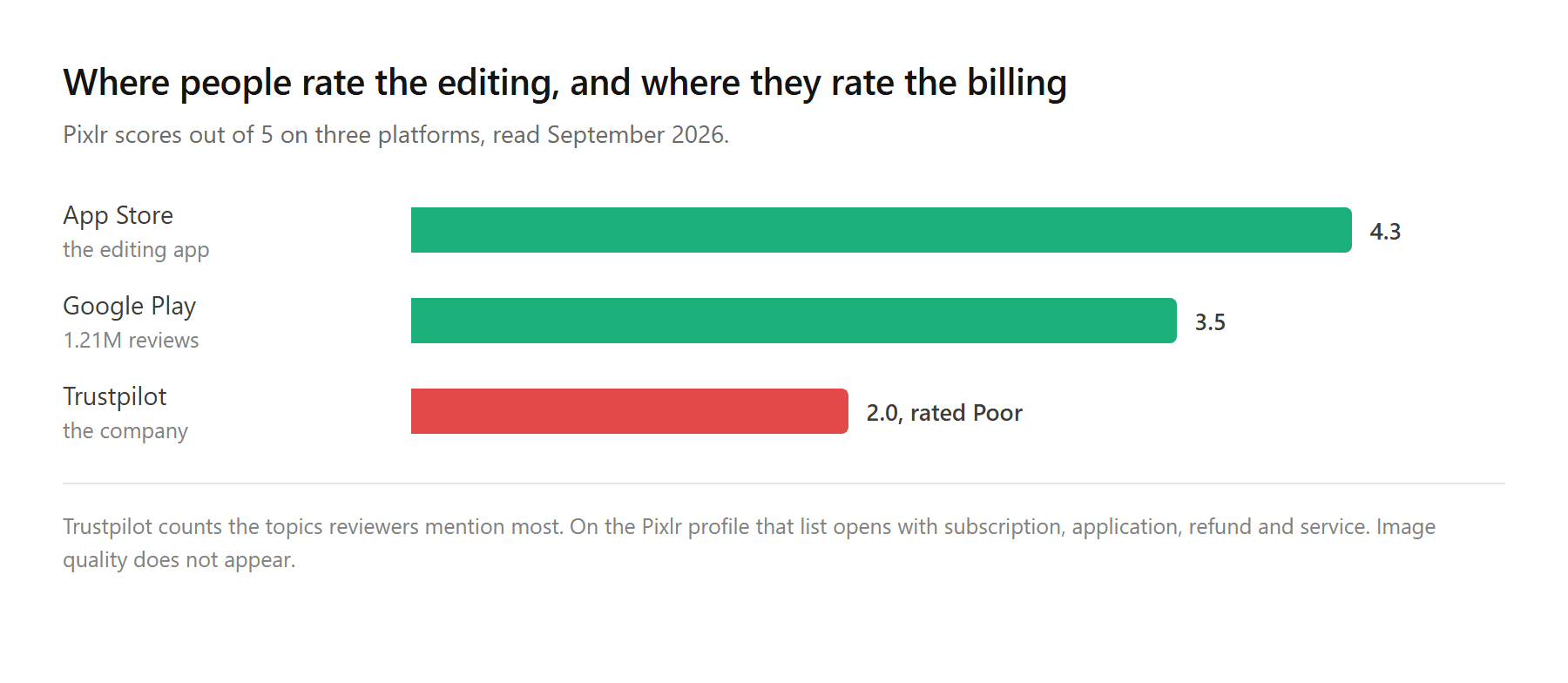
The ratings hint at where the friction lives. On the stores, where people score the editing, Pixlr holds 4.3 from about 5,200 iOS ratings and 3.5 on Google Play. On Trustpilot, where people score the company, it holds 2 out of 5. The alternatives lists we read cover that gap with the phrase "limited free tier" and move on.
Here is what sits behind it.
The Free Tier Number Lives in a Review Reply
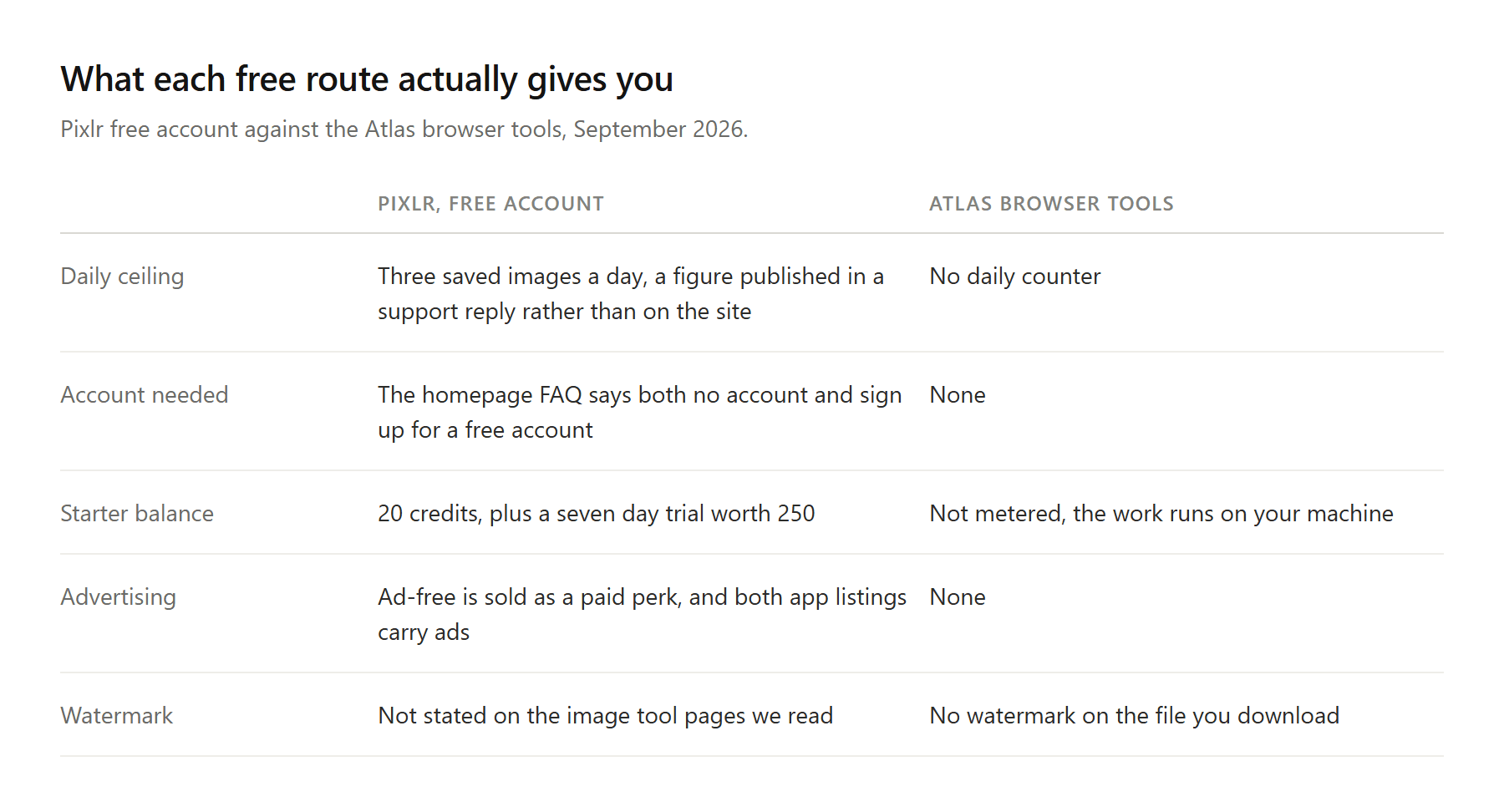
Start with the pricing page. Four cards, named Plus, Premium, Ultra and Ultra MAX, each selling a monthly credit allowance into the same pool. No free card. The clue that free accounts are counted at all is a line in the Plus column reading "Unlimited saves," which tells you the free ones are not, without telling you the figure.
The homepage FAQ then answers the account question twice, differently. One entry says you can enjoy Pixlr's free version "without requiring an account or any charges." Another tells you to "sign up for a free account, and start exploring the vast array of editing tools at your fingertips." Both sit on the same page.
The figure itself shows up in an unexpected place. Replying to a one-star review in May 2025, Pixlr's team wrote: "for our users with a Free account without a plan, you may edit and save up to 3 images/photos on daily basis. Without an active plan, the access to Pixlr features/tools are at minimum/standard."
Three a day. That reply is over a year old and the allowance may have moved since, which is rather the point: a rule you can only read in a customer service response is a rule you cannot plan around.
The counter is not new either, and it did not arrive quietly. A post in the Pixlr subreddit written a couple of months after save limits appeared describes the drift that follows: "In the time post save limit, I have used Pixlr maybe a dozen times and am juggling a mess of drawing tools that I am absolutely not happy with." People do not announce that they are leaving an editor. They just open it less.
![Bar chart comparing what each Pixlr AI action costs in credits, with layer extraction far above the rest at 40 credits.回复...[图片]Amy Lee9 分钟前Table of three one-star reviews of Pixlr from July and September 2026, each quoting a complaint about automatic renewal or an unexpected charge.回复...[图片]Amy Lee8 分钟前The Atlas Cloud Image Edit workspace with the model selector open above the reference upload slot and the prompt box, and the price of the next run printed on the Run button.回复...[图片]Amy Lee7 分钟前Two separate photographs, a woman on a studio backdrop and an empty rooftop terrace at golden hour, beside the single combined image Atlas Cloud Image Edit returned from one instruction.回复...[图片]Amy Lee6 分钟前One product photo of a steel flask edited by two different AI models from the same instruction, with the input and both results side by side and each result labelled.回复...[图片]Amy Lee6 分钟前Table comparing what a free Pixlr account gives you against four Atlas browser tools that run locally without an account.回复...[图片]Amy Lee5 分钟前Decision table matching four editing situations to the tool that fits, from manual layer work through repeated AI edits billed per image.回复...推荐内容由 AI 生成本文暂未被其它文档引用本文暂未引用其它文档真诚点赞,手留余香取消发送0 字上传日志联系客服功能更新帮助中心快捷键 .wikiSSRBox{--wiki-ssr-tree-sidebar-width:0px;--wiki-ssr-header-expander-display:flex;visibility:hidden;display:block;background-color:var(--bg-body)}.wikiSSRBox{position:absolute;top:0;right:0;width:100%;height:100%;z-index:91}.wikiSSRBox #fakeTitle{display:none}.wikiSSRBox #innerdocbody{-webkit-user-select:none;-moz-user-select:none;-ms-user-select:none;user-select:none}.wikiSSRBox .app-main-container:not(.is-suite){background-color:var(--bg-body)!important}.wikiSSRBox #innerdocbody.blank-title>div:first-child:before,.wikiSSRBox .mention-chat-button{visibility:hidden!important}.wikiSSRBox #mainContainer{width:100%;height:100%}.wikiSSRBox .app-main-container{width:100%;height:100%}.wikiSSRBox .app-main{width:100%;height:100%}.wikiSSRBox .wiki-ssr-container{width:100%;height:100%;position:relative}.wikiSSRBox .wiki-ssr-right-box{height:100%;position:absolute;top:0;right:0;width:calc(100% - var(--wiki-ssr-tree-sidebar-width));display:flex;flex-direction:column;background-color:var(--bg-body)}.wikiSSRBox .wiki-ssr-header__wrapper{position:relative;width:100%;height:64px}.wikiSSRBox .wiki-ssr-header__bar{padding-left:10px;border-bottom:1px solid var(--line-border-card);display:flex;position:relative;line-height:64px;height:64px;background-color:var(--bg-body)}.wikiSSRBox .wiki-ssr-header__box{width:calc(100% - 100px);margin-right:16px;position:relative;white-space:nowrap;flex:1}.wikiSSRBox .wiki-ssr-header__note-title{user-select:none;position:relative;display:flex;flex-direction:row;height:64px;width:100%;line-height:1.5;align-items:center;justify-content:space-between;white-space:nowrap}.wikiSSRBox .wiki-ssr-header__left-content{flex-grow:1;overflow:hidden;display:flex;justify-content:flex-start;align-items:center}.wikiSSRBox .wiki-ssr-header__right-content{flex-grow:0;flex:1;display:flex;justify-content:flex-end;align-items:center}.wikiSSRBox .wiki-ssr-header__input-container{min-width:120px;flex:1 1 0%;font-variant-numeric:normal;font-feature-settings:normal}.wikiSSRBox .wiki-ssr-header__wiki-logo{display:flex;align-items:center;height:100%}.wikiSSRBox .wiki-ssr-header__expander,.wikiSSRBox .wiki-ssr-header__recent-menu-icon{width:24px;border-radius:4px;height:24px;margin:0 8px 0 6px;display:var(--wiki-ssr-header-expander-display);flex-shrink:0;flex-grow:0;justify-content:center;align-items:center}.wikiSSRBox .wiki-ssr-header__expander-next{width:30px;height:30px;border-radius:5px 0 0 5px;margin-right:0;margin-left:4px;box-sizing:border-box}.wikiSSRBox .wiki-ssr-header__recent-menu-icon{width:24px;height:24px;margin:0 2px 0 0;border-radius:0 5px 5px 0;border-left:none;box-sizing:border-box}.wikiSSRBox .wiki-ssr-header__wiki-logo-navbar{display:flex;flex-direction:column;width:100%;padding-left:4px;overflow:hidden}.wikiSSRBox .wiki-ssr-header__title{width:100%;display:flex;flex-direction:column;height:26px;justify-content:center}.wikiSSRBox .wiki-ssr-header__title-text{overflow:hidden;font-size:14px;margin-left:6px;color:var(--text-title)}.wikiSSRBox .wiki-ssr-header__title-info{margin-left:1px;display:flex;color:var(--text-caption);font-size:12px;line-height:18px;height:18px;white-space:nowrap;overflow:hidden;text-overflow:ellipsis;flex-shrink:0;margin-top:-1px}.wikiSSRBox .wiki-ssr-header__right-btn{margin-left:10px;display:flex;align-items:center;justify-content:center}.wikiSSRBox .wiki-ssr-header__line{width:1px;height:32px;background-color:var(--ccmtoken-mindnote-highlightcolor-neutral);margin:0 4px 0 16px}.wikiSSRBox .wiki-ssr-header__avatar-box{display:flex}.wikiSSRBox .setting-btn.hidden,.wikiSSRBox .wiki-ssr-header__avatar-box.hidden{display:none}.wikiSSRBox .wiki-ssr-header__avatar-box .wiki-ssr-header__line{margin:0 16px 0 14px}.wikiSSRBox .wiki-ssr-header__avatar{width:32px;height:32px;border-radius:50%}.wikiSSRBox .wiki-workspace-ssr-header__wrapper{position:relative;width:100%;height:64px}.wikiSSRBox .wiki-workspace-ssr-header__wrapper-card-mode{position:relative;width:100%;height:40px}.wikiSSRBox .wiki-workspace-ssr-header__wrapper-card-mode .wiki-workspace-ssr-header__box{margin-right:12px}.wikiSSRBox .wiki-workspace-ssr-header__wrapper-card-mode .wiki-workspace-ssr-header__note-title{padding-right:0}.wikiSSRBox .wiki-workspace-ssr-header__wrapper-card-mode .wiki-workspace-ssr-header__line{margin:0 0 0 12px}.wikiSSRBox .wiki-workspace-ssr-header__wrapper-card-mode .wiki-workspace-ssr-header__right-btn{margin-left:12px}.wikiSSRBox .wiki-workspace-ssr-header__bar{padding-left:10px;border-bottom:1px solid rgba(var(--N900-raw),.075);display:flex;position:relative;height:100%;background-color:var(--bg-body)}.wikiSSRBox .wiki-workspace-ssr-header__box{width:calc(100% - 100px);margin-right:16px;position:relative;white-space:nowrap;flex:1}.wikiSSRBox .wiki-workspace-ssr-header__note-title{user-select:none;position:relative;display:flex;flex-direction:row;padding-right:16px;height:100%;width:100%;line-height:1.5;align-items:center;justify-content:space-between;white-space:nowrap}.wikiSSRBox .wiki-workspace-ssr-header__left-content{flex-grow:1;overflow:hidden;display:flex;justify-content:flex-start;align-items:center}.wikiSSRBox .wiki-workspace-ssr-header__right-content{flex-grow:0;flex:1;display:flex;justify-content:flex-end;align-items:center}.wikiSSRBox .wiki-workspace-ssr-header__input-container{min-width:120px;flex:1 1 0%;font-variant-numeric:normal;font-feature-settings:normal}.wikiSSRBox .wiki-workspace-ssr-header__wiki-logo{display:flex;align-items:center;height:100%}.wikiSSRBox .wiki-workspace-ssr-header__wiki-logo-left{display:var(--wiki-ssr-header-expander-display);align-items:center;height:100%}.wikiSSRBox .wiki-workspace-ssr-header__expander{width:24px;border-radius:4px;height:24px;margin:0 8px 0 3px;display:flex;flex-shrink:0;flex-grow:0;justify-content:center;align-items:center}.wikiSSRBox .wiki-workspace-ssr-header__wiki-logo-navbar{display:flex;flex-direction:column;width:100%;padding-left:4px;overflow:hidden}.wikiSSRBox .wiki-workspace-ssr-header__title{width:100%;display:flex;flex-direction:column;height:26px;justify-content:center}.wikiSSRBox .wiki-workspace-ssr-header__title-text{overflow:hidden;font-size:14px;margin-left:6px;color:var(--text-title)}.wikiSSRBox .wiki-workspace-ssr-header__title-info{margin-left:1px;display:flex;color:var(--text-caption);font-size:12px;line-height:18px;height:18px;white-space:nowrap;overflow:hidden;text-overflow:ellipsis;flex-shrink:0;margin-top:-1px}.wikiSSRBox .wiki-workspace-ssr-header__right-btn{margin-left:10px;display:flex;align-items:center;justify-content:center}.wikiSSRBox .wiki-workspace-ssr-header__line{width:1px;height:20px;background-color:var(--ccmtoken-mindnote-highlightcolor-neutral);margin:0 4px 0 16px}.wikiSSRBox .wiki-workspace-ssr-header__avatar-box{display:flex;align-items:center}.wikiSSRBox .wiki-workspace-ssr-header__avatar-box .wiki-workspace-ssr-header__line{margin:0 16px 0 14px}.wikiSSRBox .wiki-workspace-ssr-header__avatar{width:32px;height:32px;border-radius:50%}.wikiSSRBox .wiki-ssr-sidebar__wrapper,.wikiSkeletonBox .wiki-ssr-sidebar__wrapper{height:100%;top:0;left:0;overflow:hidden;display:flex;flex-direction:column;background-color:var(--bg-body-overlay);border-right:1px solid var(--N300)}.wikiSSRBox .wiki-ssr-sidebar__wrapper{position:absolute;width:var(--wiki-ssr-tree-sidebar-width)}.wikiSkeletonBox .wiki-ssr-sidebar__wrapper{width:100%}.wikiSSRBox .wiki-ssr-sidebar__placeholder,.wikiSkeletonBox .wiki-ssr-sidebar__placeholder{border-radius:6px;background:var(--bg-filler)}.wikiSSRBox .wiki-ssr-sidebar__header,.wikiSkeletonBox .wiki-ssr-sidebar__header{padding:0 14px 0 8px;height:64px;width:100%;display:flex;align-items:center;flex-shrink:0;overflow:hidden;box-sizing:border-box}.wikiSSRBox #wiki-ssr-sidebar .wiki-ssr-sidebar__header,.wikiSkeletonBox #wiki-ssr-sidebar .wiki-ssr-sidebar__header{justify-content:space-between}.wikiSSRBox .wiki-ssr-sidebar__header-back-btn,.wikiSkeletonBox .wiki-ssr-sidebar__header-back-btn{width:24px;height:24px;border-radius:50%!important;margin-left:10px;margin-right:6px}.wikiSSRBox #wiki-ssr-sidebar .wiki-ssr-sidebar__header-title,.wikiSkeletonBox #wiki-ssr-sidebar .wiki-ssr-sidebar__header-title{width:128px;height:22px}.wikiSSRBox #workspace-next-ssr-sidebar .wiki-ssr-sidebar__header-title,.wikiSkeletonBox #workspace-next-ssr-sidebar .wiki-ssr-sidebar__header-title{width:137px;height:14px}.wikiSSRBox #wiki-ssr-sidebar .wiki-ssr-sidebar__header-icon,.wikiSkeletonBox #wiki-ssr-sidebar .wiki-ssr-sidebar__header-icon{width:24px;height:24px;display:flex;flex-shrink:0;flex-grow:0;justify-content:center;align-items:center;position:relative;right:-1px}.wikiSSRBox .wiki-ssr-sidebar__search-box,.wikiSkeletonBox .wiki-ssr-sidebar__search-box{flex-grow:0;flex-shrink:0;padding:0 8px 8px 8px}.wikiSSRBox .wiki-ssr-sidebar__search,.wikiSkeletonBox .wiki-ssr-sidebar__search{color:var(--text-caption);height:32px;padding-left:12px;display:flex;justify-content:space-between;align-items:center;border:1px solid transparent;background-color:var(--udtoken-component-outlined-bg)!important}.wikiSSRBox .wiki-ssr-sidebar__search-icon,.wikiSkeletonBox .wiki-ssr-sidebar__search-icon{color:var(--icon-n2);width:20px;height:20px;display:flex;align-items:center;justify-content:center;font-size:16px}.wikiSSRBox .wiki-ssr-sidebar__space-info,.wikiSkeletonBox .wiki-ssr-sidebar__space-info{height:56px;width:100%;padding:0 18px;margin-right:12px;display:flex;align-items:center}.wikiSSRBox .wiki-ssr-sidebar__space-icon,.wikiSkeletonBox .wiki-ssr-sidebar__space-icon{width:24px;height:24px;border-radius:50%!important;flex-shrink:0;margin-right:12px}.wikiSSRBox .wiki-ssr-sidebar__space-name,.wikiSkeletonBox .wiki-ssr-sidebar__space-name{height:14px;width:200px}.wikiSSRBox .wiki-ssr-sidebar__catalog-list,.wikiSkeletonBox .wiki-ssr-sidebar__catalog-list{flex-grow:1;overflow:hidden;display:flex;flex-direction:column;padding:0 8px}.wikiSSRBox #wiki-ssr-sidebar .wiki-ssr-sidebar__catalog-list,.wikiSkeletonBox #wiki-ssr-sidebar .wiki-ssr-sidebar__catalog-list{margin-top:14px}.wikiSSRBox .wiki-ssr-sidebar__catalog-title,.wikiSkeletonBox .wiki-ssr-sidebar__catalog-title{padding-left:2px;padding-right:8px;height:32px;display:flex;justify-content:space-between;align-items:center;font-size:13px;white-space:nowrap;border-radius:6px;overflow:hidden}.wikiSSRBox #wiki-ssr-sidebar .wiki-ssr-sidebar__catalog-tips,.wikiSkeletonBox #wiki-ssr-sidebar .wiki-ssr-sidebar__catalog-tips{width:94px;height:20px}.wikiSSRBox #workspace-next-ssr-sidebar .wiki-ssr-sidebar__catalog-tips,.wikiSkeletonBox #workspace-next-ssr-sidebar .wiki-ssr-sidebar__catalog-tips{width:54px;height:14px}.wikiSSRBox .wiki-ssr-sidebar__add-icon,.wikiSkeletonBox .wiki-ssr-sidebar__add-icon{font-size:16px;width:20px;height:20px;display:flex;align-items:center;justify-content:center;position:relative;right:-1px}.wikiSSRBox .wiki-ssr-sidebar__catalog-item,.wikiSkeletonBox .wiki-ssr-sidebar__catalog-item{height:35px;margin-top:1px;display:flex;align-items:center;padding:4px}.wikiSSRBox #wiki-ssr-sidebar .wiki-ssr-sidebar__catalog-item-left,.wikiSkeletonBox #wiki-ssr-sidebar .wiki-ssr-sidebar__catalog-item-left{width:16px;height:16px;margin-right:6px}.wikiSSRBox #workspace-next-ssr-sidebar .wiki-ssr-sidebar__catalog-item-left,.wikiSkeletonBox #workspace-next-ssr-sidebar .wiki-ssr-sidebar__catalog-item-left{width:18px;height:18px;margin-right:8px;margin-left:8px;flex-shrink:0;border-radius:50%!important}.wikiSSRBox #wiki-ssr-sidebar .wiki-ssr-sidebar__catalog-item-right,.wikiSkeletonBox #wiki-ssr-sidebar .wiki-ssr-sidebar__catalog-item-right{width:180px;height:18px}.wikiSSRBox #workspace-next-ssr-sidebar .wiki-ssr-sidebar__catalog-item-right,.wikiSkeletonBox #workspace-next-ssr-sidebar .wiki-ssr-sidebar__catalog-item-right{width:180px;height:14px}.wikiSSRBox .wiki-workspace-ssr-sidebar__wrapper,.wikiSkeletonBox .wiki-workspace-ssr-sidebar__wrapper{height:100%;top:0;left:0;overflow:hidden;display:flex;flex-direction:column}.wikiSSRBox .wiki-workspace-ssr-sidebar__wrapper{position:absolute;width:var(--wiki-ssr-tree-sidebar-width)}.wikiSkeletonBox .wiki-workspace-ssr-sidebar__wrapper{width:100%}.wikiSSRBox .wiki-workspace-ssr-sidebar__placeholder,.wikiSkeletonBox .wiki-workspace-ssr-sidebar__placeholder{border-radius:6px;background:var(--bg-filler)}.wikiSSRBox .wiki-workspace-ssr-sidebar__header,.wikiSkeletonBox .wiki-workspace-ssr-sidebar__header{padding:0 0 0 8px;height:64px;width:100%;display:flex;align-items:center;justify-content:space-between;flex-shrink:0;overflow:hidden;box-sizing:border-box;border-bottom:1px solid rgba(var(--N900-raw),.075)}.wikiSSRBox .wiki-workspace-ssr-sidebar__header-left-area,.wikiSkeletonBox .wiki-workspace-ssr-sidebar__header-left-area{display:flex;align-items:center;height:28px}.wikiSSRBox .wiki-workspace-ssr-sidebar__header-right-area,.wikiSkeletonBox .wiki-workspace-ssr-sidebar__header-right-area{display:flex;align-items:center}.wikiSSRBox .wiki-workspace-ssr-sidebar__header-entry,.wikiSkeletonBox .wiki-workspace-ssr-sidebar__header-entry{width:28px;height:28px;font-size:24px;padding:2px;margin:0 0 0 2px}.wikiSSRBox .wiki-workspace-ssr-sidebar__header-entry .universe-icon,.wikiSkeletonBox .wiki-workspace-ssr-sidebar__header-entry .universe-icon{display:flex}.wikiSSRBox .wiki-workspace-ssr-sidebar__header-divider,.wikiSkeletonBox .wiki-workspace-ssr-sidebar__header-divider{width:1px;height:20px;background:var(--line-divider-default);margin:0 8px}.wikiSSRBox .wiki-workspace-ssr-sidebar__header-divider-no-margin,.wikiSkeletonBox .wiki-workspace-ssr-sidebar__header-divider-no-margin{width:1px;height:20px;background:var(--line-divider-default)}.wikiSSRBox .wiki-workspace-ssr-sidebar__header-title,.wikiSkeletonBox .wiki-workspace-ssr-sidebar__header-title{width:128px;height:22px}.wikiSSRBox .wiki-workspace-ssr-sidebar__header-icon,.wikiSkeletonBox .wiki-workspace-ssr-sidebar__header-icon{width:24px;height:24px;display:flex;flex-shrink:0;flex-grow:0;justify-content:center;align-items:center;position:relative;right:-1px;margin:0 10px 0 0}.wikiSSRBox .wiki-workspace-ssr-sidebar__catalog-list,.wikiSkeletonBox .wiki-workspace-ssr-sidebar__catalog-list{flex-grow:1;overflow:hidden;display:flex;flex-direction:column;padding:12px 8px 0 8px;background-color:var(--bg-content-base)}.wikiSSRBox .wiki-workspace-ssr-sidebar__catalog-title,.wikiSkeletonBox .wiki-workspace-ssr-sidebar__catalog-title{padding-left:8px;padding-right:8px;height:32px;display:flex;justify-content:space-between;align-items:center;font-size:13px;white-space:nowrap;border-radius:6px;overflow:hidden}.wikiSSRBox .wiki-workspace-ssr-sidebar__catalog-tips,.wikiSkeletonBox .wiki-workspace-ssr-sidebar__catalog-tips{width:94px;height:20px}.wikiSSRBox .wiki-workspace-ssr-sidebar__add-icon,.wikiSkeletonBox .wiki-workspace-ssr-sidebar__add-icon{font-size:16px;width:20px;height:20px;display:flex;align-items:center;justify-content:center;position:relative;right:-1px}.wikiSSRBox .wiki-workspace-ssr-sidebar__catalog-item,.wikiSkeletonBox .wiki-workspace-ssr-sidebar__catalog-item{height:35px;margin-top:1px;display:flex;align-items:center;padding-left:6px}.wikiSSRBox .wiki-workspace-ssr-sidebar__catalog-item-left,.wikiSkeletonBox .wiki-workspace-ssr-sidebar__catalog-item-left{width:16px;height:16px;margin-right:6px}.wikiSSRBox .wiki-workspace-ssr-sidebar__catalog-item-right,.wikiSkeletonBox .wiki-workspace-ssr-sidebar__catalog-item-right{width:180px;height:18px}.wikiSSRBox .wiki-ssr-content-box{flex:1;overflow:hidden;height:100%;width:100%;position:relative}#ssrBox.wikiSSRBox .etherpad-container{width:auto;transition:none}.wikiSSRBox .wiki-selection-nav{position:absolute;height:100%;display:flex;align-items:center}.wikiSSRBox .entries-container{margin-top:30px;padding-bottom:0}#ssrBox.wikiSSRBox .etherpad-container.narrow{margin-left:100px}#ssrBox.wikiSSRBox .etherpad-container.medium{margin-left:max(calc(140px + (100% - 900px)/ 500 * 156),140px)}#ssrBox.wikiSSRBox .ssr-cover-loader-container{display:block;align-items:initial;justify-content:initial;text-align:center}#ssrBox.wikiSSRBox .ssr-cover-loader-container:after{content:'';display:inline-block;height:100%;vertical-align:middle}#ssrBox.wikiSSRBox .ssr-cover-loader-container .suite-loading-docx{vertical-align:middle}.wikiSSRBox .version-header__dropdown-btn-container{display:flex;align-items:center;margin-right:24px;font-size:14px;min-width:120px;padding-left:6px}.wikiSSRBox .version-header__title{overflow:hidden;white-space:nowrap;text-overflow:ellipsis}.wiki-ssr-sidebar__wrapper{display: none !important}.wiki-ssr-header__expander.wiki-ssr-header__expander-legacy, .wiki-ssr-sidebar__header-icon.wiki-ssr-sidebar__header-icon-legacy{display: none !important} !function(){!function(){var e=document.querySelector(".wikiSSRBox .wiki-ssr-header__avatar-box"),i=document.querySelector(".wikiSSRBox .wiki-ssr-header__right-btn.setting-btn"),t=window&&window.navigator.userAgent;if((/feishu/i.test(t)||/lark/i.test(t))&&/superapp/i.test(t))i&&i.classList.remove("hidden");else e&&e.classList.remove("hidden")}();var e=window.current_space_wiki,i=function(e){var i=document.querySelector(e);if(i&&i.parentNode)i.parentNode.removeChild(i)},t=function(){i(".wikiSSRBox"),i("#wikiSSRStyle")};if(e&&8===e.obj_type){const e=document.querySelector(".bitable-ssr-table-content"),i=document.querySelector(".bitable-ssr-workflow-content");if(!(e||i))return void t();if(window.matchLocal)return void t();if(window.bitableSSRValid&&!window.bitableWorkflowSSRValid)return void t()}if(document.querySelector(".wikiSSRBox").style.visibility="visible",window.performance&&window.performance.mark)window.performance.mark("wiki_suite_ssr_show")}(); window.fourthChunkStartTime=Date.now();window.catalogRecordInfo={"isEmptyCatalog":true,"headingRecords":{}} try { // 更新 catalogue if (window.__catalogueContentCallbacks) { window.__catalogueContentCallbacks.forEach(cb => cb()) window.__catalogueContentCallbacks = null } } catch(e) {} window.fourthChunkEndTime=Date.now();document.cookie="template-branch-list\u003d;expires\u003dMon, 21 Sep 2026 09:57:40 GMT;path\u003d/"window.__trailers = {"x-pageserver-objtype":"22","x-ssr-version":"1.0.18.78"} 采集#HUABAN_WIDGETS {font-family: "helvetica neue",arial,sans-serif; color: #444; font-size: 14px;} #HUABAN_WIDGETS * {box-sizing: content-box;} #HUABAN_WIDGETS .HUABAN-main {position: fixed; left: 0; top: 0; width: 100%; height: 100%; background: #e5e5e5; background: rgba(229,229,229,.95); max-height: 100%; overflow: hidden; z-index: 9999999999999;} #HUABAN_WIDGETS a img {border: 0;} #HUABAN_WIDGETS .HUABAN-header {height: 50px; background: white; box-shadow: 0 0 4px rgba(0,0,0,.2); width: 100%; left: 0; top: 0; position: absolute;} #HUABAN_WIDGETS .HUABAN-header .HUABAN-inner {margin: 0 auto; position: relative;} #HUABAN_WIDGETS .HUABAN-header .HUABAN-close {width: 60px; height: 50px; border-left: 1px solid #ddd; position: absolute; right: 0; top: 0; background: url(https://huaban.com/img/widgets/btn_close.png) 20px 14px no-repeat; cursor: pointer;} #HUABAN_WIDGETS .HUABAN-header .HUABAN-close:hover {background-position: 20px -26px;} #HUABAN_WIDGETS .HUABAN-header .HUABAN-close:active {background-position: 20px -66px;} #HUABAN_WIDGETS .HUABAN-header .HUABAN-logo {display: block; position: absolute; top: 12px;} #HUABAN_WIDGETS .HUABAN-waterfall-holder {position: relative; overflow-y: auto; height: 100%;} #HUABAN_WIDGETS .HUABAN-waterfall {position: relative; margin-top: 50px;} #HUABAN_WIDGETS .HUABAN-waterfall .HUABAN-empty {position: absolute; left: 50%; top: 30px; height: 36px; line-height: 36px; width: 216px; text-align: left; margin-left: -128px; color: #777; background: url(https://huaban.com/img/widgets/icon_notice.png) 12px 8px no-repeat white; padding-left: 40px; font-size: 15px;} #HUABAN_WIDGETS .HUABAN-btn {display: inline-block; border-radius: 2px; font-size: 14px; padding: 0 12px; height: 30px; line-height: 30px; cursor: pointer; text-decoration: none; white-space: nowrap; -moz-user-select: none; -webkit-user-select: none; user-select: none; text-align: center; background: #D53939; color: white;} #HUABAN_WIDGETS .HUABAN-btn:hover {background: #E54646;} #HUABAN_WIDGETS .HUABAN-btn:active {background: #C52424;} #HUABAN_WIDGETS .HUABAN-wbtn {background: #EDEDED; color: #444;} #HUABAN_WIDGETS .HUABAN-wbtn:hover {background: #F2F2F2;} #HUABAN_WIDGETS .HUABAN-wbtn:active {background: #DDD;} #HUABAN_WIDGETS .HUABAN-f-button {position: absolute; display: none; z-index: 9999999999998; box-shadow: 0 0 0 2px rgba(255,255,255,.2); background: #aaa; background: rgba(0,0,0,.3); color: white; cursor: pointer; padding: 0 12px; height: 30px; line-height: 30px; border-radius: 2px; font-size: 14px} #HUABAN_WIDGETS .HUABAN-f-button:hover {background-color: #999; background-color: rgba(0,0,0,.5);} #HUABAN_WIDGETS .HUABAN-f-button:active {background-color: rgba(0,0,0,.6);} #HUABAN_WIDGETS .HUABAN-red-normal-icon-button {width: 36px; height: 24px; border: 0px; line-height: 24px; padding-left: 24px; padding-right: 0px; text-align: left; background: url(https://huaban.com/img/widgets/widget_icons.png) 0 -200px no-repeat; box-shadow: none !important; font-size: 14px; background-color: transparent !important;} #HUABAN_WIDGETS .HUABAN-red-normal-icon-button:hover {background-position: -130px -200px;} #HUABAN_WIDGETS .HUABAN-red-normal-icon-button:active {background-position: -260px -200px;} #HUABAN_WIDGETS .HUABAN-red-large-icon-button {width: 80px; height: 24px; border: 0px; line-height: 24px; padding-left: 24px; padding-right: 0px; text-align: left; background: url(https://huaban.com/img/widgets/widget_icons.png) 0 -150px no-repeat; box-shadow: none !important; font-size: 14px; background-color: transparent !important;} #HUABAN_WIDGETS .HUABAN-red-large-icon-button:hover {background-position: -130px -150px;} #HUABAN_WIDGETS .HUABAN-red-large-icon-button:active {background-position: -260px -150px;} #HUABAN_WIDGETS .HUABAN-red-small-icon-button {width: 30px; height: 21px; border: 0px; line-height: 21px; padding-left: 20px; padding-right: 0px; text-align: left; background: url(https://huaban.com/img/widgets/widget_icons.png) 0 -250px no-repeat; box-shadow: none !important; font-size: 12px; background-color: transparent !important;} #HUABAN_WIDGETS .HUABAN-red-small-icon-button:hover {background-position: -130px -250px;} #HUABAN_WIDGETS .HUABAN-red-small-icon-button:active {background-position: -260px -250px;} #HUABAN_WIDGETS .HUABAN-white-normal-icon-button {width: 36px; height: 24px; border: 0px; line-height: 24px; padding-left: 24px; padding-right: 0px; text-align: left; background: url(https://huaban.com/img/widgets/widget_icons.png) 0 -500px no-repeat; box-shadow: none !important; color: #444; font-size: 14px; background-color: transparent !important;} #HUABAN_WIDGETS .HUABAN-white-normal-icon-button:hover {background-position: -130px -500px;} #HUABAN_WIDGETS .HUABAN-white-normal-icon-button:active {background-position: -260px -500px;} #HUABAN_WIDGETS .HUABAN-white-large-icon-button {width: 80px; height: 24px; border: 0px; line-height: 24px; padding-left: 24px; padding-right: 0px; text-align: left; background: url(https://huaban.com/img/widgets/widget_icons.png) 0 -450px no-repeat; box-shadow: none !important; color: #444; font-size: 14px; background-color: transparent !important;} #HUABAN_WIDGETS .HUABAN-white-large-icon-button:hover {background-position: -130px -450px;} #HUABAN_WIDGETS .HUABAN-white-large-icon-button:active {background-position: -260px -450px;} #HUABAN_WIDGETS .HUABAN-white-small-icon-button {width: 30px; height: 21px; border: 0px; line-height: 21px; padding-left: 20px; padding-right: 0px; text-align: left; background: url(https://huaban.com/img/widgets/widget_icons.png) 0 -550px no-repeat; box-shadow: none !important; color: #444; font-size: 12px; background-color: transparent !important;} #HUABAN_WIDGETS .HUABAN-white-small-icon-button:hover {background-position: -130px -550px;} #HUABAN_WIDGETS .HUABAN-white-small-icon-button:active {background-position: -260px -550px;} #HUABAN_WIDGETS .HUABAN-cell {width: 236px; position: absolute; background: white; box-shadow: 0 1px 3px rgba(0,0,0,.3); transition: left .3s ease-in-out, top .3s linear;} #HUABAN_WIDGETS .HUABAN-cell .HUABAN-img-holder {overflow: hidden; position: relative;} #HUABAN_WIDGETS .HUABAN-cell .HUABAN-img-holder:hover img.HUABAN-cell-img {opacity: .8} #HUABAN_WIDGETS .HUABAN-cell .HUABAN-video-icon {width: 72px; height: 62px; position: absolute; left: 50%; top: 50%; margin: -31px auto auto -36px; background: url(https://huaban.com/img/widgets/media_video.png) 0 0 no-repeat; display: none;} #HUABAN_WIDGETS .HUABAN-cell.HUABAN-video .HUABAN-video-icon {display: block;} #HUABAN_WIDGETS .HUABAN-cell .HUABAN-over {display: none;} #HUABAN_WIDGETS .HUABAN-cell:hover .HUABAN-over {display: block;} #HUABAN_WIDGETS .HUABAN-cell .HUABAN-over .HUABAN-btn {width: 60px; height: 34px; padding: 0; position: absolute; left: 50%; top: 50%; margin: -18px 0 0 -31px; line-height: 34px; box-shadow: 0 0 0 2px rgba(255,255,255,.2); font-size: 16px;} #HUABAN_WIDGETS .HUABAN-cell.HUABAN-long .HUABAN-img-holder {height: 600px;} #HUABAN_WIDGETS .HUABAN-cell.HUABAN-long .HUABAN-img-holder:after {content: ""; display: block; position: absolute; width: 236px; height: 12px; left: 0; bottom: 0; background: url(https://huaban.com/img/widgets/long_image_shadow_2.png) repeat-x 4px top;} #HUABAN_WIDGETS .HUABAN-cell img {width: 236px; display: block;} #HUABAN_WIDGETS .HUABAN-cell .HUABAN-size {margin: 8px 16px; font-size: 12px; color: #999} #HUABAN_WIDGETS .HUABAN-cell .HUABAN-description {display: block; width: 202px; margin: 0 6px 6px; padding: 6px 10px; border: 0; resize: none; outline: 0; border: 1px solid transparent; line-height: 18px; font-size: 13px; overflow: hidden; word-wrap: break-word; background: url(https://huaban.com/img/widgets/icon_edit.png) 500px center no-repeat;} #HUABAN_WIDGETS .HUABAN-cell:hover .HUABAN-description {background-color: #fff9e0; background-position: right top;} #HUABAN_WIDGETS .HUABAN-cell .HUABAN-description:focus {background-color: #F9F9F9; background-position: 500px center;} #HUABAN_WIDGETS .HUABAN-cell .HUABAN-select-btn {width: 34px; height:34px; background: url(https://huaban.com/img/widgets/checkbox.png) 0 0 no-repeat; position: absolute; right: 5px; top: 5px; cursor: pointer;} #HUABAN_WIDGETS .HUABAN-cell .HUABAN-pinned-label {position: absolute; left: 0; top: 10px; height: 24px; line-height: 24px; padding: 0 10px; background: #CE0000; background: rgba(200, 0, 0, 0.9); color: white; font-size: 12px; display: none;} #HUABAN_WIDGETS .HUABAN-cell.HUABAN-pinned .HUABAN-pinned-label {display: block;} #HUABAN_WIDGETS .HUABAN-selected .HUABAN-select-btn {background-position: 0 -40px;} #HUABAN_WIDGETS .HUABAN-multi .HUABAN-cell .HUABAN-img-holder {cursor: pointer;} #HUABAN_WIDGETS .HUABAN-multi .HUABAN-cell .HUABAN-cell-pin-btn {display: none;} #HUABAN_WIDGETS .HUABAN-multi .HUABAN-cell .HUABAN-over {display: block;} #HUABAN_WIDGETS .HUABAN-header .HUABAN-multi-buttons {position: absolute; top: 10px; left: 0; display: none;} #HUABAN_WIDGETS .HUABAN-header .HUABAN-multi-buttons .HUABAN-btn {margin-right: 10px;} #HUABAN_WIDGETS .HUABAN-header .HUABAN-multi-noti {display: none; height: 50px; line-height: 50px; text-align: center; font-size: 16px; color: #999; font-weight: bold;} #HUABAN_WIDGETS .HUABAN-header .HUABAN-multi-noti span {font-weight: normal;} #HUABAN_WIDGETS .HUABAN-header .HUABAN-multi-noti i {font-style: normal;} #HUABAN_WIDGETS .HUABAN-header .HUABAN-notice {padding: 0 10px; height:30px; line-height: 30px; position: absolute; left: 50%; top: 10px; margin-left: -83px; background: #fff9e2; text-align: center;} #HUABAN_WIDGETS .HUABAN-header .HUABAN-notice i {display: inline-block; width: 18px; height: 18px; background: url(https://huaban.com/img/widgets/icon_notice.png) 0 0 no-repeat; vertical-align: top; margin: 6px 6px 0 0;} #HUABAN_WIDGETS .HUABAN-switcher {height: 50px; width: 100px; position: relative;} #HUABAN_WIDGETS .HUABAN-switcher .HUABAN-title {position: absolute; right: 75px; top: 13px; color: #999; white-space: nowrap; line-height: 24px; opacity: 0; visibility: hidden;} #HUABAN_WIDGETS .HUABAN-switcher:hover .HUABAN-title {visibility: visible; opacity: 1; -webkit-transition: opacity .2s linear; -webkit-transition-delay: .2s; transition: opacity .2s linear; transition-delay: .2s;} #HUABAN_WIDGETS .HUABAN-switcher .HUABAN-bar {width: 40px; height: 24px; background: #EB595F; border-radius: 12px; color: white; position: absolute; right: 0; top: 13px; cursor: pointer; font-size: 14px; -webkit-transition: all .2s linear; transition: all .2s linear;} #HUABAN_WIDGETS .HUABAN-switcher:hover .HUABAN-bar {width: 64px;} #HUABAN_WIDGETS .HUABAN-switcher.HUABAN-on .HUABAN-bar {background: #7DD100;} #HUABAN_WIDGETS .HUABAN-switcher .HUABAN-bar .HUABAN-round {width: 20px; height: 20px; background: white; border-radius: 50%; position: absolute; left: 2px; top: 2px; -webkit-transition: left .2s linear; box-shadow: 0px 0px 3px rgba(0,0,0,0.15); transition: left .2s linear; box-shadow: 0px 0px 3px rgba(0,0,0,0.15);} #HUABAN_WIDGETS .HUABAN-switcher.HUABAN-on .HUABAN-bar .HUABAN-round {left: 17px;} #HUABAN_WIDGETS .HUABAN-switcher.HUABAN-on:hover .HUABAN-bar .HUABAN-round {left: 41px;} #HUABAN_WIDGETS .HUABAN-switcher .HUABAN-bar .HUABAN-text-1 {height: 24px; line-height: 24px; position: absolute; right:17px; top: 0; opacity: 0; visibility: hidden; -webkit-transition: all .2s linear; transition: all .2s linear;} #HUABAN_WIDGETS .HUABAN-switcher:hover .HUABAN-bar .HUABAN-text-1 {right: 9px; opacity: 1; visibility: visible;} #HUABAN_WIDGETS .HUABAN-switcher.HUABAN-on:hover .HUABAN-bar .HUABAN-text-1 {right: 17px; opacity: 0; visibility: hidden;} #HUABAN_WIDGETS .HUABAN-switcher .HUABAN-bar .HUABAN-text-2 {height: 24px; line-height: 24px; position: absolute; left:17px; top: 0; opacity: 0; visibility: hidden; -webkit-transition: all .2s linear; transition: all .2s linear;} #HUABAN_WIDGETS .HUABAN-switcher:hover .HUABAN-bar .HUABAN-text-2 {left: 17px; opacity: 0; visibility: hidden;} #HUABAN_WIDGETS .HUABAN-switcher.HUABAN-on:hover .HUABAN-bar .HUABAN-text-2 {left: 9px; opacity: 1; visibility: visible;} #HUABAN_WIDGETS .HUABAN-header .HUABAN-switcher {position: absolute; right: 0; top: 0;} <!--\[if IE 6\]>#HUABAN\_WIDGETS .HUABAN-red-normal-icon-button, .HUABAN-red-large-icon-button, .HUABAN-red-small-icon-button, .HUABAN-white-normal-icon-button, .HUABAN-white-large-icon-button, .HUABAN-white-small-icon-button { background-image: url({{imgBase}}/widget\_icons\_ie6.png) <!\[endif\]-->](https://static.atlascloud.ai/uploads/looking_for_a_pixlr_alternative_start_with_the_number_pixlr_does_not_print_4_eecc2f107a.png)
Screenshot from Pixlr's official pricing page, September 2026.
What Pixlr's AI Buttons Cost in Credits
Inside the Express workspace the pricing is refreshingly blunt. The buttons wear it. Generative Fill reads Generate (1c), Generative Expand reads Expand (2c), the face swapper reads Swap (2c), noise removal and super scale ask for 1 credit each, and pulling layers out of a flat image asks for 40. Our walkthrough of what a swap costs goes through that particular button in detail.
A new account gets a small starter balance. Pixlr's image generator FAQ describes "generating 20 images using 20 credits," then mentions a trial worth 250 credits in the same answer, without explaining how the two relate.
The part that surprises people arrives later. Pixlr's terms state that unused credits "at the end of the relevant month shall automatically expire and will not roll over, accumulate, or be carried forward to any subsequent month." The pricing FAQ adds what cancelling does: "If you cancel your subscription the subscription credits will reset to 0." Credits bought as a separate pack last a year instead.
Read those three rules together and the meter starts shaping your behaviour. Credits you did not spend are gone monthly, and credits you did not spend before quitting are gone immediately, so the rational move is to burn the balance whether or not you have work that needs it.
What Pixlr's One-Star Reviews Are About
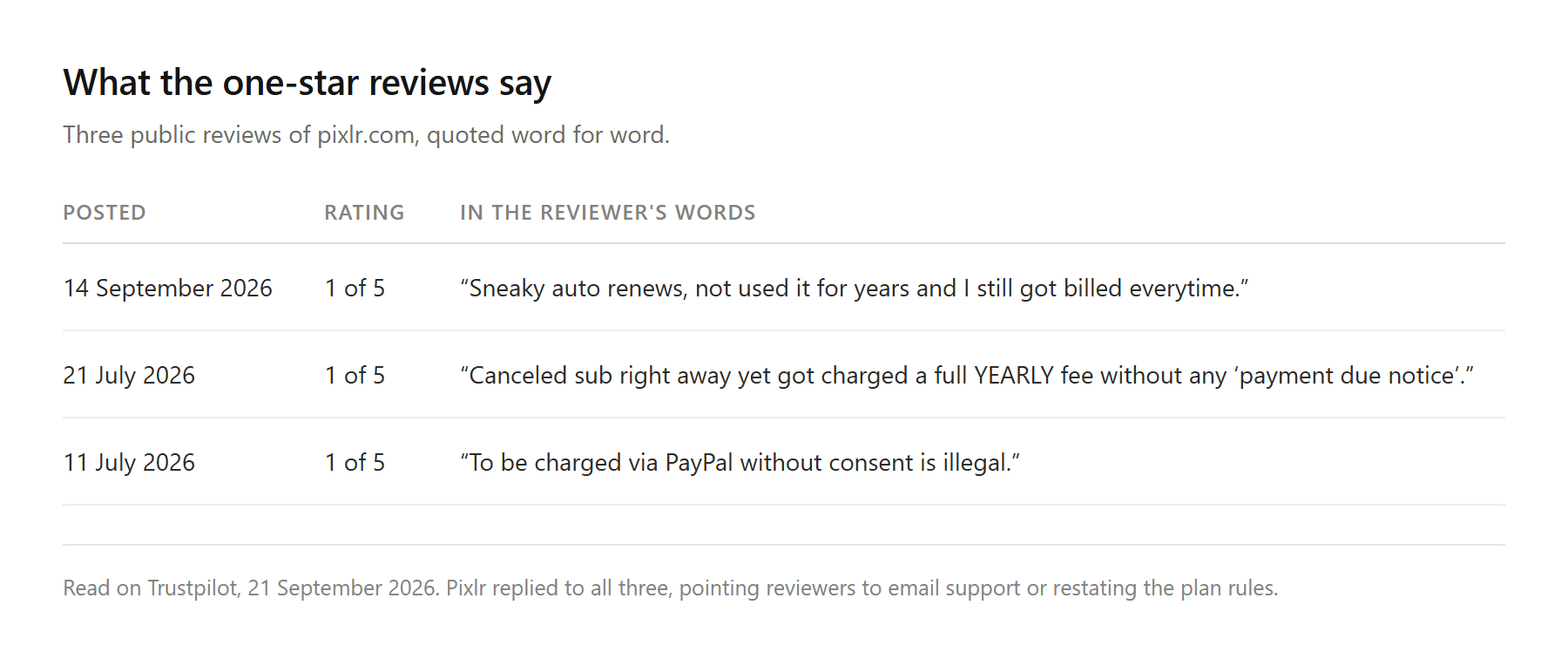
You do not have to take our word for what those reviews say, because Trustpilot counts the topics itself. On the pixlr.com profile, read on 21 September 2026, that list opens with subscription, application, refund and service. Cancellation comes a few places later. Image quality does not appear.
A review posted on 14 September 2026 reads "Sneaky auto renews, not used it for years and I still got billed everytime." One from 21 July 2026 says "Canceled sub right away yet got charged a full YEARLY fee without any 'payment due notice'." Another from 11 July 2026 is shorter: "To be charged via PayPal without consent is illegal."
Reviews are customer accounts, not audited transactions, and Pixlr replies to a good share of them. What those replies do is worth noting. They route people to email support or restate the plan rules, and none of the ones we read promised money back.
The written policy explains why. Pixlr's terms say payments are non-refundable, and the pricing FAQ states that Pixlr "is unable to process any refunds for your subscription once your payment has been processed."
The subreddit tells the same story from the inside, and with more detail. A subscriber who went looking for a breakdown of credit spending in May 2026 came back with this: "there is no client side visibility for usage, so when they told me I was using all of my credits every month, the source is 'trust me bro.'" Two months later another thread recorded a refund request that went nowhere, with the reply that "their Terms of Service prohibit refunds once a charge has been processed, regardless of the situation."
The subscription is the thing generating the anger. When a product bills monthly whether or not you opened it, and the meter it draws on is not itemised anywhere you can check, a quiet month is still a charge.
Atlas Image Edit: A Pixlr Alternative That Bills Per Image
Upload a photo, describe the change in plain English, choose which AI model runs it, press Run. Atlas Image Edit is the editing half of the image workspace at Atlas Cloud, and the reference slot is labelled Image to edit and required, so this is an editor rather than a prompt box that invents pictures from nothing.
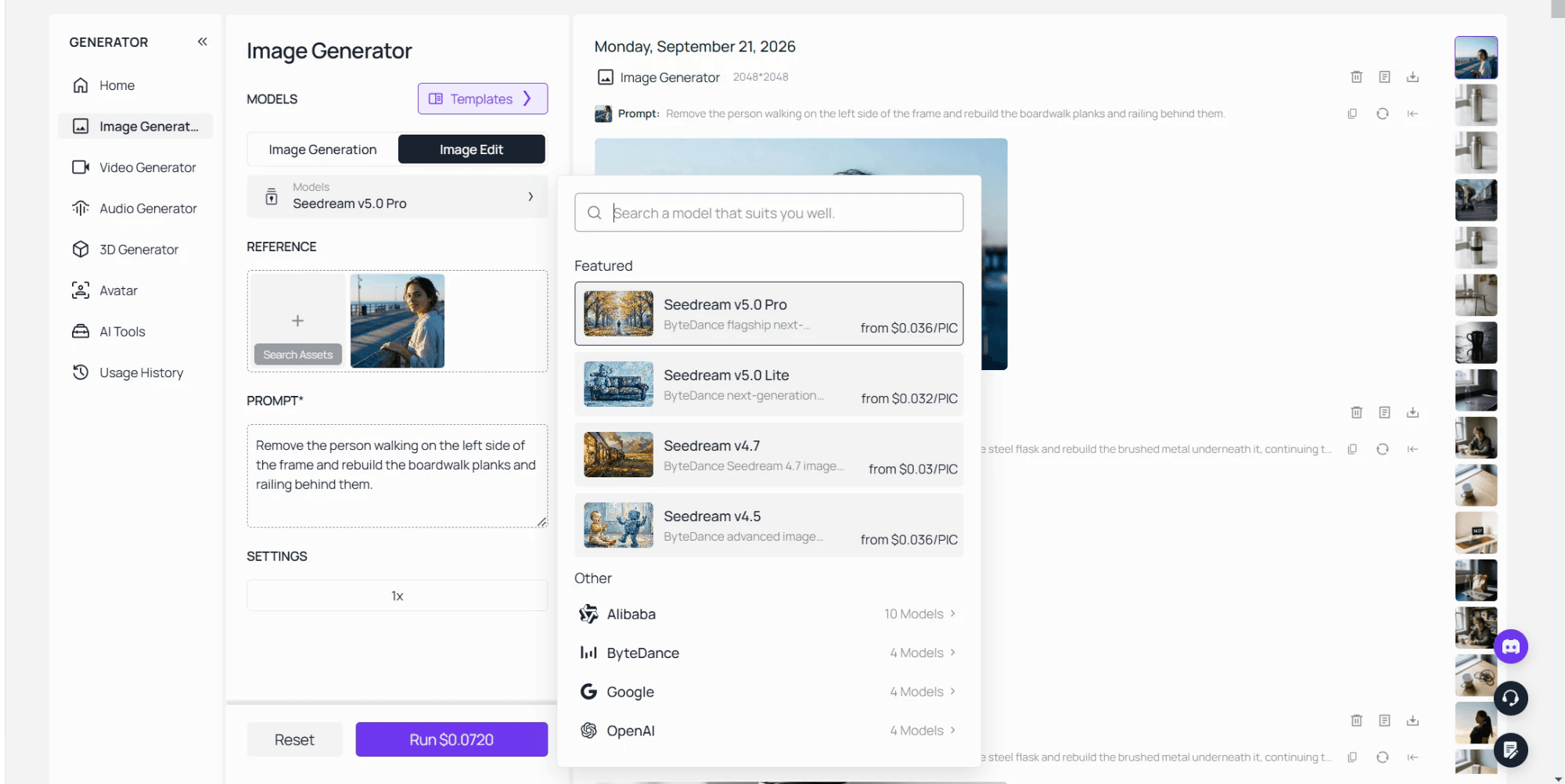
The model list is where the comparison gets interesting, because this is not a story about one product holding better engines. Pixlr sells a Nano Banana editor. Nano Banana 2 Edit sits in the Atlas picker as well, beside Seedream, Qwen and GPT Image builds, twenty-two of them on the editing side. Same family of models, two meters underneath.
Take a job Pixlr users run constantly: putting two photos into one. The reference area holds more than a single file, and Seedream v5.0 Pro Edit, one of the models in that picker, accepts one to ten reference images alongside the instruction. Combining a subject from one frame with a background from another becomes one sentence and one run. Adding that second reference nudges the number on the Run button up, and it does so before you commit rather than after.
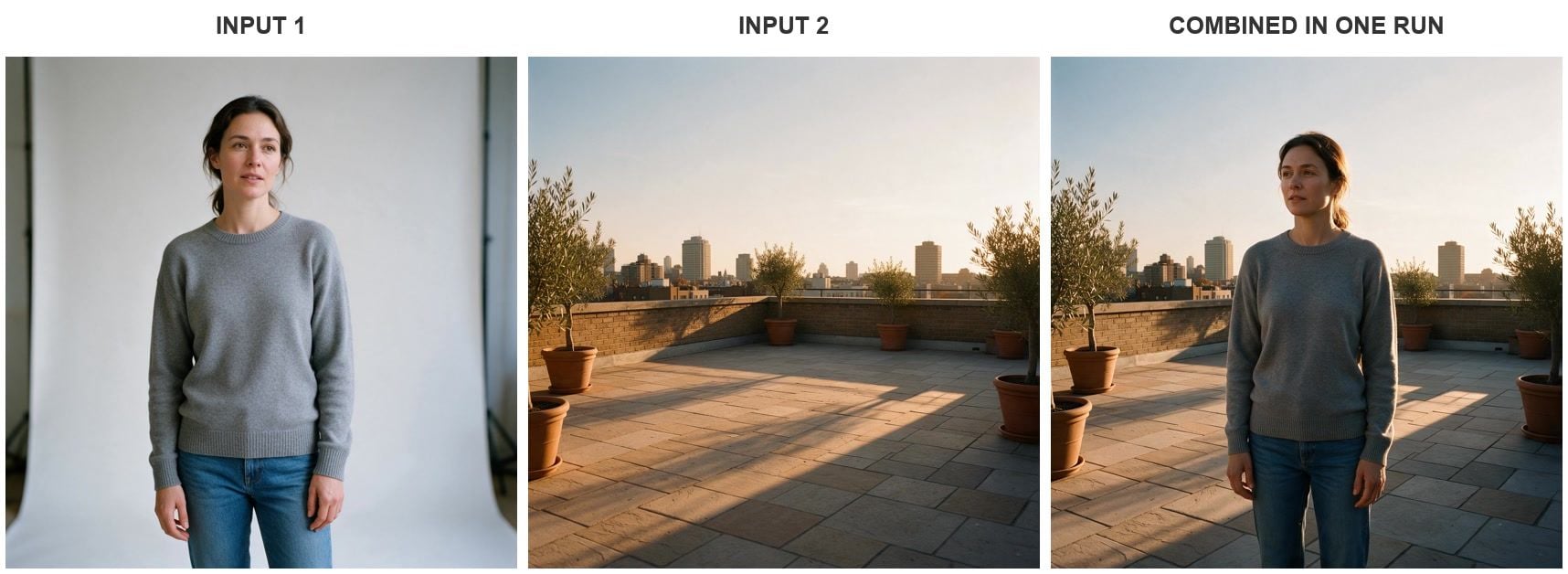
Two references, one instruction, one run on Seedream v5.0 Pro Edit, September 2026. Both source frames were generated in the same workspace.
The relighting is the part worth looking at. She was photographed under flat studio light and comes back with the terrace's low sun on her right side and her shadow thrown left across the stone. That match is the step people lose an evening to when they do it by hand.
Upload, Describe the Change, Pick the Model
Three steps, and the third is the one people skip. Drop the file into the Image to edit slot. Write what should change, in a sentence, the way you would brief a retoucher. Then choose the model instead of accepting whichever one loaded by default.
That third step is your recovery path. When an edit comes back wrong the instinct is to rewrite the sentence, and a model that smeared the pavement will usually smear it again. Swapping the engine takes about ten seconds and reuses the upload you already made.
Below is one instruction sent to two of them. Both took the rubber band off the flask. They made different calls about everything else, which is the argument for having the picker at all.
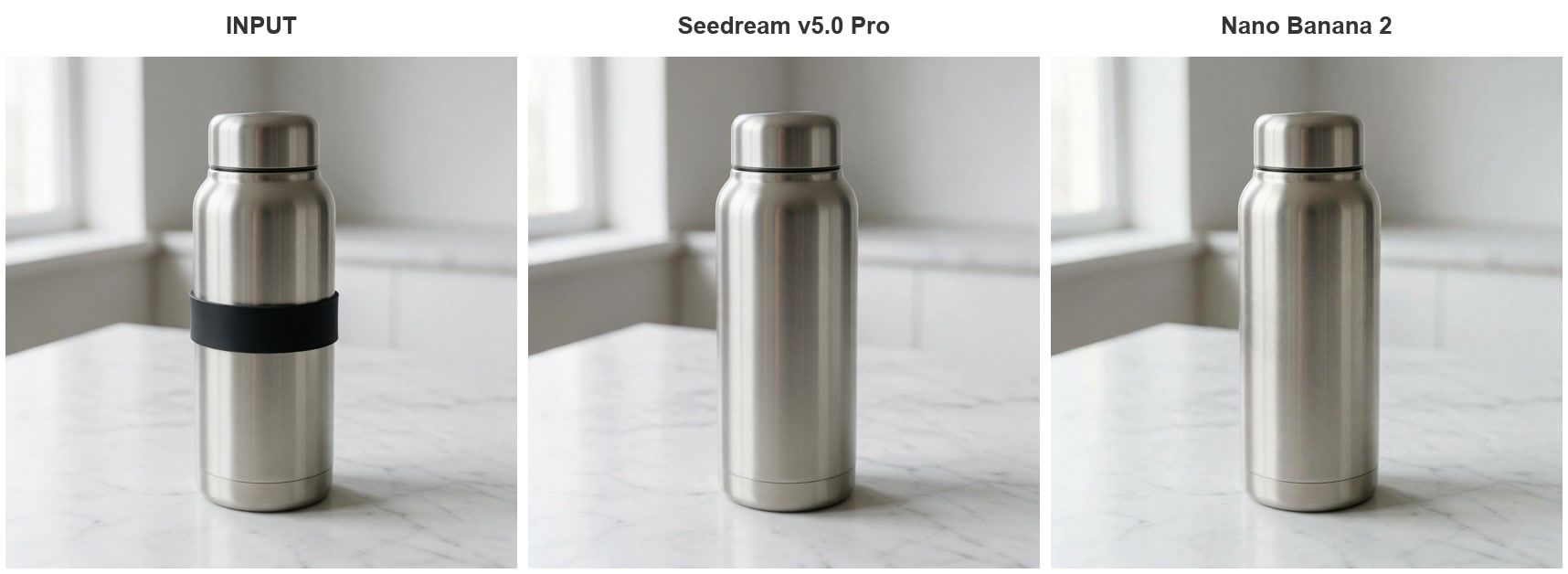
One instruction, two models, single runs on Seedream v5.0 Pro and Nano Banana 2, September 2026.
Pixlr and Atlas Image Edit, Side by Side
Everything in the Pixlr column is what Pixlr publishes about itself, read in September 2026, or what its support replies state in public. Where a cell says a figure is not published, that absence is the finding.
| Pixlr | Atlas Image Edit | |
|---|---|---|
| Where it runs | Browser, iOS and Android apps | Browser tab, no install |
| What the pricing page shows | Four paid tiers, no free column | Per image billing, no monthly seat |
| Free tier ceiling | Three saves a day, stated in a support reply | Four separate browser tools, no account |
| Free export watermark | Not stated on the tool pages we read | No watermark on the file you download |
| Model choice | Named models, Nano Banana tiers at 1, 3 and 5 credits | Twenty-two models in the Image Edit picker |
| What one action costs | 1c to generate, 2c to expand or swap, 40c for layers | Price of that run, printed on the button |
| Unused balance | Expires monthly, resets to zero on cancellation | Nothing bought in advance, nothing to expire |
| Refunds | Not processed once payment goes through | Pay per run, so there is no balance to reclaim |
One row deserves a caveat instead of a victory lap. Pixlr's credit rate can beat a per run price comfortably if you hold a plan and spend the whole allowance every month on work you genuinely needed. The rows where it hurts are the quiet months and the month you quit.
A Free Pixlr Alternative for One-Off Jobs
Sometimes the honest answer to a search for a free Pixlr alternative is that you have one photo and one problem, and a whole workspace is overkill. Atlas keeps four free browser tools for exactly that: an image upscaler, a background remover, an object eraser and a face swapper.
They run on your machine, not on a server. The upscaler page says files "never leave your device," and the background remover describes itself as "local inference with zero uploads." No account, no daily counter, no watermark on the way out. If background removal is the whole job, we ranked ten tools that do it in best AI background removers.
Be clear about where that stops. Local inference means your laptop is doing the work, so the upscaler tops out at 2x while a server reaches further, and the gap between adding pixels and adding detail does not close by itself. We took that apart in photo enhancer versus upscaler.
The rest of that page works differently. Tools like the headshot generator and the clothing changer give signed-in users one free trial each, so they are a sample, not a free tier.
When Apps Like Pixlr Are Still the Right Call
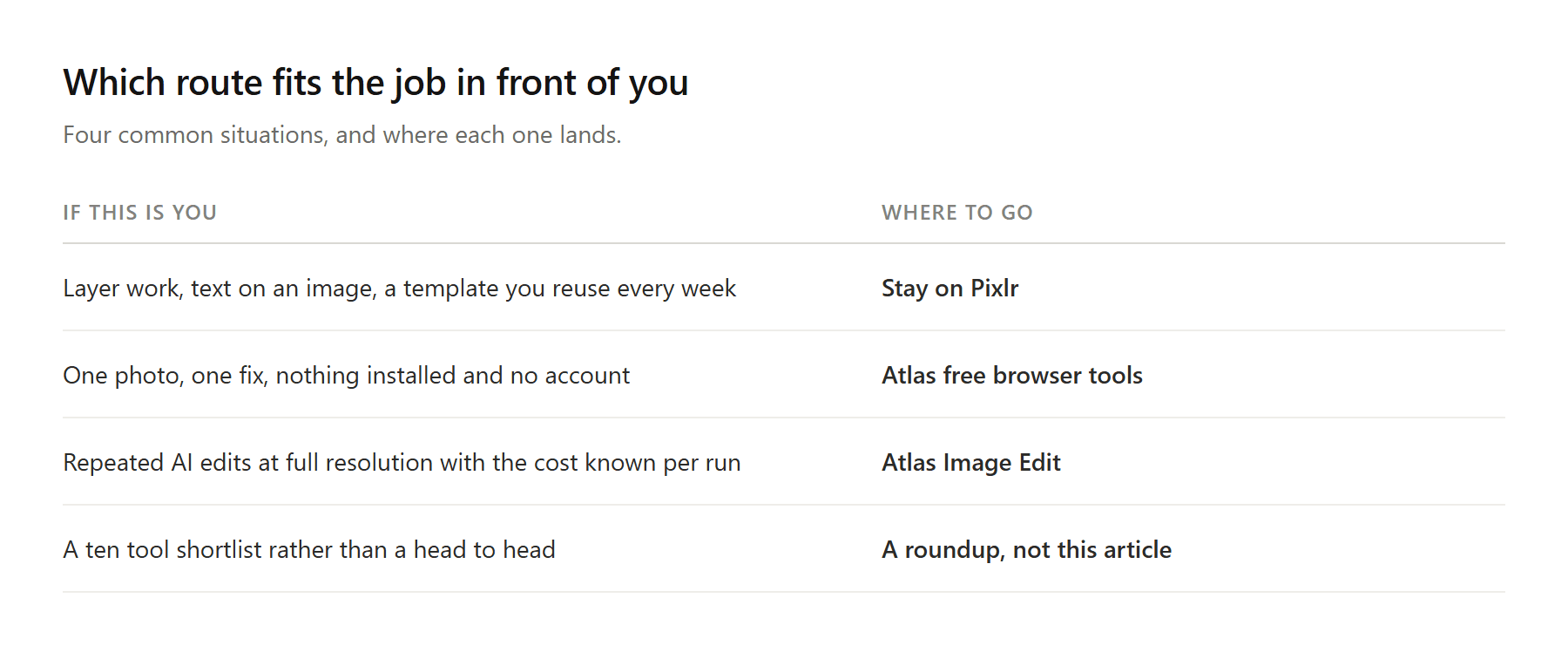
Stay where you are if the editing is manual. Layer work, text placed on an image, a template you reuse weekly, a phone workflow you have muscle memory for: a prompt box replaces none of that, and Pixlr's two editors handle it well.
Switch when the AI edit is the job and the file is the deliverable. A client photo that has to come back at full size, a listing image due tonight, a run of product shots that each need the same fix. Those are the jobs that die against an undocumented daily ceiling.
One more thing to weigh if you are searching from a phone. Both app listings carry ads on the free side, with Google Play marking the app "Contains ads" and the iOS listing selling ad removal as a separate purchase. A browser tab shows you no ads and asks for no updates.
Frequently Asked Questions
Is there a free Pixlr alternative that works without signing in?
Yes, with a narrower scope. Atlas runs four editing tools in the browser with no account and no daily counter, and they process the file on your own machine. Each one does a single job, so the tool that erases an object will not also relight the scene. Prompt based editing across the full model list runs in Image Edit and is billed per image instead.
What do Pixlr's paid plans cost?
On the web pricing page in September 2026, Plus was US$2.49 a month or US$1.99 billed yearly, Premium was US$9.99 or US$7.99 yearly, Ultra started at US$24.99 or US$19.99 yearly, and Ultra MAX was listed at US$39.99 against a struck-through US$49.99. The mobile storefronts run their own names and numbers, with the iOS listing showing weekly, monthly and yearly purchases plus a 500 credit pack, so check which one you are buying through before comparing notes with anyone.
Can I get a refund if Pixlr bills me after I stop using it?
The written policy says no. Pixlr's terms describe subscriptions as auto-renewing and state that payments are non-refundable, and the pricing FAQ repeats that refunds cannot be processed once a payment has gone through. If you subscribed inside a mobile app, that FAQ sends you to the app store instead, since the store holds the billing relationship.
How do I combine two images in Pixlr, and is there a faster route?
Pixlr's route is manual, and its editor page lists the kit: "layers, masks, filters, effects, retouching". You open the first photo, bring the second in as a layer, then mask and blend by hand. For a collage, or any composite where you want control over the edges, that is the right tool and it costs no credits. When the difficulty is making two shots look like they were taken in the same room, an instruction beats a mask, because relighting the pasted subject is the part that eats the evening. Merge photos by hand when the composition is the job, and by instruction when the lighting match is what you are fighting.
Are there apps like Pixlr that do not need an install?
That is the main reason this search exists on phones. Browser editors skip the download, the updates and the storage, and they behave the same on a locked-down work laptop. The trade is that a browser tool wants a connection, so if you edit on planes, keep something installed for those trips.
Conclusion
Pixlr did not get worse at editing. It got harder to plan around. The pricing page sells four tiers into one credit pool, the free account's daily ceiling is documented in a support reply rather than on the site, unspent credits expire monthly, and cancelling zeroes whatever is left. Each rule is defensible on its own. Together they explain why the one-star reviews are about billing rather than image quality.
If your work is manual and lives in an editor's toolbar, none of that is worth moving for. If the AI edit is the work and the export is what you hand over, pick something that tells you the cost before the run and leaves nothing to expire afterwards: a model you can change, a file at full size, and a price on the button. That is a reasonable standard to hold any Pixlr alternative to, this one included.





