

You finally get a design brief with five modules, two languages, dates, people, small copy, and a hard deadline. Then the image generator gives you a beautiful mess. Qwen Image 3.0 Pro complex layout work is worth trying when you need a fast, inspectable first version of a poster, newspaper page, or storyboard, but it still needs a human proofreader.
This article puts that claim under pressure with three 2K briefs: a bilingual five-column event poster, a six-module newspaper front page, and a six-frame product storyboard. The useful result is not a promise that every glyph lands perfectly. It is a repeatable acceptance routine for deciding whether a generated layout can move forward.
Qwen positions Image 3.0 for dense productivity formats including newspaper PDFs and short-drama storyboards. That is a useful starting point, not a substitute for testing your own brief ( Qwen’s Image 3.0 announcement, August 2026).
Key takeaways
- Define reading order and zones before visual adjectives.
- Use 1K for structure trials, then inspect finals at 2K.
- Check text, image meaning, and crop before visual polish.
- Use real captures for real UIs, maps, and data screens.
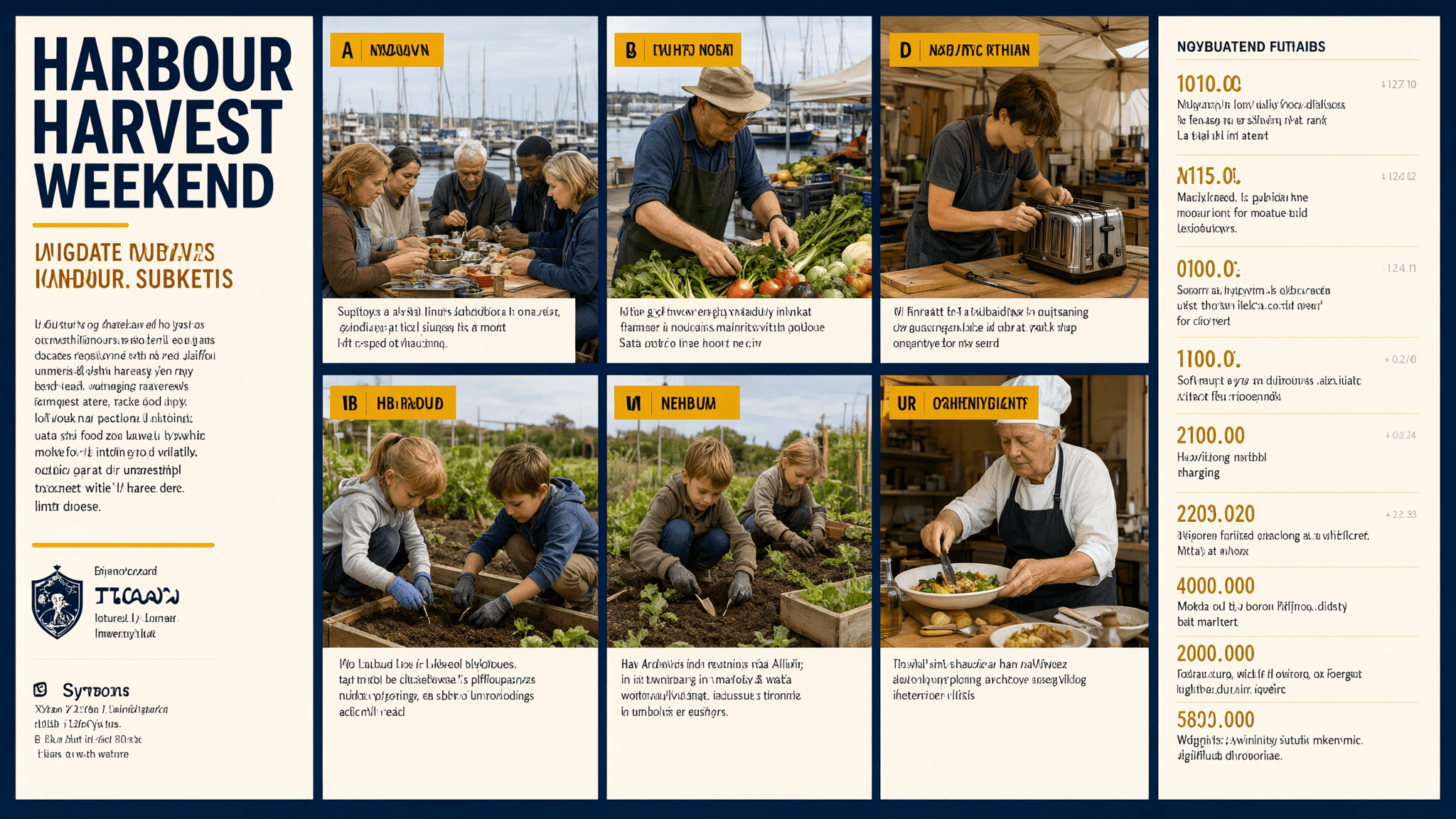
Required Qwen Image 3.0 Pro complex layout poster run capture for the five-column bilingual Harbour Harvest Weekend case
Case 1: the generated five-column poster pairs a shared community meal, growers’ produce, a repair bench, children planting, and a cook with distinct editorial zones. Review reading order, image-to-column matching, and every small text field before publication.
Why Qwen Image 3.0 Pro Complex Layout Attempts Still Fail
The hottest demos make dense layouts look effortless. The actual pressure point is coordination: text hierarchy, spatial boundaries, and adjacent images have to agree at the same time. QwenCloud documents complex layouts, multilingual fonts, fine-grained text, negative prompts, and output up to 2048 by 2048 for this model family (QwenCloud image-model guide, September 2026). Those are capabilities to test, not a blanket approval for client delivery.
Most weak attempts fail in one of three predictable ways.
- A content pile without hierarchy. A prompt can list twelve facts and still omit the reading order, column count, gutter behavior, or which headline must dominate. The model then has to invent the information architecture.
- Too many long strings that must be exact. Names, dates, URLs, prices, and multilingual phrases are brittle. Keep copy short in a first pass. Add only the text that matters to the decision.
- Correct words beside the wrong image. A repair-café card paired with a fashion portrait is a failed layout even when the headline is readable. Designers need semantic alignment, not merely attractive type.
Review in this order: structure, then text, then image-to-text meaning, then crop and finish. It catches the expensive failures first.
Do not ask an image model to manufacture evidence. A fictional app screen, backend dashboard, map, chart, or terminal can look convincing from a distance and still contain false UI, nonsensical labels, or invented figures. When your article or campaign needs a real product flow, capture the actual browser state instead.
Qwen Image 3.0 Pro Complex Layout Workflow and Model Choice
For these three tests, work from a single Atlas Cloud workspace: keep the prompt, selected output, and correction decision in one browser tab. That small bit of discipline matters when a team needs to explain why version B, rather than version A, was approved.
| Model | Job in this workflow | Settings to start with | Price check |
| Qwen Image 3.0 Pro Text-to-Image | Build each new layout | 16:9, 1 output, 2K final review | Check the resolution-specific quote before Run |
| Qwen Image 3.0 Pro Edit | Correct a local word, object, or region | Upload one approved image, preserve the rest | Use only when structure already survives QA |
Use 1K for a cheap structure rehearsal if the playground offers it. The publishable examples here use 2K because tiny labels, gutters, and captions need room for inspection. The settings shown in the completed captures are the source of truth if the interface commits a different size.
The research backdrop is promising but modest: the earlier Qwen Image technical report describes advances in complex text rendering and precise editing for the Qwen Image series, rather than a benchmark claim for this specific 3.0 Pro run (Qwen Image technical report, August 2025).
Step 1: Build a Qwen Image 3.0 Pro Complex Layout Poster
This is the main pressure test. It asks for five equal program zones, a bilingual subtitle, ten schedule and location fields, and documentary scenes that must belong to the nearby column. The completed case image shown above is this step’s only visual, so the same evidence is never duplicated.
Paste this exact prompt:
plaintext1Create a print-ready 16:9 bilingual event-program poster for “HARBOUR HARVEST WEEKEND” in English and Spanish. Use a disciplined five-column grid with generous gutters and a clear top-to-bottom reading order. Visual system: midnight navy background, warm ivory paper, saffron accent color, documentary editorial photography, subtle recycled-paper grain, no logos and no watermark. 2 3Top header across all five columns: “HARBOUR HARVEST WEEKEND” in bold sans serif, with the subtitle “Food, growers, music and practical climate action / Comida, agricultores, música y acción climática práctica”. Under it, place five equal vertical program columns with these exact headings and content: 41. FRI 18:00 / VIERNES 18:00 — “Dockside supper / Cena en el muelle” — “Pier 4”. 52. SAT 10:00 / SÁBADO 10:00 — “Growers’ market / Mercado de productores” — “Harbour Square”. 63. SAT 14:00 / SÁBADO 14:00 — “Repair café / Café de reparación” — “Workshop Tent”. 74. SUN 11:00 / DOMINGO 11:00 — “Kids seed lab / Laboratorio de semillas” — “Garden Stage”. 85. SUN 16:00 / DOMINGO 16:00 — “Community table / Mesa comunitaria” — “Bring one dish”. 9 10Give every column one different documentary photograph: diverse neighbours sharing food at a waterfront table, a farmer arranging vegetables, a young mechanic repairing a toaster, children planting seeds, and an elderly cook serving a shared meal. Keep each photograph inside its own clean editorial frame. Add one footer strip reading “FREE ENTRY · ALL AGES · harbourharvest.example”. Ensure the bilingual text, times, locations, five-column structure and image-to-column match are all clear and legible. Do not depict a software interface.
Choose 16:9, 1 output, the highest available 2K setting, and Direct prompt strategy if the model page exposes it. Turn off automatic prompt rewriting when available, then record the seed shown for the output. Run it through Qwen Image 3.0 Pro Text-to-Image.
At 100% zoom, check all five columns, the ten time and location fields, the bilingual subtitle, and every photograph’s relationship to its event. Send a local mistake to Edit or rerun a broken grid. Do not fix a collapsed structure with a tiny patch.
Step 2: Generate a Qwen Image 3.0 Pro Complex Layout Newspaper
The second test changes the deliverable completely. A newspaper page exposes whether the model can separate a masthead, dominant story, utility box, pull quote, caption, and event strip without treating them as one decorative block.
Paste this exact prompt:
plaintext1Create a 16:9 fictional community newspaper front page titled “THE LOCAL LEDGER”. Keep the same midnight navy, warm ivory and saffron editorial design system, subtle paper texture and documentary photography used in the previous test, but make this a distinct printed newspaper page, not an app screen and not a real publication. 2 3Use a strong readable masthead at the top: “THE LOCAL LEDGER”. Add the date line “SATURDAY EDITION · SEPTEMBER 2026”. Build six clearly separated editorial modules: 4A. Main story with headline “THE BLOCK THAT CUT ITS WASTE IN HALF”, a two-line deck “Neighbours turned surplus food, repair skills and shared storage into a weekly habit.” and a large photograph of neighbours sorting vegetables beside a harbour market. 5B. Right-side portrait story: “MEET THE WOMAN FIXING TOASTERS FOR FUN”, with a photograph of a mechanic at a repair table. 6C. Small weather box: “SUN 18°C · BREEZE FROM THE WEST”. 7D. Pull quote: “The useful thing was already here. We just needed to share it.” 8E. Bottom event strip: “THIS WEEKEND: HARBOUR HARVEST WEEKEND”. 9F. Photo caption beneath the main image: “Volunteers sort market surplus before the community supper.” 10 11Use a precise newspaper hierarchy: largest masthead, one dominant headline, then secondary headlines, captions and small utility text. Keep all six modules visually distinct, with believable print margins and no watermark.
Choose 16:9, 1 output, the highest available 2K setting, and a new fixed seed. The finished case image below is a generated newspaper layout, not a fabricated newspaper-tool screen.
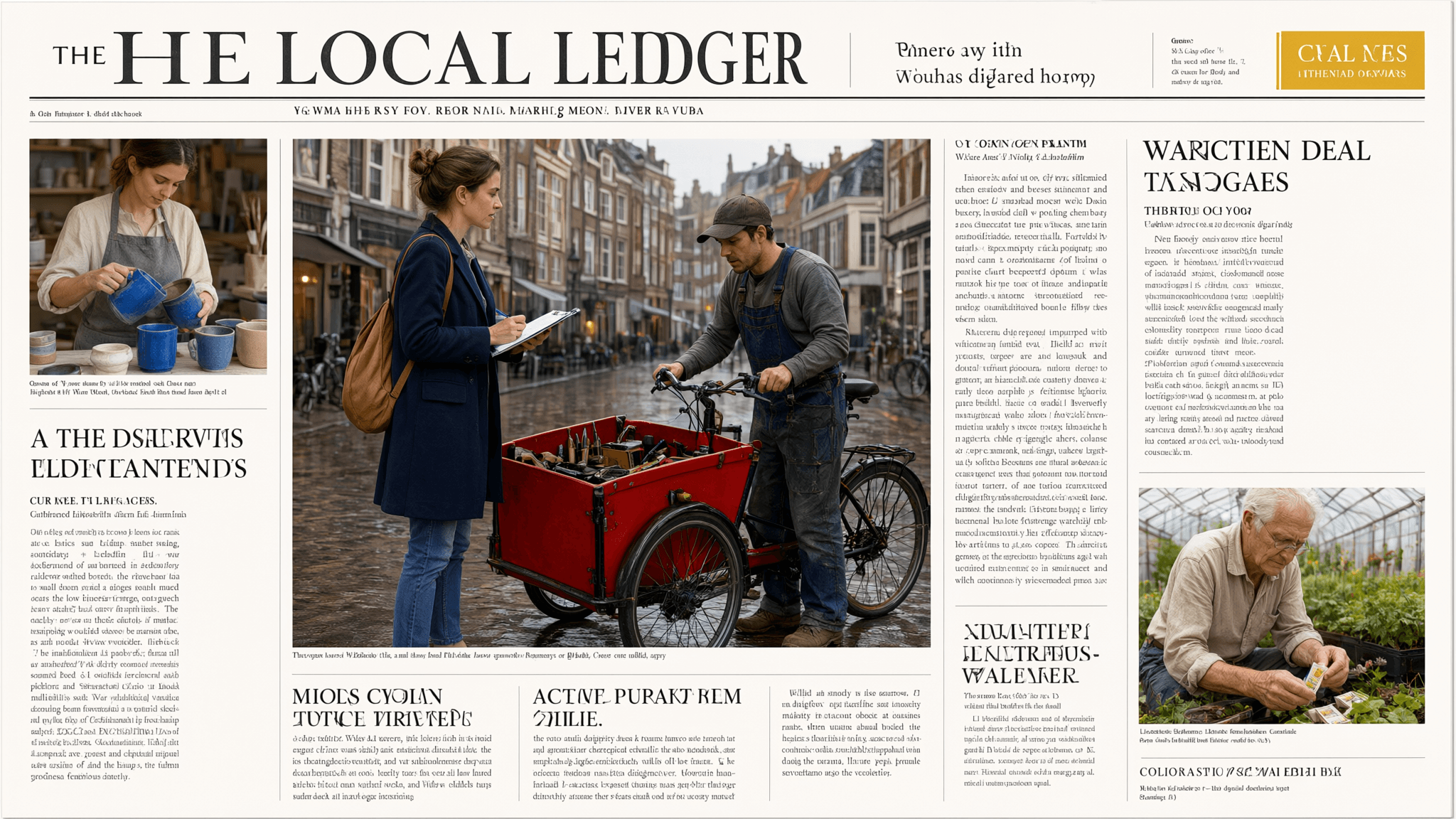
Required Qwen Image 3.0 Pro complex layout newspaper run capture for the fictional THE LOCAL LEDGER case
Case 2: the central reporter-and-cargo-bike story, ceramic-maker inset, and greenhouse gardener test a masthead, lead-image hierarchy, secondary modules, and photo-to-story relevance. Proofread any intended text character by character.
Proofread the masthead, date, weather, pull quote, and caption character by character. Then verify that the lead image actually shows market food sorting, rather than a generic crowd or unrelated object.
Step 3: Create a Qwen Image 3.0 Pro Complex Layout Storyboard
Storyboards ask for a different kind of discipline: visual continuity across time. This final case tests one shop owner, one amber bottle, six numbered frames, six captions, and an action sequence that must still read left to right.
Paste this exact prompt:
plaintext1Create a 16:9 six-panel production storyboard titled “REFILL AT DAWN”. Keep the same midnight navy, warm ivory, saffron accent and documentary editorial photography system as the prior two tests. Present it as a printed creative-production board with six numbered frames, clean gutters, paper texture, short captions and no logos or watermark. 2 3The story follows one young female shop owner with short dark hair and a mustard work jacket, and one amber glass refill bottle: 4Frame 1 — “06:10” — she unlocks a small refill shop at dawn on a quiet street. 5Frame 2 — “06:25” — close-up of hands placing the amber bottle beside a metal refill tap. 6Frame 3 — “06:40” — she fills the bottle, visible liquid catching warm morning light. 7Frame 4 — “07:05” — a neighbour arrives with two empty jars and smiles. 8Frame 5 — “07:20” — the owner and neighbour place filled jars into a bicycle basket. 9Frame 6 — “07:30” — wide street view of the bicycle leaving in early sun. 10 11Put these exact short captions under the six frames: “OPEN”, “BRING BACK”, “REFILL”, “SHARE”, “RIDE”, “REPEAT”. Keep the same woman, jacket and amber bottle recognizable across the sequence. Make the frame order unmistakable and keep every caption readable.
Choose 16:9, 1 output, the highest available 2K setting, and record a third fixed seed. Use the same test page, not a synthetic storyboard UI.
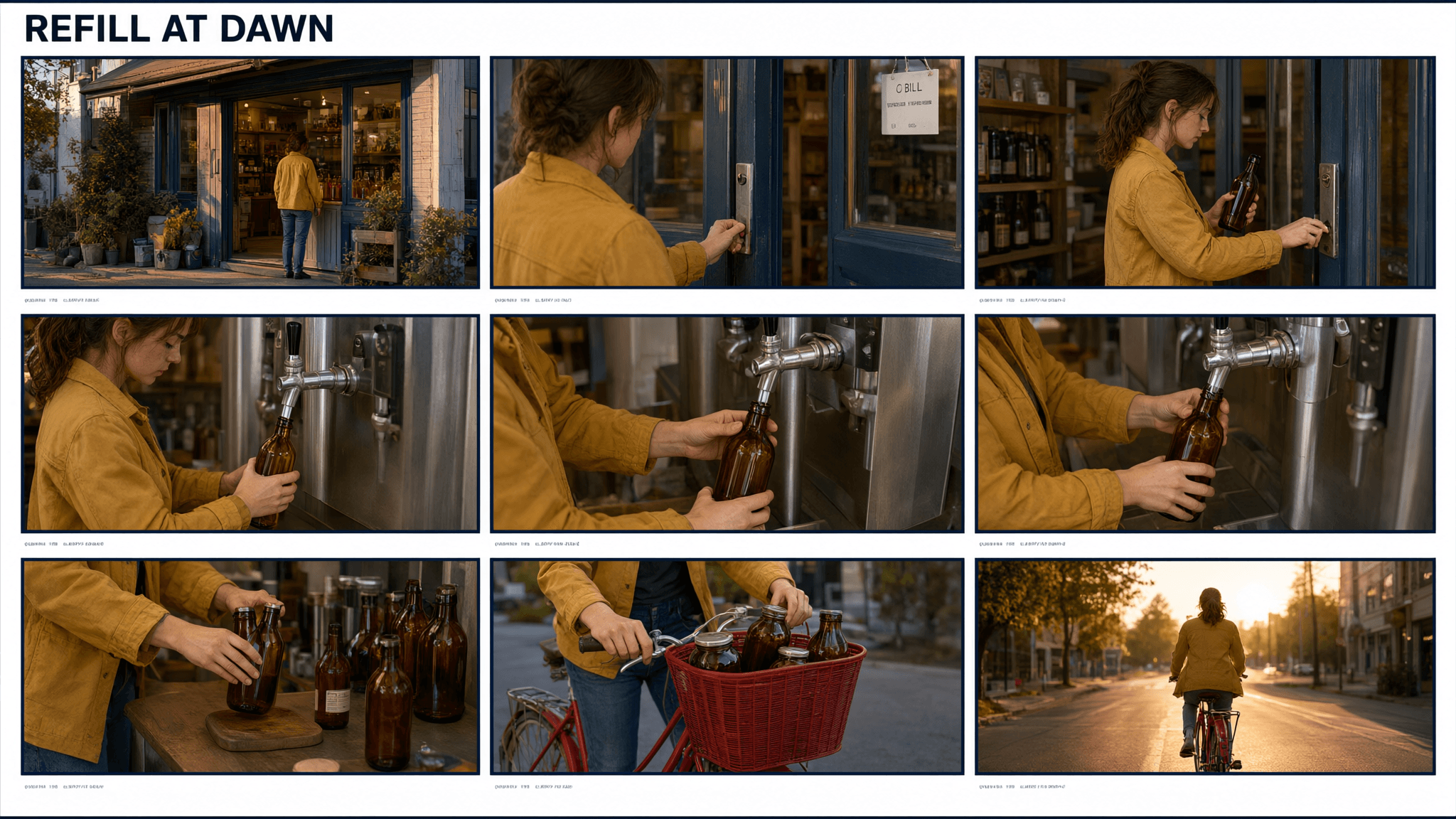
Required Qwen Image 3.0 Pro complex layout storyboard run capture for the six-frame Refill at Dawn case
Case 3: the repeated mustard jacket and amber bottle carry one person through storefront, refill tap, basket, and bicycle scenes. Review character continuity, object continuity, frame order, and every short caption.
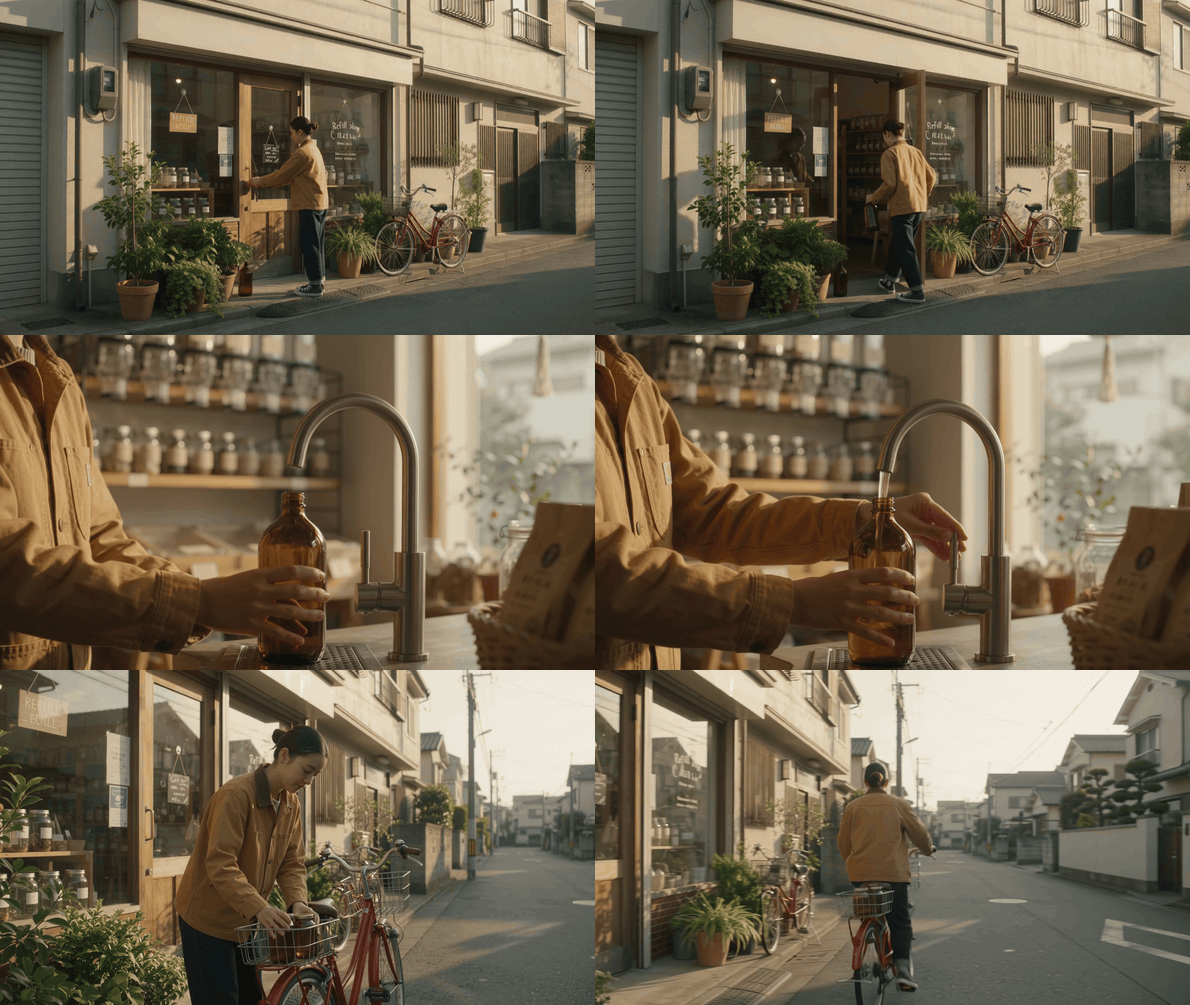
Animated Refill at Dawn sequence with exterior, refill-tap, and street-level bicycle viewpoints
The short companion sequence changes viewpoint from a wide exterior, to a side close-medium refill action, to a street-level bicycle departure. It tests continuity in motion rather than relying on a single push-in shot.
Count six frames first. Then inspect hair, jacket, bottle color, caption text, and sequence of actions. If just one word, object, or localized region is wrong, upload the approved image to Qwen Image 3.0 Pro Edit. If the grid or chronology fails, rerun instead.
Qwen Image 3.0 Pro Complex Layout Variations and QA
Use this matrix after every draft. It is a real browser-rendered checklist, deliberately separate from generated output so the criteria stay readable and reusable.
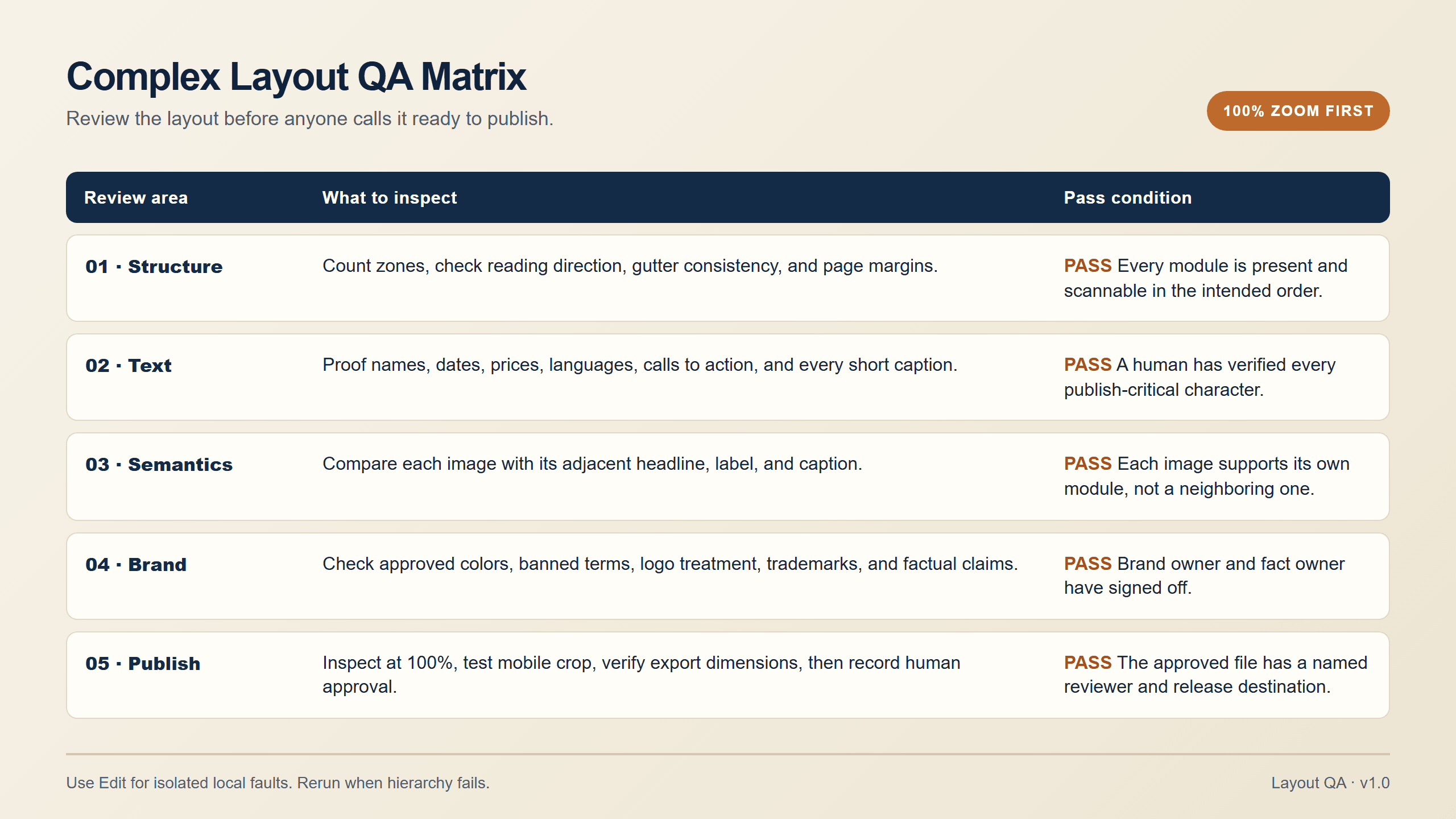
Browser-rendered Qwen Image 3.0 Pro complex layout quality-control matrix for structure, text, semantics, brand, and publishing review
A practical acceptance matrix rendered in a browser, not generated by an image model.
The test can scale without changing its core logic.
- Event poster to restaurant menu: remove long body copy, keep the fixed grid, and proof each dish name, allergen label, price, and language.
- Newspaper to quarterly internal newsletter: select one unmistakable lead story before asking for secondary modules. A page with three competing leads feels unedited.
- Storyboard to social carousel: make six printed panels or generate the panels separately. Do not ask the model to draw a fake social platform interface.
Choose Edit when the grid, hierarchy, and most of the image relationships are already sound but one word, object, or short local phrase is wrong. Start a fresh run when the hierarchy is wrong, the column count changed, or images migrated into the wrong modules.
Qwen Image 3.0 Pro Complex Layout Cost
Cost should follow the resolution you actually plan to inspect. The Atlas Cloud model directory is the place to confirm the live quote and any temporary discount immediately before publishing. This article does not treat the directory’s starting price as the price of every 2K configuration.
For a planning example, if the selected 2K setting displays $0.075 per image, three single-output finals total about $0.225. That is a scenario calculation, not a price promise. If you run three lower-resolution structure trials first, add the current 1K quote shown at Run. A local Edit correction adds one more displayed image charge only when a local fix saves a full rerun.
Use the same structure brief at 1K before committing to 2K. Confirm module count, reading direction, and image placement. Then spend the higher-resolution run on the version worth enlarging and proofreading.
Rights, accuracy, and brand review. The titles, newspaper, event URL, and people in these tests are fictional. Do not present generated newspaper layout as factual reporting. Verify real brands, prices, health, safety, legal, and statistical claims against first-party material word for word. Get appropriate permission for people, trademarks, customer work, or source photography. Generated text can look correct and still require human approval before it goes live.
Frequently Asked Questions
What is Qwen Image 3.0 Pro best for in complex layouts?
It is a practical first-pass tool for information-dense visual drafts such as posters, menus, newspapers, and storyboards. It works best when the prompt defines reading order, zones, and the responsibility of each zone.
Can Qwen Image 3.0 Pro render small text accurately?
It can produce small text worth inspecting at 2K, but do not assume every character is correct. Treat names, dates, amounts, URLs, and multilingual copy as mandatory proofreading items.
How do I prompt Qwen Image 3.0 Pro for a newspaper or poster?
Name the format, ratio, visual system, exact zones, hierarchy, key copy, and the image that belongs inside each zone. Keep the first version focused enough that a reviewer can quickly see whether the structure held.
Should I use 1K or 2K for a complex layout?
Use 1K to test architecture when that option is available. Use 2K for the final review when fine labels, small captions, and gutters matter. Inspect the actual committed size before describing the output.
What should I do when the text is correct but the image is wrong?
If the layout is sound and the error is local, use an edit pass with a specific instruction to preserve all other regions. If the wrong image breaks a module’s meaning or the hierarchy has drifted, regenerate the full layout.
Can I use Qwen Image 3.0 Pro to create real app screenshots?
No. Use a real browser capture for product evidence. Reserve Qwen Image 3.0 Pro complex layout generation for fictional creative layouts and clearly label generated material as such.





