

The video above holds three pieces: a product promo, a creative-edit social clip, and the intro where I'm talking to you. None of them touched editing software.
Every one of them came from one reference video plus one sentence, remade in a single Claude conversation.
This post takes the whole workflow apart: what it needs from you, what it does on its own, and what each of the three cases cost.
1. You can see why it works. You just can't make it.
You scroll past a viral video and you can usually tell why it looks good. The cuts land, the transitions are clean, the text and the picture fit together just right.
Making one yourself is a different story. Where to cut, how to transition, which beat the sound effect lands on: that all lives in editing software, plus years of muscle memory.
You can get a decent video out of AI with a good prompt. But only if you can explain why it looks good, know what's off, and know how to fix it. That alone is a professional skill.
So this time I flipped it. Don't describe it. Show it.
2. Three inputs, one conversation
There are three things behind it. Claude Opus 5.5 reads the reference, makes the calls and runs the show. The Atlas Cloud MCP is one entry point to 400+ models, for images, video, music and video editing, so it calls whatever the job needs. And the Remix skill is our own editing skill. It breaks down the reference, writes the storyboard and puts the final cut together.
From you, it needs three things: a reference video (that's the taste), your footage (optional), and one sentence (what you want).
It handles the rest in seven steps: fill in the brief → break down the reference → list the gaps and generate them → storyboard → music and sound effects → composite → self-check.
It doesn't remix the elements. It remixes why the video works.
The three cases here map to three common kinds of short-form video:
| Case | Scenario | Goal | Who it's for |
|---|---|---|---|
| The intro video | Long-form repurposing: films, streams, podcasts and courses cut into shorts, trailers and other languages | Reach, distribution, going global | Studios, streamers, podcasters, course creators, in-house content teams |
| Marketing Studio launch video | Marketing: launch videos, ad creatives, several versions of one ad for A/B tests | Conversion, acquisition, lower cost | Brands, e-commerce sellers, media buyers, growth teams, indie developers |
| OFF THE CARD | Social short-form: fashion, fitness, travel, cars, fan edits | Followers, trends, personal brand | Creators, everyday users, fan editors |
Let's walk through all seven steps with the intro first.
3. Case one | Long-form repurposing: how the intro was made
Scenario: long-form repurposing | Goal: reach, distribution, going global | For: studios, streamers, podcasters, course creators, in-house content teams
If you run a podcast, a stream or a course, you're sitting on hours of material. What actually brings in new viewers is the few dozen seconds you cut out of it: a trailer, a hook, a short clip.
The hard part is making that cut worth stopping for on its own. Animated captions, scene changes, music on the beat: that used to be an editor's job.
The long-form piece here was a 30-second talking-head video of my avatar. I gave it that video, two edits I'd already made, one viral talking-head reference, and one sentence: "Cut this talking-head clip into a tutorial intro, in the style of the reference."
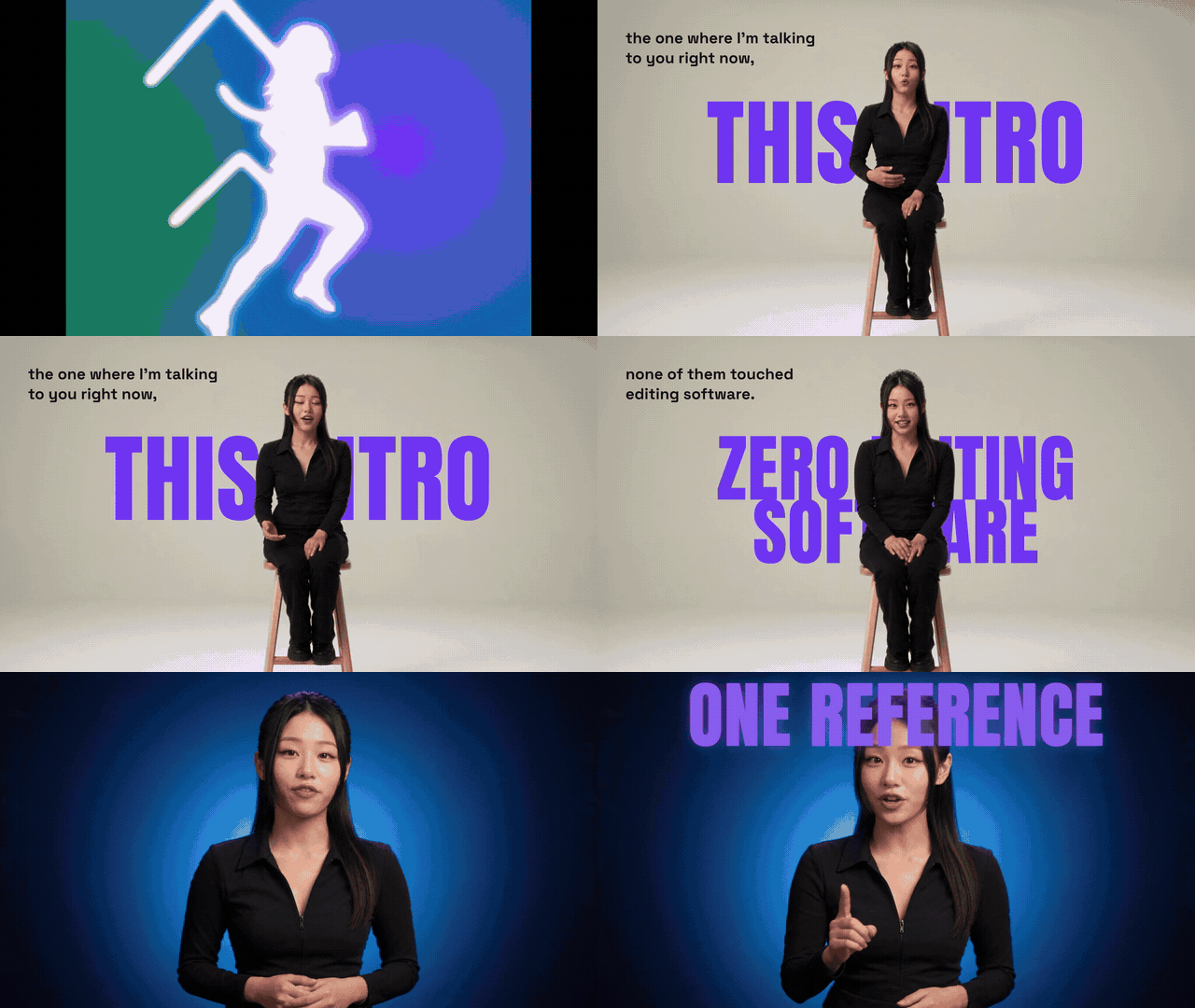
Step 1: Fill in the brief
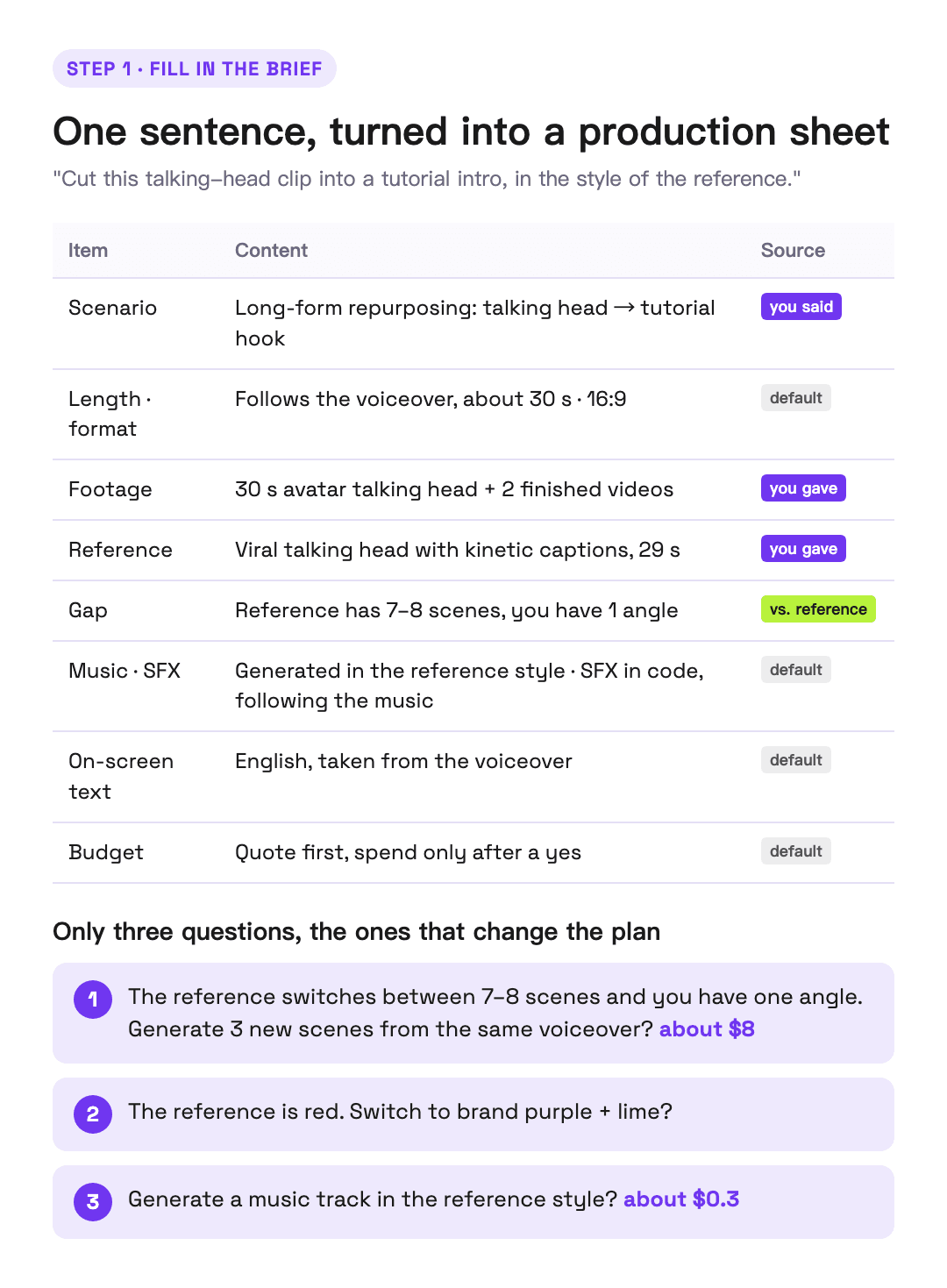
First it fills in everything the sentence didn't say, as a production sheet: length, format, where it's going, whether there's enough footage, what music, what budget. Every line is marked as something I said or something it assumed.
It only asked me about three things:
- The reference switches between seven or eight scenes, and you have one angle. Generate a few new scenes from the same voiceover? (with a price)
- The reference is mostly red. Switch to the brand colors?
- Generate a music track in the reference's style? (with a price)
Step 2: Break down the reference
This step produces a full analysis report, with four "eyes" each doing one job:
- Edit engine (local code): splits the reference into 23 shots, with in and out points, framing and transitions, and measures the music's tempo and section energy
- Motion curve (local code): measures frame by frame where it pushes, where it eases, and what's moving in the frame
- Gemini (through the Atlas Cloud MCP): listens to the music and describes the genre, instruments and structure
- Claude: reads every shot and matches it to the line being spoken
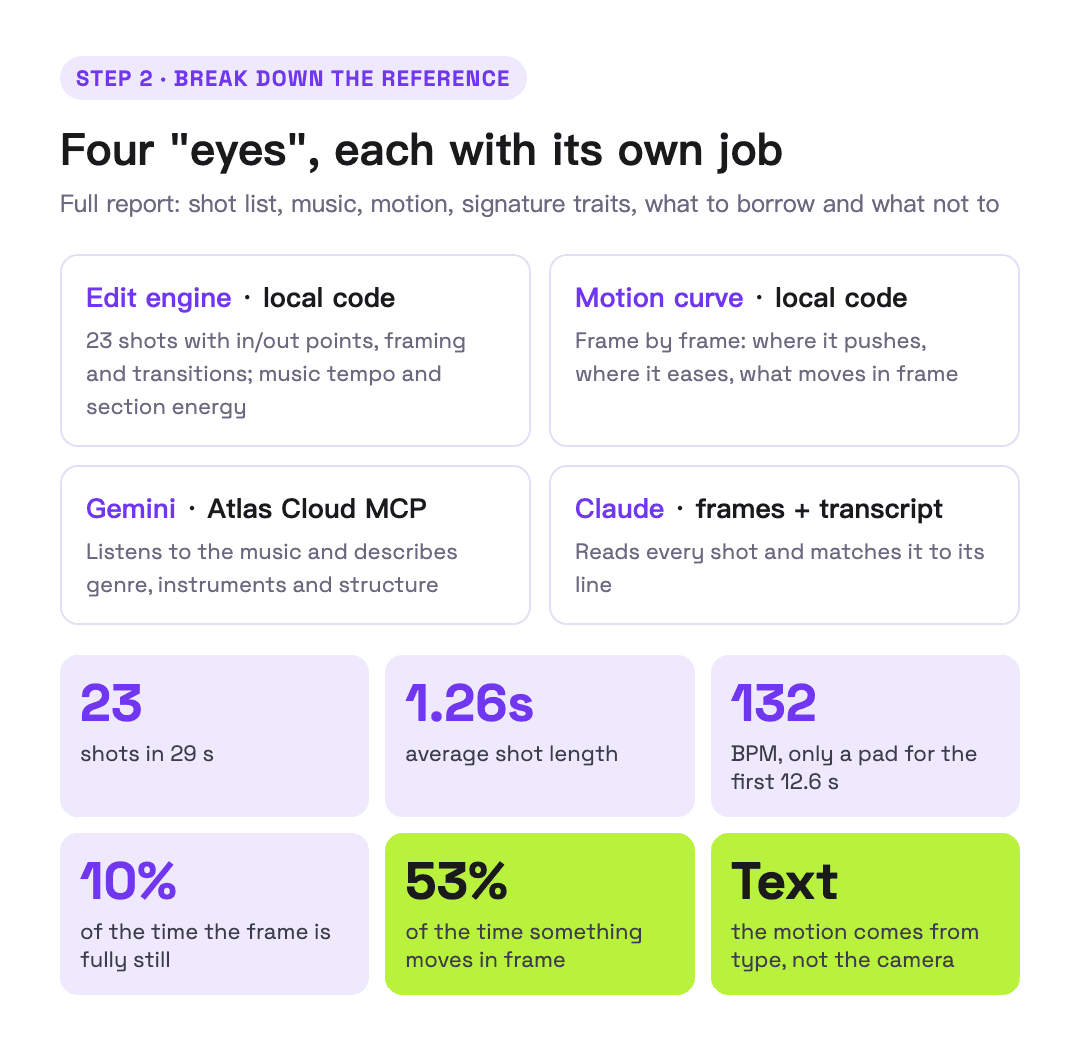
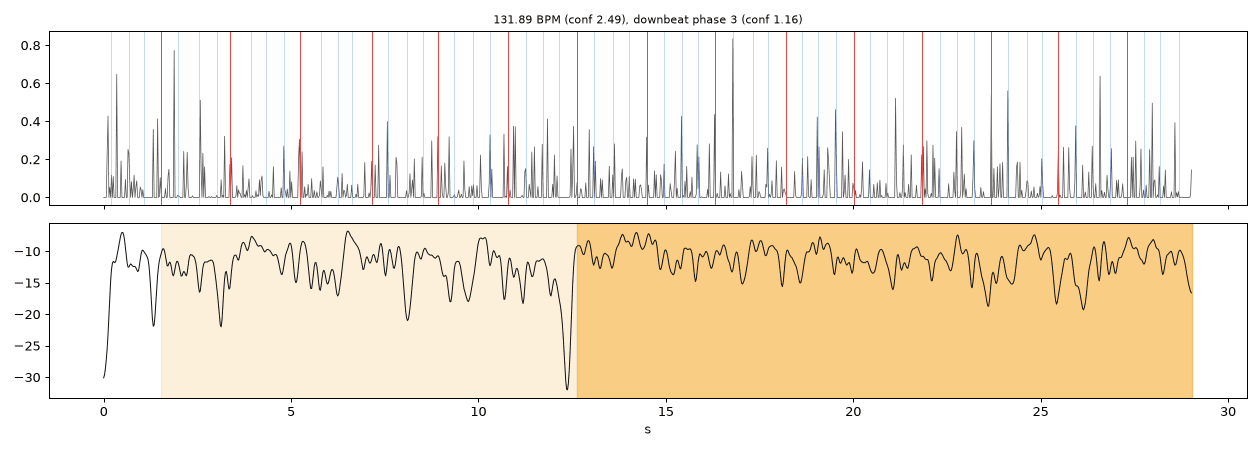
A few key numbers: the reference is 29 seconds with 23 shots, a cut every 1.26 seconds on average. The music sits around 132 BPM, with only a pad for the first 12.6 seconds before the drums come in, and that lift lands right on the line where the speaker turns the argument.
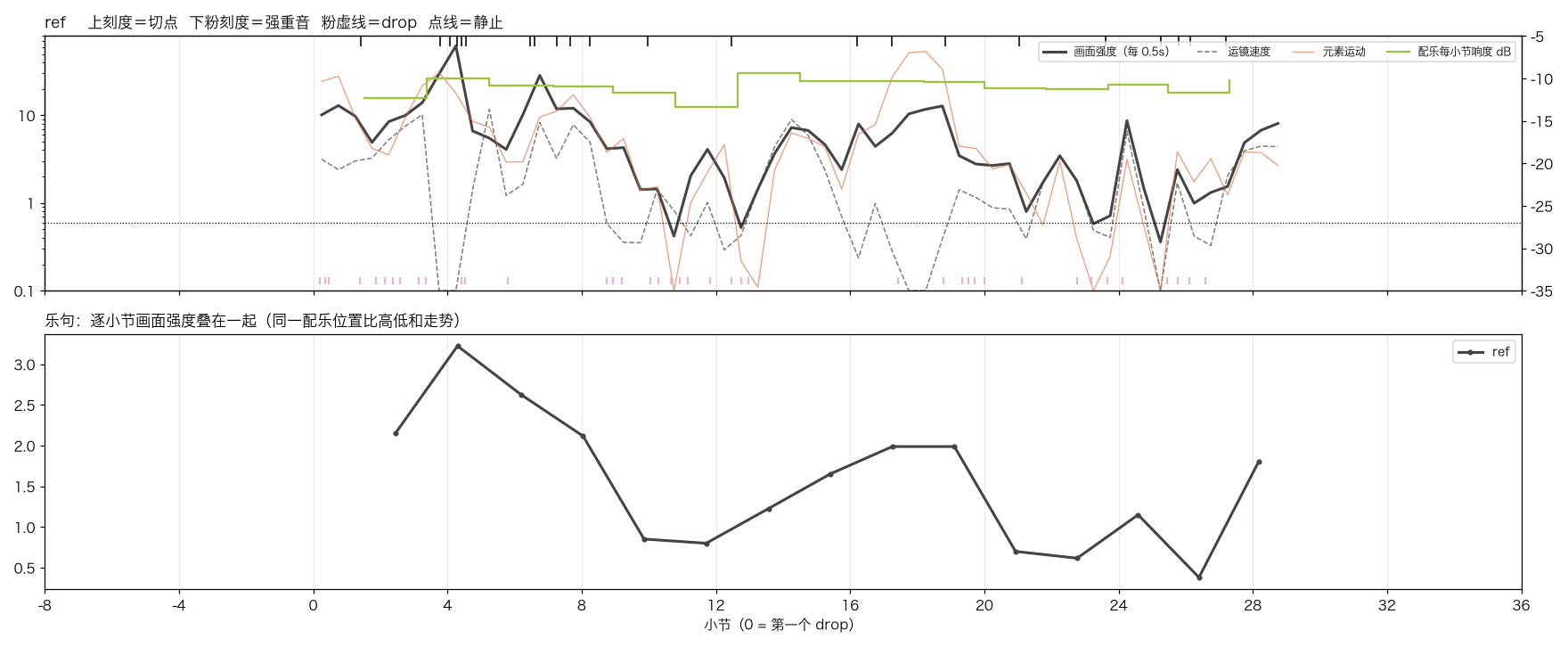
The frame is fully still only 10% of the time, and something is moving 53% of the time, half of which is the camera holding still while only the text moves. In other words, most of this video's motion comes from type.
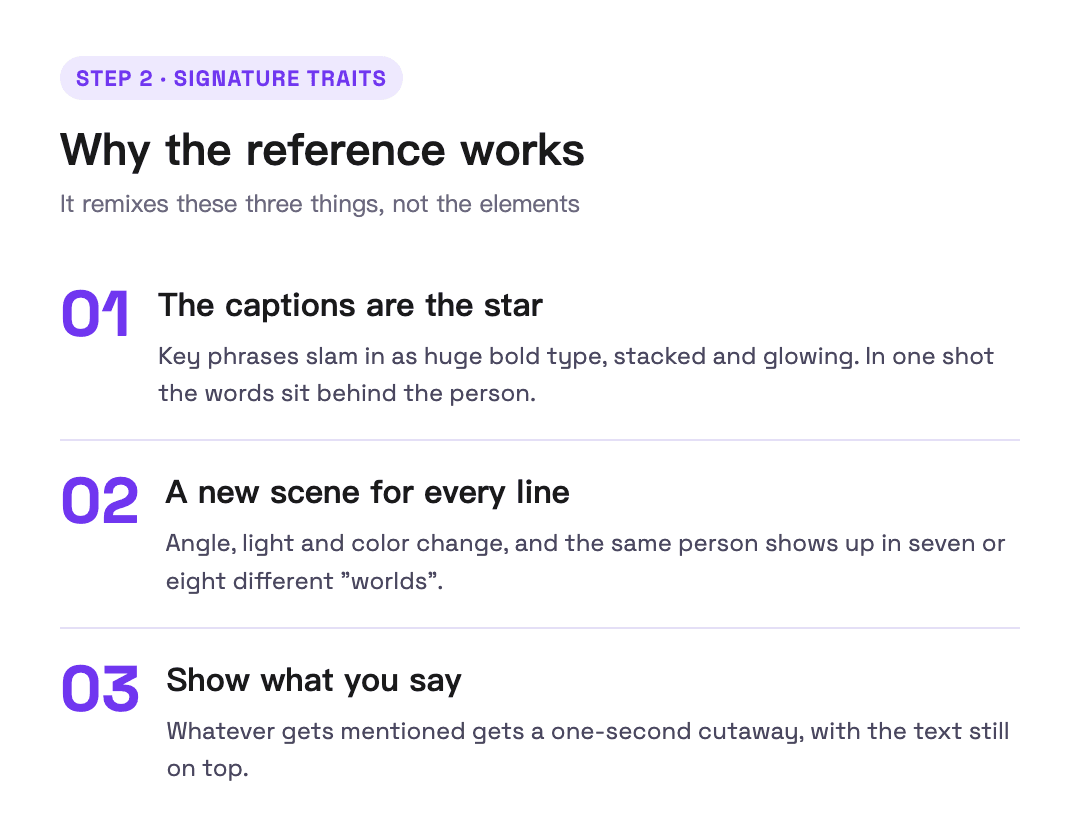
Finally, it boils down why the video works to three things:
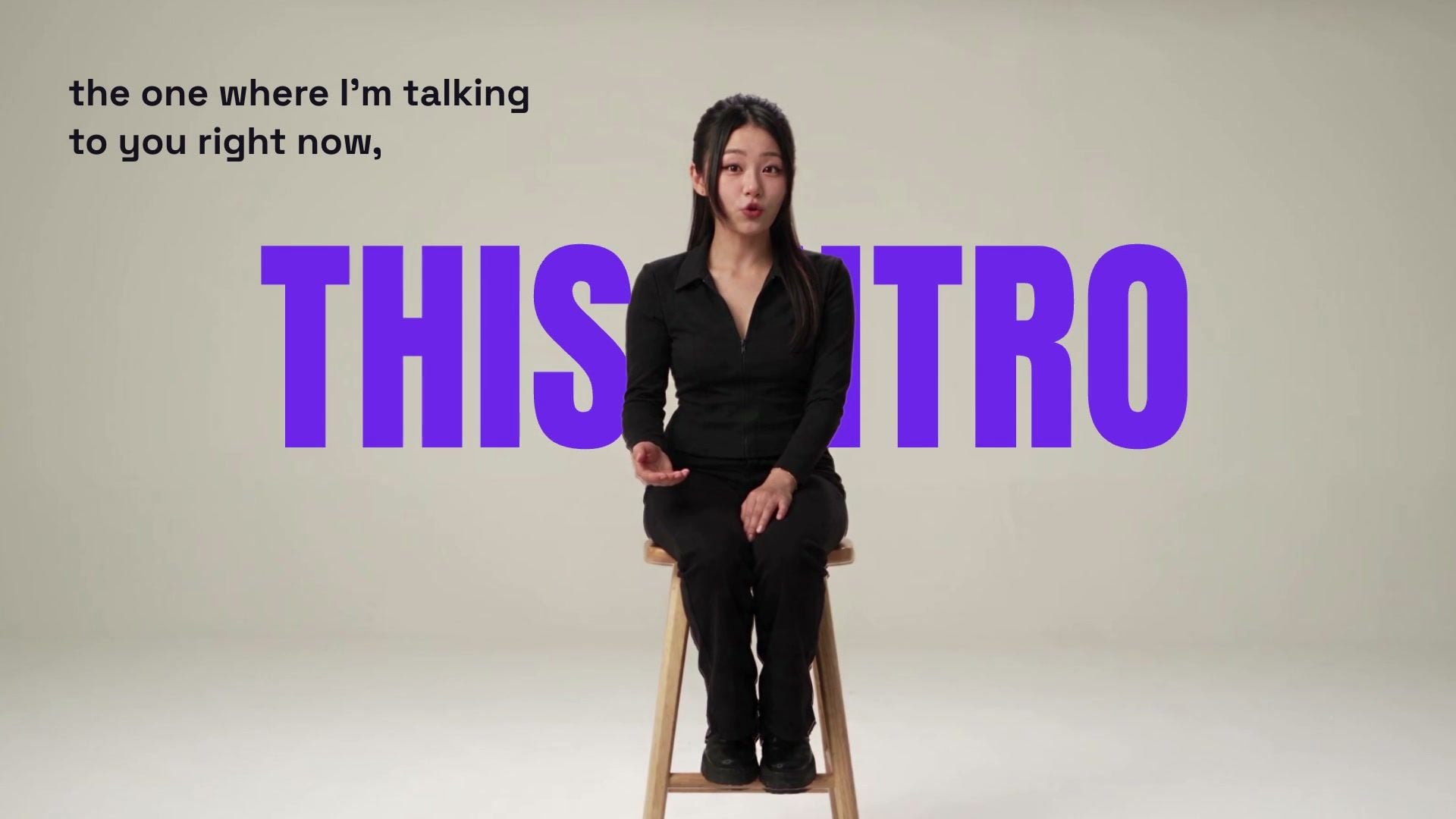
- The captions are the star. Key phrases slam in as huge bold type, and in one shot the words sit behind the person.
- A new scene for every line. The angle, light and color change, and the same person shows up in seven or eight different "worlds".
- Show what you say. Whatever gets mentioned gets a one-second cutaway, with the text still on top.
Step 3: List the gaps, then generate
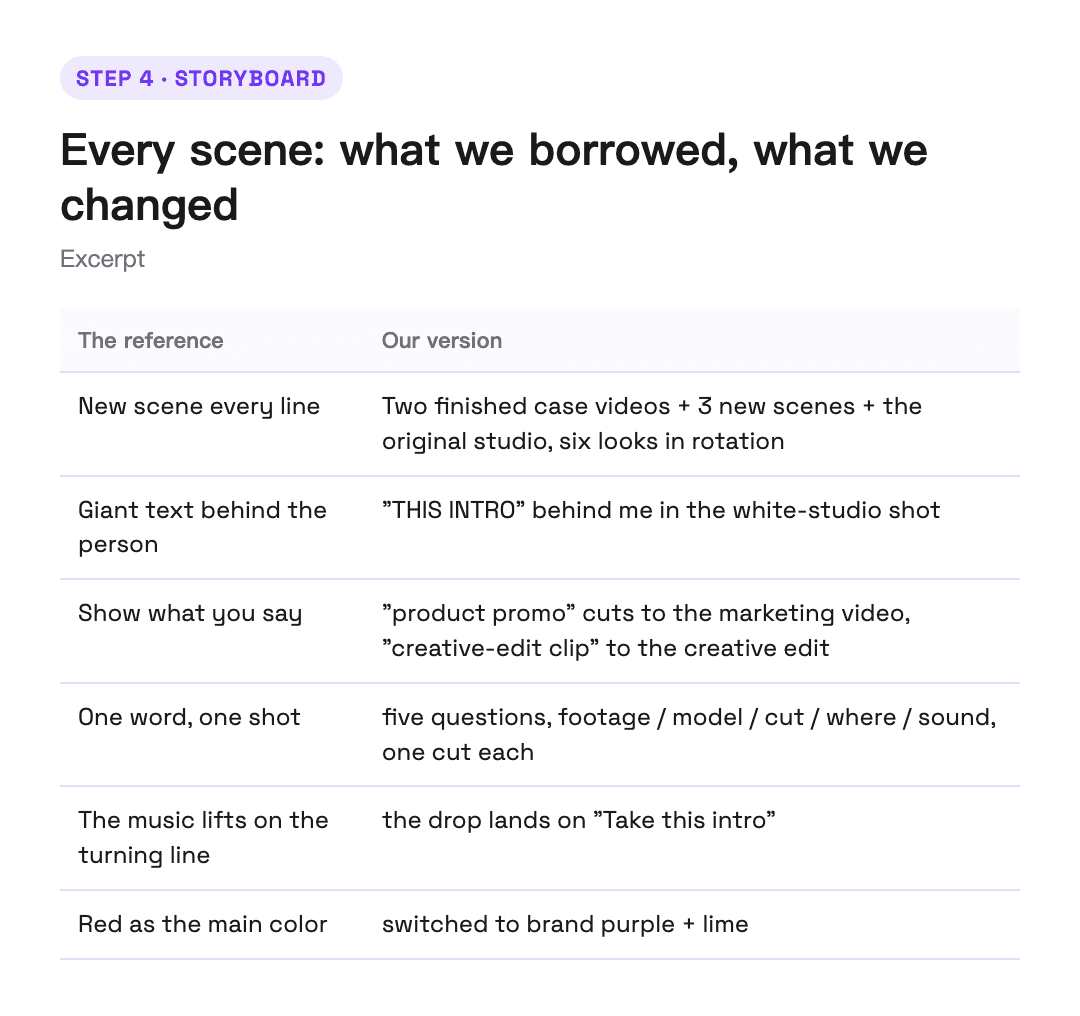
The reference has seven or eight scenes and I had one angle. That's a gap. It quoted a price, I said yes, and it called Seedance 2.5 to generate three new scenes from the same voiceover: a full-body shot in a white studio, side light on a blue background, and a black-and-white side close-up, all lip-synced to the lines.
The avatar itself was made the same way. The script was split into roughly 30-second chunks, a reference audio was made in my cloned voice, and Seedance 2.5 generated 30 seconds in one go, with the full script in the prompt. 112 English words, all 30 seconds, not one word off, in a single continuous take.
Step 4: Storyboard
Every scene in the storyboard has to say two things: what it borrows from the reference, and what it changes and why. For example:

Step 5: Music and sound effects
For the music, Gemini first listened to the reference and came back with "melodic electronic, 132 BPM, only a pad up front, then a four-on-the-floor kick." Suno then generated an instrumental in the same style, and the lift was placed on the turning line in the voiceover, "Take this intro."
There are 21 sound effects, all written in code. It first measures the music's root note and the notes it uses most. Impacts land on the root, and shimmers and risers only use notes in the key, so nothing clashes with the music.
Step 6: Composite
Putting the text behind me means cutting me out. The white studio background is clean, so local person segmentation plus a color key did the job for free. The whole thing was composited in code, without opening an editing app once.
Step 7: Self-check
Once the cut is out, it only checks for the big problems that would spoil a watch: whether picture and sound are the same length, whether it's loud enough, whether there's a black or frozen frame, whether any text is covered. Then it transcribes the whole audio track again to make sure no words were dropped. The creative direction was settled in the analysis and storyboard, so the self-check never drags the video back.
From a 30-second talking head to an intro with new scenes, animated captions, music and sound effects, the only extra inputs were one reference and one sentence. Run the same workflow with an English voiceover and a different reference, and you get another language and another style.
4. Case two | Marketing: the Marketing Studio launch video
Scenario: marketing | Goal: conversion, acquisition, lower cost | For: brands, e-commerce sellers, media buyers, growth teams, indie developers
This one is a launch video for Atlas Cloud's new Marketing Studio. The footage was a screen recording of the site, plus a set of perfume product images and short videos made with Marketing Studio.
We made this one twice, which makes a neat control group.
Without a reference: we only described what we wanted. With a long description and several rounds of changes, it got to a decent place. But every round, you have to judge what's off and which way to push it yourself. That takes real skill and taste, and it isn't very direct.
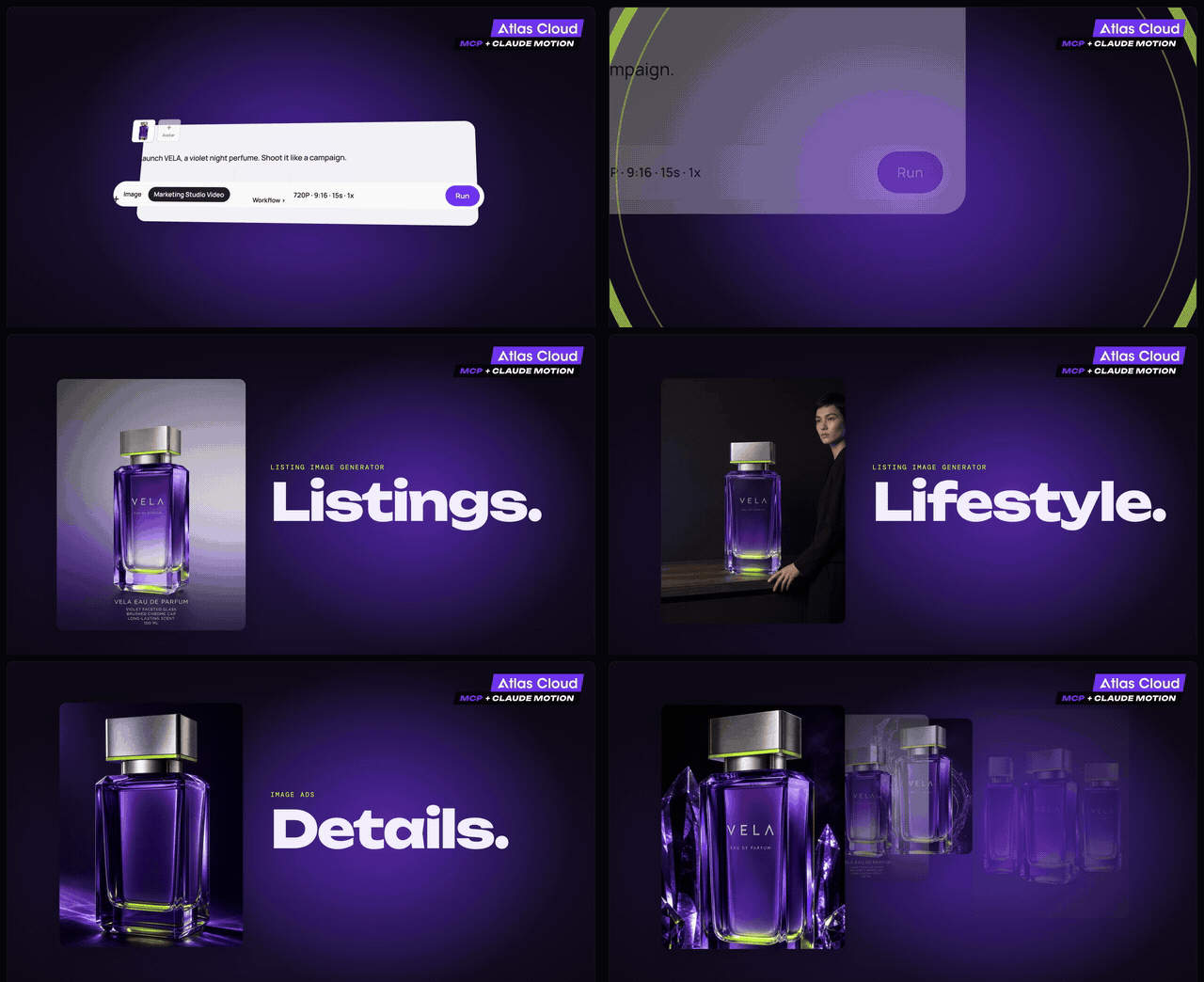
With a reference: the prompt was short, and the pacing, structure and transitions came straight from the reference. The reference opens with a person on camera, and has a UGC selfie section and a cartoon-style section in the middle. None of that was in our footage. It listed those three kinds of shots as gaps, quoted a price, and generated them after I said yes. The music, again, came from listening to the reference, describing the style, and generating an instrumental in that style.
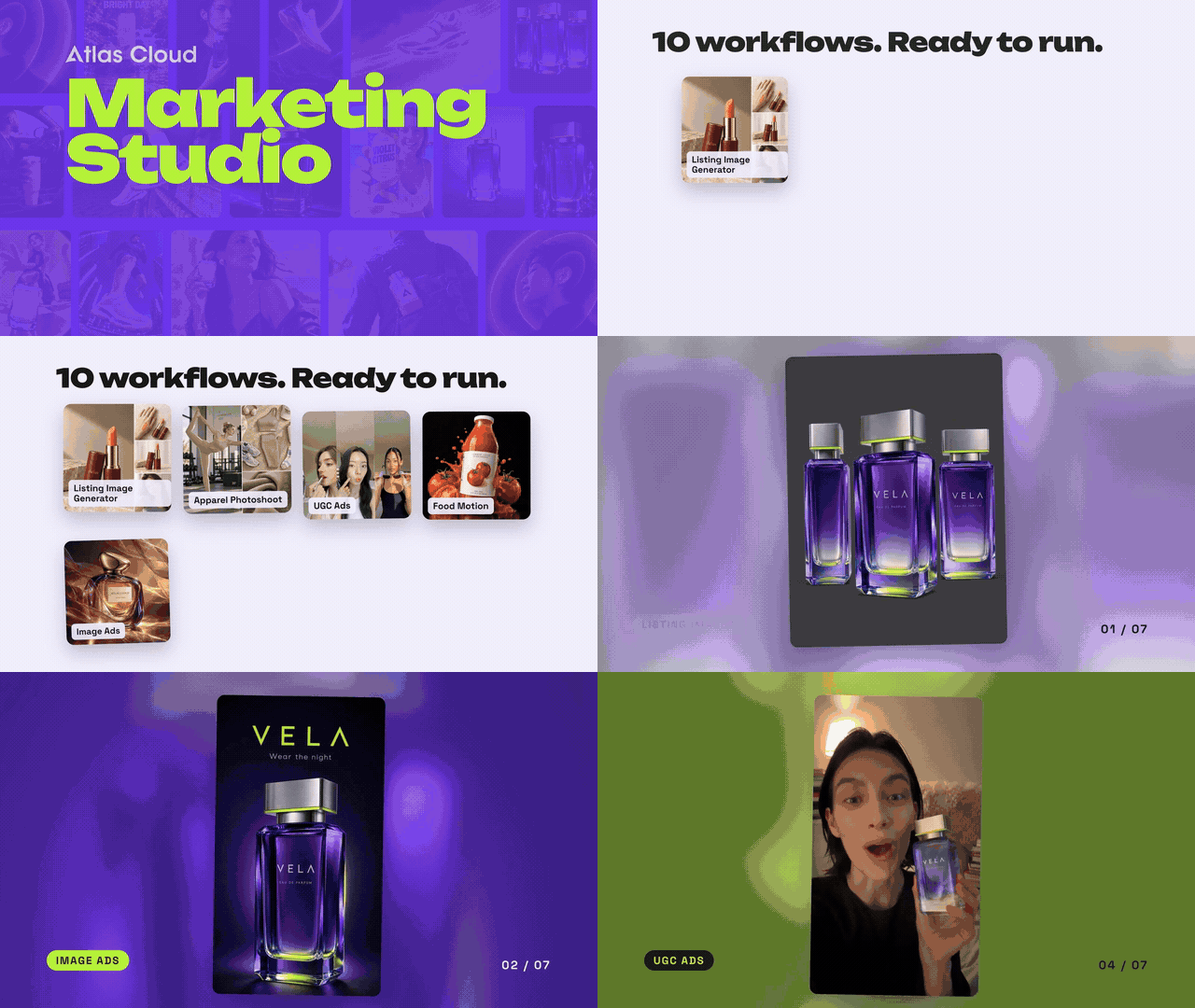
Put the two side by side and the difference is concrete: the person opening, the UGC selfie section and the cartoon section in the reference version are all missing from the version without one. Not because they couldn't be made. Without a reference, you'd never think to ask for them.
That's what a reference is worth. It hands the AI the things you didn't think to say. You don't need to know how to describe pacing or shot language. You just point at a video and say "that feel."
5. Case three | Creative edit: OFF THE CARD
Scenario: social short-form | Goal: followers, trends, personal brand | For: creators, everyday users, fan editors
This is a creative edit you see all the time on social: a person running, the fill behind them changing every 0.1 seconds, and the person always in front of the big text.
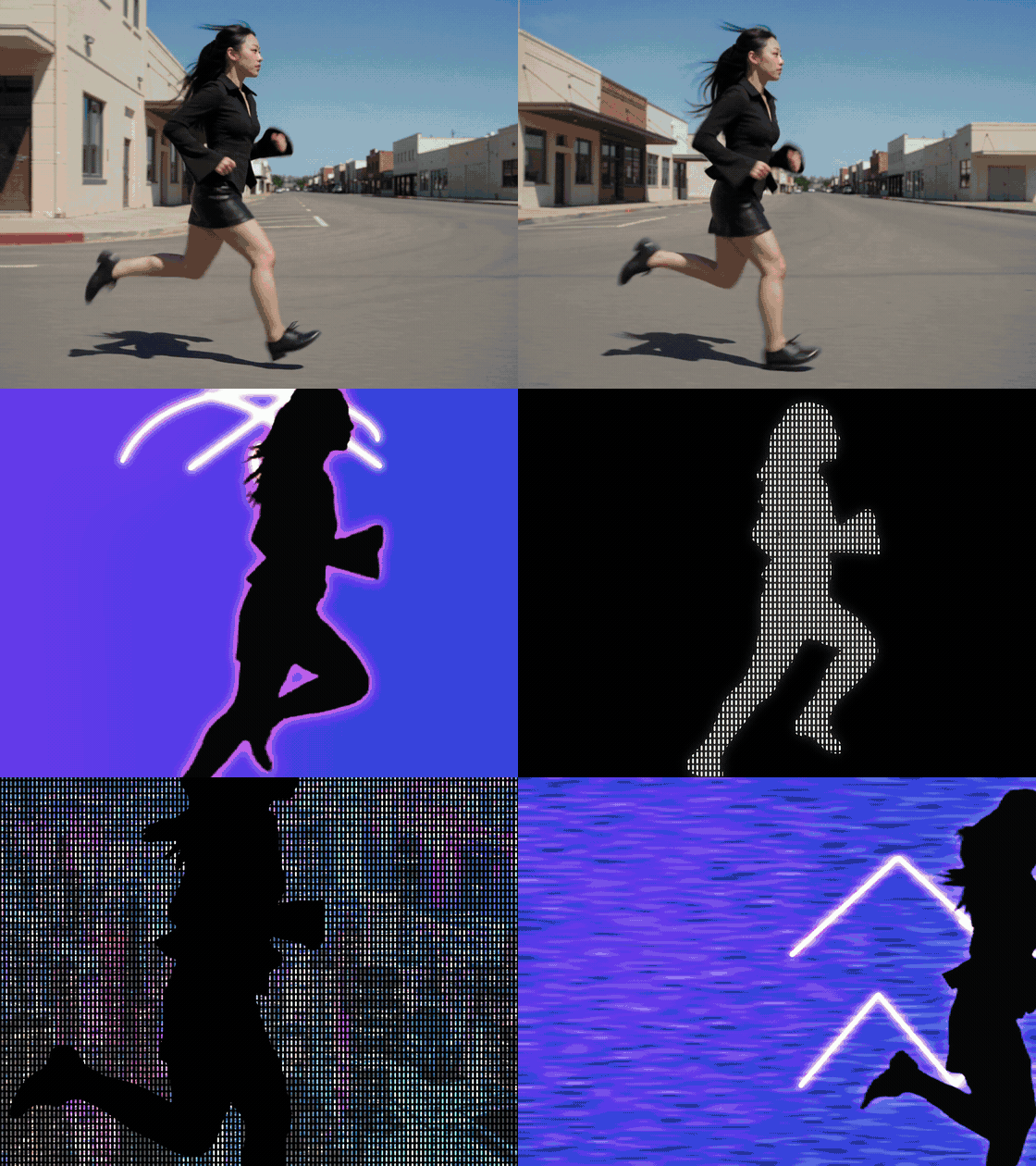
Edits like this used to mean editing software. When I went looking for a reference, what I found was an editing tutorial, and the process looked roughly like this:
- Import the footage and use smart cutout to separate the person
- Duplicate the layer and invert the mask, splitting person and background into two layers
- The background has a hole where the person was, so export a frame, remove the person with AI and fill in the background
- Bring it back into the editor
- Put the text and overlays between the person layer and the background layer
- Grade and add effects
Six or seven steps, and every one of them needs the software.
This time I gave it the reference, a model card of me, and one sentence.
- When breaking down the reference, it named the signature trait: the fill changes every 0.1 seconds, the person in front, the text behind
- The running shots were generated with Seedance 2.5 from the model card
- The MCP has no video matting model, so it used a video editing model to swap the background for a green screen, then keyed it out locally
- The fill images came from GPT Image 2.5, and the music from Suno
- Every frame was composited in code
Cutting out the person, masking, slipping the text between layers: everything you'd do by hand in the software became calls it decided on and made itself.
6. What it cost
| Case | Cost | Mostly spent on |
|---|---|---|
| Long-form repurposing (the intro) | about $26 | The avatar and three new scenes, 46 seconds of generated video |
| Marketing video | about $4.92 | Gap shots $4.63, music $0.29 |
| Creative edit | about $2.91 | Running shots, green-screen swap, fill images, music |
The marketing video and the creative edit both came in under $5. In the version with the avatar, almost all the money went to video generation, which is billed by the second.
7. You might be wondering
Where do references come from?
Saved viral videos, accounts in your niche, trending templates on the platform. Editing tutorials are a good source too: the reference for the creative edit came from one.
Only borrow the structure and pacing. Never lift someone else's footage, text or audio.
Can I do it without a reference?
Yes. The marketing video without a reference shows how. You just have to be the director yourself.
We're also putting together another skill that needs no reference: you say what you want, and the agent fills in the calls a director would make, like how to structure it, how the pacing rises and falls, and how the shots connect. We'll introduce it separately when it's ready.
What about long-form, like a faceless YouTube explainer channel?
That's for next time.
Get started
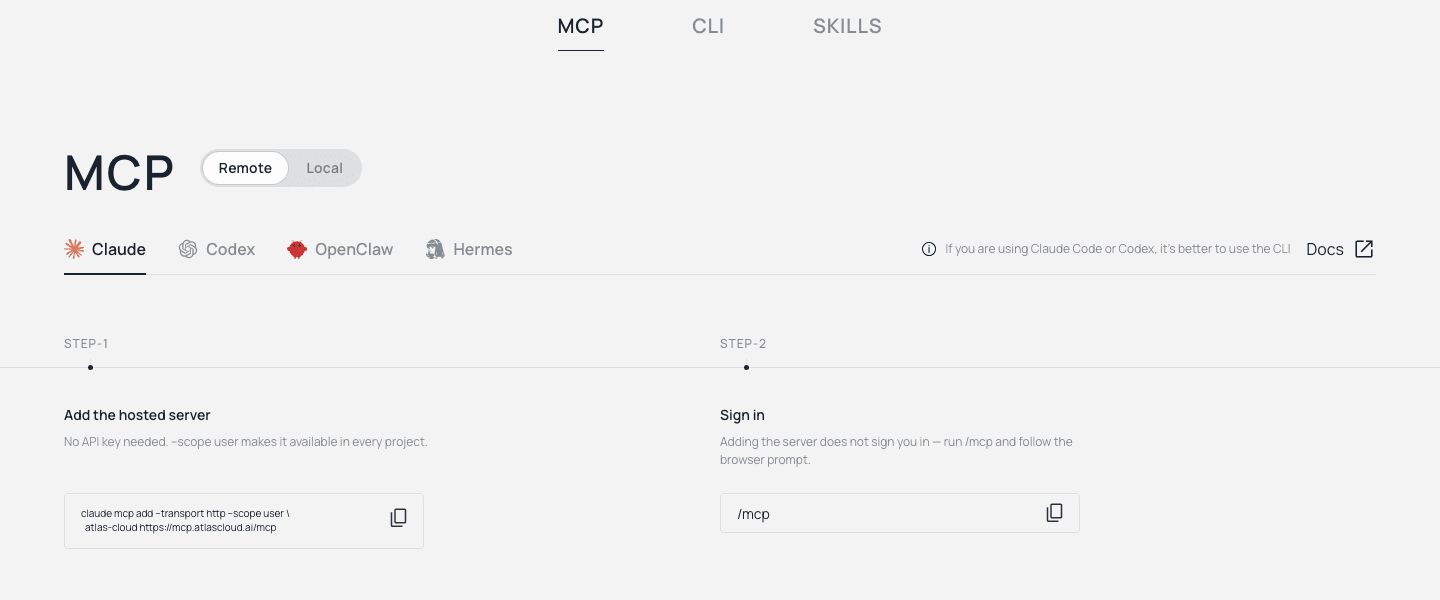
The whole workflow runs in Claude, and the first step is connecting the Atlas Cloud MCP. In Claude Code, it takes two steps:
- Create an API key in the Atlas Cloud console. It's only shown once, so copy it right away.
- Run this in your terminal, with your own key:
bash1claude mcp add atlascloud \ 2 --env ATLASCLOUD_API_KEY=your-api-key-here \ 3 -- npx -y atlascloud-mcp
Claude Code reloads on its own, and from then on you can call 400+ image, video, audio and language models right in the conversation.
Setup for Codex, OpenClaw and Hermes, plus the CLI and the skills pack, is all on atlascloud.ai/cli.
Download the Remix skill (free, .zip). Unzip it and copy the three folders inside skills/ into your Claude skills folder (~/.claude/skills/ for Claude Code). Then hand Claude a reference video and one sentence.





