


A character changes coats between shots. The product looks right until the camera moves. Three new ad openings arrive, but each also changes the setting and message, so nobody knows what to keep.
An efficient Seedance 2.5 Flash AI Drama & Ad Workflow gives each generation a reviewable job: establish the story beat, assign reference roles, generate a baseline, test one change, then repair or replace the affected shot. Assemble accepted clips before expanding the batch.
The seven examples below connect those decisions to short drama and ad production. Four published Seedance 2.5 Flash examples sit alongside three original production examples supplied by the article creator. Source-based prompt capsules summarize the published instructions in English; they are not verbatim originals. The bakery, coffee and garden briefs describe the production directions supplied for those examples. Embedded results allow review of the actual action; they do not establish repeatability or advertising performance.
Key takeaways
- Define each shot's action and acceptance check before generating footage.
- Assign separate references to character, product, location, movement, and sound.
- Freeze the reference pack and settings while testing one creative variable.
- Edit a localized defect; regenerate when the story action or camera plan is wrong.
- Review the complete sequence, including continuity, audio, and actual file length.
1. Turn the brief into shots someone can approve
Begin with the viewer's next thought. A short drama needs a change in what the audience knows. An ad needs a visible action that communicates the product's use. Write that outcome before describing lenses or lighting.
For a dialogue scene, the decision may be how long to hold an admission before cutting to the listener. For a product film, it may be whether the opening establishes the object before a detail shot. These are different jobs. Giving both the same dramatic reveal can obscure the product or rush the performance.
Build a shot ledger with an ID, intended duration, starting state, action, ending state, reference requirements, and rejection condition. Treat timing as a direction to test. A generated file may combine, shorten, or redistribute the requested beats.
Case 1: a rain-window diner conversation
Published Seedance 2.5 Flash dialogue scene, approximately 18.08 seconds, with original sound. Credit and submitted instructions: the creator's scene-and-prompt page.
Source-based prompt capsule, condensed rather than verbatim:
plaintext1An 18-second rainy-night diner scene: establish two adults over coffee, move to her question about a missed train, briefly insert his hand at the mug, then hold his admission, her silent reaction, and an invitation to stay. Preserve seating, eyelines, wardrobe and mugs. Use distinct voices, continuous rain ambience and no music or subtitles.
| Beat | Shot's job | Review question |
|---|---|---|
| Establishing view | Place both speakers and recurring props | Can the viewer understand their positions? |
| Question and admission | Carry the exchange | Does each speaker have time to finish? |
| Object insert and reaction | Mark a change in attention | Does the cut reveal something useful? |
| Shared ending | Let the scene settle | Is the final response readable? |
Use the ledger to decide what a revision must change. If the listener's response feels rushed, adjust that beat rather than rewriting the whole setting. If a cup moves between cuts, record the prop discontinuity separately from your judgment of the dialogue.
Review sound once without watching the picture. Then watch the picture without sound. This separates unclear speech from unclear staging. Keep the complete source file so that a later editor can shorten a pause without losing the original performance or ambience.
2. Give every reference one clear job
Prepare only the material needed for the next decision. A folder of attractive images gives you more things to reconcile. A small reference pack with explicit roles makes the result easier to inspect and revise.
For a character scene, separate appearance from location and motion. For an ad, photograph the actual product from any angle needed to show its mechanism. A reference showing one side cannot establish unseen construction. Request another real view or choose a camera plan that stays within the available evidence.
Keep filenames and upload order stable. Image numbers in a prompt must match the interface's actual markers. After replacing an attachment, check every instruction that addresses it. A correct sentence pointing at the wrong image can quietly change the task.
Case 2: a three-character bakery handoff
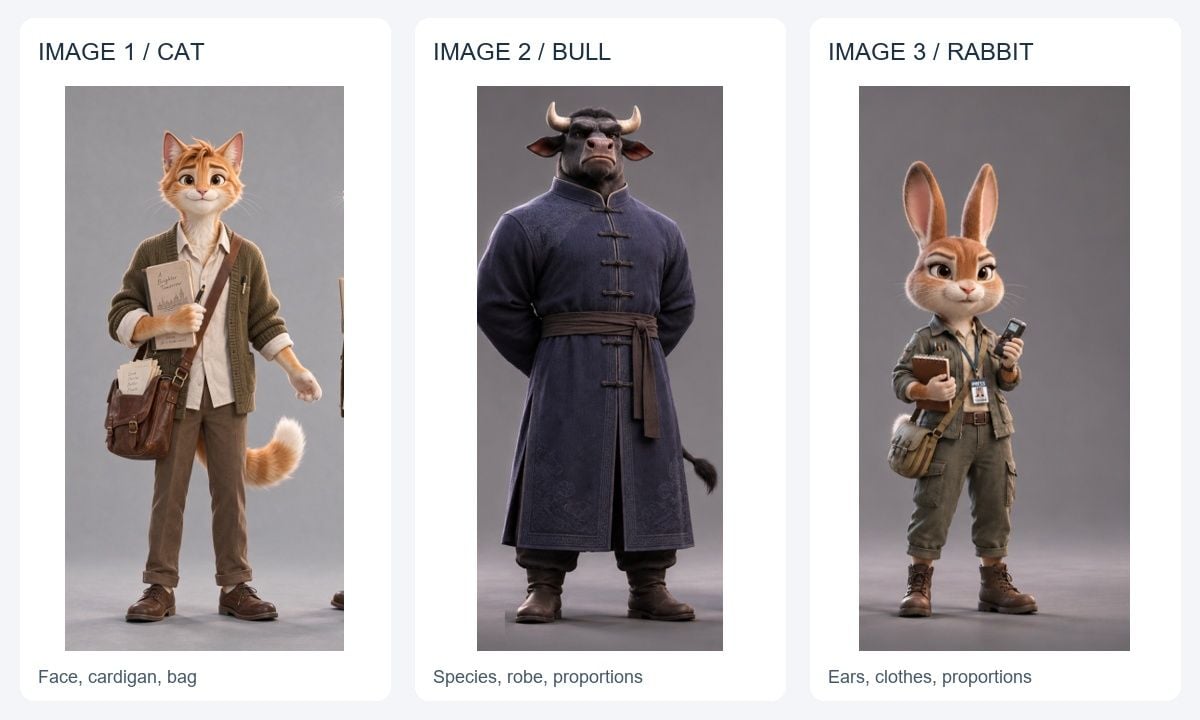
Real reference material from a published multi-character Seedance 2.5 Flash walkthrough, cropped and arranged for this example. The three-character bakery scene below is an original variation generated separately and supplied by the article creator.
| Upload | Supplies | Does not supply |
|---|---|---|
| Image 1: cat | Face, fur, cardigan and bag | Bull or rabbit identity |
| Image 2: bull | Species, dark robe and larger body | A new costume for the cat |
| Image 3: rabbit | Long ears, clothing and smaller body | A replacement for the bread prop |
Original production brief, final dialogue version:
plaintext1Create a 15-second 3D animated bakery comedy, 16:9, with synchronized English dialogue. @Image1 defines the cat; @Image2 the bull; @Image3 the rabbit. Preserve identity, proportions and clothing. Omit the reference notebooks and phone. Warm morning light, detailed fur, tactile clothing, lively real-time movement and planted footsteps. 2 30-4s: The cat offers one paper bag containing a round loaf. The bull takes the handles and supports the base before the cat releases. 4CAT: "Fresh bread! Careful, it's warm." 5BULL: "Thanks. I've got it." 6 74-8s: The bull turns and lowers the bag to the approaching rabbit. The cat gestures toward the breakfast table. 8RABBIT: "Are we sharing that?" 9CAT: "Of course. Breakfast together." 10 118-12s: The rabbit takes the handles and supports the bag underneath. The bull releases only after the rabbit has a secure grip. 12BULL: "Support it underneath. Ready?" 13RABBIT: "Got it! Let's eat!" 14 1512-15s: The rabbit turns toward the table, and the others follow. Use readable cuts, natural weight shifts and visible hand contact. One bag and one loaf. Six distinct lines, no overlapping speech. Paper rustle and footsteps; no music, subtitles or logos.
User-supplied 15.04-second bakery result, retained as a complete video with its original audio. Review the two handoffs alongside the six-line dialogue brief; requested dialogue and timing remain instructions to check against the result.
Judge identity separately from the handoff. A recognizable character can still grab a bag before it reaches them, or release it before the receiver has contact. Mark that action failure directly. The next revision should solve the transfer rather than add more words about visual style.
The BytePlus prompting guide distinguishes a subject reference from a first-frame input. An identity image guides appearance; a first-frame input also anchors the opening composition. Choose between them according to the decision you need to control.
3. Choose the task and commit the settings
On Atlas Cloud, choose Seedance 2.5 Flash Reference-to-Video for mixed character, product, motion, or audio references. Use Seedance 2.5 Flash Text-to-Video for a written staging test. Confirm that the selected model is Seedance 2.5 Flash.
The current Seedance 2.5 Flash routes support 4–30-second generation, native 480p or 720p output, optional synchronized audio, and up to 10 image, 5 video, and 5 audio references. These allowances do not guarantee consistent subjects. Start with the smallest coherent input set.
Use a 4–6-second shot when that can answer the decision. Broad staging can be assessed at 480p; finer contact or product checks may warrant 720p. Select duration, ratio, resolution, and sound in the form, then verify that each control retains its choice. Prompt wording does not establish what the form submitted.
Case 3: a miniature postal robot
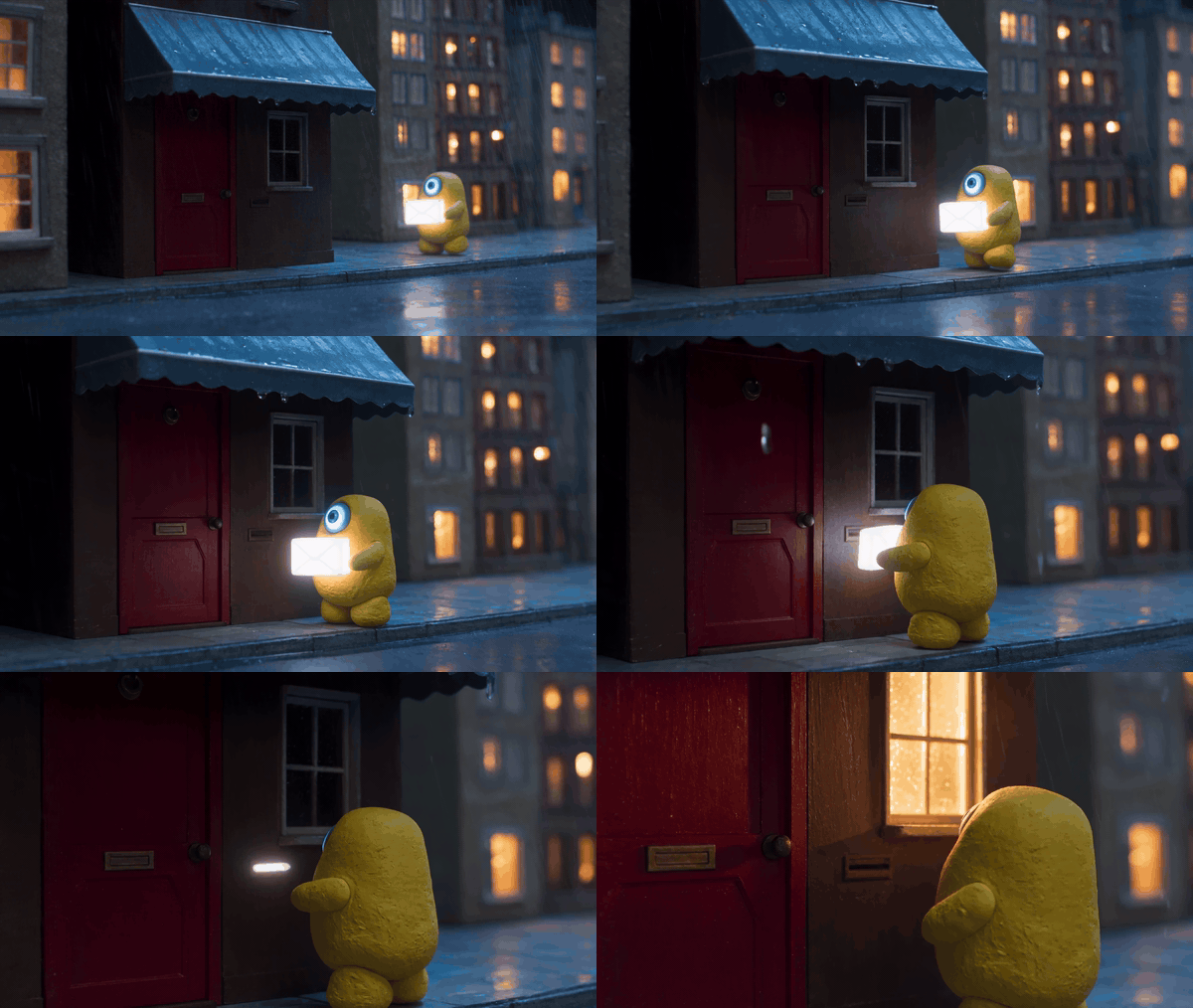
Complete published 8.06-second preview, converted to a silent GIF. This source example used text-to-video, not a supplied first frame. Its source credit appears with case 4 below.
Source-based prompt capsule, condensed rather than verbatim:
plaintext1An 8-second miniature rainy street shot: a yellow postal robot with one blue eye carries a glowing envelope to a red door and posts it. After delivery, illuminate the window above the door. Keep the robot, envelope and door consistent, with clay materials, rain and small mechanical steps. No dialogue, captions or cuts.
The visible delivery position differs from the requested layout. For a strict storyboard, prepare an approved first frame showing the door, slot, and window together, then test whether the action respects those positions. That proposed change has not been demonstrated by this source clip.
Separate that framing decision from model settings. A higher resolution does not fix an ambiguous location description. A longer duration does not ensure that the envelope enters the intended opening. Give the model clear visual evidence and inspect the physical relationship.
Reference generation, editing, and extension also have different constraints. On the current Atlas Cloud route, an explicit subtask parameter is API-only; do not assume the browser exposes a matching button. A strict edit uses a source video and retains its aspect ratio, with adaptive ratio and automatic duration requirements. Treat reframing as a separate operation.
4. Generate a baseline with an observable action
A baseline should answer whether the central action and composition work. Leave secondary styling decisions for later variants. If every request changes the subject, light, lens, environment, and action, the next result gives you little guidance about which choice helped.
For a product film, write a short list of attributes that a buyer would notice: silhouette, cap construction, material, markings, and visible connections. Check those through the complete camera move. An accurate opening frame cannot validate the middle or ending.
Case 4: an amber-glass perfume study
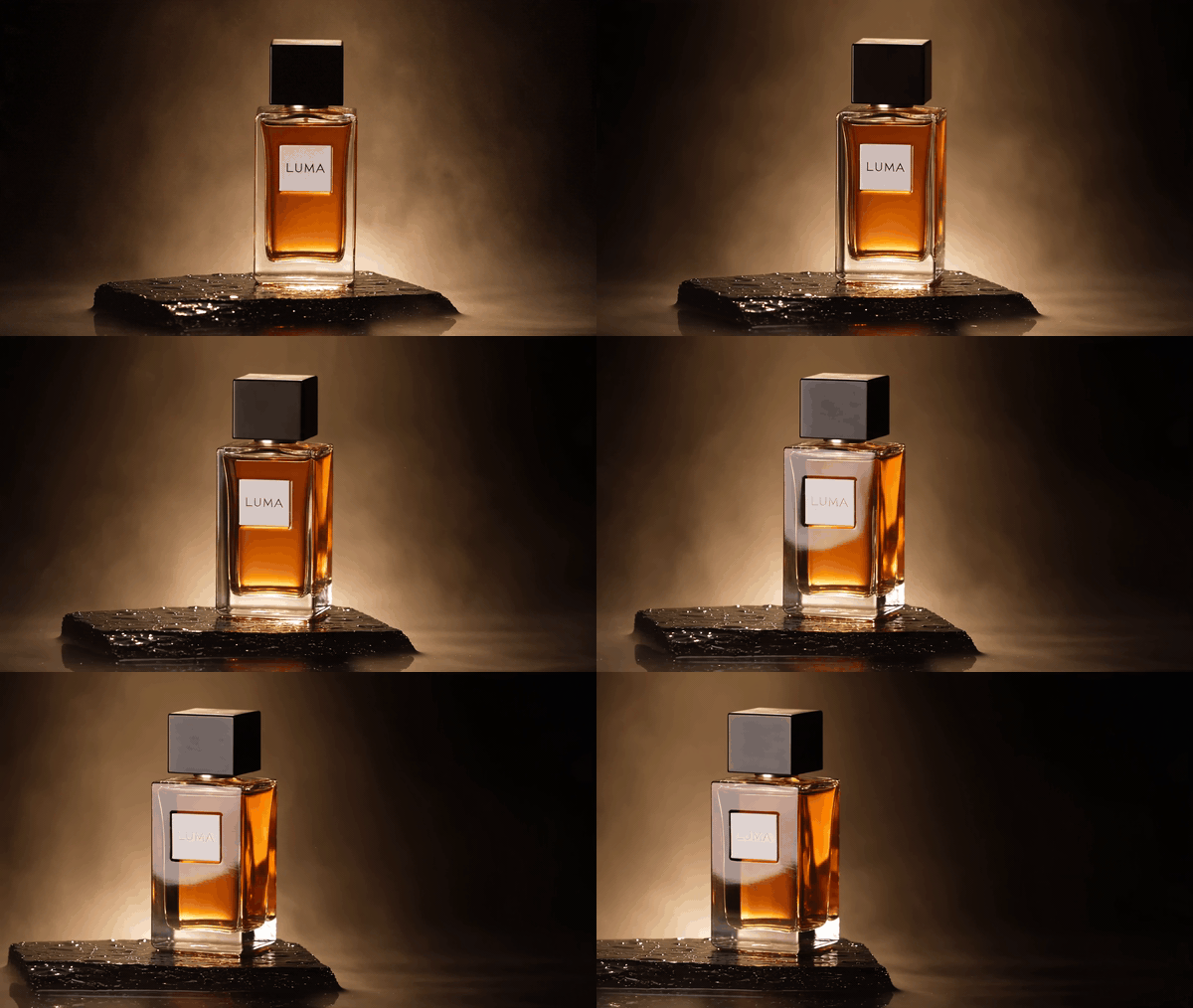
Complete published 8.06-second product study, shown as a silent GIF. Cases 3 and 4 come from the same published test and prompt record; source details are retained in the media provenance record.
Source-based prompt capsule, condensed rather than verbatim:
plaintext1An 8-second perfume shot: one rectangular amber bottle with a black cap and a LUMA label stands on wet dark stone. Arc from a frontal view to a three-quarter view, retaining the product and reflections. Finish with the complete bottle left of center and dark space for copy. Warm backlight, light mist, no cuts or additional bottles.
Use the opening and final frames to review the requested product treatment, then inspect the intervening movement. The label's contrast changes in the published result. A real brand approval should therefore include a packaging check rather than accepting the clip from its closing composition alone.
Keep exact offer text, prices, headlines, and the CTA in the editor. Those elements often need revision independently of the product performance. A clean source clip allows another copy treatment without asking the model to recreate the object.
If you revise this concept into a droplet demonstration, define the new action and create another result. Do not pair that new instruction with the existing arc and imply the droplet happened. A droplet demonstration would need its own product reference, action prompt, and newly generated result.
5. Batch creative tests around one decision
Batch testing starts with a matrix, even when jobs are submitted one at a time. It does not require an unverified bulk-generation feature. Freeze the baseline, name the change, and queue only the variants that help resolve it.
Three openings and two camera choices could become six combinations. Screening the three openings first, then trying the alternative framing of the selected opening, produces four initial candidates. That is planning arithmetic rather than an exhaustive test of interactions or a measured saving.
Case 5: three coffee-ad directions from one reference
This production example uses one shared cup, pot, table and lighting reference across three eight-second vertical clips. The final briefs vary the complete action: aroma and pouring, stirring, then lifting and returning the cup. Treat this as an exploratory screen of creative directions. It does not isolate the opening alone or measure which direction sells more coffee.

The actual shared reference supplied with the generated clips. Use it to compare the cup handle, saucer, pot and light across all three directions.
| Variant | Deliberately changed action | Physical check |
|---|---|---|
| A: aroma and pour | Steam detail leads into a visible coffee pour | Stream connects spout and cup; pouring stops before the pot moves away |
| B: stir | One hand steadies the cup while the other stirs | Spoon enters the coffee; cup and saucer remain supported |
| C: lift and return | A hand lifts the cup and replaces it | Grip precedes lift; the base touches the saucer before release |
Original production briefs, condensed:
plaintext1Shared: 8 seconds, vertical 9:16. Use @Image1 for the same cream-white cup and saucer, metal pot, pale oak table, linen and soft morning light. Preserve product geometry and warm-neutral colors. Every object movement needs visible hand contact. No branding or generated copy. 2 3A / Aroma and pour: 40-2s: Steam close-up; rack focus toward the cup rim. 52-5s: A hand pours a connected espresso stream into the cup. 65-8s: Stop pouring, place the pot on the table and withdraw the hand. Finish with a small sideways camera move and a clear product view. 7 8B / Stir: 90-2s: One hand steadies the handle; the other lowers a teaspoon. 102-5s: Make two small stirring circles, with gentle liquid ripples. 115-8s: Lift the spoon, let a drop return to the coffee, then place it on the linen and withdraw both hands. Keep the cup and saucer still. 12 13C / Lift and return: 140-2s: A hand visibly establishes a secure grip on the handle. 152-4s: Lift the upright cup a short distance above the stationary saucer. 164-5s: Hold it in the window light as the camera moves slightly sideways. 175-8s: Lower the cup onto the saucer, then release and withdraw. 18 19Natural room tone and object sounds in the source clips; no voice or music. The article GIFs are silent visual previews.
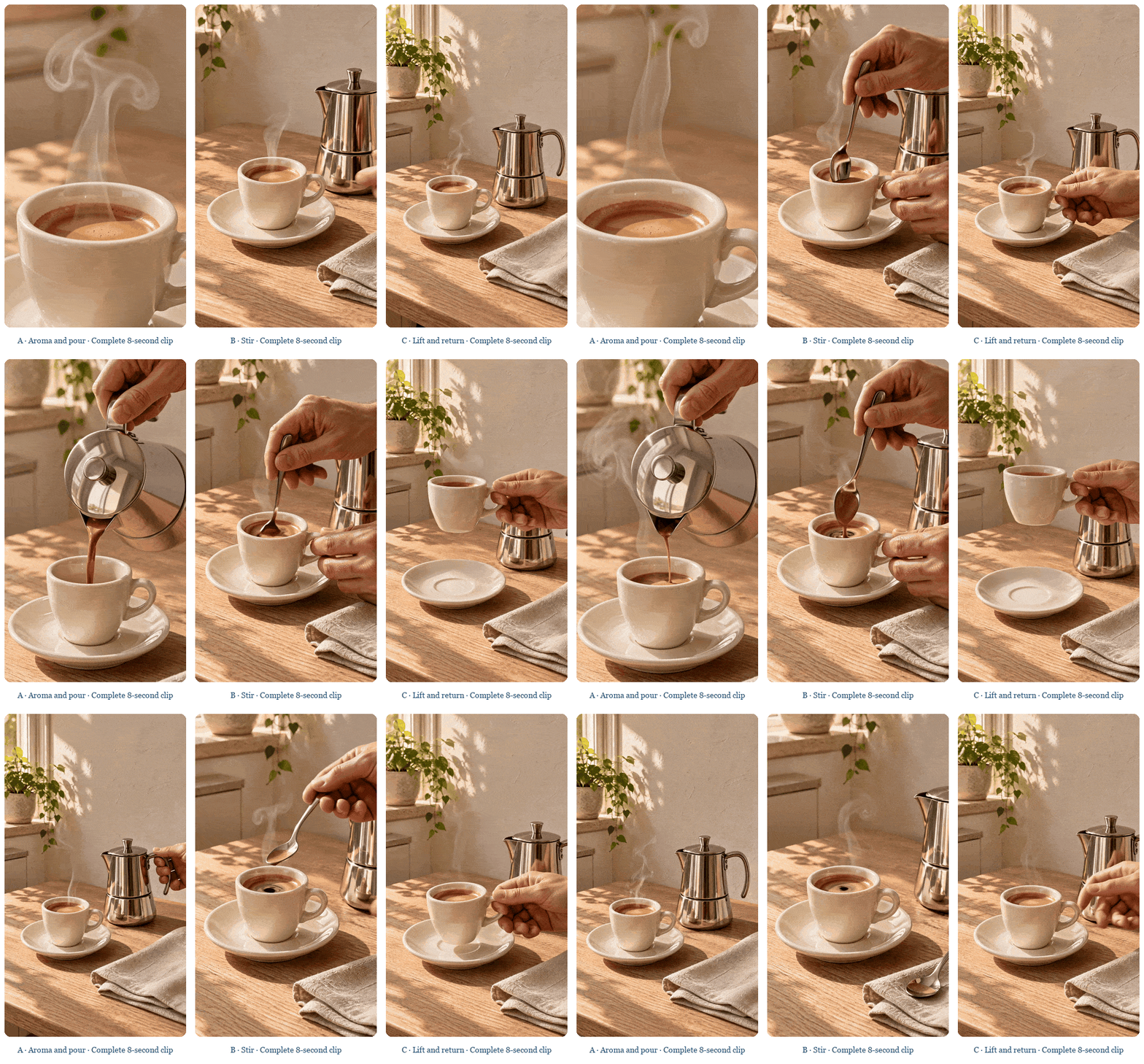
Three complete user-supplied results synchronized in one silent comparison GIF: A, aroma and pour; B, stir; C, lift and return. Their actions and framing differ, so an outcome difference could have several causes. Shared references support comparison without making the outputs identical.
For a controlled opening test, choose one accepted body and ending, then attach alternate openings in the editor while keeping the offer, copy and campaign conditions constant. Record the actual edit used for testing. Keep these full-sequence concepts under separate creative IDs rather than labeling them a completed hook-only experiment.
Run a repeat before treating a selected direction as a reusable recipe. If two takes disagree, inspect the reference pack and action description. One useful take is footage you can keep, while repeatability is a separate question.
plaintext1SHOT_ID / VARIANT_ID / PARENT_TAKE 2MODEL_AND_MODE / ORDERED_REFERENCE_FILES / PROMPT_VERSION 3REQUESTED_SETTINGS / ACTUAL_DURATION_AND_DIMENSIONS / AUDIO_PRESENT 4CHANGED_VARIABLE / ISSUE_AND_TIMESTAMP / ACCEPT_OR_REVISE 5ACTUAL_CHARGE / REVIEW_MINUTES / FINAL_EDIT_USED
Production review can establish that an action is legible. Advertising performance needs campaign data. TikTok's ad testing guide recommends defined objectives, controlled variables, meaningful samples, and metrics matched to the campaign goal. Carry creative IDs into the campaign log and keep delivery conditions comparable.
6. Edit the selected take when the defect is local
Classify the failure before writing another request. A wrong garment color is an appearance problem. A hand that never reaches the product is an action problem. An ending that explains the mystery is a writing problem. Editing one color cannot resolve all three.
Use video editing when the source supplies the camera, timing, and performance you want to retain. Name the source, target, interval, requested change, and unaffected content. Preservation instructions define the task; the returned video still needs comparison with its source.
Case 6: ivory coat to blue coat
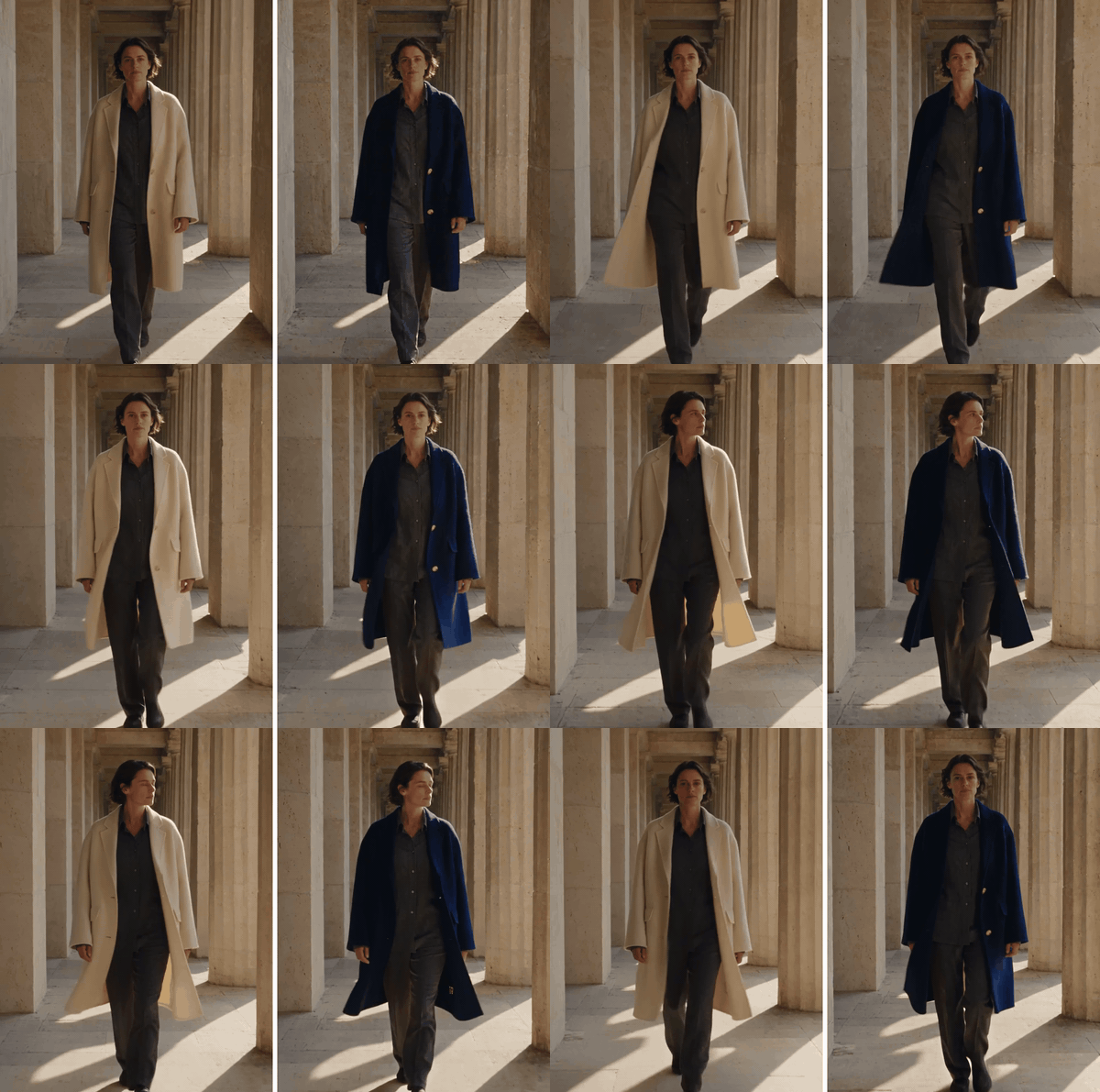
Published wardrobe edit: source left, edited result right. Both complete clips run at native speed. The edited side ends earlier and holds its last frame. Credit: the creator's before-and-after post.
Source-based prompt capsule, condensed rather than verbatim:
plaintext1Edit the source video by changing the ivory wool coat to deep petrol blue. Retain its cut, length, fastenings, folds and texture. Preserve the person, other clothes, walk, camera, courtyard, light and original sound. Request the same continuous action with no new shots or text.
The downloaded containers are approximately 6.08 seconds and 5.73 seconds long. The comparison preserves that difference instead of trimming the source to hide it. Check the moving hem, fastenings, face, and frame boundaries before approving a replacement.
Compare the affected interval and the content around it. If a correction creates a different hand or face, that new failure belongs in the decision. Keep the original source beside every revision so the next editor can recover the accepted performance.
Regenerate the affected shot when action or geography is wrong. Return to its starting and ending states, then change the smallest instruction that explains the failure. Do not keep appending prohibitions to a brief with incompatible actions.
Use extension when an accepted ending needs a continuation. Specify what carries forward and what new beat follows. The last pose alone may not establish the body's movement phase, so inspect the join at normal speed before extending the sequence further.
7. Assemble the sequence before approving the batch
Drop accepted clips into a rough edit as soon as a complete action is available. A shot can work alone and fail at the cut. Check screen direction, prop state, light, costume, and sound across the join; inspect adjacent frames after watching at normal speed.

An editor can shorten a pause, place a reaction, or replace an unwanted sound. A missing physical action may need another take. Identify the actual repair before spending another generation on something a timeline adjustment can solve.
Case 7: a leaf, a swing and a painted-garden ending
This gallery-style production uses three independent five-second shots: a falling leaf, a woman gently moving on a swing, and a leaf landing beside the garden path. One shared reference supplies the woman, ivory dress, blue ribbon, tree, swing and painted light. Each shot contributes a different subject or scale to the edit.
The complete garden reference supplied by the article creator. This replaces the earlier leaf-only style illustration as the production input shown here.
Original production briefs, final three-shot version:
plaintext1Shared: Use @Image1 for the same garden, woman, ivory dress, blue hair ribbon, wooden swing and warm-green light. Generate three separate 5-second 16:9 clips. Preserve layered oil brushwork throughout; no change to live action, generated lettering or music. 2 3A / Leaf departure: 4Begin close to the notched green-gold leaf on a low branch. A breeze bends the stem; the leaf detaches and drifts diagonally down-right. Track sideways and end while the complete leaf is still moving. 5 6B / Swing cutaway: 7Begin with the woman seated, both hands holding the ropes and both feet touching the ground. She pushes gently with her feet, lifts them slightly, and swings through a small natural arc. Keep the seat supporting her, ropes taut and dress movement subtle. Show her whole seated figure from the side. Do not follow a falling leaf in this shot. 8 9C / Landing and reveal: 10Begin low beside the pale path. The leaf enters from upper left, lands and comes to rest. Rise into a wider garden view, preserving the resting leaf, woman and swing, with quiet space for later copy.
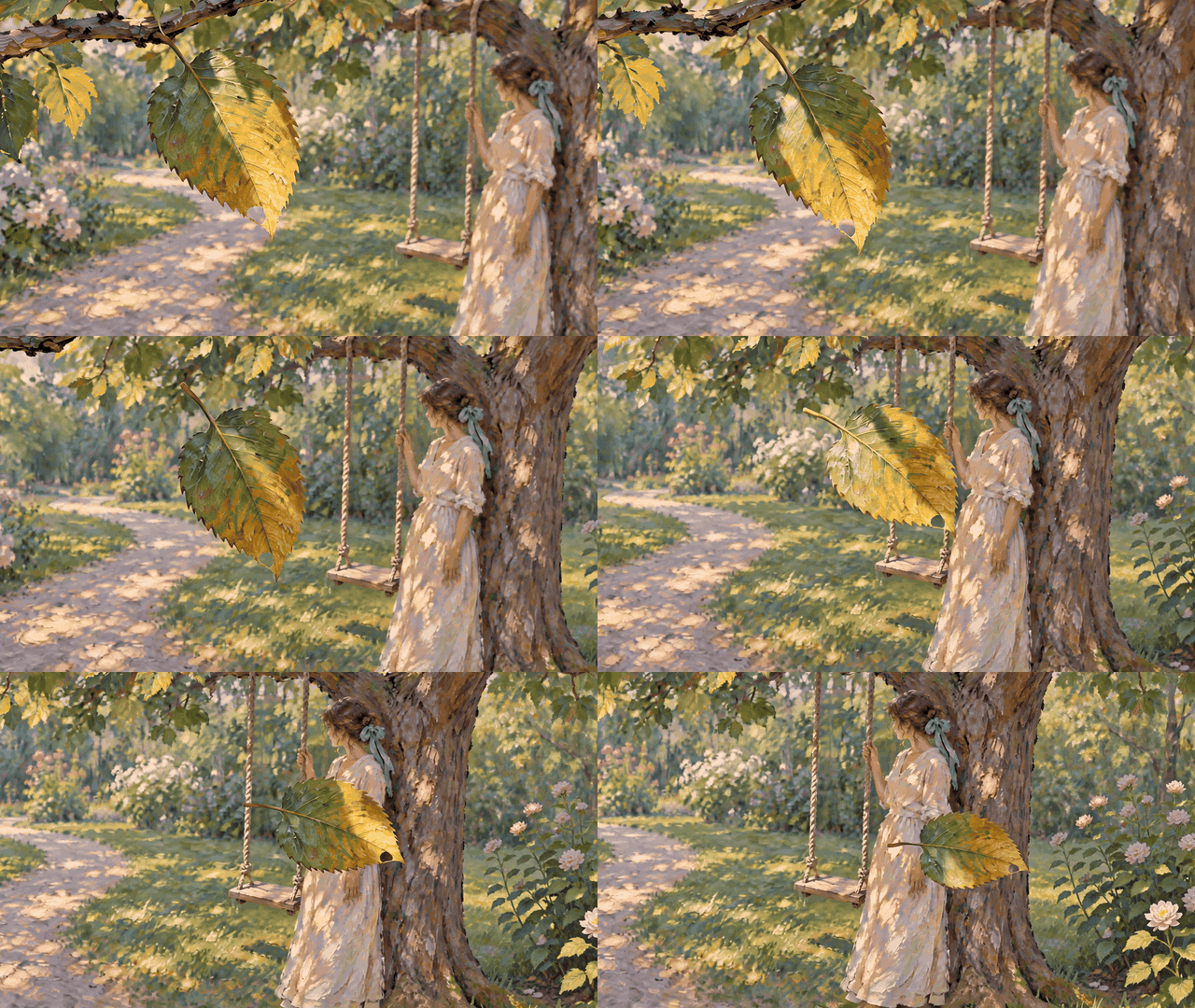
A · Leaf departure. Complete five-second user-supplied clip, presented as a silent GIF.
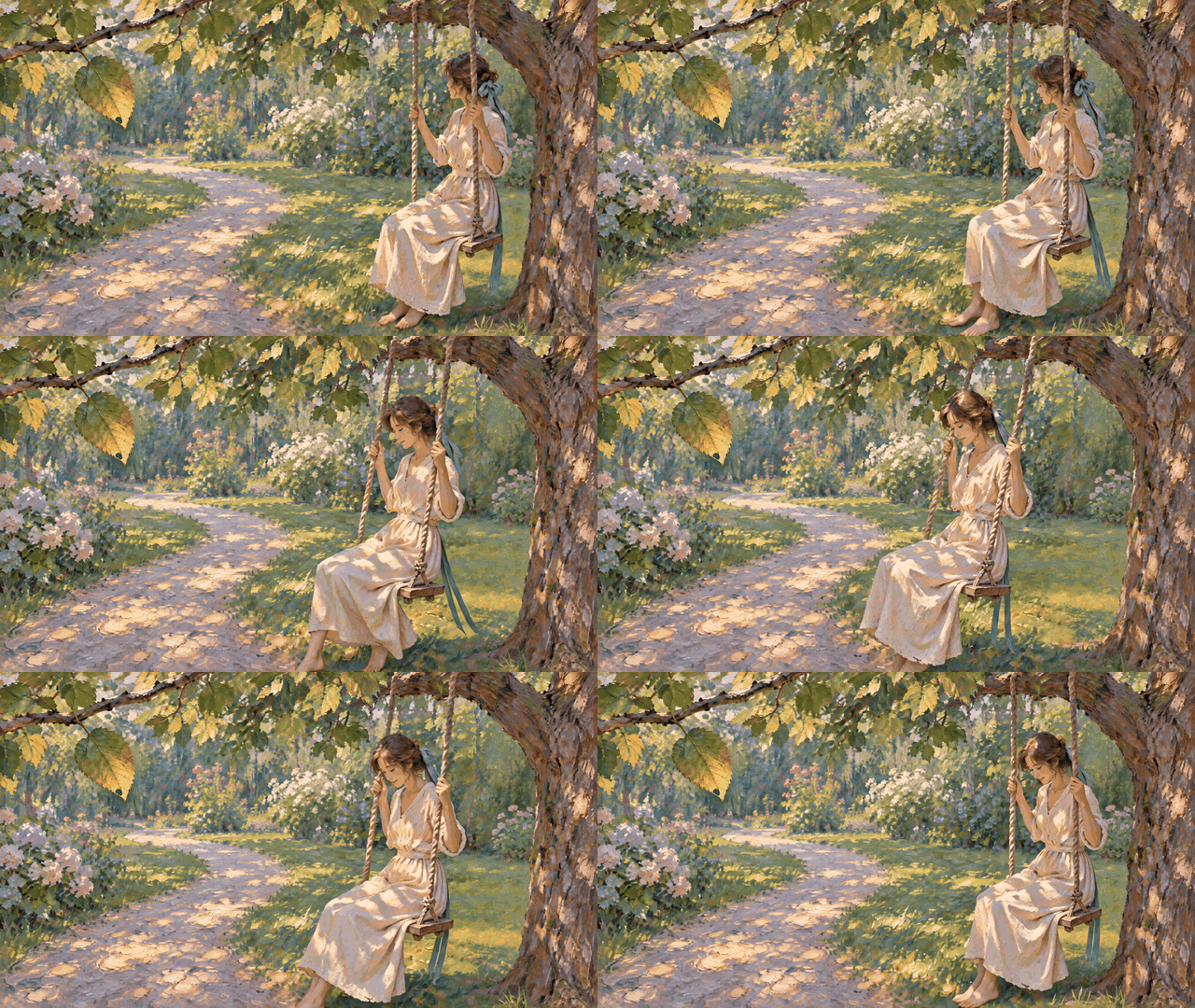
B · Swing cutaway. A separate character action replaces the earlier second leaf-following shot. Complete five-second clip, presented as a silent GIF.
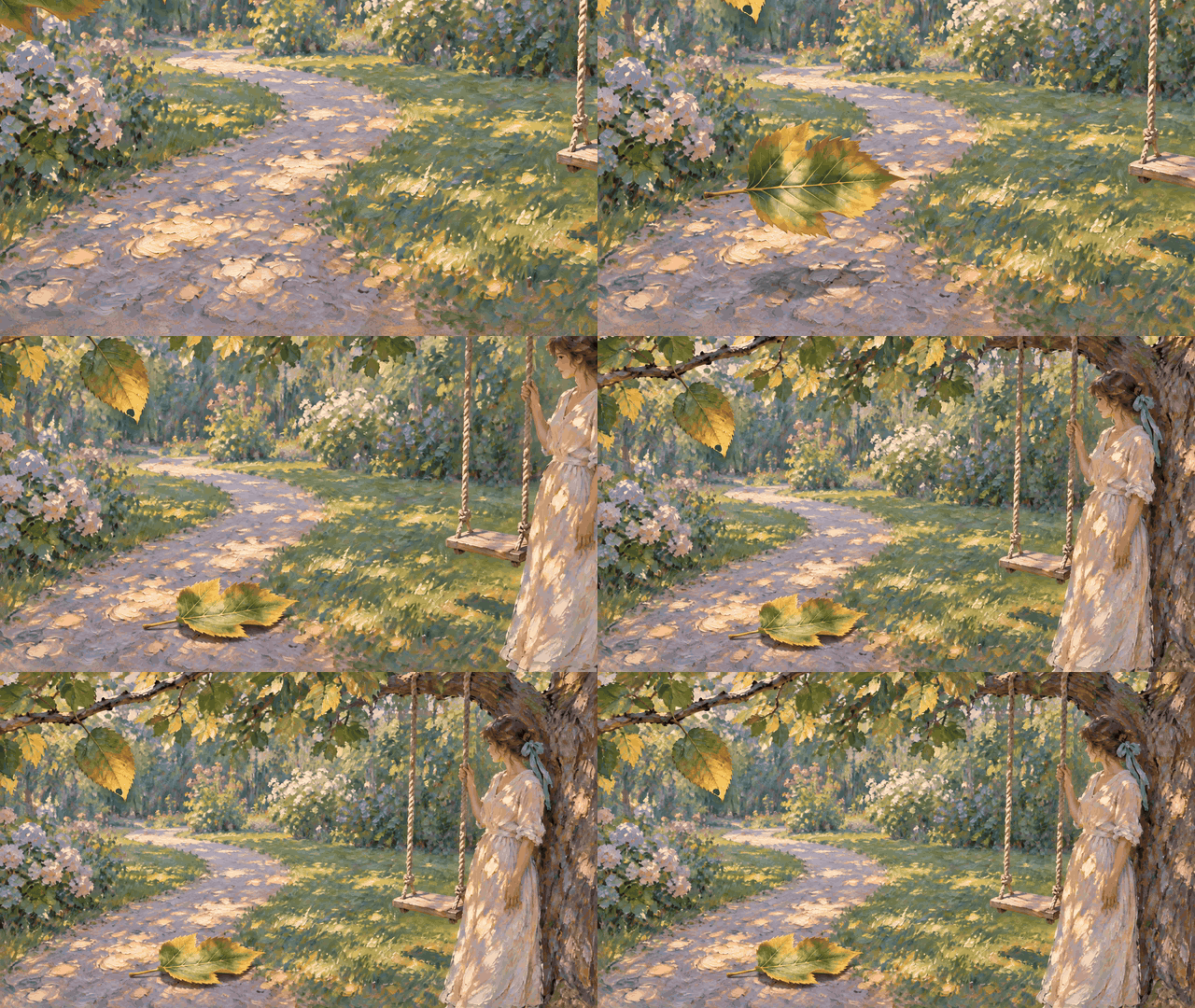
C · Landing and garden reveal. Complete five-second clip, presented as a silent GIF.
Review these as separate shots before assembling them. B shows a leaf still on the branch and changes the woman's pose to seated; C returns to a standing figure. The shared reference therefore has not established uninterrupted prop and pose continuity. B can function as an intentional cutaway, but a strict continuous event would need matching character states and leaf placement at the joins. Replacing that shot is more precise than calling the sequence seamless. Add exhibition copy only after the chosen edit works.
Finish with clean source clips, the final timeline, ordered references, prompt versions, actual output specifications, approval notes, and the charge log. Keep branded exports separate from clean footage so the next format or language revision does not require recreating every performance.
Measure cost per accepted shot as total actual generation charges, including rejected attempts and edits, divided by accepted shots. Record review and assembly time separately. For example, eight attempts yielding three accepted shots gives a 37.5% acceptance rate. That is hypothetical arithmetic, not a Seedance 2.5 Flash benchmark. Failure categories tell you whether to improve references, simplify action, or choose another route.
Frequently asked questions
Can Seedance 2.5 Flash generate a complete short-drama episode?
A single generation currently supports up to 30 seconds. Build longer episodes from accepted clips and review continuity in the edit. A multi-shot file does not guarantee an uninterrupted take or eliminate transition checks.
Should every reference be uploaded?
Use the smallest coherent set that defines the required subject and action. Add another angle when it supplies missing evidence. Different product revisions or incompatible costumes can make the next result harder to diagnose.
Do the prompt capsules reproduce the published requests exactly?
They are short English summaries of the source instructions. Full source details are retained in the article's media provenance record. The bakery, coffee and garden briefs are original production directions; their user-supplied results are embedded alongside them. A prompt describes the requested action, so compare it with the actual output rather than assuming every instruction was followed.
Can editing guarantee that everything else stays unchanged?
Compare the complete revision with its source, including unaffected regions, sound, and length. A successful color change alone does not establish preservation of all other content.
Must an accepted Seedance 2.5 Flash clip be regenerated in another model?
Keep footage that meets the delivery brief. If another output specification requires another model, transfer the approved references and shot brief, generate again, and review the new result. Do not assume the accepted performance transfers unchanged.




