


A rainy street can look convincing and still sound like a film trailer. For creators who need usable atmosphere, the difference comes down to identifiable sounds: rain hitting a roof, a shoe entering water, and traffic staying in the distance.
These Seedance 2.5 Flash ambient sound examples give you six copyable scenes and a way to judge their audio. Seedance 2.5 Flash supports video with generated sound. Start with a few named sources, one clear action, and a foreground/background relationship. Then check the complete result; a prompt cannot guarantee a clean, music-free mix.
The examples cover rain, woodland, a cafe, a kitchen, a station, and a pebble beach. Each includes three listening targets. Treat those targets as acceptance criteria, separate from any recorded result.
Key takeaways
- Seedance 2.5 Flash supports generated audio with video; enable audio before submitting.
- Name the sound source, its distance, and the action that triggers it.
- Listen through the opening, action, cut, and ending before keeping a clip.
- Explicit music exclusions can guide generation, but unwanted music remains possible.
What Makes a Useful Seedance 2.5 Flash Ambient Sound Prompt?
Write the sound you need as something a listener could identify. “Immersive ambience” leaves the content open. “Rain tapping on a metal awning, with faint traffic beyond the sidewalk” tells you what to listen for and which layer should dominate.
Ambience is the sustained sound of a place, such as ventilation or rainfall. Action sounds, often called Foley in production, accompany events such as a cup touching a saucer. Music adds a composed layer. The phrase “ambient music” can therefore send the wrong instruction when your goal is environmental sound.
| Layer | Purpose | Concrete direction | Wording that leaves too much open |
|---|---|---|---|
| Environmental bed | Establish the place | Quiet, continuous extractor-fan noise | Immersive kitchen atmosphere |
| Foreground action | Mark a visible event | One ceramic clink as the cup touches the saucer | Realistic sound effects |
| Distant activity | Suggest space beyond the subject | A few quieter bird calls beyond the clearing | Rich forest audio |
| Music | Add a score, when wanted | Exclude music for these tests | Ambient soundtrack |
Use this order: scene and action, camera, main sound, background sound, then exclusions. Keep each source attached to an object or location. A loud event can be plausible without being useful; an extractor fan that masks every knife strike defeats the kitchen example.
Distance words describe a desired relationship. They do not give you independently adjustable tracks or a calibrated acoustic simulation. Judge whether the near sound is easier to identify than the far sound at an ordinary listening volume.
Choose one failure to fix at a time. If a cup sound is missing, simplify the background before adding more descriptive adjectives. That gives the next generation a clearer priority and gives you a more interpretable comparison.
For an editor building a sequence, continuity matters as much as the loudest effect. A convincing cup impact can still be difficult to use if the surrounding room suddenly falls silent. Write a continuous bed when the location stays the same, then reserve brief sounds for visible events. This also gives you a practical reason to review pauses.
Outdoor Ambient Sound Examples: Rain and Forest
Rain on an Awning: Separate the Surfaces
Rain offers several sources within one scene. Drops hitting corrugated metal can produce sharper taps; an umbrella suggests softer pattering; a foot entering a puddle creates a short event. Naming all three makes the request more specific than asking for “heavy rain sounds.”
The puddle step supplies a visible timing reference. Listen for the splash near water contact, then check whether rainfall continues underneath it. A splash that arrives before the shoe touches the water can distract even when the general atmosphere feels plausible.
P1: Rain on an awning
plaintext1An eight-second photorealistic scene on a small neighborhood sidewalk during steady rain. From 0 to 4 seconds, a waist-height camera tracks sideways beneath a corrugated metal awning as a person carrying an umbrella approaches. From 4 to 8 seconds, cut to a low side view as one shoe steps through a shallow puddle. Natural overcast light and believable water movement. 2 3Sound: steady rain tapping on the metal awning, softer rain pattering on the umbrella, and one brief splash exactly when the shoe enters the puddle. The rain remains continuous across the cut. Distant traffic is faint. Only environmental and action sounds. No music, score, melody, narration, or intelligible speech.
P1 listening targets: continuous rain, distinguishable surface sounds, and a splash near the visible step. These are requested outcomes, not a success claim.
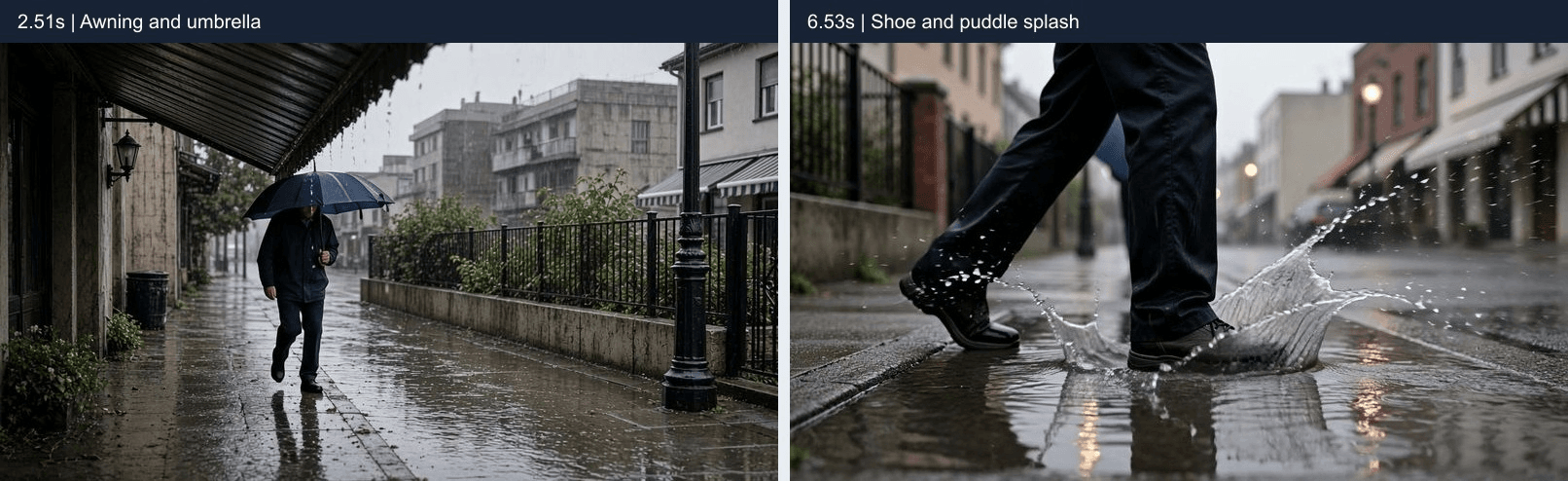
Two frames from P1 separate the overhead rain surfaces from the visible puddle event. Their timestamps locate moments to replay; a still cannot establish the corresponding sound.
Do not demand equal prominence from every surface. The camera begins beneath the awning, so that roof can reasonably dominate. If you hear only one broad wash of rain, record the material distinction as unresolved rather than inferring it from the image.
Compare the moment beneath the roof with the low puddle view. A change in perspective can justify a change in balance, but an abrupt switch to a completely different rain recording would break the scene. If the requested cut never happens, note that visual limitation separately from whether the rain itself is useful.
Forest Ambience: Make Distance Audible
A woodland prompt can become crowded when it asks for wind, insects, streams, many birds, and footsteps together. Here, nearby leaves carry the foreground while a few distant calls suggest a larger space. The sparse arrangement makes missing or misplaced sounds easier to notice.
A bird does not need to appear on screen for its call to belong. Off-screen sources are normal in environmental audio. What matters is whether the call fits the scene and remains subordinate to the nearby branch.
P2: Forest distance
plaintext1An eight-second photorealistic scene in a leafy woodland after sunrise. From 0 to 4 seconds, the camera moves laterally beside a branch whose leaves flutter in a light breeze, with the woodland visible behind it. From 4 to 8 seconds, cut to a wider view across the same clearing as the branches continue moving. Soft natural daylight, realistic vegetation, no people. 2 3Sound: nearby leaves rustling clearly, a few quieter bird calls from farther inside the woodland, and occasional soft drops falling from wet leaves. Keep the background sparse and continuous across the cut. No music, score, melody, narration, or human voices.
P2 listening targets: prominent nearby rustle, quieter distant calls, and an uninterrupted background through the requested cut.
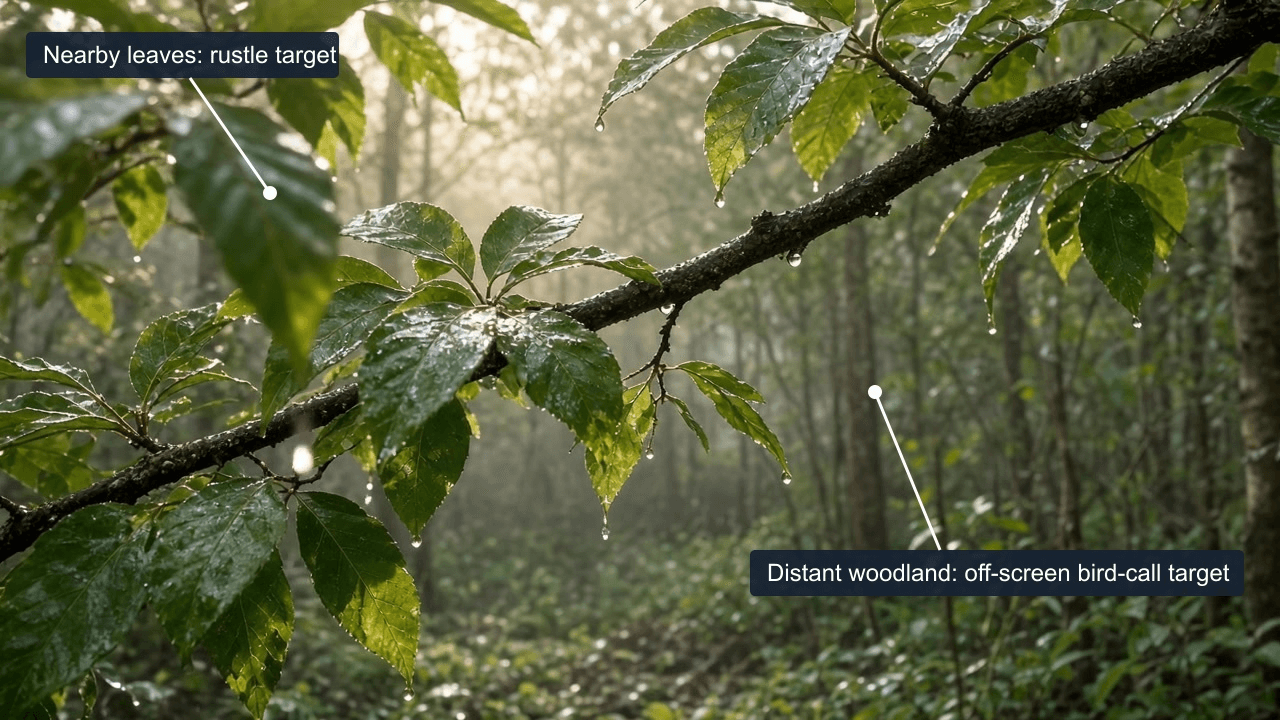
A frame from P2 at 2.51 seconds locates nearby leaves and the distant woodland. Bird calls may be off screen; the labels identify listening targets, not verified audio sources or measured distance.
Listen again with your eyes closed. If every source sounds equally close, the image may be supplying a sense of depth that the audio does not support. A wider second view should also retain a recognizable connection to the first environment.
P1 rain first (0:00), followed by P2 forest (about 0:08). The two complete clips play in order with their original audio. Still-image timestamps refer to each original clip.
Indoor Ambient Sound Examples: Cafe and Kitchen
Cafe Room Tone with One Clear Cup Sound
For a short cafe clip, one cup placement gives you a more useful test than a busy montage. Quiet room tone establishes the interior. A faint machine hum adds context. The cup touching its saucer supplies the event you can compare against the picture.
Avoid asking for several simultaneous conversations. They can obscure the clink and introduce intelligible speech you did not need. For a marketing edit, that also creates another sound element to review before combining the clip with your own voiceover.
P3: Layered cafe sound
plaintext1An eight-second photorealistic scene at a small cafe counter in natural morning light. From 0 to 4 seconds, a medium side view follows a barista carrying a ceramic cup toward the counter. From 4 to 8 seconds, cut to a close side view as the cup is placed on a saucer and the hand withdraws. An espresso machine remains in the background. Realistic hand movement and ordinary cafe surroundings. 2 3Sound: a quiet, steady room tone, a faint espresso-machine hum in the background, and one clear ceramic clink when the cup touches the saucer. The cup sound is more prominent than the background. No intelligible speech. No music, background music, score, melody, synth, or ambient pad.
P3 listening targets: stable room tone, a clink near cup contact, and an audible foreground event without added music.
Check the clink against the first contact, rather than the hand withdrawing. Then listen to the gap afterward. A stable bed should make that quiet moment feel connected without adding a new flourish.
These are designed generation scenarios, not customer projects or evidence of a commercial outcome. A suitable clip still needs review in the edit where you intend to use it.
Kitchen Ambience with Action-Synced Chopping
The kitchen separates a continuous bed from discrete impacts. Three deliberate cuts create three proposed sync points, followed by a different action when the knife is set down. That change helps reveal whether the model is following events or merely supplying a generic chopping loop.
Count the actual visible cuts first. If the output contains four cuts, evaluate four contacts and report the mismatch with the prompt. Do not describe “three synchronized cuts” simply because the request specified three.
P4: Kitchen action sound
plaintext1An eight-second photorealistic scene in a bright home kitchen. From 0 to 4 seconds, a medium side view shows a cook making three deliberate cuts through a carrot on a wooden chopping board. From 4 to 8 seconds, cut to a closer side angle as the knife is set down and the cut pieces are moved into a bowl. Natural window light, realistic food and hand movement. 2 3Sound: a quiet extractor fan in the background, three short knife-on-board sounds aligned with the three visible cuts, a softer sound as the knife is set down, and light vegetable movement into the bowl. Keep the actions easy to hear above the background. No music, score, narration, or speech.
P4 listening targets: impacts near visible cuts, a quieter fan, and no chopping continuing after the knife stops.
Review the final seconds carefully. Repeated cutting sounds after the cook stops can make otherwise plausible footage unusable. If the fan masks the impacts, reduce its requested prominence while keeping the action description unchanged.
Use normal-speed playback to decide whether a mismatch matters, then replay the contact to locate it. Scrubbing the picture can help identify an event, but it does not recreate the listening experience. Write down what you can defend, such as “an impact follows the second contact,” rather than assigning a precise synchronization error without measurement.
P3 cafe first (0:00), followed by P4 kitchen (about 0:08). The two complete clips play in order with their original audio. The kitchen timing strip uses timestamps from the original P4 clip.
Moving Through a Soundscape: Station and Shore
A Station Platform with a Passing Train
A moving source should change its relationship to the listener. This station prompt asks the train to become louder as it approaches, dominate while passing, and begin receding. The quieter passenger bed should still belong to the platform throughout.
That is a listening target, not a claim of precise stereo positioning or a physically accurate Doppler effect. A louder pass alone establishes neither. Describe only the changes you can identify in the downloaded audio.
P5: Passing train
plaintext1An eight-second photorealistic scene on a covered commuter railway platform in daylight. From 0 to 4 seconds, a waist-height camera tracks sideways beside a waiting passenger as a commuter train approaches along the platform. From 4 to 8 seconds, cut to a wider side view as the train passes through the frame. Ordinary station details, realistic train movement, no dramatic lighting. 2 3Sound: a faint background murmur from waiting passengers, the approaching train growing louder, wheel and rail sounds becoming prominent as it passes, then beginning to recede. Keep the station ambience present underneath. No intelligible announcements or conversation. No music, score, melody, or cinematic whoosh effects.
P5 listening targets: an approach/pass/recession change, underlying station ambience, and no added transition whoosh.
Train movement itself can produce a rushing sound. Judge whether that rush follows the train or appears as an unrelated editing effect at a cut. If the train has not passed by the ending, do not mark recession successful; the generated action may simply lack that phase.
Waves, Pebbles, and Changing Viewpoints
The beach example ties sound to two phases of one wave. Incoming water suggests a rush; retreating water can move small pebbles. Faint wind adds context while leaving those phases exposed.
The second viewpoint asks whether the same soundscape survives a visual change. A prompt can request two shots, but generation may deliver a different arrangement. Evaluate the actual camera change and audio continuity independently.
P6: Pebble beach
plaintext1An eight-second photorealistic scene on a quiet pebble beach in soft afternoon light. From 0 to 4 seconds, a low camera tracks sideways beside a small wave washing over wet pebbles. From 4 to 8 seconds, cut to a wider side view as the water retreats and the next wave approaches. Natural coastal colors, realistic water movement, no people or boats. 2 3Sound: the gentle rush of the incoming wave, a distinct but soft pebble rattle as the water retreats, and faint coastal wind behind the surf. The sound follows the wave's movement and remains continuous across the cut. No music, background music, score, melody, narration, or voices.
P6 listening targets: distinct incoming and retreating phases, plausible pebble movement, and wind staying behind the surf.
A constant surf loop may still fit a general beach establishing shot. It answers a different need from this phase-specific request. Decide whether you need recognizable coastal atmosphere or sound closely matched to the visible water before spending another attempt.
Keep changes in viewpoint distinct from changes in location. A wider view of the same shore should not automatically sound like a new beach with stronger wind. If you need several clips for one scene, compare their environmental beds before assembling them. Individually acceptable takes can still clash when their wind levels or surf rhythms meet at an edit.
P5 station first (0:00), followed by P6 beach (about 0:08). The two complete clips play in order with their original audio.
How to Recreate These Examples on Atlas Cloud
Use one model throughout so that changes in the sound instructions remain interpretable. Atlas Cloud provides the model entry used for this workflow. No reference image or second generation model is needed.
- Open Seedance 2.5 Flash Text-to-Video. Confirm the selected model is Seedance 2.5 Flash Text-to-Video.
- Set resolution to 720p, duration to 8 seconds, and aspect ratio to 16:9. Enable Generate audio and select MP4 where an output-format control is available.
- Paste one complete prompt above, including its sound paragraph. Check the displayed settings again before submitting.
- Wait for the task to finish. Play the result and download the original MP4 before assessing it.
- Listen to the saved file from beginning to end. Check its actual duration, frame dimensions, and audio track; a selected form value does not prove what the file contains.
- Record the three scene targets, any extra sounds, and your keep/retry decision. If you retry, change one sound instruction at a time so you can identify what improved.
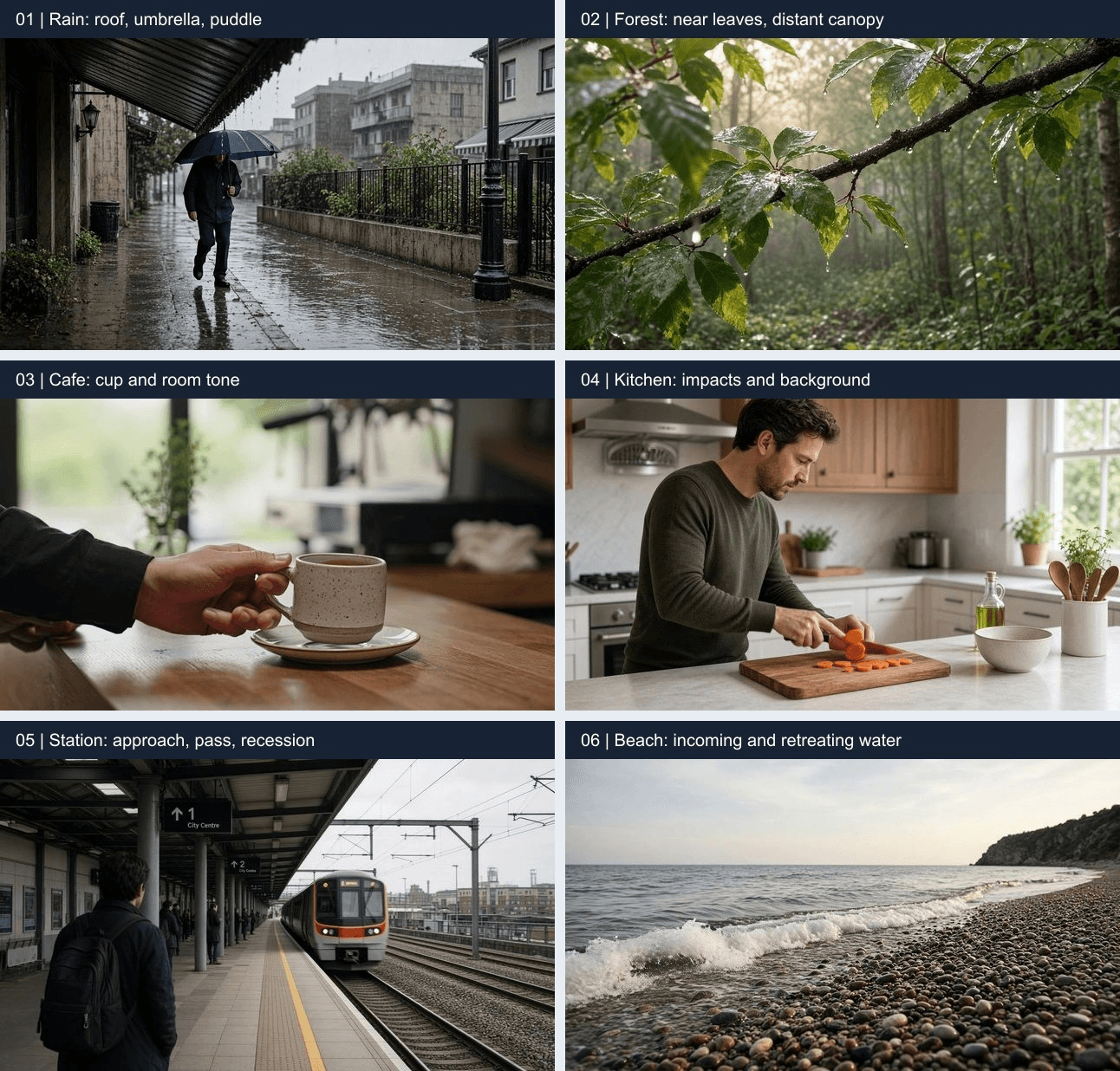
Selected source frames map the six clips to their listening tasks. File inspection confirms 1280 × 720 video and stereo audio in every download; these frames do not verify the submitted model settings or the identity of individual sounds.
Use headphones to locate quiet additions, then try ordinary speakers at a comfortable volume. A subtle clink that disappears in the intended viewing context may need a different balance.
Keep the downloaded original separate from any edited version. That preserves a fair basis for judging native audio and prevents an improved replacement soundtrack from being mistaken for the model's output.
Fix Unwanted Music and Check the Whole Clip
Listen for Timing, Missing Sounds, and Intro or Outro Effects
Use one uninterrupted playback for the overall impression, then replay the target actions. Check the first and last second separately. A musical rise at the ending can be easy to overlook when you focus only on the main event.
| Check | Requested evidence | Actual result to record | Decision |
|---|---|---|---|
| Sources | The named rain, leaves, cup, knife, train, or surf | Present, missing, or uncertain; name extras | Simplify competing sources if needed |
| Timing | Event near visible contact or movement | Identify the action and audible event | Retry when the mismatch distracts |
| Hierarchy | Foreground identifiable above the bed | Describe what masks what | Lower the requested background |
| Unwanted sounds | Environmental/action audio without score | Check melody, drones, voices, and effects | Regenerate or edit |
| Whole clip | Coherent opening, cuts, pauses, and ending | Note sudden gaps or added flourishes | Keep only if the full clip works |
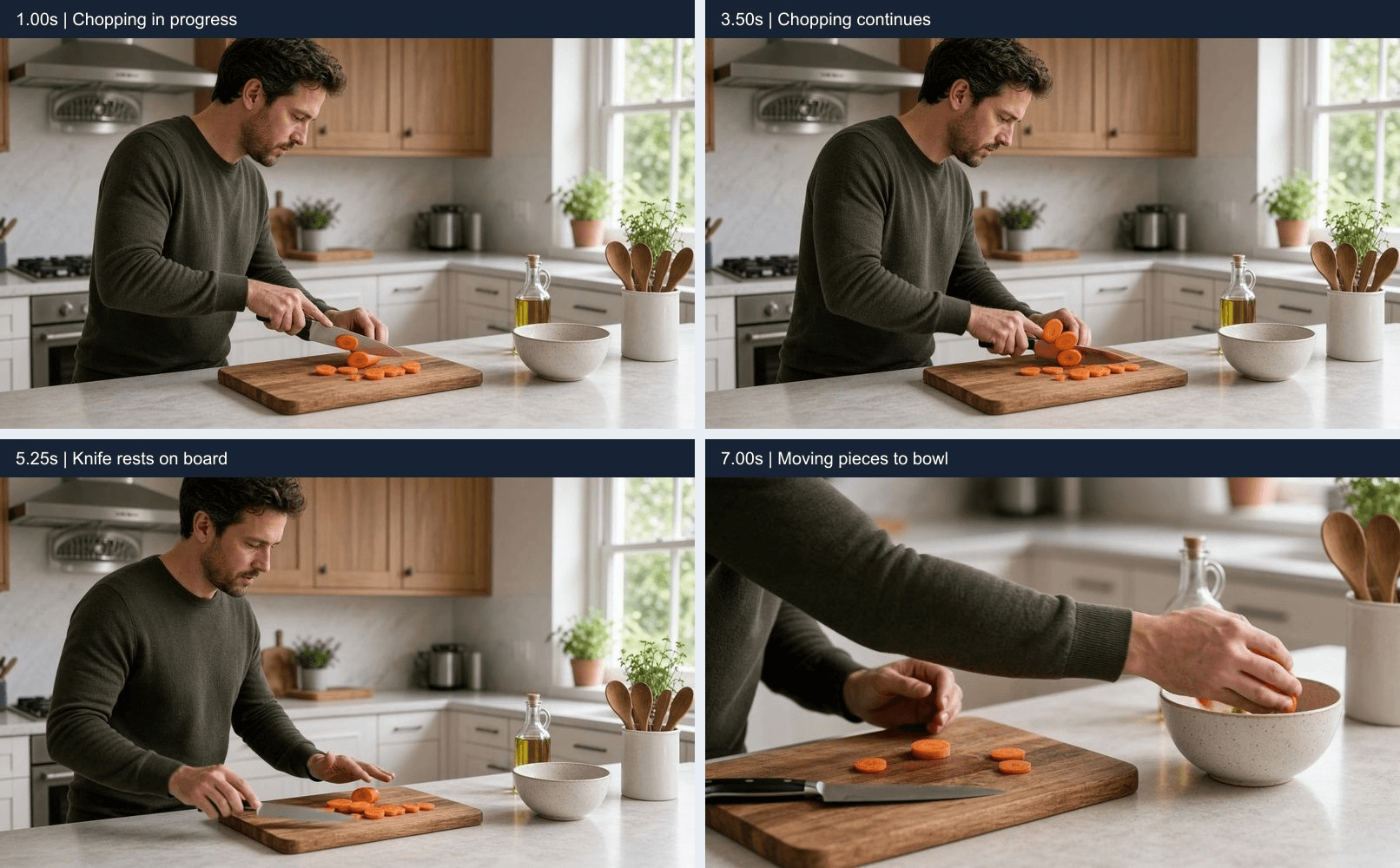
Actual P4 frames mark chopping at 1.00s and 3.50s, the resting knife at 5.25s, and transfer toward the bowl at 7.00s. The output continues chopping longer than requested. Replay these phases to check impacts and the transition to quieter handling; the strip does not prove audio synchronization.
If a clip is close, revise the sound paragraph and regenerate. If the picture is worth keeping, replacing the soundtrack in an editor gives you another route. Listen for lost room tone and softened impacts after any music removal.
Keep an “uncertain” category for sounds you cannot confidently name. A sustained tone might be machinery, a musical pad, or an artifact. Replay the quiet interval and describe its behavior instead of forcing a label. If that uncertainty would distract your audience, the practical decision can still be to retry even before you identify its cause.
Label an edited soundtrack clearly. Once you replace or repair audio, that version can demonstrate an editing result, but it no longer establishes the untouched native audio behavior.
Settings, Cost, and When 720p Is Enough
An 8-second test is long enough to request a setup, action, and short aftermath while keeping the review manageable. Use the same length for comparisons so a longer take does not receive extra room to perform its action.
Seedance 2.5 Flash's documented native resolutions are 480p and 720p, with generation lengths from 4 to 30 seconds. For higher-resolution delivery, evaluate Seedance 2.5 separately; switching models can also change the picture and sound.
| Item | Value for this guide | Verification boundary |
|---|---|---|
| Model | Seedance 2.5 Flash Text-to-Video | Exact variant must match |
| Requested video | 720p, 8 seconds, 16:9, MP4 | Verify the downloaded file |
| Audio | On | Check for an audible audio track |
| Reference assets | None | Text-only prompts |
| Price and offers | Check the current directory and selected-settings quote | Downloaded files do not establish a task charge |
Check the current model directory and pricing before submitting. Record the quote for your selected duration, resolution, and audio settings. The files included here do not establish what those generation tasks cost.
Choose 720p when the delivery size and crop leave enough detail for the subject to remain readable. A small article player has different needs from a full-screen presentation or a heavily cropped vertical edit. Higher resolution will not repair a missing sound or a mistimed impact, so settle those problems before evaluating a different delivery model.
Budget around usable results. Two paid attempts to obtain one keeper double the generation outlay for that keeper. Record the displayed quote and actual attempts rather than treating a starting price as your finished-asset cost.
For these Seedance 2.5 Flash ambient sound examples, choose the scene closest to your next edit, run one version in the same playground, and decide what to change only after listening through it.
Frequently Asked Questions
Can I download ambient sound as a separate audio file?
This workflow downloads a video with audio. You can extract an audio file from that MP4 in an editor. Extraction does not split rain, speech, effects, and music into independently controllable stems.
Can I turn a short clip into a seamless ambient loop?
You can edit it into a loop, but check both joins. A visually smooth repeat can still click, jump in background level, or restart a recognizable bird call. An 8-second generation and a seamless loop are different deliverables.
Why is there no sound when I play an example?
Check player mute and device volume first, then play the downloaded MP4 in another player. If the file has no audio track, verify generation settings and export handling. If a track exists but contains silence, report that separately. Feishu may handle pasted video differently from a local browser, so test playback in the destination document.
How do I ask Seedance 2.5 Flash for ambience without music?
Name the environmental sounds first, such as rain tapping on metal or water moving over pebbles. Then add a direct exclusion: “Only environmental and action sounds. No music, score, melody, or ambient pad.” Listen to the entire result, including the opening and ending, because the instruction does not guarantee that every take will exclude music.
How can I keep Seedance 2.5 Flash background sounds from masking the action?
Choose one foreground event and give it priority. For a cafe scene, ask for a clear ceramic clink above quiet room tone and a faint machine hum. If the contact is hard to hear, reduce the competing background sources in the next prompt while keeping the cup action unchanged. Judge the result at the volume and on the speakers your audience is likely to use.




