


The cat reaches the second platform, but it never clearly jumps. It crouches, stretches a front paw across the gap, and steps over. If you only checked the last frame, you could miss the very action the prompt requested.
That is the useful test for a Seedance 2.5 Flash animal action video: can you follow the whole event, from preparation to contact and recovery? A dog holding a frisbee does not prove that you saw the catch. A duck above a pond still needs a visible transition from water to air.
The five prompts below cover a turning dog, a horse moving through water, a cat crossing between platforms, a duck taking off, and a dog catching a disc. Each is paired with supplied footage, selected action frames, and a specific review question. Use them to plan pet content and short creative clips, then decide what needs changing before another attempt.
Key takeaways
- Describe preparation, movement, contact, and recovery in that order.
- Keep paws, landing surfaces, and moving props visible when they matter.
- Seedance 2.5 Flash's documented native output reaches 720p; longer clips do not guarantee complete actions.
- Review the complete action: the supplied cat crosses the gap without the requested airborne jump.
- Count every attempt when calculating the cost of a usable clip.
30.12-second public example by @juliaevee, attributed to Seedance 2.5. Flying food, a slow-motion mid-air catch, and the cat's landing turn a simple action into a complete comic sequence. Watch the approach, mouth contact, and recovery: the same stages matter in the Seedance 2.5 Flash examples below.
This guide now includes five supplied clips, A through E, matched to the five actions below. Each downloaded MP4 is 1280 × 720 at 24 fps and approximately 8.04 seconds long. Each animation shows one complete source clip, with no action segment removed.
The prompts describe the intended shots; the result notes describe what appears in these files. The playground screenshot below records the golden-retriever prompt, selected model, visible settings, and a completed output. Complete task records for all five examples, retry counts, and final charges are not available, so these examples support a visual review rather than a controlled success-rate test. The GIFs are silent; the original MP4s retain their audio tracks.
What Seedance 2.5 Flash Can Do for Animal Action Videos
Seedance 2.5 Flash generates a new video from your description. A text prompt can specify a golden retriever, a park, and a turning run, but the result remains AI-generated footage. It does not document an animal that performed those movements in front of a camera.
The Seedance 2.5 Flash Text-to-Video model page on Atlas Cloud lists 480p and 720p output, durations from 4 to 30 seconds, and optional synchronized audio. These are supported settings, rather than proof that a particular jump or catch will be complete.
For this guide, use text-to-video throughout. That keeps the input method consistent across all five animals and the frisbee rewrite. Adding a pet photo would introduce a different constraint and require a separate test.
Choose your acceptance criteria around the action. A running dog needs continuous direction changes and believable ground contact. A frisbee catch also needs a separate object to travel through space and meet the dog's mouth. An attractive ending cannot establish that the intermediate event occurred.
Start by checking whether 720p meets your delivery requirements. If your destination requires more pixels, check the native resolution listed for the exact alternative model before switching. A new model produces another generation and requires another motion review.
For social content, assess the intended viewing size as well as the source file. A small prop that barely survives at full resolution may become unreadable after cropping and upload compression. Decide which action detail the audience must see before writing the shot.
Write the Action Before You Write the Camera Move
“A cinematic dog running” leaves the model to choose the direction, pace, ending, and camera relationship. You may get movement without the moment your post needs. Start with a sequence that someone could recognize during silent playback.
Use this order: subject → initial state → one action event → visible contact → finish → camera. For a jumping cat, name the starting platform, the gap, the destination, and the paws reaching the landing surface. Add camera movement after those relationships are clear.
The initial state gives you something to compare with the ending. A crouching cat on the left platform should leave that surface and finish on the right one. If both platforms drift together, the apparent jump becomes difficult to judge even when the cat moves convincingly.
The contact stage deserves its own sentence. Specify where the front paws land, or which part of the disc enters the mouth. Give the animal enough room to recover afterward. Otherwise, the clip can end at the dramatic airborne pose and omit the landing entirely.
| Animal action | Process that must be visible | Common omission to check |
|---|---|---|
| Running and turning | Acceleration, continuous curve, deceleration | Instant direction change |
| Galloping through water | Repeated hoof contact and local splashes | Water spray detached from hooves |
| Platform jump | Crouch, push-off, flight, landing, balance | Missing hind-paw landing |
| Pond takeoff | Paddling, propulsion, separation, low flight | Duck suddenly airborne |
| Frisbee catch | Disc flight, approach, mouth contact, landing | Disc appears already caught |
Time ranges communicate directing intent. “From 2 to 4 seconds” gives an event priority within the requested duration; it is not a promise of frame-accurate scheduling. Check the delivered file rather than judging compliance from the prompt alone.
Keep the camera useful. A lateral track can reveal changing paw placement, while a gentle arc adds a second view. A tight orbit during contact can hide the evidence you need. For the cat, keep both platforms visible through landing, even if that means using a wider shot than you originally imagined.
Before generating, finish this sentence: “I will accept the clip only if I can see…” That sentence becomes your review checklist and keeps later feedback specific.
Generate Your First Animal Clip on Atlas Cloud
Open Atlas Cloud, then go to the Seedance 2.5 Flash Text-to-Video playground. Confirm that the selected model is Seedance 2.5 Flash Text-to-Video. The Seedance 2.5 Flash Image-to-Video page expects an image and is a different starting point.
The public model reference lists duration, resolution, aspect ratio, output format, and audio controls. Use the following setup for P1, the running dog prompt in the next section:
- Sign in and replace any sample prompt with the complete P1 text.
- Choose 720p, 8 seconds, and 16:9.
- Choose MP4. For a silent motion check, turn generated audio off; keep it on if you also want an audio version of the MP4.
- Read the displayed settings and quote again before submitting.
- Run once, wait for the task to complete, and play the entire output.
- Download the original MP4 and save the exact prompt beside it.
720p is the documented native ceiling for Seedance 2.5 Flash Text-to-Video. Eight seconds gives this sequence room for acceleration, a curve, and a stop. The landscape frame helps you inspect the ground and the dog's route. Review motion independently of the soundtrack; the GIF examples below are silent even when the original MP4 contains audio.
If a control is absent, record the real setting rather than claiming you selected it. A requested duration also needs checking against the downloaded file. Browser controls can revert, and the final MP4 is the evidence for what you received.
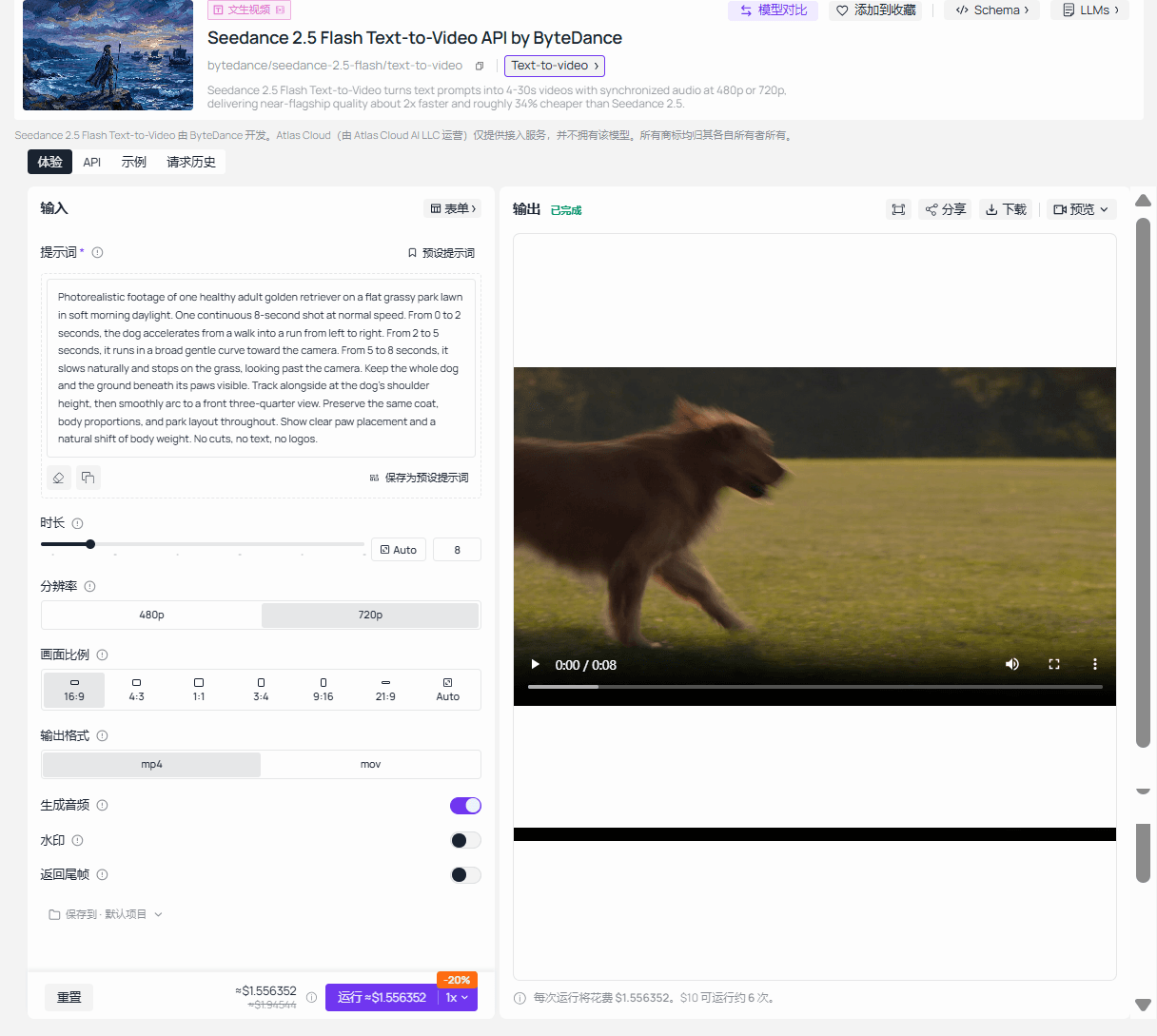
Seedance 2.5 Flash Text-to-Video is selected, with 8 seconds, 720p, 16:9, MP4, and generated audio enabled. The output panel shows a completed golden-retriever clip. The GIF examples below show motion without audio.
The screenshot shows the golden-retriever prompt alongside a completed output and the selected generation controls. The downloaded files separately confirm 720p, a landscape 16:9 frame, 24 fps, and approximately eight seconds. Save both the completed-task view and original MP4 alongside future outputs so you can connect the model, prompt, settings, and result.
Keep the first completed, decodable output as your representative attempt, even if its action fails. If you later display another run, explain the substitution. Save attempts as P1-01, P1-02, and P1-03 rather than overwriting the original file.
Changing a prompt or parameter produces another result. Preserve each version so you can connect a successful or unsuccessful action to its actual input. This simple habit also prevents a downloaded example from being confused with a newly generated output.
5 Animal Action Prompts You Can Copy and Adapt
Choose the closest action first. Each copyable prompt is paired with a supplied result and a check of the visible action. For comparisons, keep 720p, 8 seconds, 16:9, and the audio selection consistent across runs. The captured playground has generated audio enabled; the GIFs here assess motion only. The screenshot documents one completed output rather than a settings record for all five downloads.
| Prompt | Useful creative task | Main constraint | Decisive check |
|---|---|---|---|
| P1: Dog run | Pet-content opening or movement study | Continuous curve and stop | Weight changes through the turn |
| P2: Horse gallop | Outdoor action sequence | Hooves and water remain visible | Splashes originate at contact |
| P3: Cat jump | Short action beat | Two stable landing surfaces | Both pairs of paws reach the destination |
| P4: Duck takeoff | Wildlife-style creative scene | Continuous water-to-air transition | Body visibly clears the water |
| P5: Frisbee catch | Fetch scene with a clear payoff | One traceable disc | Mouth reaches the visible rim |
A Dog Running and Turning
P1 gives the run an ending you can inspect. The broad curve tests whether direction changes continuously, while the slowdown tests whether the animal transitions out of the run. That makes it useful for a short pet-content opening with a readable finish.
plaintext1Photorealistic footage of one healthy adult golden retriever on a flat grassy park lawn in soft morning daylight. One continuous 8-second shot at normal speed. From 0 to 2 seconds, the dog accelerates from a walk into a run from left to right. From 2 to 5 seconds, it runs in a broad gentle curve toward the camera. From 5 to 8 seconds, it slows naturally and stops on the grass, looking past the camera. Keep the whole dog and the ground beneath its paws visible. Track alongside at the dog's shoulder height, then smoothly arc to a front three-quarter view. Preserve the same coat, body proportions, and park layout throughout. Show clear paw placement and a natural shift of body weight. No cuts, no text, no logos.
“Keep the whole dog and the ground beneath its paws visible” protects the evidence. Watch the shoulders and hips through the curve, then check whether the paws move relative to the grass during deceleration. A dog that stays in a running pose while the background scrolls needs closer review.
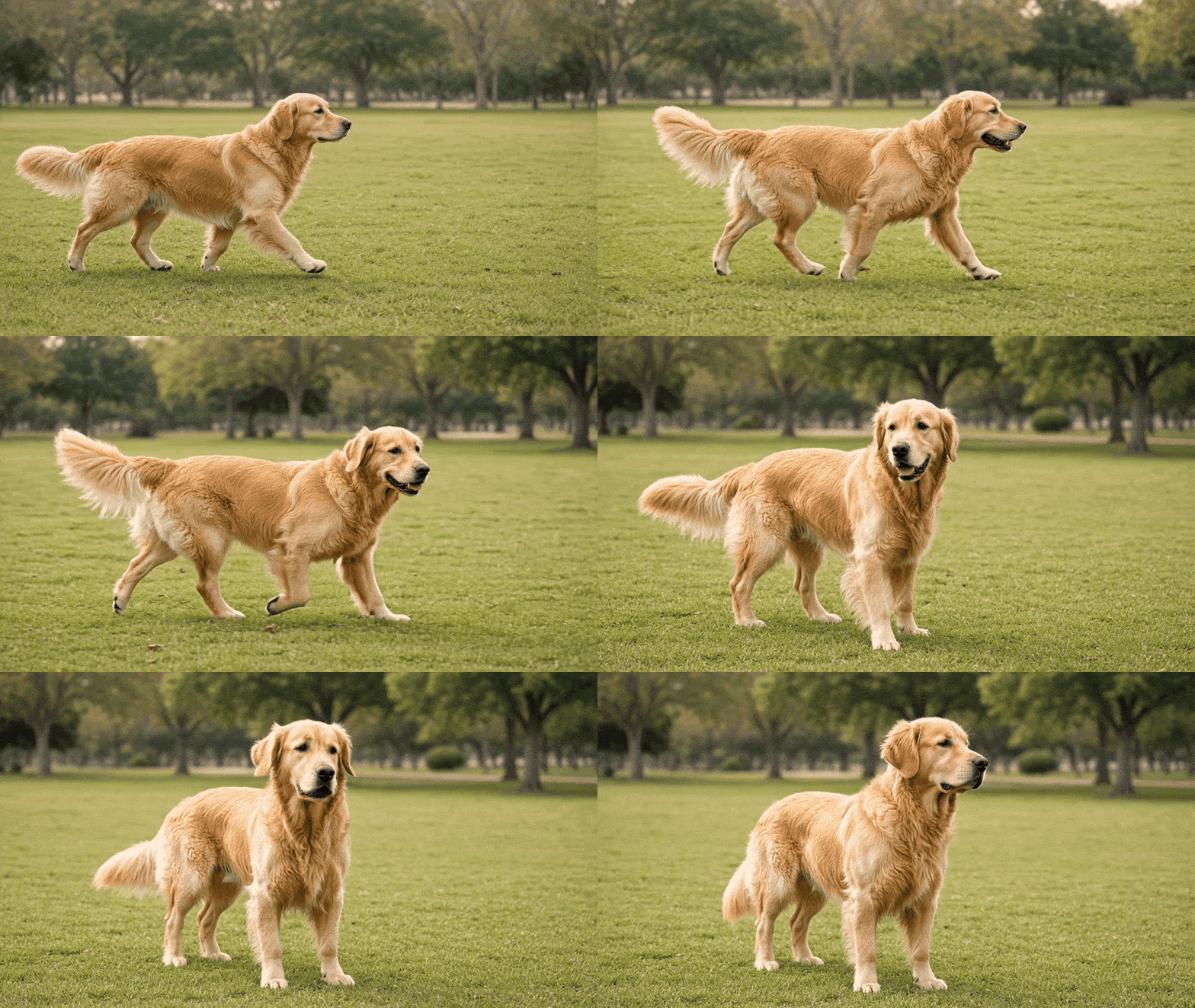
P1 result, source A: the complete 8.04-second clip, shown as a silent GIF.
What the result shows: The retriever moves side-on, turns toward the camera, and finishes standing on the grass. The direction change and ending are readable, although the early movement is closer to a gentle trot than a strong burst of acceleration. Use this as an example of a clear turn-and-stop sequence, then judge the desired pace separately.
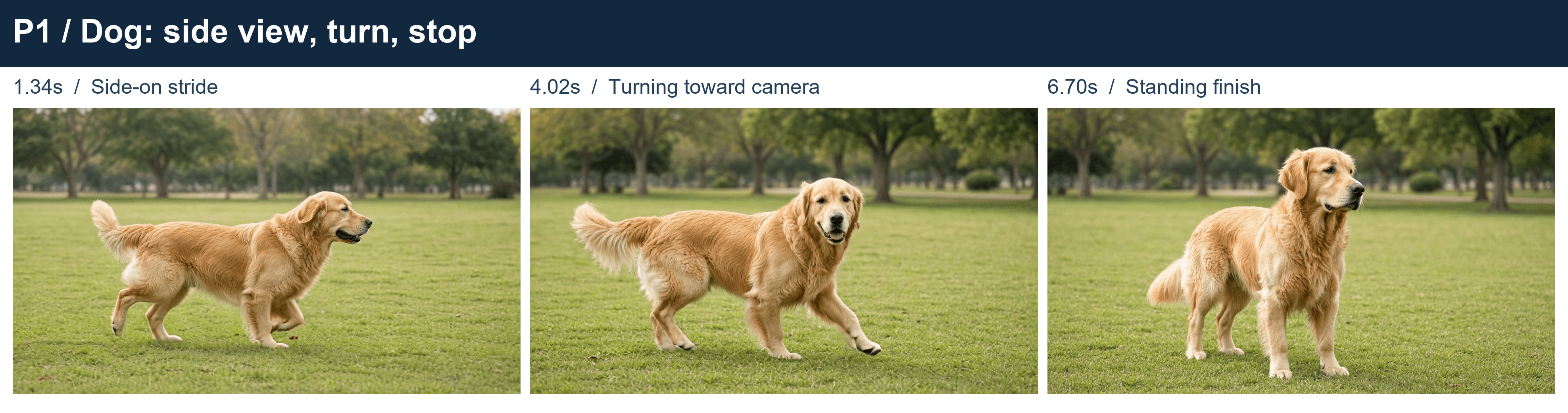
Frame check: 1.34s shows the side-on stride; 4.02s shows the turn toward the lens; 6.70s shows the standing finish. These are selected frames from A, not separate generations.
You can replace the retriever with another dog or move the scene to a beach. Recheck footing and the stopping distance after that change. Sand, grass, and wet paving create different visual expectations; the same wording does not make them interchangeable.
A Horse Galloping Across Shallow Water
P2 adds an environmental reaction. The horse should move forward while splashes start around the hooves, giving you two linked processes to inspect. Use it for an outdoor action beat rather than a riding or veterinary demonstration.
plaintext1Photorealistic footage of one adult chestnut horse with a small white forehead marking galloping across a broad, shallow stretch of water on firm level ground. Soft overcast daylight, natural colors, no rider, no tack. One continuous 8-second shot at normal speed. Begin in a full-body side view with the horse moving left to right. Track parallel for the first 5 seconds, keeping its hooves and the water surface visible, then arc gently toward a front three-quarter view while maintaining distance. The horse continues along the same path without changing direction. Small splashes begin where the hooves contact the water and fall back naturally. Preserve the horse's markings, leg proportions, and shoreline position. No cuts, no slow motion, no text, no logos.
Inspect legs that overlap during the gallop, especially as the camera changes view. Then compare the hoof positions with the origins of the splashes. Spray across the scene can look energetic while concealing missed contact.
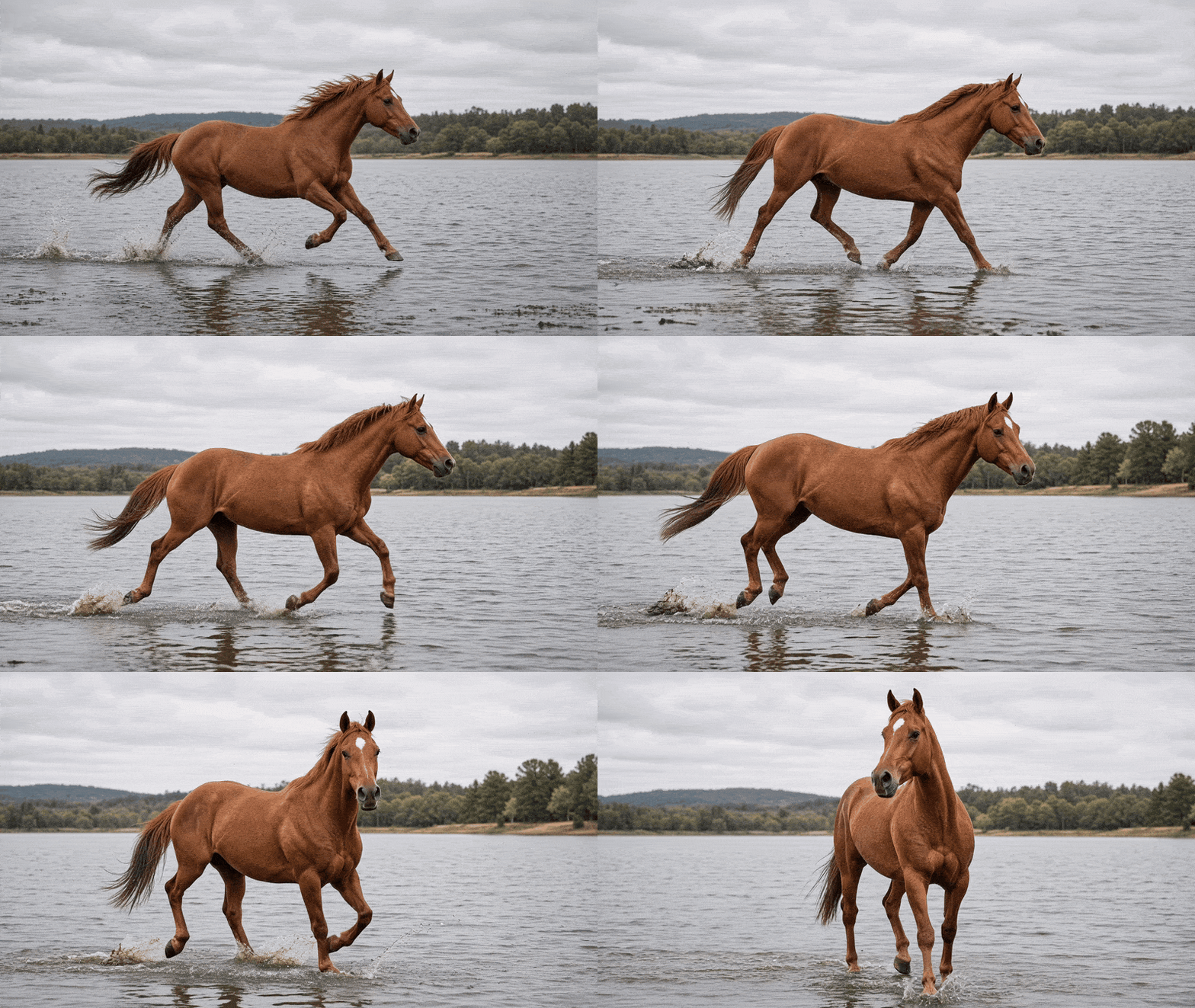
P2 result, source B: the complete 8.04-second clip, shown as a silent GIF.
What the result shows: The horse crosses the shallow water while small splashes appear around the hoof-contact areas. The view shifts from side-on toward the front near the end. That makes the water reaction useful to inspect, but also makes it harder to separate a changing camera angle from a change in the horse's route. Visible movement and spray alone do not certify an accurate gallop.
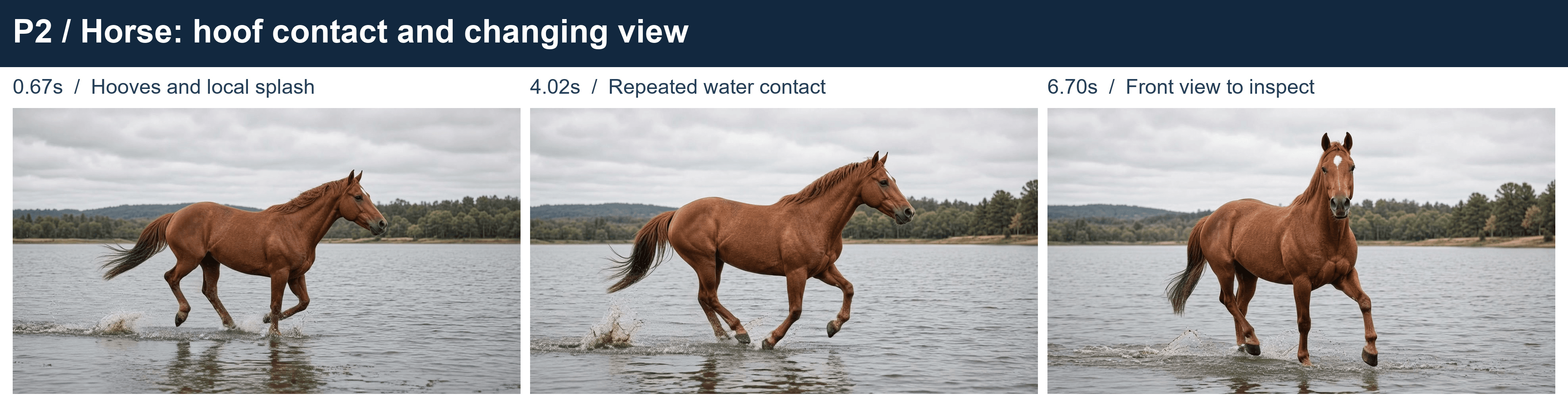
Frame check: compare hoof positions and nearby splashes at 0.67s and 4.02s, then inspect the overlapping legs in the 6.70s front view. Check the continuous GIF for the timing between these moments.
The small forehead marking gives you a continuity cue during the arc. If you change the horse's coloring, choose another visible identifier and check it across the shot. Do not use a generated result as an authoritative example of equine gait, even when it passes this creative checklist.
A Cat Jumping Between Low Platforms
P3 makes the landing surface explicit. Two low, broad platforms let you evaluate preparation, flight, landing, and recovery without adding a dangerous-looking leap. The action can serve a short pet-themed creative sequence.
plaintext1Photorealistic footage of one adult gray tabby cat on a low, broad stone platform in a quiet garden. A second matching platform stands 40 centimeters away at the same height. Soft overcast daylight. One continuous 8-second shot at normal speed. From 0 to 2 seconds, the cat crouches at the edge and looks at the second platform. From 2 to 4 seconds, it pushes off with its hind legs, crosses the gap, places its front paws on the second platform, and brings its hind paws onto the same surface. From 4 to 8 seconds, it steadies its body and takes two small steps forward. Use a full-body side three-quarter view, tracking gently sideways so both platforms and the landing remain visible. Preserve the cat's stripe pattern and both platforms' positions. No cuts, no text, no logos.
The 40-centimeter gap describes the scene you want; it is not a measurement established by the generated pixels. Check whether the gap remains visually stable and whether the cat actually leaves one surface before reaching the other.
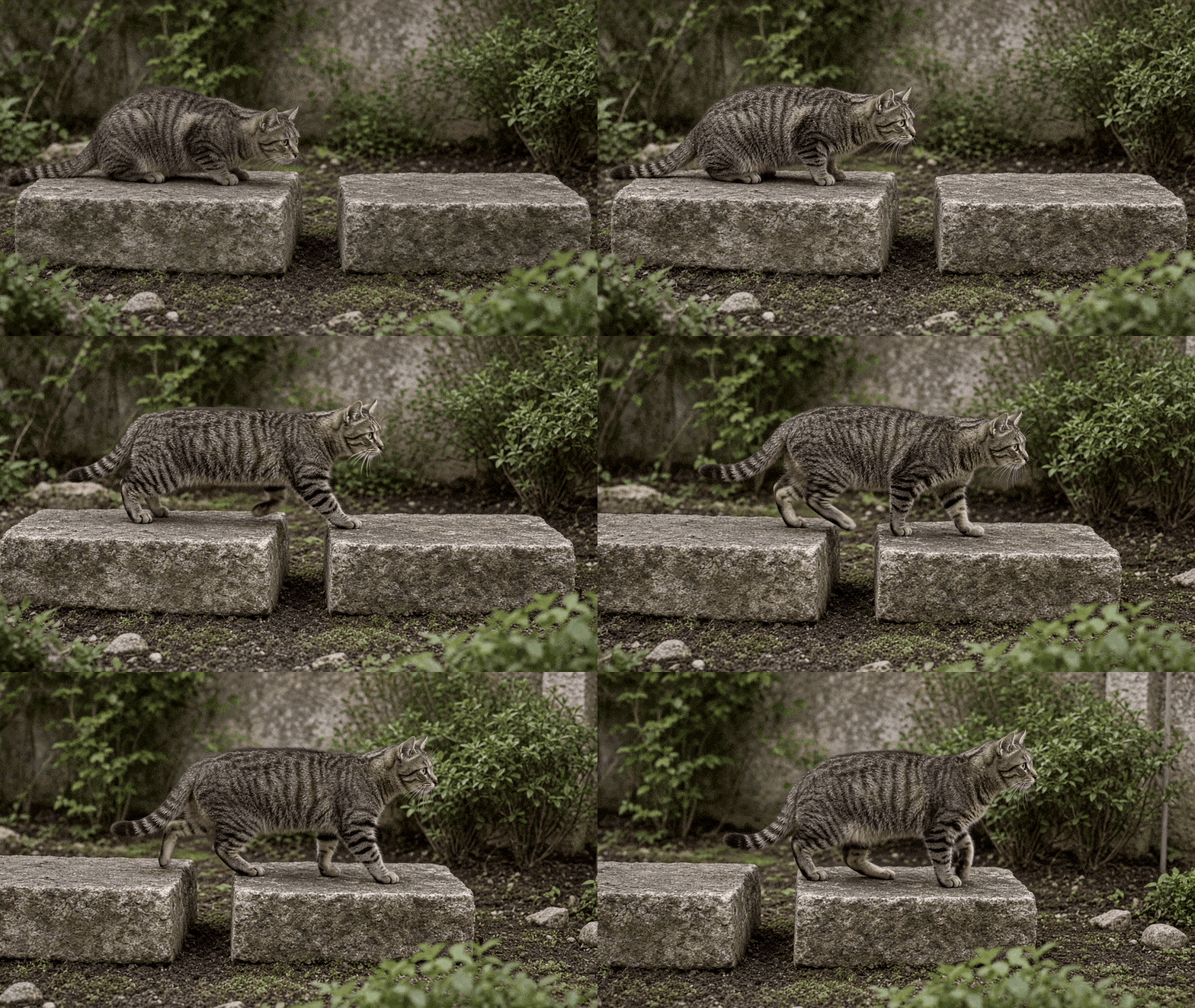
P3 result, source C: the complete 8.04-second clip, shown as a silent GIF.
What the result shows: The cat starts crouched on the left platform, reaches a front paw across the gap, and brings its rear body onto the right platform. It crosses successfully as a stepping action, but there is no clear airborne leap separating push-off from landing. This result does not meet the prompt's jump criterion, even though the animal reaches the intended destination.
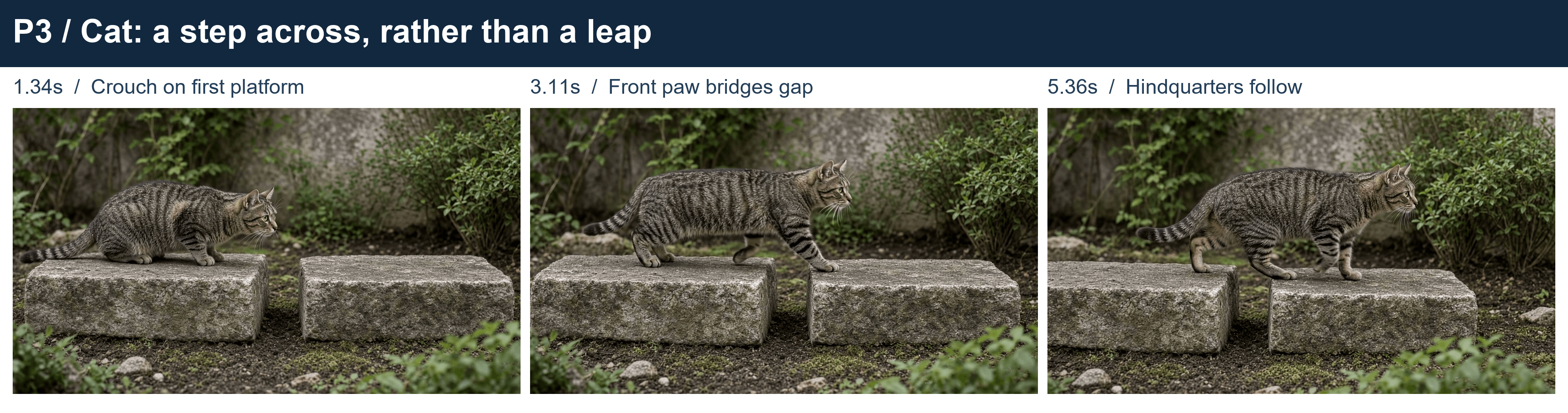
Frame check: the front paw bridges the gap around 3.11s while the rear body remains over the starting platform. The 5.36s frame shows the hindquarters following. Reaching the second platform is not evidence of a jump.
For a follow-up, state the missing event explicitly: “Both hind paws push off the first platform, all four paws visibly clear both surfaces, and the front paws land on the second platform before the hind paws.” Keep both edges visible and check the full result again. This is a proposed rewrite, not another completed example.
Pay particular attention to the hind paws. Front paws on the destination can create a convincing impression while the rear half merges with an edge. If you substitute wooden benches, recheck edge positions, shadows, and where each paw bears weight.
A Duck Taking Off from a Pond
P4 tests a change of state: floating becomes flying. The prompt assigns time to paddling and propulsion before asking the duck to clear the surface. That gives a wildlife-style creative clip a visible beginning and payoff.
plaintext1Photorealistic wildlife-style footage of one adult mallard duck on a calm pond in soft morning daylight. One continuous 8-second shot at normal speed. From 0 to 2 seconds, the duck paddles forward. From 2 to 5 seconds, it beats its wings, pushes against the water with its feet, and lifts its body clear of the surface. From 5 to 8 seconds, it flies low above the pond along the same forward path. Track parallel from a low side view, then smoothly arc toward a rear three-quarter view. Keep the entire duck, its wings, and the water beneath it visible throughout takeoff. Show ripples and small splashes at the points where the feet leave the water. Preserve the same plumage and pond shoreline. No cuts, no text, no logos.
Follow the body relative to the waterline. You should be able to identify the interval when support changes from the surface to flight. Check the wings for intersections with the body and the feet for unexplained disappearance.
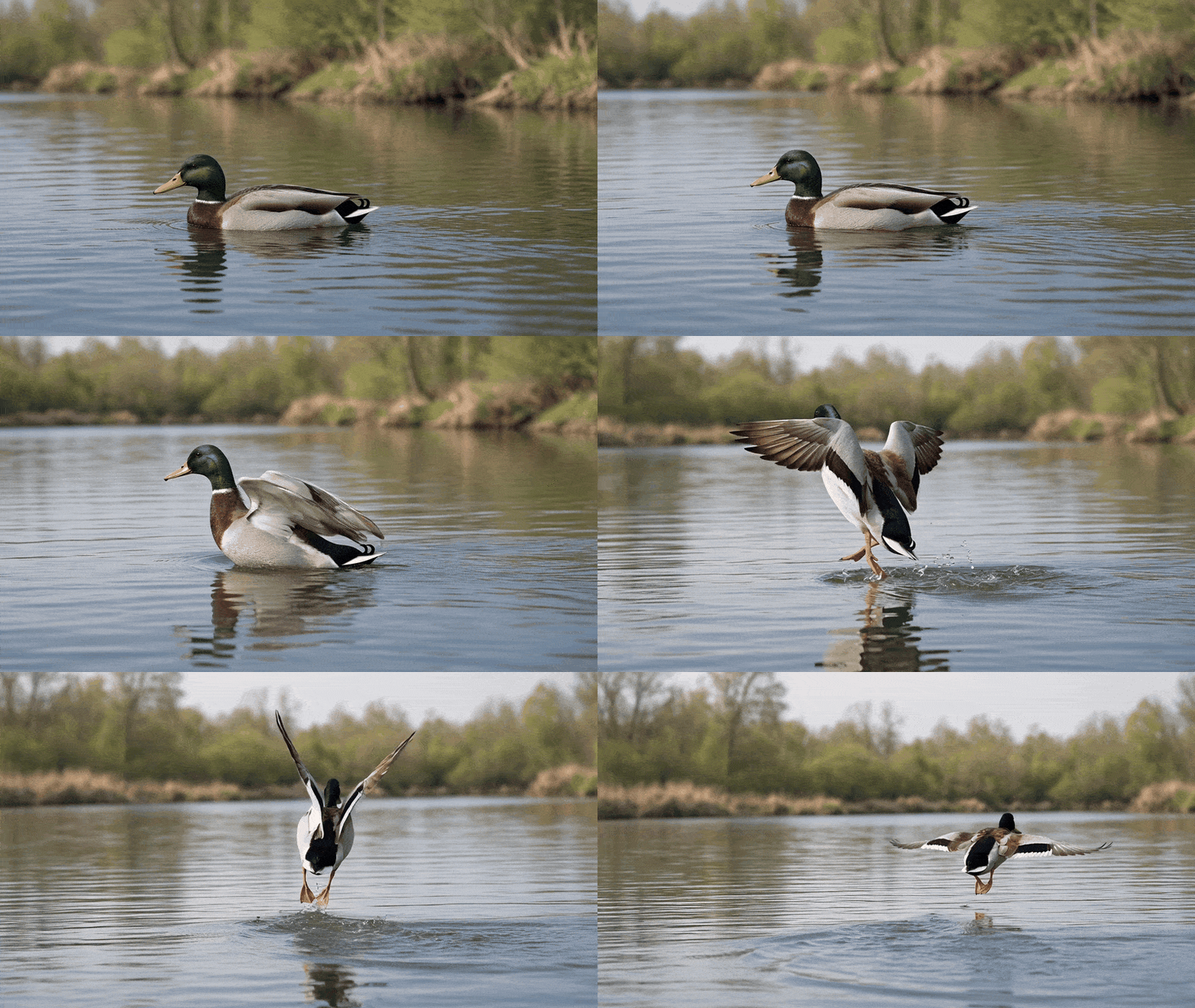
P4 result, source D: the complete 8.04-second clip, shown as a silent GIF.
What the result shows: The mallard begins floating, raises and beats its wings, lifts its body, and moves away low over the pond. The sequence gives the takeoff a visible lead-in and a water-to-air transition. Follow the feet and the remaining splash as the view turns toward the rear; the bird's body clearing the surface is the decisive event.
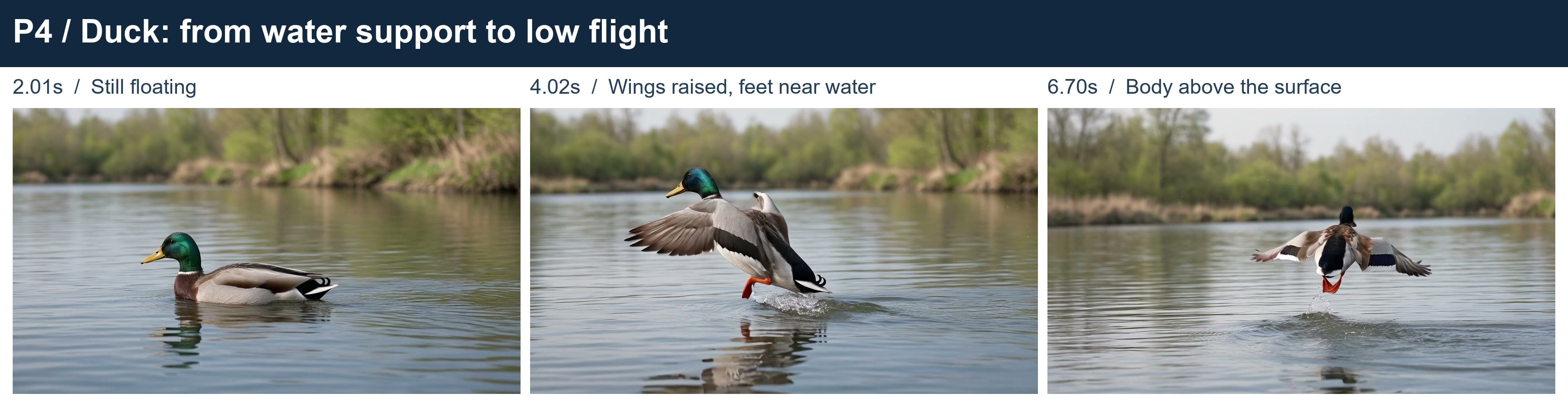
Frame check: 2.01s establishes water support, 4.02s captures the lifting phase, and 6.70s shows the body above the surface. These stills isolate the change of state; the GIF shows its continuity.
Swapping a mallard for another bird changes more than appearance. A gull, swan, or small songbird would need its own movement description and review. Keep species substitutions deliberate instead of assuming one takeoff recipe covers every animal.
A Dog Catching a Frisbee
P5 introduces the most demanding relationship in this set: a moving animal must contact a moving prop. The red disc provides contrast against the grass, while the full-body view leaves room to inspect the jump and landing.
plaintext1Photorealistic footage of one black-and-white border collie in an open grassy park in soft overcast daylight. One continuous 8-second shot at normal speed. The dog runs left to right, jumps to catch one red flying disc in mid-air, lands on the grass, and slows while holding the disc. A low tracking camera follows the dog from a full-body side three-quarter view, then arcs gently toward the front after landing. Keep the dog's whole body and the flying disc in frame. Preserve the same coat markings and park layout throughout. No cuts, no text, no logos.
Reject the catch if the disc appears only after the jump. Also check whether the dog reaches the same object that was flying earlier. A duplicated disc or a change in its position can break the event even when the ending looks plausible.
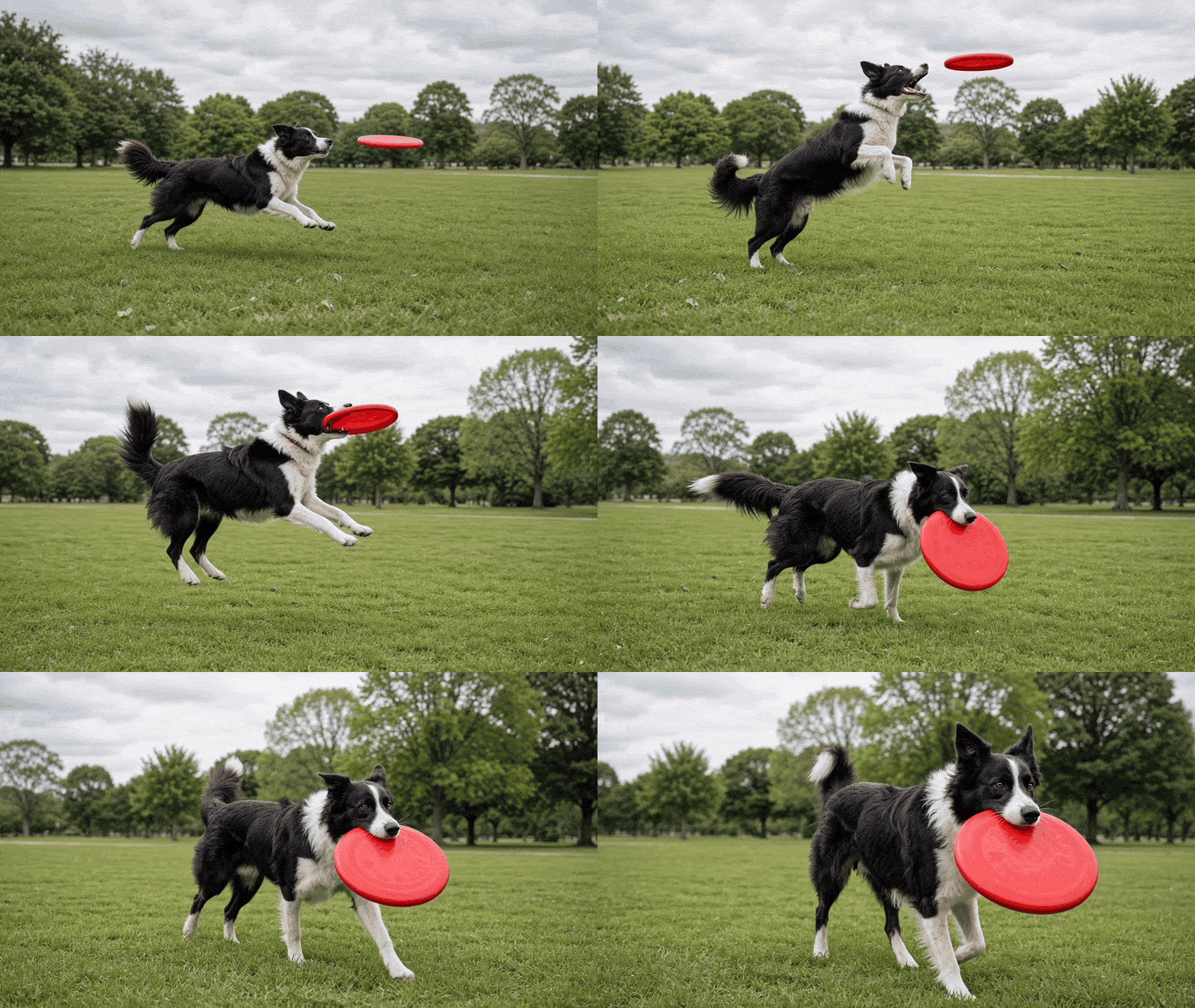
P5 result, source E: the complete 8.04-second clip, shown as a silent GIF.
What the result shows: The red disc is visible separately from the dog before the jump. The collie approaches it, reaches the rim with its mouth during the airborne phase, and comes down carrying the disc before moving toward the camera. Unlike an ending that simply reveals an already-held prop, this clip includes the approach and contact. The extended airborne pose still deserves a timing check if you need normal-speed action.
You can change the dog's breed or disc color, but preserve contrast and recheck visibility before judging contact.
Fix Missing Contact, Sliding Paws, and Broken Motion
The supplied cat and frisbee clips show why the intermediate action matters. The cat reaches its destination without a clear leap, while the collie approaches a separate disc and makes visible mouth contact. Review those stages before accepting the final pose. These two examples illustrate what to inspect; they do not establish a general success rate for Seedance 2.5 Flash.
Review the full clip at normal speed first. Then scrub through the approach, contact, and recovery. Select meaningful frames around the actual event rather than extracting arbitrary seconds. A three-frame sequence can expose a missing trajectory, although it cannot replace continuous playback.
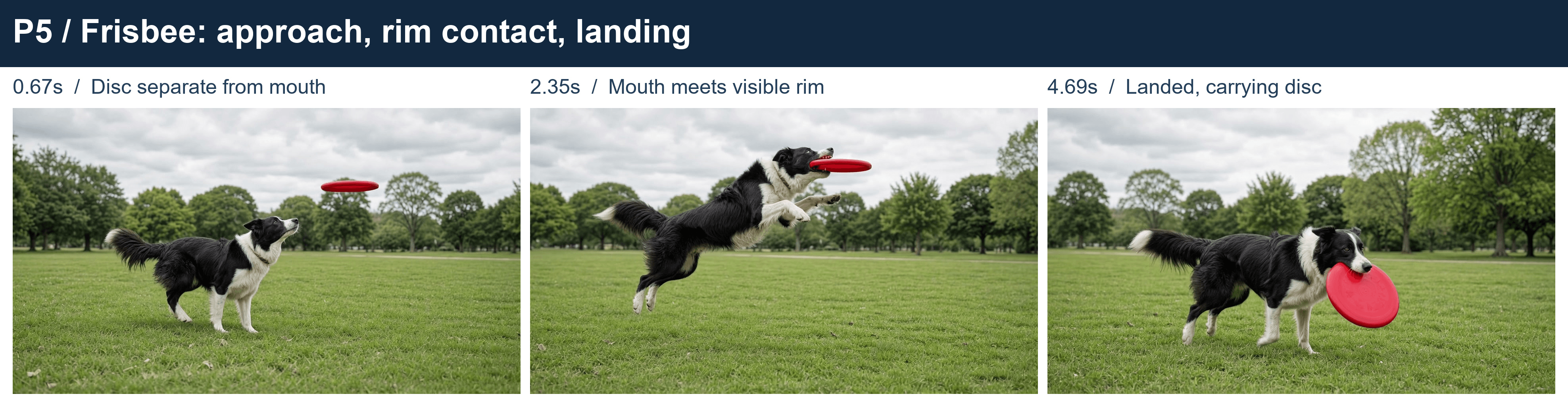
Contact check from E: at 0.67s the disc is separate from the mouth; around 2.35s the mouth meets the visible rim; by 4.69s the dog has landed and is carrying the disc. The full animation appears once in the P5 case above.
If your own result hides the catch, try P5-R below. It makes the disc's initial position and uninterrupted flight explicit, and delays the camera arc until after landing. This follow-up prompt has no supplied result, so it is not presented as an improvement demonstrated by a paired test. Keep generation settings unchanged when testing it.
plaintext1Photorealistic footage of one black-and-white border collie in an open grassy park in soft overcast daylight. One continuous 8-second shot at normal speed. At the opening, one red flying disc is already visibly traveling from left to right, about two meters ahead of the running dog. From 0 to 3 seconds, show the disc's uninterrupted flight and the dog following it. From 3 to 5 seconds, the dog jumps toward that same disc and closes its mouth around the visible rim; keep the contact moment unobstructed. From 5 to 8 seconds, the dog lands, absorbs the impact through its legs, and slows while holding the same disc. Track alongside in a full-body side three-quarter view, then arc gently toward the front only after landing. Keep the entire dog and disc visible throughout. Preserve the same coat markings and park layout. No cuts, no text, no logos.
Use the supplied E clip as a reference for what a visible approach-and-contact sequence contains. A future P5-R run would be an independent generation; compare both complete clips before crediting the rewrite.
Match the edit to the failure. For sliding paws, simplify the route and hold more ground in view. For a drifting landing surface, keep both platforms visible. For changing markings, reduce occlusion and inspect the animal before and after the turn. For missed contact, remove a secondary action before adding more instructions.
Test one class of change at a time. P5-R changes several related process descriptions together, so even a better result would not identify one sentence as the cause. Without a fixed seed and repeated paired tests, variation between generations remains another explanation.
The five downloaded files provide one displayed example per action. The table records what those files show, rather than a generation ledger or a model-wide pass rate.
| Case | Supplied file | Decisive observation | Limit of the example |
|---|---|---|---|
| P1: Dog run | A | Side-on movement, turn toward camera, standing finish | Mild acceleration; review the intended pace |
| P2: Horse in water | B | Hoof-area splashes during movement | Camera shift complicates route and gait assessment |
| P3: Cat jump | C | Cat steps across and reaches the second platform | No clear airborne jump; does not meet that criterion |
| P4: Duck takeoff | D | Floating, wingbeats, then body above water | Review foot contact and wing continuity in playback |
| P5: Frisbee catch | E | Separate disc, visible mouth contact, landing with disc | Extended airborne timing still needs review |
One supplied file per case cannot reveal how many retries preceded it. For a future controlled test, save three independent generations per prompt version, including unsuccessful results. Record task failures separately from completed clips that miss the action checklist, and preserve each exact submitted prompt.
Count the Cost per Usable Clip
Use total actual cost of all attempts ÷ number of accepted clips. Include completed outputs you reject, and include failed tasks if they incurred a charge. When no clip meets the checklist, report the total spend and zero accepted outputs; a usable-clip unit cost is undefined.
Check the live quote in the Atlas Cloud model directory and the selected playground before spending. Record the resolution, duration, aspect ratio, audio setting, and final charge for each attempt. A starting rate does not establish the bill for your selected configuration.
The supplied downloads contain no task receipts, timing logs, or retry history. Five displayed clips therefore do not mean five paid attempts, and their cost per usable clip cannot be calculated from these files alone.
| Cost record | What is known | What is still needed |
|---|---|---|
| Supplied A–E examples | Five MP4 files, approximately 8.04 seconds each | Actual task charges, all preceding attempts, and acceptance decisions |
| Future prompt comparison | Use the same requested settings for each version | Log every attempt and divide total actual cost by accepted outputs |
Set a retry budget before starting. One controlled rewrite can answer whether clearer staging helps your task; repeated unchanged submissions may only consume the budget. Queue time and completion time also affect your schedule, so log them separately when available.
If repeated contact failures persist, first simplify the shot and keep the decisive event visible. If you then try another model, check its native resolution and current quote and repeat the same action review. Switching models does not preserve the motion of a Seedance 2.5 Flash clip.
Export Animal Action Videos Without Hiding the Action
Keep the original MP4, then inspect the version you intend to publish. A landscape shot can preserve a long disc trajectory, while a portrait crop may remove the object before contact or cut off the landing surface.
For vertical delivery, plan enough space around the animal, the moving prop, and the destination. If a crop loses any required stage, generate another version in the target ratio and review it again. Enlarging or cropping the same pixels cannot restore an event outside the original frame.
Play the complete source at normal speed. Check the first and last seconds, any apparent cut, and the recovery after contact. If you make a loop, inspect the join; a jump from a stopped animal back to a running pose can create an unintended motion discontinuity.
The article's short motion evidence is intended as silent, full-length GIFs, with the original MP4s retained for review. A GIF conversion is a publishing format, not another generation or evidence that the action passed. Review the animation after conversion as well.
Describe the result as AI-generated content and avoid presenting it as observed wildlife behavior. To try your own Seedance 2.5 Flash animal action video, start with the nearest prompt above, define one acceptance sentence, and inspect the whole action before your next submission.
Frequently Asked Questions
Can I animate my own pet photo with Seedance 2.5 Flash?
Use the Seedance 2.5 Flash Image-to-Video playground with a photo you own or have permission to use. A first frame gives the model a concrete starting composition, but it does not guarantee unchanged markings or body proportions throughout the motion. Review the animal before, during, and after the action. The five examples in this article do not test that photo-based workflow.
Can Seedance 2.5 Flash keep the same animal across several clips?
Repeated text-only generations do not guarantee the same individual animal. Repeating “golden retriever” describes a breed, not a specific dog's identity. If continuity matters, use a suitable reference-image workflow and compare the face, coat markings, tail, and body proportions across the complete outputs. Check consistency within each clip as well as between clips.
Will a longer Seedance 2.5 Flash video fix an unfinished action?
More time can leave room for preparation and recovery, but it does not guarantee an omitted jump, landing, or catch. First identify the missing stage and describe it explicitly. Change duration separately so you can see whether the extra time helps. Review the full result instead of accepting it because it reaches the intended final pose.
How do I fix a cat that steps across a gap instead of jumping?
Name the airborne phase: the hind paws push off, all four paws visibly clear both surfaces, and the front paws land before the hind paws. Keep both platform edges in a stable, full-body view. The supplied cat clip shows a stepping crossing, so reaching the far platform alone should not count as a successful jump. Generate a new result and check for the missing airborne interval.
Can Seedance 2.5 Flash generate animal action videos in 1080p?
The Seedance 2.5 Flash Text-to-Video listing on Atlas Cloud lists native 480p and 720p output, with no native 1080p option. Select 720p when using Seedance 2.5 Flash Text-to-Video. If your delivery requires 1080p, check the exact alternative model's supported output before generating; enlarging a 720p export does not create a native 1080p generation.







