


The mouth starts smiling while the eyes seem stuck in the previous emotion. You can see every eyelash, yet the reaction still feels disconnected. A Seedance 2.5 Flash facial expression close up needs a readable change over time: a clear starting expression, a visible response to something, and a final moment that has time to settle.
Start with one emotional turn. Describe what the eyes, mouth, and breathing do, then give those actions room to happen in a simple close-up. Add dialogue, hand movements, or complex camera work after that silent reaction makes sense.
The five cases below cover cafe laughter, a seaside conversation, train-car suspense, a worried parent at a pharmacy, and a station farewell. Three supplied eight-second clips appear as silent GIFs; two longer dialogue clips come from the official Seedance 2.5 showcase. The supplied clips do not include independently verified model or run records. The official clips are same-series references, not confirmed Seedance 2.5 Flash outputs, so this collection is not a Seedance 2.5 Flash performance benchmark.
Their timestamps describe intended performance beats; they do not guarantee frame-accurate execution or reveal a character's scientifically verified psychological state.
Key takeaways
- Give the face 1 emotional turn and 2 or 3 visible actions.
- Start at 720p, 16:9, 8 seconds, with audio off.
- Check the whole reaction before inspecting individual frames.
- Change 1 instruction per retry and track cost per usable take.
What Seedance 2.5 Flash Can Do for Facial Close-Ups
A reaction close-up asks the viewer to notice a small decision. Someone hears good news, tries to hide amusement, or recognizes what another person means. The shot succeeds when the viewer can follow that change without an explanatory caption.
Facial detail and facial performance answer different production questions. Texture tells you whether the face remains readable at delivery size. Performance tells you whether the person appears to respond to the scene. A sharp frame alone cannot establish the second.
For a short film, this might be the listener's reaction between 2 lines of dialogue. For an advertisement, it might be the brief hesitation before someone accepts an offer. Write down that editing purpose before generating. It helps you reject an attractive clip that conveys the wrong reaction.
Seedance 2.5 Flash supports text-to-video, native 480p or 720p output, and durations from 4 to 30 seconds. It does not support Draft mode. The standard Seedance 2.5 model has additional output-resolution options; those should not be attributed to Seedance 2.5 Flash. (Source: BytePlus series tutorial, checked November 2026.)
Use 720p when it meets the needs of your preview, storyboard, or final placement. Check the face at the size your audience will actually see. Small eye movements that read on a large monitor may disappear inside a phone feed or a wide composition.
Set a practical acceptance rule before you start: the reaction must read on first viewing, the person must remain recognizable, and the face must survive the intended crop. If native 1080p or 4K is a delivery requirement, decide that early rather than treating an upscale as equivalent native output.
Write the Reaction, Not Just the Emotion
Give the Emotion a Visible Trigger
“Make her look happy” leaves the model to invent the cause, timing, and intensity. A more useful direction gives the person someone to respond to: she listens just beside the camera, tries to stay composed, and gradually lets a small smile appear.
The trigger can remain off-screen. You do not need a second person, a phone, or a letter for every reaction. Keeping the source outside the frame lets the shot focus on the face and avoids adding hand contact, readable text, or another identity to maintain.
Choose a trigger that fits the surrounding edit. Relief after reassuring news should begin with tension. Recognition during a conversation should begin with attention. If the opening already shows the final emotion, the reaction has nowhere to go.
Describe the Eyes, Mouth, and Breath
Translate the emotion into a small number of things a viewer could point to. “She is secretly delighted” is an interpretation. A lifting mouth corner, gently narrowing eyes, and a brief exhale give the model visible actions to render.
| Vague direction | Visible action | What to inspect |
|---|---|---|
| Happy | One mouth corner lifts; cheeks rise slightly | Does the smile develop instead of switching on? |
| Worried | Brows draw together; lips rest lightly pressed | Can you read tension without a grimace? |
| Surprised | Brows lift; lips part briefly; a pause follows | Does the face process the news before recovering? |
| Angry | Jaw tightens; gaze drops; a slow breath follows | Does restraint remain visible without shouting? |
These are creative directions, not universal diagnostic signs of emotion. People express themselves differently. Select the combination that communicates your scene rather than presenting the gestures as a psychological test.
Keep the face easy to observe. Shoulder-up framing includes enough neck and shoulder movement to suggest breathing, while an eye-level angle keeps the eyes and mouth visible. Soft side light gives the cheeks and jaw shape without hiding one half of the expression.
Leave Time for the Expression to Settle
Divide the reaction into an opening, a transition, and a hold. In an 8-second shot, 2 seconds of listening, 3 seconds of change, and 3 seconds of settling form a useful starting script. Those intervals are an editorial choice, not a prescribed model optimum.
A small head turn and shallow camera arc can reveal whether the face holds together as perspective changes. Keep both modest. A rapid orbit or dramatic turn can distract from the expression and make continuity harder to assess.
Generate Your First Close-Up on Atlas Cloud
Start with One Silent, Eight-Second Shot
Use Atlas Cloud to keep the prompt, selected model, settings, and resulting clip in one working context. For this exercise, the specific entry is the Seedance 2.5 Flash Text-to-Video playground. Confirm the selected model is Seedance 2.5 Flash before entering the prompt.
- Copy the complete cafe-laughter prompt in the next section.
- Paste it into the prompt field without uploading a reference image.
- Select 720p resolution, 16:9 aspect ratio, and an 8-second duration.
- Turn audio generation off. Confirm the displayed settings and task quote before running.
- Run once, wait for completion, and save the entire original MP4.
- Record the exact prompt, settings, date, task identifier, elapsed wait, and quoted charge alongside the file.
The screenshot below shows a completed Seedance 2.5 Flash run on Atlas Cloud. The cafe prompt and settings appear on the left: 8 seconds, 720p, 16:9, and MP4 output. The right panel is marked Completed and displays the eight-second result preview, so you can check the selected model, prompt, settings, and output together.
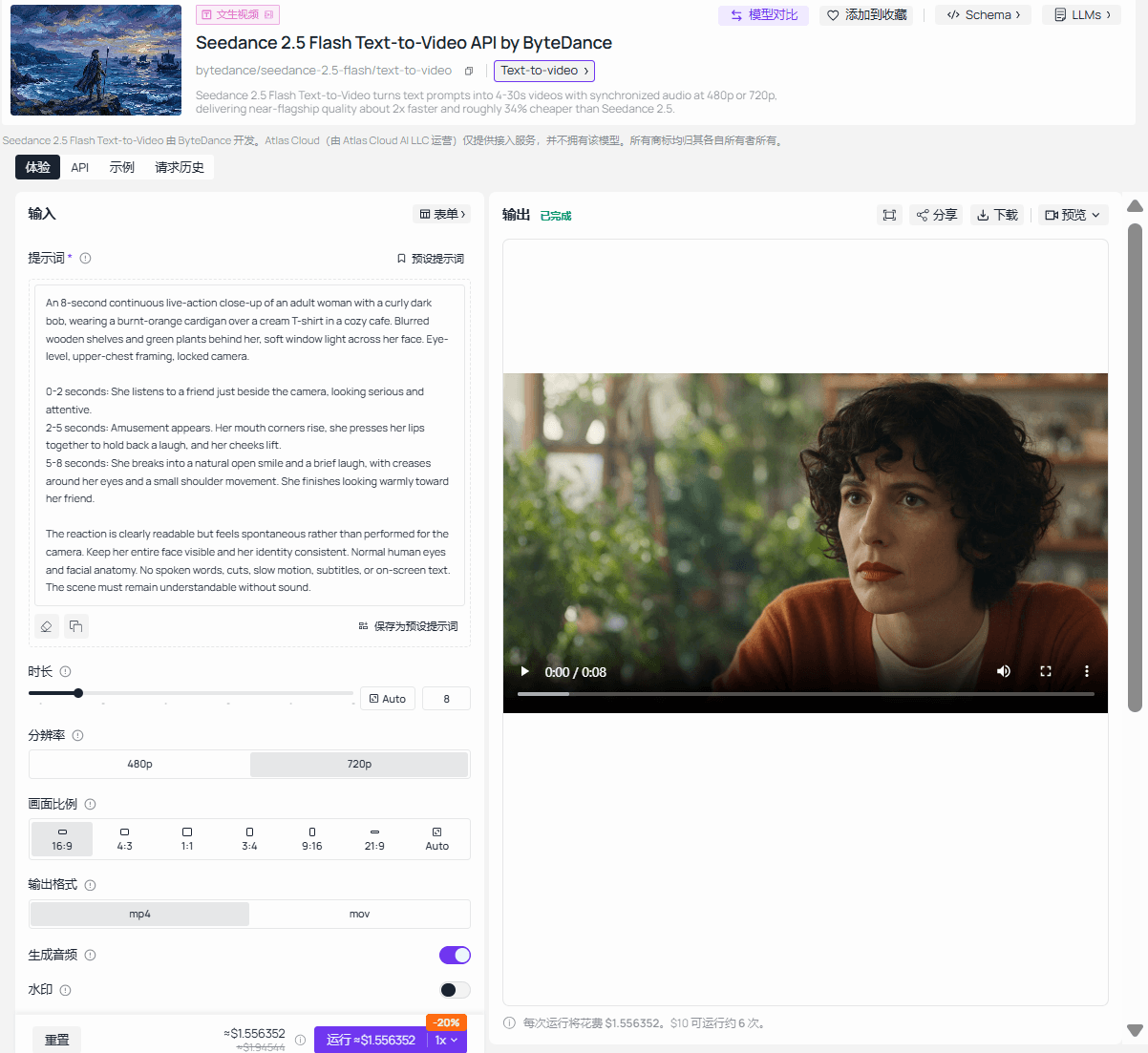
Completed Seedance 2.5 Flash cafe-prompt run on Atlas Cloud. Audio generation is enabled in this capture; turn it off before running the silent exercise above. GIF playback does not include audio.
These settings simplify the first review. Eight seconds leaves room for a reaction to begin and finish. A silent shot lets you judge facial movement without a voice or soundtrack steering your interpretation. An 85mm portrait-lens look describes the intended appearance; it does not claim a physical camera recorded the output.
Use the controls the page exposes. If it offers no independent seed, negative-prompt, guidance, or quality field, do not invent values for those controls. The constraints at the end of each template belong in the main prompt.
Save a playground capture with the run record, then review the full video before accepting the take. A completed status and a single preview frame do not establish whether the expression develops naturally.
Review the Whole Clip Before Changing the Prompt
Watch once at normal speed without pausing. Decide whether the reaction reads and whether its ending would fit your edit. Then review slowly for eye direction, mouth movement, jaw shape, and the face outline during the turn.
Keep the original video available when judging fine detail. A looping GIF is convenient for comparison, but its palette and compression can obscure subtle movements. Save your first judgment before a retry so a different-looking face does not quietly change your acceptance standard.
5 Facial Expression Prompts You Can Copy
Each case uses a different setting, wardrobe, and emotional task. Watch the eyes and mouth together, then check whether the final expression follows from the opening. The short GIFs demonstrate silent reactions; the longer videos show how listening and speech shape a performance.
The prompts below are creative templates. Cases 1, 3, and 5 retain the requested eight-second briefs beside the supplied clips; intended actions can differ from the resulting performance. Cases 2 and 4 are adaptations inspired by the official videos, not their full production prompts or dialogue transcripts. Timestamps describe intended beats, not measured frame-by-frame compliance.
1. Cafe Laughter: Listening, Suppression, and Release
The orange cardigan, cafe shelves, and green plants give this reaction its own setting. The useful change is the growing connection between the smile, lifted cheeks, and creases around the eyes. The supplied clip develops into an open smile without needing a large head movement.
plaintext1An 8-second continuous live-action close-up of an adult woman with a curly dark bob, wearing a burnt-orange cardigan over a cream T-shirt in a cozy cafe. Blurred wooden shelves and green plants behind her, soft window light across her face. Eye-level, upper-chest framing, locked camera. 2 30-2 seconds: She listens to a friend just beside the camera, looking serious and attentive. 42-5 seconds: Amusement appears. Her mouth corners rise, she presses her lips together to hold back a laugh, and her cheeks lift. 55-8 seconds: She breaks into a natural open smile and a brief laugh, with creases around her eyes and a small shoulder movement. She finishes looking warmly toward her friend. 6 7The reaction is clearly readable but feels spontaneous rather than performed for the camera. Keep her entire face visible and her identity consistent. Normal human eyes and facial anatomy. No spoken words, cuts, slow motion, subtitles, or on-screen text. The scene must remain understandable without sound.

Case 1. Full supplied clip, approximately 8 seconds, presented as a silent GIF.
Compare the opening with the last two seconds. A changing mouth alone would be a weaker reaction than a smile that also affects the eyes and cheeks. The GIF is silent, so judge the visible laughter rather than its sound.
2. Seaside Conversation: Listening, Glances, and a Smile
This official Seedance 2.5 reference uses two young adults on a seaside bench. The conversation gives their looks a reason: a speaker finishes, the listener responds, and a smile develops during the exchange. Later close-ups let you inspect each face more closely than the opening two-person composition.
Adapted prompt: this brief follows the visible setting and performance approach. It is not the official source prompt or a transcript.
plaintext1A 25-second live-action conversation between two adult friends on a wooden seaside bench after swimming. He wears a loose white T-shirt; she wears a cream summer outfit with a towel over one shoulder. Their hair is still damp. Calm blue sea, pale sky, warm late-afternoon daylight, natural skin texture. 2 30-8 seconds: Hold a chest-up two-person shot. They look toward the sea and exchange a few short, natural lines in French. Let one finish speaking before the other answers. 48-18 seconds: She turns her eyes and then her head toward him. He pauses, glances back, and lets a small smile develop. She watches his reaction before responding with a restrained smile. 518-25 seconds: Cut to separate face close-ups. Show his speaking expression, then her listening reaction and a brief smile as she looks away toward the water. 6 7Keep the exchange unhurried and conversational, with natural pauses and accurate lip synchronization. Preserve both identities, clothing, light, and seating positions. Gentle sea ambience and clear dialogue, no background music, subtitles, exaggerated reactions, or on-screen text.
Case 2. Official Seedance 2.5 showcase reference, 25.04 seconds, 720p, with original audio. Seedance 2.5 Flash generation is not confirmed.
Use this clip to separate speaking from reacting. An open mouth during a line is not by itself an emotional change. Look at the listener before the answer, the direction of the glance, and the point where the cheeks and mouth begin to soften. Keep the sound available when judging the dialogue timing.
3. Night Train: Fatigue Turning into Apprehension
A mustard-yellow raincoat and a rain-covered train window distinguish this case from the cafe. The supplied clip begins with a lowered gaze, then follows an off-screen event through an eye shift, head turn, and parted lips. The result reads as apprehension rather than a large shock reaction.
plaintext1An 8-second continuous cinematic live-action close-up of an adult woman with straight black hair, wearing an unhooded mustard-yellow raincoat over a charcoal sweater. She sits inside a nearly empty train at night. A rain-streaked window and blurred city lights are behind her. Soft cool interior lighting keeps both eyes and her mouth clearly visible. Locked eye-level camera. 2 30-2 seconds: She looks tired, gazing downward with a relaxed face. 42-5 seconds: She notices something in the aisle beside the camera. Her eyes move first, followed by a small head turn. Her brows lift and her lips part as her attention sharpens. 55-8 seconds: Her gaze becomes fixed. Her lower eyelids tighten, her shoulders stiffen, and she draws her chin back slightly. Hold the apprehensive expression through the ending. 6 7Keep the cause off-screen. Grounded suspense acting with a clearly visible change from fatigue to fear. Normal human eyes; no glowing pupils. No screaming, spoken dialogue, cuts, zoom, subtitles, or on-screen text. The reaction must read without sound.

Case 3. Full supplied clip, approximately 8 seconds, presented as a silent GIF.
Watch whether the eyes move toward a consistent target before the head follows. The final mouth position and brow should remain compatible with uncertainty. Avoid calling the result terror if the face only communicates concern.
4. Rainy-Night Pharmacy: Concern During a Conversation
This official Seedance 2.5 reference follows a mother carrying a child into a late-night pharmacy. Wider shots establish the need for help; repeated close-ups show her concern while speaking and listening. The child and the pharmacist give her changing attention a clear scene context.
Adapted prompt: this is a new brief based on the visible scene, not a reproduction of the official dialogue or complete production prompt.
plaintext1A 30-second realistic live-action scene at a late-night pharmacy on a rainy Paris street. An adult mother with damp brown hair wears a dark wool coat and a checked scarf, carrying her young child in a light hooded jacket. A pharmacist in a white coat stands behind the counter. Cool wet street outside, soft practical light inside, clear and natural faces. 2 30-7 seconds: Establish the rainy street and follow the mother carrying the child into the pharmacy. 47-13 seconds: Frame the mother and pharmacist at the counter as she asks for help in a short French sentence. He listens before turning toward the shelves. 513-24 seconds: Return to a close-up of the mother. Her brows stay drawn together; her lips briefly press closed while she listens, then part as she asks a short follow-up question. She looks down at the child and adjusts her supporting arm gently. 624-30 seconds: Hold her face as she looks back toward the pharmacist, worried but attentive. End with the mother comforting the child near the doorway. 7 8Keep the acting grounded in concern and concentration. Natural pauses, clear dialogue, accurate lip synchronization, quiet pharmacy ambience and rain outside. Maintain identities, clothing, and lighting. No screaming, melodramatic crying, subtitles, or on-screen text.
Case 4. Official Seedance 2.5 showcase reference, 30.04 seconds, 720p, with original audio. Seedance 2.5 Flash generation is not confirmed.
The close-ups are useful for comparing a speaking face with a worried listening face. Watch the brow, resting lips, and gaze toward the child. A quieter mouth does not necessarily mean relief; the clip can retain concern through its ending. Review the facial performance alongside the spoken exchange.
5. Station Farewell: Composure, a Dropped Gaze, and Return
The older man wears an olive-green coat and brown scarf against a softly blurred station platform. In the supplied clip, a brief smile gives way to a lowered gaze before he looks up again. The prompt asks for visible sorrow, but the result is more contained and does not clearly show a falling tear.
plaintext1An 8-second continuous live-action close-up of an older adult man with silver hair and a lined, clean-shaven face. He wears an olive-green wool coat and a brown scarf on a railway platform at dusk. Soft station lamps and a stationary train blur behind him. Gentle warm light reveals his face. Locked eye-level camera, upper-chest framing. 2 30-2 seconds: He watches someone beside the camera, holding his chin level and his lips closed as he tries to stay composed. 42-5 seconds: His inner eyebrows rise, his mouth corners turn downward, and his lower lip briefly trembles. His eyes become wet as his gaze drops. 55-8 seconds: He takes an uneven breath, swallows, and looks back toward the person. He holds a sorrowful expression, trying to regain composure without smiling. 6 7Natural, restrained farewell acting with a visible emotional progression. Tears gather at the lower eyelids rather than streaming dramatically. Keep his face unobstructed, with consistent wrinkles and normal human eyes. No spoken dialogue, exaggerated sobbing, cuts, slow motion, subtitles, or on-screen text. The emotion must remain clear without sound.

Case 5. Full supplied clip, approximately 8 seconds, presented as a silent GIF.
Judge the supplied result against the intended brief. The opening smile and later downward glance are visible; they should not be presented as proof that every requested crying cue was followed. Check the eyes, lip shape, and facial lines as his head lowers and returns.
Cases 2 and 4 are sourced from the official Seedance 2.5 showcase. Their source page displays abbreviated prompts; the adaptations above should not be attributed to ByteDance as exact production prompts.
Fix Blank Eyes, Sudden Smiles, and Face Drift
Change One Instruction at a Time
A useful retry tests a specific explanation. If the eyes look vacant, first identify whether the character has a clear target to look at. “Just left of the camera” gives the viewer a spatial relationship; “deeply emotional eyes” gives no comparable direction.
Keep a short record of the problem at a particular moment. “Smile appears fully formed near the start” is actionable. “Looks fake” does not tell you whether to change timing, intensity, framing, or continuity constraints.
The following are troubleshooting suggestions, not a claim that every defect occurred in these examples.
| Observed problem | First change | What to hold constant | Next check |
|---|---|---|---|
| Blank or wandering gaze | Name one off-screen listener target | Setting and emotional sequence | Does gaze return to that target? |
| Sudden smile | Lengthen the transition and simplify the ending | Character description and framing | Does the mouth begin changing before the final hold? |
| Exaggerated reaction | Replace a strong adjective with a small action | Duration and camera direction | Does the emotion still read at lower intensity? |
| Face drift during a turn | Reduce the turn angle | Lighting and expression beats | Do jaw and eye spacing stay coherent? |
| Repetitive blinking | Remove any repeated-blink instruction | Gaze target and shot length | Does blinking stop dominating the reaction? |
| Unnatural glowing pupils | Use neutral emotion wording and normal-eye constraints | Light and scene | Do the eyes retain an ordinary appearance? |
BytePlus documents glowing pupils as a possible overreaction to intense emotional wording. Its suggested remedies include neutral descriptions and explicit normal, non-glowing eyes. These are workarounds, not guarantees. The templates include that constraint without requiring a separate negative-prompt control. (Source: BytePlus prompt guide, checked November 2026.)
Separate Expression Problems from Continuity Problems
Expression problems concern what the person does and when. Continuity problems concern whether the face remains the same coherent face while doing it. A change from concern to relief is intended; a changing jawline or inconsistent eye spacing is a different issue.
Reduce simultaneous demands when diagnosing continuity. Remove a hand crossing the face, a dramatic turn, or a second action before rewriting the emotional sequence. Occlusion and large perspective changes can make the source of the failure harder to identify.
Allow ordinary perspective changes during the shallow arc. A nearer cheek can appear wider, and one ear can become more visible as the head turns. Those changes alone are not face drift. Look for a feature that changes shape implausibly or fails to return coherently when the person settles.
Likewise, judge blinking by its effect on the scene rather than a fixed count. A blink at the transition can work; repeated closures that hide the reaction can make the take unusable. Your acceptance rule should describe what the viewer needs to read, without demanding a motionless, symmetrical face.
Hold the room, lighting, framing, and shot length steady while changing 1 instruction. Independent text-to-video runs can still produce different people, so this is a practical revision method rather than a controlled identity-matched A/B test. If the person must match an existing shot, reconsider the input route.
When to Use a Reference Image or Seedance 2.5
Text-to-video is a useful starting point for an invented character and a standalone reaction. It lets you explore the performance before choosing a fixed portrait. That freedom becomes a drawback when an editor needs the same person across several shots.
For an existing first frame, consider Seedance 2.5 Flash Image-to-Video. The image gives the model a visual starting point, while the prompt directs the change over time. It still needs a full continuity review.
Portrait inputs have an additional practical boundary. BytePlus documents restrictions on directly uploaded real human faces and a separate approved portrait-asset route. Check the current upload and approval requirements before building a workflow around a person's photograph. Permission to use a photo and acceptance by the service are separate requirements.
| Production need | Suitable input or model | Trade-off |
|---|---|---|
| New person, one reaction | Seedance 2.5 Flash text-to-video | Appearance can vary across independent runs |
| Established first-frame appearance | Seedance 2.5 Flash image-to-video with accepted input | Starting appearance does not guarantee perfect motion continuity |
| Several reference responsibilities | A supported reference-to-video route | Each asset's role needs explicit direction and approval |
| Native 1080p or 4K requirement | Seedance 2.5, after checking the specific route | Another generation can change the performance |
Treat a move from Seedance 2.5 Flash to Seedance 2.5 as a fresh render. Reusing the prompt and accepted references can preserve intent, but it does not promise the same gestures or timing. Seedance 2.5 Flash has no Draft completion pathway that locks this take into a higher-resolution result.
Community comparisons also deserve that distinction. A same-prompt Seedance 2.5 Flash discussion on Reddit compares a small selection of clips. Such examples can suggest what to inspect; they cannot establish which model will win your particular close-up. (Reddit, November 2026.)
Budget for a Usable Take, Not Just One Render
Record the quote shown after selecting your actual resolution, duration, aspect ratio, and audio setting. A catalog's “From” rate is insufficient evidence for the final charge on any chosen task. Promotions and available settings can also change between sessions.
The catalog and Seedance 2.5 Flash detail page were checked on November 23, 2026. The catalog advertised a temporary Seedance 2.5 Flash discount, with a November 30 end banner. Confirm the current task quote rather than assuming that banner defines the terms for every configuration.
Use this project calculation:
Total test spend ÷ usable takes = cost per usable take
For example, if 5 equally priced renders produce 2 clips that meet your acceptance rule, each usable take carries 2.5 render charges. That is arithmetic for a hypothetical project, not a measured success rate. If none pass, report the spend and zero usable takes rather than dividing by zero.
Track elapsed wait separately from charges. A quicker individual result can still cost editing time if the eyes or mouth need repeated retries. Compare routes using your own delivery requirement and accepted clips; avoid assuming a fixed speed advantage for every prompt.
For your next Seedance 2.5 Flash facial expression close up, choose 1 template and generate 1 silent reaction. Check the eyes, mouth corners, visible breathing cues, facial continuity, and emotional landing. Save the take only when those observations support the scene you intended to edit.
Frequently Asked Questions
Can I use these prompts for vertical videos?
Yes. Select 9:16 and adjust the composition language if needed. Recheck face size, headroom, shoulder placement, and whether the turn cuts off the chin or hair. A ratio change does not guarantee preservation of the horizontal composition.
Will the same prompt reproduce the same face?
Do not count on it. Independent text-to-video generations can change appearance even when the wording stays identical. For a recurring character, investigate an accepted reference-input route and review each shot for identity continuity.
Can I add dialogue after the silent expression works?
Yes, as a separate test. Add the exact line, then recheck mouth shapes, vocal delivery, timing, and unwanted subtitles. A dialogue example must remain a video with sound; a silent GIF cannot demonstrate the audio or lip-sync result.
Why does a GIF make subtle eye movement harder to judge?
GIF palettes and compression can reduce fine texture and introduce visible color changes. Playback conditions can also affect perceived smoothness. Review the original MP4 before attributing a flicker, softened eyelid, or lost detail to the model.







