


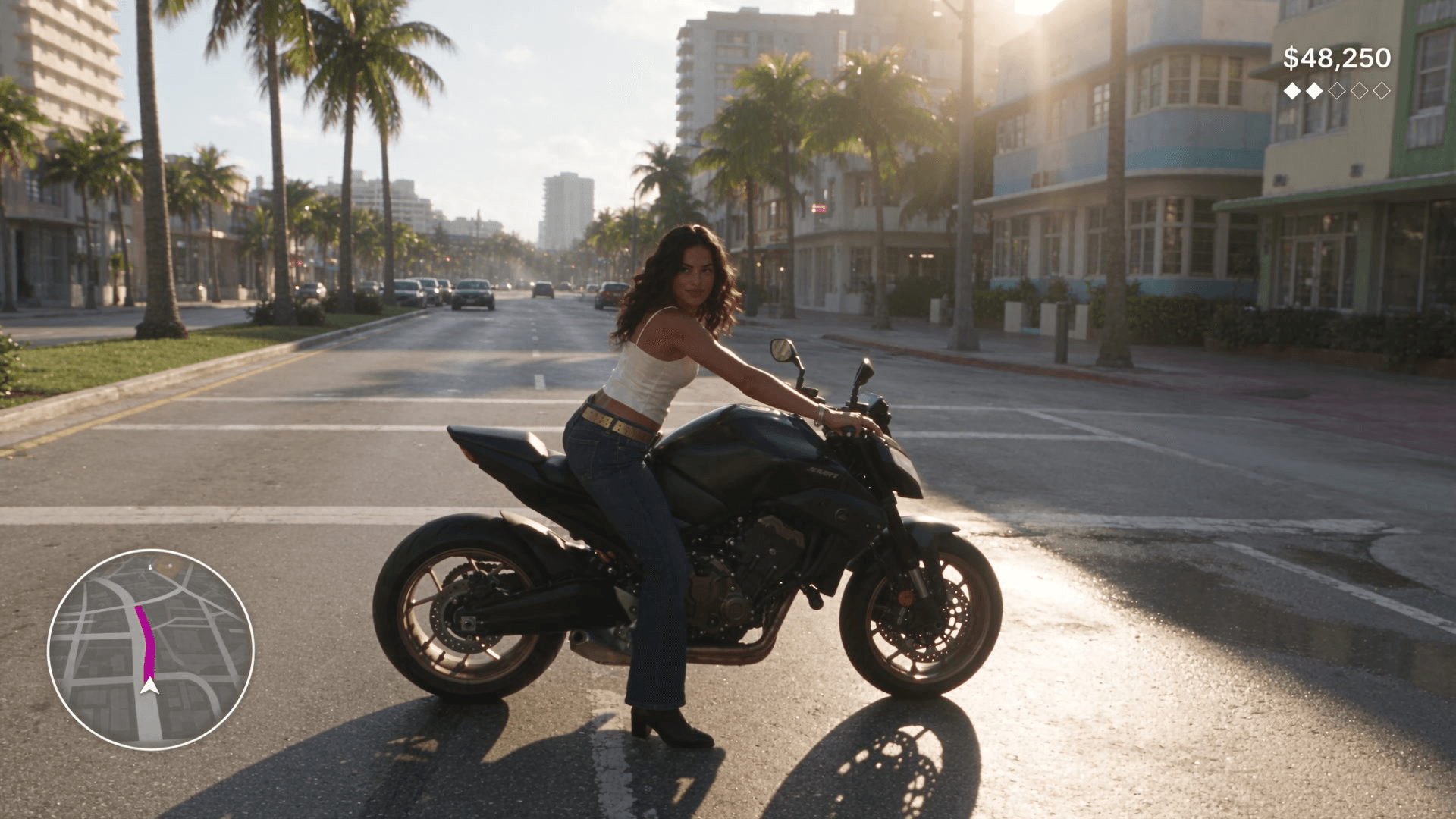
Rockstar has set GTA VI for November 19, 2026, and launch week is full of fan videos. Many of them look like trailers: slow drone shots, sunsets, a title card. Far fewer look like someone holding a controller. This guide covers that harder look, a Seedance 2.5 GTA 6 style clip that reads as real gameplay.
We built three 10-second clips with one original character: a motorcycle chase, a jet ski run and a walk through a rainy neon street. Across all thirty seconds, the minimap stayed in its corner and the money counter never changed a digit. Below are the prompts, the reference images behind them, the settings and the mistakes we fixed along the way.
Key Takeaways
- Seedance 2.5 GTA 6 style clips read as gameplay when a chase camera stays locked behind the player.
- Draw the HUD into the first frame with exact text and positions, and the video copies it.
- Make a face photo, a full-body sheet and a first frame before you generate any video.
- Start in the Seedance 2.5 image-to-video playground at 1080p, 10 seconds, with audio on.
- Describe neon signs as shapes, and give the player an original look and name.
What Makes a Seedance 2.5 GTA 6 Video Look Like Real Gameplay?
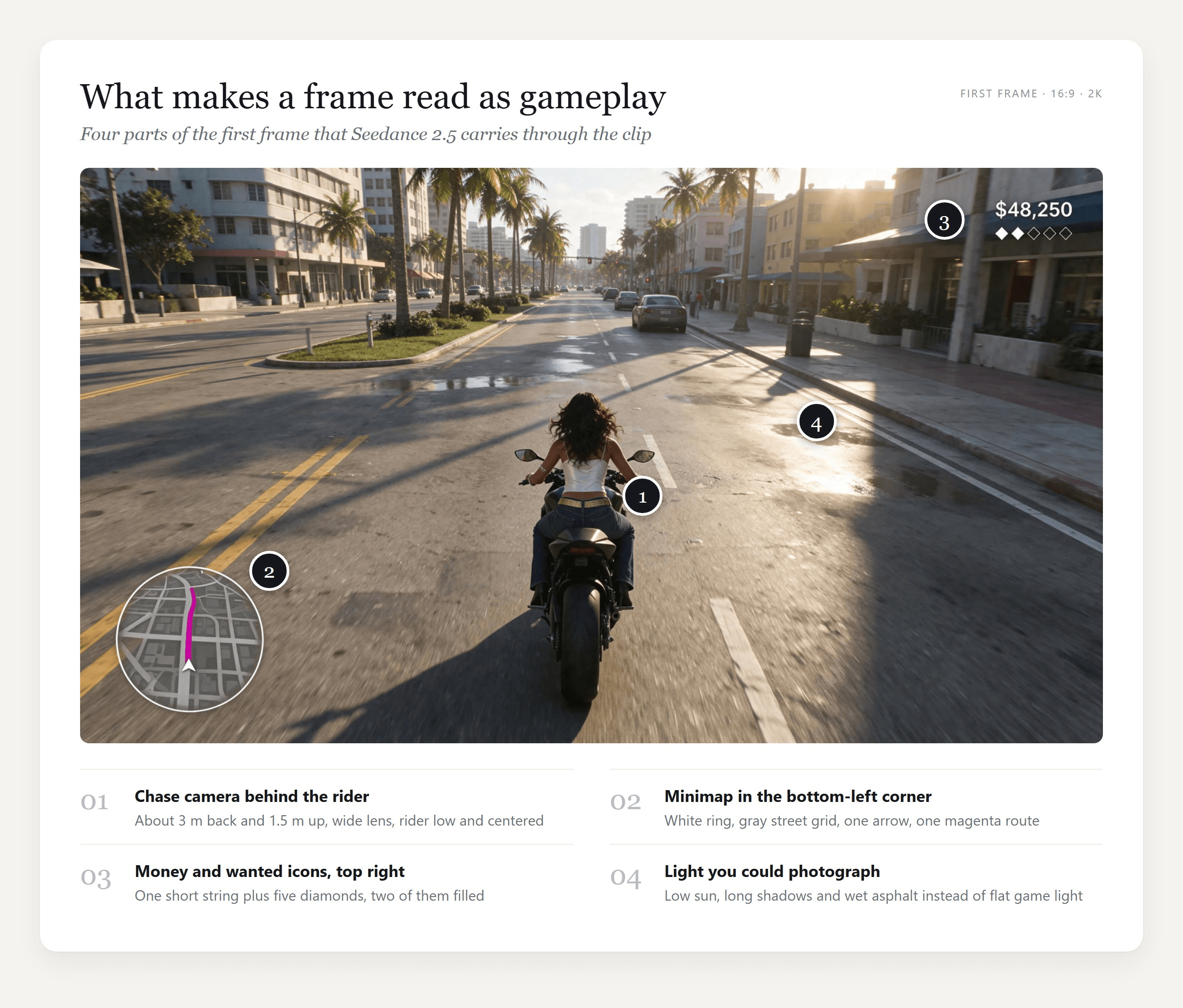
A trailer can cut anywhere. Gameplay can't. The camera sits behind the player at roughly the same distance for the whole clip, the HUD stays glued to the screen while the world moves under it, and the action happens in the order the player pressed the buttons. Viewers know that grammar from thousands of hours of play, so they spot a fake when any part of it breaks.
The fourth signal is light. Low sun, wet streets and hard shadows read as a current-generation game, while flat midday light reads as an older one.
We checked what happens without a picture to start from. Two text-only prompts, one opening with "GTA 6 gameplay footage" and one with "open-world crime game footage", both came back looking like the previous console generation: flat noon light, simpler textures and a square radar where we had only asked for a minimap.
The generic one even added a three-color status bar under its radar. With words alone, the model seems to fill the gaps with the open-world footage it knows best.
So the look gets decided before the video starts. A photoreal first frame sets the graphics, and a HUD you design yourself keeps the clip from borrowing someone else's.
How to Make a GTA 6 AI Video With Seedance 2.5
On Atlas Cloud, the whole job is two models in one account: an image edit model builds the first frame, and Seedance 2.5 animates it with sound. Here are the three clips this guide produces.
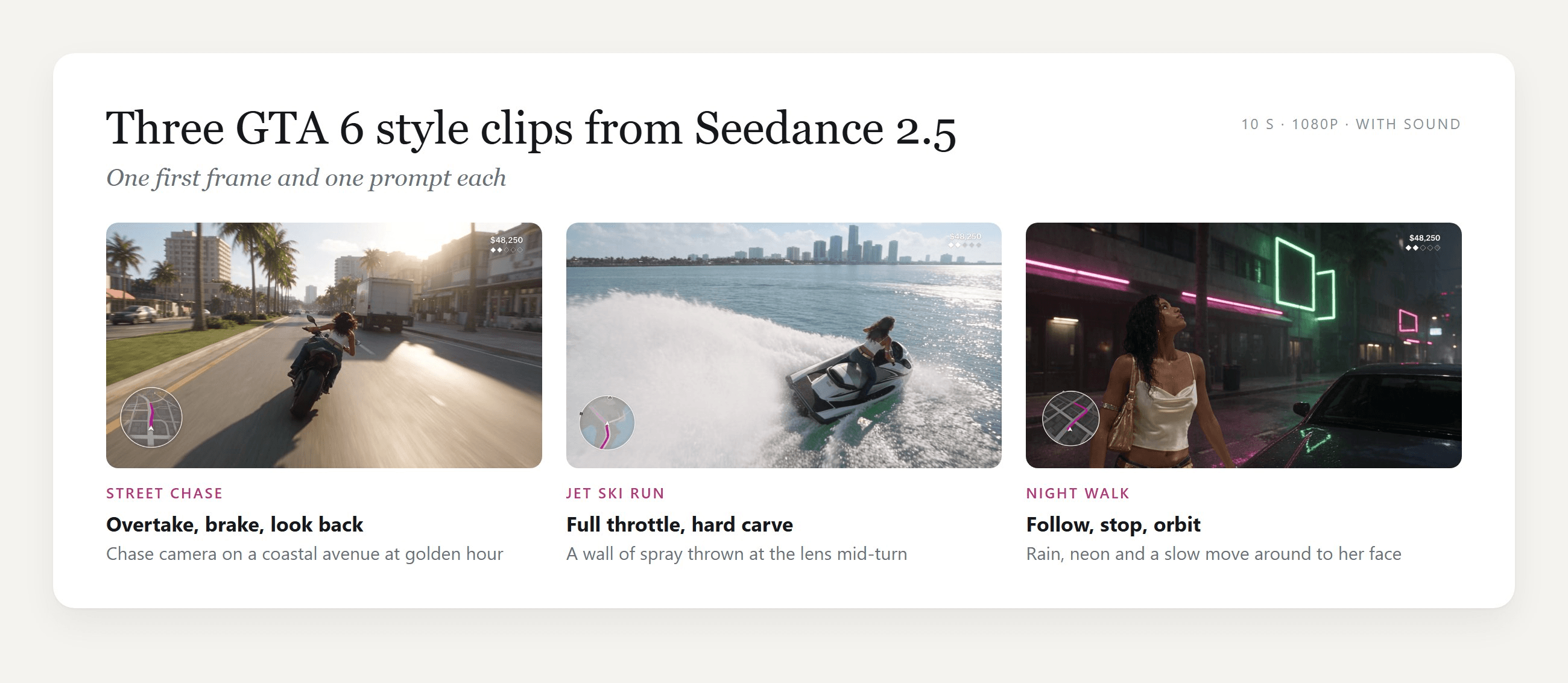
Seedance 2.5 starts the video from that exact frame, and in all three of our clips it kept what was drawn there, from the outfit down to the HUD text. That is why the image-to-video mode suits gameplay better than text-to-video: you decide the camera height, the character and the interface, and the model only has to move them.
Method 1: Generate the Clip in the Seedance 2.5 Playground
Sign in, then open the Seedance 2.5 image-to-video playground. Follow the numbered controls in the screenshot:
- Replace the sample text in Prompt with one of the video prompts from the next section.
- Remove the sample picture under Image and upload your first frame. Leave Last Image empty.
- Type 10 in the Duration box.
- Set Resolution to 1080p.
- Keep Generate Audio on.
- Press Run.

Aspect Ratio offers only Auto on this page, because the clip follows the image: a 16:9 first frame gives you a 16:9 clip.
Method 2: Call Seedance 2.5 Through the API
Batching ten chase variants for a launch-day edit is faster in code than in a browser tab.
Step 1: Create and copy an API key in the Settings page of the Atlas Cloud console.
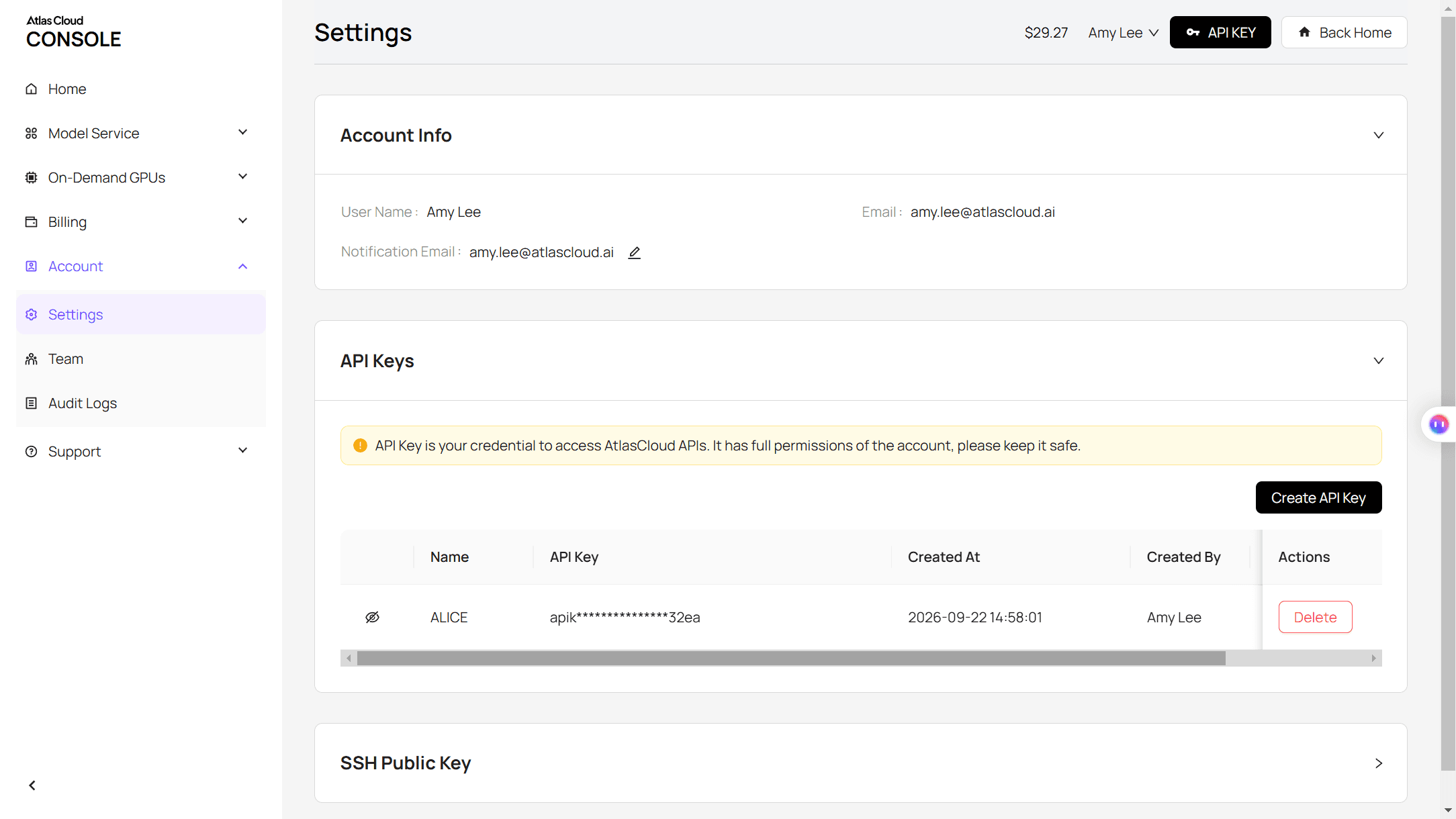
Step 2: Check the request format in the Atlas Cloud API docs.
Step 3: Build the first frame, then the clip, and poll for each result. The image call takes your face photo and full-body sheet as two references:
plaintext1curl -X POST https://api.atlascloud.ai/api/v1/model/generateImage \ 2 -H "Authorization: Bearer $ATLASCLOUD_API_KEY" \ 3 -H "Content-Type: application/json" \ 4 -d '{ 5 "model": "bytedance/seedream-v5.5/edit", 6 "prompt": "Photorealistic frame of third-person open-world video game footage. The young woman from the reference images, seen from behind and slightly above, rides a matte black sport motorcycle down a coastal city avenue at golden hour. A flat game HUD in clean white sans-serif: a circular minimap in the bottom-left corner, the text "$48,250" with five small diamonds in the top-right corner. No other text, no logos.", 7 "reference_images": ["https://your-cdn.com/face.jpg", "https://your-cdn.com/full-body.jpg"], 8 "size": "2816*1584", 9 "output_format": "jpeg" 10 }'
The video call takes the returned frame as image:
plaintext1curl -X POST https://api.atlascloud.ai/api/v1/model/generateVideo \ 2 -H "Authorization: Bearer $ATLASCLOUD_API_KEY" \ 3 -H "Content-Type: application/json" \ 4 -d '{ 5 "model": "bytedance/seedance-2.5/image-to-video", 6 "prompt": "Third-person open-world video game footage, one continuous take, no cuts. [0-3s] She accelerates down the avenue and swerves left past a slow sedan. [3-7s] She leans right and overtakes a delivery van. [7-10s] She brakes hard, the bike stops sideways and she looks back toward the camera. The chase camera stays locked behind her. The HUD stays exactly as in the first frame.", 7 "image": "https://your-cdn.com/frame-moto.jpg", 8 "duration": 10, 9 "resolution": "1080p", 10 "generate_audio": true 11 }'
plaintext1curl https://api.atlascloud.ai/api/v1/model/prediction/<prediction_id> \ 2 -H "Authorization: Bearer $ATLASCLOUD_API_KEY"
Other image and video models on Atlas Cloud take the same key and the same two endpoints. To try another video model on the same first frame, change the model string and leave the rest.
The GTA Style AI Prompt Formula for Gameplay Footage
Our video prompts follow one structure. Each part answers a question the model would otherwise answer for you.
| Part | What ours says | What it prevents |
|---|---|---|
| Footage type | "Third-person open-world video game footage, one continuous take, no cuts" | Trailer-style cuts and cinematic close-ups |
| Timed beats | "[0-3s] … [3-7s] … [7-10s] …" with one action each | Actions arriving out of order or not at all |
| Camera lock | "The chase camera stays locked about 3 meters behind… never moves in front of her and never becomes a close-up" | The camera drifting into a film shot |
| Body rules | "She takes real steps the whole way; she never glides, floats or morphs" | Characters sliding across the ground |
| HUD lock | "The HUD stays flat on the screen in the same corners and the text "$48,250" stays exactly as in the first frame" | Numbers rewriting themselves mid-clip |
| Sound | Engine, tires, water, rain, "no music, no voices" | A soundtrack that fights your edit |
| Exclusions | "No new text, no logos" | Signs and decals appearing out of nowhere |
The timed beats do the most work. Seedance 2.5 accepts bracketed timestamps like these, and splitting ten seconds into three beats gives each action enough time to finish.
Three Prompts to Copy: Street Chase, Jet Ski Run and Night Walk
Each prompt below ran on its own first frame, at 1080p for 10 seconds with audio on.
Street chase. She swerves past a sedan, overtakes a box truck, then brakes into a sideways stop, plants a boot and looks back. The camera swings around to her side for the final pose.
plaintext1Third-person open-world video game footage, one continuous take, no cuts. [0-3s] The young woman on the matte black motorcycle accelerates down the avenue and swerves left past a slow sedan, her long dark hair whipping behind her. [3-7s] She leans right and overtakes a delivery van, palm trees and pastel buildings streaming past on both sides, the minimap rotating slightly as she changes lanes. [7-10s] She brakes hard, the rear wheel slides a quarter turn and the bike stops sideways across the lane; she plants her left boot on the road, turns her head and looks back over her shoulder toward the camera. The chase camera stays locked about 3 meters behind and slightly above her for the whole clip, following with a small lag and a light shake at speed; it never cuts away, never moves in front of her and never becomes a close-up. The HUD stays flat on the screen in the same corners and the text "$48,250" stays exactly as in the first frame. Realistic game physics, the bike's wheels turn and the suspension dips under braking. Sound: engine roar rising and falling, wind, a tire screech at the stop, distant city traffic. No music, no voices, no new text, no logos.
Jet ski run. Four seconds of straight-line speed toward the skyline, then a hard right carve that throws a wall of spray at the lens before the camera settles back behind her.
plaintext1Third-person open-world video game footage, one continuous take, no cuts. [0-4s] The young woman on the jet ski speeds straight across the bay toward the skyline, the hull slapping over small waves, spray fanning out behind her, her long dark hair streaming back. [4-7s] She rides up the face of a rolling swell and the jet ski lifts clear of the water for a moment, then lands with a heavy splash and keeps going straight. [7-10s] She carves a hard right turn that throws a wall of water toward the camera, then straightens up, standing tall on the footwells as the bridge slides across the background. The two speedboats stay small and far away near the skyline the whole time; she never comes near or touches any boat. The chase camera stays locked about 4 meters behind and slightly above her for the whole clip, following with a small lag and bobbing gently with the water; it never cuts away, never moves in front of her and never becomes a close-up. A few water drops land on the lens during the turn and run off. The HUD stays flat on the screen in the same corners and the text "$48,250" stays exactly as in the first frame. Sound: jet ski engine whine, water slapping the hull, a big splash on landing, wind and gulls. No music, no voices, no new text, no logos.
Night walk. The camera follows over her shoulder as she walks to a parked car, then orbits to the front while she pushes back her wet hair and looks up into the rain.
plaintext1Third-person open-world video game footage, one continuous take, no cuts. [0-4s] The young woman walks down the wet street with an even, unhurried stride, her right hand on the strap of her gold shoulder bag, each boot heel clicking and splashing in the shallow puddles; the camera follows 2 meters behind her right shoulder. [4-7s] She stops beside the parked dark sedan and rests her left hand on its roof; the camera slowly orbits around her right side until it faces her. [7-10s] She sweeps her wet hair back over her shoulder with her left hand, tilts her chin up slightly and looks past the camera, rain beading on her bare shoulders, neon reflections sliding across the car roof. She takes real steps the whole way; she never glides, floats or morphs. Her outfit stays the same throughout: white satin cropped camisole, low-rise bootcut jeans, wide gold studded belt. The street stays empty, no other people appear. The neon stays abstract: pink horizontal tubes and hollow green rectangle frames, never letters. The HUD stays flat on the screen in the same corners and the text "$48,250" stays exactly as in the first frame. Sound: steady rain, heel steps in water, a low electric hum from the neon, a distant siren. No music, no voices, no new text, no logos.
Reference Images: Lock the Character and the HUD First
Every clip above started three images earlier. A face photo alone gives the model too much freedom with the body and clothes, and those details can shift once the camera starts moving. A full-body sheet settles them once, and the first frame then places that exact person in the scene.
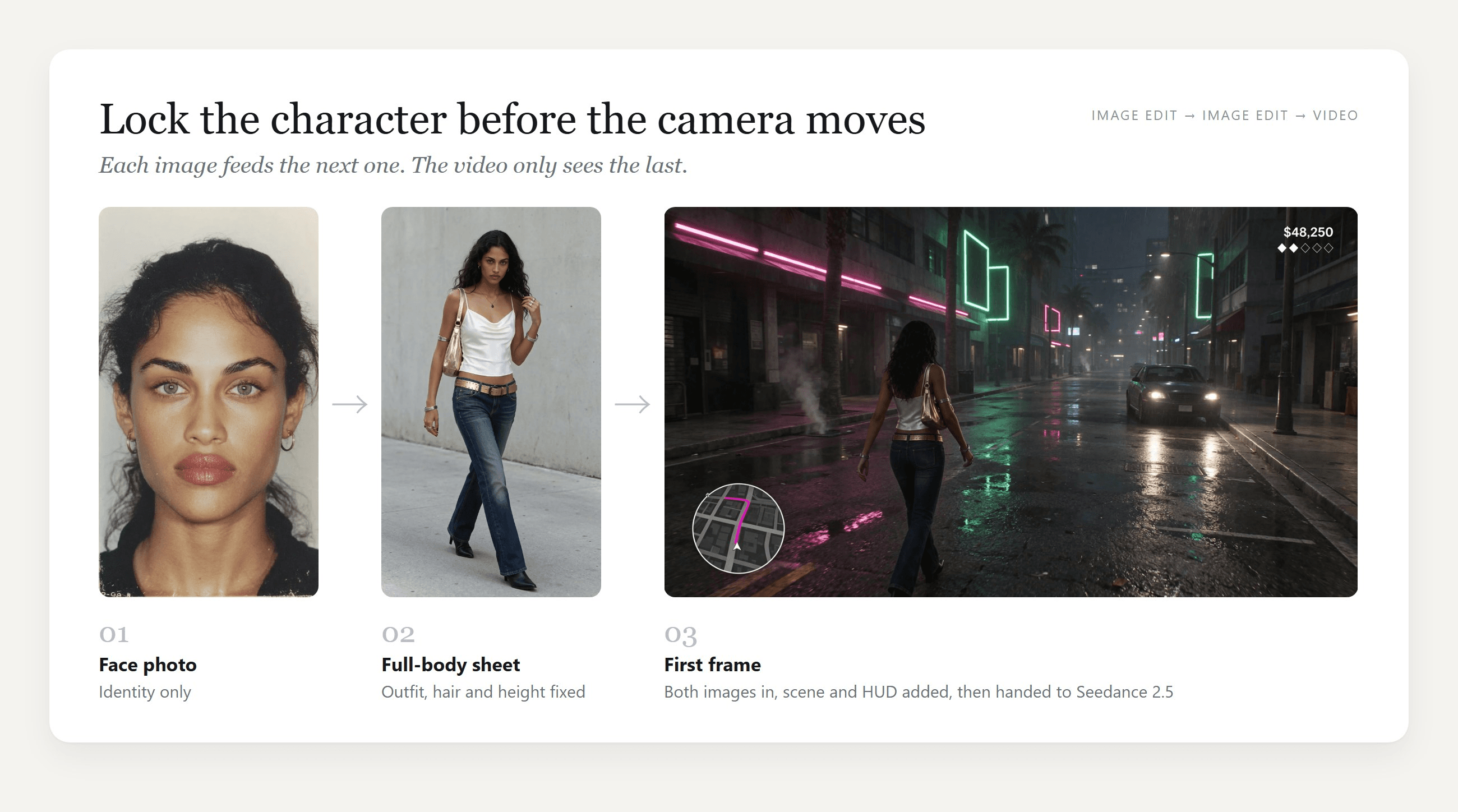
We made both stills with Seedream v5.5 in Atlas Cloud's Image Edit tab, and any image model that accepts two references can do the same. The full-body sheet asked for model proportions, a waist-height camera and a specific outfit: a white satin cowl-neck camisole, low-rise bootcut jeans, a gold studded belt and black heeled boots. Naming each item gives the later images something exact to copy.
Each first frame then took both the face and the full-body sheet. Two habits made them work:
- Draw the HUD into the image, and keep it small. One money string and five icons were all ours needed to read as a game.
- Show the player from behind or over the shoulder. That is how gameplay is framed, and it leaves the face for one deliberate reveal at the end.
Here is the full first-frame prompt for the street chase, uploaded with the two reference images:
plaintext1Photorealistic frame of third-person open-world video game footage. The young woman from the reference images, seen from behind and slightly above, rides a matte black sport motorcycle down the center lane of a wide coastal city avenue, leaning slightly to the left. Same outfit as the full-body reference: white satin cowl-neck cropped camisole, low-rise dark-wash bootcut jeans, wide gold studded belt, black heeled ankle boots, silver bangles, no bag; her long dark curly hair is loose and blown back by the wind. The chase camera sits 3 meters behind her and 1.5 meters above the road, wide lens; she is centered in the lower middle of the frame and the road runs straight to the horizon. Late afternoon sun low on the right, long shadows, wet patches on the asphalt reflecting the sky, palm trees on the median, pastel mid-rise buildings, a few plain unbranded cars far ahead. A flat game HUD is drawn on top of the picture in clean white sans-serif: in the bottom-left corner a circular minimap with a thin white ring, gray street grid, a white arrow in the center and a magenta route line; in the top-right corner the text "$48,250" with a row of five small diamond icons under it, the first two filled white and the other three only outlined. No other text anywhere, no logos, no brand names, blank license plates, no lettering on signs or buildings.
If you would rather turn a selfie into a GTA loading-screen poster, our GTA filter guide covers that illustrated look step by step.
Seedance 2.5 Settings for GTA 6 Gameplay AI Clips
These are the settings behind all three clips, with the reason for each.
| Setting | What we used | Why |
|---|---|---|
| Mode | Image to video, first frame only | The first frame fixes the character, the graphics and the HUD |
| Aspect ratio | 16:9, set by the first frame | Image-to-video keeps the ratio of the image you upload |
| Resolution | 1080p | Seedance 2.5 renders 480p, 720p and 1080p natively; the SR and ESR options add an upscaling or enhancement pass on top |
| Duration | 10 seconds | Room for three timed beats. One generation can run from 4 to 30 seconds |
| Audio | On | Engine, water and rain sounds arrive synced to the action |
| Draft | Optional 480p preview | Checks the motion cheaply before you commit to a 1080p render |
For ideas you are unsure about, the draft option is worth a look. It renders a 480p preview and returns a draft ID, which the separate draft-complete endpoint finishes at 1080p once you like the motion.
Why GTA 6 AI Trailer Clips Go Wrong, and the Fix for Each
Failed GTA-style clips tend to break the same handful of gameplay rules. This jet ski chase posted to YouTube shows several in 42 seconds: the rider drives into a yacht, rides up its hull, a police boat crashes too, and the planned jump never happens. Here is what causes each problem and the line that fixes it.
| What goes wrong | Usually caused by | What to write instead |
|---|---|---|
| Signs fill with invented letters | "No text" alone leaves the model to decide what a sign shows | Describe what the neon is, such as pink horizontal tubes and hollow green rectangles |
| The money counter changes or garbles | A long HUD, or a prompt that never mentions it | One short string, plus "stays exactly as in the first frame" in the video prompt |
| Icons multiply or vanish | The count is implied instead of stated | Add a count check: "exactly five diamonds, the first two filled" |
| The camera wanders into a film shot | No distance or position given | "Locked about 3 meters behind… never moves in front of her" |
| The player glides instead of walking | Walking is assumed, never described | "She takes real steps the whole way; she never glides, floats or morphs" |
| Vehicles collide or the scene drifts | Too many moving objects close to the player | Keep other vehicles far away and give each beat one action |
| The clip looks a console generation old | Text-only prompt, no first frame | Start from a photoreal first frame with your own HUD |
| Official logos or characters show up | Asking for the real game's branding | An original character, an invented HUD and no wordmarks |
If the HUD still shifts on a 10-second clip, cut the duration to 5 seconds and generate again. Fewer seconds leave less room for the overlay to change.
Frequently Asked Questions
Can I write "GTA 6" in a Seedance 2.5 prompt?
In our test, a prompt that opened with "GTA 6 gameplay footage" generated normally and showed no official logo or text. It also looked older than the clips above, as if the name pulled the model toward last-generation footage. Describing the camera, the light and your own HUD gets you closer to the GTA 6 look than the name does.
If you publish the result, label it as AI-made fan content and leave out Rockstar's logos and characters.
How much does a 10-second GTA 6 style clip cost on Atlas Cloud?
As of November 17, 2026, with a 20% discount applied, a 10-second Seedance 2.5 image-to-video clip with audio costs $5.98 at 1080p (list price $7.47) and $3.04 at 720p. A 5-second clip at 1080p is $3.00, and a 10-second 480p draft is $1.40. Each first frame from Seedream v5.5 Edit at 16:9 2K with two reference images is about $0.04. Prices change, so check the model page before a big batch.
How long can one Seedance 2.5 clip run?
One image-to-video generation runs anywhere from 4 to 30 seconds. We kept to 10 because three timed beats fit comfortably and the HUD held steady for the whole clip. For a longer sequence, generate several short clips from first frames that share the same character and HUD, then cut them together.
Can I put myself in a GTA 6 style AI video?
Yes. Use your own face photo as the first reference, make a full-body sheet from it, then build the first frame from both, exactly as in the reference image section. Rear and over-the-shoulder views keep you recognizable without asking the model to hold your face for ten seconds. Use only photos of yourself or of people who have agreed to it.
Will the same workflow make vertical 9:16 clips for TikTok?
Yes. Seedance 2.5 image-to-video follows the ratio of the first frame, so a 9:16 first frame gives you a 9:16 clip. Move the minimap and the money counter inward so the app's buttons and captions do not cover them, and remember that a vertical frame shows less of the road on either side of the player.
Conclusion
Gameplay realism comes from rules more than from rendering power. Lock the camera behind the player, draw a small HUD into the first frame, write the action as timed beats and spell out what has to stay the same. Seedance 2.5 held those rules across all three of our clips, and the light and texture come from the photoreal frame you hand it.
Start with one first frame and the street chase prompt, then swap in your own character, vehicle and city. GTA VI arrives on November 19, and a Seedance 2.5 GTA 6 style clip of your own can be ready before the game unlocks.




