A losing football coach beams through a celebratory funk song, the keyboard player joins in, and the camera cuts to a saxophone solo. That is the joke behind the Tiny Desk AI trend. The performance underneath it is real; the coaches performing it are not. Before making a new version, it helps to see what three existing edits actually preserve, and what changes when their casts change. The original concert and the AI parodies are different kinds of media, and that distinction matters.
Key takeaways
- A 2023 NPR Music concert is the real performance behind the Outstanding edits.
- The October 2026 all-loss coaches parody turned the joyful song into a joke about a terrible football weekend.
- Three online clips show how the cast changes while the keyboard, lead reaction, and saxophone handoff keep the format recognizable.
- An original version needs more than a face swap: plan the cast, facial reactions, instrument handoffs, camera cuts, and sound as one sequence.
Three Tiny Desk AI videos to watch before making one
These silent GIFs are excerpts from publicly displayed online video previews. They show the visual structure of three edits made by others; their original sound is not included here. None is an output from our Atlas Cloud test.
1. The all-loss coaches: the joke that launched the wave
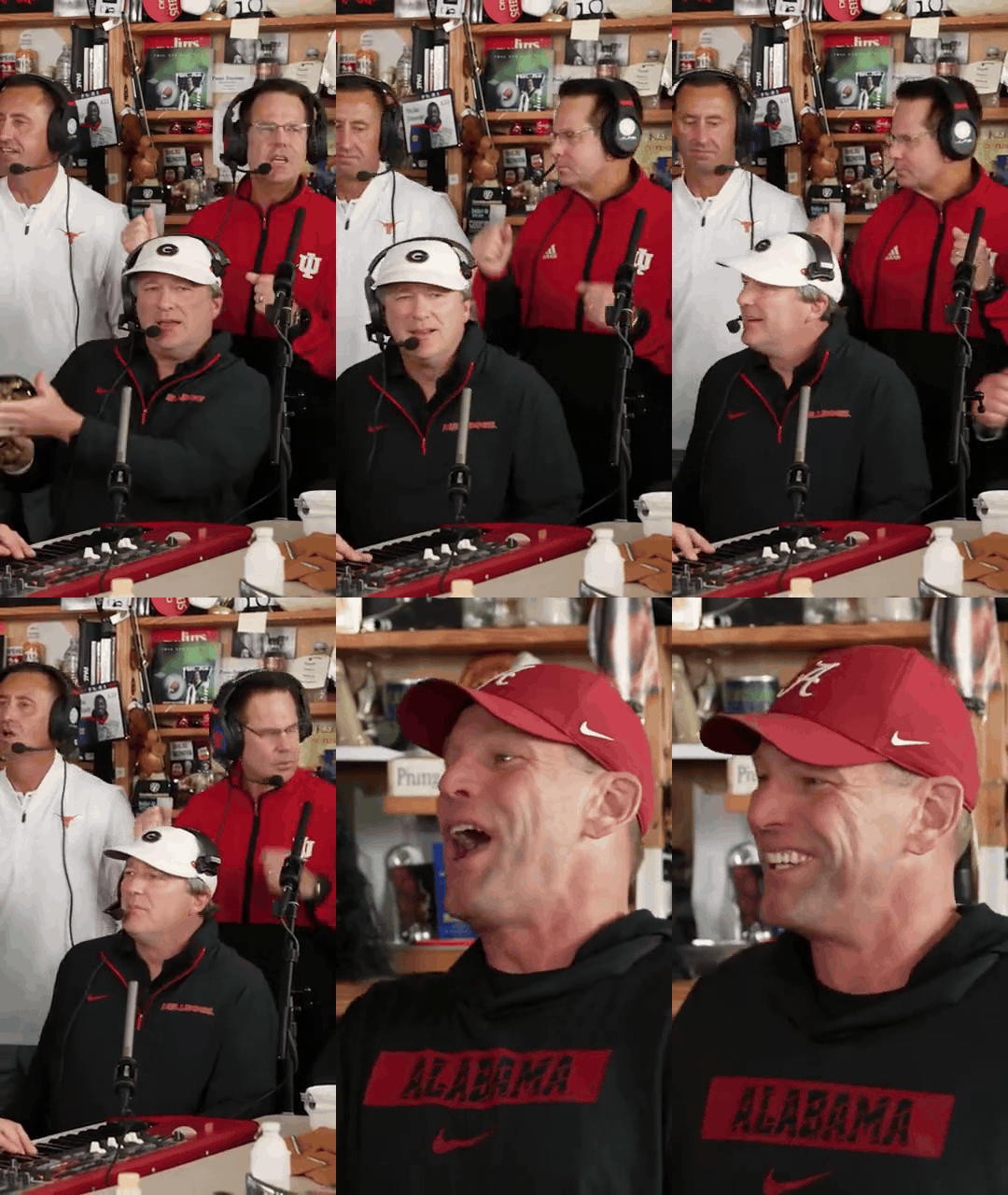
Six-second excerpt of an all-loss coaches parody. The preview shows the keyboard and backing singers, followed by a cut toward the lead.
After five highly ranked college football teams lost on October 17, 2026, an AI parody put their coaches into a Tiny Desk-style performance of “Outstanding.” The choice of people supplies the punchline: the song sounds like a victory lap the morning after defeat. The edit reframes a section of the real concert vertically and recasts the musicians. It is an AI parody, not an NPR booking or footage of the coaches singing.
The group frame matters as much as the famous lead. The red keyboard and two animated backing performers make the music feel like a shared event. If a remake only changes the close-up face, the group shots can still reveal the previous cast.
2. Cowboys Legends: the lead reaction carries the middle

Nine-second excerpt of a Cowboys Legends version. This GIF is silent; the performance's sound is not reproduced here.
Here the performers wear suits, and the singer's face takes over the frame. A small smile becomes a full laugh while the band stays audible in the original post. The change in expression gives the viewer a reason to stay through the middle of the edit. A useful prompt should specify a progression, such as a sung phrase, a glance toward the keyboard, then an unplanned laugh, rather than asking for one fixed “happy” expression.
3. NFC East: save a distinct role for the saxophone
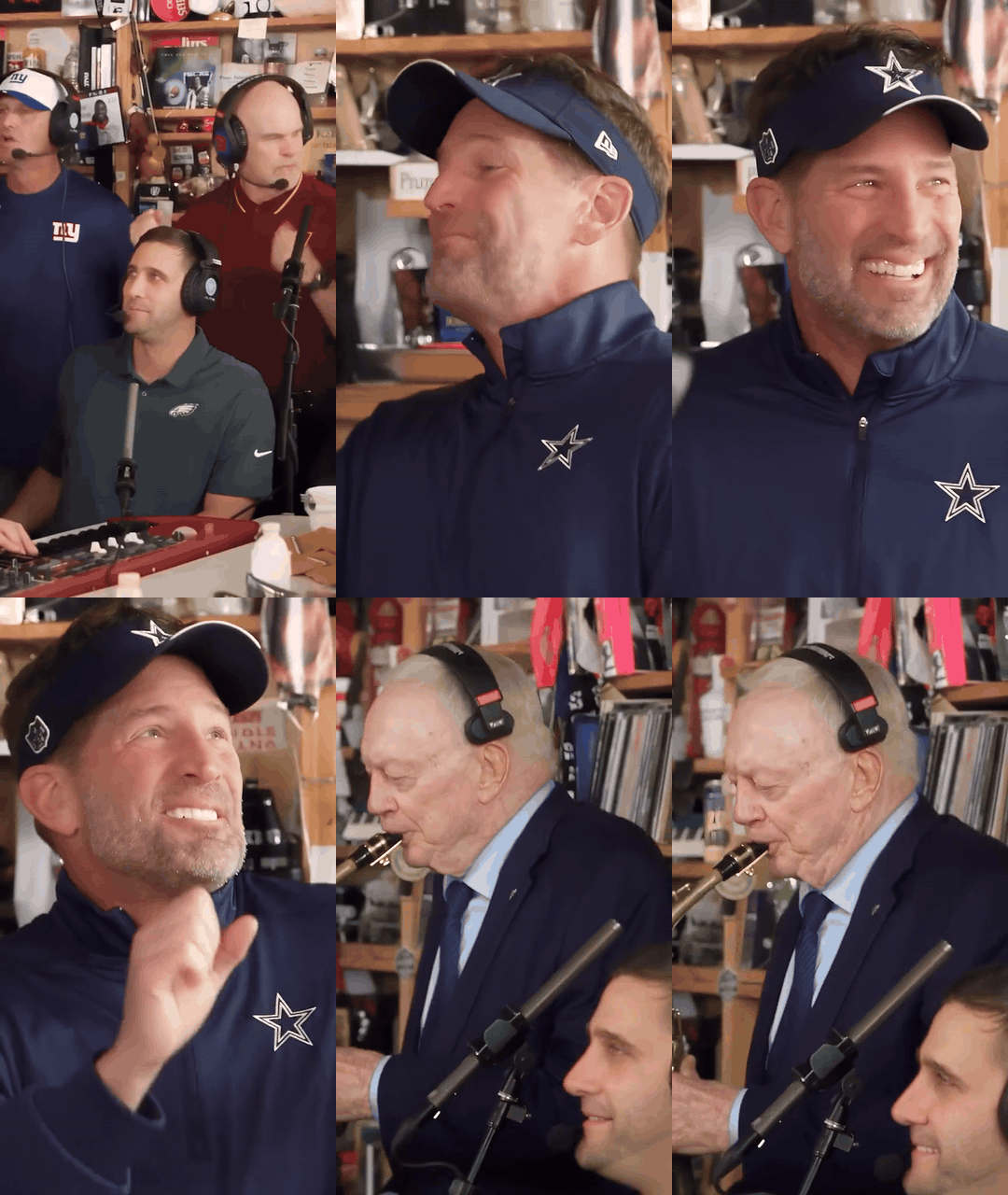
Nine-second excerpt from an NFC East video preview. This is a third-party preview, not an independently verified copy of the original post.
The lead laughs, then the edit gives the saxophone player a separate close-up. That cut is a payoff, not a decorative instrument insert: a new character takes over the musical phrase. The same principle works for a fictional band. Give each performer one readable action and let the camera move to whoever has the musical turn. Asking every band member to emote and solo simultaneously makes the sequence harder to follow.
Which video is the original?
The underlying concert is an NPR Music Tiny Desk performance published June 5, 2023. It closes with “Outstanding,” a song associated with The Gap Band. The real set includes keyboard players, backing vocalists and a saxophonist. Its smiles, band interplay and horn handoff were filmed before the 2026 AI trend. The coaches parody recasts a section of that concert. Neither the concert nor its performers should be described as AI-generated.
The recognizable short-form sequence can be read as five visual beats: a lead opening, the band at the desk, an expressive lead close-up, a saxophone turn, and the band again. The exact order and length vary between edits. The structure matters because it gives a new cast several chances to add a joke without requiring a new song or a long explanation. In the GIFs above, the most useful thing to study is who is onscreen when the music changes.
Design a version that has its own performers and setting
For the original test below, the cast is fictional. The setting is an after-hours record archive with a small performance corner, not NPR's office. The lead is a young adult woman in a cobalt satin jacket; her band has a red electric keyboard, a saxophone, bass and light percussion. The scene uses amber practical lamps, deep teal shadows, record sleeves, and worn wood textures. Those details give the performers a common place to inhabit without copying NPR signage or another creator's faces.
The comic idea is that the lead tries to hold a polished late-night performance, then loses her composure when the keyboardist answers her melody with an unexpectedly cheeky run. She laughs, recovers, and gestures to the saxophonist for the finale. A visual action causes the reaction, so the laugh has a reason to happen.
| Time | Performance beat | Camera and expression to check |
|---|---|---|
| 0–5 s | Introduce the archive corner and the ensemble | A medium-wide view establishes all players and the red keyboard. The lead looks focused. |
| 5–10 s | Lead sings a short original, wordless melodic phrase | Move to a three-quarter close-up. Her eyes track the keyboard player. |
| 10–14 s | Keyboardist answers with a playful flourish | Cut to hands on keys and a knowing grin, then back to the lead. |
| 14–19 s | The lead tries to continue and breaks into a genuine laugh | Keep the face stable through a surprised smile, brief laugh and recovery. |
| 19–24 s | Saxophonist steps forward for the handoff and the band closes together | A side close-up shows the instrument and player, followed by a final group view. |
The timing is a target for the generated result, not a claim that a model will follow every second precisely. We review the returned video before describing what actually happened.
Make the reference image on Atlas Cloud
The reference image should establish the people, instruments, room, light and starting camera angle before asking for 24 seconds of movement. A wide opening frame is more useful than a tightly cropped face because the first beat introduces the whole band. We use fictional adults and an original room design so the subsequent video has its own identity.
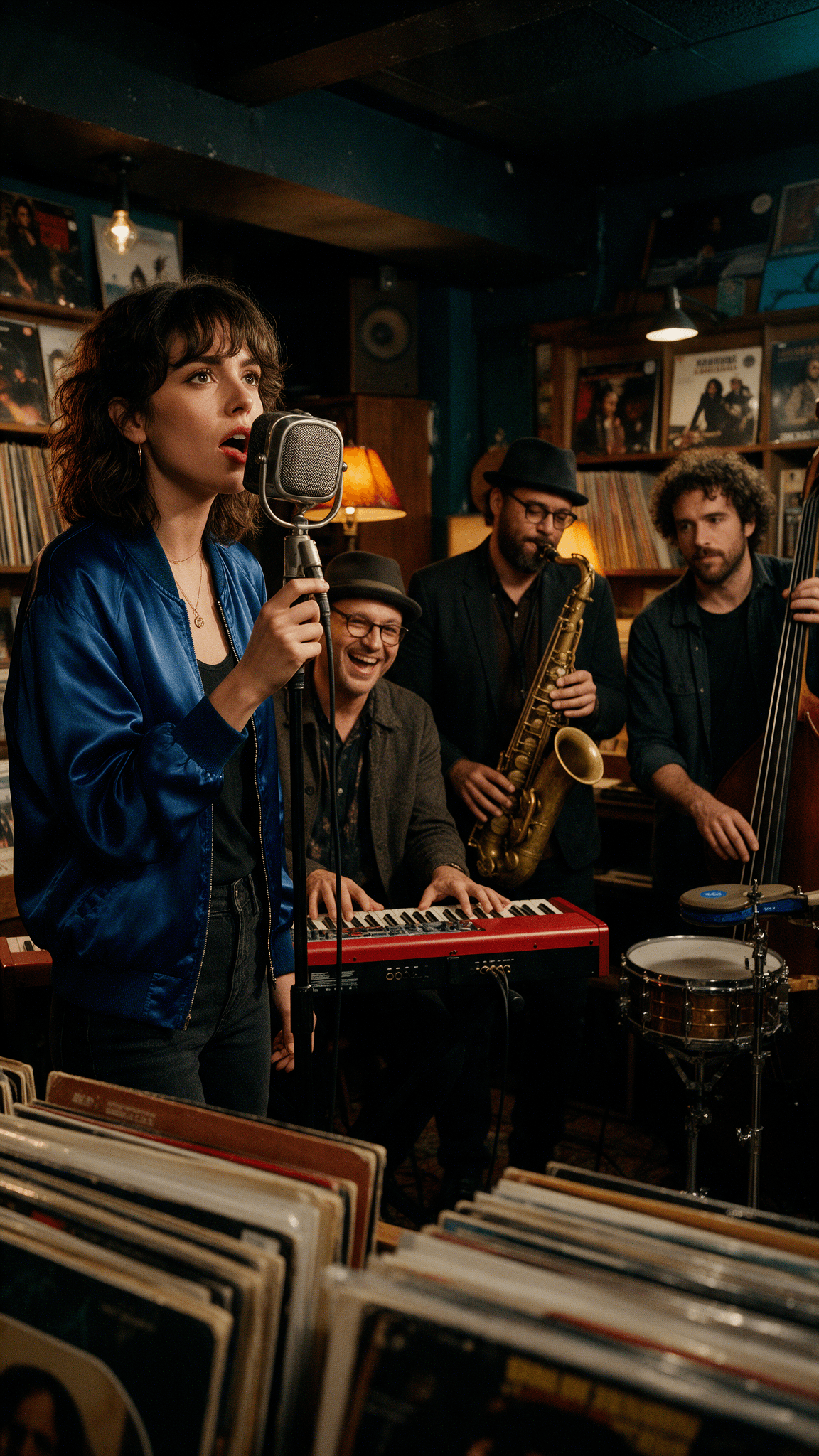
The actual 1152 × 2048 reference frame generated in the Atlas Cloud Seedream 5.0 Pro playground. Its red keyboard, upright bass, saxophone and record racks give the video model stable visual anchors. The keyboardist is already laughing in this opening frame, which makes the band's playful tone visible before the camera moves.
The reference-image prompt is:
plaintext1Vertical 9:16 cinematic editorial photograph of a small fictional late-night soul band in an intimate after-hours record archive. A charismatic young adult woman in a cobalt satin jacket stands front left at a vintage microphone, focused and about to sing; her expressive face is clearly visible. Behind and beside her are three distinct adult musicians: a playful keyboardist at a glossy red electric keyboard, a saxophonist holding a brass tenor saxophone, and a bassist beside a compact percussion setup. Shelves of record sleeves, worn walnut wood, amber table lamps and deep teal corners. Warm directional lamp light with gentle rim light on faces and brass, layered foreground record sleeves, a clear view of each person's hands and instrument, restrained amber and teal color palette, natural skin and fabric texture, 35 mm documentary lens, subtle film grain. Rich but believable small-room composition, no logos, signs, text, duplicate people or extra instruments.
Generate and inspect a longer performance
Use the Atlas Cloud Seedance 2.5 image-to-video playground with the approved starting frame. The live form accepted 24 seconds, 720p, MP4 and native audio. Its aspect-ratio control only offers Auto for this first-frame workflow; the model's help text says Auto preserves the uploaded image's aspect ratio, so the 9:16 reference sets the vertical output. Keep the same cast, clothing, instruments and room in every shot. An original wordless melody and instrumental groove make the music part of the example without relying on the commercial Outstanding recording.
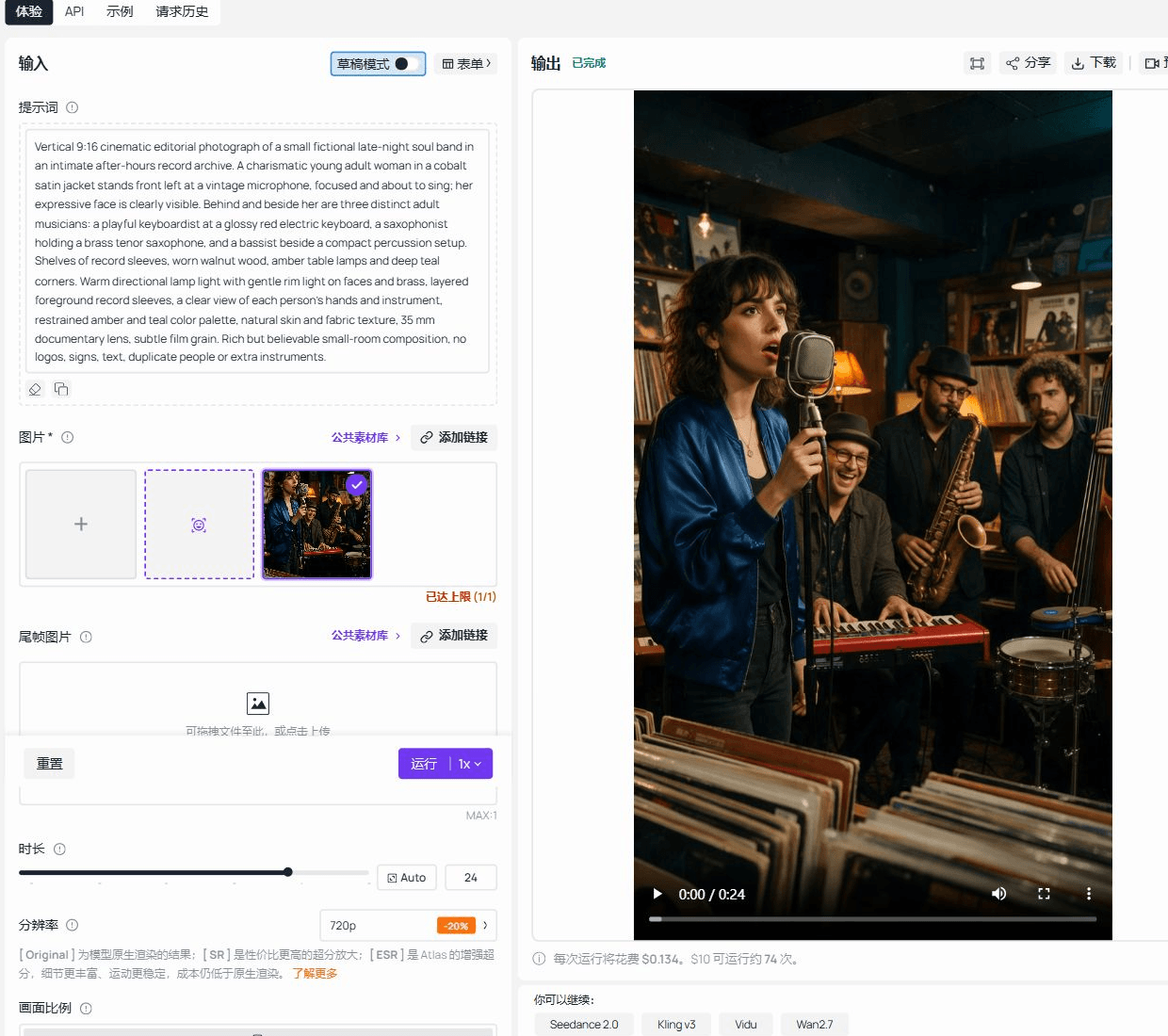
The completed Atlas Cloud test-environment page, cropped around its input and output panes. The uploaded first frame, 24-second setting, 720p selection and returned vertical video are visible. The prompt field in this capture shows the band's visual description; the motion prompt used for the video is reproduced below. The downloaded MP4 measures 24.064 seconds at 720 × 1280 and includes an AAC audio track.
The motion prompt is:
plaintext1Create a 24-second vertical 9:16 live-performance video from this reference frame. Keep the same four fictional adult band members, faces, clothes, instruments, record-archive room and amber-teal lighting throughout. Use smooth, believable human playing and rich facial expression. 0–5 seconds: medium-wide view, the lead woman gathers herself at the mic while the bassist begins a lively original soul-funk groove with a light drum beat; the keyboardist glances at her. 5–10 seconds: three-quarter close-up as she sings a short original wordless melody, focused and warm, then turns her eyes to the red keyboard. 10–14 seconds: cut to the keyboardist's moving hands and delighted grin during a nimble musical answer. 14–19 seconds: cut back to the lead; a surprised smile grows into a genuine brief laugh, she catches her breath and nods to the saxophonist. 19–22 seconds: side close-up of the saxophonist stepping into a bright, melodic solo, fingers moving correctly on the keys. 22–24 seconds: medium-wide final group view, the band lands the phrase together and the lead smiles toward them. Original instrumental music and room ambience, no recognizable existing song or lyrics. Natural camera cuts, stable identities, coherent instrument positions, no extra people, no subtitles, no logos, no frozen close-up, no slow camera-only zoom.
The finished original video
Our original 24-second record-archive concert, generated from the reference frame above with Seedance 2.5. The edit moves from an ensemble view to the singer, a smiling keyboard player and a saxophone close-up before returning to the group. The singer's smile grows after the keyboard exchange. The timing and action vary from the requested beat sheet, so the finished clip is the result to judge.
Judge the result on the band as a whole, not only the lead's face. The keyboard player should be playing when the keyboard phrase is heard; the saxophonist should actually hold the saxophone in the solo shot. The lead's expression should change for a reason and return to the performance. A result that stretches one smile or camera push across 24 seconds misses the point of the longer duration.
If the first pass loses a player between cuts, reduce the number of simultaneous actions or make the handoff a separate shot. If a face changes, use a clearer reference image before increasing prompt length. If the music drives the joke, keep the final file as a video with sound. A silent GIF would hide the relationship between the keyboard answer, the laugh and the saxophone solo.
Before posting your own concert
Use photos and footage you are allowed to transform, and make the cast's participation clear. The online examples are references for studying the format, not a supply of faces or recordings for a new commercial video. If you publish a realistic AI video showing people doing things they did not do, check the platform's current labeling rules. The commercial song and NPR's recorded performance also have rights holders. For an original promotional video, use music you can publish and avoid presenting the result as an official Tiny Desk appearance.
The transferable idea is a small performance with an unexpectedly expressive cast. Keep the setup, reaction and musical handoff legible, then let your own people and setting provide the reason to watch.


