


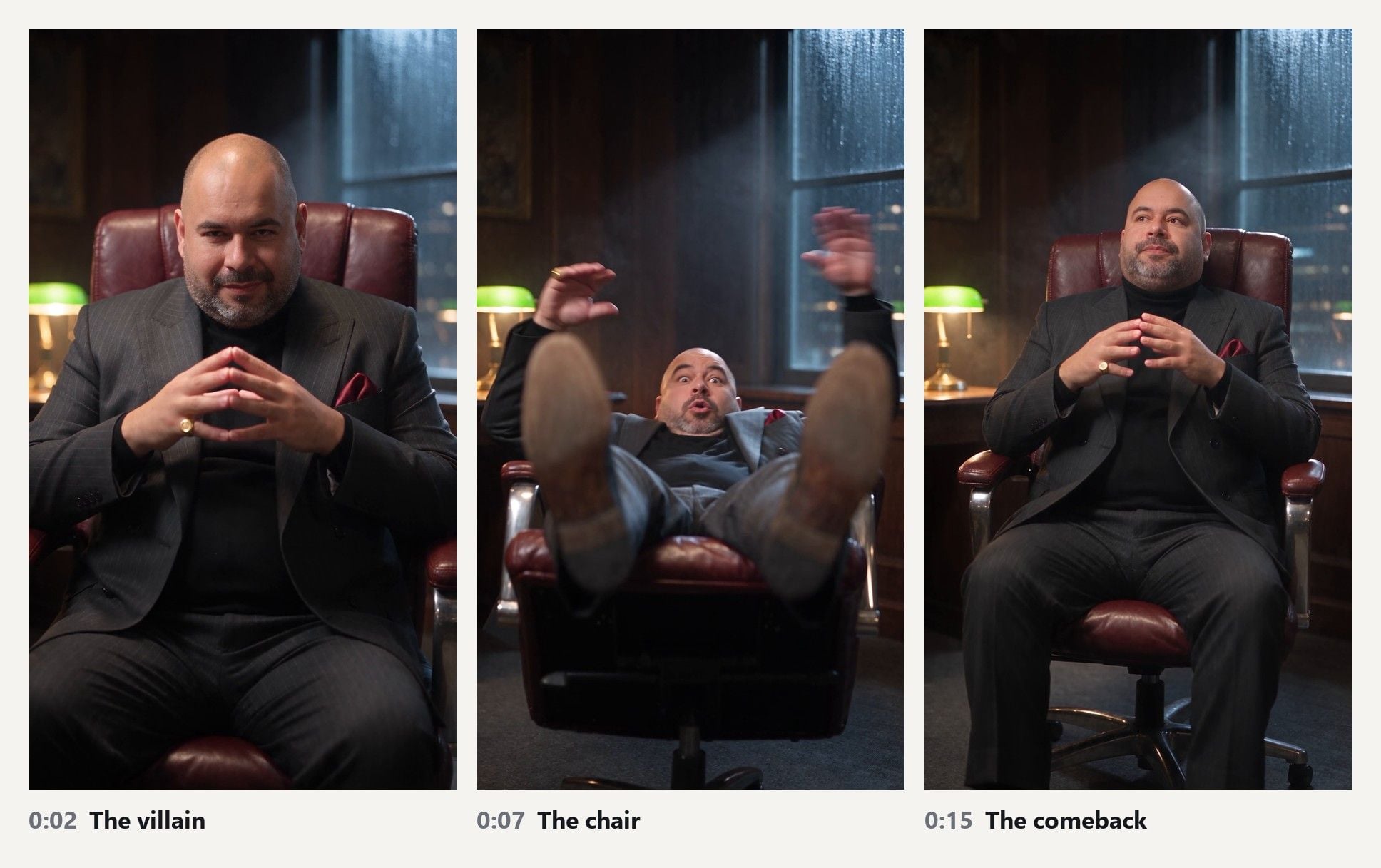
A leather chair, a slow swivel, fingertips pressed together. Then the villain leans back to look powerful, and the chair just keeps going.
That is the whole villain chair trend, and it went from one TikTok in early November 2026 to a feed full of copies, a Formula 1 team and the first AI versions. Below: where the "POV: you're the villain but the chair leaned back" clip came from, the sound everyone uses, and how to make your own villain chair AI video from a single photo, fall and all.
Key Takeaways
- The villain chair trend is a TikTok POV where a dramatic villain lean-back ends with the chair tipping way too far.
- The biggest clip we found went up on November 9, 2026 and has passed 19 million plays.
- Most of the clips we opened run on "Living in the Dark (Evil Larry Version)" by Myuu, a sound older than the meme.
- None of the 137 trend posts we opened links a CapCut template, so creators film or generate each clip themselves.
- One character photo and a timed prompt in the Atlas Cloud video generator produce the full fall and the recovery.
What Is the Villain Chair Trend on TikTok?
It is a short movie scene that goes wrong. The creator plays a villain who has been waiting for the hero, sitting in an office chair with their back or side to the camera. The caption sets it up: "POV: you're the villain but the chair leaned back more than you expected."
The lean-back clips we watched follow the same five beats:
| Beat | What happens | What sells it |
|---|---|---|
| 1. The wait | Back or side to the camera, a dim room, a big chair | A hoodie or a suit, hands already together |
| 2. The swivel | The chair turns slowly toward the lens | Fingertips steepled, a slow cold stare |
| 3. The lean | The villain leans back to look powerful | A smug half smile, shoulders dropping into the chair |
| 4. The betrayal | The backrest keeps reclining | Legs up, arms flailing, sometimes a full fall to the floor |
| 5. The cover-up | They scramble upright and try the stare again | Nobody admits anything happened |
Beat 4 is the joke. Beat 5 keeps it going: the more seriously the villain tries to recover, the funnier the clip gets.
Where "POV: You're the Villain but the Chair Leaned Back" Started
The swivel itself is an old movie move. TV Tropes files it under the Chair Reveal trope, and its entry notes that the chair is often cool and the posture villainous. The TikTok version simply lets the chair win.
The earliest clip we traced with the exact caption is a November 8 post: a guy in a black hoodie turning around in a black office chair at home. A day later, Matt Fletcher's version went up. It runs six and a half seconds, it is the biggest clip we found, and copies such as a 10.7-million-play remake tag him by name.
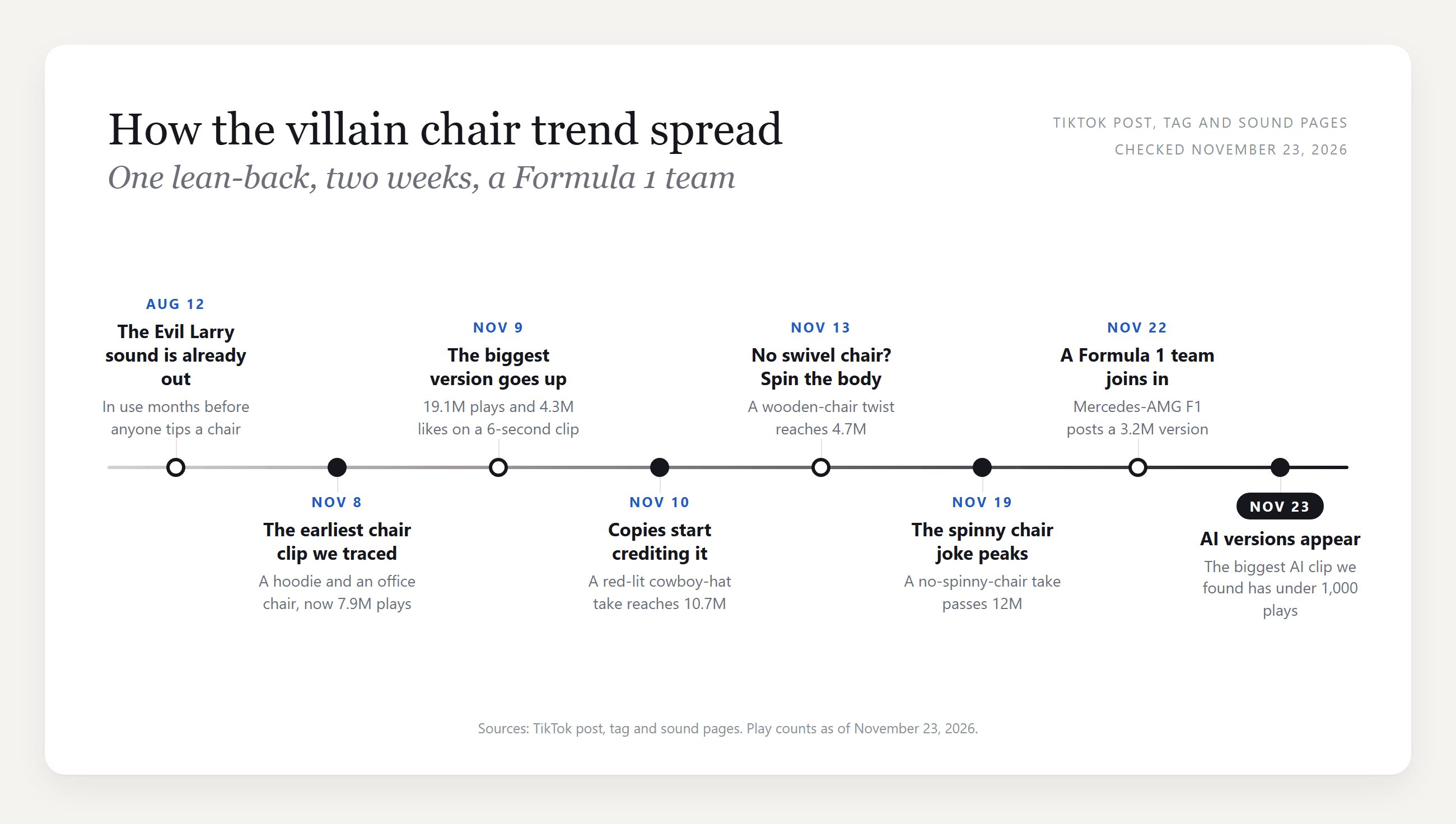
Two weeks in, the format had split into several versions, and Mercedes-AMG F1 had posted one with a celebrity guest leaning back in the team boss's chair. AI versions were only just starting: the biggest one we found on November 23 had fewer than 1,000 plays.
The Villain Chair Sound: Living in the Dark (Evil Larry Version)
The menacing track under most of the clips is a TikTok upload of Myuu's "Living in the Dark". Nobody made it for this meme. It was already in use in August, and through September and October it backed cat clips and "he's right behind me" jokes, months before anyone tipped a chair.
| Sound | Artist | Videos using it (Nov 23, 2026) | Where to find it |
|---|---|---|---|
| Living in the Dark (Evil Larry Version) | Myuu | About 41,400 | Tap the sound name on any villain chair clip |
Plenty of big clips use their own audio instead, the Formula 1 team's version among them. The chair is the joke; the sound is optional.
How to Make a Villain Chair AI Video From One Photo
Filming it yourself needs a reclining chair you are willing to fall out of. A prompt needs one photo.
Atlas Cloud runs Seedance 2.5, which takes a first-frame image and animates everything after it, including a heavy man losing a fight with his own chair. Here is the full villain chair AI video we made, with the POV caption added afterwards:
Every beat from the table above is there. He swivels to face the lens, grins over steepled fingers, and leans back at 5.8 seconds. The backrest drops flat, his shoes point at the camera, and he fails twice to sit up before the third try works. The last two seconds are the cover-up: jacket straightened, fingers steepled, eyes darting sideways.
Method 1: First Frame in the Atlas Cloud Video Generator
Start with the character. We used a stock portrait of a heavyset man in a grey suit, on the phone, and turned him into the villain with one image edit in Seedream 5.5 (any image editor that keeps the face works). The prompt asked for a charcoal pinstripe suit, a black turtleneck, a gold pinky ring and a tall oxblood leather swivel chair in a dark walnut study, with the whole chair and its casters in frame.
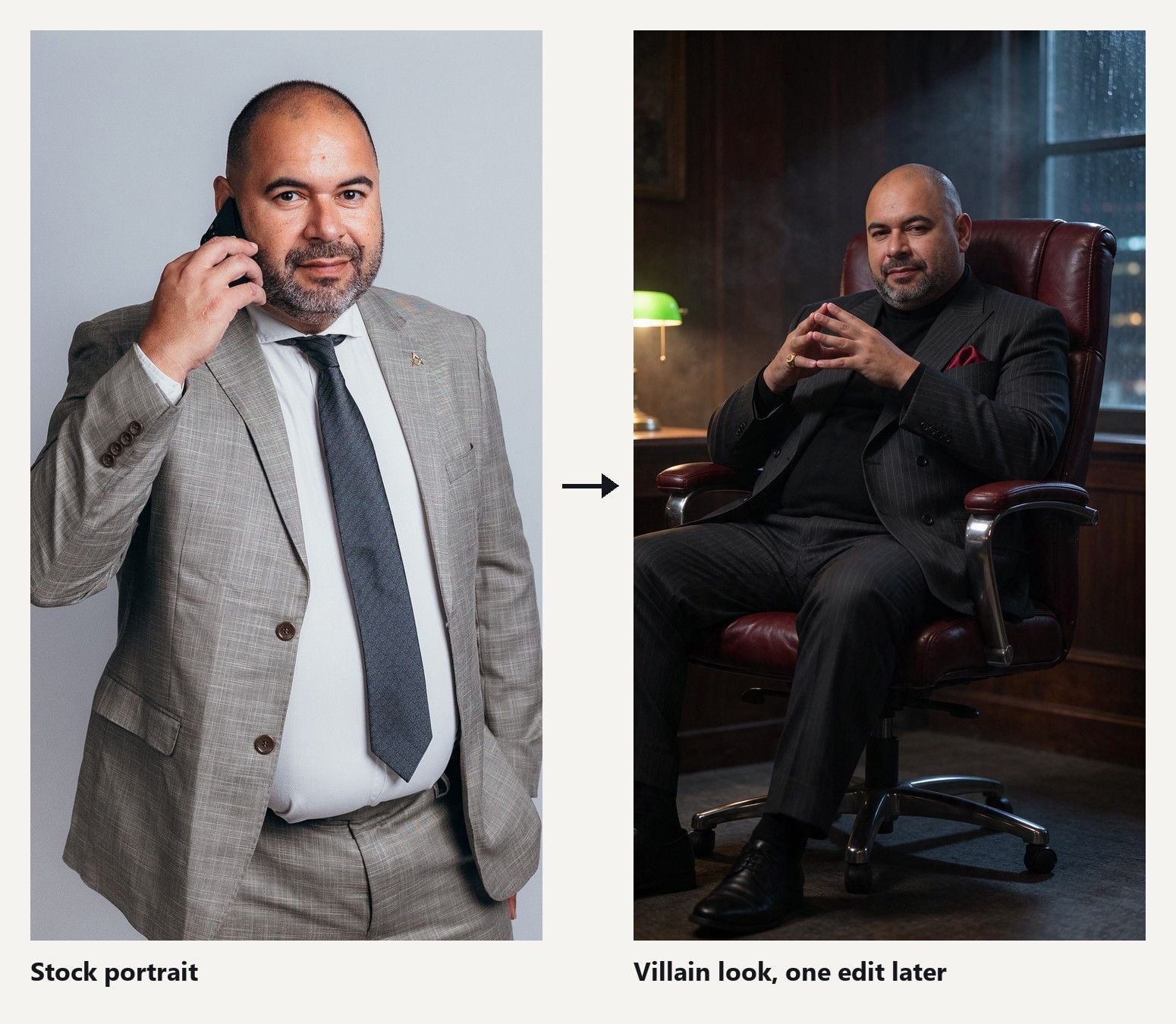
Keep the full chair in the frame and leave floor around it. The model needs room to tip the backrest and throw the legs up without cropping them.
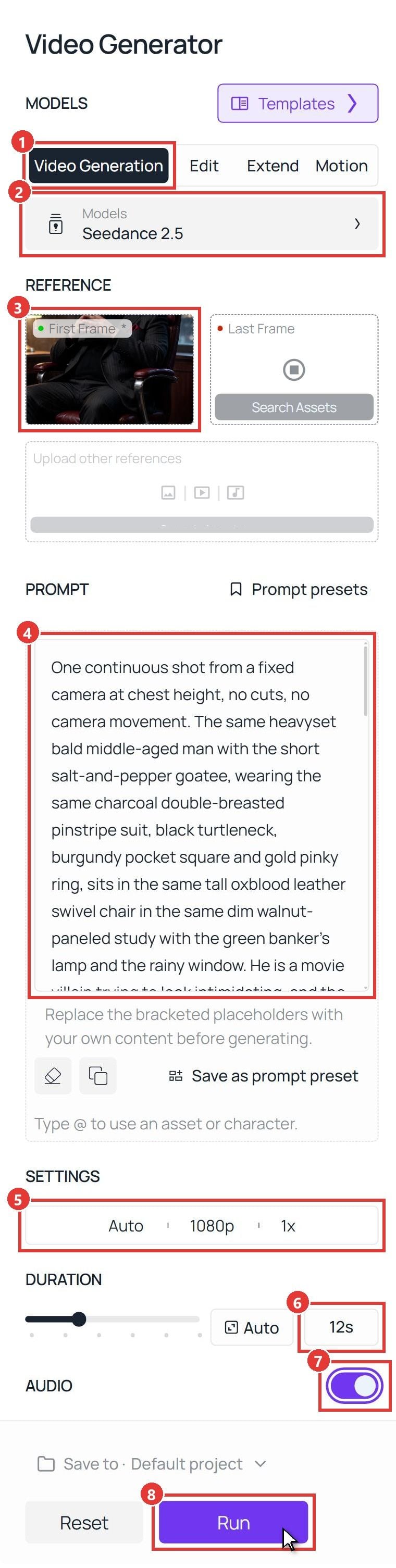
Then sign in, open the AI video generator, and follow the numbers:
- Open the Video Generation tab.
- Keep Seedance 2.5 under Models.
- Upload the villain photo as the First Frame. Leave Last Frame empty.
- Paste the prompt below.
- Under Settings, choose 1080p. The aspect ratio follows your photo, so start with a vertical one.
- Type 12 in the Duration box.
- Keep Audio on, so the clip comes with sound effects built from the Sound line of the prompt.
- Click Run.
plaintext1One continuous shot from a fixed camera at chest height, no cuts, no camera movement. The same heavyset bald middle-aged man with the short salt-and-pepper goatee, wearing the same charcoal double-breasted pinstripe suit, black turtleneck, burgundy pocket square and gold pinky ring, sits in the same tall oxblood leather swivel chair in the same dim walnut-paneled study with the green banker's lamp and the rainy window. He is a movie villain trying to look intimidating, and the chair betrays him. 2 3[0-2s] He slowly swivels the chair until he faces the camera squarely, fingertips steepled in front of his chest, half-lidded cold stare into the lens, a smug smirk. 4 5[2-4.5s] He leans forward a little, taps his steepled fingertips together twice and gives a low, menacing chuckle. 6 7[4.5-6.5s] Full of confidence, he leans back hard into the chair to look powerful. The backrest tilt mechanism gives way with a loud clunk and keeps reclining much farther than he expected. 8 9[6.5-9s] The backrest drops almost flat. His legs flip up into the air with the soles of his shoes toward the camera, his arms windmill wildly, his smirk turns into wide-eyed panic, and the chair rolls backward a little on its casters. He stays in the chair and does not fall onto the floor. 10 11[9-12s] He grabs both armrests and hauls himself upright as the backrest snaps back up. He straightens his jacket and pocket square, clears his throat, steeples his fingers again and tries the cold villain stare, but his eyes dart sideways in embarrassment. 12 13Throughout: the same man, same face, same suit and turtleneck, same chair and room in every frame; his body moves like a real heavy person with natural weight; the chair is a normal office chair, nothing magical. Sound: a low ominous cello drone that cuts off abruptly when the chair gives way, leather creaks, a loud mechanical clunk, a short startled "whoa", caster wheels rolling, then an awkward throat clear. No music with lyrics, no other dialogue. No text, no subtitles, no captions, no logos, no watermark.
Rewrite the second sentence to match your character: build, hair, outfit, chair and room. Leave the caption out of the prompt and add it in the TikTok editor, where the text stays sharp and spelled right.
Method 2: Seedance 2.5 API
Making one for every villain in your friend group, or putting a "make me the villain" button in an app? The API takes the same photo and prompt.
Step 1: Create an API key. In the console, open Settings and create a key under API Keys. One key works for every model.
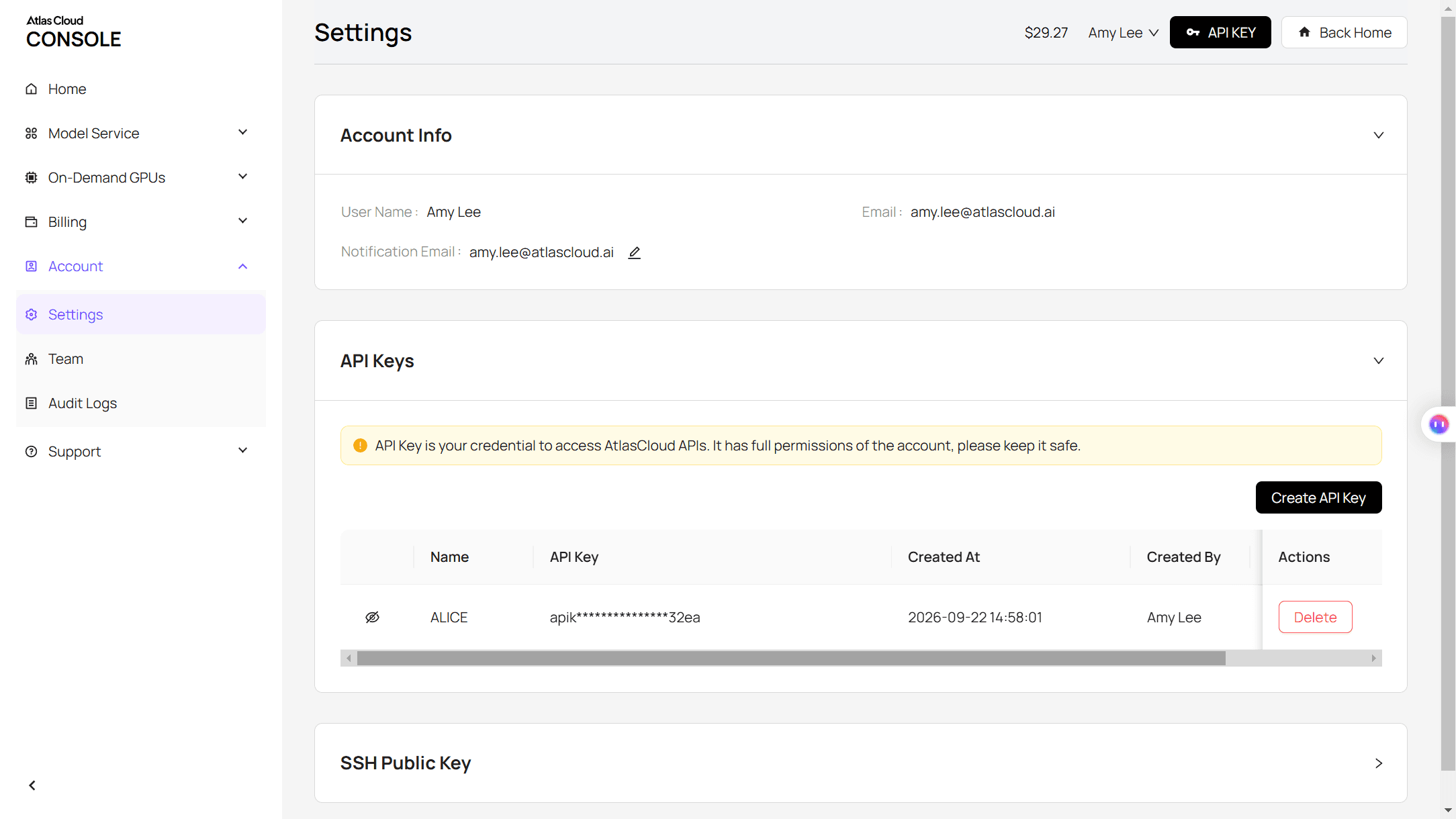
Step 2: Check the request format. The Atlas Cloud docs cover authentication and the video endpoint.
Step 3: Send the request and poll. Your villain photo goes in the image field:
plaintext1curl -X POST https://api.atlascloud.ai/api/v1/model/generateVideo \ 2 -H "Authorization: Bearer $ATLASCLOUD_API_KEY" \ 3 -H "Content-Type: application/json" \ 4 -d '{ 5 "model": "bytedance/seedance-2.5/image-to-video", 6 "prompt": "<paste the Method 1 prompt here>", 7 "image": "https://your-cdn.com/your-villain-photo.jpg", 8 "duration": 12, 9 "resolution": "1080p", 10 "generate_audio": true 11 }'
Poll the returned prediction ID until the status reads completed, then download the clip from the outputs array:
plaintext1curl https://api.atlascloud.ai/api/v1/model/prediction/<prediction_id> \ 2 -H "Authorization: Bearer $ATLASCLOUD_API_KEY"
The endpoint and key stay the same for every video model on Atlas Cloud. To try another one, change the model string.
Villain Chair Prompts for the Lean-Back, the Flail and the Comeback
The lean-back worked on the first run. Here is that stretch of the clip, sound on:
Three lines in the prompt carry the joke:
| Prompt line | What it is there for |
|---|---|
| "He is a movie villain trying to look intimidating, and the chair betrays him" | Sets the tone, so every beat plays as a villain losing face |
| "The backrest tilt mechanism gives way with a loud clunk and keeps reclining" | Gives the fall a mechanical cause, so the chair does the moving instead of his body bending |
| "He stays in the chair and does not fall onto the floor" | Decides where the fall ends, so the recovery in the last beat has a chair to happen in |
The first take had one weak spot. After the fall, he sat up in a single smooth move, calm faced, as if nothing had happened. The cover-up needs effort to be funny.
Rerunning all 12 seconds would have gambled the parts that already worked. So we kept the first 7.5 seconds, where he is still mid-panic with his legs up, and generated only what came after. Export the frame at the cut and the last frame of the first take:
plaintext1ffmpeg -ss 7.5 -i villain-take1.mp4 -frames:v 1 cut-frame.png 2ffmpeg -sseof -0.1 -i villain-take1.mp4 -update 1 last-frame.png
Upload cut-frame.png as the First Frame and last-frame.png as the Last Frame, set Duration to 8, and run this prompt:
plaintext1One continuous shot from the same fixed camera, no cuts, no camera movement. The same heavyset bald middle-aged man with the short salt-and-pepper goatee, in the same charcoal double-breasted pinstripe suit, black turtleneck, burgundy pocket square and gold pinky ring, is stuck in the same oxblood leather swivel chair whose backrest has collapsed almost flat, in the same dim walnut-paneled study with the green banker's lamp and the rainy window. He is a villain who cannot get out of his own chair. 2 3[0-1.5s] Still lying back with his legs up in the air, he panics: arms flailing, legs pedaling in the air, wide eyes, mouth open. 4 5[1.5-3s] First try: he grabs both armrests and heaves his upper body forward, gets halfway up, but the loose backrest springs him straight back down and his legs fly up again. 6 7[3-4.5s] Second try: he rocks forward and back twice to build momentum, cheeks puffed, straining and grunting, still stuck; the chair wobbles and skids a little on its casters. 8 9[4.5-6s] Third try: he swings both legs down hard, plants his shoes on the floor and lunges forward; the backrest snaps upright with a loud clunk and he almost pitches out of the front of the chair, catching himself on the armrests. 10 11[6-8s] Out of breath, he settles back carefully without leaning, straightens his jacket and pocket square, clears his throat, steeples his fingers and puts on the cold villain stare again, ending in exactly the pose of the last frame. 12 13Throughout: the same man, same face, same suit, same chair and room in every frame; his body moves like a real heavy person with natural weight, every attempt clearly fails before the last one works. Sound: leather squeaks, effortful grunts and huffs, caster wheels rolling, a loud mechanical clunk when the backrest snaps up, heavy breathing, a throat clear. No music, no words. No text, no subtitles, no captions, no logos, no watermark.
The new 8 seconds start on the exact frame where the first take was cut, so the join is invisible. Here are both endings side by side:
Video: Villain chair AI video fix compared side by side, on the left the first take where the villain sits up in one calm move, on the right the rerun where he fails twice to climb out of the flat backrest before lunging upright and steepling his fingers (target file: videos/villain-chair-trend-fix-compare.mp4)
The line "every attempt clearly fails before the last one works" is there so each try ends in a visible drop back into the chair, and in our run both failed tries did. For longer clips, our guide to writing Seedance 2.5 prompts covers the timecode structure in more depth.
Is There a Villain Chair Meme Template on CapCut or TikTok?
Not one we could find. We opened every post that loaded on the #villainchair and #villaintrend tag pages, 137 after removing duplicates, and read the links attached to each one. Here is what came back on November 23, 2026:
| What we checked | Result |
|---|---|
| CapCut templates linked from the 137 posts | None; a few posts carry CapCut's generic editing link with no template behind it |
| TikTok effects on the same posts | General effects such as beauty filters and green screen, nothing made for the chair joke |
| AI labels on those 137 posts | None; the big clips are filmed |
| CapCut villain templates | The top results are anime villain edits, unrelated to chairs |
Two older memes sit near this one in search results. The 2023 Rumpelstiltskin chair slide is a Shrek clip, and the "villain era" trend is about attitude, not furniture. Neither involves a chair tipping over.
Villain Swivel Chair Variations: No Spinny Chair, Spinning Too Far and More
The format bends easily, and the biggest variation is not far behind the original. Each one is a small change to the Method 1 prompt:
| Version | Seen on TikTok | What to change in the prompt |
|---|---|---|
| No spinny chair | Both no-swivel clips on the timeline above, one in a fixed chair and one in a wooden chair | Swap the swivel chair for "a plain wooden dining chair that cannot turn"; he lifts and drags the whole chair around with a loud scrape |
| The chair spins too far | A mesh office chair version reached 2.4 million | Replace the recline beats with "the chair keeps spinning past the camera for two full turns while he grips the armrests" |
| They brought the wrong person | A skit series where the henchmen bring the villain the wrong person | Add a henchman who wheels in a cheerful stranger instead of the hero, and let the villain's smirk freeze mid-swivel |
If you want the full evil villain chair look, the chair carries most of it. Tall tufted leather, a winged back or a black egg chair all read as villain furniture in a single frame. Describe the chair in the photo edit as well as in the prompt, so the model already has it before the first second.
The same one-photo approach works for other TikTok formats. Our skull cap trend tutorial uses a lens wipe instead of a fall, and the he is nonchalant walkthrough adds a stadium crowd behind the subject.
Frequently Asked Questions
Who started the villain chair trend?
The earliest clip we found with the exact caption went up on November 8, 2026, and the version that made it big followed a day later. Both are filmed clips with no template or effect attached, so the format spread by people copying it by hand.
Can I put the Evil Larry sound on an AI villain chair video?
Yes. With Audio on, Seedance 2.5 writes its own sound from the Sound line of the prompt. When you post, either keep that track or mute it and add Living in the Dark (Evil Larry Version) from TikTok's sound library. Using the trend sound puts your clip on the same sound page as the rest.
How much does a 12-second villain chair AI video cost on Atlas Cloud?
The Run button showed $9.01 for our 12-second 1080p clip with audio on November 23, 2026, which is 20% off the $11.26 list price. A 720p test of the same length is $3.64, and the 8-second fix pass with first and last frames is $6.02. Test the timing at 720p, then render the keeper at 1080p.
Can I make the villain chair video with a photo of a friend?
Only if they say yes first. The clip shows a real face falling over, and it can travel far beyond your group chat once it is posted. If you would rather not ask, generate an original character with any image model and keep the same prompt.
Conclusion
The villain chair trend runs on one promise and one betrayal. A villain swivels around to look in control, and the furniture decides otherwise. Two weeks after the first clip, creators had tried it in hoodies, suits and dining chairs, and the AI versions were only beginning.
If you want to try the villain chair trend without risking your own tailbone, one photo and the timed prompt above will do it. Keep the whole chair in frame, give the fall a mechanical reason, and make the comeback a struggle.







