

Latest update: Wan 3.0 is now live as of August 24, 2026.
You opened six tabs. Every single one handed you a clean chart: 1.3B on 8GB, 14B on 24GB, Apache-2.0, shipped April 2026. So you opened the Wan-AI page on Hugging Face to grab the checkpoint.
27 repositories. The newest one is Wan2.2.
Those charts are not out of date. They were invented. Wan 3.0 VRAM requirements cannot have been measured by anyone outside Alibaba, because Wan 3.0 only entered public beta on 6 August 2026 and has never shipped a weight file. There was nothing to release in April.
So what is the real answer? Nobody has benchmarked it. But Wan 3.0's own spec sheet boxes the answer in hard, and we did that math below.
Key takeaways
- No Wan 3.0 weights exist anywhere. Every VRAM table for it on the web today is fabricated.
- Wan 3.0 is a first-party API beta: 30s max, 1080P max, no 4K tier.
- Its own specs imply 13.5x the latent sequence of a 5s 720P clip, which is a ~180x attention bill.
- The real local ceiling right now is Wan2.2 TI2V-5B on 24GB, or 6GB with community quantization.
- For 1080P output this week, rent seconds instead of buying VRAM.
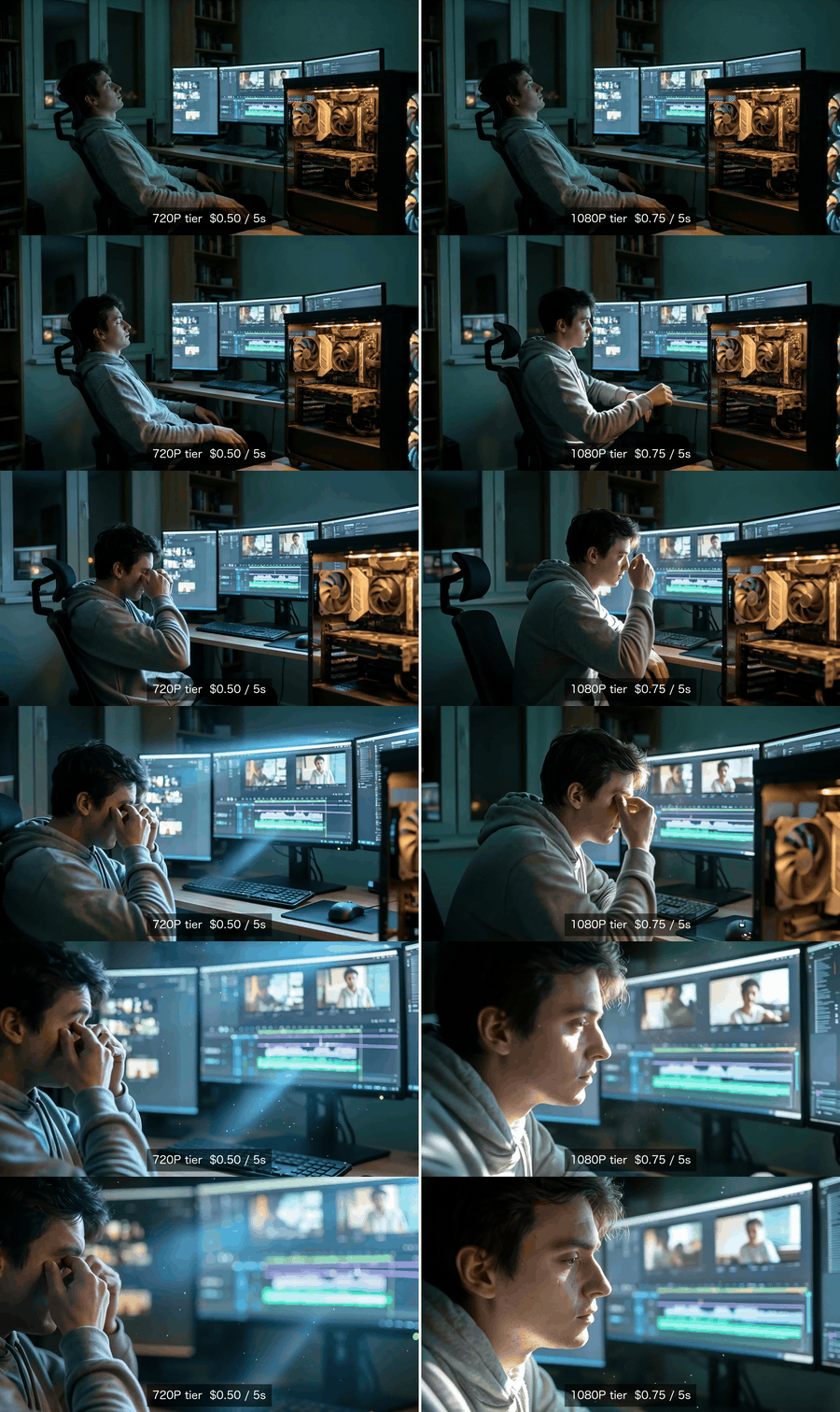
Wan VRAM requirements made visible: the same first frame animated at the 720P tier on the left and the 1080P tier on the right, both rendered with no local GPU
Same first frame, same motion prompt, same model. Only the resolution tier changes: 720P on the left at $0.50 for 5 seconds, 1080P on the right at $0.75. Both were rendered on Wan 2.7 with zero local VRAM, and the price on each label is the quote the Run button actually gave us. Shown as a silent GIF.
That is what this whole argument is about. Not gigabytes. Pixels.
Why Every Wan 3.0 VRAM Requirements Table You Found Is Fiction
Conclusion first: the top-ranking pages for this keyword recycled Wan 2.1 and Wan 2.2 numbers, slapped "3.0" on them, and invented a release date. You can disprove all of it in about 60 seconds.
Check this out.
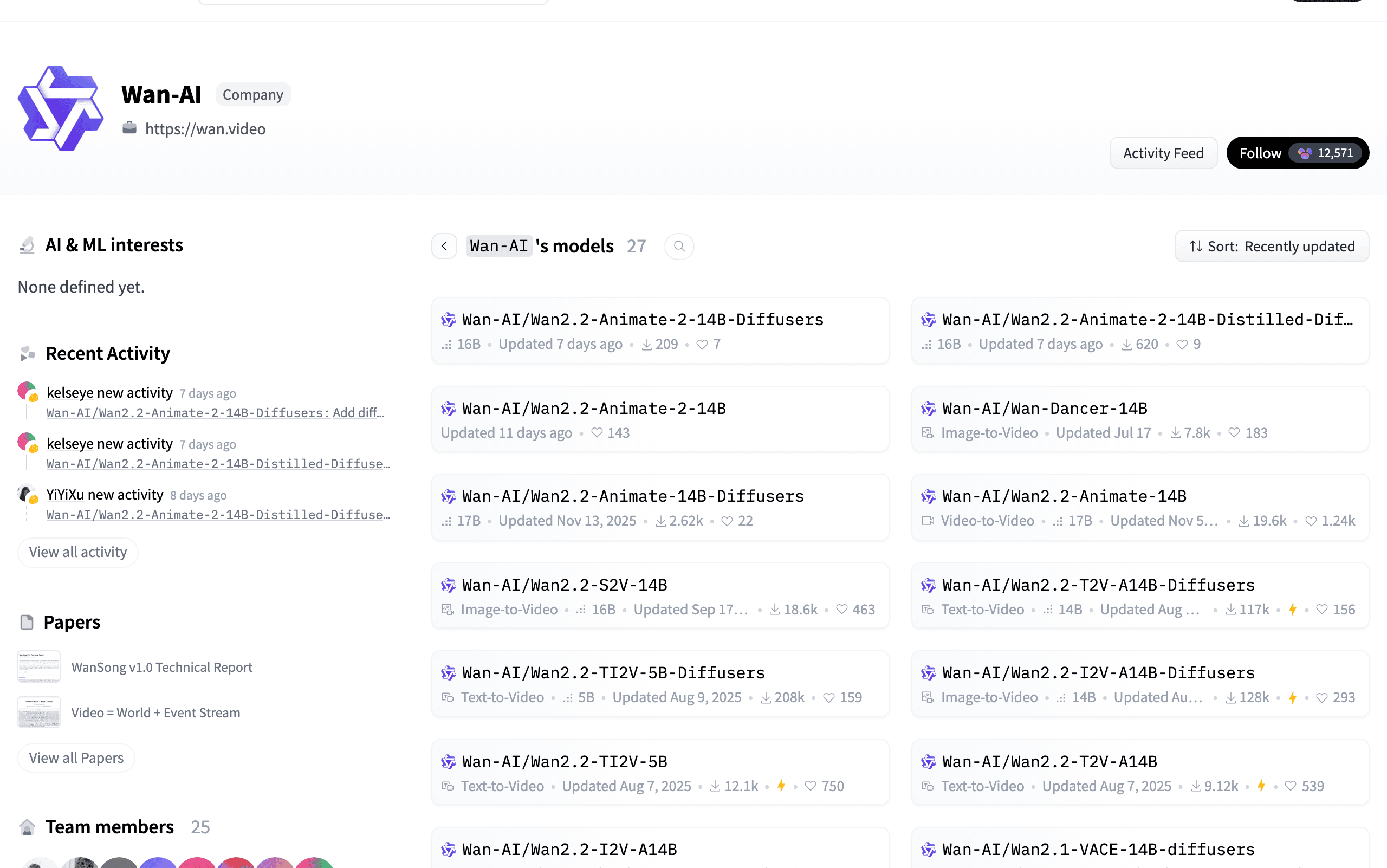
Hugging Face Wan-AI organization page showing 27 repositories with Wan2.2 as the highest version, proving no Wan 3.0 weights exist for local VRAM testing
The official Wan-AI organization on Hugging Face, models tab, sorted newest first. 27 repos, and the highest version number anywhere on the list is 2.2 (Hugging Face, August 2026).
There is no Wan3.0 repo. There is no Wan2.7, Wan2.6 or Wan2.5 repo either. The newest thing in the org is Wan2.2-Animate-2-14B-Diffusers, updated seven days ago (Hugging Face, August 2026).
Here is the claim-by-claim breakdown.
Table 1: what the guides claim vs what is verifiable
| Claim you'll find on page 1 | Verifiable as of August 2026 | How to check it yourself |
|---|---|---|
| "Wan 3.0 released 1.3B + 14B weights in April 2026" | Wan 3.0 opened public beta on 6 August 2026. No weights on any date. | Load the Wan-AI org page |
| "Wan 3.0 is Apache-2.0" | No license file has ever been published for 3.0 | Search the org for a 3.0 repo. There isn't one. |
| "1.3B runs on 8GB, 14B on 24GB" | Those are Wan 2.1/2.2 figures. Wan 2.2's own A14B asks for 80GB. | The Wan2.2 README hardware section |
| "Full 4K / 30s workflow tier" | The beta tops out at 1080P. Tiers are 480P, 720P, 1080P. | Alibaba's own per-second price list |
| "Runs in ComfyUI / WanGP today" | WanGP's supported list covers Wan 2.1/2.2 only | The Wan2GP README |
What Alibaba actually shipped in August 2026 is an API-and-web product, not a checkpoint. One generation goes up to 30 seconds, resolution caps at 1080P, and it accepts text, images, audio, video and even documents (doc, xls, ppt, pdf, md) as reference input. API pricing is ¥0.3 / ¥0.6 / ¥1.2 per second for 480P / 720P / 1080P (QbitAI, August 2026).
Notice what is missing from that list: a download link.
Wan 3.0 VRAM Requirements, Calculated From Its Own Specs
Promise: by the end of this section you'll know why "just get a 32GB card" cannot work, with numbers you can re-derive yourself. Proof: the calculation only needs two published facts, Wan's VAE compression ratio and Wan 3.0's 1080P/30s ceiling.
Let's get started.
It's the sequence length, not the parameter count. Everyone stares at the B number. That's the wrong variable.
A video diffusion transformer's memory and compute scale with how many latent tokens it has to attend over, and that count comes from resolution times duration, not from parameters. Wan2.2's VAE compresses at 4x16x16 in time, height and width, and the DiT patchifies on top of that, so each latent token covers roughly a 4x32x32 block of pixels (Wan2.2 README, August 2026). The older Wan2.1-generation VAE compresses at 4x8x8, so with patchify it's 4x16x16 per token, four times as many tokens for the same clip.
Run Wan 3.0's own ceiling through that and here is what falls out.
Table 2: latent token count by target clip (our calculation, 24fps)
| Target clip | Frames | Latent frames | Tokens (2.2-gen VAE) | Tokens (2.1-gen VAE) | vs 5s 720P |
|---|---|---|---|---|---|
| 5s 480P (832x480) | 121 | 31 | 12,090 | 48,360 | 0.44x |
| 5s 720P (1280x704) | 121 | 31 | 27,280 | 109,120 | 1.0x (baseline) |
| 10s 1080P (1920x1088) | 241 | 61 | 124,440 | 497,760 | 4.6x |
| 30s 1080P (1920x1088) | 721 | 181 | 369,240 | 1,476,960 | 13.5x |
Read the last row again. Wan 3.0's headline capability is 13.5x the sequence length of the 5-second 720P clip your 4090 currently sweats over.
And self-attention is quadratic in sequence length. 13.5 squared is about 180. So the attention work for one 30s 1080P clip is roughly 180x the attention work of one 5s 720P clip, before you count anything else.
That is the number nobody in the SERP calculated. It is also why "buy 8 more gigabytes" is not a plan.
So what does that mean in gigabytes? Weights are the boring part. A 27B-total MoE at fp8 is about 27GB resident, bf16 about 54GB. MoE only helps the compute per step (Wan2.2's A14B activates 14B of 27B parameters per step), not what has to live in memory.
The interesting part is activations. One transformer layer's hidden state at model dim 5120 in bf16 costs tokens x 5120 x 2 bytes:
- 5s 720P (27,280 tokens): 0.28 GB per layer
- 30s 1080P (369,240 tokens): 3.8 GB per layer
- 30s 1080P on a 2.1-generation VAE (1,476,960 tokens): 15.1 GB per layer
Per layer. Multiply by however many layers your attention implementation has to keep live, add the text encoder, add the VAE decode pass, and the 80GB figure stops looking conservative.
Table 3: estimated VRAM if weights ever ship (ESTIMATE, not measured)
| Target clip | If a 5B-class high-compression model ships (fp8) | If it's an A14B-class MoE (fp8) | Practical verdict |
|---|---|---|---|
| 5s 480P | ~8-10 GB | ~30-34 GB | a 12GB card is plausible for the small model only |
| 5s 720P | ~10-14 GB | ~34-40 GB | 16GB floor, 24GB comfortable |
| 10s 1080P | ~20-28 GB | ~45-60 GB | a 32GB card is already marginal |
| 30s 1080P | ~45-70 GB | ~90-140 GB | no single consumer card, at any quantization |
Every cell in that table is an ESTIMATE derived from Table 2 plus published checkpoint sizes. Real figures depend on the attention kernel, the offload strategy, and whether Alibaba ever ships weights at all. Treat it as the shape of the problem, not a spec sheet.
The shape is clear enough: the flagship setting was never a consumer-GPU workload.
The Wan VRAM Requirements You Can Actually Hit Today
Here's the part the fabricated tables were pretending to be. These numbers are published by the Wan team and they are real.
Table 4: real Wan VRAM tiers, August 2026
| Variant | Minimum VRAM | Resolution | Measured speed | Flags you need | Weights |
|---|---|---|---|---|---|
| Wan2.2 T2V-A14B / I2V-A14B | 80GB single GPU | 480P / 720P | not published | --offload_model True --convert_model_dtype | Apache-2.0 |
| Wan2.2 TI2V-5B | 24GB (RTX 4090) | 720P @ 24fps | 5s 720P in under 9 minutes | --offload_model True --convert_model_dtype --t5_cpu | Apache-2.0 |
| Wan 2.1 / 2.2 via WanGP | 6GB and up | mostly 480P | slower, quality cost | int8 / fp8 / gguf / NVFP4 / Nunchaku | Apache-2.0 base |
| Wan 2.5 / 2.6 / 2.7 | n/a | API only | n/a | n/a | none published |
| Wan 3.0 | n/a | API only, first-party beta | n/a | n/a | none published |
Two things in that table deserve a second look.
First: the A14B row already has both memory-saving flags switched on and still wants 80GB. That is the official single-GPU figure, not a naive one. Second: the 5B row is the honest consumer answer, and its own README quotes 5 seconds of 720P in under 9 minutes on a 4090.
Below 24GB you're in community territory. WanGP (the deepbeepmeep/Wan2GP project, which describes itself as generative models "accessible to the GPU Poor") gets select models down to 6GB using int8, fp8, gguf, NVFP4 and Nunchaku quantization. It supports Wan 2.1 and 2.2. It does not support 3.0, because there is nothing to support.
Now the part that should change your purchasing decision: the "next version will be open" assumption has failed three times in a row. Wan 2.2 was Apache-2.0. Wan 2.5 went API-only. Wan 2.6 and 2.7 never shipped weights. Wan 3.0 has no license file at all.
Buying a card today on the bet that 3.0 weights land tomorrow is betting against a three-generation trend.
For a current hosted run, open Wan 3.0 on Atlas Cloud and test a prompt like the one below before you publish the workflow.
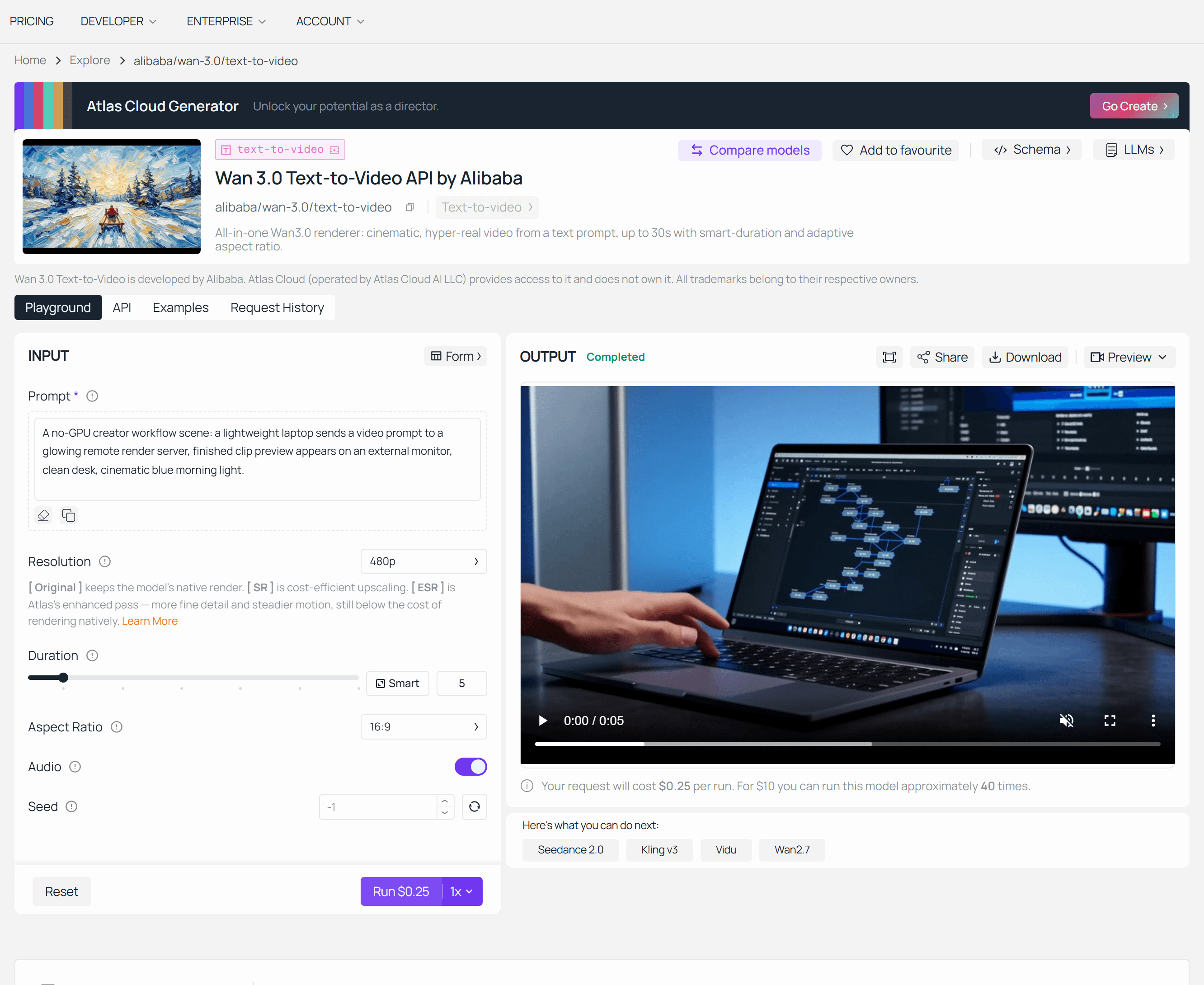
Wan 3.0 prompt-to-result screenshot: No-GPU render path.
Skip the VRAM Requirements: The No-GPU Wan Workflow
Let me be blunt about the boundary first, because most pages in this niche will not be.
Nobody hosts Wan 3.0. Not Atlas Cloud, not anyone else. There are no weights, so there is no third-party inference. If a page offers you "Wan 3.0 API access", it is selling you something else.
What you can get right now is the rest of the family, hosted, billed by the second, with no VRAM in the equation. Atlas Cloud runs Wan 2.2 through 2.7 behind one API and one browser tab, and Wan 2.7 at 1080P is the closest thing to 3.0-class output available outside Alibaba's own beta channels.
For the reader this article is written for, that solves a specific problem. You were about to spend four figures on a card to chase a checkpoint that does not exist. Renting seconds means you find out what the output actually looks like before you buy anything, and if 3.0 weights never drop, you have lost nothing but a few dollars.
Table 5: the hosted Wan family (list prices as of August 2026)
| Model id | Resolution | Max duration | Price | Best for |
|---|---|---|---|---|
| atlascloud/wan-2.2-turbo/image-to-video | 480p / 720p / 1080p, 30fps | 5s only | $0.02 / s | cheapest look-see in the family |
| atlascloud/wan-2.2/image-to-video | 480P native + 720P VSR | 3-10s | $0.03 / s | budget batches |
| alibaba/wan-2.5/text-to-video | up to 1920x1080 | 10s | $0.035 / s | cheap 1080P text-to-video |
| alibaba/wan-2.6/text-to-video | up to 1920x1080 | 5 / 10 / 15s | $0.07 / s | longer takes, no first frame needed |
| alibaba/wan-2.7/image-to-video | 720P / 1080P, plus 1080P-SR and 1440P-SR | 15s | $0.10 / s list | the closest tier to 3.0-class output |
| alibaba/wan-2.2/animate-mix | character swap in existing footage | matches your source clip | $0.126 / s | swapping a character into a shot |
One warning before the tutorial, because it will show up on your invoice: the list price is a floor. Wan 2.7's page quotes $0.10 per second. In our August 2026 runs the same five second job quoted $0.50 at the 720P tier and $0.75 at 1080P, so the flagship tier bills at $0.15 per second, half again the listed rate. Always read the quote the button gives you before you click it.
Table 6: four routes to 30 seconds of 1080P
| Route | Up-front | Per 30s of 1080P | Do you actually get it? |
|---|---|---|---|
| Buy a 24GB card (4090-class) | ~$1,600-2,000 | electricity | No. 24GB runs Wan2.2 TI2V-5B at 720P. No 3.0 weights exist. |
| Rent an 80GB card | hourly | hours of compute + setup | Only Wan 2.2 A14B, and still not 1080P/30s |
| Alibaba first-party beta | none | ¥1.2/s x 30 = ¥36 (~$5) | Yes, one continuous clip, first-party channels only |
| Hosted Wan 2.7 at 1080P | none | 2 x 15s at ~$0.15/s = ~$4.50 | 30s of footage, but as two clips (15s cap) |
Do the division. At roughly $4.50 per 30 seconds of 1080P, a $2,000 card needs about 440 thirty-second renders to break even, and it still cannot produce a single one of them.
That's the argument. Now here's the three-step run so you can judge the output yourself.
Step 1: Lock the First Frame at 16:9
Every honest VRAM comparison needs one variable. So we fix the first frame, then feed the identical frame and the identical motion prompt to both tiers. Any difference you see afterwards is the tier, not the dice.
Open the Qwen Image 2.0 Pro text-to-image playground and paste this:
text1Cinematic wide shot inside a dim home office at 2am: a young engineer in a grey hoodie leans back in a desk chair, face lit only by a triple-monitor rig showing a paused video timeline. Beside the desk an open PC case glows, a single oversized graphics card visible inside, fans spinning. Dust motes in the air, teal-and-amber color grading, shallow depth of field, 35mm anamorphic lens, photorealistic, highly detailed, 16:9 2
Settings: click the 16:9 size chip, which snaps the frame to 1280 x 720, and leave everything else default. Cost is $0.06 per image (currently 20 percent off $0.075). The width and height boxes go up to 2048 per side if you want a bigger frame, but the chip's default is already the right shape for both video tiers.
Why this scene? Because it is literally the reader. Keep the output file, you need it twice.
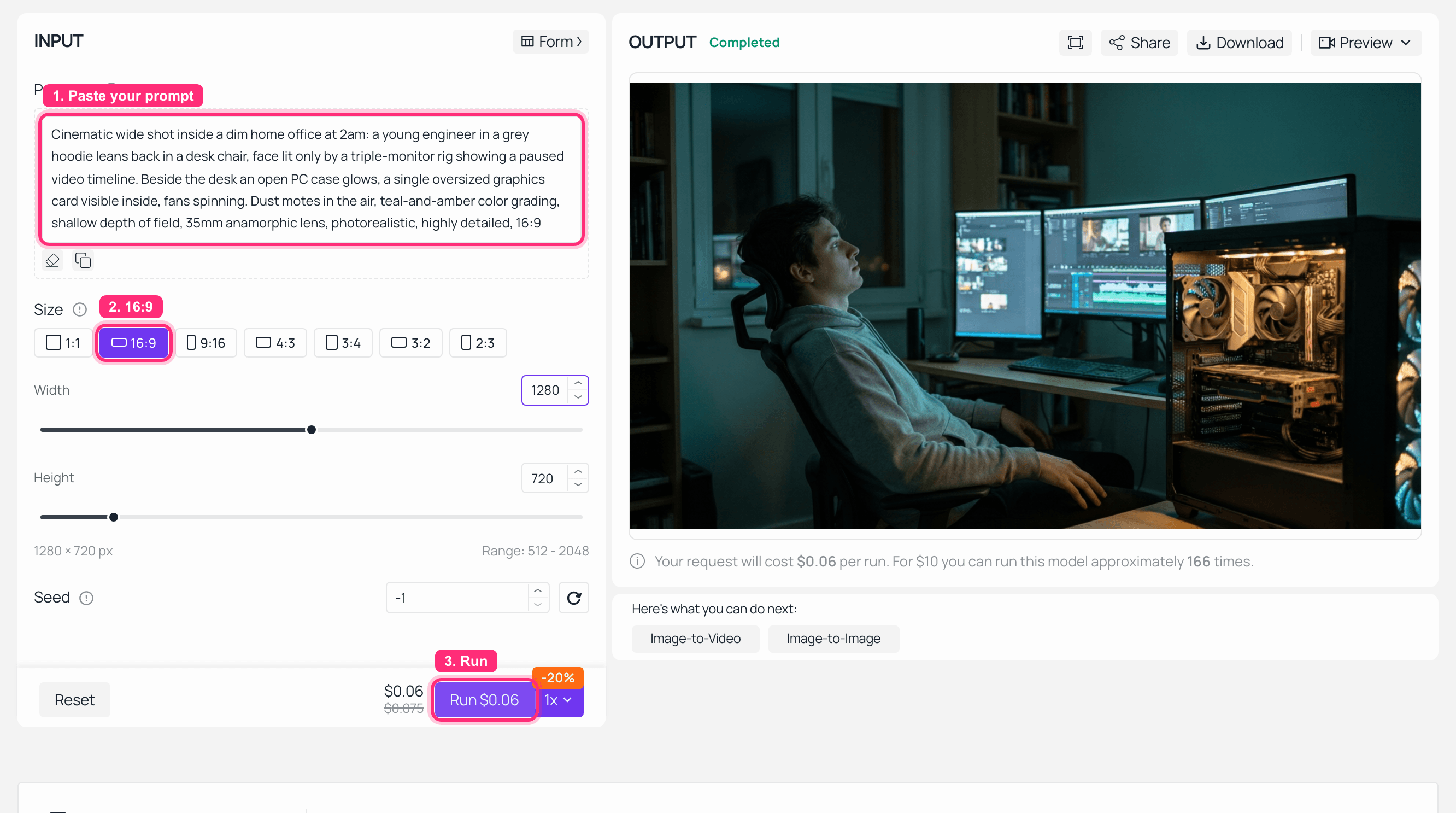
Qwen Image 2.0 Pro playground on Atlas Cloud with the 16:9 size chip selected and the finished 1280x720 first frame in the output panel
Step 1 complete: the 16:9 chip selected at 1280 x 720, and the first frame that both video tiers will start from. $0.06 on the Run button.
Step 2: Animate It at the 720P VRAM Tier
This is the stand-in for what a real 24GB local setup gets you: 720P, five seconds, and that is the ceiling.
One deliberate choice here. Rather than switch models between the two tiers, we run the same model at both, so the only variable in the comparison is the resolution tier. Load the Step 1 image as the first frame in the Wan 2.7 image-to-video playground, then paste this motion prompt:
text1The engineer slowly leans forward and rubs his eyes; the monitor glow flickers as the timeline scrubs; the camera pushes in slightly; dust motes drift through the beam of light; subtle handheld micro-shake; single continuous shot, no cuts. 2
Settings: resolution 720P, duration 5s, everything else default. The Run button quoted $0.50, which is the $0.10 per second list rate times five seconds. Note that number down, because Step 3 is going to change it.
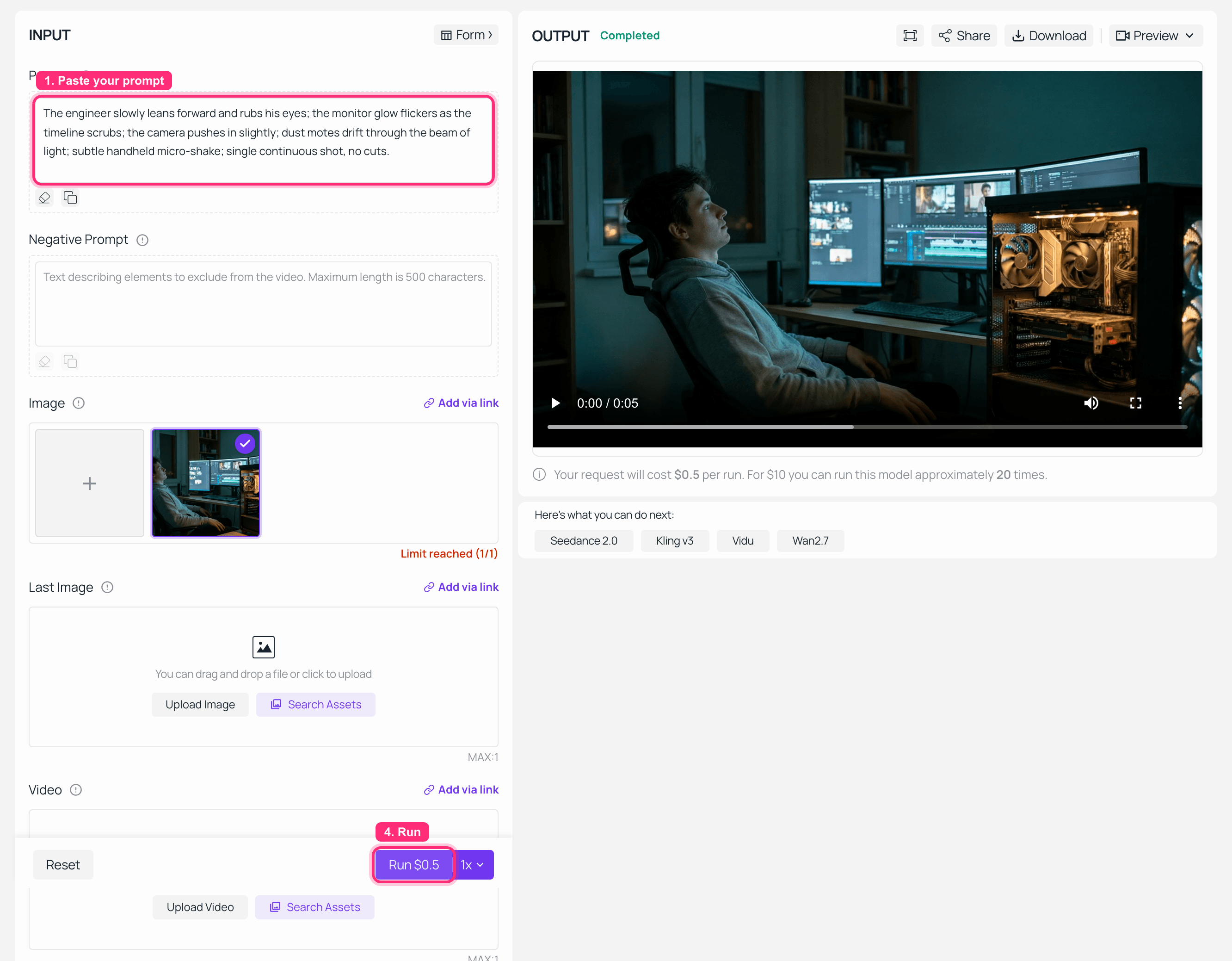
Wan 2.7 image-to-video playground at the 720P tier with the first frame loaded, 5s duration, and the finished clip in the output panel
Step 2 complete: the 720P tier, 5 seconds, quoted at $0.50, with a real clip in the output panel.
Step 3: Animate the Same Frame at 1080P With No Local GPU
Same page, same first frame, same motion prompt word for word, same 5 second duration. Change exactly one control: set resolution to 1080P.
The Run quote goes from $0.50 to $0.75. That is your $0.15 per second, measured, on a page whose list price says $0.10.
Two settings traps to watch, both of which cost us real runs to learn:
- The duration control does not always commit. We set duration to 10 seconds, the field showed 10, and the job still rendered 5. The Run button's quote is the only source of truth: at $0.15 per second a genuine 10 second 1080P job has to read about $1.50, so a quote of $0.75 means you are still buying 5 seconds no matter what the slider shows. Read the quote, not the field.
- Confirm your own image is loaded. If the reference slot still holds the page's preset demo image, the run will happily produce something unrelated. Look at the thumbnail before you click.
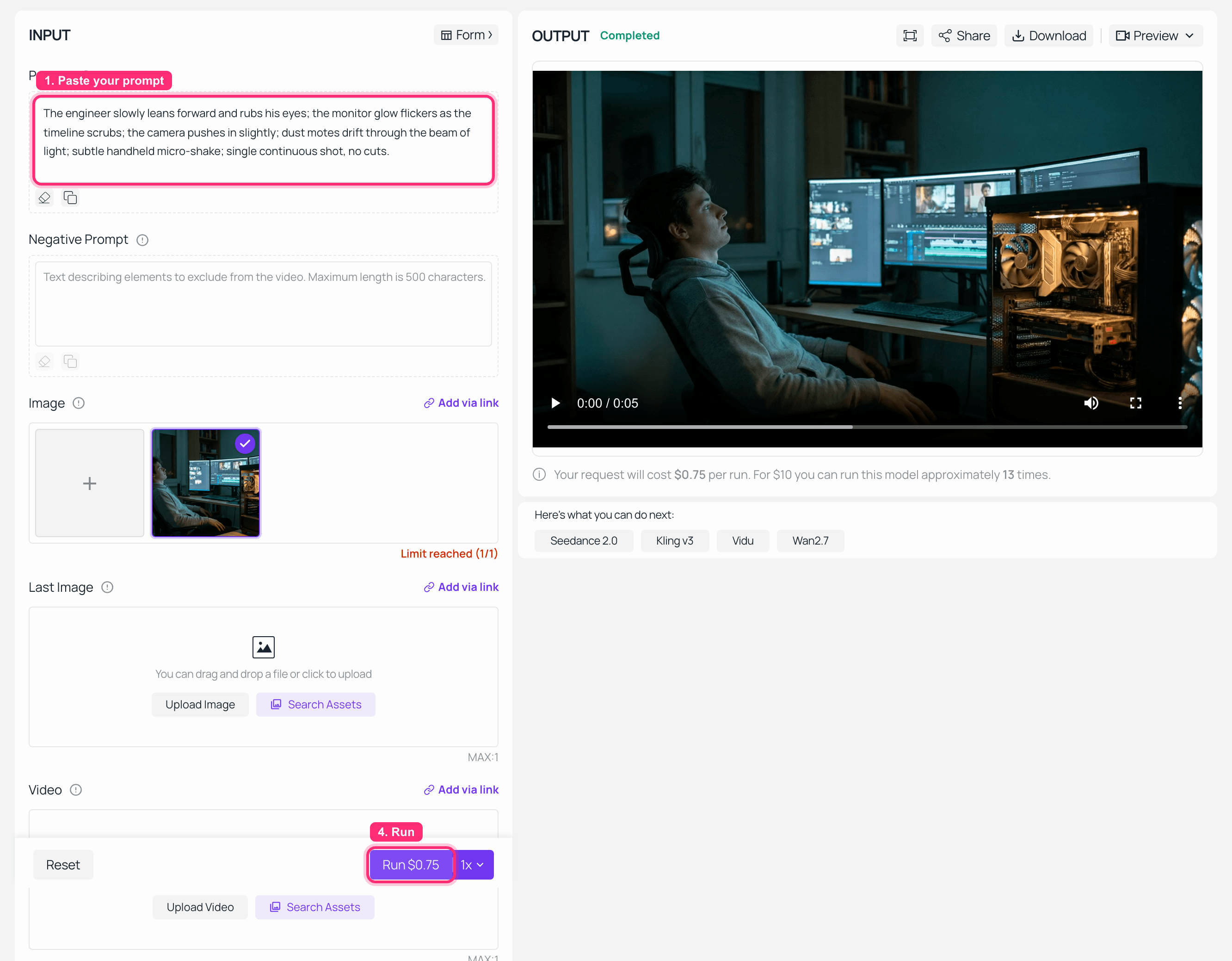
Wan 2.7 image-to-video playground at the 1080P tier with the Run button quoting $0.75, and the finished 1080P clip in the output panel
Step 3 complete at the 1080P tier. The Run quote is the point: $0.75 for the same five seconds that cost $0.50 one tier down, on a page that lists $0.10 per second.
Both renders are in the clip at the top of this article, side by side. That is the entire VRAM argument in five seconds: two tiers of output, the same prompt, and not one gigabyte of local video memory involved.
Variations worth trying. Drop to 480P for cheap look-sees before committing to a 1080P render. Swap in alibaba/wan-2.6/text-to-video at $0.07/s when you don't have a first frame and want 15 seconds in one go. Use alibaba/wan-2.2/animate-mix at $0.126/s to put a different character into footage you already have. And if you want closer to 30 seconds, budget for two clips, because of a 15-second per-clip ceiling almost no tutorial mentions.
Frequently Asked Questions
Can a 24GB GPU run Wan 3.0?
Not today, because there are no weights to load. If they ever ship, the math in Table 2 says 24GB gets you 480P and short clips under aggressive quantization. The flagship 1080P/30s setting is a different order of magnitude and is not reachable on a single consumer card.
Where can I download Wan 3.0 weights?
Nowhere. The Wan-AI organization on Hugging Face tops out at Wan2.2, and the Wan-Video GitHub org has no 3.0 inference repo and no 3.0 license. Any site offering a "Wan 3.0 checkpoint download" is not distributing what it claims.
Is Wan 3.0 open source or Apache 2.0?
No license has been published. The trend is running the other way: Wan 2.2 was Apache-2.0, Wan 2.5 went API-only, and 2.6 and 2.7 shipped no weights at all. Three consecutive generations closed. Plan accordingly.
What is the lowest-VRAM Wan model I can actually run today?
Wan2.2 TI2V-5B, officially 24GB on a 4090, doing 5s of 720P in under 9 minutes. Below that, WanGP's quantized paths reach down to 6GB on select models, and you pay for it in speed and detail.
Wan 3.0 vs Wan 2.7: which one can I run locally?
Neither. Both are API-only. If the requirement is "runs on my machine", your options are the Wan 2.1 and 2.2 families. If the requirement is 2.7-class output, that is a hosted call, not a local install.
If I can't run it locally, how do I get 30 seconds of 1080P now?
Alibaba's first-party beta bills by the second and delivers 30s in one clip. Outside those channels there is a hard 15-second ceiling per clip, so 30 seconds means stitching two. In our own Wan 2.7 continuation testing the constraints were strict: the source segment had to be 2 to 10 seconds, the output had to be strictly longer than the source, the source frames were not preserved, and chaining continuations did not accumulate length. Most tutorials never mention any of that.
So the short version of the whole Wan 3.0 VRAM requirements question: stop shopping for a card, because the checkpoint you would buy it for does not exist. Run Wan 2.2 locally if you want weights on disk, and rent 1080P seconds when you want the output the fake tables were selling.





