Take a look at the "gameplay footage" above first.
He steals a parking spot: the car fires its jets, does a barrel roll in mid-air and drops into the space. The driver who lost the spot storms out and yells at him in a British accent, and our guy answers in an American one without turning around: "Finders keepers." Then he pulls out a rocket launcher, flips the sedan, flies the car into the sky and turns around to shoot down the helicopter chasing him. Minimap, speedometer, wanted stars, mission banner, it's all there.
Looks like leaked GTA 6 gameplay? Is the Roadster a new vehicle?
Neither. This was generated by Kling 4.0 from 10 reference images and one prompt.
The full Kling 4.0 API is live on Atlas Cloud today. In this post we break down two films we made ourselves: the "GTA gameplay" above, and a Malfoy romance short. Each one shows one of Kling 4.0's core abilities: multi-reference, and consistency across shots. Here's the model page if you want to try it as you read: Kling 4.0 on Atlas Cloud.
1. Ten images lock down a whole gameplay clip
One image per thing
Kling 4.0's omni reference takes up to 15 references at once. This clip uses 10 of them, all images: one each for the people, the cars, the props, the street and the HUD. In the prompt, tags like @image1 and @image2 tell the model which image is which character, which car and which street.
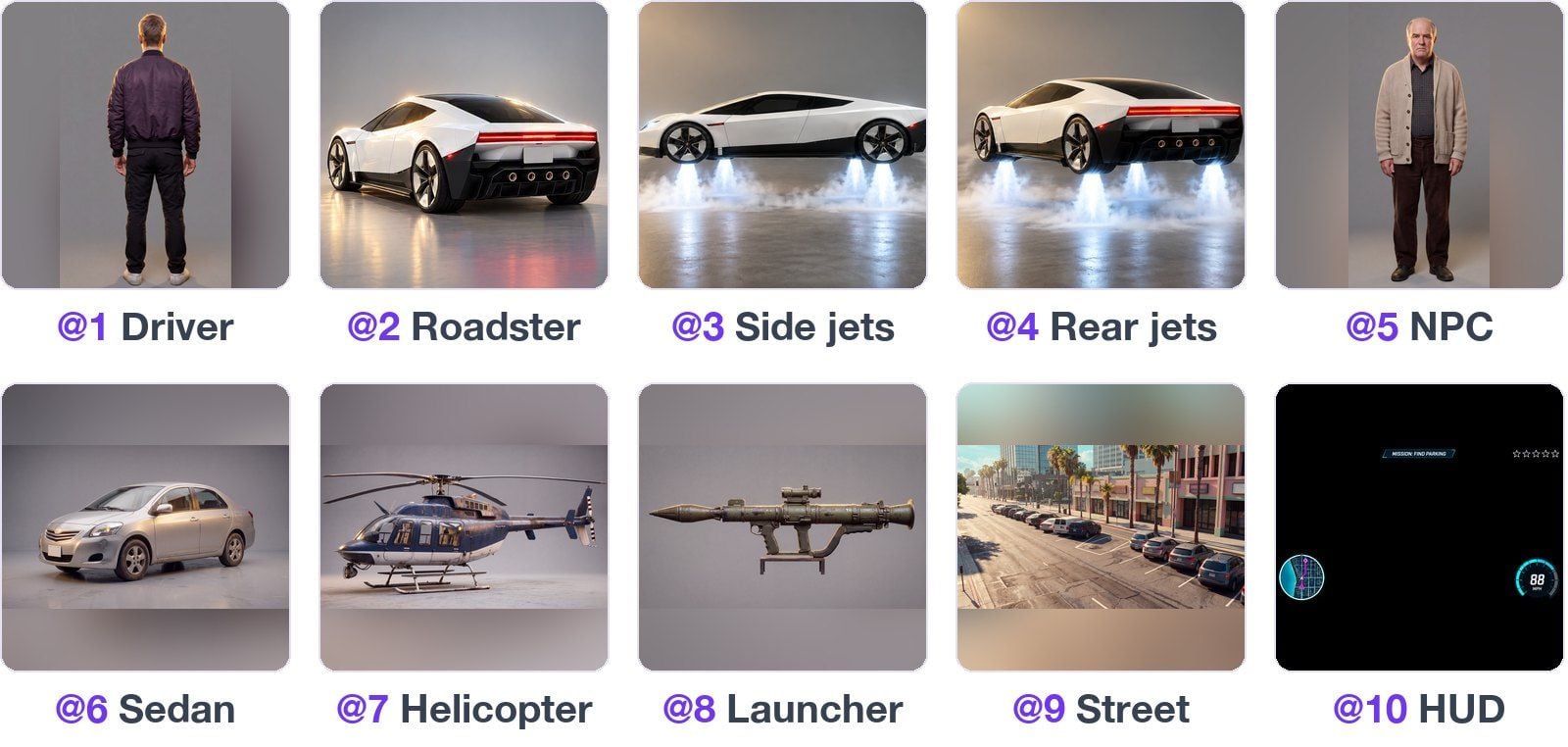
The driver is only ever seen from behind, so @image1 is a back view only. The jets get two images of their own, from the side and from 45 degrees behind, and the car copies them every time it lifts off, rolls or climbs. The HUD is a UI frame on a plain black background. It only sets the style and position of the minimap, speedometer, wanted stars and mission banner; the black itself never shows up in the shot.
All 10 images were made on Atlas Cloud too. The driver, the NPC, the sedan, the helicopter, the launcher and the street came from Nano Banana 2.1 and were then edited into a game look. The three car images and the HUD were edited with GPT Image 2.5 Flare.
The camera moves, nothing drifts
The camera changes position several times: above and behind the car, over the driver's shoulder, then at the window as he leans out and turns to fire. The white car's tail lights and jets, the driver's purple jacket and the NPC's beige cardigan stay the same set from the reference images in every angle. The minimap, speedometer, mission banner and wanted stars stay where @image10 put them from start to finish, and the stars go up as the story does.
The prompt
This is the final prompt. We ran it in Chinese; below is an English translation, with the dialogue exactly as written. Upload the references in order, @image1 to @image10.
text1GTA-style open-world game, gameplay screen recording. One continuous 30-second take, no cuts, all of it on the street in @image9 and directly above it. The camera is the game's third-person follow camera: above and behind the car while driving, over the driver's right shoulder on foot. The driver @image1 always has his back to the camera. The HUD from @image10 is always on screen; at the start none of the five wanted stars are lit. 20–6s | Stealing the spot: the driver drives @image2 along the street in @image9. In a row of spaces ahead on the right there's only one free spot, and the silver sedan @image6 is in front of it, slowly reversing in. The sports car swerves right at once, its jets fire and it lifts off (@image3), does one barrel roll in mid-air and lands cleanly in the spot ahead of the sedan. The sedan brakes hard and stops in the lane next to the sports car. 36–12s | The argument: the camera follows the driver out of the car and swings round behind his right shoulder. The NPC @image5 shoves the sedan's door open, storms out, points at the driver and shouts in a British accent: "Oi! You absolute muppet! That was MY spot!" The driver, back to the camera, says in an American accent: "Finders keepers." 412–17s | Blowing up the car: the driver takes the rocket launcher @image8 out of the trunk and the NPC runs off in fright. One shot flips the empty sedan. Two stars light up in the top right. 517–22s | Vertical takeoff: the driver gets back in the driver's seat and the camera returns to above and behind the car. The sports car stays where it is, its jets fire downward (@image4), and the whole car rises straight up like an elevator, all the way to rooftop height, the burning sedan getting smaller below. Three stars light up in the top right. 622–30s | Shooting down the helicopter: the sports car flies forward above the street. The helicopter @image7 catches up from behind. The camera moves round behind the driver's left shoulder, facing the back of the car: the driver leans out of the driver's window, turns with the rocket launcher, aims and fires, and the helicopter explodes into a fireball in mid-air. The driver says: "Now it's free." "MISSION COMPLETE" appears at the top.
Negative prompt:
text1cuts, transitions, scene changes, driver's face, car taking off while driving along the ground, helicopter coming from the front, split screen, car badges
The prompt is split into five timed sections, and each one says where the camera is, who's moving and how the HUD changes. The British and American accents are written right before the lines, and the dialogue and lip movement are generated with the picture.
2. Character sheets lock down the same face
The second film is a Malfoy romance short: Harry, chasing the Snitch, crashes into Malfoy. Furious, she writes to her father to complain, but the letter turns out to be full of "Potter."
One sheet per character
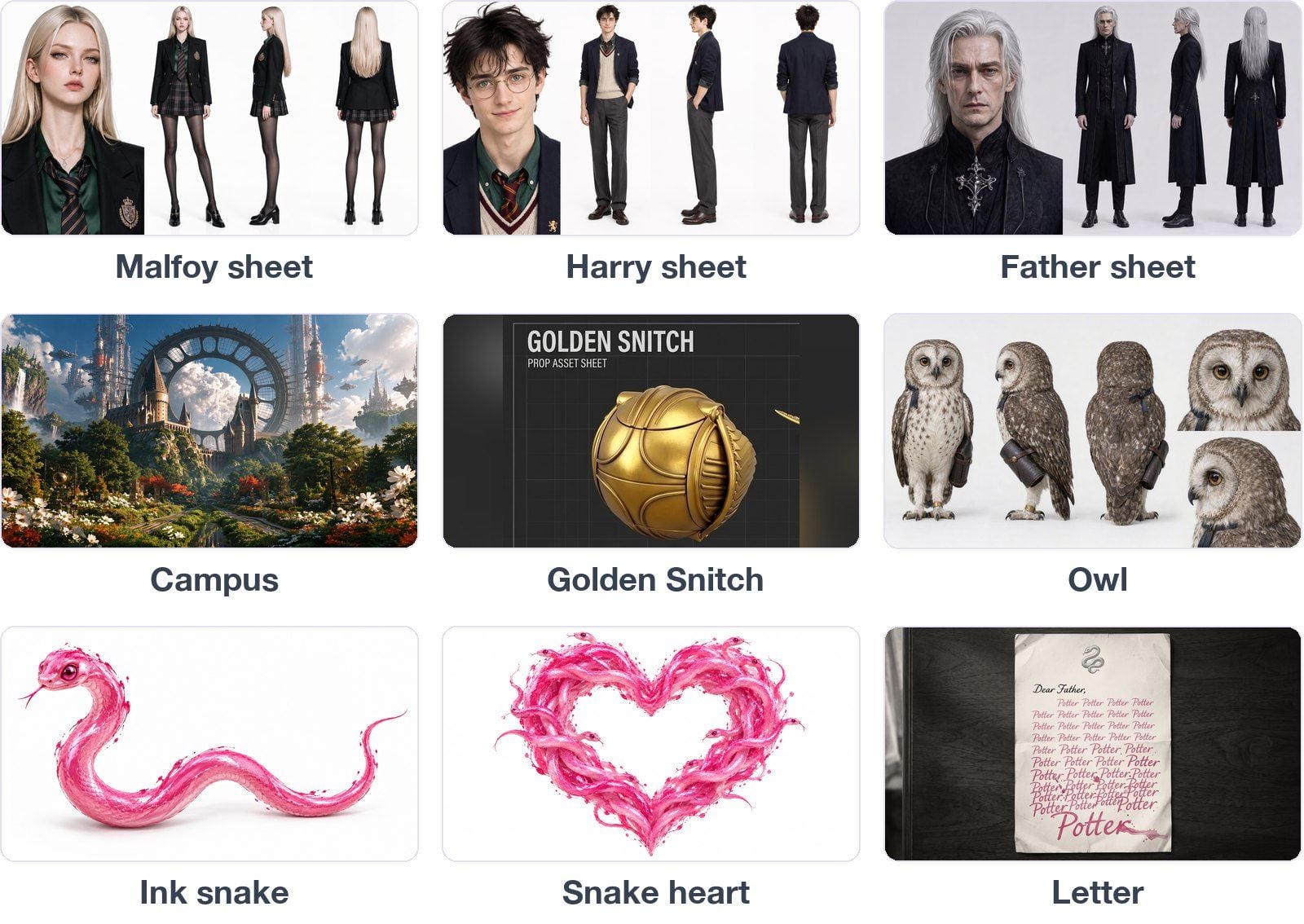
This film uses 9 reference images. Malfoy, Harry and the father each get a four-view sheet: a face close-up plus full-body front, side and back. The other 6 are the campus, the Golden Snitch, the owl, the ink snake, the snake heart and the letter.
Four generations, one face
Once the storyboard was done, the shots were merged into 4 groups at scene changes and pauses in the action, each under 15 seconds. For each group, the prompt lays out several shots on a timeline, and Kling 4.0 cuts between them inside a single video.
The four groups were generated separately. Malfoy's platinum hair and green tie, and Harry's round glasses and messy hair, match in every group, and the pieces cut together cleanly. The effects shots, where the ink letters turn into little snakes and a swarm of snakes wraps into a heart and bursts, each have a reference image holding their shape too.
3. What's new in Kling 4.0
Both films use omni reference. That's not the only upgrade in this generation. Here's a rundown based on Kling's official API documentation.
One model, three endpoints. On the API, Kling 4.0 comes as text-to-video, image-to-video (keyframes) and omni reference, all backed by the same model. "Omni reference" is the multi-reference capability, not a separate model.
Omni reference: up to 15 references at once
Images, videos, elements and voices can be mixed, up to 15 in total: up to 10 images, 5 reference videos, 7 elements and 3 voices. Images can be element shots, three-view sheets, grids, keyframes or wireframes. Videos can serve as references for motion, camera work and pacing, and gray-box and depth-map videos go straight in.
It also handles video editing: give it a source video and you can add or remove things, or change the style, the weather or the materials.
Up to 30 seconds in one generation
A single native generation runs 3 to 30 seconds, picked by the second. Long takes and continuous stories no longer have to be split into several clips and stitched together.
Multiple keyframes: up to 10
You can set the first frame, middle frames and last frame, up to 10 in total, to pin down character states and story beats so the video goes where you planned.
Output specs and prompts
Resolution is 720p or 1080p. 21:9 is new, alongside 16:9, 9:16 and 1:1, and the omni reference endpoint adds an adaptive ratio. The prompt limit is higher too: up to 26,000 characters in English, or 11,000 in Chinese.
Native audio
Sound is generated with the picture: speech lines up with lip movement, and ambient sound comes with it. It supports Chinese, English, Japanese, Korean, Spanish, Portuguese, German, French, Hindi and more, plus a range of accents and dialects.
4. Get started
On the platform: log in to Atlas Cloud and open Kling 4.0.
Through the API:
- Get your API key. Log in to Atlas Cloud and create an API key in the console. One key works for every model on the platform.
- Read the API docs. The model page has the parameters and code samples. Parameters, duration options and resolution options all follow the model page.
- Send your first request. With Atlas Cloud's One API, one endpoint and one way of calling it reach every model on the platform. The Nano Banana 2.1 and GPT Image 2.5 Flare that made the reference images here, and the Kling 4.0 that made the videos, all ran on the same key; switch the model name and you're done.
Coming next: we'll put Kling 4.0 through a detailed review and compare it with other models, to help you find where it fits.





