
 Atlas Cloud ya es revendedor autorizado en EE. UU. de Dreamina Seedance 2.5 y Seedream 5.0 Pro.Atlas Cloud ya es revendedor autorizado en EE. UU. de Dreamina Seedance 2.5 y Seedream 5.0 Pro.
Gemini Omni es la familia de vídeo nativamente multimodal de Google DeepMind para la creación y edición guiadas por prompts. Genera vídeos a partir de texto, anima imágenes estáticas o modifica metraje existente con referencias visuales opcionales, preservando el contenido que no se haya modificado. Los controles flexibles de resolución, relación de aspecto y duración permiten adaptarse a diversos flujos de producción. Atlas Cloud unifica el acceso con precios transparentes de pago por uso. Empieza a crear hoy mismo.
Gemini Omni Flash ha sido desarrollado por Google. Atlas Cloud (operado por Atlas Cloud AI LLC) proporciona acceso al modelo, pero no es su propietario. Todas las marcas comerciales pertenecen a sus respectivos titulares.
Atlas Cloud le proporciona los últimos modelos creativos líderes en la industria.
Compara las rutas de entrada, las capacidades de salida y los usos en producción de Gemini Omni en siete endpoints de video especializados.
| Modalidad | Descripción |
|---|---|
| Gemini Omni Flash R2V API (Reference To Video) | Combina un prompt de texto con entre una y cinco imágenes de referencia para generar video cinematográfico con sonido nativo. La coherencia de sujetos, escenas y estilos hace que este endpoint sea adecuado para secuencias de marca, personajes recurrentes y narrativas visuales coordinadas. |
| Gemini Omni Flash I2V API (Image To Video) | A partir de una imagen fija y un prompt de texto, este endpoint crea un video cinematográfico con sonido, preservando el sujeto y la composición de origen. Es ideal para animación de productos, movimiento de retratos y desarrollo de conceptos visuales. |
| Gemini Omni Flash Video Edit API | Envía un video existente, una instrucción de texto e imágenes de referencia opcionales para aplicar cambios coherentes con la escena y audio nativo. Como el metraje intacto se conserva, los editores pueden realizar revisiones específicas sin reconstruir toda la escena. |
| Gemini Omni Flash T2V API (Text To Video) | Un simple prompt de texto se convierte en un video cinematográfico con audio nativo sincronizado y movimiento basado en la física del mundo real. Su generación controlable y de alta velocidad permite visualizar conceptos, desarrollar historias y crear prototipos de video rápidamente. |
| Gemini Omni Flash R2V Developer API | Para transformaciones guiadas, combina un clip de video existente con imágenes de referencia y prompts de texto. El endpoint admite transferencia de estilo de video, edición de escenas e inserción de personajes para aplicaciones creativas que generan variaciones dirigidas a partir del metraje proporcionado. |
| Gemini Omni Flash I2V Developer API | Hasta siete imágenes de referencia pueden guiar un video generado mediante un prompt de texto, preservando la identidad visual en todo el resultado. Elige esta ruta para personajes recurrentes, imágenes de producto coherentes o recursos visuales cohesionados en una campaña. |
| Gemini Omni Flash T2V Developer API | Elige un prompt de texto junto con la resolución, la relación de aspecto y la duración requeridas para producir un video cinematográfico controlable. Los ajustes de salida flexibles ayudan a los desarrolladores a crear contenido específico para cada plataforma, automatizar flujos de generación y probar múltiples direcciones creativas. |
Cada solicitud a la API Gemini Omni Flash puede aceptar cualquier combinación de texto, imágenes, video y audio, generar sonido sincronizado, modelar la física del mundo real y perfeccionar el resultado mediante conversación.
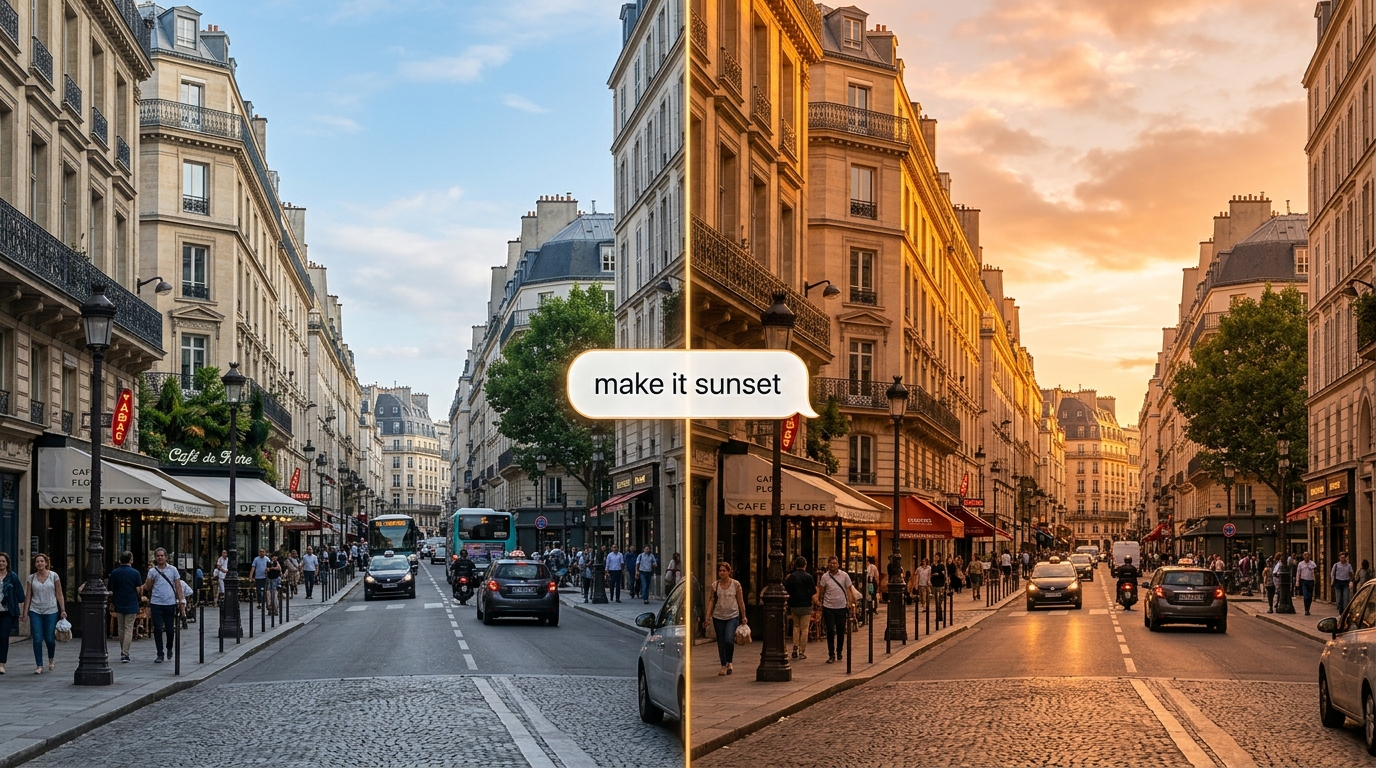
Perfecciona un clip mediante lenguaje natural y la API Gemini Omni Flash aplicará el cambio mientras conserva el resto de la escena. Su API de Interactions con estado recuerda cada turno, de modo que las ediciones se construyen unas sobre otras.
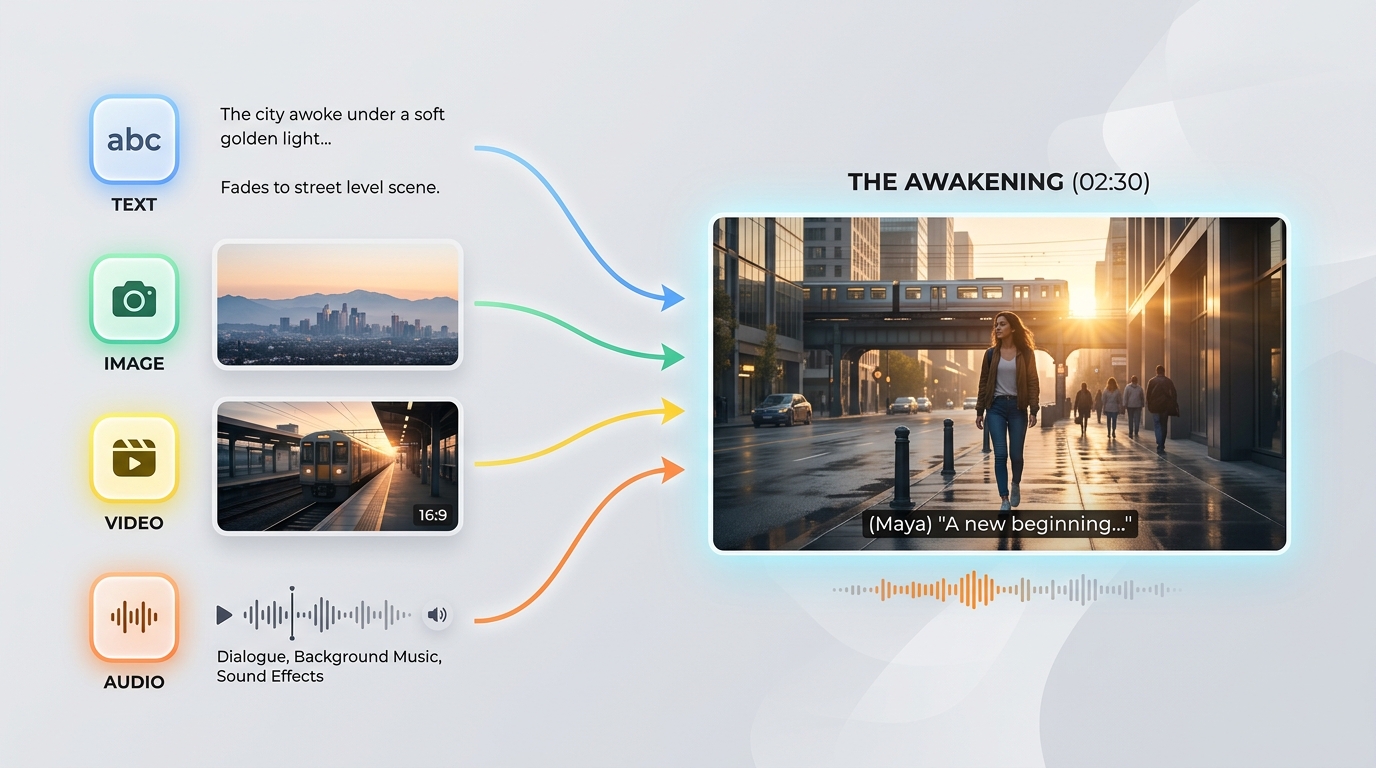
La API Gemini Omni Flash acepta cualquier combinación de texto, imágenes, video y audio en un solo prompt. Esta entrada de cualquier fuente te permite iniciar una generación a partir del material que ya tengas.
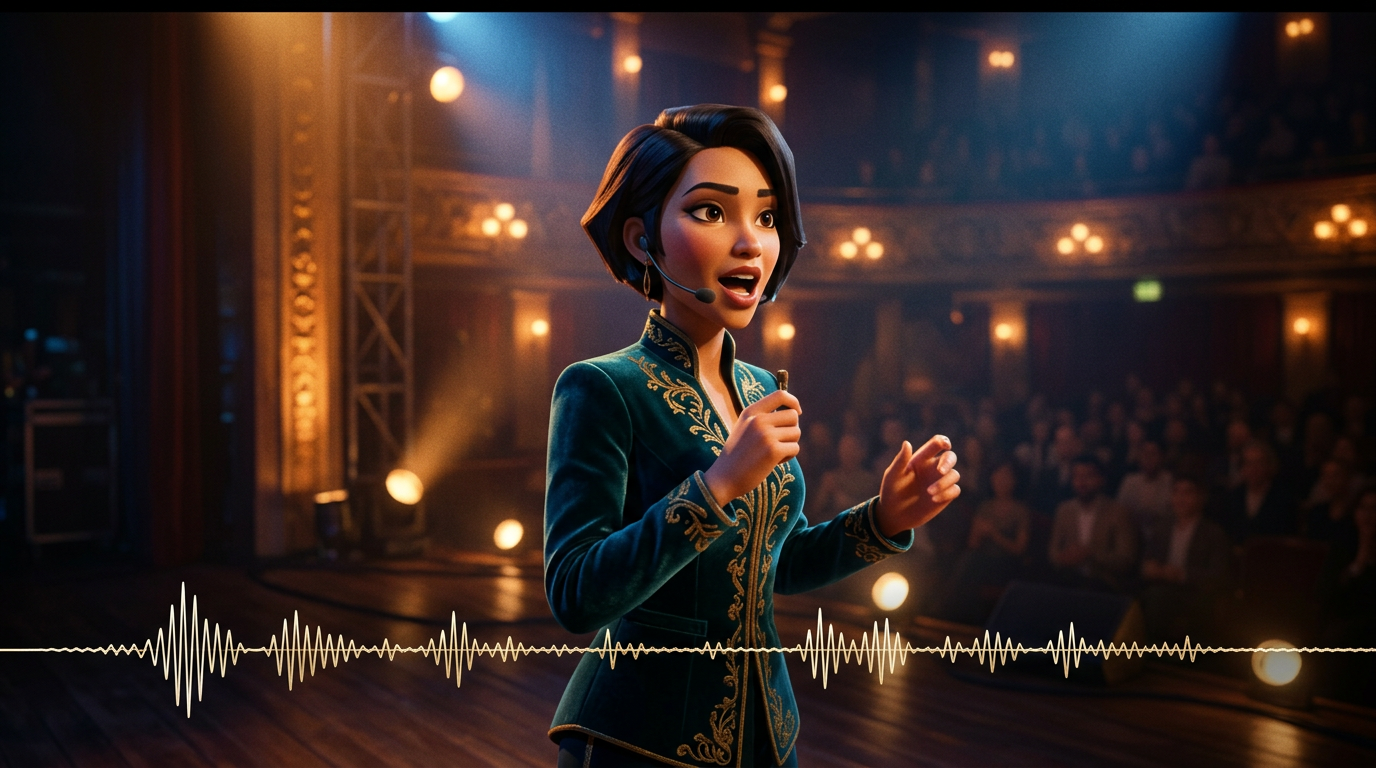
El sonido se genera junto con la imagen en una sola pasada de inferencia, por lo que los diálogos, efectos y sonidos ambientales permanecen sincronizados con la acción. La API Gemini Omni Flash no necesita un paso de audio independiente posterior.

Basada en un modelo de la física del mundo real, la API Gemini Omni Flash representa reflejos, gravedad, iluminación y condiciones meteorológicas creíbles. Las escenas mantienen su coherencia visual en lugar de convertirse en artefactos, incluso en tomas dinámicas.
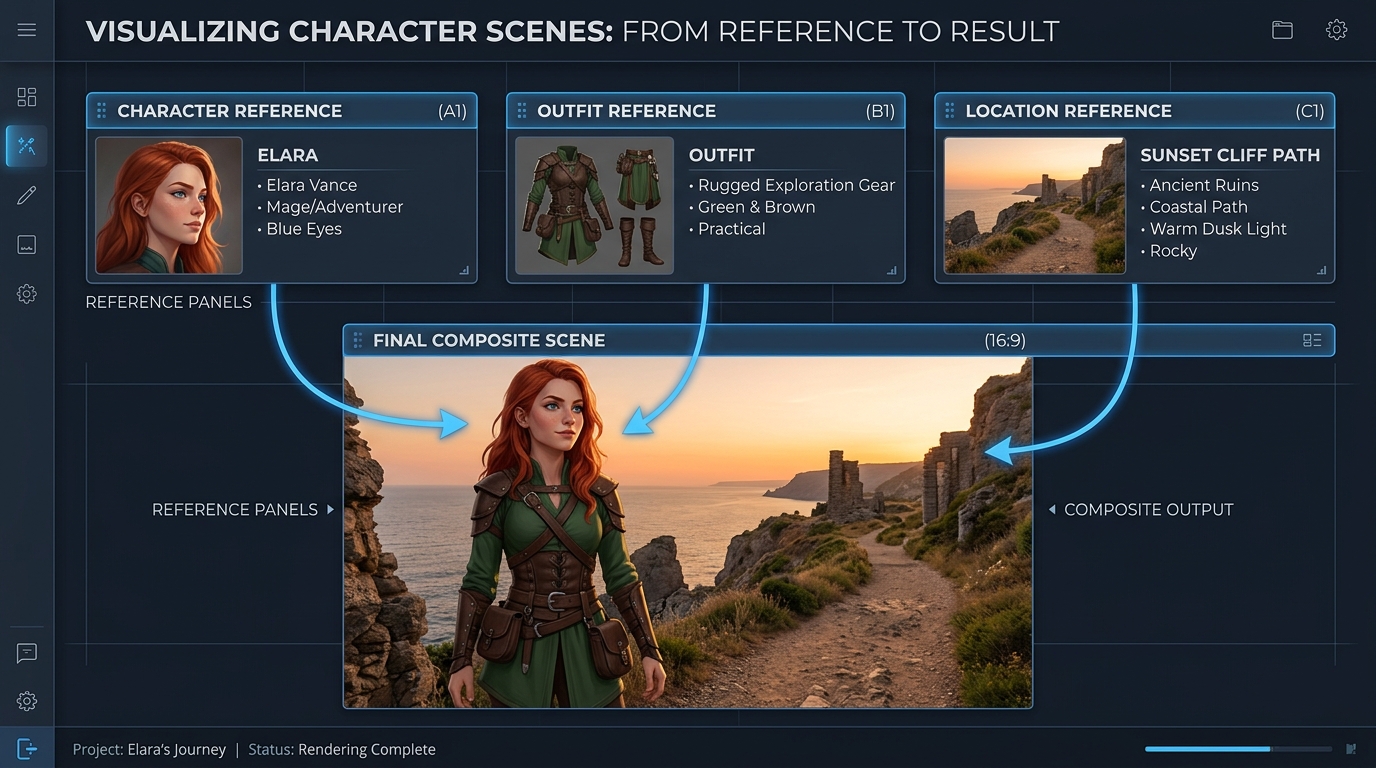
Guía una generación con hasta siete imágenes de referencia y tres clips de video cortos, y la API Gemini Omni Flash mantiene la coherencia de los sujetos, el estilo y la escena. Esto preserva la identidad entre ediciones y tomas.
El mismo prompt, generado por Gemini Omni y otros modelos de vídeo líderes: multitoma y película publicitaria de alta gama
Genera un vídeo continuo de 3 escenas: Escena 1: La mujer permanece de pie bajo luces de neón en una calle lluviosa de Tokio. Reflejos sobre el suelo mojado, profundidad de campo cinematográfica y movimiento de cámara en mano. Escena 2: La cámara pasa lentamente a un plano más cercano. Ella habla suavemente en sincronía con la voz proporcionada, con los movimientos de los labios perfectamente sincronizados. El tráfico de fondo continúa sin interrupciones. Escena 3: Entra en una estación de metro. El entorno mantiene la coherencia de la iluminación, el clima y el estado de ánimo. La cámara la sigue desde atrás, manteniendo la coherencia de su identidad. Restricciones: - Mantén una identidad facial idéntica en todas las escenas - Conserva la continuidad de la iluminación (lluvia y reflejos de neón) - Garantiza el realismo físico (interacción con la lluvia y superficies mojadas) - Garantiza la sincronización audiovisual con la entrada de voz - No reinicies la escena durante las transiciones; mantén un estado continuo del mundo Estilo: realismo cinematográfico de alta gama, grano de película, lente anamórfica, poca profundidad de campo, aspecto de película 4K
Gemini Omni
Wan 2.7
Kling v3.0
Genera un vídeo continuo de 4 escenas: Escena 1: Un pequeño robot blanco permanece inmóvil sobre un escritorio de madera, en un apartamento tenuemente iluminado a medianoche. La luz de la luna entra por la ventana. Los ojos del robot se iluminan lentamente y comienza un tenue zumbido mecánico. Escena 2: El robot baja cuidadosamente del escritorio. Sus pequeños pies metálicos producen suaves chasquidos sobre el suelo de madera. La cámara lo sigue desde un ángulo bajo, manteniendo constantes el tamaño y la forma del robot. Escena 3: El robot entra en la cocina. Los reflejos de la puerta del frigorífico y del suelo de baldosas reaccionan de forma natural a su movimiento. La misma luz de la luna y la tranquila atmósfera nocturna continúan desde la escena anterior. Escena 4: El robot se detiene junto a una ventana y observa las luces de la ciudad desde el exterior. La cámara se acerca lentamente desde atrás, conservando la coherencia de la identidad, el material, la escala, la iluminación y el sonido del robot. Requisitos: - Mantén exactamente el mismo diseño del robot en todas las escenas - Conserva una distribución continua del apartamento, sin reiniciar la escena - Mantén una iluminación uniforme de una habitación a otra - Sincroniza los pasos y el zumbido mecánico con el movimiento del robot - Usa reflejos, sombras e interacciones con los objetos físicamente realistas - Crea transiciones fluidas entre escenas, como si se filmara un único mundo continuo Estilo: realismo cinematográfico, atmósfera de ciencia ficción serena, luz de luna suave, materiales detallados, movimiento de cámara realista, poca profundidad de campo, aspecto de película publicitaria de alta gama
Gemini Omni
Kling V3.0
Pixverse v6
Gemini Omni impulsa la producción de campañas, la revisión conversacional, la previsualización, el aprendizaje visual, la continuidad de marca y las herramientas integradas para creadores mediante flujos de trabajo de edición de texto, imágenes, referencias y vídeo con audio nativo sincronizado.

Anima una imagen fija aprobada del producto con movimiento cinematográfico, conservando el sujeto y la composición. Los equipos de marketing pueden producir teasers de lanzamiento, anuncios para redes sociales y presentaciones de producto pulidas con audio nativo sincronizado.

Describe un cambio específico y Gemini Omni editará el metraje existente manteniendo intacto el contenido que no se haya modificado. Los editores pueden crear tratamientos alternativos, variantes localizadas y revisiones para clientes sin reconstruir una escena aprobada.

Guía la generación con imágenes de referencia para mantener la coherencia de los productos, personajes y el estilo visual a lo largo de un clip. Los estudios pueden desarrollar recursos coordinados para campañas, universos de marca recurrentes y contenido episódico reconocible en distintos canales.

Parte de una indicación de texto y genera vídeo cinematográfico con audio sincronizado y movimiento basado en la física del mundo real. Directores y diseñadores pueden explorar momentos clave de la historia, ideas de cámara y formatos específicos de cada plataforma antes de la producción.

Convierte conceptos abstractos en explicaciones visuales breves describiendo la escena, la acción y la secuencia de aprendizaje prevista. Los equipos educativos pueden crear demostraciones científicas, recorridos de procesos y módulos de formación con sonido nativo.

Combina la generación de texto, la animación de imágenes fijas, la creación guiada por referencias y la edición de vídeo en una única integración de Gemini Omni. Las plataformas para creadores pueden ofrecer herramientas de producción conectadas sin tener que ensamblar canales independientes de procesamiento visual y de audio.
Compara los modelos de video de referencia de Gemini Omni API, incluido Gemini Omni 1.1 Flash, con las principales alternativas según las entradas compatibles, la capacidad de referencias, la generación de audio y los precios estándar.
| Modelo | Entradas aceptadas | Capacidad de referencias | Generación de audio | Precio estándar | Standard Base Price |
|---|---|---|---|---|---|
| Gemini Omni 1.1 Flash Reference-to-Video | Text, source video, reference images | Conversational additions, removals, replacements, and restyling | 360p, 720p, upscaled 1080p, upscaled 4K | Native synchronized audio | $0.041 |
| Gemini Omni Flash Reference-to-Video | Text, source video, up to 5 reference images | Scene-consistent edits that preserve untouched footage | 720p | Native audio editing | $0.14 |
| Seedance 2.0 Reference-to-Video | Text, source video, up to 5 reference images | Instruction-guided video changes with visual references | 720p, 1080p | Automatic audio or original audio retention | $0.14 |
| Wan-2.7 Reference-to-video | Text, source video, reference images, optional driving audio | Style transfer, scene changes, and element replacement | 720p, 1080p | Original audio retention, regeneration, or driving audio | $0.10 |
Empieza en minutos — sigue estos sencillos pasos para integrar y desplegar modelos a través de la plataforma de Atlas Cloud.
Regístrate en atlascloud.ai y completa la verificación. Los nuevos usuarios reciben créditos gratuitos para explorar la plataforma y probar modelos.
Combina modelos avanzados de Gemini Omni Flash con la plataforma acelerada por GPU de Atlas Cloud, proporcionando rendimiento, escalabilidad y experiencia de desarrollo incomparables.
Baja Latencia:
Inferencia optimizada por GPU para respuestas en tiempo real.
API Unificada:
Una sola integración para acceder a Gemini Omni Flash, GPT, Gemini y DeepSeek.
Precios Transparentes:
Facturación por Token, soporta modo Serverless.
Experiencia del Desarrollador:
SDK, análisis de datos, herramientas de ajuste fino y plantillas todo en uno.
Confiabilidad:
99.99% de disponibilidad, control de permisos RBAC, registros de cumplimiento.
Seguridad y Cumplimiento:
Certificación SOC 2 Type II, cumplimiento HIPAA, soberanía de datos en EE.UU.
La API de Gemini Omni ofrece a los desarrolladores acceso, a través de Atlas Cloud, a la familia de generación y edición de video nativamente multimodal de Google DeepMind. Según el endpoint seleccionado, puede generar videos a partir de texto o imágenes, usar medios de referencia, editar metraje existente y producir audio nativo sincronizado.
Gemini Omni 1.1 Flash incorpora extensión de video, interpolación entre el primer y el último fotograma, resoluciones de salida de 360p a 4K y una guía ampliada mediante referencias. Su variante de extensión añade entre 3 y 10 segundos por solicitud y puede encadenarse para crear un video coherente de hasta 40 segundos.
Crea una cuenta de Atlas Cloud, guarda tu clave de API en el servidor y selecciona el endpoint del modelo que corresponda a tu flujo de trabajo. Atlas Cloud proporciona una única clave compatible con OpenAI, mientras que el esquema publicado de cada endpoint define el prompt, las entradas multimedia y los ajustes de generación obligatorios.
Elige text to video cuando partas de un prompt, image to video para animar una imagen fija o reference to video cuando sean importantes la identidad y la guía de estilo. Usa video edit para modificar metraje existente y el endpoint Gemini Omni 1.1 Flash video extend para continuar una escena.
Los límites de referencia varían según el endpoint y la versión del modelo. Gemini Omni 1.1 Flash Reference to Video acepta hasta 10 imágenes de referencia y 3 clips de video de referencia, mientras que los endpoints anteriores admiten límites diferentes; por eso, comprueba el esquema del endpoint seleccionado antes de enviar los medios.
Gemini Omni 1.1 Flash admite salidas de entre 3 y 10 segundos a 24 FPS, con opciones de resolución de 360p, 720p, 1080p reescalada y 4K reescalada. Las relaciones de aspecto compatibles son 16:9 y 9:16, aunque los controles disponibles pueden variar según el endpoint de Atlas Cloud.
Sí. La variante video edit sigue instrucciones de texto para añadir, eliminar, reemplazar o cambiar el estilo de elementos, conservando el metraje que el prompt no mencione. Para realizar cambios iterativos, usa instrucciones concretas y el contexto de interacción compatible con el flujo de trabajo seleccionado.
Para continuar una escena, proporciona un clip existente al endpoint Gemini Omni 1.1 Flash video extend y solicita entre 3 y 10 segundos adicionales. Las extensiones pueden encadenarse hasta alcanzar un total de 40 segundos, mientras que la variante image to video puede interpolar entre el primer y el último fotograma proporcionados.
El precio estándar de Atlas Cloud para Gemini Omni 1.1 Flash es de $0.041 por segundo para text to video, reference to video, edición de video y extensión de video, mientras que image to video cuesta $0.043 por segundo. Los endpoints anteriores de Gemini Omni Flash parten de $0.112 por segundo, con facturación basada en el uso y sin suscripción obligatoria.
Todos los videos generados incluyen una marca de agua invisible de SynthID que puede detectarse mediante programación. Los filtros de seguridad se aplican tanto a los prompts como al contenido generado, mientras que el tiempo de procesamiento varía según la duración, la resolución y la carga del servicio. No se admiten controles específicos para negative prompt, system instruction, temperature, top_p ni stop sequence; por eso, incluye las exclusiones en el prompt principal.
¡La API de Seedance 2.5 ya está disponible en Atlas Cloud! Ofrece a los desarrolladores el modelo de video más reciente de ByteDance. Genera hasta 30 segundos de video nativo en una sola pasada a partir de texto, una sola imagen o hasta 50 referencias multimodales, con audio sincronizado y texto multilingüe en el encuadre. En Atlas Cloud puede acceder a él mediante una única clave, con consistencia del sujeto y físicas mejoradas que mantienen la coherencia en las tomas largas.

La API Wan 3.0 es la próxima generación de la familia de videos Wan de Alibaba, diseñada para llevar la generación de formato largo, el control de múltiples referencias y la calidad audiovisual a nuevas alturas. Atlas Cloud ya aloja Wan 2.7, 2.6 y 2.5, y Wan 3.0 se ejecuta con la misma clave unificada sin necesidad de configuración adicional. Empieza a construir hoy mismo. Desplázate hacia abajo hasta la galería para ver lo que Wan 3.0 puede crear.
MiniMax H3 es la familia de vídeo multimodal de MiniMax para la creación guiada por texto, imagen y referencias. En las rutas compatibles, conserva los sujetos del material de referencia, ofrece relaciones de aspecto flexibles y combina el sonido generado con los elementos visuales mediante H3 Developer, con perfiles de salida seleccionados según el endpoint. Atlas Cloud reúne toda la familia bajo una única clave compatible con OpenAI, con precios transparentes de pago por uso a partir de la tarifa estándar de $0.038 por segundo. Empieza a crear hoy mismo.
La familia gpt-image-2.5 de OpenAI ofrece a los desarrolladores la posibilidad de elegir entre Flare y Sunburst para flujos de trabajo de producción de imágenes. Renderiza con resoluciones arbitrarias de hasta 3840x2160 y elige entre cinco niveles de calidad, incluidos xhigh y max, para adaptarte a requisitos de salida específicos. Atlas Cloud proporciona inferencia REST lista para usar, sin arranques en frío y con precios estándar desde $0.004 por generación. Empieza a crear hoy mismo.
La API de Seedream 5.0 Pro ofrece a los desarrolladores el modelo de edición de imágenes controlable de ByteDance en Atlas Cloud. Sitúa las ediciones con precisión mediante anclajes y coordenadas, separa las imágenes en capas editables, fusiona múltiples referencias y empareja colores y materiales exactos, con texto multilingüe a 2K y 3K. ¡En Atlas Cloud puede acceder a él mediante una sola clave!
Seedance 2.0 es el modelo de vídeo para producción de ByteDance, diseñado para crear planos con precisión. Convierte prompts en vídeo, anima una imagen del primer fotograma con orientación opcional del último fotograma o da forma a los resultados mediante medios de referencia y búsqueda web opcional. Atlas Cloud reúne estos flujos de trabajo en una única API unificada, con precios transparentes de pago por uso y una sola clave compatible con OpenAI. Empieza a crear hoy mismo.
La Kling 3.0 API lleva la suite de video insignia de Kuaishou a Atlas Cloud mediante una clave compatible con OpenAI. Abarca dos modelos: Kling 3.0 para la narración de AI Director, sincronización labial multilingüe y texto en pantalla preciso, y Kling 3.0 Omni (O3) para la clonación de sujetos y voz a partir de un video corto o imagen. Ambos generan audio nativo en la misma pasada, con una salida de hasta 4K. Construya narrativas cinematográficas, marketing global, anuncios multilingües y contenido de personajes en serie sobre una infraestructura confiable.
Grok Imagine Video brinda a los desarrolladores acceso a la familia de modelos de video de xAI para crear, animar, ampliar y editar clips. Genera videos de 1 a 15 segundos a partir de indicaciones, guía personas, objetos o estilos con hasta siete imágenes de referencia y trabaja en 480p o 720p. Atlas Cloud reúne estas capacidades mediante endpoints compatibles con OpenAI y precios transparentes de pago por uso. Empieza a crear hoy mismo.
Vidu Q4 es el último modelo de vídeo insignia de Vidu, diseñado para la generación de vídeo a partir de imágenes y referencias. Puede animar una sola imagen estática y crear transiciones automáticas entre escenas, ofreciendo a los desarrolladores dos vías de entrada para distintos flujos de trabajo de producto. Atlas Cloud proporciona endpoints de API dedicados con esquemas de parámetros publicados, a un precio estándar verificado de $0.04 por segundo. Empieza a desarrollar hoy mismo.
Gemini Omni 1.1 Flash es la familia de vídeo nativamente multimodal de Google DeepMind para flujos de producción flexibles. Edita material existente mediante instrucciones de texto, mantén la coherencia visual con hasta 10 imágenes de referencia y 3 clips de vídeo, o amplía una toma en segmentos encadenables de hasta 40 segundos. Accede a todos los flujos de trabajo en Atlas Cloud con una sola clave de API compatible con OpenAI, precios de pago por uso y disponibilidad desde el día 0. Empieza a desarrollar hoy mismo.
Nano Banana 2.1 es la familia de modelos de imagen de Google basada en Gemini 3.6 Flash. Ofrece generación y edición con calidad Pro a la velocidad de Flash, admite ediciones y combinaciones mediante lenguaje natural con entre 1 y 14 imágenes de entrada, y mantiene la coherencia de hasta 4 personajes y 10 objetos. A través de Atlas Cloud, los desarrolladores pueden acceder a la familia con una única clave compatible con OpenAI, disponibilidad fiable y disponibilidad desde el día 0. Empieza a crear hoy mismo.
Construya con la API Nano Banana 2, impulsada por el modelo Gemini 3.1 Flash Image de Google. Genera imágenes en 4K nativo de hasta 4096x2304 con una representación de texto precisa y personajes consistentes en hasta 14 imágenes de referencia, tanto para generación como para edición. En Atlas Cloud puede acceder a ella a través de una API unificada junto con más de 300 modelos, con precios desde $0.04 por imagen, un tiempo de actividad del 99.99% y créditos gratuitos para comenzar.
Guías, tutoriales y novedades de producto para aprovechar al máximo Atlas Cloud.



