
 Atlas Cloud est désormais revendeur agréé aux États-Unis de Dreamina Seedance 2.5 et Seedream 5.0 Pro.Atlas Cloud est désormais revendeur agréé aux États-Unis de Dreamina Seedance 2.5 et Seedream 5.0 Pro.
Gemini Omni est la famille vidéo nativement multimodale de Google DeepMind, conçue pour la création et le montage guidés par des prompts. Générez des vidéos à partir de texte, animez des images fixes ou modifiez des séquences existantes avec des références visuelles facultatives, tout en préservant le contenu non modifié. Des paramètres flexibles de résolution, de format d’image et de durée prennent en charge une grande variété de workflows de production. Atlas Cloud unifie l’accès grâce à une tarification transparente à l’usage. Commencez à créer dès aujourd’hui.
Gemini Omni Flash est développé par Google. Atlas Cloud (exploité par Atlas Cloud AI LLC) en fournit l’accès mais n’en est pas propriétaire. Toutes les marques appartiennent à leurs détenteurs respectifs.
Atlas Cloud vous offre les derniers modèles créatifs de pointe de l'industrie.
Comparez les routes d’entrée de Gemini Omni, les capacités de sortie et les usages en production de sept endpoints vidéo spécialisés.
| Modalité | Description |
|---|---|
| Gemini Omni Flash R2V API (Reference To Video) | Associez un prompt textuel à one to five images de référence pour générer une vidéo cinématographique avec un son natif. La cohérence des sujets, des scènes et des styles rend cet endpoint adapté aux séquences de marque, aux personnages récurrents et à une narration visuelle coordonnée. |
| Gemini Omni Flash I2V API (Image To Video) | À partir d’une image fixe et d’un prompt textuel, cet endpoint crée une vidéo cinématographique avec son tout en préservant le sujet et la composition d’origine. Il convient à l’animation de produits, aux portraits en mouvement et au développement de concepts visuels. |
| Gemini Omni Flash Video Edit API | Envoyez une vidéo existante, une instruction textuelle et, éventuellement, des images de référence pour appliquer des modifications cohérentes avec la scène et dotées d’un audio natif. Les séquences intactes étant préservées, les monteurs peuvent effectuer des révisions ciblées sans reconstruire toute la scène. |
| Gemini Omni Flash T2V API (Text To Video) | Un simple prompt textuel devient une vidéo cinématographique avec un audio natif synchronisé et des mouvements fondés sur la physique du monde réel. Sa génération contrôlable et rapide prend en charge la visualisation de concepts, le développement narratif et le prototypage vidéo accéléré. |
| Gemini Omni Flash R2V Developer API | Pour des transformations guidées, combinez un clip vidéo existant avec des images de référence et des prompts textuels. Cet endpoint prend en charge le transfert de style vidéo, l’édition de scènes et l’insertion de personnages pour des applications créatives générant des variantes dirigées à partir de séquences fournies. |
| Gemini Omni Flash I2V Developer API | Up to seven images de référence peuvent guider une vidéo générée à partir d’un prompt textuel tout en préservant l’identité visuelle dans l’ensemble du résultat. Choisissez cette route pour les personnages récurrents, une imagerie produit cohérente ou des assets harmonisés au sein d’une campagne. |
| Gemini Omni Flash T2V Developer API | Choisissez un prompt textuel ainsi que la résolution, le ratio d’aspect et la durée requis pour produire une vidéo cinématographique contrôlable. Des paramètres de sortie flexibles aident les développeurs à créer du contenu adapté à chaque plateforme, à automatiser les workflows de génération et à tester plusieurs orientations créatives. |
Chaque requête adressée à Gemini Omni Flash API peut combiner librement du texte, des images, des vidéos et de l’audio, générer un son synchronisé, modéliser la physique du monde réel et affiner le résultat au fil de la conversation.
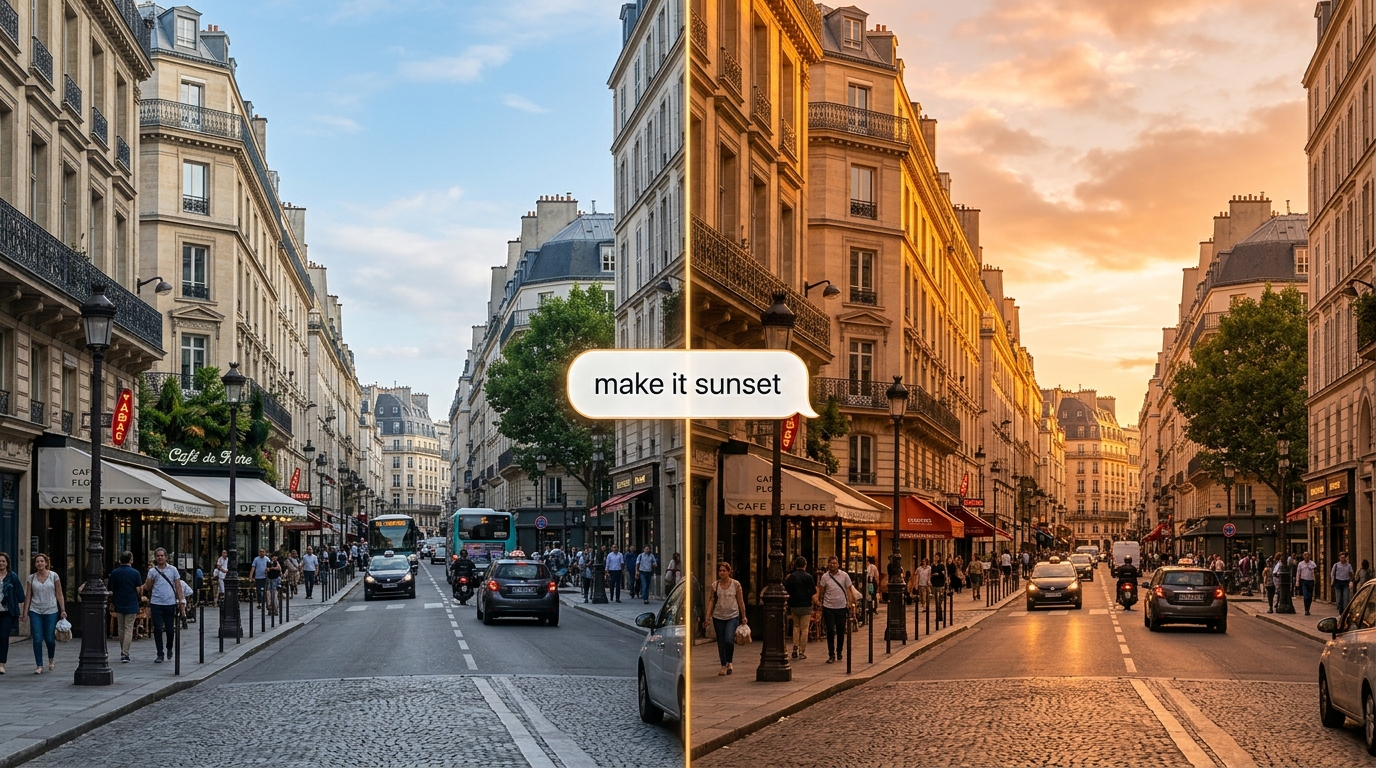
Affinez un clip en langage naturel : Gemini Omni Flash API applique la modification tout en préservant le reste de la scène. Son API Interactions avec état mémorise chaque échange, afin que les modifications successives s’appuient les unes sur les autres.
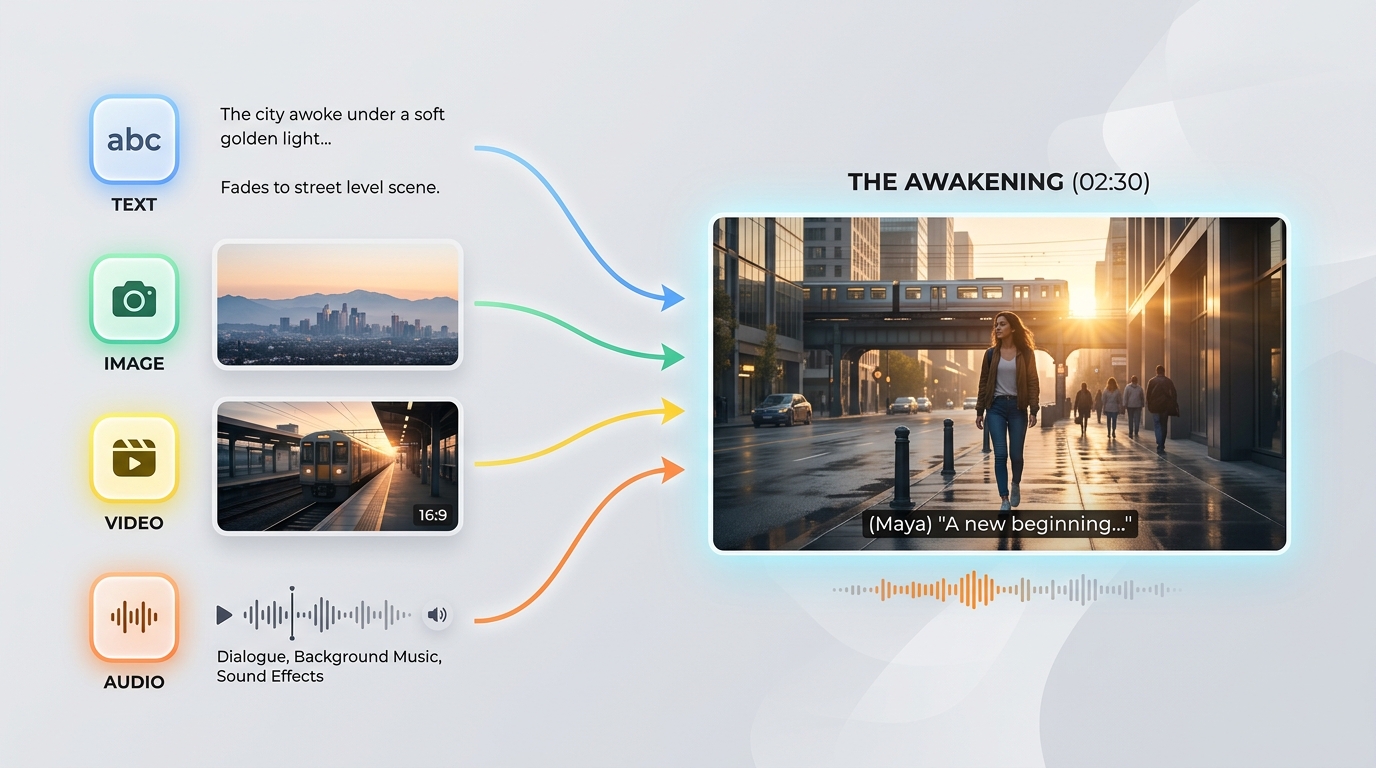
Gemini Omni Flash API accepte n’importe quelle combinaison de texte, d’images, de vidéos et d’audio dans un même prompt. Cette entrée de n’importe quel type vers n’importe quel autre vous permet de lancer une génération à partir des sources dont vous disposez déjà.
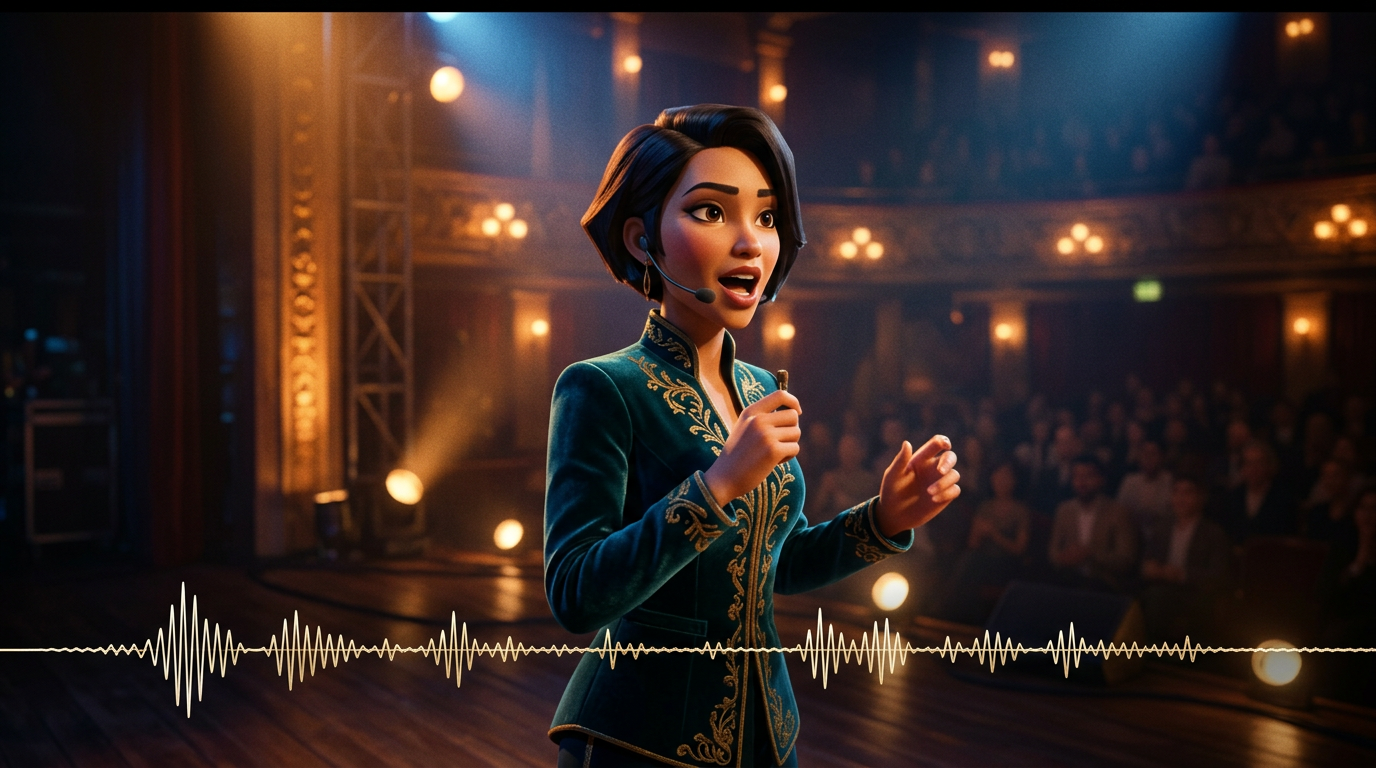
Le son est généré avec l’image en une seule passe d’inférence : les dialogues, les effets et l’ambiance restent ainsi parfaitement synchronisés avec l’action. Gemini Omni Flash API ne nécessite aucune étape audio distincte par la suite.

Fondé sur un modèle de la physique du monde réel, Gemini Omni Flash API restitue des reflets, la gravité, l’éclairage et les conditions météorologiques de manière crédible. Les scènes restent visuellement cohérentes au lieu de dériver vers des artefacts, même dans les plans dynamiques.
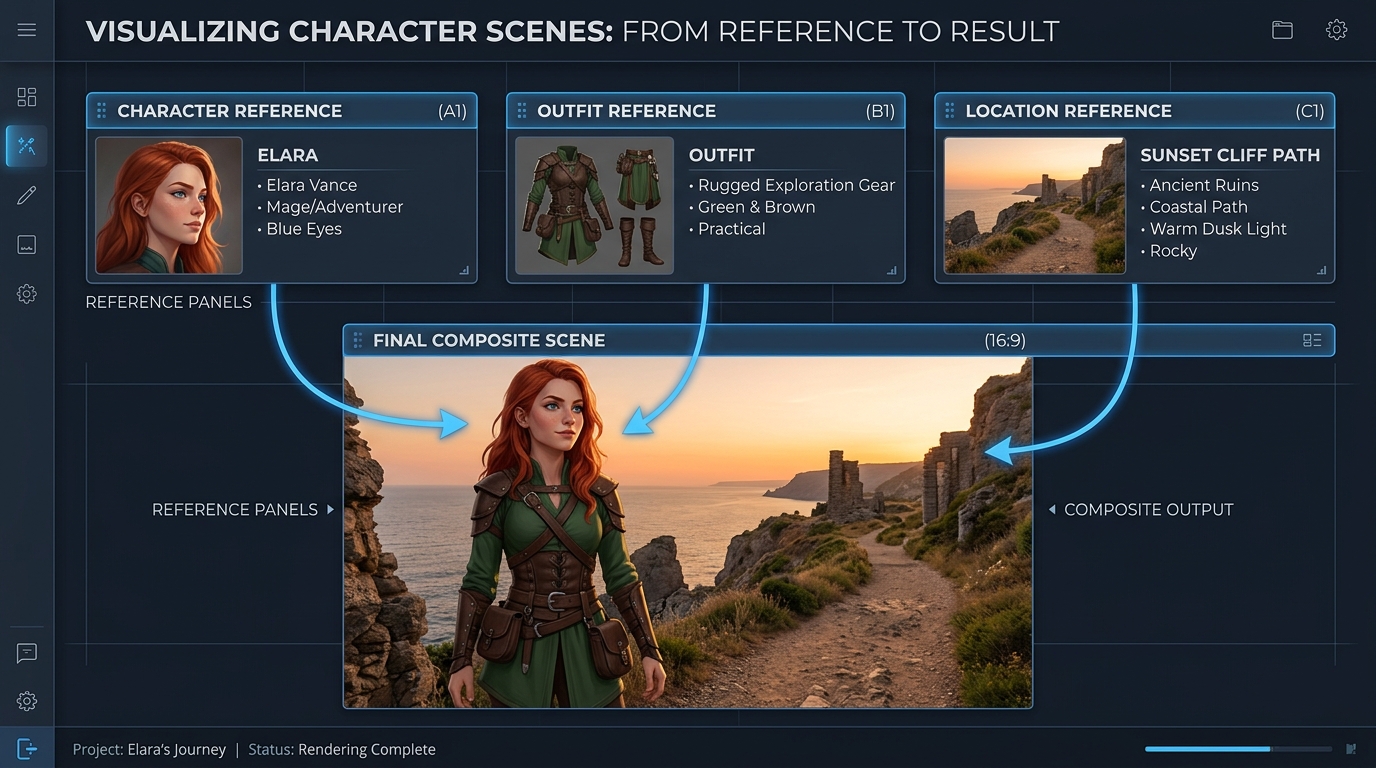
Guidez une génération avec jusqu’à 7 images de référence et 3 courts clips vidéo, tandis que Gemini Omni Flash API préserve la cohérence des sujets, du style et de la scène. L’identité reste ainsi stable d’une modification ou d’un plan à l’autre.
Le même prompt, généré par Gemini Omni et d’autres modèles vidéo de premier plan : multi-plan et film publicitaire haut de gamme
Générez une vidéo continue en 3 scènes : Scène 1 : La femme se tient sous des lumières néon dans une rue pluvieuse de Tokyo. Reflets sur le sol mouillé, profondeur de champ cinématographique, mouvements de caméra à l’épaule. Scène 2 : La caméra passe lentement à un plan plus rapproché. Elle parle doucement, en synchronisation avec la voix fournie ; ses mouvements de lèvres sont parfaitement synchronisés. La circulation en arrière-plan se poursuit sans rupture. Scène 3 : Elle entre dans une station de métro. L’éclairage, la météo et l’ambiance restent cohérents. La caméra la suit de dos tout en préservant la cohérence de son identité. Contraintes : - Maintenir une identité faciale identique dans toutes les scènes - Préserver la continuité de l’éclairage (pluie, reflets néon) - Garantir le réalisme physique (interaction avec la pluie, surfaces mouillées) - Garantir la synchronisation audiovisuelle avec l’entrée vocale - Ne pas réinitialiser la scène entre les transitions ; conserver un état du monde continu Style : réalisme cinématographique haut de gamme, grain de film, objectif anamorphique, faible profondeur de champ, rendu de film 4K
Gemini Omni
Wan 2.7
Kling v3.0
Générez une vidéo continue en 4 scènes : Scène 1 : Un petit robot blanc reste immobile sur un bureau en bois dans un appartement sombre, à minuit. La lumière de la lune pénètre par la fenêtre. Les yeux du robot s’allument lentement et un léger bourdonnement mécanique commence à se faire entendre. Scène 2 : Le robot descend prudemment du bureau. Ses petits pieds métalliques produisent de légers cliquetis sur le parquet. La caméra le suit en contre-plongée, tout en conservant sa taille et sa forme. Scène 3 : Le robot entre dans la cuisine. Les reflets sur la porte du réfrigérateur et le sol carrelé réagissent naturellement à ses mouvements. La même lumière lunaire et la même atmosphère nocturne silencieuse se prolongent depuis la scène précédente. Scène 4 : Le robot s’arrête près d’une fenêtre et regarde les lumières de la ville à l’extérieur. La caméra avance lentement en travelling avant depuis l’arrière, en préservant la continuité de l’identité, des matériaux, de l’échelle, de l’éclairage et du son du robot. Exigences : - Maintenir exactement le même design de robot dans toutes les scènes - Préserver un agencement d’appartement continu et cohérent, sans réinitialisation de scène - Conserver un éclairage cohérent d’une pièce à l’autre - Synchroniser les pas et le bourdonnement mécanique avec les mouvements du robot - Utiliser des reflets, des ombres et des interactions entre objets physiquement réalistes - Assurer des transitions fluides entre les scènes, comme si un seul monde continu était filmé Style : réalisme cinématographique, atmosphère de science-fiction intimiste, douce lumière lunaire, matériaux détaillés, mouvements de caméra réalistes, faible profondeur de champ, rendu de film publicitaire haut de gamme
Gemini Omni
Kling V3.0
Pixverse v6
Gemini Omni fait évoluer la production de campagnes, la révision conversationnelle, la prévisualisation, l’apprentissage visuel, la continuité de marque et les outils intégrés pour les créateurs au sein de workflows d’édition de texte, d’images, de références et de vidéos avec audio natif synchronisé.

Animez une image fixe approuvée d’un produit pour lui donner un mouvement cinématographique tout en préservant son sujet et sa composition. Les équipes marketing peuvent produire des teasers de lancement, des publicités pour les réseaux sociaux et des présentations de produits soignées avec audio natif synchronisé.

Décrivez une modification ciblée, et Gemini Omni édite les séquences existantes tout en préservant le contenu inchangé. Les monteurs peuvent créer des variantes de traitement, des déclinaisons localisées et des révisions client sans reconstruire une scène approuvée.

Orientez la génération à l’aide d’images de référence afin de préserver la cohérence des produits, des personnages et du style visuel tout au long d’un clip. Les studios peuvent développer des éléments de campagne coordonnés, des univers de marque récurrents et des contenus épisodiques reconnaissables sur tous les canaux.

Partez d’un prompt textuel pour générer une vidéo cinématographique avec un audio synchronisé et des mouvements fondés sur la physique du monde réel. Les réalisateurs et les designers peuvent explorer les temps forts du récit, les idées de caméra et les formats propres à chaque plateforme avant la production.

Transformez des concepts abstraits en courtes explications visuelles en décrivant la scène, l’action et la séquence d’apprentissage souhaitée. Les équipes pédagogiques peuvent créer des démonstrations scientifiques, des présentations de processus et des modules de formation avec son natif.

Réunissez la génération de texte, l’animation d’images fixes, la création guidée par des références et le montage vidéo au sein d’une seule intégration Gemini Omni. Les plateformes de création peuvent proposer des outils de production connectés sans assembler des pipelines visuels et audio distincts.
Comparez les modèles vidéo de référence de Gemini Omni API, notamment Gemini Omni 1.1 Flash, aux principales alternatives selon les entrées prises en charge, la capacité de référence, la génération audio et le tarif standard.
| Modèle | Entrées acceptées | Capacité de référence | Génération audio | Tarif standard | Standard Base Price |
|---|---|---|---|---|---|
| Gemini Omni 1.1 Flash Reference-to-Video | Text, source video, reference images | Conversational additions, removals, replacements, and restyling | 360p, 720p, upscaled 1080p, upscaled 4K | Native synchronized audio | $0.041 |
| Gemini Omni Flash Reference-to-Video | Text, source video, up to 5 reference images | Scene-consistent edits that preserve untouched footage | 720p | Native audio editing | $0.14 |
| Seedance 2.0 Reference-to-Video | Text, source video, up to 5 reference images | Instruction-guided video changes with visual references | 720p, 1080p | Automatic audio or original audio retention | $0.14 |
| Wan-2.7 Reference-to-video | Text, source video, reference images, optional driving audio | Style transfer, scene changes, and element replacement | 720p, 1080p | Original audio retention, regeneration, or driving audio | $0.10 |
Soyez opérationnel en quelques minutes — suivez ces étapes simples pour intégrer et déployer des modèles via la plateforme Atlas Cloud.
Inscrivez-vous sur atlascloud.ai et complétez la vérification. Les nouveaux utilisateurs reçoivent des crédits gratuits pour explorer la plateforme et tester les modèles.
Combiner les modèles Gemini Omni Flash avancés avec la plateforme accélérée par GPU d'Atlas Cloud offre des performances, une évolutivité et une expérience développeur inégalées.
Faible Latence :
Inférence optimisée par GPU pour un raisonnement en temps réel.
API Unifiée :
Exécutez Gemini Omni Flash, GPT, Gemini et DeepSeek avec une seule intégration.
Tarification Transparente :
Facturation prévisible par token avec options serverless.
Expérience Développeur :
SDK, analytiques, outils de fine-tuning et modèles.
Fiabilité :
99,99% de disponibilité, RBAC et journalisation conforme.
Sécurité et Conformité :
SOC 2 Type II, alignement HIPAA, souveraineté des données aux États-Unis.
L’API Gemini Omni permet aux développeurs d’accéder, via Atlas Cloud, à la famille de modèles de génération et de montage vidéo nativement multimodale de Google DeepMind. Selon l’endpoint sélectionné, elle peut générer des vidéos à partir de texte ou d’images, utiliser des médias de référence, modifier des séquences existantes et produire un audio natif synchronisé.
Gemini Omni 1.1 Flash ajoute l’extension vidéo, l’interpolation entre la première et la dernière image, des résolutions de sortie allant de 360p à 4K, ainsi que des possibilités élargies de guidage par références. Sa variante d’extension ajoute de 3 à 10 secondes par requête et peut être enchaînée pour créer une vidéo cohérente d’une durée maximale de 40 secondes.
Créez un compte Atlas Cloud, conservez votre clé API côté serveur et sélectionnez l’endpoint du modèle correspondant à votre workflow. Atlas Cloud fournit une clé compatible OpenAI, tandis que le schéma publié de chaque endpoint définit le prompt, les entrées média et les paramètres de génération requis.
Choisissez Text to Video pour partir d’un prompt, Image to Video pour animer une image fixe, ou Reference to Video lorsque l’identité et le style doivent être guidés par des références. Utilisez Video Edit pour modifier une séquence existante et l’endpoint Video Extend de Gemini Omni 1.1 Flash pour prolonger une scène.
Les limites de référence varient selon l’endpoint et la version du modèle. Gemini Omni 1.1 Flash Reference to Video accepte jusqu’à 10 images de référence et 3 clips vidéo de référence, tandis que les endpoints précédents appliquent d’autres limites. Consultez donc le schéma de l’endpoint sélectionné avant d’envoyer vos médias.
Gemini Omni 1.1 Flash prend en charge des sorties de 3 à 10 secondes à 24 FPS, avec des options de résolution en 360p, 720p, 1080p mise à l’échelle et 4K mise à l’échelle. Les proportions prises en charge sont 16:9 et 9:16, même si les contrôles disponibles peuvent varier selon l’endpoint Atlas Cloud.
Oui. La variante Video Edit suit les instructions textuelles pour ajouter, supprimer, remplacer ou restyler des éléments, tout en préservant les parties de la séquence que le prompt ne mentionne pas. Pour les modifications itératives, utilisez des instructions ciblées ainsi que le contexte d’interaction pris en charge par le workflow sélectionné.
Pour prolonger une scène, fournissez un clip existant à l’endpoint Video Extend de Gemini Omni 1.1 Flash et demandez 3 à 10 secondes supplémentaires. Les extensions peuvent être enchaînées jusqu’à une durée totale de 40 secondes, tandis que la variante Image to Video peut interpoler entre la première et la dernière image fournies.
La tarification standard d’Atlas Cloud pour Gemini Omni 1.1 Flash est de $0.041 par seconde pour Text to Video, Reference to Video, Video Edit et Video Extend, tandis que Image to Video coûte $0.043 par seconde. Les anciens endpoints Gemini Omni Flash commencent à $0.112 par seconde, avec une facturation à l’usage et sans abonnement requis.
Chaque vidéo générée inclut un filigrane SynthID invisible, détectable par programmation. Des filtres de sécurité s’appliquent aux prompts comme aux sorties générées, tandis que le temps de traitement varie selon la durée, la résolution et la charge du service. Les contrôles dédiés negative prompt, system instruction, temperature, top_p et stop sequence ne sont pas pris en charge ; placez donc les exclusions dans le prompt principal.
L'API Seedance 2.5 est désormais disponible sur Atlas Cloud ! Elle offre aux développeurs le tout dernier modèle vidéo de ByteDance. Il génère jusqu'à 30 secondes de vidéo native en un seul passage à partir de texte, d'une seule image ou de jusqu'à 50 références multimodales, avec un son synchronisé et du texte multilingue dans le cadre. Sur Atlas Cloud, vous y accédez via une clé unique, la cohérence du sujet et la physique améliorée maintenant la fluidité des plans longs.

L'API Wan 3.0 est la nouvelle génération de la famille vidéo Wan d'Alibaba, conçue pour repousser les limites de la génération de formats longs, du contrôle multi-références et de la qualité audiovisuelle à de nouveaux sommets. Atlas Cloud héberge déjà Wan 2.7, 2.6 et 2.5, et Wan 3.0 fonctionne sur la même clé unifiée sans configuration distincte. Commencez à créer dès aujourd'hui. Faites défiler vers le bas jusqu'à la vitrine pour découvrir ce que Wan 3.0 peut créer.
MiniMax H3 est la famille vidéo multimodale de MiniMax, conçue pour la création guidée par du texte, des images et des références. Sur les routes prises en charge, elle préserve les sujets des médias de référence, offre des rapports d’aspect flexibles et associe un son généré aux visuels via H3 Developer, avec des profils de sortie sélectionnés par endpoint. Atlas Cloud unifie cette famille derrière une seule clé compatible avec OpenAI, avec une tarification transparente à l’usage à partir du tarif standard de 0,038 $ par seconde. Commencez à développer dès aujourd’hui.
La famille gpt-image-2.5 d’OpenAI offre aux développeurs le choix entre Flare et Sunburst pour leurs workflows de génération d’images en production. Générez des images à des résolutions arbitraires allant jusqu’à 3840x2160 et choisissez parmi cinq niveaux de qualité, dont xhigh et max, pour répondre à des exigences de sortie spécifiques. Atlas Cloud fournit une inférence REST prête à l’emploi, sans démarrage à froid, avec une tarification standard à partir de $0.004 par génération. Commencez à développer dès aujourd’hui.
L'API Seedream 5.0 Pro offre aux développeurs le modèle d'édition d'images contrôlable de ByteDance sur Atlas Cloud. Elle positionne les modifications avec précision à l'aide d'ancrages et de coordonnées, sépare les images en calques modifiables, fusionne de multiples références et fait correspondre les couleurs et matériaux exacts, avec du texte multilingue en 2K et 3K. Sur Atlas Cloud, vous y accédez via une seule clé !
Seedance 2.0 est le modèle vidéo de production de ByteDance pour créer des plans avec précision. Transformez vos prompts en vidéos, animez une image de première image avec un guidage facultatif par la dernière image, ou façonnez vos résultats à l’aide de médias de référence et d’une recherche web facultative. Atlas Cloud regroupe ces workflows dans une API unifiée, avec une tarification transparente à l’usage et une clé compatible avec OpenAI. Commencez à développer dès aujourd’hui.
L'API Kling 3.0 apporte la suite vidéo phare de Kuaishou sur Atlas Cloud via une clé compatible avec OpenAI. Elle englobe deux modèles : Kling 3.0 pour la narration AI Director, la synchronisation labiale multilingue et le texte à l'écran précis, et Kling 3.0 Omni (O3) pour le clonage de sujet et de voix à partir d'une courte vidéo ou d'une image. Les deux génèrent un son natif lors du même passage, avec une sortie allant jusqu'à 4K. Créez des récits cinématographiques, du marketing mondial, des publicités multilingues et du contenu de personnages en série sur une infrastructure fiable.
Grok Imagine Video donne aux développeurs accès à la famille de modèles vidéo de xAI pour créer, animer, prolonger et retoucher des clips. Générez des vidéos de 1 à 15 secondes à partir de prompts, guidez des personnes, des objets ou des styles avec jusqu'à sept images de référence, et travaillez en 480p ou 720p. Atlas Cloud réunit ces fonctionnalités via des points de terminaison compatibles avec OpenAI, avec une tarification transparente à l'usage. Commencez à créer dès aujourd'hui.
Vidu Q4 est le dernier modèle vidéo phare de Vidu, conçu pour la génération image-to-video et reference-to-video. Il peut animer une seule image fixe et créer automatiquement des transitions entre les scènes, offrant ainsi aux développeurs deux modes d’entrée pour différents flux de produits. Atlas Cloud fournit des points de terminaison API dédiés, avec des schémas de paramètres publiés, au tarif standard vérifié de $0.04 par seconde. Commencez dès aujourd’hui à développer.
Gemini Omni 1.1 Flash est la famille vidéo nativement multimodale de Google DeepMind, conçue pour des workflows de production flexibles. Modifiez des séquences existantes à l’aide d’instructions textuelles, préservez la cohérence visuelle avec jusqu’à 10 images de référence et 3 clips vidéo, ou prolongez un plan par segments enchaînables jusqu’à 40 secondes. Accédez à tous les workflows sur Atlas Cloud avec une seule clé API compatible OpenAI, une tarification à l’usage et une disponibilité dès le Day-0. Commencez à développer dès aujourd’hui.
Nano Banana 2.1 is Google's image model family built on Gemini 3.6 Flash. It delivers Pro-level generation and editing at Flash-level speed, supports natural-language edits and merges across 1 to 14 input images, and maintains consistency for up to 4 characters and 10 objects. Through Atlas Cloud, developers can access the family with one OpenAI-compatible key, reliable uptime, and Day-0 availability. Start building today.
Créez avec l'API Nano Banana 2, propulsée par le modèle Gemini 3.1 Flash Image de Google. Elle génère des visuels 4K natifs jusqu'à 4096x2304 avec un rendu de texte précis et des personnages cohérents sur un maximum de 14 images de référence pour la génération et l'édition. Sur Atlas Cloud, vous y accédez via une API unifiée aux côtés de plus de 300 modèles, avec des tarifs à partir de 0,04 $ par image, une disponibilité de 99,99 % et des crédits gratuits pour commencer.
Guides, tutoriels et actualités produit pour tirer le meilleur d'Atlas Cloud.



