Every article about this model stops at the same line. Nine images, three video clips, three audio clips, twelve files total. It reads like a warranty card.
So I treated it like one. I built a character, built a prop, generated a night scene, fed that night scene back in as a reference video, sliced eight seconds of jazz into a reference audio track, and pushed all three reference types through a single request. Then I started breaking the rules on purpose to see which ones the API actually defends.
Four of them are not defended the way you would expect. One of them still charges you full price for a video you did not ask for, and the error message you were hoping for never arrives. That is the one worth reading to the end for.
Key Takeaways
- Three reference types, one array. Up to 9 images, 3 video clips and 3 audio clips, 12 files combined. They all go into the same
refersfield, andtypeis optional because the API infers it from the file extension. - Audio can never fly alone. An audio-only request is rejected with a named error. It has to ride along with at least one image or one video.
- Reference to video and image to video are mutually exclusive, but nothing tells you. Send a first-frame
imagealongsiderefersand the job completes anyway. One of your two inputs is thrown away in silence, at full price. Verified twice on 2026-08-12, on both endpoints. - Nothing is validated when you submit. Every wrong request in this article returned HTTP 200 and an ID. The real verdict lands two to three minutes later at the generation stage. Rejections there are free; completions are not.
- Extra reference files are free. One reference image and ten reference images billed at exactly the same amount for the same clip length. The price follows output seconds, not input count.
Here is what came out the other end. Two shots, one face, two completely different places, and the second shot was built from an image, a video and an audio file at the same time.
Shot A (rain, night, neon alley) then Shot B (empty covered market the next morning), cut together with nothing added but the join. Same woman, same scar above the right eyebrow, same indigo jacket, same towel. Shot B was generated from three references at once: her portrait, the Shot A clip itself, and an eight second jazz slice. Both shots are minimax/h3/reference-to-video at 2K, 2560x1440, 24fps, with the native 32kHz stereo track. Worth having sound on for the second half, where she delivers her line.
Why MiniMax H3 Reference to Video Beats Any Prompt You Can Write
A prompt describes a person. A reference is the person. That difference is the whole reason this endpoint exists, and it is why MiniMax H3 currently sits at the top of the video editing leaderboard: Elo 1,125 across 10,280 votes (Artificial Analysis, August 2026). Worth being precise about that number, though: the same table lists its rank range as 1 to 2, statistically tied with Google Gemini Omni Flash at 1,122. First place, inside a confidence interval it shares. The related claim that H3 also lands in the top three for both text to video and image to video comes from the same lab's announcement post (Artificial Analysis on X, August 2026).
Ranks are cheap. Here is the actual behaviour, same prompt, three levels of reference, everything else identical.
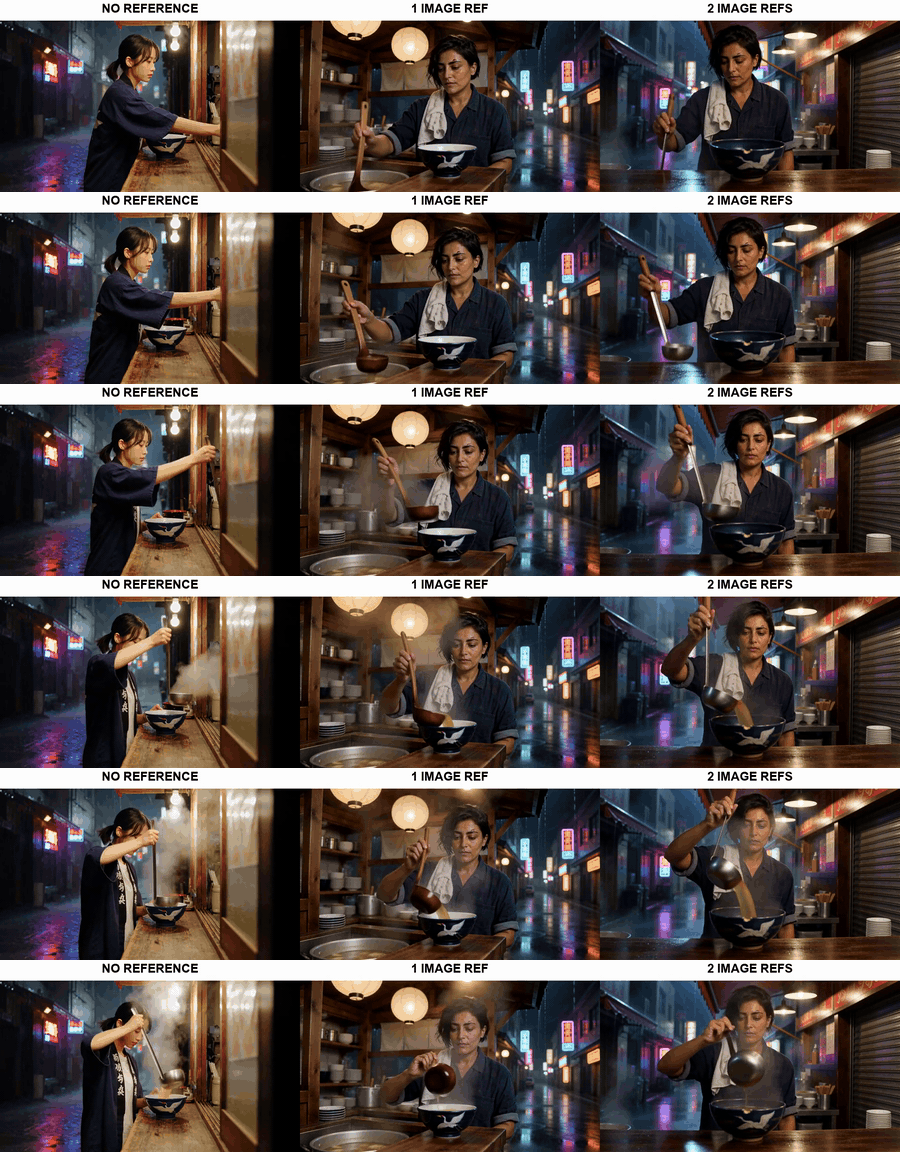
Three MiniMax H3 reference to video runs on the same prompt: no reference, one character reference image, and two reference images
Same prompt, same 768P 4s settings, left to right: no references at all (text to video), one character reference image, two reference images (character plus the ramen bowl). The prompt says "the woman from the reference image" in all three. In the left panel that phrase refers to nobody, so the model invents a stranger. Generated with minimax/h3/text-to-video and minimax/h3/reference-to-video.
Two honest readings of that strip. The jump from panel one to panel two is enormous: without a reference, "the woman from the reference image" is a phrase pointing at nothing, and the model quietly fills the hole with a person who has no relationship to your project. The jump from panel two to panel three is much smaller, because my prompt also described the bowl in words, and H3 drew a passable navy bowl with a crane on it from the text alone. That is the useful part. A reference image and a good noun phrase compete for the same job, so spend your reference slots on the things language cannot pin down: a specific face, a specific product, a specific logo.
The pattern behind almost every failure in this article is the same as panel one. Nothing warns you that part of your request landed on nothing.
What a reference actually locks, and what it does not. A reference image pins identity: face structure, hair, distinguishing marks, garment. It does not pin lighting, and this is the single most common surprise. It also drags the reference photo's light along with it, which is why a character sheet shot in a moody environment produces a character who cannot survive a scene change. Shoot your reference flat and neutral. A reference video pins motion, grade and grain, not identity. A reference audio pins the audio bed itself. If you need the same face reading a line in the same voice across a series, the reference stack is doing three different jobs and you have to say which is which. Practitioner guides converge on naming them positionally in the prompt ("Image 1 is the character, Image 2 is the product") and that convention is worth adopting; my prompts below use plain descriptive naming instead, which also works when the references are visually unambiguous.
Why the first call usually disappoints. Four things, all measured on 2026-08-12:
- The submit endpoint validates nothing. Wrong MIME, 164 second audio, a dead URL, mutually exclusive fields: all of it returns HTTP 200 with a prediction ID. You find out later.
ratiodefaults toadaptive, documented as "let the model choose". With 16:9 references I got 1344x768 at 768P whether I left it onadaptiveor forced 16:9, so the default is harmless when your inputs already agree. It is a coin flip when they do not, and this is the only H3 endpoint where you can simply take the decision away from it.- A first-frame image plus references does not error. It silently drops one of them and bills you.
- If the model has nothing concrete to hold onto, it fills the gap confidently, and a confident wrong face looks exactly like a successful run.
For the prompt-craft side of this, the MiniMax H3 prompt guide goes deeper on phrasing than I can here.
The MiniMax H3 Reference to Video Rulebook: Three Types, One Request
All three reference types share one array. Here is the contract as published, next to what the endpoint actually did when I pushed on it.
Table 1: the three reference types
| Reference images | Reference video | Reference audio | |
|---|---|---|---|
| Max files | 9 | 3 clips | 3 clips |
| Combined ceiling | 12 files across all three types | ||
| Per-file duration | n/a | 2 to 15 seconds | 2 to 15 seconds |
| Total duration | n/a | 15 seconds | 15 seconds |
| Formats | png, jpeg, jpg, webp | mp4, mov | mp3, wav |
| Can it be used alone? | Yes | Yes | No, needs an image or a video |
| What it locks | identity, garment, product, style | motion, camera, grade, grain | the audio bed itself |
| What it does not lock | lighting of the new scene | who is in the shot | the exact track (see Step 6) |
| Delivered as | public URL or base64 data URL | public URL or base64 data URL | must be declared audio/mp3, not audio/mpeg |
| Enforced? | 10 images went through fine | not tested past 1 clip | per-clip window enforced, 15s total was not |
File counts and duration windows are MiniMax's published limits (Hailuo, August 2026), cross-checked against the launch write-up which lists the same reference video window of 2 to 15 seconds each and 15 seconds total (MarkTechPost, August 2026). Everything in the last three rows is mine, measured.
Two things the spec sheet does not tell you. First, the type field on each entry is optional and inferred from the URL extension, which means a base64 data URL or an extension-free link must declare its type or the request guesses wrong. Second, the browser uploader caps out at nine files (Reference Materials (2/9), MAX:9 in the Step 5 screenshot below), below MiniMax's own twelve. I sent ten reference images through the API anyway and the job completed normally, so nine is a UI limit, not a model limit.
Table 2: reference to video vs image to video vs text to video
| reference-to-video | image-to-video | text-to-video | |
|---|---|---|---|
| Accepts refers | yes, required, min 1 | no (silently ignored) | no |
| Accepts image first frame | no (silently ignored) | yes, required | no |
| Accepts end_image last frame | no | yes | no |
| ratio options | all 7, incl. 16:9, 9:16, 21:9 | adaptive only | all 7 |
| Resolution | 768P or 2K, default 2K | same | same |
| Duration | 4 to 15s integers, default 8 | same | same |
| Mixing the other endpoint's input | job completes, input dropped, full charge | job completes, refers dropped, full charge | n/a |
That fourth row is the difference nobody mentions. On image to video the aspect ratio enum contains exactly one value, adaptive, because the first frame decides the shape. On reference to video you get all seven, which makes this the only H3 endpoint where you can force a frame shape while still anchoring a character. If you are choosing a tier for this work, 2K vs 768P for MiniMax H3 covers what the extra pixels buy.
The last row is the expensive one. Documentation frames the two endpoints as mutually exclusive, and they are, in the sense that only one input path is honoured. But there is no error. I ran it both ways on 2026-08-12: a reference-to-video call carrying a first-frame image completed in 115 seconds and billed $0.40, and an image-to-video call carrying refers completed in 167 seconds and billed $0.40. Both produced a video. Both threw away half of what I sent, and no field in the response says which half.
Table 3: the models this workflow uses
Everything below runs in one browser tab on Atlas Cloud, which is where the prices and screenshots come from. Rates checked 2026-08-12.
| Step | Model | Rate | Runs here | Cost |
|---|---|---|---|---|
| Character + prop references | openai/gpt-image-2/text-to-image | listed from $0.009; high quality at 2048x1152 measured at $0.1745 | 2 | $0.35 |
| Reference audio | minimax/music-2.6 | $0.15 per track | 1 | $0.15 |
| Shot A and Shot B | minimax/h3/reference-to-video | $0.10/s at 768P, $0.14/s at 2K | 2 x 8s at 2K | $2.24 |
| Reference ladder | same, plus minimax/h3/text-to-video | $0.10/s at 768P | 3 x 4s at 768P | $1.20 |
No discount is live on any of the three H3 endpoints this month. Two neighbours are cheaper right now if you are only building reference stills: gpt-image-2-developer/text-to-image is at 50% off, $0.009 down to $0.004 as of August 2026. Full per-second breakdowns live in the MiniMax H3 API pricing guide.
MiniMax H3 Reference to Video, Step by Step
The scene: a woman running a ramen stall. Shot A is a rainy neon alley at night. Shot B is the same woman the next morning in an empty covered market, a different place, a different time of day and a different lens. Nothing carries between the two calls except the references, which is the point of the test.
Step 1: Build the character reference, lit flat on purpose
This is the step people get wrong. A character reference is not a nice photo of your character, it is a measurement of their face. Neutral light, plain background, no scene, no mood. H3 learns the light along with the face, so an atmospheric reference produces a character who is welded to that atmosphere.
Model: openai/gpt-image-2/text-to-image. Settings: quality high, size 2048x1152 (16:9), format png.
text1Editorial photograph of a woman in her early thirties, a street-food chef. Close three-quarter portrait, neutral expression, direct eye contact with camera. Short black hair tucked behind one ear, a small scar above the right eyebrow, warm olive skin. She wears a faded indigo work jacket with the sleeves rolled to the elbow and a folded white towel over the left shoulder. Plain light grey studio background, soft even key light, no props, sharp focus on the face, natural skin texture, no retouching. Photorealistic, 50mm lens. 2
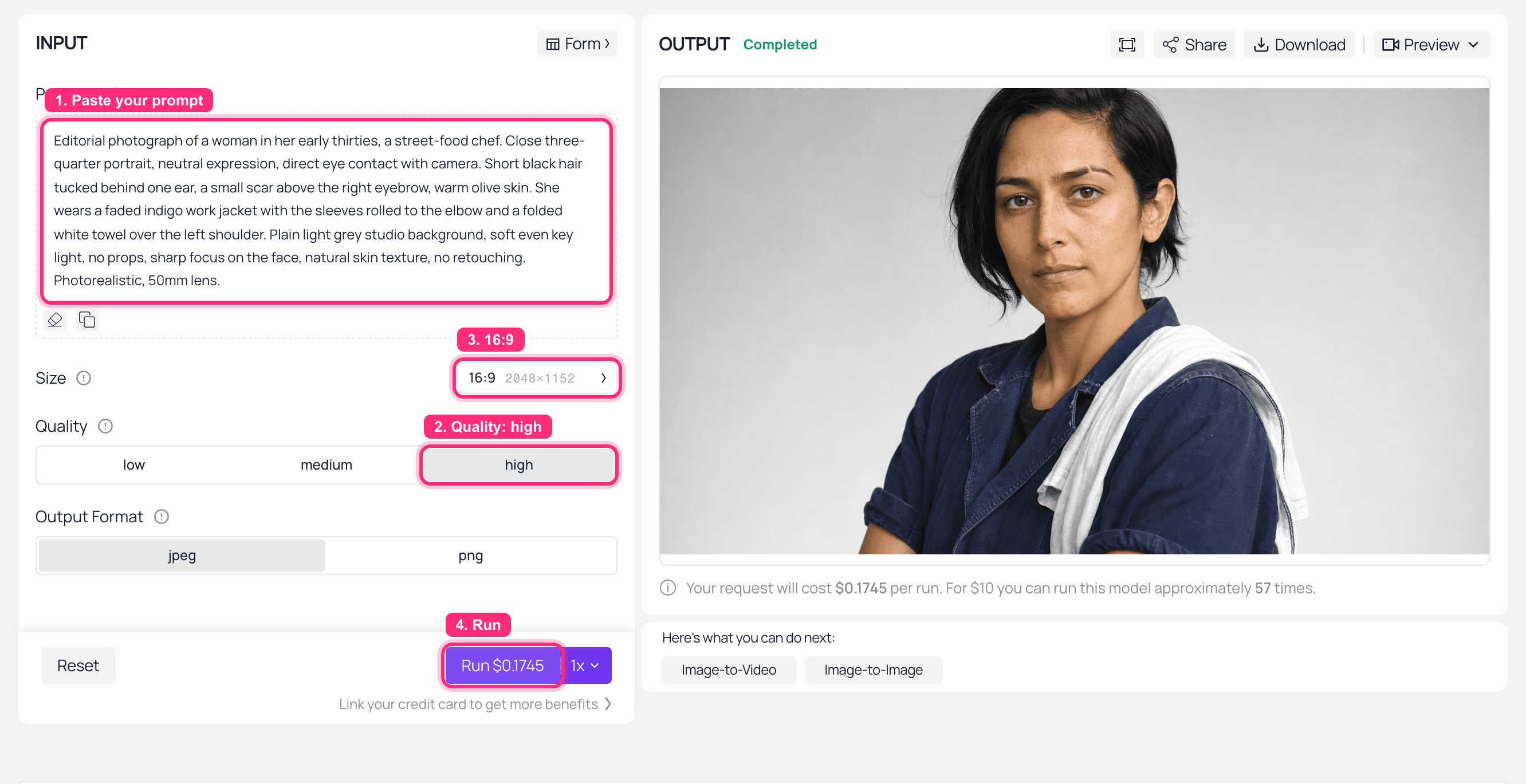
GPT Image 2 playground on Atlas Cloud with the character reference prompt loaded and the finished portrait in the output panel
GPT Image 2 on Atlas Cloud: quality set to high, 16:9, the character sheet rendered on the right.

Character reference image for MiniMax H3 reference to video: neutral studio portrait of a ramen chef with a scar above her right eyebrow
Reference image 1. The scar above the right eyebrow and the folded white towel are deliberate: they are cheap, unambiguous identity anchors you can check for in every later frame.
Step 2: Build the prop reference
Second reference slot, second job. Objects behave better than faces here, which makes a distinctive prop the easiest way to prove a reference landed. Same model, same settings.
text1Product photograph of a single dark navy ceramic ramen bowl with a hand-painted white crane on the side, chipped at the rim, filled with steaming shoyu ramen. Straight-on view, plain light grey background, soft even light, sharp focus, photorealistic, 50mm lens. 2
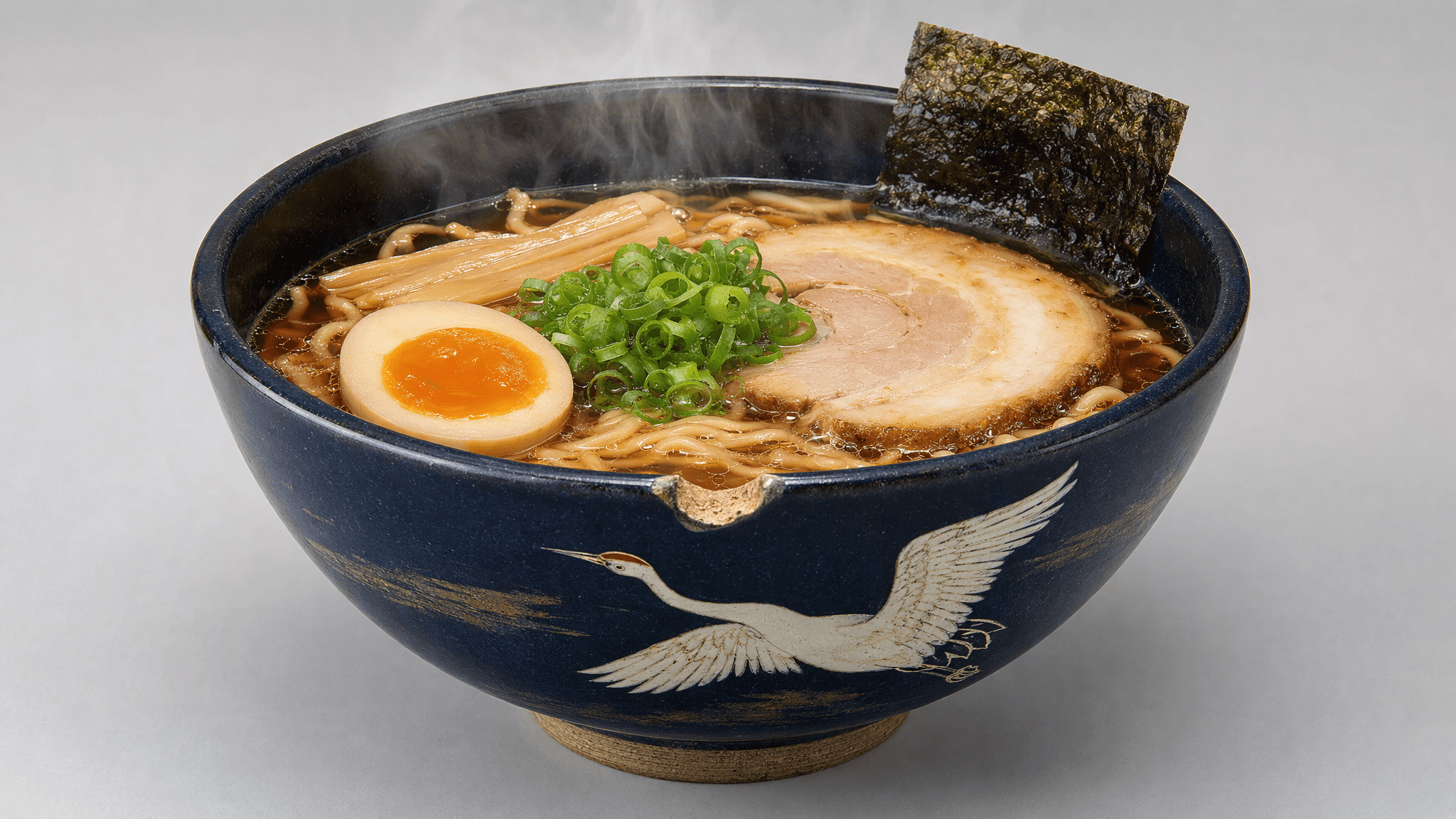
Prop reference image: dark navy ramen bowl with a hand-painted white crane and a chipped rim
Reference image 2. The hand-painted crane and the chip in the rim are the tells. If they survive into the video, the reference was read.
Step 3: Shot A, two images into MiniMax H3 reference to video
Two reference images, both type: "image", into refers. Set the ratio explicitly. adaptive is the default and it will usually do the right thing when your references are already 16:9, but it decides for you, and on this endpoint you do not have to let it.
Model: minimax/h3/reference-to-video. Settings: resolution 2K, duration 8, ratio 16:9.
text1Wide establishing shot. Heavy rain at night in a narrow neon-lit alley. The woman from the reference image works alone behind a small steaming ramen stall under a plastic awning, ladling broth into the navy bowl with the white crane from the reference image. Steam rises through pink and green neon reflections on the wet pavement. Slow push-in on the stall. Ambient sound: rain on plastic, boiling broth, distant traffic. No dialogue. 2
The output of this call is the first half of the showcase clip at the top. Keep its URL. It is the input to Step 5.
Step 4: Cut an eight second reference audio
Reference audio is not a soundtrack slot. It is a bed the model matches its own mix against, and it is the fussiest input on the endpoint. Generate a track, then cut it down, because a full song is rejected.
Model: minimax/music-2.6, with is_instrumental: true and format: "mp3".
text1Sparse late-night jazz, brushed snare, upright bass, one muted trumpet, melancholic, 70 BPM, instrumental. 2
Then slice roughly eight seconds and encode it as a data:audio/mp3 URL. Three things I got wrong here first, all with the exact error text:
- The MIME string matters more than the bytes. Declare
data:audio/mpegand the reference is refused withaudio format ".mpeg" not allowed, even though the file is a perfectly ordinary MP3. Writeaudio/mp3. - 2 to 15 seconds per clip, and it is enforced. My generated track was 164 seconds. It came back as
invalid param: audio duration 164258 ms, expected [2000, 15000] ms. Slicing to 8.05 seconds fixed it. Both rejections cost nothing. - The 15 second combined ceiling is documented but not enforced. I sent two 8 second clips in the same request, 16.1 seconds total, expecting a rejection. The job completed and billed normally. Do not build on that: it is published as a limit and could start behaving like one at any time.
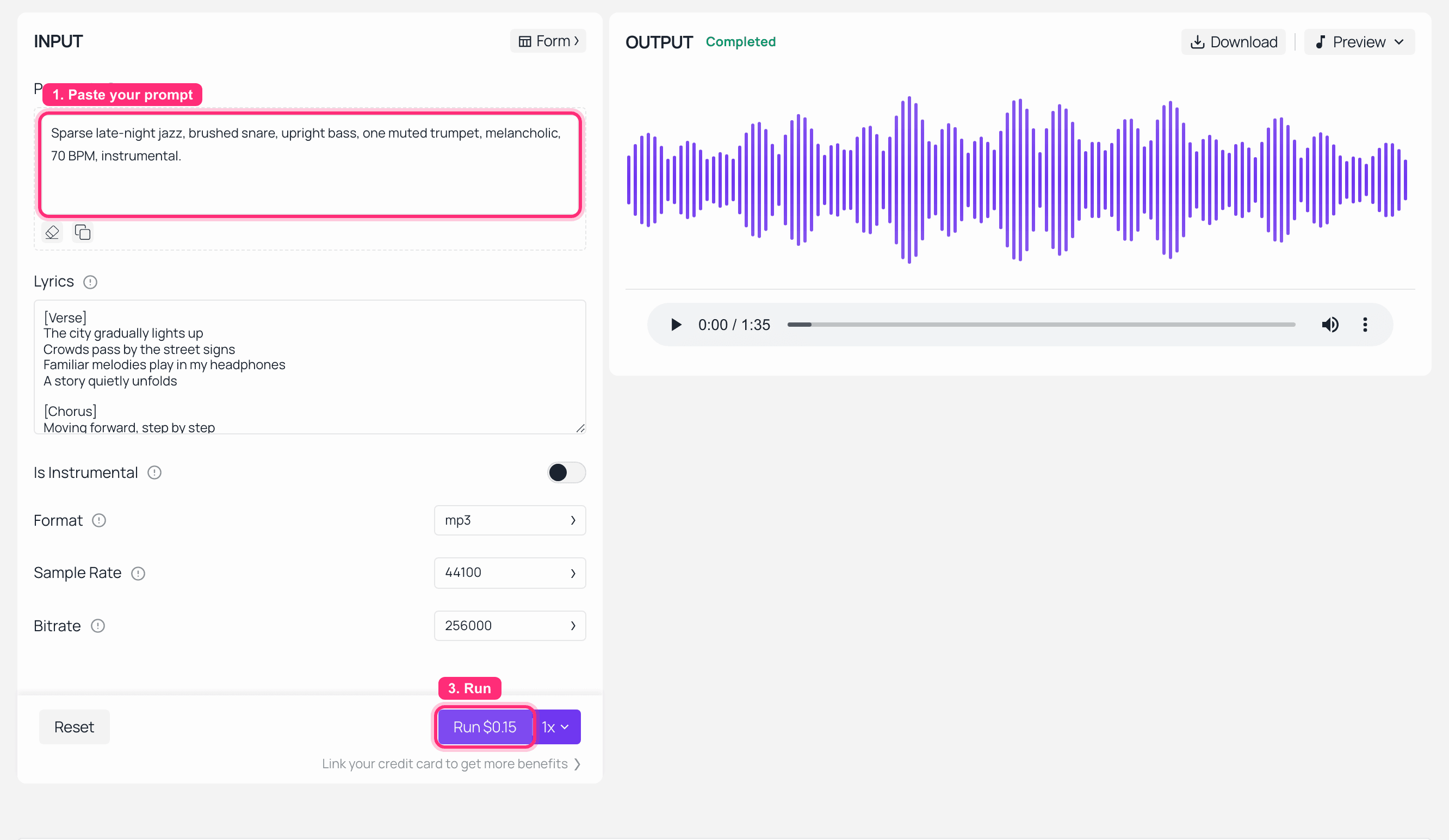
MiniMax Music 2.6 playground on Atlas Cloud with the jazz prompt and the finished track in the output panel
MiniMax Music 2.6 on Atlas Cloud, $0.15 a run, finished track on the right. One thing to copy from this screenshot and one thing not to: the price and the mp3 format are right, but Is Instrumental is still off and the page's demo lyrics are still sitting in the box, so this particular run came back as a 1:35 song with vocals. Flip that toggle on and clear the Lyrics field before you run it, or you will be cutting a reference bed with someone singing over it. My API run, with isinstrumental: true, returned 2:44 of instrumental in 209 seconds.
Step 5: Shot B, one MiniMax H3 reference to video call with all three types
This is the call the keyword is really about. Three reference types, three different jobs, one array:
- the character portrait from Step 1,
type: "image", to hold her face - the Shot A mp4 from Step 3,
type: "video", to carry grade and grain across the cut - the eight second jazz slice from Step 4,
type: "audio", as the bed
Output URLs from other generations on the platform can be dropped straight into refers as the video reference, which is the actual mechanism behind multi-shot continuity. Not "H3 remembers your character". You hand the previous shot back to it.
Model: minimax/h3/reference-to-video. Settings: resolution 2K, duration 8, ratio 16:9.
text1The same woman from the reference image, the next morning. Bright empty covered market, cold clean daylight through a skylight, shutters still down behind her. Medium close-up, static camera. She wipes the counter with the folded white towel, looks up at the camera and says one line, then goes back to work. Keep her face, hair, scar and indigo jacket identical to the reference. Carry the grade and grain of the reference clip. Use the reference audio as the underscore. 2
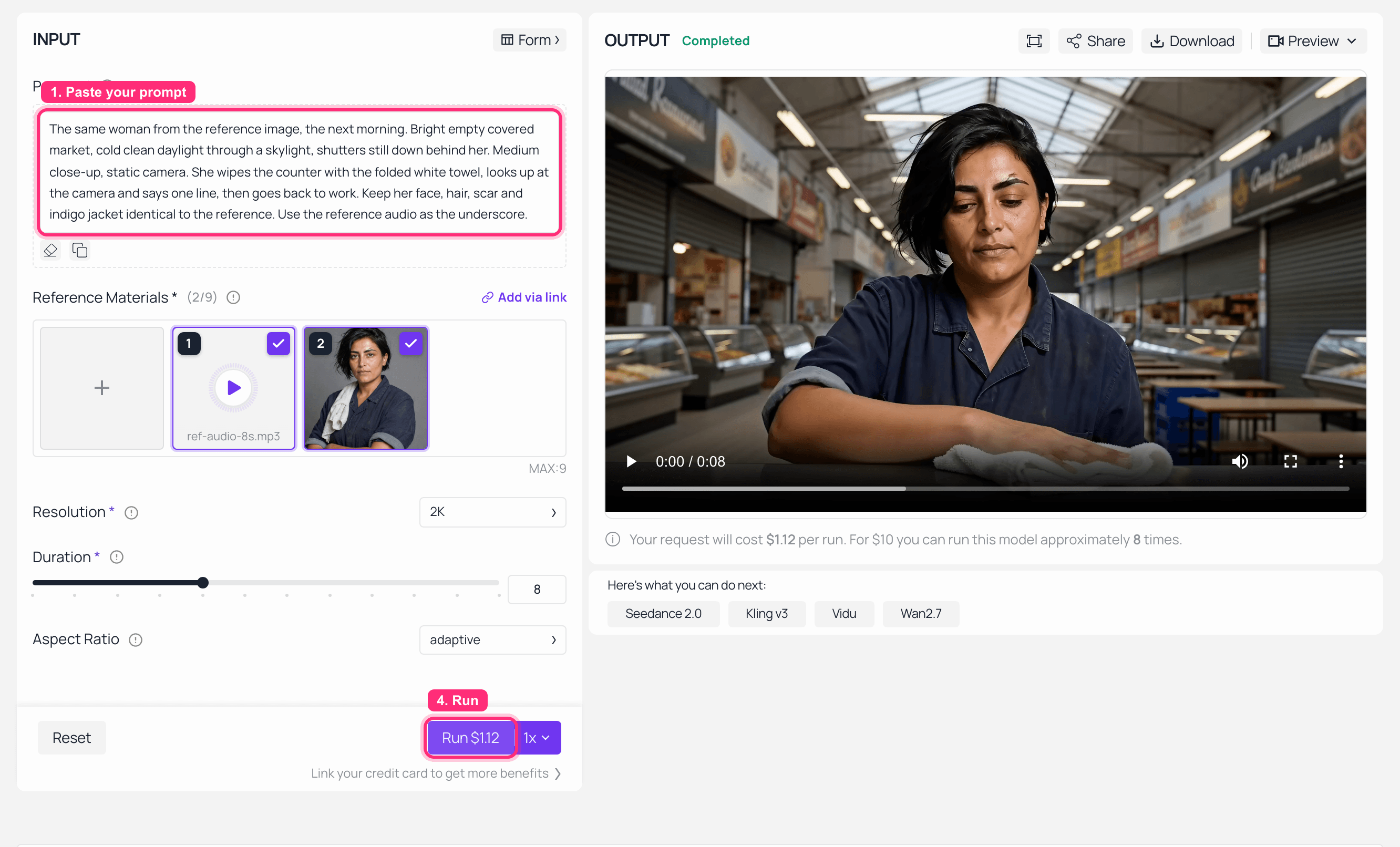
MiniMax H3 reference to video playground on Atlas Cloud with an image and an audio reference loaded and the generated clip in the output panel
The same call in the MiniMax H3 Reference-to-Video playground, at 2K and 8 seconds. Two reference slots of different types are visible in Reference Materials (2/9): slot 1 is ref-audio-8s.mp3, slot 2 is her portrait. The video reference goes in through "Add via link" (top right of that panel) or through the API, because it lives at a URL rather than on disk. Three things to read off this panel: the uploader says MAX:9 even though MiniMax's own ceiling is 12, Aspect Ratio sits on adaptive unless you change it, and the run price for 2K at 8 seconds is $1.12, which is the $0.14 per second tier.
Step 6: Verify the reference actually landed
A completed job is not a successful job. Two checks, both cheap.
Check the face. Pull a frame from each shot and put them side by side. You are looking for the anchors you planted: the scar, the hair line, the jacket, the towel.
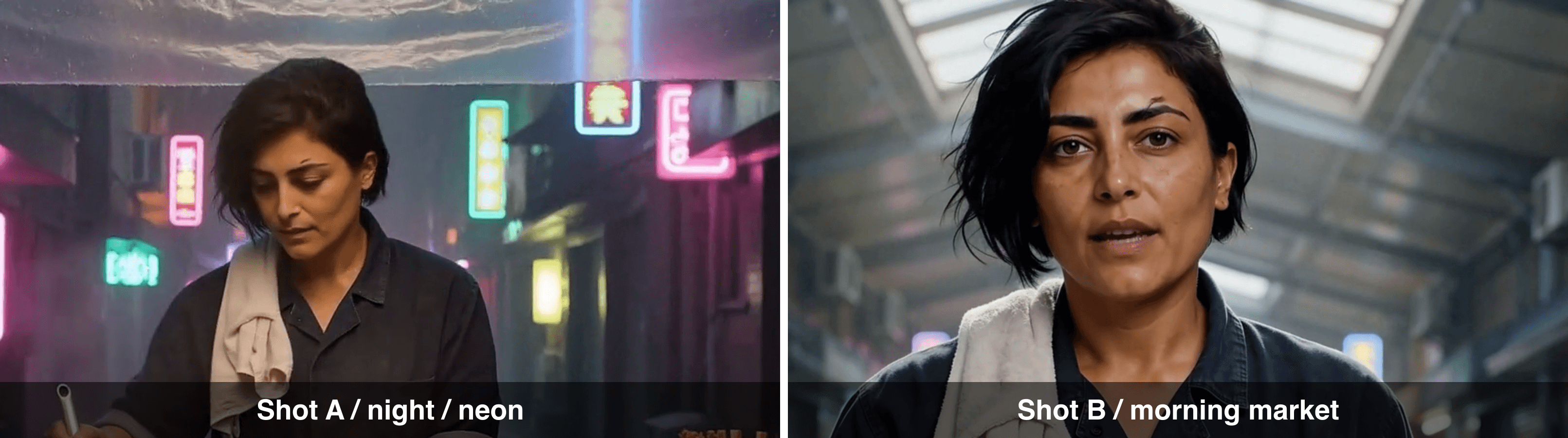
Frame from Shot A next to a frame from Shot B, showing the same MiniMax H3 reference to video character in two different scenes
Left: Shot A, night, neon, wide. Right: Shot B, covered market, next morning, medium close-up. Same face, same scar over the right eyebrow, same jacket and towel, across a scene and framing change with nothing shared but the references.
One thing did not go the way I wrote the prompt. I asked for "bright empty covered market, cold clean daylight" and "carry the grade and grain of the reference clip", and the reference clip won. Shot B is unmistakably morning and unmistakably a different place, but it is far moodier than "bright" implies, because the night grade came across with the video reference. You cannot ask one call for the same look and the opposite light. If you need the light to change, drop the grade instruction, or drop the video reference and hold identity with the image alone.
Check the audio. Plot the waveform of the eight second slice you uploaded next to the track that came back inside the mp4, and add a control: a clip generated with no audio reference at all.
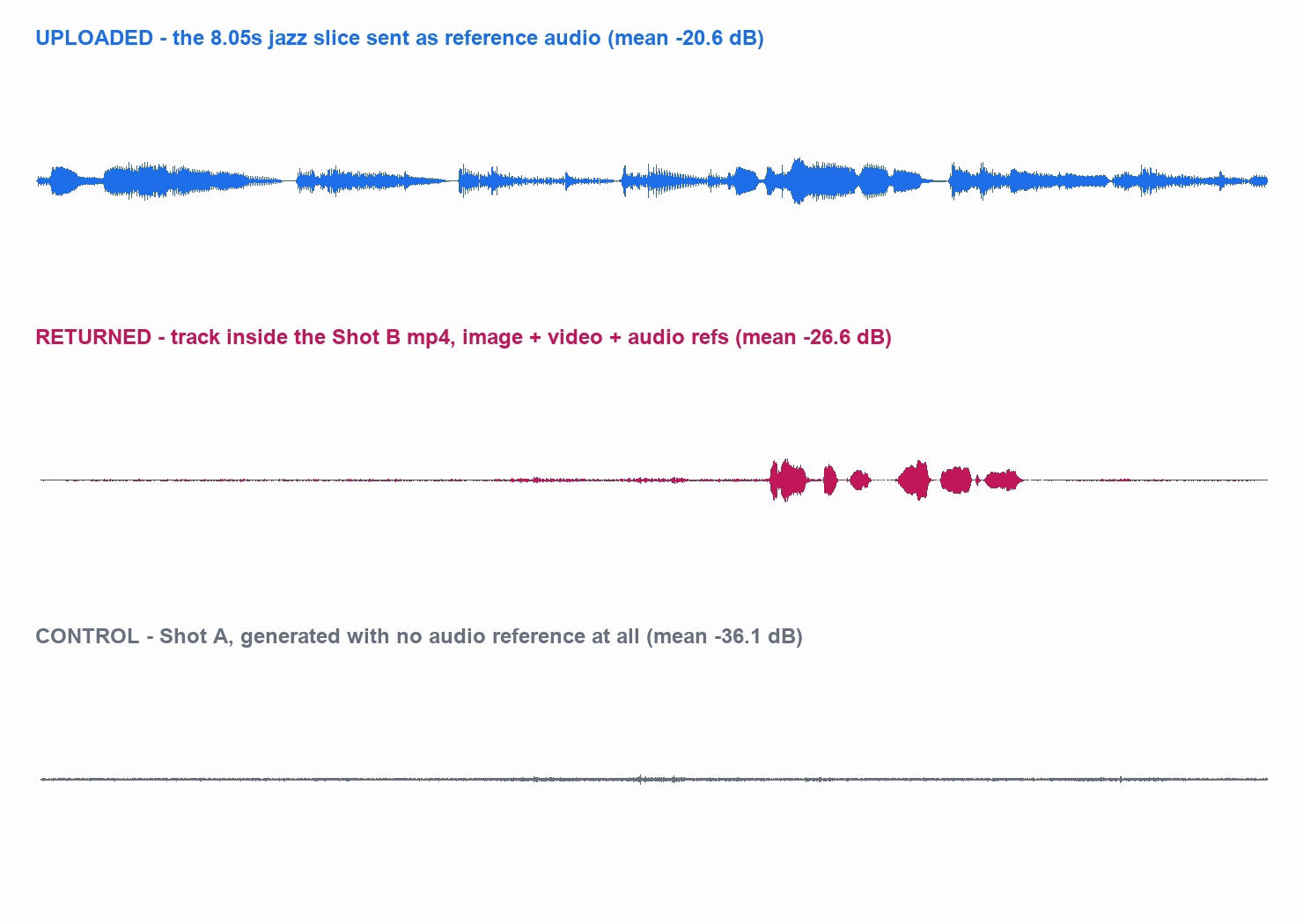
Waveform of the uploaded eight second reference audio, the audio track returned inside the generated clip, and a no-audio-reference control
Top: the 8.05 second jazz slice sent as a reference. Middle: the track extracted from the returned Shot B mp4, dominated by the line of dialogue at around 5.5 seconds. Bottom: Shot A, same workflow, no audio reference.
This is where I have to correct something I believed going in. Reference audio does not come back verbatim. Envelope correlation between my slice and the returned track is 0.25, against −0.05 for the no-reference control, so the two are related but nowhere near identical, and the returned shape is clearly its own mix rather than my file with something laid over it. What the reference clearly did do is put something underneath: Shot B's bed runs about 7 dB hotter than the no-audio control across the first five seconds, before any dialogue starts. Read reference audio as a steer on the mix, not a music slot. If you need your exact track under the picture, lay it in afterwards.
If you are building on the audio side of this, MiniMax H3 lip sync and audio and the MiniMax H3 music video walkthrough both start from this same reference audio behaviour. For the polling and retry code around all of this, the MiniMax H3 tutorial has the loop.
Four More MiniMax H3 Reference to Video Setups Worth Stealing
Restyle a clip you already own. Put a finished clip in refers as the video reference, no images at all, and ask for a different medium. The motion, the framing, the push-in and the props survive; the surface changes. This is the mechanism behind H3's video editing ranking, and it is the same one behind the anime work in MiniMax H3 vs Veo 3.1 for anime.
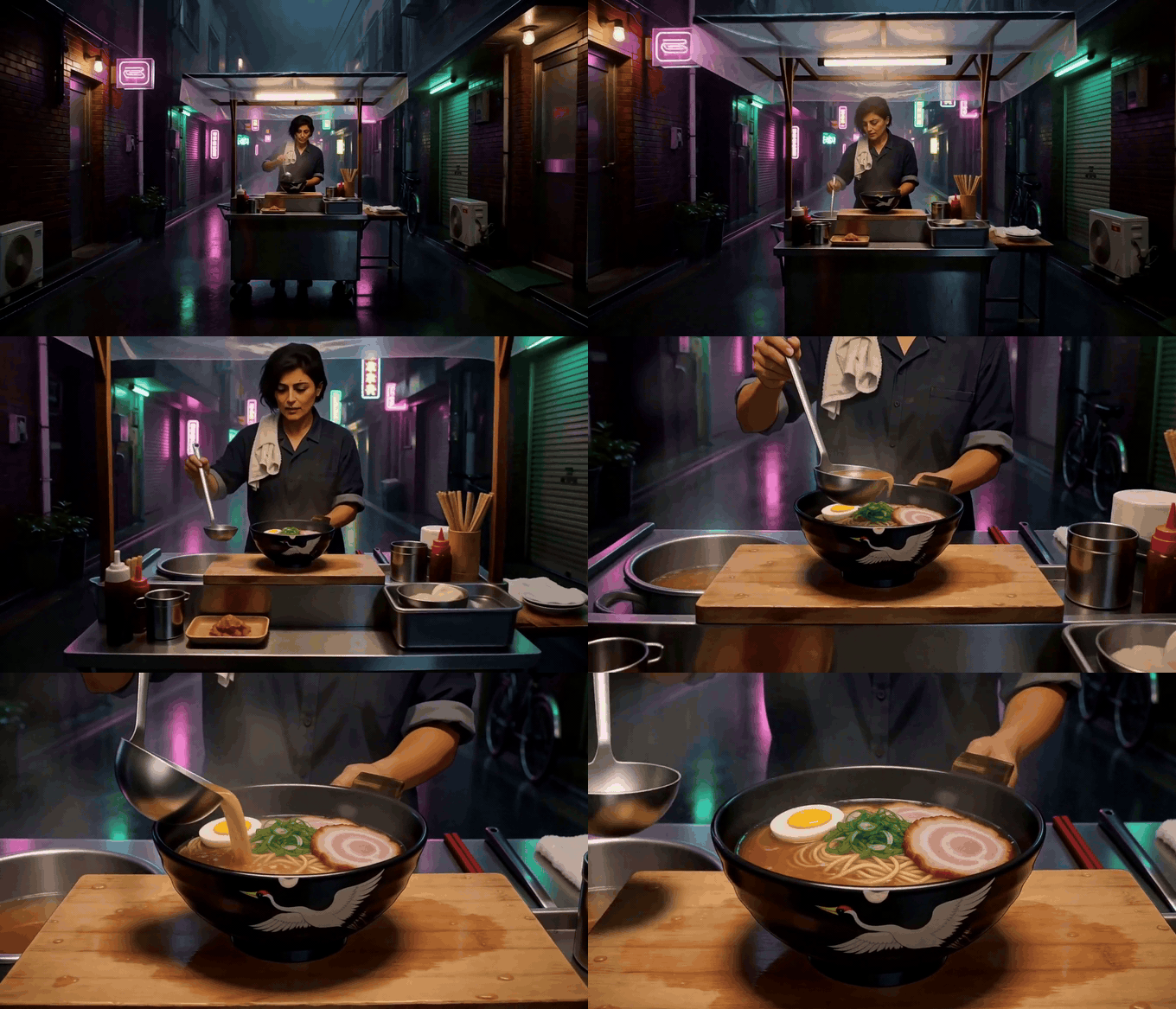
Anime restyle generated from the Shot A clip used as a MiniMax H3 reference to video reference
The Shot A alley handed back in as the only reference, with a cel-shaded anime prompt. Same stall, same ladle, same crane bowl, same push-in, redrawn. One detail worth knowing: the conversion is weakest in the first frames and strongest once the camera commits to the move. Shown as a silent GIF. Generated with minimax/h3/reference-to-video at 768P, 4s, $0.40.
Make a photo sing. One portrait plus one vocal clip inside the 2 to 15 second window, prompt the performance. Cheaper than a lip sync pipeline because it is a single call.
Lock a product into any scene. Reference images pin objects harder than faces, so a real product shot plus a scene prompt is the most reliable thing on this endpoint. Check what you are allowed to do with the result before it goes in an ad.
Build a series, not a clip. Chain it: shot N's output becomes shot N+1's video reference. Each call still caps at 15 seconds, so continuity is your job, not the model's. How long a MiniMax H3 video can be covers where that ceiling bites.
Comparing engines before you commit a series to one? Seedance 2.5 vs MiniMax H3 and MiniMax H3 alternatives are the two to read.
What a Two-Shot MiniMax H3 Reference to Video Scene Actually Costs
Every line below is a real job from 2026-08-12, with the amount taken from the price field the API returns on each completed prediction.
Table 4: the actual bill
| Job | Model | Settings | Result | Billed |
|---|---|---|---|---|
| Character reference | gpt-image-2 | high, 2048x1152 | completed | $0.1745 |
| Prop reference | gpt-image-2 | high, 2048x1152 | completed | $0.1745 |
| Reference audio | music-2.6 | instrumental, mp3 | completed, 164s track, 209s wait | $0.15 |
| Shot A | h3/reference-to-video | 2K, 8s, 2 image refs | completed in 309s | $1.12 |
| Shot B | h3/reference-to-video | 2K, 8s, image + video + audio refs | completed in 557s | $1.12 |
| Ladder, no reference | h3/text-to-video | 768P, 4s | completed in 154s | $0.40 |
| Ladder, 1 image ref | h3/reference-to-video | 768P, 4s | completed in 119s | $0.40 |
| Ladder, 2 image refs | h3/reference-to-video | 768P, 4s | completed in 128s | $0.40 |
| Anime restyle | h3/reference-to-video | 768P, 4s, 1 video ref | completed in 239s | $0.40 |
| Step 5 re-run in the playground | h3/reference-to-video | 2K, 8s, image + audio refs | completed | $1.12 |
| Control: 10 image refs | h3/reference-to-video | 768P, 4s | completed in 150s | $0.40 |
| Control: first-frame image + refers | h3/reference-to-video | 768P, 4s | completed, one input dropped | $0.40 |
| Control: refers on image-to-video | h3/image-to-video | 768P, 4s | completed, refers dropped | $0.40 |
| Control: 16.1s of reference audio | h3/reference-to-video | 768P, 4s | completed over a documented limit | $0.40 |
| Control: ratio omitted, then ratio adaptive | h3/reference-to-video | 768P, 4s, twice | both completed, identical 1344x768 | $0.80 |
| Screenshot re-runs of Steps 1 and 4 | gpt-image-2, music-2.6 | as above | completed | $0.32 |
| Control: audio reference alone | h3/reference-to-video | 768P, 4s | failed in 7ms | $0.00 |
| Control: 164s reference audio | h3/reference-to-video | 768P, 4s | failed in 16s | $0.00 |
| Control: audio/mpeg MIME | h3/reference-to-video | 768P, 4s | failed in 17s | $0.00 |
| Control: dead reference URL | h3/reference-to-video | 768P, 4s | failed in 21s | $0.00 |
| Total | $8.18 |
Split that total honestly. The finished two-shot scene at the top of this article, references and audio included, is $2.74 of it. The other $5.44 is the investigation: controls, deliberate breakage, and re-running steps in the browser for the screenshots. If you already know the rules, a 16 second two-shot sequence at 2K costs less than a sandwich.
Three things fall out of that table.
References are free. The ten-image control cost exactly the same $0.40 as the one-image ladder run at the same length and resolution. On this platform the meter runs on output seconds and resolution, nothing else. Worth flagging one contradiction: MiniMax's own platform rules describe input video being charged at the output rate, and the unified schema over on OpenRouter carries a separate reference_images line item. Neither appeared on my invoice here. If you are budgeting elsewhere, price it yourself rather than assuming.
Failure is free, and it is late. All four rejections cost nothing, which is the good news. The bad news is when they arrive: 7 milliseconds for the audio-alone rule, 16 to 21 seconds for the audio length, the wrong MIME and the dead URL, and nothing at all at submit time. Every malformed request in this article got HTTP 200 and a prediction ID first, so treat a submit response as a receipt, not as validation, and poll the status field before you believe anything.
Silent success is the expensive failure. The two mixing controls each cost a full $0.40 and returned a perfectly valid video built from half my inputs. There is no error, no warning field, and no way to tell from the response that anything was discarded. That is the only line in the table where money left the account and I got nothing I wanted.
One honest correction on that last point, because it changed under me while I was writing. In early August a reference URL that 404'd behaved the same way: the job completed, the reference was silently ignored, and the full amount was charged. Re-running it on 2026-08-12, the endpoint now checks reachability and fails the job for free with a named error, content[1].image_url: media not found (HTTP 404). That specific hole is closed. The mutually-exclusive-inputs hole is not. For per-clip credit maths, MiniMax H3 credits per video has the tables.
Whose Face, Whose Voice: Check This Before You Upload a Reference
This endpoint is different from text to video in one legally relevant way: you supply the likeness. A reference image of a real person, a reference clip from someone's film, a reference vocal in a recognisable voice, all of it is material you are asserting a right to use. Model-side content rules still apply on top of that, and they are stricter about real people than about invented ones. Two guides worth reading before a client sees the output: MiniMax H3 content restrictions and the commercial use and licensing breakdown, which also covers the territory exclusions in MiniMax's terms.
MiniMax H3 Reference to Video: Frequently Asked Questions
Can MiniMax H3 reference to video keep the same character across two different shots?
Yes, and my two-shot test above holds across a full night-to-morning lighting inversion. But a character image alone is not what does it. The reliable pattern is to pass the previous shot's output URL back in as a reference video alongside the character image, so the second call inherits grade and grain as well as identity.
Can I use a first-frame image and references in the same MiniMax H3 reference to video call?
No, and the failure mode is the problem. Sending both image and refers does not error. Tested on 2026-08-12, the job completed in 115 seconds, billed $0.40, and silently discarded one of the two inputs. The same thing happens in reverse on the image to video endpoint. Pick one path per call.
Can I send an audio file on its own as a MiniMax H3 reference to video reference?
No. Audio must travel with at least one reference image or video, and the endpoint enforces it with an explicit error: reference-to-video requires at least one reference image or video. It arrives at the generation stage, not at submit, and the rejected job is free. Audio references also have to sit inside 2 to 15 seconds, 15 seconds combined, and be declared audio/mp3 rather than audio/mpeg.
Does MiniMax H3 reference to video charge extra for each reference file?
Not on Atlas Cloud. A run with ten reference images and a run with one billed the identical $0.40 at 768P and 4 seconds, so the meter tracks output seconds and resolution only. Note the contradiction though: MiniMax's own rules mention input video being metered at the output rate, and other platforms expose a separate reference-image line item. Verify on whatever surface you are billing through.
What happens if one of my MiniMax H3 reference to video URLs is broken?
As of 2026-08-12 the endpoint validates reachability and fails the whole job for free, with content[1].image_url: media not found (HTTP 404) after about 21 seconds. That is a change: earlier in August the same request completed, quietly ignored the missing reference, and charged full price. Do not assume older behaviour reports still hold, and do check the status field rather than assuming a 200 at submit means anything.
Is MiniMax H3 reference to video actually the best model for this?
On the only public head-to-head that measures it, yes, narrowly. MiniMax H3 leads the video editing leaderboard at Elo 1,125 over 10,280 votes, but its listed rank range is 1 to 2 and Gemini Omni Flash sits 3 Elo points behind with an overlapping interval. Treat it as "joint best available", pick on the rest of the workflow, and read MiniMax H3 alternatives if the tie matters to you.





