All summer my feed has been the same video on a loop. World Cup players redrawn as shonen protagonists. A dictator. A pirate captain. A grizzled mentor who shows up in the last four seconds. Millions of views a post, and the storyline updates after almost every match.
Nobody making those is writing benchmark posts. They are picking a model, burning credits, and shipping before the next kickoff.
So I took one anime keyframe and one prompt, and tested MiniMax H3 as an anime video generator against Veo 3.1, both pushed to their maximum settings on identical inputs.
The first thing that broke was not image quality. It was a dropdown. Veo 3.1 stops at 8 seconds and offers exactly two aspect ratios. A shot that holds on a face, whip pans with the ball, then lets a title card land does not fit in 8 seconds. It never had a chance to fail on quality.
Key takeaways
- Veo 3.1's
durationenum is[4, 6, 8]and itsaspect_ratioenum is[16:9, 9:16]. MiniMax H3 runs any whole second from 4 to 15 and offers21:9, 16:9, 4:3, 1:1, 3:4, 9:16. No 4:3 on Veo means no retro OVA framing, at all. - H3's model card lists 11 natively stable dialogue languages and Japanese is one of them. Audio and picture are generated together at 32 kHz stereo, not dubbed afterwards.
- Reference packs are not close: H3 takes up to 9 images plus up to 3 videos and 3 audio clips (12 files max). Veo 3.1's reference endpoint takes 3 images, and the moment you use it
durationcollapses to[8]only. - Two traps that silently ruin tests: Veo's API defaults
generate_audiotofalseandresolutionto720p, and H3's text-to-videoratiodefaults to1:1. Leave those alone and you are comparing a silent 720p clip against a square one. - Veo 3.1 keeps two things H3 does not have at all:
seedandnegative_prompt. For 2D anime that second one genuinely matters, and I will show where.
MiniMax H3 Anime Video Generator vs Veo 3.1, The Same Frame Back to Back
One original character. One keyframe. One prompt, copied character for character into both models. Everything else maxed on each side.
MiniMax H3, image-to-video, 2K, 8 seconds, native audio. Turn the sound on: the crowd bed, the ball strike and the Japanese shout are generated in the same pass as the picture. Generated with minimax/h3/image-to-video on Atlas Cloud.
Veo 3.1, image-to-video, 1080p, 8 seconds, generateaudio switched on by hand, plus a negativeprompt holding the line art flat. Same first frame, same words. Generated with google/veo3.1/image-to-video on Atlas Cloud.
Both draw beautifully. Veo's wide shot of the strike, with hand-drawn impact lines and a manga sound effect floating in the air, is genuinely lovely. That is the honest starting point, and it is why the rest of this article is about parameters and instruction-following rather than vibes.
Why Most MiniMax H3 Anime Video Generator Tests vs Veo 3.1 Go Wrong
Two things happened at once this summer.
Anime became the highest-volume format in AI video. The 2026 World Cup got rewritten as a shonen tournament, with players cast as a dictator, a pirate captain, a marine general and a mentor, and storylines that "evolve after nearly every match" across TikTok, Instagram, X and YouTube (Complex, July 2026).
And MiniMax H3 shipped with open weights. The day-0 ComfyUI thread hit 330 points and 95 comments, with people posting real local numbers within hours (Hacker News, August 2026).
Put those together and you would expect a pile of anime comparisons. There are almost none, because most tests get built wrong in one of four ways.
They compare pictures, not constraints. Anime shots are timing. A whip pan into a title card is a duration problem before it is a rendering problem.
They forget Veo's API is silent by default. On the API, generate_audio is false and resolution is 720p. Plenty of "Veo has no audio in anime" posts are just someone who never flipped a boolean.
They forget H3's text-to-video is square by default. ratio defaults to 1:1, not 16:9. Run a t2v anime prompt without setting it and you get a square clip and a confused conclusion.
They test with photoreal prompts. "Cinematic, volumetric light, shallow depth of field" is exactly the vocabulary that drags a 2D model toward 3D render shading. The failure mode in anime is not blur. It is plastic.
The three settings that decide an anime test before you press run
Before anything else, set these on both sides or the comparison is void.
| Setting | MiniMax H3 | Veo 3.1 | What happens if you skip it |
|---|---|---|---|
| Audio | Generated with the picture, always on | generate_audio defaults to false | Veo returns a silent clip and looks worse than it is |
| Frame shape | ratio defaults to 1:1 on text-to-video | aspect_ratio defaults to 16:9 | H3 hands you a square anime cut you cannot use |
| Resolution | defaults to 2K | defaults to 720p | You compare 2K against 720p and call it a quality gap |
Want to test MiniMax H3 and Veo 3.1 on the same anime prompt yourself? Atlas Cloud's model comparison runs them side by side in one pass — same prompt and settings, cost shown before you generate.
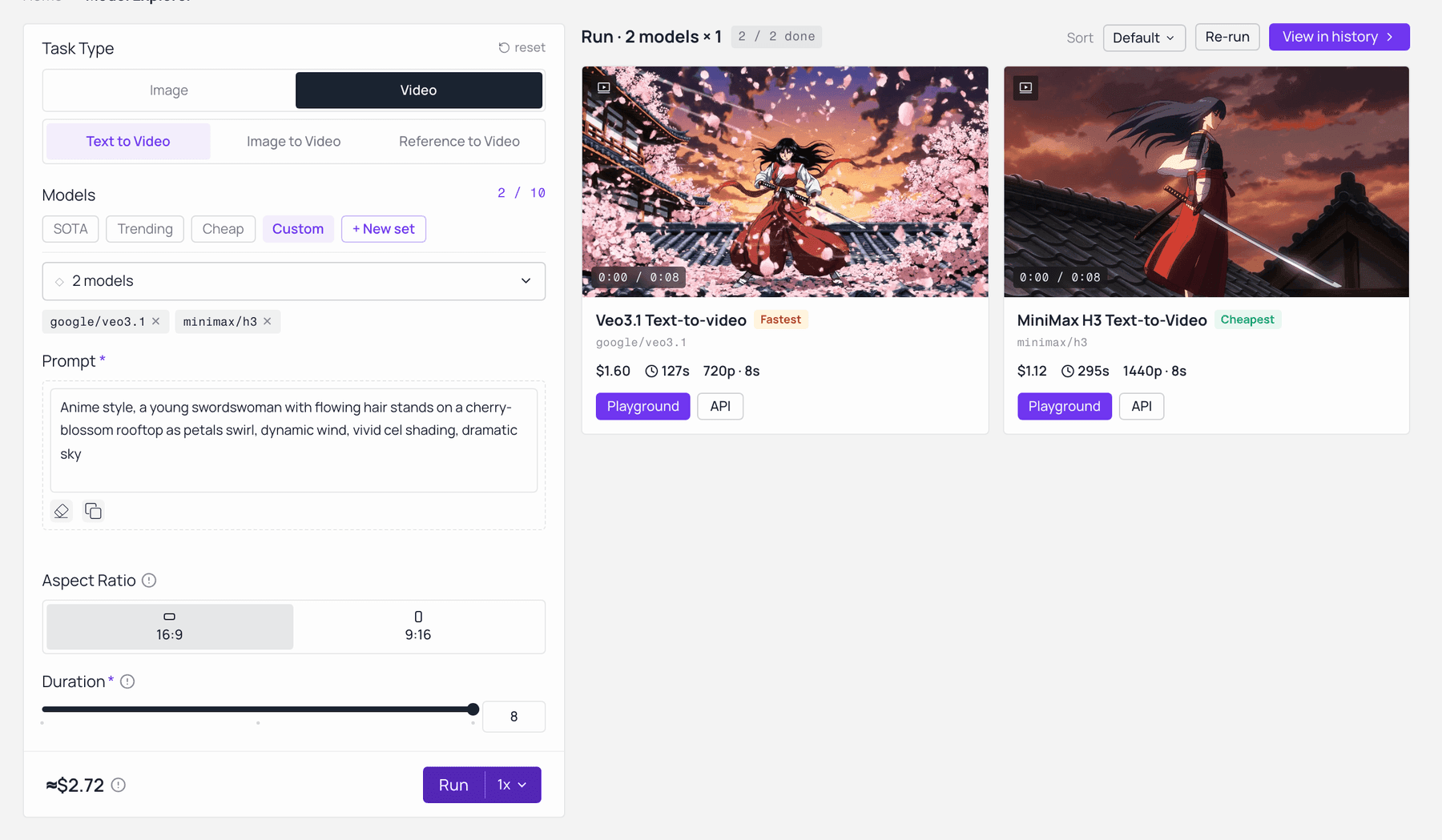
MiniMax H3 and Veo 3.1 on the same anime prompt in Atlas Cloud’s model comparison — same settings, price shown before you generate. Captured live on the model-explorer.
The MiniMax H3 vs Veo 3.1 Anime Spec Sheet: Length, Ratio, Audio, References
I pulled both models' live input schemas rather than trusting any launch post. Every value below is an enum you can read yourself on the model pages, not an impression.
Table 1: MiniMax H3 vs Veo 3.1, the parameters that decide an anime shot
| MiniMax H3 | Veo 3.1 | |
|---|---|---|
| Duration | 4 to 15, every whole second (default 8) | 4, 6, 8 (default 8) |
| Aspect ratios | 21:9, 16:9, 4:3, 1:1, 3:4, 9:16 | 16:9, 9:16 |
| Ratio default (text-to-video) | 1:01 | 16:09 |
| Resolution | 768P, 2K (default 2K) | 720p, 1080p, 4k (default 720p) |
| Audio | Generated jointly, 32 kHz stereo | generate_audio, default false |
| Native dialogue languages | 11 stable, Japanese included | Not published as a stable list |
| Reference pack | up to 9 images, 3 videos, 3 audio clips, 12 files total | 3 images |
| Duration when using references | still 4 to 15 | collapses to 8 only |
| seed | not available | available |
| negative_prompt | not available | available |
| Weights | downloadable | closed |
Duration, ratio, resolution, audio and reference limits are read from the live schemas on the MiniMax H3 image-to-video, H3 text-to-video, H3 reference-to-video, Veo 3.1 image-to-video and Veo 3.1 reference-to-video pages. The 9-image and 12-file reference ceiling and the 11-language dialogue list come from the MiniMax H3 model card (Hugging Face, August 2026).
Now the scoreboards, because they say something different from the spec sheet and both matter.
Table 2: Crowd-vote Elo and list price per minute, snapshot 7 August 2026
| Model | Text-to-video (with audio) | Image-to-video (with audio) | $/min |
|---|---|---|---|
| Gemini Omni Flash | 1,244 (#1) ±7 | 1,191 (#2) ±9 | $6.00 |
| MiniMax H3 | 1,238 (#2) ±9 | 1,190 (#3) ±10 | $7.80 |
| Dreamina Seedance 2.0 720p | 1,224 (#3) ±6 | 1,198 (#1) ±7 | $9.07 |
| Kling 3.0 1080p (Pro) | 1,111 (#7) ±6 | not listed in top 10 | $20.16 |
| Veo 3.1 | 1,093 (#11) ±7 | 1,085 (#10) ±7 | $24.00 |
| Veo 3.1 Fast | 1,091 (#14) ±6 | not listed in top 10 | $9.00 |
| Veo 3.1 Lite | 1,089 (#15) ±7 | not listed in top 10 | $4.80 |
Elo and price figures from the Artificial Analysis Video Arena (Artificial Analysis, August 2026). These are rolling crowd votes and they move. The $/min column is a normalised model estimate, not your invoice.
A 145-point Elo gap is large, but it is a general-purpose vote, not an anime vote. And here is the part I have to say plainly: MiniMax does not market H3 as an anime model. Internal first-line feedback lists film, animation and comic-drama as the areas H3 is not aimed at. So the interesting question is not "which one is the anime model". It is why the model that is not selling itself on anime still wins the shot, and where Google still takes the round.
One practical note before the tutorial. Every model below runs through the same console and the same API key, which is the only reason the parameters are comparable at all. Same queue, same auth, one bill. If you set up GPT Image 2 on one service and Veo on another, half the differences you find will be plumbing rather than model.
Build the Shot: MiniMax H3 vs Veo 3.1, Step by Step
One running example, start to finish. "Last Whistle": an original teenage striker, red hair, white and navy number 9 kit, floodlights, a whip pan on the strike, and a Japanese title card that has to land in the last two seconds and hold steady.
No real player, no official character, no existing anime IP. Style and homage only. More on why in a moment.
Step 1: Design the anime keyframe with GPT Image 2
The keyframe carries the art direction so the video model does not have to invent it. Note the negative space on the left third: it is deliberate. The title card gets written there by the video model, and that is the text-stability test.
Plain1A single frame from a modern shonen sports anime. Cel-shaded 2D animation, hand-inked 2line art with consistent line weight, flat colour fills, hard-edged graphic shadows, 3absolutely no 3D shading and no photoreal skin. Close-up on an original teenage striker: 4messy dark-red hair, white-and-navy kit with the number 9, sweat and grass streaks across 5one cheek, eyes wide with exhausted determination, mouth open mid-shout. Behind him, 6stadium floodlights blaze into a wall of blurred crowd colour; radial speed lines burst 7from the centre of frame; one blade of grass hangs frozen in the air. Saturated palette, 8deep cyan shadows, warm orange rim light. 16:9 composition, the character framed right of 9centre, clean negative space on the left third. No text anywhere in the image.
Settings: model openai/gpt-image-2/text-to-image, quality high, size 16:9 (2048x1152). Nothing else.
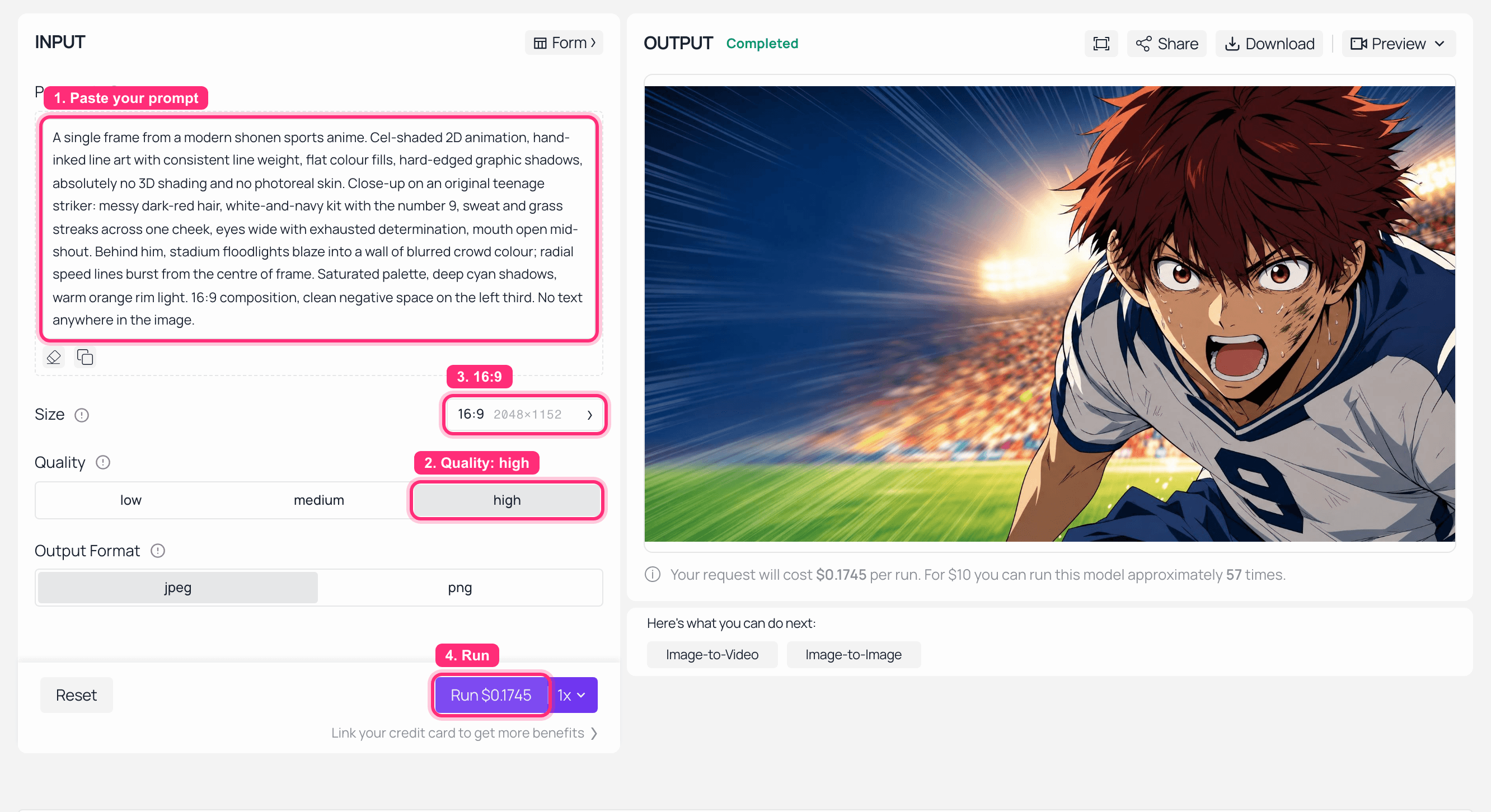
GPT Image 2 playground on Atlas Cloud with the Last Whistle keyframe prompt and the finished anime frame in the output panel
GPT Image 2 on Atlas Cloud: quality set to high, the finished keyframe on the right.
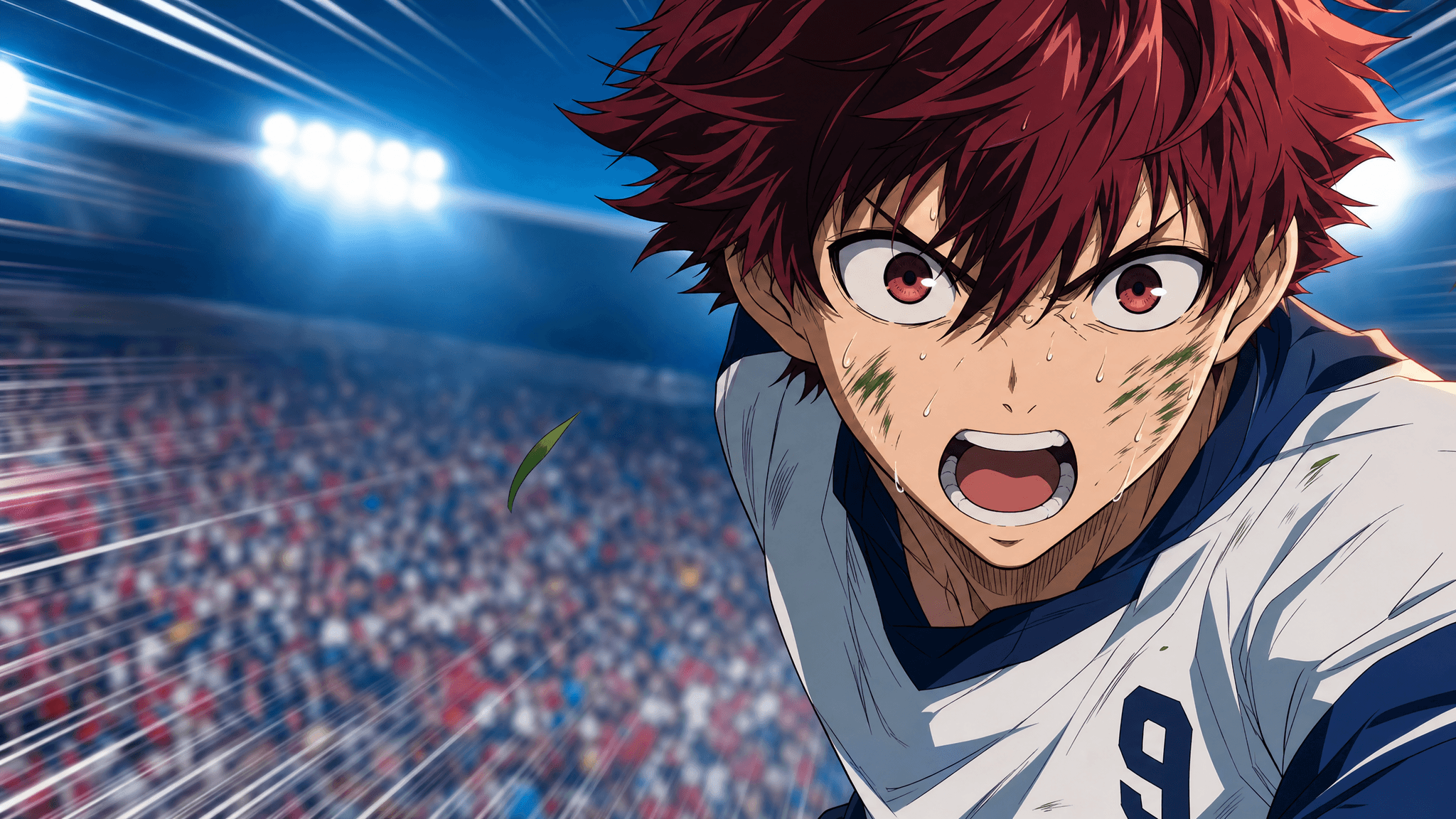
The base anime keyframe: an original red-haired striker mid-shout under stadium floodlights, cel-shaded with flat colour and speed lines
The keyframe both models receive. Flat colour, hard shadows, and an empty left third waiting for a title card.
Step 2: MiniMax H3 image-to-video, everything maxed
Same picture in, 2K out. I held H3 to 8 seconds here only so it matches Veo's ceiling. That is not H3's limit and Step 4 takes the cap off.
Plain1Cel-shaded 2D anime, hand-inked line weight, flat colour, no 3D shading. Hold on the 2striker's face for one beat, then a violent whip pan follows the ball as he strikes it, 3the pan smearing the frame into streaked sakuga motion trails. One frame of total silence 4at impact. Over the final two seconds, bold white Japanese title lettering reading 5ラストホイッスル punches onto the left third of frame and holds rock-steady, no warping, 6no flicker, no drift. The striker shouts one line in Japanese: 「まだ終わってない!」 7Audio: stadium roar swelling, a single sharp ball-strike impact, a low taiko hit under the 8title card.
Settings: model minimax/h3/image-to-video, resolution: 2K, duration: 8, ratio: adaptive (image-to-video takes its frame shape from your input image), image = the Step 1 output.
One warning if you branch to text-to-video instead: write ratio: 16:9 explicitly. The default is 1:1 and it will happily hand you a square anime cut.
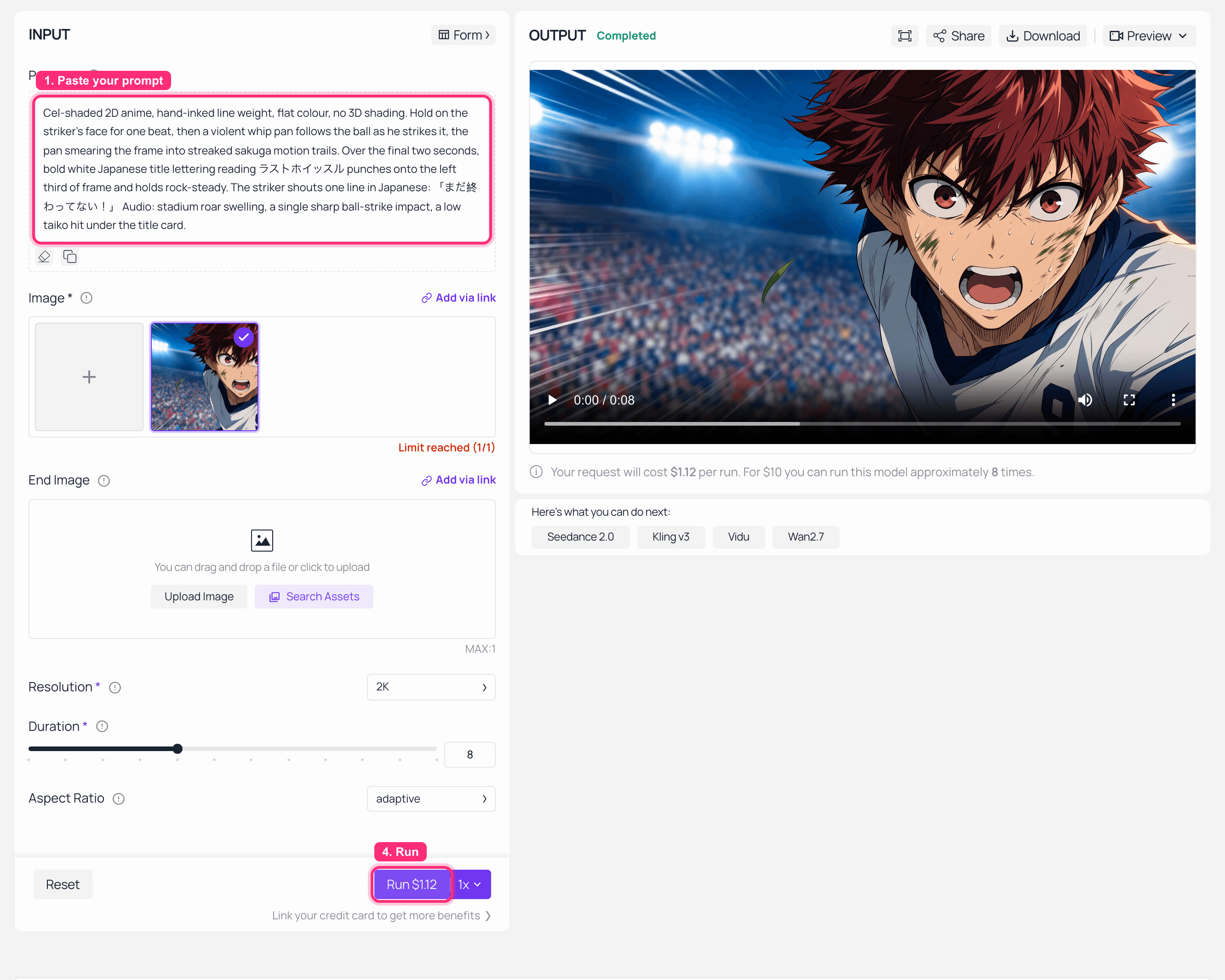
MiniMax H3 image-to-video playground on Atlas Cloud with the Last Whistle prompt, keyframe loaded and the finished clip in the output panel
MiniMax H3 image-to-video on Atlas Cloud: the Step 1 keyframe loaded on the left, the finished clip playing on the right.
Step 3: Veo 3.1 image-to-video, audio switched on by hand
The prompt is identical, word for word. Change a single adjective and it stops being a comparison. What does change is the extra field Veo gives you and H3 does not.
negative_prompt, which for 2D anime is the single most useful control on this list:
Plain13D render, CGI, plastic shading, photorealistic skin, live action footage, motion blur 2soup, warped lettering, gibberish text, extra fingers, subtitle bar
Settings: model google/veo3.1/image-to-video, resolution: 1080p (change it, the default is 720p), duration: 8 (this is the ceiling), aspect_ratio: 16:9, generate_audio: true (the API default is false, this is the silent-clip trap), seed: 20260807, image = the same Step 1 output.
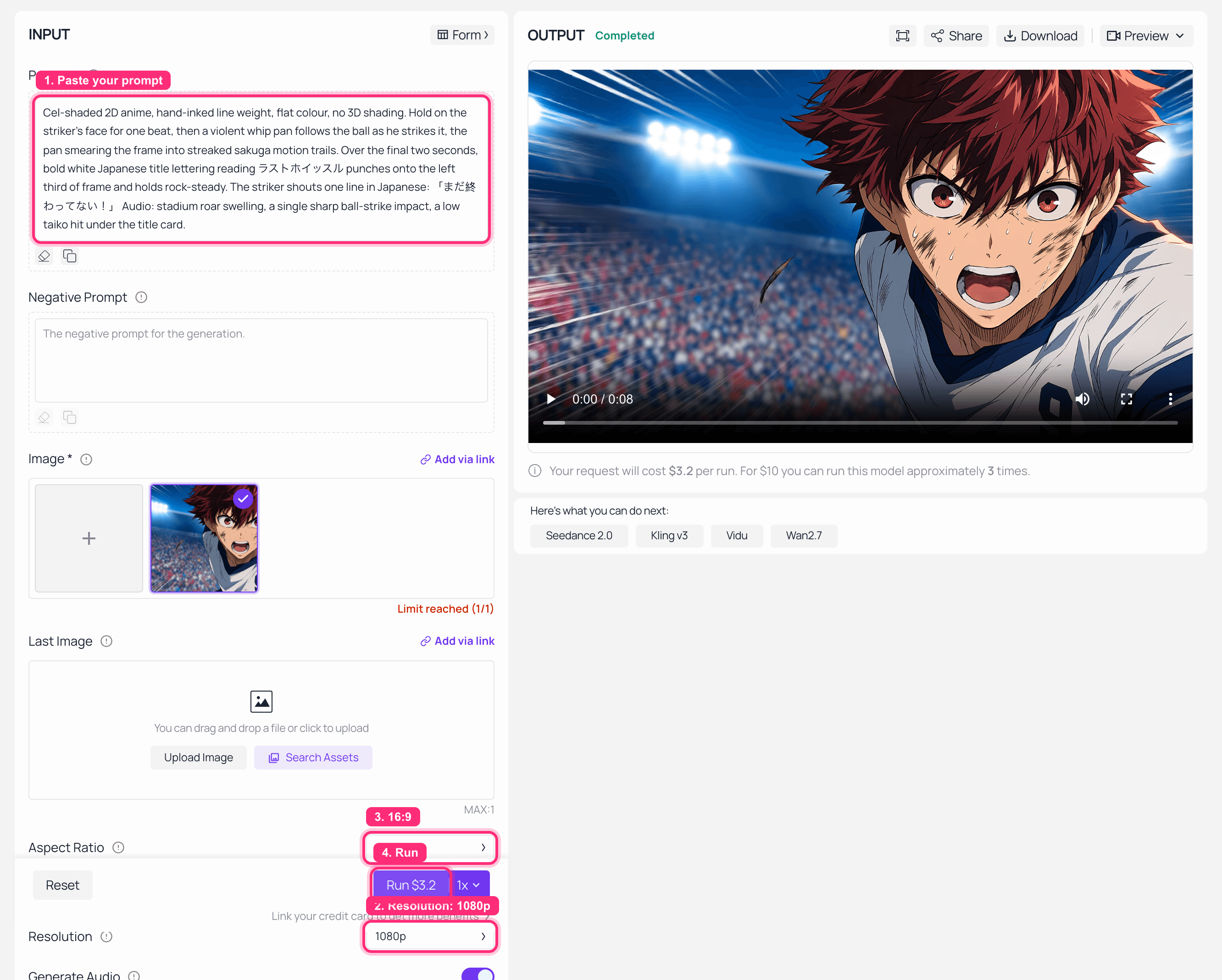
Veo 3.1 image-to-video playground on Atlas Cloud showing generate audio enabled, the anime keyframe loaded and the finished clip in the output panel
Veo 3.1 image-to-video on Atlas Cloud, with Generate Audio switched on and the finished clip on the right.
Step 4: Score it on five anime-specific axes
Nothing to generate here. Just look, on the things anime actually breaks on. Both clips are embedded near the top of this article, so you can score them yourself instead of taking my word.
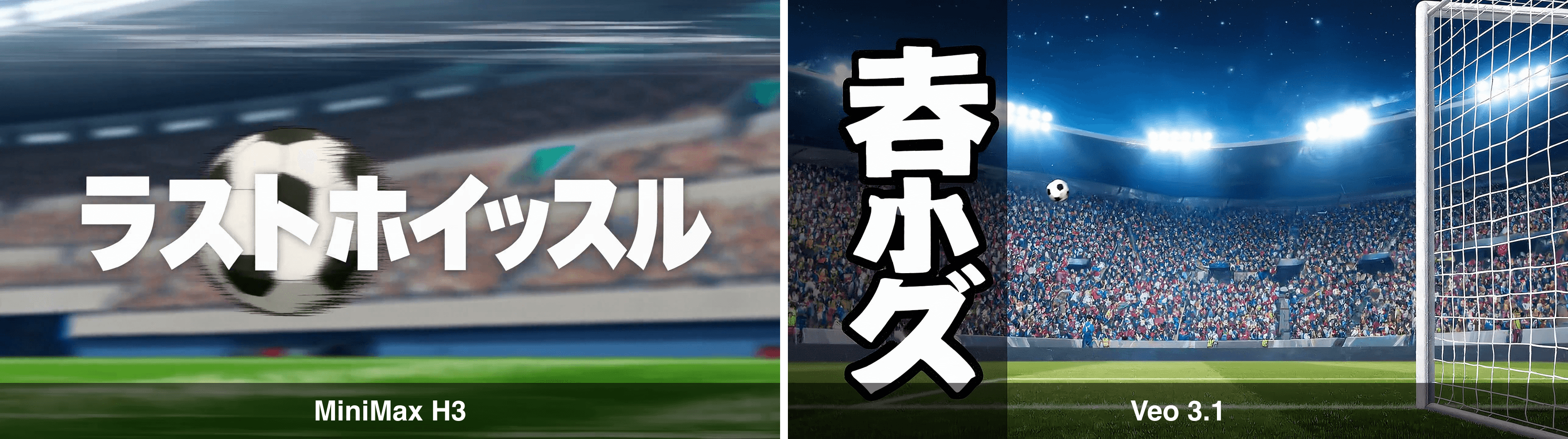
Side-by-side of the final frame from both clips, MiniMax H3 on the left with clean Japanese title lettering, Veo 3.1 on the right with garbled vertical characters
The last frame of each clip. Left, H3 wrote ラストホイッスル, all eight katakana correct and rock steady. Right, Veo 3.1 wrote three characters that are not the requested word and do not form one.
The title card is where the round was decided, and it was not close. H3 rendered the requested katakana exactly, hard-edged and stable, over a streaked pan of the goalmouth. Veo 3.1 produced a vertical stack of three characters that are neither the requested word nor a word. On the same frame it also dropped the character out of shot and let the background slide toward semi-photoreal stadium plate, despite photorealistic skin and 3D render sitting in the negative prompt.
Table 3: five axes that decide an anime cut, from these two runs
| Axis | MiniMax H3 | Veo 3.1 |
|---|---|---|
| Character continuity from the keyframe | Held the exact face, hair and kit for the full 8 seconds | Redrew the character in a new wide shot, on model but a different drawing |
| Line weight and flat cel shading | Held, no drift toward 3D | Held in the mid shot, drifted to a photographic stadium plate by the end |
| Japanese title card | ラストホイッスル rendered correctly and held steady | Three characters, not the requested word, not a word |
| Delivered audio track | 32 kHz stereo, exactly as the model card states | 48 kHz stereo, present only because I set generate_audio myself |
| Whip pan and sakuga smear | Executed as a smeared pan into the title | Replaced with a hard cut to a new setup |
That last row is the loudest public criticism of H3 so far, which is exactly why I wrote it into both prompts. On the day-0 ComfyUI thread, user fwip complained that even the official demo prompts were ignored: "a violent WHIP PAN off the rooftop that SMEARS the floating words away with it, motion-streaked. And the video just didn't do any of that transition at all, it just replaced it with a cut."
In this run it was Veo that swapped the pan for a cut, and H3 that smeared. One take each is not a verdict, and I would not claim otherwise. But it does mean the criticism is not H3-specific: whip pans are the least reliable instruction in this whole test on either side. If your storyboard depends on one, storyboard around it rather than through it.
Step 5: The 4:3 retro OVA cut Veo 3.1 structurally cannot output
This is not a quality preference. It is a wall. Veo's aspect_ratio enum has two values and neither is 4:3, and its duration enum has no 12. The 90s OVA look is simply not addressable.
Plain1A 1990s OVA anime cut, 4:3 full-frame. Hand-painted background art with visible brush 2texture, cel-paint characters with thick uneven ink lines, heavy halation glow around the 3floodlights, 16mm film grain and faint gate weave. The same red-haired striker in a 4white-and-navy number 9 kit walks off a rain-soaked pitch as the crowd noise fades to a 5single ringing tone. Camera pushes in slowly on his face. He says quietly in Japanese: 6「次は、勝つ」. Retro palette: muted teal, dusty amber, deep maroon shadows. Audio: 7distant rain, a lone analogue synth pad, one reverb-heavy whistle in the far distance.
Settings: model minimax/h3/text-to-video, resolution: 2K, duration: 12, ratio: 4:3. Set that ratio by hand, remember the default.
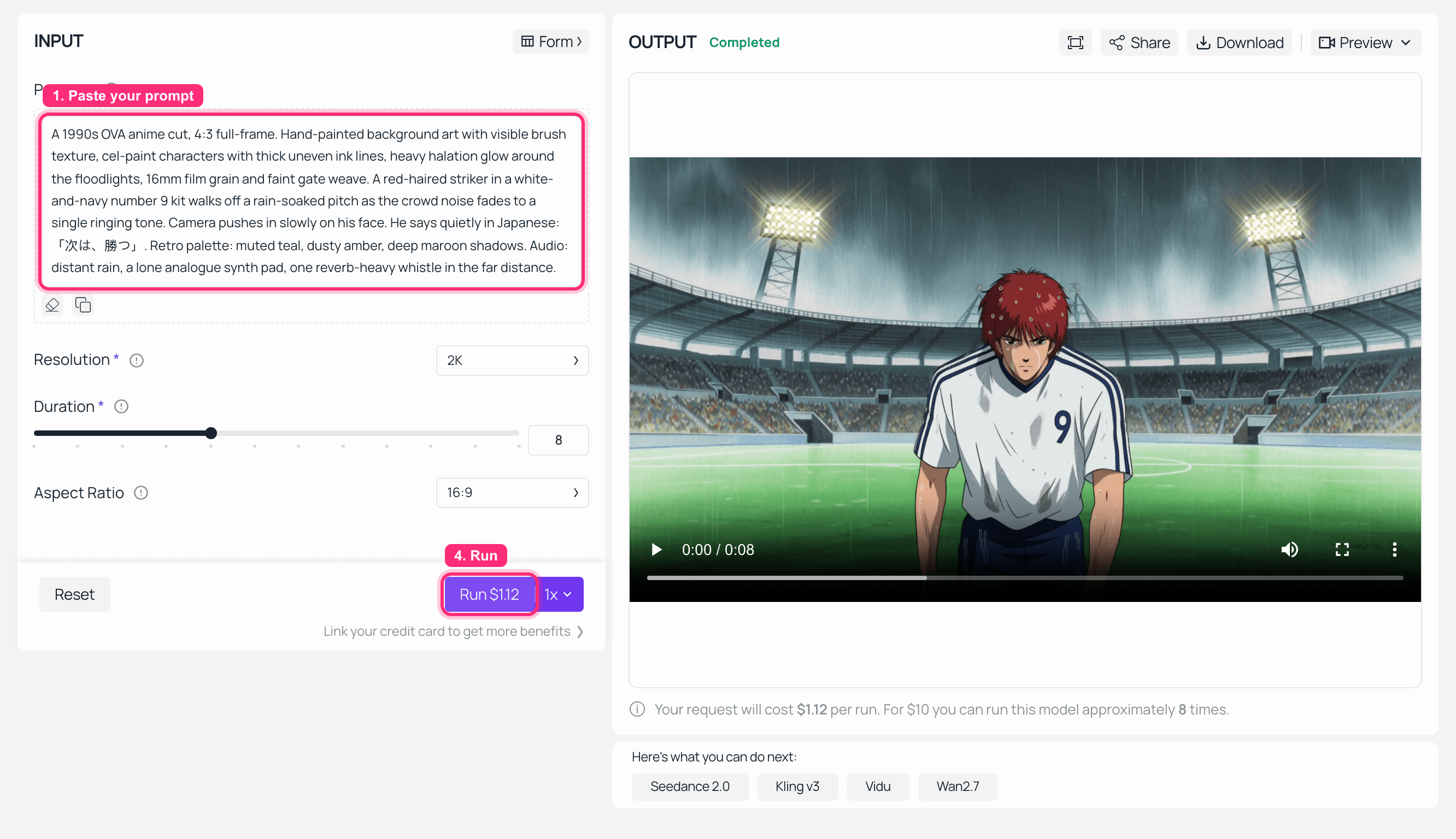
MiniMax H3 text-to-video playground on Atlas Cloud with the OVA prompt typed in and the finished retro clip in the output panel
MiniMax H3 text-to-video on Atlas Cloud, OVA prompt typed in, clip completed. Full disclosure: this particular run left Aspect Ratio at 16:9 and Duration at 8, so what you see on the right is the widescreen short version. The 4:3 twelve-second cut below came from the API call with ratio: 4:3 and duration: 12 set explicitly.
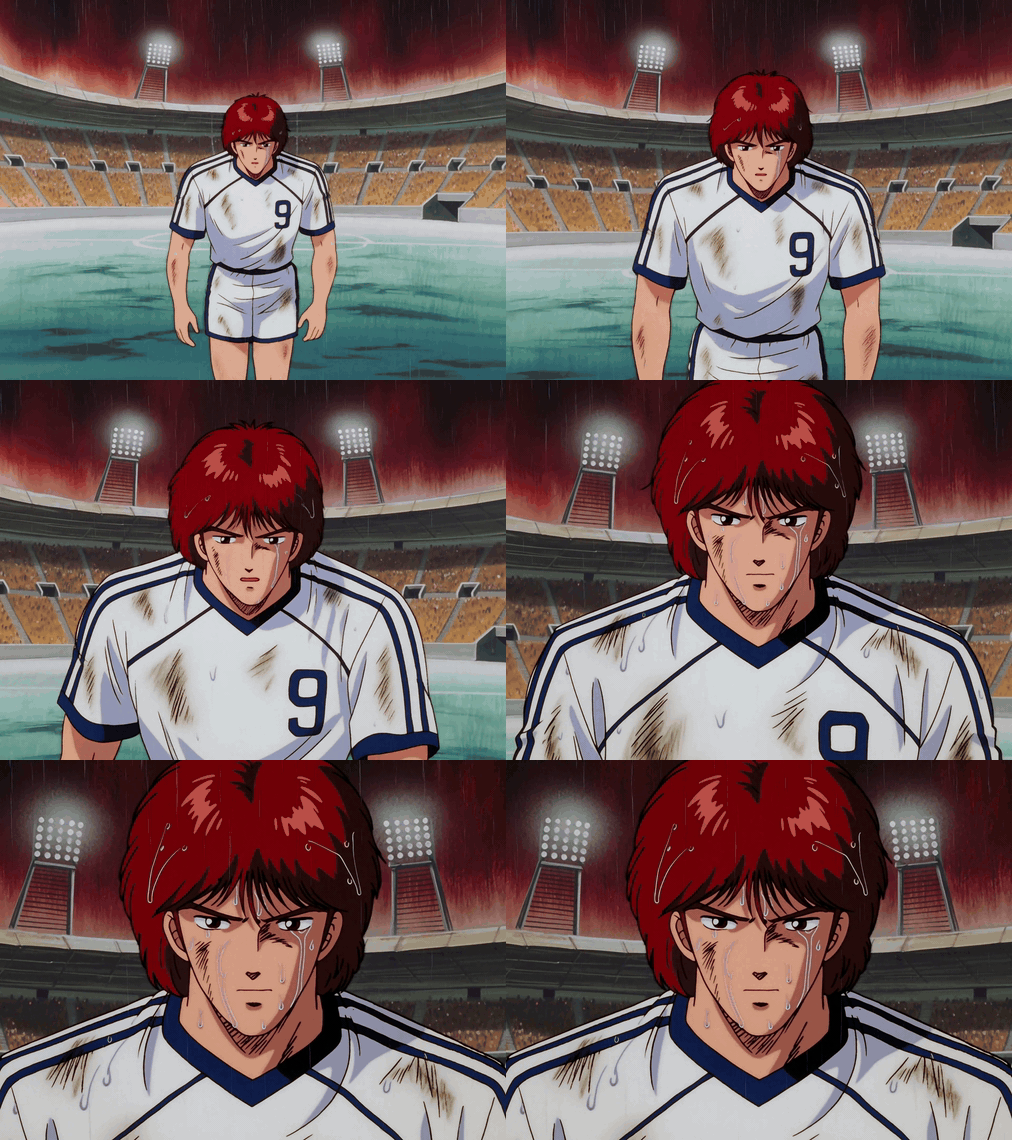
The 4:3 retro OVA cut: the same striker walking off a rain-soaked pitch in 90s anime style
H3 text-to-video, 4:3, 12 seconds. The delivered file came back 1920x1440, which is 4:3 to the pixel, with a 32 kHz stereo track. Shown here as a silent GIF at reduced frame rate to keep the page light. Generated with minimax/h3/text-to-video on Atlas Cloud.
Step 6: Nine reference images, one character, four cuts
Cross-shot character consistency is the hardest problem in AI anime, and it is solved with reference volume. Build the pack first: rerun the Step 1 prompt with the framing swapped for front, three-quarter, full profile, back, laughing, gritted teeth, full-body stance, kit detail and boot detail. Nine images, roughly eight cents in total.
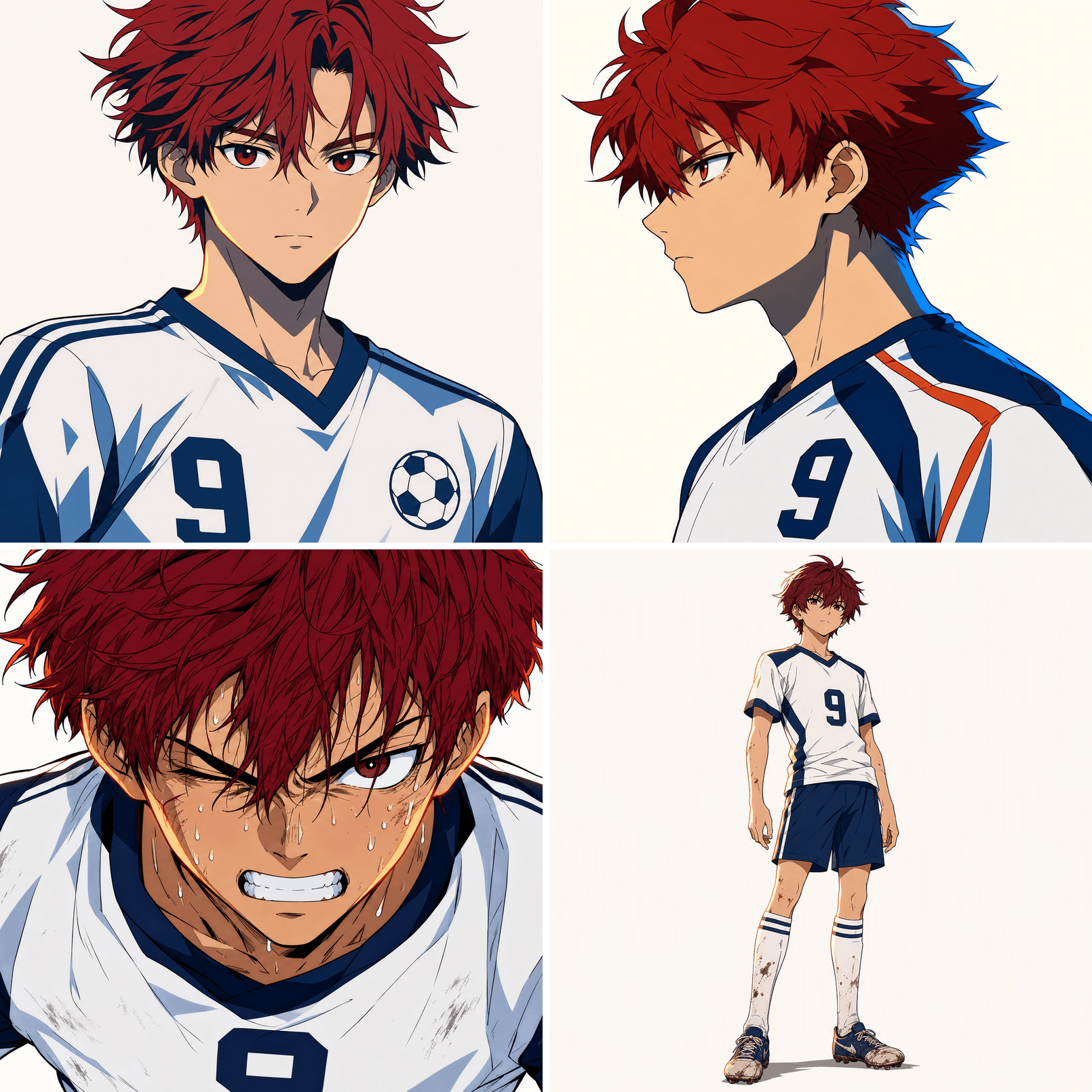
Four angles of the same original striker character generated as a reference pack, arranged in a two by two grid
Four of the nine reference angles. H3 accepts up to nine images in one reference pack, plus video and audio references on top.
Plain1Cel-shaded 2D anime, consistent hand-inked line weight, flat colour, no 3D shading. Keep 2the referenced striker's face, hair silhouette and number 9 kit identical across every cut. 3Four cuts in one continuous take: (1) low-angle push-in on his boots hitting the turf, 4(2) whip-pan up to a tight close-up of his eyes, (3) wide shot of him sprinting past three 5defenders drawn as blurred silhouettes, (4) freeze on a mid-air header, speed lines 6exploding outward. Audio: crowd roar, breath, boot-on-turf impacts, one taiko hit on the 7freeze.
Settings: model minimax/h3/reference-to-video, refers = your images with type: image, resolution: 2K, duration: 8 or higher, ratio: adaptive or 16:9.
The Veo 3.1 equivalent cannot be run at these settings and you do not need to try it to know why. Its reference endpoint accepts a maximum of three images, and choosing that endpoint collapses duration to a single legal value of 8. A nine-image pack and a 10-second take are both out of range.
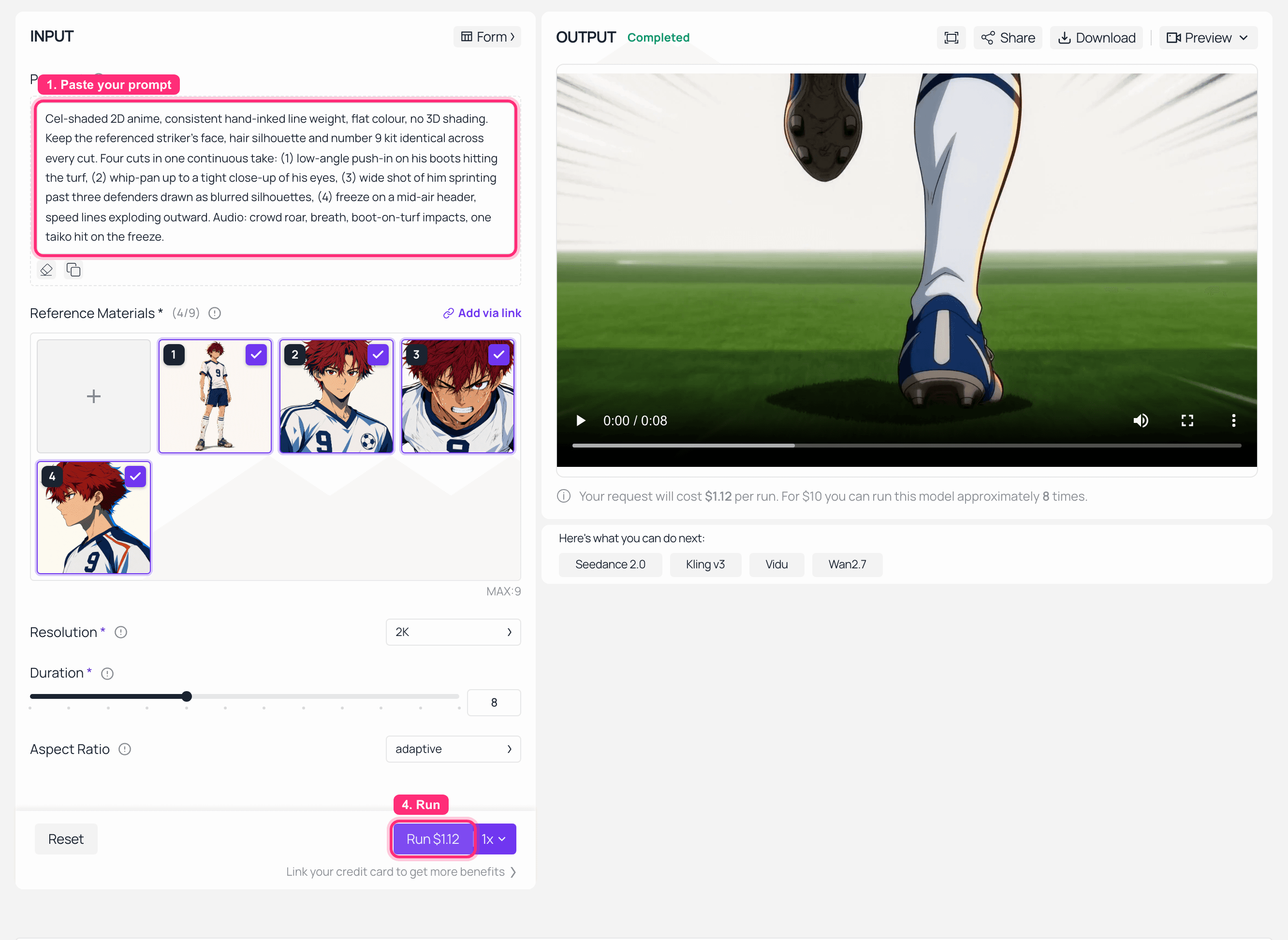
MiniMax H3 reference-to-video playground on Atlas Cloud showing the reference counter at four of nine and the first cut in the output panel
MiniMax H3 reference-to-video on Atlas Cloud. The counter reads Reference Materials (4/9) with MAX:9 underneath, which is the ceiling in the interface rather than a claim from a spec sheet. Output is cut one, the low-angle push-in on the boots.
Four More MiniMax H3 Anime Video Generator Runs Worth Doing
The Last Whistle shot only stresses four of the differences. These four stress the rest. All of them run on H3; the notes say which ones Veo 3.1 can match.
- Ultrawide sakuga fight,
21:9, 10 seconds. Veo cannot output 21:9 at all.
Plain1Cel-shaded 2D anime action, thick tapered ink lines, flat colour, hard-edged shadows, 2no 3D shading. Two original masked duelists on a windswept temple roof at dusk. Blade 3clash, the frame shudders, both fighters break apart in a burst of hand-drawn impact 4frames and radial speed lines. Camera: low-angle push-in, then a lateral track, then a 5snap to a wide silhouette against the orange sky. Audio: two sharp metal clashes, cloth 6snap, a low taiko hit on the final freeze, no music.
- Beat-synced AMV cut, reference-to-video with an audio reference. H3 takes up to three audio clips as reference input. Veo 3.1 has no audio input at all, only audio output.
Plain1Cel-shaded 2D anime montage cut to the referenced audio track. Five short beats: rain on 2a window, a hand tightening a bandage, a city skyline flashing past a train window, a 3sprint start, a freeze on an outstretched hand. Every cut lands exactly on a downbeat of 4the referenced audio. Flat colour, thick ink lines, high-contrast night palette of deep 5indigo and neon magenta.
- Two-line Japanese dialogue scene, 12 seconds. This is the lip-sync stress test, and 12 seconds is already outside Veo's range.
Plain1Cel-shaded 2D anime, flat colour, no 3D shading. Two original characters on a rooftop at 2golden hour, shot reverse shot. First says in Japanese:「本当に行くの?」. The second 3answers, half-smiling, in Japanese:「もう決めた」. Mouths match every syllable. Warm rim 4light, long shadows, gentle wind in hair. Audio: two distinct Japanese voices, distant 5traffic, one cicada.
- Vertical shonen short,
9:16, 8 seconds. Both models can do vertical, so this is the one place to actually A/B them rather than assume.
Plain1Cel-shaded 2D anime, vertical composition. An original teenage runner bursts through a 2paper banner in slow-motion, then the frame snaps back to full speed as she accelerates 3down a stadium straight. Speed lines, flat colour, hard shadows, bold graphic sky. 4Camera: low-angle follow shot, then a whip up to her face. Audio: banner tear, crowd 5surge, one breath held then released.
If you want the prompt grammar behind these, the MiniMax H3 prompt guide goes deeper on how H3 parses camera and audio instructions than I can here.
What a 60-Second Anime Opening Costs on MiniMax H3 vs Veo 3.1
A standard anime OP is roughly 90 seconds. Call it eight shots of 8 seconds, 64 seconds of finished video, plus one keyframe per shot at $0.009 each.
There is a real pricing discrepancy you should know about rather than have me paper over. The Atlas Cloud catalog lists MiniMax H3 at $0.10 per second flat, while the model readme breaks it out as $0.14/s at 2K and $0.10/s at 768P. Veo 3.1 is listed at $0.20 per second, while its readme separates $0.40/s with audio from $0.20/s without.
The run buttons in my screenshots settle it. H3 reference-to-video, 8 seconds at 2K, quoted Run $1.12, which is exactly $0.14 per second. Veo 3.1 image-to-video, 8 seconds at 1080p with audio on, quoted Run $3.2, which is exactly $0.40 per second. So the readme rates are the ones that bill, and the catalog headline is the entry tier. I have shown both readings below anyway. These are list prices as of August 2026.
Table 4: eight shots of 8 seconds, keyframes included
| Setup | Video cost (catalog rate) | Video cost (readme rate) | Keyframes | Total range |
|---|---|---|---|---|
| MiniMax H3, 2K | $6.40 | $8.96 | $0.07 | $6.47 to $9.03 |
| MiniMax H3, 768P | $6.40 | $6.40 | $0.07 | $6.47 |
| Veo 3.1, 1080p with audio | $12.80 | $25.60 | $0.07 | $12.87 to $25.67 |
| Veo 3.1 Lite, 720p | $3.20 | $3.20 | $0.07 | $3.27 |
Prices pulled from the Atlas Cloud model pages linked in Table 1, August 2026. None of these four are discounted right now.
Two things that table does not include, and both hit harder than the per-second rate.
Retries. Nobody ships the first take of an anime shot. Whatever multiplier you assume, apply it to both columns and the gap widens in the same proportion.
Wall-clock, and this one goes the other way. Timed end to end on 7 August 2026: H3 at 2K for 8 seconds took 447 seconds, about 7.5 minutes. H3 text-to-video at 2K for 12 seconds took 334 seconds. Veo 3.1 at 1080p for 8 seconds with audio took 152 seconds, under three minutes. Veo is roughly three times faster to a first take here, and if you are iterating on a shot at 2am that is worth real money. Queues move, so treat these as one afternoon's snapshot rather than a spec. But anyone quoting "2 to 3 minutes" for H3 at 2K is quoting a readme, not a queue. The 2K versus 768P breakdown covers when the higher tier is worth the extra minutes.
Anime Style, Homage, and What You Can Actually Publish
Everything in this article is style and homage. An original character, an original kit, an original title. No official anime character was generated or requested, and no real footballer's name or likeness was used. The World Cup trend is referenced as a format, because that is what it is useful for.
That distinction is not decoration. If you are producing anime-styled content commercially, "in the style of 90s OVA" and "this specific character from this specific show" are different legal objects, and only one of them is a business.
On the open weights: H3 is genuinely downloadable, and people ran it on day one. One commenter reported 10 minutes for a 10-second 480p clip on a 4070 Ti Super with 16GB, and others posted 3 minutes on a 5080 and 68 seconds on an RTX 6000 Pro. But self-hosting runs at a 768 short edge; the Context-IR and Regenerate-2K stages that produce 2K stay on the API side.
The licence has a real catch. The community licence does not currently cover the EU, UK, South Korea or the United States, citing regions "currently developing or enforcing AI-related regulations". A formal licensing request channel is open, which one HN commenter summarised as "you just have to pinkie promise you won't make disney mad and they will send you a licence". Funny, and also exactly the compliance step you cannot skip if you are in one of those four territories. The open weights write-up has the full territory list.
Frequently Asked Questions
Is MiniMax H3 a good anime video generator compared to Veo 3.1?
For most anime work, H3, and mainly for reasons that are not about rendering. It runs 4 to 15 seconds against Veo's 4, 6 or 8, it offers six aspect ratios including 4:3 and 21:9 against Veo's two, it lists Japanese among 11 natively stable dialogue languages, and it takes nine reference images against Veo's three. Veo 3.1 wins in one specific situation: when you need seed for reproducible retakes, or negative_prompt to stop a shot drifting into 3D render shading. H3 has neither parameter. If your pipeline depends on either, that is a genuine reason to stay.
Can Veo 3.1 generate anime in 4:3 or a 15-second clip?
No, and not for stylistic reasons. Veo 3.1's aspect_ratio enum contains exactly 16:9 and 9:16, and its duration enum contains exactly 4, 6 and 8. There is no 4:3 value to select and no way to request 12 or 15 seconds. If your reference is a 90s TV anime or OVA, the framing is out of reach on Veo and available on H3.
Why did my Veo 3.1 anime clip come back silent?
Because generate_audio defaults to false on the API. The playground toggle is usually already on, so this only bites people calling the API directly. Set generate_audio: true explicitly. While you are there, set resolution too, since it defaults to 720p rather than the 1080p or 4k you probably meant.
Does MiniMax H3 do Japanese dialogue and lip sync for anime?
Yes. The model card lists 11 languages with stable dialogue support: Arabic, Chinese, English, French, German, Italian, Japanese, Korean, Portuguese, Russian and Spanish. Audio is generated jointly with the picture at 32 kHz stereo rather than dubbed on afterwards, which is why the mouth timing holds across a whole line instead of the first few syllables. Write the Japanese line directly into the prompt in Japanese.
How many reference images can I use to keep an anime character consistent?
MiniMax H3 accepts up to 9 images, up to 3 video clips and up to 3 audio clips, with a hard ceiling of 12 files across all types. Veo 3.1's reference-to-video endpoint accepts 1 to 3 images, and selecting it collapses duration to 8 as the only legal value. For a recurring anime character across a series, that difference is the whole ballgame.
MiniMax H3 has open weights, so can I run my anime pipeline locally for free?
You can download and run it, with three caveats. Self-hosted inference runs at a 768 short edge, and the Context-IR and Regenerate-2K stages that produce 2K output remain API-side. Real-world local speeds range widely by card: roughly 10 minutes for a 10-second 480p clip on a 4070 Ti Super, about 3 minutes on a 5080, about 68 seconds on an RTX 6000 Pro, per the day-0 ComfyUI thread. And the community licence does not currently cover the EU, UK, South Korea or the US, so if you are in one of those, you need the formal licence before commercial use.





