

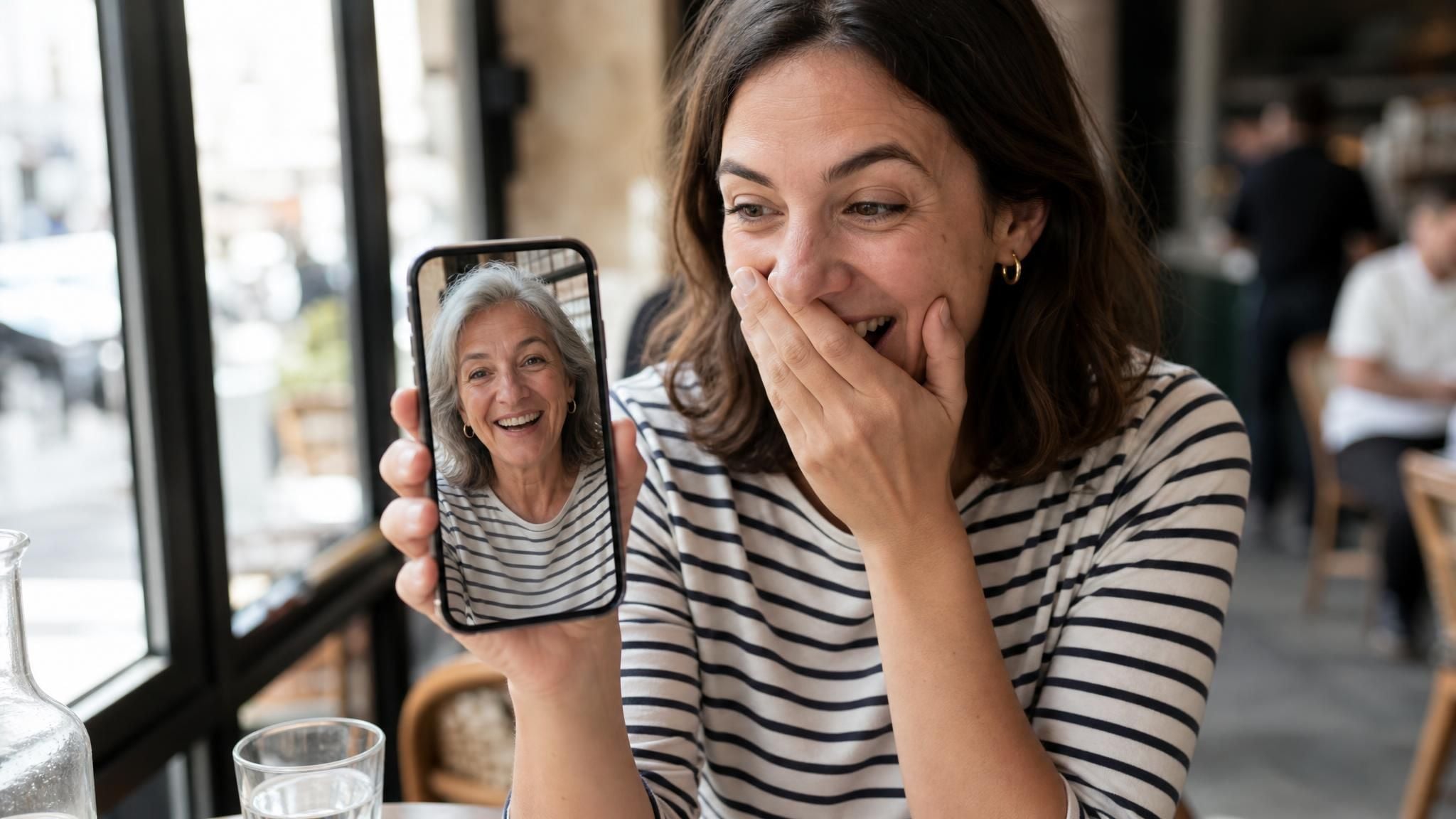
여러분의 단체 채팅방에 이미 그런 사람이 있을 것입니다. 셀카 한 장을 넣으면, 여러분과 똑같은 미소를 가진 은발의 낯선 사람이 나오고, 답글은 "완전 소름 돋는다"와 "말도 안 돼, 나는 저것보다는 늙겠어"로 갈립니다. 두 진영 모두 같은 질문을 하고 있습니다. AI 나이 변환(AI age progression)은 실제로 무엇을 하는 것이며, 그 늙은 얼굴을 어느 정도나 믿어야 할까요?
이 가이드는 두 질문에 모두 답합니다. 편집이 무엇을 바꾸는지, 무료로 실행할 수 있는 곳, 법의학 아티스트가 같은 작업을 손으로 하는 방법, 그리고 일란성 쌍둥이 186쌍에 대한 연구가 얼굴 예측의 확률에 대해 말해주는 바를 설명합니다.
핵심 요약
- AI 나이 변환은 같은 얼굴을 수십 년 더 나이 들어 보이게 재구성합니다. 실제 헤어라인을 따라 흰머리가 나고, 기존 표정 주름 자리에 주름이 생기며, 정체성은 그대로 유지됩니다.
- Atlas Cloud의 무료 AI 노화 사진 도구는 셀카 한 장을 약 30초 만에 워터마크 없는 고해상도 초상화로 바꿔줍니다.
- 법의학 나이 변환은 다른 기술입니다. NCMEC 아티스트는 이미지 한 장에 약 8시간을 투자하며, 아동이 미성년자인 동안 2년마다 수정합니다.
- 어떤 단일 사진도 개인이 실제로 어떻게 늙을지 예측할 수 없습니다. 일란성 쌍둥이 186쌍에 대한 연구는 인지된 나이를 흡연, 자외선 노출, 체질량지수와 연결했습니다.
- 개발자는 프롬프트 작성 없이 단일 이미지 필드로 하나의 고정 엔드포인트를 통해 동일한 효과를 얻을 수 있습니다.
AI 나이 변환이 얼굴에 하는 일
마케팅 문구를 걷어내면 작업은 단순합니다. 사람 사진 한 장이 들어가고, 수십 년 더 나이 든 같은 사람의 사진이 나옵니다. 어려운 부분은 "같은"이라는 단어입니다.
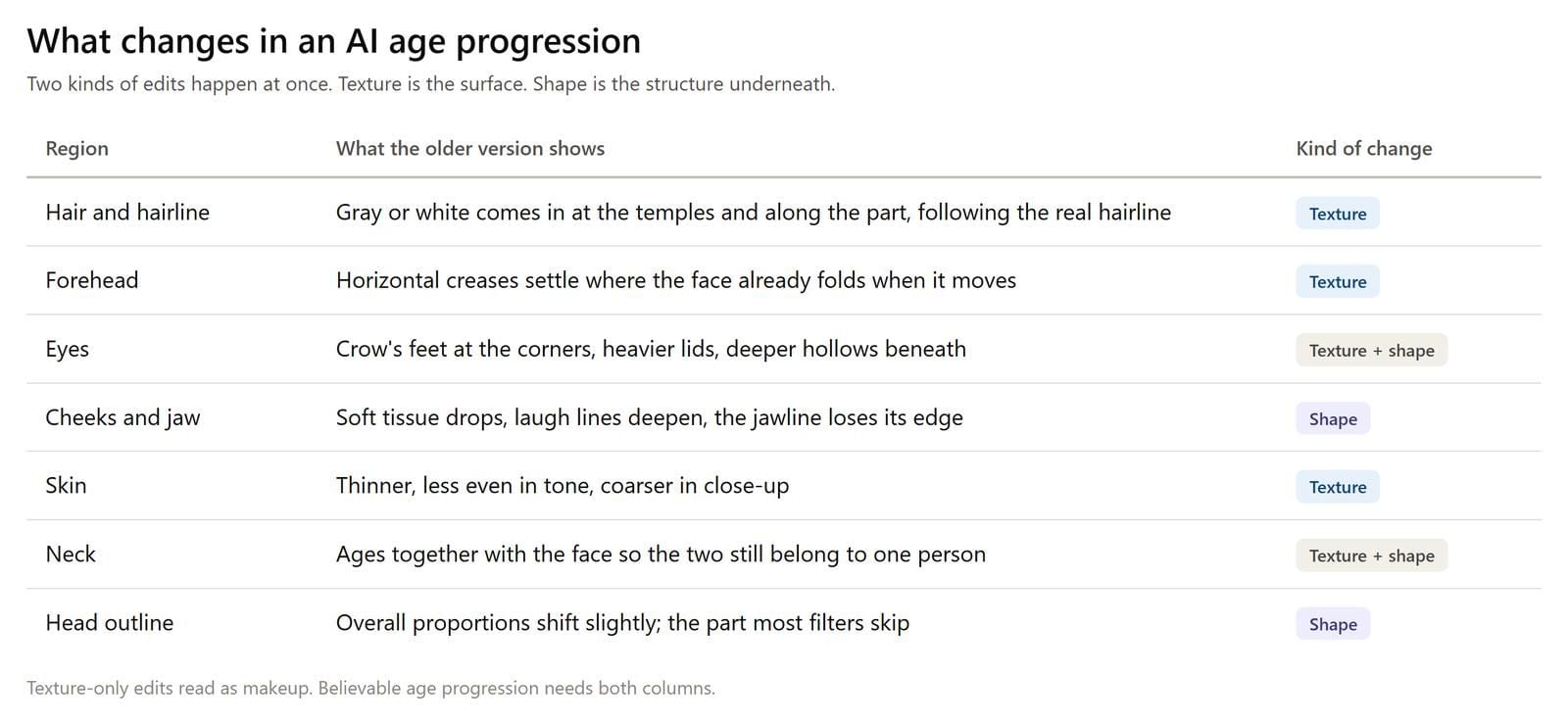
노화는 얼굴을 두 가지 층위로 변화시킵니다. 표면 층위는 질감입니다. 관자놀이와 가르마를 따라 머리카락 색이 빠지고, 얼굴이 웃거나 찡그릴 때 이미 만들어지는 주름 자리에 주름이 자리 잡으며, 피부는 얇아지고 고르지 않게 변합니다. 더 깊은 층위는 형태입니다. 연조직이 처지고, 턱선이 부드러워지며, 눈구멍이 더 깊어 보이고, 머리 자체의 윤곽도 다소 변합니다.
두 번째 층위가 저가 필터가 들통 나는 지점입니다. 2020년 논문 Lifespan Age Transformation Synthesis는 당시 대부분의 노화 방법이 "질감을 바꾸는 데 그치고 머리 형태의 변환을 간과했다"고 지적했습니다. 이에 대한 해결책으로 FFHQ 얼굴 데이터셋으로 학습된 네트워크를 사용했으며, 고정된 나이 등급을 앵커로 삼아 0세부터 70세까지의 전체 머리 초상화를 렌더링할 수 있었습니다.
아래와 같은 원클릭 도구는 나이 등급을 선택하라고 요청하지 않습니다. 초상화를 넘기면 모델이 그 사람을 더 나이 들어 보이게 재구성하며, 사람이 아닌 모든 것은 그대로 유지되어야 합니다.
흰머리만 궁금하다면 흰머리 미리보기로 주름 하나 추가하지 않고 확인할 수 있습니다.
AI 나이 변환 무료로 체험하기
Atlas Cloud는 이 효과를 프롬프트 입력창이 아닌 단일 목적 페이지로 제공합니다. 업로드하고 버튼 하나를 누르면 워터마크 없는 고해상도 초상화가 반환됩니다. 같은 기능은 API 모델로도 제공되어 자체 제품에 이 효과를 통합하려는 개발자도 사용할 수 있습니다.
방법 1: 브라우저에서 실행하기
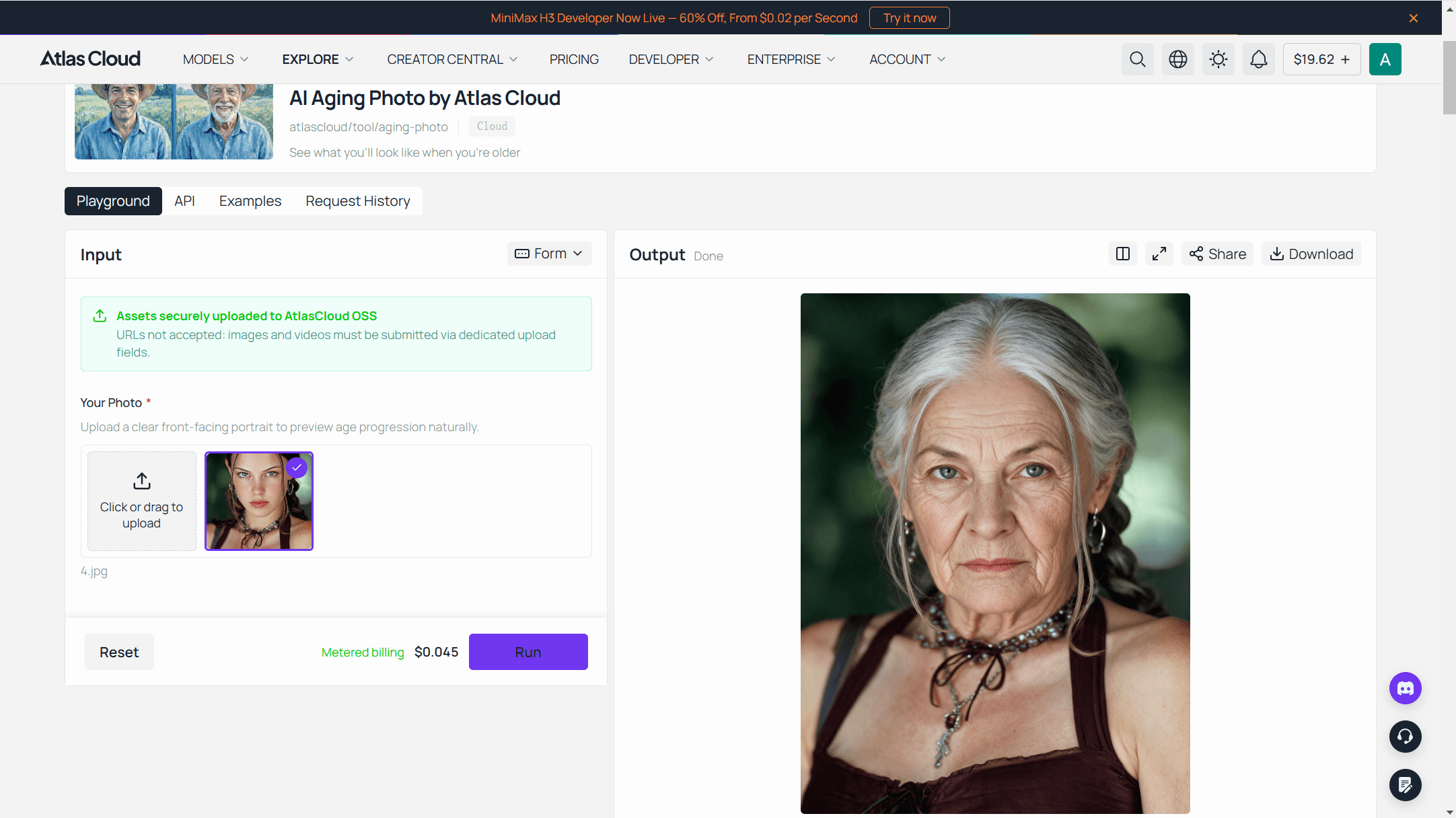
노화 사진 플레이그라운드를 열고 Atlas Cloud 계정에 로그인하세요. 무료 실행은 계정에 연결됩니다. 그다음:
- 선명한 정면 사진을 업로드 상자에 끌어다 놓으세요. 10MB 이하의 일반적인 이미지 형식이면 모두 작동합니다. 자신의 얼굴을 사용하고 싶지 않다면? 페이지에서 공식 예시 이미지를 제공합니다.
- 생성(generate)을 누르세요. 나이 든 초상화가 약 30초 만에 만들어집니다.
- 페이지에서 다운로드하거나, 나중에 요청 기록에서 찾을 수 있습니다.
페이지는 이 변환이 미묘한 5년 추가가 아니라 수십 년 앞으로 도약하는 것으로 설명합니다. 위 예시의 남성은 약간 나이 든 자신이 아니라 노인으로 돌아옵니다.
로그인 한 번으로 AI 도구 라인업의 나머지 기능도 사용할 수 있습니다. 노화 미리보기로 시작한 세션은 같은 사진으로 추가 계정 없이 헤어스타일이나 증명사진 테스트로 이어질 수 있습니다.
방법 2: API로 나이 변환 이미지 생성하기
80명의 동창회 손님의 나이 든 버전을 인쇄하는 이벤트 플래너나 자체 인터페이스에 이 효과를 제공하는 족보 앱은 웹 페이지를 80번 클릭하고 싶지 않을 것입니다. 같은 모델은 atlascloud/tool/aging-photo로 호출할 수 있으며, 입력은 정확히 하나입니다.
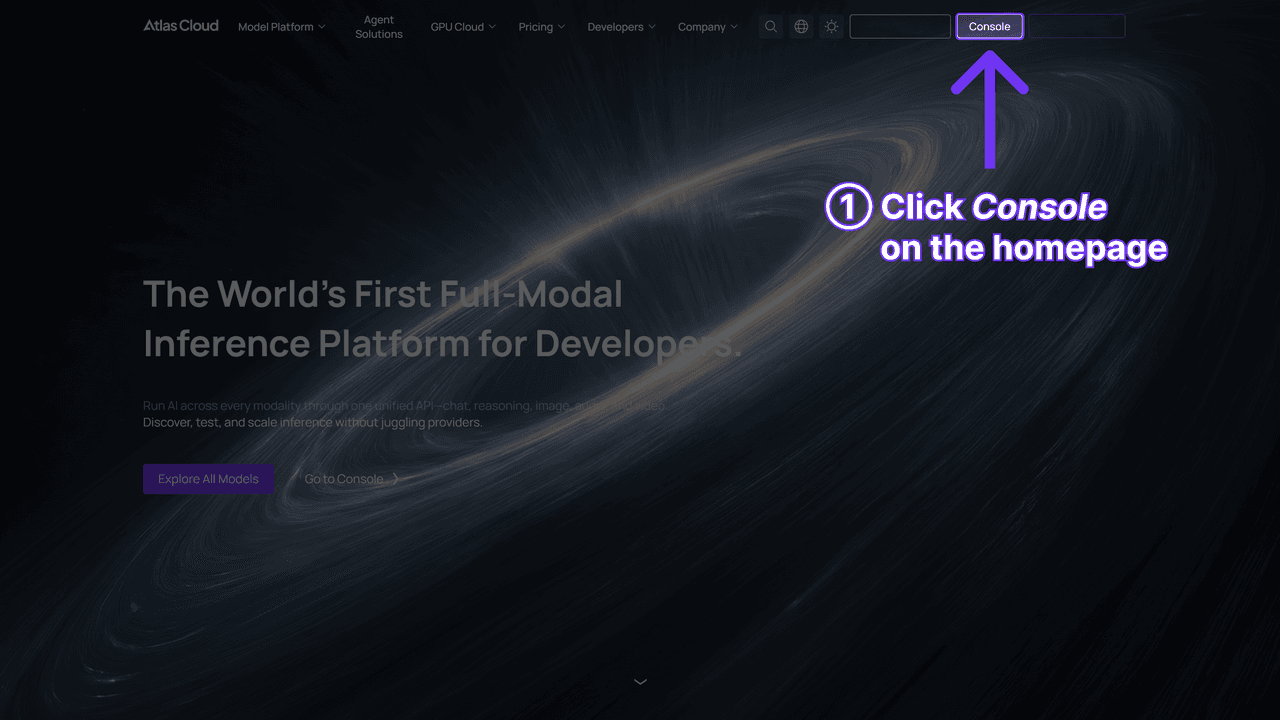
1단계: API 키 생성. Atlas Cloud 콘솔에서 키를 생성하고 복사한 후 서버 측에 보관하세요. 도구 엔드포인트는 플랫폼의 다른 모든 모델과 동일한 키를 사용합니다.
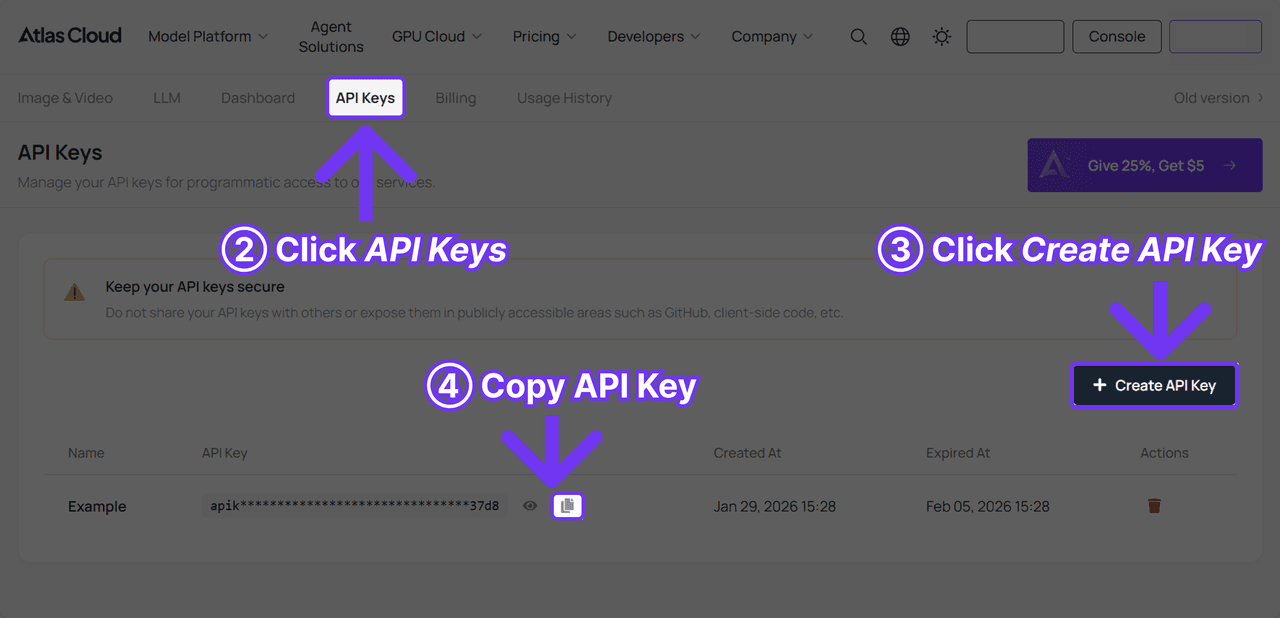
2단계: API 문서 확인. 인증, 공유 이미지 엔드포인트 및 폴링 계약은 API 문서에 있습니다.
검색하기 전에 알아두면 좋은 한 가지 특징: 2026년 9월 2일에 공개 모델 목록을 가져왔을 때 464개 항목이 반환되었지만 이 도구는 그중에 없었습니다. 해당 스키마, readme 및 가격은 모두 정상적으로 확인됩니다. 카탈로그 검색만으로는 찾을 수 없습니다.
3단계: 첫 번째 요청 보내기. 제출은 비동기식이며 예측 ID를 반환합니다.
Bash1curl -X POST https://api.atlascloud.ai/api/v1/model/generateImage \ 2 -H "Content-Type: application/json" \ 3 -H "Authorization: Bearer $ATLASCLOUD_API_KEY" \ 4 -d '{ 5 "model": "atlascloud/tool/aging-photo", 6 "image": "https://your-cdn.com/portraits/guest-042.jpg" 7 }'
상태가 안정될 때까지 폴링합니다:
Bash1curl -s https://api.atlascloud.ai/api/v1/model/prediction/<PREDICTION_ID> \ 2 -H "Authorization: Bearer $ATLASCLOUD_API_KEY"
status는 created, processing, completed 또는 failed로 표시됩니다. outputs는 작업이 완료될 때까지 비어 있으며, 완료 후 나이 든 초상화의 호스팅 URL을 보관합니다.
스키마는 image를 이미지 참조로 타입 지정하며 파일이 어디에 있어야 하는지에 대해서는 언급하지 않습니다. 따라서 첫 번째 호출에서 키가 호스팅 URL 또는 업로드된 파일을 허용하는지 확인하세요.
이 요청 형태가 통합의 전부입니다. 동일한 키, 동일한 POST, 동일한 폴링 호출로 플랫폼의 모든 이미지 모델에 도달할 수 있습니다. 나중에 이 고정 도구에서 프롬프트 가능한 편집기로 전환하려면 모델 문자열을 바꾸고 해당 모델이 허용하는 필드를 추가하면 됩니다. 나머지 작업 프로세스는 변경할 필요가 없습니다.
법의학 나이 변환은 셀카 앱과 다릅니다
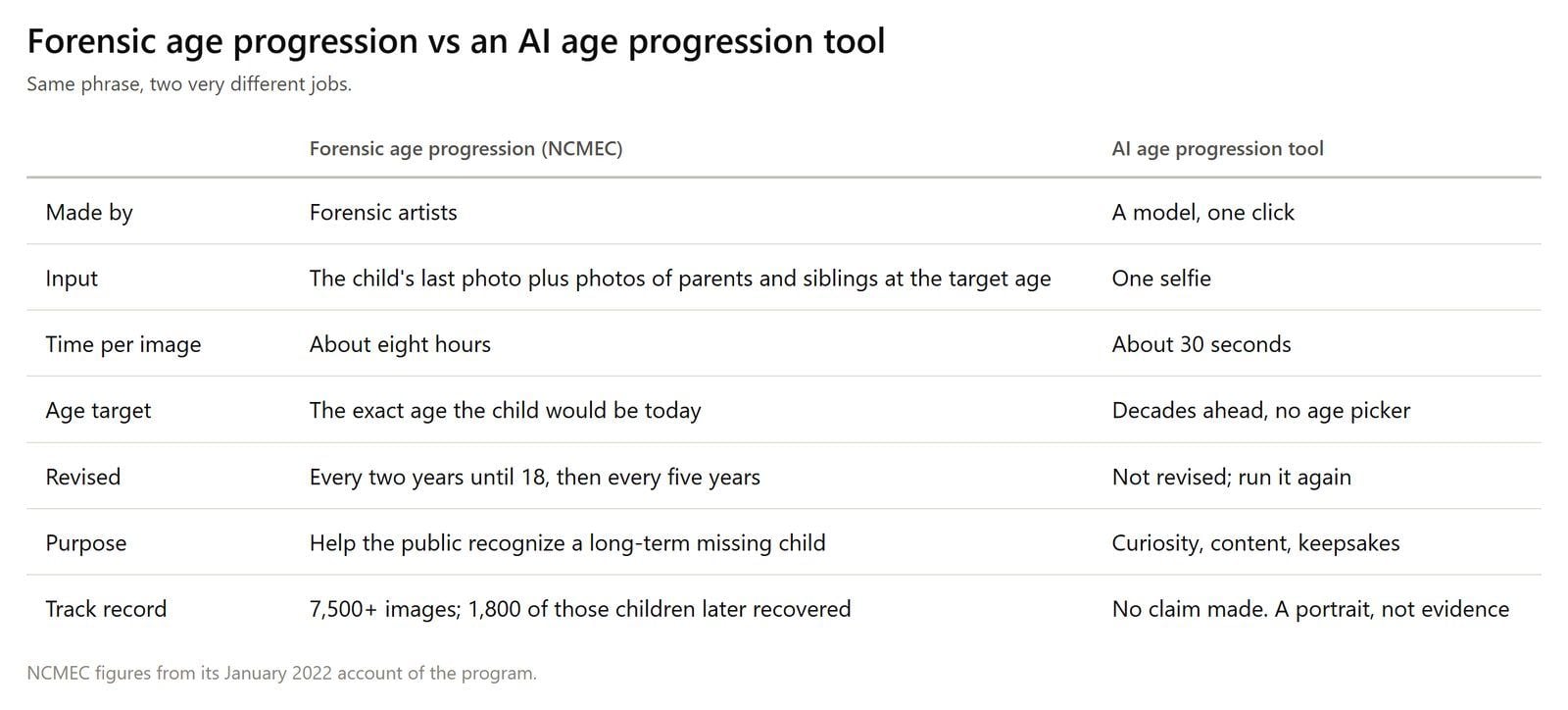
법의학 아티스트는 이 모든 것보다 오래전부터 "나이 변환(age progression)"이라는 용어를 사용해 왔으며, 그들의 작업 방식은 원클릭 도구가 생략하는 것이 무엇인지 보여주는 가장 명확한 기준입니다.
전국 실종·착취 아동 센터(National Center for Missing & Exploited Children)에서 아티스트들은 장기 실종 아동의 사진을 나이 변환하여 대중이 오늘날의 그 아이를 알아볼 수 있게 합니다.
그들의 프로그램 설명에는 입력물이 설명되어 있습니다: 아동의 생물학적 부모와 형제자매의 사진을 수집하며, 가능하면 지금 아동의 나이에 해당하는 시점에 찍은 사진을 사용하고, 그렇게 수집한 유전적 특징을 어린이 얼굴 발달에 대한 지식과 결합합니다.
각 이미지는 "약 8시간이 소요되는 과정"입니다. 아이가 18세가 될 때까지 2년마다 다시 작업하고, 그 이후로는 5년마다 다시 작업합니다. 2022년 초까지 팀은 7,500건 이상의 나이 변환을 제작했으며, 해당 이미지에 등장한 아동 중 1,800명이 되찾아졌습니다. 그중 일부는 누군가가 사진을 알아보아 직접 찾은 경우도 있습니다.
이것을 소비자용 AI 도구와 나란히 놓아보세요. 셀카 한 장, 가족 참조 사진 없음, 목표 나이 없음, 수정 주기 없음, 그리고 사건 파일과 결과물을 대조하는 사람도 없습니다. 소비자용 도구는 다른 작업을 하고 있는 것입니다.
오락용 나이 변환은 실종자 수색에 사용될 수 없습니다. Atlas Cloud의 자체 모델 노트도 반대 방향으로 선을 긋습니다: "사용 권한이 있는 미디어만 업로드하세요." 그리고 실제 인물의 초상화를 생성하기 전에 동의를 받으세요.
나이 변환 사진은 정확한가요?
짧은 답: 당신의 얼굴의 그럴듯한 나이 든 버전으로는 종종 그렇습니다. 70세에 실제로 가질 얼굴의 예측으로는 아닙니다. 그 이유는 모델 품질과 아무 관련이 없습니다.
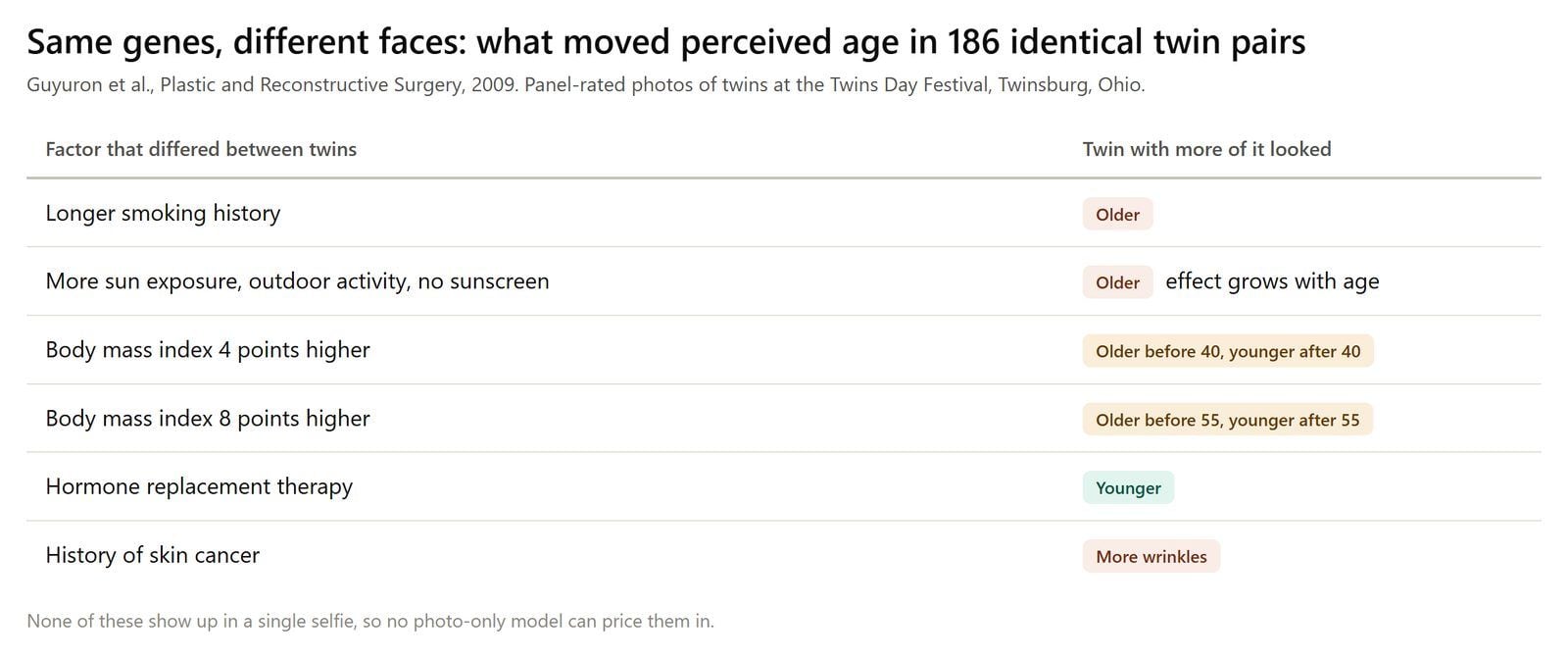
2009년 Bahman Guyuron이 이끄는 연구팀은 Plastic and Reconstructive Surgery 저널에 오하이오주 트윈즈버그의 쌍둥이의 날 축제에서 일란성 쌍둥이 186쌍을 촬영하고 패널이 각 쌍둥이가 몇 살처럼 보이는지 평가하도록 했습니다. DNA가 동일하므로 인지된 나이의 모든 차이는 다른 데서 비롯된 것입니다.
쌍둥이 중 한 명이 오래 흡연할수록 더 나이 들어 보였습니다. 자외선 노출이 많을수록, 야외 활동이 많을수록, 선크림을 덜 바를수록 모두 같은 방향으로 영향을 미쳤으며, 그 효과는 나이가 들수록 커졌습니다. 체질량지수가 4포인트 높으면 40세 이전에는 더 나이 들어 보였고 40세 이후에는 더 젊어 보였습니다. 호르몬 대체 요법은 더 젊어 보이게 했습니다.
셀카 한 장에는 그 어떤 것도 담겨 있지 않습니다: 흡연 이력 없음, 선크림 습관 없음, 25년 후 체중이 어디에 있을지에 대한 힌트 없음. 한 장의 사진으로 작업하는 모델은 많은 얼굴에서 학습한 평균 궤적만 적용할 수 있으며, 여러분의 얼굴은 사진이 보여줄 수 없는 어떤 방향으로든 그 평균에서 벗어날 것입니다.
이러한 모델을 만드는 연구자들도 스스로 그렇게 말합니다. SIGGRAPH 2025 논문인 MyTimeMachine 팀은 노화가 성별, 민족성, 생활 방식에 따라 달라지므로 "개인별 노화를 정확하게 예측하기 위한 전역적 노화 사전 지식을 학습하는 것이 극도로 어렵다"고 썼습니다.
그들의 해결책은 같은 사람의 개인 사진 50장만으로 모델을 개인화하는 것이었습니다. 한 장의 사진을 사용하는 도구는 정의상 한 장만 가지고 있습니다.
그러니 출력물을 있는 그대로 읽으십시오: 많은 가능한 경로 중 하나의 그럴듯한 경로이지, 결코 측정값이 아닙니다. 사진 속 사람이 같은 나이의 부모님처럼 보인다면 그것은 인구 패턴이 드러난 것이며, 꽤 인상적일 수 있습니다.
일부 AI 결과물이 분장처럼 보이는 이유
여러분도 실패한 버전을 본 적이 있을 것입니다. 얼굴은 같은데 머리카락이 갑자기 하얗고, 주름 층이 무대 분장처럼 표면에 얹혀 있습니다. 주로 다섯 가지가 잘못되며, 이를 알게 되면 몇 초 만에 어떤 결과물도 평가할 수 있습니다.
- 형태 없는 질감. 주름이 추가되지만 볼, 턱, 눈구멍은 30대가 유지하는 위치에 그대로 있습니다. 이것이 2020년 Lifespan 논문이 해결하려고 만든 실패입니다.
- 평범한 노인 얼굴. 정체성이 일반적인 노인 얼굴로 흘러갑니다. 친구들이 당신이 아니라 낯선 사람의 할아버지를 먼저 알아봅니다.
- 균일한 노화. 모든 부위가 같은 정도로 나이 들어 결과물이 얼굴이라기보다 얼굴 위에 깔린 필터처럼 보입니다.
- 모든 것이 나이 듦. 셔츠가 바래고, 뒤의 벽이 변하고, 조명이 바뀝니다. 이제 전후 사진이 더 이상 일치하지 않습니다.
- 잘못된 헤어라인. 흰머리가 실제로 머리카락이 가늘어지고 밝아지는 부위부터 시작되는 대신 평평한 색상 변경으로 나타납니다.
Atlas Cloud 페이지는 두 가지 설계 목표를 직접 명시합니다: "정체성 유지(Identity Stays Intact)"와 "사진 유지(The Photo Stays Put)"는 각각 두 번째와 네 번째 실패에 해당합니다. 같은 목록으로 어떤 결과물도 확인할 수 있습니다. 공식 예시를 가져와 노화가 어디에 적용되었는지 살펴보세요.
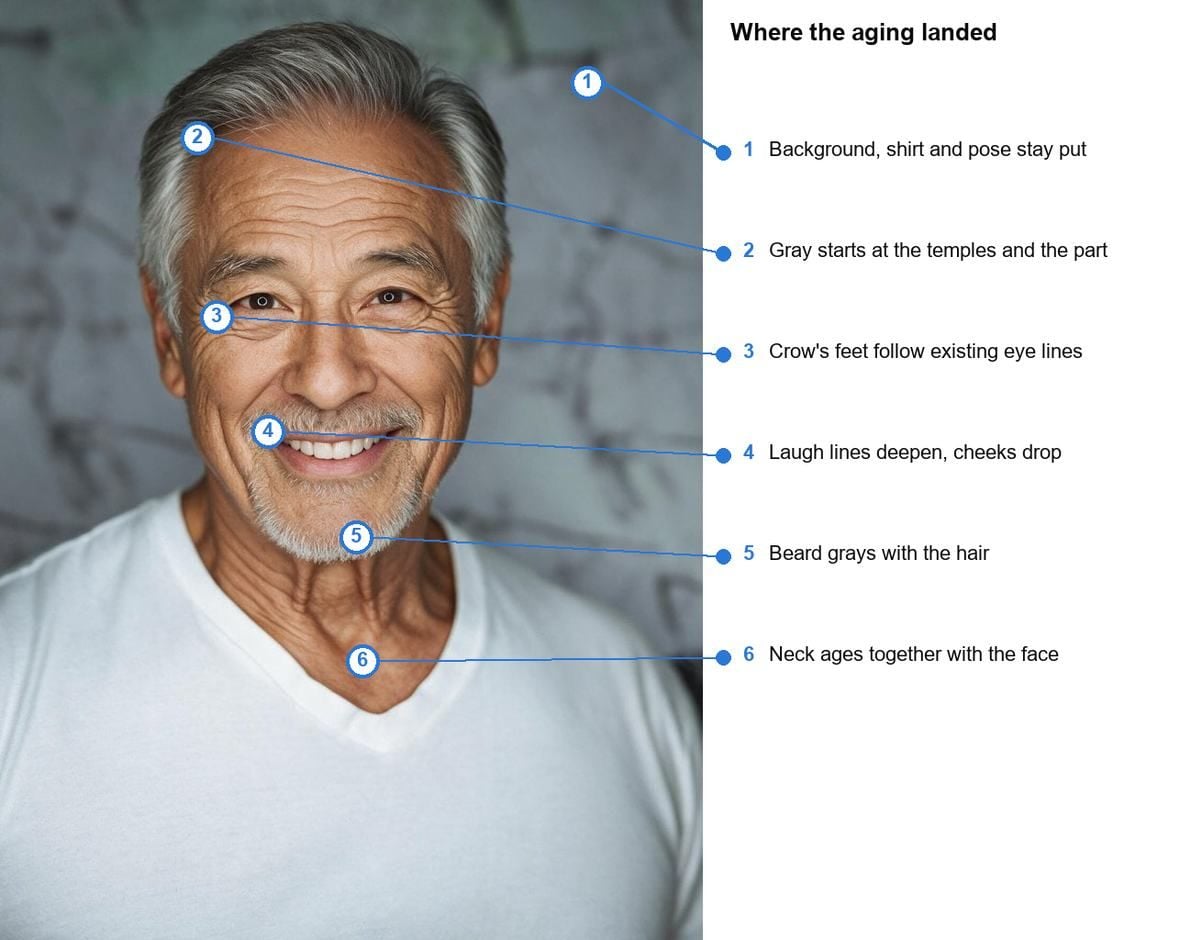
흰머리는 관자놀이와 가르마부터 시작됩니다. 눈가 주름은 원본에서 미소가 이미 만든 선을 따라 형성됩니다. 수염은 검은색으로 남는 대신 머리카락과 함께 희어집니다. 목도 얼굴과 함께 나이 들었습니다. 대리석 벽, V넥, 포즈는 그대로이며, 그래서 이 두 장면이 수십 년 간격으로 촬영된 한 사람의 두 사진처럼 읽히는 것입니다. 게시하기 전에 자신의 초상화도 같은 체크리스트로 확인해 보세요.
무료 AI 나이 변환 앱이 할 수 없는 것
이 검색어로 상위 노출되는 도구 페이지들은 가입 없음을 내세우고, 일부는 젊어지게 하는 모드나 월간 무료 할당량을 추가합니다. 비교하기 전에 어떤 경계가 제품 선택이고 어떤 것이 카테고리 전체의 한계인지 아는 것이 도움이 됩니다.
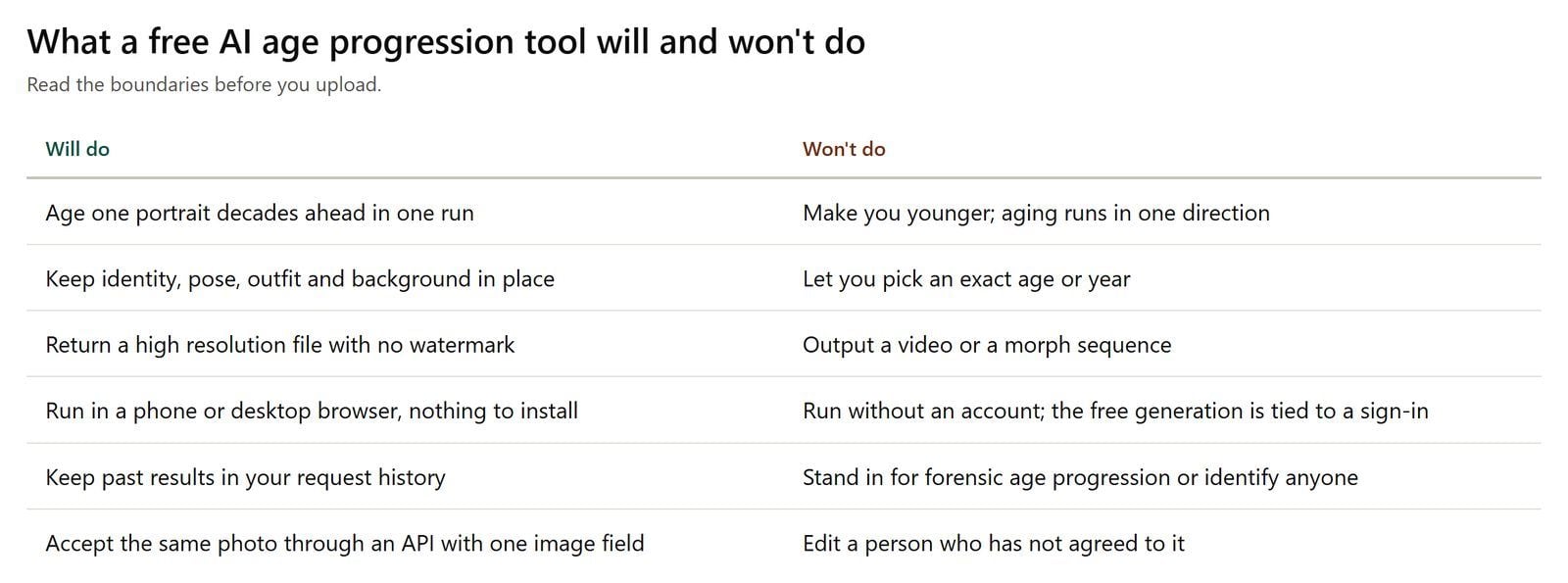
Atlas Cloud 도구는 한 방향으로만 나이를 변환합니다. 젊어지게 하는 모드, 10대 버전, "25세의 나"가 없습니다. 단일 정지 이미지만 생성하므로 타임랩스 비디오나 나이 간 모핑을 원한다면 다른 종류의 도구가 필요합니다.
또한 먼저 로그인을 요구합니다. 페이지는 그 이유를 솔직하게 설명합니다: 무료 생성, 요청 기록, 다운로드가 계정에 연결되어 다시 찾을 수 있으며, 그러려면 로그인이 필요합니다.
랜딩 페이지가 뭐라고 하든 두 가지 경계는 카테고리의 모든 도구에 적용됩니다. 어떤 도구도 여러분의 정확한 나이나 연도를 의미 있게 지정할 수 없습니다. 위의 쌍둥이 연구가 수치가 거짓 정밀도일 이유를 이미 보여줬기 때문입니다. 또한 어떤 도구도 동의하지 않은 얼굴을 대상으로 사용해서는 안 됩니다.
머릿속의 질문이 "이게 어떻게 작동하지"보다는 "내가 실제로 어떻게 보일까"에 가깝다면 나이 든 자신 미리보기에서 그 궁금증을 직접 다룹니다.
자주 묻는 질문
무료 AI 나이 변환 앱이 있나요, 아니면 온라인에서만 작동하나요?
Atlas Cloud 도구는 휴대폰과 데스크톱 모두 브라우저에서 실행되므로 앱 스토어에서 설치할 것이 없습니다. 페이지를 열고 업로드하면 같은 탭에 나이 든 초상화가 나타납니다. 다운로드 없이 무료 나이 변환 앱처럼 작동합니다.
가입 없이 AI 나이 변환을 무료로 사용할 수 있나요?
Atlas Cloud에서는 불가능합니다. 무료 실행이 계정에 연결되어 있으므로 간단한 로그인이 먼저 필요합니다. 모든 계정에는 이 도구에서 무료 생성 1회가 포함되며, 이후 실행은 Atlas Cloud 크레딧이 사용됩니다. 로그인은 나중에 요청 기록과 다운로드를 유지하는 이유이기도 합니다.
사진을 단계별로 나이 변환하려면 어떻게 하나요?
로그인하고 선명한 정면 셀카를 업로드 상자에 끌어다 놓은 후 생성 버튼을 누르고 약 30초 기다린 다음 결과를 다운로드하면 됩니다. 눈이 보이고 과한 필터가 없는 가슴 위 사진이 모델이 작업할 수 있는 정보를 가장 많이 제공합니다. 이것이 전체 과정입니다.
나이 변환 사진과 실제: 얼마나 가깝나요?
알아볼 수 있을 정도는 그렇습니다. 예측적이지는 않습니다. 이 도구는 얼굴이 나이 드는 평균적인 방식을 여러분의 특정 얼굴에 적용합니다. 70세의 실제 얼굴은 어떤 단일 사진도 기록하지 못하는 수십 년의 자외선, 수면, 체중, 습관을 함께 담게 됩니다.
이 도구로 더 젊어 보이게 할 수 있나요?
아니요. 이 도구에서 노화는 한 방향으로만 진행됩니다. 어린 시절 사진, 10대 버전, 젊어지게 하는 효과는 이 도구가 하는 일이 아닙니다.
AI 나이 변환은 비디오에서도 작동하나요?
여기서는 아닙니다. 출력물은 정지 이미지 한 장입니다. 이를 비디오나 모핑 시퀀스로 바꾸려면 별도의 비디오 도구와 다른 작업 흐름이 필요합니다.
나이 변환 사진은 어떤 해상도로 나오나요?
고해상도이며 이미지 어디에도 워터마크가 없습니다. 도구 페이지에 보고된 초상화 테스트는 1328 x 1776 픽셀로 반환되었으며, 인쇄나 전체 크기 게시에 충분한 수치입니다.
다른 사람의 사진을 나이 변환할 수 있나요?
동의가 있고 사진 사용 권한이 있는 경우에만 가능합니다. 허락을 받으면 선명한 정면 초상화는 자신의 사진과 동일하게 작동합니다.
결론
셀카 한 장에서 생성된 나이 든 얼굴을 그럴듯한 초상화로 취급하세요. 편집 자체는 잘 이해되어 있습니다: 질감과 형태가 함께 변하고, 정체성은 유지되며, 배경은 원래 위치에 남습니다. 사진이 알 수 없는 것은 선크림 습관부터 흡연 이력까지 실제로 여러분이 어떻게 늙을지를 결정할 모든 것입니다. 그래서 일란성 쌍둥이 186쌍이 DNA를 공유하면서도 다른 나이로 평가될 수 있었던 것입니다.
그런 조건에서 즐기세요. 무료 도구를 실행하고 결과를 같은 나이의 부모님 사진과 비교하고, 반응이 좋을 것 같으면 전후 사진을 게시하세요. 다만 AI 나이 변환을 제자리에 두세요: 하나의 가능한 미래를 보여주는 빠르고 설득력 있는 엿보기이지, 법의학 아티스트가 승인할 만한 것은 아닙니다.





