

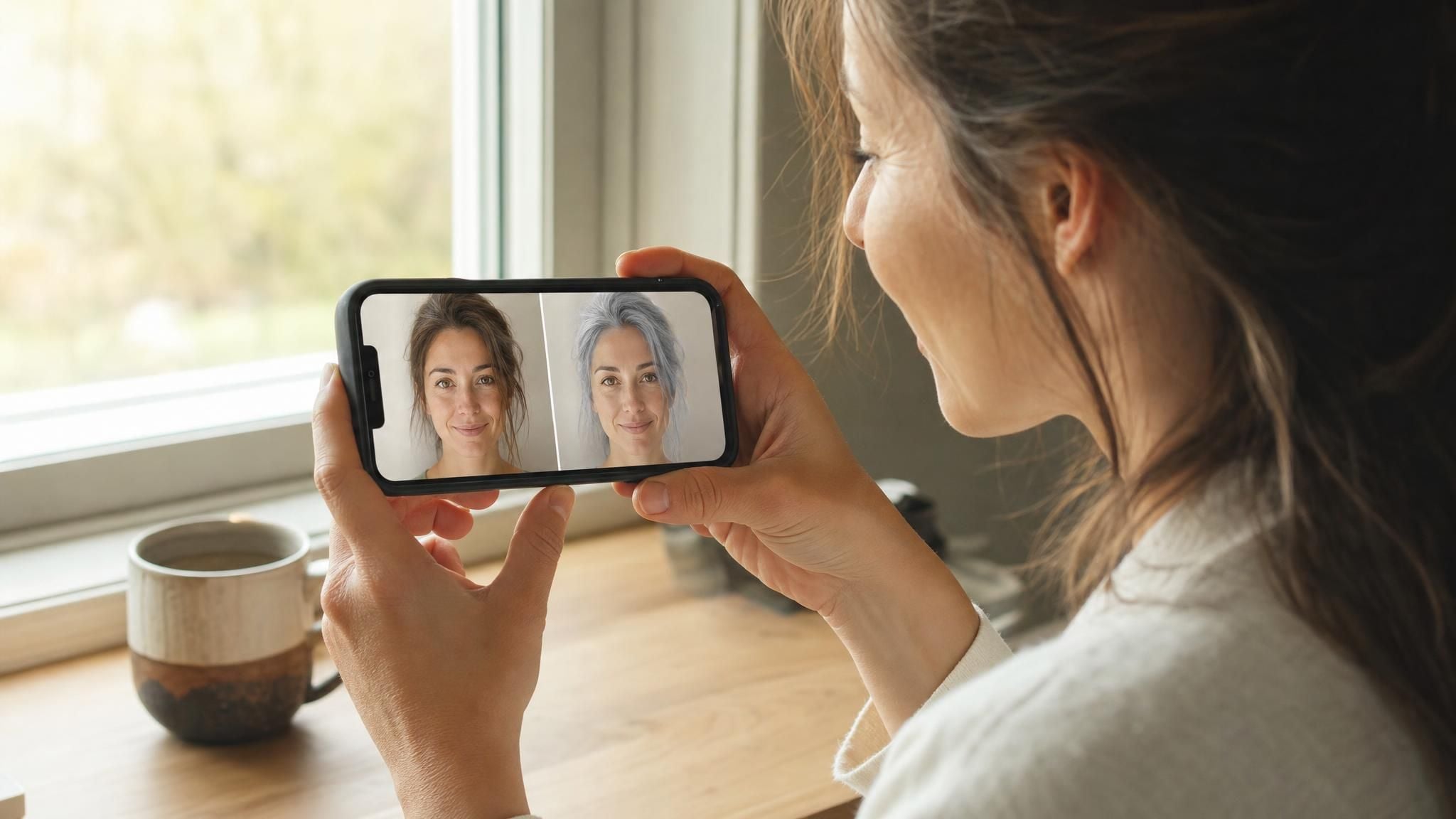
Somewhere between scrolling past a stranger's silver pixie cut online and catching an actual gray strand in your own bathroom mirror, the question stops being abstract: what would I look like with gray hair, not a stock photo model's face, yours. Guessing from someone else's before-and-after doesn't settle that. A flat gray tint slapped over a video feed for three seconds doesn't either. A text-driven AI hair color changer working from your own selfie gets a lot closer, and it takes less time than picking out which shade to even ask for.
Key Takeaways
- Atlas Cloud's Free AI Hair Color Changer previews what you would look like with gray hair from one selfie and a written description, no dye or salon visit involved.
- The same tool works as a general hair color changer, not a gray-only gimmick. Silver, salt-and-pepper, platinum, or any shade you can describe goes through the same request.
- It lives inside Atlas Cloud's wider AI Tools collection, so one free account covers other photo previews too.
- A one-tap gray hair filter and a text-driven hair color changer solve different problems: one overlays a flat tint, the other rewrites the hair itself.
- A clear, front-facing photo with even lighting makes the difference between a convincing preview and an obviously fake one.
Try On Gray Hair First: Atlas Cloud's Free AI Hair Color Changer
Atlas Cloud keeps a shelf of single-purpose editors under its AI Tools collection, and the one built for this is the Free AI Hair Color Changer. Instead of picking from a fixed grid of preset colors, you type what you want, so a request for icy silver goes through the same box as a request for honey blonde.
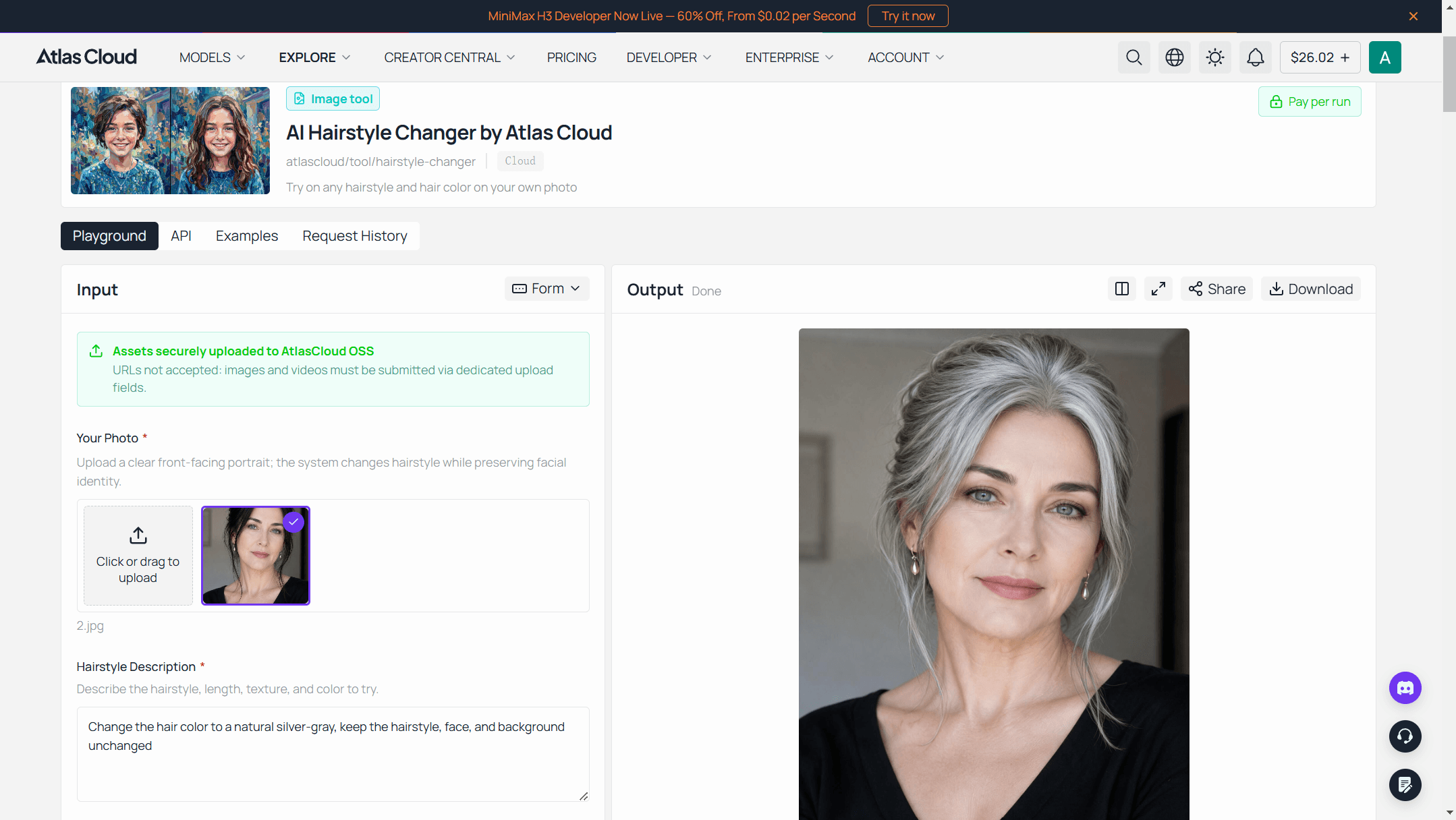
Three steps to a preview:
- Upload a clear, front-facing selfie. Even light, hairline visible, nothing covering the sides.
- Name the exact gray tone. A prompt like Change the hair color to a natural silver-gray, keep the hairstyle, face, and background unchanged gives the model far more to work with than typing "gray hair" alone.
- Generate, then check it at full size. Zoom in on the hairline and any strands near the face before deciding anything.
Naming the finish matters as much as naming the color. "Silver" and "salt-and-pepper" describe two different textures of gray, and the more specific the request, the less the model has to guess.
Gray Hair Filter vs. AI Hair Color Changer: What's Actually Different
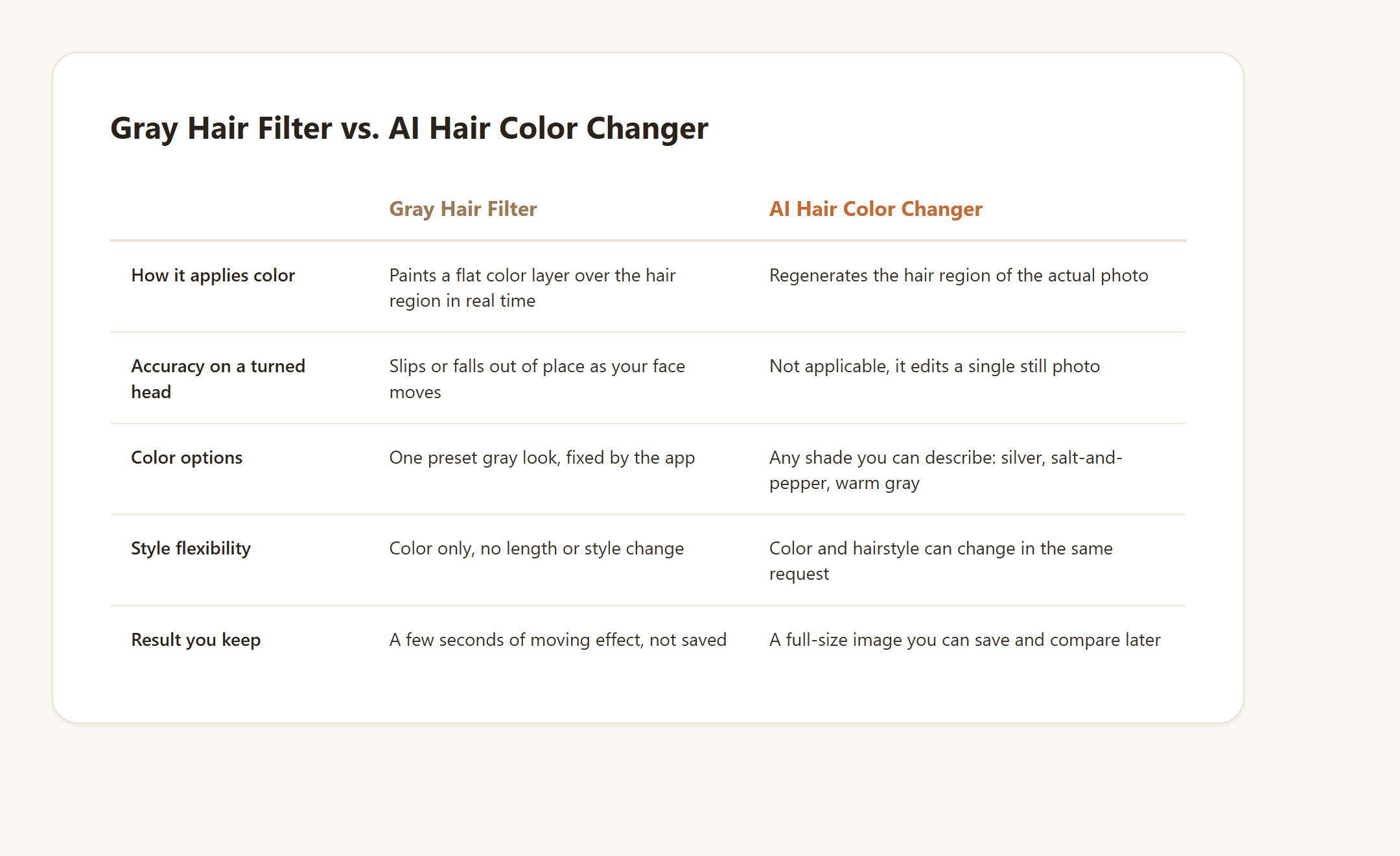
A quick gray hair filter and a text-driven AI hair color changer both promise a new shade, but they're built on different mechanics and aimed at different jobs. A live camera filter, the kind running in a phone's camera or a story effect, tracks your face and paints one preset gray look over the hair region in real time. It's fast to open, but it's also fixed: one look, nothing else adjustable, and it slips or warps the moment you turn your head since it's never actually reading your real hairline or lighting.
A text-driven hair color changer works closer to a rewrite. Feed it a photo and a sentence describing the shade, silver, salt-and-pepper, warm gray, whatever you're picturing, and it regenerates that region of the actual photo based on your real hairline, texture, and lighting, leaving the face and background untouched. Because it isn't locked to one preset, the same tool that handles gray also handles any other color, or a length change in the same request, which is the whole difference between a narrow filter and a full changer.
If what you're actually picturing is losing the hair entirely rather than recoloring it, that's a separate question with its own tool behind it, covered in our guide to what you'd look like bald. And if the color is settled but the cut isn't, our guide to bangs, mullets, and wolf cuts runs through the same kind of preview for shape instead of shade.
This is also why "change hair color online free" and "hair color changer app" turn up such different results depending on which mechanism sits behind the name. Some are genuinely running an editing model against your photo. Others are a filter wearing an app icon.
Build a Hair Color Changer Into Your Own App via API
Running one preview in a browser answers your own curiosity. A salon's booking page, a wig retailer's product page, or a batch job across a client list needs the model directly instead of a one-off upload.
Step 1: Create an API key. Generate one from the Atlas Cloud console and keep it server-side.
Step 2: Check the schema. Seedream v5.0 Pro Edit, part of the broader ByteDance model collection on Atlas Cloud, publishes its full parameter set on its model page, no login required to read it. The fields that matter for a color edit:
| Field | Required | Default | Notes |
|---|---|---|---|
| model | Yes | N/A | bytedance/seedream-v5.0-pro/edit |
| prompt | Yes | N/A | Name the exact tone, e.g. "silver-gray" or "salt-and-pepper," rather than just "gray" |
| images | Yes | N/A | 1 reference selfie is enough; up to 10 accepted |
| size | No | 2048*2048 | A portrait preset like 1328*1776 also works |
| output_format | No | jpeg | jpeg or png |
Step 3: Send the request, then poll for the result.
plaintext1curl -X POST https://api.atlascloud.ai/api/v1/model/generateImage \ 2 -H "Authorization: Bearer $ATLAS_API_KEY" \ 3 -H "Content-Type: application/json" \ 4 -d '{ 5 "model": "bytedance/seedream-v5.0-pro/edit", 6 "prompt": "Change only the hair color to a natural silver-gray. Keep the hairstyle, face, skin tone, and background unchanged.", 7 "images": ["https://your-cdn.example.com/selfie.jpg"], 8 "size": "1328*1776", 9 "output_format": "jpeg" 10 }'
plaintext1curl https://api.atlascloud.ai/api/v1/model/prediction/{prediction_id} \ 2 -H "Authorization: Bearer $ATLAS_API_KEY"
The first call returns a prediction ID right away. Poll the second endpoint until status reads completed, then read the image out of outputs. Swap the prompt's color description for whichever shade a client is asking about, salt-and-pepper, platinum, warm gray, and the same two calls handle it.
Silver, Salt-and-Pepper, or Warm Gray: Which Shade Actually Suits You
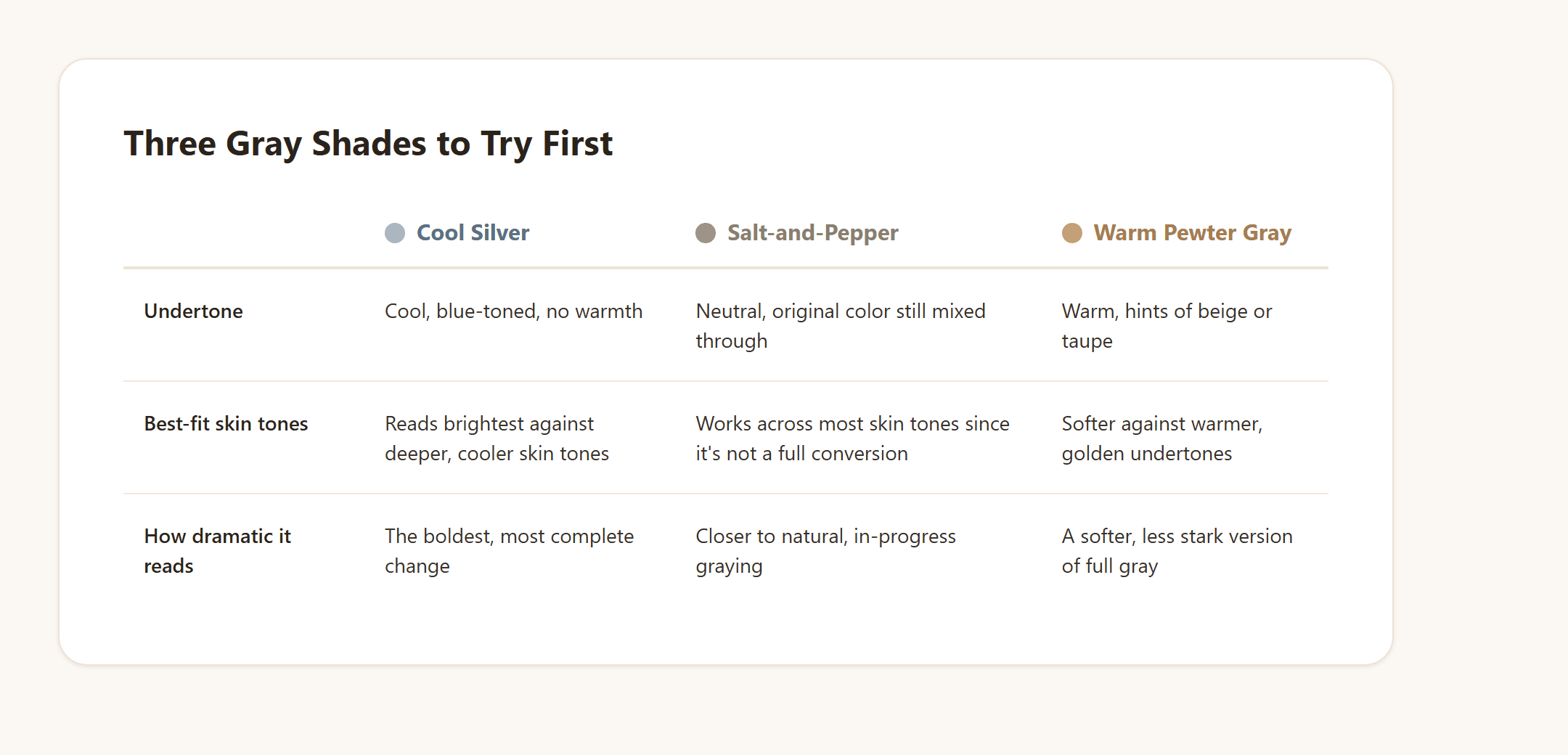
"Gray hair" covers more ground than the word suggests. Silver leans cool and reads brightest against darker skin tones and sharp, polished styles. Salt-and-pepper keeps some of the original color mixed through, so it looks less like a full conversion and more like a natural, in-progress gray, which is often closer to what people are actually picturing when they type the question. Warm gray, sometimes described as pewter or taupe-toned, carries a hint of beige underneath the gray and tends to sit more gently against warmer skin undertones than a stark, cool silver does.
Typed requests that give the model something concrete to work with: "a cool-toned silver, evenly distributed" for the dramatic version, "salt-and-pepper with the original brown still visible underneath" for something closer to natural graying, or "a soft, warm gray with beige undertones" if stark silver feels like too much at once.
Trying more than one of these on the same photo, back to back, tends to be more useful than picking one shade from a mental image and hoping it matches once it's on your own face.
Why "What Would I Look Like With Gray Hair" Is Such a Common Search
Part of it is curiosity that has nothing to do with an actual salon appointment, the same impulse behind trying on sunglasses you'd never buy. But a real share of this search traces back to a genuine before-and-after problem: gray hair, unlike most color changes, usually isn't something you're choosing to add. It's already started, and the decision left is whether to keep coloring over it or let it grow in and see what that actually looks like on your own face.
That decision is harder to reverse than most haircuts. Bleaching gray hair to test a lighter dye, or growing out months of color to see the natural gray underneath, both take real time and can't be undone the same afternoon you change your mind. People already reach for workarounds to shortcut that: temporary root spray for a few hours at an event, a gray-toned wig for a costume or a trial run, colored hairspray for a single photo.
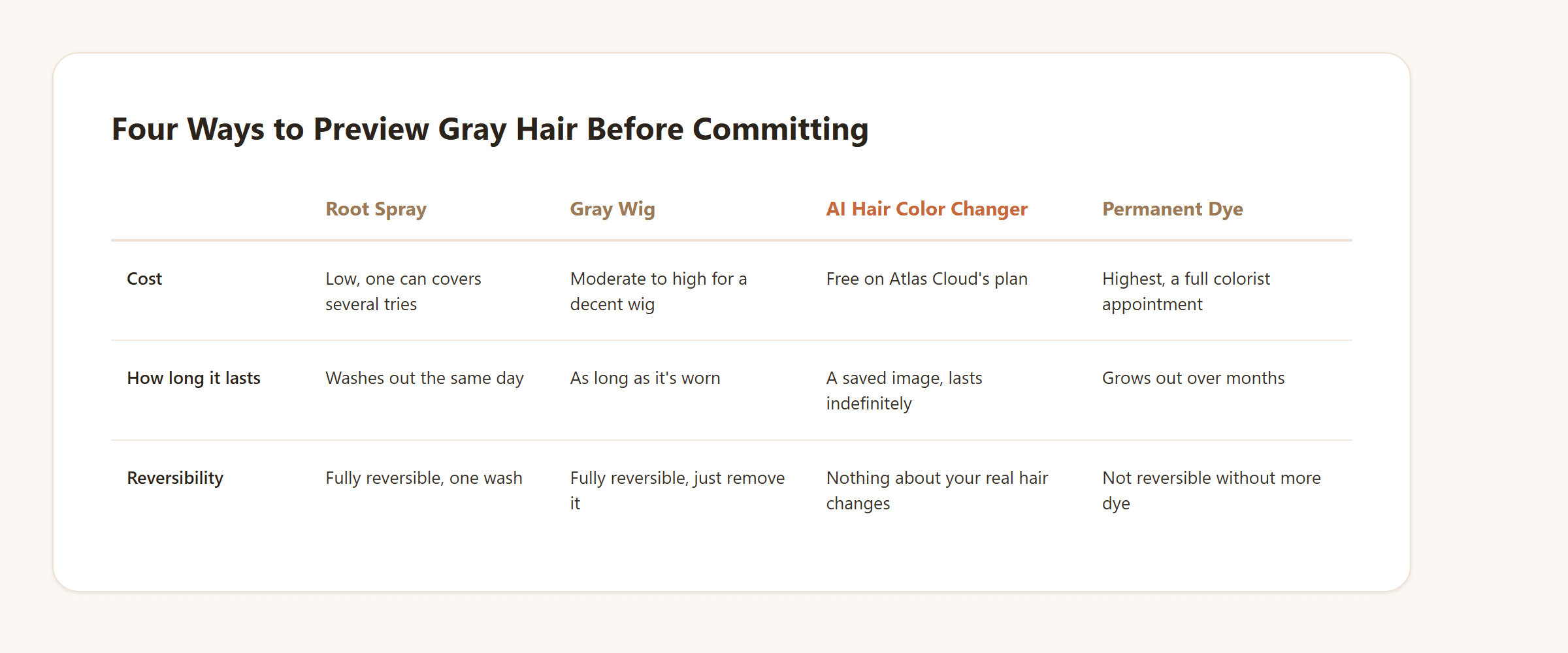
An AI preview sits at the far end of that list: no product, no fitting, nothing to wash out afterward, and the only real hair it touches is the description you type. It won't tell you how your hair will feel once it's actually gray, but it answers the narrower question people are usually asking first, whether the color itself is going to work on their face.
Frequently Asked Questions
Is there an app to see how you'd look with gray hair?
Yes. Atlas Cloud's Free AI Hair Color Changer generates that preview from your own photo and a typed description, and gray, silver, and salt-and-pepper are handled the same way as any other color request.
Can I try on gray hair color without actually dyeing it?
That's the entire point of a text-driven preview. Upload a photo, describe the gray tone you want to see, and compare the result against your real hair before any dye touches it.
What's a good gray hair filter app to start with?
A narrow, single-purpose gray filter works fine for a quick, throwaway look on video. If the goal is a specific shade you can actually study and compare, a full hair color changer that takes a written description gives more control than a fixed filter preset.
Do I need Photoshop to change my hair color in a photo?
No. Manually recoloring hair in Photoshop means selecting each strand and adjusting it by hand, which takes real editing skill. A text-driven AI hair color changer skips that step: describe the shade, and the model handles the masking and blending on its own.
Is the AI hair color changer free to use?
Yes, generating a preview runs on Atlas Cloud's free plan. Sign in with a free account and the generation itself doesn't cost anything up front.
Do I need an account to try it?
Yes, signing in is part of the flow, through Google, GitHub, or email. That's what the free generation runs on, not a hidden paywall behind it.
Can I change my hair color and hairstyle in the same request?
Yes. Describing both in one sentence, such as "a shoulder-length bob in a cool silver-gray," changes the length and color together in a single generation.
How accurate is an AI hair color preview compared to real dye?
Treat it as a strong reference rather than a guarantee. The preview shows how a described shade reads against your face and skin tone; it doesn't account for how your specific hair type absorbs color once a colorist actually applies it, and gray hair in particular can process dye differently than hair that still has its natural pigment.
Conclusion
The honest answer to what would I look like with gray hair doesn't come from a filter guessing at a flat overlay, it comes from a model that actually looks at your face, your skin tone, and your current hair before it answers. That distinction is most of what separates a result worth trusting from one that's just fun for a few seconds on camera.
Start with the free version, name the exact shade instead of just typing "gray," and compare a couple of tones on the same photo before reading too much into any single result. Whether that settles a real decision about letting your hair go gray or just answers a five-minute curiosity, that comparison against your own face is the only test that actually matters here.





