

You're six posters into a campaign and a gray banner slides over the chat box: "You've reached your image creation limit." It names a time tomorrow and offers an upgrade. The ChatGPT image generation limit is real, yet OpenAI doesn't put a number on it for any plan.
So we went looking for the wall. On October 12, 2026, one free ChatGPT account sent 22 built-in image requests in the desktop app and got 23 images back without a limit message. Below is what each plan actually promises, how the reset works, and how to keep making images in the same chat when the banner does show up.
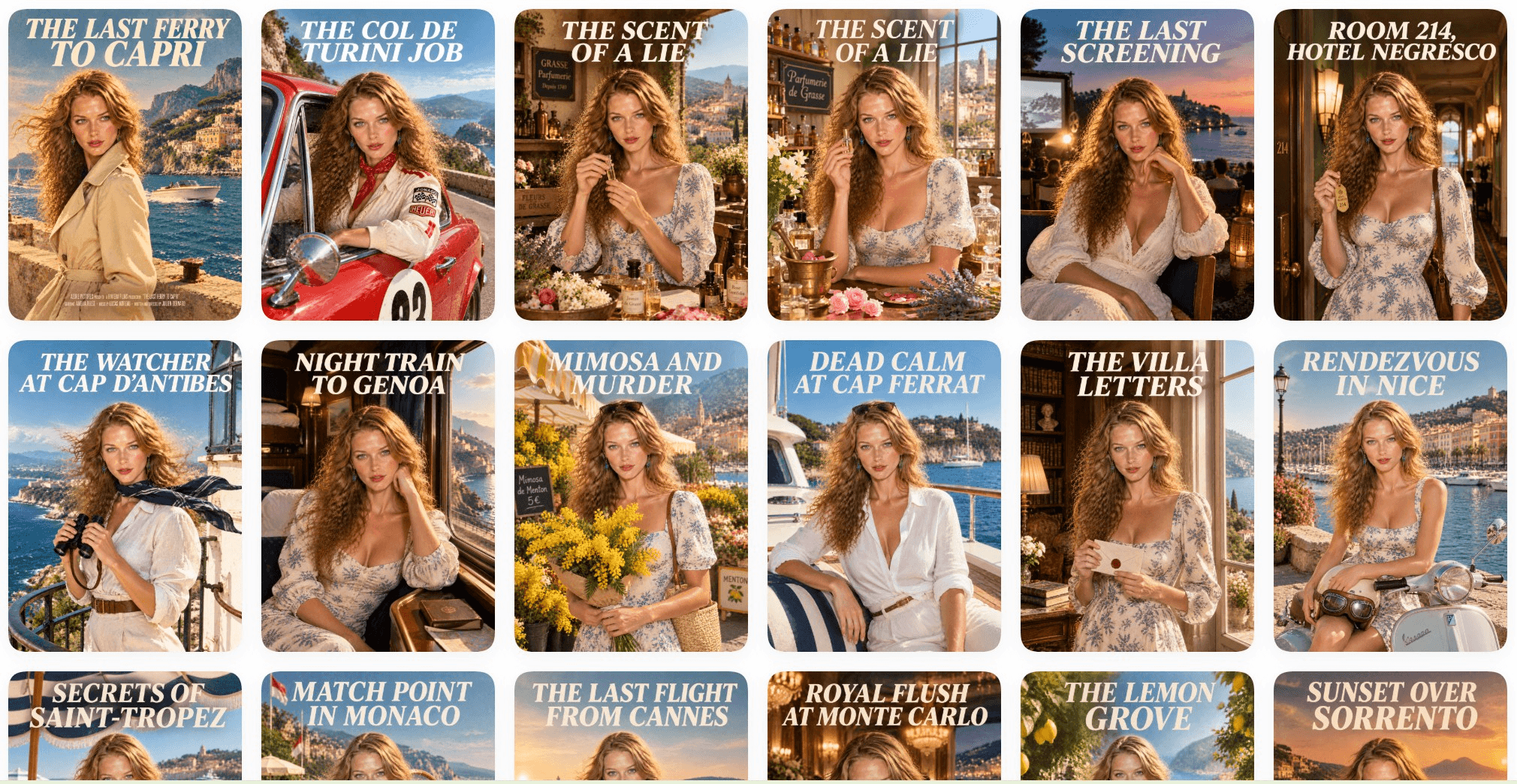
One free account, one day, 23 posters in the ChatGPT Library.
Key Takeaways
- OpenAI publishes no image count for any ChatGPT plan, and its pricing page lists Free as "Limited."
- Our free account sent 22 image requests in one day without seeing alimitmessage.
- Upgrading to Plus, Pro or Business resets your usage, according to OpenAI's Free tier FAQ.
- The Atlas Cloud plugin generates Seedream 5.0 Pro images inside the same ChatGPT thread.
- Bypassing the cap breaks OpenAI's terms, so the real options are waiting, upgrading or switching models.
What Is the ChatGPT Image Generation Limit on Each Plan?
Nobody outside OpenAI can give you a fixed number, because OpenAI doesn't publish one. Each plan gets a phrase instead. Here is the wording on the ChatGPT pricing page as of October 12, 2026:
| Plan | What OpenAI says about image creation | Image generation with Thinking |
|---|---|---|
| Free | "Limited image creation" | No |
| Go | "More image creation" | No |
| Plus | "More complex and accurate image creation" | Yes |
| Pro | "Unlimited and faster image creation," with unlimited use "subject to abuse guardrails" | Yes |
| Business | Image generation included, no allowance stated | Yes |
Two details matter more than the wording. Images run on their own meter. OpenAI's model guide says Free and Go users have unlimited everyday text chats, while "Separate limits continue to apply to file uploads, image generation, voice, data analysis, and other tools." So a chat that never runs out of replies can still run out of pictures.
The meter also moves. OpenAI's Plus FAQ says usage limits "may vary based on system conditions," which turns every number you read online, ours included, into a snapshot of one account on one day. The current model, ChatGPT Images 2.5, arrived on September 8, 2026, and the release notes said at the time that "Existing image-generation limits are unchanged."
ChatGPT Image Limit per Day on the Free Plan
If you've read that free accounts get two or three images a day, that figure comes from user reports, and ours didn't match it. We sent every request in one thread from a free account in the ChatGPT desktop app, and the first one told ChatGPT to skip plugins and use its built-in image generation.
The first eight requests went out in 10 minutes, including one edit of the first poster. After a break, 13 more went out in 17 minutes, and one of those came back as two images to choose from. A 22nd request, nearly three hours after the first, also came back as an image. No banner appeared at any point.
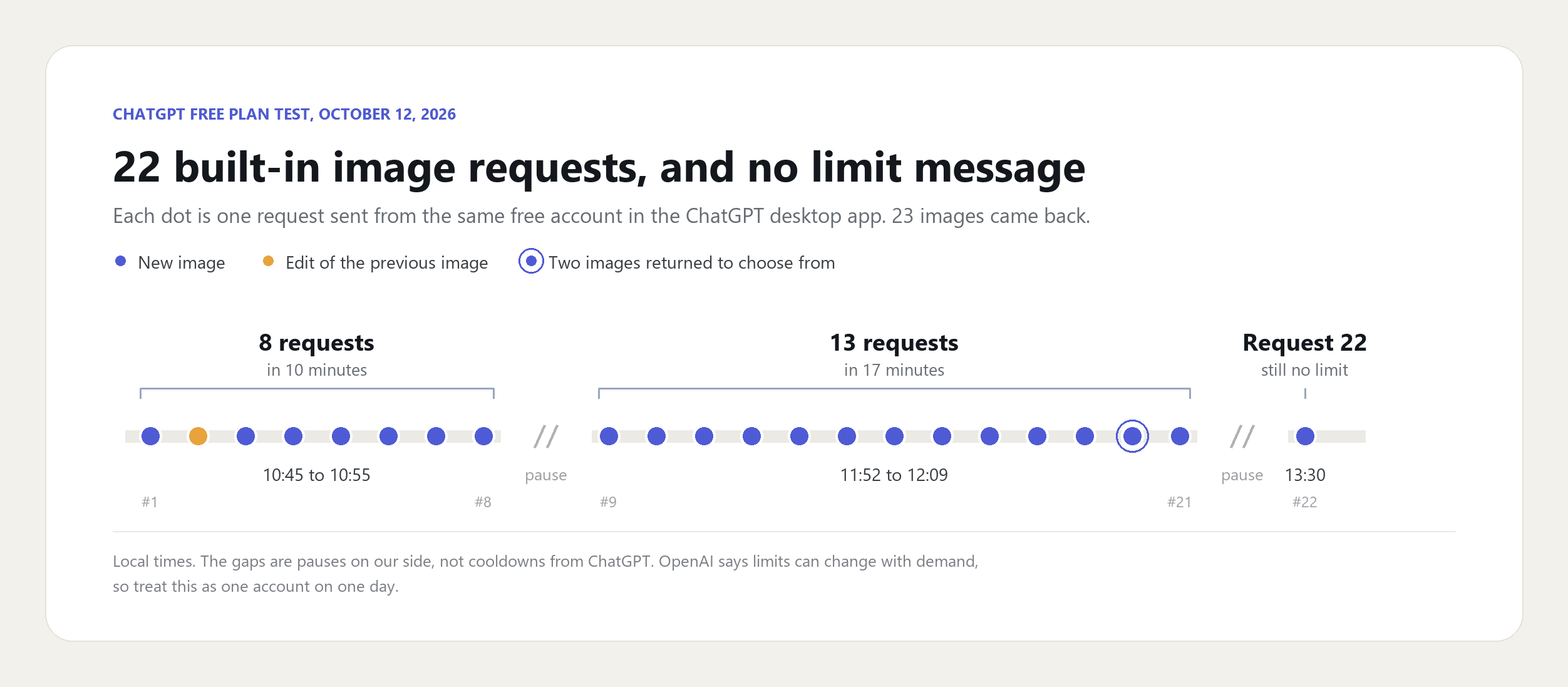
Don't read 22 as the free allowance. It's a floor for one account on a Monday, not a quota you can count on. The useful takeaway is that a free account can run a real working session before the cap appears, so the cap is something to plan around rather than something you hit by the third try.
How Long Does the ChatGPT Image Limit Last?
Until the time ChatGPT shows you. OpenAI's help center says the app displays when an allowance resets whenever that information is available, and its own example of the free-plan notice spells it out: "Upgrade to ChatGPT Plus or try again tomorrow after 9:17 AM."
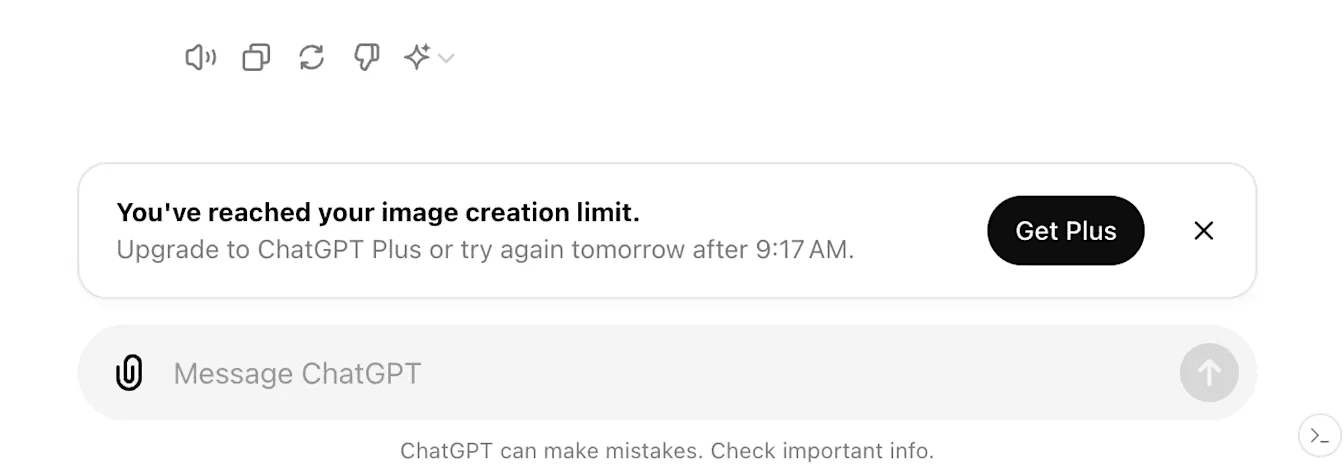
Screenshot from OpenAI's Help Center article on the ChatGPT Free tier, October 2026.
That example points to a wait measured in hours and pinned to a clock time rather than midnight. Three more rules from OpenAI's help pages decide what you can do while you wait:
- Upgrading clears it. "Your usage rates will reset when you update your account to a Plus plan, a Pro plan, or a Business plan," per the Free tier FAQ.
- Support can't clear it. OpenAI's model guide says Support "does not reset ChatGPT or Codex usage limits" and steps in only when usage looks miscounted or access doesn't return after the stated time.
- No setting raises it. The Pro tiers article is blunt about model allowances: "You cannot bypass a limit or increase it through a setting."
Some users in a long-running r/ChatGPTPro thread reported countdowns of 720 hours during summer 2025. Treat those as reports from an earlier model, and go by the time your own banner shows.
Keep Making Images in the Same Chat With the Atlas Cloud Plugin
Waiting until tomorrow morning doesn't help when the deck is due today. The other route is a different image model in the same conversation. Atlas Cloud connects ChatGPT to its catalog of 400+ models through a plugin, and right after our 22 built-in posters we asked it for the same poster from Seedream 5.0 Pro.
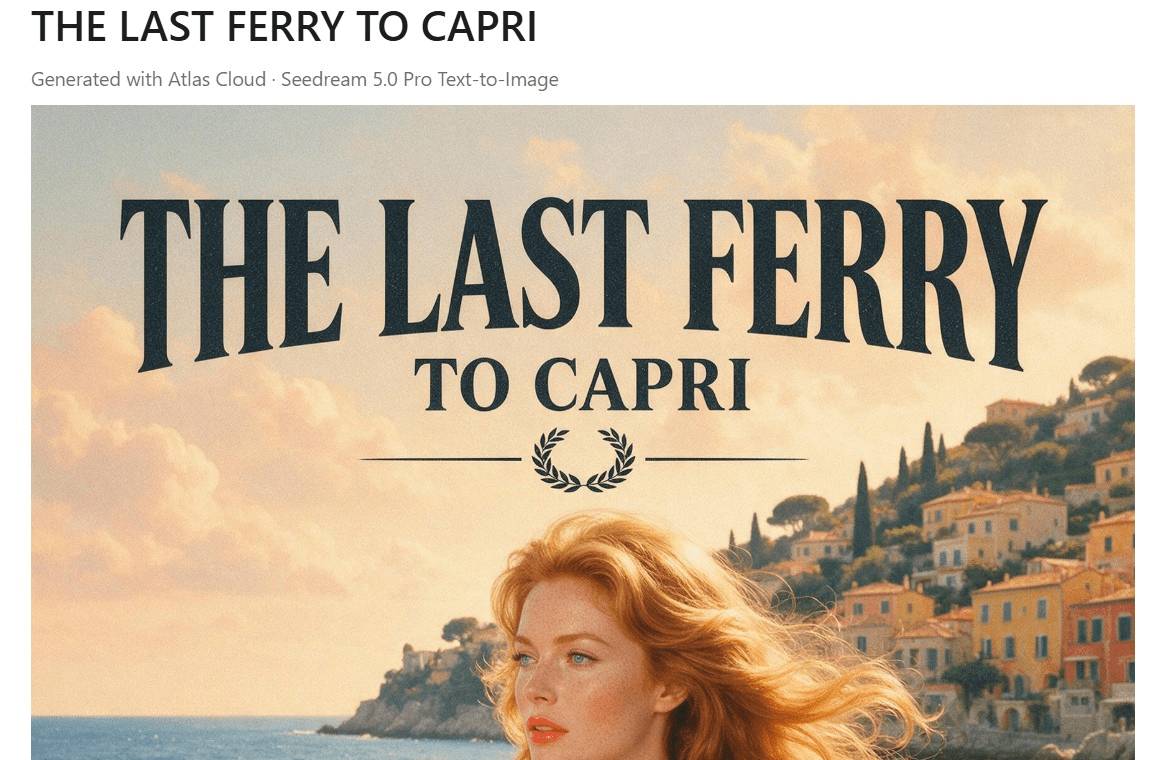
The poster landed in the thread under a "Generated with Atlas Cloud" label, at 1776 × 2368 pixels, with a link to the full-resolution file. The title came out in clean serif capitals, and the small print at the bottom read as real credits. Install the plugin once from OpenAI's Plugins Directory and sign in with your Atlas account; our plugin launch guide walks through each click.
Does the Plugin Draw on Your ChatGPT Image Allowance?
OpenAI's wording leaves room for both answers. The help article on connected apps says "App use may count toward your ChatGPT plan limits, feature-specific allowances, and limits imposed by the app provider." It doesn't list which apps count against which allowance.
Here's what happens on the plugin side. ChatGPT passes your request to Atlas, Atlas runs the model, and the job is billed to your Atlas balance per image. ChatGPT's built-in image tool doesn't render that picture. The screenshot below is the request that produced the poster above, sent in the same thread as our 22 built-in images.
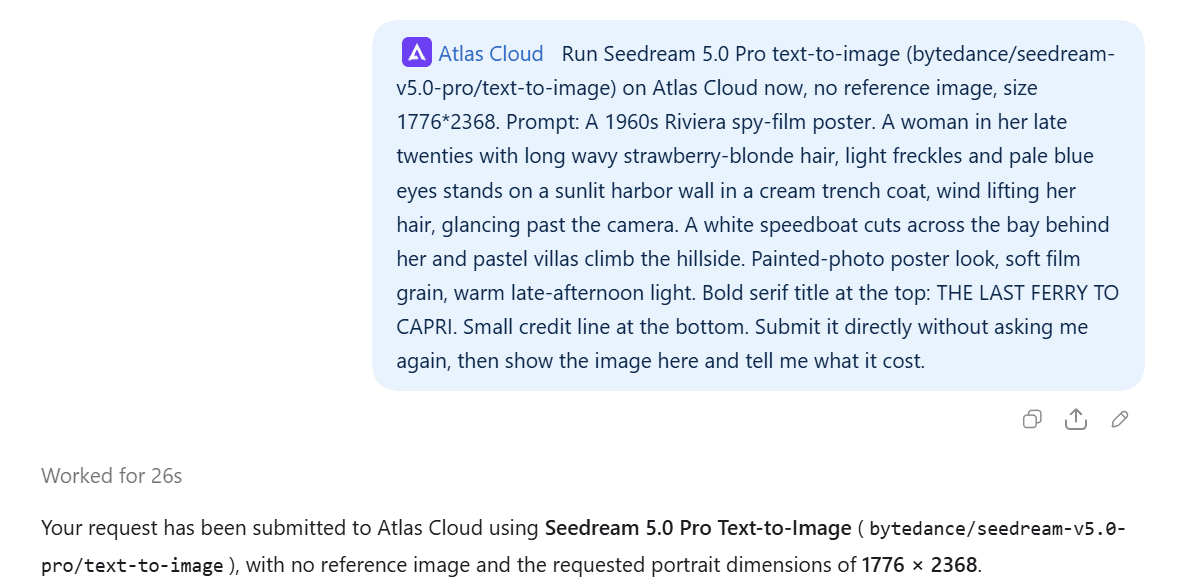
Our free account never reached its built-in cap, so this test can't show how ChatGPT treats a plugin call after the banner appears. What it does show is the split in billing: built-in images come out of your ChatGPT plan, and plugin images come out of your Atlas balance.
How to Generate Images With Seedream 5.0 Pro in ChatGPT
Three moves, all in the normal message box:
- Type @ and pick Atlas Cloud. The plugin shows up as a tag at the start of the message, which sends the job to Atlas instead of ChatGPT's own image tool.
- Name the model and the size, then describe the image. Our request named Seedream 5.0 Pro text-to-image at 1776 × 2368, and the plugin used exactly that model and size.
- Send it. The plugin submits the job, and the finished image appears in the thread with a download link.

Longer jobs finish in the background. Ask the plugin to check the job, and it posts the finished image in the thread.
ChatGPT Image Generator Alternatives You Can Call From the Same Chat
A cap is also a good excuse to try a different model. We ran one poster brief three times with the same reference portrait: once with ChatGPT's built-in tool, and twice on Atlas Cloud with Seedream 5.0 Pro and Nano Banana 2.1. The panels below are cropped to the title and the subject.
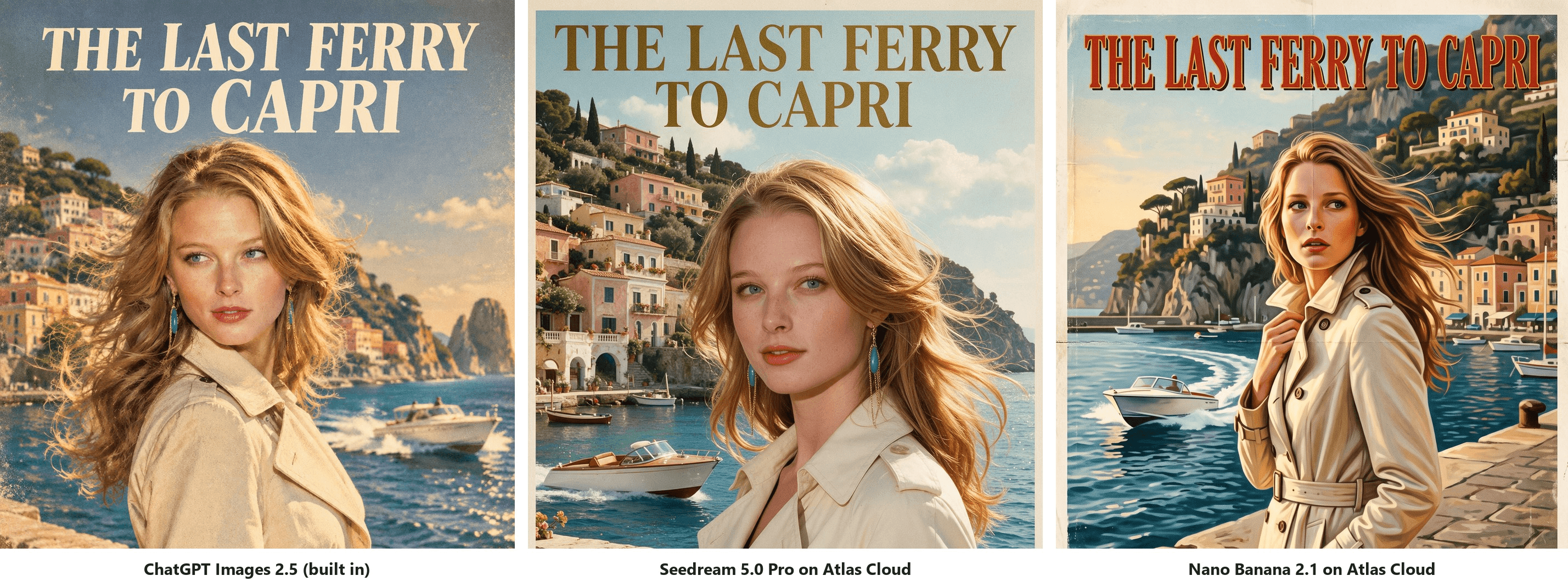
All three spelled the title correctly. Seedream 5.0 Pro kept the reference face closest and gave the whole frame a photographic finish. ChatGPT went warmer and softer. On ChatGPT vs Nano Banana, the bigger difference was framing: Nano Banana 2.1 pulled back to a three-quarter-length figure in a painted style. Our separate Nano Banana 2.1 vs GPT Image 2.5 test goes deeper on brief-following.
| Model | Where it runs | What it brings | Pick it when |
|---|---|---|---|
| ChatGPT Images 2.5 | Built into ChatGPT | OpenAI cites sharper details, more precise editing and faster generation | You still have built-in allowance left |
| Seedream 5.0 Pro | Atlas Cloud plugin | Up to 10 reference images while keeping identity, lighting and color tone | A face, product or brand look has to match |
| Nano Banana 2.1 | Atlas Cloud plugin | 1 to 14 input images, with up to 4 characters and 10 objects kept consistent | You're merging several references into one scene |
| Midjourney V8.2 | Midjourney's own app | Midjourney's default version since July 24, 2026 | You already pay for Midjourney and leave ChatGPT for it |
The same Atlas catalog also lists Flux 2 Pro and OpenAI's GPT Image 2.5 models, so a flux vs ChatGPT check is one more message in the same thread.
How to Avoid the ChatGPT Image Limit Without Breaking the Rules
Start with what's off the table. OpenAI's Terms of Use, effective January 1, 2026, forbid using its services to "circumvent any rate limits or restrictions." Rotating accounts or scripting around the cap would fall under that line.
Inside the rules, the easiest savings come before you press send:
- Settle the brief in text first. Ask ChatGPT to tighten the prompt, the layout and the copy before it draws anything, then generate once.
- Bundle your changes. One edit that fixes the headline, the color and the crop costs one request; three separate edits cost three.
- Watch the clockinthe banner. It tells you when built-in images come back, so schedule the next batch around it.
When the work can't wait, these are the four legitimate routes:
| Route | How you pay | When it helps | Stays in the same chat |
|---|---|---|---|
| Wait for the reset | Nothing extra | The deadline is after the time on the banner | Yes |
| Upgrade to Plus, Pro or Business | Monthly subscription | You'll use the other paid features as well | Yes |
| OpenAI Image API | Per image, on separate API billing | You're generating images from your own code | No |
| Atlas Cloud plugin | Per image, from your Atlas balance | You want another model or a few extra images today | Yes |
If you already live in a few other plugins, our roundup of the best ChatGPT plugins covers how they share one chat.
FAQ
Why does ChatGPT limit image generation?
OpenAI points to demand and abuse prevention. Its Go FAQ says usage is subject to "plan limits, abuse guardrails, and temporary restrictions during high demand." The Free tier FAQ adds that image creation and other advanced tools "can have stricter limits than paid plans." Put together, the cap can tighten when everyone is generating at once, so the same account may get a different allowance on a busy evening than on a quiet morning.
Does editing an image count toward the ChatGPT image limit?
OpenAI's help pages don't say. In our test, the edit went through just like a new image, and one user in the r/ChatGPTPro thread on this topic complained that every edit counts as a generation. Until OpenAI says otherwise, count each edit as one image when you budget a session.
Is ChatGPT Plus worth it just for more images?
Only if you'll use the rest of Plus. In October 2026 the pricing page lists Go at $8 a month, Plus at $20 and Pro from $100, and only Pro puts the word "unlimited" next to images. Plus does add image generation with Thinking, which Free and Go don't get.
If more pictures are the only goal, price them one at a time. Through the Atlas Cloud plugin, a Seedream 5.0 Pro image costs $0.036 at the 1.5K size and $0.072 at 2K, both 20% off list price on the model page in October 2026. At those rates, the $20 a Plus month costs covers about 555 images at 1.5K or 277 at 2K, and you pay only for the images you make.
Do ChatGPT images count against your OpenAI API rate limit?
No. The app and the API are separate products with separate meters. The help article titled "What are the rate limits for Image Generation?" covers only the API, where the limit "depends on which model you are using along with your usage tier."
OpenAI's billing guide adds that ChatGPT and the API platform "have separate billing systems," and the Plus FAQ says API usage isn't included in the subscription. Running out in the app changes nothing on an API key, and an API key won't top up the app.
Can you use Midjourney inside ChatGPT?
Not through an official plugin. A search for Midjourney in the ChatGPT Plugins Directory returned no results on October 12, 2026, so Midjourney images still come from Midjourney's own app. If you're weighing ChatGPT vs Midjourney for a project, you can still compare ChatGPT with a second model side by side in one thread, since the Atlas Cloud plugin reaches Seedream 5.0 Pro, Nano Banana 2.1 and Flux 2 Pro from the same chat.
Conclusion
OpenAI won't tell you how many images a plan includes. It describes each allowance in words, lets it move with demand and shows a reset time only once you hit the wall. Our free account ran 22 requests without reaching that point, which says more about planning a session than about the size of the allowance.
When the banner does appear, check the time it gives and decide from there: wait, upgrade, or tag Atlas Cloud and finish the batch with Seedream 5.0 Pro in the same thread. Whichever you pick, the ChatGPT image generation limit only has to cost you a few minutes, not a working day.





