簡介:什麼是 Seedance 2.0?
Seedance 2.0 是備受期待的 ByteDance 多模態影片生成模型繼承者。
- 升級重點: 雖然 Seedance 1.5 Pro 為原生影音生成奠定了基礎,但預計 2.0 版本將引入**「聲學物理場 (Acoustic Physics Fields)」與「世界模型先驗 (World Model Priors)」**。
- 目標: 彌合 AI 生成與物理現實之間的鴻溝。它旨在成為全能的導演,管理超過 30 秒影片的複雜影音敘事。
關鍵預測:Seedance 2.0 的 3 大升級(預測)
1. 從影音同步到「聲學物理」
Seedance 1.5 Pro 使用了雙分支擴散 Transformer (MMDiT) 來解決口型同步問題。然而,預計 Seedance 2.0 將能模擬完整的聲學場 (Acoustic Field)。
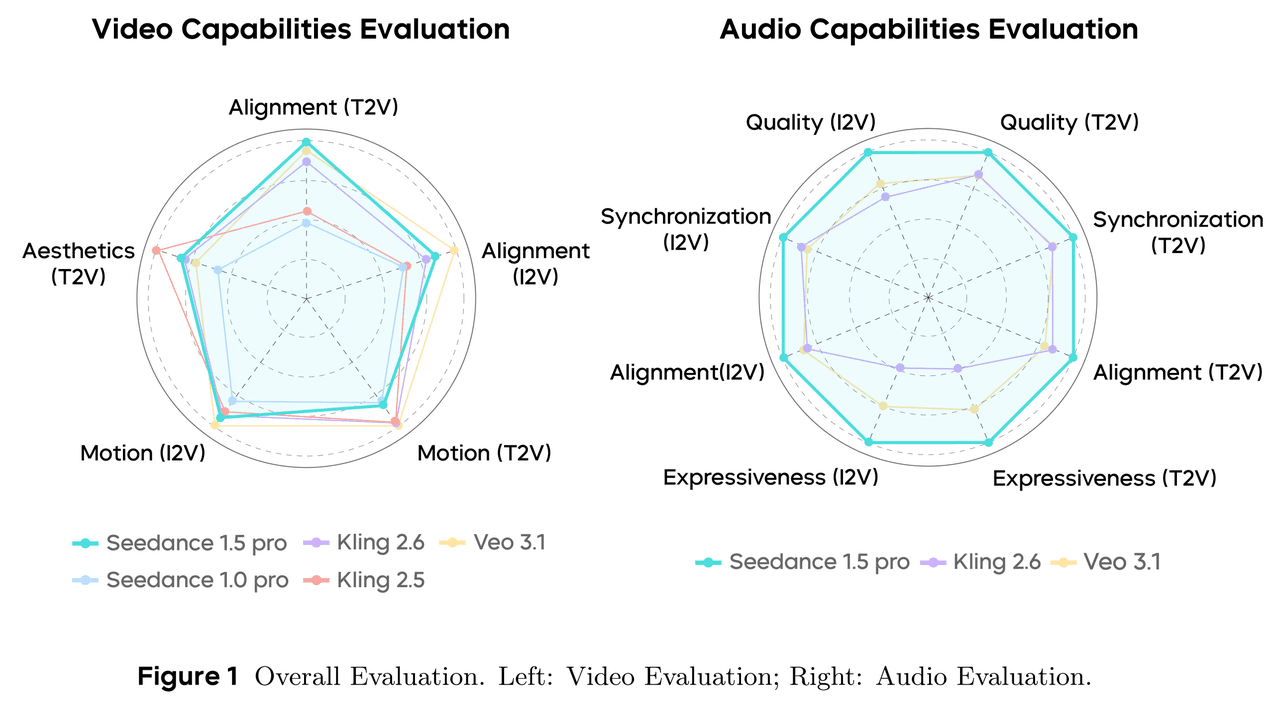
- 真正的多模態物理: 如果影片中一個玻璃杯碎裂,生成的音訊將不再僅是通用的音效。它會根據畫面中可見的地板材質(例如地毯 vs. 瓷磚)計算迴響。
- 隱性先驗 (Latent Priors): 這涉及將物理引擎先驗添加到 MMDiT 架構中,賦予聲音「重量感」與「衝擊力」。
2. 對抗 Wan 2.6:長影片的一致性
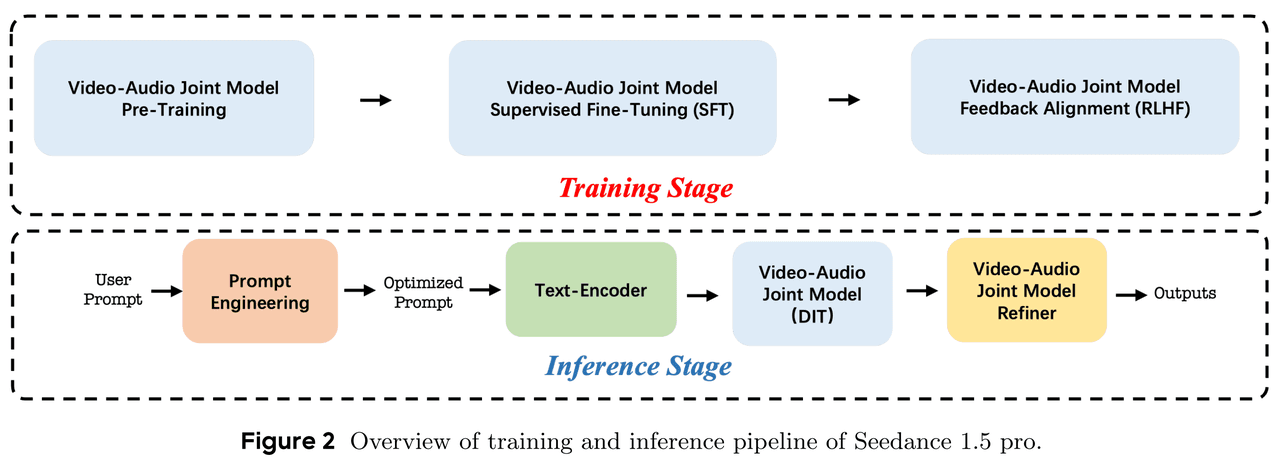
- 目前,Wan 2.6 憑藉其 Reference-to-Video(參考影片)功能在角色一致性方面處於領先地位,該功能就像零樣本的角色 LoRA。Seedance 2.0 預計將通過鎖定**「世界 ID (World ID)」**來應對。
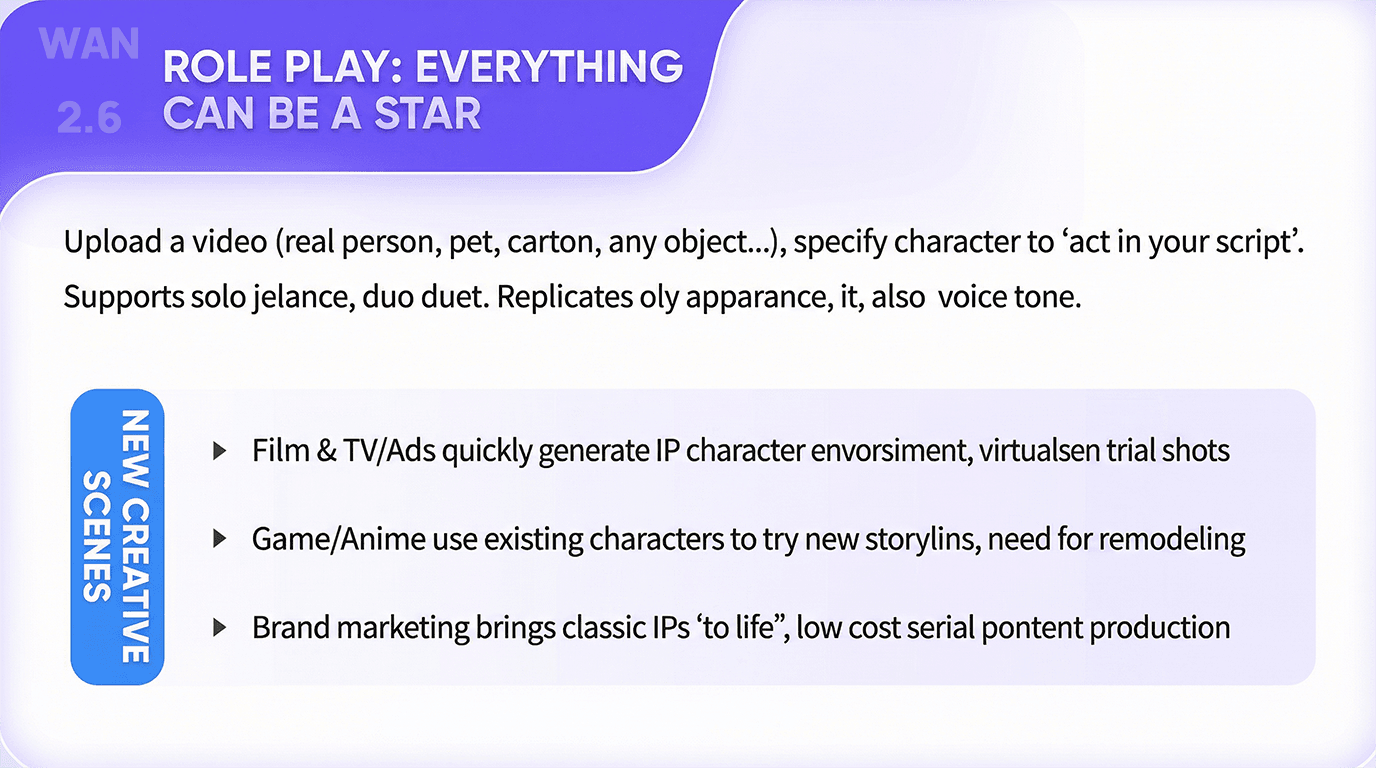
- 更長的生成時間: 打破「12 秒詛咒」,Seedance 2.0 的目標是實現 30-60 秒影片的原生連貫性。
- 時間注意力機制 (Temporal Attention): 增強的訓練後優化可能會讓模型「記住」第一秒發生的事件,並在短片結尾處進行參考。
3. 導演級控制力
- 預測 Seedance 2.0 將引入節點式控制 (Node-based Control) 與即時預覽功能。
- 局部修復與音訊重混: 用戶或許能夠選擇一個角色,並修改其動作或對話情緒(例如從憤怒改為懇求),同時保持背景音樂與環境不變。
比較:Seedance 2.0 與競爭對手
| 特性 | Seedance 1.5 Pro | Seedance 2.0 (預測) |
|---|---|---|
| 架構 | MMDiT (影音) | World-MMDiT (物理 + 影音) |
| 音訊 | 口型同步、情緒對齊 | 物理模擬、環境交互 |
| 時長 | 短片 (~10 秒) | 長片 (30-60 秒) |
| 計算負載 | 高 | 極高 |
如何存取 Seedance 2.0:硬體挑戰
1.5 Pro 的技術文件強調,儘管優化使速度提升了 10 倍,但躍升至 Seedance 2.0 的「世界模型」能力將導致 VRAM 與計算需求呈指數級增長。
對於大多數用戶而言,要在本地運行 Seedance 2.0(即使是使用 NVIDIA RTX 4090)可能是不可能的,因為它具有龐大的多模態處理負載。
解決方案:Atlas Cloud
Atlas Cloud 已為此發布做好準備。我們整合了完整的 Seedance 模型系列,並將在 Seedance 2.0 發布的當天 (Day 0) 提供支援。
- 零配置部署: 無需複雜的 Python 或 CUDA 設定,即可存取 Seedance、Kling 與類似 Sora 的模型。
- 彈性運算: 即時擴充您的 GPU 算力。按秒付費渲染長且複雜的影片,無需燒毀您的本地硬體。
- API 存取: 開發者可以在模型發布後,透過 Atlas Cloud API 將 Seedance 2.0 能力直接整合到您的應用程式中。
別讓硬體限制您的創造力。 [註冊 Atlas Cloud] 以確保您在 2 月中旬獲得 Seedance 2.0 的優先存取權。
如何在 Atlas Cloud 上使用
Atlas Cloud 讓您可以並排使用模型 — 首先在 Playground 中嘗試,然後透過單一 API 進行呼叫。
方法 1:直接在 Atlas Cloud Playground 中使用
方法 2:透過 API 存取
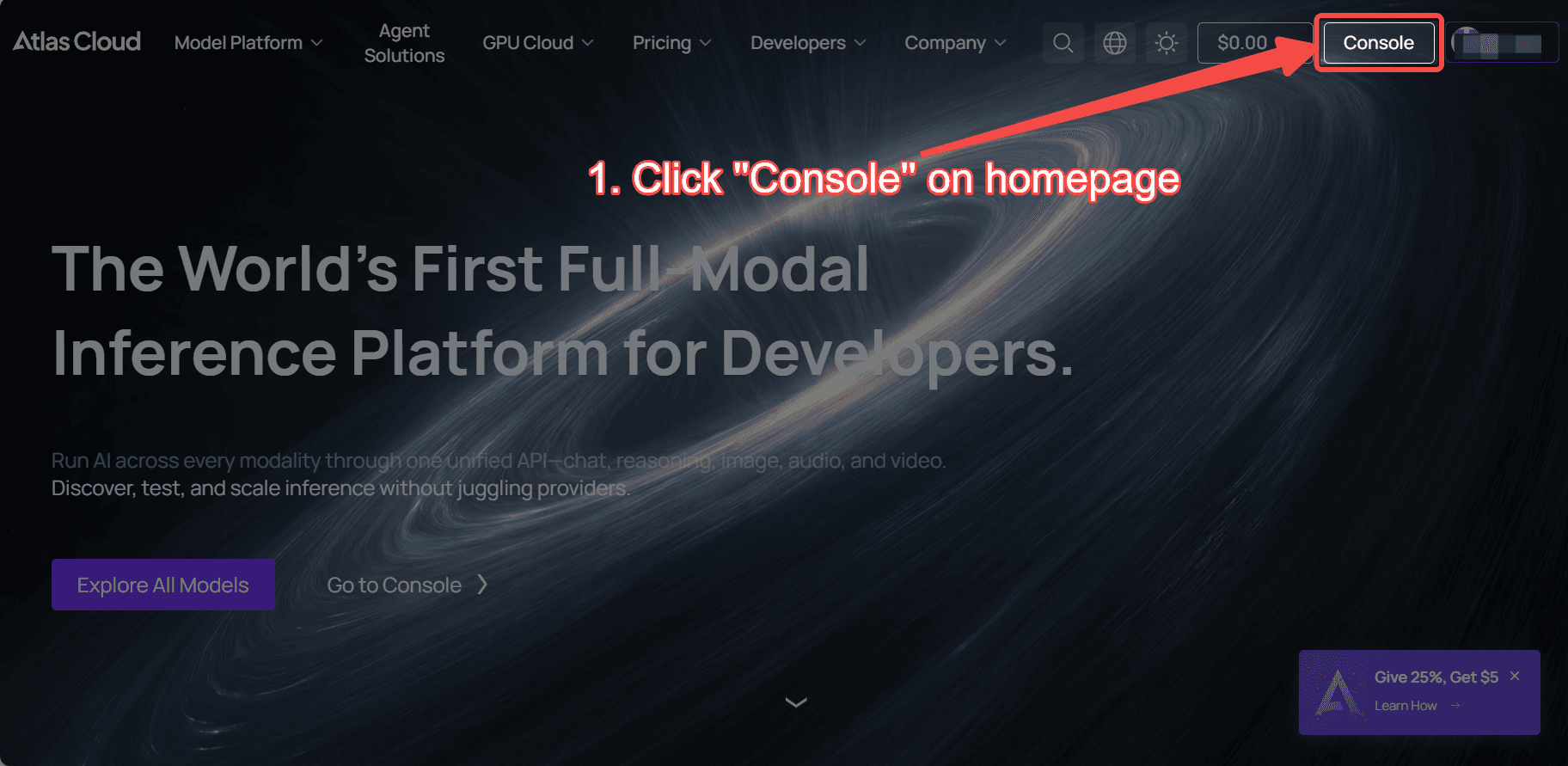
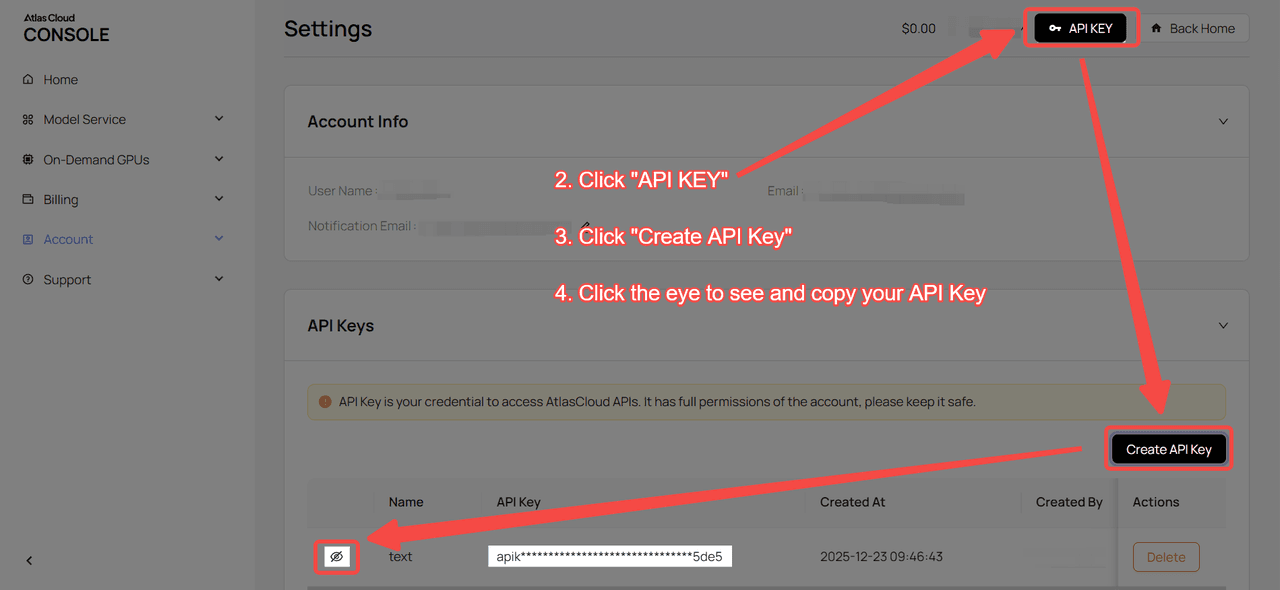
步驟 1:獲取您的 API 金鑰
在您的 控制台 中建立 API 金鑰並複製以供後續使用。
步驟 2:查看 API 文件
在我們的 API 文件 中查看端點、請求參數與驗證方法。
步驟 3:發送您的第一個請求 (Python 範例)
範例:使用 Seedance 1.5 Pro 生成影片:
plaintext1import requests 2import time 3 4# 步驟 1:啟動影片生成 5generate_url = "https://api.atlascloud.ai/api/v1/model/generateVideo" 6headers = { 7 "Content-Type": "application/json", 8 "Authorization": "Bearer $ATLASCLOUD_API_KEY" 9} 10data = { 11 "model": "bytedance/seedance-v1.5-pro/image-to-video-fast", 12 "aspect_ratio": "16:9", 13 "camera_fixed": False, 14 "duration": 5, 15 "generate_audio": True, 16 "image": "https://static.atlascloud.ai/media/images/06a309ac0adecd3eaa6eee04213e9c69.png", 17 "last_image": "example_value", 18 "prompt": "Use the provided image as the first frame.\nOn a quiet residential street in a summer afternoon, a young girl in high-quality Japanese anime style slowly walks forward.\nHer steps are natural and light, with her arms gently swinging in rhythm with her walk. Her body movement remains stable and well-balanced.\nAs she walks, her expression gradually softens into a gentle, warm smile. The corners of her mouth lift slightly, and her eyes look calm and bright.\nA soft breeze moves her short hair and headband, with individual strands subtly flowing. Her clothes show slight natural motion from the wind.\nSunlight comes from the upper side, creating soft highlights and natural shadows on her face and body.\nBackground trees sway gently, and distant clouds drift slowly, enhancing the peaceful summer atmosphere.\nThe camera stays at a medium to medium-close distance, smoothly tracking forward with cinematic motion, stable and controlled.\nHigh-quality Japanese hand-drawn animation style, clean linework, warm natural colors, smooth frame rate, consistent character proportions.\nThe mood is calm, youthful, and healing, like a slice-of-life moment from an animated film.", 19 "resolution": "720p", 20 "seed": -1 21} 22 23generate_response = requests.post(generate_url, headers=headers, json=data) 24generate_result = generate_response.json() 25prediction_id = generate_result["data"]["id"] 26 27# 步驟 2:輪詢結果 28poll_url = f"https://api.atlascloud.ai/api/v1/model/prediction/{prediction_id}" 29 30def check_status(): 31 while True: 32 response = requests.get(poll_url, headers={"Authorization": "Bearer $ATLASCLOUD_API_KEY"}) 33 result = response.json() 34 35 if result["data"]["status"] in ["completed", "succeeded"]: 36 print("Generated video:", result["data"]["outputs"][0]) 37 return result["data"]["outputs"][0] 38 elif result["data"]["status"] == "failed": 39 raise Exception(result["data"]["error"] or "Generation failed") 40 else: 41 # 仍在處理中,等待 2 秒 42 time.sleep(2) 43 44video_url = check_status()





