We installed ten WorkBuddy skills, gave each a real job, and ranked them on what a skill has to deliver: a usable file, no surprise setup, a credit bill you can predict, and a package you can trust. Every pick was run on November 4, 2026, on the international WorkBuddy app. One of them is ours, and it is the only one that turns a WorkBuddy task into finished video.

All four frames came from one Seedream 5.0 Lite call inside WorkBuddy, 2304 x 1728, no watermark, 1 minute 22 seconds.
Key Takeaways
- On November 4, 2026, the international WorkBuddy skill market listed 215 skills across nine categories.
- PPTX Generator, Deep Research and Word Generator led installs, while Skill Creator logged the mostuses.
- The Atlas Cloud skills add Seedance 2.5 video plus image, voice and 3D models to any WorkBuddy task.
- WorkBuddy runs a security check on every uploaded skill, and high-risk packages always need manual confirmation.
- Snyk found security flaws in 36.82% of 3,984 public agent skills, so read SKILL.md before installing.
WorkBuddy Skills Comparison Table
Nine of the ten install with one click from the market tab inside the app. The Atlas Cloud skill lives on GitHub and goes in through Add Skill. Six hand back a file; four answer in the chat.
| Skill | Best for | Where to get it | Needs | Our run |
|---|---|---|---|---|
| Atlas Cloud | Image, video, voice and 3D output | GitHub package | Atlas Cloud API key | 14 min 28 s, 0 credits on a custom model |
| PPTX Generator | Slide decks | Market | Nothing | 11 min 23 s, 31.19 credits |
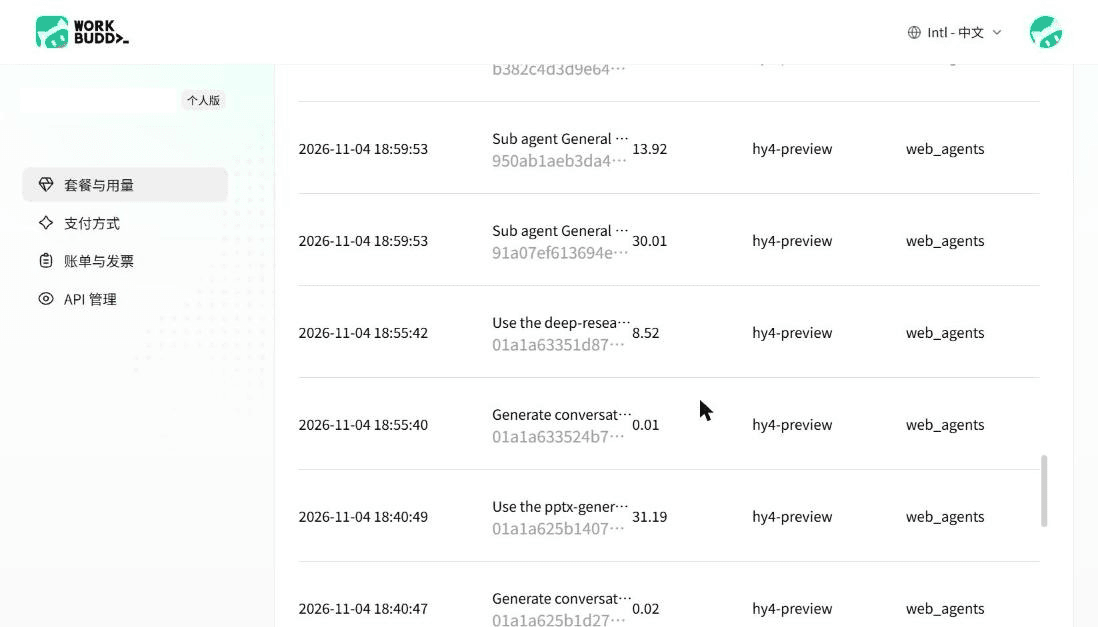
| Deep Research | Cited reports | Market | Nothing | 73.56 credits, 3 sub-agents |
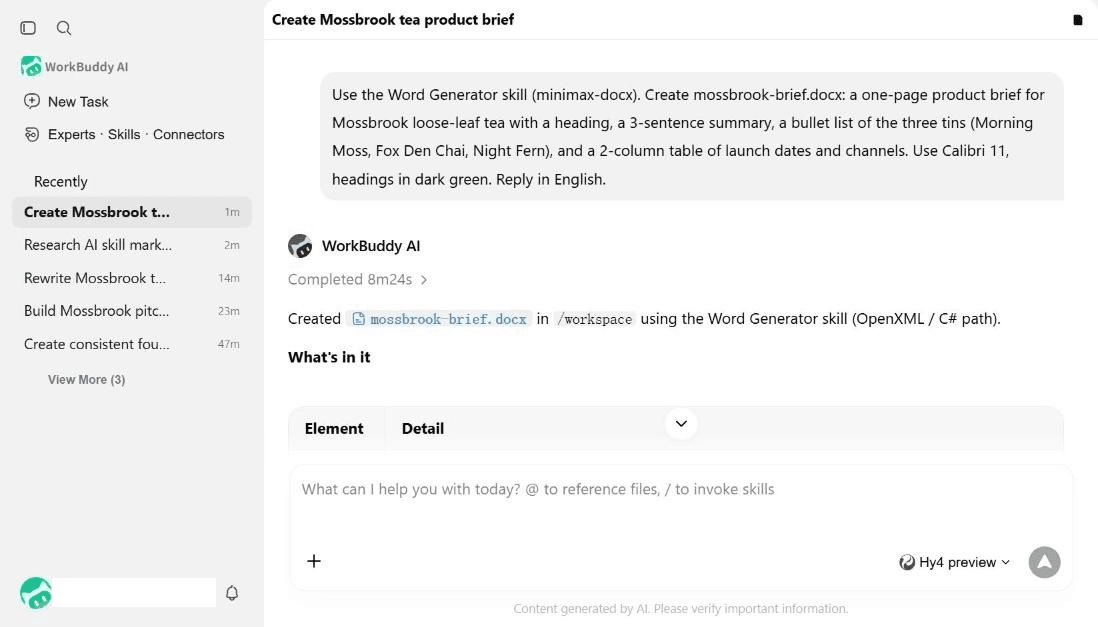
| Word Generator | .docx files | Market | Nothing | 8 min 24 s, 41.52 credits |
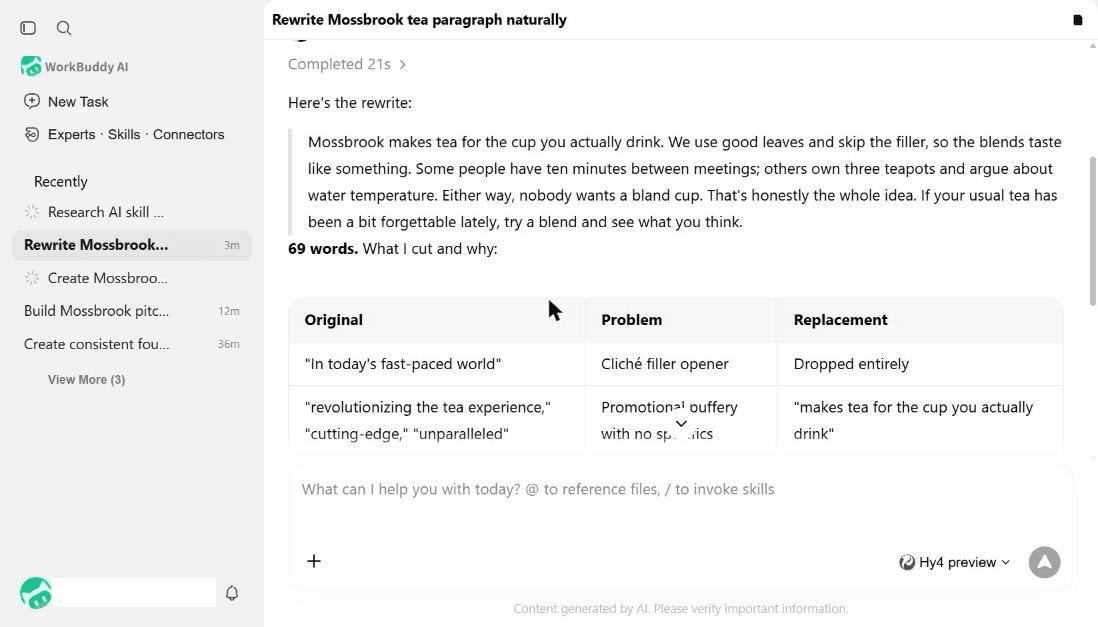
| Humanizer | Rewriting AI text | Market | Nothing | 21 s, 1.22 credits |
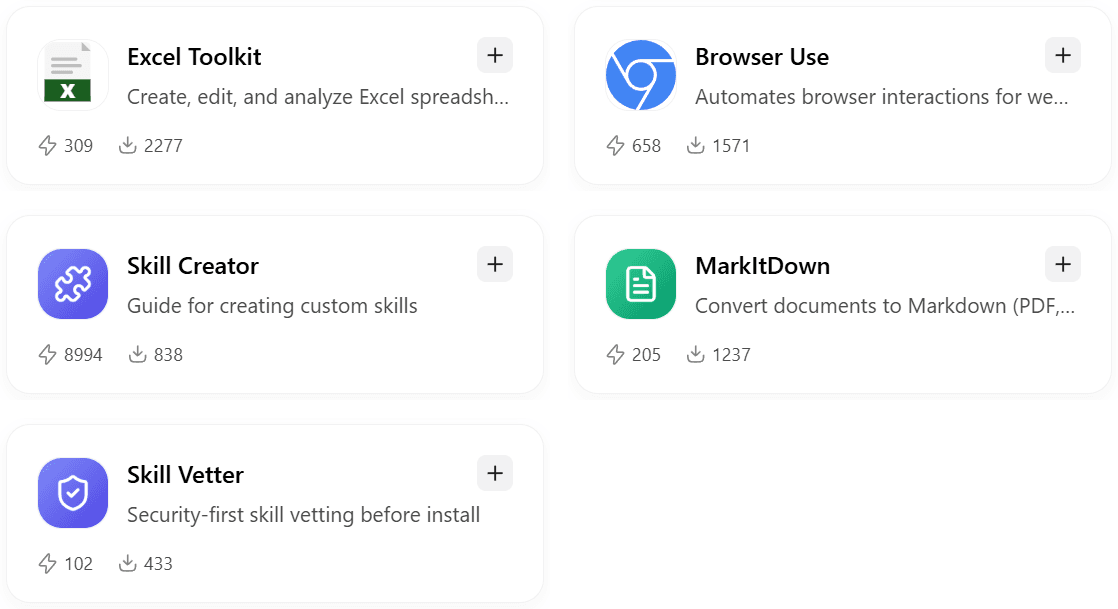
| Excel Toolkit | Spreadsheets | Market | Nothing | Not run, 2,277 installs |
| Browser Use | Forms and scraping | Market | Nothing | Not run, 1,571 installs |
| Skill Creator | Writing your own skill | Market | Nothing | Not run, 8,994 uses |
| MarkItDown | Files to Markdown | Market | Nothing | Not run, 1,237 installs |
| Skill Vetter | Pre-install review | Market | Nothing | Not run, 433 installs |
How We Tested Every WorkBuddy Skill on This List
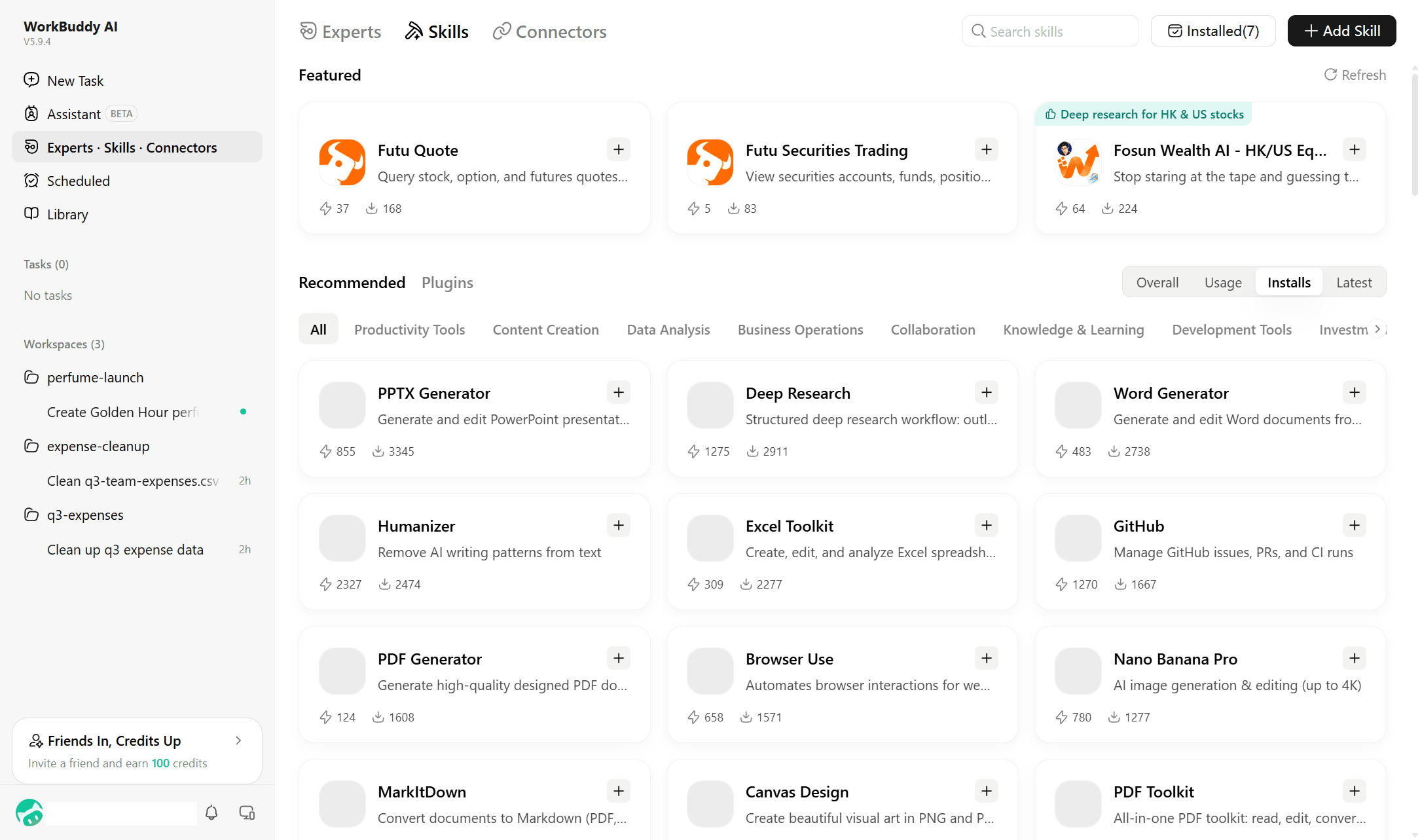
We read the international skill market on November 4, 2026, on the web app and the Windows desktop app, version 5.9.4: 215 skills in nine categories, Content Creation the largest at 95. The desktop cards show two counters the web cards hide, uses and installs, and sort by either.
Four criteria decided the ranking: usable output, setup before the first run, credits per task read from the Usage page, and where the package comes from. Output weighed the most, because a one-click skill that hands back a broken file costs more time than one that asks for a key. Credits came second: the free plan gives 100 credits a month plus a signup bonus, and one skill here can empty that in a single run.
Disclosure: Atlas Cloud publishes this article and operates the skill ranked first. No other skill paid to be listed; each is described from its market card, its documentation and our run.
1. Atlas Cloud: Best WorkBuddy Skill for Image and Video
One WorkBuddy task, three skills chained: the Atlas Cloud skill generated four matching shots of a ceramic fox mascot, animated the first into a five-second clip, and PPTX Generator laid all four into a launch deck. The chain ran in 14 minutes 28 seconds while we watched.

Seedance 2.5 image-to-video, 5 seconds at 720p with native audio, generated from the first frame in 2 minutes 25 seconds.
Install the three Atlas Cloud skills and WorkBuddy can call any of the 400+ models on Atlas Cloud by name, including Seedance 2.5 image-to-video.
The upload steps are in our WorkBuddy setup guide; on the desktop app, copying the skill folders into the skills directory also works.
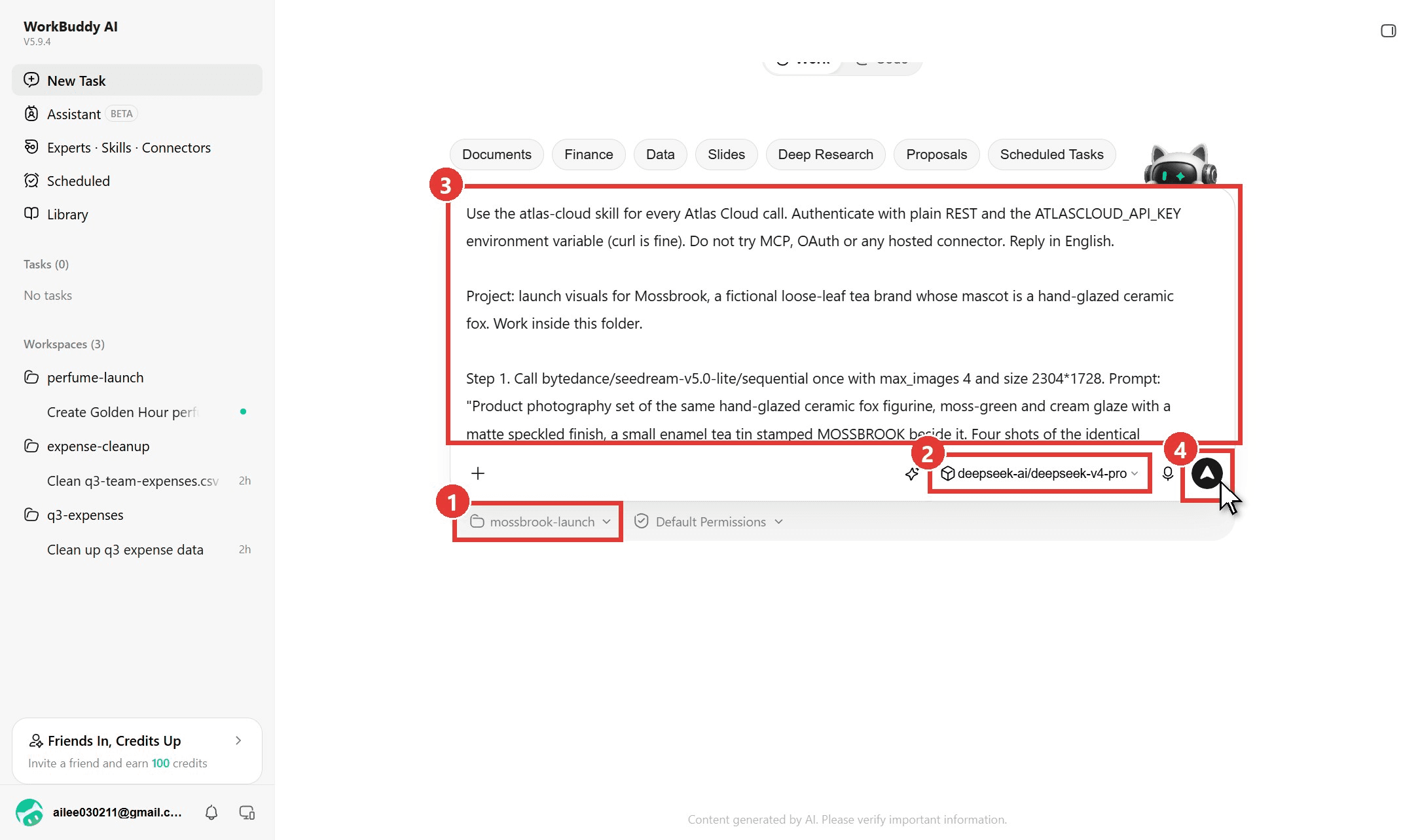
- Pick or create a workspace; the files land in that folder.
- Choose a model. We ran DeepSeek V4 Pro through Atlas as a custom model, which is why this run spent zero WorkBuddy credits.
- Paste the brief: model IDs, sizes, slide titles, and a line asking it to quote each price first.
- Send. The skill read both model schemas, quoted the image call, downloaded the frames, uploaded one as the first frame and polled the video until it was done.
Why it stands out: it is the only skill on this list that returns video, and it logs the Atlas prediction ID and cost for every call, so the task doubles as a receipt.
Best for: launches, storyboards and social clips built from the same brief as the deck.
Pricing: the skill is free; each generation is billed per call on Atlas Cloud, and WorkBuddy credits are spent only when the task runs on a WorkBuddy-hosted model.
2. PPTX Generator: Best WorkBuddy Skill for Slide Decks
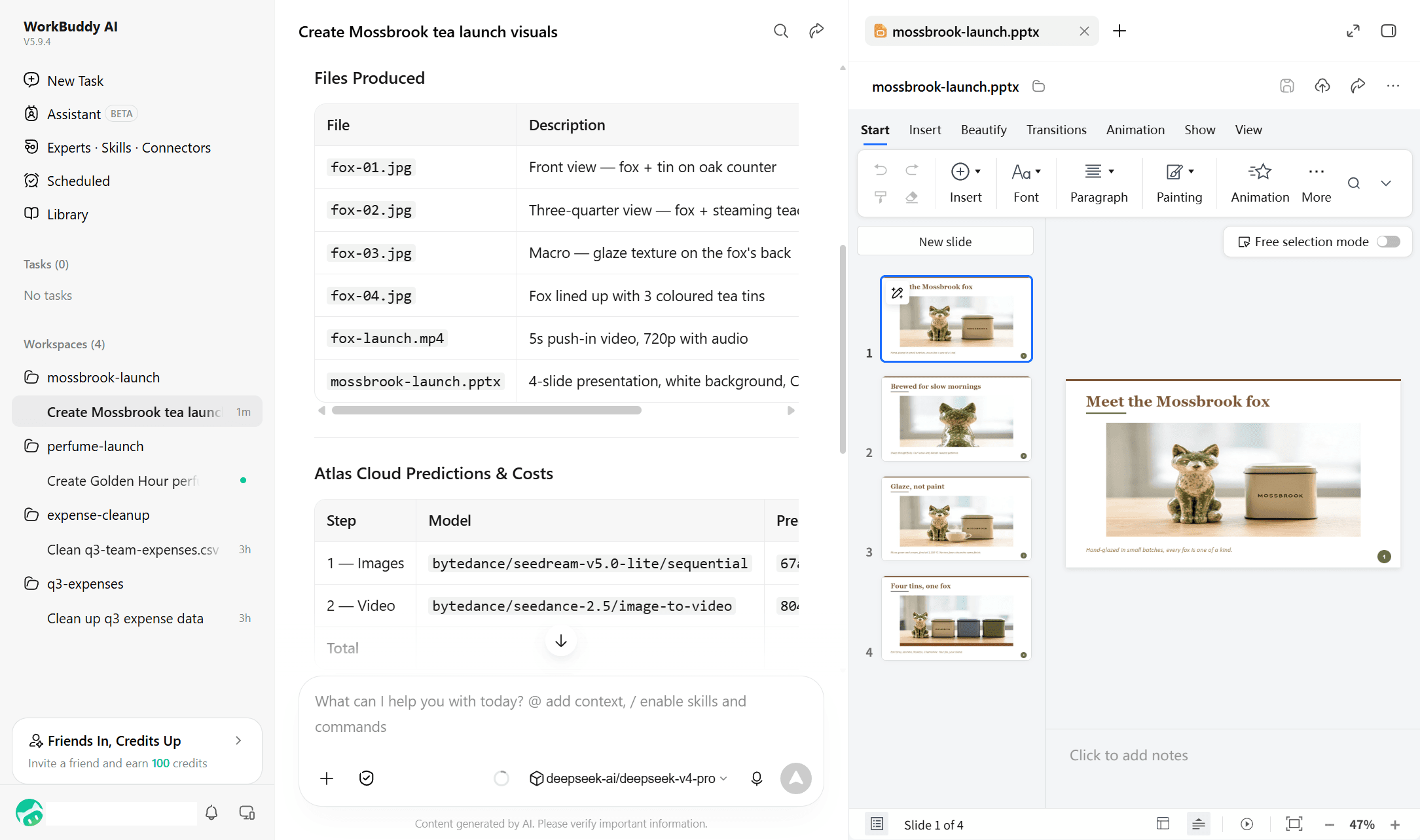
The most-installed skill in the market at 3,345 installs. We asked for a five-slide pitch with a pricing table and no stock images; it drew its own fox as an SVG, rendered every slide, caught four layout overflows in its own review and fixed them before handing back the deck.
Where the free tier stops you: at the fourth deck. This run took 11 minutes 23 seconds and 31.19 credits on the Auto model, so three decks fit in a month's 100 credits.
Where it falls short: no image model of its own, so photos on a slide come from another skill or your files.
Fits: pitch, launch and lesson decks. Not for you if : you want a deck in under five minutes.
3. Deep Research: Best WorkBuddy Skill for Cited Reports
Second in installs at 2,911 and the most credit-hungry skill we ran. It asked two scoping questions, then split the work across three sub-agents that ran 48 web searches between them.
Where the free tier stops you: mid-report. The run spent 73.56 credits in 16 minutes (8.52 for the lead agent, 59.80 for the sub-agents, 5.24 for searches) and had not finished when our free balance reached zero, so plan on a Pro plan for regular reports.
Where it falls short: of the five skills we ran, it is the one that pauses for your input, fine at your desk and a problem in a scheduled task.
Fits: market scans and literature reviews with sources. Not for you if : you are on the free plan and want more than one report a month.
4. Word Generator: Best WorkBuddy Skill for Documents
The minimax-docx package, 2,738 installs. A one-page brief with a heading, summary, bullet list and two-column table came back as a real .docx in 8 minutes 24 seconds, with true Word bullets and a banded table rather than typed dashes.
Where the free tier stops you: after two documents. This brief cost 41.52 credits, more than the deck, because the skill compiled a small validator in the sandbox.
Where it falls short: no tracked changes; it writes new files rather than editing yours.
Fits: briefs, letters, one-pagers. Not for you if: you need to revise an existing document in place.
5. Humanizer: Best WorkBuddy Skill for Rewriting AI Text
The cheapest skill we ran and the one people keep using: 2,327 uses against 2,474 installs. We fed it a paragraph stuffed with "cutting-edge" and "journey of taste"; 21 seconds and 1.22 credits later it returned 69 plain words plus a table of every phrase it cut and why.
Where the free tier stops you: it does not. At 1.22 credits a run, 80 rewrites fit in the free allowance.
Where it falls short: it works on text you paste or reference, not on a whole document.
Fits: marketing copy, emails, blog drafts. Not for you if : you want tone fixed across an entire file.
The Other Five WorkBuddy Skills Worth Installing
These five missed the top half because we did not run them end to end, so their costs are unmeasured.
6. Excel Toolkit
The minimax-xlsx package, 2,277 installs, 309 uses. Creates, edits and analyses spreadsheets; expect the same build-and-validate pattern as Word Generator.
7. Browser Use
1,571 installs, 658 uses. Drives a real browser for form filling, screenshots and data extraction, the skill to pair with Deep Research when a source sits behind a login.
8. Skill Creator
Only 838 installs, but 8,994 uses, the highest in the market. It walks WorkBuddy through writing a SKILL.md for your own tool.
9. MarkItDown
1,237 installs. Converts PDF, Word, PowerPoint, images, audio and URLs to Markdown. Run it first when a task starts from a file.
10. Skill Vetter
433 installs. A security-first review of a skill before you install it, which the next section explains the need for.
Is a WorkBuddy Skill Safe to Install?
A skill is a folder of instructions and, often, scripts that run on your machine. The numbers from the open registries WorkBuddy can import from explain why the market's curated front door matters.
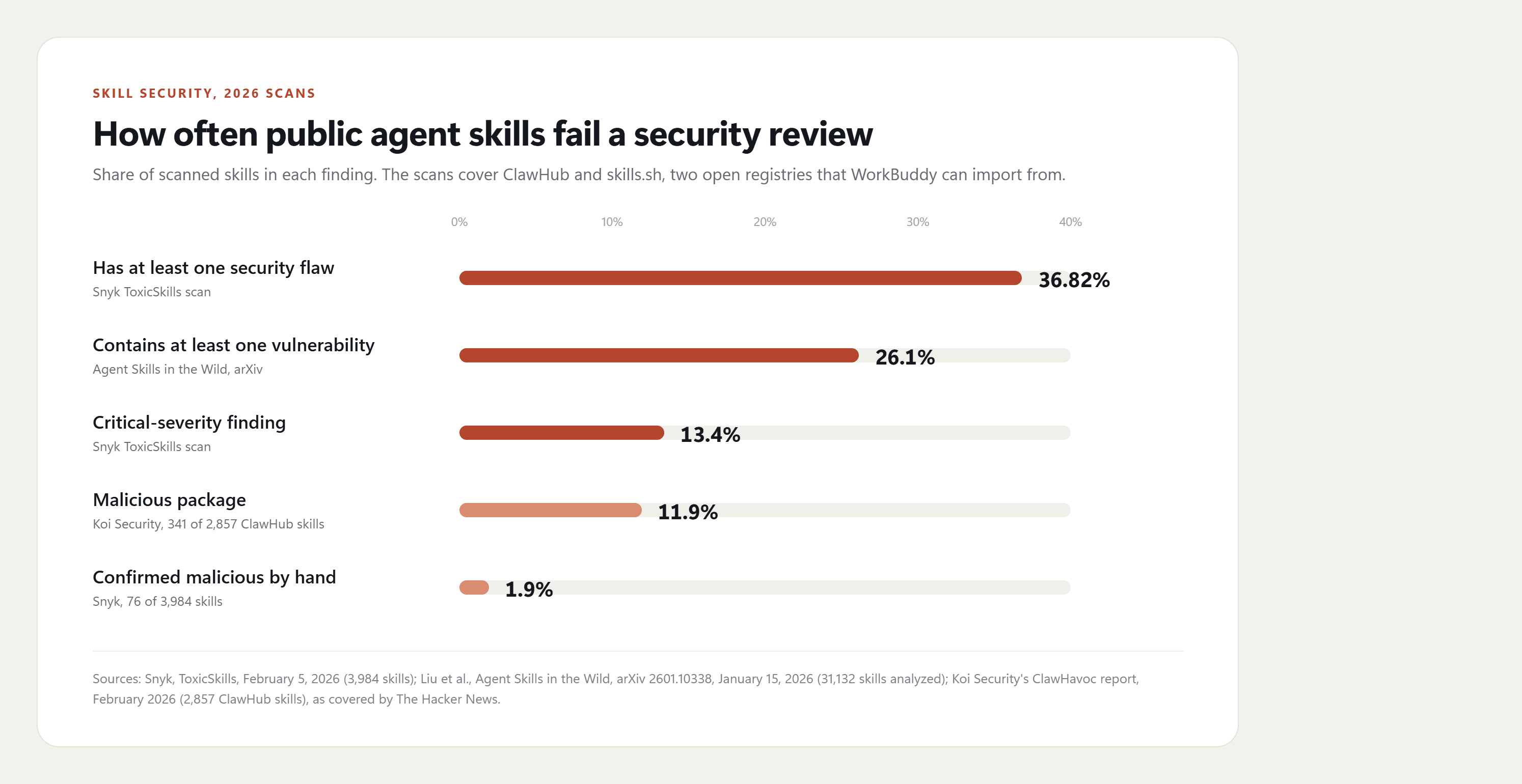
Snyk's ToxicSkills scan of 3,984 skills on ClawHub and skills.sh, published February 5, 2026, found security flaws in 36.82% and confirmed 76 as malicious by hand.
The study Agent Skills in the Wild reported that "26.1% of skills contain at least one vulnerability". Koi Security reported 341 malicious packages among 2,857 ClawHub skills in February, most of them droppers for a macOS credential stealer posing as wallet trackers, according to coverage by The Hacker News. We found no public report of a malicious skill in WorkBuddy's own market.
WorkBuddy's Skills documentation states that "Uploaded skills undergo a security check first" and that for high risk "Manual confirmation is always required". Anthropic's guidance for Claude skills is blunter: use skills only from trusted sources, those you wrote yourself or obtained from the vendor.
What to do instead: open SKILL.md before installing anything from GitHub, and refuse any Prerequisites step that asks you to download an archive or paste a terminal command. Install from the market when the same skill exists there, run Skill Vetter on anything else, and keep API keys in environment variables rather than in the prompt.
What the WorkBuddy Skill Market Data Shows
Install counts show what people tried; use counts show what they kept. On November 4 the two rankings disagreed in a useful way.
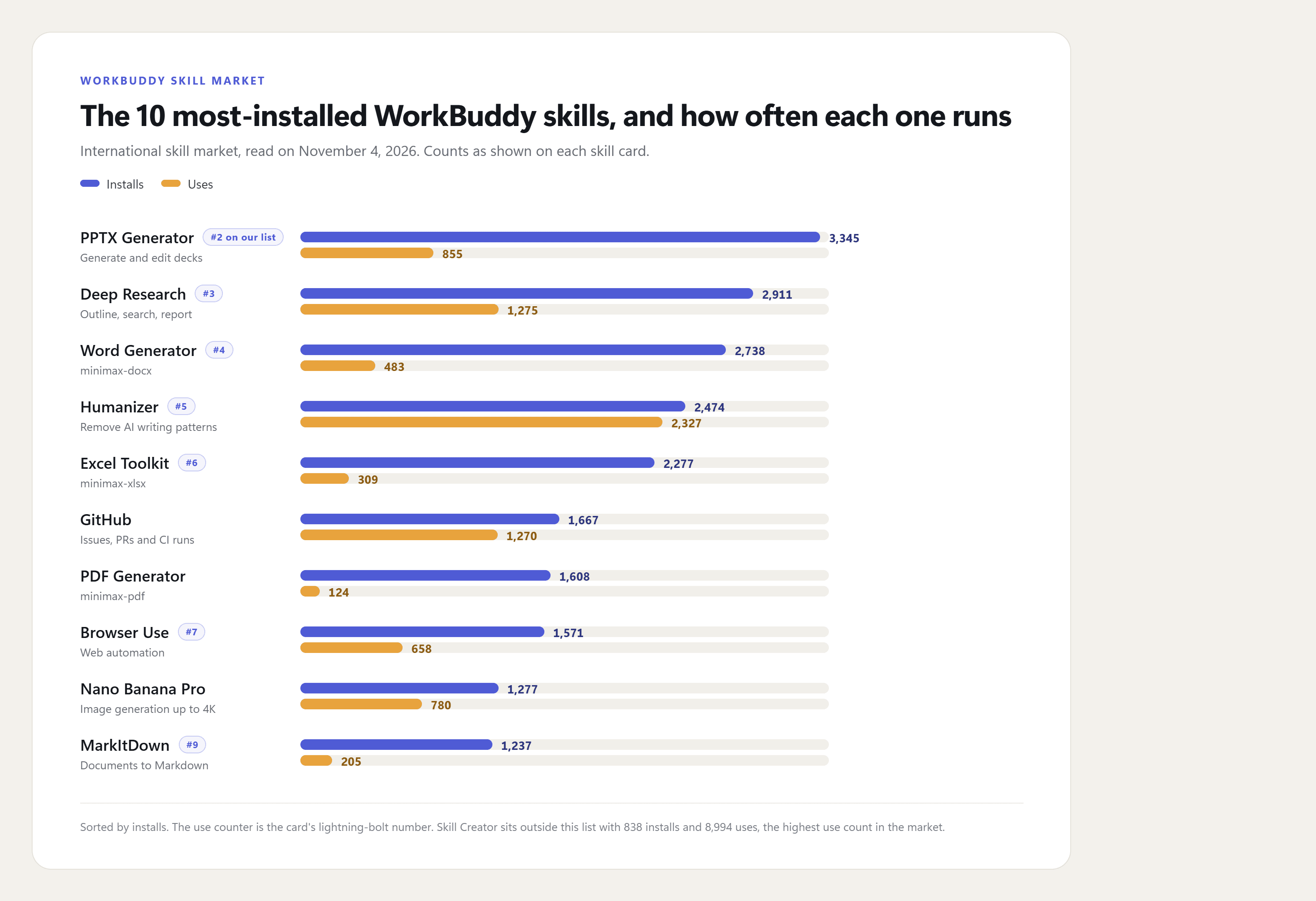
Humanizer is used almost once per install; PDF Generator fewer than once per thirteen. File-producing skills draw the installs, text and research skills draw the repeat use. Of 215 skills, 29 are tagged SkillHub, 29 GitHub, 20 ClawHub and 15 official, with 122 from other publishers. Media skills exist too: Nano Banana Pro leads with 1,277 installs for images, and Remotion Video Toolkit has 858 for code-rendered video. A skill that puts a current video model such as Seedance 2.5 one prompt away is what the Atlas Cloud package adds.
Frequently Asked Questions
Are WorkBuddy skills free?
Installing from the market costs nothing, and the free plan can run the skills. You pay credits per task on WorkBuddy-hosted models, from about 1 credit for a rewrite to over 70 for a long research report, plus any third-party API usage a skill calls, billed by that provider. Our Atlas Cloud run, four images and one Seedance 2.5 clip, came to $1.65 on the Atlas account.
What is WorkBuddy SkillHub?
SkillHub is a source label inside the market, not a separate store: 29 of the 215 skills carry it, including Humanizer, Nano Banana Pro and Skill Creator. Searching for a WorkBuddy skill hub lands you on the same Skills tab.
Can I install WorkBuddy skills from GitHub?
Yes. Any folder with a SKILL.md goes in through Add Skill, then Upload Skill, as a folder or zip, and the upload triggers the security check. Our GitHub skill directory lists video skills in this format.
Can WorkBuddy run Claude or OpenClaw skills?
The format is the same SKILL.md package, and the market already lists 20 skills tagged ClawHub. The Atlas Cloud skills use the same package format as the ones in our OpenClaw video skills guide; only the key handling differs, since the WorkBuddy web sandbox has no environment variables.
Conclusion
Ten skills, one afternoon, one pattern: the most-installed skills hand you a file, the most-used fix text in seconds, and the cost spread between them is about sixty to one. Pick by the job and by the credits you have left, not by install count alone.
For anything visual, the Atlas Cloud skill fills the gap the market data shows: a direct route from a WorkBuddy brief to a finished Seedance 2.5 clip, with every call priced before it runs. Put it next to PPTX Generator and Humanizer and you have the best WorkBuddy skills for turning one brief into a deck, a video and copy that reads like a person wrote it.


