


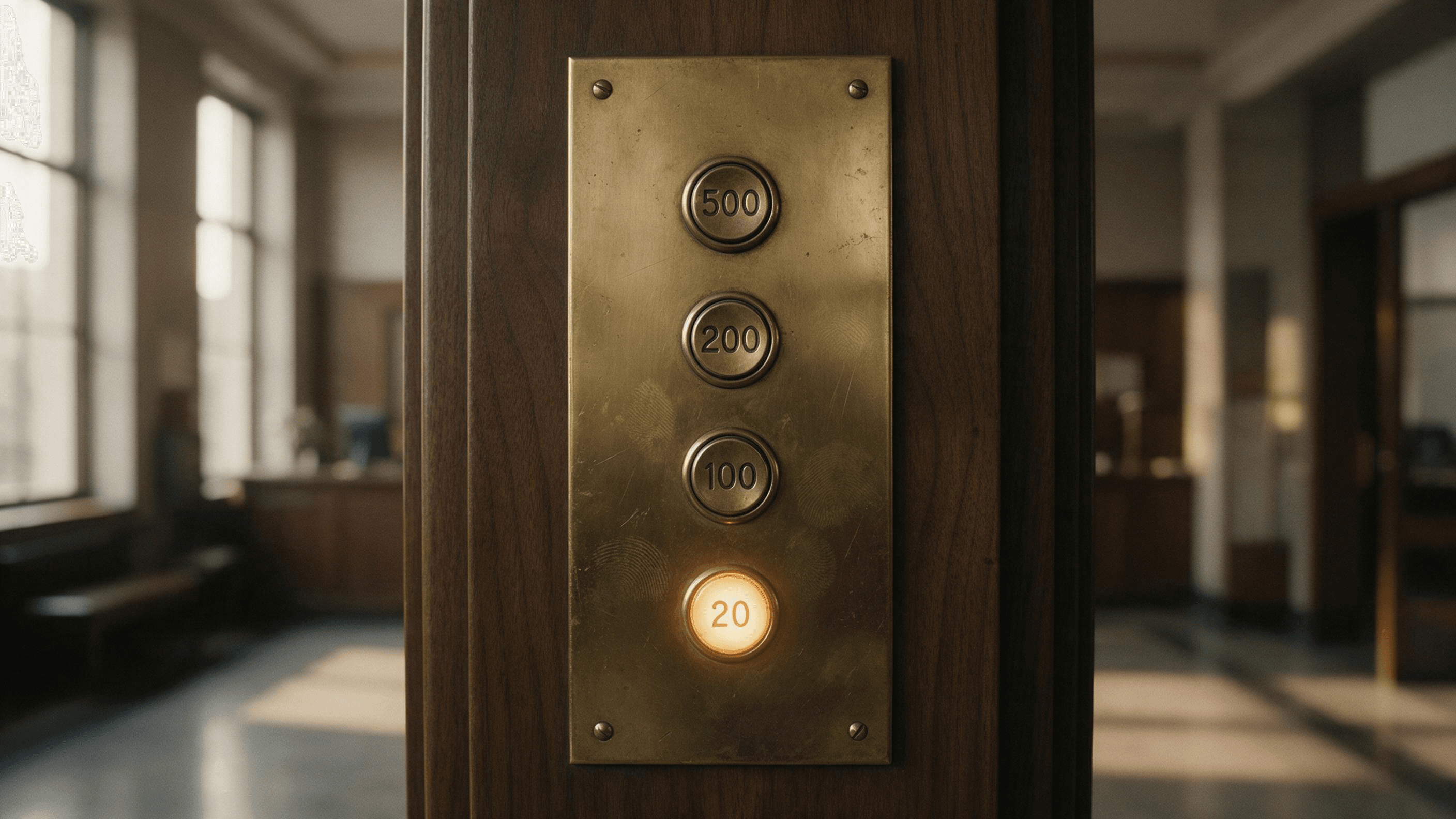
The limit notice lands in the middle of a task. Your Codex session stops, the reset timer shows four hours, and the upgrade page behind it lists three Pro tiers at $100, $200 and $500 a month.
We read OpenAI's pricing table, its help center and its release notes, then ran three analysis tasks on GPT-6.2 Astra to see what a heavy prompt costs by the token. This ChatGPT Plus vs Pro guide covers the models, the three prices, the limits and who should move up.
Key Takeaways
- ChatGPT Pro is now three tiers that differ mainly in usage allowance and Ultrafast access.
- Plus stops at High thinking in Chat; Extra High and the Astra-powered Pro level start at Pro.
- Pro drops the five-hour Codex window, yet GPT-6 Pro still carries a weekly message limit.
- GPT-6.2 Astra and Sol sit on both plans, but only inside ChatGPT Work and Codex.
- The same GPT-6.2 Astra runs bythetoken on Atlas Cloud, so you can size your workload first.
The Difference Between ChatGPT Plus and Pro in the Model Picker
Is ChatGPT Plus and Pro the same product? It is the same app with the same GPT-6 default. The gap opens in the Thinking slider.
With GPT-6 selected, GPT-6 Sol powers Instant, Medium, High and Extra High. A fifth level, named Pro, runs GPT-6 Pro, which OpenAI describes as powered by GPT-6 Astra. Plus reaches only part of that slider.
| Thinking level in Chat | Plus | Pro |
|---|---|---|
| Medium and High | Included | Included |
| Extra High | Not included | Included |
| Pro (GPT-6 Pro) | Not included | Included |
Source: OpenAI help center, "GPT-6 and other models in ChatGPT", read November 19, 2026.
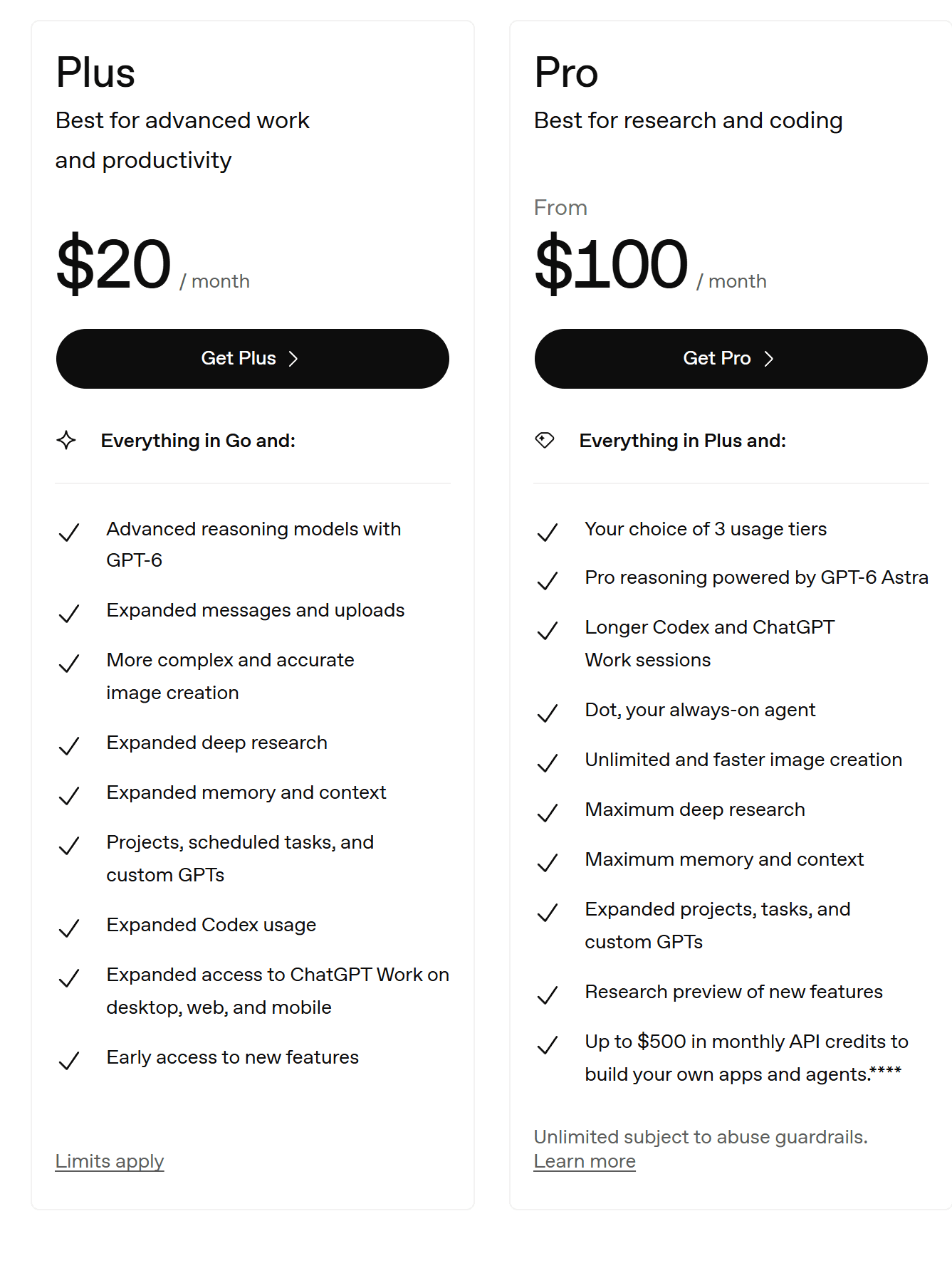
Source: ChatGPT pricing page, captured November 19, 2026.
Context grows too. The pricing table gives reasoning chats 256K of total context on Plus and 400K on Pro, which OpenAI puts at roughly 320 and 680 pages of input.
A few rows exist only in the Pro column: the Dot agent, ChatGPT Space, GPT-5.6 Sol Pro and plugin sharing with a workspace. Voice moves from Expanded to Unlimited.
One thing the upgrade does not change is GPT-6.2. Astra and Sol are open to Plus and Pro alike, and only inside ChatGPT Work and Codex, as our GPT-6.2 review explains. New to the slider? See how thinking levels work.
Run GPT-6.2 Astra by the Token Before You Pay for ChatGPT Pro
The usual reason to look at Pro is a heavy prompt that keeps hitting a limit. Before you buy a bigger allowance, measure how heavy those prompts are. Atlas Cloud hosts the OpenAI model family, GPT-6.2 Astra included, and every reply comes back with its own token count.
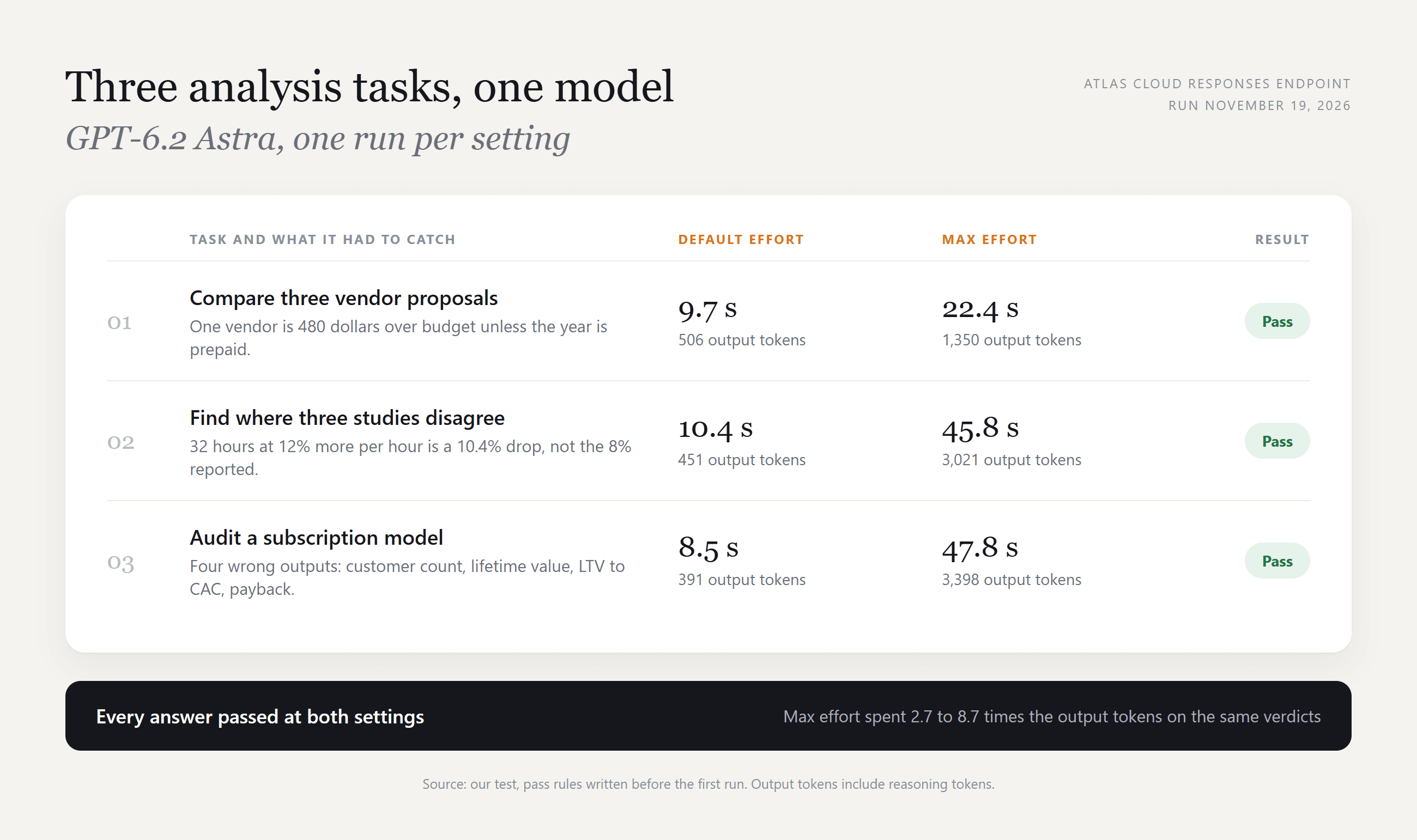
We wrote three analysis tasks, two of them modeled on OpenAI's example prompts for Astra, hid one trap in each, and fixed the pass rules before the first run. One vendor quote runs $480 over budget unless the year is prepaid. One invented study reports an 8% drop that its own numbers put at 10.4%. One subscription model has four wrong outputs.
Astra passed all three at default effort, each in about ten seconds. We then raised reasoning effort to max. The verdicts stayed the same, the answers took 22 to 48 seconds, and output tokens rose by 2.7 to 8.7 times.
That is one run per setting on prompts under 300 input tokens. GPT-6.2 Sol passed the same three when we swapped the model string.
Method 1: Run GPT-6.2 Astra in the Playground
Sign in and open the GPT-6.2 Astra playground.
- Paste your prompt into the message box.
- Click the send arrow to the right of the box.
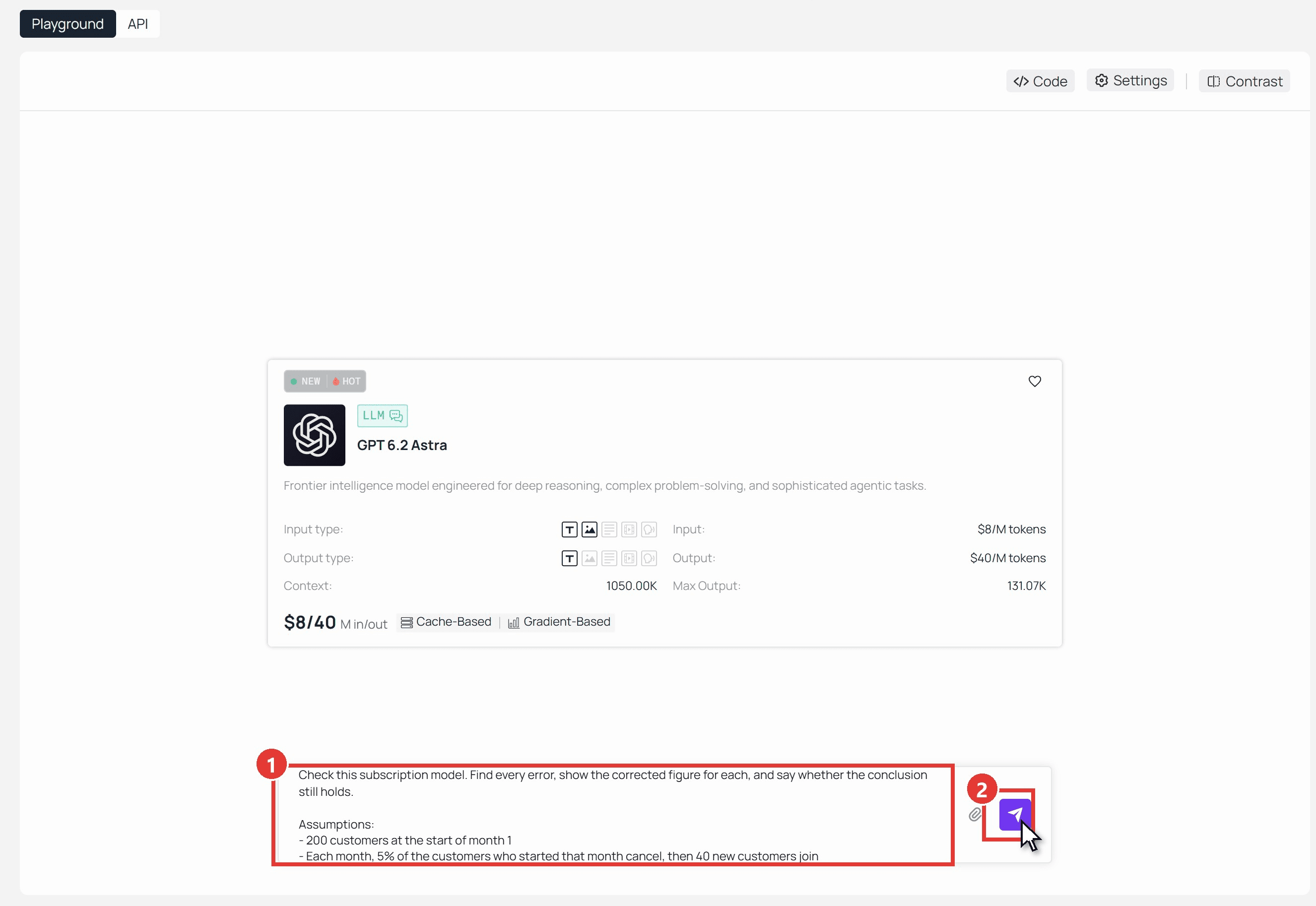
Here is the model audit prompt, ready to copy:
plaintext1Check this subscription model. Find every error, show the corrected figure for each, and say whether the conclusion still holds. 2 3Assumptions: 4- 200 customers at the start of month 1 5- Each month, 5% of the customers who started that month cancel, then 40 new customers join 6- Average revenue per customer: $50 a month 7- Gross margin: 80% 8- Cost to acquire one customer: $300 9 10The model's outputs: 111. Customers at the end of month 12: 680 122. Lifetime value per customer (margin-adjusted): $1,000 133. LTV to CAC ratio: 3.3 144. Months to pay back CAC: 6 15 16The model's conclusion: "LTV to CAC is above 3, so we can double acquisition spend."
A passing answer corrects the four outputs to about 476 customers, $800, 2.67 and 7.5 months, then rejects the conclusion.
Method 2: Send the Same Task Through the API
A script lets you replay a week of real prompts and add up the tokens.
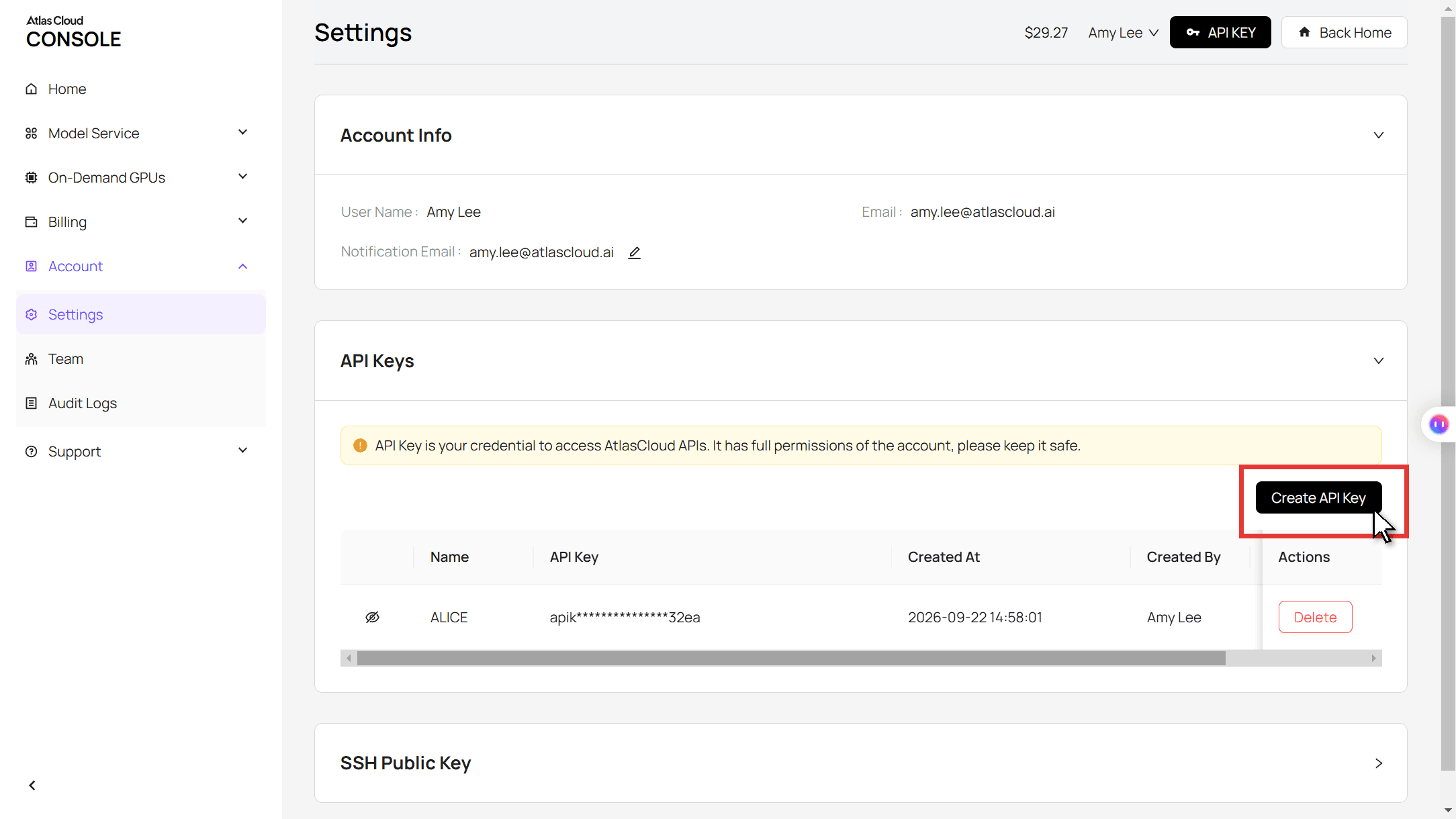
Step 1: Create an API key. In the console, open Settings, go to API Keys and click Create API Key. One key covers every model on the platform.
Step 2: Check the request format. The Atlas Cloud API docs list six request formats under LLM API Protocols. The request below uses the Responses format.
Step 3: Send the request. The reply text sits in the output array, and the usage block reports input, output and reasoning tokens. Delete the reasoning line to run at default effort.
plaintext1curl -s -X POST "https://api.atlascloud.ai/v1/responses" \ 2 -H "Authorization: Bearer $ATLASCLOUD_API_KEY" \ 3 -H "Content-Type: application/json" \ 4 -d '{ 5 "model": "openai/gpt-6.2-astra", 6 "input": "Check this subscription model. Find every error, show the corrected figure for each, and say whether the conclusion still holds. <paste the model here>", 7 "reasoning": {"effort": "max"}, 8 "max_output_tokens": 16000 9 }'
The endpoint and the key stay the same for every chat model on the platform that speaks this format. Change the model string and the same script measures the next release.
ChatGPT Pro Price: Pro 100, Pro 200 and Pro 500 Compared
How much is ChatGPT Pro? From $100 a month on OpenAI's pricing page as of November 19, 2026, against $20 for Plus. The ChatGPT Pro $200 per month plan that some reviews still describe is now the middle of three tiers.
| Plus | Pro 100 | Pro 200 | Pro 500 | |
|---|---|---|---|---|
| Price per month (US, as of November 19, 2026) | $20 | $100 | $200 | $500 |
| Billing | Monthly | Monthly only | Monthly only | Monthly only |
| Work and Codex allowance | Plus baseline | Above Plus | Above Pro 100 | Highest of the three |
| Ultrafast | No | No | GPT-6.2 Sol in Codex | GPT-6.2 Astra and Sol, GPT-6 Astra, GPT-6.1 Sol |
| Monthly API credits | None | $100 | $200 | $500 |
The ChatGPT Pro cost buys allowance more than features. The pricing table keeps all three tiers in a single Pro column, and OpenAI describes each step up as more included usage.
API credits are easy to miss. Activation and eligibility rules apply, unused credits expire with the billing cycle, and OpenAI notes the benefit may change.
Ultrafast needs a caution. OpenAI's Pro tiers article still limits it to Pro 500, while the newer GPT-6.2 launch notes from November 17 give Pro 200 subscribers Ultrafast on Sol. Check your own model picker.
ChatGPT Pro 5x vs 20x: What Happened to the Old Tier Names
OpenAI's release notes show how the Pro lineup grew to three tiers between April and September.
| Date | Change |
|---|---|
| April 9, 2026 | A $100 Pro plan arrives with a standard Codex allowance five times that of Plus |
| September 29, 2026 | Pro 500 launches at $500 with Astra Ultrafast; Pro 200 reopens to new subscribers |
| October 29, 2026 | Work and Codex allowance doubles on Pro 100 and Pro 500; a planned Pro 200 cut is canceled |
| November 17, 2026 | GPT-6.2 launches; Pro 200 gains Ultrafast on GPT-6.2 Sol |
Source: OpenAI ChatGPT release notes and GPT-6.2 launch notes.
The April note is where 5x comes from. Forum threads call the $100 tier Pro 5x and the $200 tier Pro 20x. The pricing page now uses Pro 100, Pro 200 and Pro 500, and the 5x figure predates the October doubling.
ChatGPT Pro Limits: Does ChatGPT Pro Have a Limit?
Yes. OpenAI's help center says it plainly: "A Pro subscription does not include unlimited use of the GPT-6 Pro model."
Everyday text chats are unlimited on both plans, subject to abuse guardrails. The ChatGPT chat limits for Pro sit on the top reasoning levels, and the help pages we read give no message counts for them.
| In Chat | Plus | Pro 100 | Pro 200 |
|---|---|---|---|
| Everyday text chats | Unlimited* | Unlimited* | Unlimited* |
| GPT-6 Pro | Not included | One weekly allowance shared with GPT-5.6 Sol Pro | Weekly limit, then an automatic switch to GPT-5.6 Thinking at Medium |
| At a limit | Another available model, or wait for the reset | Same | Same |
Subject to abuse guardrails. Source: OpenAI help center, read November 19, 2026.
That help article names Pro 100, Pro 200, Business and Enterprise for GPT-6 Pro and does not mention Pro 500, so confirm it in the picker on that tier.
Does ChatGPT Pro Include Codex? Codex Limits by Plan
It does, and so does Plus. The difference is a clock. OpenAI's pricing guide estimates how many local messages Plus allows per five hours, then adds that Pro plans currently have no five-hour limit.
| Model | Plus, local messages per five hours | Pro |
|---|---|---|
| GPT-6.2 Astra | 6 to 50 | No five-hour limit |
| GPT-6.2 Sol | 17 to 180 | No five-hour limit |
| GPT-6.1 Sol | 15 to 160 | No five-hour limit |
| GPT-6 Luna | 350 to 3,000 | No five-hour limit |
Estimates from OpenAI, read November 19, 2026. Weekly limits may also apply, and cloud tasks can use more than local messages.
Speed modes spend that allowance faster. On the GPT-6.2 models, Fast draws included usage at twice the Standard rate. Ultrafast draws it at six times and generates tokens up to 4.5 times as fast.
When ChatGPT Pro Codex limits or Plus limits run out, both plans can buy credits to keep working. Credits expire 12 months after purchase.
Is ChatGPT Pro Worth It? The Break-Even Against Plus
Why is ChatGPT Pro so expensive? The clearest answer in OpenAI's own pages is allowance. Each tier up buys more Astra-class work before a limit.
So price your own work. As of November 19, 2026, Atlas Cloud lists GPT-6.2 Astra at $8 per million input tokens and $40 per million output tokens. Our three tasks came to these figures:
| Astra setting | Average cost per task | Tasks equal to the $80 gap (Plus to Pro 100) | Tasks equal to the $180 gap (Plus to Pro 200) |
|---|---|---|---|
| Default effort | $0.020 | About 4,000 | About 9,100 |
| Max effort | $0.105 | About 760 | About 1,700 |
Even at max effort, the gap to Pro 100 equals about 35 such prompts every working day.
Agent sessions are a different scale. One Codex turn that carries 200,000 tokens of context costs $1.60 in input alone at Astra's rate, before caching. A flat allowance is built for days of that, and paying by the token fits bursts of single prompts.
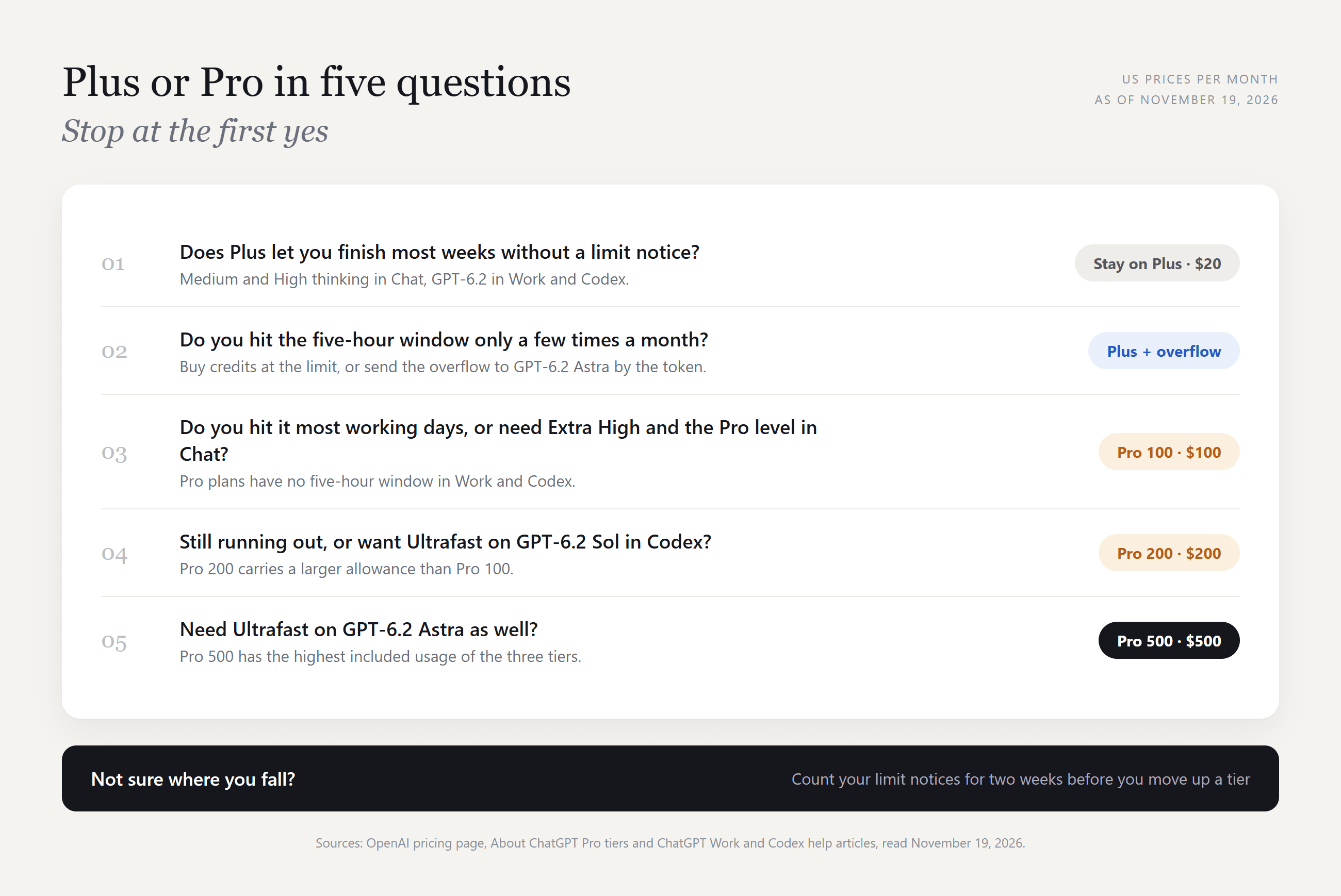
Is ChatGPT Pro worth it, then? ChatGPT Pro vs Plus comes down to how often the limit notice appears. For someone who lives in Codex or Work and sees it most days, Pro 100 is the natural first step. For someone who hits it a few times a month, Plus with credits or by-the-token overflow costs less.
Deciding at the cheaper end instead? Our Go vs Plus comparison covers the $8 plan.
ChatGPT Pro vs Business: When a Team Seat Fits Better
Two people who mainly want the higher thinking levels have a cheaper route than two Pro subscriptions. Business seats include Extra High and the Pro level in Chat.
| Pro 100 | Business Standard | Business Premium | |
|---|---|---|---|
| Price (US, as of November 19, 2026) | $100 a month | $25 a seat monthly, $20 billed annually | $125 a seat monthly, $100 billed annually |
| Minimum | 1 person | 2 seats | 2 seats |
| Extra High and Pro level in Chat | Included | Included | Included |
| Pro-model messages | Weekly allowance, number not published | 15 a month | 50 a week |
| Five-hour window in Work and Codex | None | Same estimates as Plus | None |
That table also settles ChatGPT Plus vs Business. Is ChatGPT Business better than Plus? For a pair or a team it adds Extra High and a small Pro-model allowance for $5 more per seat on monthly billing, while Work and Codex estimates match Plus.
Fifteen Pro-model messages a month is a taste, so a Standard seat does not replace Pro for daily use. If you already pay for Pro and join a Business workspace, you can keep both as long as your personal workspace stays separate.
FAQ
Is ChatGPT Pro free for students?
We found no student version of ChatGPT Pro in OpenAI's help center as of November 19, 2026. The closest offer was for Plus: the 2026 Back to School deal gave college and graduate students at eligible US institutions four free months, verified through SheerID. Its claim deadline was October 31, 2026, and it renews at $20 a month unless canceled.
Is there a ChatGPT Pro free trial?
The pricing page lists none. OpenAI does run invitation-based trials: some subscribers receive codes or links that give a friend a free, limited-duration trial of a paid plan. The plan and the length are set per promotion and arrive by email or inside ChatGPT, so a ChatGPT Pro free period depends on someone inviting you.
What is the difference between ChatGPT Thinking and Pro?
Both are positions on the same slider, and Pro sits above the three thinking levels. It changes more than depth. Pro answers leave out Intelligent UI, the visuals and interactive elements GPT-6 can add at the lower levels, and they draw on a separate Pro-model allowance.
The Pro level is a model option and the Pro plan is a subscription. A Business seat can select the level without a Pro plan.
How do I cancel ChatGPT Pro or drop to a lower tier?
Cancel on the platform where you bought it: ChatGPT on the web, the App Store or Google Play. Access continues until the billing period ends.
To change tiers, open Settings and then My Plan. Moving from Pro 200 to Pro 100 mid-week carries your usage over, so a heavy week can leave you at zero until the weekly reset.
Conclusion
Plus and Pro share an app, a default model and GPT-6.2 in Work and Codex. Pro adds the Extra High and Pro levels in Chat, a larger context window, no five-hour window in Codex and, on the upper tiers, Ultrafast.
Count your limit notices for two weeks. If they are rare, stay on Plus and send the overflow to GPT-6.2 Astra by the token. If they arrive daily, start at Pro 100 and move up only when that runs out. That count settles ChatGPT Plus vs Pro better than any feature table.




